• Здравствуйте. Сайт заработал в архивном режиме форум www.old.nado.in

Dl4ever Software

Pixarra Pixel Studio 3.03

11add36c162f2a8164ff37435fa429f7.jpg

Pixarra Pixel Studio 3.03 | 36 Mb
​
Pixel Studio follows the key strong points from all the of the Pixarra TwistedBrush artist software products but with a focus on pixel art. This art, sometimes called retro, makes no attempt to hide pixels and sizes of images are often very small. Useful as utility for creating icons, sprites, and other small images for games and websites but also for art on it's own. There is no surprise that pixel art is popular, it is simply fun!


Powerful Pixel Art Editing
Above is the user interface for Pixel Studio, designed for efficiency and elegance. Power of over a decade of development in the TwistedBrush product line brought to focus on the single task of pixel art.

Specialized ArtSet for Pixel Art
TwistedBrush has always been known for its powerful and vast collection of brushes. The same is true for Pixel Studio. To the left is a collection of brushes included with Pixel Studio designed just for pixel art.

Brush Variety
Choices are important in pixel art as in any art. Here are a few pixel drawing brushes.

1. Pure pixel brush. Solid pixels are panted everywhere the cursor goes.
2. Anti-alias pure pixel. Same as previous but the pixels edges are smoothed.
3, 4. Pixel brush that draws as a connected line.

Quick Access Panels
On the right are two panels you will use a lot. The Color Management panel and the Brush Shortcut Panel. All the panels in Pixel Studio will automatically hide if they get in your way while painting. Manually hiding all panels is also possible with the F3 hotkey.

Quick Command Panel
The Quick Command panel gives you a configurable array of buttons you can keep close at hand while working. Resize and reshape the panel to your needs. Add, remove and move buttons to create the layout that works best for you. Quickly show or hide the panel with the [F4] hotkey. Right click to edit a button or add one to an empty slot. [Ctrl] + click to drag a button to a new location. As an added bonus there is some functionality exposed in the Quick Command panel that isn't available anywhere else in Pixel Studio.

Powerful Brush Effects System
Since User ArtSets are available you might be thinking where will you get new brushes from. There are a number of ways, user shared brushes in the Pixarra forum, brushes imported from Pro Studio, OR now you can edit brushes right in Pixel Studio with the powerful Brush Effects system from Pro Studio. First an IMPORTANT NOTE: Editing brushes is NOT an easy task. There are over 500 different effects that can be combined in 28 effect layers with each effect processed with 100's of modifiers. I think it's safe to say the Pixarra brush effects system makes for the most powerful brush engine in existence. Evidenced in the ability with the same engine to draw simple lines or fully detailed tree with a single stroke as can be seen in Tree Studio.

Layers
Easy access support for layers are in Pixel Studio. The idea is to keep your work flow simple and fast. A simple single click to create a layer with no scrolling. Right click a layer for additional options. Drag layers to rearrange them.

Other Features
Above were just some of the features in Pixel Studio, there is much, much more.

- 64 bit color painting system for the smoothest blends available anywhere.
- Worlds most powerful and flexible brush engine with the Pixarra brush effects system
- Automatic saving multiple copies of your work in progress.
- Brush compatibility with other Pixarra Studio products.
- Tracing paper to use as a guide.
- Up to 9 floating reference Image panels to hold reference photos when working on your art.
- Sketchbook system that automatically saves your work to your sketchbook.
- Switching pages in your book with a single key press (Page Up or Page Down)
- Saving your work to a range of standard image formats.
- Work with symmetry with all the standard Pixel Studio brushes.
- And many more features!

System Requirements:
Windows /XP / Vista / Windows 7/ Windows 8 / Windows 10
500MB disk space
1024x768 minimum display resolution
4GB RAM (8GB or more recommended)

Home Page -
Код:
http://www.pixarra.com


-:DOWNLOAD FROM LINKS:-

RapidGator
Код:
https://rapidgator.net/file/0f7f119a7da8b28ef23929a88b6f2c17/DL4eVeR_Pixel.Studio.3.03.rar.html

NitroFlare
Код:
https://nitroflare.com/view/56E843C80C65606/DL4eVeR_Pixel.Studio.3.03.rar
​
 
PhotoScissors 8.0


ad504aec93443c6ff9f9a4c2f6596ec7.jpg

PhotoScissors 8.0 (x64) | 16.49 Mb
​
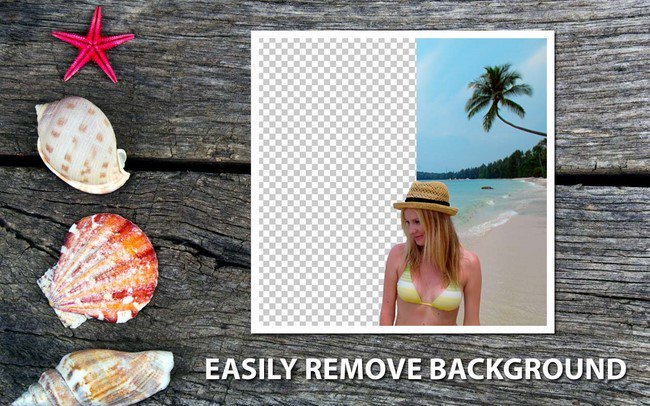
PhotoScissors interactive cutout tool for foreground segmentation enables new smart ways of removing backgrounds from still images. PhotoScissors saves the day when you quickly need to cut out a person or an object to paste it to another picture, or to remove background from a photo. You don't need any specific skills or professional software for a perfect image clip: few mouse strokes produce an accurate clipping path that can be further enhanced with fine brushes.


Cut out objects with a Few Clicks
PhotoScissors provides an extremely easy way to cut a background an image. Instead of trying to accurately enclose a region with the Lasso or Magic Wand tools in cumbersome professional graphical editors, you quickly mark areas you want to cut out and areas you would like to preserve, and the program automatically does the rest. Thanks to optimized analysis of the clipping edges, you don't have to hunt for pixels trying to select an unwanted background. PhotoScissors is easy background removal with minimum efforts!

Remove Background Around Hair
PhotoScissors easily handles complex semi-transparent objects like hair and allows you to get rid of the background of such pictures as easy as with any other scenes. While in other tools you have to deal with hair literally pixel by pixel, with PhotoScissors you save hours, because the Magic Marker tool efficiently deals with transparent objects too.

Quickly Prepare Photos for Uploading
Cutting out a background from photos is a popular picture editing procedure. Indeed, there are dozens of possible applications for PhotoScissors: uploading product pictures to eBay or Amazon, preparing photos for job seeking or dating websites, replacing a boring background with a more picturesque one or a solid color, creating photo jokes, collages, retouching vacation photos for fun or for a better impression and plus many more.

Remove Background from Transparent Objects
In the real world, some objects are transparent. And removing backgrounds from photos with such objects on them is pain. But with PhotoScissors you can effortlessly change one background to another thanks to the transparent marker tool that denotes areas that should retain both foreground and background textures.

Top Reasons to use PhotoScissors
Instantly remove complex background from photos
Easily separate the foreground from the background
Swap background
Create collage
Move object on photo
Remove background around hair
Remove background from transparent objects
No limits by image size
Cutting out objects
Creating isolated images with colored or transparent backgrounds
Remove background for eBay, Etsy or Amazon listings
Set background to any color include transparent
Easy to get use and get started
Preparing pictures of products for online shops
Supports all popular graphic formats (PNG, JPG.)
No technical or designer skills required

Home Page -
Код:
http://www.photoscissors.com/

Language: English


-:DOWNLOAD FROM LINKS:-

RapidGator
Код:
https://rapidgator.net/file/1826550e73f3b37d0b2e0446013c0bef/DL4eVeR_PhotoScissors_8.0.rar.html

NitroFlare
Код:
https://nitroflare.com/view/B8794DC1FC578B2/DL4eVeR_PhotoScissors_8.0.rar

​
 
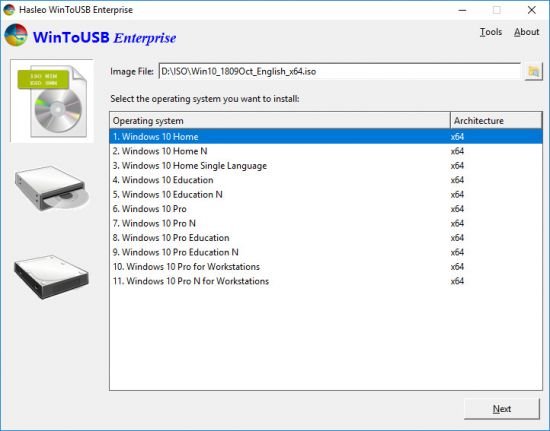
WinToUSB 5.6 Release 1


0fa75faf6716192bb5d1ce96e6b6c240.jpg

WinToUSB 5.6 Release 1 All Editions Multilingual | 6.7 Mb
​
WinToUSB is the best Windows To Go Creator that allows you to install and run Windows operating system on a USB hard drive or USB flash drive, using an ISO image or CD/DVD drive as the source of installation. Starting from version 2.0, you can clone current Windows OS installation (Windows 7 or later) to a USB drive as a Windows To Go Workspace. WinToUSB also supports creating a bootable WinPE USB drive, it can help you transfer the contents of WinPE to a USB drive and make the drive bootable.


WinToUSB's key features include:
Easy-to-use wizard interface that provides step-by-step instructions for creating a Windows To Go USB drive.
Creation of Windows To Go from an ISO image file or CD/DVD drive.
Clone an existing Windows OS (Windows 7 or later) to a USB Drive as a Windows To Go Workspace.
Use of a Non-Enterprise Edition of Windows 10/8.1/8/7 to create Windows To Go Workspace.
Creation of Windows To Go on Non-Certified Windows To Go USB Drive.
Support for creating VHD-based/VHDX-based Windows To Go Workspace.

Operating System: Windows XP or later (64 & 32 bits)

Home Page -
Код:
http://www.easyuefi.com


-:DOWNLOAD FROM LINKS:-

RapidGator
Код:
https://rapidgator.net/file/fc2769c7e89619789a78f7978b372a73/DL4eVeR_WinToUSB5.rar.html

NitroFlare
Код:
https://nitroflare.com/view/1E8EDF22E54CEFE/DL4eVeR_WinToUSB5.rar

​
 
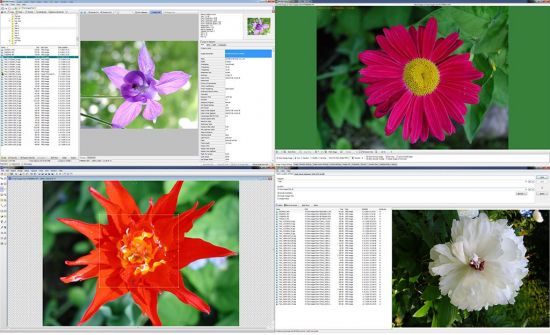
WildBit Viewer v6.6 Commercial


a29ab9c93b513f46b6f69cd033d64fe6.jpg


File Size: 47.9 MB
​
WildBit Viewer is compact & fast image viewer with slide show and editor. Eye catching interface within blazing fast folder, file list and thumbnail viewer. Viewer includes also Image Info with Image EXIF meta data JPEG and TIFF support and IPTC (IIMV4) information (like PhotoShop file info) from JPEG and TIFF, Thumbview has changeable views, sorting and thumbnail predefined sizes for fast thumbnail size setting.

WildBit Viewer also includes shell toolbar, you can drop your favorite folder there and use it as an organizer. It also includes image compare. In Compare you can compare images side-by-side. In Favorites you can save list of favorite images and load list later on and you can create custom show in to Slide Show also that list you can edit with Custom Show List Editor. With Slide Show you can view images within 176 different transition effects. Slide Show includes now multi-monitor support for fast switching between two monitors. WildBit Viewer supports all major graphic formats including BMP, JPEG, JPEG 2000, GIF, PNG, PCX, TIFF, WMF and TGA (over 70 formats).


-:DOWNLOAD FROM LINKS:-
RapidGator
Код:
https://rapidgator.net/file/5f978aed5323c24ef4fce8a16261484c/DL4eVeR_WildBit.Viewer.6.6.rar.html

NitroFlare
Код:
https://nitroflare.com/view/4BAE3144ABB54F1/DL4eVeR_WildBit.Viewer.6.6.rar

​
 
CorelDRAW Graphics Suite 2020 v22.1.1.523 (x64) Multilingual


6c5e41075070aa977472a539f891e9ae.jpg

CorelDRAW Graphics Suite 2020 v22.1.1.523 Multilingual | 860 Mb
​
Create with passion. Design with purpose. Break down creative barriers with CorelDRAW® Graphics Suite 2020. Find all the professional vector illustration, layout, photo editing and typography tools you need to create and complete important design projects, from virtually any device.


Create
Produce unique illustrations, signage, logos and more - on Windows or Mac - and on the go with CorelDRAW.app™.

Connect
Collaborate with clients and colleagues using CorelDRAW.app to gather feedback from one or many reviewers.

Complete
Deliver exceptional results in less time, thanks to seriously productive tools for any type of output.

Create anything and everything
From manufacturing and engineering, to sign making, marketing, and more, CorelDRAW Graphics Suite is enjoyed by diverse designers, industries, and businesses worldwide.

Show and tell
Be inspired by how our users create and what they have to say.

Over 30 years of Windows expertise
CorelDRAW Graphics Suite was built for Windows. Enjoy powerful pen and touch capabilities, support for Microsoft Surface Dial, Windows color management system and more, for a true Windows experience.

Integrated applications
CorelDRAW provides functionality for graphic design and layout in one application. Corel PHOTO-PAINT adds professional photo-editing tools directly integrated into the workflow.

Tools for serious productivity and limitless creativity
From stunning artwork to impactful web graphics and stand-out print, express your creative vision with tools that empower you to deliver pro results you'll be proud of.

Next-level trace results
Enjoy exceptional bitmap-to-vector trace results, thanks to the impressive new AI-powered PowerTRACE™. Benefit from advanced image-optimization options that help improve the quality of a bitmap as you trace it.

Vector illustration
Use CorelDRAW's powerful vector illustration tools to turn basic lines and shapes into complex works of art. Create curves with many versatile shaping and drawing tools. Add creative effects to your vector artwork with effect tools like Contour, Envelope, Blend, Mesh Fill, and more.

Photo editing
Retouch and enhance your photos with Corel PHOTO-PAINT's powerful layer-based photo editing tools. Adjust color and tone, remove imperfections, correct perspective and more. Use AfterShot 3 HDR to create stunning High Dynamic Range photos from your RAW images.

Color, fills and transparencies
Easily apply color to fills and outlines using color swatches, or generate colors based on color harmonies. Change the transparency of an object and fill objects with patterns, gradients, mesh fills, and more.

Non-destructive editing
Edit bitmaps and vectors knowing you won't harm the original image or object. Enjoy many non-destructive features such as the Block Shadow tool, Symmetry Drawing mode, the Impact tool, Add Perspective, and Non-Destructive Effects in CorelDRAW and Corel PHOTO-PAINT.

Extensive file compatibility
Compatible with over 100 graphics, publishing and image file formats, easily import and export a variety of project assets based on client-provided files or needs.

Tech Specs:
- Windows 10*, Windows 8.1 or Windows 7, in 64-bit, all with latest Updates and Service Packs
- Intel Core i3/5/7/9 or AMD Ryzen 3/5/7/9/Threadripper, EPYC
- OpenCL 1.2 capable video card (recommended)
- 4 GB RAM
- 4 GB hard disk space
- Multi-touch screen, mouse or tablet
- 1280 x 720 screen resolution at 100% (96 dpi)
- Microsoft Internet Explorer 11 or higher
- Microsoft.NET Framework 4.7.2

* CorelDRAW Graphics Suite 2020 supports Windows 10, version 1903, 1909 and later versions which may be released during the lifecycle of CorelDRAW Graphics Suite 2020. Variable fonts are supported on Windows 10 only.


-:DOWNLOAD FROM LINKS:-

RapidGator
Код:
https://rapidgator.net/file/5b26d0de4cc9e32cec7756dc0e68e9af/DL4eVeR_CDRW.22.1.1.523.rar.html

NitroFlare
Код:
https://nitroflare.com/view/EFE31EED77A8DBD/DL4eVeR_CDRW.22.1.1.523.rar

​
 
JRiver Media Center 26.0.106 (x64)


87742dab4a8e2c167ac555a6418a5566.jpg

JRiver Media Center 26.0.106 (x64) Multilingual | 38.3 Mb
​
JRiver Media Center - all-in-one media management app turns any Windows PC into an entertainment hub for complete control of your digital media: Audio, Video, Images, and Television. It connects PC to stereo, TV, remote control devices, digital cameras, scanners, and portable MP3 players. It plays all media, rips, burns, and organizes all your music, images, and video. MC encodes and plays all popular media formats.


Powerful utilities include Media Server for streaming music and images to remote PCs. Media Center is more than a world class player. It's also a Media Network, a whole house music, movie, TV, and photo solution. The leader in audiophile quality sound. The most powerful media database available; an essential tool for large collections.

Features:
- Native support of DirectShow DSP filters
- Audiophile - WASAPI exclusive output using high-end USB DACs
- Audiophile - Added ability to play files from memory instead of disk
- Audiophile - Support for high end USB DAC's with WASAPI
- Headphone DSP makes listening more natural and comfortable.
- SoundcardSwitch command for the launcher, allows soundcard selection
- 3D album view adjusts text size to display more tracks when necessary
- 3D album view allows playing, adding, shuffling, and adding as next to play

Operating System: Windows 10, Windows 8, Windows 7 and Vista

Home Page -
Код:
https://jriver.com/


-:DOWNLOAD FROM LINKS:-

RapidGator
Код:
https://rapidgator.net/file/4b4c2f78d7e614de0edfd68cd039caad/DL4eVeR_JRiverMediaCenter26.rar.html

NitroFlare
Код:
https://nitroflare.com/view/0A68D37550F5B03/DL4eVeR_JRiverMediaCenter26.rar

​
 
Extra Subst 6.0


e5cff4e5a1990731ccac82dda0daeb82.jpg

Extra Subst 6.0 Multilingual | 1.1 Mb
​
Extra Subst - program designed to make access to frequently used folders of your computer easier. It is also used to create, edit and remove virtual drives of your computer. Extra Subst creates virtual drives on the basis of selected folders. Physical drives remain unchanged and are not divided into additional partitions.


System requirements:
OS Windows 10/8/7/VISTA/XP/2k/2k3/2k8 x86 x64
Minimum screen resolution 800x600
Pentium processor and above
128 Mb RAM, 32 Mb free disk space

Home Page -
Код:
http://www.wintools.net/extrasubst/


-:DOWNLOAD FROM LINKS:-

RapidGator
Код:
https://rapidgator.net/file/b481eecabc80f06f1aeda6b4a2a537c5/DL4eVeR_extrasubst6.0.rar.html

NitroFlare
Код:
https://nitroflare.com/view/1E3E6C463044E76/DL4eVeR_extrasubst6.0.rar

​
 
Pinnacle Studio Ultimate 24.0.1.183 (x64)


ce024de44380b31a54d17cb8d834cb68.jpg

Pinnacle Studio Ultimate 24.0.1.183 (x64) Multilingual | Incl. content Packs | 4.7 Gb
​
Advanced video editing and screen recording software. Edit freely across unlimited tracks with complete flexibility. Take control of your edits with enhanced keyframing. Access hundreds of creative effects, plus new graphics and overlays. Tap into pro-caliber tools including enhanced Video Masking, Color Grading and new Title Editor.


Your advanced video editing software
Edit like a pro with the unlimited power, precision, and total creative control of Pinnacle Studio™ 24 Ultimate.

Advanced editing
Advanced keyframing controls deliver the power to fine-tune every parameter of your clips, transitions, and effects across unlimited tracks.

Unlimited creativity
Leverage pro-caliber tools including full Color Grading controls, dynamic Video Masking, 360 video editing, and more!

Loaded with power
Tap into smart editing tools to save presets, export grouped clips, and even create customizable shortcuts with Pinnacle's customizable interface.

Pro-caliber editing power that doesn't break the bank
Dive into powerful tools you'd expect to only find in professional editing software.

Loaded with powerful features:
- Color Grading
- Stabilize Video
- 360 Video Editing
- Screen Recorder
- MultiCam Editing
- Dynamic Split Screen Video
- Keyframe Controls
- Stop Motion Animation
- Motion Tracking
- Audio Ducking
- Alpha Channel
- Author DVDs

Keyframe precision
Add keyframes to customize almost any parameter of your edits-take complete control over your motions, effects, and overlays.

Customizable workspace
Set custom tool shortcuts, group and edit clips simultaneously, and explore a streamlined workflow for your most intuitive editing experience.

Additional applications
Included tools empower you to capture video and record your screen, author DVDs, and leverage compatibility with many third party plugins.

System Requirements:
- Operating system: Windows 10, 64 bit
- Processor: Intel Core i3 or AMD A4 3.0 GHz or higher
- Intel Core i5 or i7 1.06 GHz or higher required for AVCHD & Intel Quick Sync Video support
- Intel Core i7 4th generation or later or AMD Athlon A10 or higher for UHD, Multi-Camera or 360 video
- RAM: 4 GB or higher, 8+GB highly recommended for UHD, Multi-Camera, or 360 video
- Graphics card: Minimum resolution 1024 x 768, minimum 256MB VGA VRAM, 512MB or higher recommended for hardware decoding acceleration
- DirectX graphics device recommended:
- NVIDIA GeForce 700 series / Quadro 600 (Fermi-based) or newer (CUDA-enabled required for CUDA support)
- ATI Radeon HD 5XXX series or higher
- Intel HD Graphics from Ivy Bridge or higher
- 3D Titler requires DirectX 11
- Sound card: Windows-compatible sound card
- Hard drive space: 8 GB HDD space for full installation

Home Page -
Код:
https://www.pinnaclesys.com


-:DOWNLOAD FROM LINKS:-

RapidGator
Код:
https://rapidgator.net/file/9589963ad38193d12ef05a3919e29474/DL4eVeR_Pinnacle_Studio_Ultimate_24.0.1.183.part1.rar.html
https://rapidgator.net/file/ae1ada51e6bea90cfd9c931ed2a863eb/DL4eVeR_Pinnacle_Studio_Ultimate_24.0.1.183.part2.rar.html
https://rapidgator.net/file/5ee696fb056a38e3055ce67aab56506d/DL4eVeR_Pinnacle_Studio_Ultimate_24.0.1.183.part3.rar.html
https://rapidgator.net/file/710a3d2a03e5bc85cec0dca43c5a286d/DL4eVeR_Pinnacle_Studio_Ultimate_24.0.1.183.part4.rar.html
https://rapidgator.net/file/9d8c986a2c93cb730a1cad654a2ac852/DL4eVeR_Pinnacle_Studio_Ultimate_24.0.1.183.part5.rar.html

NitroFlare
Код:
https://nitroflare.com/view/F8A5860E227D536/DL4eVeR_Pinnacle_Studio_Ultimate_24.0.1.183.part1.rar
https://nitroflare.com/view/D5CAF8863AA60E4/DL4eVeR_Pinnacle_Studio_Ultimate_24.0.1.183.part2.rar
https://nitroflare.com/view/066420985EEC40F/DL4eVeR_Pinnacle_Studio_Ultimate_24.0.1.183.part3.rar
https://nitroflare.com/view/C96688EA16DE1B8/DL4eVeR_Pinnacle_Studio_Ultimate_24.0.1.183.part4.rar
https://nitroflare.com/view/C9E02B7BF47A5EC/DL4eVeR_Pinnacle_Studio_Ultimate_24.0.1.183.part5.rar

​
 
Franzis HDR projects 8 professional 8.32.03590


1331102ba9ef5ada3b6bee0515fae249.jpg


Languages: Multilingual | File Size: 312.28 MB
​
With the brand new HDR projects 8 professional you have the choice between natural and perfectly exposed images as well as spectacular photos with bright colors, the highest level of contrast and trendy "grungy" styles. Now develop your own HDR style, which immediately affects all presets and gives the photos your personal touch!

The correctly exposed image in every situation
HDR technology brings out the best possible exposure from difficult exposure situations by combining different levels of brightness. Now you will get the desired result even easier and faster: The new color module and the 188 optimized presets get even more out of your pictures. This is how you achieve the best results in the shortest possible time!

What's New:
- New: Dynamic interface, ideally suited for UHD 4K
- New: Extended RAW mode with area protection and exif data that can be displayed
- New: 5 freely assignable HDR styles for personal preferences
- New: All 188 presets have been revised and especially optimized with regard to noise behavior
- New: Smart Exposure Analysis of the exposure series: all images in the exposure series are examined individually for blurring and exposure in order to be able to find outliers and blurred images more quickly.
- New: "Ultra" image alignment in the HDR preparation: The image alignment is calculated even more precisely and thus leads to a better HDR result image.
- New: Extended grain module: The grain module now offers 3 color spaces - RGB, HSV and HSL - in order to be able to use the grain in a more differentiated and targeted manner.
- New: New module "Virtual micro details" With this tool, micro details can be calculated into images in order to give flat parts of the image more structure.
- New: New color module with which you can set color accents in an impressive way without having to use complicated image processing.
- New: The focus peaking module shows the areas in an image on which the focus of the camera was when the picture was taken.
- New: Extended functions in selective characters: intelligent mode activated by default
- New: Additional calculation qualities for the texture masks, which make textures look more homogeneous and natural with a high zoom.
- New: New effects in expert mode
- Stand-alone and plug-in for Adobe® Lightroom Classic® and Photoshop®

EXCLUSIVE in the professional version!
If you want to fully exploit the technical possibilities, you should use the professional version. The full equipment offers the latest tools and all the features that are technically possible and leaves nothing to be desired, even for professionals.

Then the professional version of HDR projects 8 is just right for you:
- RAW module with all the editing functions of a professional RAW converter and new extensions such as area protection
- Full selection of presets and effects
- Batch processing with automatic exposure series recognition for simultaneous development of dozen HDR exposure series
- Plug-in for Adobe® Lightroom Classic® and Photoshop®
- Export exposure series: Create an exposure series from a JPG or RAW that you can edit in any program.
- Support for D65 color spaces, corresponds to the standard light for medium daylight in the noon northern sky and ensures particularly true-color daylight images.
- Point of Interest view for quick and resource-saving image analysis and calculation

New: sensational results in any light
With the new, revised presets, you can also get a grip on difficult lighting conditions. Everyone knows the problem of noise in low-light situations. The new presets reduce the color noise even before the tone mapping in order to produce even cleaner images. So you are guaranteed to have even more of your photos!

8 digital color filters
The "Color filter" module in the "Selective drawing" area provides 8 digital color filters: red, orange, yellow, green-yellow, green, cyan, blue, violet.

The fascination of HDR
With HDR technology, you can take spectacular photos. The finest details, bright colors and an overwhelming wealth of contrasts will inspire you. Regardless of whether you have taken and processed a series of exposures or a single image.

NEW: color module with pipette
This impressive new module is one of the most important innovations and manipulates colors in the best possible way. With the new color module you can set selective color accents without having to select the color range. Simply click on the color to be changed with the color picker and select another segment in the color wheel.

You can use the eyedropper to select any colored area that is immediately shown in the color wheel. This color selection can be expanded or narrowed by a lower / higher saturation, an expansion of the color spectrum (color angle) etc ... Use the sliders "Target hue / saturation / exposure / contrast" to select the desired new hue. The great advantage here is that no selection of the colored objects is necessary, but an exact selection is made via the colors.

Including plug-in for Photoshop and Lightroom
There are many ways to get to HDR projects 8 professional, and of course also very comfortably from Adobe® Photoshop® and Lightroom®! A new, full-fledged filter plug-in for Adobe® Lightroom® Classic and Photoshop® offers maximum convenience for your personal workflow. Simply select the desired image or the series of images in the Lightroom® image database, export to HDR projects 8 professional, edit and put the resulting image back into the database.

TOP performance
HDR projects 8 professional is also suitable for cameras with high resolutions, even the processing of RAW exposure series with a large number of images is no problem.

System Requirements:
- Windows 10/8/7
- Core Duo processor
- 2 GB of free RAM
- 2 GB HDD
- Screen resolution 1,280 x 1,024 pixels, graphics card: DirectX 9 compatible, 128 MB, 32 bit color depth
- Product languages: English, Deutsch, French.


-:DOWNLOAD FROM LINKS:-
RapidGator
Код:
https://rapidgator.net/file/c63d446a58e28920f4306b8decf786b9/DL4eVeR_HDR.8.32.03590.rar.html

NitroFlare
Код:
https://nitroflare.com/view/66D3FAD97F843DB/DL4eVeR_HDR.8.32.03590.rar

​
 
Prima Cartoonizer v2.0.0


d88c63dfdf469c9dad19dc059d20454f.jpg

Prima Cartoonizer v2.0.0 | 90 Mb
​
Convert photos into cartoons with just few clicks of a mouse with our Prima Cartoonizer for PC. Now, you can convert all of your pictures and images into cartoon effect more quickly and precisely. You can convert large or high-quality photos into cartoons with best results. Besides, you can also edit your photos and make multiple adjustments even before or after converting them. Add many items, crop your photos, resize and adjust the brightness and contrast.


Enjoy fantastic cartoon effects with Prima Cartoonizer!
- Amazing Cartoon Effects!
- Automatic conversion process!
- It works without internet connection!
- Output image size up to 4096px!

It's the time to replace the cookie cut forum avatar by a real cartoon of you:
- The good thing is that you can let the people know how you look like without sharing your actual photo but a cartoon of yourself.
- You can make cartoons of your friends, pets, house, neighborhood and especially the celebrities and the politicians.
- Cartoons will be the best gift for your family and friends. You can also use them on mugs and T-shirts.
- Undoubtedly, this software is a great fun and addictive, too. It is very easy to use and also intuitive.
- No need of great artistic skills because no manual drawing is involved.
- The software uses very novel technology to execute the whole process.
- First of all, it splits the image into solid color patterns just similar to a mosaic. After that, it converts the minute details of the image into cartoon format.
- Since it applies effects throughout the photo, the end result is always of high-quality.
- Cartoon yourelf without any Watermark or Logo!
- Standalone software!

Comes with several neat customization features
Following a quick installation, you are prompted to add a picture to get started, an event that also brings forth the effects, features and options of the application. Therefore, on the ride side, you can use the small menu to customize the brightness, contrast and RGB. The app also comes with a zoom feature that can come in handy when adjusting these parameters.

An app for anyone who enjoys cartoons or this particular effect
Depending on the number of effects you want to add to your pictures the conversion process can take some time. But then again, nobody is really in a hurry when processing images and overall, it's not a big setback. All in all, Prima Cartoonizer is an easy to use application that provides an effective way to add a toon effect to your images.

More Features:
- You can even make all types of adjustments with the cartoonized photo.
- Avail multiple effects to make your pictures desirable and mesmerizing.
- You can conveniently convert your photos into cartoons just within seconds.
- It is extremely simple software with the main theme of turning images into cartoons.
- It allows the users to covert photos into cartoons really fast than normal process.
- With the help of crop function, you can remove any unwanted part/parts of your image.
- You can edit your images and adjust the brightness and the contrast.etc
- No other standalone program or software is needed; it does all the functions itself.
- The converted cartoon does not contain any watermark or logo.(Paid version only)
- You need not to save the photo to print it. You can do it right from within your software.
- Resize function available, you can resize your photo before or after the conversion.
- Different goodies enhance the overall fun and joy, thus bringing extra colors to your cartoons.

Requirements: Windows® 10, Windows® 8/8.1, and Windows® 7

Home Page -
Код:
https://primacartoonizer.com/


-:DOWNLOAD FROM LINKS:-

RapidGator
Код:
https://rapidgator.net/file/2de1c741ce69a0ee29058cf787155221/DL4eVeR_Prima.Cartoonizer.2.0.0.rar.html

NitroFlare
Код:
https://nitroflare.com/view/B060BB16046C889/DL4eVeR_Prima.Cartoonizer.2.0.0.rar

​
 
Disk Drill 4.0.533.0 Professional


9528206de3cb513455a3b57c2d82ef10.jpg

Disk Drill Professional 4.0.533.0 (x86/x64) Multilingual | 56.6 Mb
​
From high-level business to home relaxation, modern life revolves around data. We all know that sinking feeling of a missing file. Fortunately Disk Drill is here to help with advanced file recovery software on all of your connected devices and files. Download Disk Drill, click "Recover" and watch as your day gets better.


Platform Independent
Disk Drill is powered by multiple data recovery algorithms that read NTFS, FAT32, EXT, HFS+ and many other file systems. Even obscure file types are accessible using our software.

Fixed & Mobile Storage
Recover your lost data on system disks and external devices, including all types of memory cards and USB drives. If you can connect it to your computer, Disk Drill can find your lost data.

Quick and Simple
Disk Drill tells you if your files can be recovered for free. Just a few files deleted? 500MB of free data recovery on us!

Complete Data Recovery
There are countless ways to lose your data. Power failure, failed boot drives, partition damage, an accidentally emptied Recycle Bin, a virus attack. these are only the most common. Data loss can be a frustrating, infuriating or downright terrifying experience. For fast, reliable file recovery software, download Disk Drill for Windows to recover your lost data no matter what the cause.

Multiple Scan Options
Was your data lost just a few minutes ago? On Windows, your chances of free file recovery are much higher if you act right away and Disk Drill is the perfect way to retrieve these lost bits. Even if Disk Drill wasn't installed when the files were deleted, Disk Drill knows where to look and can bring them back to you in a flash. Accidentally deleted files are an easy target for Disk Drill's Quick Scan function. Typically, when a file is deleted, the file contents are still there on the drive and only the filename has been marked as removed. Quick Scan takes just a second to find the list of recently deleted items. You then choose which ones you wish to recover and Disk Drill recovers them as if they'd never been lost!

Powerful Session Management Means Flexible Scanning
Recovering data from large hard drives or memory cards can be a time consuming process. In an ideal world we would be able to sit around and wait, but that is not always the case, which is why Disk Drill features powerful session management features. Scans can be paused, stopped or resumed anytime. This means that you do not need to wait for a full scan to finish if you have already found the file you were after, simply stop the scan and recover it. If you need to pause a scan to step away or turn off your computer, no problem! Come back and resume a scan anytime exactly where you left off in a prior session.

Premium Data Protection
Even before your data is lost, download Disk Drill to start protecting your files right now. With Recovery Vault enabled, our software provides an added level of protection for all your sensitive and important locations. Quite simply, Recovery Vault stores detailed information about every file that you delete, think of it as an extended Recycle Bin in your system without the need for extra disk space. That way, if you change your mind it's a simple matter of a click to restore it back.

More Than File Recovery Software, Full Partition Recovery
Disk Drill for Windows is a free data recovery software. Its powerful scanning engine is unmatched in versatility and scanning power. You can recover up to 500MB completely free. Advanced scanning options like Quick Scan for fast, easy scans and Deep Scan for more complex, deeper searches means that your files can easily be recovered by Disk Drill. Recovery goes beyond just files with Disk Drill's full partition recovery feature. Included with Disk Drill are several powerful partition healing algorithms, too. Combining these tools into a single data recovery suite (Disk Drill) means you have the best possible chance to recover not only your files but your entire storage medium. Disk Drill is especially helpful after erroneous formats on partitions, by scanning the entire drive (and not just the new partition) it is possible for Disk Drill to recover the original partition and many or all associated files.

The Ultimate File Recovery Toolkit
Not having the right tool makes the job much harder which is why Disk Drill has everything you need for complete free file recovery. In addition to simply being able to recover files, Disk Drill can do much more with an advanced suite of powerful features wrapped in an easy to use interface. Check out some of the tools & features of Disk Drill:

Scanning Choices
Multiple advanced recovery algorithms including Quick Scan and Deep Scan for more complex situations.

Recovery Vault
The best way to fix lost files is to prevent file loss! Disk Drill's Recovery Vault protects your valuable files and data.

ISO/DMG Backup
Don't want to restore multiple files on your computer now? No worries, Disk Drill can backup your recovery results into a mountable DMG or ISO!

Pause & Resume
We know life happens, Disk Drill offers a powerful pause and resume feature to start and stop scanning at anytime, perfect for large drives.

USB Drive Recovery
Disk Drill can scan and recover from USB drives, memory cards and other forms of portable media. If your computer can read it, we can scan it.

Partition Recovery
Lost or damaged partition? No problem. Disk Drill features an advanced partition recovery tool and several healing algorithms, too.

Flexible Data Recovery Software
In most cases lost data is so valuable it's nearly impossible to replace. Disk Drill can recover deleted data from virtually any storage device. This includes internal and external hard drives, memory cards and more from desktops, laptops, workstations, even cameras or iPods. If your computer has direct access to a device's memory, Disk Drill will be able to scan it for lost data. You don't have to worry about the recovery method, Disk Drill will quickly analyze the problem and choose the most effective approach.

Requirements: Windows 7 SP1+, 44 MB

Home Page -
Код:
https://www.cleverfiles.com


-:DOWNLOAD FROM LINKS:-

RapidGator
Код:
https://rapidgator.net/file/dfdf725d950c6ca58279f5ed4a9b1d67/DL4eVeR_Disk.Drill.4.0.533.0.rar.html

NitroFlare
Код:
https://nitroflare.com/view/1E3446117EFECC3/DL4eVeR_Disk.Drill.4.0.533.0.rar

​
 
Tipard DVD Ripper 10.0.16 (x64)


1cc66a1e48cab3ebef9eff3ac7f588d7.jpg

Tipard DVD Ripper 10.0.16 (x64) Multilingual | 66 Mb
​
Tipard DVD Ripper enables you to rip any DVD with 12x faster ripping speed than others. You can convert any DVD to almost all video and audio formats like MP4, AVI, MOV, WMV, MKV, MP3 and more for playing and sharing on YouTube with excellent video/image quality. You can also feel free for backup any DVD movie on your computer local disc.


Rip any DVD to Video like MP4, AVI, MKV, MOV, FLV, WMV, and audio like MP3 and more than 300 formats.
Backup DVD disc/movie and even protected DVD to computer on Windows 10 with fastest speed.
Put DVD movies on iTunes, iPhone, iPad, iPod, Apple TV, Android, Samsung, HTC, and PSP, etc.
Edit video like clip/crop/add watermark/adjust video effect before ripping DVD movies.

Freely rip DVD to MP4, AVI, MOV, FLV, WMV, MKV, and more with fastest speed
The best DVD Ripper enables you to rip DVD to AVI, DVD to MP4, DVD to AVI, DVD to MOV, DVD to MKV, DVD to FLV, DVD to WMV, and other videos like M4V, TS, VOB, MPEG and more with super fast speed and fantastic video quality. Also, it's possible to extract audio files from and convert them to popular audio files like MP3, WAV, M4A, AAC, and AC3, etc.

You can convert DVD movies to all popular digital devices like iPhone X, iPhone 8/8 Plus, iPhone 7/7 Plus, iPhone 6s/6s Plus, iPhone 6/6 Plus, iPhone SE, iPhone 5s, iPhone 5c, iPhone 5, iPad Pro/mini 4, iPod, and Apple TV, Samsung, Sony Xperia, HTC, LG, Nokia Lumia and more multimedia players. With this all-in-one DVD Rip Software, you do not need to rely on VLC, but can play favorite DVD movies on your portable player easily.

Rip almost all DVDs latest released on Windows 10/8/7/Vista/XP
Tipard DVD Ripper allows you to rip any DVD disc like DVD-5/9, DVD folder and ISO files to any popular video. It is capable of ripping homemade DVDs to video and audio easily on Window PC with 1:1 clone. Moreover, for protected or commercial DVDs, it moves common protected DVD CSS, UOP, RCE, Sony ARccOS, region code, UOPs, APS, RCE, etc. For the new encryption method adopted by Disney X-project DRM, Paramount and Warner, it also works great to remove the protected elements and rip to the video as you like.

It is the super fast and high video/audio quality DVD Ripper with Hyper-threading and Super Encode Engine built on this DVD ripper.

System requirements:
OS Supported: Windows XP (SP2 or later), Windows Vista, Windows 7, Windows 8, Windows 10
CPU: 1.2GHz Intel or AMD CPU, or above
RAM: 1G RAM or higher recommended

Home Page -
Код:
https://www.tipard.com/


-:DOWNLOAD FROM LINKS:-

RapidGator
Код:
https://rapidgator.net/file/fad7141132e51b12c34518155a32e0c8/DL4eVeR_DVD.Ripper.10.0.16.rar.html

NitroFlare
Код:
https://nitroflare.com/view/73D34260B5B288F/DL4eVeR_DVD.Ripper.10.0.16.rar

​
 
AnyMP4 Video Converter Ultimate 8.0.20 (x64)


f5b4f843db89a2faa08dd4bd4414a0f8.jpg

AnyMP4 Video Converter Ultimate 8.0.20 (x64) Multilingual | 72.6 Mb
​
All-in-one Video Converter to convert 4K/1080p HD video to over 500 formats at 70X faster speed, rip any DVD disc/movie to any mainstream video & audio format, copy DVD to ISO/Folder in 1:1 ratio, edit and compress full HD video.


Support 4K/1080p HD
This impeccable 4K UHD Video Converter supports converting video to 4K/2K UHD and HD videos like 1080p, 720p, 480p, and make a conversion from HD/SD to 4K videos, like 4K with VP9, 4K H.265/HEVC Video(*.mp4), 4K H.264/MPEG-4 AVC Video (*.mp4), 4K H.264 FLV Video, WebM-VP9 4K WebM Video (*.webm), AVCHD, MP4, AVI, MOV, MKV, WMV and so on.

Support Any Format
AnyMP4 Video Converter Ultimate enables you to convert any popular video format including MP4, AVI, MKV, MOV, MKV, WMV, WebM, M4V, FLV, RMVB, SWF, VOB, TS, M2TS, MTS, MXF, MPG, 3GP, and audio format like MP3, FLAC, WMA, OGG, AAC, ALAC, AIFF, M4R, etc. With this powerful Video Format Converter, you can easily change the format of your media file.

Support Any Device
It has the ability to convert 4K/HD videos to any format for easy playback on any mainstream devices, players or game consoles like iPhone 11/11 Pro/11 Pro Max/XS/XS Max/XR/X/8/7/6s/6/SE, iPad, Samsung, HTC One, LG, Google Pixel XL, Huawei, Xiaomi, Motorola, Xbox 360, PS4, Wii, iMovie, Final Cut Pro, Adobe Premiere Pro, Avid Media Composer, 4K TV and more.

70x Faster Video Converting Speed
This amazing Video Converter tool is well-known as the fastest 4K/HD video converting for PC. With the world's most advanced hardware-accelerated 4K video/audio processing of AMD®, Intel® HD Graphics, NVIDIA® CUDA®, NVENC, and NVDEC, you can make a lossless conversion at 70x faster speed. It can also make full use of multi-core processor on your computer to make a batch conversion faster with different cores.

10x Faster DVD Ripping Speed
This simple-to-use DVD Ripper software supports batch conversion, multi-core CPUs and GPU accelerations, which makes DVD ripping easy and fast. With the help of GPU accelerations powered by Intel® (QSV), NVIDIA® (CUDA/NVENC) and AMD® (APP), this DVD Ripping software offers 10x faster DVD ripping speed than other competitors.

Rip any DVD to MPG with Lossless Compressor
This professional DVD Ripper provides one-click solution to rip DVD into MPG at 10X faster speed without transcoding and quality loss, then you can make a full and uncompressed copy of the original DVD.

Copy any DVD to ISO and Folder
You are able to copy the DVD movie to ISO and folder with the original structure. You are in full control of the complete DVD structure including audio tracks, menus, chapters, subtitles and all audio and video parameters, without any quality loss.

Multiple Editing Features Act As Video Editor
It enables you to quickly edit the video and DVD movie with the built-in Editor. You can easy to cut, trim, crop, rotate your video, adjust brightness, contrast, saturation, hue of the video as well as the sound volume, add a special watermark to your DVD movie, choose the suitable and audio tracks for the output video. Moreover, you are capable of merging multiple DVD titles and exporting them into a single video file.

Cut Video
Whether you want to cut a long 4K UHD/1080p HD video into parts, or create a long video collection with the clips, this Video Converter can be as the Video Clipper to trim a long video to several segments, rearrange clips in new sequence, trim video length, chop any unwanted part, etc.

System Requirements:
OS Supported: Windows XP (SP2 or later), Windows Vista, Windows 7, Windows 8, Windows 10
CPU: 1.2GHz Intel or AMD CPU, or above
RAM: 1G RAM or more

Home Page -
Код:
https://www.anymp4.com/


-:DOWNLOAD FROM LINKS:-

RapidGator
Код:
https://rapidgator.net/file/91900600a9d3074b26cc8ce1c1ef2867/DL4eVeR_Video.Converter.Ultimate.8.0.20.rar.html

NitroFlare
Код:
https://nitroflare.com/view/7E25FB6C5947E39/DL4eVeR_Video.Converter.Ultimate.8.0.20.rar

​
 
Driver Talent Pro 7.1.32.4 Multilingual


ef3181f01a38780c6e8b0fb964400d35.png


File size: 25.09 MB
​
Driver Talent is able to automatically download and install the latest updates for all of the drivers for all of your components. The program includes an extensive database with thousands of drivers for all kinds of devices, including printers, monitors, keyboards, sound cards, video cards and more. With Driver Talent there is no need to worry about losing drivers again. Driver Talent backup and reinstall features can save you hours of searching for and installing individual device drivers.

Key Features of Driver Talent
Scan to find all outdated, missing, corrupted, faulty & incompatible drivers.
Download and install best-matched drivers for computer hardware and all connected peripheral devices.
Update to the latest drivers (several driver versions are available).
One-click repair & fix all driver problems.
Pre-download and save drivers for your own PC, download and transfer drivers for another PC.
One-stop manage: backup, restore, uninstall, reinstall, and more.
Support driver downloads and updates for all hardware devices and manufacturers.
Keep your computer and devices in top condition.
100% compatible with Windows 10/8.1/8/7/XP/Vista, Windows Server.

All-in-one Windows Driver Manager:
Backup drivers
Find out the drivers that need to be backed up and backup them in a very short time. All backed-up files are automatically saved in your computer - this can help you restore the deleted/lost drivers from the backup to avoid driver-related issues.

Restore drivers from backup
You can instantly find back drivers for computer hardware and other devices, especially when the drivers are damaged or missing. This helps to fix driver issues without Internet connection.

Uninstall drivers
Driver Talent is quite professional to uninstall drivers totally and clearly without residual files, which is very helpful for you to install new drivers successfully.

Pre-download drivers
You can pre-download and save drivers for your own computer before system being changed or restored, or download and transfer drivers for another PC to install. This helps you to get drivers under any circumstances, especially when there is no internet connection on a computer.
Release Notes• official site does not provide any info about changes in this version
Support for Windows 10 / 8.1 / 8 / 7 / XP / Vista, and Windows Server


-:DOWNLOAD FROM LINKS:-
RapidGator
Код:
https://rapidgator.net/file/9694a5b87db4beb2ba9bf461afc73306/DL4eVeR_DriverTalent.Pro.7.1.32.4.rar.html

NitroFlare
Код:
https://nitroflare.com/view/ABB5DD4E151E0B8/DL4eVeR_DriverTalent.Pro.7.1.32.4.rar

​
 
Prima Cartoonizer One 2.0.0


b79f5febd54754a3441ba874d7ea0900.jpg

Prima Cartoonizer One 2.0.0 | 45.3 Mb
​
Prima Cartoonizer One has the same effects as Prima Cartoonizer but with Batch Processing! Convert photos into cartoons with just few clicks of a mouse with our Prima Cartoonizer for PC. Now, you can convert all of your pictures and images into cartoon effect more quickly and precisely.


You can convert large or high-quality photos into cartoons with best results. Besides, you can also edit your photos and make multiple adjustments even before or after converting them. Add many items, crop your photos, resize and adjust the brightness and contrast.

Enjoy cartooning several pictures at the same time in One Click!
- Batch Processing!
- Automatic Cartoon effect conversion !
- Turn Yourself Into Caricature In One Click!
- Amazing Cartoon Effects!
- Exclusive Cartoonizer Software With More Than 30 Cartoon Effects!
- Full HD Conversion!
- It works offline without internet connection!
- Output image size up to 4096px!

It's the time to replace the cookie cut forum avatar by a real cartoon of you:
- The good thing is that you can let the people know how you look like without sharing your actual photo but a cartoon of yourself.
- You can make cartoons of your friends, pets, house, neighborhood and especially the celebrities and the politicians.
- Cartoons will be the best gift for your family and friends. You can also use them on mugs and T-shirts.
- Undoubtedly, this software is a great fun and addictive, too. It is very easy to use and also intuitive.
- No need of great artistic skills because no manual drawing is involved.
- The software uses very novel technology to execute the whole process.
- First of all, it splits the image into solid color patterns just similar to a mosaic. After that, it converts the minute details of the image into cartoon format.
- Since it applies effects throughout the photo, the end result is always of high-quality.
- Cartoon yourelf without any Watermark or Logo!
- Standalone software!

Comes with several neat customization features
Following a quick installation, you are prompted to add a picture to get started, an event that also brings forth the effects, features and options of the application. Therefore, on the ride side, you can use the small menu to customize the brightness, contrast and RGB. The app also comes with a zoom feature that can come in handy when adjusting these parameters.

An app for anyone who enjoys cartoons or this particular effect
Depending on the number of effects you want to add to your pictures the conversion process can take some time. But then again, nobody is really in a hurry when processing images and overall, it's not a big setback. All in all, Prima Cartoonizer is an easy to use application that provides an effective way to add a toon effect to your images.

More Features:
- Prima Cartoonizer One has the same effects as Prima Cartoonizer but with Batch Processing!
- You can even make all types of adjustments with the cartoonized photo.
- Avail multiple effects to make your pictures desirable and mesmerizing.
- You can conveniently convert your photos into cartoons just within seconds.
- It is extremely simple software with the main theme of turning images into cartoons.
- It allows the users to covert photos into cartoons really fast than normal process.
- With the help of crop function, you can remove any unwanted part/parts of your image.
- You can edit your images and adjust the brightness and the contrast.etc
- No other standalone program or software is needed; it does all the functions itself.
- The converted cartoon does not contain any watermark or logo.(Paid version only)
- You need not to save the photo to print it. You can do it right from within your software.
- Resize function available, you can resize your photo before or after the conversion.
- Different goodies enhance the overall fun and joy, thus bringing extra colors to your cartoons.

Requirements: Windows® 10, Windows® 8/8.1, and Windows® 7

home Page -
Код:
https://primacartoonizer.com


-:DOWNLOAD FROM LINKS:-

RapidGator
Код:
https://rapidgator.net/file/f0c0082798c172571637efa5cf357f2c/DL4eVeR_Prima.Cartoonizer.One.2.0.0.rar.html

NitroFlare
Код:
https://nitroflare.com/view/4DD288667840DAB/DL4eVeR_Prima.Cartoonizer.One.2.0.0.rar

​
 
Adobe XD 31.3.12 (x64) Multilingual


HpOQ1Dsxm54N4URZ3LsjGGFSbIN56gfQ.jpg


x64 | Language:Multilanguage | File Size: 343 MB
​

XD CC Adobe - is the new creative tools from Adobe for the design of high-quality prototypes of user interfaces for mobile and Web applications. This tool is specifically designed for building rapid prototypes, as well as for high-fidelity user interface and design. With the help of Adobe XD CC anyone can create frames, high fidelity interactive prototypes and design applications and web sites. Once you will have a prototype, you can import visuals into Visual Studio or IDE of your choice to start creating the final application.

Publish prototypes and get feedback
Generate weblinks to your designs that you can share with others to get feedback. Or embed it into a web page, For example on Behance. Comments can be attached directly to the prototype or to specific components of your design. You will be notified as soon as a comment has been added. To see your changes, checkers simply need to reload the link in the browser.

Liquid working with drawing surfaces
Whether you work with one or hundreds of workspaces, it does not matter: You can rely on the performance of XD. Create any number of designs for different screens and devices within a project. Pan and zoom without jerking or stuttering. Choose a template or define your own drawing area. Copy design elements between drawing faces while the layout is preserved.

repeating grid
Select an item in your design, Such as a contact list or a photo gallery, and duplicate it as often in the horizontal or vertical direction. All styles and distances are preserved. When you edit the item, the changes are applied to the entire design.
Platform-wide support

Control panel "Elements"
Colors and character formats are handy and reusable when you add them to the "Elements" panel (formerly "Symbols"). This panel also contains the icons. When you edit a color or format in the panel, the change is automatically performed throughout the document.

Next generation symbols
Work with time-saving symbols. The ready-to-use design components make it unnecessary to search for and edit each instance of an item in a document. When you edit an instance, all other instances are automatically updated. Overwriting certain entities is also possible. The symbols can be vector graphics, raster images or text objects, which you can also use as objects within repeating screens.

Creative Cloud libraries
With integration with Creative Cloud libraries, Adobe XD CC lets you access colors and character formats created in Photoshop CC, Illustrator CC, or any other Creative Cloud application, and use them in your design.

System Requirements:
OS:Windows 10 Creators Update OR higher
CPU:Intel® or AMD processor with 64-bit support
Display:1280 x 800
RAM:4 GB of RAM
Graphics:Minimum Direct 3D DDI Feature Set: 10. For Intel GPU, drivers released in 2014 or later are necessary. To find this information, launch "dxdiag" from the Runmenu and select the "Display" tab.


-:DOWNLOAD FROM LINKS:-
RapidGator
Код:
https://rapidgator.net/file/845561c0899b5591bbfa930e92bc7b03/DL4eVeR_Adobe_XD_31.3.12.rar.html

NitroFlare
Код:
https://nitroflare.com/view/C90E2BAC24703EC/DL4eVeR_Adobe_XD_31.3.12.rar

​
 
Guthrie QA-CAD 2020 A.35


5268aebd1e7eb74c58de2a280f31b231.jpg


File size: 116 MB
​
QA-CAD is an essential tool in the engineering design process. If you are still plotting drawings and adding numbered stamps and revisions by hand, then QA-CAD is for you! Save your valuable time and resources with our QA stamping software that overlays drawings with auto-numbered stamps and markup notes and corrections (text, sketches, boxes, lines and arrows). With just a press of a button the drawing, along with the revision stamps and markup notes/corrections, can be saved to a PDF and sent in an email. The source drawing remains untouched by the stamping and markup operations.

Features:

(QA-CAD also includes all the features and functions of CAD Viewer, CAD Markup, SymbolCAD, and also includes the valuable add-on extension CAD Viewer Batch Command.)

Export embedded data to EXCEL/CSV:
• Export embedded data to EXCEL forms for First Article Inspection, AS9102/EN 9102 and PPAP
• Export embedded data to a spreadsheet (EXCEL/ CSV) for revision management or inspection
• Export ballooned drawing to PDF
• Export bills of characters to customisable EXCEL reports.

Balloons (bubbles) drawing feature:
• You can choose to draw balloons (bubbles) or QA Stamps on AutoCAD / PDF drawing
• Overlay drawings with unlimited no. of balloons or QA stamps and Markup annotations.
• Field-based data or attributes may be embedded into balloons or QA stamps.

Support multiple formats:
• Vector (DWG, DXF, HPGL/2, DWF), pixel (TIFF, JPG, BMP) and PDF formats can be opened and stamped.
• All AutoCAD DWG/DXF versions/ formats support including AutoCAD 2019.
• Inventor DWG format support including Inventor 2019.
• Save the drawing with bubbles and markup overlays to PDF, DWG, DXF, TIFF ...

Auto-numbered Balloons:
• Stamps are automatically numbered and easily configured.
• Alter numbering system of balloons (QA Stamps) anytime during stamping process.

Balloon size, color and numbers:
• Color changer - Choose from 20 different ballooning ink (stamping inks).
• Alter each stamp to any size.
• Rotate stamps in any direction.
• Add leaders to stamps.

Capture data from CAD drawing:
• Automatically pick up dimension values from drawings.
• Automatically pick up GD&T symbols from drawings. (plan to support in near future)

Save balloon edits:
• Save balloons (QA stamps) and markup annotations separate to the drawing.

Integration with your email software:
• Send ballooned PDF by email with just the process of a button.

User-defined Stamp:
• User-defined Time / Date / 'Checked by' stamp.

Field entry control:
• Option to configure field entry controls as a dropdown list of user defined values.
RELEASE NOTES


-:DOWNLOAD FROM LINKS:-
RapidGator
Код:
https://rapidgator.net/file/aa74f13fb386db85931421ed5b78c761/DL4eVeR_Guthrie_QA-CAD_2020_A.35.rar.html

NitroFlare
Код:
https://nitroflare.com/view/1FC1F6D0868BE26/DL4eVeR_Guthrie_QA-CAD_2020_A.35.rar

​
 
PVSOL premium 2020 R8


a715960d21abde91f95f25fc1ad0209b.png

PVSOL premium 2020 R8 Multilingual | 312.98 MB
​
PVSOL premium is a dynamic simulation program with 3D visualization and detailed shading analysis for the calculation of photovoltaic systems in combination with appliances, battery systems and electric vehicles.


With PVSOL premium, the industry standard for photovoltaic design programs, you can design and simulate all types of modern PV systems. From the small rooftop system with a few modules to medium-sized systems on commercial roofs to large solar parks - PVSOL premium supports you with numerous tools for design and simulation.

The unique 3D visualization is the highlight of PVSOL premium. You can visualize all common types of systems in 3D, whether roof-integrated or roof-mounted, whether on small angled roofs, large industrial halls or open spaces - with up to 7,500 mounted modules or up to 10,000 roof-parallel modules, and calculate the shading based on 3D objects. This enables you to achieve the highest reliability for your earnings forecast - because for an accurate income calculation, a realistic representation of the shading from surrounding objects is essential.

All other design types from PVSOL are of course also available to you in PVSOL premium. Choose the type of design that best suits you and your PV project! The detailed results provide information about the performance of your system at all times.

Whether calculating self-consumption, designing battery storage or integrating electric vehicles - with PVSOL you can implement and present all customer wishes in no time at all.

You can use our extensive product database at any time. It currently includes over 20,000 PV modules, 4,700 inverters, 1,400 battery systems and many other products such as electric vehicles and performance optimizers.

It is updated regularly by the product manufacturers themselves, so that you can always work with the latest data.

You can generate high-quality project reports for your customers that can be configured and edited as required. Circuit diagrams with the necessary safety devices can also be created, e.g. for submission to the relevant authorities.

The current feed-in tariffs are already available in our database for the calculation of economic efficiency. Supplemented with the information on the system costs, you will receive a detailed and meaningful economic analysis of the system over 20 years. In a few minutes you will receive an initial offer that you can refine afterwards if the customer is interested.

Our technical support team and our online help support you with open questions, and in our forum you can put more complex questions to our team and other users of PVSOL premium and quickly receive an answer.

Would you like to try out whether PVSOL premium fits your design process? Download the free trial version now and get an impression of the program functionalities!

Product highlights

Detailed 3D shading analysis
A three-dimensional representation of surrounding objects is extremely important for determining the reduction in yield due to shading. With PVSOL premium, you can visualize all roof-integrated and mounted systems - even in open spaces - with up to 7,500 mounted modules or up to 10,000 roof-parallel modules in 3D and calculate the shading based on 3D objects.

Extrude buildings from plans
Buildings and objects can also be created quickly and easily using floor plans, cadastral maps and map screenshots. You only have to trace the respective contours and then the building can be extruded by entering the height. This allows, for example, any type of building to be created with a flat roof.

Global climate data available
The climate data supplied in PVSOL premium are based on Meteonorm and include a total of 8350 ground measuring stations. You can use the interactive map to conveniently select the climate data. Locations not included are interpolated using satellite data and neighboring ground measuring stations. The import of your own measurement data takes place via files in DWD, Meteonorm or WBV format.

Import of 3D models
3D models of different file formats can be imported to enter object data. This adds another important tool to the existing option of reading floor plans, cadastral maps and screenshots from web-based satellite maps (e.g. Google Earth) directly into the 3D visualization.

Module assignment in 3D view
The roof areas are covered with the maximum possible number of modules automatically, or manually by tracing the areas to be covered by PV. If required, PVSOL premium can show you the annual radiation reduction (direct and diffuse radiation) for every point of the PV area and for each module.

Polymorphic interconnection in combination with optimizers
Flexibility has been significantly increased when interconnecting the modules that are automatically placed on an object. The new option of polystring interconnection means that completely different strings can be connected in parallel or in series to an MPP tracker. Even different modules in one string, e.g. defective modules that are no longer available, can be replaced with similar ones.

Optimization of the module interconnection
You decide whether you want to connect several module areas to one inverter or choose a separate inverter for each module area, or combine both. The current status of the system check for the complete interconnection, the individual inverters and the MPP tracker is displayed at any time in the interconnection window.

Current online databases
In our extensive product databases you can currently find data records of over 19,500 PV modules, 4,700 inverters, 1,400 battery systems and many other products such as electric vehicles and performance optimizers, which are updated by the respective manufacturers. With our online databases, you can easily make your own products available to others.

Detailed project report
Create comprehensive project reports with simulation results and technical details in 20 languages and export them as Word or PDF documents. For a professional appearance, you can add your company logo to the title page and specify which content should be shown in the report.

Grid-connected systems with battery storage
Degign your own battery storage system by selecting the batteries used and defining the battery inverter and charging strategy. Alternatively, you can charge battery systems from leading manufacturers.

Electric vehicles
Select one or more electric vehicles that are simulated in combination with the photovoltaic system. By entering the daily mileage and the downtimes, PVSOL calculates how much PV energy can be used to charge the electric vehicles.

Summary of results
The detailed results overview contains representations of the simulation results, the results of cost-effectiveness and a detailed tabular energy balance with all the gains and losses that occur. Carpetplots immediately provide you with an annual overview of individual results.

Circuit diagram
PVSOL supports your system design with a freely configurable circuit diagram. Both the string cable losses and the AC and DC cable losses per inverter can be determined. Numerous safety devices such as fuses, switch disconnectors and surge protection can be easily added.

Other features
Choose which models you want to use for diffuse radiation and radiation on the inclined surface. The U-I and U-P characteristics for each time step can be produced when required. Exchange your user ID to share self-created products within your company.

System Requirements:
-Currently PVSOL requires Microsoft Windows as the operating system with the latest service packs. At least Windows 7 is required.
-A DirectX compatible graphics card is required.
-PVSOL requires resources such as processor time, RAM and hard disk space to store temporary files. Depending on the size of the project, these requirements vary and are difficult to quantify.
-An internet connection is required.

HomePage -
Код:
https://valentin-software.com/


-:DOWNLOAD FROM LINKS:-

RapidGator
Код:
https://rapidgator.net/file/21318369ba2190f8f5f9f867701de8b8/DL4eVeR_PVSOL_premium_2020_R8.rar.html

NitroFlare
Код:
https://nitroflare.com/view/5287D6A3C0E952A/DL4eVeR_PVSOL_premium_2020_R8.rar

​
 
4Videosoft Video Converter Ultimate 7.0.28


b870d826fc7503547971a03a7daba70c.jpg

4Videosoft Video Converter Ultimate 7.0.28 Multilingual | 118.51 Mb
​
As the professional ultimate video converter software, which can convert homemade DVD and video files including 4K videos to all popular videos and audio such as MPG, MP4, FLV, VOB, MOD, M4V, MP3, AAC, WAV, along with HD videos. It also converts homemade DVD and 2D video to 3D video with high quality.


Professional Converting Function
The new enhancing capability will improve video quality greatly. You can easily convert lower resolution video to higher resolution video. Also you can optimize video brightness and contrast for more pleasure. What's more, you can enjoy a clear visual feast by removing the dirt-like video noise.

Support external audio track and multi-audio track (New)
The new audio track function on Video Converter Ultimate enables you to add external audio tracks for your current video to animate your video. If you feel annoyed for the unsynchronized audio file in your video and want to replace it, this new feature can do you a great favor. You can add external audio track and multi-audio track to fully meet your demands. You are also allowed to remove the original audio. It highly supports audio track in format of MP3, WAV, AAC, AIFF, WMA, etc. You can handily add more audio tracks to make a wonderful video.

Add external subtitles to video/DVD (New)
Video Converter Ultimate is designed with another new feature, which enables you to add external subtitles to your video or DVD. You can search for the proper subtitles and then use this subtitle adding tool to load them to videos. The supported subtitle formats are *.srt, *.ssa and *.ass. With this software, you can better enjoy your favorite movies with subtitles synchronized.

Videos Rotating Function
Video Converter Ultimate adds rotating function to entertain you greatly. You can use this program to rotate your videos with 90 clockwise, 90 counter clockwise, and flip horizontally or vertically. The angle problem can be solved easily with a simple click.
Versatile Editing Functions
You can preview the original video and output video effect at the same time with the assistance of this Video Converter Ultimate, and adjust the video effects by modifying the video Contrast, Brightness, Saturation.
Video Converter Ultimate has the clip function, which helps you get any time-length video or audio clips from your video sources.
With this Video Converter Ultimate, you can adjust the size of video play region and the output aspect ratio to get the perfect playing effect.
Merge your selected DVD chapters/titles or video sources into one file after conversion for you to enjoy successively.
Personalize your video by putting a watermark in the form of text or image.

Various Setting Functions
Select you need audio track and subtitle for output video. You can also choose the output video format for your player from the drop-down list.
All the detailed video and audio settings are provided for you to choose, such as Video Encoder, Resolution, Frame Rate, Video Bitrate, Audio Encoder, Sample Rate, Channels, Audio Bit rate. All settings can be saved as user-defined profile for your later use.
Choose the 3D setting modes - Anaglyph or Split Screen according to your device. And you can adjust the 3D depth from 1 to 50.
It can be used to convert homemade DVD and video for iPad Air, iPad Mini, iPad Mini 2, iPhone 11 Pro Max/11 Pro/11, iPhone XS, iPhone XS Max, iPhone XR, iPhone X, iPhone 8/8 Plus, iPhone 7/7 Plus, iPhone 6/6 Plus, iPhone 5s/5c, iRiver, PSP and other portable devices.

System Requirements:
OS Supported: Windows 8, Windows 7, Windows Vista, Windows XP (SP2 or later)
Processor: 1.2Hz Intel or AMD CPU, or above
RAM: 1GB RAM or more

Home Page-
Код:
https://www.4videosoft.com/

Language: Multilingual


-:DOWNLOAD FROM LINKS:-

RapidGator
Код:
https://rapidgator.net/file/cdb51ae77a85cdaec6ee14ca1b3a4099/DL4eVeR_Video_Converter_Ultimate_7.0.28.rar.html

NitroFlare
Код:
https://nitroflare.com/view/A0564007FF9E478/DL4eVeR_Video_Converter_Ultimate_7.0.28.rar

​
 
ACDSee Luxea Video Editor v5.0.0.1278 (x64)


aee709452eb6dde00d36eb168f875339.jpg

ACDSee Luxea Video Editor 5.0.0.1278 (x64) | 251 Mb
​
In a world where everyone is a creator - create better. Luxea Video Editor gives you the power to turn your visions into reality. Produce your smoothest work with support for up to 60 frames per second. Be creative with new features including a text tool, added transitions and extended editing capabilities. Let Luxea Video Editor take you to the next level of video content.


record
Import your own footage, work with existing media, or generate your own. Record your webcam, microphone, or screen and add it to your project.

edit
Arrange, edit, split, trim, and merge audio, video and still images. Add effects, captions, filters and transitions that make your video stand out.

produce
Finalize and render your video in a variety of formats and sizes, including 4K. Then share your masterpiece on social media straight from the application.

System Requirements:
Intel® Core™ i3 or AMD Ryzen™ ( 2GHz or faster)
8 GB RAM (16 GB RAM recommended)
DirectX 10 compatible graphics adapter
1024 x 768 display resolution (1920 x 1080 recommended)
4GB of available hard disk space

Microsoft® Windows® 7 (SP1), Windows® 8, Windows® 8.1 & Windows® 10 (64-bit editions only)
Microsoft® Internet Explorer® 9+
Microsoft® DirectX® 10 or higher
Microsoft® .Net 4.0 or later version (included)

Home Page -
Код:
https://www.acdsee.com/


-:DOWNLOAD FROM LINKS:-

RapidGator
Код:
https://rapidgator.net/file/1f1dd102a611a72b15592a82caf82bde/DL4eVeR_Luxea.Video.Editor.5.0.0.1278.rar.html

NitroFlare
Код:
https://nitroflare.com/view/F0A94D759CC6FA6/DL4eVeR_Luxea.Video.Editor.5.0.0.1278.rar

​
 
Назад
Сверху