• Форум работает в архивном режиме www.old.nado.in

All mitsumi'1s Applications !! (updated daily)

  • Автор темы Автор темы mitsumi1
  • Дата начала Дата начала
JRiver Media Center 30.0.63 (x64) Multilingual


cb2fbb1ae2760c145b52ccd138ce9ecd.jpeg


JRiver Media Center 30.0.63 (x64) Multilingual
File size: 40.4 MB​

JRiver Media Center - all-in-one media management app turns any Windows PC into an entertainment hub for complete control of your digital media: Audio, Video, Images, and Television. It connects PC to stereo, TV, remote control devices, digital cameras, scanners, and portable MP3 players. It plays all media, rips, burns, and organizes all your music, images, and video. MC encodes and plays all popular media formats. Powerful utilities include Media Server for streaming music and images to remote PCs. Media Center is more than a world class player. It's also a Media Network, a whole house music, movie, TV, and photo solution. The leader in audiophile quality sound. The most powerful media database available; an essential tool for large collections.

Features
Audio
* Native support of DirectShow DSP filters
* Audiophile - WASAPI exclusive output using high-end USB DACs
* Audiophile - Added ability to play files from memory instead of disk
* Audiophile - Support for high end USB DAC's with WASAPI
* Headphone DSP makes listening more natural and comfortable.
* SoundcardSwitch command for the launcher, allows soundcard selection
* 3D album view adjusts text size to display more tracks when necessary
* 3D album view allows playing, adding, shuffling, and adding as next to play
Images
* Image Preview allows zoom from a thumbnail to rotate, delete, compare, edit, and more
* Image thumbnail frames (optional)
* Photoshop PSD file support
* Single command copy / send to an editor like Photoshop, and stack new image with original
Video
* Video tagging using sidecar files
* Chapter Support for MKV and MP4
* Chapters added to On Screen Display
* Info Panel displays metadata
Television
* Added new "watched" column to metadata
* EPG can automatically retrieve XMLTV data
* Automatic correlation of XML channel names and MC channel names
* Info Panel displays metadata, including TV program art
* TV program art from YADB
Theater View
* Watch Hulu and YouTube from Theater View
* Customizable nested views in Theater View
* Customizable File Info panel to display metadata
* Speed and quality enhancements
* Custom backgrounds
* Touch screen support
* On screen clock
Remotes and Servers
* Wiki articles: Remotes and Servers
* Remote Relay using IR transceivers for controlling a set top box or receiver
* Remote Setup Wizard
* Media Center Remote learning and blasting
* Media Center can connect to another Media Center to act as a remote (TRemote)
* New HID remote control plug-in - supports shortcuts with keyboard, mouse, & gamepad
* Remote control with REST based Web Service Interface in Library Server
* Library Server supports read and write to allow for shared, multi-user database access
* DLNA added to the UPnP Server
* Library Server clients can write changes back to server
* Library Server connections allow playback on server as Playing Now zones
Код:
https://yabb.jriver.com/interact/index.php/topic,135176.0.html

Homepage:
Код:
http://www.jriver.com/

Download link

rapidgator.net:
Код:
https://rapidgator.net/file/4ab7870b3dffe873798ae0fde052c7fa/gflbs.JRiver.Media.Center.30.0.63.x64.Multilingual.rar.html

uploadgig.com:
Код:
https://uploadgig.com/file/download/2cdc80ee005b4D89/gflbs.JRiver.Media.Center.30.0.63.x64.Multilingual.rar

nitroflare.com:
Код:
https://nitroflare.com/view/8992B67C9763CB6/gflbs.JRiver.Media.Center.30.0.63.x64.Multilingual.rar

1dl.net:
Код:
https://1dl.net/uhj6lnausoao/gflbs.JRiver.Media.Center.30.0.63.x64.Multilingual.rar
 
Leica Cyclone REGISTER 360 Plus 2023.0.0 (x64)


cb2d0048cab5868d877a88ebd99cba5f.jpeg


Leica Cyclone REGISTER 360 Plus 2023.0.0 (x64)
x64 | File Size: 1.63 GB​

Description
Leica Cyclone REGISTER 360 is the latest upgrade to the number one point cloud registration software, Cyclone REGISTER. This all-new product built from the ground-up brings with it all-new capabilities from simple, guided workflows to automated registration and client-ready deliverables with the click of a button.

REGISTER 360 empowers users of any skill level to work smarter, deliver results more accurately, visualise in more detail and collaborate more effectively - placing users at the centre of their projects.
Whether deployed as a stand-alone solution or as part of an end-to-end integrated digital reality solution, Cyclone REGISTER 360 is your fastest and easiest option to get the job done right, the first time.
Cyclone REGISTER 360 is available in a special BLK Edition optimised for use with the BLK reality capture product family.
Speed
Drag, Drop, Done. From project creation to final reporting, project completion is significantly faster thanks to multi-threaded batch routines, one-step import and processing, guided workflows, built-in QA/QC tools and automated reporting to save considerable time and guesswork while delivering higher productivity. Users of the Leica RTC360 3D laser scanner can also leverage the system's unique on-bard pre-registration feature to further accelerate the process
Scale
Cyclone REGISTER 360 handles even the most challenging of projects with ease and simplifies complex workflows. It empowers users of any skill-level to work smarter, deliver results more accurately, visualise in more detail and collaborate more effectively - placing the user at the centre of their projects. Whether deployed as a stand-alone solution or as part of an end-to-end integrated laser scanning solution, Cyclone REGISTER 360 is your fastest and easiest option to get the job done right, the first time
Simplicity
Deliver professional-level project deliverables with ease. Cyclone REGISTER 360 provides guided registration workflows to assist new users and speed the process for experienced users. Intuitive QA tools and reporting take the guesswork out of determining the quality of your registration, and put all the information you need at your fingertips. Batch export your final products to numerous industry-standard formats or the all-new Leica Geosystems Universal project file (LGS). Even push your data direct to the cloud for collaboration with the click of a button.
Field to Finished
Cyclone REGISTER 360 is part of the integrated RTC360 Field-to-Finished solution. Taking advantage of the RTC360's Visual Inertial System (VIS), Cyclone REGISTER 360 will automatically place project data on real-world coordinates and complete a registration with little to no manual assistance from the user. Projects can be published into the all-new Leica Geosystems Universal project file (LGS) for use downstream in every HDS Software product. One file, endless possibilities.
System Requirements
OS:Windows 7/8/10/11 (x64)
CPU:2.0 GHz Dual Core processor or better
RAM:2 GB (4 GB for Windows® 7)
Space:40 GB
GPU:SVGA or OpenGL accelerated graphics card (with latest drivers)

Homepage:
Код:
https://leica-geosystems.com/

Download link

rapidgator.net:
Код:
https://rapidgator.net/file/e04fb681f04377a2e603cca80f4385cd/vcjsh.Leica.Cyclone.REGISTER.360.Plus.2023.0.0.x64.part1.rar.html
https://rapidgator.net/file/57e81ba613f290a44b313e1e869718d0/vcjsh.Leica.Cyclone.REGISTER.360.Plus.2023.0.0.x64.part2.rar.html

uploadgig.com:
Код:
https://uploadgig.com/file/download/D867218819D5D32b/vcjsh.Leica.Cyclone.REGISTER.360.Plus.2023.0.0.x64.part1.rar
https://uploadgig.com/file/download/62c86A1e69126488/vcjsh.Leica.Cyclone.REGISTER.360.Plus.2023.0.0.x64.part2.rar

nitroflare.com:
Код:
https://nitroflare.com/view/6751D98E7D31295/vcjsh.Leica.Cyclone.REGISTER.360.Plus.2023.0.0.x64.part1.rar
https://nitroflare.com/view/C2D0BB934C2C7EE/vcjsh.Leica.Cyclone.REGISTER.360.Plus.2023.0.0.x64.part2.rar

1dl.net:
Код:
https://1dl.net/c0ng0kf06xxc/vcjsh.Leica.Cyclone.REGISTER.360.Plus.2023.0.0.x64.part1.rar
https://1dl.net/r5xuvdhbi0ol/vcjsh.Leica.Cyclone.REGISTER.360.Plus.2023.0.0.x64.part2.rar
 
Leica MissionPro v12.11.0 (x64)


9565523ccc8ae6f3cb287e85b91b2eca.jpeg


Leica MissionPro v12.11.0 (x64)
x64 | File Size: 1.33 GB​

Description
1 + 1 = 3D is the ultimate formula for successful collaboration: when two get together, something new is created.
Leica MissionPro expands on what is best in airborne mission planning from Z/I Mission and Leica FPES and takes mission planning to the next dimension with the new 3D virtual globe view.

Leica FlightPro is a state of the art flight management and sensor control system that makes survey flights more effective and effortless for Leica Geosystems airborne sensors. Flight guidance, sensor configuration and release, system monitoring and logging are part of an integrated and complete system that increases productivity. The in-flight sensor and system quality control features cut data acquisition cost.

The optimized workflow loop from flight planning to flight execution to flight evaluation and then again to planning shortens projects and generates reliable project feedback. The consistent design and combination of hardware components and the software user interface across all sensors systems makes users more productive and ensures consistent acquisition.

Features
-Automatic and accurate computation of blocks, corridors and single flight lines from any user specified parameter such as area coverage, stereo overlap, point density and any other sensor-related parameters
-New 3D virtual globe planning environment and traditional 2D map planning view
-Sophisticated computation algorithms using local DTM and global SRTM/ASTER DTM data automatically
-Background maps from Web Map Service (WMS)- compliant map service providers
-Integrated multi-sensor planning and LiDAR planning
-Powerful reporting of all planned and flown information for planning, QC, cost estimation and project management
-Fully integrated into existing Leica Geosystems workflows

-Enjoy immersive planning with the 3D virtual globe view
-Enhanced features add new flexibility and planning capabilities to your organization
-Use one tool to plan for all LiDAR, frame and line sensors
-Fully integrated true 3D mission planning across the globe
-Reduce training but increase productivity
-Estimate the project cost during planning phase
-Evaluate the flight results when you land
-Offers a complete solution for every sensor and workflow

System Requirements
Minimum: Intel Core 2 or compatible processor with 7 GB Disk Space, 4 GB RAM and MS Windows XP,
Vista or Windows 7. Supported for all OS on 32bit and 64bit systems.
Recommended: Intel Core i7 with 7 GB Disk Space, 8 GB RAM, 15GB space for SRTM data and 20 GB
Cache on local disk, Windows 7 64bit.
Leica MissionPro requires suitable graphic hardware. The screen resolution shall be at least 1280 x 1024
pixels. Usually the graphic card/chips from AMD/ATI or NVIDA meet the graphic performance
requirements of Leica MissionPro. Also, graphic cards/chips with similar performance from other vendors
will work.

rapidgator.net:
Код:
https://rapidgator.net/file/ea1e7966d01db43d50025423b58a484a/wahnk.Leica.MissionPro.v12.11.0.x64.part1.rar.html
https://rapidgator.net/file/aaf5dca37559dcef04780bc223fa817a/wahnk.Leica.MissionPro.v12.11.0.x64.part2.rar.html

uploadgig.com:
Код:
https://uploadgig.com/file/download/d25769148ee6cc6c/wahnk.Leica.MissionPro.v12.11.0.x64.part1.rar
https://uploadgig.com/file/download/063AeEcee51ae31e/wahnk.Leica.MissionPro.v12.11.0.x64.part2.rar

nitroflare.com:
Код:
https://nitroflare.com/view/A39A0398A5FDF50/wahnk.Leica.MissionPro.v12.11.0.x64.part1.rar
https://nitroflare.com/view/2D1C4C29919C841/wahnk.Leica.MissionPro.v12.11.0.x64.part2.rar

1dl.net:
Код:
https://1dl.net/kl06m7h61eod/wahnk.Leica.MissionPro.v12.11.0.x64.part1.rar
https://1dl.net/8bltv0n9pkol/wahnk.Leica.MissionPro.v12.11.0.x64.part2.rar
 
LosslessCut 3.51.0 (x64)


be86299b2834a48e225cee232f34a5b8.jpeg


LosslessCut 3.51.0 (x64)
File Size : 101 Mb​

LosslessCut is a simple, cross platform video editor for lossless trimming / cutting of videos. Great for rough processing of large video files taken from a video camera, GoPro, drone, etc. Lets you quickly extract the good parts from your videos and discard GB of data without losing quality. It doesn't do any decoding / encoding and is therefore extremely fast. Also allows for taking JPEG snapshots of the video at the selected time. Also supports lossless cutting in the most common audio formats .

Since LosslessCut is based on Chromium and uses the HTML5 video player, not all ffmpeg supported formats will be supported. The following formats/codecs should generally work: MP4, MOV, WebM, MKV, OGG, WAV, MP3, AAC, H264, Theora, VP8, VP9 For more information about supported formats / codecs, seeh

Homepage:
Код:
https://github.com/mifi/lossless-cut

Download link

rapidgator.net:
Код:
https://rapidgator.net/file/f2b805be34527343434919687dd35ff8/yapup.LosslessCut.3.51.0.x64.7z.html

uploadgig.com:
Код:
https://uploadgig.com/file/download/85E3552D4e8211Ba/yapup.LosslessCut.3.51.0.x64.7z

nitroflare.com:
Код:
https://nitroflare.com/view/7AF2FB6AE73B353/yapup.LosslessCut.3.51.0.x64.7z

1dl.net:
Код:
https://1dl.net/468fb84hxy6v/yapup.LosslessCut.3.51.0.x64.7z
 
Lovely Composer 1.3.1b (x64)


c18a5bbf2d4cb792848f390a220248d5.jpeg


Lovely Composer 1.3.1b (x64)
File size: 36 MB​

This is a playful music creation tool that inherits the spirit of a game console music editor! You can enjoy and easily create chiptune music and sound effects like retro games on a cute screen.

The created song can be quickly output to files such as Wave or a MIDI file, and is suitable for game production and as a sketch before full-scale composition on other DAW.
The operation is simple, and there are a chord input function, a function to select the rhythm from the pattern, and a composition support function such as checking the tone with a MIDI keyboard.
Код:
https://1oogames.itch.io/lovely-composer

Homepage:
Код:
https://1oogames.itch.io/

Download link

rapidgator.net:
Код:
https://rapidgator.net/file/934bcce40c35a5e13744727425927924/qhjwl.Lovely.Composer.1.3.1b.x64.rar.html

uploadgig.com:
Код:
https://uploadgig.com/file/download/921B6d52F7c136a9/qhjwl.Lovely.Composer.1.3.1b.x64.rar

nitroflare.com:
Код:
https://nitroflare.com/view/E3EBF13CF5D6B2C/qhjwl.Lovely.Composer.1.3.1b.x64.rar

1dl.net:
Код:
https://1dl.net/ngrb1vcihf4m/qhjwl.Lovely.Composer.1.3.1b.x64.rar
 
Macrium Reflect Server Plus 8.1.7378 (x64) WinPE / WinRE


9854b8644c497f587c4dde721d835f71.jpeg


Macrium Reflect Server Plus 8.1.7378 (x64) WinPE / WinRE
File size: 1.4 GB​

Macrium Reflect - our image based backup and disaster recovery solutions have taken another big step forward in speed, simplicity and power. Our entire focus is helping organisations protect business critical data and systems, without fuss and budget breaking costs.

Solution highlights
- New Backup Engine: Incremental and differential images up to 60 times faster
- Instant virtual booting of backup images: instantly create, start and manage Microsoft Hyper-V virtual machines
- Ultra-fast Live imaging of windows systems, physical and virtual
- Restore images to dissimilar hardware using Macrium ReDeploy
- Greatly simplified administration including pre-defined Backup Plans for popular backup strategies
- Fully featured file and folder level backup and recovery
- Updated support for all the latest Windows Operating Systems and disk formats

Macrium Reflect Workstation Features
- Backup your entire PC to a single compressed image file.
- Backup files and folders to a single compressed archive file.
- Recover partitions and entire disk images with just a few clicks of your mouse
- Dynamic disk support
- MBR and GPT disk support
- Restore images to dissimilar hardware using Macrium ReDeploy

Macrium Reflect Server Features
- Backup your entire physical or virtual Server to a single compressed image file.
- Backup files and folders to a single compressed archive file.
- Recover partitions and entire disk images with just a few clicks of your mouse
- Dynamic disk support
- MBR and GPT disk support
- Restore images to dissimilar hardware using Macrium ReDeploy

rapidgator.net:
Код:
https://rapidgator.net/file/7440b53d8933d47f3eecbc211a672952/fdumo.Macrium.Reflect.Server.Plus.8.1.7378.x64.WinPE..WinRE.rar.html

uploadgig.com:
Код:
https://uploadgig.com/file/download/AD1cd4b1b5fB0aF6/fdumo.Macrium.Reflect.Server.Plus.8.1.7378.x64.WinPE..WinRE.rar

nitroflare.com:
Код:
https://nitroflare.com/view/A0C59F843C20B03/fdumo.Macrium.Reflect.Server.Plus.8.1.7378.x64.WinPE..WinRE.rar

1dl.net:
Код:
https://1dl.net/17bcz3lc3dyf/fdumo.Macrium.Reflect.Server.Plus.8.1.7378.x64.WinPE..WinRE.rar
 
Microsoft Edge 110.0.1587.49 Stable Multilingual


554dca4ca695d173671f9fcaae71921f.jpeg


Microsoft Edge 110.0.1587.49 Stable Multilingual
File Size : 268 Mb​

Introducing the new Microsoft Edge: Rebuilt from the ground up to bring you world-class compatibility and performance, the security and privacy you deserve, and new features designed to bring you the best of the web. The new Microsoft Edge is a modern web browser - designed for faster, safer browsing. Get more done on the web with built-in tools for notetaking, reading and more.

The new Microsoft Edge is based on the Chromium project, so you can use the extensions/add-ons from Google Chrome extensions web store and from Microsoft Edge extensions web store for free. Choose your style
News, images, search-choose what you want to see when you open a new tab. Select a layout best for you: Focused, Inspirational, or Informational.
Take control of your data
Microsoft Edge and Bing give you more control over your data, and more transparency into what information is being collected, while you browse with new features like Tracking Prevention and InPrivate mode.
Browse with peace of mind
Microsoft Defender SmartScreen automatically protects you online from security issues, phishing schemes, and malicious software.
Browse anywhere
The new Microsoft Edge is now available on all supported versions of Windows, macOS, iOS, and Android.
Experience 4K streaming
Get the best browser for high definition media on Windows 10 with unique support for streaming in 4K Ultra HD.
Customize with extensions
The new Microsoft Edge is now compatible with your favorite extensions, so it's easy to personalize your browsing experience.
Код:
https://docs.microsoft.com/en-us/deployedge/microsoft-edge-relnote-stable-channel

Homepage:
Код:
https://www.microsoft.com/en-us/edge

Download link

rapidgator.net:
Код:
https://rapidgator.net/file/c61dc8b0173d4b8d25ddeeacbbd09589/wqktg.Microsoft.Edge.110.0.1587.49.Stable.Multilingual.rar.html

uploadgig.com:
Код:
https://uploadgig.com/file/download/fe2565f3cF004Cc5/wqktg.Microsoft.Edge.110.0.1587.49.Stable.Multilingual.rar

nitroflare.com:
Код:
https://nitroflare.com/view/89DA54A7818328E/wqktg.Microsoft.Edge.110.0.1587.49.Stable.Multilingual.rar

1dl.net:
Код:
https://1dl.net/n6y6agb6g8gd/wqktg.Microsoft.Edge.110.0.1587.49.Stable.Multilingual.rar
 
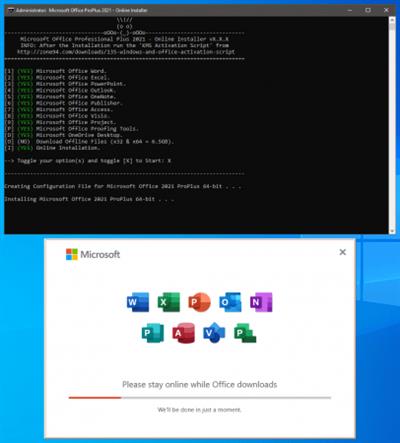
Microsoft Office 2021 ProPlus - Online Installer v2.3.7


ee74987c61a5e3781e2cec9f9cbe7298.jpeg


Microsoft Office 2021 ProPlus - Online Installer v2.3.7
File size: 3.2 MB
​
This small Script will download and install the Microsoft Office 2021 Professional Plus including all the updates directly from the Microsoft CDN Server.

Includes
Word, Excel, PowerPoint, Outlook, OneNote, Publisher, Access, Visio, Project, Pr
oofingTools, OneDrive Desktop.

System Requirements
Windows 10/11 x86 (32-bit)
Windows 10/11 x64 (64-bit)

What's New
Updates: official site does not provide any info about changes in this version

rapidgator.net:
Код:
https://rapidgator.net/file/ebb18b02994a90b99c49e59ced174ed4/okzgl.Microsoft.Office.2021.ProPlus..Online.Installer.v2.3.7.rar.html

uploadgig.com:
Код:
https://uploadgig.com/file/download/1A7a4A0b4981Bb66/okzgl.Microsoft.Office.2021.ProPlus..Online.Installer.v2.3.7.rar

nitroflare.com:
Код:
https://nitroflare.com/view/62A7C59D44FC5B5/okzgl.Microsoft.Office.2021.ProPlus..Online.Installer.v2.3.7.rar

1dl.net:
Код:
https://1dl.net/igqe6xb3jwuy/okzgl.Microsoft.Office.2021.ProPlus..Online.Installer.v2.3.7.rar
 
Microsoft Windows 7 Ultimate SP1 Multilingual Preactivated February 2023


2631afc099dca5b54c13100788888336.jpeg


Microsoft Windows 7 Ultimate SP1 Multilingual Preactivated February 2023
Windows (x64) | Languages:Arabic,English,German,Greek,French,Spanish,Italian,Portuguese-Portuguese,Portuguese-Brazil,Turkish,Dutch | Wim Install | File Size: 5.04 GB​

Windows 7 Ultimate is the most versatile and powerful edition of Windows 7. It combines remarkable ease-of-use with the entertainment features of Home Premium and the business capabilities of Professional, including the ability to run many Windows XP productivity programs in Windows XP Mode.For added security, you can encrypt your data with BitLocker and BitLocker To Go. And for extra flexibility, you can work in any of 35 languages. Get it all with Windows 7 Ultimate.

Features
-64-bit versions Combines remarkable ease-of-use with the entertainment features of Home Premium and the business capabilities of Professional--get it all with with Windows 7 Ultimate
-Make the things you do every day easier with improved desktop navigation; start programs faster and more easily, and quickly find the documents you use most often
-Run many Windows XP productivity programs in Windows XP Mode; watch, pause, rewind, and record TV on your PC
-Easily create a home network and connect your PCs to a printer with HomeGroup; connect to company networks easily and more securely with Domain Join
-Recover your data easily with automatic backup to your home and business network; help protect data on your PC and portable storage devices against loss or theft with BitLocker.
Код:
https://support.microsoft.com/en-us/topic/february-14-2023-kb5022872-monthly-rollup-4b7dbc01-aa80-4b84-a138-173f22737f26

8390630dd256471e180582bcd29f9d28.jpeg

f912f7d848f50a71225102ab84ee78fe.jpeg


1f251b3364e4b05404cde587db3c81db.jpeg

System Requirements
Processor: 1 gigahertz (GHz) or faster.
RAM: 1 gigabyte (GB).
Free space on hard disk: 16 gigabytes (GB).
Graphics card: DirectX 9 graphics device or a newer version.
Additional requirements to use certain features.
To use touch you need a tablet or monitor that supports multitouch.
To access the Windows store to download and run apps, you need an active Internet connection and a screen resolution of at least 1024 x 768 pixels

Homepage:
Код:
http://www.microsoft.com

Download link

rapidgator.net:
Код:
https://rapidgator.net/file/d7ef1d69cd30f8a902d781da4afb9f2a/febaq.Microsoft.Windows.7.Ultimate.SP1.Multilingual.Preactivated.February.2023.part1.rar.html
https://rapidgator.net/file/f29e1e571b931de631d4feed6ac6da49/febaq.Microsoft.Windows.7.Ultimate.SP1.Multilingual.Preactivated.February.2023.part2.rar.html
https://rapidgator.net/file/c17c2a1a10a6676b7390e63dabbdbad3/febaq.Microsoft.Windows.7.Ultimate.SP1.Multilingual.Preactivated.February.2023.part3.rar.html
https://rapidgator.net/file/f3210669a8cda5d1b3ad6bf57cf8df65/febaq.Microsoft.Windows.7.Ultimate.SP1.Multilingual.Preactivated.February.2023.part4.rar.html
https://rapidgator.net/file/d113eee2114efe6e8019b91d9b0213f1/febaq.Microsoft.Windows.7.Ultimate.SP1.Multilingual.Preactivated.February.2023.part5.rar.html
https://rapidgator.net/file/d027cc61bbc56cb4db7230e9e0d2a922/febaq.Microsoft.Windows.7.Ultimate.SP1.Multilingual.Preactivated.February.2023.part6.rar.html

uploadgig.com:
Код:
https://uploadgig.com/file/download/93174Fb90d3FB041/febaq.Microsoft.Windows.7.Ultimate.SP1.Multilingual.Preactivated.February.2023.part1.rar
https://uploadgig.com/file/download/85cc8e7c319fe389/febaq.Microsoft.Windows.7.Ultimate.SP1.Multilingual.Preactivated.February.2023.part2.rar
https://uploadgig.com/file/download/77f5c8f66f31f870/febaq.Microsoft.Windows.7.Ultimate.SP1.Multilingual.Preactivated.February.2023.part3.rar
https://uploadgig.com/file/download/365d8A03eEa8d8E5/febaq.Microsoft.Windows.7.Ultimate.SP1.Multilingual.Preactivated.February.2023.part4.rar
https://uploadgig.com/file/download/5ab8Fdc230a7C913/febaq.Microsoft.Windows.7.Ultimate.SP1.Multilingual.Preactivated.February.2023.part5.rar
https://uploadgig.com/file/download/c54a8b410d8eabf4/febaq.Microsoft.Windows.7.Ultimate.SP1.Multilingual.Preactivated.February.2023.part6.rar

nitroflare.com:
Код:
https://nitroflare.com/view/7C354388D562F8E/febaq.Microsoft.Windows.7.Ultimate.SP1.Multilingual.Preactivated.February.2023.part1.rar
https://nitroflare.com/view/A06771C5EA397AB/febaq.Microsoft.Windows.7.Ultimate.SP1.Multilingual.Preactivated.February.2023.part2.rar
https://nitroflare.com/view/72659F0F0CE6C20/febaq.Microsoft.Windows.7.Ultimate.SP1.Multilingual.Preactivated.February.2023.part3.rar
https://nitroflare.com/view/1A5603D9ECDA690/febaq.Microsoft.Windows.7.Ultimate.SP1.Multilingual.Preactivated.February.2023.part4.rar
https://nitroflare.com/view/1A70884FE5793C5/febaq.Microsoft.Windows.7.Ultimate.SP1.Multilingual.Preactivated.February.2023.part5.rar
https://nitroflare.com/view/0A421D827E92575/febaq.Microsoft.Windows.7.Ultimate.SP1.Multilingual.Preactivated.February.2023.part6.rar

1dl.net:
Код:
https://1dl.net/7gi6rnnn5i79/febaq.Microsoft.Windows.7.Ultimate.SP1.Multilingual.Preactivated.February.2023.part1.rar
https://1dl.net/0tmo9qi11id0/febaq.Microsoft.Windows.7.Ultimate.SP1.Multilingual.Preactivated.February.2023.part2.rar
https://1dl.net/8d5hiqkcsb5w/febaq.Microsoft.Windows.7.Ultimate.SP1.Multilingual.Preactivated.February.2023.part3.rar
https://1dl.net/wm7drim5kpwc/febaq.Microsoft.Windows.7.Ultimate.SP1.Multilingual.Preactivated.February.2023.part4.rar
https://1dl.net/a4qygxqye45g/febaq.Microsoft.Windows.7.Ultimate.SP1.Multilingual.Preactivated.February.2023.part5.rar
https://1dl.net/ttjwe7rumykg/febaq.Microsoft.Windows.7.Ultimate.SP1.Multilingual.Preactivated.February.2023.part6.rar
 
myTracks 4.3.0 macOS


acd6110a3b78711a130ae4ec079d86df.jpeg


myTracks 4.3.0 macOS
Language: Multilingual | File size: 40 MB​

myTracks is the swiss-army knife for organizing your GPS tracks. They can be loaded from a broad range of devices and organized in a library comfortably.

Once imported you can drag & drop photo files to myTracks and they will be assigned to the GPS tracks automatically. The GPS information can be written to the EXIF and IPTC tags of the photo files (Geotagging). You can use any photo organizing software such as Photos, iPhoto, Aperture, Lightroom, GraphicConverter or even the Finder. myTracks can handle both JPEG and RAW file formats.
GPS tracks can be exported as GPX, KML or KMZ files. You can use the exported files, e.g. with Google Earth.
Besides the dedicated GPS loggers a free iPhone App called "myTracks - The GPS logger" is available on the App Store. You can use this App to record GPS tracks.
See the supporting website for more screenshots, screencasts and the complete list of supported loggers.
Feature Highlights
* Logger Assistant with more than 50 presets for downloading GPS tracks
* Search, bookmark, and organize using the Track Library
* 1-click, drag & drop geotagging of JPEG and RAW photo files
* Display tracks on a wide variety of maps online and offline
* Import, export, and edit tracks in GPX and KML formats and export of KMZ formats
* Upload photos from within the application to flickr
* Compatible with Adobe Lightroom, Apple Photos, Apple Aperture, Apple iPhoto, GraphicConverter or macOS Finder
Release Notes
Код:
https://geo.itunes.apple.com/app/id403100976

Supported Operation Systems
macOS 10.13.6 or later

Homepage:
Код:
https://geo.itunes.apple.com/app/id403100976

Download link

rapidgator.net:
Код:
https://rapidgator.net/file/565d7ef8c19d5766a9c8c8016c529179/dchot.myTracks.4.3.0.macOS.dmg.html

uploadgig.com:
Код:
https://uploadgig.com/file/download/784c2066082daF9A/dchot.myTracks.4.3.0.macOS.dmg

nitroflare.com:
Код:
https://nitroflare.com/view/A822D6F0C8934C7/dchot.myTracks.4.3.0.macOS.dmg

1dl.net:
Код:
https://1dl.net/dm877mrys1qc/dchot.myTracks.4.3.0.macOS.dmg
 
Navicat Premium Essentials 16.1.6 macOS


c5f0a2dff95a4512c480ec921ddac106.jpeg


Navicat Premium Essentials 16.1.6 macOS
File size: 235 MB​

Navicat Premium Essentials is a compact version of Navicat which provides basic and necessary features you will need to perform simple administration on a database. It supports the latest features including Trigger, Function, View, and it also comes with an Import/Export tool which allow user to import and export data from plain text file formats including TXT, CSV and XML.

Navicat Essentials is for commercial use. Currently, Navicat Essentials is available for MySQL, SQL Server, PostgreSQL, Oracle and SQLite databases. If you need to administer all the above database servers at the same time, there is also Navicat Premium Essentials which allows you to access multiple database servers within one single application.
It can connect you to local/remote server, providing several utilities such as SQL editors, import/export, dump/execute SQL scripts and Server Monitor to facilitate the process of data maintenance.
*** You need to disable the System Integrity Protection (SIP) to perform the selected Application and Gatekeeper off!
Release Notes
Updates: official site does not provide any info about changes in this version

Supported Operation Systems
macOS 10.14 or later

Homepage:
Код:
https://www.navicat.com

Download link

rapidgator.net:
Код:
https://rapidgator.net/file/2db0edadff8a412c679c192c74e3f600/lizck.Navicat.Premium.Essentials.16.1.6.macOS.dmg.html

uploadgig.com:
Код:
https://uploadgig.com/file/download/5660734a94E8091E/lizck.Navicat.Premium.Essentials.16.1.6.macOS.dmg

nitroflare.com:
Код:
https://nitroflare.com/view/9ED8E61DF082247/lizck.Navicat.Premium.Essentials.16.1.6.macOS.dmg

1dl.net:
Код:
https://1dl.net/ghu99svav8q9/lizck.Navicat.Premium.Essentials.16.1.6.macOS.dmg
 
Paste Queue 1.5.0 macOS


ae084966330667a54ed2ccac189aa6bb.jpeg


Paste Queue 1.5.0 macOS
File size: 8.67 MB
​
Paste Queue is a great time-saver for copying and pasting multiple items between locations. Just copy all needed items first. Then paste them one by one or all at once -- no need to switch back and forth between your source and destination.

For example, you can copy a name, phone number, and address, one by one with a keyboard shortcut, and then paste them all at once (or one by one) in the same order into a form, with another shortcut. It's like an extended clipboard, where you can copy and paste as many items as you wish each time, in sequential (or reverse) order!
Paste Queue also lets you paste items in a custom order, paste rich text as plain text, rearrange copied items, delete them, etc. If you copy and paste often, it is a right app for you. It'll make your copy and paste routines simple, fun, and fast!
KEY FEATURES
- Supports text, HTML, code, images, files, hyperlinks, PDFs, and app-proprietary data
- Works across different apps and windows
- Can hold unlimited number of items before pasting them
- Customizable keyboard shortcut for copying items into the queue
- Can use regular copy commands to copy items into the queue (when the app window is open)
- Option to not record duplicated items into the queue
- Customizable keyboard shortcuts for pasting items one by one, in first-in-first-out (sequential) or last-in-first-out order
- Can paste items in any order by clicking them
- Can drag and drop items to destinations
- Can reorder items before pasting them
- Customizable keyboard shortcut for pasting all items at once
- Can insert text that separates multiple items pasted together
- Can paste multiple items into consecutive fields/cells in a form/spreadsheet in one shot
- Can paste rich text as plain text
- Optional copy and paste sound effects
- Quick access to the queue via the app's menu-bar icon
- Can open the app window with a keyboard shortcut
- Can delete all copied items or selected ones
Free Helper App
Because the App Store does not allow its apps to issue copy/paste commands to other apps, Paste Queue relies on an external
Код:
https://apprywhere.com/ce-helper.html
(which is free) to copy from and paste into other apps. If you don't use the helper app, you would need to do one more step each time you paste an item from Paste Queue: press Command-V yourself.
Release Notes
Код:
https://geo.itunes.apple.com/app/id1380017883

Supported Operation System
• macOS 10.13 or later
• Apple Silicon or Intel Core processor

Homepage:
Код:
http://apps.apple.com/app/paste-queue-multi-clipboard/id1380017883

Download link

rapidgator.net:
Код:
https://rapidgator.net/file/c05c9ac20e7954f177134fcc97cc30cf/czmyu.Paste.Queue.1.5.0.macOS.dmg.html

uploadgig.com:
Код:
https://uploadgig.com/file/download/c4Ac69bd25EfFaC3/czmyu.Paste.Queue.1.5.0.macOS.dmg

nitroflare.com:
Код:
https://nitroflare.com/view/4E60F31598DB1A2/czmyu.Paste.Queue.1.5.0.macOS.dmg

1dl.net:
Код:
https://1dl.net/uv9myacazkbd/czmyu.Paste.Queue.1.5.0.macOS.dmg
 
PDF Reader Pro 2.8.22.1 macOS


d80bade46045b27693671f7207dc1ff9.jpeg


PDF Reader Pro 2.8.22.1 macOS
Language: Multilingual | File size: 70 MB​

PDF Reader Pro is a PDF powerhouse that will fulfill all your document needs. Building on solid features such as Annotation, Edit, Form filling, OCR, Convert, Create, Sign, Bookmark and protect your PDF files, PDF Reader Pro allows you to maneuver through your PDF files.

PDF Reader Pro offers even more - Edit text in PDFs, merge and combine multiple documents, split your PDF into several files, insert pages from another PDF, Convert PDF to Word and any other Microsoft Office® formats. Carry just your PDFs and make your presentations with them under the Presentation Mode, work becomes effortless and more productive with lighter PDFs!
The app has a presentation mode that will allow you to showcase your PDF document to others. Now you can enjoy the best PDF to Office Converter! Export from PDF to Microsoft Word (.docx), PowerPoint (.pptx), Excel (.xlsx), RTF, HTML, Text, Image, CSV, and more Offline
Release Notes
Updates: official site does not provide any info about changes in this version

Supported Operation Systems
macOS 10.13 or later

Homepage:
Код:
https://www.pdfreaderpro.com

Download link

rapidgator.net:
Код:
https://rapidgator.net/file/455240f9e213b49e34513fddeda97e86/kpfik.PDF.Reader.Pro.2.8.22.1.macOS.dmg.html

uploadgig.com:
Код:
https://uploadgig.com/file/download/269a4fbf3bcb9426/kpfik.PDF.Reader.Pro.2.8.22.1.macOS.dmg

nitroflare.com:
Код:
https://nitroflare.com/view/822A44C57945681/kpfik.PDF.Reader.Pro.2.8.22.1.macOS.dmg

1dl.net:
Код:
https://1dl.net/hfnoj86izbca/kpfik.PDF.Reader.Pro.2.8.22.1.macOS.dmg
 
Scrutiny 12.7.0 macOS


913228ade29b7075004d9746b245dcff.jpeg


Scrutiny 12.7.0 macOS
File size: 5.50 MB

Scrutiny - Website crawl-and-report. Link checking, html validation, SEO, Sitemap and more.​

Link checking
All the features of Integrity, Integrity Plus and Integrity Pro. The same fast, efficient, accurate engine. With more power and options - authenticate (scan sites that require logging in) test links within pdf documents, render js before parsing and much more.
Test all the hyperlinks within a local pdf or Word (.docx) including links to other local documents. (from Scrutiny v9.9.0)
Also supports and assists your migration to a secure (https) website. Reports pages with oldhttps links and pages which usehttp resources (mixed / insecure content).
New - HTML validation
Site-wide html validation. A number of tests are made to the html of each page as they are scanned, with a focus on well-formedness and issues that may have consequences. For a strict validation, a page can be passed to the w3c validator with a single click. (from Scrutiny v10)
Accessibility
Scrutiny can perform a number of tests that will help with your website's DDA / ADA / WCAG compliance.
There are certain very important things that automated testing does do very well. Here is a list of tests that Scrutiny can perform.
No software can declare your site fully compliant because some tests are subjective / must be checked by a human. (For example, is a heading, title or link text meaningful?) Even in these cases, Scrutiny can list these fields and make your testing easier.
SEO
After a single scan, Scrutiny holds a vast amount of information about your site. Search it, filter it, export it. Shows a list of warnings such as missing title / description, thin content, keyword stuffed pages, images without alt text, mixed content and much more.
Sitemap
Export an xml sitemap for submission to the search engines (and in other formats too). Option to include images and pdf files. Set up rules for your priority / change frequency or edit these manually.
Spelling
Run a spelling and/or grammar check, view the results by misspelled word or by page. Uses the standard OSX functionality and your custom dictionary.
Reporting
At the press of a button, generate a report for yourself, your customer or your boss with charts and a custom header and footer. Either a summary with charts and key stats, or a full report including a number of tables.
Serviced scan, scheduled, cross-platform results
If you're not a Mac user, or would like to just receive a regular notification of the scan results, viewable and downloadable on any platform, you may be interested in ordering a regular Integrity or Scrutiny scan online.
Release Notes
Код:
https://peacockmedia.software/mac/scrutiny/version_history.html

Supported Operation System
• macOS 10.14 or later
• Apple Silicon or Intel Core processor

Homepage:
Код:
http://peacockmedia.software/mac/scrutiny

Download link

rapidgator.net:
Код:
https://rapidgator.net/file/2acec27ead19acbf7bb58e93fea03f97/thxts.Scrutiny.12.7.0.macOS.dmg.html

uploadgig.com:
Код:
https://uploadgig.com/file/download/4d28c50A5b4ca850/thxts.Scrutiny.12.7.0.macOS.dmg

nitroflare.com:
Код:
https://nitroflare.com/view/0639C9B4CE90B0C/thxts.Scrutiny.12.7.0.macOS.dmg

1dl.net:
Код:
https://1dl.net/6tfwotie74ha/thxts.Scrutiny.12.7.0.macOS.dmg
 
SILKYPIX JPEG Photography 11E 11.2.8.1 macOS


2c71f9c3a1d31435868a74d5e4f466be.jpeg


SILKYPIX JPEG Photography 11E 11.2.8.1 macOS
File size: 77.51 MB​

With SILKYPIX JPEG Photography 11, you can release your creativity! Improve your JPEG photos taken with digital cameras, smart phones, and other devices. Use clarity tools to adjust sharpness, the freehand selection brush and other tools. Produce the high quality photo you imagined when you took your picture.

SILKYPIX RAW Bridge is an ISL own technology for high quality, precise control of the image enhancement and transformation process.
Although JPEG data uses 8 bit (256 gradations) gradation, it is automatically expanded to 16 bit (65,536 gradations) using SILKYPIX RAW Bridge. By treating JPEG data in a similar way to RAW data, high gradation rich image quality adjustment is possible.
Easy Editing with Tastes
SILKYPIX JPEG Photography includes "tastes", a kind of preset that incorporates useful styles and forms. Choose a taste such as "Landscape" or "Portrait" to make a finished photograph easily that fits your image. In addition, you can save all of your custom, adjusted parameters as a taste preset. Parameters are very useful functions, and you can easily recreate themes and styles across any number of photographs you take.
Freely remove dust, fix image orientation and crop your photo!
Remove unwanted objects using the Spotting Tool, such as dust that may appear due to contamination of your camera sensor. You can also adjust and apply rotation and cropping as you wish.
Process multiple photos at once
If you work with multiple images at the same time (such as images shot with continuous shooting), and adjust the taste and parameters, you can make corrections for all selected images at once.
For example, even if you darken the exposure setting of the camera, if you select that picture and make correction, you can correct all the selected images at once.
Preview differences due to paper quality on your monitor
SILKYPIX offers color management for monitor viewing or printing, including a "Printer proof" system that lets you simulate printed results from an ICC profile.
These features support a process from accurate editing for printing.
* Requires monitor that supports color management
Release Notes
Код:
http://silkypix.isl.co.jp/en/release-note/latest/jp11/

Supported Operation System
• macOS 10.15 or later
• Intel Core processor

Homepage:
Код:
http://silkypix.isl.co.jp/en/product/jp11

Download link

rapidgator.net:
Код:
https://rapidgator.net/file/31d22ea19dd64b6b517d2f399d1f3cd1/vfqos.SILKYPIX.JPEG.Photography.11E.11.2.8.1.macOS.dmg.html

uploadgig.com:
Код:
https://uploadgig.com/file/download/c029811C6b158cB2/vfqos.SILKYPIX.JPEG.Photography.11E.11.2.8.1.macOS.dmg

nitroflare.com:
Код:
https://nitroflare.com/view/96B62C3EF088592/vfqos.SILKYPIX.JPEG.Photography.11E.11.2.8.1.macOS.dmg

1dl.net:
Код:
https://1dl.net/umkkel32m4jl/vfqos.SILKYPIX.JPEG.Photography.11E.11.2.8.1.macOS.dmg
 
SketchUp Pro 2023 v23.0.366 macOS


e90c0274c14a5cdaab362baa8f2fcf0d.jpeg


SketchUp Pro 2023 v23.0.366 macOS
Language: Multilingual | File size: 893 MB​

SketchUp is an easy-to-learn 3D modeling program that enables you to explore the world in 3D. With just a few simple tools, you can create 3D models of houses, sheds, decks, home additions, woodworking projects - even space ships.

Programming, diagramming, design development, detailing, documentation, RFIs-wherever you need drawings, you need SketchUp Pro.
A great mix of our classic desktop software, our shiny new SketchUp for Web modeler, and all sorts of things you've been asking for over the years - including the ability to publish, share, and store projects in the cloud with Trimble Connect.
Tools for your 3D modeling toolbox
SketchUp Pro for Desktop
Fast, easy 3D modeling for anything you can imagine.
SketchUp for Web
Our powerful web modeler, with all the features you need to turn your designs into real things.
Unlimited cloud storage
Share, collaborate, and store your projects in the cloud. Gain flexibility and peace of mind.
2D design documentation
Create scaled drawing sets in 2D with LayOut.
VR model viewing
Wow your clients with a walkthrough of their project on Microsoft HoloLens, HTC Vive, or Oculus, on your phone or tablet.
Features that make your projects yours
Make your project look like only you can with custom Styles, Materials, and Outliner. And, make that work smooth and easy with Dynamic Components.
Languages: English, Deutsch, Español, Français, Italiano, 日本語, 한국어, Português (Brasil), Русский, Svenska, 中文 (简体), 中文 (繁體)
Release Notes
Updates: official site does not provide any info about changes in this version

Supported Operation Systems
macOS 10.15 or later

Homepage:
Код:
https://www.sketchup.com/

Download link

rapidgator.net:
Код:
https://rapidgator.net/file/54a798e0d335836f67b6e562c38428c2/liurc.SketchUp.Pro.2023.v23.0.366.macOS.dmg.html

uploadgig.com:
Код:
https://uploadgig.com/file/download/d9673C6C953f4E83/liurc.SketchUp.Pro.2023.v23.0.366.macOS.dmg

nitroflare.com:
Код:
https://nitroflare.com/view/F61B06EAB5D8BBC/liurc.SketchUp.Pro.2023.v23.0.366.macOS.dmg

1dl.net:
Код:
https://1dl.net/zh1r6kizeq2i/liurc.SketchUp.Pro.2023.v23.0.366.macOS.dmg
 
TinkerTool System 8.3 (Build 230215) macOS


eadb91ff5392518b40558137d53bb005.jpeg


TinkerTool System 8.3 (Build 230215) macOS
File size: 21 MB​

TinkerTool System 8 is a collection of system utility features helping you in performing advanced administration tasks on Apple Macintosh computers. The application makes use of a self-adapting user interface which automatically adjusts to the computer model and to the version of macOS you are running.

All options available in the current situation are accessible via "panes", very similar to the System Settings application. The features are controlled via a single window which allows you to use the application as a general toolbox and First Aid assistant.
This includes
built-in maintenance features of macOS, usually not visible on the graphical user interface,
extended file operations, not available in the macOS Finder,
the possibility to access advanced system settings which are not visible in System Settings,
graphical user interfaces for "pro" features for which Apple doesn't provide any graphical interface in modern versions of macOS any longer,
genuine and unique features of TinkerTool System, designed to resolve typical real-world problems of administrators and to fix the effects of certain defects ("bugs") in the operating system,
features to protect your privacy,
an emergency tool to troubleshoot and repair macOS in cases where the normal user interface is no longer starting correctly or the user account of the system administrator has been damaged,
functions to collect advanced information about the hardware, operating system, and applications.
Release Notes
Код:
https://www.bresink.com/osx/301031383/history.html

Supported Operation Systems
macOS 13.0 or later

Homepage:
Код:
https://www.bresink.com/

Download link

rapidgator.net:
Код:
https://rapidgator.net/file/37eac80892742b263fd012324a6b84a0/nbjwx.TinkerTool.System.8.3.Build.230215.macOS.dmg.html

uploadgig.com:
Код:
https://uploadgig.com/file/download/2db55d99df63dd59/nbjwx.TinkerTool.System.8.3.Build.230215.macOS.dmg

nitroflare.com:
Код:
https://nitroflare.com/view/C084D088A21D343/nbjwx.TinkerTool.System.8.3.Build.230215.macOS.dmg

1dl.net:
Код:
https://1dl.net/lspfgvk7ihgq/nbjwx.TinkerTool.System.8.3.Build.230215.macOS.dmg
 
UltraEdit 22.0.0.18 macOS


1153b6479b3051933e6e7baa4e067dca.jpeg


UltraEdit 22.0.0.18 macOS
File size: 29.53 MB​

UltraEdit - The world's best text editor! Our 4+ million power users all agree - UltraEdit is the most flexible, powerful, and secure text editor out there.

→ Feature Highlights:
Themes
Choose one of our core themes or try our beautiful user-contributed themes to get UltraEdit looking exactly how you'd like it to. Take it a step further by modifying your theme or creating a new one from scratch, then contribute it back for the rest of our users to enjoy.
Multi-caret/multi-select
UltraEdit features the most powerful and intuitive multi-caret editing and multi-selection capabilites in the business. Once your cursors or selections are where you want them to be, you can copy, cut, paste, select and delete just the same as you normally would.
HTML / Markdown live preview
Want to see your rendered HTML or Markdown changes on the fly, as you edit them? UltraEdit's live preview makes this possible. Double-click an element in the preview to jump to its definition in source. And with Github Flavored Markdown (GFM) code highlighting and compatibility, UltraEdit is the only editor you'll need for your repos.
Search
If it can be searched for, UltraEdit will find it. But search is almost the wrong word. With the power to search with regular expressions, search across files, find a needle in a 4GB haystack, or just quickly find a word you're looking for, this isn't search. This is omniscience.
Column Mode
When editing horizontally just isn't quite good enough, Column Mode is there for you. Use Column Mode to intuitively edit along the Y axis anywhere in your document. It's just one of the many powerful ways UltraEdit helps you edit tabular data or code files.
Integrated FTP, SSH & Telnet
Whether you need to make quick edits to a file on a server or upload a massive codebase, UltraEdit's integrated FTP capabilities and SSH/Telnet make it easy to work with remote files and interact with servers from a single, powerful application.
Customizable UI
Our menu system has been rebuilt from the ground up to make it even more customizable than ever. Our deeply customizable new menu can be laid out however you'd like. Set yourself up with Ribbon mode for a familiar look and feel. Or maybe you prefer the simple toolbar with only your most commonly needed features. The possibilities are endless.
Edit large files
UltraEdit is built to edit large files that cause other text editors to crash. People who deal with databases and large log files absolutely love our product for this very reason.
4k UHD support
UltraEdit looks great on Retina and other ultra high-definition displays. If you haven't upgraded yet, no need to worry. We'll be ready for you when you do.
Key features
• Easily open and edit large files - 4 GB and beyond!
• Multi-caret editing and multi-select
• Column (block) mode editing
• Powerful search: Find & replace in files, regular expressions, inverse search, etc.
• File compare
• Code syntax highlighting for nearly any programming language
• Code folding and hierarchical function listing
• Beautify and reformat source code
• Powerful XML handling: XML tree view, reformatting, validation, etc.
• Auto-closing XML/HTML tags
• Smart templates - automatic intelligent code completion
• Editor themes - skin the entire app
• Powerful and configurable tools
• File and data sorting
• Integrated FTP client (supports FTP, SFTP, and FTPS)
• Integrated SSH/telnet client
• Filtered spell checker
• Unicode/UTF-8 support
• Split/duplicate window editing
• Hex editing
• Macros and scripts for automated editing
• CSV data reformatting
• Log file polling
• File encryption and decryption
• Integrated Ctags (symbols listing)
• Base64 encode/decode
• Project support
• Robust bookmarking
Release Notes
Код:
https://www.ultraedit.com/products/mac-text-editor/latest-changes.html

Supported Operation System
• macOS 10.13 or later
• Intel Core processor

Homepage:
Код:
http://www.ultraedit.com/products/mac-text-editor

Download link

rapidgator.net:
Код:
https://rapidgator.net/file/d52e58cb243c552635a84b6276b13513/bzzia.UltraEdit.22.0.0.18.macOS.dmg.html

uploadgig.com:
Код:
https://uploadgig.com/file/download/c774c059e42ba0f9/bzzia.UltraEdit.22.0.0.18.macOS.dmg

nitroflare.com:
Код:
https://nitroflare.com/view/F62F79F5D189074/bzzia.UltraEdit.22.0.0.18.macOS.dmg

1dl.net:
Код:
https://1dl.net/q1j268y8m54t/bzzia.UltraEdit.22.0.0.18.macOS.dmg
 
XYplorer 24.10.0000 Multilingual


a58f418ee724f7698a808f0b5890f3cf.jpeg


XYplorer 24.10.0000 Multilingual
File size: 5.7 MB​

XYplorer is a file manager for Windows. It features tabbed browsing, a powerful file search, a versatile preview, a highly customizable interface, optional dual pane, and a large array of unique ways to efficiently automate frequently recurring tasks. It's fast, light, and portable.

It's Tabbed
Tabs let you switch between folders most easily. Drag them around, hide them, lock them, name them, or drop files onto them. The tabs remember their configuration individually and across sessions. On top of this you get tabsets and dual pane.
t's Functional
XYplorer has been designed to make you faster. Numerous usability enhancements in an attractive interface help to streamline your workflow and increase your efficiency. You will definitely save a lot of time.
It's Scriptable
Yes, you can program this app. Individual solutions for individual tasks. No plugins needed, scripts run out-of-the-box. Even beginners can benefit from this feature since many ready-to-use scripts are available in the forum.
It's Fast
Speed has always been a major design goal with XYplorer. The code is constantly optimized for performance, zero tolerance for slowness. On top of that the app uses very little RAM, the executable is light (7 MB), and it loads almost instantly.
It's Reliable and Robust
You can trust XYplorer. It works as intended and expected, and is very hard to destroy. Any issues are immediately attended and usually fixed within hours. A large community is closely watching the development and permanently testing the frequent beta versions.
It's Customizable
You can fine-tune the app to look and behave exactly as you want it. This ranges from fonts and colors to custom toolbar buttons and even file icons and program associations. And every bit of it is fully portable. Even the dark mode.
It's Responsive
Your customer voice is listened to and taken seriously, most of the time you get instant feedback, and your wish might actually get implemented sooner than you'd think.
Код:
https://www.xyplorer.com/whatsnew.php

Homepage:
Код:
https://www.xyplorer.com/

Download link

rapidgator.net:
Код:
https://rapidgator.net/file/43c2424d18eee17c017bd89f7003b959/utkjl.XYplorer.24.10.0000.Multilingual.rar.html

uploadgig.com:
Код:
https://uploadgig.com/file/download/1d99d2719Af50CBe/utkjl.XYplorer.24.10.0000.Multilingual.rar

nitroflare.com:
Код:
https://nitroflare.com/view/0F8EAC9A05BE3B4/utkjl.XYplorer.24.10.0000.Multilingual.rar

1dl.net:
Код:
https://1dl.net/6n1elho81nyy/utkjl.XYplorer.24.10.0000.Multilingual.rar
 
XML ValidatorBuddy 8.2.0


3c866ed17204ad9890c6e3ec28b66a3c.jpeg


XML ValidatorBuddy 8.2.0
File Size: 29.2 MB​

XML Validator Buddy Desktop is your easy to use set of XML tools to edit, validate, transform and manage even a large number of XML and JSON data. The grid and text editor windows offer syntax-coloring and various entry-helpers to create and modify any XML or JSON content quickly.

Assign XML and JSON schemas to your data to run the built-in validator with a single click. Use the XML or JSON validator in batch mode to check any number of documents and get a comprehensive error report. XML ValidatorBuddy supports XSD, DTD and Schematron rules with the easy to use XML validator. Transform XML or JSON to HTML directly in the editor or apply XSL transformations to multiple files at once on your disk. The unique Explorer window with XML related enhancements enables everyone to work with XML and JSON technologies in a convenient and efficient way.

XML validator software for W3C, DTD, Schematron, RelaxNG and JSON Schema
Know instantly which XSD or DTD is assigned to your XML data.
Complete XML and JSON editor with grid and text editor windows.
Check your XML and run XSL transformations for one or multiple documents with just a few clicks.
Find all XML documents with no XSD or DTD reference without the need to open them manually.
Run any XSL transformation as custom user tool with a single click.
JSON/XML conversions - JSON syntax checking
Sign and verify XML documents with digital signatures.

Whats New
official site does not provide any info about changes in this version.

rapidgator.net:
Код:
https://rapidgator.net/file/20ee396955d028528dddb20cdd2b5dce/iedhv.XML.ValidatorBuddy.8.2.0.rar.html

uploadgig.com:
Код:
https://uploadgig.com/file/download/E580F080e9e09847/iedhv.XML.ValidatorBuddy.8.2.0.rar

nitroflare.com:
Код:
https://nitroflare.com/view/8801133562F3227/iedhv.XML.ValidatorBuddy.8.2.0.rar

1dl.net:
Код:
https://1dl.net/s6wlaxtcp5d9/iedhv.XML.ValidatorBuddy.8.2.0.rar
 
Назад
Сверху