• Форум работает в архивном режиме www.old.nado.in

All mitsumi'1s Applications !! (updated daily)

  • Автор темы Автор темы mitsumi1
  • Дата начала Дата начала
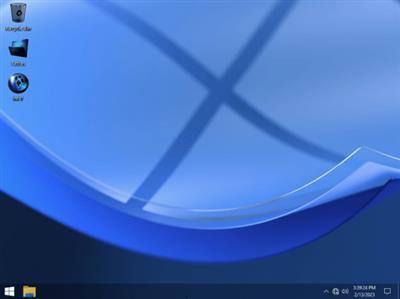
Windows 10 22H2 Pro Lite Build 19045.2546 Vitality February 2023

5f467d5cd0264f1b427b8dcbeeb636ed.jpeg


Windows 10 22H2 Pro Lite Build 19045.2546 Vitality February 2023
Language: English | Size: 2.6 GB
​
This is the latest version of Windows OS release by FBConan (PhoenixOS), with new interface, the build is full featured, updatable with extreme performance for your Apps and Games and with improved stability and performance.

Features
- Full Featured, Updatable Build!
- Improved Stability and Performance!
- Automatic Updates Paused Until 2099!
- Includes Optional System Transparency!
- Extreme Performance for your Apps and Games!
- Full Support for UWP Apps, Xbox, MS Store and much more!
- Full Support for Additional Language Packs, Speech, Voice, etc.!
- Includes Custom Cursors, Themes, Wallpapers, and MUCH MORE!
- MS Store Installer and much more Included!
- No UWP Apps Pre-Installed!

- Removed Features -
Smart Screen, Edge, UWP Apps.

- Disabled Features -
Defender, Virtual Memory, Windows Ink Workspace, Error Reporting, Indexing, BitLocker, UAC, Ads, Telemetry, Hibernation, Power Throttling, Automatic Maintenance.

- Performance Prioritized -
This build has been designed to Maximize Performance, Responsiveness, and Resource Savings.

What do Windows X-Lite Builds have to offer?
- 100% Clean and Safe to Use!
- 4GB Installed Size!
- Full Featured, Updatable Builds!
- Full Support for Language Packs, Speech, Voice, etc.!
- Full Support for UWP Apps, Xbox, MS Store and much more!
- Includes Optional System Transparency and additional Custom Themes!
- Extreme Performance for your Apps and Games!
- Improved Stability, Privacy, Control, Performance, and Flexibility!

rapidgator.net:
Код:
https://rapidgator.net/file/5c18ef74e3f87c0589857e993aa98f67/suhgt.Windows.10.22H2.Pro.Lite.Build.19045.2546.Vitality.February.2023.part1.rar.html
https://rapidgator.net/file/2b91897dee88bc9d3bfb235e8a90159d/suhgt.Windows.10.22H2.Pro.Lite.Build.19045.2546.Vitality.February.2023.part2.rar.html
https://rapidgator.net/file/7ce6390d361bc06969d8d0599dffd7b7/suhgt.Windows.10.22H2.Pro.Lite.Build.19045.2546.Vitality.February.2023.part3.rar.html

uploadgig.com:
Код:
https://uploadgig.com/file/download/b6D5beF32B38987e/suhgt.Windows.10.22H2.Pro.Lite.Build.19045.2546.Vitality.February.2023.part1.rar
https://uploadgig.com/file/download/bcA5b975013f9a08/suhgt.Windows.10.22H2.Pro.Lite.Build.19045.2546.Vitality.February.2023.part2.rar
https://uploadgig.com/file/download/57Ea17d9fC423aEe/suhgt.Windows.10.22H2.Pro.Lite.Build.19045.2546.Vitality.February.2023.part3.rar

nitroflare.com:
Код:
https://nitroflare.com/view/1E673FA58E360DD/suhgt.Windows.10.22H2.Pro.Lite.Build.19045.2546.Vitality.February.2023.part1.rar
https://nitroflare.com/view/86E4BD38528797E/suhgt.Windows.10.22H2.Pro.Lite.Build.19045.2546.Vitality.February.2023.part2.rar
https://nitroflare.com/view/74B6FEDC48855ED/suhgt.Windows.10.22H2.Pro.Lite.Build.19045.2546.Vitality.February.2023.part3.rar

1dl.net:
Код:
https://1dl.net/sy16iqh0dje0/suhgt.Windows.10.22H2.Pro.Lite.Build.19045.2546.Vitality.February.2023.part1.rar
https://1dl.net/x1kdd3ypla3e/suhgt.Windows.10.22H2.Pro.Lite.Build.19045.2546.Vitality.February.2023.part2.rar
https://1dl.net/ivvlb8zhr91b/suhgt.Windows.10.22H2.Pro.Lite.Build.19045.2546.Vitality.February.2023.part3.rar
 
Windows 10 22H2 10.0.19045.2604 16in1 en-US x86x64 Integral Edition February 2023


412e9cf57794f0a4f43a8ebaef46dcd3.jpeg


Windows 10 22H2 10.0.19045.2604 16in1 en-US x86/x64 Integral Edition February 2023
Language: English | Size: 3.7 GB / 5.6 GB
​
Windows 10 is a series of personal computer operating systems produced by Microsoft as part of its Windows NT family of operating systems. Devices in enterprise environments can receive these updates at a slower pace, or use long-term support milestones that only receive critical updates, such as security patches, over their ten-year lifespan of extended support.

Windows 10 Updates
All Windows 10 22H2 Updates are included until 14.2(February).2023
1. KB890830-v5 - Windows Malicious Software Removal Tool, version 5.110.19957.2.
2. KB2267602 - Security Intelligence Updates for Windows Defender Antivirus, version 1.381.3562.0.
3. KB4052623 - Update for Windows Defender Antivirus antimalware platform, version 4.18.2211.5.
4. KB4559309 - Microsoft Edge (Chromium), version 110.0.1587.46.
5. KB4589212-v2 - Intel Microcode Updates.
6. KB5007401 - Critical .NET Framework 3.5 Dynamic Update.
7. KB5011048 - .NET Framework 4.8.1 Base, version 9110.10.
8. KB5012170 - Security Update for Secure Boot DBX, version 19041.1880.
9. KB5015684 - Feature Update 22H2 Enablement Package, version 19041.1799.
10. KB5020377 - Setup Dynamic Update.
11. KB5021043 - Safe OS Dynamic Update.
12. KB5022498 - Cumulative Update for .NET Framework 3.5 and 4.8.1.
13. KB5022834 - Cumulative Update for Windows 10, OS build 19045.2604.
14. KB5023319 - Out of Band Update for .NET Framework 4.8.1.

Windows 10 Runtime Libraries
* DirectX End-User Runtime v9.29.1974 (June 2010).
* Visual C++ Redistributable 2002 v7.0.9975.0.
* Visual C++ Redistributable 2003 v7.10.6119.0.
* Visual C++ Redistributable 2005 SP1 v8.0.50727.6229.
* Visual C++ Redistributable 2008 SP1 v9.0.30729.7523.
* Visual C++ Redistributable 2010 SP1 v10.40219.473.
* Visual C++ Redistributable 2012 Update 5 v11.0.61135.400.
* Visual C++ Redistributable 2013 Update 5 v12.0.40664.0.
* Visual C++ Redistributable 2015-2022 v14.34.31938.0.
* Visual Basic Runtime v1.00.
* Visual Basic Runtime v2.0.9.8.
* Visual Basic Runtime v3.0.5.38.
* Visual Basic Runtime v4.0.29.24.
* Visual Basic Runtime v5.2.82.44.
* Visual Basic Runtime v6.1.98.39 (SP6 Update KB3096896).

Pre-Configured Windows 10 Settings
* .NET Framework 3.5 = Installed.
* OneDrive Auto Install = Disabled.
* Diagnostic Data Collection = Disabled.
* Show all File Extensions = On.
* Show hidden files, folders and drives = On.
* File Progress Dialog = Detailed.
* Combine Taskbar Buttons = Never.
* Windows Theme Color = Storm.
* Windows Theme Accent Color = On.
* Browser Media Auto-Play = Off.
* Default Browser = Firefox.
* Default Media Player = Media Player Classic.
* Default File Archiver = 7-Zip.

Additional Applications
* Microsoft Office 2021 Professional Plus (Online Installer v2.3.7).
* 7-Zip v22.01 (With a few Preconfigured Settings).
* Mozilla Firefox v110.0.0 (With a few Preconfigured Settings).
* K-Lite Codec Pack Full v17.4.4 (With a few Preconfigured Settings).
* OpenHashTab v3.0.2.

Enterprise has the most Features.
Windows 10 Home Single Language
Windows 10 Home
Windows 10 Home N
Windows 10 Pro
Windows 10 Pro N
Windows 10 Pro Education
Windows 10 Pro Education N
Windows 10 Pro for Workstations
Windows 10 Pro for Workstations N
Windows 10 Education
Windows 10 Education N
Windows 10 Enterprise
Windows 10 Enterprise N
Windows 10 Enterprise multi-session
Windows 10 IoT Enterprise
Windows 10 Team

General
* All the Windows 10 Language Packs can be downloaded directly from the Language Settings Menu: "Settings -> Time & Language -> Language -> Add a language".
* This Windows 10 was not in Audit-Mode and was compiled with the Microsoft DISM tool and is based on the Windows 10 19041.1 en-US x64 source.
* All the included extras can be modified or removed in the ISO\Disc folder ".\sources\$OEM$" (Removing the $OEM$ folder will also remove the update #1 and update #4).
* To set you own pre-confurated borwser start page, simply edit the files "initial_preferences" and "firefox.cfg" with a text editor in the ISO\Disc folder ".\sources\$OEM$" or in the Hard Disk Drive folder "C:\Program Files" and "C:\Program Files (x86)".
* A Windows 10 Activator is not included, but a Text file is placed on the Desktop with a direct download link to a good working Activator.
* System Requirements (Minimum|Recommended): 1|3 GigaHertz Processor with 2|4 Cores, 2|8 GigaBytes of RAM, DirectX 9 Graphics card, 30|120 GigaByte of free Hard Disk storage.

System Requirements
- Processor:1 GHz or faster with 2 or more cores on a compatible 64-bit processor. (Microsoft provides a list of compatible processors on its website).
- RAM:4 gigabytes or more
- Storage:64 GB or larger storage device (such as a hard drive or SSD)
- System Firmware:UEFI and Secure Boot capable
- TPM:Trusted Platform Module 2.0 (common on motherboards manufactured after 2016)
- Graphics Card:Compatible with DirectX 12 or later with WDDM 2.0 driver
- Display:An HD display at least 720p (1280x720) resolution larger than 9″ diagonal, 8-bits per color channel

What's New
* Added the latest Windows 10 22H2 Updates from 11.1(January).2023 till 14.2(February).2023: KB5022498 (Replaces KB5020881) | KB5022834 (Replaces KB5022282) | KB5023319.
* Updated Security intelligence updates for Windows Defender Antivirus (KB2267602) from "v1.381.2018.0" to "v1.381.3562.0".
* Updated Windows Malicious Software Removal Tool (KB890830-v5) from "v5.109.19957.1" to "v5.110.19957.2".
* Updated Microsoft Edge (Chromium) from "v108.0.1462.76" to "v110.0.1587.46".
* Updated Microsoft Visual C++ 2015-2022 Redistributable from "v14.34.31931.0" to "v14.34.31938.0".
* Updated Office 2021 Professional Plus Online Installer from "v2.3.6" to "v2.3.7".
* Updated Mozilla Firefox from "v108.0.2" to "v110.0.0".
* Updated K-Lite Codec Pack Full from "v17.3.5" to "v17.4.4".

Homepage
Код:
microsoft.com

rapidgator.net:
Код:
https://rapidgator.net/file/0d5ccedf609e918dcafb387c7c611196/pslys.Windows1022H215in1enUSx86IntegralEdition2023.2.15.part1.rar.html
https://rapidgator.net/file/43066373daaae36eeb993e8d58ec397f/pslys.Windows1022H215in1enUSx86IntegralEdition2023.2.15.part2.rar.html
https://rapidgator.net/file/4978793404643415bd568a969d87d3c7/pslys.Windows1022H215in1enUSx86IntegralEdition2023.2.15.part3.rar.html
https://rapidgator.net/file/092e1303bf8598bafe12dec3c7cac635/pslys.Windows1022H215in1enUSx86IntegralEdition2023.2.15.part4.rar.html
https://rapidgator.net/file/7a250a55ec0549e400acd4d7d35b66c2/pslys.Windows1022H216in1enUSx64IntegralEdition2023.2.15.part1.rar.html
https://rapidgator.net/file/9de1ec8badde06e976992ee5fb9951fd/pslys.Windows1022H216in1enUSx64IntegralEdition2023.2.15.part2.rar.html
https://rapidgator.net/file/b41a282545c32f40683b818c2051f3a8/pslys.Windows1022H216in1enUSx64IntegralEdition2023.2.15.part3.rar.html
https://rapidgator.net/file/67956144e44dcae4358164c3519948b9/pslys.Windows1022H216in1enUSx64IntegralEdition2023.2.15.part4.rar.html
https://rapidgator.net/file/754f1c0adb3ceb9af2daad32239ee72f/pslys.Windows1022H216in1enUSx64IntegralEdition2023.2.15.part5.rar.html
https://rapidgator.net/file/0dc626c1d6c8900526c5e214c122546d/pslys.Windows1022H216in1enUSx64IntegralEdition2023.2.15.part6.rar.html

uploadgig.com:
Код:
https://uploadgig.com/file/download/e6e36Fb2717A3a8A/pslys.Windows1022H215in1enUSx86IntegralEdition2023.2.15.part1.rar
https://uploadgig.com/file/download/66361543D9084A7a/pslys.Windows1022H215in1enUSx86IntegralEdition2023.2.15.part2.rar
https://uploadgig.com/file/download/Ae30AA31c11d81C8/pslys.Windows1022H215in1enUSx86IntegralEdition2023.2.15.part3.rar
https://uploadgig.com/file/download/DdDc574874274d68/pslys.Windows1022H215in1enUSx86IntegralEdition2023.2.15.part4.rar
https://uploadgig.com/file/download/5Cb8b19024a67d6c/pslys.Windows1022H216in1enUSx64IntegralEdition2023.2.15.part1.rar
https://uploadgig.com/file/download/0ec448fcb392122b/pslys.Windows1022H216in1enUSx64IntegralEdition2023.2.15.part2.rar
https://uploadgig.com/file/download/3Eed1bB0aa725eE9/pslys.Windows1022H216in1enUSx64IntegralEdition2023.2.15.part3.rar
https://uploadgig.com/file/download/1Ebdeb22fcD3e77E/pslys.Windows1022H216in1enUSx64IntegralEdition2023.2.15.part4.rar
https://uploadgig.com/file/download/4d4584CCF1717A97/pslys.Windows1022H216in1enUSx64IntegralEdition2023.2.15.part5.rar
https://uploadgig.com/file/download/E03bf153c73368cB/pslys.Windows1022H216in1enUSx64IntegralEdition2023.2.15.part6.rar

nitroflare.com:
Код:
https://nitroflare.com/view/3446AA5C2E031D9/pslys.Windows1022H215in1enUSx86IntegralEdition2023.2.15.part1.rar
https://nitroflare.com/view/2379AFB8C99C363/pslys.Windows1022H215in1enUSx86IntegralEdition2023.2.15.part2.rar
https://nitroflare.com/view/D3A59E1A0C23ECD/pslys.Windows1022H215in1enUSx86IntegralEdition2023.2.15.part3.rar
https://nitroflare.com/view/E4EC54A65EE6F5D/pslys.Windows1022H215in1enUSx86IntegralEdition2023.2.15.part4.rar
https://nitroflare.com/view/6A6CA483EC520A3/pslys.Windows1022H216in1enUSx64IntegralEdition2023.2.15.part1.rar
https://nitroflare.com/view/181A13231CC6EE9/pslys.Windows1022H216in1enUSx64IntegralEdition2023.2.15.part2.rar
https://nitroflare.com/view/ABBF3A39A7C81E7/pslys.Windows1022H216in1enUSx64IntegralEdition2023.2.15.part3.rar
https://nitroflare.com/view/55989281FC8A58C/pslys.Windows1022H216in1enUSx64IntegralEdition2023.2.15.part4.rar
https://nitroflare.com/view/7BF0136BD7BC1C0/pslys.Windows1022H216in1enUSx64IntegralEdition2023.2.15.part5.rar
https://nitroflare.com/view/CEEC70EB29930A2/pslys.Windows1022H216in1enUSx64IntegralEdition2023.2.15.part6.rar

1dl.net:
Код:
https://1dl.net/0v2jjo8nhhe0/pslys.Windows1022H215in1enUSx86IntegralEdition2023.2.15.part1.rar
https://1dl.net/4x98g9dhv2wp/pslys.Windows1022H215in1enUSx86IntegralEdition2023.2.15.part2.rar
https://1dl.net/corbxv27z1pg/pslys.Windows1022H215in1enUSx86IntegralEdition2023.2.15.part3.rar
https://1dl.net/fnkejopghthl/pslys.Windows1022H215in1enUSx86IntegralEdition2023.2.15.part4.rar
https://1dl.net/yzt1i4ohb89u/pslys.Windows1022H216in1enUSx64IntegralEdition2023.2.15.part1.rar
https://1dl.net/1mq9dhltrpeh/pslys.Windows1022H216in1enUSx64IntegralEdition2023.2.15.part2.rar
https://1dl.net/ouwmosrloek1/pslys.Windows1022H216in1enUSx64IntegralEdition2023.2.15.part3.rar
https://1dl.net/c96gp2yv22g6/pslys.Windows1022H216in1enUSx64IntegralEdition2023.2.15.part4.rar
https://1dl.net/wc98wkaueeqh/pslys.Windows1022H216in1enUSx64IntegralEdition2023.2.15.part5.rar
https://1dl.net/t7u2vab0oje5/pslys.Windows1022H216in1enUSx64IntegralEdition2023.2.15.part6.rar
 
Vivaldi v5.7.2921.53 + Mail


3726c59d215dfba83dfaa1ce7b4f50ea.jpeg


Vivaldi v5.7.2921.53 + Mail
File size: 87.80 MiB | Languages: English, Deutsch, Español, Italiano, Português, Français, ...​

Superior Internet/Web Browser (+ e-mail client). Better than any other browser. If you're not using Vivaldi you're not using the web's best browser.

Vivaldi is Chromium based. Chromium is the code ofGoogle Chrome Browser. So you can use all the extensions/add-ons for Google Chrome. Take a look at the extensions available in the
Код:
https://anonym.to/?https://chrome.google.com/webstore/category/extensions
.
Built-in features: e-mail client, calendar, contacts, feed reader, webpage translation (108 languages), screen capture (incl. full-page screenshots), ad/tracker blocker, ...

We're building the most feature-packed, customizable browser out there.
***
New. Now with Vivaldi Mail
Vivaldi Mail, Calendar, and Feed Reader have arrived, built right into your favorite browser.
Vivaldi Mail makes it easy to manage e-mails from multiple accounts, mailing lists and feeds in a unified inbox.
Stress less, celebrate more! Because your e-mails and schedules are now better organized and in safe hands with Vivaldi Mail.
Vivaldi Mail is our ode to the original, simple, and reliable form of communication. And we hope you will enjoy using it as much as we have enjoyed building it for you.
Enable Vivaldi Mail via "Settings → General → Productivity features → Enable Mail, Calendar and Feeds".
***
Features
• Tab Management
Unique features give you full control of how you group and display browser tabs.
• Customization
Tweak and tune every part of the browser to create your own unique experience.
• User Interface
An adaptive interface lets you adjust the position, size and appearance of the browser's UI elements.
• Navigation
Get to where you're going faster with fully configurable Search options, custom shortcuts and a Bookmark manager fit for power users.
• Privacy & Security
Vivaldi is built with privacy as a priority and gives you full control of settings critical to keeping your data safe.
• Tools
An arsenal of built-in tools like Notes, Image Properties and more give you advanced functionality without sacrificing performance.
• Mouse & Keyboard
Use custom Keyboard Shortcuts, Mouse Gestures or the command line control of Quick Commands. The choice is at your fingertips.
Release Notes
Changes inv5.7.2921.53: some improvements.

Homepage:
Код:
https://vivaldi.com/

rapidgator.net:
Код:
https://rapidgator.net/file/aac454688e78e9983e03a2bc6bc48b46/pmbpq.Vivaldi.v5.7.2921.53..Mail.rar.html

uploadgig.com:
Код:
https://uploadgig.com/file/download/35d3f3c37c48cff7/pmbpq.Vivaldi.v5.7.2921.53..Mail.rar

nitroflare.com:
Код:
https://nitroflare.com/view/7AAFF68D8C42B4F/pmbpq.Vivaldi.v5.7.2921.53..Mail.rar

1dl.net:
Код:
https://1dl.net/hv2onmne37e0/pmbpq.Vivaldi.v5.7.2921.53..Mail.rar
 
Tenorshare iCareFone 8.6.5.14 Multilingual


6a19b10a6f6b04664666082940dde00c.jpeg


Tenorshare iCareFone 8.6.5.14 Multilingual
File Size: 103.6 MB​

iCareFone - A Real Manager of iOS Data. Transfer music, photos, videos, contacts, SMS without limitation. Backup & Restore your data selectively and instantly. Save iPhone/iPad/iPod from common iOS problems. Bring your device better performance (iOS 12 and iPhone X)

Transfer Your Files Flexibly
Enjoy music, videos and photos anytime and anywhere
iPhone/iPad/iPod
Transfer & Playback your music collection seamlessly
Keep your photos and videos and accessible on all devices
Export & Import your valuable contacts and SMS securely
Copy other files between your computer and iOS devices
Backup & Restore Your Device at Ease
Meet faster backup speed and more backup file choices. From now on, get rid of iTunes or iCloud backup.
Rescue Your Smartphone from Common iOS Troubles
Handle annoying iOS problems and device failure at home. No professional knowledge required.
Whats New
official site does not provide any info about changes in this version.

Homepage:
Код:
https://www.tenorshare.net

Download link

rapidgator.net:
Код:
https://rapidgator.net/file/6581e1ba5516809d18de89b70f351387/irson.Tenorshare.iCareFone.8.6.5.14.Multilingual.rar.html

uploadgig.com:
Код:
https://uploadgig.com/file/download/27361476A8b14F89/irson.Tenorshare.iCareFone.8.6.5.14.Multilingual.rar

nitroflare.com:
Код:
https://nitroflare.com/view/546D67020406354/irson.Tenorshare.iCareFone.8.6.5.14.Multilingual.rar

1dl.net:
Код:
https://1dl.net/607a96a5ef37/irson.Tenorshare.iCareFone.8.6.5.14.Multilingual.rar
 
Telegram Desktop 4.6.3


dee2fa7cef0eb44ca0da0bf0277d718d.jpeg


Telegram Desktop 4.6.3
File Size : 72.8 Mb​

Telegram Desktop is a powerful, cross-platform messenger app that enables you to get in touch with other users without worrying about data interception and stealing. Focusing on security, it encrypts all conversations and shared files and stores them in the cloud, allowing fast synchronizations and quick access to the message database from anywhere in the world.

A more secure alternative to other messaging apps
Deploying versions for all major mobile platforms like Android, iOS (known as Telegram Messenger) and Windows Phone, but also desktop operating systems (Windows, Mac OSX and Linux), Telegram Desktop becomes a good alternative to other more popular messaging programs, such as WhatsApp, currently available exclusively on mobile platforms.
As mentioned above, the plus it brings is improved security, putting privacy above everything else. Messages you send via Telegram Desktop are automatically encrypted before they are stored online.
Send broadcasts and share files
Telegram Desktop features an intuitive interface that encases a list of your contacts and displays the conversation with each. In order to create your account, you will be prompted to enter your name and provide a valid mobile phone number, which is used for generating a security code.
Users can create groups comprising up to 200 contacts and broadcast messages to a maximum of 100 people that are using Telegram, regardless of the platform of their choice.
The application features desktop notifications for incoming messages and supports file and photo sending, ensuring compatibility with any format, be it documents, archives, music files or pictures. And like in any messaging application out there, conversations can be enriched using various funny emoticons.
A secure and user-friendly messaging app
Relying on the advanced security protocols, Telegram Desktop delivers a messaging application that is worth trying, at least.
Not only that your messages are protected at all times, but you can easily access them from any mobile or desktop device, no matter where you are.
Код:
https://github.com/telegramdesktop/tdesktop/blob/dev/changelog.txt

Homepage:
Код:
https://desktop.telegram.org/

Download link

rapidgator.net:
Код:
https://rapidgator.net/file/f8e3dbc10b283be5e782a67a8bde42a5/mkvpd.Telegram.Desktop.4.6.3.rar.html

uploadgig.com:
Код:
https://uploadgig.com/file/download/9c6fC96abceaF190/mkvpd.Telegram.Desktop.4.6.3.rar

nitroflare.com:
Код:
https://nitroflare.com/view/21CD22D12CF2DB6/mkvpd.Telegram.Desktop.4.6.3.rar

1dl.net:
Код:
https://1dl.net/vf0wc70rf4tq/mkvpd.Telegram.Desktop.4.6.3.rar
 
TablePlus 5.3


059135e85737a976a24b88e71360465b.jpeg


TablePlus 5.3
File Size: 174.2 MB​

Database Management made easy. Modern, native, and friendly GUI tool for relational databases: MySQL, PostgreSQL & more.

Start getting more done in less time
With native build, simple design and powerful features, it makes database management easier, faster & more efficient for you.
Native, Fast & Secured
Query, edit and save your database easily with a native app that can run fast like a Lambo. It's also equipped with many security features to protect your database, including native libssh and TLS to encrypt your connection.
Multi Tabs & Code Review
Quickly get a snapshot of your database with multi-tab and multi-window view, as well as stay in control of what you have changed on your database with Code Review.
Built-in SSH
You don't need to install any SSH client in order to connect to the server. SSH is a part of TablePlus.
Powerful SQL Editor
We've built the best practices for SQL Editor into our default to help you boost your productivity
Elegant in every detail
Clean & Focus
We don't want to be an app that does many things, but masters none. We only focus on the most important features.
High Performance
With native build, we eliminate needless complexity & extraneous details that you can get it up and run in less than a second.
Shortcut key available
Every function has a shortcut key to keep your hands always on the keyboard.
Always Improving
There's always something cool to be discovered in the new updates released weekly. We shipped more than 1000 improvements over the past year.
Quick Support
We help you troubleshoot your problems with TablePlus at a lightning speed.
Extend Without Limit (beta testing)
You can vastly extend TablePlus to fit your needs by installing plugins written by others or writing your own in JavaScript.
Код:
https://tableplus.com/blog/2018/09/changelogs-windows.html

Homepage:
Код:
https://tableplus.com

Download link

rapidgator.net:
Код:
https://rapidgator.net/file/043f093dfc6613a0258501e0396639a8/kjnin.TablePlus.5.3.rar.html

uploadgig.com:
Код:
https://uploadgig.com/file/download/13De1ad05f8335AB/kjnin.TablePlus.5.3.rar

nitroflare.com:
Код:
https://nitroflare.com/view/978AB3A58AF61B3/kjnin.TablePlus.5.3.rar

1dl.net:
Код:
https://1dl.net/3uayq1whpyl2/kjnin.TablePlus.5.3.rar
 
Steinberg HALion v7.0.0


8e7c9221fa78c6bd9c45557d6cc9ab27.jpeg


Steinberg HALion v7.0.0
837.8 MB​

HALion gives you everything you need to create all the sounds you have ever imagined - and many you have never thought of. With six different forms of synthesis, a high-performance sample engine, scripting, a groundbreaking time-stretch and resynthesis algorithm, plus fast and easy assignable modulations, HALion delivers new inspiration every time you open it.

Changelog

Updates: official site does not provide any info about changes in this version.

rapidgator.net:
Код:
https://rapidgator.net/file/6429b93741e2a97308d0c86dd3958597/azqpb.Steinberg.HALion.v7.0.0.rar.html

uploadgig.com:
Код:
https://uploadgig.com/file/download/8bc34C4901c65646/azqpb.Steinberg.HALion.v7.0.0.rar

nitroflare.com:
Код:
https://nitroflare.com/view/69ED57C5361DB90/azqpb.Steinberg.HALion.v7.0.0.rar

1dl.net:
Код:
https://1dl.net/irxre73cs9dl/azqpb.Steinberg.HALion.v7.0.0.rar
 
SolidCAM 2022 SP2 HF2 Multilingual for SolidWorks 2018-2023 (x64)


c1f1734a322db8fefa4712efb4bc1dfc.jpeg


SolidCAM 2022 SP2 HF2 Multilingual for SolidWorks 2018-2023 (x64)
File Size: 5.9 GB​

SolidCAM - The Leading Integrated CAM Solution with the Amazing iMachining Technology. Get the 'Best-in-Class' CAM Solution for Efficient & Profitable CNC-Programming Inside Your CAD.

Amazing iMachining technology..
SolidCAM provides the great value of the revolutionary and amazing iMachining technology.
iMachining saves 70% and more in CNC machining time
iMachining extends cutting tool life dramatically
The unique iMachining Technology Wizard, provides optimal feeds and speeds, taking into account the toolpath, stock and tool material and machine specifications
iMachining will make you and your CNC machines more profitable and more competitive than ever before. Patented iMachining is completely unique both in its toolpath and by the method of programming with the patented Technology Wizard.
Complete CAM solution, seamlessly integrated in SOLIDWORKS and Autodesk Inventor
SolidCAM runs directly inside your existing SOLIDWORKS or Autodesk Inventor CAD system, with seamless integration and full tool path associativity - design changes initiate automatic tool path updates to the CAD model.
With the single-window integration, all machining operations can be defined and verified without leaving the parametric CAD assembly environment you're already used to.
Provides a complete CAM solution for all CNC applications
Works right inside your existing CAD: Seamless integration in both SOLIDWORKS and Autodesk Inventor
Saves time and frustration: Eliminates import/export challenges
Gets you up to speed fastest: Extremely short learning curve because you're already familiar with SolidCAM's interface since it runs right inside your CAD system
Get the full picture: SolidCAM works in the CAD assembly mode to graphically show Fixtures, Tooling & Vices in simulations
SolidCAM grows as you grow: SolidCAM is scalable with packages for all CNC machine types and applications
SolidCAM gives you the most for your money: The integrated CAD/CAM-Solution SOLIDWORKS + SolidCAM is available at a competitive bundle-price
What's New
official site does not provide any info about changes in this version.

Homepage:
Код:
http://www.solidcam.com/

Download link

rapidgator.net:
Код:
https://rapidgator.net/file/e06b0215fb1915d223887d9d6ed86afb/hphir.SolidCAM.2022.SP2.HF2.Multilingual.for.SolidWorks.20182023.x64.part1.rar.html
https://rapidgator.net/file/b517fe8356754e955ad7c4b897eb7699/hphir.SolidCAM.2022.SP2.HF2.Multilingual.for.SolidWorks.20182023.x64.part2.rar.html
https://rapidgator.net/file/77dda283415cfcef3fe6b9fd63a58774/hphir.SolidCAM.2022.SP2.HF2.Multilingual.for.SolidWorks.20182023.x64.part3.rar.html

uploadgig.com:
Код:
https://uploadgig.com/file/download/cca9715dCf6e3Ea0/hphir.SolidCAM.2022.SP2.HF2.Multilingual.for.SolidWorks.20182023.x64.part1.rar
https://uploadgig.com/file/download/9D03a046728d1393/hphir.SolidCAM.2022.SP2.HF2.Multilingual.for.SolidWorks.20182023.x64.part2.rar
https://uploadgig.com/file/download/bc731fC09270d231/hphir.SolidCAM.2022.SP2.HF2.Multilingual.for.SolidWorks.20182023.x64.part3.rar

nitroflare.com:
Код:
https://nitroflare.com/view/82EAAF2BF94D867/hphir.SolidCAM.2022.SP2.HF2.Multilingual.for.SolidWorks.20182023.x64.part1.rar
https://nitroflare.com/view/417F0D42DA5782D/hphir.SolidCAM.2022.SP2.HF2.Multilingual.for.SolidWorks.20182023.x64.part2.rar
https://nitroflare.com/view/845827AB709FA5B/hphir.SolidCAM.2022.SP2.HF2.Multilingual.for.SolidWorks.20182023.x64.part3.rar

1dl.net:
Код:
https://1dl.net/uae3littd3vs/hphir.SolidCAM.2022.SP2.HF2.Multilingual.for.SolidWorks.20182023.x64.part1.rar
https://1dl.net/rb8ns4qiymn9/hphir.SolidCAM.2022.SP2.HF2.Multilingual.for.SolidWorks.20182023.x64.part2.rar
https://1dl.net/q4i3srsepjts/hphir.SolidCAM.2022.SP2.HF2.Multilingual.for.SolidWorks.20182023.x64.part3.rar
 
SketchUp Pro 2023 v23.0.367 (x64) Multilingual


4016d9fb582533ed3b25ac986f65ef4e.jpeg


SketchUp Pro 2023 v23.0.367 (x64) Multilingual
File size: 1.73 GB​

SketchUp is useful from the earliest stages of design to the end of construction. Programming, diagramming, design development, detailing, documentation, RFIs-wherever you need drawings, you need SketchUp Pro.

SketchUp Pro
The SketchUp you know and love... and so much more.

3D modeling for professionals? We've got you.
A great mix of our classic desktop software, our shiny new SketchUp for Web modeler, and all sorts of things you've been asking for over the years - including the ability to publish, share, and store projects in the cloud with Trimble Connect.

Tools for your 3D modeling toolbox

SketchUp Pro for Desktop
Fast, easy 3D modeling for anything you can imagine.

SketchUp for Web
Our powerful web modeler, with all the features you need to turn your designs into real things.

Unlimited cloud storage
Share, collaborate, and store your projects in the cloud. Gain flexibility and peace of mind.

2D design documentation
Create scaled drawing sets in 2D with LayOut.

VR model viewing
Wow your clients with a walkthrough of their project on Microsoft HoloLens, HTC Vive, or Oculus, on your phone or tablet.

Features that make your projects yours
Make your project look like only you can with custom Styles, Materials, and Outliner. And, make that work smooth and easy with Dynamic Components.

rapidgator.net:
Код:
https://rapidgator.net/file/a280d6003cdaebaa9c610a89c03bd34b/nzdry.SketchUp.Pro.2023.v23.0.367.x64.Multilingual.rar.html

uploadgig.com:
Код:
https://uploadgig.com/file/download/caaEcaffCEc1bBa5/nzdry.SketchUp.Pro.2023.v23.0.367.x64.Multilingual.rar

nitroflare.com:
Код:
https://nitroflare.com/view/A9EADADEDA9C45C/nzdry.SketchUp.Pro.2023.v23.0.367.x64.Multilingual.rar

1dl.net:
Код:
https://1dl.net/cqkeiqtkauwv/nzdry.SketchUp.Pro.2023.v23.0.367.x64.Multilingual.rar
 
Simlab Composer 11.0.43 (x64) Multilingual


ff694329dd90d17d9898c85956dc97d0.jpeg


Simlab Composer 11.0.43 (x64) Multilingual
File size: 343.9 MB​

Simlab Composer is a complete, easy, affordable and feature-rich 3D software having all the tools you need for importing your models then creating dynamic visualization, rendering, all into creating fully interactive VR training sessions.

Features

Import/Export
Import and Export from a wide range of 3D files formats.

Cloud Sharing
Share your visualization outputs into your devices and with other users.

3D PDF
Export your interactive 3D models into 3D PDF Files and show options and animations.

Integration with CAD
Connect your CAD software directly to SimLab Composer and have great visualization outputs.

CADVRter
Stand-Alone 3D/CAD/VR Conversion Tool.

Scene Building
Intuitive and fast tools to build and organize your scenes the way you want.

Animation
Add life to your scene by creating and controlling animations on all elements.

Simulation
Simulate your designs with an easy work-flow, create solids, add joints, run simulations, plot data, and much more.

3D Rendering
Smartest, easiest and fastest way to create premium high quality renders.

360
Give immersive views by rendering your scenes into 360 images and 360 grids.

Texture/Light Baking
Give your 3D scenes and models a realistic look on all devices.

VR Creation
Create, view, share, and bring your VR experiences to life very fast and without writing a single line of code.

VR Catalogs
Build and access catalogs of 3D models while in VR experience.

Visual Scripting
Automate massive workflows without a single line of code.

Scripting
Automate your repetitive workflow with a few lines of code.

Command Line
Automatically trigger certain tasks at certain conditions on a daily-basis.

rapidgator.net:
Код:
https://rapidgator.net/file/6d3efe1702dd0e6d3fda19534c804136/lzvwa.Simlab.Composer.11.0.43.x64.Multilingual.rar.html

uploadgig.com:
Код:
https://uploadgig.com/file/download/7e9e39922e4dbBFc/lzvwa.Simlab.Composer.11.0.43.x64.Multilingual.rar

nitroflare.com:
Код:
https://nitroflare.com/view/ADCAEB3F8B0B546/lzvwa.Simlab.Composer.11.0.43.x64.Multilingual.rar

1dl.net:
Код:
https://1dl.net/n7bm4prumy8z/lzvwa.Simlab.Composer.11.0.43.x64.Multilingual.rar
 
SILKYPIX JPEG Photography 11.2.8.1


913439a9de34c1c3474fcbd4bec7e3f3.jpeg


SILKYPIX JPEG Photography 11.2.8.1
Windows x64 | File Size: 77.93 MB​

"SILKYPIX JPEG Photography 9" is the best adjustment tool for finishing as a nice-looking photo for blogs and SNS, and printing and finishing uncompromised works. In SILKYPIX JPEG Photography 9, "Auto Adjust" button which automatically performs correction suitable for the image, "individual adjustment of highlight/shadow" of the highlight part and shadow part of the photograph, "Dehaze" function and other features newly added, and making it more powerful photo adjustment software.

High quality, precise control of the image enhancement and transformation process.
Although JPEG data uses 8 bit (256 gradations) gradation, it is automatically expanded to 16 bit (65,536 gradations) using SILKYPIX RAW Bridge. By treating JPEG data in a similar way to RAW data, high gradation rich image quality adjustment is possible.
Easy Editing with Tastes
SILKYPIX JPEG Photography includes "tastes", a kind of preset that incorporates useful styles and forms. Choose a taste such as "Landscape" or "Portrait" to make a finished photograph easily that fits your image. In addition, you can save all of your custom, adjusted parameters as a taste preset. Parameters are very useful functions, and you can easily recreate themes and styles across any number of photographs you take.
Freely remove dust, fix image orientation and crop your photo!
Remove unwanted objects using the Spotting Tool, such as dust that may appear due to contamination of your camera sensor. You can also adjust and apply rotation and cropping as you wish.
Process multiple photos at once
If you work with multiple images at the same time (such as images shot with continuous shooting), and adjust the taste and parameters, you can make corrections for all selected images at once. For example, even if you darken the exposure setting of the camera, if you select that picture and make correction, you can correct all the selected images at once.
Preview differences due to paper quality on your monitor
SILKYPIX offers color management for monitor viewing or printing, including a "Printer proof" system that lets you simulate printed results from an ICC profile. These features support a process from accurate editing for printing.
New Features
Adding an automatic adjustment button
We have newly added the "Auto Adjust" button which performs[Auto exposure bias],[Auto White Balance Setting],[Automatic level correction] suitable for each image at the same time. The "Auto Adjust" button is recommended for those who are "to start adjusting photos in the future" or "Photo editing has many adjustable items and do not know what to start from". Also, when adjusting a large amount of images at once, you can improve the efficiency of the adjustment work by utilizing the "Auto Adjust" button.
Adjust brightness of highlight/shadow individually
The "Highlight/Shadow" slider is mounted in the exposure adjustment item. This makes it possible to individually adjust the brightness of light and dark areas in the image. Even in scenes where subjects with dark contrasts are difficult to shoot or exposure scenes might be difficult to control, the brightness adjustment can still be fixed afterwards by individually using the "Highlight/Shadow" slider.
Equipped with Dehaze function
Add the "Dehaze" slider to the adjustment item for the mist removement of hazy images caused by atmospheric moisture or vapor.
Function enhancement of partial correction tool (Curve / Polygon area selection, Select color to be corrected)
"Curve / polygon area selection" has been added for selecting the correction area of the partial correction tool. "Curve / polygon area selection" can be set by clicking the area to be partially corrected in the image and connecting it by a curve or a straight line. That makes it very easy to select even a complicated area which used to be difficult before.
In addition, it is now possible to click "Select color to be corrected" that allows you to adjust only specific color gamut within the region as a correction target by selecting all correction regions including Circular/Gradual correction filter and brush. By utilizing "Select color to be corrected", it became possible to select more complicated correction area, and it was also possible to easily create monochrome photographs of only a partial color.
"Blurred/sharp periphery" function added
The "Blurred/Sharp periphery" function is added to the effect adjustment item. Using this tool, users are now able to blur the periphery of the specified range and apply sharpness. You can create a close-up effect by blurring the surroundings of the subject that is the main subject in "Blurred periphery". You can make a good correction using "Sharp periphery", etc. when shooting with the aperture stop value of the lens and the peripheral resolution drops.
Improvement of noise reduction (Level of shadow noise reduction)
The adjustment item of "Level of shadow noise reduction" has been added to the adjustment item of noise reduction. In the latest SILKYPIX noise reduction, processing of the latter is optimized for each of the bright and dark parts of the image in order to achieve a higher image quality. However, the noise in the dark area may be conspicuous due to the exposure correction and sharp adjustment. Side effects, for example that the entire photo may be blurred will occur if the "noise removal" is strengthened with the "Smoothness" slider. Instead of this procedure setting the "Level of shadow noise reduction" of the new function, dark noise Removal can be applied.
"Search in thumbnail" possible
"Search in the thumbnail" is an easy way to search and display images by designating conditions such as file name, shooting date, comment or rating information from the specified folder.
Further improved operability
Independent arrangement of "initialization button" instantly returning the image to the state before adjustment. Added new color to "User mark" convenient for image selection etc. Added "Open in another application" that allows you to easily transfer images from SILKYPIX to retouching software etc. New construction of "control pallet" which can arrange multiple sub-controls collectively, Items related to operability such as "Customize toolbar" have been improved.
Код:
http://silkypix.isl.co.jp/en/release-note/latest/jp11/
System Requirements
- Microsoft® Windows® 11 / 10 / 8.1 (Service Pack 1 or later) 64-bit version
- * It does not correspond to the Windows® 10 tablet mode.
- * It does not correspond to 32-bit version OS.
- Intel® Core™ 2 Duo or higher, or AMD Athlon™ 64 X2 or higher processor
- 4GB or more RAM (8GB or higher recommended)
- 10GB of available hard-disk space or more
- Display that supports screen resolution of 1024x768 or higher

Homepage:
Код:
http://silkypix.isl.co.jp/en/

Download link

rapidgator.net:
Код:
https://rapidgator.net/file/588a22c0256deb00fb163d243f1dad55/kikbv.SILKYPIX.JPEG.Photography.11.2.8.1.rar.html

uploadgig.com:
Код:
https://uploadgig.com/file/download/ea06909935e87C65/kikbv.SILKYPIX.JPEG.Photography.11.2.8.1.rar

nitroflare.com:
Код:
https://nitroflare.com/view/D4170C1437EBF47/kikbv.SILKYPIX.JPEG.Photography.11.2.8.1.rar

1dl.net:
Код:
https://1dl.net/q15prd73emwh/kikbv.SILKYPIX.JPEG.Photography.11.2.8.1.rar
 
ServiceCommander 6.1.0.39


57fa01ed65a3838bccc3116efc01c728.jpeg


ServiceCommander 6.1.0.39
File Size : 2.8 Mb​

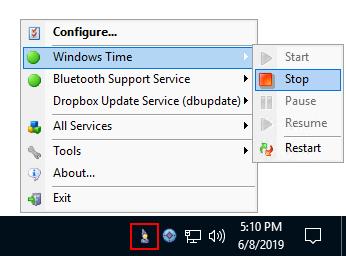
ServiceCommander is a free utility that helps you to take control of your important Windows Services. Easily start, stop, or restart selected services on any computer on your network, all conveniently from the Windows Taskbar.

Key Features & Benefits of managing your Windows Services with ServiceCommander
Start / stop / restart your important services easily from the Windows Taskbar ("system tray")
Quickly discover if your important services are running
Assemble a set of services from any computers on your network - local or remote
Manipulate all services as a group
A friendly alternative to the Windows Service Control Manager (SCM)
Avoid having to rely on the net.exe and sc.exe utilities at the command line
Код:
https://www.coretechnologies.com/products/ServiceCommander/VersionHistory.html

Homepage:
Код:
https://www.coretechnologies.com

Download link

rapidgator.net:
Код:
https://rapidgator.net/file/11072557285caddc5423e59c4a93093b/ijfeq.ServiceCommander.6.1.0.39.rar.html

uploadgig.com:
Код:
https://uploadgig.com/file/download/Dad0cBFD8f2Fb310/ijfeq.ServiceCommander.6.1.0.39.rar

nitroflare.com:
Код:
https://nitroflare.com/view/1663AA51F197CE8/ijfeq.ServiceCommander.6.1.0.39.rar

1dl.net:
Код:
https://1dl.net/ls2nm0y1fk4l/ijfeq.ServiceCommander.6.1.0.39.rar
 
Seagate Toolkit 2.4.0.9


2b3c8d0616e333cf521d53a0c10090e9.jpeg


Seagate Toolkit 2.4.0.9
File Size : 4.5 Mb​

Get the most out of your storage solution with easy-to-use tools such as Backup, Mirror, Sync Plus, Seagate Secure, and RGB and Status LED Management. See your product manual for which Toolkit activities are supported by your drive.

Whats New
Updates: official site does not provide any info about changes in this version

Homepage:
Код:
https://www.seagate.com/

Download link

rapidgator.net:
Код:
https://rapidgator.net/file/0ef7ef2d00c366712b87529832cd6342/sraew.Seagate.Toolkit.2.4.0.9.rar.html

uploadgig.com:
Код:
https://uploadgig.com/file/download/Daa20E993b9dd31b/sraew.Seagate.Toolkit.2.4.0.9.rar

nitroflare.com:
Код:
https://nitroflare.com/view/2615EB5939C36BC/sraew.Seagate.Toolkit.2.4.0.9.rar

1dl.net:
Код:
https://1dl.net/gxxnqzy38u1c/sraew.Seagate.Toolkit.2.4.0.9.rar
 
ScreenHunter Pro 7.0.1447


c24eea9745531fca3dc631edf4015aa5.jpeg


ScreenHunter Pro 7.0.1447
Windows x86/x64 | File size: 175.36 MB​

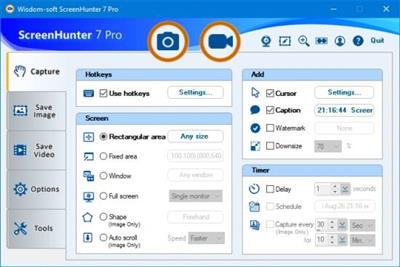
ScreenHunter 7 is an award-winning solution to all-in-one image capture, print, edit and video recording. It's the total capture solution to save you time and boost productivity. Also with auto-scroll web pages, auto-capture, webcam and video screen capture. It captures what you see as an image even whilst recording. It has an easy-to-use interface. All the features are visible in 4 easy-to-use tabs, so everyone from beginners to professionals can use ScreenHunter 7. The process is simple, the options are easy to manage, and the results are flawless. Powerful and intelligent, ScreenHunter has proven to be an incomparable helper of your business.

The software supports full screen capture up to 6K for multiple monitors and records 4K videos for a single monitor. Supports frame rate up to 100 fps.

Using DirectX lets ScreenHunter 7 produce professional quality videos. It is a perfect tool for recording movies and courses online.

Moreover, ScreenHunter 7 captures and records windows covered by another window or even minimized windows. Optimal for automatic or scheduled captures and recording.

Furthermore, you can show your webcam anywhere at any given time, so you can integrate it into your recording the way you want.

ScreenHunter Pro 7 is the most advanced version with all the necessary tools included for your screen capture needs. It's the total capture solution to save you time and boost productivity. With this tool, you can capture screen to image or PDF files, immediately see the benefits of numerous time-saving features and deliver the highest quality screenshots. As well, it offers easy-to-use user interface and maximum flexibility for a more interactive capture experience.

Capturing Features
• Rectangular area
• Adjustable rectangle
• Object / Window
• Auto-scroll
• Multi-object
• Text
• Active Window
• Fixed area (user defined)
• Specific window (lock-in window)
• Full screen
• DOS program
• DirectX / Screen saver
• Movie / video
• Freehand
• Round area (Ellipse)
• Round Rectangular area
• Polygon
• Web capture
• Scanning images

Addition Features
• Mouse pointer
• Multiple monitors
• Transparent window
• AutoText (date/time stamps, note)
• Watermark
• Border

Timing Features
• Delayed capture
• Timed auto-capture
• Scheduled auto-capture
• Recurring capture

Viewing and Editing Features
• Image editing, adding text & annotation
• Advanced image processing
• High-quality zooming, resizing & cropping
• Viewing 100 images & conversion
• Drag & drop images from desktop

Saving Features
• Automatic naming and saving to files
• Clipboard
• Auto-email
• Auto-scale
• Saving in the smallest file size
• Optimized JPEG, GIF and PNG
• High quality and transparent GIF
• Saving to TIFF

Other Features
• Screen Color Picker
• System tray
• Zoombox
• Flexible hotkey
• Multiple hotkey
• Direct printing
• Wysiwyg printing
• Developer support

Version History

rapidgator.net:
Код:
https://rapidgator.net/file/9573d01dd78269f7887e68e2561d6530/wzvqx.ScreenHunter.Pro.7.0.1447.rar.html

uploadgig.com:
Код:
https://uploadgig.com/file/download/a2A280439FE1d6e3/wzvqx.ScreenHunter.Pro.7.0.1447.rar

nitroflare.com:
Код:
https://nitroflare.com/view/01A2EB15FD47E11/wzvqx.ScreenHunter.Pro.7.0.1447.rar

1dl.net:
Код:
https://1dl.net/iu0ea8s1fqvb/wzvqx.ScreenHunter.Pro.7.0.1447.rar
 
QuickImageComment 4.53


7d6c19eecc37b8551145841ace9bce7c.jpeg


QuickImageComment 4.53
File Size : 33.4 Mb​

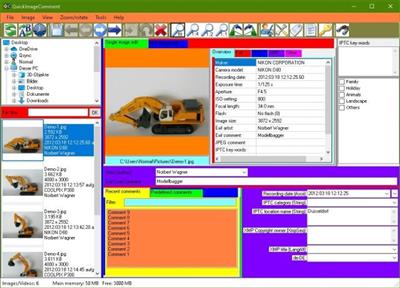
QuickImageComment displays EXIF, IPTC, and XMP properties of digital images (e.g. JPEG and TIFF) and allows to edit them. Especially editing of user comment and artist (author) is supported by using the last entered or predefined values. These attributes are read from the EXIF, IPTC, and XMP properties of the image and are stored there. Metadata (XMP) in video files are displayed.

Overview of features

Display of all EXIF, IPTC and XMP properties of images, as well as some other file properties such as modification date.
Display of metadata (XMP) of video files as well as (depending on the Windows version and, if necessary, installed components) display a frame of the video.
Images or videos can be searched via their properties or recording location on map.
In addition to the full lists of EXIF, IPTC and XMP properties a list of properties is displayed, which is configurable.
In addition to user comment and artist further EXIF, IPTC and XMP properties can be changed. The list of modifiable properties can be configured.
Data templates can be defined to set several properties in one step.
Via placeholder it is possible to copy values of properties in others.
Changes can be carried out simultaneously for two or more files.
EXIF, IPTC and XMP properties can be deleted, thereby exceptions can be defined. Single properties can be deleted selectively.
Files can be renamed using Exif, IPTC and XMP properties.
The EXIF, IPTC and XMP properties contained in the files can be compared.
A special mask is used to synchronize the recording time of a set of images taken with different cameras. Images are grouped by properties (mostly camera model). For each group, a shift of the recording time can be entered. Then the images are immediately sorted in order to check whether the images are then in the correct timely order.
Selected image properties of all images/videos in a folder (including any subfolders) can be exported to a text file.
All image properties of selected images/videos can be exported to text files (one file per image).
Display of image details with graphical and numerical representation of brightness and RGB values.
Display recording location in a map using the GPS coordinates; change of coordinates by selecting a position on the map.

rapidgator.net:
Код:
https://rapidgator.net/file/4561b36681bd929eb6f14dd034d8468a/kpspo.QuickImageComment.4.53.rar.html

uploadgig.com:
Код:
https://uploadgig.com/file/download/9ba07ac6de124edf/kpspo.QuickImageComment.4.53.rar

nitroflare.com:
Код:
https://nitroflare.com/view/D689511ADDCBF2E/kpspo.QuickImageComment.4.53.rar

1dl.net:
Код:
https://1dl.net/qbcdk6pyrraj/kpspo.QuickImageComment.4.53.rar
 
NoMachine 8.4.2 (x64)


f955246b08216e67b08c6583ccddb793.jpeg


NoMachine 8.4.2 (x64)
File Size : 57.2 Mb​

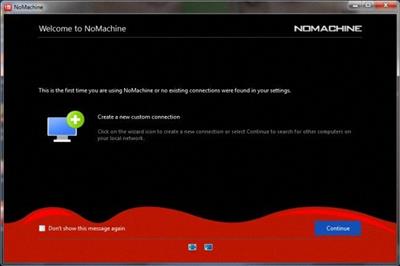
NoMachine is an incredibly fast easy-to-use remote desktop allowing you quick access to any computer in the world. Travel from your desktop to any NoMachine-enabled computer at the speed of light. NoMachine is the fastest remote desktop you have ever tried. In just a few clicks you can reach any computer in the world and start working on it as if it was right in front of you. NoMachine can turn your computer into your personal cloud. Take what's important where you go, whether it's at home or at the office. Wherever your desktop and your data is, you can reach it from the other side of the world in a few simple clicks.


NoMachine Features
Your own personal server
Private and secure
Access any time, anywhere
Share with who you want

rapidgator.net:
Код:
https://rapidgator.net/file/3cbeb6a10f908b49c8c55af96ca1e138/rmvbp.NoMachine.8.4.2.x64.rar.html

uploadgig.com:
Код:
https://uploadgig.com/file/download/4796e3d0eb4b5bB9/rmvbp.NoMachine.8.4.2.x64.rar

nitroflare.com:
Код:
https://nitroflare.com/view/8CCC2EE6AE356FF/rmvbp.NoMachine.8.4.2.x64.rar

1dl.net:
Код:
https://1dl.net/q23ro2b4q66h/rmvbp.NoMachine.8.4.2.x64.rar
 
NCH Debut Professional 9.01


e3e75b8b5fd492f182cc47334e3089e0.jpeg


NCH Debut Professional 9.01
File size: 7.0 MB​

Record and capture video from almost any source - even VHS tapes. And unlike other recording software, you can utilize key pre-production features like video color, resolution, and output settings.

Video Capture Features
Capture video directly to your hard drive
Record videos as avi, wmv, flv, mpg, mp4, mov and more video formats
Capture video from a webcam, network IP camera or video input device (e.g., VHS recorder)
Screen capture software records the entire screen, a single window or any selected portion
Digital zoom with the mouse scroll wheel, and drag to scroll the recording window
Zoom-to-mouse feature focuses the recording window on the cursor
Mouse highlighting spotlights the location of the cursor
Record video alone or video and audio simultaneously
Record audio from your microphone and speakers simultaneously, ideal for recording video conferences
Time lapse video recording
Create photo snapshots of a video at any time
Add your own text captions or time stamp your video
Change color settings and video effects before recording
Adjust the video resolution, size and frame rate for capture
Burn directly to DVD with Express Burn Disc Burner
Works with VideoPad Video Editor Softwareac
Код:
https://www.nchsoftware.com/capture/versions.html

Homepage:
Код:
http://www.nchsoftware.com

Download link

rapidgator.net:
Код:
https://rapidgator.net/file/322f8839ad49b9ff38fd69f1df8db1e0/flozz.NCH.Debut.Professional.9.01.rar.html

uploadgig.com:
Код:
https://uploadgig.com/file/download/37ba8f1d62a165ff/flozz.NCH.Debut.Professional.9.01.rar

nitroflare.com:
Код:
https://nitroflare.com/view/E910F4065D6C79D/flozz.NCH.Debut.Professional.9.01.rar

1dl.net:
Код:
https://1dl.net/o1o4ckng07lx/flozz.NCH.Debut.Professional.9.01.rar
 
NCH DrawPad Pro 10.02


59e70cc5e30ef2fa94022e66cca415f8.jpeg


NCH DrawPad Pro 10.02
File size: 10 MB​

DrawPad is an easy-to-use image composition and manipulation program, and an essential tool for all types of graphic design projects.

Features
Pencil and brush tools for drawing, sketching and painting
Ability to edit pencil & brush strokes
Tablet & touchpad pressure sensitivity
Work with both raster and vector images
Image layers allow for non-destructive editing
Layers allow you to easily rearrange elements
Add effects such as bevels and shadows
Fill areas with solid colors, gradients, patterns or textures
Editing features including crop, rotate, resize and flip
Insert shape objects, including circles, rectangles, polygons, stars, word/thought bubbles and more
Insert text and edit the font, size, color and weight
Save graphics as png, bmp, jpg, gif, pdf, or svg files
Choose a design template to get your project started
Supported Input Formats
Scalable Vector Graphics (*.svg)
Graphics Interchange Format (*.gif)
JPEG Image (*.jpg; *.jpeg)
Windows Bitmap Image (*.bmp)
Microsoft Icon (*.ico)
PNG Image (*.png)
Tagged Image File Format (*.tif; *.tiff; )
Most major graphic file formats
Supported Output Formats
PNG Image (*.png)
JPEG Image (.jpg; *.jpeg)
Windows Bitmap Image (*.bmp)
Microsoft Icon (*.ico)
Scalable Vector Graphics (*.svg)
Portable Document Format (*.pdf)
Encapsulated Postscript (*.eps)
Код:
https://www.nchsoftware.com/drawpad/versions.html

Homepage:
Код:
https://www.nchsoftware.com

Download link

rapidgator.net:
Код:
https://rapidgator.net/file/24d47e203d15ce5c25cea192a60f7688/vzgtv.NCH.DrawPad.Pro.10.02.rar.html

uploadgig.com:
Код:
https://uploadgig.com/file/download/e9c1315BE784f8fF/vzgtv.NCH.DrawPad.Pro.10.02.rar

nitroflare.com:
Код:
https://nitroflare.com/view/E61A5ED1EF8C846/vzgtv.NCH.DrawPad.Pro.10.02.rar

1dl.net:
Код:
https://1dl.net/eszh731hipsu/vzgtv.NCH.DrawPad.Pro.10.02.rar
 
NCH DreamPlan Plus 8.01


e3b22378daddbe3406a0f4fe04ed727c.jpeg


NCH DreamPlan Plus 8.01
File size: 8.0 MB​

DreamPlan Home Design Software is a user-friendly application whose main function is to provide you with the proper means of creating a 3D plan of your future home, in just a few steps. The program is very easy to work with, featuring several tabs corresponding to the operations you can perform, namely: 'Building', 'Exterior', 'Interior' and 'Landscaping'.

From the 'Building' section of DreamPlan Home Design Software, you can create your house from scratch, adding walls of any length you want, that will automatically be placed in straight angles. The utility enables you to select from three types of windows: 'Classic', 'Sliding' and 'Panel'. You can also add 'Interior' and 'Exterior' doors or 'Door Frames'.
DreamPlan Home Design Software allows you to choose the 'Floor Style' from several available 'Textures', in a color of your prefer. Moreover, you can add a 'Roof', with plenty of style options to select from, and adjust its 'Slope' and 'Eave' levels. Last, but not least, you can paint the walls of your house in any color you want.
Home & Floor Plan Design
Switch between 3D, 2D, and blueprint view modes
Easily design floor plans of your new home
Easy-to-use interface for simple house design creation and customization
Landscape & Garden Design
Plant trees and gardens
Build the terrain of outdoor landscaping areas
Visualize your new outdoor swimming pool design
Download additional content to spruce up your outdoor living space
Interior & Room Design
Include every detail in your kitchen design
Explore bathroom design ideas prior to building
Plan home decor with 3D furniture, fixtures, appliances and other decorations
Lay out and design your unfinished basement
Remodeling, Additions & Redesigning
Create walls, multiple stories, decks and roofs
Try colors and textures before you commit
Transform existing rooms
Код:
https://www.nchsoftware.com/design/versions.html

Homepage:
Код:
https://www.nchsoftware.com

Download link

rapidgator.net:
Код:
https://rapidgator.net/file/fe3f0cc5bfcb823ddc4214ad6bf51499/idvhm.NCH.DreamPlan.Plus.8.01.rar.html

uploadgig.com:
Код:
https://uploadgig.com/file/download/ce46958540c95214/idvhm.NCH.DreamPlan.Plus.8.01.rar

nitroflare.com:
Код:
https://nitroflare.com/view/65E47015B1C6D7A/idvhm.NCH.DreamPlan.Plus.8.01.rar

1dl.net:
Код:
https://1dl.net/1t4t52djluzc/idvhm.NCH.DreamPlan.Plus.8.01.rar
 
NCH Express Animate 9.00


0d952f4de10aeed7a4e964a1a88308f5.jpeg


NCH Express Animate 9.00
File size: 6.0 MB​

Express Animate is animation software that gives you the ability to animate shapes, text and imported images. You are also able to enhance your movie projects in post-production using key-frame motion animation, masking, dummy objects and more.

Features
Add video and image files to your movie canvas
Objects can be moved, resized, rotated and more
Apply digital effects, such as brightness, contrast, negative and more
Key frames can be applied to each object and parameter
Add text to your video project
Create animated text and text bubbles
Add audio tracks or record audio
Apply effects to audio tracks
Group objects for easy editing
Add masks to an object
Export as video, flash, html5 or an animated GIF
Free to download and easy to use
Works seamlessly with VideoPad Video Editor
Код:
https://www.nchsoftware.com/animation/versions.html

Homepage:
Код:
https://www.nchsoftware.com/

Download link

rapidgator.net:
Код:
https://rapidgator.net/file/fa69d6a232f0039c8e3fa31e1711fa06/mrrpm.NCH.Express.Animate.9.00.rar.html

uploadgig.com:
Код:
https://uploadgig.com/file/download/9a9e805d1BeaB0c6/mrrpm.NCH.Express.Animate.9.00.rar

nitroflare.com:
Код:
https://nitroflare.com/view/12EBA7C68486A6E/mrrpm.NCH.Express.Animate.9.00.rar

1dl.net:
Код:
https://1dl.net/ylbv03ec0mem/mrrpm.NCH.Express.Animate.9.00.rar
 
Назад
Сверху