• Форум работает в архивном режиме www.old.nado.in

All mitsumi'1s Applications !! (updated daily)

  • Автор темы Автор темы mitsumi1
  • Дата начала Дата начала
Office 2013-2021 C2R Install / Install Lite 7.4.9 b02


ff7cccd65ce0f81b94b64db30d9516eb.jpeg


Office 2013-2021 C2R Install / Install Lite 7.4.9 b02
File size: 41 MB​

This program designed for on-line installation and activation Microsoft Office 2013/2016/2019/2021 C2R. You also can create custom installation of Office off-line for using later.

How to use the program
1. Uninstall Office via (Control panel) applet "Add or remove Programs".
2. Uninstall Office using the "Force Remove Office" and restart your computer.
3. Install Office by clicking the "Install Office" button.
4. Go to "Utilities" tab and do the conversion "Office RETAIL - VL".
5. Then click "Activate Office" button.
How to use Bookmark Download Office
Bookmark Download Office serves to create the off-line installation varying versions and editions of Microsoft Office
with the possibility for the subsequent installation of the product without receiving files from outside..
1. Select the appropriate version of Office, bit and language. I recommend to make a full x86-x64 distribution.
To do this, select the tab-width All (the lowest). Click the Download button and choose a folder to the distribution files.
You can select the folder of the previous session of the program to further develop distribution, or will start a new session.
2. If you want to make multilingual distribution - after complete loading of the first language, switch to the pre-
Executive language, click the Download button, and select the same download folder.
3. After downloading all required bit and spoken recommend creating ISO-image office suite.
To do this, click Create ISO.
4. As a result, in the selected folder you will see a ready to use off-line installer Microsoft Office
chosen version.
In one session, downloading files does not use different versions of MS Office 2016 and 2013. It is possible to manipulate
with x86-x64 and languages, but not versions. Or use a different folder assignment is. Otherwise you will get unusable distribution.
5. Now you can create multiple projects distributions of return, additions and corrections have
downloaded. You can choice the versions builds. For Office 2013 Branch-choice and does not matter. Always will
be download the most current build. For Office 2016, you can choose the source of download (branch). Button Check version
has been added to check the build number the selected Branch.
Whats New
Fixed bugs
Fixed dark mode

Homepage:
Код:
http://forum.ru-board.com/topic.cgi?forum=2&topic=5820&start=0

Download link

rapidgator.net:
Код:
https://rapidgator.net/file/8b499ae41be36bf7ebb28da992d68be8/jwdfz.Office.20132021.C2R.Install..Install.Lite.7.4.9.b02.rar.html

uploadgig.com:
Код:
https://uploadgig.com/file/download/03ebE1991786e86F/jwdfz.Office.20132021.C2R.Install..Install.Lite.7.4.9.b02.rar

nitroflare.com:
Код:
https://nitroflare.com/view/F723BD734F551E3/jwdfz.Office.20132021.C2R.Install..Install.Lite.7.4.9.b02.rar

1dl.net:
Код:
https://1dl.net/zfrciy4ryqcj/jwdfz.Office.20132021.C2R.Install..Install.Lite.7.4.9.b02.rar.html

 
Patterns - The Regex App 1.2 macOS


33fd7d123173fb862f0e5aef80a10360.jpeg


File size: 2.40 MB​

Patterns is the ultimate tool for working with regular expressions. Build great patterns quickly and effortlessly with regex syntax highlighting, live match view, replace mode, built-in quick reference, and much more. Whether you're a seasoned regex wizard or new to regex, Patterns is the only tool you'll ever need.

FEATURES
- Regular expression syntax highlighting makes it easy to see how your pattern is interpreted by the regex engine. No more confusion about what needs to be escaped.
- The Matches view lets you inspect all matches and captured text produced by your regex, alongside your search text. Clicking on a match or group highlights both the matched search text and the specific portion of your regex that produced the match or capture.
- See matches, replacements, and filter results in real time while you edit your pattern.
- Use the Copy Code feature to quickly export your pattern for use in a number of different programming languages.
- The built-in regular expression quick reference sheet helps you learn and expand your knowledge of regex syntax.
- Customize the regex engine for different regex "flavors". Supported flavors are: Oniguruma, POSIX Basic (BRE), POSIX Extended (ERE), Perl (PCRE), emacs, Java, Ruby, bash, grep, and sed.
Release Notes
Код:
https://geo.itunes.apple.com/app/id429449079

Supported Operation System
• OS X 10.7 or later
• Intel Core processor

Homepage:
Код:
http://apps.apple.com/app/patterns-the-regex-app/id429449079

Download link

rapidgator.net:
Код:
https://rapidgator.net/file/de263107e3a7fc2aa187d555da4ba54a/lgpjf.Patterns..The.Regex.App.1.2.macOS.dmg.html

uploadgig.com:
Код:
https://uploadgig.com/file/download/51c38F5f8deEd7B6/lgpjf.Patterns..The.Regex.App.1.2.macOS.dmg

nitroflare.com:
Код:
https://nitroflare.com/view/0173CA6D479EA7D/lgpjf.Patterns..The.Regex.App.1.2.macOS.dmg

1dl.net:
Код:
https://1dl.net/ge65qlw1w6e9/lgpjf.Patterns..The.Regex.App.1.2.macOS.dmg.html
 
PDF Annotator 9.0.0.906 Multilingual


4932c8fcf47a54acd456234f780511ec.jpeg


Windows x64 | File size: 106.86 MB​

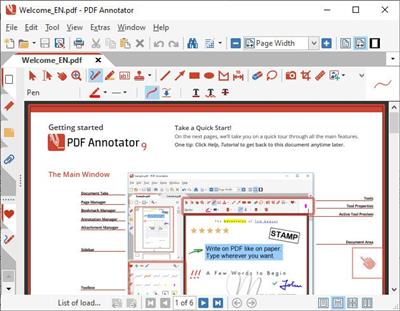
PDF Annotator lets the user open any PDF file and add annotations, using the mouse or a Tablet PC pen, directly on the PDF file's pages. The annotated documents can then be saved directly back to PDF format. In this way, anyone can read or print the annotated PDF documents. Annotated documents can also be easily attached to emails.

Previously, annotating, commenting or proofreading a document received for review in PDF file format was possible only by using multiple software products in a row--or only by printing the document and adding comments manually. With PDF Annotator, annotations can also be added in a natural way--using a pen--but everything remains in digital format. PDF Annotator allows commenting of PDF files in a single step.
Annotation Manager in the Sidebar
• Get a quick overview of all annotations in a document.
• Navigate to any annotations quickly.
• Perform operations on any selection of annotations.
Filter Annotations
• Only display a filtered subset of your annotations in the new Annotations sidebar.
• Filter by type, color, or page number.
Print Annotations Overviews
• Print a detailed list with small previews of every single annotation in a document.
• Print an overview only outlining the pages containing annotations.
Код:
http://www.pdfannotator.com/pdfannotator/std/en/History.txt
Compatible OS:Windows 10/8.1/8/7 (64 bit)

Homepage:
Код:
http://www.pdfannotator.com/

Download link

rapidgator.net:
Код:
https://rapidgator.net/file/5d9eab0bd3f0de9cf82b2b87ffa96691/eufhv.PDF.Annotator.9.0.0.906.Multilingual.rar.html

uploadgig.com:
Код:
https://uploadgig.com/file/download/619784bc26918533/eufhv.PDF.Annotator.9.0.0.906.Multilingual.rar

nitroflare.com:
Код:
https://nitroflare.com/view/8511175B2BB74B9/eufhv.PDF.Annotator.9.0.0.906.Multilingual.rar

1dl.net:
Код:
https://1dl.net/9pjgyye1f67t/eufhv.PDF.Annotator.9.0.0.906.Multilingual.rar.html
 
PerkinElmer ChemOffice Suite 2022 v22.0.0.22


fb56b16bb1dd21088f0acd758eed1d5e.jpeg


PerkinElmer ChemOffice Suite 2022 v22.0.0.22
Languages: English
File Size: 809.27 MB​

ChemOffice is a scientifically intelligent, integrated suite of personal productivity tools that helps scientists to efficiently keep track of their work, gain a deeper understanding of their data and produce scientific reports professionally and efficiently. ChemOffice is a Desktop suite of the most advanced capabilities of the ChemDraw products. ChemOffice offers the best of all of the ChemDraw capabilities rolled into one. Learn more about all of the powerful drawing capabilities or test it out for yourself.

Bringing your Molecules to Life
- Have you ever wished you could easily and quickly communicate your chemistry research and reporting in 3D without the cumbersome process of using specialized software? Now you can. ChemOffice allows you to paste a live 3D rendering of your molecule natively in PowerPoint, as well as save molecules as 3D printable objects.
Wouldn't it be nice to see if the chemical structures you have drawn already exist in the patent literature? ChemOffice integrations with Google Scholar and Google Patents allow you to quickly and easily access the most relevant and up-to-date information.
- Would having immediate safety information, including H&P Phrases as well as GHS Pictograms, at your fingertips safeguard your research? With integration to PubChem Laboratory Chemical Safety Summary (LCSS), you can.
ChemOffice Suite includes the following applications
ChemDraw
Is used by hundreds of thousands of scientists around the world to quickly and effectively to draw molecules and reactions for use in documents and electronic lab notebooks, to search databases, and to generate accurate names from structures and to predict properties and spectra.
ChemDraw for Excel
Adds chemical intelligence to Excel spreadsheets so that chemists can use Excel's analysis, sorting and organization tools to further manipulate and enrich sets of compounds and data and explore structure-activity relationships
Chem3D
Generates 3D models so that chemists can view their compounds in three dimensions to assess shape and properties to maximize activity or specificity
ChemFinder
Is a chemically-intelligent personal database system that scientists use to organize their compounds and to search for and correlate structures with properties.
Release Notes
It is our pleasure to introduce the newest release of ChemDraw and ChemOffice 22.0. This release contains several key improvements and enhancements that support the drawing and representation of large molecules and new therapeutic drug delivery modalities.
These new features include
Drawing Large Molecules (Oligonucleotides, peptides, etc) (ChemDraw Professional) - There have been significant improvements in the representation of biopolymers.
These include
- Graphical Representation of Sequences: accessible through a new style sheet, this gives scientists a visual representation of peptides or oligonucleotides. These are shaped according to polymer type, and color coded according to the natural residues they represent, giving a scientist a way to quickly view their entire complex biopolymer. Any graphic is easily expandable to reveal the molecular structure of residue in a sequence, lending for a quick way to emphasize only the most important parts of the biopolymer.
- FASTA Support: ChemDraw now fully supports FASTA format for sequences, allowing users to paste a FASTA string into ChemDraw as HELM monomer sequences. This also includes ambiguous monomer support which are combinations of other monomers, known as 'OR Monomers.' These will be badged in the graphical representation to show the number of monomers that make up an ambiguous monomer label.
- Natural Monomer Library: A new monomer library has been added to the HELM Editor for quick and easy access to natural monomers.
Hydrogen Bonds (ChemDraw Prime)
It is now possible to draw and represent hydrogen bonds in ChemDraw. Formerly, dotted lines were used to represent hydrogen bonds, however they were not chemically recognized. ChemDraw now has a specific bond tool for placement of such bonds and explicitly recognizes these robustly and correctly, identifying hydrogen bond donors and acceptors. Hydrogen bonds are now correctly written to cdxml and MOL files.

System Requirements
- Windows 10, 11 (64-bit)
- Microsoft Office 2019, 2021, 365
- Adobe Acrobat DC

Homepage:
Код:
http://www.perkinelmer.com

Download link

rapidgator.net:
Код:
https://rapidgator.net/file/67bd6a3a5474ed3f1f7e4c435bbeeb92/spisx.PerkinElmer.ChemOffice.Suite.2022.v22.0.0.22.rar.html

uploadgig.com:
Код:
https://uploadgig.com/file/download/dc26958F93B1143C/spisx.PerkinElmer.ChemOffice.Suite.2022.v22.0.0.22.rar

nitroflare.com:
Код:
https://nitroflare.com/view/9802EAD6FF271E5/spisx.PerkinElmer.ChemOffice.Suite.2022.v22.0.0.22.rar

1dl.net:
Код:
https://1dl.net/glunkjuedzmf/spisx.PerkinElmer.ChemOffice.Suite.2022.v22.0.0.22.rar.html
 
Prima Cartoonizer 5.0.5


7699e7a61ad761677775ae920d28329f.jpeg


Languages: English
File Size: 132.69 MB
​

Convert photos into cartoons with just few clicks of a mouse with our Prima Cartoonizer for PC. Now, you can convert all of your pictures and images into cartoon effect more quickly and precisely. You can convert large or high-quality photos into cartoons with best results. Besides, you can also edit your photos and make multiple adjustments even before or after converting them. Add many items, crop your photos, resize and adjust the brightness and contrast.

Enjoy fantastic cartoon effects with Prima Cartoonizer!
- Amazing Cartoon Effects!
- Automatic conversion process!
- It works without internet connection!
- Output image size up to 4096px!
It's the time to replace the cookie cut forum avatar by a real cartoon of you
- The good thing is that you can let the people know how you look like without sharing your actual photo but a cartoon of yourself.
- You can make cartoons of your friends, pets, house, neighborhood and especially the celebrities and the politicians.
- Cartoons will be the best gift for your family and friends. You can also use them on mugs and T-shirts.
- Undoubtedly, this software is a great fun and addictive, too. It is very easy to use and also intuitive.
- No need of great artistic skills because no manual drawing is involved.
- The software uses very novel technology to execute the whole process.
- First of all, it splits the image into solid color patterns just similar to a mosaic. After that, it converts the minute details of the image into cartoon format.
- Since it applies effects throughout the photo, the end result is always of high-quality.
- Cartoon yourelf without any Watermark or Logo!
- Standalone software!
Comes with several neat customization features
Following a quick installation, you are prompted to add a picture to get started, an event that also brings forth the effects, features and options of the application. Therefore, on the ride side, you can use the small menu to customize the brightness, contrast and RGB. The app also comes with a zoom feature that can come in handy when adjusting these parameters.
An app for anyone who enjoys cartoons or this particular effect
Depending on the number of effects you want to add to your pictures the conversion process can take some time. But then again, nobody is really in a hurry when processing images and overall, it's not a big setback. All in all, Prima Cartoonizer is an easy to use application that provides an effective way to add a toon effect to your images.
More Features
- You can even make all types of adjustments with the cartoonized photo.
- Avail multiple effects to make your pictures desirable and mesmerizing.
- You can conveniently convert your photos into cartoons just within seconds.
- It is extremely simple software with the main theme of turning images into cartoons.
- It allows the users to covert photos into cartoons really fast than normal process.
- With the help of crop function, you can remove any unwanted part/parts of your image.
- You can edit your images and adjust the brightness and the contrast...etc
- No other standalone program or software is needed; it does all the functions itself.
- The converted cartoon does not contain any watermark or logo. (Paid version only)
- You need not to save the photo to print it. You can do it right from within your software.
- Resize function available, you can resize your photo before or after the conversion.
- Different goodies enhance the overall fun and joy, thus bringing extra colors to your cartoons.
Release Notes
- Release notes were unavailable when this listing was updated.

System Requirements
Windows 11, 10, 8.1, 7 (64-bit)

Homepage:
Код:
https://primacartoonizer.com

Download link

rapidgator.net:
Код:
https://rapidgator.net/file/9b7c15fa18056c616e4abafba49c07fd/asepu.Prima.Cartoonizer.5.0.5.rar.html

uploadgig.com:
Код:
https://uploadgig.com/file/download/728e9f139cBdeeCd/asepu.Prima.Cartoonizer.5.0.5.rar

nitroflare.com:
Код:
https://nitroflare.com/view/9771408391B0C10/asepu.Prima.Cartoonizer.5.0.5.rar

1dl.net:
Код:
https://1dl.net/omc8ifwgmrkl/asepu.Prima.Cartoonizer.5.0.5.rar.html
 
ProFind 1.17.0 macOS


e986498622fb91259baec2f0c06d7d72.jpeg


File size: 13 MB​

ProFind is advanced file search app for macOS. With powerful features and great performance, ProFind delivers advanced file search for macOS. And with support for natural language queries, application launching, hidden location searches, scripting and more.

Search inside invisible folders and packages. Searches any disk type.
Uses kernel based searching (searchfs) when available. Uses metadata indexes (as used by Spotlight) when available to improve performance. Autocompletion for application names. Large icon view for one or two search results.
Under it's elegant user interface, ProFind combines the power of macOS's different search capabilities to make sure it finds all the files your looking for. And it's been carefully tuned for performance and responsiveness.
Full Feature List
Natural language search queries.
Unlimited search results.
Search inside invisible folders and packages.
Searches any disk type: Mac, Windows, servers, etc.
Supported search locations: home, mac disks, local disks, servers, individual disks, open Finder folders.
Search Saving and History.
Search by: name, creation date, modification date, file extensions, tags, parent folders, kind, regex, wildcards and spotlight Metadata.
Exclude (-) words.
Hashes: md4, md5, sha1, sha224, sha256, sha384, sha512. (Show Advanced Info).
Autocompletion for application names, command names and keywords.
Full, non obscured, display of file paths with path diference highlighting.
Large icon view for one or two search results.
Spatial disk browsing (with saving of window positions, size, scroll position, etc).
Support for executing shell and AppleScripts on found items.
Highlighting of found words.
Sidebar featuring: Saved Searches, History, Favorites, Recent Items, Built-in searches for recent downloads and recent changes files.
Context menus: Sharing, Services, Open, Show In Finder, Get Info, Copy Path.
Quick access to favourite folders.
QuickLook previews.
Supports Dark Mode (10.14 Mojave).
Drag and drop out of the app.
Menu bar icon on/off.
Fully configurable system wide hot key.
Built in command reference.
Release Notes
Updates: official site does not provide any info about changes in this version

Supported Operation Systems
macOS 10.13 or later

Homepage:
Код:
https://www.zeroonetwenty.com/profind/

Download link

rapidgator.net:
Код:
https://rapidgator.net/file/e81074d80d2a6902953a47993b10b6a2/aoupa.ProFind.1.17.0.macOS.dmg.html

uploadgig.com:
Код:
https://uploadgig.com/file/download/47897d75Ca373eBF/aoupa.ProFind.1.17.0.macOS.dmg

nitroflare.com:
Код:
https://nitroflare.com/view/3F00418E4A95148/aoupa.ProFind.1.17.0.macOS.dmg

1dl.net:
Код:
https://1dl.net/725p6q8cwne1/aoupa.ProFind.1.17.0.macOS.dmg.html
 
PullTube 1.8.4.16 U2B macOS


82517a01ce34a7cfc8b5c0ad8776a5f2.jpeg


File size: 112.28 MB​

PullTube - online video downloader. Download online video, audio, playlist, subtitles from over a 1,000+ websites!

Unique set of features:
Built-in Media Converter
Convert Vimeo, Youtube videos to MP4 or just save audio to MP3 and M4A. Save 8K, 4K, HD, 50fps videos. Video parts are stitched into one file automatically.
Trim Video and Audio
Want to crop several seconds of that inspiring Youtube video? No need to download an entire media file.
Smart Extensions
Chrome, Safari, Firefox extensions send links to Pulltube or its download later list. If there's video content on a web page, you can trust Pulltube to save it onto your Mac.
Gestures and Shortcuts
Use long and short swipe gestures & keyboard shortcuts to use the app even faster.
Full List of Features
• Download videos with 8K, 4K, HD & 60fps support
• Simply drag & drop and copy and paste videos to download
• Download subtitles (including Youtube auto-generated) with your videos
• Supports HEVC (h265), VP9/8 (Webm), AV1 video codecs
• Save media thumbnails
• Convert videos to mp3 & mp4a formats
• Use clever Chrome, Safari, Firefox extensions to download faster
• Trim Youtube videos on the fly
• Recognize when videos are part of a playlist & choose which to download
• HTTP/SOCKS proxy support for location restricted downloads
• Keep download history
Save video, playlists, audio and subtitles from YouTube, Vimeo, TikTok, Facebook, Instagram, Bilibili, SoundCloud and hundreds more!
Release Notes
Код:
https://updates.mymixapps.com/mmaptupd-rnotes1

Supported Operation System
• macOS 10.12 or later
• Apple Silicon or Intel Core processor

Homepage:
Код:
http://mymixapps.com/pulltube

Download link

rapidgator.net:
Код:
https://rapidgator.net/file/10b5c726fe0eeffd852d74868f8deb7e/qmfms.PullTube.1.8.4.16.U2B.macOS.dmg.html

uploadgig.com:
Код:
https://uploadgig.com/file/download/a782388aC0d63C18/qmfms.PullTube.1.8.4.16.U2B.macOS.dmg

nitroflare.com:
Код:
https://nitroflare.com/view/4E3B5EC8CAC3BE5/qmfms.PullTube.1.8.4.16.U2B.macOS.dmg

1dl.net:
Код:
https://1dl.net/dtb2jx8w76l9/qmfms.PullTube.1.8.4.16.U2B.macOS.dmg.html
 
Recordia 2.6.0 macOS


a477be655b29584c3fb0f6e4b6293dbe.jpeg


File size: 5.23 MB​

Recordia lets you record audio directly from the menu bar or with a global keyboard shortcut.
This can be useful for recording voice memos, song ideas, meetings, lectures, interviews, phone calls, voice-overs, and more.

Features
- Record compressed or lossless audio.
- Customizable keyboard shortcuts to start/stop and pause/resume recording.
- Change input device.
- Unlimited recording duration.
- Set default output directory.
- Optionally show the recording in Finder when done.
- Easily copy and share the previous recording.
- Launch at login preference.
- Record system audio (See FAQ below).
- Choose between multiple menu bar icons.
Technical details: It records at 48 kHz to either M4A (AAC, 256 kbps, compressed) or WAV (PCM, 16-bit, uncompressed). The recording is stereo if the input device supports it, otherwise mono.
FAQ
→How can I preview the recording when done?
First, ensure the "Show recording in Finder after saving" preference is enabled. When the recording is shown in Finder, press the Space key to preview it.
→How can I trim the recording when done?
Preview the recording as described above and then click the trim button.
→How can I record system audio?
Click "Record System Audio" in Recordia and follow the instructions.
→How can I sync recordings to iCloud?
Choose "iCloud Drive" as the output directory.
→Why 48 kHz and not 44.1 kHz?
48 kHz is the standard for audio in today's video production. It's also the internal production standard for many audio production companies. 44.1 kHz was popularized by music CDs.
Release Notes
Код:
http://apps.apple.com/app/recordia/id1529006487

Supported Operation System
• macOS 12.3 or later
• Apple Silicon or Intel Core processor

Homepage:
Код:
http://apps.apple.com/app/recordia/id1529006487

Download link

rapidgator.net:
Код:
https://rapidgator.net/file/69df0fa46a6bbb469f140547f42608de/ozodu.Recordia.2.6.0.macOS.dmg.html

uploadgig.com:
Код:
https://uploadgig.com/file/download/67F4c592185f7886/ozodu.Recordia.2.6.0.macOS.dmg

nitroflare.com:
Код:
https://nitroflare.com/view/36E0F5325A4A148/ozodu.Recordia.2.6.0.macOS.dmg

1dl.net:
Код:
https://1dl.net/sxbmuh6ivz4g/ozodu.Recordia.2.6.0.macOS.dmg.html
 
Screen Timelapse 1.7 macOS


765663700bfc4a8d9ef39505b48745dc.jpeg


File size: 11.27 MB

Screen Timelapse saves screenshots of what you're working on and makes them searchable.​


Use it to
• Share screenshots and timelapses with your co-workers.
• Keep a permanent record of what you're working on.
Release Notes
Код:
https://geo.itunes.apple.com/app/id1629620421

Supported Operation System
• macOS 12.1 or later
• Apple Silicon or Intel Core processor

Homepage:
Код:
http://apps.apple.com/app/digital-surfaces/id1629620421

Download link

rapidgator.net:
Код:
https://rapidgator.net/file/c028851cbd6079c5b3419d2403aec94d/uyokj.Screen.Timelapse.1.7.macOS.dmg.html

uploadgig.com:
Код:
https://uploadgig.com/file/download/20b7a2856C5dB10f/uyokj.Screen.Timelapse.1.7.macOS.dmg

nitroflare.com:
Код:
https://nitroflare.com/view/07E690E5FA11975/uyokj.Screen.Timelapse.1.7.macOS.dmg

1dl.net:
Код:
https://1dl.net/ituwz38el1z6/uyokj.Screen.Timelapse.1.7.macOS.dmg.html
 
Stacks (RapidWeaver plugin) 4.3.0 macOS


4cccc9397da2020fae432880948436c7.jpeg


File size: 23 MB​

Stacks is a new way to create pages in RapidWeaver. It's a plugin designed to combine drag-and-drop simplicity with the power of fluid layout. Powerful, flexible, and extensible. Stacks turns RapidWeaver into a professional-grade web development tool. With a community of developers and hundreds of pre-made stacks, you can build anything

Features
• Fluid Layout: Stacks lets you build pages that flow text to the dimensions of a theme even if the theme has a variable width. You can build flowing columns, flexible rows, and tiles of images.
• Nesting Objects: Build columns within columns within rows within columns. Or group a stack of objects inside a box. Almost anything is possible with Stacks.
• Download More Stacks:There are hundreds of professionally designed free and low cost stacks ready for download. Easily add amazing content to your site.
• Live Image Editing: Resize, rotate, and style your images with an easy to use HUD and see the changes happen right in the layout.
• Pros Welcome: Because Stacks builds layout with relative positioning from a simple two-div structure, the HTML is clean and valid. Pros can use Stacks to prototype difficult layout and add their own HTML to the mix.
• Stacks API: You can build your own components for Stacks or even publish them for others to use. The Stacks API reference covers how to build and configure a stack and even build a custom UI for the Stacks HUD.
Requirements:RapidWeaver 8 or later
Release Notes
Updates: official site does not provide any info about changes in this version

Supported Operation Systems
macOS 10.12 or later

Homepage:
Код:
http://www.yourhead.com/stacks/

Download link

rapidgator.net:
Код:
https://rapidgator.net/file/0fea11047f54b1b5abda7afa50112215/rdjrb.Stacks.RapidWeaver.plugin.4.3.0.macOS.dmg.html

uploadgig.com:
Код:
https://uploadgig.com/file/download/9f3ff2b727e8AE68/rdjrb.Stacks.RapidWeaver.plugin.4.3.0.macOS.dmg

nitroflare.com:
Код:
https://nitroflare.com/view/70DCD10708CAE13/rdjrb.Stacks.RapidWeaver.plugin.4.3.0.macOS.dmg

1dl.net:
Код:
https://1dl.net/ifth2vpai8iy/rdjrb.Stacks.RapidWeaver.plugin.4.3.0.macOS.dmg.html
 
SyncTime 4.2.2 macOS


dc32e00c9f69d0fe98a631256dd337bc.jpeg


File size: 10.24 MB​

SyncTime is the simplest solution to synchronize your files. Did you ever wish you could easily keep up to date all your backup copies, distributed across many devices? SyncTime will just do it.

SyncTime is capable of so many things, yet is so simple to use. From manual, scheduled or completely automatic syncing, to background syncing, bidirectional syncs and sophisticated exclude filters, you'll be able to set up your syncs exactly as you imagine.
You can create as many sync items as you need and customize each one individually. A sync item mainly consists of two folders: a source and a destination. You can choose any two folders reachable in the Finder: they can be located on your Mac, on an external drive, like a USB stick, or even on a remote server.
Among the possible options you will find
• Four overwrite policies: don't touch files already existing on the destination, overwrite only if the source file is newer than the destination file, overwrite if the source file has a different timestamp or overwrite always
• Three sync types: one-way sync (default), two-way sync (merge source and destination) and one-way move (delete the source files after a successful transfer to the destination). Please read carefully about these sync types in the Help section on the SyncTime website
• Remove files that don't exist on the source anymore
• Background syncing: changes are monitored in real time in order to keep your destination always up to date
• Start to sync automatically whenever source and destination become available or sync once a day, a week or a month
• Every sync item can be dependent on other sync items: it will trigger the dependencies and run automatically when they are all completed
• Files to be overwritten or removed can be moved to the trash or to a custom backup directory
• Exclude hidden files, files with names containing specific words or matching a regular expression, and selected files. Or exclude the root directory and specify just some included files.
Other features include
• Changes have to be confirmed by default and you can inspect the files that will be added, overwritten and removed and preview them in QuickLook
• Cancel a running sync at any time and restart it later
• Syncs run in parallel
• Automatic launch on login can be enabled from the status bar menu
• Your Mac can automatically be set to sleep or shut down after all syncs have finished (requires the respective Applescripts to be installed in the Scripts directory. For detailed instructions, please visit the website).
Release Notes
Код:
https://itunes.apple.com/app/synctime/id590386474

Supported Operation System
• OS X 10.10 or later
• Apple Silicon or Intel Core processor

Homepage:
Код:
http://itunes.apple.com/app/synctime/id590386474

Download link

rapidgator.net:
Код:
https://rapidgator.net/file/f8ea544244a000a4eb7262fcb89ecb0d/leefh.SyncTime.4.2.2.macOS.dmg.html

uploadgig.com:
Код:
https://uploadgig.com/file/download/502AB925989c1f8d/leefh.SyncTime.4.2.2.macOS.dmg

nitroflare.com:
Код:
https://nitroflare.com/view/190134645543BDB/leefh.SyncTime.4.2.2.macOS.dmg

1dl.net:
Код:
https://1dl.net/43gjri5qivk7/leefh.SyncTime.4.2.2.macOS.dmg.html
 
Q-Dir 11.15 Multilingual


12fe5fe573e16b8e59cbdabaabcda7c1.jpeg


File size: 2.0 MB​

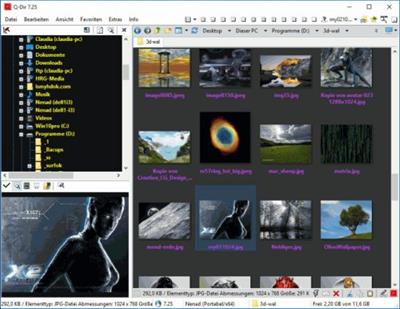
Q-Dir (the Quad Explorer) makes your files and folder easy to manage, as an installed or portable Windows program. Fast and easy access to your hard disks, network folders, USB-Stiks, floppy disks and other storage devices. Q-Dir i a good file manager with an amazing Quadro-View technique. You don't have to renounce the usual, Drag and Drop, all Views, and other functions of your system.

Q-Dir does not have to be installed and can be executed easily from the desktop. Rename Q-Dir_Installer.exe to Q-Dir.exe and GO.
It's a small famous utility for Windows PC-s and also an USB-stick friend :).
Features
Favorites: - Quick access to most often used folders.
Drag&Drop: - Move files by dragging in Q-views, and other programs such as MS Explorer.
Clipboard: - Copy/ Paste between the Q-Dir directory views, and other programs such as MS Explorer.
Folder-Type: - ZIP-, FTP-,cabinet-,network-, system - folders, shortcuts ...
Views: - Large icons, tiles, list, detail, thumbnail (Vista: extra large symbols) .
Export: - to XLS, CSV, TXT, HTML.
Popup Menus: - Desktop, My Computer.
Screen magnifier: - anything on the screen can be enlarged.
Color Filter: - Different colors for different item types (e.g. *.log;*.txt).
Highlight-Filter: - Effective way for fast items highlighting.
File-Filter: - Allows for quick and easy filtering of the items.
Columns: - All columns support, and save function .
Quick-Link's: - For fast folder access.
Folder-Select: - Fast & flexible folder selection address-bar/ desktop menu/ my-computer menu/...
Multi-INI: - Several INI files for Q-Dir.
Tree-View: - Simple and quadruple.
Preview: - Allows a quick preview.
Код:
http://www.softwareok.com/?seite=Freeware/Q-Dir/History

Homepage:
Код:
http://www.softwareok.com

Download link

rapidgator.net:
Код:
https://rapidgator.net/file/93d63a11281db5bcad6b8d37ad918592/zqzyj.QDir.11.15.Multilingual.rar.html

uploadgig.com:
Код:
https://uploadgig.com/file/download/aCf4809ee9e500b7/zqzyj.QDir.11.15.Multilingual.rar

nitroflare.com:
Код:
https://nitroflare.com/view/56ABD174B2602DC/zqzyj.QDir.11.15.Multilingual.rar

1dl.net:
Код:
https://1dl.net/rsusyf91apbu/zqzyj.QDir.11.15.Multilingual.rar.html
 
QuickMemoryTestOK 4.21


dcd063fa280b05187678a45745ccf3cf.jpeg


File Size : 0.5 Mb​

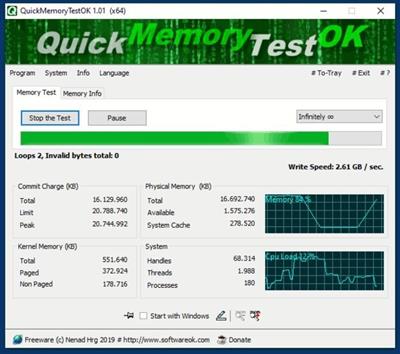
A small but effective program to quickly check the RAM for errors before the warranty expires!
Today you buy PCs with 16, 32, 64, 128, ... Giga-Bit RAM, but these are usually never used or addressed on most computers. For this reason, you should undergo a test, as long as the warranty does not expire. To make sure that there is no defective area in the main memory that you should use in the future. Or just test your Windows on the high memory behavior to provoke other system errors or so ....

QuickMemoryTestOK Key Features
◆ Memory Quick Test
◆ Pause test to monitor the PC with high RAM load
◆ Customizable test runs
◆ Clear display of memory status
◆ Keep the CPU's behavior in mind
◆ Access to essential memory and system functions

Other options and specifications

◆ Zoom: Visually-impaired and eye-friendly
◆ Very small program
◆ Low CPU usage
◆ Optional translation capability
◆ Portable
◆ Multilanguage
Код:
http://www.softwareok.com/?seite=Microsoft/QuickMemoryTestOK/History

Homepage:
Код:
http://www.softwareok.com

Download link

rapidgator.net:
Код:
https://rapidgator.net/file/74154833a9ccd8934266c9d73ca4283b/gztje.QuickMemoryTestOK.4.21.rar.html

uploadgig.com:
Код:
https://uploadgig.com/file/download/998cf8d8962C23a6/gztje.QuickMemoryTestOK.4.21.rar

nitroflare.com:
Код:
https://nitroflare.com/view/772DF4F5CAF8781/gztje.QuickMemoryTestOK.4.21.rar

1dl.net:
Код:
https://1dl.net/4nrrfcrzuuxw/gztje.QuickMemoryTestOK.4.21.rar.html
 
Rufus 3.21.1949 Multilingual


d18ab237a40bc8bd8d74ff3b88d55dd8.jpeg


File Size: 1.3 MB​

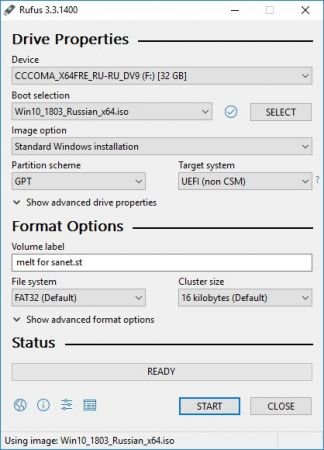
Rufus Portable is a USB formatting utility which also can create a bootable USB drive using a bootable ISO image. This app requires admin rights.

Rufus is a small utility that helps format and create bootable USB flash drives, such as USB keys/pendrives, memory sticks, etc.
It can be be especially useful for cases where
you need to create USB installation media from bootable ISOs (Windows, Linux, etc.)
you need to work on a system that doesn´t have an OS installed
you need to flash a BIOS or other firmware from DOS
you want to run a low-level utility
Features
Format USB, flash card and virtual drives to FAT/FAT32/NTFS/UDF/exFAT/ReFS
Create DOS bootable USB drives, using FreeDOS or MS-DOS
Create BIOS or UEFI bootable drives, including UEFI bootable NTFS
Create bootable drives from bootable ISOs (Windows, Linux, etc.)
Create bootable drives from bootable disk images, including compressed ones
Create Windows To Go drives
Twice as fast as Microsoft's USB/DVD tool or UNetbootin, on ISO -> USB creation (1)
Perform bad blocks checks, including detection of "fake" flash drives
Compute MD5, SHA-1 and SHA-256 checksums of the selected image
Modern and familiar UI, with more than 35 languages natively supported
Small footprint. No installation required.
Portable
100% Free Software (GPL v3)
Код:
https://github.com/pbatard/rufus/releases

Homepage:
Код:
https://rufus.akeo.ie/

Download link

rapidgator.net:
Код:
https://rapidgator.net/file/3642145c419e9eccd97457b83955dde8/npyvn.Rufus.3.21.1949.Multilingual.rar.html

uploadgig.com:
Код:
https://uploadgig.com/file/download/F165877d217310a3/npyvn.Rufus.3.21.1949.Multilingual.rar

nitroflare.com:
Код:
https://nitroflare.com/view/8F3CFFAA107D786/npyvn.Rufus.3.21.1949.Multilingual.rar

1dl.net:
Код:
https://1dl.net/r75oaujfrssh/npyvn.Rufus.3.21.1949.Multilingual.rar.html
 
Seagate Toolkit 2.2.0.17


0f738135c21ada6726f5f60658a405c8.jpeg


File Size : 4.5 Mb​

Get the most out of your storage solution with easy-to-use tools such as Backup, Mirror, Sync Plus, Seagate Secure, and RGB and Status LED Management. See your product manual for which Toolkit activities are supported by your drive.

Whats New
Updates: official site does not provide any info about changes in this version

Homepage:
Код:
https://www.seagate.com/

Download link

rapidgator.net:
Код:
https://rapidgator.net/file/01b266a1539d9eb868d37a6a926033c3/uqedo.Seagate.Toolkit.2.2.0.17.rar.html

uploadgig.com:
Код:
https://uploadgig.com/file/download/44419897898aE8A8/uqedo.Seagate.Toolkit.2.2.0.17.rar

nitroflare.com:
Код:
https://nitroflare.com/view/B029FBD5365ECB9/uqedo.Seagate.Toolkit.2.2.0.17.rar

1dl.net:
Код:
https://1dl.net/w9bzelh8mmw4/uqedo.Seagate.Toolkit.2.2.0.17.rar.html
 
Smart Driver Manager 6.2.875 Multilingual


9ac12ef208a70ce56389aaac6d09d8a8.jpeg


File size: 5.18 MB​

Smart Driver Manager offers a fast, easy and safe solution for automatically managing and updating your drivers. The program scans your computer and all associated hardware devices and provides a list of all the drivers that need to be updated. With just a single click Smart Driver Manager safely installs each update on your PC. Finally, the driver database contains over 1,200,000 drivers and is constantly updated ensuring that you always download the most current drivers.

Features
Keep your devices fully optimized
Hardware manufacturers are constantly updating their product drivers in order to fix problems or improve performance. By running regular scans with Smart Driver Manager you can make sure you always have the latest driver updates installed.
Some of the biggest problems faced by users upgrading to Windows 10 is when their existing hardware is not compatible with their new operating system. Smart Driver Manager can fix these issues by identifying the problem drivers and downloading the correct version for Windows 10.
Fast & safe way to update your drivers
Smart Driver Manager has a database of over 1,200,000 drivers. We are constantly updating and editing the database to make sure that we have the best driver updates available. As a Smart Driver Manager user, you will have ongoing access to all database updates to ensure that you are always running the best drivers for your system.
Backup and Restore
If you're upgrading your operating system or just need to reinstall Windows, Smart Driver Manager can backup all the drivers on your PC or laptop. The driver backup will be compressed into a zip file that is easy to export and reinstall. In the end, Smart Driver Manager's backup and reinstall features can save you hours of searching for and installing individual device drivers.
Easy to use
Our goal is always to design simple easy to use solutions. With just one click Smart Driver Manager will analyze your PC and any attached hardware devices. The scan identifies outdated drivers and finds the correct new drivers to replace them with. With Smart Driver Manager even if you're a novice computer user you will be able to easily find, replace, backup and restore your drivers.
Built-in Scheduler means that you can set it and forget it!
Simply set the built-in scheduler to run a scan automatically at start-up or at a convenient time either daily, weekly or monthly. Smart Driver Manager lets you know when new driver updates are available for your system so that you always have the best possible drivers.
What's new
• official site does not provide any info about changes in this version

Homepage:
Код:
https://smartpctools.com

Download link

rapidgator.net:
Код:
https://rapidgator.net/file/df36c22fd6ff1639c989734df79470c9/ciiuc.Smart.Driver.Manager.6.2.875.Multilingual.rar.html

uploadgig.com:
Код:
https://uploadgig.com/file/download/399528224aE051F4/ciiuc.Smart.Driver.Manager.6.2.875.Multilingual.rar

nitroflare.com:
Код:
https://nitroflare.com/view/4E46825B0EB2AFE/ciiuc.Smart.Driver.Manager.6.2.875.Multilingual.rar

1dl.net:
Код:
https://1dl.net/md3xo7tcrngo/ciiuc.Smart.Driver.Manager.6.2.875.Multilingual.rar.html
 
Summitsoft Creative Fonts Collection 2022


d7f6f419892de7488028f49c1da6d947.jpeg


Summitsoft Creative Fonts Collection 2022
Languages: English
File Size: 412.6 MB​

Creative Fonts by SummitType™. The creative team at SummitType Foundry, a division of Summitsoft, is where we design and craft each font in our collection. Each font is unique and can not be found elsewhere, making Creative Fonts a great source for your one-of-a-kind projects.

Licensed. Royalty-Free. Ready for any project.
Each font in the Creative Font Collections is licensed for personal and commercial use. So rest easy knowing that you can use them where ever and whenever you like!
Traditional Fonts Collection
The Traditional Fonts Collection includes unique typefaces such as classic, cursive, creativity, designer, cool and handwriting fonts.
Wonderful Fonts Collection
The Wonderful Fonts Collection includes unique typefaces such as sci-fi, fun, sports, fantastic, games, and comic fonts.
Seasonal Fonts Collection
The Seasonal Fonts Collection includes unique typefaces & clip-art such as Christmas, Spring, Halloween, Classroom, Valentines and Wedding.
High Quality & Unique
All of our Creative Fonts are OpenType, the same industry standard used by Microsoft® and Adobe®. This means they stay sharp and clear at any size.
Commercially Licensed
All the fonts in the Creative Font collections are licensed for personal and commercial use. So rest easy knowing that you can use them royalty-free where ever and whenever you like!
Full Character Sets
Each and every creative font contains a full set of characters plus all of the international and foreign language symbols and special characters.
Release Notes
- Release notes were unavailable when this listing was updated.

System Requirements
- Operating System: Windows 11, Windows 10, Windows 8 (32 & 64-bit)
- 256Mb RAM
- 400Mb Hard Disk Space

Homepage:
Код:
https://summitsoft.com

Download link

rapidgator.net:
Код:
https://rapidgator.net/file/3481f16d6fbe9b281492d6db4d38d753/ecwpg.Summitsoft.Creative.Fonts.Collection.2022.rar.html

uploadgig.com:
Код:
https://uploadgig.com/file/download/b32eB7fC1e37f24c/ecwpg.Summitsoft.Creative.Fonts.Collection.2022.rar

nitroflare.com:
Код:
https://nitroflare.com/view/DD6A2A226598514/ecwpg.Summitsoft.Creative.Fonts.Collection.2022.rar

1dl.net:
Код:
https://1dl.net/1v6z64854bzn/ecwpg.Summitsoft.Creative.Fonts.Collection.2022.rar.html
 
Sysinternals Suite 2022.11.28


8be368a57e5bc5b44337dcb6598bd0f3.jpeg


File size: 45 MB​

Sysinternals Suite - a suite of technical tools to configure, optimize, test, detect and correct errors in the operating systems Windows. Spektr application of this package is quite wide, because the utility of his cover many areas of the operating system. For example, the utility controls the Autoruns Startup, Process Monitor provides monitoring of all operations that take place in the file system, and the utility PageDefrag performs optimization and defragment your registry.

The package Sysinternals Suite includes the following utilities
AccessChk, AccessEnum, AdExplorer, AdRestore, Autologon, Autoruns, BgInfo, CacheSet, ClockRes, Contig, Coreinfo, Ctrl2Cap, DebugView, Desktops, DiskExt, DiskMon, DiskView, Disk Usage (DU), EFSDump, FileMon, Handle, Hex2dec, Junction, LDMDump, ListDLLs, LiveKd, LoadOrder, LogonSessions, NewSid, NTFSInfo, PageDefrag, PendMoves, PortMon, ProcessExplorer, Process Monitor, ProcFeatures, PsExec, PsFile, PsGetSid, PsInfo, PsKill, PsList, PsLoggedOn, PsLogList, PsPasswd, PsService, PsShutdown, PsSuspend, RegDelNull, RegJump, RegMon, RootkitRevealer, SDelete, ShareEnum, ShellRunas, SigCheck, Streams, Strings, Sync, TCPView, VolumeID, WhoIs, WinObj, VMMap, ZoomIt.
Код:
https://technet.microsoft.com/en-us/sysinternals/

Homepage:
Код:
https://technet.microsoft.com

Download link

rapidgator.net:
Код:
https://rapidgator.net/file/46228ac3af5ce9dda15e3562ab6353b2/qwncc.Sysinternals.Suite.2022.11.28.zip.html

uploadgig.com:
Код:
https://uploadgig.com/file/download/76cBd62C17D58910/qwncc.Sysinternals.Suite.2022.11.28.zip

nitroflare.com:
Код:
https://nitroflare.com/view/73856DAD7DB88D1/qwncc.Sysinternals.Suite.2022.11.28.zip

1dl.net:
Код:
https://1dl.net/bcdt2a09stzw/qwncc.Sysinternals.Suite.2022.11.28.zip.html
 
TeamViewer Free 15.36.9 Multilingual


00576defa6fdcb067c0734555004cc95.jpeg


File size: 84.5 MB​

TeamViewer is a simple and fast solution for remote control, desktop sharing and file transfer that works behind any firewall and NAT proxy. To connect to another computer just run TeamViewer on both machines without the need of an installation procedure. With the first start automatic partner IDs are generated on both computers. Enter your partner's ID into TeamViewer and the connection is established immediately. With many thousand users worldwide TeamViewer is a standard tool to give support and assistance to people in remote locations. The software can also be used for presentations, where you can show your own desktop to a partner. This application also is VNC compatible and offers secure, encrypted data transfer with maximum security.

TeamViewer establishes connections to any PC all around the world within just a few seconds. You can remote control your partner's PC as if you were sitting in right front of it. TeamViewer is completely free for private use.
Features
- One solution for everything. While most competitors offer different packages for remote support, remote administration, training and sales (and also charge for them...) The application is the one-stop solution for everything you need: includes all modules in one simple and very affordable package.
- Remote administration of unattended servers. TeamViewer can also be used to control unattended computers and servers. Installation as a system service even allows remote reboot and reconnect.
- File transfer. TeamViewer comes with integrated file transfer that allows you to copy files and folders from and to a remote partner - which also works behind firewalls
- Highest security standard. TeamViewer is a very secure solution. All versions feature completely secure data channels with key exchange and RC4 session encoding, the same security standard used byhttps/SSL.
- No installation required. To install TeamViewer no admin rights are required. Just run the software and off you go...
- High performance with international router network. Optimized for connections over LANs AND the Internet, TeamViewer features automatic bandwidth-based quality selection for optimized use on any connection.
TeamViewer uses an extended international server network with server locations in many countries all over the world, so no matter where you are located we will make sure that a high-security, high-performance router near your home destination will ensure great performance.
- Remote support without installation. With TeamViewer you can remotely control any PC anywhere on the Internet. No installation is required, just run the application on both sides and connect - even through tight firewalls.
- Remote presentation of products, solutions and services. The second TeamViewer mode allows you to present your desktop to a partner. Show your demos, products and presentations over the Internet within seconds - live from your screen.
- Works behind firewalls. The major difficulties in using remote control software are firewalls and blocked ports, as well as NAT routing for local IP addresses. If you use TeamViewer you don't have to worry about firewalls: TeamViewer will find a route to your partner.
- Flexible use for a variety of applications. TeamViewer lets you connect to your partners in many different ways: You can either view or control your partner's desktop in order to do online-support; You can transmit your screen to your partners for presentation purposes - You may even change directions during a session for high fidelity teamwork!
Код:
https://www.teamviewer.com/en/download/changelog/windows

Homepage:
Код:
https://www.teamviewer.com/

Download link

rapidgator.net:
Код:
https://rapidgator.net/file/ef6fcc2b28788d6be252aeac81b68e86/sipdl.TeamViewer.Free.15.36.9.Multilingual.rar.html

uploadgig.com:
Код:
https://uploadgig.com/file/download/edbA71F6f9923189/sipdl.TeamViewer.Free.15.36.9.Multilingual.rar

nitroflare.com:
Код:
https://nitroflare.com/view/8B34F0A1D1C9721/sipdl.TeamViewer.Free.15.36.9.Multilingual.rar

1dl.net:
Код:
https://1dl.net/wqqak7mcgqz7/sipdl.TeamViewer.Free.15.36.9.Multilingual.rar.html
 
Texifier 1.9.16 macOS


d64fa246573dd640007efec80b35366c.jpeg


File size: 35.78 MB​

Texifier is a LaTeX editor designed for straightforward navigation, editing and typesetting of projects of any size. Open a LaTeX root file, and Texifier will scan it, open any referenced files, extract the document structure for display in the outline view, and configure the typesetter according to the packages and tools used by your document.

Texifier's editor has syntax highlighting, a choice of themes, autocomplete of commands including those defined in your document, autofill for \cite and \ref commands, and many other features. The powerful sidebar's document structure view allows you to navigate through large multifile projects with ease. Additionally, Texifier's outline lists all labels, figures, tables, todos and the search pane can search and replace across your entire project using either normal text searches, or regular expression searches.
TexpadTeX - Texifier's internal, no internet connection required, typesetter comes with PGF drivers, Native Fonts extensions, Unicode and more. These allow it to support almost any LaTeX package available. TexpadTeX also integrates a BibteX tool and a Makeindex compatible indexer for documents that require those tools. The integrated bundle manager takes care of downloading, installing and updating LaTeX packages for you, giving you access to almost the entire LaTeX ecosystem without using any more space on your device than needed.
TexpadTeX can run in Live mode, updating the output as you type, so you never need wait for a typeset to finish again.
For the rare cases of documents that are not compatible with TexpadTeX, you can use our free cloud typesetters. These are fully integrated into Texifier so press typeset, and Texifier will run the typeset in the Cloud, presenting the results just as if it had been typeset on your device.
After typeset, any errors in your document are organised in a table of issues. Tap on an issue to jump directly to the offending line of LaTeX source, or the line in the raw log if you wish to read the original output.
Texifier supports Markdown on an equal footing with LaTeX. Edit your document in Texifier's syntax highlighting editor, browse the document by outline, then when you press Typeset, the document will be transparently converted and typeset by LaTeX, combining the informal ease of Markdown with LaTeX's ability to create beautiful and high quality PDFs. Likewise Plain TeX users can edit and typeset their documents in Texpad.
Features
- Support for LaTeX, Plain Tex and Markdown
- Navigate easily through even the largest projects using the Outline view
- Search all files by string or regex with the global search view
- Search by section title, label, filename, citation and more with the tag search
- Browse the typeset errors and warnings either as a raw log, or with the errors and warnings table view.
- Texifier's editor autocompletes commands, and autofills commands such as \ref{...} or \cite{...}
- Instant Live typeset using texifier's built in TexpadTeX typesetter
- Free typesetting through our secure cloud servers gives you access to all packages in the latest TeXLive distribution without the need to install or maintain it yourself.
Release Notes
Код:
https://www.texifier.com/docs/apps/release-notes/macos

Supported Operation System
• macOS 10.15 or later
• Apple Silicon or Intel Core processor

Homepage:
Код:
http://www.texifier.com/mac

Download link

rapidgator.net:
Код:
https://rapidgator.net/file/7a766f0c0466182b9e5f7800b7b31442/jlkru.Texifier.1.9.16.macOS.dmg.html

uploadgig.com:
Код:
https://uploadgig.com/file/download/05e7af8f5bfdE780/jlkru.Texifier.1.9.16.macOS.dmg

nitroflare.com:
Код:
https://nitroflare.com/view/07EAB7D3A1AACD8/jlkru.Texifier.1.9.16.macOS.dmg

1dl.net:
Код:
https://1dl.net/zug5qbry73hx/jlkru.Texifier.1.9.16.macOS.dmg.html
 
Назад
Сверху