• Форум работает в архивном режиме www.old.nado.in

All mitsumi'1s Applications !! (updated daily)

  • Автор темы Автор темы mitsumi1
  • Дата начала Дата начала
KORG Software KAOSS PAD v1.0 macOS


c24e39328851e4bc4bb59ca12aca5a5b.jpeg


MORiA | November, 28 2022 | STANDALONE | AUi | VST3i | 104 MB​

KAOSS PAD Dynamic Effect/Sampler Control by touching the pad. Creating a new dynamic effects processor. Touch, trace, and rub the touch pad to play. The KAOSS PAD series, with its simple and clear concept, has been used not only in the international lDJ world but also in all kinds of music production scenes, evolving from the first-generation KP1 introduced in 1999 to the third-generation KP3+ and further developing into many other music products equipped with its clear interface - building the "KAOSS family" with its clear interface.

Real-time control of effects via touch pad.
Simple operation with real-time control of effect parameters via the touch pad is similar to the hardware KAOSS PAD series. Simply select a preloaded program and touch the TouchPad portion of the UI with a mouse or trackpad to dramatically change the sound. Also, effects can be controlled by sending MIDI CC to "KAOSS PAD for Mac/Win" from a hardware controller.You can control the effect in real time with a hardware controller equipped with an XY pad like the Korg nanoKEY Studio or nanoPAD2.
- In addition, MIDI note on/off control allows you to send note data to reproduce the state in which you touch a certain position on the pad, allowing you to control the effect as if you were playing a keyboard or other instrument. Of course, the automation function on your DAW is also supported, so real-time control can be recorded and reproduced as is, and the automation itself can be elaborately created to express changes in effects that are difficult to achieve with real-time operation. This gives your DAW the flexibility of a plug-in while retaining the clarity of hardware.
The effects programs have been reimagined so you can edit the effects!
"KAOSS PAD for Mac/Win" features an edit page that allows users to edit each and every effect program - a major step up from the hardware versions of the KAOSS PAD series so you can create your own effects programs! Up to five effects can be used simultaneously in an effects program, and settings can be built to control each effect's parameters with four LFOs, four envelope generators, two envelope followers,an XY pad, and a rich set of modulators. The user can build up a configuration to control each modulator and effect. Mapping each modulator to the effect parameters is a simple drag-and-drop operation. You can also set the modulation depth and polarity for each parameter in great detail.
- In the Virtual Patch tab, the mapping between modulation source and effect parameters, polarity, modulation depth, modulation curve, and XY pad resolution (resolution) can be set individually for each mapping. This allows you to create KAOSS effects as deeply as you like. In addition, the input/output settings and panning settings of the five effects allow you to freely position the effects within the sound image in stereo space, creating a truly chaotic world of effects.
25 diverse and manic effect algorithms.
The effects range from spatial effects such as reverb and delay, modulation effects such as chorus and flanger, filter effects such as filter, isolator, and equalizer, digital effects such as grain shifter and impulse response, pitch shifter, ring modulator, vinyl break, looper, and vocal processor, and even analog oscillators that produce their own sound. The effects range from digital effects such as grain shifters and impulse responses, digital effects such as pitch shifters, ring modulators, vinyl breaks, loopers, vocal processors, and even analog oscillators that produce their own sound. Each effect has a wide variety of parameters that can be precisely set to create a wide range of effects.
- The Vocal Processor, in particular, allows you to add vocals while playing back samples, etc., making it possible to complete beat making with vocals using only the KAOSS PAD. This vocal processor is more than just an effects processor; it allows you to enjoy incredible beat making.
A wide variety of effect programs created by talented sound designers are built in.
The KAOSS PAD features 128 built-in effects programs that use up to five different effect algorithms simultaneously, including classic effects suitable for DJ play, gimmicky effects that will surprise, and real-time effects for music production on your DAW, so you can enjoy the real-time effects control that is typical of the Kaoss Pad, whether in the DJ booth, on stage, or in the studio. You can enjoy the real-time effect control that is typical of the Kaoss Pad in the DJ booth, on stage, and in the studio.
Whats new in this version
Official site does not provide any info about changes in this version.
System Requirements
Windows 7 or newer

Homepage:
Код:
https://www.korg.com/us/products/software/kc_kaosspad/

Download link

rapidgator.net:
Код:
https://rapidgator.net/file/567678d02ab5afdd1d7d6e2493f79904/gdswk.KORG.Software.KAOSS.PAD.v1.0.macOS.rar.html
uploadgig.com:
Код:
https://uploadgig.com/file/download/852885Afe03253e8/gdswk.KORG.Software.KAOSS.PAD.v1.0.macOS.rar

nitroflare.com:
Код:
https://nitroflare.com/view/EC65C5D0F7EB299/gdswk.KORG.Software.KAOSS.PAD.v1.0.macOS.rar

1dl.net:
Код:
https://1dl.net/nlp0snpa7wm9/gdswk.KORG.Software.KAOSS.PAD.v1.0.macOS.rar.html
 
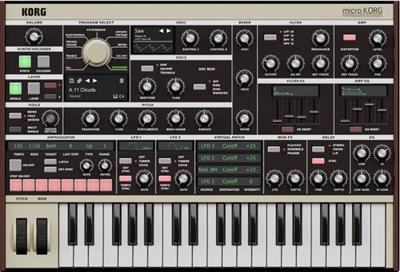
KORG Software microKORG v1.0 macOS


18803f279aa44ec9c98b6caff813037a.jpeg


KORG Software microKORG v1.0 macOS
MORiA | November, 28 2022 | STANDALONE | AUi | VST3i | 515 MB​

Korg's best-selling synthesizer is now available
in software - the microKORG plug-in version for Mac/Win!
Since its release in 2002, the microKORG has been loved by more musicians around the world than any other hardware synth in music history. Following the first generation microKORG, a number of variations were introduced, including the microKORG XL released in 2009 and the microKORG S with 2+1 speakers, as well as many color variations.

The microKORG was born out of a desire to bring the appeal and fun of synthesizers to beginner and professional musicians, track makers, and creators everywhere. Korg easily achieved this goal,creating a wildly successful synthesizer that was not only compact andeasy to use but sounded amazing.
To celebrate the 20th anniversary of its release, the original "microKORG" will be reintroduced as software: microKORG for Mac/Win.
Whats new in this version
Official site does not provide any info about changes in this version.
System Requirements
OSX 10.6.8 or later

Homepage:
Код:
https://www.korg.com

Download link

rapidgator.net:
Код:
https://rapidgator.net/file/ff00f5f12e049fb78b344e48f1f8cb7a/rxdal.KORG.Software.microKORG.v1.0.macOS.rar.html

uploadgig.com:
Код:
https://uploadgig.com/file/download/9Ed2a3278bEA8540/rxdal.KORG.Software.microKORG.v1.0.macOS.rar

nitroflare.com:
Код:
https://nitroflare.com/view/BC1F5C0DFDE156A/rxdal.KORG.Software.microKORG.v1.0.macOS.rar

1dl.net:
Код:
https://1dl.net/ucuymwruo06p/rxdal.KORG.Software.microKORG.v1.0.macOS.rar.html
 
LanSweeper 10.3.1


0360742b813ccb9306694a509cd1cfd5.jpeg


LanSweeper 10.3.1
File Size: 220.5 MB​

Lansweeper is an automated network discovery and asset management tool which scans all your computers and devices and displays them in an easy accessible web interface. There is no need to install any agents on the computers, all scanning is done by standard build-in functionality.

Software inventory
With Lansweeper it's easy to track and audit all your installed software, you can create powerful software inventory reports to find out which application is installed on which computer. Google unknown software and publishers right from the web interface and find out who is running software that's not up to date.
Hardware inventory
Lansweeper cannot only detect all hardware devices in your computers but with it's change tracking it can find out when a device was changed or removed. Not only does Lansweeper scans windows devices, it also gathers details about all other IP enabled devices on your network from the network discovery scan. (Linux, Printers, Routers, ...)
License compliance
If you want to keep all software and operating systems licenses up to date it can be a time consuming work. With Lansweeper computer inventory it doesn't need to be...
The webinterface will tell you how many software versions are installed and how much licenses you are missing.
Compliance reporting
Every company needs policies to get a smooth running network. Compliance reporting and the dashboard can help you to make all kinds of asset management reports. Who doesn't have the latest version of our virus scanner, Who is missing the latest patch for our ERP solution. The only limit is your imagination...
Active directory integration
Lansweeper gathers all active directory user and computer details for your scanned machines. Create reports based on OU, integrate user pictures, Clean up your Active directory...
Eventlog integration
Every windows computer logs errors into the Eventlog. Thanks to Lansweeper you can now consolidate all these errors and get an alert e-mail as soon as an important error occurs.
Код:
http://www.lansweeper.com/changelog.aspx

Homepage:
Код:
http://www.lansweeper.com

Download link

rapidgator.net:
Код:
https://rapidgator.net/file/781a2a1bf1521ad634f979a56c74ca58/lcywi.LanSweeper.10.3.1.rar.html

uploadgig.com:
Код:
https://uploadgig.com/file/download/EB87F13249070879/lcywi.LanSweeper.10.3.1.rar

nitroflare.com:
Код:
https://nitroflare.com/view/51DBD245DBDE6F6/lcywi.LanSweeper.10.3.1.rar

1dl.net:
Код:
https://1dl.net/ztlc21xnhb0b/lcywi.LanSweeper.10.3.1.rar.html
 
Luminar Neo 1.5.1 U2B macOS


c07a4cb2f0db948d76cffe6275ce5f00.jpeg


Luminar Neo 1.5.1 U2B macOS
File size: 5.12 GB​

Luminar Neo is an AI-driven creative image editor. A creative image editor to bring your ideas to life. Have you ever wanted to achieve more with your images? Luminar Neo is an innovative image editor powered by AI technologies of the future that simplifies complex editing routines and enables creators to bring their boldest ideas to life. And enjoy it.

Control the light in 3D space with RelightAI
Relight backlit photos or darkened images in a click with the RelightAI feature. Luminar Neo calculates the depth of a photo and creates a 3D map, making it possible to spread light naturally in 3D space across a 2D image. You can also relight the background and foreground separately - meaning you can darken parts of the image as well. This opens up an opportunity for creative relighting in order to bring your artistic vision to life.
Remove messy powerlines with AI
Automatically remove distracting elements in your cityscapes, urban landscapes or travel photos. Get a clear sky with no cluttered phone or power lines.
Unleash your creativity with Layers and AI Masking
Use both MaskAI and Layers for limitless creativity. MaskAI automates the masking process by identifying objects in the image and creating precise masks. You can always manually refine those masks with a brush if you choose to. Layers open up a whole new level of creative expression, with endless possibilities for adding objects, textures, watermarks, and any other graphics to your images.
Replace the sky in one click
Cutting-edge sky replacement technology with water reflections, sky positioning, and human-aware relighting to match the new sky.
Lightning-fast creative editing with an all-new image engine.
Designed as a module system its parts now can be optimized separately, for the best performance.
→What is Luminar Neo?
Have you ever wanted to achieve more with your images? Luminar Neo is an innovative image editor powered by AI technologies of the future that simplifies complex editing routines and enables creators to bring their boldest ideas to life. And enjoy it.
• Get speed and flexibility in your editing with our brand-new core engine and layers workflow.
• The new engine we built for Luminar Neo is based on all the best solutions from our combined and evolved experience for maximum performance and creativity and is developed for achieving complex creative results.
• Adjust the light in your photo for creative control over the lighting in a scene. You can control the exposure of an image based on the distance from the lens to independently adjust the background and foreground exposure.
• Automatically remove spots on your images caused by dust and dirt on your lens and sensor.
• Clean up unwanted power lines from the skies in your cityscapes.
• Experiment with infinite creative possibilities by effortlessly combining two or more images in a shot.
• ...And much more.
The new technologies and innovative user experience in Luminar Neo make creative image editing simple and fun.
→What's New in Luminar Neo?
Luminar Neo is a giant leap forward to more innovative, AI-based editing that targets the pains of photographers. Its goal is high-quality, fast, easy, and enjoyable results for anyone who wants to edit their images and channel their creativity in new ways.
The collection of AI-powered tools take a significant jump forward in function and performance with Luminar Neo. The application expands its toolbox with more groundbreaking AI-powered tools. The new tools are joined by additional options to solve even more problems and unleash creativity.
Speed up your editing workflow with our new fast core engine.
It's based on unique technologies developed by Skylum and works on a module system, which means that different parts of the application can now be optimized separately for the best results. Thanks to the independent modules engine, Luminar Neo will be updated more frequently. Luminar Neo has a more flexible editing process, which means less memory is required to edit photos. The new engine has many small background optimizations of memory use, which increases the speed of all processes inside the application, from uploading to applying editing effects, using layers, and exporting.
Completely transform your photos with new relighting options.
Luminar Neo analyzes each image to recognize the depth of a scene and its subject allowing for unique control over exposure and tone.
Easily remove distracting image blemishes caused by a dirty camera sensor or lens.
There are also new tools to clean up unwanted elements in the background of a photo.
Explore creativity with an effortless layers workflow and combine a photograph with other visual elements.
Discover a collection of textures, overlays, and visual effects to add creativity to an image and personalize it. This addition unlocks new creative options for compositing images and visuals to create a custom style. You can add an infinite number of Layers, move Layers on top of each other, use blending modes and masking modes, make collages, add double exposure effects, and do more on each layer.
Skylum is also excited to announce that a new mobile app is in development.
It will allow easy transfer of photos between a mobile device and a computer. This will make it easier to add pictures captured on a mobile device to your Luminar library. Once edited in Luminar Neo, results can be sent back to the portable device for easy social sharing or viewing on the go.
The powerful AI tools and the convenient and fresh design that helps photographers effortlessly access all the features give anyone the ability to transform photos easily and achieve satisfying results. We'll treat you to even more cutting-edge features that will ship as free updates after the official release.
Release Notes
Код:
https://downloads.skylum.com/luminarneo/mac/1.5.1/update_notes_13304.htm

Supported Operation System
• macOS 10.14.6 or later
• Apple Silicon or Intel Core processor

U2B (Intel + ARM) version
Intel-Only version

Homepage:
Код:
http://skylum.com/luminar-neo

Download link

rapidgator.net:
Код:
https://rapidgator.net/file/260f06e0cfe883be124932bf87d06ea5/isokl.LuminarNeo1.5.1.13304U2BHCiSO.DMGSAnet.zip.005.html
https://rapidgator.net/file/288bd8ee7b88352fc4c62738b9e61d40/isokl.LuminarNeo1.5.1.13306IntelHCiSO.DMGSAnet.zip.001.html
https://rapidgator.net/file/2e8a28aa79041622896ab7f63f05d5a7/isokl.LuminarNeo1.5.1.13304U2BHCiSO.DMGSAnet.zip.004.html
https://rapidgator.net/file/58cdc2eb5b9374b7afe7ec9336a9b95c/isokl.LuminarNeo1.5.1.13304U2BHCiSO.DMGSAnet.zip.002.html
https://rapidgator.net/file/6c2aa0756ab5b037ede357bf6d11f6a2/isokl.LuminarNeo1.5.1.13304U2BHCiSO.DMGSAnet.zip.003.html
https://rapidgator.net/file/9c62737c709e4bc32b4803ad880c89ef/isokl.LuminarNeo1.5.1.13306IntelHCiSO.DMGSAnet.zip.002.html
https://rapidgator.net/file/bcb98c42860053ee2049656f15469124/isokl.LuminarNeo1.5.1.13304U2BHCiSO.DMGSAnet.zip.001.html
https://rapidgator.net/file/c94795d3dc74170493d730aeab9c526a/isokl.LuminarNeo1.5.1.13306IntelHCiSO.DMGSAnet.zip.003.html

uploadgig.com:
Код:
https://uploadgig.com/file/download/2bd52aa3ba234Bc7/isokl.LuminarNeo1.5.1.13304U2BHCiSO.DMGSAnet.zip.003
https://uploadgig.com/file/download/3b80944dcbB6d4Ae/isokl.LuminarNeo1.5.1.13306IntelHCiSO.DMGSAnet.zip.003
https://uploadgig.com/file/download/53cc6211a765deB6/isokl.LuminarNeo1.5.1.13306IntelHCiSO.DMGSAnet.zip.001
https://uploadgig.com/file/download/F9d70de3e1574CeF/isokl.LuminarNeo1.5.1.13306IntelHCiSO.DMGSAnet.zip.002
https://uploadgig.com/file/download/b5A45A8aEDf6bd02/isokl.LuminarNeo1.5.1.13304U2BHCiSO.DMGSAnet.zip.002
https://uploadgig.com/file/download/cf95572D2577d163/isokl.LuminarNeo1.5.1.13304U2BHCiSO.DMGSAnet.zip.005
https://uploadgig.com/file/download/e564d2713987fd4d/isokl.LuminarNeo1.5.1.13304U2BHCiSO.DMGSAnet.zip.001
https://uploadgig.com/file/download/f674792043cabC40/isokl.LuminarNeo1.5.1.13304U2BHCiSO.DMGSAnet.zip.004

nitroflare.com:
Код:
https://nitroflare.com/view/21F8021BA332791/isokl.LuminarNeo1.5.1.13306IntelHCiSO.DMGSAnet.zip.001
https://nitroflare.com/view/46E72C925382F14/isokl.LuminarNeo1.5.1.13306IntelHCiSO.DMGSAnet.zip.002
https://nitroflare.com/view/86C23943A0F8567/isokl.LuminarNeo1.5.1.13306IntelHCiSO.DMGSAnet.zip.003
https://nitroflare.com/view/88D9ECEE7743F6A/isokl.LuminarNeo1.5.1.13304U2BHCiSO.DMGSAnet.zip.004
https://nitroflare.com/view/A5D8CAD6CD66BB3/isokl.LuminarNeo1.5.1.13304U2BHCiSO.DMGSAnet.zip.003
https://nitroflare.com/view/A7649C26395218A/isokl.LuminarNeo1.5.1.13304U2BHCiSO.DMGSAnet.zip.001
https://nitroflare.com/view/E0A63E2A4C6A844/isokl.LuminarNeo1.5.1.13304U2BHCiSO.DMGSAnet.zip.002
https://nitroflare.com/view/F0EBFDFA1194A08/isokl.LuminarNeo1.5.1.13304U2BHCiSO.DMGSAnet.zip.005

1dl.net:
Код:
https://1dl.net/6fs2xldvzj9o/isokl.LuminarNeo1.5.1.13304U2BHCiSO.DMGSAnet.zip.002.html
https://1dl.net/crjz5xthv9s7/isokl.LuminarNeo1.5.1.13304U2BHCiSO.DMGSAnet.zip.001.html
https://1dl.net/d30ng9p5gg07/isokl.LuminarNeo1.5.1.13306IntelHCiSO.DMGSAnet.zip.003.html
https://1dl.net/dte74f6xdbhz/isokl.LuminarNeo1.5.1.13304U2BHCiSO.DMGSAnet.zip.004.html
https://1dl.net/i6yd8qfodr40/isokl.LuminarNeo1.5.1.13304U2BHCiSO.DMGSAnet.zip.005.html
https://1dl.net/ix7li9y6grat/isokl.LuminarNeo1.5.1.13306IntelHCiSO.DMGSAnet.zip.002.html
https://1dl.net/u87btbm7lo9w/isokl.LuminarNeo1.5.1.13306IntelHCiSO.DMGSAnet.zip.001.html
https://1dl.net/vp6bfe5xn6ts/isokl.LuminarNeo1.5.1.13304U2BHCiSO.DMGSAnet.zip.003.html
 
Macrium Reflect Server Plus 8.0.7175 (x64) WinPE / WinRE


79984a94f8efa49ca5bda2cfef220f7f.jpeg


Macrium Reflect Server Plus 8.0.7175 (x64) WinPE / WinRE
File size: 1.26 GB​

Macrium Reflect - our image based backup and disaster recovery solutions have taken another big step forward in speed, simplicity and power. Our entire focus is helping organisations protect business critical data and systems, without fuss and budget breaking costs.

Solution highlights
- New Backup Engine: Incremental and differential images up to 60 times faster
- Instant virtual booting of backup images: instantly create, start and manage Microsoft Hyper-V virtual machines
- Ultra-fast Live imaging of windows systems, physical and virtual
- Restore images to dissimilar hardware using Macrium ReDeploy
- Greatly simplified administration including pre-defined Backup Plans for popular backup strategies
- Fully featured file and folder level backup and recovery
- Updated support for all the latest Windows Operating Systems and disk formats
Macrium Reflect Workstation Features
- Backup your entire PC to a single compressed image file.
- Backup files and folders to a single compressed archive file.
- Recover partitions and entire disk images with just a few clicks of your mouse
- Dynamic disk support
- MBR and GPT disk support
- Restore images to dissimilar hardware using Macrium ReDeploy
Macrium Reflect Server Features
- Backup your entire physical or virtual Server to a single compressed image file.
- Backup files and folders to a single compressed archive file.
- Recover partitions and entire disk images with just a few clicks of your mouse
- Dynamic disk support
- MBR and GPT disk support
- Restore images to dissimilar hardware using Macrium ReDeploy
Код:
https://updates.macrium.com/reflect/v8/v8.0.7175/details8.0.7175.htm

Homepage:
Код:
http://www.macrium.com/

Download link

rapidgator.net:
Код:
https://rapidgator.net/file/67889ee6b5b8583be7f2d2872809778b/lxnoh.Macrium.Reflect.Server.Plus.8.0.7175.x64.WinPE..WinRE.rar.html

uploadgig.com:
Код:
https://uploadgig.com/file/download/3697031e6d58603d/lxnoh.Macrium.Reflect.Server.Plus.8.0.7175.x64.WinPE..WinRE.rar

nitroflare.com:
Код:
https://nitroflare.com/view/11AE1EEF1E16908/lxnoh.Macrium.Reflect.Server.Plus.8.0.7175.x64.WinPE..WinRE.rar

1dl.net:
Код:
https://1dl.net/68ggx113yzb6/lxnoh.Macrium.Reflect.Server.Plus.8.0.7175.x64.WinPE..WinRE.rar.html
 
Macrorit Disk Scanner 5.2.0 Multilingual


8ebf773964e31f953ee060bec00280e0.jpeg


All Editions | File size: 9.6 MB​

Macrorit Disk Scanner is a smart bad sector scanning software that can help you quickly test the disk and mark the location of bad sectors.Hard disk "bad sectors" is the most common problems of the hard disk. Bad sectors are little clusters of data on your hard disk that cannot be read. Hard disks with bad sectors means the disk is not safe to store data; it will eventually lead to the important data loss of the hard disk or partition as well as errors with running files and the hard disk speed will slow down significantly and blue screen errors may also occurs.

Features of Disk Scanner
Support to check and scan all disks at the same time
Support to check and scan whole disk, partition, free space
Support to select/specify a part of disk/partition to scan only. (Time-saving scanning method)
Support to automatically shut down the computer while finish scanning
Scan result will be automatically saved to the specified location
Scan disk with the super-fast speed
Mark healthy sectors in green and errors in red
Small portable tool, 100% clean, safe, no Spyware, no Adware, no virus
Force to shut down or stop scanning process is supported. NO harm for computer.
Код:
https://macrorit.com/disk-surface-test/scanner-pro.html#changelog

Homepage:
Код:
http://macrorit.com

Download link

rapidgator.net:
Код:
https://rapidgator.net/file/c3da2c7ada2337c42107fbaf8dae6a07/mzxfc.Macrorit.Disk.Scanner.5.2.0.Multilingual.rar.html

uploadgig.com:
Код:
https://uploadgig.com/file/download/6ea8C8607dd8cbc1/mzxfc.Macrorit.Disk.Scanner.5.2.0.Multilingual.rar

nitroflare.com:
Код:
https://nitroflare.com/view/7E01B9815E6A525/mzxfc.Macrorit.Disk.Scanner.5.2.0.Multilingual.rar

1dl.net:
Код:
https://1dl.net/p7l10lvjw4wf/mzxfc.Macrorit.Disk.Scanner.5.2.0.Multilingual.rar.html
 
MacX DVD Ripper Pro 6.7.1 macOS


3b58cd053c8baa66cdf09c179c152104.jpeg


Language: Multilingual | File size: 56 MB​

Best DVD ripper for Mac users to rip both homemade and commercial DVDs to any format at NO.1 fast speed (5 min only to rip a full DVD) and original quality.

The first and only tool to support all knotty DVDs (new DVD, 99-title DVD, damaged & unplayable DVD) and rip DVDs/ISO images in all sorts of formats, including DVD to MP4, H.264, MOV, FLV, MPEG4, AVI, QT, MP3, etc.
With 350+ preset profiles, the DVD ripper makes it hassle-free to convert DVDs for playback on iTunes, QuickTime, Apple iPhone iPad, Android, PS4, TV, etc. You can also clone DVD to ISO image at 1:1 ratio and copy DVD title to MPEG2 and MKV with all videos, audios and subtitles. Digitize your DVDs to protect them from scratch or damage and enjoy them anywhere anytime.
Release Notes
Release notes were unavailable when this listing was updated

Supported Operation Systems
macOS 10.9 or later

Homepage:
Код:
https://www.macxdvd.com

Download link

rapidgator.net:
Код:
https://rapidgator.net/file/8e1270325a112325e985df2723d895b2/dzvoe.MacX.DVD.Ripper.Pro.6.7.1.macOS.dmg.html

uploadgig.com:
Код:
https://uploadgig.com/file/download/7e9Aacb169f93229/dzvoe.MacX.DVD.Ripper.Pro.6.7.1.macOS.dmg

nitroflare.com:
Код:
https://nitroflare.com/view/D2683C885C64950/dzvoe.MacX.DVD.Ripper.Pro.6.7.1.macOS.dmg

1dl.net:
Код:
https://1dl.net/bxcw124y10vd/dzvoe.MacX.DVD.Ripper.Pro.6.7.1.macOS.dmg.html
 
MacX DVD Ripper Pro 8.10.1.171 Multilingual


4cc96bc256ee8d9c4a1c9274b5c046c8.jpeg


File size: 31.8 MB​

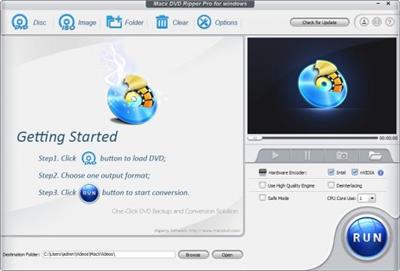
MacX DVD Ripper Pro for Windows is the fastest DVD ripper for windows (10/8/7) to backup DVD to ISO/hard drive, rip DVD to MP4, FLV, MOV, MPEGAVI, WMV, etc for iPhone SE/6s/6s Plus, iPad Air 2, iPad Mini 4/3/Mini with Retina, The new Apple TV, Android, HTC One M9, Samsung Galaxy S6/edge+, Galaxy Note 5/Edge, WP8, Surface, WP8, etc with 100% quality reserved.

This DVD ripper software gives you full access to protected DVD movies by getting rid of the copy protections. It strips CSS encryption, Sony ARccOS encryption, RCE Region protection, Disney X-project DRM, etc. Powered with NVIDIA® CUDA™, this DVD ripper for Windows (10) demonstrates its speed excellence, costing 5 minutes only in copying a 2-hour DVD movie.
Convert DVD to AVI, MP4, FLV, WMV, MOV, etc
Backup and rip DVD to the more convenient and smaller sized video formats on Windows PC for playing, sharing and editing. MacX DVD Ripper Pro for Windows gets prepared for all audio and video formats, including rip DVD to AVI, MP4, FLV, WMV, MPEG, MOV, MP3, etc which are perfect for portable devices like iPhone, iPad, iPod, Apple TV, PSP, Android, HTC, Samsung, Google new Nexus 7, and more.
Rip DVD to iPhone, iPad, Android, and 370+ Mobiles
To make sure you could put your favorite DVD movies in your pocket for playback anywhere and anytime, this DVD ripper has 370+ ready profiles for portable devices and is able to rip DVDs straight to iPhone SE/6s/6s Plus/6/5S/5C, iPad/Air 2/Mini 4/Mini with Retina, iPad Pro, iPod/5, Apple TV, Android, HTC Desire 816, Samsung Galaxy S6 edge+/5/4, Galaxy Tab S, Galaxy Note 4/Edge, Google new nexus 7, PS4, Surface Pro 3, Xperia Z4/Z5/C4/M4 and other popular mobile phones and tablets.
Support the Latest DVD Copy Protections
This DVD ripper for windows (10) is updated constantly to keep up with any new DVD copy protections. At this moment, it can strip the major copy protections off DVD movies, like CSS encryption, Sony ARccOS encryption, RCE Region protection, even the newly released Disney X-project DRM. It provides you a perfect solution to rip copy protected DVD movies to plain videos without effort.
Copy DVD to ISO, Hard Drive and USB
The DVD copy feature allows you to backup DVD to ISO image and DVD folder without cutting down the quality during the DVD backup operation. It allows you to copy full /main content of DVD to MPEG-2 file with lossless video quality and 5.1 Channel AC3/DTS Dolby audio. It only takes 5 min to complete the copy process of a 2-hour DVD movie on Windows 7/8/10.
Trim, Crop, Merge, Add External Subs to Edit Video
With this DVD ripping tool for PC, You can access all available editing functions to trim, combine and crop your DVD movie. You can create a custom clip from a larger scene to adjust the duration of your clip by trimming. The crop feature helps you cut off the black edges you don't want to keep. Combining some of video clips into a single video can be achieved by merging. It also leaves up to you to select subtitle track (incl. forced subtitle ) and attach external .srt subtitles to the movie.
Flexible Parameter Settings for Output Video
MacX DVD Ripper offers a decent level of control over parameter setting. Lots of customized options are provided so that you can choose video codec, adjust video/audio bitrate, frame rate, aspect ratio, resolution etc for making personalized videos.
Easy to Handle
Supporting Hyper-Threading, batch conversion, and Multi-Core CPU processing on Mac (specially designed for i3, i5, i7) can speed up the ripping process dramatically, the advanced function "Run as Safe Mode" and "Advanced Deinterlacing Accelerator" will also smooth the conversion and improve the video effect.
Ripping DVD with Fast Speed
It is featured for NVIDIA CUDA graphics acceleration technology, promoting the DVD ripping process, up to 36 times performance compared to other DVD rippers. The multi-core CPU utility and hyper threading technology help to maximize the speed as well. Thus, you can rip a DVD movie in a fraction of seconds while getting a good-looking video with no quality loss.
Lossless Output Quality
Generally, it is difficult to balance the video quality and file size. But this DVD ripper for windows make a perfect balance between them. The default setting for each output format will help you to maximize the output quality. The "High Quality Engine" and "Deinterlacing" are also designed in this DVD ripper to ensure highest possible output quality with desired file size.
Take snapshot and Extract Audio from DVD File
With this DVD ripper, it is easy to extract background music from the DVD file and rip DVD audio to MP3 audio format with high quality. An option is also offered to those who would like a copy of the favorite scene in the DVD movies for making wallpapers.
Whats New
Updates: official site does not provide any info about changes in this version.

Homepage:
Код:
https://www.macxdvd.com

Download link

rapidgator.net:
Код:
https://rapidgator.net/file/965c4bf088f88f97dcb02ce347c66744/wtewm.MacX.DVD.Ripper.Pro.8.10.1.171.Multilingual.rar.html

uploadgig.com:
Код:
https://uploadgig.com/file/download/dab27f7CD28924E3/wtewm.MacX.DVD.Ripper.Pro.8.10.1.171.Multilingual.rar

nitroflare.com:
Код:
https://nitroflare.com/view/FE59C41C8ADCE7C/wtewm.MacX.DVD.Ripper.Pro.8.10.1.171.Multilingual.rar

1dl.net:
Код:
https://1dl.net/2uwoqsyz8nc6/wtewm.MacX.DVD.Ripper.Pro.8.10.1.171.Multilingual.rar.html
 
MacX HD Video Converter Pro 5.17.1.256 Multilingual


4137c28e14853f42de354ec2b08f7a6d.jpeg


File size: 49.1 MB​

MacX HD Video Converter Pro for Windows - the ultimate media processing program that combines the industry-leading video converter, downloader, editor, recorder and file size compressor. It has the fastest and most powerful solution to convert 4K/HD videos into other formats, download online streams, edit raw footages, compress video file size and more. Your must-have helper to process videos for social media, online sites, mobiles, webs, other devices & services. It works well on Windows 10 (32/64 bit), Windows 8, Windows 7, Vista, Windows 98, NT, 2000, 2003, XP.

Accept Videos in Any Format from Anywhere
Supporting 370+ codecs, VideoProc accepts almost all formats ranging from SD, HD to 4K, 5K and 8K Ultra HD videos. Its supported input files include MOD, TOD, TS/MTS/M2TS/AVCHD, HEVC captured by GoPro, Dji drones, JVC, Panasonic, Cannon, Sony camcorders; MKV, M2TS and VOB files from Blu-ray discs and standard DVDs; as well as AVI, WMV, MP4, FLV, H.264/MPEG-4, DivX, Xvid, MOV, RM, RMVB, ASF, 3GP, 3G2, QT, Google TV, WebM, VPX 8 files and more from any other sources.
Support 420+ Apple/Android Devices
You can select a specific output for your portable device without questioning screen dimensions. Simply convert video on Windows 10 for playing on Apple device, i.e. iPhone (11/Pro/Max), iPad Air/Air 2/3, iPad Mini 5/4/3/2 retina, iPod, iPad Pro and other mobile devicess like HTC One M9, Samsung Galaxy S(10), WP8, Microsoft Surface Pro 4, PS4, Xbox One, etc.
Multi-track HD/4K Video Converter
As for some special HD video files, they may include several audio and video tracks which are separated from each other, namely the multi-track video files. No matter what multi-track HD video converter you are looking for, 4K converter, M2TS video converter, MKV video converter, AVCHD video converter, HDTV BDAV converter etc, MacX HD Video Converter Pro for Windows is your ultimate choice.
Edit/Trim/Cut/Merge/Subtitle Videos at Ease
The versatile video converter boasts vivid video editing features you'll be delighted at. Users can choose video segments by trimming, remove any unwanted areas by cropping, create multiple videos into a new one by merging, and even personalize your video by watermarking. More specially, besides supporting inner subtitle tracks, it allows you to add external SRT subtitle files to videos before conversion.
Create Photo Slideshow with Background Music
As a versatile video converter software, MacX HD Video Converter Pro for Windows has "slideshow maker" feature in the side-by-side comparison among congeners. You can create slideshow from your JPG/PNG/BMP photos and convert the slideshow video to MP4, AVI, FLV, etc for editing in iMovie, uploading to YouTube, Facebook, or sharing on iPhone, iPad, HTC, Samsung, etc.
Download Videos from 1000+ Others
VideoProc can download tons of movies, videos, TV shows, mp3 audios, playlists etc. from 1000+ popular sites like Vevo, Vimeo, Dailymotion, FaceBook, Metacafe etc. and convert video to AVI, MP4, MOV, etc in one step for offline playback. The advanced Download Engine supports downloading 4K/8K ultra HD videos with lightning-fast speed (30s to download a full MV).
Take Snapshot Picture and Extract Music
It will even extract audio tracks from video files and save them as MP3, AAC, AC3, WMA, etc, which is handy if you like to create cell phone ring tones out of famous movie lines or TV sitcom theme songs. You are also allowed to take snapshot for your desired movie scene in PNG as your computer wallpaper.
Whats New
Updates: official site does not provide any info about changes in this version

Homepage:
Код:
https://www.macxdvd.com

Download link

rapidgator.net:
Код:
https://rapidgator.net/file/13aeac2c91e3f44a9c49bbe0af37f7b4/jcbiw.MacX.HD.Video.Converter.Pro.5.17.1.256.Multilingual.rar.html

uploadgig.com:
Код:
https://uploadgig.com/file/download/cb5569a540a83923/jcbiw.MacX.HD.Video.Converter.Pro.5.17.1.256.Multilingual.rar

nitroflare.com:
Код:
https://nitroflare.com/view/7565127835CF282/jcbiw.MacX.HD.Video.Converter.Pro.5.17.1.256.Multilingual.rar

1dl.net:
Код:
https://1dl.net/prbb9pd8gtx7/jcbiw.MacX.HD.Video.Converter.Pro.5.17.1.256.Multilingual.rar.html
 
MacX Video Converter Pro 6.7.1 macOS


14e1f7e5127cd041eb3668f999d10dc5.jpeg


Language: Multilingual | File size: 43 MB​

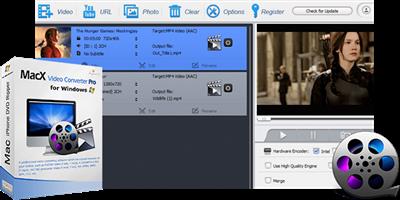
MacX Video Converter Pro is an excellent all-in-one toolkit that works as an HD video converter, video editor, screen recorder, and slideshow maker. It lets you convert 4K HD/SD videos to MP4, AVI, MPEG, FLV, MOV, WMV, MKV, MP3, etc., for playback on QuickTime, iPhone, iPad, or Android flawlessly, and for editing with iMovie and Final Cut Pro.

Main features
- Ultra-fast video converter: Built-in 370 video/audio codecs, MacX Video Converter Pro is able to convert any video to popular video/audio formats, such as M2TS to MP4, MKV to AVI, MKV to MP4, WMV to MOV, AVI to iMovie, FLV to AVI, MP4 to MP3, etc. The 350+ preset profiles allows you to convert video to iPhone 6/6 Plus, iPad Air 2/Mini 3, iPod, Apple TV 3, iTunes, QuickTime, Galaxy S5 mini/ Note 4, Surface Pro3, Xperia Z3, PS4, etc., for playback.
- Edit, trim and record video: Besides the video converting and downloading ability, MacX Video Converter Pro also offers robust functionality to edit video (cut/trim/merge video, add external subtitles and watermark), adjust video parameters, record screen activity, etc.
- No.1 converting speed and high video quality: This Mac video converter has an easy-to-navigate interface and brings the fastest converting speed and zero quality loss with the help of hyper-threading technology and high quality engine.
Release Notes
Release notes were unavailable when this listing was updated.

Supported Operation Systems
macOS 10.9 or later

Homepage:
Код:
https://www.macxdvd.com

Download link

rapidgator.net:
Код:
https://rapidgator.net/file/d460c7b55c92a051776eba8eb56bd47c/thwak.MacX.Video.Converter.Pro.6.7.1.macOS.dmg.html

uploadgig.com:
Код:
https://uploadgig.com/file/download/3a06c4a562Bd5450/thwak.MacX.Video.Converter.Pro.6.7.1.macOS.dmg

nitroflare.com:
Код:
https://nitroflare.com/view/79353B4F7396C68/thwak.MacX.Video.Converter.Pro.6.7.1.macOS.dmg

1dl.net:
Код:
https://1dl.net/p8tm74miecvk/thwak.MacX.Video.Converter.Pro.6.7.1.macOS.dmg.html
 
MediaHuman YouTube Downloader 3.9.9.77 (2811) Multilingual (x64)


ccda74b67bbb93c5c4b6499983974213.jpeg


Windows x64 | File size: 68.27 MB​

There are so many interesting things to be found on YouTube, but you can't download the videos or save them as audio files by default. That's why we developed YouTube Video Downloader. This app will help you to accomplish video downloads quickly and without hangups. Using our program you can simply download an entire YouTube playlist or channel at once and watch it whenever and wherever you want.

The application has many other convenient and practical functions for you to explore and enjoy. Give it a try, download it now!
• Downloads several videos simultaneously
• Supports Ultra High resolutions including 4K & 8K (with audio)
• Downloads entire playlists and channels
• YouTube, Vimeo, Dailymotion, Soundcloud and much more
• Extracts audio track and saves it as MP3
• Supports exporting to iTunes/Music.app
• Works on all modern platforms (macOS, Windows and Ubuntu)
Main Features
Playlists and channels
The program supports downloading of all videos of a playlist or a channel. And there's also an option to track the selected channel or playlist and download new clips as they are uploaded.
Add to iTunes
You can configure the program to automatically add downloaded movies to your iTunes library. You can also pick a playlist where the downloaded video should be added.
HQ, HD, 4K or 8K
The program supports all available resolutions, be that 720p, 1080p, 4K or 8K. The choice is up to you. Unlike online video downloaders, the app downloads any resoulution with audio.
Monitor the clipboard
The program keeps an eye on the clipboard and as soon as it spots a supported link there, it automatically adds this video into the download queue.
Quality of the original
You can choose to save videos in the original quality (usually in MP4 format), without any modifications. In this case, the clip you get is exactly the same as the one its author uploaded.
Simple tag editor
The app automatically detects the artist and the title of a video and saves them to the downloaded file. And you can easily change them later.
Not just YouTube
The program supports Twitch, Vevo.com, Vimeo, Dailymotion, Facebook, UOL, VKontakte, SoundCloud, TikTok and a lot of other sites. So you can download video from these websites as easy as you do from YouTube.
Drag & Drop
The app features a 100% drag&drop support. Just drag the link to a video with your mouse and drop it to the main window of the program, or to its dock icon on Mac.
Multi-language interface
The app is translated into: Arabic, Armenian, Azerbaijani, Bulgarian, Catalan, Chinese (Taiwan), Croatian, Czech, Danish, Dutch, English, Esperanto, French, German, Greek, Hebrew (Israel), Hungarian, Indonesian, Italian, Japanese, Korean, Latvian, Lithuanian, Malay, Norwegian Bokmål, Polish, Portuguese, Portuguese (Brazil), Romanian, Russian, Spanish, Swedish, Turkish, Vietnamese.
Код:
https://www.mediahuman.com/youtube-downloader/changelog.html

Homepage:
Код:
https://www.mediahuman.com/

Download link

rapidgator.net:
Код:
https://rapidgator.net/file/9830d790a464cf84c6b5092a84ab7c6c/dqyrr.MediaHuman.YouTube.Downloader.3.9.9.77.2811.Multilingual.x64.rar.html

uploadgig.com:
Код:
https://uploadgig.com/file/download/3cb5aa04eeCdd941/dqyrr.MediaHuman.YouTube.Downloader.3.9.9.77.2811.Multilingual.x64.rar

nitroflare.com:
Код:
https://nitroflare.com/view/15DBA04E9768376/dqyrr.MediaHuman.YouTube.Downloader.3.9.9.77.2811.Multilingual.x64.rar

1dl.net:
Код:
https://1dl.net/7b5z0pcyvmlq/dqyrr.MediaHuman.YouTube.Downloader.3.9.9.77.2811.Multilingual.x64.rar.html
 
MediaHuman YouTube To MP3 Converter 3.9.9.77 (2811) Multilingual (x64)


e7de08bf48a9917f2ab7ce4162007c54.jpeg


Windows x64 | File size: 66.36 MB​

You like to listen to music on YouTube or SoundCloud and want to save it for offline playing. Or you want to download soundtrack of a new movie. Then we recommend you to try out this software developed specifically for this purpose.

• Downloads all music from playlist or channel
• Downloads highest available quality up to 320 kbps
• Supports YouTube, Vimeo, SoundCloud, Dailymotion, VEVO, etc.
• Downloads simultaneously several tracks
• Includes simple tag editor with cover art image support
• Works on all modern platforms (macOS, Windows, Ubuntu)
• Exports to iTunes
Main Features
Playlists and channels
The software supports downloading all videos of a playlist or a channel. And there is also an option for subscribing to and downloading only newly uploaded tracks.
iTunes support
In the preferences of the application you can select an option to add downloaded tracks into iTunes automatically. You can also specify iTunes playlist, where the converted track should be added.
Saves your time & traffic
The app detects audio track in YouTube video clip and downloads it, skipping the video part. As a result download speed increases dramatically, especially on HD-quality content.
Simple tag editor
Application automatically detects artist name and track title of the video and saves it in the downloaded file. But at the same time, you can easily change tags to whatever you want. You can even change a cover art image.
Original format, no conversions
You can save audio tracks in original quality without any conversion. It means that there will be no loss of quality and it greatly reduces the downloading time.
Free music
There is a great amount of music on YouTube. You can always find the one you like there. And YouTube to MP3 Converter allows you to save it on your computer for free. Just find the track you like and download it in the quality you need.
Not only YouTube
Vevo.com, Vimeo, DailyMotion, Soundcloud, Bandcamp, HypeMachine, MixCloud, UOL and many other sites are also supported. So you can download music as easy as from YouTube.
Clipboard tracking
The program tracks the content of the system clipboard. It means that you can easily add a video clip without switching from your favorite browser. Just copy an URL into the clipboard and it will be added to the download queue.
Multilingual interface
Localized to: Arabic, Armenian, Azerbaijani, Bulgarian, Catalan, Chinese (Taiwan), Croatian, Czech, Danish, Dutch, English, Esperanto, French, German, Greek, Hebrew (Israel), Hungarian, Indonesian, Italian, Japanese, Korean, Latvian, Lithuanian, Malay, Norwegian Bokmål, Polish, Portuguese, Portuguese (Brazil), Romanian, Russian, Spanish, Swedish, Turkish, Vietnamese
Код:
https://www.mediahuman.com/youtube-to-mp3-converter/changelog.html

Homepage:
Код:
https://www.mediahuman.com/

Download link

rapidgator.net:
Код:
https://rapidgator.net/file/490e93a24bd83f5dc6216d154c5ba73f/mvuja.MediaHuman.YouTube.To.MP3.Converter.3.9.9.77.2811.Multilingual.x64.rar.html

uploadgig.com:
Код:
https://uploadgig.com/file/download/057Fe95C81481100/mvuja.MediaHuman.YouTube.To.MP3.Converter.3.9.9.77.2811.Multilingual.x64.rar

nitroflare.com:
Код:
https://nitroflare.com/view/5428FCDC9D78E3E/mvuja.MediaHuman.YouTube.To.MP3.Converter.3.9.9.77.2811.Multilingual.x64.rar

1dl.net:
Код:
https://1dl.net/o50zppuw9rkg/mvuja.MediaHuman.YouTube.To.MP3.Converter.3.9.9.77.2811.Multilingual.x64.rar.html
 
MEGAsync 4.8.1 Multilingual


e2ef88271294bd05ce179631be656c9d.jpeg


File Size : 50.2 Mb​

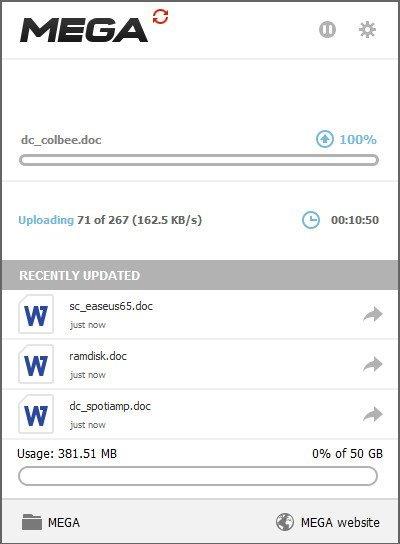
MEGAsync is a simple and easy to use application that enables you to create a path between a local source folder and a cloud drive, in order to perform file synchronization. The program requires that you create a MEGA account and set up your cloud drive, then select a local source folder for synchronization. Once you sign up, the rest of the process is simple. All you have to do is copy or update the files you wish to synchronize in the local dedicated folder. The transfer is done instantly.

Does the world really need yet another cloud backup storage solution? The answer is yes when you look more closely at what MEGA, the brainchild of Kim Dotcom, has to offer. First, there's the offer of 50GB free storage space (capped to 10GB bandwidth a month), with paid-for plans offering 500GB/1TB monthly bandwidth from $11 a month or $120 a year.
Second, MEGA promises really tight security: 2048-bit RSA encryption no less. Your password acts as the master encryption key, so if it's strong enough it should be impervious even to brute-force attacks. Be wary, however: there are no password-reset options, so if you forget it, any data not shared with others will be lost.
Having 50GB to hand is very useful, but to make the most of it you'll want a client that can make uploading and syncing data between your machines effortless. This is that client.
Once installed, you're able to either sync the entire contents of your MEGA drive or just specific folders within it to your computer. These are housed inside a MEGA folder that's created inside your personal Documents folder - if this doesn't suit, take a trip to the Sync tab of the program's settings to delete the default choice and add your choice of location instead. A bit fiddly, but at least it can be done.
Any data already in your cloud account will then download to your PC, while any files or folders copied or updated into this folder will upload in turn back to your MEGA account online. Open the folder in Windows Explorer and you'll see tiny progress icons - red cross, blue sync and green tick - indicating if the files are in sync with your online storage or not.
Click the program's system tray icon for a more comprehensive view of what's going on behind the scenes: what's being synced, recently synced items and access to the all-important settings. From here you can perform a number of tweaks, and even optimise the client's bandwidth so that uploading doesn't cripple your internet connection (in most cases, the automatic setting should be fine).
Whats New
Updates: official site does not provide any info about changes in this version

Homepage:
Код:
https://mega.nz

Download link

rapidgator.net:
Код:
https://rapidgator.net/file/1ad42923ca293ea74992949b1a78dbd9/nsszk.MEGAsync.4.8.1.Multilingual.rar.html

uploadgig.com:
Код:
https://uploadgig.com/file/download/7fcd36eaB2C1c48f/nsszk.MEGAsync.4.8.1.Multilingual.rar

nitroflare.com:
Код:
https://nitroflare.com/view/C16495A8A7C9268/nsszk.MEGAsync.4.8.1.Multilingual.rar

1dl.net:
Код:
https://1dl.net/45vmvezq7kdk/nsszk.MEGAsync.4.8.1.Multilingual.rar.html
 
Microsoft Edge 107.0.1418.62 Stable Multilingual


03a22050155b04df0797ee107b4aad2b.jpeg


File Size : 123/137 Mb​

Introducing the new Microsoft Edge: Rebuilt from the ground up to bring you world-class compatibility and performance, the security and privacy you deserve, and new features designed to bring you the best of the web. The new Microsoft Edge is a modern web browser - designed for faster, safer browsing. Get more done on the web with built-in tools for notetaking, reading and more.

The new Microsoft Edge is based on the Chromium project, so you can use the extensions/add-ons from Google Chrome extensions web store and from Microsoft Edge extensions web store for free. Choose your style
News, images, search-choose what you want to see when you open a new tab. Select a layout best for you: Focused, Inspirational, or Informational.
Take control of your data
Microsoft Edge and Bing give you more control over your data, and more transparency into what information is being collected, while you browse with new features like Tracking Prevention and InPrivate mode.
Browse with peace of mind
Microsoft Defender SmartScreen automatically protects you online from security issues, phishing schemes, and malicious software.
Browse anywhere
The new Microsoft Edge is now available on all supported versions of Windows, macOS, iOS, and Android.
Experience 4K streaming
Get the best browser for high definition media on Windows 10 with unique support for streaming in 4K Ultra HD.
Customize with extensions
The new Microsoft Edge is now compatible with your favorite extensions, so it's easy to personalize your browsing experience.
Код:
https://docs.microsoft.com/en-us/deployedge/microsoft-edge-relnote-stable-channel

Homepage:
Код:
https://www.microsoft.com/en-us/edge

Download link

rapidgator.net:
Код:
https://rapidgator.net/file/c8f8c5943b4cd254452fb35a94805ec3/afirh.MicrosoftEdgeEnterpriseX86..msi.html
https://rapidgator.net/file/e50c11e06430d3397c5b15344c7a50ea/afirh.MicrosoftEdgeEnterpriseX64..msi.html

uploadgig.com:
Код:
https://uploadgig.com/file/download/Cea9f09e7F36f6c2/afirh.MicrosoftEdgeEnterpriseX86..msi
https://uploadgig.com/file/download/f7bb00bEebAfE06B/afirh.MicrosoftEdgeEnterpriseX64..msi

nitroflare.com:
Код:
https://nitroflare.com/view/8E7100FE66A1F4E/afirh.MicrosoftEdgeEnterpriseX64..msi
https://nitroflare.com/view/FDA42431A8CD4C9/afirh.MicrosoftEdgeEnterpriseX86..msi

1dl.net:
Код:
https://1dl.net/71ppj4dhkbga/afirh.MicrosoftEdgeEnterpriseX86..msi.html
https://1dl.net/ibwoqi7mo3jr/afirh.MicrosoftEdgeEnterpriseX64..msi.html
 
Middle 1.7.9 macOS


eae8fcc55eefd886e69e48843599759e.jpeg


File size: 13.11 MB

Middle simply adds the middle click to your Mac for your trackpad or Magic Mouse.​

A small piece of missing functionality goes a long way
• Open links in new browser tabs
• Choose from simple trackpad or Magic Mouse gestures
• Any Apple Trackpad or Magic Mouse is supported
Select from the following gestures
• Click with three fingers (trackpad or Magic Mouse)
• Tap with three fingers (trackpad or Magic Mouse)
• Force touch with one finger on a force touch compatible trackpad
• Click with one finger in the center of the Magic Mouse
Release Notes
Код:
https://middleclick.app/versions

Supported Operation System
• macOS 10.12 or later
• Apple Silicon or Intel Core processor

Homepage:
Код:
http://middleclick.app

Download link

rapidgator.net:
Код:
https://rapidgator.net/file/97c4a361a45d3a0233827bc1fd18f17d/vmfaz.Middle.1.7.9.macOS.dmg.html

uploadgig.com:
Код:
https://uploadgig.com/file/download/5E49062a399fb631/vmfaz.Middle.1.7.9.macOS.dmg

nitroflare.com:
Код:
https://nitroflare.com/view/3D30742A833CE3C/vmfaz.Middle.1.7.9.macOS.dmg

1dl.net:
Код:
https://1dl.net/yhzwnnotpixj/vmfaz.Middle.1.7.9.macOS.dmg.html
 
Mozilla Firefox 107.0.1


198d253a7fb92aa1e47e47ac27709dab.jpeg


File Size : 108 Mb​

Mozilla Firefox is a fast, secure and easy to use web browser that offers many advantages over other web browsers, such as the tabbed browsing and the ability to block pop-up windows. It lets you to view Web pages way faster, using less of your computer's memory. Take Firefox with you wherever you go. Synchronize your browsing across multiple devices. Forget clunky URLs - find the sites you love in seconds. Firefox has the most ways to customize your online experience specifically for the way you use the web. It is built with you in mind, so it's easy and instinctive to use even the first time you try it.

Thousands of Add-ons (little extras that augment Firefox to meet your unique needs) just waiting out there to help you do more, have more fun and be more creative online.
Mozilla Firefox keeps your personal info and your online interests away from the bad guys. Simply put, your security is our top priority.
Choose from 5000 free extras to make your Mozilla Firefox browser look and function the way you want. An add-on can be a new time-saving toolbar button, a shortcut to search, a themed look, and more. Add-ons make browsing easier.
Mozilla Firefox Helps You Stay Safe
• Protect Your Privacy. When you browse, you leave a trail of data that potentially contains all sorts of personal information. We believe this info belongs to you and you alone (and least of all to overzealous advertisers), and have built in features to ensure that's the case.
• Browse With Security. Whether it's buying a gift, paying your bills or simply signing in to Facebook, it's important keep your personal info out of the hands of any online bad guys who might be snooping around. Fortunately, Firefox is packed with advanced security features to help you stay safe.
• Stay In Control. The online world is always changing, which is why we give you easy-to-use tools to let you adapt and make smart choices as you go.
• It's Part of Firefox Mission. Mozilla is a non-profit organization with the goal of making the Web better for everyone. We're not trying to make money off our users - we just want you to have the best possible experience online, and that includes keeping you and your personal information safe and private.
Mozilla Firefox Personal Settings
• Add Style: Personas. Make Firefox match your style! Choose from thousands of Personas designed by users around the world, or create one yourself. With a single click you can dress up your browser however you want.
• Customize: Add-ons. Many of the most popular add-ons are extensions, little extras you download to add more bells & whistles to Firefox. Compare prices, check the weather, listen to music, update your Facebook profile - all built right into the browser!
• Make It Work: Plugins. Plugins are small bits of third-party software built by companies like Adobe Systems or Apple to power videos, animation and games (examples include Flash Player or Quicktime). They can cause browser crashes or pose security risks when they get out of date, so we've built an easy tool to help you stay current.
• Adapt Your Interface. The Firefox interface has been designed by a team of experts and tested by a community of millions of users around the world to make sure your browsing is as easy and intuitive as possible. But, everyone has their own specific needs, and you can always adjust the interface to be exactly the way you like it: re-arrange, organize, add or remove buttons or fields to change your browsing experience however you want.
• Stay In Sync. Sync seamlessly connects your desktop and mobile Firefox, so you can access your browsing history, passwords, bookmarks and even open tabs no matter which device you use. Now you can surf the Web on your desktop, get up in the middle of browsing and have your open tabs ready and waiting on your mobile, just as you left them. Your browsing will never be the same!
Blazing Performance
• Making the Web Faster. Fasten your seat belts! With faster start-up times, rapid graphics rendering and improved page load speed, Firefox is full of major performance enhancements you'll notice instantly. Upgrades to DOM and Style Resolution performance mean pages load faster, scrolling up and down is smoother, and web applications can run at breakneck speed. It's an entirely new - and fast - browsing experience.
• Web Application Speed. Web applications like mail, video or games keep getting more awesome, but they also require additional processing power to run smoothly. To meet these increasingly sophisticated demands, Firefox features a massively improved javascript engine called JägerMonkey. As a result, Firefox handles even the most dynamic applications smoothly and easily, allowing you to enjoy the very best the modern Web has to offer.
• Hardware Acceleration. Whether you're using Windows 8.1, 8, 7, Vista, XP or Mac OS X with Firefox, you'll also enjoy hardware acceleration for many common operations, such as watching videos or playing games. Firefox uses a new layers-based graphics system that takes advantage of Direct2D and Direct3D on Windows and OpenGL on Mac to deliver amazing performance even on graphics-heavy sites.
Код:
http://www.mozilla.org/en-US/firefox/releasenotes/

Homepage:
Код:
http://www.mozilla.org/

Download link

rapidgator.net:
Код:
https://rapidgator.net/file/aae50f94edee484822fecb18f1a904d4/fqbat.Mozilla.Firefox.107.0.1.rar.html

uploadgig.com:
Код:
https://uploadgig.com/file/download/F2A565029dbba9fd/fqbat.Mozilla.Firefox.107.0.1.rar

nitroflare.com:
Код:
https://nitroflare.com/view/DE9B54FA8D38414/fqbat.Mozilla.Firefox.107.0.1.rar

1dl.net:
Код:
https://1dl.net/ifx99k7rfys2/fqbat.Mozilla.Firefox.107.0.1.rar.html
 
Native Instruments Massive X v1.4.2 U2B macOS


4e8904aed01b286b5c4e0446ca4910cc.jpeg


TRAZOR | 28 November 2022 | 1,28 GB

Next-generation synthesizer. Rethought, rewired, and reincarnated for the next decade of sound.​

THE (RE)BIRTH OF A LEGEND
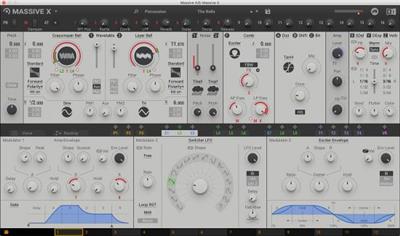
Rethought, rewired, and reincarnated - MASSIVE X is the successor to an iconic synthesizer that helped spawn entire genres. Get everything you need to create any sound imaginable. Quickly patch complex routings to bring your ideas to life - no matter how far-out they might seem - and take things further than you thought you could with expressive, playable modulation. Think it up, dial it in, and define what the future sounds like.
MASSIVE X will grow, adapt, and evolve with regular free updates - both inspired by, and to inspire, the cultures it helps to create.
THE OSCILLATORS
At the heart of MASSIVE X you'll find the completely new oscillator section - capable of producing more variation than some entire synths, right at the source. Choose from over 170 wavetables and 10 different modes of reading them - from the aggressive Gorilla family, to a wavetable-bending mode, Hardsync, Formant, and many more - each with their own unique sub-modes and additional controls. Dial in two phase-modulation oscillators to inject extra movement into the main oscillators.
ROUTING REIMAGINED
Connect any output to any input, and see what happens. The intuitive routing setup lets you essentially rewire parts of MASSIVE X, meaning you can bypass, feedback, and send audio any way you like. It's also possible to route modulators as audio sources to excite elements such as the comb filter.
PERFORMERS: MADE TO MODULATE
Draw precise patterns of modulation in the Performer section, and assign them to parameters for complex, evolving patches, or for controlled changes to your sound. You can then use the Remote Octave control to trigger them on your keyboard, meaning you get truly playable modulation and huge expressive variety within a single patch.
MORE THAN SKIN-DEEP
Whether you're a daytime sound designer or all-night deep diver, switch to a skin that suits your workflow. Keep a little extra CPU power under the hood with stripped-back flat modes, and resize MASSIVE X to fit your studio.
Whats new in this version
Official site does not provide any info about changes in this version.
System Requirements
Windows 7 or newer

Homepage:
Код:
https://www.native-instruments.com/en/products/komplete/synths/massive-x/

Download link

rapidgator.net:
Код:
https://rapidgator.net/file/7396eec17df31fe593f8aa94cfcb0fad/ozxvl.Native.Instruments.Massive.X.v1.4.2.U2B.macOS.rar.html

uploadgig.com:
Код:
https://uploadgig.com/file/download/aD421847942017bc/ozxvl.Native.Instruments.Massive.X.v1.4.2.U2B.macOS.rar

nitroflare.com:
Код:
https://nitroflare.com/view/C88FACBD971894C/ozxvl.Native.Instruments.Massive.X.v1.4.2.U2B.macOS.rar

1dl.net:
Код:
https://1dl.net/onafqsctzqro/ozxvl.Native.Instruments.Massive.X.v1.4.2.U2B.macOS.rar.html
 
O&O DiskImage Professional / Server 18.1.191


5171a05003928c5d1418586058f67149.jpeg


File size: 203 MB​

O&O DiskImage lets you back up an entire computer or single files whenever you want - even while the computer is being used. In the event you should lose your personal data it can be quickly restored with just a few mouse clicks - even when Windows is no longer able to start. It also supports SSD drives and the latest UEFI System.

O&O DiskImage lets you carry out a system restore and to duplicate or clone an entire PC or hard drive. You can even restore this backup onto a computer whose hardware is different from the original machine, for instance, where you have changed a motherboard on the target machine or have bought a brand new PC and want to restore an old backup onto it.
A regular backup is still something that many users prefer to avoid. At least that is until they suffer their first loss of important files as a result of software, hardware or user error: that's when it becomes crystal clear just how valuable a reliable and up-to-date backup really is!
New in O&O DiskImage 18: Comprehensive VHD / VHDX functionality
With the new version 18 it's possible to convert image files made with O&O DiskImage into Microsoft Virtual Hard Disc (VHDX as well as VHD) image files. This can be especially useful if someone wants to first "rehearse" migrating from Windows 10 to Windows 11 because it can be done using a virtual machine created on the current system.
The new O&O DiskImage 18 can also create incremental and differential images of virtual drives. Combining or mounting these images is also possible. Whenever there's a backup available, it only takes a few seconds to access any files that are needed. Work on the computer can then be continued without any loss of time or important data.
O&O DiskImage 18 with its own recovery partition
Normally with a backup or imaging program you need to create a boot medium (USB) to boot up your system if something goes awry. This you have to either carry around or store somewhere safe in case disaster strikes.
Thanks to the integration into the system, the O&O DiskImage RecoveryPartition can be accessed immediately so that the last system image can be restored directly. If the Windows operating system does not start or if faulty drivers have to be uninstalled - with the integrated recovery environment, all O&O tools are available to make the system operational again as easily as possible. Not only is this much more comfortable and quicker for the user, it also provides them with an extra level of security as this medium cannot get lost or damaged as easily as a "portable", external one.
O&O DiskImage To Go
Previously, in addition to regularly backing up your machine, you also had to separately create an O&O DiskImage boot media to restore that backup. Everything is easier now! The new O&O DiskImage To Go function automatically turns an external hard drive (or USB flash drive with enough storage space) into an O&O DiskImage boot medium and marks this disk as the preferred storage medium for future system backups. As soon as you then connect this external USB hard disk to your computer, O&O DiskImage 18 automatically creates a backup. This makes it easy to create a recent backup. And if something really happens to your computer or you want to transfer your system and all your data to a new computer, then with the O&O DiskImage boot medium you can restore the backup stored on it with just one touch of a button. Without the hassle of searching for the boot medium and the external hard drive with the backup.
It has never been so easy to ensure the security of your data!
Код:
https://www.oo-software.com/en/diskimage-backup-your-data

Homepage:
Код:
https://www.oo-software.com

Download link

rapidgator.net:
Код:
https://rapidgator.net/file/2868379170573f9ad6b8cb947a1202a0/tgomn.OO.DiskImage.Professional..Server.18.1.191.rar.html

uploadgig.com:
Код:
https://uploadgig.com/file/download/3F961D5E52833919/tgomn.OO.DiskImage.Professional..Server.18.1.191.rar

nitroflare.com:
Код:
https://nitroflare.com/view/BF9E8FF1C875CAA/tgomn.OO.DiskImage.Professional..Server.18.1.191.rar

1dl.net:
Код:
https://1dl.net/5n4ythxt0kqu/tgomn.OO.DiskImage.Professional..Server.18.1.191.rar.html
 
O&O DiskImage Professional / Server 18.1.192


7189713177010ee9678f542d38a86679.jpeg


O&O DiskImage Professional / Server 18.1.192
File size: 194.99 MB​

O&O DiskImage lets you back up an entire computer or single files whenever you want - even while the computer is being used. In the event you should lose your personal data it can be quickly restored with just a few mouse clicks - even when Windows is no longer able to start. It also supports SSD drives and the latest UEFI System.

O&O DiskImage lets you carry out a system restore and to duplicate or clone an entire PC or hard drive. You can even restore this backup onto a computer whose hardware is different from the original machine, for instance, where you have changed a motherboard on the target machine or have bought a brand new PC and want to restore an old backup onto it.
A regular backup is still something that many users prefer to avoid. At least that is until they suffer their first loss of important files as a result of software, hardware or user error: that's when it becomes crystal clear just how valuable a reliable and up-to-date backup really is!
New in O&O DiskImage 18: Comprehensive VHD / VHDX functionality
With the new version 18 it's possible to convert image files made with O&O DiskImage into Microsoft Virtual Hard Disc (VHDX as well as VHD) image files. This can be especially useful if someone wants to first "rehearse" migrating from Windows 10 to Windows 11 because it can be done using a virtual machine created on the current system.
The new O&O DiskImage 18 can also create incremental and differential images of virtual drives. Combining or mounting these images is also possible. Whenever there's a backup available, it only takes a few seconds to access any files that are needed. Work on the computer can then be continued without any loss of time or important data.
O&O DiskImage 18 with its own recovery partition
Normally with a backup or imaging program you need to create a boot medium (USB) to boot up your system if something goes awry. This you have to either carry around or store somewhere safe in case disaster strikes.
Thanks to the integration into the system, the O&O DiskImage RecoveryPartition can be accessed immediately so that the last system image can be restored directly. If the Windows operating system does not start or if faulty drivers have to be uninstalled - with the integrated recovery environment, all O&O tools are available to make the system operational again as easily as possible. Not only is this much more comfortable and quicker for the user, it also provides them with an extra level of security as this medium cannot get lost or damaged as easily as a "portable", external one.
O&O DiskImage To Go
Previously, in addition to regularly backing up your machine, you also had to separately create an O&O DiskImage boot media to restore that backup. Everything is easier now! The new O&O DiskImage To Go function automatically turns an external hard drive (or USB flash drive with enough storage space) into an O&O DiskImage boot medium and marks this disk as the preferred storage medium for future system backups. As soon as you then connect this external USB hard disk to your computer, O&O DiskImage 18 automatically creates a backup. This makes it easy to create a recent backup. And if something really happens to your computer or you want to transfer your system and all your data to a new computer, then with the O&O DiskImage boot medium you can restore the backup stored on it with just one touch of a button. Without the hassle of searching for the boot medium and the external hard drive with the backup.
It has never been so easy to ensure the security of your data!
Код:
https://www.oo-software.com/en/diskimage-backup-your-data
Supported systems:Windows® 11, 10, 8.1

Homepage:
Код:
https://www.oo-software.com/

Download link

rapidgator.net:
Код:
https://rapidgator.net/file/dfb9f8a3ed85b2b3ef53f96f0ecaecc4/qwfhw.OO.DiskImage.Professional..Server.18.1.192.rar.html

uploadgig.com:
Код:
https://uploadgig.com/file/download/4892a7Dd69902C96/qwfhw.OO.DiskImage.Professional..Server.18.1.192.rar

nitroflare.com:
Код:
https://nitroflare.com/view/A2C86397040F6F0/qwfhw.OO.DiskImage.Professional..Server.18.1.192.rar

1dl.net:
Код:
https://1dl.net/rkux7ie6vsh4/qwfhw.OO.DiskImage.Professional..Server.18.1.192.rar.html
 
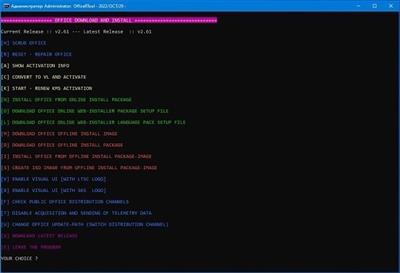
Office(R)Tool 2.70


67dca2864085b035dff18dde0c616009.jpeg


File size: 6.3 Mb

An advanced tool to install, activate, and config MS Office 2016, 2019, and 2021.​

Features
Scrub Office
Reset - Repair Office
Start Kms Activation
Show Current Activation Status
Convert Retail License To Volume License
Install Office From Online Install Package
Create Office Online Web-installer Package Setup File
Create Office Online Web-installer Language Pack Setup File
Download Office Offline Install Image
Download Office Offline Install Package
Install Office From Offline Install Package-image
Create Iso Image From Offline Install Package-image
Check For New Version
Download Latest Release
Enable Visual Ui[with Ltsc Logo]
Enable Visual Ui[with 365 Logo]
Disable Acquisition And Sending Of Telemetry Data
Change Office Update-path (switch Distribution Channel)
Core function changes
User-friendly Interface
Up to date Activation files
Auto Create Package Info file
Auto Detect system Arch. & Lang
Multi-Language / Architecture Support
Menu changes
Install from ISO / Offline folder
Online / Offline Install Include Create ISO
Visual Refresh for Current & LTSC Channels
Downloading Offline Image / Offline Package
Convert & Activation for Office Products, Include 365 & Home
Misc.
Last activation Error Code output
Proxy / Debug / Self Update Options *NEW*
Using Language Name instead Language code
Replace 0/1 selection, with something much better
Remove Not genuine banner & Pop-up (the new one)
Whats New
~ Add support for Windows terminal
~ Fix Mondo install option, missing exclude list
~ Add check if bits service exist, cause Some users remove it .

Homepage:
Код:
https://forums.mydigitallife.net/

Download link

rapidgator.net:
Код:
https://rapidgator.net/file/9ff95996ab17f5614b13bbc626a87001/yfcll.OfficeRTool.2.70.rar.html

uploadgig.com:
Код:
https://uploadgig.com/file/download/a3453579e0306De8/yfcll.OfficeRTool.2.70.rar

nitroflare.com:
Код:
https://nitroflare.com/view/9A1C2153F79D75A/yfcll.OfficeRTool.2.70.rar

1dl.net:
Код:
https://1dl.net/3pjbhb7u37mq/yfcll.OfficeRTool.2.70.rar.html
 
Назад
Сверху