• Здравствуйте. Сайт заработал в архивном режиме форум www.old.nado.in

KAMAL's Softwares Collection!!! (Updated Daily)

  • Автор темы Автор темы KAMAL
  • Дата начала Дата начала
CCleaner Professional Plus 5.69 Multilingual
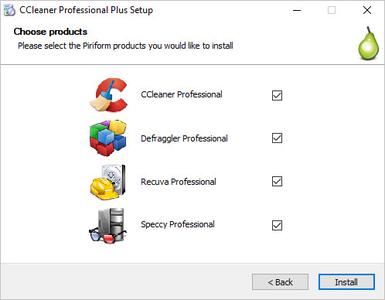
CCleaner Professional Plus 5.69 Multilingual


37bb26691f086b4f8dce57a5ae0fcd10.jpeg


CCleaner Professional Plus 5.69 Multilingual | 34 MB | Language: Multilanguage​


We get many requests from our users wanting to buy all our products in one bundle. So we've listened and we're very happy to announce that we're launching CCleaner Professional Plus: a 4-in-1 product that includes all the Professional versions of CCleaner, Defraggler, Recuva and Speccy! With our patented technology products you can regain full control of your PC and keep it running like new: make it faster and more secure with fewer crashes, recover lost files, and keep track of what's inside your PC with detailed statistics on every piece of hardware.


CCleaner a utility for cleaning the debris in the operating system. In the course of their work CCleaner (Crap Cleaner) is looking for and removes unused files. These include: cookies, history, visiting sites in IE, temporary Internet files, search strings, files, Recycle Bin, etc.

Also search for temporary files of third-party applications: Firefox, Opera, Media Player, eMule, Kazaa, Google Toolbar, Netscape, Office XP, Nero, Alcohol 120, Adobe Acrobat, WinRAR, WinAce, WinZip, GetRight, Morpheus, Download Accelerator Plus, VirtualDub , ZoneAlarm and many others. Can be subjected to cleaning and registry Windows, ridding it of its unnecessary extensions of the old library dll and wrong ways, which accumulate in considerable quantities, especially after the installation and removal of a variety of programs.


What is more than Regular CCleaner in Plus version:
Defragmentation
File Recovery
Hardware Analysis

System Requirements:
Windows 10, 8.1, 8, 7, Vista and XP. Including both 32-bit and 64-bit versions.


Home Page -
Код:
http://www.piriform.com/


DOWNLOAD LINKS:

Код:
https://rapidgator.net/file/fc1c33d0138621355c066af74afe6795/CCleaner_Professional_Plus_5.69_Multilingual.rar

Код:
http://nitroflare.com/view/149E1095D82819A/CCleaner_Professional_Plus_5.69_Multilingual.rar

Код:
https://uploadgig.com/file/download/16abD76afa88edA8/CCleaner_Professional_Plus_5.69_Multilingual.rar

 
Dassault Systemes DraftSight Enterprise Plus 2020 SP2.1 x64 Multilingual

Dassault Systemes DraftSight Enterprise Plus 2020 SP2.1 x64 Multilingual


35f846efdfbff206c5851d764746381c.jpeg


Dassault Systemes DraftSight Enterprise Plus 2020 SP2.1 x64 Multilingual | 243 MB | Language: Multilanguage​


The Dassault Systemes product team is pleased to announce the availability of DraftSight 2020 SP2.1 is major software powerful, and includes your most asked-for capabilities and functionality. DraftSight lets you create, edit, view and markup any kind of 2D and 3D DWG file with greater ease, speed and efficiency.

DraftSight is a feature-rich 2D and 3D CAD solution for architects, engineers and construction service providers, as well as professional CAD users, designers, educators and hobbyists, and includes your most asked-for capabilities and functionality.

DraftSight lets you create, edit, view and markup any kind of 2D and 3D DWG file with greater ease, speed and efficiency. Its familiar user interface facilitates a quick transition from your current CAD application.

Real design freedom is letting you work the way you want to work. It's the ability to effortlessly go from 2D drafting to 3D modeling and back again in order to optimize and maximize designs. And the capability to seamlessly integrate with other Dassault Systèmes and SOLIDWORKS solutions, including SOLIDWORKS PDM to easily manage your DWG file designs from first inspiration to final outcome.

DraftSight 2020 delivers powerful automations to save you time, improve detailing quality and reduce tedious tasks. Automatically dimension drawings and arrange dimension spacing to save hours of time per drawing, simply drag and drop drawings and blocks from 3D ContentCentral right from the DraftSight task pane, and much more.

DraftSight: A Better 2D Drafting and 3D Design Experience

Dassault Systèmes SolidWorks Corp. offers complete 3D software tools that let you create, simulate, publish, and manage your data. SolidWorks products are easy to learn and use, and work together to help you design products better, faster, and more cost-effectively. The SolidWorks focus on ease-of-use allows more engineers, designers and other technology professionals than ever before to take advantage of 3D in bringing their designs to life.


Product: Dassault Systemes DraftSight
Version: Enterprise 2020 SP2.1
Supported Architectures: x64
Website Home Page :
Код:
http://www.draftsight.com
Language: multilanguage
System Requirements: PC *
Supported Operating Systems: *
Size: 243.4 mb

Languages: Čeština, Deutsch, English, Français, Italiano, 日本語, 한국어, Polski, Português, Русский, Español, Türkçe, 中文 (Simplified)

Minimum
- 64-bit version: Windows 7 Service Pack 1, Windows 8.1, or Windows 10 (with latest Updates and Service Packs)
- 32-bit version: Windows 7 Service Pack 1, Windows 8.1, or Windows 10 (with latest Updates and Service Packs)
- Intel Core 2 Duo, or AMD Athlon X2 Dual-Core processor
- 1.5 GB free hard disk space depending on accessory applications installed
- 2 GB RAM
- 3D Graphics accelerator card with OpenGL version 1.4
- Display with 1280 x 768 pixels resolution
- Mouse
Recommended
- 64-bit version: Microsoft Windows 10 (with latest Updates and Service Packs)
- 32-bit version: Microsoft Windows 10 (with latest Updates and Service Packs)
- Intel Core i5 processor, AMD Athlon/Phenom X4 processor, or better
- 1.5 GB free hard disk space depending on accessory applications installed
- 8 GB RAM
- 3D Graphics accelerator card with OpenGL version 3.2 or better
- Full HD monitor
- Wheel mouse, or 3D mouse


DOWNLOAD LINKS:

Код:
https://rapidgator.net/file/c6e1d78299c42e409a1fdf7e610ad87b/Dassault_Systemes_DraftSight_Enterprise_Plus_2020_SP2.1_x64_Multilingual.rar

Код:
http://nitroflare.com/view/46E41889B5758B6/Dassault_Systemes_DraftSight_Enterprise_Plus_2020_SP2.1_x64_Multilingual.rar

Код:
https://uploadgig.com/file/download/189621fa1f0576CC/Dassault_Systemes_DraftSight_Enterprise_Plus_2020_SP2.1_x64_Multilingual.rar
 
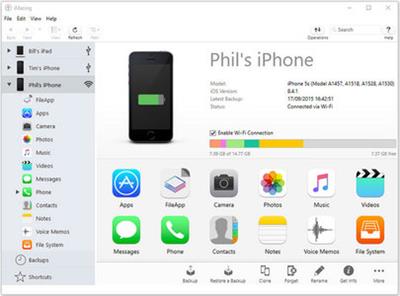
DigiDNA iMazing 2.11.8 Multilingual

DigiDNA iMazing 2.11.8 Multilingual


f1b89cc83fda148e448f9c9d7e8d5c26.jpeg


DigiDNA iMazing 2.11.8 Multilingual | 115 MB | Language: Multilanguage​


iMazing (was DiskAid) is the ultimate iOS device manager with capabilities far beyond what iTunes offers. With iMazing and your iOS device (iPhone, iPad, or iPod), you can: Copy music to and from any iOS device, Backup & restore individual iOS apps and your custom saved data, perfect for freeing up space on your iOS device without losing your files (or progress in a game) or for copying the app as-is to another iOS and much more!


With iMazing, you can:
- Copy music to and from any iOS device (even from one iOS device to another!) regardless of what Mac or PC the device is already synced to; it's music copy how you always wished it could be, without limitations or restrictions
- Backup & restore individual iOS apps and your custom saved data, perfect for freeing up space on your iOS device without losing your files (or progress in a game) or for copying the app as-is to another iOS device
- Transfer files to and from an iOS device, and browse the iOS file system
- Use your iOS device like an external drive
- Browse and save messages (SMS, MMS, iMessage), voicemails, and call logs, none of which iTunes can do
- Browse, save, and add contacts to your iPhone, without automatically adding them to your iCloud account
- Manage multiple backups of the same iOS device and restore from any one (similar to Time Machine for iOS)
- And other amazing things you never thought possible!

Operating System: Windows 7 or higher.

Home Page -
Код:
https://imazing.com/


DOWNLOAD LINKS:

Код:
https://rapidgator.net/file/e881fa704478267bbb9bfcbfcc97dae4/DigiDNA_iMazing_2.11.8_Multilingual.rar

Код:
http://nitroflare.com/view/2DAC480246B0C54/DigiDNA_iMazing_2.11.8_Multilingual.rar

Код:
https://uploadgig.com/file/download/c4E624136B58d7c0/DigiDNA_iMazing_2.11.8_Multilingual.rar
 
Draftable Desktop 2.3.200

Draftable Desktop 2.3.200


b957ad53a27c31f3770f3fdcb07762dd.jpeg


Draftable Desktop 2.3.200 | 192 MB | Language: English​


Go home early. The fastest document comparison tool. Compare 300+ pages in seconds. Draftable Desktop 2.0 is now available - faster and more powerful than ever! See all the changes in your documents, locally and offline. Take your work to the next level.


Confidential and private
Comparisons don't use the internet and your documents never leave your computer.
Compare anything to anything

Draftable compares any combination of files:
- PDF (.pdf[/url])
- Word (.doc, .docx, .docm, .rtf)
- PowerPoint (.ppt, .pptx, .pptm)
- Excel (.xls, .xlsx, .xlsxm, .csv)

Compare spreadsheets
Compatible with .xls, .xlsx, .xlsxm. With Office 2013, 2016, or 365, you can compare text in Excel.

Password protected document?
Simple. Just enter the password when prompted and you can compare password-protected documents.

Intuitive user interface
Our simple interface means no downtime for training. You and your team can start comparing in minutes.

Draftable Desktop
Think of all the time you will save over the course of a year. It's a no-brainer.


System Requirements:
- Draftable Desktop requires Windows 7+.
- Comparing Word documents, PowerPoint presentations and Excel spreadsheets requires Office 2007+.


Home Page -
Код:
https://draftable.com/desktop


DOWNLOAD LINKS:

Код:
https://rapidgator.net/file/089ffd6743fa942384def78ea650d088/Draftable_Desktop_2.3.200.rar

Код:
http://nitroflare.com/view/FFF43282BBF885B/Draftable_Desktop_2.3.200.rar

Код:
https://uploadgig.com/file/download/b13f4Bbd9beCc784/Draftable_Desktop_2.3.200.rar
 
East Imperial Soft Magic NTFS & FAT Recovery 3.1 Multilingual

East Imperial Soft Magic NTFS & FAT Recovery 3.1 Multilingual


def11671d04dc501a1fffd9909dbb94d.jpeg


East Imperial Soft Magic NTFS & FAT Recovery 3.1 Multilingual | 82 MB | Language: Multilanguage​


NTFS / FAT Disk Recovery Software. Looking for a tool to recover an NTFS or FATvolume? Formatted the disk or deleted partitions? Boot disk or SSD drive no longer recognized by the system? Magic NTFS Recovery will recover data even if the disk was repartitioned and formatted afterwards!


Magic NTFS Recovery
Dedicated to recovering data from NTFS volumes, this tool is perfect for solving isolated cases and single incidents with system disks and hard drives. Offered at a discount compared to our top of the line tool, Magic NTFS Recovery is a perfect bargain for complex data loss situations occurring in NTFS-only environments.

Magic FAT Recovery
Working with FAT/FAT16/FAT32 media, Magic FAT Recovery is perfect for recovering information from memory cards, USB flash drives, external disks and other media formatted with a variation of the FAT system. The tool can recover all types of files from formatted, damaged, unreadable and deleted FAT volumes.

Features and Benefits Magic FAT Recovery
Magic FAT Recovery is designed to recover information from hard drives, USB drives, flash and memory cards bearing the FAT/FAT32 file system. The tool can unerase deleted files and rebuild damaged disks to their original state by restoring the original file and folder structure.

Undelete Files and Recover Data
- Undeletes files from healthy, formatted, damaged and inaccessible FAT/FAT32 partitions;
- Quick scan mode recovers files in minutes;
- In-depth recovery with content-aware analysis.

Features and Benefits Magic NTFS Recovery
Magic NTFS Recovery effectively handles hard disks, flash and SSD drives with major issues. The tool can reliably locate and recovers deleted files and data missing on damaged partitions, optionally rebuilding the damaged disk complete with original files and folder structure.

Recovering Files and Data
- Unerases deleted files from healthy, formatted and damaged NTFS partitions;
- Quick scan mode undeletes files in minutes;
- Comprehensive mode features trademark content-aware analysis for in-depth recovery.

Rebuild Corrupted Partitions
- Rebuilds damaged partitions by reconstructing the file system complete with original files and folders;
- Recovers formatted partitions and repartitioned drives;
- Refurbishes media to "as new" state perfect for long-term use.

Operating System: Windows XP, Vista, 7, 8/8.1, 10

Home Page -
Код:
http://www.magicuneraser.com/


DOWNLOAD LINKS:

Код:
https://rapidgator.net/file/b071040e1ed7489abcf06f72cff7286f/East_Imperial_Soft_Magic_NTFS__FAT_Recovery_3.1_Multilingual.rar

Код:
http://nitroflare.com/view/E4DA2EAFC3325C6/East_Imperial_Soft_Magic_NTFS__FAT_Recovery_3.1_Multilingual.rar

Код:
https://uploadgig.com/file/download/f8Df73c6c60f4e37/East_Imperial_Soft_Magic_NTFS__FAT_Recovery_3.1_Multilingual.rar
 
Easy Projects Outlook Add-In for Desktop 3.3.1.0

Easy Projects Outlook Add-In for Desktop 3.3.1.0


d7ef228d32335781985d35d42588cd51.jpeg


Easy Projects Outlook Add-In for Desktop 3.3.1.0 | 113 MB | Language: English​


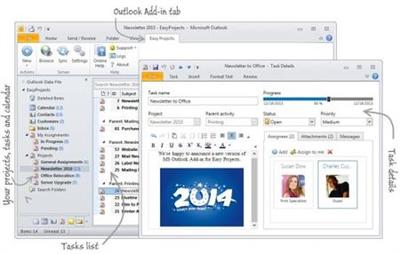
Easy Projects is a project management platform that replaces the mess of spreadsheets, emails, and whiteboards into a single, simplified work-space. Perfect for project tracking, task checking, quick task updating and attaching files without leaving Outlook.


Easy Projects Outlook Add-In for Desktop
- Two-ways synchronization
- Project and task management
- Convert and link emails with activities
- Time tracking

Two-Way Sync
Sync native Outlook tasks and folders

Task Management
Easy way to manage your teamwork

Time Tracking
Automated time tracking of email processing time

Linked Emails
Emails converting and linking with activities

Sync projects and tasks
Import Easy Projects items into native Outlook tasks and folders.Tasks are displayed hierarchically inside project folders. Use Outlook flexibility to configure view mode and task filtering.

Tasks-to-calendar import
Easy Projects tasks that is assigned to you will be imported to the Outlook calendar.

Calendar-to-project export
Choose calendar and specify destination project. Convert meetings and appointments into tasks.

Project and task management
Create and update teamwork items right from Outlook.

Weekly time logs
Form your weekly time logs in convenient window. One week - one record. 2 minutes to fill.

Mailwork time tracking
Automatically log time spent on mailwork.

System Requirements:
- Windows 10 32/64 bit
- Windows 8 32/64 bit
- Windows 7 32/64 bit
- Windows Vista
- Windows XP


Home Page -
Код:
https://www.easyprojectsaddin.com/


DOWNLOAD LINKS:

Код:
https://rapidgator.net/file/be3d70a3327b0b6e133c99c43545bec6/Easy_Projects_Outlook_Add-In_for_Desktop_3.3.1.0.rar

Код:
http://nitroflare.com/view/6D6855062DD93C0/Easy_Projects_Outlook_Add-In_for_Desktop_3.3.1.0.rar

Код:
https://uploadgig.com/file/download/a977c7d4e3A636c7/Easy_Projects_Outlook_Add-In_for_Desktop_3.3.1.0.rar
 
Geekbench Pro 5.2.3 (x64)

Geekbench Pro 5.2.3 (x64)


61332165b8265f9604b1f7cc0f7b2d70.jpeg


Geekbench Pro 5.2.3 (x64) | 123 MB | Language: English​


Geekbench 5 is a cross-platform benchmark that measures your system's performance with the press of a button. How will your mobile device or desktop computer perform when push comes to crunch? How will it compare to the newest devices on the market? Find out today with Geekbench 5.


CPU Benchmark
Geekbench 5 measures your processor's single-core and multi-core power, for everything from checking your email to taking a picture to playing music, or all of it at once. Geekbench 5's CPU benchmark measures performance in new application areas including Augmented Reality and Machine Learning, so you'll know how close your system is to the cutting-edge.

Compute Benchmark
Test your system's potential for gaming, image processing, or video editing with the Compute Benchmark. Test your GPU's power with support for the OpenCL, CUDA, and Metal APIs. New to Geekbench 5 is support for Vulkan, the next-generation cross-platform graphics and compute API.

System Requirements:
Windows 10 (64-bit) or later
2GB of RAM


Home Page -
Код:
http://www.geekbench.com/


DOWNLOAD LINKS:

Код:
https://rapidgator.net/file/b2486e2092a695e76005c4310f0273fd/Geekbench_Pro_5.2.3_x64.rar

Код:
http://nitroflare.com/view/13C52D65E4927D0/Geekbench_Pro_5.2.3_x64.rar

Код:
https://uploadgig.com/file/download/6af544Da0a612f6f/Geekbench_Pro_5.2.3_x64.rar
 
Hasleo BitLocker Data Recovery v5.6 (x64)

Hasleo BitLocker Data Recovery 5.6 (x64) Professional / Enterprise / Ultimate / Technician


2bc14a5c3880f101b447206016ade4ff.jpeg


Hasleo BitLocker Data Recovery 5.6 (x64) Professional / Enterprise / Ultimate / Technician | 110 MB | Language: English​


As a Professional BitLocker Data Recovery Software, Hasleo BitLocker Data Recovery can help you recover deleted/lost data from BitLocker encrypted drive, recover lost data from formatted, inaccessible, failed, damaged BitLocker encrypted drive or recover lost data from deleted/lost BitLocker encrypted partition. And Hasleo BitLocker Data Recovery supports recovering data from FAT, NTFS and exFAT file systems located on hard disk, external hard drive, USB flash drive, SD card, etc.


As a Professional BitLocker Data Recovery Software, Hasleo BitLocker Data Recovery can help you recover deleted/lost data from BitLocker encrypted drive, recover lost data from formatted, inaccessible, failed, damaged BitLocker encrypted drive or recover lost data from deleted/lost BitLocker encrypted partition. And Hasleo BitLocker Data Recovery supports recovering data from FAT, NTFS and exFAT file systems located on hard disk, external hard drive, USB flash drive, SD card, etc.


Solve Different Data Loss Cases
Accidental file deletion
Files gone from drive
Mistaken drive deletion
Drive reformatted/inaccessible
Drive damaged/corrupted
Hard Drive Failures
Other Cases
Supported Devices
Hard Drive
External Hard Disk
SSD
USB Drive
SD Card
CF Card
Other Storage Devices
Supported File Systems
FAT
NTFS
exFAT


System requirements:
Supported operating systems:
Windows 10/8.1/8/7/Vista/XP (64-bit only)
Windows Server 2016/2012/2008/2003 (64-bit only)
CPU: 1GHz (32 bit or 64 bit)
RAM: 256 MB or more of RAM (1024MB Recommended)
Disk Space: 100 MB and above free space


Home Page -
Код:
https://www.easyuefi.com/


DOWNLOAD LINKS:

Код:
https://rapidgator.net/file/3f301e9021f2bf781b6a642cfe36b521/Hasleo_BitLocker_Data_Recovery_5.6_x64_Professional__Enterprise__Ultimate__Technician.rar

Код:
http://nitroflare.com/view/43CB179C77398DD/Hasleo_BitLocker_Data_Recovery_5.6_x64_Professional__Enterprise__Ultimate__Technician.rar

Код:
https://uploadgig.com/file/download/c8fdCdb282f73320/Hasleo_BitLocker_Data_Recovery_5.6_x64_Professional__Enterprise__Ultimate__Technician.rar
 
Hetman NTFS / FAT Recovery 3.1 Multilingual

Hetman NTFS / FAT Recovery 3.1 Multilingual


519c843435f1ea6f13fda501251b8b7f.jpeg


Hetman NTFS / FAT Recovery 3.1 Multilingual | 83 MB | Language: Multilanguage​


NTFS / FAT Disk Recovery SoftwareLooking for a tool to recover an NTFS or FATvolume? Formatted the disk or deleted partitions? Boot disk or SSD drive no longer recognized by the system? Hetman NTFS Recovery will recover data even if the disk was repartitioned and formatted afterwards!


Hetman NTFS Recovery restores information that goes missing after a storage accident. Formatted and repartitioned hard drives, deleted partitions, inaccessible disks or simply a bunch of deleted files and folders - Hetman NTFS Recovery can recover everything as long as the problem concerns an NTFS volume.

The tool performs a comprehensive analysis of the file system, and can read the entire disk surface looking for any missing information that might still be available. The fully visual pre-recovery preview allows viewing many types of documents, pictures etc. with a built-in viewer. Finally, the user interface is so similar to Windows Explorer that you'll never notice the difference - until realizing you're browsing through deleted files!


Key Features in Hetman NTFS & FAT Recovery 2:

Recoverable Files:
Hetman NTFS Recovery can successfully recover files of any type. However, for certain types of files it can go one step further in case of serious problems. The tool can identify files such as documents (DOC, DOCX, RTF, PDF,...), spreadsheets (XLS, XLSX,...), presentations (PPT, PPTX,...), compressed archives (ZIP, RAR,...), digital pictures (JPEG, GIF, PNG, TIFF, PSD,...), video and audio files (AVI, DAT, MKV, MPG, VOB, MP3, ...) and many other popular formats by scanning the entire disk surface for characteristic file signatures. Once a recognizable signature is encountered, Hetman NTFS Recovery will be able to determine the file's exact physical location on the disk and recover the file.

Supported Storage Devices:
- Hetman NTFS Recovery can recover information from hard drives of all types and makes, as long as they are (or were) formatted with the NTFS file system.
- The tool supports USB pen drives, all types of memory types and most external storage devices connected via a USB cable, recovering NTFS volumes only.
- Information from SSD drives can be recoverable if the disk is corrupted or inaccessible, or in a case the TRIM functionality was not enabled. Otherwise, the combined actions of TRIM and garbage collection may render deleted information permanently inaccessible.

Ease of Use
Recovering data with Hetman NTFS Recovery is easy as 1-2-3. Literally, it takes just three easy steps in the File Recovery Wizard to scan the disk and locate all the recoverable data. The recovery process is completely safe, as all operations are performed strictly in read-only mode. The files to be recovered will be saved onto a separate disk or external media in order to prevent possible damage to the rest of the files. The user interface is similar to Windows Explorer, providing familiar browsing experience for deleted files and folders. Deleted files are displayed along with existing ones, distinguished by a distinctive icon.

Data Recovery Engine
Hetman NTFS Recovery makes use of a highly sophisticated and well-refined data recovery engine also available in Hetman's top of the line tool, Hetman Partition Recovery. The recovery engine can either scan just the file system in a matter of seconds, or perform a thorough, comprehensive analysis of the entire disk surface. Its content-aware analysis can reliably identify and recover files located on damaged, formatted and inaccessible media. Combining information gathered from the file system and obtained with content-aware comprehensive analysis, Hetman NTFS Recovery can successfully recover a great deal of data while re-creating the original folder structure. Effectively, using Hetman NTFS Recovery results in about the same number of recovered files as weeks' worth efforts of a well-equipped forensic lab.

Pre-Recovery Preview
Previewing the content of a deleted file is extremely simple. Just click on a file, and Hetman NTFS Recovery will immediately display its preview. The built-in viewer is completely stand-alone, and does not use any third-party or external applications. Preview is available for more than two hundred formats such as office documents, spreadsheets, images, movies, music, backups and archives. If the correct preview is displayed, then the file can be successfully recovered for sure.

Data Safety
When developing Hetman NTFS Recovery, we took data safety as top design goal. Hetman NTFS Recovery approaches recoverable media in strictly enforced read-only mode, ensuring that no further damage is caused to your data. For badly damaged and physically worn devices we're offering an extra-safe recovery mode involving a virtual disk image. By capturing the content of the entire physical device into a virtual disk image, Hetman NTFS Recovery ensures that information is read in a single operation, thus minimizing the potential risk of accidental failure. The image can then be used to recover information as the next step.

Saving Files Being Recovered
While saving a file can be as easy as hitting the "Save" button, make sure to use a separate drive letter or external storage media to keep files being recovered. Otherwise, you'll be risking overwriting the original data. This is fine in theory, but recovering huge disks requires a similarly sized storage device with lots of free space available.

Operating System: Windows XP, Vista, 7, 8/8.1, 10

Home Page -
Код:
http://hetmanrecovery.com/


DOWNLOAD LINKS:

Код:
https://rapidgator.net/file/c7f66fc87f0c0ab8930f69f5b5a34c41/Hetman_NTFS__FAT_Recovery_3.1_Multilingual.rar

Код:
http://nitroflare.com/view/212D1BAC37F5855/Hetman_NTFS__FAT_Recovery_3.1_Multilingual.rar

Код:
https://uploadgig.com/file/download/d65A6171142404f3/Hetman_NTFS__FAT_Recovery_3.1_Multilingual.rar
 
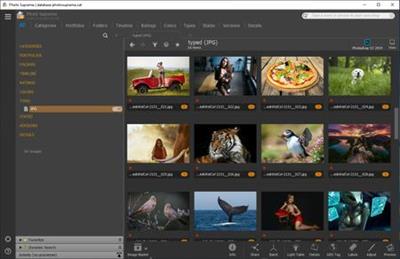
IDimager Photo Supreme 5.4.1.3022 Multilingual

IDimager Photo Supreme 5.4.1.3022 Multilingual


a9c841e3ed3270b740e57a46b79329f7.jpeg


IDimager Photo Supreme 5.4.1.3022 Multilingual | 110 MB | Language: Multilanguage​


Do you own a digital camera or do you have a large collection of images to manage? Then in no time finding that one image you're looking for becomes a chore. But Photo Supreme can change all that. Photo Supreme's integrated cataloging and management features will help you quickly find and work with your desired image.


Highlights:
Advanced search capabilities
When looking for that one image, Photo Supreme will help you with deep text searches, tag searches, duplicate detection, similarity detection, dynamic search combinations and advanced filtering.

Limit access to those who need it
The Server Edition allows you to control who can access your Catalog. You control who can add or delete. You control who sees what in their screen.

Multi tab browsing
Photo Supreme brings tabbed browsing to your image archive. Take advantage of having multiple sets open at the same time.

Import & ingest images
Import your images in your Catalog the way you want. You can define naming conventions, apply metadata on import, version rules, and of course copy files.

Keyword tagging
Tagging your images has never been easier. GEO tagging, parent cascading, face tagging, and automatic metadata enrichment are just a few of many features.

Get organized
Organize your images in Portfolios and Collections.

Multi version control
Logically hold your pictures together so you can find them again more easily.
Features
Advanced search capabilities
Multi tab browsing
Import & ingest images
Side-by-side comparison (up to 6 images)
Keyword tagging
Advanced GEO tagging
Image organization in portfolios
Duplicate detection
Share images with Flickr, Smugmug, Zenfolio, Google+ (former Picasaweb), FTP, EMail
Dual monitor support
Creative Commons support
Lossless image editing
Supports Darwin Core metadata
Dynamic collections
Face detection
Area tagging
Extensible metadata with custom field definitions
Take your previews with you while travelling
Color managed
Fully scriptable
English, German, French, Italian, and Dutch locale
Full HD, 2K, 4K, 5K, Retina screen resolutions supported

Operating System: Windows Vista or higher.

Home Page -
Код:
http://www.idimager.com/


DOWNLOAD LINKS:

Код:
https://rapidgator.net/file/98994c2665fc31affbe3a4a56cfc2c94/IDimager_Photo_Supreme_5.4.1.3022_Multilingual.rar

Код:
http://nitroflare.com/view/9EA972982C13670/IDimager_Photo_Supreme_5.4.1.3022_Multilingual.rar

Код:
https://uploadgig.com/file/download/5E00dE4366cE1afF/IDimager_Photo_Supreme_5.4.1.3022_Multilingual.rar
 
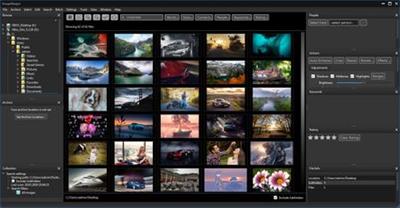
ImageRanger Pro Edition 1.7.5.1592 (x64)

ImageRanger Pro Edition 1.7.5.1592 (x64)


0b22fd7b7415e897c40b20b57acd1441.jpeg


ImageRanger Pro Edition 1.7.5.1592 (x64) | 118 MB | Language: English ​


We live in the day in which pictures are a common thing, especially with all phones being equipped with pretty powerful cameras. As such, your computer can end up the storage place of your picture collections, but it can be a hassle to manually handle it. In this regard, ImageRanger comes as an advanced picture finding and organizing tool.


ImageRanger will index photos on your PC or storage drives so you can:
Quickly load thousands of images
Find portraits, faces
Sort and filter
Find duplicates and remove copies
Organize in folders by year, location
Crop, resize very quickly
Manually sort collections from multiple folders
Sort out your images from other illustrations, clip arts
Find low quality images and improve image contrast
Perform general photo managment tasks
Print hundreds of photos

ImageRanger Features:
- Image Indexing
ImageRanger only needs to traverse your photo collection once, and you're free to search, sort and filter images anytime.
- NAS and USB drives support
ImageRanger index can be recorded directly in remote folders. This way you can quickly search and sort your photos on any other machine, using a previously built index.
- Manual Sorting
Exclude or include only folders you need while browsing images. Alternatively, ImageRanger can read your entire storage drive.
- Collections
Save and load previously found image collections to make sure you quickly restore important slideshows with manual ordering.
- Face Recognition
ImageRanger detects faces even in big portraits and group photos, letting you tag faces and quickly find images with specific people.
- Duplicates Removal
ImageRanger shows you the number of duplicated images and lets you remove redundant content.
- Arrange into folders
Option to import all your photos into a new folder structure, organized by capture time and location.
- GPS filtering
With built-in GPS locations, your images are sorted by captured city automatically. You can find all photos 5 meters away from any point on earth.

Operating System: Windows 7, 8/8.1, 10 (64-bit only)

Home Page -
Код:
https://imageranger.com/


DOWNLOAD LINKS:

Код:
https://rapidgator.net/file/e178886ba199a53f5ca80cb34b137526/ImageRanger_Pro_Edition_1.7.5.1592_x64.rar

Код:
http://nitroflare.com/view/9B210E319E0F83F/ImageRanger_Pro_Edition_1.7.5.1592_x64.rar

Код:
https://uploadgig.com/file/download/3203fDbB981f1F8e/ImageRanger_Pro_Edition_1.7.5.1592_x64.rar
 
inPhoto ID / Capture СS 4.1.2 Multilingual

inPhoto ID / Capture СS 4.1.2 Multilingual


3cfdcb535779332dbffea1c2549bb344.jpeg


inPhoto ID / Capture СS 4.1.2 Multilingual | 135 MB | Language: Multilanguage​


inPhoto ID CS is the application for identification photo preparation which also includes Sony camera control functions. It works with some modern models of Sony digital cameras allowing to control them from PC remotely and to perform ID photo preparation based on captured images.


Remote shooting
- inPhoto ID CS remotely controls your Sony camera and captures snapshots to your PC;
Identification (ID) photo preparation
- Fully automatic face detection;
- Automatic crop based on detected face area and crop settings;

Live preview
- allows selecting the best view before shooting, controlling picture quality, and verifying current shooting settings in run-time;
Face detection on live preview
- allows control of crop frame before capturing right on live image from camera preview, you may control position just before capturing and get excellent results from the first time;

TWAIN image capture
- allows transfer prepared identification (ID) photos and acquired images via TWAIN protocol directly to necessary applications - Adobe Photoshop, ID Works, CardFive, EPISuite, and any other that support TWAIN protocol, including your own application;

Save to file
- allows you to save acquired images to file and set desired file name and folder automatically or manually;

Captured image enhancement
- inPhoto ID CS allows adjusting image brightness, contrast, gamma, and sharpness;
- Resize the result image in accordance with your requirements

Image rotation
- both live preview and snapshots can be rotated manually by 90 degrees;

Remote control of camera settings
- Remote control of optical zoom;
- White balance: ability to select the best white balance setting from a list of available options (depending on the camera model). The image colors will be reproduced better if white balance is selected in accordance with the lighting conditions;
- Flash mode: The camera flash can be always on or off, or can be activated automatically if the light is too low. The red eye reduction mode is also available. Flash mode available settings depend on camera model;

inPhoto Capture CS is the camera control application that allows some modern models of Sony digital cameras being controlled from PC.
Remote shooting
- inPhoto Capture CS remotely controls your Sony camera and captures snapshots to your PC;

Live preview
- allows selecting the best view before shooting, controlling picture quality, and verifying current shooting settings in run-time;

TWAIN image capture
- allows transfer acquired images via TWAIN protocol directly to necessary applications - Adobe Photoshop, Google Picasa, XnView, and any other that support TWAIN protocol, including your own application;

Save to file
- allows you to save acquired images to file and set desired file name and folder automatically or manually;

Image rotation
- both live preview and snapshots can be rotated manually by 90 degrees;

Remote control of camera settings
- Remote control of optical zoom;
- Exposition metering mode;
- White balance: ability to select the best white balance setting from a list of available options (depending on the camera model). The image colors will be reproduced better if white balance is selected in accordance with the lighting conditions;
- ISO speed: it is recommended to increase the ISO value if you capture with the high shutter speed or if you want to minimize the risk of image blurring when the camera shakes;
- Flash mode: The camera flash can be always on or off, or can be activated automatically if the light is too low. The red eye reduction mode is also available. Flash mode available settings depend on camera model;


Supported operating systems:
- Windows 10;
- Windows 8;
- Windows 7;
- 32/64-bit version support;

IDphotocapture PS requires special prepared SD-card to be use in camera. Requirements for SD-card:
- SD or SDHC, any type supported by camera model
- size from 64Mb up to 32GB
- Preparation of SD-card requires flash-card reader, that supports desired SD-card.

Home Page -
Код:
https://idphotocapture.com


DOWNLOAD LINKS:

Код:
https://rapidgator.net/file/5253cea51c092725b511f3d182a95747/inPhoto_ID__Capture_S_4.1.2_Multilingual.rar

Код:
http://nitroflare.com/view/88903CC03DF9C46/inPhoto_ID__Capture_S_4.1.2_Multilingual.rar

Код:
https://uploadgig.com/file/download/3f743770b7494eFf/inPhoto_ID__Capture_S_4.1.2_Multilingual.rar
 
inPhoto ID PS 4.18.20 Multilingual

inPhoto ID PS 4.18.20 Multilingual


0069e9d7eef883d7fc6d5c7ecdf36f8d.jpeg


inPhoto ID PS 4.18.20 Multilingual | 107 MB | Language: Multilanguage​


inPhoto ID PS is designed for automatic ID photo with Canon Powershot cameras. inPhoto ID PS provides camera control, live image preview, automatic face detection on live image, automatic face crop, image resizing and enhancement, capture, save or transfer to TWAIN applications. inPhoto ID PS software can work both as stand alone software and as TWAIN driver with all TWAIN compatible ID card applications (Incardex, Asure ID, ID Works, EPISuite, CardFive, ID Flow and others).


inPhoto ID PS features:
- Live image preview, and Image rotation.
- Automatic face detection on live image in the preview window.
- Face crop and enhancement after detection.
- Camera settings control from computer:
- Image export to the applications supporting TWAIN. Time lapse capture option.
- Save ID photo to file: the cropped photo is save to file on the computer disk. Time lapse capture option.
- Ability to work as TWAIN driver
- Ability to work as stand alone application.
- Save all settings to User profiles.

Live image preview, and Image rotation.
Live image preview provides an ability to control the photo quality before capture. All changes made to the Canon SLR camera settings have effect on the previewed photo immediately.

The camera focus is controlled automatically from within inPhoto ID PS.
Working with inPhoto ID PS the user can rotate the photo using Rotate right or Rotate left buttons in the right part of the software window. The rotated image will be captured to a TWAIN compatible application: any standard ID card software including Incardex, Asure ID, ID Works, CardFive, EPISuite, ID Flow, and other. The ability of automatic photo rotation is very useful for ID photo. When the camera is rotated vertically, the previewed image in the live image preview window has album orientation. It is not rotated automatically. Press Rotate right or Rotate left button, and the previewed image will be rotated to the portrait orientation as it is usually required for ID photo.

Automatic face detection on live image in the preview window.
The human face is automatically detected on the live preview image. When the face is found in the live image displayed in the preview window it is outlined by the yellow frame. The green frame outlines the image area to be cropped. The yellow frame / green frame areas ratio is set in inPhoto ID SLR options. If the face is located too close to the image frame and the area to be cropped is cut by the image border, the frame color will change from green to red.

Automatic face crop and enhancement.
After the image is captured the face area is cropped. Upon pressing the Capture to TWAIN button in the image preview window the Image Processing window will open. The Image Processing window provides an ability to crop the face area, and enhance the resulting image if necessary. The face area is automatically outlined by the yellow frame. The green frame outlines the image area to be cropped. The yellow frame / green frame ratio and position are adjusted by Zoom, Vertical Position, and Horizontal Position controls. The Size control is used to set the resulting image size.

If the face is located too close to the image frame and the area to be cropped is cut by the image border, the frame color will change from green to red. In this case the user has three options: ignore, modify the image frame, or press Back button and return back to the image preview window.

The cropped image can be enhanced. It is possible to adjust image brightness, contrast, gamma, and sharpness using the corresponding controls in the right part of the Image Processing window. It is also possible to resize the resulting image. Press Set button in the upper right part of the Image Processing window and set the resizing options (pixel size of the resulting image).

Camera settings control from PC.
Warning! With inPhoto ID SLR you can control limited camera settings important for ID photo application. Press Camera settings button in the right part of the software window to control all available camera settings.

Image export to the TWAIN applications.
inPhoto ID PS can be used as ID photo module with all standard ID card software supporting TWAIN. After the captured photo is automatically cropped in the Image Processing window it is automatically transferred to ID card management software supporting TWAIN (e.g. Incardex from Akond, ID Works and IDCentre from Datacard Group (USA), Asure ID from HID Global (USA), ID Flow from Jolly Technologies (USA), EPI Suite from ImageWare Systems (USA)) and inserted into the photo field. The exported photo is printed on a ready ID card or badge together with other personal information.

Save ID photo to file.
To capture ID photos and save them to disk press Capture to file button. The user can set up the folder to save image files. The Save file tab (Options dialog box) is used to define the save to file settings. It is possible to select the folder to save images to upon pressing Capture to file button and create separate folders for the year / month / day. Check Ask before saving, and you will be prompted to assign a name to the image file before saving to the specified folder.

Ability to work as TWAIN driver
If you use TWAIN compatible ID card software (e.g. Incardex, Asure ID, ID Works, EPISuite, ID Flow and others) you you can use inPhoto ID SLR as TWAIN driver and capture ID photos directly to your ID card software.

Ability to work as Stand Alone application
inPhoto ID PS can be used as stand alone application. If so the Capture to TWAIN option in the image preview section will be disabled.To capture images and save them to disk press Capture to file button. Working in stand alone mode you can use all inPhoto ID PS functions (live image preview, camera settings control, automatic face detection and crop, image capture and save, etc.) You can set up the folder on your PC to automatically save all captured ID photos.

User profiles
Once you select the best camera settings for your specific applications you can save these settings to a profile and use them easily later on without spending time on camera settings adjustment. Moreover, not only camera settings are saved to a profile. You can also save the image processing parameters, folder to save photos, image resolution and size settings. The system Admin can block the profile, and the users will not be able to change it, they will only be able to use it.

The Profile button is located in the software main window in its right part on the Control Panel. Click on the Profile button to get a list of all profiles available, and select the profile required. You will need just two mouse clicks to apply the necessary profile. The last profile used is remembered and loaded automatically when the software is started next time. If you are not planning to use profiles you can remove the Profile button from the Control Panel. The Profiles created are saved in the separate files and can be copied or backed up.


System Requirements:
- Windows XP, Windows Vista, Windows 7 (32 and 64bit), Windows 8 (32 and 64 bit), Windows 10
- Microsoft .NET Framework 3.5 Service Pack 1,
- One free USB 1.0 (or higher) port to connect Canon camera to PC. If the software is supplied with the USB dongle your computer shall have the second free USB port,
- Card reader connected to PC (or built-in),
Canon camera requirements:
- 64Mb - 32GB SD memory card,
- Canon camera shall be used in Automatic (A) or Program (P) mode.


Homepage -
Код:
http://www.akond.net


DOWNLOAD LINKS:

Код:
https://rapidgator.net/file/3fad05d6e0050930e836a90fa26352c8/inPhoto_ID_PS_4.18.20_Multilingual.rar

Код:
http://nitroflare.com/view/1493C3009FC3F8A/inPhoto_ID_PS_4.18.20_Multilingual.rar

Код:
https://uploadgig.com/file/download/83ca3fdF335bAD07/inPhoto_ID_PS_4.18.20_Multilingual.rar
 
Intel Parallel Studio XE 2020 Update 2 x64

Intel Parallel Studio XE 2020 Update 2 x64


00728895620b6527c6c9aea9439d05e0.jpeg


Intel Parallel Studio XE 2020 Update 2 x64 | 3.02 GB | Language: English​


Intel Parallel Studio XE has three editions: Composer Edition, Professional Edition, and Cluster Edition.
Intel Parallel Studio XE Composer Edition provides a software tools environment for developing Fortran, C, and/or C++ code using Intel Compilers. Intel Parallel Studio XE Composer Edition also includes Intel Math Kernel Library, Intel Integrated Performance Primitives, Intel Threading Building Blocks, and Intel Data Analytics Acceleration Library (Intel DAAL).


Intel Parallel Studio XE Professional Edition adds Intel VTune Profilerfor performance analysis, Intel Inspectorforcorrectness analysis, and Intel Advisorfor parallelism discovery.
Intel Parallel Studio XE Cluster Edition adds support for distributed memory computing via Intel MPI Library, Intel MPI Benchmarks, and Intel TraceAnalyzer and Collector. Intel Cluster Checker provides cluster health monitoring tools.

Intel Parallel Studio XE 2020 Fortran
Intel Corp. is the brains of the operation. One the biggest computer chip companies, the company controls 80% of the market for microprocessors that act as the brains of desktop, notebook, and server computers. It has dominated the PC chip market from the early x86 processors to Pentiums to today's Core technology. Intel also makes chips for smartphones, and tablets as well as embedded semiconductors for the industrial, medical, and automotive markets. The company develops its chips and makes most of them itself in one of the industry's biggest manufacturing systems.


Product: Intel Parallel Studio XE
Version: 2020 Update 2 Cluster Edition
Supported Architectures: x64
Website Home Page :
Код:
https://software.intel.com/

Language: english
System Requirements: PC **
Supported Operating Systems: **
Size: 3.02 Gb

Processor Requirements
Systems based on IA-32 architecture are supported as target platformson Windows. Systems based on Intel 64 architectures below are supported both as host and target platforms.
Systems based on Intel 64 architecture:
- Intel Core processor family or higher
- Intel Xeon E5 v5processor families recommended
- Intel Xeon E7 v5processor families recommended
NOTE:It is assumed that the processors listed above are configured into homogeneous clusters.
Disk Space Requirements
12GB of disk space (minimum)on a standard installation. Cluster installations require an additional 4 GB of disk space.
NOTE: During the installation process, the installer may need up to 12 GB of additional temporary disk storage to manage the intermediate installation files.
Operating System Requirements
All components in Intel Parallel Studio XE support these operating systems on an Intel 64 architecture. Individual component tools may also support additional operating systems and architecture configurations.
- Windows 10
- Windows Server 2016, 2019
The Intel MPI Library and Intel Trace Analyzer and Collector are supported on Intel Cluster Ready systems and high-performance computing (HPC) versions of the listed versions of Windows Server. These components are not supported on Ubuntu non-long-term support (LTS) systems. Installation on IA-32 hosts is no longer supported by anytools.
Memory Requirements
- 2 GB RAM (minimum)
Additional Software Requirements
On Microsoft Windows OS, the Intel C/C++ Compiler and Intel Visual Fortran Compiler require a version of Microsoft Visual Studio to be installed. The following version sare currently supported:
- Microsoft Visual Studio 2017, 2019
- Microsoft Visual Studio Express (only for command line compilation)


DOWNLOAD LINKS:

Код:
https://rapidgator.net/file/5fe267aa25d842c9c53f550ad6f0870c/Intel_Parallel_Studio_XE_2020_Update_2_x64.part1.rar
https://rapidgator.net/file/91138311d2e7b14662392b7a6a0f5457/Intel_Parallel_Studio_XE_2020_Update_2_x64.part2.rar
https://rapidgator.net/file/bdf29421f61cf9fe8f3091c4a4ede6f8/Intel_Parallel_Studio_XE_2020_Update_2_x64.part3.rar
https://rapidgator.net/file/646bd291dd0fb7373a6aedb7a3e3bcd0/Intel_Parallel_Studio_XE_2020_Update_2_x64.part4.rar

Код:
http://nitroflare.com/view/7F550989C46159E/Intel_Parallel_Studio_XE_2020_Update_2_x64.part1.rar
http://nitroflare.com/view/E6FC3A6A4DA30F8/Intel_Parallel_Studio_XE_2020_Update_2_x64.part2.rar
http://nitroflare.com/view/CF0856B119FFF08/Intel_Parallel_Studio_XE_2020_Update_2_x64.part3.rar
http://nitroflare.com/view/10816FF781A6B3C/Intel_Parallel_Studio_XE_2020_Update_2_x64.part4.rar

Код:
https://uploadgig.com/file/download/719624110BC1ff86/Intel_Parallel_Studio_XE_2020_Update_2_x64.part1.rar
https://uploadgig.com/file/download/dEa3b6ff765e4e94/Intel_Parallel_Studio_XE_2020_Update_2_x64.part2.rar
https://uploadgig.com/file/download/a6924bEc29aae514/Intel_Parallel_Studio_XE_2020_Update_2_x64.part3.rar
https://uploadgig.com/file/download/b4c7A46bb0ef8669/Intel_Parallel_Studio_XE_2020_Update_2_x64.part4.rar
 
Intel System Studio 2020 Update 2 (x86-x64)

Intel System Studio 2020 Update 2 (x86-x64)


2ad1254a891d31f6f63c2d3c9d67d495.jpeg


Intel System Studio 2020 Update 2 (x86-x64) | 3.7 GB | Language: English​


Intel System Studio is a comprehensive and integrated tool suite that provides developers with advanced system tools and technologies to help accelerate the delivery of the next generation power efficient, high performance, and reliable embedded and mobile devices.

Intel System Studio Ultimate Edition includes compilers, libraries, performance analyzers, and debuggers. In addition to the highly optimizing Intel C++ compiler and Intel performance libraries, the suite of tools includes the Intel VTune Amplifier, Intel Graphics Performance Analyzers, and Intel Inspector for advanced performance analysis and debug. They can provide deep insights into CPU and GPU performance, threading performance and scalability, bandwidth, and caching. Energy analysis tools give details on wake-up, sleep state behavior, frequency, temperature, and power consumption.

Key new features include automated tracing, support for a large number of sensors (over 400), and more code samples including the Intel Data Analytics Acceleration Library, which is especially useful for machine learning work.

Intel System Studio is based on the Eclipse CDT project and offers a comprehensive set of tools under a free and renewable licensing model. This software suite allows you to build, debug, analyze and optimize applications and can be used throughout the entire development cycle from hardware bring-up to deploying the final product. During this presentation, we will introduce you to Intel System Studio and show how to develop and debug IoT and systems applications. This includes running them locally and remotely on popular Intel Developer Kit platforms like the Aaeon UP2 and IEI Tank, as well as enhancing applications through cloud connectors, sensors, and libraries.

Intel Corp. is the brains of the operation. One the biggest computer chip companies, the company controls 80% of the market for microprocessors that act as the brains of desktop, notebook, and server computers. It has dominated the PC chip market from the early x86 processors to Pentiums to today's Core technology. Intel also makes chips for smartphones, and tablets as well as embedded semiconductors for the industrial, medical, and automotive markets. The company develops its chips and makes most of them itself in one of the industry's biggest manufacturing systems.


Product: Intel System Studio
Version: 2020 Update 2 Ultimate Edition
Supported Architectures: 32bit / 64bit
Website Home Page :
Код:
https://software.intel.com/

Language: english
System Requirements: PC *
Supported Operating Systems: *
Size: 3.7 Gb

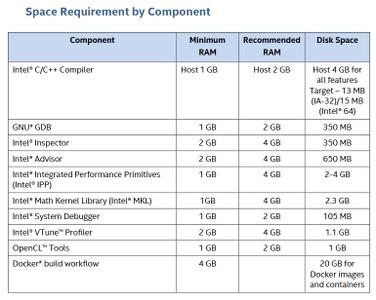
Intel System Studio 2020 Update 1 System Requirements
Supported Host Operating Systems
- Microsoft Windows 10
- Microsoft Windows Server 2016, 2019
Supported Target Operating Systems
- Microsoft Windows 10 (PC & Embedded)
- Microsoft Windows Server 2019
Supported Target Hardware Platforms
- Development platform based on the Intel Atom processor Z5xx, N4xx, N5xx, D5xx, E6xx, N2xxx, D2xxx, E3xxx,Z2xxx, Z3xxx, C2xxx, or Intel Atom processor CE4xxx, CE53xx and the Intel Puma 6 Media Gateway
- Intel Atom Processors X Series Cxxx,Exxx,Zxxx
- Intel Core processors based on a 2nd, 3rd, 4th, 5th, 6th, 7th,8thor 10thgeneration
- Intel Xeon processors based on 2nd, 3rd4th, 5th, 6thor7thgeneration
- Intel Xeon Scalable processors series


c6dc2f0767fd9361cff7a51dcc56b407.jpeg


Microsoft Visual Studio integration
To use the Microsoft Visual Studio development environment or command-line tools to build IA-32 or Intel 64 architecture applications, one of:
- Microsoft Visual Studio 2019 ProfessionalEdition (or higher edition) with 'Desktop development with C++' component installed
- Microsoft Visual Studio 2017 Professional Edition (or higher edition) with 'Desktop development with C++' component installed


DOWNLOAD LINKS:

Код:
https://rapidgator.net/file/4a0ae5808d20fc8a0055b7aa809a2dde/Intel_System_Studio_2020_Update_2_x86-x64.part1.rar
https://rapidgator.net/file/68a92f49d8f2818b7f723d531a838193/Intel_System_Studio_2020_Update_2_x86-x64.part2.rar
https://rapidgator.net/file/8494af7c9e59d56fc0d8d58260dad873/Intel_System_Studio_2020_Update_2_x86-x64.part3.rar
https://rapidgator.net/file/71c78f254265276651fc5db26c8685ba/Intel_System_Studio_2020_Update_2_x86-x64.part4.rar

Код:
http://nitroflare.com/view/DD401928814FD78/Intel_System_Studio_2020_Update_2_x86-x64.part1.rar
http://nitroflare.com/view/E670919B2E34381/Intel_System_Studio_2020_Update_2_x86-x64.part2.rar
http://nitroflare.com/view/06B23BA9ED0C186/Intel_System_Studio_2020_Update_2_x86-x64.part3.rar
http://nitroflare.com/view/C55159DDE0D5713/Intel_System_Studio_2020_Update_2_x86-x64.part4.rar

Код:
https://uploadgig.com/file/download/fAaD38F488284ca8/Intel_System_Studio_2020_Update_2_x86-x64.part1.rar
https://uploadgig.com/file/download/f18c01eeB7e5ee29/Intel_System_Studio_2020_Update_2_x86-x64.part2.rar
https://uploadgig.com/file/download/370b250f12C04575/Intel_System_Studio_2020_Update_2_x86-x64.part3.rar
https://uploadgig.com/file/download/1a71d79C11C9a346/Intel_System_Studio_2020_Update_2_x86-x64.part4.rar
 
MAGIX Video Pro X12 v18.0.1.82 (x64) Multilingual

MAGIX Video Pro X12 v18.0.1.82 (x64) Multilingual


f325076283d35ee5f919846a809a8cbb.jpeg


MAGIX Video Pro X12 v18.0.1.82 (x64) Multilingual | 709 MB | Language: Multilanguage​


Video Pro X is the only video editing software that makes professional video production accessible for everyone. With intuitive editing tools and workflows, getting started with Video Pro X is easier than with any other professional video editor. The new video engine allows for seamless, uninterrupted editing of high-resolution 4K Ultra HD material on any PC.


No matter how complex your film project, you can accomplish it fast. Enjoy an efficient workflow and innovative functions such as flexible track handling on a multi-format timeline. Access 3- & 4-point editing, multicam editing or 1-click tools such as "split & trim". A real-time audio mixer and audio cleaning tool are included for optimizing video sound.

Precise optimization
Comprehensive color grading with gradation curves or fast application of lookup tables - discover optimal color matching at the level of detail you need. proDAD Mercalli V5 Suite is now included for stabilizing choppy or distorted footage - in realtime and at a high level of precision.

High image quality in 8K Ultra HD
Video Pro X has always stood for technological innovation above and beyond industry standard. Discover resolutions in up to 8K UltraHD, HDR color space and latest film studio effects, and achieve professional results. The powerful video engine means that video editing is absolutely smooth, even for complex multi-track projects.

New in this version:
INFUSION Engine 2
Exclusive to Video Pro X: Seamless editing of video projects in up to 8K*. This is made possible by wide-ranging support for Intel, AMD and NVIDIA graphics card for decoding AVC and HEVC material.

HiDPI editing interface
Exclusive to Video Pro X: The high-resolution interface guarantees optimal contrast and readability, even on 4k monitors. The new icon design is state of the art and allows for a faster, more streamlined workflow.

Real-time video stabilization
Exclusive to Video Pro X: Fix distorted film material directly without long analysis and rendering times. Real-time image stabilization from proDAD Mercalli V5 Suite now makes it possible.


System Requirements:
- You need a 64-bit version for the following operating systems:
- Windows 10, Windows 8
- Processor: Double core processor with 2.4 GHz (recommended: Intel quad-core processor with 2.8 GHz or better)
- RAM: 4 GB (8 GB recommended)
- Graphics card: Onboard, min. resolution 1280 x 1024, 512 MB VRAM and DirectX 11 support INFUSION Engine 2 supports video acceleration for AVC and HEVC* on Intel, NVIDIA or AMD GPUs with 1GB VRAM or higher Example: Intel Graphics HD 630, NVIDIA Geforce GTX 1050, AMD Radeon RX470
- Sound card: Onboard (multi-channel sound card recommended for surround sound editing)
- Optical drive: DVD drive (only for installation of the box version)
- Program languages: English, Deutsch, Français, Nederlands


Home Page -
Код:
https://www.magix.com/


DOWNLOAD LINKS:

Код:
https://rapidgator.net/file/f6313718d58a2b0b7c7d080ccfc6e1e6/MAGIX_Video_Pro_X12_v18.0.1.82_x64_Multilingual.rar

Код:
http://nitroflare.com/view/310C6352764FBBC/MAGIX_Video_Pro_X12_v18.0.1.82_x64_Multilingual.rar

Код:
https://uploadgig.com/file/download/1d35477f7754e2de/MAGIX_Video_Pro_X12_v18.0.1.82_x64_Multilingual.rar
 
MaxBulk Mailer Pro 8.7.3 Multilingual

MaxBulk Mailer Pro 8.7.3 Multilingual


3fc14cfef8444a5d07f67dbf5f02631a.jpeg


MaxBulk Mailer Pro 8.7.3 Multilingual | 170 MB | Language: Multilanguage​


Email Marketing is spreading around the whole world because of its high effectiveness, speed and low cost. If you want to introduce and sell your product or service, the best way is to use e-mail to contact your targeted customer. Targeted e-mail is no doubt very effective. If you can introduce your product or service through email directly to the customers who are interested in them, this will bring your business a better chance of success.


Maxprog has created the ultimate tool for all of your email marketing needs. MaxBulk Mailer is a bulk emailer that allows you to design and send professional looking emails to your customers and prospects for as little as fractions of a penny, directly from your own desktop.

Here is a breakthrough tool from Maxprog that will allow you to increase your profits, strengthen your customer service and send your messages to new markets. You'll be able to reach everyone in your database without worrying about integration or compatibility issues.

MaxBulk Mailer is a full-featured bulk emailer and mail-merge tool for Macintosh and Windows that allows you to send out customized press releases, prices lists and any kind of text or HTML documents to your customers. MaxBulk Mailer is fast, fully customizable and very easy to use. MaxBulk Mailer handles plain text, HTML and styled text documents and gives full support for attachments. Take a look at the.

With MaxBulk Mailer you will create, manage and send your own powerful, personalized marketing message to your customers and potential customers. MaxBulk Mailer is a software tool that you purchase once, no need to pay on a per-email basis to submission services.

Key Features:
Detects and use your language if available.
Send Text/HTML in a way client always shows the right format.
Drag and drop support for mailing text and address list.
Easy import/export address list files easy to use functions.
Advanced parser and duplicates checking, also from clipboard.
Powerful tools in order to rewrap and justify text.
Preview function to check document appearance before sending.
Full support for international characters (40 different encodings).
Multiple customizable easy-to-use mail accounts.
Remote List Management (MLM) and Global Blacklist support.
Attachment support (Base64, UUEncode, BinHex, ...).
Complete SMTP/POP connection log.
POP, APOP and ESMTP Authentication.
E-mails can be sent all at once, grouped or using mail-merge tags.
Custom tags for mail-merge.
Mail scheduling (Mail delayed delivery).
Pro version also adds:
Styled text support - Bold, Italic, Underline, Color, Font...
Conditional message contents depending on optional tags value.
20 Custom Tags for advanced mail-merge.
Ability to process tags in subject.
13 date tags, Long Date, Short Date, Abbreviated Date...
Quick selector in order to check/uncheck recipients.
Recipients creation directly from Filemaker (Mac OS).
Full Applescript support (Mac OS).
Hyperlink manager. Allows you to insert text and HTML hyperlinks tags with one click.
Full mySQL, postgreSQL and OBDC database support.
Secure SSL connection support.
Possibility to use several server at once.
Cc and Bcc support.
Message opening and click-through tracking.
Random words and random words editor.

Operating System: Windows 7, 8/8.1, 10

Home Page -
Код:
http://www.maxprog.com/


DOWNLOAD LINKS:

Код:
https://rapidgator.net/file/9036c7750cc2f4fd83868d81f7845d7d/MaxBulk_Mailer_Pro_8.7.3_Multilingual.rar

Код:
http://nitroflare.com/view/7E8B6A0CA728E24/MaxBulk_Mailer_Pro_8.7.3_Multilingual.rar

Код:
https://uploadgig.com/file/download/B397ADde1f6b24e9/MaxBulk_Mailer_Pro_8.7.3_Multilingual.rar
 
PointCab 3DPro 3.9 R8 (x64) Multilingual

PointCab 3DPro 3.9 R8 (x64) Multilingual


6b0e39e712d044ae4d9cc4e7146100ab.jpeg


PointCab 3DPro 3.9 R8 (x64) Multilingual | 250 MB | Language: Multilanguage​


PointCab 3DPro provides the full range of functions. With these tools, the extraction of the most important information from large point clouds has never been so simple. Whether 2D or 3D functionality is used, PointCab enables an optimized workflow from the point cloud to the plan or 3D model.


With the possibility to connect PointCab directly to your CAD system via the 4CAD interface, BIM creation becomes child's play (available for Revit & ARCHICAD). It goes without saying that the registration of terrestrial scans, georeferencing, and the combination of different point cloud data are included.

Applications:
Architecture: building floor plans and sections, storey plans, façade plans, interior wall documentation, staircase measurement
Protection of historic buildings: elevations, ceiling frescoes
Surveying: site plans, as-built plans, ground plans, roof cadasters, pit sections, terrain models, tunnel sections, cross-sections, road profiles
Factory planning: piping documentation, fixture / fitting and machine plans, sections of production and factory buildings, sections for static analyses
Forensics: basis for simulations, trajectory analyses, accident documentation and much more.

System Requirements:
Minimum 2 GB RAM
1,0 GHz Intel compatible CPU
Microsoft Windows Vista, 7, 8, 10 - 64 bit
Minimum 10 GB free disk space


Home Page -
Код:
https://www.pointcab-software.com/en/


DOWNLOAD LINKS:

Код:
https://rapidgator.net/file/16c06c7adda272faed3e6bd17dfc7292/PointCab_3DPro_3.9_R8_x64_Multilingual.rar

Код:
http://nitroflare.com/view/7A9298B16DF5AE0/PointCab_3DPro_3.9_R8_x64_Multilingual.rar

Код:
https://uploadgig.com/file/download/eE352e9daeFe80a5/PointCab_3DPro_3.9_R8_x64_Multilingual.rar
 
Prima Cartoonizer 1.6.6

Prima Cartoonizer 1.6.6


c0d6cbc4ab5fcedfadad83aa3207dbf6.jpeg


Prima Cartoonizer 1.6.6 | 90 MB | Language: English​


Convert photos into cartoons with just few clicks of a mouse with our Prima Cartoonizer for PC. Now, you can convert all of your pictures and images into cartoon effect more quickly and precisely. You can convert large or high-quality photos into cartoons with best results. Besides, you can also edit your photos and make multiple adjustments even before or after converting them. Add many items, crop your photos, resize and adjust the brightness and contrast.


Enjoy fantastic cartoon effects with Prima Cartoonizer!
- Amazing Cartoon Effects!
- Automatic conversion process!
- It works without internet connection!
- Output image size up to 4096px!

It's the time to replace the cookie cut forum avatar by a real cartoon of you:
- The good thing is that you can let the people know how you look like without sharing your actual photo but a cartoon of yourself.
- You can make cartoons of your friends, pets, house, neighborhood and especially the celebrities and the politicians.
- Cartoons will be the best gift for your family and friends. You can also use them on mugs and T-shirts.
- Undoubtedly, this software is a great fun and addictive, too. It is very easy to use and also intuitive.
- No need of great artistic skills because no manual drawing is involved.
- The software uses very novel technology to execute the whole process.
- First of all, it splits the image into solid color patterns just similar to a mosaic. After that, it converts the minute details of the image into cartoon format.
- Since it applies effects throughout the photo, the end result is always of high-quality.
- Cartoon yourelf without any Watermark or Logo!
- Standalone software!

Comes with several neat customization features
Following a quick installation, you are prompted to add a picture to get started, an event that also brings forth the effects, features and options of the application. Therefore, on the ride side, you can use the small menu to customize the brightness, contrast and RGB. The app also comes with a zoom feature that can come in handy when adjusting these parameters.

An app for anyone who enjoys cartoons or this particular effect
Depending on the number of effects you want to add to your pictures the conversion process can take some time. But then again, nobody is really in a hurry when processing images and overall, it's not a big setback. All in all, Prima Cartoonizer is an easy to use application that provides an effective way to add a toon effect to your images.

More Features:
- You can even make all types of adjustments with the cartoonized photo.
- Avail multiple effects to make your pictures desirable and mesmerizing.
- You can conveniently convert your photos into cartoons just within seconds.
- It is extremely simple software with the main theme of turning images into cartoons.
- It allows the users to covert photos into cartoons really fast than normal process.
- With the help of crop function, you can remove any unwanted part/parts of your image.
- You can edit your images and adjust the brightness and the contrast...etc
- No other standalone program or software is needed; it does all the functions itself.
- The converted cartoon does not contain any watermark or logo.(Paid version only)
- You need not to save the photo to print it. You can do it right from within your software.
- Resize function available, you can resize your photo before or after the conversion.
- Different goodies enhance the overall fun and joy, thus bringing extra colors to your cartoons.

Operating System: Windows 7, 8/8.1, 10

Home Page -
Код:
https://primacartoonizer.com/


DOWNLOAD LINKS:

Код:
https://rapidgator.net/file/f30f98bb6b9bdccfb1180a6e475e4d10/Prima_Cartoonizer_1.6.6.rar

Код:
http://nitroflare.com/view/192CA526F8FCFFD/Prima_Cartoonizer_1.6.6.rar

Код:
https://uploadgig.com/file/download/6b9Cc227b16657d1/Prima_Cartoonizer_1.6.6.rar
 
Reallusion iClone 3DXchange 7.7.4310.1 (x64) Pipeline

Reallusion iClone 3DXchange 7.7.4310.1 (x64) Pipeline


674b7ee703d569ca1388cd2c0261a7b5.jpeg


Reallusion iClone 3DXchange 7.7.4310.1 (x64) Pipeline | 257 MB | Language: English​


With 3DXchange Pipeline, you can import and export all types of 3D assets, including static objects, animated props, skin-bone rigged characters, and motion files. You can also repurpose them with output options tailored for Unity, Unreal, Maya, Blender, Cinema 4D or Daz Studio. This makes iClone a universally essential tool for both game design and CG workflow.


Character Conversion
Utilizing the built-in characterization panel in 3DXchange, you can convert external characters into iClone via FBX format quickly and easily. The newly converted characters will then be compatible with thousands of iClone motion files, as well as powerful motion tools like Body Puppet, MixMoves, and motion capture. Animate any character from Daz, Maya, 3DS Max, Mixamo, and others in a heartbeat!

Prop Conversion
3DXchange provides all the tools you need to import and export 3D props. The Transform & Alighment tools allow you to quickly rotate and resize the imported model with the correct scale and axis parameters. The Pivot tools help you to set a custom pivot point that controls the object's rotational behavior. The Group tool allows you to separate objects, edit model hierarchy, build parent-child node relations, rename objects, exclude unwanted parts, and output selected objects separately for improved animation capability later.

Motion Conversion
By converting external motion data into iClone via FBX/BVH format, you are able to bring in motion data from any external motion library, popular motion editing tools, or even life-like motion capture for use with your iClone standard characters. This motion data can also be further edited or refined using iClone's powerful Human IK motion editing tools.

Facial Setup
Imported characters can take advantage of iClone's powerful facial animation tools too! 3DXchange supports all types of talking characters, allowing you to enrich your scene with more professional character assets that are more expressive with rich facial animation, regardless of whether or not the character was designed using a facial bone rig or facial blend shapes.

Direct In/Out in iClone
To further simplify the pipeline process, several critical import and export features have been implemented directly inside iClone 7, including the highly anticipated batch FBX export which allows you to export characters, props, and cameras all at once. iClone 7 can now also bring in multiple morphs from OBJs for organic morph animations.


System Requirements:
- Win 7 SP1 / 8 / 10
- Note: 3DXchange 7 is only compatible with iClone 7, there is no backwards compatibility.


Home Page -
Код:
https://www.reallusion.com/


DOWNLOAD LINKS:

Код:
https://rapidgator.net/file/dc85ddc6929a00e4960d88c6880498e4/Reallusion_iClone_3DXchange_7.7.4310.1_x64_Pipeline.rar

Код:
http://nitroflare.com/view/70FE3EC8156080F/Reallusion_iClone_3DXchange_7.7.4310.1_x64_Pipeline.rar

Код:
https://uploadgig.com/file/download/79a55a1479eB9492/Reallusion_iClone_3DXchange_7.7.4310.1_x64_Pipeline.rar
 
Назад
Сверху