• Здравствуйте. Сайт заработал в архивном режиме форум www.old.nado.in

KAMAL's Softwares Collection!!! (Updated Daily)

  • Автор темы Автор темы KAMAL
  • Дата начала Дата начала
SILKYPIX Developer Studio 10.1.4.1 (x64)

SILKYPIX Developer Studio 10.1.4.1 (x64)


d87e3b7ff3accbe7f3eed534b7a33d71.jpeg


SILKYPIX Developer Studio 10.1.4.1 (x64) | 428 MB | Language: English​


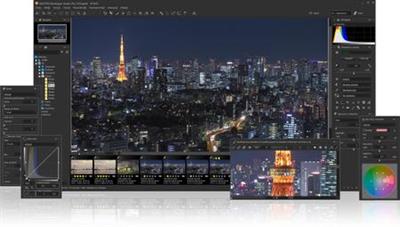
SILKYPIX Developer Studio 10 is equipped with a new function for compositing multiple RAWs which enables the user a previously unprecedented level of creative photographic expression. The latest transformative enhancement to the software's capabilites is the "Fine detail" mode which enables the optimal noise reduction. In addition, the "Select" section enables high-speed display of a large number of high-resolution images. Professional edition of RAW development software with improved flexibility and ease of use.


Equipped with 6 RAWs composition modes.
The new SILKYPIX® is equipped with the new function for compositing multiple RAWs which allows you to create a view of the world that cannot be represented from a single image. And, since this function automatically aligns images according to our image coincidence detection technology (patent No. 4689758), it is possible to combine them without any shift even with hand-held shooting.

Lighten composite
Compares the selected images while giving priority to the lighter areas of each image.By compositing multiple images from an entire night of fireworks, you can layer these together to create a single image featuring an even larger launch of fireworks.

Multiple exposure composite
The image to be composed is treated equally and the result is the same as for a multiple exposure with a camera.Combine multiple images shot together during the same scene to create highly detailed and realistic images much more effectively than with normal noise reduction.

Image quality improves with multiple images combined. For example, combine 4 images is equivalent to ISO speed 3200, and combining 16 images is equivalent to ISO speed 800.

Multiple exposure (night view) composite
Noise reduction and saturation for nightscapes, and black-level compositing are performed.This mode allows you to create a long-exposure, beautiful night scenes from multiple images taken hand-held shooting.

Depth of field composite
By compositing images with different focus positions from the front to the back, you can create an image with a wide range of focus. This mode allows you to focus on photos taken with a macro lens with shallow depth of field.

Moving object removal composite
Removes moving subjects from multiple images of the same shooting scene and combines them into a single image.By this composition mode, you can create an unnormal surreal image.

In this mode, only the static subject from multiple images is left as a single image. For good composite results, the background must be robust and stationary, and the motion of the moving object must be obvious.

Stroboscopic motion composite
Composites moving subjects from multiple images in the same scene.With this mode, you can capture moving subjects continuously to create a single image.

In this mode, only the moving subject from multiple images is left as single image. For good composite results, the background must be robust and stationary, and the motion of the moving object must be obvious.


System Requirements:
Microsoft® Windows® 10 / 8.1 64-bit version
- It does not correspond to the Windows® 10 tablet mode.
- It does not correspond to 32-bit version OS.
Intel® Core™ 2 Duo higher, or AMD Athlon™ 64 X2 or higher processor
4GB or more RAM (8GB or higher recommended)
10GB of available hard-disk space or more
Display that supports screen resolution of 1024x768 or higher


Home Page -
Код:
https://silkypix.isl.co.jp/en/


DOWNLOAD LINKS:

Код:
https://rapidgator.net/file/10b4966caab6a1efb94f5e6a864376cf/SILKYPIX_Developer_Studio_10.1.4.1_x64.rar

Код:
http://nitroflare.com/view/FB06EC3339EC162/SILKYPIX_Developer_Studio_10.1.4.1_x64.rar

Код:
https://uploadgig.com/file/download/a15909665dDbAff0/SILKYPIX_Developer_Studio_10.1.4.1_x64.rar
 
SimLab Composer 10.6 (x64) Multilingual

SimLab Composer 10.6 (x64) Multilingual


cb1e5d1d9c32c35e1660d0ccfcd8c66d.jpeg


SimLab Composer 10.6 (x64) Multilingual | 225 MB | Language: Multilanguage​


Simlab Composer is a complete, easy, affordable and feature rich solution enabling you to communicate your 3D ideas with ease. Start with any 3D model, and bring it to life with SimLab Composer to utilize it in marketing, manuals, training, user feedback, education and much more.


Features in SimLab Composer:

A brief summary with regards to the new updates that have been made in SimLab Composer :
Scene Building:

* Search by name
Animation
* Animation Auto Ease options (Auto Ease Out, Auto Ease In, and Auto Ease).
* New Animation Time-line tools: Capture keyframe for object, Go to previous/next keyframe, and Select all keyframes on Animation Time-line.
* (Enhancement) Better layout for Animation Time-line tools.

HTML/WebGL
* Added support for SimLab 360s Grid Technology.
* Added support for Light Baking (Light Baking is similar to Texture Baking but it gives the user the ability to change material of objects).
* Added support for sun light
* Added support for shadow from sun, which can be enabled or disabled by the user.
* Added support for Visualized Scene Options (lists)
* (Enhancement) Better appearance for materials
* (Enhancement) Better navigation: Smoother camera navigation with mouse movement in spin mode.
* (Enhancement) Better looking message boxes.
* (Enhancement) Camera transition among Scene States

3D PDF
* Added support for Visualized Scene Options (lists).

VR
* SimLab 360s Grid Technology for SimLab FREE VR Viewer, SimLab FREE AR/VR Mobile Viewer, and HTML/WebGL: load and move among 360 degree images.
* Make Video: View video clips in SimLab FREE VR Viewer and SimLab FREE AR/VR Mobile Viewer.
* Event-Response System: SimLabs Event-Response System used for endless possibilities in your VR experiences, which also includes location-based triggers.
* VR Training: A state-machine-based system used for endless possibilities in your VR experiences, which also includes location-based triggers.

Render
* Render Animation using SimLab FREE VR Viewer: New rendering mode using the VR Viewer.

Simlab Free VR Viewer
* Added support for SimLab 360s Grid Technology.
* Scene Building Mode: Dedicated mode where you can move, rotate, scale, copy, delete, and hide/show objects.
* (Enhancement) Improved two hands interaction with VR scene elements in VR mode.
* (Enhancement) Improved grabbing (grabbing with two hands) in VR mode.
* (Enhancement) Improved VR navigation (fixed old issues and added rotation) in VR mode.
* (Enhancement) Improved Scene Modes activation for Large Navigation, Lists, and Scene Building.
* Circular menu for switching among modes.
* Activation of List mode shows all list pins existing in scene.
* Users can now have two FREE private catalogs (up to 60 package)
* Users have the ability to edit or delete their own packages.


System Requirements:
* Intel or AMD processor
* Windows 64-bit (7, 8, or 10)
* Any graphics card with 256 MB or more (either dedicated or shared)
* 2 GB of RAM or more
* 2 GB of free hard disk space
* Monitor resolution of 1440 X 900 or greater


Homepage -
Код:
http://www.simlab-soft.com


DOWNLOAD LINKS:

Код:
https://rapidgator.net/file/bcfdd262da03d1059b7be080b7ce7fac/SimLab_Composer_10.6_x64_Multilingual.rar

Код:
http://nitroflare.com/view/A406F7DEBDAD558/SimLab_Composer_10.6_x64_Multilingual.rar

Код:
https://uploadgig.com/file/download/FA3e365b0b3137e1/SimLab_Composer_10.6_x64_Multilingual.rar
 
StudioLine Photo Classic 4.2.55 Multilingual

StudioLine Photo Classic 4.2.55 Multilingual


0d063c95e5b605824f9c943c432aaac7.jpeg


StudioLine Photo Classic 4.2.55 Multilingual | 116 MB | Language: Multilanguage​


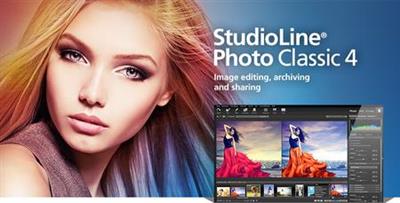
StudioLine Photo Classic 4 is a feature-packed software for conveniently managing and editing extensive image collections. Naturally all common file formats, including the RAW formats of the popular camera models are supported.


New Features:

Your Personal Load Assistant
Quickly and easily load images from you camera, hard disk or other drives. Any files not previously loaded are automatically suggested and selected.

Pre-defined Tool Settings
Store frequently used image tools (filters) or entire filter sequences as templates. This way the same tool settings are available at any time to treat further images with the same editing steps.

Protect Your Images
Superimpose your personal watermark into your images to prevent unauthorized use. Any graphics and text may be combined to create watermarks.

Easy Print
Create print layout to suit various occasions. Taylor your images for optimal print results on the desired output medium.

MediaCenter
Quickly and easily share your photos and videos on the web with friends and family. You control who may access each of your online albums, and if downloading is permitted.
Visitors of your albums can search images based on embedded information, or view them as a slide show or on a map.

Professional Image Editing
Numerous images tools such as white balance, unsharp mask oder RGB mixer are available. All editing steps are non-destructive; they are kept in a database and the original image remains untouched.

A few quick steps and your foto set will appear as a slide show, is published as a gallery to the web or burned onto CD/DVD, or is sent via email to your circle of friends.

Archival Made Easy
Categorize your images with unlimited text in system and user descriptors or by assigning keywords and ratings. After that, searching for specific images or those matching a certain theme is child's play.

Presentation
View your images in your own albums, in the advanced Timeline Explorer or by keywords and categories. Avoid data loss by backing up your image archive, with all metadata and image edits, to CD, DVD or secondary hard disk.

Convenient Geotagging
Geotag your images with GPS coordinates from GPS loggers or GPS equipped digital cameras. Or, use the Geo Explorer to drag untagged images to the correct location on a map.
StudioLine retrieves location details such as county, city and possibly street. This way, you'll be able to search, sort or filter your photo collection by names of cities and sites.


System Requirements:
Windows 8.1, Windows 10
Multi-core processor with a minimum of 1.6 GHz, higher recommended
4 GB RAM, more recommended
150 MB disk space for programs (allow extra space for data)
24 bit graphics adapter with monitor resolution of 1024 x 768 pixels


Home Page -
Код:
http://www.studioline.net/


DOWNLOAD LINKS:

Код:
https://rapidgator.net/file/a290ad99a2153f32ae0d80dfa3fe4ff3/StudioLine_Photo_Classic_4.2.55_Multilingual.rar

Код:
http://nitroflare.com/view/60458B1FA5AB44B/StudioLine_Photo_Classic_4.2.55_Multilingual.rar

Код:
https://uploadgig.com/file/download/7a0273A554520ba4/StudioLine_Photo_Classic_4.2.55_Multilingual.rar
 
StudioLine Photo Pro 4.2.55 Multilingual

StudioLine Photo Pro 4.2.55 Multilingual


90d48f1423e325fc64cc6d843130d68b.jpeg


StudioLine Photo Pro 4.2.55 Multilingual | 116 MB | Language: Multilanguage​


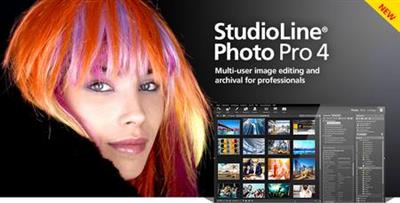
StudioLine Photo Pro 4 is the highly effective software for the professional editing and management of large image collections in server-based networks. Of course, the RAW formats from all popular camera models are supported.


All in One - Plus Networking
StudioLine Photo Pro is a multi-user product for server-based networks. The initial license covers the server instance plus 5 workstations. Additional workstations licenses can be added at any time.Sophisticated user administration functions are available to manage users, groups and permissions. Using a group-centric security model makes it easy to control capabilities for staff and grant varied access levels to specific image archive folders.

Your Personal Load Assistant
Quickly and easily load images from you camera, hard disk or other drives. Any files not previously loaded are automatically suggested and selected.

Pre-defined Tool Settings
Store frequently used image tools (filters) or entire filter sequences as templates. This way the same tool settings are available at any time to treat further images with the same editing steps.

Protect Your Images
Superimpose your personal watermark into your images to prevent unauthorized use. Any graphics and text may be combined to create watermarks.

Easy Print
Create print layout to suit various occasions. Taylor your images for optimal print results on the desired output medium.

MediaCenter
Quickly and easily share your photos and videos on the web with friends and family. You control who may access each of your online albums, and if downloading is permitted. Visitors of your albums can search images based on embedded information, or view them as a slide show or on a map.

Professional Image Editing
Numerous images tools such as white balance, unsharp mask oder RGB mixer are available. All editing steps are non-destructive; they are kept in a database and the original image remains untouched. A few quick steps and your foto set will appear as a slide show, is published as a gallery to the web or burned onto CD/DVD, or is sent via email to your circle of friends.

Archival Made Easy
Categorize your images with unlimited text in system and user descriptors or by assigning keywords and ratings. After that, searching for specific images or those matching a certain theme is child's play.

Presentation
View your images in your own albums, in the advanced Timeline Explorer or by keywords and categories. Avoid data loss by backing up your image archive, with all metadata and image edits, to CD, DVD or secondary hard disk.

Convenient Geotagging
Geotag your images with GPS coordinates from GPS loggers or GPS equipped digital cameras. Or, use the Geo Explorer to drag untagged images to the correct location on a map.


System Requirements:
- Windows® Vista, Windows® 7, Windows® 8, Windows® 10
- Multi-core processor with a minimum of 1.6 GHz, higher recommended
- 2 GB RAM, more recommended
- 150 MB disk space for programs (allow extra space for data)
- 24 bit graphics adapter with monitor resolution of 1024 x 768 pixels


Home Page -
Код:
https://www.studioline.net/


DOWNLOAD LINKS:

Код:
https://rapidgator.net/file/f4996f885fcc92517a640696f3ac70d0/StudioLine_Photo_Pro_4.2.55_Multilingual.rar

Код:
http://nitroflare.com/view/88900B054A57AD2/StudioLine_Photo_Pro_4.2.55_Multilingual.rar

Код:
https://uploadgig.com/file/download/5215811B720D460a/StudioLine_Photo_Pro_4.2.55_Multilingual.rar
 
StudioLine Web Designer 4.2.55 Multilingual

StudioLine Web Designer 4.2.55 Multilingual


2dc151296223ffb65a74d28d5b6e74db.jpeg


StudioLine Web Designer 4.2.55 Multilingual | 148 MB | Language: Multilanguage​


StudioLine Web Designer 4 integrates the components for the design, publishing and maintenance of professional websites into a common user interface - page editor, image archive and editing, graphics effects, publishing control, template editor and site management.


Web Design with Integrated Image Editor and Archive
Your create collages, edit image and use graphics effects directly in the page editor and instantly will see the results. With the media explorer your media assets - fotos, graphics, videos and sound bits. Image tools (filters) are applied as needed while working on your web page layout. Page templates let you position your design elements precisely and consistently, with the help of rulers and a guideline manager. Easily create menus and sub-menus for user friendly site navigation.

No HTML Programming Knowledge
Use the page editor to add content to your pages. Arrange text and images as needed until you are happy with the outcome. You can position content freely anywhere on your page, making use of a variety of available layout aids. Of course, snippets of your own custom HTML code can be embedded, if you should ever have the need.

Irregular Image Shapes
In StudioLine, images not limited to rectangular shapes. The actual shape of an image defines it's clickable area, not just in the StudioLine editor but also on the published web page. This enables complex layering of images without having to create and maintain traditional "image maps".

Shadows, Borders, Gradients and Rounded Corners
No need for external image editing software or learning HTML or CSS syntax. With StudioLine, you easily design your graphical elements using the integrated image tools.

Design Elements
Use intelligent container objects, called Design Elements, to automatically arrange text and images in a grid. Various settings control layout rules, such as horizontal and vertical alignment, spacing and margins. With that information, StudioLine will dynamically place and align the contained texts and images to fit within the available column width.

Professional Image Editing
Numerous images tools such as white balance, unsharp mask oder RGB mixer are available. All editing steps are non-destructive; they are kept in a database and the original image remains untouched. A few quick steps and your foto set will appear as a slide show, is published as a gallery to the web or burned onto CD/DVD, or is sent via email to your circle of friends.

Archival Made Easy
Categorize your images with unlimited text in system and user descriptors or by assigning keywords and ratings. After that, searching for specific images or those matching a certain theme is child's play.

Mobile Pages
Develop web pages for mobile devices such as smart phones and tablets. The web effects created by StudioLine are optimized to work on all popular mobile Internet devices.

Embed Slideshow on Web Page
Simply adding or removing images in your MediaCenter is all that's needed to change your slide shows - no need to manually update your web site each time.


System Requirements:
- Windows® Vista, Windows® 7, Windows® 8, Windows® 10
- Multi-core processor with a minimum of 1.6 GHz, higher recommended
- 2 GB RAM, more recommended
- 150 MB disk space for programs (allow extra space for data)
- 24 bit graphics adapter with monitor resolution of 1024 x 768 pixels


Home Page -
Код:
https://www.studioline.net/


DOWNLOAD LINKS:

Код:
https://rapidgator.net/file/61936d08229c1999a435e83474c63bf2/StudioLine_Web_Designer_4.2.55_Multilingual.rar

Код:
http://nitroflare.com/view/BFB986013B1930F/StudioLine_Web_Designer_4.2.55_Multilingual.rar

Код:
https://uploadgig.com/file/download/a1ff1AdE6182cFaA/StudioLine_Web_Designer_4.2.55_Multilingual.rar
 
Substance Alchemist 2020.2 (x64)

Substance Alchemist 2020.2 (x64)


6b1f0a95b2ae097e57d40725491d941f.jpeg


Substance Alchemist 2020.2 (x64) | 1.21 GB | | Language: English​


Substance Alchemist is a next-generation tool dedicated to material authoring, exploration, and management. Different technologies and creation methods (procedural-based, capture-based, AI-based and manual) help you manage entire material libraries and export them to other applications.


1-CLICK GENERATORS
Synthetic material creation with phenomenal speed.
Select a base material, and apply one of Alchemist's filters; within seconds, you've created a complex 3D material.
Use Alchemist's intuitive interface to modify to suit your personal preference.

COMBINE 3D MATERIALS
Take existing materials, and blend them together. Craft credible combinations of complex materials: tree bark with moss, for instance, or stone with pebbles; unlimited possibilities exist.
Define your blending criteria from options such as height, color, or custom masks to ensure utterly seamless blending.
Great results, achieved super-fast.

TRANSFORM 2D PHOTOS INTO 3D MATERIALS
Import a reference photo into Alchemist. Transform it into a high-quality 3D material. The entire process takes seconds. Our machine-learning based delighter removes shadows and helps you get the best material from your captures.

CREATE MATERIAL COLLECTIONS
Substance Alchemist's collection feature helps you build vast material libraries. Use moodboards to generate many variations of your materials.


System requirements (recommended):
OS: Windows 7 / 8 / 10 - (64 bit)
Memory: 16 GB RAM
Graphics: VRAM 4GB
DirectX: Version 11
Resolution: 1920x1080px
Supported GPUs
Intel HD 5000 / IRis Pro 6200 and above
NVIDIA GeForce GTX 600 and above
NVIDIA Quadro K2000 and above
AMD Radeon HD 7000 and above
AMD Radeon Pro WX-serie / Pro Duo and above
AMD FirePro W-series / FirePro S-series and above


Home Page -
Код:
https://www.allegorithmic.com/


DOWNLOAD LINKS:

Код:
https://rapidgator.net/file/f67ecffaea51990ad26f7e11831e91be/Substance_Alchemist_2020.2_x64.part1.rar
https://rapidgator.net/file/68f519ae36b994987c3abcebbb216ca1/Substance_Alchemist_2020.2_x64.part2.rar

Код:
http://nitroflare.com/view/6E029A7DA027450/Substance_Alchemist_2020.2_x64.part1.rar
http://nitroflare.com/view/23C30ECE0001D7B/Substance_Alchemist_2020.2_x64.part2.rar

Код:
https://uploadgig.com/file/download/440FdCb7A1a51125/Substance_Alchemist_2020.2_x64.part1.rar
https://uploadgig.com/file/download/b592458e8dA37b52/Substance_Alchemist_2020.2_x64.part2.rar
 
TechSmith Snagit 2020.1.3 Build 5968 (x64)

TechSmith Snagit 2020.1.3 Build 5968 (x64)


13776fb4764897c49684418eec25b147.jpeg


TechSmith Snagit 2020.1.3 Build 5968 (x64) | 333 MB | Language: English​


Techsmith Snagit - the award-winning screen-capture software. Using SnagIt, you can select and capture anything on your screen, then easily add text, arrows, or effects, and save the capture to a file or share it immediately by e-mail or IM. Capture and share an article, image, or Web page directly from your screen. Or, capture and share any part of any application that runs on your PC. Automatically save in one of 23 file formats, or send to the printer, to your e-mail, or to the clipboard.


Use SnagIt's built-in editors to modify, annotate, and enhance your images and the Catalog Browser to organize your files. Increase your productivity while quickly creating professional presentations and flawless documentation. With powerful new features that allow you to edit previously placed objects, capture embedded links and add interactivity to your captures,SnagIt 8 makes it easier than ever before to capture, edit, and share anything on your screen.


Features of SnagIt:
» Capture - if you can see it, you can snag it!
» Don't waste time cropping your captures. Snag exactly what you need, with just a click.
» Profiles make it easy. SnagIt comes with eleven preset buttons that make screen capture a cinch! Capture a region of your screen, text from a window, the contents of a tall page that scrolls, all the images on a Web page, you get the idea.
» Custom suits you. Don't feel limited by the eleven profiles-create your own combinations for nearly unlimited capture possibilites. What's that? You want to set up a keystroke that captures a menu along with the mouse pointer...adds a drop shadow...and sends the image directly to your ***** dot com blog? Sure, no problem!
Edit - the right tools, right now!
» You don't need a million confusing options, you need the right tools at the right time. Unlike expensive, complex image editing suites,SnagIt makes everyday screen capture tasks one-click easy.
» Say more with pictures+words. Use an arrow to direct attention. Add a text callout to explain clearly. Apply ready-made objects from the menus...and your picture is worth 1,000 more words!
» Look like a pro. Make your screenshot pop with a drop shadow. Give it perspective, spotlight an area, or add other nifty effects.
» Convey complex ideas simply. Combine multiple images, callouts, shapes, and clip art stamps into a rich and detailed information graphic.
» Have fun! Add a speech balloon to that photo of your cat.
Share - send captures where they need to go...instantly!
» Yes, you can save your captures in all the common-and a few uncommon-image formats. But with SnagIt's free output accessories you can do so much more!
» Collaborate in a flash. Click a button to send a screen capture by email, AIM, or Skype.
» Be social. Share on Flickr. Post images directly to your blog. Publish to your Web site via FTP. No technical degree required!
» Get projects done quicker. Embed images directly into your Microsoft Office projects, MindManager map, or OneNote page.
Organize - SnagIt keeps track, so you don't have to
» Save nothing...save everything. SnagIt stores every capture automatically and keeps the most recent visible. A huge timesaver!
» Find your stuff. Whether or not you saved it, find that capture later with the new visual search pane. Remember just one detail-like the approximate date or the Web site you captured-and find your capture instantly.
» Get organized (if you want to). As you capture images for next month's big project, tag them with "big project" or set the "Important" flag. No need to save anything in folders...just come back next month and view all your big project files with a click!


System Requirements:
Microsoft Windows 10 (1703, 1607, and 1511), Windows 8.1, Windows 7 SP1, Windows Server 2016, or Windows Server 2012 R2 (64-bit only)
.NET 4.6 or later
2.4 GHz single core processor (dual core i5 required for video capture)
1 GB of RAM (4 GB required for video capture)
500 MB of hard-disk space for program installation
Video and Panoramic capture on Windows N requires the Media Feature Pack for Windows N
We recommend the 64-bit Snagit installation when using multiple monitors or a 4k display


Home Page -
Код:
https://www.techsmith.com/


DOWNLOAD LINKS:


Код:
https://dropapk.to/gcs1f74iyr09/TechSmith_Snagit_2020.1.3_Build_5968_x64.rar

Код:
https://rapidgator.net/file/02c1b9e8018f98462837358512d0d3fb/TechSmith_Snagit_2020.1.3_Build_5968_x64.rar

Код:
http://nitroflare.com/view/82E0BA163339410/TechSmith_Snagit_2020.1.3_Build_5968_x64.rar

Код:
https://uploadgig.com/file/download/002eb131dfdD9142/TechSmith_Snagit_2020.1.3_Build_5968_x64.rar
 
The Foundry Katana 3.6v1

The Foundry Katana 3.6v1


dfdf94d5789c6f8e984ef67203a1632b.jpeg


The Foundry Katana 3.6v1 | 341 MB | Language: English​


The Foundry launches the newer update to its professional look development and lighting tool which include new Feature Enhancements and bug fixes that improve the 3.5v3 to 3.6v1 release.


Katana 3.6v1 Release Notes - Release Date: 29 April 2020


Dockable Tabs
- The following menu commands have been added to the context menu of tab titles, to allow users to move the respective tab to a particular dock widget area in Katana's main
window:
Move Tab To
Left Dock
Right Dock
Top Dock
Bottom Dock

Tabs in dock widgets can be dragged to one of the other dock widget areas, and can also be turned into floating panes, by clicking the Detach Tab button in the title bar of the dock widget, by double-clicking its title bar, or by dragging a docked tab away from the dock widget areas of the main window.
Docked tabs on the left and right of the main window span the entire height of the main window, whereas those at the top and bottom span the width of the main window's central widget only (containing its classic panes and tabs).
Docked tabs are saved and restored as part of Katana layout XML files. A Save Dock Widgets checkbox has been added to the Save Current Layout dialog that opens when choosing the Layouts > Save Current Layout menu command. By default, the checkbox is turned on. The checkbox can be turned off to not save docked tabs as part of the layout.
NetworkMaterialEdit
- NetworkMaterialEdit nodes allow users to edit network materials that have been created using NetworkMaterialCreate nodes, by adding shading nodes to an existing network, deleting shading nodes from an existing network, or modifying any of the parameters of shading nodes of an existing network. The contents of NetworkMaterialEdit nodes are drawn in the same style that was introduced for NetworkMaterialCreate nodes in Katana 3.2, with exposed ports on shading nodes and a left-to-right node layout.
NetworkMaterialEdit nodes leverage the functionality of the existing NetworkMaterialParameterEdit and NetworkMaterialSplice node types, but in a UI that is visually representative of how the material was originally authored.
Notable API/SDK Changes
- Python code that was never used in commercial Katana has been removed from the Katana codebase, to avoid unnecessary porting work in the transition to Python 3.
OpWrite Node Type
- OpWrite nodes allow users to write custom, dynamic Ops in C++ right within Katana's user interface, and iterating on them without having to restart Katana. The OpWrite node type has been modelled after the OpScript node type, with regards to its parameter interface and general functionality, including the ability for deferred execution of the custom Op in question.
By default, the OpWrite node type is not made available in Katana's node creation menus in the Node Graph tab. You can set the KATANA_ENABLE_OPWRITE_NODE environment variable to 1 before launching Katana to make it available.
More details on writing Ops using OpWrite nodes can be found in the Ops And OpScript > OpWrite section of the Katana Developer Guide.
Snapping in the Hydra Viewer
- Support for snapping to locations has been added to the Viewer (Hydra) tab.
Snapping can be turned on and off using the new Snapping tool button in the tab, using that button's menu, or by pressing the V key, and can also be turned on temporarily by holding the V key. Turning the feature on allows users to snap any location's translate or COI manipulator (including individual axes) to a target location's individual Vertices, Edges, Faces, Center or Object.
. When snapping to vertices (Vertex mode), only vertices of front-facing faces are considered.
. When snapping to edges, users can choose to snap to the center of a given edge (Edge - Center mode), or to slide along a given edge (Edge - Slide along mode).
.. In these modes, the target edge is highlighted in addition to the target mesh's snapping wireframe.
. When snapping to faces, users can choose to snap to the center of a given face (Face - Center mode), and also orient the transformed mesh's rotation to point along the normal of the target face (Face - Center - Oriented to Normal mode).
.. In these modes, the target face is highlighted in addition to the target mesh's snapping wireframe.
.. In Face - Center - Oriented to Normal mode, the normal is indicated by a white arrow with a dashed line.
... In Oriented to Normal modes, the OrientAxis and UpAxis can be specified via viewerHydra/snapping preferences.
. When snapping to objects, users can choose to snap to the closest point on an object's surface (Object Surface mode), and also orient the transformed mesh's rotation to point along the normal of the closest face (Object Surface - Oriented to Normal mode), or to the object's origin (Object - Origin mode).
.. In Object Surface modes, the target mesh is drawn with an outline, in addition to the target mesh's snapping wireframe being drawn.
.. In Object - Center mode, the center of an object (defined by a bounding box automatically generated by the extents of the geometry) will be highlighted with a cross-hair icon.
.. In Object - Origin mode, the origin of the targeted object is highlighted with a cross-hair icon.
. Proxy geometry shown in the current scene will work with all the above modes.
. When snapping to Lights, Cameras, and Locators, users can choose to snap to the center of a given location of the type Light, Camera or Locator. Geometry in the scene will be ignored by this modes.

NOTE: The color used for drawing the target mesh's snapping wireframe can be customized via the new viewerHydra/snapping/wireframeColor preference.
The current snapping mode can be changed via the Snapping tool button's menu, or by pressing Shift+V to cycle through the available snapping modes.

3Delight
- The version of 3Delight that we ship with Katana has been upgraded to version 2.0.1.
API/SDK Changes
- The deprecation warning that is logged when Python-based AssetAPI plug-ins are registered has been revised for clarity.
- The base class of the Katana main window has been changed from QWidget to QMainWindow, allowing for toolbars and dock widgets to be placed around a central widget.
- Improved efficiency of the Hydra Viewer's Op update system, reducing scope of transient, incomplete Geolib runtime configurations. (This change applies to the BaseViewerTab class.)
- The Python ViewerDelegate.setViewOp() method now accepts a Geolib Runtime Op (or Op ID for compatibility) as its first parameter. It also now accepts an optional Geolib Runtime transaction, to which Runtime configuration changes are added.
- The C++ FnViewerDelegate API ViewerDelegatePluginBase class no longer has a setViewOp() member function. This functionality is available in the Python ViewerDelegate class, which has responsibility for configuration.
- A Port Op Client (Nodes3DAPI.PortOpClient.PortOpClient) now accepts None as its Port, in which case a default source Op is used (a no-op that produces an empty /root location).
Example Plug-ins
- A number of implicit conversion compilation warnings in the TransformManipulators plug-in have been addressed.
Hydra Viewer
- The default keyboard shortcut for Look Through Selected Object in the Viewer (Hydra) tab has been reassigned from V to K. The V keyboard shortcut is now used for the new Snapping feature.
Network Materials
- TP 369014 - It is now possible to select all upstream or downstream shading nodes in a NetworkMaterialCreate node by pressing Ctrl+Left or Ctrl+Right. (This is similar to the existing Ctrl+Up and Ctrl+Down keyboard shortcuts in the regular node graph context.)
- User parameters and locally set parameter values of shading nodes are now stored as part of the Network Material attribute conventions.
Node Graph
- TP 357364 - Parameter reference expressions now support concatenation using the + operator. See the Katana Developer Guide for details.
Performance
- Improved the scheduling of location cook requests via CookInterface::prefetch().
- The scenewalker command-line tool now outputs a profiling JSON file if run with the command-line option -profile=, where is the path and name of the file to write. This file has the same format as the JSON file that is created when starting a Preview Render with Profiling from the context menu of a node in the Node Graph tab.
- In certain edge cases, the Op Tree Optimizer would incorrectly identify a chain of Ops that could be collapsed, effectively removing a part of the Op tree. This no longer happens, and the optimizer is much faster at manipulating the tree. Moreover, there are two additional optimization passes: one removes no-ops, and the other flattens hierarchies of Merge Ops into a single Merge Op, saving cook time and memory.
- TP 421213 - The summary report printed to the Render Log following a Preview Render with Profiling now shows Most costly Nodes and Most costly Ops in two separate tables.
- TP 426927 - Improved responsiveness in the Viewer (Hydra) manipulators when the currently selected location is cooked.
Rendering
- TP 86310 / BZ 41764 - Support for custom tile locations has been added.
Previously, the "tile_x_y." prefix was always prepended to the file name of the tiles. Now, the tile path can be customized by defining the following environment variable:
KATANA_TILE_FILENAME
These are the wildcards that can be used:
@STEM@
@EXT@ (includes dot)
@COLUMN@
@ROW@
@COLUMNS@
@ROWS@
@DEFAULT@ (equivalent to tile_@COLUMN@_@ROW@.@STEM@@EXT@)
For example, the following setup would append the tile column and row, as well as the total number of columns and rows, to the tile location:
export KATANA_TILE_FILENAME="@STEM@_(@COLUMN@,@ROW@)_@COLUMNS@x@ROWS@@EXT@"
UI Improvements
- Boolean preferences now use checkboxes instead of Yes/No combo boxes.
- A hover effect has been added to titles of tabs and to handles of scroll bars.
- It is now possible to drag and drop a NetworkMaterialCreate or NetworkMaterialEdit node onto a MaterialAssign node's materialAssign parameter. Doing so will set the materialAssign parameter of the MaterialAssign node to a Python-based parameter expression that evaluates to the path of the scene graph location that is created by the NetworkMaterialCreate node or that is edited by the NetworkMaterialEdit node.


API/SDK Changes
- TP 426773 - Viewer API: When opening and closing a manipulation group in a viewer delegate without performing any actions while the group is open, an exception could be raised from the ManipulatorBridge Python module.
Example Plug-ins
- TP 427125 - When trying to build ViewerPlugins from source, compilation could fail due to a missing declaration of a dependency on Qt 5.6.1. ViewerPlugins can now be built on systems without Qt 5.6.1 present, in which case the manipulator handles are not modified visually when entering snapping mode.
Node Graph
- TP 422514 - When using reference expressions to concatenate two or more node parameters, the relative relationships between the parent and child nodes could break when the node network was copied and pasted.
- TP 430188 - When the deletion of a Macro node was undone, the node's shape attributes (e.g. background color) were not restored correctly. (This issue was a regression in Katana 3.2v1.)
Performance
- TP 417237 - When running the scenewalker command-line tool with the -profile flag set, the summary report would not be written to the console.
- TP 420218 - When attempting to access scene graph location delegates from multiple threads, Katana sometimes crashed due to a thead-unsafe data structure in FnScenegraphLocationDelegateCache.
- TP 420641 - When cooking Op Trees with multiple paths between Ops (i.e. are not trees), the cache pre-population step would perform very poorly.
Rendering
- TP 128538 / BZ 51663 - Live Renders started while the Live Render from Viewer Camera option is turned on did not initially use the viewer camera.
- The initial Op Graph passed to a Live Render now overrides the render settings camera and creates a virtual camera location as necessary.

NOTE: Support for using non-camera locations (e.g. lights, which may provide camera interface attributes) as the render camera depends on the renderer plug-in that is being used.
Scene Graph
- TP 420753 - Newly created Geolib Runtime Clients could incorrectly be reported as being in 'all open' mode.
UI
- TP 425492 - When setting the value of a numeric preference for which minimum and/or maximum values are provided via hints, the resulting value could wrongly be set to that minimum or maximum value, rather than the entered value.
Other Bug Fixes
- TP 418460 - When editing a promoted drop-down parameter that provides a string attribute, for some renderer plug-ins, Material nodes set to edit material downstream failed to reflect these edits.
Known Issues
Hydra Viewer
- TP 431869 - When selecting a light or camera while the Center of Interest manipulator is selected, Katana stalls briefly before the manipulator's handles appear.
- TP 427252 - Locators created via PrimitiveCreate nodes can be snapped to in all modes, rather than just the Lights, Cameras, and Locators mode.
- TP 420882 - Changing between the Viewer (Hydra) tab's multipane layout options quickly can cause a crash or many error messages to be written to the terminal/console.
Live Groups
- TP 85118 / BZ 41152 - When editing parameters of a node that is part of a LiveGroup node and reloading the parent LiveGroup node, the UI state of the Parameters tab is reset. This includes scroll bar positions, selections of items, and selections of nested tabs (for example Object, Material and Linking tabs for a Gaffer node).
- TP 84998 / BZ 41092 - When reloading a LiveGroup node's parameter interface and contents from its source, parameters of child nodes that are edited in floating panes disappear from those panes.
- TP 84020 / BZ 40598 - Reverting a LiveGroup node does not revert its user parameters.
- TP 84019 / BZ 40599 - Parameters that are added to LiveGroup nodes are wrongly discarded when performing a reload from source, leading to loss of data.
- TP 84018 / BZ 40600 - Undoing a revert of an unpublished LiveGroup node does not restore the LiveGroup's editable and modified state.
- TP 83061 / BZ 40237 - Nodes can be dragged into the Group bubble of a non-editable LiveGroup node.
Materials
- TP 429775 - NetworkMaterialEdit nodes do not currently respect local Graph State changes, for example as performed by VariableSet nodes downstream.
- TP 429302 - When editing a locked node inside a NetworkMaterialEdit node graph, the parameters will be shown at their default state.
- TP 429206 - Parameter expressions when promoted from shading nodes in a NetworkMaterialCreate node are of a constant value, relative to the resolved expression at time of creation.
- TP 427408 - When entering a NetworkMaterialEdit node whose sceneGraphLocation parameter is empty, warnings are logged by the Geolib3 Runtime.
- TP 427353 - NetworkMaterialEdit nodes support editing of network materials that were created by NetworkMaterialCreate nodes only, not network materials that were created with legacy shading nodes in the classic node graph context.
- TP 423341 - In a NetworkMaterialEdit node graph, connections can be displayed incorrectly if a node's name begins with a number.
- TP 410474 - In a NetworkMaterialCreate context, shading nodes appear to shake during view state changes if the node's width is adjusted.
- TP 402064 - In a ShadingGroup node graph, the connection between a Dot node and a shading node port can be wrongly colored in some cases.
- TP 269449 - Choosing Edit Shader Parameters from the main wrench menu of Material nodes does not show wrench buttons next to shader parameters. This can be worked around by toggling the edit flag on the node.
- TP 199304 - The namespace parameter on Material nodes wrongly allows the insertion of Unicode codepoints outside the ASCII range.
- TP 191052 - Katana does not have any support for the texture reference object workflows of V-Ray for Maya.
Parameter Expressions
- TP 188533 - Expressions linked to non-local parameters on not previously edited Material nodes can't be evaluated.
- TP 105434 / BZ 47520 - Reference Expressions may not refer to dynamic parameters such as shader parameters.
- TP 60457 / BZ 31790 - Setting an array or group parameter to an expression results in an invalid expression. Upon setting a valid expression (for example, an evaluation of an equivalent parameter on another node using getParam), the parameter is not immediately updated. To workaround this issue, close and reopen the parameter, or flush caches while the node is not edited.
Qt 5
- TP 356345 - Partially covering the Hydra Viewport with a floating tab will cause it to repaint continuously.
Rendering
- TP 381284 - The 3Delight renderer plug-in makes use of source material locations rather than resolved material attributes as a means of de-duplication. This can result in material data being lost when excluding material locations from the Render Working Set during a Live Render session.
- TP 344118 - (Windows only) When installing Katana and opting to install the bundled version of 3Delight, the installation of 3Delight is made by modifying system-wide environment variables such as KATANA_RESOURCES. Thereafter, launching any version of Katana will pick up this installation of 3Delight, which may be incompatible with the version of Katana being launched.
NOTE: This does not affect Linux, where a bundled 3Delight installation is tied to its corresponding Katana installation.
- TP 208802 - Closing the Histogram tab after use leaves the Monitor tab unable to display rendered images.
- TP 176598 - Use of nodes that modify Graph State Variables in Interactive Render Filters is not currently supported.
- TP 114182 / BZ 49288 - When exporting a Catalog item you need to specify the export folder path to an existing folder. If the folder you're trying to export to does not exist on disk Katana will fail to export.
- TP 94052 / BZ 44199 - The Repeat Previous Render menu command only works on renders started from a 3D node's context menu.
- TP 74799 / BZ 36926 - The rendererSettings > displayOptions parameter of a RenderOutputDefine node for the PRMan renderer, shown when its type parameter is set to 'raw', cannot be set using the Parameters tab.
- TP 70016 / BZ 36137 - Rendering repeatedly with a large number of AOVs consumes more and more memory, possibly leading to a crash when running out of memory.
- TP 12517 / BZ 16168 - Only one Monitor tab may display the results of a Preview Render. The use of multiple Monitor tabs is not currently supported.
Widgets
- TP 373702 - Clicking in the Viewport and pressing a shortcut whilst the mouse is hovered in another widget will still send the event back to the 'focused' Viewport widget, for shortcuts where the widget hovered over does not handle the shortcut.
- TP 123558 / BZ 50911 - When changing an array parameter's tuple count/size, any corresponding attributes are not properly updated in the Attributes tab.
- TP 65347 / BZ 34949 - Using Compiz can lead to text fields not receiving focus events correctly due to an incompatibility between Compiz and Qt. Depending on your configuration, disabling Compiz "desktop effects" may resolve the problem.
Miscellaneous
- TP 381692 - (Windows only) When logging out and logging back in again, the colors in the UI are incorrect. For example, certain parts of certain types of tabs may appear with a white background color.
- TP 337653 - Katana logs deprecation warnings when loading the PyMockAsset, PyMultiMockAsset and PyMockFileSeq shipping example Asset API plug-ins.
- TP 218742 - (Windows only) Katana must be installed to a path no longer than ~140 characters. Attempting to install to a longer path results in an unintuitive error: "The system cannot find the path specified."
- TP 112544 / BZ 49051 - The Viewer tab may lose sync with the Scene Graph tab when changes to expansion state are interrupted.
- TP 107038 / BZ 47853 - Indication of attribute source nodes (such as the yellow 'glow' in the Node Graph tab) is unavailable as of Katana 2.0v1.
- TP 84326 / BZ 40709 - The Alembic library does not support multiple process or thread access to an Alembic file. This means that a crash occurs when modifying an Alembic file outside Katana, while it's loaded in an open Katana scene. To avoid this, you must Flush Caches before attempting to update any modified Alembic files.
- TP 80738 / BZ 39261 - Operations that lock and unlock nodes do not currently create entries in the Undo History, which can lead to an incorrect node graph state when undoing and redoing operations.
- TP 71965 / BZ 36691 - State badges are currently shown for attribute values of dynamic array child parameters, even though only their parent array parameter should appear with a state badge.
- TP 70217 / BZ 36176 - The 2D node Disk Render Upstream Render Outputs option does not use the batch render method, batchRender, for upstream render nodes, instead using diskRender.
- TP 70196 / BZ 36170 - Control keys (notably arrow keys) do not function as expected in shell mode.
The Foundry Katana is a 3D application specifically designed for the needs of look development and lighting in an asset-based pipeline. Originally developed at Sony Pictures Imageworks, Katana has been their core tool for look development and lighting for all their productions since Spider-Man 3, Beowulf, and Surf's Up!. Katana provides a very general framework for efficient look development and lighting, with the goals of scalability, flexibility, and supporting an asset-based pipeline.
Katana is used in VFX, broadcast, and animation as a post-processing tool for final lighting. It uses a recipe approach to establishing lighting, making it easier for users to establish a lighting profile that can be reused in other scenes or projects.

The Foundry is a leading global developer of creative software used to deliver high-end visual effects and 3D content for the design, visualization and entertainment industries. The portfolio empowers artists to create inspiring and technical images and visual experiences in media production (film, commercials, episodic television, gaming, and virtual and augmented reality), and product and industrial design.

The company was founded in 1996 and is headquartered in London, with offices in Silicon Valley, Manchester, Los Angeles, Shanghai, Dublin and Austin. In November 2015 Alex Mahon was appointed as CEO while Bill Collis became president.


Product: The Foundry Katana
Version: 3.6v1
Supported Architectures: x64
Website Home Page :
Код:
http://www.foundry.com

Language: english
System Requirements: PC *
Supported Operating Systems: *
Size: 341.2 mb

Officially Supported Operating Systems
- Windows 7 64-bit or higher
Hardware Requirements
CPU: Dual-core processor
Storage: 1+ GB available for installation
System RAM: 1+ GB available
Graphics RAM: 1+ GB available: 2+ GB available (Recommended)
Display: 800 x 600: 1920 x 1080 (Recommended)
OpenGL OpenGL: 4.3+


DOWNLOAD LINKS:

Код:
https://rapidgator.net/file/aec8a1489f3550d49723e8cf71ce9213/The_Foundry_Katana_3.6v1.rar

Код:
http://nitroflare.com/view/7AEB79F5321E516/The_Foundry_Katana_3.6v1.rar

Код:
https://uploadgig.com/file/download/161B3c25c771f032/The_Foundry_Katana_3.6v1.rar

 
Toolchefs Atoms Crowd 3.4.1 for Houdini/Katana/Maya

Toolchefs Atoms Crowd 3.4.1 for Houdini/Katana/Maya


24bce35a5e7794dff7c24b9e1e09241a.jpeg


Toolchefs Atoms Crowd 3.4.1 for Houdini/Katana/Maya | 606 MB | Language: English​


Atoms Crowd makes crowd animation available to anyone. You don't need any particular skill set to layout your crowd shots and simulate them. You don't believe it, do you? Wait and see!


Abstract Skeletons
Atoms Crowd supports characters with any number of legs!
There's no difference between two, four, eight, twelve legs! Atoms will simulate any kind of skeleton!
Customizable
Full control on every single entity in the simulation!
Different users can take advantage of their skill sets.
Do you like playing with nodes?
Do you script with Python?
Can you write C++ plug-ins?
If the answer is yes, you can unlock a whole new world within Atoms Crowd.
Hybrid Workflow
Atoms Crowd supports multiple softwares and each integration shares the same workflow!
You can lookdev and prepare your agents in Maya, simulate in Houdini and come back to Maya for rendering. Or do the opposite. Or use only one software. It's up to you really!


Platform Requirements:
- Microsoft Windows
Video Card supported
- Any NVidia video card. You might get the following error depending on your drivers. In case you do, please set the ATOMS_GLSL_DISABLE_LIGHTS environment variable (defined in your Maya module) to 1.
0(490) : error C5208: Sampler needs to be a uniform (global or parameter to main), need to inline function or resolve conditional expression
- AMD video cards will only show agents in skeleton and proxy mode.
3D Packages supported
- Maya 2015 (windows only), 2016, 2016.5, 2017 (64 bit)
- Houdini 15, 16
Rendering engines
- Arnold 4.x
- Renderman 20.x, 21.x
- V-Ray 3.5x, 3.6x


Home Page -
Код:
https://atoms.toolchefs.com/atoms-crowd/


DOWNLOAD LINKS:

Код:
https://rapidgator.net/file/df3c3cc4c1661a356d971dcfe2fa30dd/Toolchefs_Atoms_Crowd_3.4.1_for_HoudiniKatanaMaya.rar

Код:
http://nitroflare.com/view/1D5DC675E02AD08/Toolchefs_Atoms_Crowd_3.4.1_for_HoudiniKatanaMaya.rar

Код:
https://uploadgig.com/file/download/2208A7Fe5332Cd85/Toolchefs_Atoms_Crowd_3.4.1_for_HoudiniKatanaMaya.rar
 
Toolchefs Atoms Crowd 3.4.1 for Houdini/Katana/Maya (Linux)

Toolchefs Atoms Crowd 3.4.1 for Houdini/Katana/Maya (Linux)


5331a6819c14b758ab74cb8d7e596dc0.jpeg


Toolchefs Atoms Crowd 3.4.1 for Houdini/Katana/Maya (Linux) | 1.1 GB | Language: English​


Atoms Crowd makes crowd animation available to anyone. You don't need any particular skill set to layout your crowd shots and simulate them. You don't believe it, do you? Wait and see!


Abstract Skeletons
Atoms Crowd supports characters with any number of legs!
There's no difference between two, four, eight, twelve legs! Atoms will simulate any kind of skeleton!

Customizable
Full control on every single entity in the simulation!
Different users can take advantage of their skill sets.

Do you like playing with nodes?
Do you script with Python?
Can you write C++ plug-ins?
If the answer is yes, you can unlock a whole new world within Atoms Crowd.

Hybrid Workflow
Atoms Crowd supports multiple softwares and each integration shares the same workflow!
You can lookdev and prepare your agents in Maya, simulate in Houdini and come back to Maya for rendering. Or do the opposite. Or use only one software. It's up to you really!

Platform Requirements:
-Linux
Video Card supported
- Any NVidia video card. You might get the following error depending on your drivers. In case you do, please set the ATOMS_GLSL_DISABLE_LIGHTS environment variable (defined in your Maya module) to 1.
0(490) : error C5208: Sampler needs to be a uniform (global or parameter to main), need to inline function or resolve conditional expression
- AMD video cards will only show agents in skeleton and proxy mode.
3D Packages supported
- Maya 2015 (windows only), 2016, 2016.5, 2017 (64 bit)
- Houdini 15, 16
Rendering engines
- Arnold 4.x
- Renderman 20.x, 21.x
- V-Ray 3.5x, 3.6x


Home Page -
Код:
https://atoms.toolchefs.com/atoms-crowd/


DOWNLOAD LINKS:

Код:
https://rapidgator.net/file/7fb278c296143806223c6e24db219c4a/Toolchefs_Atoms_Crowd_3.4.1_for_HoudiniKatanaMaya_Linux.part1.rar
https://rapidgator.net/file/b289ba1c4d594e40972d86141e16b46c/Toolchefs_Atoms_Crowd_3.4.1_for_HoudiniKatanaMaya_Linux.part2.rar

Код:
http://nitroflare.com/view/9AB1E4A78A1506C/Toolchefs_Atoms_Crowd_3.4.1_for_HoudiniKatanaMaya_Linux.part1.rar
http://nitroflare.com/view/AAC5A437358F8C4/Toolchefs_Atoms_Crowd_3.4.1_for_HoudiniKatanaMaya_Linux.part2.rar

Код:
https://uploadgig.com/file/download/55244B46e964e7c9/Toolchefs_Atoms_Crowd_3.4.1_for_HoudiniKatanaMaya_Linux.part1.rar
https://uploadgig.com/file/download/C1b44302db287f12/Toolchefs_Atoms_Crowd_3.4.1_for_HoudiniKatanaMaya_Linux.part2.rar
 
Toon Boom Harmony Premium 20.0.0 Build 15996 (x64)

Toon Boom Harmony Premium 20.0.0 Build 15996 (x64)


f47e996f5f3a0d87326aa6e386e7ddde.jpeg


Toon Boom Harmony Premium 20.0.0 Build 15996 (x64) | 467 MB | Language: English​


Harmony 20, the industry's leading 2D animation software, brings the latest in digital drawing sensitivity to its brushes - every marking, every style, every texture you want to create and leave for the audience is felt. Rulers, guides, colour control & features as well as innovative deformers enrich your animation, bringing reality and fantasy within millimeters of each other.


Harmony Premium:
Complete professional edition for studios, small creative businesses, freelancers and schools working on the most demanding projects. Adds ability to create sophisticated cut-out rigs, very natural and realistic character movement plus unlimited special effects for any style of animation.

Benefits of Harmony:
- Unlimited creative freedom on your terms
- Flexibility, functionality and sensitivity of tools allows you to create with the highest quality
- All-in-one tool for efficient animation - from drawing to final production
- Cost and time savings
- Reliable team that stands behind their software and services; we are reachable - speak with our team live.
- Value; while we do not have the lowest prices, we do ensure the highest quality ensuring the integrity of your artistic expression
- Chosen by the leading animation studios worldwide who are setting the industry standard, for over 25 years
- We don't say we are the best, our Emmy-winning 2D animation technology has the awards to prove it
- Our community and network makes us unique; we were built for animation professionals and we intend to stay that way

Discover the Industry Leading Production Animation Software:
- Most advanced brush engine
- Defined colour pallets and painting
- Unlimited traditional paperless animation
- Innovative cut-out animation and rigging
- 2D/3D integration for limitless possibilities
- Deformers for even more textures and depth realism
- Special effects and compositing
- Pipeline integration for seamless end-to-end animation - all in one tool

New NOTEWORTHY FEATURES included in Harmony 20:
- The smoothest texture deformation with the Weighted-Deform Node
- Create depth, volume, and more realistic animations with new Lighting & Shading
- Advanced color management environments and effects give artists and studios full control over the accuracy of their project's colours from initial illustration to final export
- New colour effects nodes: colour curves, colour levels, gamma and colour-fade
- Drawing and creativity live hand-in-hand and snapping Alignment Guides make it faster & easier
- Drawing improvements made for animation artists make animation creation quicker and easier


System Requirements:
- Windows 10 (64-bit)
- Windows 8.1 (64-bit)
- Windows 7 (64-bit, excluding Starter and Home Basic)


Home Page -
Код:
https://www.toonboom.com/


DOWNLOAD LINKS:

Код:
https://rapidgator.net/file/07eba0fa6908a7490a576a97bd493b5d/Toon_Boom_Harmony_Premium_20.0.0_Build_15996_x64.rar

Код:
http://nitroflare.com/view/E2DA7D5474E1D0B/Toon_Boom_Harmony_Premium_20.0.0_Build_15996_x64.rar

Код:
https://uploadgig.com/file/download/96B8e37041BfD07d/Toon_Boom_Harmony_Premium_20.0.0_Build_15996_x64.rar
 
VSDC Video Editor Pro 6.4.7.154/155 Multilingual

VSDC Video Editor Pro 6.4.7.154/155 Multilingual


86342e2275af298a09d5aa7666bdc1cf.jpeg


VSDC Video Editor Pro 6.4.7.154/155 Multilingual | 183 MB | Language: Multilanguage​


The video editor is intended for editing video files and creating videos of any complexity involving various visual and audio effects. The program offers rich functionality and yet has a simple and intuitive interface, allowing you to create videos with a bare minimum of efforts.


Non-linear video editor
Our editor is a non-linear tool. This means that unlike in most other editors, where scenes come one after another in a linear sequence and certain order, our software allows objects to be placed in any position on the timeline and have any size. Besides, various parameters, shape and position of objects can change arbitrarily over time.

Visual and audio effects
You can apply various visual and audio effects to your videos to achieve the necessary result. Since the number of available visual effect is very high, they are split into five categories for ease of navigation: color correction, object transformation, object filters, transition effects and special fx.

Blending modes and Instagram-like filters
One more way of changing the look of your video image according to your preferences is color blending. Using a wide array of adjustable parameters, you can attach a unique professional style to your video. Newbies or those, who would like to save time, can benefit from stylish Instagram-like filters applied in one click.

Masking
VSDC Free Video Editor allows for creating different shaped masks for hiding, blurring or highlighting certain elements in your video. You can use it to apply special effects inside or outside the masked area. One of the most common reasons for masking are to blur a face to protect the identity or remove unwanted marks.

Subpixel accuracy
Objects in a scene are positioned with subpixel accuracy, which makes for smooth animation, rotation, transformation and precise relative positioning.

Support of popular formats
Our software supports virtually all video, image and audio formats and codecs. That is why you won't need any additional conversion tools to edit your files, as is often the case with other programs.

Creation of videos for specific multimedia devices
Thanks to a large set of preconfigured profiles, you can easily create videos for most popular multimedia devices, such as DVD players, iPod/iPhone/iPad, PSP, any smartphones and regular phones, Sony PlayStation, Xbox, Zune, Archos, iRiver, Creative Zen, Blackberry, MP4 players and many others.

Working with charts
You can create diagrams of different kinds, including 3D diagrams: Bar, Stacked Bar, Point, Bubble, Line, Scatter Line, Fast Line, Step Line, Spline, Area, Spline Area, Stacked Area, Stacked Spline Area, Range Bar, Gantt, Pie, Pie 3D, Torus 3D, Radar Point, Radar Line, Radar Area, Radar Spline, Radar Spline Area, Funnel, Pyramid, Pyramid 3D, High Low, Candle Stick. These objects can be based on dynamically changing data of different types. Besides, the appearance of diagrams is fully customizable (appearance of charts, coordinate axes, user-defined axes, legends, names of charts and axes, lines, labels and other elements), which will help you tailor them to your specific needs. Integrated color themes make it possible to quickly change the way your charts look.

Video library (to be included in the next program release)
The editor software lets you create your own library of multimedia files with brief or detailed descriptions. This will help you organize your video collection and simplify access to the necessary files.

Built-in DVD burning tool
The editor comes with a DVD burning tool, allowing you to easily burn the results of your work to optical discs.

Video File Converter
The application is designed to quickly convert video files from one format to another. It has some basic features for editing videos: removing unneeded segments, splitting your video into parts, and merging several files into one.

Desktop video capture
The video editor features a desktop video capture utility that saves captured footage to a video file for subsequent processing in the editor.

Video capturing
Another feature of the our editor is the ability to capture video from various video tuners, webcams, IP сameras and save the captured footage on your computer in an arbitrary format for subsequent editing.


System Requirements:
Operating system: Microsoft Windows XP SP3 / Vista / Win7 / Win8 / Win10 (we recommend to install the latest updates and service packs as well)
Intel, AMD or compatible processor with the work frequency at 1.5 GHz or higher
Screen resolution: 1024x768 pixels with 16-bit color or higher
RAM 256Mb for the program
Microsoft DirectX 9.0с or higher
At least 50 MB of free disk space


Home Page -
Код:
http://www.videosoftdev.com/


DOWNLOAD LINKS:

Код:
https://rapidgator.net/file/146170579714cafa995d397c546ae5c8/VSDC_Video_Editor_Pro_6.4.7.154155_Multilingual.rar

Код:
http://nitroflare.com/view/3EE77C07076A815/VSDC_Video_Editor_Pro_6.4.7.154155_Multilingual.rar

Код:
https://uploadgig.com/file/download/891CC308ecbE5B54/VSDC_Video_Editor_Pro_6.4.7.154155_Multilingual.rar
 
WebSupergoo ABCpdf DotNET 11.309

WebSupergoo ABCpdf DotNET 11.309


bdae6064c17b313033e257c40cdeeaf3.jpeg


WebSupergoo ABCpdf DotNET 11.309 | 224 MB | Language: English​


ABCpdf .NET is a .NET development tool that can be integrated into your web server and standalone applications to allow end users to create PDF documents with ease. The package contains a series of DLL files made for quick deployment.


Among other features, it facilitates a virtualized COM interface that can be used for backwards compatibility with ABCpdf ASP and Classic ASP/COM. The tool is suitable for ASP, VB.NET, C# and ASP.NET, along with projects supported by other programming languages too.

No print drivers are used in the making of the PDF files, which means that the process time is significantly reduced. It is fully multi-threaded, so that it can be deployed under COM+, MTS or .NET Enterprise Services.

ABCpdf .NET supports various filetypes, including HTML and CSS that can be imported from either local or remote websites. For instance, you can use Chrome, Firefox or IE style conversion. As far as graphical content is concerned, you can work with BMP, PNG, EXIF, JPEG, GIF, JPEG 2000, Photoshop PSD and PSB, EPS, TIFF, and HDR, among others.

Besides PDF, the utility can be used to create XPS and EPS. Other supported formats include Microsoft Word (DOC), PowerPoint (PPT), Lotus 1-2-3 (WK1) and AutoCAD (DXF). It is compatible with Unicode and foreign languages.

Operating System: ABCpdf 11 is supported on all Windows versions since Windows Vista.

Home Page -
Код:
http://www.websupergoo.com/


DOWNLOAD LINKS:

Код:
https://rapidgator.net/file/e203fa56ea419bbf73e92932b121c94e/WebSupergoo_ABCpdf_DotNET_11.309.rar

Код:
http://nitroflare.com/view/66E19A9262C294A/WebSupergoo_ABCpdf_DotNET_11.309.rar

Код:
https://uploadgig.com/file/download/9Fdc72e7E617251e/WebSupergoo_ABCpdf_DotNET_11.309.rar
 
Adobe Character Animator 2020 v3.3.1.6 (x64) Multilingual Repack

Adobe Character Animator 2020 v3.3.1.6 (x64) Multilingual Repack


873c042962f7222a937bf68333b81866.jpeg


Adobe Character Animator 2020 v3.3.1.6 (x64) Multilingual Repack | 832 MB | Language: Multilanguage​


Animate in real time. Really. Create a character and animate it with your own performance. Character Animator uses your expressions and movements to animate your characters in real-time. So when you smile or nod your head, your character does, too. It's so fast, you can even stream your animations live.


Eye-opening animations. In eye-opening time.
Create animations for cartoons, an animated series, and live broadcasts. Or live stream your character on social media and wow your friends.

Create a character in seconds.
Turn any piece of art into an animated character using your webcam and new Characterizer, powered by Adobe Sensei AI. Or create characters by modifying the built-in character templates available in Character Animator, or importing art from Illustrator or Photoshop.

Put your best face forward.
Easily bring your character to life through your own performance. Using your webcam and microphone, Character Animator matches your expressions - from syncing lips to tracking eyes and facial features - to animate your character in real time. Look surprised, happy, or angry and your character does, too.

Animations with legs - and arms and heads.
Getting your character to move doesn't take a lot of work. Control gestures like waving with your keyboard or MIDI device. Movements can be saved as buttons, so they're easier to remember than key commands.

It's showtime.
Check out the Hollywood studios, broadcasters, and online content creators who use Character Animator to bring their characters to life in real time. The app is powerfully fast and integrates with other Adobe apps for a seamless animation workflow. So you can take your own characters live or bring them into Premiere Pro or After Effects to include in bigger projects. It's the next generation of animation tools. Available now.

Animate in seconds with Characterizer
Create a stylized, animated character using a work of art, your webcam, and Characterizer. Powered by Adobe Sensei AI technology, Characterizer quickly and easily turns art into animations.

Easily re-use your best takes
The new Replays feature lets you choose your best laugh or perfectly timed fist bump and create a trigger that you can re-use live or in your next recording. Adjust the length of your Replays trigger to easily fit into your scene.

Magnets to make your animations livelier
Now your puppet can throw, drop, pick up static items, and do things like drink from a cup or drop a ball.

Improvements to walking behavior
Newly added right and left shoulder and hip tags make a three-quarter drawn character look better when walking.


System Requirements:
- Processor: Multi-core Intel processor with 64-bit support
- Operating system: Microsoft® Windows 10 (64 bit) version 1703 or higher
- RAM: 8 GB of RAM (16 GB or more recommended)
- Hard-disk space: 3 GB of available hard-disk space for installation; additional free space required during installation (cannot install on removable flash storage devices)
- Display: 1280x1080 display (1920x1080 or larger recommended)
- OpenGL: Latest qualified graphics driver for your GPU, with at least OpenGL 3.2 support

Language versions available for Character Animator:
- Deutsch
- English
- Español
- Français
- Italiano
- Português (Brasil)
- Русский
- 日本語
- 한국어
- 简体中文


Home Page -
Код:
https://www.adobe.com/


DOWNLOAD LINKS:

Код:
https://rapidgator.net/file/0a1d4bf53951e18b8adb863040ca7e19/Adobe_Character_Animator_2020_v3.3.1.6_x64_Multilingual_Repack.rar

Код:
http://nitroflare.com/view/3495DF702849927/Adobe_Character_Animator_2020_v3.3.1.6_x64_Multilingual_Repack.rar

Код:
https://uploadgig.com/file/download/382d5cA64208a679/Adobe_Character_Animator_2020_v3.3.1.6_x64_Multilingual_Repack.rar
 
Adobe Illustrator 2020 v24.2.0.490 (x64) Multilingual Repack

Adobe Illustrator 2020 v24.2.0.490 (x64) Multilingual Repack


f90f8a055dc71a3071d0410b05411f1e.jpeg


Adobe Illustrator 2020 v24.2.0.490 (x64) Multilingual Repack | 1.26 GB | Language: Multilanguage​


The industry-standard vector graphics software is used by millions of designers and artists to create everything from gorgeous web and mobile graphics to logos, icons, book illustrations, product packaging, and billboards.


Iconic work at any size.
Get all the drawing tools you need to turn simple shapes and colors into sophisticated logos, icons, and graphics. Illustrator artwork is vector-based design software, so it can scale down for mobile screens and up to billboard size - and always look crisp and beautiful.

Gorgeous typography that says it all.
Incorporate a company name into a logo, create a flyer, or mock up a website design with the best type tools out there. Add effects, manage styles, and edit individual characters to create typographic designs that perfectly express your messages.

Draw attention everywhere.
Create freehand drawings, or trace and recolor graphics to turn them into works of art. Use your illustrations anywhere, including printed pieces, presentations, websites, blogs, and social media.

Pro power comes standard.
Illustrator launches, saves, and renders effects faster than ever before. Reuse your vector graphics and quickly access unlimited fonts. Work seamlessly with other Creative Cloud apps like Photoshop, InDesign, XD, and Premiere Pro. Your graphics, styles, and text are stored in the cloud, so they're always up to date and at your fingertips.

Home Page -
Код:
https://www.adobe.com/


DOWNLOAD LINKS:

Код:
https://rapidgator.net/file/e22c6a8498f155d38a83bd06e54d958b/Adobe_Illustrator_2020_v24.2.0.490_x64_Multilingual_Repack.part1.rar
https://rapidgator.net/file/cf3e88b4545807f7e7e23e76e7791a0a/Adobe_Illustrator_2020_v24.2.0.490_x64_Multilingual_Repack.part2.rar

Код:
http://nitroflare.com/view/2108529D8C3FE92/Adobe_Illustrator_2020_v24.2.0.490_x64_Multilingual_Repack.part1.rar
http://nitroflare.com/view/2F88BB16A8DAB20/Adobe_Illustrator_2020_v24.2.0.490_x64_Multilingual_Repack.part2.rar

Код:
https://uploadgig.com/file/download/841e26Bc08a21bb9/Adobe_Illustrator_2020_v24.2.0.490_x64_Multilingual_Repack.part1.rar
https://uploadgig.com/file/download/1446bedffdDa925B/Adobe_Illustrator_2020_v24.2.0.490_x64_Multilingual_Repack.part2.rar
 
Adobe InDesign 2020 v15.1.0.25 (x64) Multilingual Repack

Adobe InDesign 2020 v15.1.0.25 (x64) Multilingual Repack


a10d3c7598cd080f8aefb9e116010138.jpeg


Adobe InDesign 2020 v15.1.0.25 (x64) Multilingual Repack | 814 MB | Language: Multilanguage​


Standout layouts. Only with InDesign. InDesign is the industry-leading layout and page design software for print and digital media. Create beautiful graphic designs with typography from the world՚s top foundries and imagery from Adobe Stock. Quickly share content and feedback in PDF. Easily manage production with Adobe Experience Manager. InDesign has everything you need to create and publish books, digital magazines, eBooks, posters, interactive PDFs, and more.


Make an impression in print.
Design everything from stationery, flyers, and posters to brochures, annual reports, magazines, and books. With professional layout and typesetting tools, you can create multicolumn pages that feature stylish typography and rich graphics, images, and tables.

Digital publications. Dazzling interactions.
Create digital magazines, eBooks, and interactive online documents that draw people in with audio, video, slideshows, and animations. InDesign makes it easy to manage your design elements and quickly deliver immersive experiences in any format.

Keep your team on the same page.
Design faster and smarter with tools built for collaboration. Make changes quickly with Paragraph, Character, or Object Styles. Share feedback and edits from PDFs. InDesign integrates with Creative Cloud and Adobe Experience Manager, so you can share content, fonts, and graphics across all your projects.

See what new can do.
InDesign is always getting better, with new features rolling out regularly. And with your Creative Cloud membership, you get them as soon as we release them. Here are some of the latest updates.

Peak performance
Our latest upgrades include faster launch times and performance improvements.

Adobe Experience Manager integration
Keep your content up to date and share assets across all your projects using Adobe Experience Manager.

SVG import
Import SVG files into your InDesign projects to create interactive graphics and animations.

Variable fonts
Design with variable fonts - customizable typefaces that compact multiple fonts into a single file.


System Requirements:
- Processor: Intel® Pentium® 4 or AMD Athlon® 64 processor
- Operating system: Windows 10* (64-bit)
- RAM: 4 GB of RAM (16 GB recommended)
- Hard disk space: 3.6 GB of available hard-disk space for installation; additional free space required during installation (cannot install on removable flash storage devices); SSD recommended
- Monitor resolution: 1024 x 768 display (1920 X 1080 recommended), HiDPI display support
- Video card: 32-bit video card
* Not supported on Windows 10 versions 1507, 1511, 1703, and 1709.


Home Page -
Код:
http://www.adobe.com


DOWNLOAD LINKS:

Код:
https://rapidgator.net/file/c8fb641893ceace0256a55c23b5691d8/Adobe_InDesign_2020_v15.1.0.25_x64_Multilingual_Repack.rar

Код:
http://nitroflare.com/view/89E8FB7977AB2F6/Adobe_InDesign_2020_v15.1.0.25_x64_Multilingual_Repack.rar

Код:
https://uploadgig.com/file/download/90044Ec97Ef50ED3/Adobe_InDesign_2020_v15.1.0.25_x64_Multilingual_Repack.rar
 
Adobe Photoshop 2020 v21.2.0.225 (x64) Multilingual

Adobe Photoshop 2020 v21.2.0.225 (x64) Multilingual


b5947af65a417dd71bf8f249cbd72f0d.jpeg


Adobe Photoshop 2020 v21.2.0.225 (x64) Multilingual | 2.34 GB | Language: Multilanguage​


Reimagine reality with Photoshop. Millions of designers, photographers, and artists around the world use Photoshop to make the impossible possible. From posters to packaging, basic banners to beautiful websites, unforgettable logos to eye-catching icons, Photoshop keeps the creative world moving. With intuitive tools and easy-to-use templates, even beginners can make something amazing.


The creative world runs on Photoshop.
Millions of designers, photographers, and artists around the world use Photoshop to make the impossible possible.

Designed for anyone to design anything.
From posters to packaging, basic banners to beautiful websites, unforgettable logos to eye-catching icons, Photoshop keeps the creative world moving. With intuitive tools and easy-to-use templates, even beginners can make something amazing.

Not just photo taking. Breathtaking.
Whether you're looking for everyday edits or total transformations, our graphic design software offers a complete set of professional photography tools to turn your snapshots into works of art. Adjust, crop, remove objects, retouch, and repair old photos. Play with color, effects, and more to turn the ordinary into something extraordinary.

Power to the paintbrush.
Draw and paint whatever you dream up with tools designed especially for illustrators. Paint in perfectly symmetrical patterns. Get polished looks with stroke smoothing. And create with pencils, pens, markers, and brushes that feel real - including more than 1,000 from celebrated illustrator Kyle T. Webster.

Symmetry mode
Paint in perfect symmetry with a new mode that lets you define your axes and choose from preset patterns like circular, radial, spiral, and mandala.

New Content-Aware Fill experience
A dedicated workspace lets you select the exact pixels to use for fills, and Adobe Sensei makes it easy to rotate, scale, and mirror them.

Frame tool
Create shape or text frames to use as placeholders on your canvas. Drag and drop images to fill the frames and they'll scale to fit.


Minimum Requirements:
- Processor: Intel® Core 2 or AMD Athlon® 64 processor; 2 GHz or faster processor
- Operating system: Microsoft Windows 10 (64 bit) versions 1703 (Creators Update) and later
- RAM 2 GB or more of RAM (8 GB recommended)
- Hard disk space: 3.1 GB or more of available hard-disk space for 64-bit installation; additional free space required during installation (cannot install on a volume that uses a case-sensitive file system)
- Monitor resolution: 1024 x 768 display (1280x800 recommended) with 16-bit color and 512 MB or more of dedicated VRAM; 2 GB is recommended**
- Graphics processor acceleration requirements OpenGL 2.0-capable system

Photoshop is available in the following languages:
Dansk, Deutsch, English, Español, Français, Français*, Hebrew*, Hungarian, Italiano, Nederlands, Norwegian, Polish, Português (Brasil), Suomi, Svenska, Turkish, Ukrainian, čeština, Русский , 日本語, 简体中文, 繁體中文, 한국어


Home Page -
Код:
https://www.adobe.com/


DOWNLOAD LINKS:

Код:
https://rapidgator.net/file/0653cd7a4ac6f32e55cee66de6c4efab/Adobe_Photoshop_2020_v21.2.0.225_x64_Multilingual.part1.rar
https://rapidgator.net/file/513413861a5ae5647518184dfe7d5e58/Adobe_Photoshop_2020_v21.2.0.225_x64_Multilingual.part2.rar
https://rapidgator.net/file/ba63bcdf7850fc2c97fc2b8da1dc6d0b/Adobe_Photoshop_2020_v21.2.0.225_x64_Multilingual.part3.rar

Код:
http://nitroflare.com/view/E2FD69D49AA8C8B/Adobe_Photoshop_2020_v21.2.0.225_x64_Multilingual.part1.rar
http://nitroflare.com/view/6FEAE92A22FB60A/Adobe_Photoshop_2020_v21.2.0.225_x64_Multilingual.part2.rar
http://nitroflare.com/view/FC3149BB00E821C/Adobe_Photoshop_2020_v21.2.0.225_x64_Multilingual.part3.rar

Код:
https://uploadgig.com/file/download/0698c2ce3fB4B021/Adobe_Photoshop_2020_v21.2.0.225_x64_Multilingual.part1.rar
https://uploadgig.com/file/download/31bffc1d8A7860E2/Adobe_Photoshop_2020_v21.2.0.225_x64_Multilingual.part2.rar
https://uploadgig.com/file/download/0Bba0706c185c2Cd/Adobe_Photoshop_2020_v21.2.0.225_x64_Multilingual.part3.rar
 
Adobe Photoshop Lightroom Classic 2020 v9.3.0.10 (x64) Multilingual

Adobe Photoshop Lightroom Classic 2020 v9.3.0.10 (x64) Multilingual


3bd43192b572392d292617b0fd6cab8d.jpeg


Adobe Photoshop Lightroom Classic 2020 v9.3.0.10 (x64) Multilingual | 1.07 GB | Language: Multilanguage​


Edit and organize your photos with the app that's optimized for desktop. Lightroom Classic CC gives you powerful one-click tools and advanced controls to make your photos look amazing. Easily organize all your photos on your desktop, and share in a variety of ways.


Your best shots. Made even better.
Your photos don't always reflect the scene the way you remember it. But with Lightroom Classic, you have all the desktop editing tools you need to bring out the best in your photographs. Punch up colors, make dull-looking shots vibrant, remove distracting objects, and straighten skewed shots. Plus, the latest release offers improved performance so you can work faster than ever.
- With better performance under the hood, Lightroom Classic lets you import photos, generate previews, and move from Library to Develop Module in record time.
- Use range masking tools to easily select the areas or objects you want to edit based on their color, luminance, or depth.
- Create HDR panos faster now that you can merge multiple bracketed exposures into multiple HDR photos and then stitch them into a panorama - all in one step.

The future of photography. Here today. Get to know Lightroom.
Go beyond the desktop and edit, organize, store, and share from anywhere with the cloud-based Lightroom photo service:
- Store and access your full-resolution photos in the cloud
- Find photos on any device fast with auto tagging
- Edit from any device using an intuitive, streamlined interface

Accelerate image-editing with GPU support
Use the GPU of your system to enhance image-editing experience.
Organize your collections with color labels
Color labels can be added for collections, collections sets, and smart collections.
Support for new cameras and lenses
Adds support for new cameras and lens profiles.
Other enhancements
Find information about PNG export, batch merge for HDR and panoramas, and other new enhancements in this release.

Home Page -
Код:
https://www.adobe.com/


DOWNLOAD LINKS:

Код:
https://rapidgator.net/file/2ed8f78f8be6324f75aa0acab094f0b6/Adobe_Photoshop_Lightroom_Classic_2020_v9.3.0.10_x64_Multilingual.part1.rar
https://rapidgator.net/file/111188a0e75dc793213ce45c33172965/Adobe_Photoshop_Lightroom_Classic_2020_v9.3.0.10_x64_Multilingual.part2.rar

Код:
http://nitroflare.com/view/0B244A137D0459F/Adobe_Photoshop_Lightroom_Classic_2020_v9.3.0.10_x64_Multilingual.part1.rar
http://nitroflare.com/view/D375FAFE26DD65F/Adobe_Photoshop_Lightroom_Classic_2020_v9.3.0.10_x64_Multilingual.part2.rar

Код:
https://uploadgig.com/file/download/a86104f89Ec38Ec9/Adobe_Photoshop_Lightroom_Classic_2020_v9.3.0.10_x64_Multilingual.part1.rar
https://uploadgig.com/file/download/Af4Ad152d3Eee5d0/Adobe_Photoshop_Lightroom_Classic_2020_v9.3.0.10_x64_Multilingual.part2.rar
 
Chief Architect Premier / Interiors X12 v22.3.0.55 (x64)

Chief Architect Premier / Interiors X12 v22.3.0.55 (x64)


86d6f73f3c128e9b5ab5f8459a038106.jpeg


Chief Architect Premier / Interiors X12 v22.3.0.55 (x64) | 238/237 MB | Language: English​


For all aspects of residential and light commercial design. As you draw walls and place smart architectural objects like doors and windows, the program creates a 3D model, generates a Materials List, and with the use of powerful building tools, helps produce Construction Documents with Site Plans, Framing Plans, Section Details, and Elevations.


Building & Design Tools
Use powerful building and drafting tools to quickly create plans according to standard building practices and make the design process efficient and productive. Automatic and Manual Building tools allow you to create a variety of Roof styles, Stairs, Framing - both stick and truss, Schedules and Materials Lists for Cut, Buy and Estimating, Dimensioning, Cross-Sections, Elevations and CAD tools. More on Building Design features.

Kitchen, Bath & Interior Design
Chief Architect uses smart design objects, such as cabinets, to quickly and easily create various styles, shapes and sizes. Chief Architect partners with specific manufacturers (cabinets, appliances, doors, windows, countertops and flooring) so that styles, finishes and other product-specific design details can be accurately drawn and rendered.

3D Design and Modeling Tools
As you draw walls, the program automatically creates a 3D model and supports full 3D editing. With Chief Architect, you can design in any view for seamless and simultaneous editing between 2D & 3D. Advanced rendering provides both Photo Realistic and Artistic styles such as Line Drawing and Watercolor. An extensive 3D Library of architectural objects and tools make it easy to detail and accessorize your designs so that styles, finishes and other product-specific design details can be accurately rendered.

CAD Tools for Productivity & Precision
Chief Architect has a powerful CAD software engine that includes tools for lines, polylines, splines, arcs and solids to produce objects that range from custom entry columns to a deck ledger detail. Quickly manipulate objects with multiple copy, align, reflect and replicate at specific intervals. A CAD-to-Walls tool imports AutoCAD® files and provides mapping for layers so you can quickly see the model in 3D. Draw custom CAD details, import as DWG/DXF/PDF, or choose from over 500 CAD details in the premium SSA catalog to overlay on your design.

Plans Sets & Construction Drawings
3D renderings and virtual tours help you sell the project and construction drawings help you specify, permit and build. All views in your project - Floor Plans, Framing, Electrical, Section Details and Elevations have a user defined scale and link to a specific drawing that updates as your design changes. Layers control what displays for each of the drawing pages to help create professional detailed construction drawings.

Site Planning, Terrain, Decks & Landscaping
Create site plans for single or multiple lots. Import terrain survey data or create with the Terrain Modeling tools - terrain data can then be used for a 2D site plan or viewed in 3D to show the specific topology. Road, Sidewalk, Hill and Valley tools provide added detail. For Landscaping, there's over 4,000 plants with detailed information about each plant including integrated Hardiness Zone Maps. Define a North pointer and seasonal settings for shadow effects and overlays. Decking tools include automatic and manual deck framing; customize deck planking and materials.


System Requirements:
Windows 64-bit 10 / 8 / 7
Multi-core processor
4 GB of memory
Video Card
1 GB of memory
OpenGL 3.3 or higher
5 GB of available hard disk space
Supported Video Cards include 1) Dedicated Video Card such as NVIDIA GeForce or AMD gaming card or 2) Intel Integrated Graphics 5th Generation or newer.


Home Page -
Код:
https://www.chiefarchitect.com/


DOWNLOAD LINKS:

Код:
https://rapidgator.net/file/6625544d8b7fad6599b5cf8d1bc878f4/97f54.Interiors.22.3.0.55.rar
https://rapidgator.net/file/f94627f5276563fde2244e892dc6a1e5/97f54.Premier.22.3.0.55.rar

Код:
http://nitroflare.com/view/B1E81904925BB63/97f54.Interiors.22.3.0.55.rar
http://nitroflare.com/view/2186524A51D3D86/97f54.Premier.22.3.0.55.rar

Код:
https://uploadgig.com/file/download/C4743611985161f6/97f54.Interiors.22.3.0.55.rar
https://uploadgig.com/file/download/0c0EAbcCb5a70e48/97f54.Premier.22.3.0.55.rar
 
InPixio Photo Cutter 10.3.7466.30245 Multilingual

InPixio Photo Cutter 10.3.7466.30245 Multilingual


42c09e259a5db1cd620845de505d6936.jpeg


InPixio Photo Cutter 10.3.7466.30245 Multilingual | 285 MB | Language: Multilanguage​


inPixio Photo Cutter lets you produce creative and realistic photomontages in just a few clicks. Thanks to these powerful digital scissors, no more time is wasted cutting out your images down to the nearest pixel since Photo Cutter does it all for you. The time saved can be devoted to coming up with original photomontages that are bound to impress your friends and family.


Create photomontages in a few clicks
- Cut out your photos easily
- Crop your photos to your liking
- Add a wallpaper from among the themes on offer or import your own images
- NEW! + 100 stickers and text templates
- NEW! Import several images into your photo montages

Cutting out in a few clicks
With inPixio Photo Cutter, your digital scissors, cut out any detail, individual, object or even landscape in your photos. Select the outline of the person using the slider or the background to erase, and the Photo Cutter algorithm then runs automatically! Conversely, you can use the "keep" slider for important features to make sure your cut-out is perfect. Even hair, drops of water and the finest details are removed from the background down to the nearest pixel.

Choose a background:
Then put the cut objects on the available backgrounds to make photomontages or collages in an instant! Just select your background pattern from the new original images, or download your own images for unique photomontages.

Even easier use and infinite creations
You can now import multiple photos in a single edit for spectacular and unexpected results. Also find over 100 stickers and text templates to add style to your photos and photomontages. Original content for every special occasion (birthdays, greetings, invitations, etc.).

Find tutorial videos for each Photo Cutter module
To get the most out of Photo Cutter 9's features, mini videos have been added to each of the software program's modules in the form of tooltips, making it easier and more effective to use. The old and new features of the program are explained in a fun and dynamic way. Simply hover over one of the features to reveal a demonstration of what you can do with it.

Solid-coloured wallpapers
In addition to the themed wallpapers, you can simply choose a solid colour in the background. You can choose from a wide range of colours while colour gradients are also an option.


System Requirements:
- OS : Windows 7/8/10
- Processor Intel® or AMD
- 1 GB RAM
- 100 MB free disk space
- Screen Resolution 1024 x 768


Home Page -
Код:
https://www.inpixio.com/


DOWNLOAD LINKS:

Код:
https://rapidgator.net/file/2553e34d89a7dd9a30629377e79d745b/InPixio_Photo_Cutter_10.3.7466.30245_Multilingual.rar

Код:
http://nitroflare.com/view/D64874698441957/InPixio_Photo_Cutter_10.3.7466.30245_Multilingual.rar

Код:
https://uploadgig.com/file/download/b96634ea9A425D10/InPixio_Photo_Cutter_10.3.7466.30245_Multilingual.rar
 
Назад
Сверху