• Здравствуйте. Скоро заработает в архивном режиме форум www.old.nado.in

Dl4ever Software

RS Browser Forensics 4.1 Multilingual

32273e54a9a0789e6f5a8187021b1de2.jpg


RS Browser Forensics 4.1 Multilingual | Windows x86/x64 | FIle size: 34.18 MB
​


Analyzing the user's online activities? Attempting to recover data from incognito/private browsing sessions? Require access to the user's online accounts and social networks? RS Browser Forensics helps extract existing and deleted records and traces left by the users' browsing activities.

Helps recovering information about the user's online activities. The tool can extract existing and deleted browsing history records from most common Web browsers, access stored passwords and recover bookmarks and favourites.
Even if the browsing cache was cleared or the browsing session occurred in Incognito mode, RS Browser Forensics may still be able to locate traces of the user's online activities. The tool can recover deleted data by analysing the hard drive in low-level mode, automatically discovering all Web browsers currently installed and previously used on the computer.

Web Browsing Analytics
In addition to extracting and recovering information, RS Browser Forensics comes with a powerful analytic module. You will gain access to the user's complete browsing history in a convenient timeline, track their use of social networks and online accounts, and access their saved passwords.
RS Browser Forensics helps identify online resources, social networks, chats and forums frequented by the user by laying them out in a convenient timeline. You will be able to investigate the user's online activities during a specified period of time, analyse their search queries, translation history, sent and received messages, page transitions, and much more.

Low-Level Disk Access
Quick pre-recovery preview allows viewing the content of recoverable files in live mode, allowing to quickly locate the exact document, picture or archive to recover. You don't have to purchase the full version or actually recover a file to have a peek. Just complete a disk scan and click on a file to see its live pre-recovery preview!

Comprehensive recovery and analysis of deleted data
RS Browser Forensics analyzes the disk in low level, allowing extracting browsing data after the browser cache was cleared. In addition, the low-level data recovery engine helps obtain information occurred during InPrivate/Incognito browsing sessions.

Access to saved forms and passwords
The tool extracts passwords and filled form data stored by all supported Web browsers including addresses, nicknames, logins and passwords that were used to sign in to social networks, chats, forums and other types of online resources.

Timeline
The Timeline offers a highly convenient way of analysing the user's online activities by congregating data extracted from all supported Web browsers and placing records on a single timeline. The user's search requests, opened Web pages, sign ins, messages sent and received as well as many other activities can be quickly analysed.

Incognito mode support
Depending on the Web browser, private (incognito) sessions may or may not leave visible traces on the hard drive. RS Browser Forensics will analyse the disk in low level to extract the bits and pieces left after a private browsing session, recover deleted files and place activities onto the timeline.

Support for multiple Web browsers
RS Browser Forensics supports all popular Web browsers including Chrome, Mozilla FireFox, Opera, Yandex.Browser, UC Browser and many others.

What's new
• official site does not provide any info about changes in this version

Editions: Unlimited / Commercial / Office / Home

HomePage:
Код:
https://recoverhdd.com/

-:DOWNLOAD FROM LINKS:-​
Download From RapidGator
https://rapidgator.net/file/251d7866508e981a5294494d05617592/

Download From NitroFlare
https://nitroflare.com/view/4C3CEBEB4256F8F/
 
RS Data Recovery 5.0 Multilingual


d639b9240dad1d8e78d9bd5bee07702f.jpg


RS Data Recovery 5.0 Multilingual | Windows x86/x64 | File size: 227.35 MB
​


RS Data Recovery makes data recovery easy for everyone. Combining two useful tools in one convenient package, RS Data Recovery can undelete all types of data while offering dedicated support for picture recovery. RS Data Recovery is extremely easy to use by using a convenient step-by-step wizard. The available pre-recovery preview instantly displays deleted files and documents, allowing you to estimate whether or not a particular document or picture is worth recovering.

Data Recovery and Picture Restoration at a Discount
RS Data Recovery combines the functionality of two separate tools, RS File Recovery and RS Photo Recovery. By including two tools in one convenient package, RS Data Recovery is offered at a 20% discount compared to purchasing the two products separately.

Recover Files from Formatted and Repartitioned Drives
RS Data Recovery offers a highly sophisticated deep scan algorithm for locating and recovering files stored on corrupted and reformatted disks, deleted partitions and failed memory cards. In deep scan mode, RS Data Recovery will read the entire disk surface and match information it reads against a built-in database of known file formats. If a known type of file is detected, the algorithm analyzes its header and correctly determines the exact location and length of the file. When using deep scan, RS Data Recovery can successfully recover files no other tool can even see.

Recover Deleted Pictures
RS Data Recovery can recover lost and deleted pictures, producing viewable and editable images from empty memory cards. The data recovery tool supports pictures and RAW files in a wide range of photographic formats, including *.cr2, *.crw, *.jpeg, *.jpg, *.psd, *.cdr, *.bmp, *.raw, *.tiff, *.tif ,*.nef, *.pef, *.x3f and so on.

Instant Preview
RS Data Recovery comes equipped with pre-recovery preview to display the content of supported documents and pictures before they are being recovered.

Recover Files from All Kinds of Storage Media
The data recovery utility supports all models of hard drives made by different manufacturers. We tested a wide range of SSD disks, USB drives, and pretty much every type of memory card (click here to access the full list of supported memory cards).

Safer Recovery with Virtual Drive Images
The data recovery utility has an option to recover data from virtual drive images instead of the real disk. By recovering data from a bit-precise snapshot of a disk instead of the real, physical device, RS Data Recovery offers an additional protection against accidents.

CD/DVD and FTP Support
Recoverable information should always go onto another drive. If you're short of a spare disk, you can upload the files being recovered to a network location over an FTP protocol, or burn them to a CD or DVD media.

Features at a Glance
• Recovers deleted files and folders;
• Recovers lost and deleted digital pictures;
• Offers two tools in one discounted package;
• Recovers information cleared off the Recycle Bin or deleted with "Shift"+"Del";
• Restores information from formatted and repartitioned disks;
• Recovers files from corrupted or deleted FAT and NTFS partitions;
• Recovers from physical drives and virtual drive images;
• Pre-recovery preview quickly views images and documents;
• Can store recoverable files to another drive letter, burn to a CD/DVD, or upload them onto an FTP server.

Deleted Digital Picture Recovery
RS File Recovery recovers deleted picture files in the following formats
*.CR2, *.CRW, *.JPEG, *.JPG, *.PSD, *.CDR, *.BMP, *.RAW, *.TIFF, *.TIF ,*.NEF, *.PEF, *.X3F
Lossless JPEG recovery (jpg, jfif, jpeg formats)

Supported Storage Media
RS Data Recovery supports all types of fixed and removable storage media. The data recovery tool has been successfully tested with the following devices
• Desktop and laptop hard drives of all makes and models;
• SSD drives including those with TRIM support;
• USB sticks and removable solid-state drives;
• Memory cards including SD, SDHC, SDXC, Compact Flash, Memory Stick, xD, MMC, regardless of make and capacity;
• Most digital compact cameras and media players connected via a USB cord.

Recoverable Files
RS Data Recovery can recover all types of files and folders, including compressed and encrypted. In addition, advanced recovery mode powered by the deep scan algorithm is available for certain types of files
• Recovers Microsoft Office documents: Word (*.doc, .docx, *.rtf etc.), Excel(*.xls, .xlsx etc.), PowerPoint (*.ppt);
• Recovers Adobe Reader(*.pdf), databases and email databases (*.pst *.dbf, *.mdb, *.1cd, *.mdf);
• Recovers digital pictures in all popular formats including *.cr2, *.crw, *.jpeg, *.jpg, *.psd, *.cdr, *.bmp, *.raw;
• Recovers audio and video files (*.avi, *.dat, *.mkv, *.mov, *.mpg, *.vob, *.wmv, *.m4p, *.mp3, *.wav, *.wma, etc.;

File Systems
The data recovery utility supports all Windows file systems including exFAT, FAT 16, FAT 32, NTFS, NTFS 4, and NTFS5.

What's new
• official site does not provide any info about changes in this version

Editions: Unlimited / Commercial / Office / Home

HomePage:
Код:
https://recoverhdd.com/

-:DOWNLOAD FROM LINKS:-​
Download From RapidGator
https://rapidgator.net/file/3cf2653480c97439b5a72eb2b42b22d4/

Download From NitroFlare
https://nitroflare.com/view/EE3514EE8A89E36/
 
RS File Recovery 7.2 Multilingual


fadcfee11041cd78abe628cc9b7dd400.jpg


RS File Recovery 7.2 Multilingual | Windows x86/x64 | File size: 73.98 MB
​


Deleted a bunch of files from the .hard disk or lost information after a memory card failure? Want your documents, compressed archives or digital pictures back? Looking for a tool to recover files from a repartitioned disk? Formatted a hard drive or memory card and want your files back? Something really important stored on a drive that turned unreadable? No worries, your files are not gone forever. Chances are that your files are sitting safely exactly where they used to be.

ou simply need a way to get them back. Today's data recovery technologies have drastically evolved. With modern file recovery utilities you can even recover everything from a crashed hard drive that's been repartitioned and formatted afterwards, let alone simple cases such as formatted memory cards or deleting a bunch of files from the Recycle Bin.
RS File Recovery is a modern file recovery utility using highly sophisticated algorithms to locate and recover your files and folders. You can use this file recovery utility to undelete a single file or a bunch of folders, recover information from corrupted and formatted disks and memory cards.

Its simple, step-by-step wizard and instant pre-recovery preview allow anyone feel immediately comfortable using RS File Recovery.

RS File Recovery Features
- Recovers files deleted directly or removed from the"Recycle Bin";
- Recovers information from formatted hard disks and deleted FAT and NTFS partitions;
- Recovers data from hard drives or all makes and models, USB flash drives, and all types of memory cards including full-size and micro SD, SDHC, SDXC, Compact Flash, Memory Stick, MMC, and xD.
- Recovers data from hard drives or all makes and models, USB flash drives, and all types of memory

What's new
• official site does not provide any info about changes in this version

Edition: Unlimited / Commercial / Office / Home

HomePage:
Код:
https://recoverhdd.com/

-:DOWNLOAD FROM LINKS:-​
Download From RapidGator
https://rapidgator.net/file/06799e32d392f96c231fce9a5413051b/

Download From NitroFlare
https://nitroflare.com/view/15828C6222EB9F7/
 
RS Office Recovery 5.0 Multilingual


c5cd4b52bc64b14f4a43d97167e87876.jpg


RS Office Recovery 5.0 Multilingual | Windows x86/x64 | File size: 28.47 MB
​


Deleted an important document or wiped a flash drive clean? Cleared Recycle Bin, partitioned the hard drive or formatted the disk by accident? Have an unreadable device or a disk with corrupted file system? RS Office Recovery helps get your documents and spreadsheets back regardless of which exact problem caused the loss of data! Designed to handle the toughest cases of data loss, RS Office Recovery can help you get Word, Excel, OpenOffice and other types of documents back in some of the worst-case scenarios. Supporting healthy, damaged, formatted, repartitioned and plain unreliable storage media, RS Office Recovery can recover documents even if Windows cannot access the disk or open the device.

Featuring two recovery modes, Quick and Comprehensive, RS Office Recovery can be used to undelete a recently deleted document in minutes or to thoroughly analyze the entire content of the device in order to reliably extract documents that are still available.
RS Office Recovery offers fully automated operation. The built-in pre-recovery preview allows viewing documents you are about to recover. The pre-recovery integrity check ensures that only complete, healthy documents make it to the recovery list, reducing visual clutter and speeding up the recovery in case you have hundreds or thousands of documents to recover.
RS Office Recovery Features
- Recovers files in Microsoft Office (Word, Excel), Adobe PDF and OpenOffice (ODT, ODS) formats;
- Recovers documents from healthy, damaged, formatted and repartitioned FAT and NTFS disks;
- Quick Recovery gives positive results in a matter of minutes, while Comprehensive Recovery performs the most thorough analysis in tough cases;
- Supports all types of storage media including hard drives, SSD, memory cards and USB drives.

What's new
• official site does not provide any info about changes in this version

Editions: Unlimited / Commercial / Office / Home

HomePage:
Код:
https://recoverhdd.com/

-:DOWNLOAD FROM LINKS:-​
Download From RapidGator
https://rapidgator.net/file/0d521b6f9ed330f168f054764f1f7b5d/

Download From NitroFlare
https://nitroflare.com/view/092D4F06048B893/
 
RS Partition Recovery 5.2 Multilingual (Windwos x86/x64)


163cbac76e379631117b17621a178672.jpg


RS Partition Recovery 5.2 Multilingual | Windwos x86/x64 | File size: 73.9 MB
​


Formatted a hard disk, SSD drive or USB flash drive? Erased a memory card but forgot to back up information? Repartitioned a hard drive by mistake? Want to recover information from a deleted or formatted volume? Want all your files and folders back? RS Partition Recovery helps you restore corrupted drives and files fast and easy!

RS Partition Recovery can restore the original structure of your hard drive after accidental formatting or repartitioning, recovering all information stored on the affected drive. The complete data recovery is available to even complete novices thanks to sophisticated algorithms combined with highly intuitive and fully guided user interface. The Quick Recovery mode will recover recently deleted files and repair minor damage in no time. Sophisticated algorithms available in the Deep Scan mode will thoroughly analyze the entire content of the storage media sector by sector, performing the complete recovery of all information located on badly damaged, corrupted and repartitioned hard drives. In this mode, RS Partition Recovery will help you rebuild the original partition structure from the scratch.
Using RS Partition Recovery is genuinely easy. Explorer-like user interface with step-by-step wizard will make you feel at home just moments after you start using the tool. The entire process of data recovery is completely automated. Just specify the disk to recover and point to a place to keep your recovered files, and RS Partition Recovery will do the rest automatically.
RS Partition Recovery Features
- Recovers data from all types of magnetic and solid-state hard drives regardless of their size or brand;
- Recovers information from USB flash drives, memory cards and other types of storage media;
- Recovers data from formatted and repartitioned disks, damaged and corrupted volumes;
- Reconstructs badly damaged disk structures, allows recovering information from repartitioned and inaccessible disks;
- Compatible with all versions of Windows and most popular file systems;

What's new
• official site does not provide any info about changes in this version

Editions: Unlimited / Commercial / Office / Home

HomePage:
Код:
https://recoverhdd.com/

-:DOWNLOAD FROM LINKS:-​
Download From RapidGator
https://rapidgator.net/file/42d98f987fc6cfab2bdf1978f674439a/

Download From NitroFlare
https://nitroflare.com/view/F6F3607515F84DC/
 
RS Photo Recovery 7.0 Multilingual


8cc7ee373759cc943bbfe384fa5d3dae.jpg


RS Photo Recovery 7.0 Multilingual | Windows x86/x64 | File size: 66.25 MB
​


Lost the entire content of a memory card after a shooting session? Deleted important photo albums? Lost a bunch of photos after a disk or memory card failure? Files lost after emptying the Recycle Bin or deleted with "Shift"+"Del"? Looking for a way to recover data lost after a virus attack, power failure, or hard drive corruption?

Recover your favorite images in minutes with RS Photo Recovery! This picture recovery tool offers quick, safe and intuitive recovery of digital photos with full pre-recovery preview, RAW support and universal storage media compatibility. RS Photo Recovery offers a quick and easy solution for your image restoration needs. Equipped with powerful undelete and recovery algorithms, this photo recovery utility can reliably recover files stored on formatted, corrupted and unreadable memory cards, repartitioned disks and deleted partitions.
Supporting a wide range of image formats, this photo recovery utility can locate, recover or undelete all popular photographic formats and RAW files produced by digital cameras manufactured by Canon, Nikon, Olympus, Panasonic, Pentax, SONY, and many others.
RS Photo Recovery Features
- Recovers lost and deleted digital pictures in all popular formats;
- Supports all popular formats and RAW files produced by Canon, Nikon, Olympus, Pentax, SONY cameras;
- Recovers all kinds of memory cards including SD, SDHC, SDXC, Compact Flash, Memory Stick etc.;
- Recovers images from all types of hard disks and SSD drives regardless of make and model;
- Recovers photos from deleted and formatted FAT and NTFS partitions;

What's new
• official site does not provide any info about changes in this version

Edition: Unlimited / Commercial / Office / Home

HomePage:
Код:
https://recoverhdd.com/

-:DOWNLOAD FROM LINKS:-​
Download From RapidGator
https://rapidgator.net/file/79f0541c21fa3ff9b56a34acdcebd2f2/

Download From NitroFlare
https://nitroflare.com/view/7F1B907B82D0A11/
 
RS RAID Retrieve 2.9 Multilingual (Windows x86/x64)


4b513aab160a0466c2515026833c4f63.jpg


RS RAID Retrieve 2.9 Multilingual | Windows x86/x64 | File size: 72.73 MB
​


Data stored on a broken NAS unit or RAID array with a failed controller can be difficult to recover - but not if you use RS RAID Retrieve! The tool can automatically repair many types of RAID arrays, allowing to recover files and folders from multi-disk volumes without the original RAID controller. Whether your disks were installed in a NAS unit, in a computer with a hardware RAID controller, or managed with mdadm in a Linux box, RS RAID Retrieve can reassemble and repair the storage spaces and recover your files and folders in just a few clicks.

Features
• Automatically detects and reassembles multi-disk volumes;
• Detects and rebuilds corrupted RAID arrays created in Windows, Linux and NAS devices;
• Supports RAID 0, RAID 1, RAID 4, RAID 5, and RAID 6;
• Supports RAID 1E, RAID 5E, RAID 5EE and composite arrays such as RAID 01, RAID 10, RAID 50, and RAID 60;
• Mounts multi-disk storage spaces even if the original RAID controller is unavailable;
• Recovers files and folders from healthy and corrupted multi-disk arrays;
• Recognizes most common file systems including NTFS, ReFS, FAT, exFAT, APFS, HFS+, Ext2/3/4, XFS, ReiserFS, and UFS 1/2;
• Automatically detects disk order and RAID parameters;
• Advanced manual mode offers fully manual or semi-automatic operation;
• Partial data recovery from RAID 5 and RAID 6 arrays crashed beyond fault tolerance threshold;
• Recovers data from single-disk volumes and JBOD arrays;
• Avoids array rebuild and resilvering for mirrored and checksum arrays;

What's new
• official site does not provide any info about changes in this version

Editions: Unlimited / Commercial / Office / Home

HomePage:
Код:
https://recoverhdd.com/

-:DOWNLOAD FROM LINKS:-​
Download From RapidGator
https://rapidgator.net/file/54643d7ff55aacb52801c1fafca88e53/

Download From NitroFlare
https://nitroflare.com/view/96C7FCC6BB6F696/
 
Screenpresso Pro 2.2.5 Multilingual


02ac662c0026a3d844cbf6f05892804e.jpg


Screenpresso Pro 2.2.5 Multilingual | File size: 46.2 MB
​


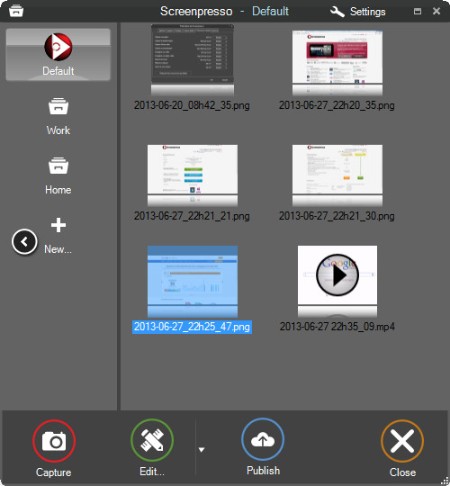
Screenpresso overrides the Print Screen key and makes it easy to take the best screen captures in a few seconds. It is a light-weight Windows software giving a wonderful look to your screenshots.

Features
Capture windows and region
Capture part of the screen or a specific window with the same shortcut. Simple.

Portable application
No need to install the application, you can run it directly after download.

Screenshot history
Don't bother to save screenshots on your drive, Screenpresso does it for you. Practical.

Attach screenshots to emails
Drag and drop screenshots from the history directly to your favorite email editor. Webmails like GMail are also taken into account! Swift.

Built-in image editor
Crop, spotlight an area or comment parts of a captured image. Efficient.

Capture scrolling part
Can't fit it on the screen ? Make a unique image thanks to the stitching mechanism. Smart.

Add effects
Look like a pro. Add drop shadow, rounded corners, reflection and more. Sleek.

Resize bunch of images
Need to export images or create thumbnails at a specific size, one click.

Share screenshots
Easily share your screenshots via Twitter, Facebook, G-Mail, Evernote, Flickr or FTP.

Great support
Simply send an e-mail to support team. It will always quickly respond.

Whats New
Код:
https://www.screenpresso.com/releases/

HomePage:
Код:
https://www.screenpresso.com

-:DOWNLOAD FROM LINKS:-​
Download From RapidGator
https://rapidgator.net/file/203068e733d8e03a85b67e41dc1fbabb/

Download From NitroFlare
https://nitroflare.com/view/CA6E40A493A8ED4/
 
Starus File Recovery 7.2 Multilingual


c5d4acf1b82c8365d98c743285695ca8.jpg


Starus File Recovery 7.2 Multilingual | Windows x86/x64 | File size: 72.78 MB
​


Recover deleted files and folders in a snap! The latest version of Starus File Recovery is the quickest file recovery tool on the market. Featuring new and improved disk analysis algorithms, Starus File Recovery can analyze your disk in just a few seconds. Featuring the familiar look and feel of Windows Explorer, Starus File Recovery will let you browse disks and folders while displaying any deleted files discovered.

Quick and Slow Modes
While having deleted files back in a few seconds is nice, it's not always possible. Files located on formatted, inaccessible, corrupted or badly damaged disks just don't come as easy. For tough scenarios, Starus File Recovery features a comprehensive "slow" mode, performing a complete scan of the entire disk surface in order to locate and recover every little bit of usable information. But don't you worry, the "slow" mode works completely automatically and does not require anything but a bit of your patience. In its "slow" mode, Starus File Recovery can successfully restore information from deleted partitions, corrupted and repartitioned disks.

Data Recovery for Everyone
Starus File Recovery is easy to use for the novices while advanced enough to interest data recovery professionals.

Fully Guided Wizards
Featuring a fully guided, step-by-step deleted file recovery wizard, Starus File Recovery helps selecting the right mode and configuring the settings in fully visual mode. The wizard guides users through in few easy steps.

Look and Feel of Windows Explorer
Starus File Recovery looks and feels just like Windows Explorer. Anyone familiar with how Windows handles files and folders will feel immediately at home with Starus File Recovery. Imagine browsing your disk in a familiar way and seeing all the deleted files and folders in real time.

Pre-Recovery Preview
A fully visual pre-recovery preview is supported for hundreds of file formats. All popular image formats, music, most types of videos, office documents, spreadsheets and presentations, ZIP and RAR archives, emails and attachments can be previewed before undeleting.

Professional Features
Some features included in Starus File Recovery can interest professional computer users and data recovery specialists. The ability to create a full snapshot of a disk being recovered and committing any changes onto that virtual disk image is the way the professionals work. Saving files onto a CD/DVD disc or sending them over an FTP connection comes handy when recovering lots of information.

System Compatibility
Starus File Recovery works in all versions of Windows up to the latest Windows 7 and Windows 2008 Server, and supports all Windows file systems including FAT, FAT32, NTFS, and NTFS5. The latest version can recover files compressed with corresponding NTFS attributes.

What's new
• official site does not provide any info about changes in this version

Editions: Unlimited / Commercial / Office / Home

HomePage:
Код:
https://www.starusrecovery.com/

-:DOWNLOAD FROM LINKS:-​
Download From RapidGator
https://rapidgator.net/file/663948c765936b354d5cb8e6c98ec0fc/

Download From NitroFlare
https://nitroflare.com/view/11915E8548AC257/
 
Starus Office Recovery 5.0 Multilingual (Windows x86/x64)


c8eb3ee19db931b0deb72747b488ea30.jpg


Starus Office Recovery 5.0 Multilingual | Windows x86/x64 | File size: 28.15 MB
​


Recover many types of documents that go missing! Starus Office Recovery can quickly undelete a wide range of document formats, recover them from formatted partitions and repartitioned hard drives, and extract documents from corrupted volumes and unreadable pen drives and memory cards. Starus Office Recovery can recover Word documents, Excel spreadsheets, PowerPoint presentations, Adobe PDF files and many other formats produced by Microsoft Office and OpenOffice applications.

Best in Class Recovery Engine
Starus Office Recovery implements low-level, content-aware disk scan to enable surefooted recovery from badly damaged, corrupted and inaccessible devices. Content-aware analysis obtains information from the disk surface and not just the file system, allowing the product to successfully recover documents other tools cannot even notice. Its highly sophisticated document analysis engine combined with convenient user interface deliver best-in-class performance for safe, smooth recovery even in the hands of a complete novice.

Get Exactly What You See
With Starus Office Recovery, you get exactly what you see. The tool validates documents before adding them to the list of recoverable files, ensuring that any file you see is actually 100% recoverable. It won't show you thousands of corrupted copies - but the handful of those that make it to the list are fully functional copies that passed the tool's integrity check!
The built-in preview allows you viewing the documents before recovering. The viewer is completely self-contained and requires no office applications to be installed.

Undelete Documents in the Widest Range of Formats
Starus Office Recovery supports documents produced by Microsoft Office and OpenOffice applications as well as Adobe PDF files. It can securely undelete Microsoft Word files in RTF, DOC/DOCX formats, Excel spreadsheets XLS/XLSX, RTF, OpenOffice ODT, ODS, and ODP documents, Adobe PDF, and many other formats.

Recover Accidentally Deleted Documents
Whether you deleted a document directly with Shift+Del, removed it from the Recycle Bin, or never saved it at all, Starus Office Recovery will help you get those files back in no time. In its Quick Recovery mode, the tool will only take seconds to discover and undelete the documents. The easy recovery wizard will guide you through the entire process, enabling a safe and speedy recovery experience.

Restore Maliciously Destroyed Documents
Have some documents missing, corrupted or locked up after malware activities? Use Starus Office Recovery to quickly regain access to those document files! The tool can scan the entire disk surface looking for any document still remaining - even if any trace if it is deliberately eliminated from the file system.

Recover after Virus Attacks
Virus attacks can be devastating, corrupting your hard drive or locking up entire volumes. Starus Office Recovery can access corrupted partitions and locked-up disks in low level, bypassing affected Windows mechanisms to ensure smooth, safe recovery after a virus attack.

Recover Documents You Never Saved
Did you know that Microsoft Office applications save temporary copies of documents you are working on every few minutes? This opens an opportunity to recover the latest versions of documents - even if your computer crashed while you were typing. Starus Office Recovery supports temporary files created by Microsoft Office before you save them, allowing you to recover work you never saved at all!

Recover Documents Stored on Corrupted Partitions
Cannot read the disk or getting a Windows error when accessing a flash drive? Starus Office Recovery is here to help! Accessing the device in low level, the tool can recover documents no other program will even see. Corrupted or missing file systems, raw partitions and unpartitioned space are no problem with Starus Office Recovery!

Recover Documents from Formatted Disks
Clicked "OK" in a prompt to format a USB pen drive? Formatted a disk, pen drive or memory card? Starus Office Recovery will help you recover any office documents you had on that disk! Reading the complete content of the device in low level, Starus Office Recovery employs a highly sophisticated content-aware analysis allowing the tool to identify documents even if no file system is left on the disk. Content-aware analysis works great on hard drives, USB pen drives, memory cards, and many other types of storage devices.

Recover Documents from All Types of Storage Media
Regardless of whether your documents were stored on a local hard drive, external or removable device, Starus Office Recovery will help. Working with the widest range of storage devices, Starus Office Recovery explicitly supports all versions of FAT, FAT16, FAT32, NTFS and NTFS5 used in the latest versions of Windows.

Recover Documents from Inaccessible Flash Media
Can't read a memory card? Getting the "Windows cannot access the specified drive, path or file" error message for a newly inserted USB drive? More often than not, the reason is file system corruption. Starus Office Recovery can scan the entire content of the device to ensure that all documents stored there are successfully recovered - even if the file system is badly damaged or no longer exists.

Supports NTFS Compressed Files
Do you have NTFS compression enabled? Starus Office Recovery can recover compressed files, too! The tool supports the built-in NTFS compression algorithm, enabling surefooted recovery of documents compressed with on-the-fly mechanism built into all recent versions of Windows.
Why use NTFS compression at all? Older versions of Office documents used to compress well, saving considerable space on the hard drive. With newer DOCX, XLSX and similar formats, on-the-fly compression no longer makes sense as these files are already compressed (they are, in fact, ZIP files with XML content packed inside), so if you are using a newer version of Microsoft Office, disabling NTFS compression (if it is still on) is a good idea.

Recover Documents from Faulty Hard Drives with Virtual Disk Images
If you want the safest recovery experience possible, you can use Starus Office Recovery to take a bit-precise image of your disk in one long sweep, and continue the recovery using that disk image. If the hard drive is unstable, physically damaged or badly worn (contains multiple remapped sectors or "bad blocks"), reducing the number of head movements to absolute minimum is a must. Starus Office Recovery is designed to capture virtual images of physical drives with as little read operations as possible. And of course, the tool guarantees the number of write operations to be absolute zero!

What's new
• official site does not provide any info about changes in this version

Editions: Unlimited / Commercial / Office / Home

HomePage:
Код:
https://www.starusrecovery.com/

-:DOWNLOAD FROM LINKS:-​
Download From RapidGator
https://rapidgator.net/file/c79e923b693d42528af96de4d4b89f33/

Download From NitroFlare
https://nitroflare.com/view/718973788185BD5/
 
Starus RAID Restore 2.9 Multilingual (Windows x86/x64)


fa3c55ba7b9f8e76a45c4e29f9920ef5.jpg


Starus RAID Restore 2.9 Multilingual | Windows x86/x64 | All Editions | File size: 71.78 MB
​


This program recovers data from non-operational RAID systems or from disks within such systems. It reads all the information about the controller, the motherboard or the software used to create a disk array. Our product can rebuild the crashed RAID and it lets you copy all critical information from there.

The integrated constructor wizard helps you recover a failing RAID in a step-by-step mode. You can use one of the presets or chose the required data in the damaged array, and RAID Recovery™ will collect the disks together to provide you with access to the data.

Why RAID gets damaged
Recover software or hardware RAID of any type: JBOD, RAID 0, RAID 1, RAID 10, RAID 5, RAID 50, RAID 6, RAID 60, etc.

Hard disk failure
Both hard disk types, HDD and SSD, have a limited operational life. Certainly, server-type NAS or SCSI disks can last longer than their SATA counterparts intended for home use only, but there is no such thing as a hard disk that works endlessly. For most RAID arrays, the day when one or two disks fail means loss of all information, from all disks within this array. Reliability of the entire array decreases with every disk which is added to it.

Accidental array rebuilding
Mistakes when replacing one of the disks within the storage system, accidental "rebuilding" of the array instead of "restoring" it, disconnecting and reconnecting the disks in a wrong order, incorrect RAID initialization or rebuild - any of these things will certainly result in the loss of information. After such errors, RAID can't restore itself automatically.

A controller bug or failure
A controller is the element containing information of critical importance which is vital for building a disk array and gaining access to all of the files stored on the disks. A controller failure may both result in losing service data and cause several disks to fail. The most expensive controllers use an additional battery and non-volatile memory. Such elements improve the whole system's reliability and are supposed to help save data even if a power interruption occurs.

A motherboard failure
Creating a RAID based on specific motherboard features is a cheaper (though less reliable) solution in comparison with buying an expensive controller. Motherboard failures, botched BIOS updates, low CMOS battery, power surges, disconnecting or reconnecting disks - all these things may cause your RAID to crash. As the entire system is very sensitive to all kinds of power issues, problems with your power supply unit may cause crashes as well.

A system crash
Software RAID systems based on the functionality offered by an operating system - Windows, macOS, Linux, FreeBSD, Ubuntu - depend largely on the health of that operating system. Upgrading your hardware, or updating other software may cause errors that prevent the computer from booting and make the data inside such array inaccessible.
Unlike hardware RAID systems, the software-based arrays are made of logical partitions rather than physical disks. Operations that involve formatting or removing partitions can easily destroy such array.

What's new
• official site does not provide any info about changes in this version

Editions: Home, Office, Commercial, Unlimited

HomePage:
Код:
https://www.starusrecovery.com

-:DOWNLOAD FROM LINKS:-​
Download From RapidGator
https://rapidgator.net/file/d871400d6de930920ffdf3796ac4cd84/

Download From NitroFlare
https://nitroflare.com/view/ACBAA90A3B13FA7/
 
StatusHolder 9.0.0 Multilingual


b6520a25266f8b0ce8f7d6bcde6fc3a4.jpg


StatusHolder 9.0.0 Multilingual | File size: 14.9 MB
​


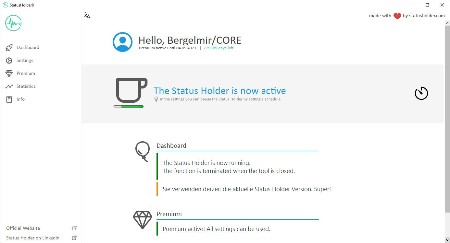
The topics of monitoring and data protection are very quickly slain with our tool, because with it it is possible to permanently set the status of Teams, but also of Skype for Business or other tools to Available. This means that you are online all the time.

Always available in teams
With the Status Holder it is possible to always be shown as Available in Microsoft Teams. The status is set to online throughout and thus disguises the absence.

INVISIBLE for IT
The Status Holder is a click-to-run application and does not need to be installed. Thus, the tool is also usable on the company PC and does not appear on the Install Software list.

Prevent surveillance
They are now always on green in teams and are shown as online. Thus, the actual online times are disguised and thus prevents the monitoring of the employee.

Starts automatically
In the settings, the Status Holder can be configured to start automatically. This means that you are always online in Teams as soon as you start up the computer.

Increase data protection
Is it really relevant whether you are available or absent? With the Status Holder you increase the data protection when using teams by setting the status to Available throughout.

Not only teams
The status is permanently set to Online not only in Teams, but also in Skype, Slack and other communication platforms. Thus, the areas of application are manifold.

Whats New
Код:
https://www.statusholder.com/en/features/changelog/

HomePage:
Код:
https://www.statusholder.com/

-:DOWNLOAD FROM LINKS:-​
Download From RapidGator
https://rapidgator.net/file/2e146e9986074abed3c271c26bb0c3df/

Download From NitroFlare
https://nitroflare.com/view/7772D38DD8B5D03/
 
SyMenu 8.12.9561 Multilingual


182b361c58de5c91697c1dc04dc9ca3d.jpg


SyMenu 8.12.9561 Multilingual | File Size : 71 Mb
​


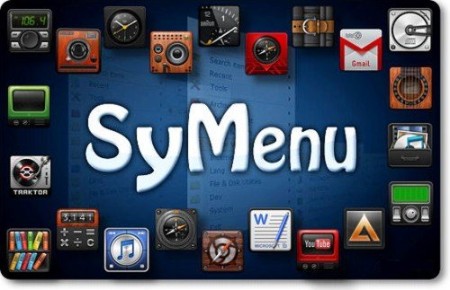
SyMenu is a portable menu launcher and a Start Menu replacer that allows you to organize your portable applications in a quick and easy way. Moreover SyMenu automatically links any application installed on the host pc. All the linked items - SyItems - and all the indexed applications can be organized in a hierarchical structure with colorful folders, separators and labels and can be found with the internal search tool.

You can customize SyMenu in a simple and quick way adding links to portable programs, documents, Windows commands, folders and urls.
It's easy to add new SyItem dragging & dropping file from host pc or using the mass importer tool.
Linked items can reside on the same USB device or even on host pc ever since SyMenu supports absolute path (such as C:\Windows\Explorer.exe).

These are SyMenu best functionalities
Start Search bar: (Windows Vista like) allows to quickly search amongst any SyItem configured on menu;
Windows Start Menu wrapper: SyMenu exposes through Start Search bar every program linked in host PC Windows Start menu too;
Extension Manager: allows to temporarly replace normal Windows extension associations with SyMenu custom extension association;
Autoexec: allows to launch a custom list of SyItems at SyMenu startup or closing.
Execution modes: Run, RunAs, Open folder and Show Properties.
Batch Import: allows to make massive imports of new SyItems.

SyMenu is a multilanguage program.
Up till now the languages supported are Chinese Simplified, Chinese Traditional, Dutch, English, Finnish, French, German, Greek, Hungarian, Italian, Polish, Portuguese, Russian, Slovak, Spanish, Swedish,

HomePage:
Код:
https://www.ugmfree.it/

-:DOWNLOAD FROM LINKS:-​
Download From RapidGator
https://rapidgator.net/file/d95a4b0752144274636a09add502403e/

Download From NitroFlare
https://nitroflare.com/view/FC1CF6268AE6427/
 
Symless Synergy Business 3.5.1 (x64)


1fa262cc43afb14fd05b1e0ca61cd3b0.jpg


Symless Synergy Business 3.5.1 (x64) | File size: 164.7 MB
​


Control other computers on your local network with a single mouse and keyboard. Use the keyboard and mouse of one computer to control nearby computers. Copy and paste between all of your computers with shared clipboard.

Whats New
Updates: official site does not provide any info about changes in this version

HomePage:
Код:
https://symless.com/synergy

-:DOWNLOAD FROM LINKS:-​
Download From RapidGator
https://rapidgator.net/file/ef079a7715347580ce0d8803c02decb2/

Download From NitroFlare
https://nitroflare.com/view/D0D434432A255A1/
 
SysTools OST Splitter 8.0


39153c3d0abafbac8e5986ae3cfbaf7b.png


SysTools OST Splitter 8.0 | File size: 27 MB
​


OST Splitter Tool is an Application that can easily split oversized Outlook OST Files into Smaller sized PST files. The installation of Outlook on the computer is mandatory in order to use this tool to divide large OST files.

Split oversized OST file into multiple parts by Date, Size, Year, Folder, Email ID, Category
Option to Repair Corrupted Outlook OST files before splitting
Allows user to split OST files without any file size limit into UNICODE PST file
Option to Add Single / Multiple Files or Add Folder or Search Files
Tool provides option to break OST data items like emails, contacts, etc
Allows splitting newly created OST file & archive OST file
Outlook Installation is Not Required to divide OST file which is huge in size

Whats New
Updates: official site does not provide any info about changes in this version.

HomePage:
Код:
https://www.systoolsgroup.com/ost/splitter/

-:DOWNLOAD FROM LINKS:-​
Download From RapidGator
https://rapidgator.net/file/a581fea9d9abc32627689f5fab61f227/

Download From NitroFlare
https://nitroflare.com/view/D51F851D54DB670/
 
Topaz Gigapixel Pro 1.1.3 Multilingual (x64)


74b3e014f9c669c9d9204971cdc769ce.jpg


Topaz Gigapixel Pro 1.1.3 (x64) Multilingual | File size: 464.5 MB
​


Larger. Sharper. More real. Upscale and enhance any image 16x. Take any image to 16X scale for the largest possible prints, posters, and billboard-size projects. Crop. Zoom in. Maximize photos, images, and AI-rendered art.

Sharper.
Just one click to both upscale and enhance your image at the same time. The result is an image sharper and larger than it started.

More real.
Every feature is built to bring your images closer to reality. Skin textures, fabrics, feathers, and hair. Trained using millions of images for the highest-quality detail.

Whats New
Код:
https://community.topazlabs.com/c/gigapixel-ai/109

HomePage:
Код:
https://topazlabs.com/

-:DOWNLOAD FROM LINKS:-​
Download From RapidGator
https://rapidgator.net/file/2a812c2c34e86590484fb6cccbc90ed6/

Download From NitroFlare
https://nitroflare.com/view/2995172A46FC57C/
 
UPDF 2.2 Multilingual(x64)


e5ef6041442bf7ef21aa94473b1d041e.jpg


UPDF 2.2 (x64) Multilingual | File size: 225.2 MB
​


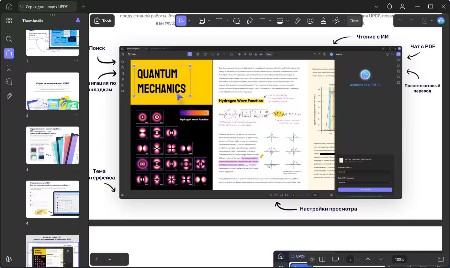
An all-in-one AI PDF editor on Windows that allows you to efficiently and easily edit, annotate, summarize, translate, and convert PDFs.

Editing PDF on PC is as Easy as in Word
UPDF for Windows is an easy-to-use Windows PDF software! Enjoy powerful editing tools for text, images, links, and more in your PDF. Customize backgrounds, watermarks, and page sizes with simplicity like in Word.

Analyze PDFs with 10X Efficiency
Upload a PDF with 100+ pages to get lightning-fast summaries, precise translations, in-depth explanations, and engaging conversations from your documents. Experience a new era of efficiency and accuracy with AI in this PDF editor software for Windows!

Read and Annotate, All in UPDF on Windows
UPDF for Windows offers diverse page display modes and scaling options for an optimal reading experience. Utilize its practical annotation toolkit, including sticky notes, stickers, stamps, highlighters, underlines, and more, to enhance your PDF review.

PDF Conversion. So Fast, So Accurate, So Easy
UPDF PDF editor for Windows offers a complete solution for transforming documents across formats. It provides 7 methods to create PDFs and supports converting PDF to 14 formats.

Digitize Paperwork for Better Collaboration
This PDF editor for PC can help you create fillable forms, share for collaborative filling, embed signatures, and enhance your PDF capabilities. Experience a seamless and customizable PDF journey that boosts versatility for improved collaboration.

Whats New
Код:
https://updf.com/whats-new/

HomePage:
Код:
https://updf.com/updf/

-:DOWNLOAD FROM LINKS:-​
Download From RapidGator
https://rapidgator.net/file/92ac022f640017b747bc457e242b2395/

Download From NitroFlare
https://nitroflare.com/view/F4D2D3D598C3F34/
 
VideoMeld 1.83 (x64)


bc7271b378b35770a1b57f6c65f5e3b5.jpg


VideoMeld 1.83 (x64) | File size: 10.8 MB
​


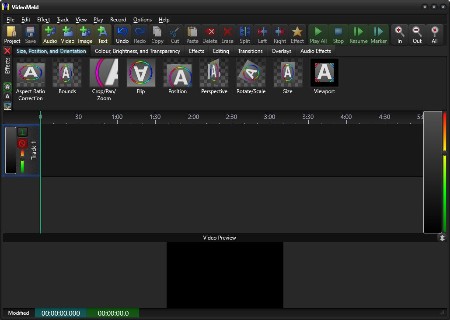
VideoMeld is an all new multitrack digital audio and video editing program. VideoMeld has one of the most advanced effects editors in its class. Many effects can be applied at the same time, creating incredible variety. Effect settings can be varied precisely over time for detailed animated visuals.

Use it to
- Mix together any number of audio and video files into a single file
- Create impressive presentations or tutorials with background music, photos, and video
- Edit videos and add text captions, special effects, and transitions
- Create professional looking YouTube videos
- Master music recordings, keeping instrument and vocal tracks separate
- Make video recordings of the computer screen (screencasting), ideal for software training videos or demonstrations

VideoMeld features include
- High quality HD video up to 1920x1080 and save as MPEG 4 H.264
- High quality 8 channel audio (7.1 surround sound)
- Over 50 video effects, transitions, and compositing functions
- 7 audio effects including Noise Reduction, Compressor/Expander, Equalizer, and Pitch
- Powerful! dynamic effect settings for all audio and video effects
- Scrolling captions for credits or tickers
- Screencasting records video directly from the computer screen

Whats New
Код:
https://goldwave.ca/forums2/viewforum.php?f=16

HomePage:
Код:
https://goldwave.com/

-:DOWNLOAD FROM LINKS:-​
Download From RapidGator
https://rapidgator.net/file/e4aa51021446663ef45447f2581dabd9/

Download From NitroFlare
https://nitroflare.com/view/EC5689CD6370787/
 
VovSoft Open Multiple Files 3.3


71ed8a6044eb99b8d283c14d25404c0a.jpg


VovSoft Open Multiple Files 3.3 | File size: 5.1 MB
​


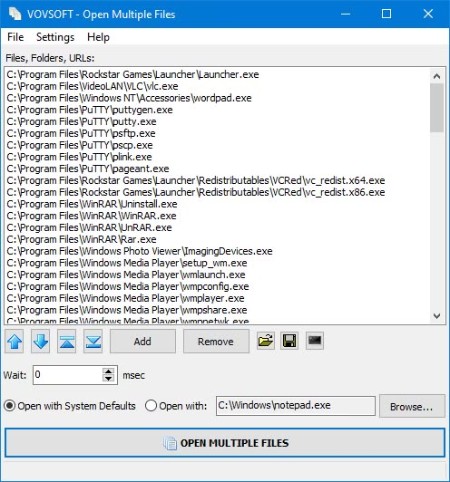
Working with multiple files, folders, apps or URLs at the same time can result in hectic situations, especially when trying to launch or open several instances at a time. Carried out manually, this process can be at least tiresome, not to mention inefficient. Open Multiple Files is an app which was developed for helping users cope with such issues and allow them to open multiple files or folders simultaneously.

Adding files or folders is a breeze and users can do so by either resorting to the dedicated menu, buttons or by dragging-and-dropping the preferred files. Once files or folders have been added, these will appear listed in the app's main viewing area, which could have benefited from the addition of a detailed-type listing, for better identification. Besides the files or folders, the app can also receive URLs as input, as well as executable files, this way providing users a broader usage palette. Running the main feature - the multi-file opener will quickly launch all the added content, simultaneously, in the inserted order.

A great feature is the ability to save the added content as a text listing, which can be opened at any time. This not only improves overall efficiency but also offers people the ability to manage their multi-file sessions better. It also adds shortcut to SendTo folder, user can right-click files and folders from the context menu.

Whats New
Код:
https://vovsoft.com/version-history/open-multiple-files/

HomePage:
Код:
https://vovsoft.com

-:DOWNLOAD FROM LINKS:-​
Download From RapidGator
https://rapidgator.net/file/e57ee30e018791144bb30468de50f56a/

Download From NitroFlare
https://nitroflare.com/view/919E4E6A5AB3D47/
 
VRGeoscience Virtual Reality Geological Studio 3.03 Build 6 (Window64)


872e12ab04cb5927bf5ace175b1c26b7.jpg


VRGeoscience Virtual Reality Geological Studio 3.03 Build 6 (x64) | File size: 271.3 MB
​


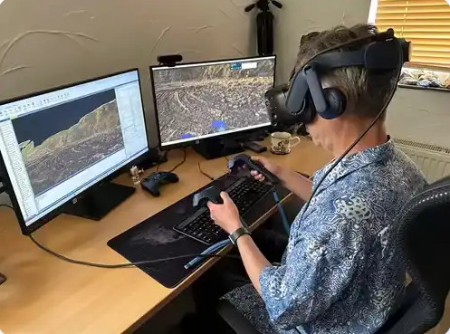
VRGS (Virtual Reality Geological Studio) provides an integrated software solution to visualise, interpret and analyse 3D geological datasets of virtual outcrops. It enables users to import large datasets from Lidar and Structure from Motion (SfM)/photogrammetry, create and visualise ultra-high-resolution models in 3D in VR or desktop mode and deploy a comprehensive suite of analytical tools to describe and interpret key geological features such as bedding, faults and fractures.

Whats New
Код:
https://docs.vrgeoscience.com/docs/release-notes/r3-2-notes

HomePage:
Код:
https://www.vrgeoscience.com/

-:DOWNLOAD FROM LINKS:-​
Download From RapidGator
https://rapidgator.net/file/fe9ded2258e8964f3ab16a88cf7fb06e/

Download From NitroFlare
https://nitroflare.com/view/3E4DC17F8E9E02A/
 
Назад
Сверху