• Здравствуйте. Сайт заработал в архивном режиме форум www.old.nado.in

Dl4ever Software

Multi OEM/Retail Project Build v28.02.2023

MOPB28022023.jpg

File size: 93 MB
​

100+ OEM's
• Acer • Advent • Action • Alienware • AOC • Aquarius • ASRock • Asus • ATcomputers • Bangho • Beko • BenQ • BGH-SA • ByteSpeed • Casper • CCE • chiliGREEN • Compaq • crea • CZC • Dell • Depo • digimix • ECS • eMachines • Epson • Equus • Everex • Excimer • EXO • Exper • Extra • Founder • FSC • Fujitsu • Gateway • Genuine • Gericom • Gigabyte • Greatwall • Haier • Hannspree • Hasee • HCL • Hedy • Higrade • HP • Hyrican • IBM • Impression • Infinity • Insys • Intelbras • iQon • Itautec • Jetway • JooyonTech • Kohjinsha • Kouziro • Kraftway • KSystems • Lanix • Lenovo • LG • M&A Technology • Maxdata • Mecer • Medion • Megaware • Mesh • Mitac • Mouse • MSI • NEC • Nokia • Olidata • Olivetti • Onkyo • OQO • Packard Bell • Panasonic • Paradigit • Paragon • Philco • Positivo • PowerSpec • Prolink • qbex • Quanmax • RMplc • Rover • Samsung • SCC • Semp Toshiba • Seneca • Sharp • Sony • Stone • Synnex • Systemax • Tangent • Targa • Tarox • TCL • TTL • Tongfang • Toshiba • Trigem • Twinhead • Velocity • Vestel • Viewsonic • viliv • WD Corporation • Wortmann • xplore • Zoostorm • ZT ~incl. (branding only): BioStar • Foxconn • Intel • M$ $urface • VirtualBox • VMware
OEM's Branded = 133~
•BIOS Mode supported: Legacy and/or UEFI
• You can force install 'ANY' brand theme by reading and using the Force_Theme_[readme].txt
Editions for OEM Activation
• Server 2008 • Server 2008 R2 • Server 2012 • Server 2012 R2
• Win10... • Home • Pro
• Win8.x... • Core • Pro
• Win7..... • Starter • Home Basic • Home Premium • Pro • Ultimate
• Vista..... • Starter • Home Basic • Home Premium • Business • Ultimate
Objective - add $oem$ folder to .iso /usb.
• $oem$ method can be used to apply activation & manufacturer brand to your Win10 • Win 8.x • Win 7 • Vista '.iso'/usb
• NOTE:- PC needs (Win8.x and Win10 'OEM-DM' • Win7 '2.1 slic' • Vista '2.0 slic') bios to apply genuine oem activation.
• Project includes optional Telemetry disabling, (WinTel.cmd), for all supported OS's and adds domains to block through Route commands.
• Optional Retail activation method via online, if needed.
How To
Win8.x|Win10
Place the downloaded '$oem$' folder in the 'sources' folder of your 'clean' iso, and add custom 'ei.cfg' file to the same 'sources' folder and edit|save iso. Windows will install the edition identified from 'ei.cfg' file. (Project 'Options' folder includes 'ei.cfg' instructions). OOBE.cmd will call tool that will extract embedded 'OEM-DM' key from bios (if exists), and apply the serial during installation.
Win7
Place the downloaded '$oem$' folder in the 'sources' folder of your 'clean' iso, and delete the 'ei.cfg' file from the same 'sources' folder and edit|save iso... during install you will have option to select the edition of 'Win7' you want installed (ie. Starter • Home Basic • Home Premium • Pro • Ultimate)... if you don't delete 'ei.cfg' file, that's OK, just means Ultimate will install by default.
Vista
Place the downloaded '$oem$' folder in the 'sources' folder of your 'clean' iso, and delete the 'PID.txt' file (if exists) from the same 'sources' folder and edit|save iso... during install you will have option to select the edition of 'Vista' you want installed (ie. Starter • Home Basic • Home Premium • Business • Ultimate)... if you don't delete 'PID.txt' file, that's OK, just means serial used on that file will determine edition installed.
• Please read the 'readme' files included in the download folder, for additional information.
• "UltraISO" recommended to edit|save your .iso, preserving 'bootable' image.
Editions for OEM Activation
• Win10.. • Technical Preview • Consumer Preview
• Win8.x... • Core • Pro
• Win7.... • Starter • Home Basic • Home Premium • Pro • Ultimate
• Vista.... • Starter • Home Basic • Home Premium • Business • Ultimate
• (Vista-Win10) If not known edition, branding only takes place.
Objective - add $oem$ folder to .iso /usb.
• $oem$ method can be used to apply activation & manufacturer brand to your Win10 • Win 8.x • Win 7 • Vista '.iso'/usb
• NOTE:- PC needs (Win8.x and Win10 'OEM-DM' • Win7 '2.1 slic' • Vista '2.0 slic') bios to apply genuine oem activation.
How To
Win 10
Place the downloaded '$oem$' folder in the 'sources' folder of your 'clean' iso, and edit|save iso. OOBE.cmd (Install.cmd) will extract embedded 'OEM-DM' serial from bios (if exists), and apply the serial during installation.
Win8.1
Place the downloaded '$oem$' folder in the 'sources' folder of your 'clean' iso, and add custom 'ei.cfg' file to the same 'sources' folder and edit|save iso. Windows will install the edition identified from 'ei.cfg' file. (Project 'Options' folder includes 'ei.cfg' instructions). OOBE.cmd (Install.cmd) will extract embedded 'OEM-DM' serial from bios (if exists), and apply the serial during installation.
Win8.0
Place the downloaded '$oem$' folder in the 'sources' folder of your 'clean' iso, and edit|save iso. Windows will install the edition that matches the embedded 'OEM-DM' serial in your bios (if exists).
Win7
Place the downloaded '$oem$' folder in the 'sources' folder of your 'clean' iso, and delete the 'ei.cfg' file from the same 'sources' folder and edit|save iso... during install you will have option to select the edition of 'Win7' you want installed (ie. Starter • Home Basic • Home Premium • Pro • Ultimate)... if you don't delete 'ei.cfg' file, that's OK, just means Ultimate will install by default.
Vista
Place the downloaded '$oem$' folder in the 'sources' folder of your 'clean' iso, and delete the 'PID.txt' file (if exists) from the same 'sources' folder and edit|save iso... during install you will have option to select the edition of 'Vista' you want installed (ie. Starter • Home Basic • Home Premium • Business • Ultimate)... if you don't delete 'PID.txt' file, that's OK, just means serial used on that file will determine edition installed.
• Please read the 'readme' files included in the download folder, for additional information
• UltraISO recommended to edit|save your .iso, preserving 'bootable' image
Included link for images to be used with System Brand Changer if users prefer using a desktop branding tool with a nice gui, created by Alphawaves.
Whats New
+ Fixed rare DMI parsing error. Re-adjusted order in which results are processed
which should have better detection of any OEM Brand names.
+ Re-wording on some log entries to cover some little changes for respective OS's.
+ Fixed issue where the 'OEM Information' screen not show on some supported Builds.
+ Fixed a issue that sometimes the enable network adapters fails to enable the device(s),
this should now work properly again. Was rare but it randomly happened. This option will
be auto disabled for any Home/Core editions of Windows 11 as it can cause major setup issues.

-:DOWNLOAD FROM LINKS:-​
Download From RapidGator
Код:
https://rapidgator.net/file/9b4279687b8c7921bca9f73439392440/MOPB28022023.rar

Download From DDownload
Код:
https://ddownload.com/tn1idnmccl6w/MOPB28022023.rar

 
Native Instruments KOMPLETE 12 FX Bundle 2023.2


NIK12-FB20232-x.jpg

File size: 292 MB | (x64)
​

Effects Bundles from Native Instruments.
Included
Bite v1.3.1 - bit-crushing
Choral v1.3.1 - chorus
Dirt v1.3.1 - distortion
Driver v1.4.5 - distortion
Enhanced EQ v1.4.5 - tube EQ by Softube
Flair v1.3.1 - flanger
Freak v1.3.1 - modulation
Passive EQ v1.4.5 - 4-band passive EQ by Softube
Phasis v1.3.1 - phaser
Raum v1.3.1 - creative reverb
RC 24 v1.4.5 - classic Lexicon reverb by Softube
RC 48 v1.4.5 - classic Lexicon reverb by Softube
Replika v1.6.1 - delay
Replika XT v1.3.1 - multi-mode delay
Solid Bus Comp v1.4.5 - bus compressor by coolstafflabs
Solid Dynamics v1.4.5 - compressor by coolstafflabs
Solid EQ v1.4.5 - 6-band EQ
Supercharger GT v1.4.5 - saturation compressor by coolstafflabs
Transient Master v1.4.5 - Transienter
Vari Comp v1.4.5 - tube compressor by Softube
VC 2A v1.4.5 - optical compressor by Softube
VC 76 v1.4.5 - FET compressor by Softube
VC 160 v1.4.5 - VCA compressor by Softube
Formats: Win64; AAX*, VSTi

-:DOWNLOAD FROM LINKS:-​
Download From RapidGator
Код:
https://rapidgator.net/file/b16479ab8920028adff94e3154e548bb/NIK12.FB20232.x.rar

Download From DDownload
Код:
https://ddownload.com/qb0s3ylpql3t/NIK12.FB20232.x.rar
 
RealPlayer v22.0.2.305


R2202305.png

File size: 64.3 MB
​

RealPlayer is the first product that integrates Real's revolutionary new Harmony technology. RealPlayer enables consumers to buy and download music that plays on more than 100 portable devices, including the Apple iPod. RealPlayer is the only digital-media player you need for finding and downloading new music, playing and managing audio and video clips, and taking your digital entertainment with you.
RealPlayer offers a streamlined interface that allows you to keep your media library close at hand. Keep all your digital-media clips organized in one place; save CD tracks with one click; pause and rewind live streams; transfer music to CDs and portable devices effortlessly; and enjoy clear, smooth video playback and multichannel, surround-sound support. Helix Powered RealPlayer is the all-in-one digital media player that lets you find anything and play everything. This popular streaming-media player offers improved video controls and access to 3200 radio stations.
RealPlayer also includes an option during setup to install the Real Toolbar for Internet Explorer. With RealPlayer you get an improved graphic equalizer and media services, including a radio tuner and an artist and music guide. Meanwhile, the Take 5 news service can offer you daily sports updates. A contextual video search helps you find interviews with your favorite artists. The RealPlayer music store lets you buy music files. Finally, you can use the software to transfer files to CDs and portable devices
Whats New
Updates: official site does not provide any info about changes in this version

-:DOWNLOAD FROM LINKS:-​
Download From RapidGator
Код:
https://rapidgator.net/file/4603081cb58d92f0c0320466cd433276/R2202305.rar

Download From DDownload
Код:
https://ddownload.com/89qnrwjzfeat/R2202305.rar
 
Roxio MyDVD v3.0.309.0


RM303090.png

Languages: Multilingual File Size: 895.42 MB
​

Roxio MyDVD - DVD Authoring Software. Turn your videos into professional-looking multimedia disc projects, complete with stylish menus and music. Try Advanced Mode to add submenus, edit the names in menu lists and add chapter points. Advanced mode also lets you change the background picture for the template and change the background music.
Main Features
- Burn videos to DVD, AVCHD and Blu-ray Disc
- Choose from 10 themed menu templates
- Add a photo background to create infinite menu layouts
- Drag and drop to add movies
- Add an intro video
- Enjoy 3-step burning in Magic Mode
- Customize menus, text, music and more in Advanced Mode
- Easily combine multiple videos on one disc
Step 1
Choose a themed template, complete with menus, submenus and chapters.
Step 2
Drag and drop your clips from the Media Browser.
Step 3
Click to burn.
Want to customize your project?
Try Advanced Mode to add submenus, edit the names in menu lists and add chapter points. Advanced mode also lets you change the background picture for the template and change the background music.
More Features
- Burn to DVD, AVCHD or Blu-ray
- Choose from 10 themed templates
- Drag and drop to add movies
- Add an intro video
- View project size
- View disc size drop-down
- Preview projects
- Save to ISO Image
- Review project settings
- Erase a disc (to free space for burning)
- AutoSave your project
- Change menu layout
- Add/remove submenus
- Edit names in menus/submenus
- Add chapter points to videos
- Mix and match templates in a project
- Edit text
- Change music
- Change the background image
System Requirements
- Microsoft Windows 10 and higher, 64-bit OS
- Optional DVD or Blu-ray drive to burn DVD, AVCHD or Blu-ray Discs

-:DOWNLOAD FROM LINKS:-​
Download From RapidGator
Код:
https://rapidgator.net/file/c469f368f5e8b2dd170e0fd305ab19d3/RM303090.rar

Download From DDownload
Код:
https://ddownload.com/z4y5atqtmepi/RM303090.rar
 
Seagate DiscWizard 27.0.1.39868


SD270139868.png

File Size : 681 Mb
​

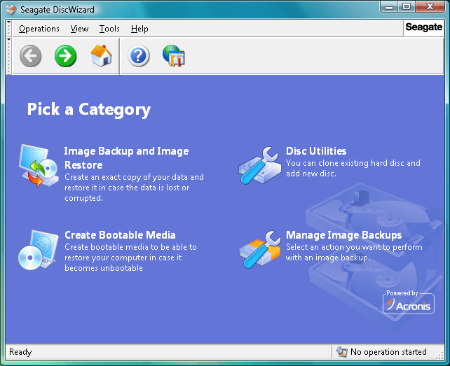
Seagate DiscWizard offers a suite of tools to help you manage Seagate or Maxtor hard drives.The program can create a complete image backup of your hard drive, for instance. This image can then be mounted as a temporary drive in Explorer, letting you browse it and restore just the selected files or folders that you need.
You're able to build a bootable recovery disc, too. If your hard drive becomes corrupted and Windows will no longer start, then boot from this instead, restore your last backup, and everything should be back to normal.
Or maybe you've bought a faster, larger hard drive? Seagate DiscWizard includes an option to add a new drive to your system. And you can then clone your existing hard drive by copying its partitions to the new disc, so you're able to boot from that instead.
As with any hard drive management tool, you need to be extremely careful about how you use DiscWizard. A single error - restore a backup to the wrong drive, say - could result in massive data loss. All Seagate DiscWizard functions are launched using clear and easy-to-follow wizards, though, so on balance you're probably safer here than with much of the competition.
Whats New
Updates: official site does not provide any info about changes in this version

-:DOWNLOAD FROM LINKS:-​
Download From RapidGator
Код:
https://rapidgator.net/file/87866db8dc6de22d6a6b9ac9655c4b2a/SD270139868.rar

Download From DDownload
Код:
https://ddownload.com/568ows01izv1/SD270139868.rar
 
Show Desktop Icons v1.2


SDI12.png

File Size : 0.8 Mb
​

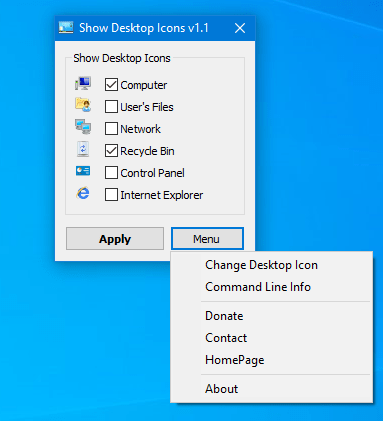
To show or hide common icons on the desktop ; Click the Start button Picture of the Start button, type desktop icons into the search box, and then click Show or hide common icons on the desktop or you can use a run command , but if you use Home edition it can be restricted.Show Desktop Icon is very Little tool to Add or hide common icons ( Internet Explorer, Computer, User's Files, Network, Recycle Bin, Control Panel) on the desktop , it is a Portable freeware and was a request from one of our followers
It has a very simple interface , to show a icon on the desktop tick one of the box and use "Apply" button , to hide a icon untick it and use "Apply" again , With Windows defult "Show or hide common icons on the desktop" feature you can not add an internet explorer icon on the desktop but with "Show Desktop Icon" tool you can , this is not a internet explorer shortcut remember ; in early versions of Windows, Internet Explorer had a special icon right on the Desktop. It was not just a shortcut, but an ActiveX object which provided access to various IE settings and features by right clicking it. For instance, you could open Internet Options directly from its context menu or start a private browsing session. Such an icon can still be added to the Desktop

-:DOWNLOAD FROM LINKS:-​
Download From RapidGator
Код:
https://rapidgator.net/file/1985295f2292784bd649adc18a5ba7d8/SDI12.rar

Download From DDownload
Код:
https://ddownload.com/ifkvw7t5hzzk/SDI12.rar
 
SimpleSoft Simple Invoice 3.25.0.6


SSI32506-M.jpg

File size: 2.8 MB | Multilingual
​

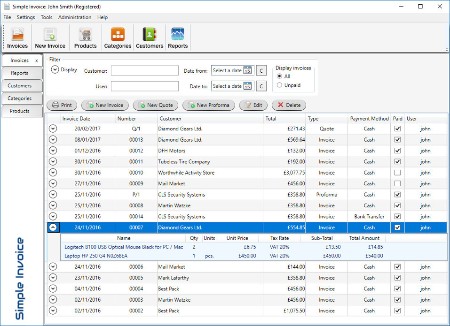
Simple Invoice is easy to use software that helps you to manage and account invoices. Simple and intuitive user interface designed for latest Windows systems. Instalation is quick because program is very "light" for system. You need about two minuts for issue new Invoice after instalation process!
Main features
Creating professional invoices with your own logo.
Creating Quotes (Quotation) and Proforma Invoices.
Support invoicing in UK, USA, Australia and more.
Currencies from around the world.
Rich configuration and customization.
Sales TAX, VAT, GST and non Tax, non-VAT invoices.
Supports multiple tax rates.
Four professional looking invoice templates.
Save invoice as PDF.
Very easy to install and use.
You can add your own terms and conditions to the end of every invoice.
Find invoices and customers quickly.
Create categories for products or services.
Set four different prices for product or service.
Quickly creating new invoice on the basics of existing invoice.
Three different invoice numbering styles.
Business reports such as sales, customers, totals by year or month.
Password protection access to the program (if you want).
Easy backup and restore system.
Support multiple bank accounts.
Multiple users.
Import and Export tool.
and more...
Whats New
Код:
http://simple-invoice.co.uk/download.html

-:DOWNLOAD FROM LINKS:-​
Download From RapidGator
Код:
https://rapidgator.net/file/420156fdb479bbf92686d80fdd69d217/SSI32506.M.rar

Download From DDownload
Код:
https://ddownload.com/9xt1h0ik57qq/SSI32506.M.rar
 
Solid Automator 10.1.15836.9574


SA101158369574-M.jpg

File size: 79 MB | Multilingual
​

Solid Automator - automated PDF to Word conversion, PDF/A validation, PDF to PDF/A conversion, searchable PDF creation and text extraction. Solid Automator uses watch folders and pre-defined settings to automate PDF workflow. Convert images and PDF files to PDF/A, validate PDF/A and create PDF to searchable PDF or PDF/A. ISO 19005 PDF/A-1b, PDF/A-2b, PDF/A-2u, PDF/A-3b and PDF/A-3u formats supported.
PDF to Word Converter. Convert your PDF files to Word documents for easy editing.
PDF to Text Converter. Use advanced document reconstruction to extract flowing text content from PDF. Figures out columns. Removes headers and footers.
Features
Convert to PDF/A
Validate PDF/A
PDF to Searchable PDF or PDF/A
Create PDF from Images
Whats New
Код:
https://www.soliddocuments.com/features.htm?product=SolidAutomator

-:DOWNLOAD FROM LINKS:-​
Download From RapidGator
Код:
https://rapidgator.net/file/e216f01bd9640c71381b8f5803829982/SA101158369574.M.rar

Download From DDownload
Код:
https://ddownload.com/wwuup2znzl51/SA101158369574.M.rar
 
Solid Commander 10.1.15836.9574


SC101158369574-M.jpg

File size: 144 MB | Multilingual
​

Solid Commander - automated PDF to Word conversion, PDF/A validation, PDF to PDF/A conversion, searchable PDF creation and text extraction. Automated PDF to Word or text conversion, PDF/A validation, PDF to PDF/A conversion and searchable PDF creation. Solid Commander uses watch folders and pre-defined settings to automate your PDF and PDF/A workflow.
Features
Document Conversion and Reconstruction
- PDF to Word
- Extract Text
Archival Using PDF/A
- Convert to PDF/A
- Validate PDF/A
- PDF to Searchable PDF or PDF/A
- Create PDF from Images
PDF to Word Converter. Convert your PDF files to Word documents for easy editing.
PDF to Text Converter. Use advanced document reconstruction to extract flowing text content from PDF. Figures out columns. Removes headers and footers.
PDF to PDF/A Converter. Convert existing normal or image PDF files into fully searchable ISO 19005-1 and ISO 19005-2 compliant archivable documents.
TIFF to PDF Converter. Convert legacy scanned TIFF documents into fully searchable and archivable PDF/A documents.
OCR for Search. Add searchable text layer. Easy for indexing and archiving legacy and paper documents.
Whats New
Код:
https://www.soliddocuments.com/features.htm?product=SolidCommander

-:DOWNLOAD FROM LINKS:-​
Download From RapidGator
Код:
https://rapidgator.net/file/fec31bcda7479b79ec52bd19c40c87f4/SC101158369574.M.rar

Download From DDownload
Код:
https://ddownload.com/fwss4cecb1id/SC101158369574.M.rar
 
Solid Converter PDF 10.1.15836.9574


SCP101158369574-M.jpg

File size: 130.8 MB | Multilingual
​

Solid Converter is the best PDF converter for turning PDF files into fully editable Windows documents. Whether you need your content in Microsoft Word, Excel, PowerPoint, HTML or just text, Solid Converter gives you simple methods to quickly get your content.
Features
PDF to Word Converter. Convert your PDF files to Word documents for easy editing.
Scan to Word. Scan directly from paper to well formatted, editable Word documents using the Solid AddIn from within Microsoft Word.
PDF to Excel Converter. Convert tables from your PDF files to Microsoft Excel spreadsheets. Select pages or entire document.
PDF to PowerPoint Conversion. Convert each page in your PDF to a slide in PowerPoint and then edit.
Convert to HTML. Convert your PDFs to high quality reflowed HTML while preserving styles, tables and hyperlinks.
Extract Data. Use this to extract data from PDF files to .CSV files. User options include: specify delimiter, line terminator and encoding to be used during extraction.
PDF to Text Converter. Use advanced document reconstruction to extract flowing text content from PDF. Figures out columns. Removes headers and footers.
WYSIWYG Content Extraction. Convert selected text, tables or images from a PDF file. Creates formatted content in Word, tables in Excel or image files.
Combine. Combine multiple documents into a single PDF file. Combine PDF files.
Rearrange Pages. Use drag and drop to rearrange page order in a file or between multiple files allowing selective conversion.
Extract Pages. Extract pages from a PDF file as a single new PDF or as multiple new PDFs for each page.
Multiple-file Conversions. Save time by using the multiple-file conversion list in the UI.
PDF Creation. Simply drag and drop. Easily create PDFs from your documents. WYSIWYG user interface.
Print to PDF. Create PDF files easily from any Windows-based program.
Password-Protect your PDFs. You can restrict who can view, edit, copy, print or add comments to your document.
256 AES Encryption. This new high level encryption is supported in Adobe Acrobat 9 or higher. 128-bit RC4 or AES encryption algorithms also supported.
Archive Using PDF/A. Create PDF/A documents which are fully compliant with current ISO archiving standards.
Set Document Properties. Define Title, Author, Subject and Keywords to help organize your documents.
Reduce File Size. Keep your PDFs small with our compression options. Optimize file size for Web or print while preserving an appropriate level of quality.
Acrobat Reader Settings. Set default view including page layout, initial zoom and page thumbnail view.
PDF Bookmarks from Office. Automatically create PDF bookmark outlines from Word, PowerPoint, Excel or Publisher documents.
Whats New
Код:
https://www.soliddocuments.com/special_offers.htm?product=SolidConverterPDF

-:DOWNLOAD FROM LINKS:-​
Download From RapidGator
Код:
https://rapidgator.net/file/3e1a1e7f3c51af1eee03ec164c1f4f26/SCP101158369574.M.rar

Download From DDownload
Код:
https://ddownload.com/hm3edbwrn4od/SCP101158369574.M.rar
 
Solid PDF to Word 10.1.15836.9574


SPt-W101158369574-M.jpg

File size: 120 MB | Multilingual
​

A complex and reliable application developed to help you convert all your text PDF files to DOCX or RTF format, with minimal effort entailed. Solid PDF to Word is an efficient and intuitive software solution whose main purpose resides in providing you with the ability of converting Portable Document Format files to Microsoft Office-compatible files.
Simple and neatly-structured appearance
The application features a fairly basic and approachable user interface, slightly resembling the Office suite due to the use of a ribbon, which comprises its main functions and options.
The start screen of the program enables you to open a PDF in order to manually decide which area you need to turn to DOCX or RTF format, but for converting whole documents, you can just load the files into Solid PDF to Word and export them in a few button presses.
Swiftly convert your PDFs to RTF or DOCX format
The utility lets you open a Portable Document Format file and browse through the available pages, while the zoom function helps you analyze the text in more detail, in order to determine which text area you need.
The tool is capable of automatically detecting tables, also prompting you to choose the precise page range for conversion. However, if you only need a certain paragraph, you can use your mouse cursor and select that exact region, then right-click and pick the 'PDF to Word' option from the context menu.
Solid PDF to Word offers a series of output 'Options', allowing you to define a destination folder and the overwrite rules, the 'Reconstruction Mode' for vector graphics, list rendering as well as OCR text recovery preferences. The text can be reconstructed in flowing, continuous or exact mode, while headers, footers and annotated text can be kept or removed.
A useful conversion instrument
All in all, Solid PDF to Word proves to be a reliable and user-friendly application that can successfully guide you through the process of converting your PDF files to DOCX or RTF format, so as to keep the source text unaltered.
Whats New
Код:
https://www.soliddocuments.com/features.htm?product=SolidPDFtoWord

-:DOWNLOAD FROM LINKS:-​
Download From RapidGator
Код:
https://rapidgator.net/file/06c41a7da49f273069aef5ef51f77b39/SPtW101158369574.M.rar

Download From DDownload
Код:
https://ddownload.com/ymnij5d3b2fi/SPtW101158369574.M.rar
 
Solid PDF Tools 10.1.15836.9574


SPT101158369574-M.jpg

File size: 197 MB | Multilingual
​

Solid PDF Tools is one of several excellent PDF conversion and creation products from Solid Documents. With Solid PDF tools you can Convert PDF to HTML. Use advanced document reconstruction to convert PDF to formatted W3C compliant XHTML. Figures out columns, convert PDF to Text. Use advanced document reconstruction to extract flowing text content from PDF. Figures out columns. Removes headers and footers.
PDF to Word Conversion and Content Extraction
- PDF to Word Conversion. Convert your PDF files to Microsoft? Word documents for easy editing.
- PDF to Excel Conversion. Convert tables from your PDF files to Micrsoft? Excel spreadsheets. Select pages or entire document.
- WYSIWYG Content Extraction. Convert selected tables or images from a PDF file. Creates tables in Word or Excel or image files.
- Quality Conversions. No need to waste hours reformatting and reworking your files.
- Headers and Footers. Advanced options for converting or removing headers and footers.
- Form Recognition. Form fields are recognized and converted into text boxes for easy editing.
- Rotated Text Recovery. Convert text from your PDF no matter which way it's oriented.
- Hyperlink Detection. URL Hyperlinks in the original PDF are automatically transferred into the new Word document.
- Convert From Explorer. One click to open PDF document into Word from Windows Explorer.
Scanning and Archiving
- TIFF to PDF. Convert legacy scanned TIFF documents into fully searchable and archivable PDF/A-1b documents.
- Scan to PDF. Scan paper documents into archivable PDF/A-1b documents. Searchable thanks to OCR text layer.
- OCR for Search. Add searchable text layer. Easy for indexing and archiving legacy and paper documents.
- PDF to PDF/A. Convert existing normal or image PDF files into fully searchable ISO 19005-1 compliant archivable documents.
- Validate PDF/A. Verify ISO 19005-1 compliance for existing PDF documents and repair common issues.
PDF Editing
- PDF Creation. Simply drag and drop. Easily create PDFs from your documents. WYSIWYG user interface.
- WYSIWYG User Interface. Multiple document PDF UI for page-level manipulation operations.
- Watermarks. Pre-defined and custom watermarks. Text stamps, images or PDF overlays. Electronic letterheads.
- Combine. Combine multiple documents into a single PDF file. Combine PDF files.
- Rearrange Pages. Use drag and drop to rearrange page order in a PDF file or between multiple files.
- Extract Pages. Extract pages from a PDF file as a single new PDF or as multiple new PDFs for each page.
- Full Search. Fast text search of multiple PDF files. Navigable list of results.
- Batch-Process Conversions. Save time by using batch conversion palettes in the UI or using scripts from the command line.
PDF Creation
- Print to PDF. Create PDF files easily from any Windows-based program.
- Password-Protect your PDFs. You can restrict who can view, edit, copy, print or add comments to your document.
- Encrypt your PDFs. Secure your PDF files using 128-bit RC4 or AES encryption algorithms.
- Set PDF Permissions. Control which users can read, print, edit, copy or comment your PDF files.
- Set Document Properties. Define Title, Author, Subject and Keywords to help organize your documents.
- Custom Page Settings. Create PDF files with custom pages sizes, margins and orientation.
- Reduce File Size. Keep your PDFs small with our compression options. Optimize file size for Web or print while preserving an appropriate level of quality.
- Acrobat Reader Settings. Set default view including page layout, initial zoom and page thumbnail view.
- Archive Using PDF/A. Create PDF/A-1b documents which are fully compliant with ISO 19005-1 archiving standards.
Whats New
Код:
https://www.soliddocuments.com/features.htm?product=SolidPDFTools

-:DOWNLOAD FROM LINKS:-​
Download From RapidGator
Код:
https://rapidgator.net/file/58c727516575742b56bfbc5a034301fb/SPT101158369574.M.rar

Download From DDownload
Код:
https://ddownload.com/x1hv4k2b00ck/SPT101158369574.M.rar
 
Subtitle Workshop Classic v6.1.8


SWC618.jpg

File Size : 25.3 Mb
​

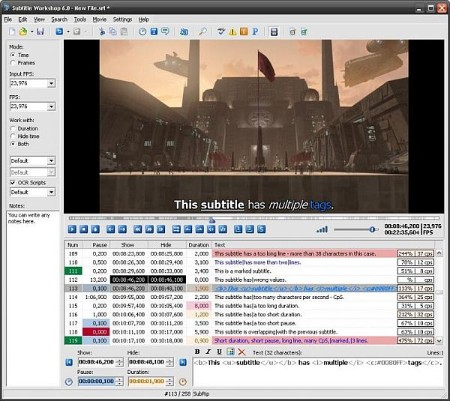
When watching movies on a computer, subtitles can either save or ruin the fun, depending on their accuracy and the synchronization with the video. To make sure they get to read the lines the second they are uttered by the characters, users can edit the subtitles themselves using Subtitle Workshop.
Subtitle Workshop is an advanced subtitle editor that integrates many other tools meant to lend users a hand in this regard. It includes a powerful spell checker and a well-organized interface that makes everything a lot easier.
At first glance, Subtitle Workshop seems to be a bit more advanced version of a text editor, but it hides many very interesting features under its hood.
For example, the nice and clean interface allows users to edit subtitles directly from the main window by double-clicking the line they wish to change. Plus, it provides a video preview window that gives a glimpse into the way the movie looks like with the modified subtitle.
Subtitle Workshop has a spell checking feature, but it only works for users who have Microsoft Word installed on their PC. The program also includes a translation option which comes in handy for those who are not native speakers of English.
More than that, Subtitle Workshop has all the functions needed to make subtitle editing a breeze. It supports configurable shortcuts, multi-language support, drag and drop, visual effects for subtitles and the option to mark text lines for later review.
Another good thing is that the application is being delivered with a comprehensive help manual that provides basically all the info one needs to handle subtitles, so beginners should definitely have a look in there as well.
As a conclusion, those looking for a smart app for subtitle editing jobs definitely need to take Subtitle Workshop into consideration.
FEATURES
• Supports converting between, creating, opening, editing, and saving over 60 (currently) subtitle formats via the Subtitle API library, as well as saving subtitles in a custom user-defined file format.
• User-friendly, multi-language, customizable interface (including customizable shortcuts and translation mode).
• Vast array of customizable tools and functions for automatic timing and text manipulations, including automatic durations, smart line adjusting, spell checking, FPS conversion, search and replace, and many more.
• Comprehensive customizable system for automatically or manually detecting, marking, and fixing various timing and text subtitle errors.
• Supports style tags (bold, italic, underline) and color tags in the subtitle text -- including full tags support for multiple tags in a single subtitle.
• Supports displaying and manipulating the timing pauses (the time gap between two subtitles) and offers a CpS (Characters per Second) system.
• Multi-level Undo-Redo system.
• Integrated video player with customizable subtitles preview and full screen mode that would play any video or audio format the system has codecs installed for.
• Offers various information about the subtitle file, including custom information based on user-defined rules about the timing or the text.
• Supports the usage of external Pascal scripts, as well as find-and-replace text scripts (called OCR Scripts).

-:DOWNLOAD FROM LINKS:-​
Download From RapidGator
Код:
https://rapidgator.net/file/bde12d11391d86f0701b77eb337a95c3/SWC618.rar

Download From DDownload
Код:
https://ddownload.com/truuoyy25kjk/SWC618.rar
 
SUPERAntiSpyware Professional X 10.0.1248


SPX01248-M.jpg

Windows x64 | File size: 231.23 MB | Multilingual
​

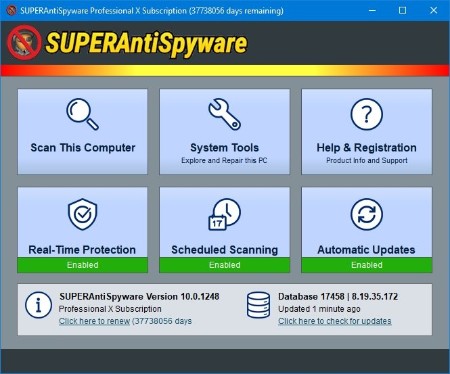
Protect your PC from malicious threats from malware, spyware, ransomware, trojans, keyloggers, and more. Boost Microsoft Defender. Pro X Edition benefits: over 1 billion threats blocked, AI-powered detection engine, real-time threat blocking, automatic database updates, and scheduled scanning.
What It Does For You?
Detects & Removes 1 Billion+ Malicious Threats
Blocks Malware, Spyware, Adware, Trojans, Worms, Ransomware, Hijackers, Parasites, Rootkits, KeyLoggers, and many more.
Securely Deletes Malicious Files
Quarantines potential threats and completely removes them, even the stubborn ones. Can restore quarantined items, if not harmful.
Analyzes Your System In-Depth
System Investigator identifies spoofed and malicious files. Shows installed applications, browser plugins, and lets you track system changes over time.
Cleans Up Browser Cookies & Popups
Removes unwanted cookies. Stops ads with integrated SUPERAdBlocker Technology
Stops Ransomware In Its Tracks
Protects your files and prevents hackers from holding them hostage.
Repairs PC Damage
Fixes parts of your operating system, registry, task manager, broken internet connections, etc. caused by malware.
Complements Your PC
Lightweight program doesn't take up a lot of memory or processing power. Works with your antivirus.
Easy to Use
Receive notifications when product and database updates are available. Scans run in the background and can start when your PC is sleeping.
Stay informed
Review detailed scan logs about detected and removed threats and their locations.
How the PROFESSIONAL X EDITION Keeps You Secure 24/7?
Scans & Blocks Threats in Real-Time
Stops potentially harmful software from installing. Examines critical points of your system each time you start up or shut down. Get alerts when new programs are added.
Updates Automatically
Never miss an update. Always have the latest database definitions so you have the most up-to-date protection.
Enables Flexible Scanning Options
Schedule either quick, complete, or critical scans to fit your schedule.
Sends Email Notifications
Get emails with scan results so you can monitor PCs remotely.
Advanced Detection & Removal
AI-Powered Engine & Definitions Database
The X Edition is upgraded with a robust detection engine fueled by 4th generation machine-learning AI. With over 500 million endpoints, the definitions database is constantly updated with the latest malware threats.
Multi-Dimensional Scanning
A next-generation scanning system that goes beyond the typical rules-based methods. It detects existing threats and analyzes general characteristics and code patterns to identify future threats.
Process Interrogation Technology
Our unique Process Interrogation Technology (PIT) detects hard-to-find threats like rootkits and kernel drivers, usually missed by standard anti-spyware applications.
What's new
Код:
https://www.superantispyware.com/producthistory.html?id=SUPERANTISPYWARE
System Requirements: Windows® 7, Windows 8, Windows 8.1, Windows 10, Windows 11 (x64)

-:DOWNLOAD FROM LINKS:-​
Download From RapidGator
Код:
https://rapidgator.net/file/580e450411a8823e28fae2087789902a/SPX01248.M.rar

Download From DDownload
Код:
https://ddownload.com/e5h91p7lvwpp/SPX01248.M.rar
 
Topaz Photo AI 1.2.4


TPA124-x.jpg

File size: 712.5 MB | (x64)
​

Sharpen, remove noise, and increase the resolution of your photos with tomorrow's technology. Topaz Photo AI supercharges your image quality so you can focus on the creative part of photography.
Focus on your creativity rather than your tools.
AI is good at some things but bad at others. It can write sentences but can't tell a story, and it can recommend songs but can't compose music. But most importantly for us: AI is exceptionally good at improving image quality, but bad at knowing what to do with it.
We believe that stunning photography comes from artistic vision paired with world-class tools. AI will never replicate human creativity, so it's still your job to provide the vision. But just like a sharper lens or better camera, Topaz Photo AI empowers you to create images that just aren't possible with yesterday's tools.
Your photos at their very sharpest.
You won't always be able to retake a shot when your subject is blurry. Sometimes you won't even know until you're reviewing your photos on your computer.
In these cases, use Topaz Photo AI to make sure your photos are as sharp as possible. Instead of artificially boosting edge contrast like traditional sharpening, the Sharpen AI module naturally reverses the root causes of blurring (camera shake, motion blur, incorrect focus) to create more natural-looking results.
Without blurring, the sharpness remains: crisp, clear detail, free from edge halos or other artifacts.
Get sharp and clear images without noise.
It's a magical feeling to see noise evaporate while sharp detail remains.
After learning from millions of images, Topaz Photo AI's Remove Noise module can effectively understand the content of your image. It can accurately determine the difference between real image detail and noise with an astonishing level of accuracy.
Not all of your images will be noisy. For those who are, Topaz Photo AI will give you the best possible results that modern technology is capable of.
Whats New
Код:
https://community.topazlabs.com/c/photo-ai/photo-ai-releases/

-:DOWNLOAD FROM LINKS:-​
Download From RapidGator
Код:
https://rapidgator.net/file/bb59f5cba72b5da250032ea103bcbb1c/TPA124.x.rar

Download From DDownload
Код:
https://ddownload.com/2ssjn4rh5nzq/TPA124.x.rar
 
Topaz Video AI 3.1.7


TVA317-x.jpg

File size: 650 MB | (x64)
​

Stunning video enlargements with groundbreaking AI technology. Trained on thousands of videos and combining information from multiple input video frames, Topaz Video AI will enlarge and enhance your footage up to 8K resolution with true details and motion consistency. Using intelligent AI technology, Video Enhance AI is the most powerful video upscaling software ever released.
Incredible Video Upscaling for Professional Filmmakers
Traditional video upscaling simply stretches resolution, degrading quality and destroying details. There has never been a way to perfectly recreate high-resolution video from low-resolution footage. Until now. We developed Video Enhance AI using groundbreaking machine learning technology to upscale video footage intelligently, for crisp details and motion consistency all the way up to 8K resolution. Some call it "magic", but we call it the power of AI.
Enhancing Footage up to 8K
Video Enhance AI is the perfect way to take good footage and make it great. Have you ever wanted your footage to look sharper with more detail? Take HD footage all the way up to 8K for use in high-quality projects.
- DVD Content
- DSLR Footage
- Game Footage
- HD Stock Footage
Upscaling Low-Res Footage
With Video Enhance AI, you can take your footage from SD to HD with an incredible increase in quality. It's perfect for older footage that you want to repurpose for modern use.
- Commercials
- Music Videos
- Movie Content
- Youtube Videos
Quality
Until now, no deep-learning based approach existed for video enlargement as a commercial product. Video Enhance AI is the only product that uses machine learning to extrapolate detail from your footage for a realistic look. The quality of output from Video Enhance AI is simply better than any other product available.
Training
Video Enhance AI was trained using a neural network that analyzes thousands of video pairs to learn how details usually get lost. Unlike Gigapixel AI for photos, Video Enhance AI is able to extrapolate more detail for an even more realistic look given the amount of information available in a single video clip.
Easy to Use
With just a few clicks of a button, your video footage will start rendering to create beautiful high-resolution quality footage. There are no complicated processes or confusing tools - just a few simple steps and your footage is ready to go.
Whats New
Код:
https://community.topazlabs.com/t

-:DOWNLOAD FROM LINKS:-​
Download From RapidGator
Код:
https://rapidgator.net/file/bd839171a6fbf5802a3ddb8d3ded98dc/TVA317.x.rar

Download From DDownload
Код:
https://ddownload.com/t82ko8g8y9nm/TVA317.x.rar
 
TweakNow RegCleaner v1.0.1


TR101.png

File Size : 8 Mb
​

Find and remove incorrect or obsolete values in the Windows registry, generate a backup, manage startup apps and analyze disk usage.
Start by performing a quick or full scan for registry key issues
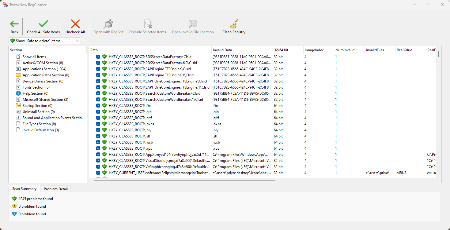
The application comes with a user-friendly interface and you can get started by doing an initial scan of the PC. If you haven't done any cleaning in a while or it's the first time you are using the program, it is recommended that you opt for the 'Full (expert mode)' scan. Otherwise, you can choose the Quick scan to find out potential issues.
While the app will provide a full list of obsolete keys, you can organize them via the drop down menu. In case you are worried that you may delete keys that are essential to Windows' functioning, then you can select the 'Show 'Safe to delete' items' and proceed to cleaning. Regardless of how you organize the list, the app allows you to go through all items individually and learn more details before deleting.
A tool that can help keep your computer running smoothly
The program allows you to access both the location related to the registry key as well as the actual registry location. Feel free to explore and inform yourself before cleaning the registry keys.
TweakNow RegCleaner is a simple and straightforward tool that provides a convenient way to scan and deal with obsolete registry keys that may be clogging up system resources and hindering its performance.
Whats New
Small bug fixes and performance improvements

-:DOWNLOAD FROM LINKS:-​
Download From RapidGator
Код:
https://rapidgator.net/file/b7acf34e57fa3b390bbeedbe57b4b6d2/TR101.rar

Download From DDownload
Код:
https://ddownload.com/mqehv1rzrx58/TR101.rar
 
Voxengo SPAN PLUS v1.23


th-9-Jvkw-Hp9p-Q5-VGHe-Htx6001774yv-MLd-ZT.jpg

TCD | 02 March 2023 | 7 MB
​


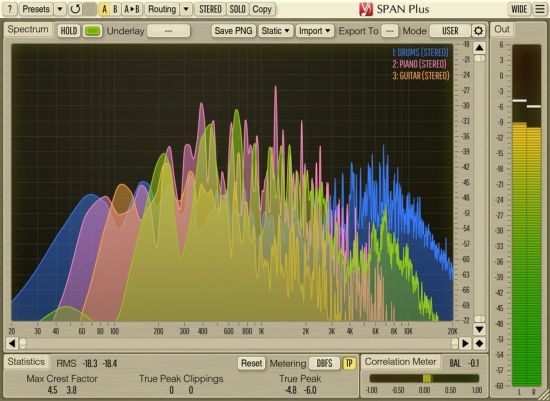
SPAN Plus is a real-time "fast Fourier transform" audio spectrum analyzer AAX, AudioUnit and VST plugin for professional sound and music production applications.
SPAN Plus is an extended version of the freeware SPAN plugin: SPAN Plus provides several additional features such as PNG file export, real-time spectrum import/export for cross-track spectrum comparisons, and static spectrums display.
SPAN Plus provides you with a very flexible "mode" system which you can use to setup your spectrum analyzer preferences. You may specify Fourier block size in samples, FFT window overlap percentage, spectrum's visual slope. Beside that you can choose to display secondary spectrum of a desired type (e.g. real-time maximum, all-time maximum). Spectrum can be smoothed out visually for an easier examination.
Beside cross-track spectrum comparison, SPAN Plus supports multi-channel analysis and can be set to display spectrums from two different channels or channel groups at the same time. Spectrum's color can be chosen to taste.
SPAN Plus also features output level metering with adjustable ballistics and integration time, EBU R128, K-system metering (including calibration K-system metering). SPAN Plus displays level metering statistics, headroom estimation and true peak clipping detection. Correlation metering is available as well.
Whats new in this version
Version 1.23, February 17, 2023
Fixed an issue with product key entry via the Paste button.
Version 1.22, January 17, 2023
•Removed SSSE3 requirement on Windows.
•Reduced visual tearing on Windows.
•Increased averaged spectrum calculation performance thus reducing time it takes to update the GUI.
•Improved spectrum averaging precision for >1/3oct.
•Static spectrum's name is now assigned/changed on "Take" only if it is currently "unnamed".
•Changed FFT analyzer's minimal averaging time to 5ms (down from 50ms).
•Changed static spectrum shift range to -42..42 dB (up from -32..32).
•Added a small delay to the "Max Crest Factor" estimation, to reduce over-reaction to transients at playback start.
•Fixed a system DPI scaling-related VST3 GUI resizing issue in Cubase, on Windows.
System Requirements
Windows 7 or newer

-:DOWNLOAD FROM LINKS:-​
Download From RapidGator
Код:
https://rapidgator.net/file/cd5418dffa26ffb2a77208d8103d93da/VSPv23.rar

Download From DDownload
Код:
https://ddownload.com/dem9eb7j6fqo/VSPv23.rar
 
Wireshark 4.0.4


W404-x.jpg

File Size : 75 Mb | (x64)
​

Wireshark is a network protocol analyzer that enables you to capture and examine data from a live network or from a capture file on disk. You can interactively browse the capture data and view summary and detail information for each packet. Wireshark has several powerful features, including a rich display filter language and the ability to view the reconstructed stream of a TCP session.
The program,can read capture files from tcpdump (libpcap), NAI Sniffer (compressed and uncompressed), Sniffer Pro, NetXray, snoop, Shomiti Surveyor, AIX s iptrace, Microsoft Network Monitor, Novell s LANalyzer, RADCOM s WAN/LAN Analyzer, HP-UX nettl, ISDN4BSD, Cisco Secure IDS iplog, the pppd log (pppdump-format), and the AG Group s/Wildpacket Etherpeek.
Wireshark can also read traces made from Lucent/Ascend WAN routers and Toshiba ISDN routers. Any of these files can be compressed with gzip and Wireshark will decompress them on the fly.
Features
• Data can be captured "off the wire" from a live network connection, or read from a capture file.
• Wireshark can read capture files from tcpdump (libpcap), NAI's Sniffer (compressed and uncompressed), Sniffer Pro, NetXray, Sun snoop and atmsnoop, Shomiti/Finisar Surveyor, AIX's iptrace, Microsoft's Network Monitor, Novell's LANalyzer, RADCOM's WAN/LAN Analyzer, HPUX nettl, i4btrace from the ISDN4BSD project, Cisco Secure IDS iplog, the pppd log (pppdumpformat), the AG Group's/WildPacket's EtherPeek/TokenPeek/AiroPeek, or Visual Networks' Visual UpTime. It can also read traces made from Lucent/Ascend WAN routers and Toshiba ISDN routers, as well as the text output from VMS's TCPIPtrace utility and the DBS Etherwatch utility for VMS. Any of these files can be compressed with gzip and Ethereal will decompress them on the fly.
• Live data can be read from Ethernet, FDDI, PPP, Token*Ring, IEEE 802.11, Classical IP over ATM, and loopback interfaces (at least on some platforms; not all of those types are supported on all platforms).
• Captured network data can be browsed via a GUI, or via the TTY*mode "tethereal" program.
• Capture files can be programmatically edited or converted via command*line switches to the "editcap" program.
• 602 protocols can currently be dissected
• Output can be saved or printed as plain text or PostScript.
• Data display can be refined using a display filter.
• Display filters can also be used to selectively highlight and color packet summary information.
• All or part of each captured network trace can be saved to disk.

-:DOWNLOAD FROM LINKS:-​
Download From RapidGator
Код:
https://rapidgator.net/file/1116d0cf64e20367fa56888a17615029/W404.x.rar

Download From DDownload
Код:
https://ddownload.com/laa0t4g9lrs1/W404.x.rar
 
Wondershare PDFelement Professional 9.4.3.2119


WPP9432119-M.jpg

File size: 164.02 MB | Multilingual
​

The PDF Experience, Simplified. The easiest way to create, edit, convert and sign PDF documents. Get control over PDFs like never before. The most Powerful and Simple PDF solution that changes the way you work with your important documents forever.
Edit PDF Like Word
Wondershare PDFelement enables you to edit PDF documents just as easily as you would in Word documents.
Edit PDF Text
Add, edit, remove text, link, watermark, header&footer, or bates numbers on your PDF easily. You can also edit the size, font, and color of the added content.
When you need to change the background of the PDF file, you can also add or change the file's background with any color, PDF or image.
Edit PDF Image
Click on an image, then move, rotate, crop (resize), extract, replace, overturn or delete images in PDF. Even you can set the Z-Order of the image.
Export each image in a PDF to a separate image file with "Convert" feature of Batch Process tool.
Move and Align Objects
It is easy to move an item forward or back just one level, or send it to the front or back of the stacking order of elements on the page.
The Align properties options (in the right-hand panel on Windows version, or right-click to call up the Align properties) let you precisely align multiple objects on a side - left, right, top, bottom vertical center, and horizontal center.
Edit PDF Pages
Organizing pages in PDFelement is intuitively simple and fast. It is easy to sort, add, rotate, move, split, crop and delete PDF pages with PDFelement in a second, from anywhere.
Edit PDF Forms
PDFelement can help you create, edit PDF forms easily, also turn PDFs into fillable forms with "Recognize Form" tool or just add, delete, and drag and drop form fields or enable fields for e-signatures.
You can even add calculations and data validation rules to your form. It is simple!
Edit Scanned PDF
When you open a scanned document for editing, you need to perform OCR feature(optical character recognition) on PDFelement.
It can recognize text and characters from PDF scanned documents (including multipage files), photographs or digital camera captured images, so to make the PDF documents editable and searchable.
Edit Password Protected PDF
Unlock the PDF by entering the correct password so to access the file. Then you can edit, print, copy, comment, sign, organize the PDF file.
You can also remove security from a PDF if you have the document password.
Your Complete PDF Convert Solution
Convert PDFs into secure file formats, like Microsoft Office, image, text etc. in high-quality and minimum effort.
PDF to Word
Batch-convert PDF files to Word documents without losing fonts and formats. It supports .docx, .doc.
PDF to Excel
Convert PDFs to Microsoft Excel files: xlsx, xls, XML.
PDF to PPT
Convert PDFs to Microsoft PowerPoint files: .pptx, .ppt.
PDF to Image
Convert PDFs as separate images or into one single image with any image quality you want. It supports JPG, PNG, BMP, GIF, and TIFF.
What's new
Код:
https://pdf.wondershare.com/whats-new.html

-:DOWNLOAD FROM LINKS:-​
Download From RapidGator
Код:
https://rapidgator.net/file/fab0ff38837765186c556e63079ea093/WPP9432119.M.rar

Download From DDownload
Код:
https://ddownload.com/ptt4erglli6f/WPP9432119.M.rar
 
Назад
Сверху