• Здравствуйте. Сайт заработал в архивном режиме форум www.old.nado.in

Dl4ever Software

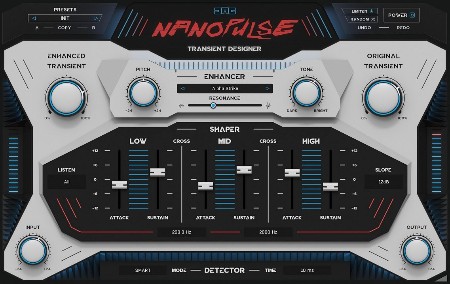
JMG Sound Nanopulse v1.1


JSNv1.jpg


TeamCubeadooby | 23 February 2023 | WiN | x86 x64 VST3 VST2 AAX | 13.1 MB
​

Get ready to add power and punch to your attacks that will cut through your mix like never before. Enhance and shape your transients in an innovative new way.
Thanks TeamCubeadooby for Release!
Just install. Rock on and enjoy!
-TCD
Whats new in this version
Official site does not provide any info about changes in this version.
System Requirements
Windows 7 or higher (32 / 64 bit)

HomePage:
Код:
https://unitedplugins.com/nanopulse/

-:DOWNLOAD FROM LINKS:-​
Download From RapidGator
Код:
https://rapidgator.net/file/c0c0f70c6ca413cf5271af4290aad6bf/JSNv1.rar

Download From NitroFlare
Код:
https://nitroflare.com/view/84C71422274C27E/JSNv1.rar
 
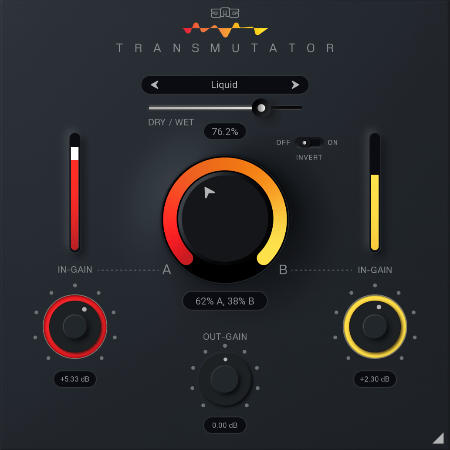
JMG Sound Transmutator v2.6


JSTv6.png


TeamCubeadooby | 23 February 2023 | WiN | x86 x64 VST3 VST2 AAX | 11.9 MB
​

The Art of Crossfading. A cross-fade effect can be useful but a simple blending of one material into another can be a bit boring. Fortunately, there's now Transmutator which brings transition between tracks, song parts or whole songs to another level of fun and creativity.
Thanks TeamCubeadooby for Release!
Just install. Rock on and enjoy!
-TCD
Whats new in this version
Official site does not provide any info about changes in this version.
System Requirements
Windows 7 or higher (32 / 64 bit)

HomePage:
Код:
https://unitedplugins.com/Transmutator/

-:DOWNLOAD FROM LINKS:-​
Download From RapidGator
Код:
https://rapidgator.net/file/bdb8c70788e9aff6fc90965740b348df/JSTv6.rar

Download From NitroFlare
Код:
https://nitroflare.com/view/A4DE9557BC8AE4F/JSTv6.rar
 
Klevgrand DAW LP 1.1.2


KDL112.jpg


File size: 18 MB
​

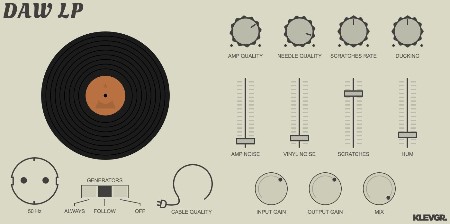
DAW LP is a vinyl player simulation plug-in for Mac & Windows (AU/VST/AAX), and iPad (AUv3). It simulates various artifacts associated with vinyl - all the way from the vinyl record surface, to the output cable of the RIAA amplifier. Tune in anything from an old 78:s player to a modern HiFi sound. Set the level of hum, scratches & noise along with the quality of amp, needle & cable. Fine-tune using the in, out & mix level.
Features
Scratches/crackles rate, level and ducking.
Control vinyl noise, amplifier noise and low frequency hum levels.
Continuous control of amplifier, pickup needle and cable quality.
Switch between 50 Hz and 60 Hz hum.
Additional input gain, output gain and dry/wet mix parameters for convenience.
Whats New
Код:
https://klevgrand.se/products/dawlp

HomePage:
Код:
https://klevgrand.se/products/dawlp

-:DOWNLOAD FROM LINKS:-​
Download From RapidGator
Код:
https://rapidgator.net/file/84c40ade2f9563e020e0999f798c7cc2/KDL112.rar

Download From NitroFlare
Код:
https://nitroflare.com/view/AC0AEB7CD289C3E/KDL112.rar
 
LastPass Password Manager 4.110 Multilingual


LPM4110-M.jpg


File size: 97 MB
​

LastPass Password Manager is a convenient program to help you keep all of your log-in information secure without having to memorize all of it. You can use LastPass to automatically log in to any site once you've entered the information once, so you'll never have to worry about forgetting your password again.
Browser integration: LastPass integrates with Chrome, Firefox, Internet Explorer, Safari, and more, so you can continue to use your favorite browser and still get all of the benefits from this app. You can choose to install only plug-ins for specific browsers, or you can use the universal installer, which will work on most major browsers and is the easiest option for novice users.
Nice interface: This app has a streamlined interface that makes the process of storing, accessing, and managing your log-ins a snap. Once you're logged in to the app, a button will pop up each time you enter log-in information for another site. Just click this button to add that log-in to the Vault, and you'll be able to manage it from there going forward.
The feature set of the basic version includes
unlimited storage of passwords and secure notes
automatic backup and synching for one device
automated filling of login credentials and forms
Security Challenge password audit
Multi factor authentication and one time passwords
Whats New
Код:
https://lastpass.com/upgrade.php?fromwebsite=1&releasenotes=1

HomePage:
Код:
https://lastpass.com

-:DOWNLOAD FROM LINKS:-​
Download From RapidGator
Код:
https://rapidgator.net/file/3d726518272770f455119be81c2a8fe5/LPM4110.M.rar

Download From NitroFlare
Код:
https://nitroflare.com/view/B0A3EBD9D6AA006/LPM4110.M.rar
 
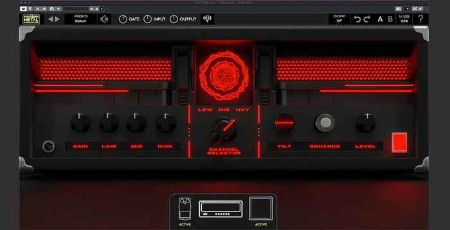
MMS Clairvoyant Amp Suite v1.0 WiN MAC


MCASv0-WM.jpg


MOCHA | VST3/AU/AAX | WiN/MAC | 563 MB
​

Modern Metal Songwriter - Clairvoyant Amp suite
Simplify your Songwriting toolbox
All the tools you need for a mix-ready guitar tone, without the hassle of a million knobs that do nothing.
Take back your time, and get back to what matters most: Your Songs
Meet your new favorite pedalboard
FEATURING
- An Aggressive take on a beloved Overdrive Pedal
- An extremely versatile Fuzz pedal that allows you to go from a classic fuzz sound, to a chainsaw guitar tone.
- An Instant Radio-Effect with our LO-FI Pedal
- A Delay and Reverb Section with endless tonal possibilities
Start creating with Clairvoyant now
• 3 Amp Heads, and 5 FX Pedals designed for getting a mix-ready tone in just minutes.
• No more fumbling around with useless knobs, take back your time with ones that get the job done
• Featuring two new creative tools added to make dialing guitars easier than ever: Tilt & Enhance.
• Cab Section that gives you the ultimate flexibility with your sound
Diverse Preset Collection
Use presets designed by your favorite guitarists and producers including Fluff (Dragged Under), Clayton King (So It Begins), Sam Mooradian (Fallujah), Xander Raymond Charles, Matt Guglielmo (END) and MANY more.
SYSTEM REQUIREMENTS
- Available as VST3 / AU / AAX
- Windows 10 or Newer OS
- Mac OS 10.13 or Newer OS (Intel & Apple Silicon M1 Native)

HomePage:
Код:
N/A

-:DOWNLOAD FROM LINKS:-​
Download From RapidGator
Код:
https://rapidgator.net/file/f37c0748b7bfff305d9ca91817783114/MCASv0.WM.rar

Download From NitroFlare
Код:
https://nitroflare.com/view/87E6AB3250EB9D2/MCASv0.WM.rar
 
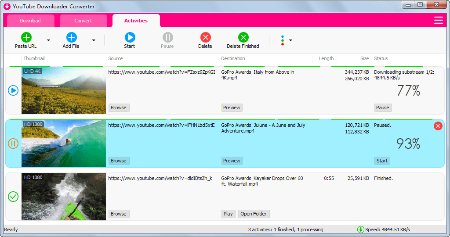
Muziza YouTube Downloader Converter 7.33.0


MYDC7330.png


File size: 46.83 MB
​

YouTube Downloader Converter is a tool that facilitates an attractive interface and plenty of features to help you download video clips from YouTube, Facebook, Dailymotion, Instagram and other websites.
Features
•Online video downloader
The app can download videos from YouTube, Facebook, Instagram, Dailymotion, and thousands of other video sites.
•HD video downloader
The app can download UHD 8K, 5K, 4K, QHD 2K, HD 1080p and 720p videos from YouTube.
•YouTube to MP3 converter
The app allows you to download only audio stream from YouTube, and save it as MP3. You don't need to download the entire video file.
•Playlist downloader
The app enables you to download entire or part of a playlist with just a few clicks.
•Download accelerator
The app features a multi-thread download acceleration engine that increases your download speeds by up to 500% or even more.
•Download multiple videos at a time
The app supports simultaneous downloads. It allows you to download more than one video at the same time.
•Pause and resume downloads
You can pause and resume your downloads at any time.
•Support drag-and-drop
You may directly drag and drop video link from your browser to the drop box or the app window to start a download. You don't even need to copy and paste video URL.
•Preview video/audio while downloading
While downloading, you can click the 'Preview' button to view incomplete file and make sure the content is you want.
•Video and audio converter
The app can convert your disk video/audio files between MP4, FLV, AVI, WMV, MOV, MP3, AAC, and any other formats for any device.
•Video optimizer
The app automatically optimizes downloaded videos for popular mobile devices, so you can watch downloaded videos smoothly on your iPhone, iPad, Android phone, and other devices.
•Video to MP3 converter
The app allows you to extract audio stream from video and save it as MP3, WAV, AC3, or other audio format.
•Ready-made presets
The app provides ready-made presets for all video and audio formats. You can also customize your own video/audio formats.
•iTunes compatible
Optionally, the app can add downloaded video/music to your iTunes library automatically, so you can easily synchronize your videos and music to your iPhone, iPad, iPod.
•Media Player
The app contains an easy-to-use media player for playing files that Windows Media Player cannot play.
What's new
• official site does not provide any info about changes in this version

HomePage:
Код:
http://www.muziza.com

-:DOWNLOAD FROM LINKS:-​
Download From RapidGator
Код:
https://rapidgator.net/file/44913266d927d331a1538ca0242a8210/MYDC7330.rar

Download From NitroFlare
Код:
https://nitroflare.com/view/0FA83EDDED93B28/MYDC7330.rar
 
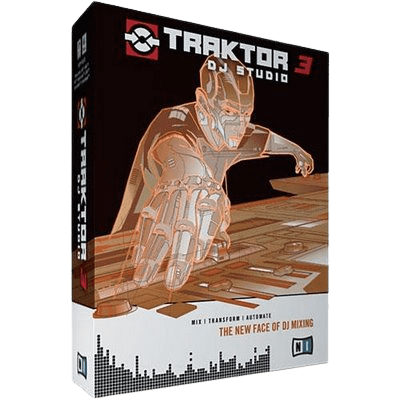
Native Instruments Traktor Pro 3.8.0.46


NITP38046.png


Languages: English File Size: 769.33 MB
​

Almost two decades ago, we created the first DJ software to truly conquer the club. Since then, it's filled sound systems and dancefloors across the world, as well as house parties, bars, beaches, and everything in between. Now, with TRAKTOR PRO 3, we've built on that past to bring you new tools for sonic sculpting, our best sound quality ever, and our clearest interface to date - so you can play whatever you want, however you want, wherever you want.
PROFESSIONAL 4-DECK DJ SOFTWARE
- Our flagship DJ software, used from bars, to booths, to the biggest stages around the world
- Pro-grade audio, with new time-stretching and improved limiter
- Powerful interfacing with TRAKTOR hardware, including Haptic Drive™, Remix Deck pattern recorder, and more
STAY IN SYNC
TRAKTOR is great for honing your beatmatching skills, but you can also blend genres and bridge BPMs by letting TRAKTOR PRO 3 do some of the work. Hitting the Sync button quickly gets your tracks beat-matched, so you have plenty of time to experiment with your mix.
REMIX WITH LOOPS, HOTCUES, AND BEATJUMPS
For those who really want to put their stamp on a set, the industry's most reliable and seamless loop, Hotcue, and beatjump tools let you chop and re-edit tracks however you like. Unless you want to cut things up outside of the beat, TRAKTOR will make sure you never skip out of the groove.
FULL FX SUITE INCLUDED
Modulate your tracks with over 40 intuitive, high-grade effects. TRAKTOR's famous Deck FX can twist and screw your tracks with endless variation, while new Mixer FX introduce easy-to-use effects in a single control on each channel. Turn them up, down, on, and off, for sonic exploration that's out of this world.
What's New
NEW INTERFACE
We've overhauled TRAKTOR's user interface for extra clarity by flattening and sharpening it, so you can see everything you need to at a glance in challenging environments. New master and channel level metering means you can accurately gain your mix with full visual feedback.
NEW MIXER FX
Whether it's heavy drops or smooth transitions that define your style, new Mixer FX are designed for one-knob modulation with big-sounding results. Choose from eight extra effects and three new filters to assign to each channel, in addition to TRAKTOR's famous Deck FX.
SCRATCH WITH ANY SOUNDCARD
TRAKTOR SCRATCH is now included in TRAKTOR PRO 3, right out of the box. This means that DVS DJs using timecode vinyl can now use any soundcard they like, in addition to tried and tested, TRAKTOR SCRATCH Certified soundcards and mixers. So if there's a model that does it for you, or if you're playing back-to-back with somebody on a different setup, TRAKTOR can adapt.
A LAYOUT FOR THE CLUB
We redesigned TRAKTOR's interface so that it's clearer, flatter, more streamlined, and easier to see through the club haze. New metering and fader designs let you gain your mix more accurately. Instantly access clock, quantization, and master output controls on a redesigned master panel. TRAKTOR PRO 3 maintains the workflows of its predecessors, so switching is a breeze.
A NEW KIND OF SOUND
From small systems to festival big-rigs - we've made changes that will help you sound great, wherever you play. Every signal-processing step in TRAKTOR has been refined with high-fidelity sound in mind. Stay confident with heavy tempo shifting that uses new Elastique 3 time-stretching. Run your tracks out through the classic warm and punchy TRAKTOR limiter, or a newly-designed, truly transparent master limiter that won't duck your sound, even when layering multiple tracks and samples.
NEW MIXER FX
Experimentation should be easy, which is why we developed new Mixer FX on each channel to give you one-touch control over huge club-grade effects. These are great tools for fail-safe sonic exploration - drench vocals in reverb for washed-out transitions, make industrial music-mayhem with bitcrushing, or step things up and away with different delays, plus more. Choose from eight new Mixer FX and three filters and assign them to a dedicated slot for quick modulation.
HOP, SKIP, AND LAND ON-BEAT
It's not just effects that can power up your performance. Hold in the new Reverse button to play a deck backwards - because it works with Flux Mode, letting go will mean you jump to where you would have been had you done nothing at all, in perfect sync with the other decks. Create shifted percussion parts, or hidden-message vocals, and team it up with effects for sounds from another dimension. Flux Mode also works with Hotcues, loops, and scratching, for moments where you need a super-tight beat, but can't help chopping things up.
MADE FOR DVS
For the DVS enthusiasts out there, TRAKTOR PRO 3 sees TRAKTOR SCRATCH capability included as standard. Scratch DJs can now use our timecode vinyl with any sound card they like - just hook up your turntables or CD players to your sound card and spin away. So as well as playing your crate-digging finds, you can cut, scratch, and backspin your beats without wrecking your wax.
System Requirements
- Windows 10, 11 (64-bit)
- Intel Core i5 or equivalent CPU
- 4 GB RAM

HomePage:
Код:
N/A

-:DOWNLOAD FROM LINKS:-​
Download From RapidGator
Код:
https://rapidgator.net/file/bcb7c93dd1b9fcbd246299b930c45c2e/NITP38046.rar

Download From NitroFlare
Код:
https://nitroflare.com/view/C440A9D04FA6A45/NITP38046.rar

 
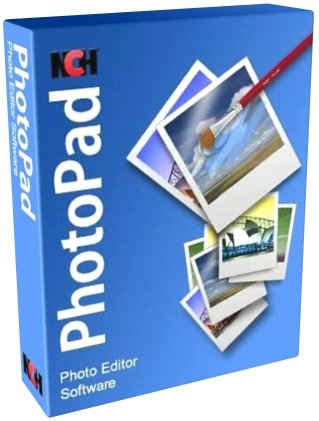
NCH PhotoPad Professional 11.11 Beta


NPP1111-B.jpg


File size: 6.31 MB
​

Whether you're a professional photographer or just want to edit your personal photos, PhotoPad offers the powerful tools and features you need to improve your digital images.
Features
Crop, rotate, resize and flip pictures
Touch up photos to remove red-eye and blemishes
Apply photo effects, including oil paint, cartoon, vignette, sepia and many more
Improve photo quality and focus with blur, sharpening and noise reduction tools
Adjust image color/hue, saturation, brightness and contrast
Create collages and photo mosaics with your photographs
Photo stitching to make your own panorama images
Load jpg, gif, png and other popular image formats
Add text and captions to photos
Insert clipart from the included clipart library
Add frames and borders around your photographs
Change the aspect ratio of an image without distorting key features using the liquid resize effect
Non-destructive editing allows easy modifications of individual photo effects on the layers list
Upload edited pictures directly to Facebook or Flickr
What's new
Код:
https://www.nchsoftware.com/photoeditor/versions.html

HomePage:
Код:
https://www.nchsoftware.com/

-:DOWNLOAD FROM LINKS:-​
Download From RapidGator
Код:
https://rapidgator.net/file/ce12b6dccdaa872cac3b029bcf814570/NPP1111.B.rar

Download From NitroFlare
Код:
https://nitroflare.com/view/C7966B74EC387A8/NPP1111.B.rar
 
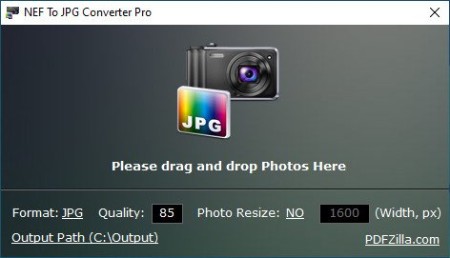
NEF To JPG Converter Pro 1.1


NTJCP11.jpg


File size: 6.6 MB
​

Convert NEF to JPG, PNG and More Formats in Bulk Easily! Besides the NEF format, it also supports HEIC/HEIF, HDR, DNG, NRW, ORF, RW2, RAF, CR2 and more popular raw image formats.
Features
- Convert NEF to JPG Format in Bulk
- Support HEIC/HEIF, HDR, DNG, NRW, ORF, RW2, RAF, CR2 and more RAW formats to JPG
- Output to JPG, GIF, PNG, TIF, BMP formats
- Resize output image
- Customize JPEG compressing quality
Whats New
Updates: official site does not provide any info about changes in this version

HomePage:
Код:
https://www.pdfzilla.com/

-:DOWNLOAD FROM LINKS:-​
Download From RapidGator
Код:
https://rapidgator.net/file/c6e956bcea8c17e96c3f786c01a4747f/NTJCP11.rar

Download From NitroFlare
Код:
https://nitroflare.com/view/B42F88C97159C02/NTJCP11.rar
 
Paprika Recipe Manager 3.2.7


PRM327.png


Windows x64 | File size: 98.25 MB
​

Delightfully simply recipe management for everyone: from aspiring cooks to professional chefs. With web importing, grocery lists and meal planning, Paprika is the perfect kitchen companion. If you love to cook, Paprika will be the most useful app you've ever downloaded!
What is Paprika Recipe Manager?
Paprika is an app that helps you organize your recipes, make meal plans, and create grocery lists. Using Paprika's built-in browser, you can save recipes from anywhere on the web. Want to access your recipes on your phone or tablet? Our free cloud sync service allows you to seamlessly sync your data across all of your devices.
Features
• Create and modify your own recipes on any device.
• Automatically download recipes from hundreds of websites with a single tap.
• Integrated browser clipboard tools help you clip recipe information from any website.
• Smart recipe view: cross off ingredients when you're done with them, and tap to highlight your current step.
• Scale ingredients to your desired serving size.
• Store nutritional information (automatically saved from sites which provide it) and personalized notes for each recipe.
• Find your recipes in a flash with our powerful subcategory organization and advanced search tools which let you search by name, ingredient or source.
• Intelligent grocery list automatically combines your ingredients and sorts them by aisle.
• Use the pantry to keep track of what ingredients you already have.
• Save time and money by planning your meals by the week! Create reusable menus from your favorite meals.
• Print and email support for recipes, grocery lists, and meal plans.
• Share recipes via email (that other Paprika users can automatically import).
• Import existing recipes from popular desktop apps such as MasterCook & Living Cookbook.
• Offline access. All of your data is stored locally, no internet connection is required to view your recipes.
• Paprika Cloud Sync. Keep your recipes, grocery lists, and meal plans seamlessly synced between all your devices!
• Bookmarklet. Capture recipes from your web browser straight into your Paprika Cloud Sync account.
What's new
• official site does not provide any info about changes in this version
Requires Windows 7 (64-bit) and .NET Framework 4.6.1 or later.

HomePage:
Код:
https://www.paprikaapp.com/windows/

-:DOWNLOAD FROM LINKS:-​
Download From RapidGator
Код:
https://rapidgator.net/file/c2f956f6ad6f8229f22c537b422d7a97/PRM327.rar

Download From NitroFlare
Код:
https://nitroflare.com/view/A34A0BA858234F4/PRM327.rar
 
PicPick Professional 7.1.0 Multilingual


PP710-M.png


File size: 78.29 MB
​

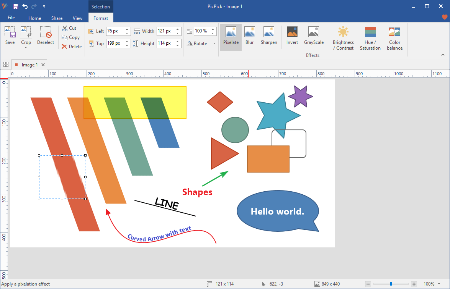
PicPick - all-in-one design tool for everyone. A full-featured screen capture tool, Intuitive image editor, color picker, color palette, pixel-ruler, protractor, crosshair, whiteboard and more. User friendly and full of features for creating your image. Suitable for software developers, graphic designers and home users.
Capture anything
Take screenshots of an entire screen, an active window, the scrolling windows and any specific region of your desktop, etc.
Edit your images
Annotate and highlight your images: text, arrows, shapes and more with the built-in image editor that includes the latest Ribbon style menu.
Enhance with effects
Easily add effects to your images: drop shadows, frames, watermarks, mosaic, motion blur, brightness control and more.
Share everywhere
Save, share, or send your images via Web, email, ftp, Dropbox, Google Drive, SkyDrive, Box, Evernote, Facebook, Twitter and more.
Graphic Accessories
Variety of graphic design accessories including color picker, color palette, pixel ruler, protractor, crosshair, magnifier, whiteboard.
Customizable setting
With highly advanced settings, you can customize hotkeys, file naming, image quality, and many other options that fits your needs.
What's new
Код:
https://picpick.app/en/download/
Available On: Windows 11, 10, 8.1, 8, 7, Vista and XP including both 32-bit and 64-bit versions.

HomePage:
Код:
https://picpick.app/

-:DOWNLOAD FROM LINKS:-​
Download From RapidGator
Код:
https://rapidgator.net/file/304c3c33acedbafa4de79343cac6612d/PP710.M.rar

Download From NitroFlare
Код:
https://nitroflare.com/view/1A024FC8398AC8C/PP710.M.rar
 
Quick Access Popup 11.6.1.4 Multilingual


QAP11614-M.jpg


File Size : 4.2 Mb
​

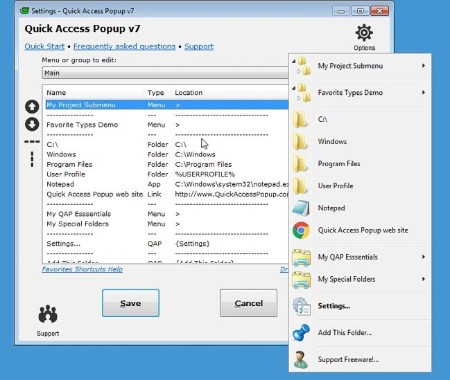
Quick Access Popup (QAP) lets you move like a breeze between your frequently used FOLDERS, DOCUMENTS, APPLISave thousands of clicks while browsing your favorite folders in Windows Explorer or file dialog boxes. Launch your most used applications, documents or web sites instantly with this easy popup menu and mouse/keyboard shortcuts manager. Gather related favorites in SUBMENUS. Assign favorites or submenus to keyboard or mouse SHORTCUTS. Or GROUP favorites and launch them in one click.
To launch the popup menu, click the QAP icon in the Notification zone, hit the Middle Mouse Button or press Windows+W (these triggers can be changed in Options). In the SETTINGS window, customize your QAP menu. Review shortcuts assigned to favorites or submenus in the HOTKEYS window.
To quickly ADD a new favorite FOLDER to your popup menu: 1) go to a frequently used folder, 2) click the QAP hotkey and choose ADD THIS FOLDER, 3) give the folder a short name ans save it.
In the MY QAP ESSENTIALS menu, choose the SWITCH menu to switch to any other running Explorer or application window. Use the REOPEN A FOLDER menu to reopen one of the folders already open in an Explorer window (very useful in file dialog boxes). Choose the RECENT FOLDERS menu to show an updated list of the Windows recent folders. Access the files or URLs in your Clipboard with the CLIPBOARD menu. Click the DRIVES menu to see the list of drives with current disk space.
In the OPTIONS dialog box, choose your preferred language, menu icons size, windows colors. Select the number of recent folders to display, add numeric keyboard shortcuts to the folders menu or shortcut reminders. Pin the popup menu at a fix position or remember the Settings window position.
All this for free in very intuitive app. Quick Access Popup is available on Windows 7 and more recent. Works with Windows Explorer, Directory Opus, Total Commander and 15 other file managersCATIONS, WEB PAGES and much more!

HomePage:
Код:
https://www.quickaccesspopup.com/

-:DOWNLOAD FROM LINKS:-​
Download From RapidGator
Код:
https://rapidgator.net/file/84efb2b66fc96710af3c2517b5187d0f/QAP11614.M.rar

Download From NitroFlare
Код:
https://nitroflare.com/view/319402AC0B43549/QAP11614.M.rar
 
R-Wipe & Clean 20.0.2393


R-C2002393.jpg


File size: 26.2 MB
​

R-Wipe and Clean is a complete R-Tools solution to remove useless files, free up your disk space, and clean various privacy-compromising information on your online and offline activity. This includes internet history and cookies, lists of downloaded files and opened documents, various data caches, temporary files, and many more items, created by the operating system, most contemporary internet browsers and communication programs, and by hundreds of third-party applications.
It is also possible to create specific lists of traces to be cleaned for unsupported applications. All small computer cleaning and file erasing jobs can be combined into large computer cleaning tasks that can be started immediately, or at scheduled time/events.
Computer Cleaning
Traces Selection helper: a tool to quickly select some of the most common traces to clean.
Cleaning Internet activity: removing traces from most contemporary browsers and communication programs.
Cleaning personal traces: removing various lists, logs, caches, temporary files, and other traces of your activity.
Cleaning system traces: removing registry traces, temp files, system history, and various log files.
Cleaning traces from various third-party programs: removing various caches, logs, temporary files, recent file lists, and other traces left by applications.
Cleaning can be performed as a background task and computer can be turn off upon its completion.
Wiping
Support for SSD devices: R-Wipe and Clean correctly recognizes SSD devices and by default wipes only necessary data on the disk preventing them from additional wear.
Strong or fast erase algorithms, including DoD-approved, for wiping files and free disk space.
Support for FAT/exFAT and NTFS file systems.
Wiping files' alternate data streams and cluster "tips", or free parts of file clusters.
Wiping files directly from File Explorer.
Wiping free space on a single disk directly from its shortcut menu.
Wiping unused space of several disks through one single wipe task.
Wipe records of small files stored directly in the NTFS Master File Table.
Predefined wipe lists of files, folders, and Registry keys to be wiped through a single task. Files or folders can be added to a current wipe list directly from File Explorer.
Advanced Features
All separate cleaning and wiping actions can be combined into large wipe and clean tasks to launch them manually or at scheduled times or events (user log-on/log-off, system start-up/shutdown, closing any or all browsers, etc.)
Detailed representation of all trace items on your computer.
Detailed logging of all wipe and clean operations.
Customization: R-Wipe and Clean can hide those items you will never want to clean.
Full system integration: Most wipe and clean operations can be performed directly from Windows.
Password protection.
R-Wipe and Clean Smart: an advanced tool to create and manage very complex wipe lists.
Cleaning and wiping task can be started from a command line.
Boss Key to close a web-browser in emergency.
Stealth mode to hide computer cleaning.
Standby/hibernate control: Your computer will not hibernate until R-Wipe and Clean finishes its long job.
Startup Renaming for files/folders locked by Windows and other programs. They will be renamed and cleaned during the next start-up.
Whats New
Код:
https://forum.r-tt.com/viewtopic.php?t=8141

HomePage:
Код:
https://www.r-wipe.com/

-:DOWNLOAD FROM LINKS:-​
Download From RapidGator
Код:
https://rapidgator.net/file/7820c3fea7ee61a05f7f94730cb123ee/R.C2002393.rar

Download From NitroFlare
Код:
https://nitroflare.com/view/C330B47161C5446/R.C2002393.rar
 
Runtime Captain Nemo Pro 7.02


RCNP702.jpg


File size: 3.0 MB
​

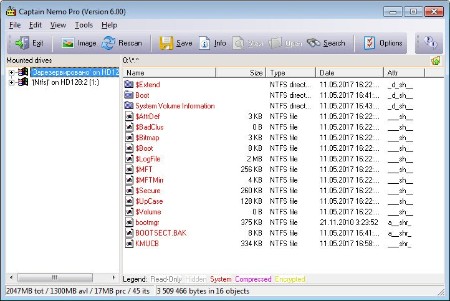
This file system mounter enables you to access any Novell, NT or Linux drive or image from your Windows computer without requiring a network setup.
Product Highlights
- Read, search and view any Novell, NTFS, or Linux drive from a Windows computer
- Mount images created from RAID Reconstructor
- Mount any raw image of a disk
- Robust disk search feature
- Display owners and attributes of every file
- Run from a WinPE boot CD-ROM
Access Novell, NTFS and Linux drives or images from any Windows Computer
Widely used by law enforcement personnel, forensic investigators as well as network administrators. Captain Nemo enables you to access any Novell, NTFS or Linux drive from your Windows computer without requiring a network setup.
Just connect the drive to your machine and Captain Nemo will automatically mount your Netware, NTFS or Linux partitions in Windows. You can read, search and view all your Novell/NT/Linux files and copy them to your Windows drive.
Mount images you previously created with another software, such as DD, RAID Reconstructor or GetDataBack. Captain Nemo can mount any raw image of a disk that was formatted with NTFS, Novell or Linux. Captain Nemo accepts raw images (.img), compressed raw images (.imc) and virtual images (.vim).
While Captain Nemo is not a data recovery tools in a strict sense, you can often use the Captain to mount an image or virtual image that you created with RAID Reconstructor. Once a RAID is reconstructed its file system is usually in good enough shape to be simply mounted in Captain Nemo, saving you many hours recovering your files.
Captain Nemo does not require the installation of any Netware, NTFS or Linux drivers, programs or files!
The foreign file system will be mounted automatically and you can copy files from it to the Windows partition.
Captain Nemo looks like and is as easy to use as the Windows Explorer, but allows you to access all the data on the Novell, NTFS or Linux drive.
Supported file systems
- Novell Netware 3.xx, 4.xx and 5.xx, supports Netware compression and sub-allocation
- Windows NTFS, support NTFS compression, supports volumes > 2 TB
- Linux EXT2FS, EXT3FS.
- XFS
Captain Nemo additional features
- A file viewer, which allows you to see the content of almost any file
- A search function, which enables you to do extensive search for containing text or files
- Display of the owners and attributes of every file
Whats New
Код:
http://www.runtime.org/captain-nemo.htm

HomePage:
Код:
http://www.runtime.org/

-:DOWNLOAD FROM LINKS:-​
Download From RapidGator
Код:
https://rapidgator.net/file/90cccadbda8c5d2da581893d79dcdd73/RCNP702.rar

Download From NitroFlare
Код:
https://nitroflare.com/view/E697110E5C79E97/RCNP702.rar
 
Runtime GetDataBack Pro 5.61


RGP561.jpg


File size: 15 MB
​

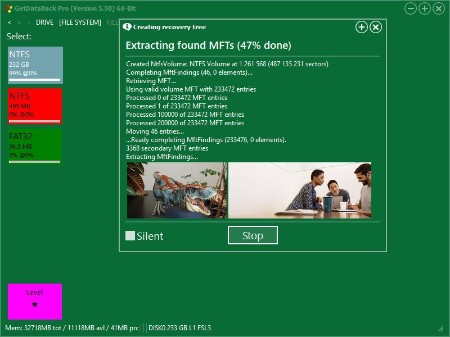
GetDataBack Simple is a completely redesigned and rewritten Data Recovery solution for Windows and Linux file systems. Our developers have combined decades of data recovery experience with the newest technologies. GetDataBack Simple's clean interface guides you to your lost data in no time. You are literally one click away from your files. GetDataBack Simple is the data recovery software for the 99%. You can recover it now. No manual to read, no ostentatious options, no kidding.
GetDataBack Simple combines recovery capabilities for NTFS, FAT, exFAT, and EXT. You do not need to find out beforehand which files system your drive was formatted with. GetDataBack Simple's recovery engine internally uses four distinguished sophistication levels that automatically escalate until good results have been achieved.
One license for three program versions
While we believe you don't want to use anything else once you tried GetDataBack Simple, the price of $79 includes licenses for our classic GetDataBack software as well. Customers who bought GetDataBack for FAT or GetDataBack for NTFS in the past can use their existing license key for GetDataBack Simple. This is the lifetime update promise.
GetDataBack is more than an undelete or file recovery program or a system restore
GetDataBack Simple will recover your data if the hard drive's partition table, boot record, FAT/MFT or root directory are lost or damaged, data was lost due to a virus attack, the drive was formatted or re-partitioned, a power failure has caused a system crash, files were lost due to a software failure, or files were accidentally deleted. GetDataBack Simple can even recover your data when the drive is no longer recognized by Windows. GetDataBack Simple works on hard drives, SSD, flash card, USB sticks, etc.
Get everything back, the safe, easy, and fast way
Advanced algorithms make sure that all files and directories are put together as they were, and that file names are reconstructed correctly. GetDataBack employs a number of approaches to your data, depending on the actual condition of your drive. Four different escalating sophistication levels ensure your files are recovered. GetDataBack Simple
GetDataBack is read-only, meaning the program will not attempt to "fix" or write to the drive you are about to recover.
GetDataBack Simple's user interface is so simple, it enables even the most inexperienced users to conduct their own data recovery with just one click.
GetDataBack Simple not only recovers you data. It does it quick. The first sophistication levels recover large drives in seconds or minutes. The speed of copying the recovered data to another medium competes with the speed of regular file copy operations.
GetDataBack Simple Highlights
GetDataBack Pro Highlights
Recover ALL your drive's data
Restore file names and directory structure
Safe, read-only design
Intuitive user interface
Lightning fast operation
Supports all hard drives, SSD, flash cards, USB
Native 64-bit application under 64-bit Windows
Recovery of very large drives
New, redesigned and rewritten, using the newest technologies
Supports NTFS, FAT12, FAT16, FAT32, exFAT, EXT, EXT2, EXT3, EXT4, HFS+, APFS
Whats New
Updates: official site does not provide any info about changes in this version.

HomePage:
Код:
https://www.runtime.org

-:DOWNLOAD FROM LINKS:-​
Download From RapidGator
Код:
https://rapidgator.net/file/1b52e972a7ed7c2fb854301e1638c9f5/RGP561.rar

Download From NitroFlare
Код:
https://nitroflare.com/view/1C852F9912F421C/RGP561.rar
 
Runtime NAS Data Recovery 4.02


RNDR402.jpg


File size: 2.0 MB
​

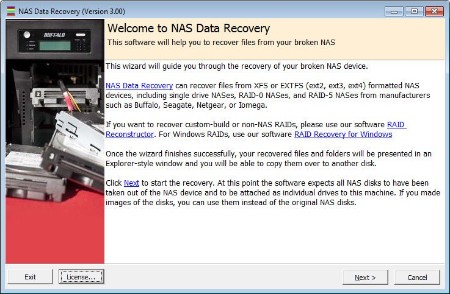
NAS Data Recovery recovers the entire content of your broken NAS within minutes. You will be able to copy the files and folders over to another disk. NAS Data Recovery works for all XFS- or EXT2FS-formatted single-drive, RAID-0, RAID-1, or RAID-5 NAS stations from manufacturers such as Buffalo, Seagate, Western Digital, DLink, or Iomega. NAS Data Recovery is easy to use. It automatically finds all parameters needed for the recovery, such as RAID start sector, stripe size, rotation, and drive order. Everybody is now able to recover his own NAS. No data recovery background required.
Product Highlights
Recover XFS- or EXT2FS-formatted NAS devices, such as Buffalo, Seagate, Western Digital, DLink, or Iomega, within minutes
Supports single-drive, RAID-0, RAID-1, RAID-5 configuration
No other software needed
Finds NAS RAID parameters, such as start sector, stripe size, rotation, and drive order automatically
Easy to use wizard, no user input required, fully automated recovery
Run from the Runtime Live CD or a WinPE boot CD-ROM
Network Attached Storage (NAS) Recovery Software
Remove the drives from your NAS station and attach them locally to your machine. Make sure the drives are all recognized by Windows Disk Management. If you are trying to recover a RAID-5, it is Ok to attach one drive less than the total number of drives in that NAS. NAS Data Recovery also works with images of your drives.
Install NAS Data Recovery to your computer and start the program. In Vista, Windows 7, or Windows 8 you need to right-click the program icon and select "Run as Administrator".
A wizard will guide you through the recovery. A couple of minutes later, an Explorer-like window will show all recoverable files and folders. Now you can copy your files over to another disk. You can also view many file types before copying them, e.g. pictures, documents, etc.
Whats New
Updates: official site does not provide any info about changes in this version.

HomePage:
Код:
http://www.runtime.org/

-:DOWNLOAD FROM LINKS:-​
Download From RapidGator
Код:
https://rapidgator.net/file/aab305916fc1948c026da372bccedc05/RNDR402.rar

Download From NitroFlare
Код:
https://nitroflare.com/view/FC8C8B093879B51/RNDR402.rar
 
Runtime RAID Reconstructor 5.01


RRR501.jpg


File size: 20 MB
​

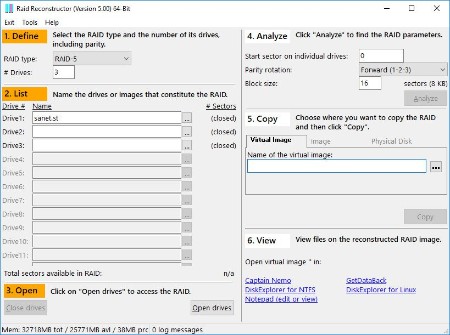
Recover data from a broken RAID Level 5 or RAID Level 0 Array. Even if you do not know the RAID parameters, such as drive order and block size, RAID Reconstructor will analyze your drives and determine the correct values. You will then be able to create a copy of the reconstructed RAID in a virtual image, an image file or on a physical drive.
Product Highlights
Recover data from a broken RAID Array
Recovers both hardware and software RAID
Automatically finds RAID parameters
Native x64 application
Destriper and Analyzer
Safe, read-only design
Run from the Runtime Live CD or a WinPE boot CD-ROM
Runtime's RAID Reconstructor will help you recover data from broken
RAID Level 5 Array consisting of 3 to 16 drives
RAID Level 0 Array (Striping) consisting of 2 to 16 drives
Even if you do not know the RAID parameters, such as start sector, drive order, block size and direction of rotation, RAID Reconstructor will analyze your drives and determine the correct values. You will then be able to create a copy of the reconstructed RAID in a virtual image (.vim), an image file (.img) or on a physical drive.
Unlike other products that require you to know the RAID parameters, RAID Reconstructor is not only a "destriper" but an "analyzer" as well. It finds the unknown parameters for you.
Once you created an image you can either mount it with Captain Nemo or use it for further data recovery processing with Runtime's GetDataBack. If you create the image on another physical drive, you can process it with Captain Nemo or GetDataBack too or you might even be able to directly boot from it.
Analysis Toolbox
RAID Reconstructor contains many tools you will appreciate once you need to recover data.
Create images of individual drives.
Entropy report. See where the most dense data is.
MFT report. Investigate disk areas around the MFT
File system report. Find file system structures for NTFS, EXT, XFS
XOR test. See if your set is xor-ed.
Create an XOR.VIM from the existing drives in order to investigate a missing drive.
RAID calculator. Convert a global sector number to a local drive and sector number, and back. Show mapping charts about the relation between the global RAID space and the individual RAID member drives. Supports RAID-0, RAID-5, RAID-6, delayed RAID-5 (HP-SmartArray).
Whats New
Updates: official site does not provide any info about changes in this version.

HomePage:
Код:
http://www.runtime.org/

-:DOWNLOAD FROM LINKS:-​
Download From RapidGator
Код:
https://rapidgator.net/file/832d7164208e97eb6f264dac89e5c33e/RRR501.rar

Download From NitroFlare
Код:
https://nitroflare.com/view/D6612A5C598F5AC/RRR501.rar
 
Runtime RAID Recovery for Windows 4.02


RRRfW402.jpg


File size: 2.0 MB
​

Recovery for NTFS-formatted Windows RAIDs, includes hardware RAIDs and Windows software RAIDs. Supports RAID-0 and RAID-5 configurations.
Product Highlights
Recover NTFS-formatted Windows RAIDs, including hardware RAID and Windows software RAIDs,, within minutes
Supports RAID-0 and RAID-5 configuration
No other software needed
Finds RAID parameters, such as start sector, stripe size, rotation, and drive order automatically
Easy to use wizard, no user input required, fully automated recovery
Run from the Runtime Live CD or a WinPE boot CD-ROM
Data Recovery Software for Windows RAIDs
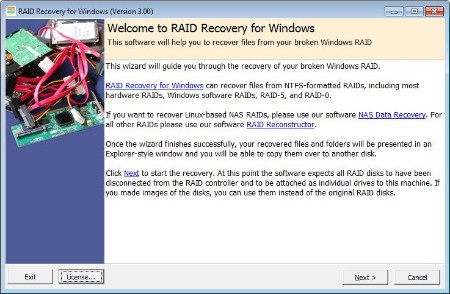
RAID Recovery for Windows recovers the entire content of your broken RAID within minutes. You will be able to copy the files and folders over to another disk.
RAID Recovery for Windows works for NTFS-formatted RAID-0 or RAID-5 configurations. It supports both, hardware RAIDs managed by the mother board or a controller card, and software RAIDs managed by Windows (dynamic disk arrays).
Remove the drives from the RAID controller and attach them locally to your machine. Make sure the drives are all recognized by Windows Disk Management. If you are trying to recover a RAID-5, it is Ok to attach one drive less than the total number of drives in that RAID. RAID Recovery for Windows also works with images of your drives.
Install RAID Recovery for Windows to your computer and start the program. In Vista, Windows 7, or Windows 8 you need to right-click the program icon and select "Run as Administrator".
A wizard will guide you through the recovery. A couple of minutes later, an Explorer-like window will show all recoverable files and folders. Now you can copy your files over to another disk. You can also view many file types before copying them, e.g. pictures, documents, etc.
RAID Recovery for Windows is easy to use. It automatically finds all parameters needed for the recovery, such as RAID start sector, stripe size, rotation, and drive order. Everybody is now able to recover his own RAID. No data recovery background required. No need to buy any other software.
Supported RAIDs
NTFS-formatted RAID-0 and RAID-5 controlled by the motherboard or a RAID controller card (hardware RAID)
NTFS-formatted RAID-0 and RAID-5 administered by Windows (Windows software RAID)
RAID Recovery for Windows additional features
A file viewer, which allows you to see the content of almost any file
A search function, which enables you to do extensive search for containing text or files
Run RAID Recovery for Windows from our Runtime Live CD or a BartPE boot CD-ROM
Whats New
Updates: official site does not provide any info about changes in this version.

HomePage:
Код:
http://www.runtime.org/

-:DOWNLOAD FROM LINKS:-​
Download From RapidGator
Код:
https://rapidgator.net/file/79d1bb30096fb97bab960d6de5edac87/RRRfW402.rar

Download From NitroFlare
Код:
https://nitroflare.com/view/D661B081A9D0511/RRRfW402.rar
 
Sante PACS Server 3.2.3


SPS323.png


File size: 434 MB
​

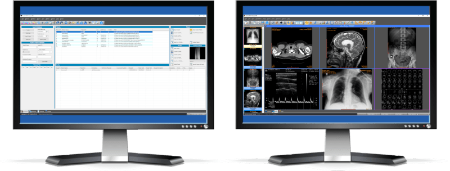
Sante PACS Server PG is a DICOM 3.0 compliant PACS server, a Modality Worklist server, an HTTP (web) server for DICOM files and a CD/DVD Burning and Printing server that offers high performance and reliability at an affordable price. It provides connectivity to all DICOM modalities (CT, MR, US, CR, NM, XA, MG, DX etc.). Reviewing the DICOM images can be done using the Sante PACS Viewer (the Built-in full-featured DICOM viewer of the system). The built-in web server can be used as a free cloud server for DICOM files!
The program modules
Sante PACS Server PG consists of 4 modules
The Database module
The program uses the Postgres SQL server for database management and offers storage of unlimited number of patients/studies/series/images (it depends only on hard disk size).
The DICOM Server module
The built-in DICOM server supports all the DICOM network services (C-FIND SCU/SCP, C-MOVE SCU/SCP, C-STORE SCU/SCP, C-GET SCU/SCP, C-ECHO SCU/SCP), it is compatible with all the modalities (CT, MR, NM, US, XA, MG, CR, DX etc.), all manufacturers and all DICOM 3.0 and NEMA 2 file types. Moreover, it supports unlimited number of connections with unlimited number of DICOM nodes and DICOM clients.
The Worklist Server module
The built-in Worklist server module can receive via HL7 communication messages the patients demographics and scheduling information of exams that are stored in a HIS/RIS system (Hospital Information System / Radiology Information System) and transfer them to any modality/medical scanner via DICOM communication protocols (C-FIND).
The Web Server module
The Web Server module lets remote users of the system to connect with it, query and retrieve studies that have been stored in the database of the DICOM Server. The Web Server module, for these connections, uses the HTTP ot HTTPS protocol of the internet and the remote user must use a web browser like Edge, Chrome or Mozilla to query and retrieve studies. The web server supports SSL secure connections. This module lets the user to connect, query, retrieve and review DICOM studies stored in the system from anywhere in the world and it can be used as a free cloud server!
The remote user, from the initial web page of the system can download and install two free applications for use with this web server, Sante Web Downloader and Sante DICOM Web Viewer.
Sante Web Downloader lets the user to inspect the downloading procedure. In the end of receiving Sante Web Downloader saves the received studies in a zip file. The user can configure Sante Web Downloader to open the saved zip file with a DICOM Viewer of his/her choice like Sante DICOM Viewer Pro or Sante DICOM Editor. The DICOM Viewer must support opening zip files from command line. For more information please read the User Guide of Sante Web Downloader. This application is useful when a user wishes to use a DICOM Viewer other than Sante DICOM Web Viewer.
Sante DICOM Web Viewer lets the user to inspect the downloading procedure as Sante Web Downloader does, but it is also a high quality, full featured, completely free 2D/3D DICOM Viewer, with all the necessary tools like measurements, roi statistics, MPR and study/series comparison. It allows the user to work smoothly in a multi-modality, multi-manufacturer environment because it has all the features of Sante DICOM Viewer Pro and Sante DICOM Viewer 3D Pro except the post-processing functions like anonymizing (de-identification).
Whats New
Updates: official site does not provide any info about changes in this version.

HomePage:
Код:
https://www.santesoft.com/

-:DOWNLOAD FROM LINKS:-​
Download From RapidGator
Код:
https://rapidgator.net/file/3a10f1b5ae2fef85685e8b867d999af2/SPS323.rar

Download From NitroFlare
Код:
https://nitroflare.com/view/1A99FCEE7A99EEE/SPS323.rar
 
Sante PACS Server PG 3.2.3


SPS323.png


File size: 434 MB
​

Sante PACS Server PG is a DICOM 3.0 compliant PACS server, a Modality Worklist server, an HTTP (web) server for DICOM files and a CD/DVD Burning and Printing server that offers high performance and reliability at an affordable price. It provides connectivity to all DICOM modalities (CT, MR, US, CR, NM, XA, MG, DX etc.). Reviewing the DICOM images can be done using the Sante PACS Viewer (the Built-in full-featured DICOM viewer of the system). The built-in web server can be used as a free cloud server for DICOM files!
The program modules
Sante PACS Server PG consists of 4 modules
The Database module
The program uses the Postgres SQL server for database management and offers storage of unlimited number of patients/studies/series/images (it depends only on hard disk size).
The DICOM Server module
The built-in DICOM server supports all the DICOM network services (C-FIND SCU/SCP, C-MOVE SCU/SCP, C-STORE SCU/SCP, C-GET SCU/SCP, C-ECHO SCU/SCP), it is compatible with all the modalities (CT, MR, NM, US, XA, MG, CR, DX etc.), all manufacturers and all DICOM 3.0 and NEMA 2 file types. Moreover, it supports unlimited number of connections with unlimited number of DICOM nodes and DICOM clients.
The Worklist Server module
The built-in Worklist server module can receive via HL7 communication messages the patients demographics and scheduling information of exams that are stored in a HIS/RIS system (Hospital Information System / Radiology Information System) and transfer them to any modality/medical scanner via DICOM communication protocols (C-FIND).
The Web Server module
The Web Server module lets remote users of the system to connect with it, query and retrieve studies that have been stored in the database of the DICOM Server. The Web Server module, for these connections, uses the HTTP ot HTTPS protocol of the internet and the remote user must use a web browser like Edge, Chrome or Mozilla to query and retrieve studies. The web server supports SSL secure connections. This module lets the user to connect, query, retrieve and review DICOM studies stored in the system from anywhere in the world and it can be used as a free cloud server!
The remote user, from the initial web page of the system can download and install two free applications for use with this web server, Sante Web Downloader and Sante DICOM Web Viewer.
Sante Web Downloader lets the user to inspect the downloading procedure. In the end of receiving Sante Web Downloader saves the received studies in a zip file. The user can configure Sante Web Downloader to open the saved zip file with a DICOM Viewer of his/her choice like Sante DICOM Viewer Pro or Sante DICOM Editor. The DICOM Viewer must support opening zip files from command line. For more information please read the User Guide of Sante Web Downloader. This application is useful when a user wishes to use a DICOM Viewer other than Sante DICOM Web Viewer.
Sante DICOM Web Viewer lets the user to inspect the downloading procedure as Sante Web Downloader does, but it is also a high quality, full featured, completely free 2D/3D DICOM Viewer, with all the necessary tools like measurements, roi statistics, MPR and study/series comparison. It allows the user to work smoothly in a multi-modality, multi-manufacturer environment because it has all the features of Sante DICOM Viewer Pro and Sante DICOM Viewer 3D Pro except the post-processing functions like anonymizing (de-identification).
Whats New
Updates: official site does not provide any info about changes in this version.

HomePage:
Код:
https://www.santesoft.com/

-:DOWNLOAD FROM LINKS:-​
Download From RapidGator
Код:
https://rapidgator.net/file/befece117575687ca1d92ace4386aa2d/SPSP323.rar

Download From NitroFlare
Код:
https://nitroflare.com/view/144ABAEB3A3FC7C/SPSP323.rar
 
Назад
Сверху