• Здравствуйте. Сайт заработал в архивном режиме форум www.old.nado.in

Dl4ever Software

High Logic FontCreator 14.0.0.2843

HLF14002843.jpg


File size: 45.2 MB
​


With over 4.5 million downloads to date, FontCreator is the world's most popular font editor. An advanced feature set makes it the tool of choice for professionals, and its intuitive interface is straightforward enough for users at any expertise level. Create your own fonts, redesign existing characters, edit the spacing in font sets, and much more.
When you create or open a font, FontCreator displays an overview of all available characters. You can simply add missing characters, or select an existing character, and modify its appearance. You can import (scanned) images of your signature or company logo, or make a font from your own handwriting. With FontCreator you can also fix character codepoints, font names, kerning pairs, and at all times you can preview your typefaces before installing.
Font Overview with Categories
The glyph and character category panel gives you quick and easy access to the glyphs, character subsets and Unicode ranges.
Work with OpenType, TrueType and Web fonts
FontCreator supports Open Type, True Type and Web Open Font Format (WOFF) fonts which can be used on Windows, Mac OS X, Linux, and in all modern web browsers.
Design High Quality Fonts
The standard and professional edition include font validation features which enable you to improve the quality of your fonts by locating and solving common glyph problems.
Optimize Contours
Optimizing glyph outlines will reduce the number of points that make up the contour(s).
Import SVG Images
High quality vector graphics can be easily imported. You can even copy and paste between FontCreator and your favorite vector editing software.
Import Raster (bitmap) Images
Import (scanned) images and convert them into glyphs. Create your own handwriting font by scanning your handwriting and import it into FontCreator.
Scalable Color Fonts
FontCreator is the first font editor to support the new scalable color fonts extension. This new feature allows you to create multi-colored glyphs for systems that support it, while maintaining backwards compatibility for systems that do not. Watch the video above for a quick introduction on how to create color fonts with FontCreator.
Visual OpenType Designer
The intuitive OpenType Designer allows you to easily add and modify OpenType Layout Features for glyph positioning. The build-in anchor manager makes adding and editing Mark to Base and Mark to Mark positioning a breeze!
OpenType Layout Scripts Editor
The Script Editor allows you to quickly add and modify OpenType Glyph Substitutions through an easy to learn scripting language.
OpenType Layout Features Made Easy
Common OpenType layout features are automatically added to your fonts and with the standard and professional editions you can take full control over these features through custom scripts.
Easy Access to Common Glyph Properties
The glyph properties toolwindow gives you easy access to the glyph's name, codepoints and bearings.
Kerning
Manually add kerning to your font or let the Autokerning take care of kerning for you in the standard and professional edition.
Optical Metrics
The Optical metrics feature in the professional edition simplifies one of the most complex and time consuming tasks in font design. It analyzes a set of most common characters to find the best left and right side bearings of each of these glyphs.
Test Your Fonts
At any time during your font development, you can test it in other applications. You can even generate a local webpage to test it as a Web font.
Powerful Transform Wizard
The standard and professional edition come with a powerful transform wizard that allows you to easily transform glyphs with just a few clicks. Transform your font to Italic, Bold, automatically add characters for other languages, small capitals and more.
Easily Rename Fonts
On the font properties dialog you can view and edit the font name, legal and copyright information, embedding rights and more.
Complete Composites
The standard and professional edition allow intelligent generation of outlines for more than 2,200 (mostly accented) composite characters.
Editions: Home, Standard, Professional
Whats New
Код:
http://www.high-logic.com/font-editor/fontcreator/release-history.html

HomePage:
Код:
http://www.high-logic.com/

-:DOWNLOAD FROM LINKS:-​
Download From RapidGator
Код:
https://rapidgator.net/file/80980ad88a05dbc07d5c1ab080d89022/HLF14002843.rar

Download From NitroFlare
Код:
https://nitro.download/view/120DF0805C55288/HLF14002843.rar
 
Jerry YouTube Downloader Pro 7.17.10


JYDP71710.png


File size: 33.3 MB
​


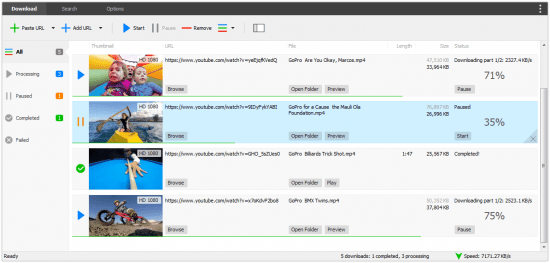
Jerry YouTube Downloader Pro is an application that can help you find, download and convert videos from the popular video streaming service so you can enjoy them offline on various devices.Enables you to search for videos and download them.
The program comes with a clean, well-organized and user-friendly interface that consists of three main tabs, the Download section, Search and Options. While the first two tabs are suggestive for their roles, you can set up the download folder, specify the download quality and access the converter from the Options tab.
Features
Download videos from YouTube, Facebook, and hundreds of other video sites
Increase your download speeds by up to 500%
Download HD 1080p, HD 720p, 4K, 2K, and 3D videos from YouTube
Download multiple videos at a time
Pause and resume downloads
Preview videos while downloading
Download only audio stream if possible
Download whole playlist from YouTube
Convert downloaded videos to any format
YouTube to MP3 converter
Ready-made presets
iTunes compatible
Integrate with Internet Explorer and Firefox
Support drag-and-drop
Search online videos
Media Converter
Media Player

HomePage:
Код:
http://www.youtubedownloaderpro.com/

-:DOWNLOAD FROM LINKS:-​
Download From RapidGator
Код:
https://rapidgator.net/file/99ebb8cf0847a8451c2868d1af9cf388/JYDP71710.rar

Download From NitroFlare
Код:
https://nitro.download/view/77DFAF0B37DC124/JYDP71710.rar
 
Movie To GIF 3.1.0.0


MTG3100.gif


File Size : 18.2 Mb
​


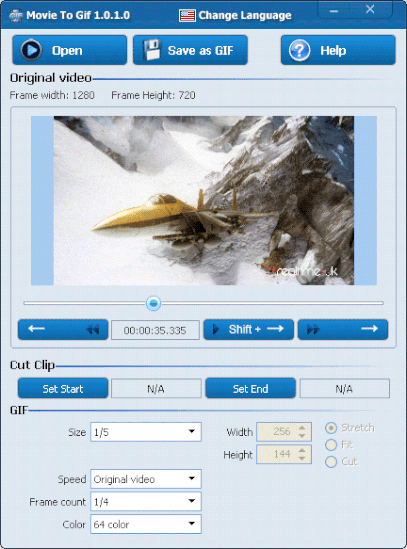
Movie To GIF is an easy-to-use video to animated GIF converter with a simple and friendly interface. Movie to GIF efficiently converts videos in most popular video formats (including AVI, MPEG, MP4, WMV, MKV, MOV, VOB, RMVB, etc) to GIF.
Movie to GIF provides the option to play video clips in GIF files. You can set more frames per second so the output GIF appears as the original video, or set fewer frames per second for smaller animated GIF files. The width and height of the GIF is also adjustable.
Features
Convert Video to Animated GIF
Convert video files such as AVI, MPEG, MKV, MP4, WMV, MOV, and RM to animated GIF files while keeping original play rate and resolution.
Resize
Keep the resolution of output image file as the original, or set a new size as desired.
Frame Rate
User can change the value of output frame rate (how many pictures per second) to control the speed of the clip.
Colors
The user can select the colors of GIF.
Whats New
Updates: official site does not provide any info about changes in this version

HomePage:
Код:
http://en.zxt2007.com/index.html

-:DOWNLOAD FROM LINKS:-​
Download From RapidGator
Код:
https://rapidgator.net/file/45206b3c31eee5467a5bd9b017b7504a/MTG3100.rar

Download From NitroFlare
Код:
https://nitro.download/view/62E6FE005C85F90/MTG3100.rar
 
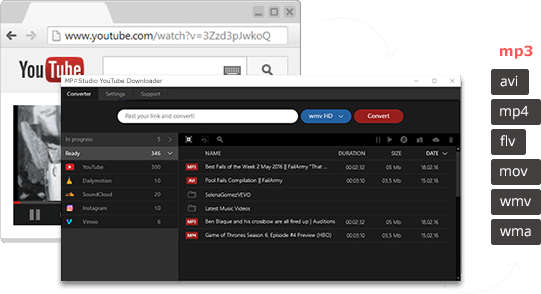
MP3Studio YouTube Downloader 2.0.13.1 Multilingual


MYD20131-M.png


File size: 30 MB
​


Mp3Studio Youtube Downloader is a user-friendly and efficient piece of software that was developed to offer you an easy means of grabbing all your favorite videos from the web and store them on your PC, in one of several available formats.
What are the Major Advantages of this Audio Program?
MP3Studio multimedia program is the most convenient to work with your media.
This audio app allows you to listen to all the songs you want from YouTube online and download them to your device seamlessly.
Downloading all the content you need when you need it is fast and simple. You don't need extra technical skills to understand the way this app works.
You won't waste your time downloading extra software for this multimedia editor.
How Fast will You Download All the Songs You Like?
You'll never be disappointed with the download speeds. You can download up to 99 songs at once in the background as you go about your business. It's a great opportunity to get more for the same amount of time!
Music in your Pocket even if You don't Have Internet Access
Our app allows you to have your music in your pocket for free at all times, even when you don't have any Internet access. Use this multimedia editor to download various songs via YouTube and other services in advance. It will provide you with good quality music you can listen to even when you're offline.
There's no barrier for you!
Whats New
Updates: official site does not provide any info about changes in this version.

HomePage:
Код:
https://mp3.studio/

-:DOWNLOAD FROM LINKS:-​
Download From RapidGator
Код:
https://rapidgator.net/file/f7ad962cadc4207781c91f69eae54f2e/MYD20131.M.rar

Download From NitroFlare
Код:
https://nitro.download/view/6317D8D10C8455C/MYD20131.M.rar
 
PilotEdit 16.5 Multilingual


P165-M.jpg


File size: 70 MB
​


PilotEdit is a handy file editor designed to help users execute scripts, extract strings and edit large files. There is also support if you want to edit or upload FTP files.
Simple user interface
All the program's functions are displayed using a single window. The app's workspace is divided in three smaller windows. The first provides access to the files and folders stored in your computer. The second lets you view and edit the text, while the third is an output window where you can see the program's messages for different actions.
Edit your text
The inserted text can be viewed in a column mode, word wrapped or have the HEX values displayed for the it. The utility can remove tabs and spaces automatically. You can switch the text to upper or lower case letters and increase or decrease text indentation. The app can insert the system date and time into the document. Moreover, words can be browsed, selected or removed using the "Edit" tab.
Different encoding modes
You can change the encoding to ANSI or UTF and set the output to work on different systems like DOS, UNIX or MAC. The tool can apply different predefined scripts which can change the date format and remove empty lines or HTML tags. PilotEdit can sort, find and remove duplicate lines or be used to extract strings from the text and copy it to the Clipboard.
FTP capability
The utility can search and replace in multiple directories and files the custom item, useful in case you have a big text file with a lot of lines. It can open an encrypted FTP file or be used in the decryption process for your files. The program can store your FTP login details and connect to your FTP server.
Conclusion
Overall, PilotEdit is a handy utility for users who want to edit their documents and then upload them to their FTP server. The program does not burden system resources and did not display any errors during tests.
Whats New
Код:
https://www.pilotedit.com/

HomePage:
Код:
https://www.pilotedit.com/

-:DOWNLOAD FROM LINKS:-​
Download From RapidGator
Код:
https://rapidgator.net/file/7d76de9fdc25b61eaf2aef4470adb6da/P165.M.rar

Download From NitroFlare
Код:
https://nitro.download/view/0F85A790A326CFA/P165.M.rar
 
R-Wipe & Clean 20.0.2359


R-C2002359.jpg


File size: 25.1 MB
​


R-Wipe and Clean is a complete R-Tools solution to remove useless files, free up your disk space, and clean various privacy-compromising information on your online and offline activity. This includes internet history and cookies, lists of downloaded files and opened documents, various data caches, temporary files, and many more items, created by the operating system, most contemporary internet browsers and communication programs, and by hundreds of third-party applications.
It is also possible to create specific lists of traces to be cleaned for unsupported applications. All small computer cleaning and file erasing jobs can be combined into large computer cleaning tasks that can be started immediately, or at scheduled time/events.
Computer Cleaning
Traces Selection helper: a tool to quickly select some of the most common traces to clean.
Cleaning Internet activity: removing traces from most contemporary browsers and communication programs.
Cleaning personal traces: removing various lists, logs, caches, temporary files, and other traces of your activity.
Cleaning system traces: removing registry traces, temp files, system history, and various log files.
Cleaning traces from various third-party programs: removing various caches, logs, temporary files, recent file lists, and other traces left by applications.
Cleaning can be performed as a background task and computer can be turn off upon its completion.
Wiping
Support for SSD devices: R-Wipe and Clean correctly recognizes SSD devices and by default wipes only necessary data on the disk preventing them from additional wear.
Strong or fast erase algorithms, including DoD-approved, for wiping files and free disk space.
Support for FAT/exFAT and NTFS file systems.
Wiping files' alternate data streams and cluster "tips", or free parts of file clusters.
Wiping files directly from File Explorer.
Wiping free space on a single disk directly from its shortcut menu.
Wiping unused space of several disks through one single wipe task.
Wipe records of small files stored directly in the NTFS Master File Table.
Predefined wipe lists of files, folders, and Registry keys to be wiped through a single task. Files or folders can be added to a current wipe list directly from File Explorer.
Advanced Features
All separate cleaning and wiping actions can be combined into large wipe and clean tasks to launch them manually or at scheduled times or events (user log-on/log-off, system start-up/shutdown, closing any or all browsers, etc.)
Detailed representation of all trace items on your computer.
Detailed logging of all wipe and clean operations.
Customization: R-Wipe and Clean can hide those items you will never want to clean.
Full system integration: Most wipe and clean operations can be performed directly from Windows.
Password protection.
R-Wipe and Clean Smart: an advanced tool to create and manage very complex wipe lists.
Cleaning and wiping task can be started from a command line.
Boss Key to close a web-browser in emergency.
Stealth mode to hide computer cleaning.
Standby/hibernate control: Your computer will not hibernate until R-Wipe and Clean finishes its long job.
Startup Renaming for files/folders locked by Windows and other programs. They will be renamed and cleaned during the next start-up.
Whats New
Код:
https://forum.r-tt.com/viewtopic.php?t=8141

HomePage:
Код:
https://www.r-wipe.com/

-:DOWNLOAD FROM LINKS:-​
Download From RapidGator
Код:
https://rapidgator.net/file/35366634b7a52fb63c464751ccf8ab4c/R.C2002359.rar

Download From NitroFlare
Код:
https://nitro.download/view/64ADEEFFB8E33CF/R.C2002359.rar
 
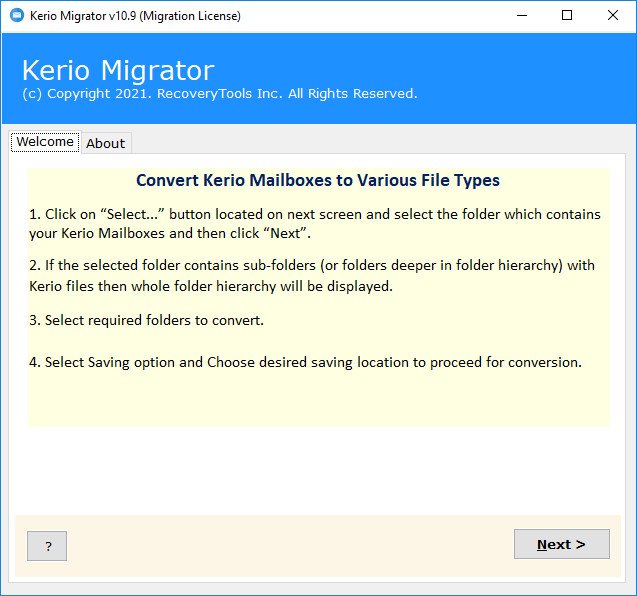
RecoveryTools Kerio Migrator 11.5


RKM115.jpg


File size: 23 MB
​


Kerio Mail Server Migration Tool to Convert Kerio Emails, Contacts, Calendars.
Batch migration of Kerio mailboxes
Migrates all your Kerio Mail Server data including emails, attachments, contacts, calendars, tasks, notes etc.
Keeps the mailbox folder hierarchy intact with Kerio Connect Migration Tool.
Export mail from Kerio Connect with 25+ conversion, migration & backup options.
Options to convert to various offline files & migrate to email cloud servers
The program supports migration of Public folders
Advanced Filter options to migrate selective Kerio Mailbox data with various criteria like Date, From, Subject etc.
Option to extract calendars & contacts separately to standard formats ICS (iCalendar), CSV, VCF (vCard)
Runs on Microsoft Windows Desktop & Windows Server Operating Systems.
To migrate Hosted Kerio Cloud emails, please use Email Backup Wizard tool.
Whats New
Updates: official site does not provide any info about changes in this version.

HomePage:
Код:
https://www.recoverytools.com/kerio/migrator/

-:DOWNLOAD FROM LINKS:-​
Download From RapidGator
Код:
https://rapidgator.net/file/b4eea78b4504c49fc986332d37567095/RKM115.rar

Download From NitroFlare
Код:
https://nitro.download/view/481621AE0BDE48C/RKM115.rar
 
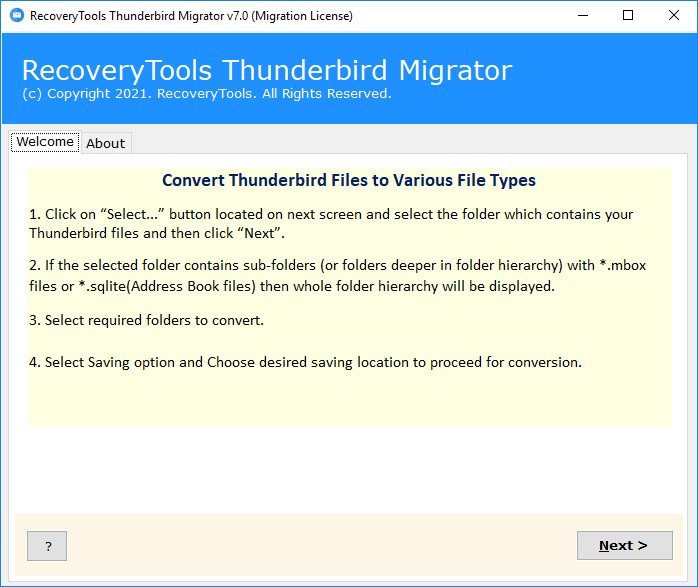
RecoveryTools Thunderbird Migrator 7.3


RTM73.jpg


File size: 35 MB
​


Thunderbird Converter Software to Export Thunderbird Emails, Contacts, Calendars.
Auto Locate Thunderbird Database from Default Configured Thunderbird Profiles
Thunderbird Mail Migration for both Thunderbird Profiles (POP & IMAP)
Convert Thunderbird Address Book & Contacts to CSV & vCard Format
Thunderbird Export Calendars with all Events, Tasks and Reminders
Preserve Thunderbird Email Attributes During Conversion: To, Cc, Bcc, Subject, Date etc.
Thunderbird Export Local Folders Including Inbox, Drafts, Sent, Deleted, Junk etc.
Save Single Massages Output Files with Desired File Naming Conventions (Subject, Date, From)
Export Thunderbird Emails with Included Attachments both Embedded Attachments & Normal Attachments
Trial of Thunderbird Migration Tool Will Export First 25 Emails Free of Cost
Successfully Migrate Thunderbird MOZMSGS & WDSEML Folders
Dual Modes for Thunderbird Migration: Convert Emails, Convert Contacts and Calendars
Does Not Makes Any Data Loss During Mozilla Thunderbird Email Migration
Run Thunderbird File Converter on Both Mac & Windows OS
Export Thunderbird Emails from Orphaned & Corrupted Database Files Without Requiring Thunderbird Email Client Installation
Whats New
Updates: official site does not provide any info about changes in this version.

HomePage:
Код:
https://www.recoverytools.com/thunderbird/migrator/

-:DOWNLOAD FROM LINKS:-​
Download From RapidGator
Код:
https://rapidgator.net/file/13ac22bdaa14de1fb89b3912d19f528d/RTM73.rar

Download From NitroFlare
Код:
https://nitro.download/view/FFCD59CB6C9076C/RTM73.rar
 
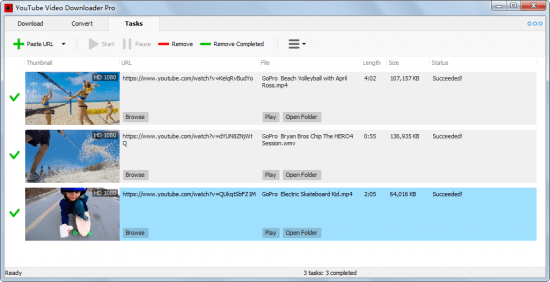
Robin YouTube Video Downloader 5.33.9.0


RYVD53390.png


File size: 36.3 MB
​


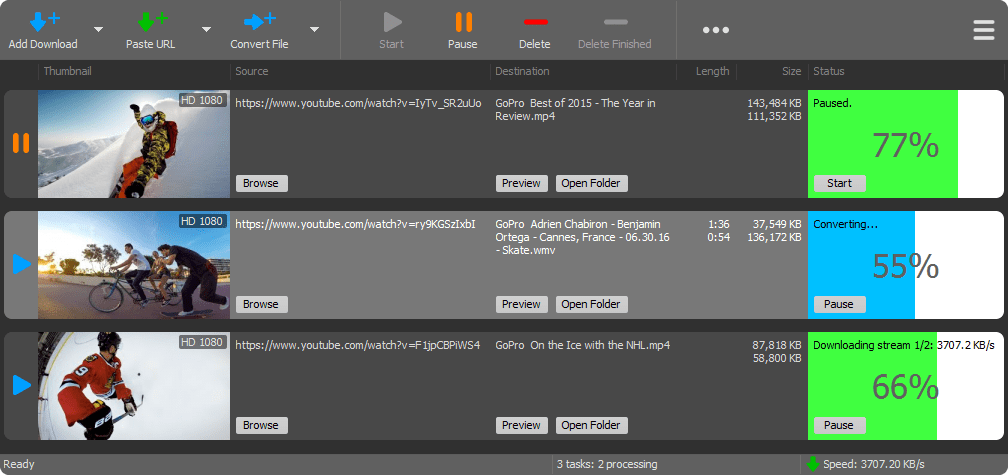
YouTube Video Downloader Pro is a professional Windows app for downloading and converting videos from YouTube, Facebook, Dailymotion, and thousands of other video sharing sites. It accelerates your downloads by up to 5 times. YouTube Video Downloader Pro allows you to download multiple videos at a time. It also allows you to pause, resume, and cancel downloads at anytime.
Features
Download videos from YouTube and thousands of other video sites
YouTube Video Downloader Pro can download videos from YouTube, Facebook, Dailymotion, Vimeo, Vine, Metacafe, and thousands of other video sites.
Accelerate downloads by up to 5 times
YouTube Video Downloader Pro features an advanced download acceleration engine that lets you download videos up to 500% faster than normal speed.
Download 4K, 2K, FHD 1080p, HD 720p, and 3D videos from YouTube
YouTube Video Downloader Pro can download UHD 4K, QHD 2K, FHD 1080p, HD 720p, and 3D videos from YouTube if they are available.
Download only audio stream from YouTube
YouTube Video Downloader Pro allows you to download only audio stream from YouTube, without downloading the entire video file.
Download whole playlist from YouTube
Just enter a YouTube playlist ID, YouTube Video Downloader Pro will download all or selected videos in the playlist from YouTube for you.
Download more than one video at a time
YouTube Video Downloader Pro supports simultaneous downloads that allows you to download multiple videos at the same time.
Pause and resume downloads
YouTube Video Downloader Pro allows you to pause, resume, and cancel downloads at anytime.
Preview incomplete video while downloading
While downloading, you can click "Preview" button to play incomplete video and make sure the file you are downloading is really the video of your choice.
Convert downloaded videos to any format
YouTube Video Downloader Pro can automatically convert downloaded videos to the format that you specify. It supports MP4, FLV, WMV, MOV, ASF, AVI, DV, M4V, MKV, MPG, OGV, SWF, TS, VOB, WEBM, DVD, VCD, SVCD, and many other formats.
Optimize downloaded videos for any device
YouTube Video Downloader Pro automatically converts and optimizes downloaded videos for your mobile/desktop device, so you can watch them smoothly on your iPhone, iPad, iPod, Android phone, Android tablet, Xbox, PSP, PS4, PS3, Samsung Galaxy, or other device.
Extract audio stream from video
YouTube Video Downloader Pro allows you to extract audio stream from video, and save it as MP3, WAV, WMA, AC3, AAC, OGG, M4A, FLAC, MP2, or any other audio format.
Convert local video/audio files
YouTube Video Downloader Pro is also a powerful video/audio converter. It helps you to convert your disk video/audio files to any format you wish so that they are playable on your media player.
Ready-made presets
YouTube Video Downloader Pro provides ready-made presets for all popular video and audio formats. You can also custom output video/audio format settings.
iTunes compatible
Optionally, YouTube Video Downloader Pro can automatically add downloaded video/music to your iTunes library, so you can easily synchronize your videos and music to your iPhone, iPad, iPod, etc.
Integrate with Internet Explorer and Firefox
YouTube Video Downloader Pro adds download button and menu commands to the toolbar and the context menu of your browser, so you can download and convert any video with just one click.
Support drag-and-drop
You may directly drag and drop video link/URL from your browser to the main window of YouTube Video Downloader Pro to start download, you don't even need to copy and paste video URL manually.
Whats New
Updates: official site does not provide any info about changes in this version.

HomePage:
Код:
http://www.youtubevideodownloaderpro.com/

-:DOWNLOAD FROM LINKS:-​
Download From RapidGator
Код:
https://rapidgator.net/file/71bbac85335611e77da37b075c5182cd/RYVD53390.rar

Download From NitroFlare
Код:
https://nitro.download/view/45D0668CCF63F11/RYVD53390.rar
 
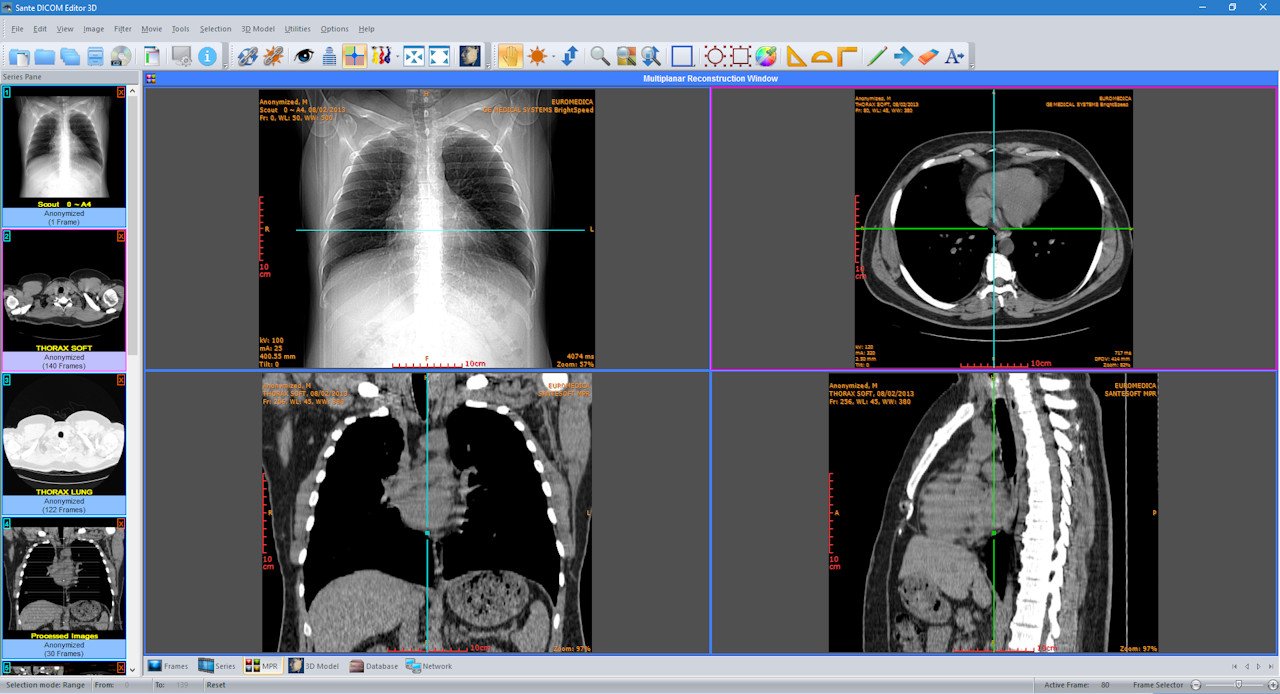
Sante DICOM Editor 3D 4.9.4


SDE3D.jpg


File size: 113.3 MB
​


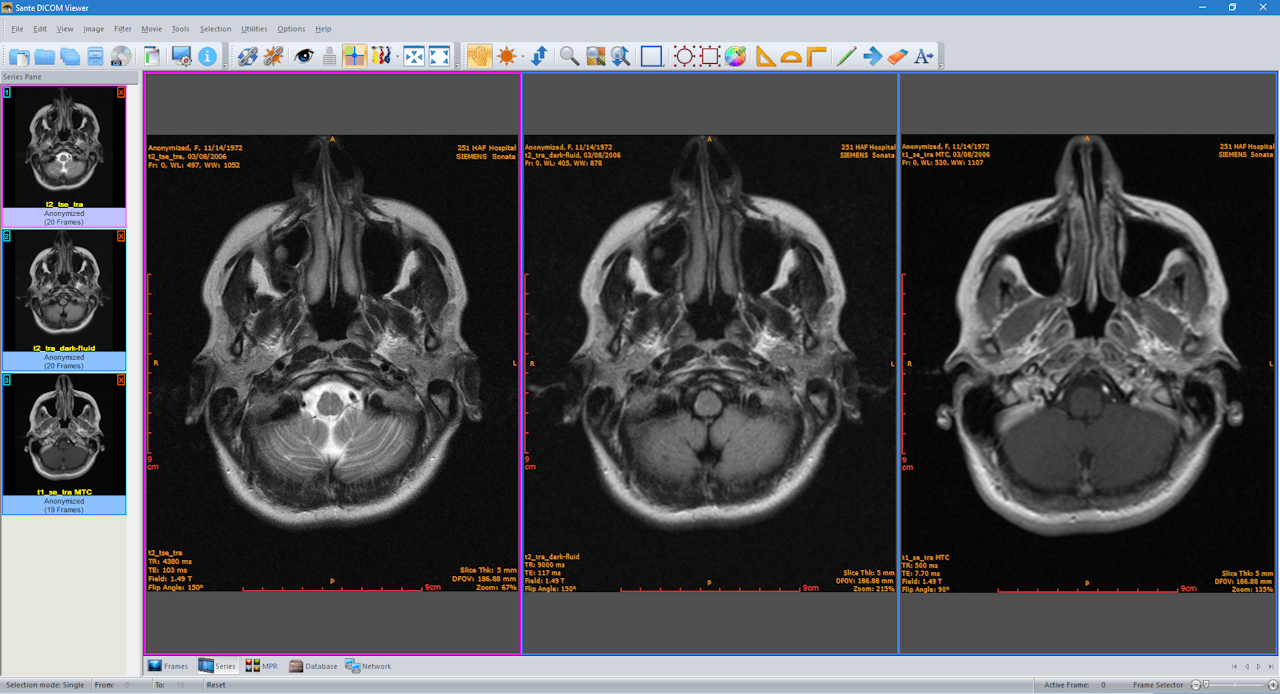
Sante DICOM Editor 3D is a professional DICOM editor, 2D/3D viewer, anonymizer, converter, dicomizer, PACS client, mini PACS server, patient CD/DVD burner (with viewer) and much more.
The unique viewer
Sante DICOM Editor 3D is not a "yet another DICOM viewer" constructed with freely available libraries such as dcmtk, itk and vtk, like hundreds of other DICOM viewers which differ from each other only in the appearance, menus, panels and dialog boxes. It is a unique program with unique capabilities, designed and developed in-house by us, from the ground up, with the most advanced programming tools and it is the result of research and development on DICOM imaging of the last two decades.
The powerful editor
Sante DICOM Editor 3D has all the features of Sante DICOM Editor plus the capability of creating 3D models. Sante DICOM Editor is the industry-leading post processing application for DICOM file editing, conversion and handling, it is used by almost all the large corporations and medical equipment manufacturers, and it is the DICOM editor of choice of the greatest universities and hospitals of the world. Among others, it lets the user to edit and modify DICOM files, to add and remove attributes, and even edit and modify sequence attributes.
Features and benefits
Powerful 2D/3D DICOM workstation, viewer and editor
Perpetual license that never expires.
Free updates and free technical support for product's lifetime
PACS client that supports all the DICOM network services (C-FIND SCU/SCP, C-MOVE SCU/SCP, C-STORE SCU/SCP, C-GET SCU/SCP, C-ECHO SCU/SCP)
It can be used as a mini PACS server as well
(the number of stored patients/studies depends on disk size only)
Command line switches for integration with PACS servers (learn more.)
Support of all charsets (latin, chinese, japanese, korean, cyrillic, arabic, greek, turkish, etc.)
Creation of 3D model by the Isosurface technique
Creation of 3D model by the Transfer Function (Volume rendering) technique
Creation of 3D model by the Maximum Intensity Projection (MIP) technique
Compatible with all modalities (CT, MR, NM, US, XA, MG, CR etc.), all manufacturers and all DICOM 3.0 and NEMA 2 file types.
Editing and modification of DICOM files (even of sequence attributes)
Simultaneous editing of all DICOM files of a series/study
DICOMDIR editor
Dual monitor support (new in version 3, learn more.)
Structured Report support (new in version 3.3)
Presentation State file editor
Structured Report file editor
Printing to DICOM printers and Windows printers
DICOM to DICOM conversion, DICOM file modification (transfer syntax, image width and height, color depth, frame insertion, removal, sorting, etc.)
Built-in Anonymizer, burned-in annotations removal (Patient data de-identification, suitable as well for avoiding issues with the GDPR regulation 2016/679 of EU)
Built-in Dicomizer: DICOM file creation from video files (avi, wmv) and plain image formats (jpeg, jpeg2000, tiff, bmp, and png)
Ultrasound region calibration module support (calibrated Ultrasound measurements)
Merging of DICOM files
Creation of DICOM CD/DVD disks with viewer
Support of Epson and Primera CD/DVD Disk Publishers (robots)
Contrast Agent Probe
Comparison with Sante DICOM Viewer 3D Pro
Sante DICOM Editor 3D has all the features of Sante DICOM Viewer Pro plus
DICOM file editor
Batch modification of headers of DICOM files (insert/modify/delete fields), with use of templates
DICOM to DICOM Converter and DICOM file modification (transfer syntax, image width and height, color depth, frame insertion, removal, sorting, etc.)
Built-in Anonymizer with use of templates (user can define extra fields for anonymizing, and its values, e.g. blank or a specified term like "anonymized")
Built-in Dicomizer: DICOM file creation from any video source and simple image formats (jpeg, jpeg2000, tiff, bmp and png)
Single multi-frame DICOM file creation from multiple DICOM files of the same series
Splitting of a multi-frame DICOM file to multiple single frame DICOM files
Batch conversion of old NEMA 2 or non-Part 10 files to DICOM 3 Part 10 files
Batch conversion of DICOM 3 files to NEMA 2 format
Batch conversion of non-compressed DICOM files to compressed (JPEG, JPEG Lossless)
Batch conversion of compressed DICOM files to a non-compressed DICOM format
Batch anonymizing with use of templates (user can define extra fields for anonymizing and its values, e.g. blank or a specified term like "anonymized")
Batch conversion of simple images (jpeg, tiff, bitmap, gif, png) to single frame or multi-frame DICOM files, with use of templates
Batch conversion of movies (avi files) to multi-frame DICOM files, with use of templates
Contrast Agent Probe
Curved Multi-planar Reconstruction (Curved MPR)
Whats New
Код:
https://www.santesoft.com/win/sante-dicom-editor-3d/whats_new.html

HomePage:
Код:
https://www.santesoft.com

-:DOWNLOAD FROM LINKS:-​
Download From RapidGator
Код:
https://rapidgator.net/file/f2b6f9763387c446f143bc1774ff82b4/SDE3D.rar

Download From NitroFlare
Код:
https://nitro.download/view/8ECA6BEC1CAAFE6/SDE3D.rar
 
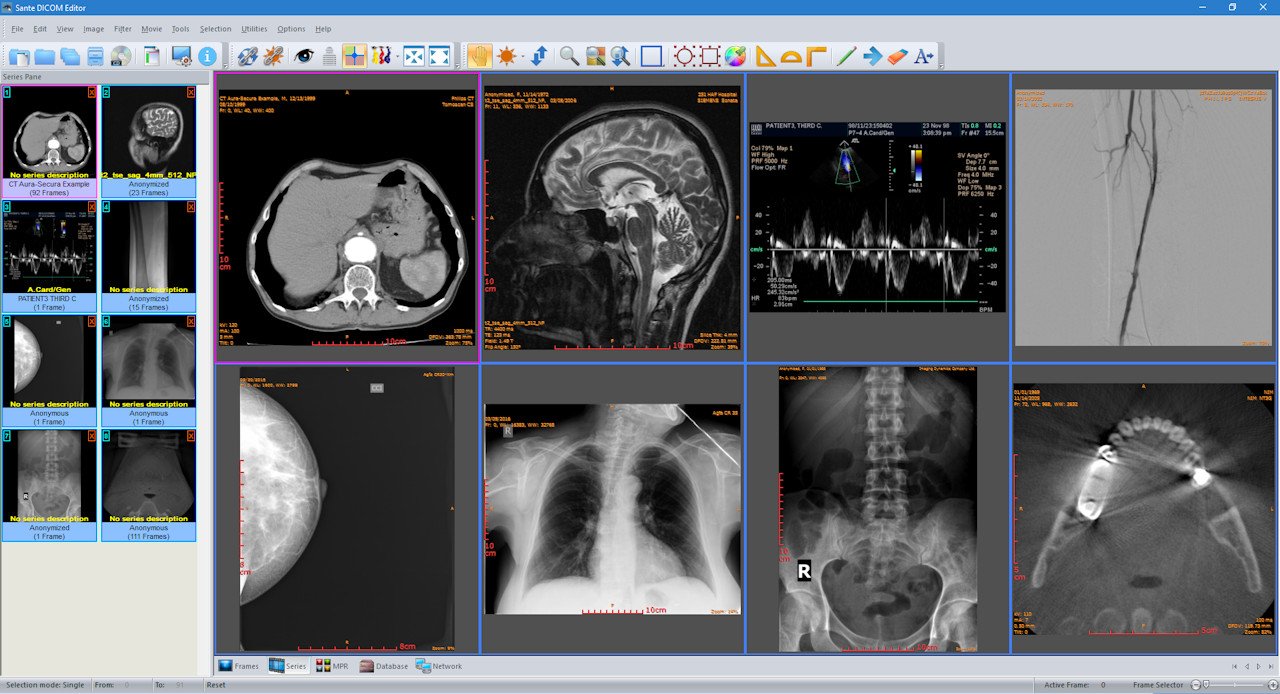
Sante DICOM Editor 7.9.4


SDE794.jpg


File size: 105.1 MB
​


Sante DICOM Editor is a professional DICOM editor, viewer, anonymizer, converter, dicomizer, PACS client, mini PACS server, patient CD/DVD burner (with viewer) and much more.
The unique viewer
Sante DICOM Editor is not a "yet another DICOM viewer" constructed with freely available libraries such as dcmtk, itk and vtk, like hundreds of other DICOM viewers which differ from each other only in the appearance, menus, panels and dialog boxes. It is a unique program with unique capabilities, designed and developed in-house by us, from the ground up, with the most advanced programming tools and it is the result of research and development on DICOM imaging of the last two decades.
The powerful editor
Sante DICOM Editor is the industry-leading post processing application for DICOM file editing, conversion and handling, it is used by almost all the large corporations and medical equipment manufacturers, and it is the DICOM editor of choice of the greatest universities and hospitals of the world. Among others, it lets the user to edit and modify DICOM files, to add and remove attributes, and even edit and modify sequence attributes.
Features and benefits
Powerful DICOM workstation, viewer and editor
Perpetual license that never expires.
Free updates and free technical support for product's lifetime
PACS client that supports all the DICOM network services (C-FIND SCU/SCP, C-MOVE SCU/SCP, C-STORE SCU/SCP, C-GET SCU/SCP, C-ECHO SCU/SCP)
It can be used as a mini PACS server as well
(the number of stored patients/studies depends on disk size only)
Command line switches for integration with PACS servers (learn more.)
Support of all charsets (latin, chinese, japanese, korean, cyrillic, arabic, greek, turkish, etc.)
Compatible with all modalities (CT, MR, NM, US, XA, MG, CR etc.), all manufacturers and all DICOM 3.0 and NEMA 2 file types.
Editing and modification of DICOM files (even of sequence attributes)
Simultaneous editing of all DICOM files of a series/study
DICOMDIR editor
Dual monitor support (new in version 6, learn more.)
Structured Report support (new in version 6.3)
Presentation State file editor
Structured Report file editor
Printing to DICOM printers and Windows printers
DICOM to DICOM conversion, DICOM file modification (transfer syntax, image width and height, color depth, frame insertion, removal, sorting, etc.)
Built-in Anonymizer, burned-in annotations removal (Patient data de-identification, suitable as well for avoiding issues with the GDPR regulation 2016/679 of EU)
Built-in Dicomizer: DICOM file creation from video files (avi, wmv) and plain image formats (jpeg, jpeg2000, tiff, bmp, and png)
Ultrasound region calibration module support (calibrated Ultrasound measurements)
Merging of DICOM files
Creation of DICOM CD/DVD disks with viewer
Support of Epson and Primera CD/DVD Disk Publishers (robots)
Contrast Agent Probe
Comparison with Sante DICOM Viewer Pro
Sante DICOM Editor has all the features of Sante DICOM Viewer Pro plus
DICOM file editor
Batch modification of headers of DICOM files (insert/modify/delete fields), with use of templates
DICOM to DICOM Converter and DICOM file modification (transfer syntax, image width and height, color depth, frame insertion, removal, sorting, etc.)
Built-in Anonymizer with use of templates (user can define extra fields for anonymizing, and its values, e.g. blank or a specified term like "anonymized")
Built-in Dicomizer: DICOM file creation from any video source and simple image formats (jpeg, jpeg2000, tiff, bmp and png)
Single multi-frame DICOM file creation from multiple DICOM files of the same series
Splitting of a multi-frame DICOM file to multiple single frame DICOM files
Batch conversion of old NEMA 2 or non-Part 10 files to DICOM 3 Part 10 files
Batch conversion of DICOM 3 files to NEMA 2 format
Batch conversion of non-compressed DICOM files to compressed (JPEG, JPEG Lossless)
Batch conversion of compressed DICOM files to a non-compressed DICOM format
Batch anonymizing with use of templates (user can define extra fields for anonymizing and its values, e.g. blank or a specified term like "anonymized")
Batch conversion of simple images (jpeg, tiff, bitmap, gif, png) to single frame or multi-frame DICOM files, with use of templates
Batch conversion of movies (avi files) to multi-frame DICOM files, with use of templates
Contrast Agent Probe
Curved Multi-planar Reconstruction (Curved MPR)
Whats New
Код:
https://www.santesoft.com/win/sante-dicom-editor/whats_new.html

HomePage:
Код:
https://www.santesoft.com

-:DOWNLOAD FROM LINKS:-​
Download From RapidGator
Код:
https://rapidgator.net/file/cd5660183380939d7ab2528c7a72419e/SDE794.rar

Download From NitroFlare
Код:
https://nitro.download/view/FC6CD7B7E93CE1B/SDE794.rar
 
Sante DICOM Viewer 3D Pro 4.9.4


SDV3D494.png


File size: 114 MB
​


Sante DICOM Viewer 3D Pro is a professional 2D/3D DICOM viewer, anonymizer, converter, PACS client, mini PACS server, patient CD/DVD burner (with viewer) and much more.
The unique viewer
Sante DICOM Viewer 3D Pro is not a "yet another DICOM viewer" constructed with freely available libraries such as dcmtk, itk and vtk, like hundreds of other DICOM viewers which differ from each other only in the appearance, menus, panels and dialog boxes. It is a unique program with unique capabilities, designed and developed in-house by us, from the ground up, with the most advanced programming tools and it is the result of research and development on DICOM imaging of the last two decades.
Sante DICOM Viewer 3D Pro has all the features of Sante DICOM Viewer Pro plus the capability of creating 3D models. Sante DICOM Viewer Pro has been developed since 1999 and it is one of the most popular professional DICOM viewers worldwide.
Features and benefits
Powerful 2D/3D DICOM workstation and viewer
Perpetual license that never expires.
Free updates and free technical support for product's lifetime
PACS client that supports all the DICOM network services (C-FIND SCU/SCP, C-MOVE SCU/SCP, C-STORE SCU/SCP, C-GET SCU/SCP, C-ECHO SCU/SCP)
It can be used as a mini PACS server as well
(the number of stored patients/studies depends on disk size only)
Command line switches for integration with PACS servers (learn more...)
Easy to use with native Windows "look and feel"
Support of all charsets (latin, chinese, japanese, korean, cyrillic, arabic, greek, turkish, etc.)
On-line, case sensitive help
Compatible with all modalities (CT, MR, NM, US, XA, MG, CR etc.), all manufacturers and all DICOM 3.0 and NEMA 2 file types.
Supports also jpeg, jpeg2000, tiff, png, and bitmap image formats
Dual monitor support (new in version 3, learn more...)
Structured Report support (new in version 3.3)
Built-in DICOM File Editor
Built-in DICOM Multi-File Editor
Creation of 3D model by the Isosurface technique
Creation of 3D model by the Transfer Function (Volume rendering) technique
Creation of 3D model by the Maximum Intensity Projection (MIP) technique
User option for full-scale or half-scale 3D models
Full support of DICOMDIRs (view, open, create, edit, image/series selection for viewing or/and for transferring in another folder)
Built-in Anonymizer (Patient data de-identification, suitable as well for avoiding issues with the GDPR regulation 2016/679 of EU)
Scout image/localizer support
Support for Overlays
Study comparison side-by-side
Printing to DICOM printers and Windows printers
Creation of DICOM CD/DVD disks with viewer
Support of Epson and Primera CD/DVD Disk Publishers (robots)
Advanced ROI selection tools (free hand, magic wand, eye-dropper, rectangle, circle, ellipse, polygon)
Statistical analysis of ROIs (pixel count, min value, max value, mean value, standard deviation, area, volume)
Synchronized frame view between the series
Synchronized level-window between the series
Synchronized field of view between the series
Measurement tools (distance, angle, cobb angle, polyline, area, volume)
Ultrasound region calibration module support (calibrated Ultrasound measurements)
Annotation texts and arrows
Interpolated (smooth) zoom and advanced zoom tools (e.g. zoom dynamic, zoom window)
Comparison of DICOM files tag by tag
Built-in Hexadecimal File Editor
Built-in Hexadecimal DICOM Viewer
File searching with criteria (patient name, study ID etc.), within hard disk's or CD's folders
File searching by tag's existence and/or tag's value, within hard disk's or CD's folders
External DICOM dictionary support
Image orientation (flip, rotate)
Image and canvas resizing
Image processing filters (blur, sharpening, convolution masks, min mask, max mask, median mask etc.)
Subtraction filter for DSA
Video (wmv) creation with or without annotations
Batch convert to image formats (JPEG, TIFF, BMP, PNG, etc.)
Batch anonymizing, with ability of burned-in annotations removal
Export DICOM Headers to text files
Orthogonal Multi-planar Reconstruction (MPR)
Easy to use with native Windows "look and feel"
Windows 11/10/8.1/8/7/ and Vista compatible
Whats New
Код:
https://www.santesoft.com/win/sante-dicom-viewer-3d-pro/whats_new.html

HomePage:
Код:
https://www.santesoft.com/

-:DOWNLOAD FROM LINKS:-​
Download From RapidGator
Код:
https://rapidgator.net/file/d73d0b2c6b7c6fb27ec19a820f1f5f05/SDV3D494.rar

Download From NitroFlare
Код:
https://nitro.download/view/7DD5CF2ECE3313B/SDV3D494.rar
 
Sante DICOM Viewer Pro 11.9.4


SDVP1194.png


File size: 106 MB
​


Sante DICOM Viewer Pro is a professional DICOM viewer, anonymizer, converter, PACS client, mini PACS server, patient CD/DVD burner (with viewer) and much more.
The unique viewer
Sante DICOM Viewer Pro is not a "yet another DICOM viewer" constructed with freely available libraries such as dcmtk, itk and vtk, like hundreds of other DICOM viewers which differ from each other only in the appearance, menus, panels and dialog boxes. It is a unique program with unique capabilities, designed and developed in-house by us, from the ground up, with the most advanced programming tools and it is the result of research and development on DICOM imaging of the last two decades. Sante DICOM Viewer Pro has been developed since 1999 and it is one of the most popular professional DICOM viewers worldwide.
Features and benefits
Powerful DICOM workstation and viewer
Perpetual license that never expires.
Free updates and free technical support for product's lifetime
PACS client that supports all the DICOM network services (C-FIND SCU/SCP, C-MOVE SCU/SCP, C-STORE SCU/SCP, C-GET SCU/SCP, C-ECHO SCU/SCP)
It can be used as a mini PACS server as well
(the number of stored patients/studies depends on disk size only)
Command line switches for integration with PACS servers (learn more...)
Easy to use with native Windows "look and feel"
Support of all charsets (latin, chinese, japanese, korean, cyrillic, arabic, greek, turkish, etc.)
On-line, case sensitive help
Compatible with all modalities (CT, MR, NM, US, XA, MG, CR etc.), all manufacturers and all DICOM 3.0 and NEMA 2 file types.
Supports also jpeg, jpeg2000, tiff, png, and bitmap image formats
Dual monitor support (new in version 10, learn more...)
Structured Report support (new in version 10.3)
Built-in DICOM File Editor
Built-in DICOM Multi-File Editor
Full support of DICOMDIRs (view, open, create, edit, image/series selection for viewing or/and for transferring in another folder)
Built-in Anonymizer (Patient data de-identification, suitable as well for avoiding issues with the GDPR regulation 2016/679 of EU)
Scout image/localizer support
Support for Overlays
Study comparison side-by-side
Printing to DICOM printers and Windows printers
Creation of DICOM CD/DVD disks with viewer
Support of Epson and Primera CD/DVD Disk Publishers (robots)
Advanced ROI selection tools (free hand, magic wand, eye-dropper, rectangle, circle, ellipse, polygon)
Statistical analysis of ROIs (pixel count, min value, max value, mean value, standard deviation, area, volume)
Synchronized frame view between the series
Synchronized level-window between the series
Synchronized field of view between the series
Measurement tools (distance, angle, cobb angle, polyline, area, volume)
Ultrasound region calibration module support (calibrated Ultrasound measurements)
Annotation texts and arrows
Interpolated (smooth) zoom and advanced zoom tools (e.g. zoom dynamic, zoom window)
Comparison of DICOM files tag by tag
Built-in Hexadecimal File Editor
Built-in Hexadecimal DICOM Viewer
File searching with criteria (patient name, study ID etc.), within hard disk's or CD's folders
File searching by tag's existence and/or tag's value, within hard disk's or CD's folders
External DICOM dictionary support
Image orientation (flip, rotate)
Image and canvas resizing
Image processing filters (blur, sharpening, convolution masks, min mask, max mask, median mask etc.)
Subtraction filter for DSA
Video (wmv) creation with or without annotations
Batch convert to image formats (JPEG, TIFF, BMP, PNG, etc.)
Batch anonymizing, with ability of burned-in annotations removal
Export DICOM Headers to text files
Orthogonal Multi-planar Reconstruction (MPR)
Easy to use with native Windows "look and feel"
Windows 11/10/8.1/8/7/ and Vista compatible
Whats New
Код:
https://www.santesoft.com/win/sante-dicom-viewer-pro/whats_new.html

HomePage:
Код:
https://www.santesoft.com/

-:DOWNLOAD FROM LINKS:-​
Download From RapidGator
Код:
https://rapidgator.net/file/98a8d4b3a3a1756753d5ddb2180d3d3d/SDVP1194.rar

Download From NitroFlare
Код:
https://nitro.download/view/207558D1816C584/SDVP1194.rar
 
Tubemate Downloader 3.27.10.0


TD327100.jpg


File size: 36.3 MB
​


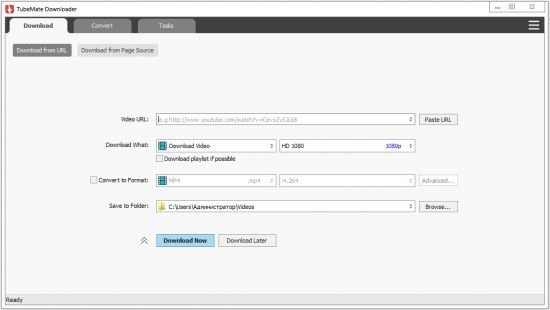
Windows TubeMate is a smart application that lets you snag any clip you want from the main video hosting sites and convert them while downloading or after that. If you need a simple and efficient video downloading tool, you can give it a try.
Features
Online video downloader
TubeMate can download videos from YouTube, Facebook, Instagram, Dailymotion, and thousands of other video sites.
HD video downloader
TubeMate can download UHD 8K, 5K, 4K, QHD 2K, HD 1080p and 720p videos from YouTube.
YouTube to MP3 converter
TubeMate allows you to download only audio stream from YouTube, and save it as MP3. You don't need to download the entire video file.
Playlist downloader
TubeMate enables you to download entire or part of a playlist with just a few clicks.
Download accelerator
TubeMate features a multi-thread download acceleration engine that increases your download speeds by up to 500% or even more.
Download multiple videos at a time
TubeMate supports simultaneous downloads. It allows you to download more than one video at the same time.
Pause and resume downloads
You can pause and resume your downloads at any time.
Support drag-and-drop
You may directly drag and drop video link from your browser to the drop box or app window to start a download. You don't even need to copy and paste video URL.
Preview video/audio while downloading
While downloading, you can click the 'Preview' button to view incomplete file and make sure the content is you want.
Video and audio converter
TubeMate can convert your disk video/audio files between MP4, FLV, AVI, WMV, MOV, MP3, AAC, and any other formats for any device.
Video optimizer
TubeMate automatically optimizes downloaded videos for popular mobile devices, so you can watch downloaded videos smoothly on your iPhone, iPad, Android phone, and other devices.
Video to MP3 converter
TubeMate allows you to extract audio stream from video and save it as MP3, WAV, AC3, or other audio format.
Ready-made presets
TubeMate provides ready-made presets for all video and audio formats. You can also customize your own video/audio formats.
iTunes compatible
Optionally, TubeMate can add downloaded video/music to your iTunes library automatically, so you can easily synchronize your videos and music to your iPhone, iPad, iPod.
Media player
TubeMate contains an easy-to-use media player for playing files that Windows Media Player cannot play.
Whats New
Updates: official site does not provide any info about changes in this version

HomePage:
Код:
http://www.windowstubemate.com

-:DOWNLOAD FROM LINKS:-​
Download From RapidGator
Код:
https://rapidgator.net/file/1923df829aea9e8c1b90490710652c59/TD327100.rar

Download From NitroFlare
Код:
https://nitro.download/view/5F778EB0AFBAFF6/TD327100.rar
 
WinSnap 5.3.1 Multilingual


W531-M.png


File size: 5 MB
​


WinSnap is a fast and user-friendly utility for taking and editing screenshots. It easily captures windows of non-rectangular form with transparent backgrounds including Aero Glass and instantly enhances screenshots with professional-looking shadows, reflections, highlights, outlines, watermarks and color effects. Moreover, it allows you to quickly edit and annotate screenshots afterwards.
Here are some key features of "WinSnap"
• Flexible screen capture capabilities
• Smoothing shadow effect in Photoshop style
• Powerful image processing and basic canvas transformations
• Support of various image formats and advanced auto-save options
• Easy Web publishing and E-Mail sending
• Multilingual user interface (Unicode based)
• Easy makes screenshots of windows with rounded corners
• WinSnap saves info about window form and adds real smoothing shadows.
• Alpha-Channel and PNG/TIFF transparency are supported.
• Unique "Application" capture mode allows you to capture all visible windows of the foreground application with one click.
• Unique "Multi-Object" capture mode allows you to select multiple windows on the screen and easy combine them into one screenshot.
• Basic coloring effects and canvas transformations.
• Advanced auto-save and auto-copy options.
• Configurable External Tools menu to open image editors and optimizers.
• Usual keyboard and mouse control (Print Screen replacement).
• Make all this work with one 100-kb application - smaller than Paint!
WinSnap 5 is the major update of our popular screen capture app. Main improvements include: pixelate tool, advanced resize feature, configurable outline and shadow effect for shapes and text, redesigned user interface and much more. Here is the new default Light UI style.
Quick demonstration of new text effects and pixelate tool.
WinSnap 5 is free for all registered users - just download and install it! If you prefer WinSnap in a language other than English, please wait for upcoming 5.x releases. Language files need to be updated too.

HomePage:
Код:
https://www.ntwind.com

-:DOWNLOAD FROM LINKS:-​
Download From RapidGator
Код:
https://rapidgator.net/file/efbe4342e98473edfa352be14b430ae9/W531.M.rar

Download From NitroFlare
Код:
https://nitro.download/view/6223EA1491C75FE/W531.M.rar
 
WinSnap 5.3.1 Multilingual Portable


W531-M.png


File size: 5 MB
​


WinSnap is a fast and user-friendly utility for taking and editing screenshots. It easily captures windows of non-rectangular form with transparent backgrounds including Aero Glass and instantly enhances screenshots with professional-looking shadows, reflections, highlights, outlines, watermarks and color effects. Moreover, it allows you to quickly edit and annotate screenshots afterwards.
Here are some key features of "WinSnap"
• Flexible screen capture capabilities
• Smoothing shadow effect in Photoshop style
• Powerful image processing and basic canvas transformations
• Support of various image formats and advanced auto-save options
• Easy Web publishing and E-Mail sending
• Multilingual user interface (Unicode based)
• Easy makes screenshots of windows with rounded corners
• WinSnap saves info about window form and adds real smoothing shadows.
• Alpha-Channel and PNG/TIFF transparency are supported.
• Unique "Application" capture mode allows you to capture all visible windows of the foreground application with one click.
• Unique "Multi-Object" capture mode allows you to select multiple windows on the screen and easy combine them into one screenshot.
• Basic coloring effects and canvas transformations.
• Advanced auto-save and auto-copy options.
• Configurable External Tools menu to open image editors and optimizers.
• Usual keyboard and mouse control (Print Screen replacement).
• Make all this work with one 100-kb application - smaller than Paint!
WinSnap 5 is the major update of our popular screen capture app. Main improvements include: pixelate tool, advanced resize feature, configurable outline and shadow effect for shapes and text, redesigned user interface and much more. Here is the new default Light UI style.
Quick demonstration of new text effects and pixelate tool.
WinSnap 5 is free for all registered users - just download and install it! If you prefer WinSnap in a language other than English, please wait for upcoming 5.x releases. Language files need to be updated too.

HomePage:
Код:
https://www.ntwind.com

-:DOWNLOAD FROM LINKS:-​
Download From RapidGator
Код:
https://rapidgator.net/file/0355087309e3583c70368c3c6d3f1ec3/W531.MP.rar

Download From NitroFlare
Код:
https://nitro.download/view/5CB166012874465/W531.MP.rar
 
XnView 2.51 Complete Multilingual


X251-CMP.gif


File size: 41 MB
​


XnView, a software to view and convert graphic files, really simple to use. Support of more than 400 graphics formats. The most important features are: Import about 400 graphic file formats and Export about 50 graphic file formats.
It has the features
Import about 400 graphic file formats
Export about 50 graphic file formats
Multipage TIFF, Animated GIF, Animated ICO support
Image IPTC, EXIF metadata support
EXIF auto rotation support
IPTC editing
Resize, rotate, crop support
Lossless rotate & crop (jpeg) support
Adjust brightness, contrast...
Auto levels, contrast
Modify number of colors
Apply filters (blur, average, emboss, ...)
Apply effects (lens, wave, ...)
Fullscreen mode
Slide show with effects
Batch convert, batch rename
Create WEB page easily
Screen capture
Create contact Sheet
Create or edit Multi-page file (TIFF, DCX, LDF)
TWAIN & WIA support (Windows only)
Print support (Windows only)
Drag & Drop support (Windows only)
Compare image side by side
Filmstrip layout
44 languages support (Windows only)
And many many other things...
No Adware, No Spyware

HomePage:
Код:
www.xnview.com/

-:DOWNLOAD FROM LINKS:-​
Download From RapidGator
Код:
https://rapidgator.net/file/5de97c731a5e040e14e4ab3f739c870b/X251.CM.rar

Download From NitroFlare
Код:
https://nitro.download/view/BB620B07F0F56E1/X251.CM.rar
 
XnView 2.51 Complete Multilingual Portable


X251-CMP.gif


File size: 41 MB
​


XnView, a software to view and convert graphic files, really simple to use. Support of more than 400 graphics formats. The most important features are: Import about 400 graphic file formats and Export about 50 graphic file formats.
It has the features
Import about 400 graphic file formats
Export about 50 graphic file formats
Multipage TIFF, Animated GIF, Animated ICO support
Image IPTC, EXIF metadata support
EXIF auto rotation support
IPTC editing
Resize, rotate, crop support
Lossless rotate & crop (jpeg) support
Adjust brightness, contrast...
Auto levels, contrast
Modify number of colors
Apply filters (blur, average, emboss, ...)
Apply effects (lens, wave, ...)
Fullscreen mode
Slide show with effects
Batch convert, batch rename
Create WEB page easily
Screen capture
Create contact Sheet
Create or edit Multi-page file (TIFF, DCX, LDF)
TWAIN & WIA support (Windows only)
Print support (Windows only)
Drag & Drop support (Windows only)
Compare image side by side
Filmstrip layout
44 languages support (Windows only)
And many many other things...
No Adware, No Spyware

HomePage:
Код:
www.xnview.com/

-:DOWNLOAD FROM LINKS:-​
Download From RapidGator
Код:
https://rapidgator.net/file/11cd285774f224ad9f5c503b6c76afe1/X251.CMP.rar

Download From NitroFlare
Код:
https://nitro.download/view/6E45D4A7F4B688D/X251.CMP.rar
 
YT Downloader 7.11.12


YD71112.png


File size: 32.97 MB
​


YT Downloader (ex YTD Youtube Downloader) is a simple and easy-to-use video download application. It helps you to download and convert videos from YouTube and hundreds of other video sites. YT Downloader increases your download speeds by up to 500%.
Features
YT Downloader is the easiest and the fastest way to download and convert videos from YouTube and other video sites.
Download videos from YouTube and hundreds of video sites
YT Downloader can download videos from YouTube, Facebook, Dailymotion, Vimeo, Metacafe, and hundreds of other video sites. After downloading your video files, you'll be able to watch them smoothly using any media player, even if you don't have internet access.
Accelerate your downloads
YT Downloader features an advanced download acceleration engine that lets you download videos 500% faster than normal speed.
Download 4K, 2K, HD 1080p and 720p videos from YouTube
You can also download 3D videos from YouTube if they are available.
YouTube to MP3
YT Downloader allows you to download only audio stream from YouTube, and save it as MP3. You don't need to download the entire video file. The audio stream is small, you can download it within seconds.
Download whole playlist from YouTube
Just enter a YouTube playlist ID, YT Downloader will download all or selected videos in the playlist from YouTube for you.
Support drag-and-drop
You can directly drag and drop video link from your browser to the drop box or program window to start a download. You don't even need to copy and paste video URL.
Download multiple videos at a time
YT Downloader supports simultaneous downloads. It allows you to download more than one video at same time and safe time.
Pause and resume downloads
You can pause, resume, or cancel your downloads if you need more connection to perform other important tasks.
Preview videos while downloading
While downloading, you can click the Preview button to play incomplete video and make sure the content you are downloading is really the content of your choice.
Video and audio converter
YT Downloader is also a powerful video/audio converter. It can convert local video/audio files to any format you wish so that they are playable everywhere.
Video to MP3
YT Downloader allows you to extract audio streams from videos and save them as mp3, wav, wma, ac3, ringtone, or other audio format.
Support all popular video and audio formats
YT Downloader allows you to save downloaded videos in any format for any device, so you can watch them smoothly on your PC, iPhone, iPad, Android phone, and other device.
Ready-made presets
YT Downloader provides ready-made presets for all video and audio formats. You can also custom output video/audio format settings.
iTunes compatible
Optionally, YT Downloader can add downloaded video/music to your iTunes library automatically, so you can easily synchronize your videos and music to your iPhone, iPad, iPod.
Media Player
YT Downloader includes a simple and easy-to-use media player. If your Windows Media Player cannot play your video/audio files, you may try our Media Player.
What's new
• official site does not provide any info about changes in this version

HomePage:
Код:
http://www.ytdapp.com/index.html

-:DOWNLOAD FROM LINKS:-​
Download From RapidGator
Код:
https://rapidgator.net/file/e7d7f1f48322b8eaf7d31214f6447f33/YD71112.rar

Download From NitroFlare
Код:
https://nitro.download/view/AAF18858692289C/YD71112.rar
 
AbyssMedia Quick Batch File Compiler 5.2.0.0


AQBFC5200.jpg


File Size: 7.2 MB
​


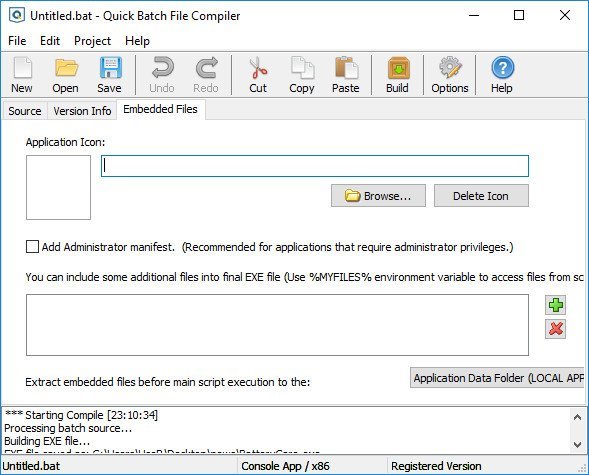
Quick Batch File Compiler convert your batch files into actual program (.EXE format) in one click. This program may be run on Windows XP/Vista/7/8/10/11 without any limitations. An .EXE file is much harder to casually reverse-engineer, so this could be a way to conceal a particular batch file's operations from an end user. Content of your batch file will be encrypted and protected from changes.
Quick Batch File Compiler also lets you set various resources in the .EXE file, such as its description, the company name, version information and even the application icon. In additional, you may include any files to compiled exe file and use it during execution.
Main Features
Creating a 32-bit or 64-bit applications in a single click.
Save/Load Project Options
Open context help for batch commands by pressing F1 in editor
Embedded files: you can embed files to the compiled executable. This files will be decompressed before script execution and deleted on exit.
Can create Ghost applications without DOS window.
Allows you to select application icon
Allows you to edit Version Info for EXE-file.
Protects contents of a batch file from the non-authorized change
Hides contents of a batch file from viewing.
It is not necessary to be the programmer to create the program
It may be useful for installation and automation tasks
Syntax highlighting of commands inside built-in editor
Can compile any batch file to exe format compatible with XP/Vista/7/8/10.
All compiled files royalty-free
Whats New
Quick Batch File Compiler convert your batch files into actual program (.EXE format) in one click. This program may be run on Windows XP/Vista/7/8/10 without any limitations. An .EXE file is much harder to casually reverse-engineer, so this could be a way to conceal a particular batch file's operations from an end user. Content of your batch file will be encrypted and protected from changes.
Quick Batch File Compiler also lets you set various resources in the .EXE file, such as its description, the company name, version information and even the application icon. In additional, you may include any files to compiled exe file and use it during execution.
Main Features
Creating a 32-bit or 64-bit applications in a single click.
Save/Load Project Options
Open context help for batch commands by pressing F1 in editor
Embedded files: you can embed files to the compiled executable. This files will be decompressed before script execution and deleted on exit.
Can create Ghost applications without DOS window.
Allows you to select application icon
Allows you to edit Version Info for EXE-file.
Protects contents of a batch file from the non-authorized change
Hides contents of a batch file from viewing.
It is not necessary to be the programmer to create the program
It may be useful for installation and automation tasks
Syntax highlighting of commands inside built-in editor
Can compile any batch file to exe format compatible with XP/Vista/7/8/10.
All compiled files royalty-free
Whats New
Код:
http://www.abyssmedia.com/quickbfc/history.shtml

HomePage:
Код:
http://www.abyssmedia.com

-:DOWNLOAD FROM LINKS:-​
Download From RapidGator
Код:
https://rapidgator.net/file/6f46181975835f2fb57272c21f46bbb6/AQBFC5200.rar

Download From NitroFlare
Код:
https://nitro.download/view/90B719923661799/AQBFC5200.rar
 
Назад
Сверху