• Здравствуйте. Сайт заработал в архивном режиме форум www.old.nado.in

Dl4ever Software

Serato DJ Pro 2.5.0 Build 2061 Multilingual

1551910122-serato-dj-pro.png

Windows x64 | Languages: Multilingual | File Size: 626.57 MB
​
Professional DJ software - From the unknown to the greatest, Serato DJ Pro is the most popular DJ software globally. When you're talking about Hip-Hop, Dance, and everything in between, you're looking at the standard.

Rock solid reliability
Serato DJ Pro is renowned for its reliability and trusted by DJs to deliver incredible performances. That's why it powers the world's top artists on some of the biggest stages.

The best hardware
Serato DJ Pro officially supports over 90 pieces of hardware by industry leaders. Every piece is tightly integrated to ensure the best experience possible.

Limitless performance
Whatever your style, you can DJ with freedom. Your creative potential will be unlocked through innovative features and an intuitive interface.

New in Serato DJ Pro 2.0:
A range of new features and improvements as Serato DJ became Serato DJ Pro.

- Practice Mode
- New UI with Performance Pad view
- Optimised for high resolution screens
- Bigger Libraries and rock-solid reliability
- Improved help and support
Release Notes Phase support
Now an Official Serato Accessory. Get improved accuracy, reduced latency, and new features when connecting Phase through USB, there's now no need for RCA cables.

Reloop Ready support
A 2-channel controller that combines portability and performance. Equipped with touch-sensitive jog wheels and 16 RGB performance pads to use with the Serato DJ Pro pad modes, including Scratch Bank. Sitting flush on a 13" laptop so you can prepare or practice your sets anywhere.

Offline Locker for Beatsource LINK and Beatport LINK
Store up to 100 tracks on your device to access and play without an internet connection. Note: LINK Pro or LINK Pro+ plans required.

New Expansions window
An improved workflow for exploring and managing your Serato DJ Pro and Expansion Pack licenses and subscriptions.

Other Changes
- Reduced drift for RANE TWELVE, TWELVE MKII, Denon DJ SC5000M Prime, Denon DJ SC6000M Prime and other devices with motorized platters.
- Added Instant Start feature for the RANE TWELVE, TWELVE MKII, Denon DJ SC5000M Prime, Denon DJ SC6000M Prime .
- Added the ability to adjust the Sampler master volume on the RANE ONE using Shift + Beats Encoder.
- Fixed an issue for the RANE ONE where audio was played back incorrectly at 45rpm setting.
- Fixed an issue on the RANE ONE where playback would stop after connecting a second laptop.
- Fixed an issue where the BPM display on the RANE TWELVE MKII was slow to update on macOS Big Sur.
- Fixed an issue for the Roland DJ-202 where the mic input was not recorded when recording the Mix or Video Mix sources.
- Fixed an issue for the Pioneer DJ DDJ-SX where Mic 1 and Mic 2 were not included when using the Make Audio Available to Other Applications feature.
- Fixed an issue for the Denon DJ MC7000 and Roland DJ-505 where the mic input was not included when using the Use Laptop Speakers and Make Audio Available to Other Applications features.
- Fixed an issue where poor screen performance occurred on HID devices when repetitively triggering cue/hot cues after loading a track.
- Fixed a crash when connecting the Numark NV on Mac.
- The DVS expansion pack is now automatically enabled after activation.
- The DVS expansion pack is always visible in the Setup -> Expansion Packs tab if activated (no longer requires hardware to be connected).
The Setup -> CD/Vinyl tab is visible when the DVS expansion pack is enabled (no longer requires hardware to be connected).
- Serato DJ Pro can no longer be installed on OS X 10.11 El Capitan or below.
- Removed drivers for non-supported operating systems.
- Updated look for in-app notifications.
- Fixed an issue where Scratch Banks can disappear while quick loading and switching between tracks in different banks.
- Fixed an issue where the Beat Matching Display was not aligned after an Instant Double.
- Fixed an issue where "Preparing Apple Music Library" popup was dismissed too early.
- Improved performance of loading streaming libraries.
- Fixed a performance issue when loading the Top 100 playlist for Beatport.
- Fixed an issue where manually entering a BPM for a Beatport or Beatsource track would be overwritten.
- Fixed an issue where clicking the Check for Updates button would not work.
- Fixed crashes when using the Use Laptop Speakers feature.
- Fixed crashes when using the Make Audio Available to Other Applications feature.
- Fixed a crash when deleting streaming tracks while playing a streaming track.
- Fixed a crash when accessing files.
- Fixed a crash on shutdown.
System Requirements:
- Operating System: Windows 10 (64-bit)
- Processor: i3: 1.07GHz, i5: 1.07GHz, i7: 1.07GHz, i9: 1.07GHz
- Screen Resolution: 1280 x 720
- Memory: 4 GB
- Free HDD Space: 5 GB

-:DOWNLOAD FROMLINKS:-
NitroFlare
Код:
https://nitroflare.com/view/E15D8D3A23856C4/SDJ.2.5.0.rar

RapidGator
Код:
https://rapidgator.net/file/379f6bb69373c15d2e76b2d49263382d/SDJ.2.5.0.rar.html


​
 
AbleBits Add-ins Collection for Outlook 2019.1.590.1655


th-L7h-ZVkjn-Ri-Gn098-Ejim-QDmy7-ZFj-Kgilc.jpg

Languages: English | File Size: 35.19 MB
​
We have rounded up our best add-ins for Microsoft Outlook in one collection to reveal the full power of your inbox and improve your emailing routine. Customize your Outlook with lots of great features like email templates, auto-filling CC or BCC line, checking emails before sending, and more.

Create simple rules to add CC or BCC addresses to your email
Sending copies of your emails to the same people can be really time-consuming and tiring because you have to enter their addresses to the CC or BCC line in Outlook again and again. Besides, there's always a risk to forget to copy your boss or colleagues on a really important email. In Add-ins Collection for Outlook you will find a solution that automatically fills CC and BCC fields so that you don't have to type each person's email address time after time. Simply create a rule in a few clicks and forget about adding CC or BCC emails. Also, you can always BCC yourself, or the entire distribution list.

Spend less time on writing emails
If you are a support service assistant, sales manager, or just extensively use email in your daily work, Template Phrases for Outlook will save hours of your precious time on composing and proofreading the same messages. All it takes is to create a collection of templates and adjust such details as text formatting, hyperlinks, images, attachments, and signatures. Then you just need to double-click to use these ready-to-paste text snippets in your replies. It's also possible to share your Outlook email templates with colleagues, search them on the plug-in pane and add to favorites.

Check emails before sending
Each time your mouse pointer hovers over the Send button, you need to check your email for dozens of critical mistakes that can affect your image and the image of your company. If you are prone to sending rapid fire emails without proofreading them, Outgoing Email Checker for Outlook will be your life saver. It always notifies you to attach a file in Outlook, add a proper salutation, use the correct address in the To field, send your email from the right account, or blind copy your manager. With dozens of things to check before sending an email, one handy reminder add-in will make your messages flawless.

Avoid "Oh, no!" after sending an email
If you frequently send and receive multi-recipient emails, the Reply All functionality in Outlook may be a big trap for you. Whether you need to always hit the Reply All button, or try to avoid sharing emails with unintended recipients, Add-ins Collection has a solution for both. Just press the Alert to Reply All button to make sure you include all initial addressees, or click Prevent Reply All to stop accidental email replies.

Manage all attachments of an email thread from one pane
Often long email communication involves dozens of attached files like images, invoices, PDFs, Word, or Excel documents. If you need to work with attachments, clicking through dozens of emails may be a really frustrating task. The Conversation Attachments add-in makes working with attachments in Outlook truly efficient by displaying all files from an email thread in one pane.

Get untied from your inbox
Picking out the most important emails from the piles of incoming messages may be a real problem. Important Mail Alert will help you keep track of the emails that need your immediate attention. It shows a notification on top of all active windows as soon as most urgent and significant emails arrive. With this smart solution the important stuff gets through to you and you don't need hover over your inbox 24/7.

View and customize the time zone of the message sender
If you often communicate with people outside of your time zone, Sender's Time Zone is for you. It stops you from replying to an Outlook email at an inappropriate moment which can make the recipient less likely to open your message. The tool shows you the local time of the sender and when the message was sent.

Unhide and parse email headers in Outlook
Every single email contains Internet headers that deliver details about the web path the message takes between the sender and recipient. The headers show various issues that may require your attention, such as delivery delays or failing to get through the spam filters. However, in its original format it is fairly hard to read. Thus, we have included the Email Headers Analyzer tool into the collection to display the information in a user-friendly layout and help you troubleshoot mail delivery problems.
Release Notes- Release notes were unavailable when this listing was updated.
Supported versions:

Outlook:
- Outlook 2019
- Outlook 2016
- Outlook 2013
- Outlook 2010
- Outlook 2007
- 32-bit and 64-bit
- Desktop Outlook included in Office 365
- Desktop Outlook included in Office 365 ProPlus

Windows:
- Windows 10
- Windows 8.1
- Windows 8
- Windows 7
- 32-bit and 64-bit

-:DOWNLOAD FROMLINKS:-
NitroFlare
Код:
https://nitroflare.com/view/21CEF5E46A50BFC/Add-ins.Outlook.2019.1.590.1655.rar

RapidGator
Код:
https://rapidgator.net/file/2317936585b0dfd43b5317dfcd7a78ff/Add-ins.Outlook.2019.1.590.1655.rar.html


​
 
Final Draft 12.0.0 Build 57


Kb4-Wpk9f-Srlml9-Sm-Nhbld-Jg-UEHYAAGco.png

Languages: English | File Size: 65.86 MB
​
For over twenty years now, Final Draft has shown itself to be the most vital tool available to the screenwriter. Final Draft has eclipsed all of its competitors because it is the best. It does everything you could possibly think of and then you can write and not think of it at all.

The Industry Standard Screenwriting Software
- The number-one selling screenwriting software in the world
- Used by 95% of the entertainment industry
- Best Choice for Screenwriting
- Final Draft paginates your script to entertainment industry formats
- Over 300 templates for screenplays, teleplays, comics, immersive storytelling, graphic novels, and stage plays

New in Final Draft 12:

Powerful Story Planning
With Final Draft 12, you can brainstorm, visualize, outline, report, tag, collaborate and customize your writing environment like never before.

Enhanced Beat Board
Limitless space to organize your ideas in a customizable, visual way. Plan set pieces, store character research, and much more.

- Beats can be anything - plot points, character arcs, research, or location ideas
- Beats can contain both stylized text and images
- Connect beats using Flow Lines
- Color code for easy reference with a vibrant color palette
- Send Beats directly to your script for easy access

ScriptNotes
Add comments to your script as edit ideas come to you.

- Add ScriptNotes that appear as flags on the page for easy reference
- Click the flag to open and edit notes in a popover
- New flags show how many notes per paragraph
- Popovers sync to ScriptNotes in the Navigator

Night & Focus Mode
Night Mode inverts your screen to cut down on eye strain, while Focus Mode eliminates unwanted distractions.

Track Changes
Keep a record of edits to your script then choose whether to accept or reject them.

Import PDF
Import a PDF and convert it into a fully editable Final Draft file.

Real-Time Collaboration
Collaborate simultaneously with your writing partners IN REAL TIME on both the script and the Beat Board.

Speech to Script
Speech to Script customizes Mac's Dictation feature so you can write your screenplay without ever touching a keyboard.

Insert Images
Insert images on title pages, in the script or even in the Beat Board to help visualize your story.

Smart Type
Use SmartType to cut down on keystrokes by auto-filling commonly used names, locations, and more.

Alternate Dialogue
Use Alternate Dialogue to store as many different versions of lines as you can imagine.

Easier Formatting
Use your creative energy to focus on your story and characters - let Final Draft take care of the rest.

Title Page
All Final Draft templates come with industry standard title pages that are easy to modify, save, and print or save to PDF.

Tab & Enter
Use just the Tab and Enter keys to write your script quickly and easily.

Format Assistant
Be confident your script is professionaly formatted before you print or email it.

Reformat Tool
Speed through the reformatting process when importing different file types.

Automatic Backup Folder
Protect your work with automatic file backups.

Unicode Support
Final Draft 12 ships with fonts which support over 97 different languages. Users can also add their own fonts to type in additional languages.

Pagination & Page Management
Automatically format and paginate to industry standards. Meet page count requirements using Final Draft 12 custom formatting tools.

Keyboard Shortcuts
Customize your workflow and save time.

Agile Production
Final Draft is used by 95% of film, television and multimedia productions to get from page to screen.

Revision Mode
Mark and review all changes to take a script through production. Set your revision colors, lock pages, omit scenes - Final Draft makes it easy.

- Add, edit or remove scene numbers throughout your script
- Lock Pages so your revisions don't affect your page numbers
- Export to PDF in Revision Mode with industry standard colors
- Protect your script with customizable watermarks on PDFs and printed pages
- Omit a scene to make last minute changes without disrupting production

Tags Mode
Powerful reporting, your way - create custom reports on any element of your script.

- Dig into your script by tracking customizable story elements and character traits
- Get ready for production by Tagging costume, props, locations and more
- Break your script down for budgeting and scheduling

System Requirements:
- Microsoft® Windows 10 and above
- Minimum 512 MB of RAM

-:DOWNLOAD FROMLINKS:-
NitroFlare
Код:
https://nitroflare.com/view/E42219F553EDF0E/Final.Draft.12.0.0.57.rar

RapidGator
Код:
https://rapidgator.net/file/1ce0331e38da91d1da90218c39a0be09/Final.Draft.12.0.0.57.rar.html


​
 
Autodesk AutoCAD LT 2022.0.1 Update Only (x64)


th-Wg-Cu-C7j-HJ7l-XWm6-ARPJVG2b-TYb3uq6-Pa.png

x64 | File Size: 181 MB
​
Description:

AutoCAD LT 2022 is designed to develop and detail 2D drawings. The program automates most of the stages of the project. A full set of 2D commands allows you to create drawings, modify them and release working documentation for projects.The program provides built-in support for DWG format and reliability of work, and also contains powerful tools to improve drawing performance.Thanks to this project files can be easily transferred to other specialists. In addition, you can customize the user interface of the program to fit your needs.
System Requirements:
OS:Microsoft Windows 10 (64-bit only) (version 1803 or higher)
CPU:Basic:2.5-2.9 GHz processor / Recommended:3+ GHz processor
Multiple processors:Supported by the application
RAM:8 GB / Recommended: 16 GB
Display Resolution:
Conventional Displays:1920 x 1080 with True Color
High Resolution & 4K Displays:Resolutions up to 3840 x 2160 supported on Windows 10, 64-bit systems (with capable display card)
Disk space:6.0 GB

-:DOWNLOAD FROMLINKS:-
NitroFlare
Код:
https://nitroflare.com/view/D6BDD32900F0F67/AutoCAD_LT_2022.0.1_Update.rar

RapidGator
Код:
https://rapidgator.net/file/55a13b288c13142248befc9dda6ed117/AutoCAD_LT_2022.0.1_Update.rar.html


​
 
Autodesk AutoCAD 2022.0.1 Update Only (x64)


th-o4-WRe-Dj67-LGt-Sq-Mp-G7-VWYsc8x-TGmcnv8.png

x64 | File Size: 232 MB
​


Autodesk AutoCAD 2022 design and documentation software, of the world's leading 2D and 3D CAD tools. It will allow you to design and shape the world around you using its powerful and flexible features. Speed documentation, share ideas seamlessly, and explore ideas more intuitively in 3D. With thousands of available add-ons, AutoCAD software provides the ultimate in flexibility, customized for your specific needs. It's time to take design further.

AutoCAD 2022 enables you to create and explore ideas like never before. It is all you need to create, visualize, document, and share your ideas. From conceptual design through drafting and detailing.
Import a wide variety of other formats including SolidWorks, Pro/ENGINEER, CATIA, Rhino, and NX. Drawing views, edge display, and location are instantly updated when an engineering change is made.

System requirements:
OS:Microsoft Windows 10 (64-bit only) (version 1803 or higher)
CPU:Basic:2.5-2.9 GHz processor / Recommended:3+ GHz processor
Multiple processors:Supported by the application
RAM:8 GB / Recommended: 16 GB
Display Resolution:
Conventional Displays:1920 x 1080 with True Color
High Resolution & 4K Displays:Resolutions up to 3840 x 2160 supported on Windows 10, 64-bit systems (with capable display card)
Disk space:6.0 GB

-:DOWNLOAD FROMLINKS:-
NitroFlare
Код:
https://nitroflare.com/view/298D3EB98EC1F3E/AutoCAD_2022.0.1_Update.rar

RapidGator
Код:
https://rapidgator.net/file/f8ef8ba3197583c23b0fcc1cf3a7445f/AutoCAD_2022.0.1_Update.rar.html


​
 
IDM UEStudio 21.00.0.52


th-0-Tttp-Z76-UFymt-SNb-YQw-YI2-JN5-NYXDSj-D.png

File size: 224 MB
​
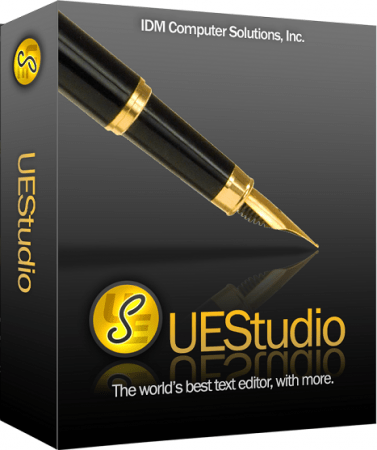
UEStudio is the powerful IDE (Integrated Development Environment) built on the chassis of UltraEdit, the world renowned text editor. As a full integrated development environment, UEStudio includes all the features of the powerful UltraEdit text editor plus native support for over 30 popular compilers (including Microsoft Visual C++, Java, GNU C/C++, PHP, Perl and over 30 others). UEStudio includes integrated debugging, VCS version control, built-in class browsing, language intelligence (like Intellisense), project conversion, and batch building features, as well as many other advanced features. Download your copy today to begin writing, debugging, and building applications in your favorite programming language.

Powerful project/solution features
» Visual Studio 6/05 project to UEStudio project conversion
» Integrated compiler support (note: compilers not included with IDE)
» Integrated CVS version control support
» Integrated SVN support
» Support for multiple SVN/CVS modules within a project
» Integrated tag support
» Powerful project manager
» Compiler-specific project templates

Application building features» Compile your projects from within UEStudio
» Build/batch build
» Debug
» Integrated debugger support for WinDbg for Microsoft C/C++ applications
» Run your application from within UEStudio

Script toolbar features
» Special PHP/Ruby scripting support
» Run and test your PHP/Ruby scripts from within UEStudio
» New PHP function checks syntax of all open PHP files
» Parse your PHP/Ruby documents
» Strip comments
» Highlight source

-:DOWNLOAD FROMLINKS:-
NitroFlare
Код:
https://nitroflare.com/view/F640A1469623076/UEStudio21.rar

RapidGator
Код:
https://rapidgator.net/file/6cba4cede8484972d2a687e318aac8b8/UEStudio21.rar.html


​
 
FxSound Pro 1.1.5


c-Y5590-Yv3-Ykvr-Medmi-EZGs-T5y-Dhe-E831.png

File size: 16 MB
​
Tired of shitty audio you can barely hear? The new FxSound boosts sound quality, volume, clarity and bass on your PC. FxSound gives you amazing sound with just a download. Once you try FxSound, you'll know if it's for you. Most people don't know what they're missing in their sound until they try better audio software/hardware. It's hard to convey without actually experiencing it for yourself.

- Perfect sound on any hardware
- Computer speakers and cheap headphones suck...
- And a good setup is overpriced and complicated.
- FxSound gives you amazing sound with just a download.

Amazing sound for everything you listen to:
Music
FxSound corrects the limitations of your audio devices and files.

Video Games
Get lost in your world. Never miss a footstep, ping, or voice line again.

TV and Movies
Never strain to hear dialog or get your ears blown out by the sound effects or score again. FxSound smooths and improves your favorite shows and movies.

Transcription
FxSound boosts your clarity to save your sanity. Rewind less, get paid more.

And more for those who want it...

EQ
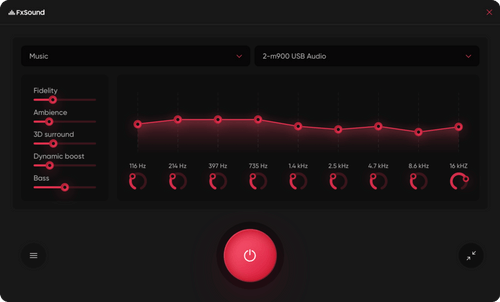
Here's the thing... No two ears are the same. Not all hardware is made equal. Our new 20-band equalizer balances your sound to your needs.

Visualizer
Make audio and visual one blended experience. Our visualization lets you feel your music in a new way.

Effects
If you like a lot of bass, we've got you covered. But we can't take responsibility from any noise complaints from your neighbors ;)

Presets
Switch between listening to music, gaming, and streaming video in an instant with specially designed presets for every possible sound situation.

-:DOWNLOAD FROMLINKS:-
NitroFlare
Код:
https://nitroflare.com/view/6A91A0898DBFBE1/xSoundPro1.rar

RapidGator
Код:
https://rapidgator.net/file/8d33d677b6a12bac1c013cc1c31914f7/xSoundPro1.rar.html


​
 
n-Track Studio Suite 9.1.4 Build 3783 Beta Multilingual


th-B3rb-P7oz71v-ZT36w-Jnvg-C8p-Z5d-XVu-OY6.jpg

Languages: Multilingual | File size: 250 MB
​
n-Track Studio 9 turns your PC into an easy to use multitrack audio recording studio. It is the perfect tool for professional quality audio recording, encoding, mixing and editing. Record, edit, overdub your audio tracks, apply effects, process audio live input, mix and then burn audio CDs or create mp3 files. n-Track Studio is an Audio and MIDI Digital Multitrack Recorder that transforms your computer into a powerful audio recording studio. You can record, playback, overdub your audio tracks exploiting the flexibility and power of today's PCs for applying effects, realtime input processing, automated aux channels sends and returns, destructive and non-destructive wave editing. The program supports 24bit-192 khz recording, 64 bit mixing, multiple channels soundcards, live input processing, CD burning, mp3 encoding and more.

Main n-Track Studio features:
• Records and plays back a virtually unlimited number of audio and MIDI tracks
• DirectX, VST and ReWire effects can be added to each channel/track
• Built-in effects include Reverb, Compression, Parametric and Graphic EQ, Echo, Auto-volume, Pitch Shift, Chorus, Multiband Compression, Spectrum analyzer
• Supports 16 and 24 bit single and multichannel soundcards at sampling frequencies up to 192 Khz using Asio, WaveRT, WDM, MME and DirectSound
• Is compatible with multichannel Asio, WaveRT, WDM and MME audio drivers, which means that n-Track can work with almost any soundcard available today with the lowest possible latency
• Supports VST Instruments and DirectX Instruments synth plug-ins. Sample-accurate MIDI tracks can be sent to VSTi/DXi software MIDI synths, without the need of expensive hardware MIDI synths.
• Adjust the effect settings and listen to the result in real time.
• Built-in effects include Reverb, Compression, Parametric and Graphic EQ, Echo, Auto-volume, Pitch Shift, Chorus, Multiband Compression, Spectrum analyzer.
• Supports third party DirectX, VST 2.0 and ReWire plug-ins.
• Realtime Audio effects can be added to each channel.
• Supports 16 and 24 bit single and multichannel soundcards at sampling frequencies up to 192 Khz using Asio, WaveRT, WDM, MME and DirectSound.
• Input processing allows to process with plug-ins live signals. Record the 'dry' (unprocessed) signal while processing and reprocess the recording later - i.e. Play a guitar through a distortion plug-in then change the distortion after the recording!

More Features:
• Supports surround mixing for creating DVD audio projects using 5.1, 6.1 and 7.1 channels surround formats
• Each audio track includes a 20 bands parametric EQ with graphical frequency response view, a full spectrum analyzer and an automatic instrument tuner. Up to 32 aux channels with fully automated sends and returns.
• Supports multiple input and output soundcards or more than one soundcard. You can record multiple tracks at a time and output to more than one stereo output. Each output channels has its own master channel effects and volume control.
• Supports technology by Propellerhead Software AB. Mix signals in realtime with n-Track's own channels from other programs (such as Reason, Ableton Live, Fruityloops and many others).
• Import and export .wav, .mp3, .wma, .mid, .ogg, .flac, .aiff, .cda, .sng, .sgw audio files
• Import and export EDL multitrack song files for exchanging songs with other multitrack programs
• Sync to other programs or external devices using SMPTE/MTC or MIDI Clock sync, acting either as master or slave
• Loads and saves MIDI tracks to standard MIDI files
• Play Videos (AVI, MPEG) in sync with the song in a dedicated video playback window
• Automated volume, pan, aux sends and returns and effects parameters. You can "program" fade-in/outs, cross fades, boost the volume of a track when there is a solo etc.

У Вас недостаточно прав для просмотра ссылок. Войдите или зарегистрируйтесь.

-:DOWNLOAD FROMLINKS:-
NitroFlare
Код:
https://nitroflare.com/view/22E1B6EC2A70627/n-Track_Studio_Suite_9.1.4_Build_3783_Beta.rar

RapidGator
Код:
https://rapidgator.net/file/96e4e6a4d4d3e20242aaf96220c5b197/n-Track_Studio_Suite_9.1.4_Build_3783_Beta.rar.html


​
 
Autodesk AutoCAD Plant 3D 2022.0.1 Update Only (x64)


autodesk-autocad-plant-3d-2020.png

x64 | Language:English | File Size: 364 MB
​

Another AutoDesk software developed on the AutoCAD platform is the AutoCAD Plant 3D program designed to design and model industrial units for oil, gas and petrochemicals. With the use of this software, it is possible to design a variety of industrial equipment and plumbing facilities with a wide library. Increasing accuracy and speed, as well as reducing production costs, are the results of using and benefiting from this program.

Features and Features of Autodesk AutoCAD Plant 3D:
-Optimized and professional but familiar interface for AutoCAD software
-Design of various structures, equipment, pipe
-Has the right equipment for simulation
-Having a comprehensive library including standard equipment and models
-Advanced logging of operations and the ability to search and output from the PCF format
-Ability to check the project to make optimizations
-Integration with AutoCAD P & ID software for the exchange of 3D models.
-Ability to use in a group to enhance quality and efficiencY

System Requirements:
OS:Microsoft Windows 10 (64-bit only) (version 1803 or higher)

CPU:Basic:2.5-2.9 GHz processor / Recommended:3+ GHz processor
Multiple processors:Supported by the application
RAM:Basic:8 GB/Recommended:16 GB
Display Resolution:Conventional Displays:1920 x 1080 with True Color / High Resolution & 4K Displays:Resolutions up to 3840 x 2160 supported on Windows 10, 64-bit systems (with capable display card)
Disk space:Disk Space:8.0 GB

Additional Requirements:
-Disk Space: 8GB
-.NET Framework Version 4.7.2
-MS SQL Server (Express, Standard, or Enterprise edition) 2008 SP1 or newer

-:DOWNLOAD FROMLINKS:-
NitroFlare
Код:
https://nitroflare.com/view/14AF119D3B85C91/Plant_3D_2022.0.1_Update.rar

RapidGator
Код:
https://rapidgator.net/file/98efb36584fc8e3af008868dea33b2c1/Plant_3D_2022.0.1_Update.rar.html


​
 
Marius Silaghis Plugins for 3ds Max 2013 - 2022


ar7-WZs-MX03-Uo-SEps-O0mq133dw-Itc-HCh-V.jpg


Size File: 1.5 GB
​
My name is Marius Silaghi and I'm a technical artist.
This site will provide you with some of my 3d graphics tools.
Click the images below to learn more about these tools and how they can help you.

Includes:
Clothify Pro 1.02
Deformation Cleaner 1.0
Jiggle 1.01
Path Deform Pro 1.01
Quad Cap Pro 1.01
Quad Chamfer Modifier 1.16
Shell Pro 1.0
Tension Morpher 1.0
TurboSmooth Pro 1.02
TurboTriSmooth 1.03
Unwrap Pro 1.04

For: 3ds Max 2013/2014/2015/2016/2017/2018/2019/2020/2021/2022 (64 Bit).

-:DOWNLOAD FROMLINKS:-
NitroFlare
Код:
https://nitroflare.com/view/A0032C70BE34238/Silaghis_plugins.part1.rar
https://nitroflare.com/view/A0B40D5DCCCF67D/Silaghis_plugins.part2.rar

RapidGator
Код:
https://rapidgator.net/file/c13c0b3948ce1cf4007232bccf469d5e/Silaghis_plugins.part1.rar.html
https://rapidgator.net/file/49814b59d6efa34c64f784d6f1f9f108/Silaghis_plugins.part2.rar.html


​
 
Xilisoft YouTube Video Converter 5.6.11 Build 20210412 Multilingual


HOz2j9-SKrw-OCXg4i-QCyk0l-K4u-Sj-YPn-QT.png

Languages: Multilingual | File size: 31.4 MB
​
For YouTube video fans, Xilisoft YouTube Video Converter is undoubtedly the ideal choice to download YouTube video MP4, FLV, Webm, and convert YouTube videos to a vast array of popular formats such as MP3, AVI, MPEG, H.264/AVC, MOV, RM, and many others. Moreover, this YouTube Converter can be also a powerful Video Converter to convert between all videos files in different formats. With super fast download and conversion speeds, Xilisoft YouTube Video Converter lets you fully experience YouTube videos at home or on the go. - Download YouTube videos (MP4, FLV, Webm) and convert to MP3, AVI, MPEG, MP4, 3GP, H.264, MKV, etc.

- Download YouTube HD videos and convert them for playback on PS3 and other HD devices.
- Convert all kinds of local video files in different formats to other videos formats.
- Convert YouTube videos for viewing on iPhone, iPad, iPod, Apple TV, Galaxy, HTC One, Moto X, Nexus, Kindle, Surface, Lumia and other devices.
- The smarter design brings much easier usage and better user experiences.

Features:

Download YouTube Videos Freely
Xilisoft YouTube Video Converter enables you to effortlessly download YouTube MP4, FLV and Webm videos.

YouTube HD video Downloader
Directly download YouTube HD videos, even 1080p HD videos to your computer with this YouTube downloader.

YouTube Video Converter
Convert YouTube FLV, MP4 to MP3, AVI, MPEG, MP4, 3GP and other formats to be compatible with iPod, iPhone, iPad, Apple TV, PSP, PS3, Zune, Blackberry, 3GP mobile phones, Xbox, etc.

More Powerful Video Converter
Convert your local videos in different formats like AVI, MPEG, WMV, MKV, MP4, H.264/MPEG-4, RM, MKV, WMV HD, etc to any other videos.

Multiple Tasks Supported
Download and convert multiple YouTube videos at the same time, just adding as many video URLs as you want, and let Xilisoft YouTube Video Converter complete the tasks in batches.

Set Output Formats
You can choose to convert YouTube video to MP3, AVI, MPEG, WMV, MP4, FLV, H.264/MPEG-4, DivX, XviD, MOV,MKV, H.264/MPEG-4 AVC (*.mp4), MPEG2 HD Video (*.mpg; *.mpeg), MKV HD Video, Quick Time HD Video (*.mov), WMV HD Video (*.wmv), Audio-Video Interleaved HD Video (*.avi).

Set Output for Various Multimedia Devices
You can set your output file just for specified devices like iPhone, iPad, Galaxy, HTC One, Moto X, Nexus, Kindle, Surface, Lumia, etc.

More Options to Better Assist Your YouTube Video Conversion
Set preferred video quality, resolutions, video bitrate, and formats; Set max simultaneous downloads and conversions; Set custom download and conversion settings.

Automatically Transfer MP4, MOV, and MP3 file to iTunes
This YouTube converter provides the option for you to choose if you want to automatically transfer MP4, MOV and MP3 file to iTunes after downloading and converting.

Multilingual Interface
This YouTube video converter is available in English, French, Japanese, German, Spanish and Chinese. And much smarter design brings much easier usage and better user experiences.

Whats New:
Updates: official site does not provide any info about changes in this version.

-:DOWNLOAD FROMLINKS:-
NitroFlare
Код:
https://nitroflare.com/view/EF0D8D82E45687C/Video_Converter_5.6.11_Build_20210412.rar

RapidGator
Код:
https://rapidgator.net/file/c4b3b23c3f1f818991d0879fd91c7a46/Video_Converter_5.6.11_Build_20210412.rar.html


​
 
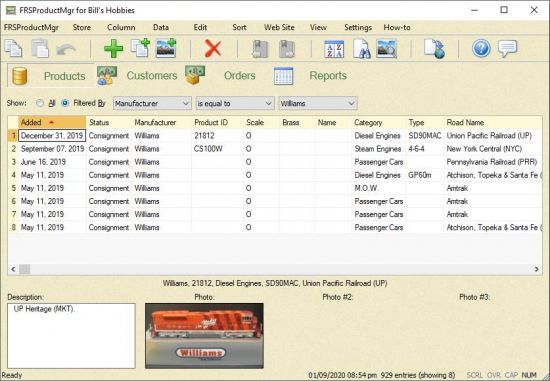
FRSProductMgr 4.0.12


th-oebf-K1-BSi-LKWOt0c3c8-BOr-QO3x-BPgdi-K.jpg

File size: 9.0 MB
​
FRSProductMgr was designed for the small business person who wants to manage his or her inventory, track customer sales, and, optionally, manage the company's products on its web site. However, due to its flexibility, FRSProductMgr can be used to track almost any manner of data, whether for commercial or private purposes. The ability to maintain data is something a software application such as a spreadsheet or a database can do.

What FRSProductMgr excels at is the ability to provide a very flexible display of that data, and to generate web pages from that data. So, if you are used to using one of the popular office suite spreadsheet or database applications, you will marvel at the way you can easily customize FRSProductMgr.

FRSProductMgr is very straight-forward to use. Setting up a store only requires a store name, and then you can start adding your product inventory. That's it! After that, you can get more involved by honing what data you want to track for your products, entering customer information if that applies, set up view/print reports, and/or create web reports for generating pages for your web site. However, those are all optional features that are there if you need them, and can be ignored if you don't. Start simple, and you can always expand later as you become more familiar with the application.

How Do I Use FRSProductMgr?
The very first time you start the application, and after reading the Welcome screen, you will see the Store Contact Info window, wherein you can enter your store's information. Enter as much as desired. The name of the store will be shown in the application's title bar, and it will be used as the name of the data file wherein your data will be stored. So, that is required, but anything else can be left blank. You can always go back and make changes using the "Store | Contact Information..." menu command, including changes to your store's name.
When you press the OK button, the main window appears, and you can now start to enter your store's product inventory. The main window, shown in figure 2 below, shows the Products tab, where you will be doing most of your work. Initially, of course, it will be blank.
To add your first product, use the large green "plus" toolbar button. This toolbar button is a short-cut for the "Data | Add Entry" menu command, or you can press the F4 function key of your keyboard. You can use whichever method you prefer.

Whats New:
Fixed:
• The windows displayed when clicking on the "Settings | Font Settings..." or the "Settings | Print
Settings..." menu commands were changed, to fix the options' icons disappearing when clicked.

-:DOWNLOAD FROMLINKS:-
NitroFlare
Код:
https://nitroflare.com/view/F621E44DE0C19A7/FRSProductMgr4.0.12.rar

RapidGator
Код:
https://rapidgator.net/file/f32f9780fa008bf108e16342b9a1c94d/FRSProductMgr4.0.12.rar.html


​
 
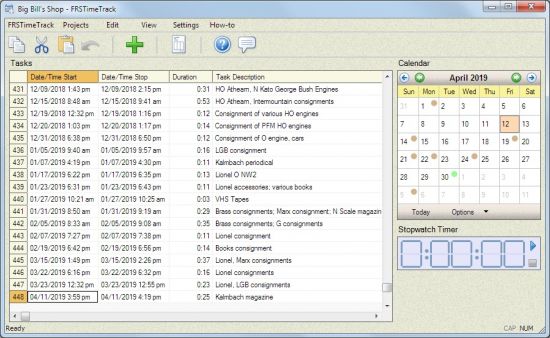
FRSTimeTrack 2.1.0


th-vg-Grgn0v01-Kfdeu-ANel-Rf-ZWy-Mi-Bwe03-T.jpg

File size: 8.0 MB
​
FRSTimeTrack makes it easy for you to keep track of your time spent on projects or clients.

Track date, time, and whether or not a task is billable.
Quickly generate invoices.
Invoices are remembered, for quick recall in the future.
Maintain data for any number of projects.
Integrated Documentation Center for quick access to supplemental application information.

Whats New:
Notes:
Due to incompatibility issues, the previous font settings and color scheme settings you might have set
in FRSTimeTrack are not transferred to this new version, so you will have to re-set those up again, if so
desired.
Fixed:
• If most of the files referenced in the "Invoice/Payment File" column of the "Invoices" window
were pointing to a folder that no longer exists (e.g. you have moved all your receipt files to a
different drive or directory), then FRSTimeTrack did not allow the selection of the new folder
(clicking the folder icon in the drop-down selection list did nothing).
• The invoice's notes, set in the "Invoices" window, weren't shown in the invoice, and therefore
also not printed.
Changed:
• The Debits and Credits shown on invoices are no longer subject to whatever sales tax rate is set,
if any, because taxes may not apply to those, and you can incorporate the tax value into those, if
they do happen to apply.
• Renamed the menu command "FRSTimeTrack | History" to "FRSTimeTrack | Version History",
to launch the new Version History PDF file that documents all the changes made to
FRSTimeTrack over the years.
• Renamed the menu command "Projects| Information..." to "Projects | Update...".
• If some or all of the files selected in the "Invoice/Payment File" column of the "Invoices"
window no longer exist (e.g. you moved some or all of your receipt files to a different drive or
folder), selecting one of the invoices' file in the new folder now triggers an automatic check to
see if any of the other invoices' receipt files can also be found in that new folder.
• The various windows and the main "How-to" menu's Documentation Center texts have been
reviewed and updated where needed.
Added:
• The main window's "Fee" column, which represents a fixed fee charge to the client or project.
These are accounted for in the invoices, if they are flagged as "billable".
• The main window's "Taxable?" column, which allows you to flag individual task entries as
needing to have sales tax applied for them. Note that if the "Tax Rate" percentage in the
Invoices window is not set or set to zero, a taxable check-mark set in the main window is not
applied, of course.
• "FRSTimeTrack | Windows Desktop Shortcut", to add or remove the Windows Desktop shortcut
to FRSTimeTrack.
• "FRSTimeTrack | Window Start-up Shortcut" to add or remove the Windows Start-up folder's
entry for FRSTimeTrack (to enable launching the application when you log into Windows).

-:DOWNLOAD FROMLINKS:-
NitroFlare
Код:
https://nitroflare.com/view/BEE2AE3ED4C4068/FRSTimeTrack2.1.0.rar

RapidGator
Код:
https://rapidgator.net/file/3001e0d9f426ab4da44a9d077636f51b/FRSTimeTrack2.1.0.rar.html


​
 
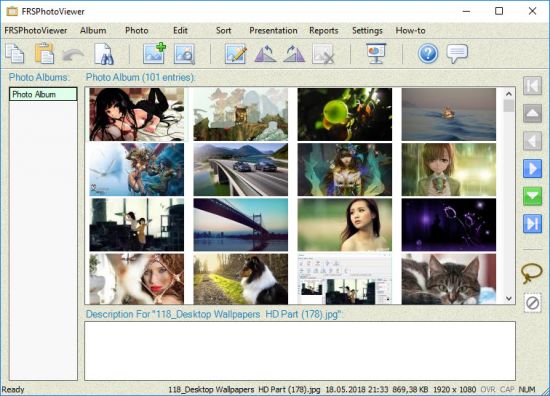
FRSPhotoViewer 2.1.0


th-4gcr-RZg-UFqsp-Zaipsx-Kq3-Maafg-Xj-NOm-R.jpg

File size: 8.0 MB
​
FRSPhotoViewer makes it very easy to view your digital photos.

Photos can be anywhere on your computer.
It is trivial to create a full-screen presentation.
Generating a web page of your photo album is easy to do.
Any number of photo albums can be added.
Intuitive organization of your photos within a photo album.
Simple labeling of your photos, if so desired.
Thoroughly-documented functionality with the built-in Documentation Center.
Native 32- and 64-bit versions available.

Whats New:
Notes:
Due to incompatibility issues, the previous font settings and color scheme settings you might have set
in FRSPhotoViewer are not transferred to this new version, so you will have to re-set those up again, if
so desired.
Fixed:
• When editing text in the Description field and then pressing F7 to go to the next photo, the text
changes were not preserved (the same applied to pressing Shift+F7).
Changed:
• The "Web Report Tags" window has been completely revised.
• The "Web Reports" window has been completely revised, to make it easier to use, and to add
some extra abilities.
• Renamed the menu command "FRSPhotoViewer | History" to "FRSPhotoViewer | Version
History", to launch the new Version History PDF file that documents all the changes made to
FRSPhotoViewer over the years.
• The application's Documentation Center text has been fully reviewed and updated.
Added:
• Support for .jfif image files.
• "FRSPhotoViewer | Windows Desktop Shortcut", to add or remove the Windows Desktop
shortcut to FRSPhotoViewer.
• "FRSPhotoViewer | Window Start-up Shortcut" to add or remove the Windows Start-up folder's
entry for FRSPhotoViewer (to enable launching the application when you log into Windows).

-:DOWNLOAD FROMLINKS:-
NitroFlare
Код:
https://nitroflare.com/view/3D83EF0BD0ADD3D/FRSPhotoViewer2.1.0.rar

RapidGator
Код:
https://rapidgator.net/file/a8297359cb4664287dc9355451c3a7aa/FRSPhotoViewer2.1.0.rar.html


​
 
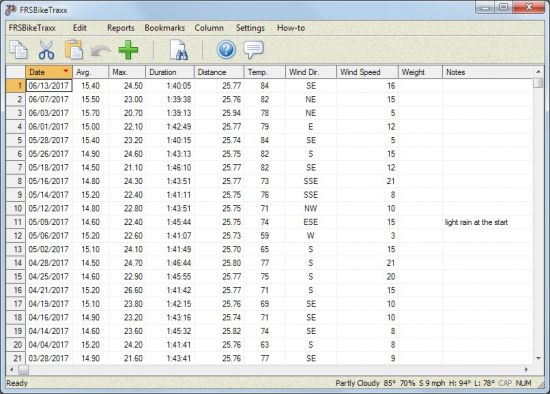
FRSBikeTraxx 2.2.0


th-gin-Lzy-Y9fv-Id-R8-Co-KVdgi-Yuq-MVi-GDp-HU.jpg

File size: 10 MB
​
FRSBikeTraxx makes it easy for you to manage your bicycle rides data.

Data entry is very intuitive.
Easily import historical data.
Optionally shows weather data.
Core data columns can be modified or added to, to store custom data.
Summary reports that make sense to a bike rider.
Integrated Documentation Center for quick access to supplemental application information.
Native 64-bit version now available.

Whats New:
Notes:
Due to incompatibility issues, the previous font settings and color scheme settings you might have set
in FRSBikeTraxx may not have transferred to this new version, so you will have to re-set those up
again, if so desired.
Fixed:
• The reports included a blank or zero-value entry as a valid entry when calculating averages, but
that is not correct (e.g. when a value is not known, the meter failed, etc.).
• "Reports | Compare Year-to-date..." showed the rides' duration total for the "Averages:" row
instead of the average value.
Changed:
• Renamed the menu command "FRSBikeTraxx | History" to "FRSBikeTraxx | Version History",
to launch the new Version History PDF file that documents all the changes made to
FRSBikeTraxx over the years.
• The application's Documentation Center text has been fully reviewed and updated.
Added:
• "FRSBikeTraxx | Windows Desktop Shortcut", to add or remove the Windows Desktop shortcut
to FRSBikeTraxx.
• "FRSBikeTraxx | Window Start-up Shortcut" to add or remove the Windows Start-up folder's
entry for FRSBikeTraxx (to enable launching the application when you log into Windows).

-:DOWNLOAD FROMLINKS:-
NitroFlare
Код:
https://nitroflare.com/view/6BB0C9AC8BE43D9/FRSBikeTraxx2.2.0.rar

RapidGator
Код:
https://rapidgator.net/file/3bc530a19db5ba2761dce9cae2a3f4f6/FRSBikeTraxx2.2.0.rar.html


​
 
CAMWorks ShopFloor 2021 SP1


007bf9b7-medium.jpg


Windows 64bit | Size: 1.13 GB
​
CAMWorks ShopFloor is the latest Industry 4.0/Smart Manufacturing tool specially designed for the CNC machinist on the shop oor and promotes digital manufacturing by providing 3D models with MBD & PMI data and CNC programming information to the shop oor in a single, compact digital format.

CAMWorks ShopFloor provides state-of-the-art digital tools for machinists to leverage digital machining data in part models, reducing errors and improving communication between CNC programmers and shop floor machinists.

This allows companies to move beyond traditional methods and meet Smart Manufacturing and Industry 4.0 initiatives, as well as improve quality, increase productivity and reduce the number of needed CAD/CAM software licenses. With CAMWorks ShopFloor, 3D digital models capture extensive data from the part design files and provide tools that machinists can utilize to produce parts with fewer miscommunications between the design and manufacturing departments.

Empower your shop floor with the Smart Manufacturing tools they need to avoid errors and increase production at a fraction of the cost of a CAD/CAM system. A full suite of tools are provided to view and precisely measure 3D parts and assemblies. Digital setup sheets and tool lists can be sent along with the 3D part models and CNC programs, and the machinist can virtually simulate the CNC program using cutting-edge 3D simulation. The ability step-through every move in a CNC program is provided to reduce setup time and eliminate the need to dry-run programs on the machine.

Operating System: MS Windows Win7 SP1+/Win8.1/Win10 64-bit

Whats New:
Updates: official site does not provide any info about changes in this version.

-:DOWNLOAD FROMLINKS:-
NitroFlare
Код:
https://nitroflare.com/view/86D1D39000299EB/CAMWorks.ShopFloor.2021.SP1.part1.rar
https://nitroflare.com/view/A4787E420101C48/CAMWorks.ShopFloor.2021.SP1.part2.rar

RapidGator
Код:
https://rapidgator.net/file/41798d8128540dcade09bd9d260f59dd/CAMWorks.ShopFloor.2021.SP1.part2.rar.html
https://rapidgator.net/file/8d9a7632f28e14e25f6a9c5e42fa1c3c/CAMWorks.ShopFloor.2021.SP1.part1.rar.html


​
 
CAMWorks 2021 SP1 Build 2021-04-07 for SolidWorks


007f020a-medium.jpg


Windows | 1.6 GBCAM
​
Works, a parametric, solids-based CNC programming software system, brings in a revolutionary way to help machinists around the world program smarter and machine faster. CAMWorks significantly reduces programming time and removes the drudgery from CNC programming by using patented Feature Recognition technology in conjunction with full toolpath to solid-model associativity and knowledge-based machining.

Being integrated into the design environment, CAMWorks allows a user to:
Maintain associativity between the design model and the toolpaths ensuring that the latest changes in the design reflect in the toolpath
Eliminate time-consuming file transfers using standard file formats such as IGES and STEP
Use a single file for storing CAD and CAM data drastically reducing file management
Work with the same familiar user-interface ensuring a short learning curve
Use the CAMWorks machining tree and commands at the click of a button and generate toolpaths without leaving the design environment
CAMWorks provides users with the ability to work with multiple platforms including its own integrated CAD/CAM platform

SOLIDWORKS Integration
Solid Edge Integration
CAMWorks Solids Integration
Knowledge-based machining allows you to capture and reuse your programmers' and machinists' best programming practices using the Technology Database, TechDB™ reducing programming time by as much as 80%.

What differentiates CAMWorks from other software is the ability to store machining strategies feature-by-feature, both multi-surface features and prismatic features, and then reuse these strategies to reduce machining time significantly.

Feature-based machining: No profiles or chains
Feature-based machining reduces programming time by as much as 90% compared to traditional profiles, and chains based 3 axis CAM software because strategies for multi-surface features can be stored and reused automatically for multiple rough and finishing operations.

Our patented Automatic Feature Recognition (AFR) automatically recognizes over 20 types of prismatic features in native format or neutral file format solid models. This capability is ably complemented by Interactive Feature Recognition (IFR) for recognizing complex multi-surface features, as well as contains and avoids areas, quickly and easily.

Machine Faster
We understand that only programming fast is not enough. Our users need to have access to the most advanced high speed machining strategies.
CAMWorks ensures that the air cuts are reduced to a minimum. In addition, users have access to optimized, out-of-the box, strategies for Mold core and cavity programming reduces programming time.
CAMWorks® Volumill™ creates ultra-high performance toolpaths by using the latest advanced technology to rough mill multi-surface parts faster than any other software available today. Reduce machining time by as much as 85% and increase tool life by as much as 500% even in the hardest materials.

System requirements:
-Operating System MS Windows Win7 SP1 / Win8.1 / Win10 64-bit
-SolidWorks 2020-2021

-:DOWNLOAD FROMLINKS:-
NitroFlare
Код:
https://nitroflare.com/view/03ECB3CD61E232F/CAMWorks.2021.SP1.Build.2021.04.07.part1.rar
https://nitroflare.com/view/D2C746F46215C1D/CAMWorks.2021.SP1.Build.2021.04.07.part2.rar

RapidGator
Код:
https://rapidgator.net/file/35010871ef02a4382180a14ad44367ca/CAMWorks.2021.SP1.Build.2021.04.07.part1.rar.html
https://rapidgator.net/file/1197df9fb97eb5e40a20e834682635c0/CAMWorks.2021.SP1.Build.2021.04.07.part2.rar.html


​
 
Stellar Toolkit for Data Recovery 10.1.0.0 Multilingual


MQAti-Qtv-CW3-Ba-Nlji-Rd5z-Gc-VS5f-QOCBA.png

Windows x64 | File size: 119.95 MB
​
Stellar Toolkit for Data Recovery is a set of comprehensive software tools to recover lost or inaccessible data from logically failed or corrupt Windows, Mac, and Linux operating system and storage devices. The toolkit recovers missing or deleted files and folders, RAID logical partitions, and data from formatted hard drives and systems that failed to boot.

• Supports file system such as NTFS, HFS, HFS+, Ext2, Ext3, and Ext4
• Restores data from damaged or corrupt RAID 0, 5, and 6 servers
• Recovers data from encrypted storage drives
• Constructs virtual RAID when probable RAID construction fails
• Option to create Disk Image for fast recovery from bad sectors

Key Features:

Data Recovery for Windows, Mac, & Linux Storage Media
Stellar Toolkit for Data Recovery runs on Windows operating system and helps recover lost or deleted data from Windows supported NTFS, FAT32, exFAT; macOS supported HFS, HFS+; and Linux supported Ext4, Ext3, & Ext2 file systems. It also automatically repairs disk errors, fixes disk permissions, and replaces damaged directory.

Finds Lost Partition & Recovers Data
The toolkit allows data recovery from a missing or deleted hard drive volumes and partitions. The 'Can't Find Drive' option helps to recover data from the non-visible partition. The software scans the entire storage drive and lists all the lost & deleted partitions of a hard disk. If the partition is still not found, the 'Deep Scan' option helps to scan the drive thoroughly and find the desired lost partitions.

Reconstructs RAID 0, 5, & 6 Server for Data Recovery
With this toolkit, data recovery from broken or inaccessible RAID 0, 5, & 6 server is fully automatic. Unlike other RAID recovery tools that require you enter RAID parameters, this toolkit automatically detects the RAID parameters, identifies the RAID factors, and constructs probable RAID array. It supports both hardware & software RAIDs and doesn't require a RAID controller card. It also supports recovery from 'NAS' based on RAID 0, 5, & 6.

Recovers Custom Files With Add Header Option
The 'Add Header' option under 'Advanced Settings' lets you add additional file types (or user-defined file types) apart from those already mentioned in the 'File Lists'. This option can be used to add a new file type or edit an existing file type with its average size to facilitate precise and faster recovery process.
Additional AdvantagesRecover Data from Encrypted Hard Drives
Unlike other products in the market that fails or crash while recovering data from encrypted disks, the Stellar Toolkit for Data Recovery recovers data from a password-protected storage drive with a few clicks. Recovery from an encrypted hard drive and storage media requires the password that must be entered when prompted - before the recovery process starts.

Clone Your Hard Disk
The toolkit has an option to create a 'Disk Image', which is a mirror image of any storage device from which you want to recover data such as Internal or external disks, volumes, USB drives, SD cards, etc. The disk image is saved as an IMG file where recovery can be performed. This option allows you to recover data from a hard drive with bad sectors. Additionally, you can specify the 'Starting' & 'Ending' sectors on the storage device to create an image of the selected region on the hard drive instead of entire drive.

Supports Multiple External Storage Devices
It supports data recovery from different storage devices such as SSDs, hard drives, SD cards (Mini SD, micro SD, SDHC/SDXC card) and from missing, unmounted, or corrupt Linux, Mac, & Windows based volumes. Simply connect the external storage, launch the software, run a scan, and save recovered files at the desired location.

Construct Virtual RAID
The toolkit provides an innovative option that builds a Virtual RAID construction when RAID reconstruction fails due to incorrect RAID parameters or other similar reasons. The Virtual RAID facilitates 'RAW Recovery' as well as 'Search Lost Volume' operation to recover the lost data from the corrupt or inaccessible RAID.

SMART Drive Monitor with Disk Cloning
The newly included SMART Drive Monitor utility in the software keeps proactive check on several vital attributes of the hard drive to prevent data loss due to drive failure. The Scan Disk locates bad sectors on the drive to determine its tolerance and readiness to withstand a routine data recovery process. Otherwise, the Clone Disk feature allows to create a replica of the drive for data recovery, and thereby prevent permanent data loss situations that may arrive due to drive failure.

Repair corrupt Video
The add-on video repair feature fixes corruption in virtually all types of video file formats. It's the one video repair tool that you would ever need to restore corrupt videos irrespective of the device- digital camera, DSLR, drone, smartphones etc. - that was used to record them. Besides, the software works effectively across the entire video production cycle including video recording, media transfer, video editing, video conversion, or any other type of video.

Preview before Recovery
With Stellar Toolkit for Data Recovery, lost or deleted files can be previewed before saving. This helps in precise data recovery. After the scan, the software classifies all files in a Tree View, File Type, and Deleted List. Click on any file to preview it. This feature can be manually turned on/off by the user.

Raw Data Recovery with Deep Scan
When the 'Quick Scan' is not able to find the desired data, the 'Deep Scan' option helps to recover data by thoroughly scanning each and every bit of lost or deleted data from the storage drives & volumes. It searches data based on 'File Signatures' and facilitates RAW data recovery which is helpful in case of a severely corrupt volume.

Compress & Save Recovered Files
The toolkit provides an 'Advanced Settings' option to compress & save recovered files at your desired location. You can either choose to compress each recovered file individually or save all the recovered files into one single compressed file. Further, you can choose to exclude, include, or recover only 'Deleted Files & Folders' and specify file filter while saving the selected data.

Selective File Recovery
Select only those file types that you want to recover from the storage drive, before starting the scan process. This facilitates faster scanning as the toolkit searches only for the specified type of files. There are various file types that are already listed in the 'File List' option. You can select the required file formats from the list for their recovery.

Repair corrupt or damaged Photos
Try out the add-on photo repair utility to restore corrupt, damaged, and broken image files in pristine condition. The software fixes the photos taken with any major camera brand in a variety of file formats such as JPEG and TIFF. It also repairs RAW camera image files stored in USB stick, SD card, SDXC, SDHC, or any other external storage compatible with Windows. It can simultaneously repair several files of different types, with option to preview them before saving. Even the severely corrupt files - which are otherwise beyond the scope of repair - can be redeemed in the form of thumbnails.
What's new
• official site does not provide any info about changes in this version

-:DOWNLOAD FROMLINKS:-
NitroFlare
Код:
https://nitroflare.com/view/C6F07432C3DEA1C/Data.Recovery.Toolkit.10.1.0.0_x64.rar

RapidGator
Код:
https://rapidgator.net/file/ea147b10747e0fbb89c171e7b77aa858/Data.Recovery.Toolkit.10.1.0.0_x64.rar.html


​
 
Stellar Data Recovery Technician 10.1.0.0 Multilingual


oh5cw-Zh-Eb-JSfm-R42-PYg-AXZbngtb5-QUbi.jpg

Windows x64 | File size: 119.95 MB
​
Stellar Phoenix Windows Data Recovery is a complete solution to recover lost data from your hard disks and removable drives. It is a complete solution for all your data loss problems. The powerful scan engine of the software does a thorough scan of the selected storage device, shows a preview of files found during the scanning process and finally saves them to specified destination. Separate options to recover documents, folders, mails or multimedia files from the storage media is also available.

Stellar Phoenix Windows Data Recovery allows you to save scan information to resume recovery process from the same point, at a later stage. It also has an option to create an image of a complete hard drive or volume/partition on the drive. This image file can be used to recover lost data even when the actual hard drive is not available. This is very helpful, in case there is a probability of hard drive failure during the recovery process or the drive has lot of bad sectors.

Listed below are some of the new and key features of the product.

Key Features:
• Categorization of scanned results
• Preview of files before recovery
• Raw recovery of volumes and hard drives to search data based on signatures
• Recovers data from accidently deleted volumes
• Recovers data from formatted volumes
• Recovers deleted files and folders
• Recovers from hard disk, removable media such as pen drives, memory cards etc
• Resume recovery option to recover data later on
• Supports 300 or more File types
• Support of all types of CD/DVD with CDFS, UDF, HFS+ file system
• Tabbed view of scanned Tree - File Type / Tree View / Deleted List
• User can add / edit their file types which makes it more robust
• User can create image of hard disk and volumes for recovery

What's new
• official site does not provide any info about changes in this version

-:DOWNLOAD FROMLINKS:-
NitroFlare
Код:
https://nitroflare.com/view/246CEDB7F009FB5/Data.Recovery.Tech.10.1.0.0_x64.rar

RapidGator
Код:
https://rapidgator.net/file/8bc0968577954ca12d87d78bc6fa28f0/Data.Recovery.Tech.10.1.0.0_x64.rar.html


​
 
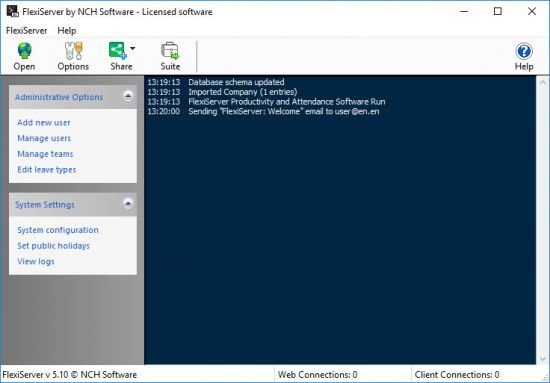
NCH FlexiServer 6.03


th-5-ON1-CU5c-B5-Yg3p-XT72dx-SUqp-YYTwevgq.jpg

File size: 2.3 MB
​
FlexiServer tracks staff hours and computer activity making tracking hours, vacation time and sick leave easier for employees and HR alike. It also has computer usage monitoring for quality control, security or legal compliance.

Track staff check in times and working hours
Know what your staff is working on
Create a flexible working environment
View reports for each employee

FlexiServer tracking hours and attendance of staff across an company. For freelancers and professionals looking to track time for easier hourly billing consider HourGuard time recording software.

Track Employee Hours and Attendance
FlexiServer is software for automatic employee time attendance logging. It also features additional tools for quality assurance monitoring and reporting, and works with home or remote employees.
Create a Flexible Working Environment
With FlexiServer you can track and monitor employee hours from a remote location. Simply have work-at-home staff or other remote employees install FlexiStation to monitor the hours put in away from the office.

Features:
Log employee time attendance automatically
Detect breaks and idle time automatically
Alternatively enter hours manually through a web form
Private mode available to employees for privacy on breaks or when completing personal tasks
Takes screenshots at regular intervals
Logs count of keystrokes and mouse clicks*
Link hours and attendance information to payroll software
Shows the online status of all team members
Real time screen monitoring available for Quality Assurance
Email monitoring can store all emails sent by employees
Generate reports on employee application and document usage
No extra hardware or dedicated server is required, FlexiServer can run on an HR or manager's computer
Works behind fire walls and routers
Can be used over the internet or on a local network

-:DOWNLOAD FROMLINKS:-
NitroFlare
Код:
https://nitroflare.com/view/843E60CD48DB4EA/FlexiServer6.03.rar

RapidGator
Код:
https://rapidgator.net/file/4e4910ff5846c82dbcd78d8c0bacf6e5/FlexiServer6.03.rar.html


​
 
Назад
Сверху