• Здравствуйте. Сайт заработал в архивном режиме форум www.old.nado.in

Dl4ever Software

Toon Boom Storyboard Pro 20 v20.10.1 Build 16823 (x64) Multilingual


th-FGk-WGx-Yv08jl-DBKYb-Svo-Rw-Ayvrj-DWNF3.jpg

Toon Boom Storyboard Pro 20 v20.10.1 Build 16823 (x64) Multilingual | 344 Mb
​
Storyboard Pro is ideal for independent storytellers, studios, agencies, schools and students, videographers and video production teams to layout stories and hit the ground running in production. Storyboard Pro is where every great story begins. Used by storytellers globally for decades, Storyboard Pro empowers you to get your ideas down, structure the sequence and elaborate the story so it can be shared, pitched and promoted on your terms.. Seamlessly integrating with Harmony, Storyboard Pro is the way to get your content off the ground quickly and easily.


Time Efficiency
Reduced time on process, import, export and switching allows for more time to go into your story
Combined drawing, video, images, animation, scripts and sound
Ability for collaboration (split project and merge back into master)
Output to Harmony or industry standard movie and other file formats

Cost Savings
Ability to work in one environment (end-to-end)

Notoriety
Award winning software, winner of Primetime Emmy
Used by major studios, artists, freelancers and students worldwide

NEW Features
Students, freelancers, artists and studios from around the globe are choosing Storyboard Pro to convey their messages for the latest content for TV, big screen movies, commercials, gaming, and more.

Industry-leading, improved stylus responsiveness
Digital has never felt (or looked) so traditional
New stabilizer for lines that are smoother than ever
Customizable stylus pressure responsiveness
Tilt and angle responsiveness

Stay on-point with new rulers and guides
Drawing accuracy made simple / Don't be square
Drawing ruler
4 point vertical pan and continuous perspectives
Fisheye (5 point perspective)
Isometric perspective guide
Camera and stage alignment guides

It's all about teamwork / Collaboration is the name of the game
Link projects to facilitate merge operation
Improved merge and replace (editor-artist pipeline)

Advanced control, sound editing
Set gain on audio clips
Synch audio and video tracks with panels
Drop audio files from an external file browser to the library or timeline

Advanced editing & efficiency
Import/export preferences & shortcuts
Export movie files (h264 compression without Quicktime)
Insert empty space between panels and scenes
Copy a layer from a panel to a video track
Multiple camera views

System Requirements:
Windows 10 (64-bit)
Windows 8.1 (64-bit)
Windows 7 (64-bit)
2.0 GHz Intel Core i3 processor or higher
700 MB available hard disk space for the software
MONITOR Minimum requirement is 1280 x 800

Home Page -
Код:
https://www.toonboom.com/


-:DOWNLOAD FROM LINKS:-

NitroFlare Link
Код:
https://nitroflare.com/view/4B3772DD9BEEF71/Storyboard.20.10.1.rar

RapidGator Link
Код:
https://rapidgator.net/file/8e89aab58dbad77aad62453362bd6fb7/Storyboard.20.10.1.rar.html

​
 
Astro Panel for Adobe Photoshop 5.1.0 Multilingual


S0g6k-LKv-WLbc75gt-Jk02-Nt6f-LJXXq85-I.jpg

Astro Panel for Adobe Photoshop 5.1.0 Multilingual | 6.3 Mb
​
Made with passion for Photography. Astro panel is the best plug-in for Adobe Photoshop CC and integrates advanced functions for digital processing of the Milky Way, deep sky images and landscapes.


Innovation in Your PC
AstroPanel is the perfect tool for landscape, night and deep sky photography. Its innovation makes it perfect for all needs. Whether you are a professional or a beginner it doesn't matter, Astropanel will always guide you to the perfect photo. Immerse yourself in the world of Astropanel and discover what you didn't think you had!

For any type of photos
With the new Astro Panel you will find new features developed specifically for any type of photography. You will be able to process white balance and color tone with a click, remove digital noise and annoying hot pixels, increase image sharpness, recover shadows and highlights and manage many effects like Orton and Glow or Dodge and Burn.

Enhance your photos with few clicks
One of the strengths of Astro Panel is the simplicity and speed of the digital processing procedure that in a very short time and few clicks will make your photos better and more detailed.

Manage the light like a Master
When the lights and shadows become difficult to handle, the Masks section comes in handy. This section is able to guarantee a rapid and constant workflow, allows you to select in real time all luminosity masks and is able to select all the highlights, shadows and midtones of the main colors.

Get Perfect Colors
With the color masks you can make the colors of your photos unique. With the real-time management of brightness masks you can also manage the main colors. You can improve contrast, brightness, saturation and vividness in no time by giving your photos perfect and balanced colors. Your photos will seem to come out of the monitor thanks to Astro Panel.

Silk Effect
The silk effect can also be achieved without the use of ND filters. In fact, with Astro Panel you can add hundreds of shots in order to obtain the same effect.

Merge Photos in HDR
With Astro Panel you can add lots of photos to create the HDR effect. You can choose between the classic HDR and the Multi Blending Night HDR.

Created for astrophotography
Automatically or step by step change all the images of the milky way, deep sky or startrail. With the tools available you can enhance any detail, remove the stars in deep sky images or enhance the colors of your startrails.

Stacking of Milky way and Deep Sky
Astro Panel allows you to stack images of the Milky Way and the deep sky very quickly. You can also enter the dark, bias and flat and have custom options for star alignment.

Sensational Startrail
Sum hundreds of pictures to get beautiful linear Startrail and special effects on the stars. Then you can make your startrails fluid thanks to the functions contained in the Astro tab.

Requirements:

Adobe Photoshop CC versions from 2014 to 2021

Language Support:
English, Spanish, French, Italian, Nederlands

Language Support:
English, Spanish, French, Italian, Nederlands

Home Page -
Код:
https://astropanel.it/


-:DOWNLOAD FROM LINKS:-

NitroFlare Link
Код:
https://nitroflare.com/view/5CC11A0BA823965/Astro.5.1.0.rar

RapidGator Link
Код:
https://rapidgator.net/file/3f84a2502caf9f184321b1b86dadfc02/Astro.5.1.0.rar.html

​
 
Altair PollEx 2021.0


0081d181-medium.jpg

Altair PollEx 2021.0 | 900.9 mb
​
The Altair development team is pleased to announce the availability of PollEx 2021.0 is a PCB-level Electronic Design Automation (EDA) software suite covering design review, analysis and manufacturing.


Highlights of the 2021 Release

Adding a feature to export layer images
- PollEx PCB supports to export images of Artwork layers and Physical layers. Supported formats are *.JPG and *.BMP formats. The feature can be used from the menu File - Export To - Image in PollEx PCB.


Adding a feature to support LPDDR4 analysis
- A function to analyze LPDDR4 added to the Automatic DDR Bus Analysis feature in PollEx SI. LPDDR4 timing standard table was added.


In the existing DDR technology, the Vref voltage, which is the measurement reference for timing data and address buses, was used as a fixed value, but the Vref voltage in LPDDR4 is generated inside the IC through the training process. If the Extract Vref_DQ using analysis result option is used, the Vref value is searched in the manner specified by JEDEC. As a result of analysis for all data/address buses of ICs, the voltage level at which the eye is the widest open is obtained, and the Vref value is determined by their middle values. If the Use user defined value option is used, user can set the required Vref value.

Replacing SI to HyperSpice Engine
- The Spice engine of PollEx SI has been changed to HyperSPICE from Polliwog Spice since only the Spice engine was changed internally with same user GUI. However, the default Spice Control Parameter is changed.


Adding a feature of impedance map
- A function to display the Impedance Map in the result of the Impedance check item of PollEx DFE+ was added. After performing the Impedance check upon clicking the Impedance Map button in the result table, the Impedance Map dialog is displayed. By using this menu, user can easily find the impedance mismatch area in the full path of the entire BUS.


Adding a feature of crosstalk coupling table mapping
- A function to display the Backward Crosstalk Coefficient(kb) Coupling Map in the result of the Crosstalk Noise check item of PollEx DFE+ was added. After performing the Crosstalk Noise check upon clicking the Coupling Map button in the result table, the Coupling Map dialog is displayed. By using this menu, user can easily find the areas where crosstalk is vulnerable in the full path of the entire BUS.


Adding a Power Integrity Check feature
- A function to check Power Integrity has been added to PollEx DFE+. The newly added functions are IR-Drop, Loop Inductance, and PDN Impedance.
- IR-Drop Check
IR drop refers to a voltage drop that appears at the resistance component of power network. IR drop is the electrical potential difference between power source and load component during a current flow. If the voltage level supplied to the component is lowered due to IR-Drop, the system malfunctions or the Rising/Falling time of the signal is delayed, causing a Signal Integrity problem. Therefore, in order for the component to work properly, it is necessary to check whether the amount of IR-Drop is within the limit value allowed by the component. This item checks whether the voltage level of the specified component is lower than the specified level.


- Loop Inductance Check
In PCB, the power line generally refers to a power network that connects the power source(VRM) and the load components. The characteristics of these power trace configurations can be determined by the power delivery network (PDN) of the PCB. PDN operates like a passive component such as a coil or capacitor, depending on its physical properties. Resonance occurs due to these passive components, and the current flowing through the resonance structure causes signal distortion and EMI problems. PDN impedance should be designed as low as possible. Usually, in order to make the PDN impedance low, a decoupling capacitor is installed around the power pin. For this decoupling capacitor to work effectively, the loop inductance between the power pin and the decoupling capacitor must be designed to be small. This item checks whether the loop inductance between the power pin and the decoupling capacitor exceeds the value specified by the user.


- PDN Impedance Check
In PCB, the power line generally refers to a power network that connects the power source(VRM) and the load components. The characteristics of these power trace configurations can be determined by the power delivery network (PDN) of the PCB. PDN operates like a passive component such as a coil or capacitor, depending on its physical properties. Resonance occurs due to these passive components, and the current flowing through the resonance structure causes signal distortion and EMI problems. Therefore, precise analysis of PDN Impedance is very important in the design phase. This item checks whether the PDN impedance of the specified Power Pins are higher than the target impedance specified by the user.


Adding a feature to export thermal results
- In PollEx Thermal, a function to output the thermal analysis result in standard file format was added. Analysis results can be output in Excel format or .CSV format. At the Thermal Analysis Dialog, using File/Export to CSV menu, user can generate result file. Among the analysis results, the PCB Top/Bottom surface temperature is saved as designname_Top/Bottom.xlsx file, the saved format is the X,Y coordinates and temperature values, the component temperature is saved as the designname_Component.xlsx file, and the saved format is the Reference Name , PlaceLayer, X/Y coordinates, and temperature values.


PollEx is the most comprehensive and integrated set of PCB design viewing, analysis, and verification tools for electrical, electronics, and manufacturing engineers. PollEx transfers data flawlessly between the industry's most popular ECAD and simulation tools and enables many of the world's major electronics corporations to quickly visualize and review PCB designs. Its checking tools detect issues early in the design to avoid product failures and simplify manufacture and assembly.

PollEx 2021 is available with a long list of new features, corrections, and improvements.

Samsung SDI Improves PCB Development with Altair PollEx


Altair is a global technology company that provides software and cloud solutions in the areas of product development, high performance computing (HPC) and data analytics. Altair enables organizations across broad industry segments to compete more effectively in a connected world while creating a more sustainable future.

Product: Altair PollEx
Version: 2021.0
Supported Architectures: x64
Website Home Page :
Код:
http://www.altair.com
Language: multilanguage
System Requirements: PC *
Size: 900.0 mb

What You Need Minimum

Operating System
- Windows 7, 8.1 and 10.
- 64 bits only

Hardware
- OpenGL graphics card with at least 256 MB of onboard memory.

Memory
- 4 GB of RAM (8 GB recommended).
- 10 GB or more of free hard disk space.


-:DOWNLOAD FROM LINKS:-

NitroFlare Link
Код:
https://nitroflare.com/view/722830E8CB5E9A2/PollEx.2021.0.rar

RapidGator Link
Код:
https://rapidgator.net/file/1b954d1f54a3b09c74933e08e0d886f9/PollEx.2021.0.rar.html

​
 
O&O DiskImage Professional / Server 16.1 Build 199


1440415913-oo-diskimage-professional-edition.png

O&O DiskImage Professional / Server 16.1 Build 199 (x86/x64) | 230.6 Mb
​
O&O DiskImage 16 lets you back up an entire computer or single files whenever you want - even while the computer is being used. In the event you should lose your personal data it can be quickly restored with just a few mouse clicks - even when Windows is no longer able to start. It also supports SSD drives and the latest UEFI System.


O&O DiskImage lets you carry out a system restore and to duplicate or clone an entire PC or hard drive. You can even restore this backup onto a computer whose hardware is different from the original machine, for instance, where you have changed a motherboard on the target machine or have bought a brand new PC and want to restore an old backup onto it.

A regular backup is still something that many users prefer to avoid. At least that is until they suffer their first loss of important files as a result of software, hardware or user error: that's when it becomes crystal clear just how valuable a reliable and up-to-date backup really is!

NEW: O&O DiskImage 16 with its own recovery partition
Normally with a backup or imaging program you need to create a boot medium (CD, USB) to boot up your system if something goes awry. This you have to either carry around or store somewhere safe in case disaster strikes.

Thanks to the integration into the system, the O&O DiskImage RecoveryPartition can be accessed immediately so that the last system image can be restored directly. If the Windows operating system does not start or if faulty drivers have to be uninstalled - with the integrated recovery environment, all O&O tools are available to make the system operational again as easily as possible. Not only is this much more comfortable and quicker for the user, it also provides them with an extra level of security as this medium cannot get lost or damaged as easily as a "portable", external one.

O&O DiskImage To Go
Previously, in addition to regularly backing up your machine, you also had to separately create an O&O DiskImage boot media to restore that backup. Everything is easier now! The new O&O DiskImage To Go function automatically turns an external hard drive (or USB flash drive with enough storage space) into an O&O DiskImage boot medium and marks this disk as the preferred storage medium for future system backups. As soon as you then connect this external USB hard disk to your computer, O&O DiskImage 16 automatically creates a backup. This makes it easy to create a recent backup. And if something really happens to your computer or you want to transfer your system and all your data to a new computer, then with the O&O DiskImage boot medium you can restore the backup stored on it with just one touch of a button. Without the hassle of searching for the boot medium and the external hard drive with the backup.
It has never been so easy to ensure the security of your data!

Further functions of O&O DiskImage:

All default and advanced features are combined in one single product
This backup software is the safest and easiest way to avoid losing important personal files! Options are available for both auto backup and manual settings. Thanks to a unique recovery system that includes additional system recovery tools combined with O&O DiskImage you'll quickly be able to restore all your important data - even if the backup you're using was created with an older O&O DiskImage version.

Backup entire PCs, hard drives or files with the push of a button
When you back up a PC, O&O DiskImage saves all personal files as well as hard drive information and individual settings. This not only protects irreplaceable files but, in a worst case scenario, also saves you the trouble of having to carry out a time-consuming new setup of programs and the Windows operating system. O&O DiskImage lets you back up an entire computer, system and hard drives or just individual files and folders. To make sure your backups are always up to date, we recommend creating them at short intervals from one another.

Quick and easy system restore - even onto different hardware
Restoring a backup with O&O DiskImage is as easy as pie: all you have to do is start the program, select the backup you want to restore, and you're off. Included with the software is our machine independent restoration which means your old backup can be transferred 1:1 onto a new machine. Hardware of a different make will be automatically recognized and Windows settings will be carried out by themselves.

Plug-and-play function
Anyone wanting to save data on an external hard disk has it even easier with the new O&O DiskImage 16. Thanks to the integrated plug-and -play option, selected files and folders can be backed up automatically as soon as, for example, an external hard disk is connected to the computer. This is ideal for users who forget to carry out regular backups or who don't want to go through the trouble. Once configured, the auto backup function runs by itself.

Create a boot medium directly from within the program
O&O DiskImage can bring a system back to life immediately and with no installation required. It does so by way of a Boot Medium (USB Stick or CD/DVD) which is based on the currently installed Windows system and which contains all the standard drivers required.

Made in Germany. Made in Berlin.
All O&O products are developed and serviced in Berlin. We at O&O are proud of our German heritage, and proud to represent the quality, security and satisfaction long associated with products "Made in Germany". We take the concerns of our customers very seriously because we know just how important their data is for them.

Product features:
Backup an entire computer with the push of a button
Backup system and hard drives, clone drives and entire disks
Brand new file-based backup: now twice as fast as ever before - backup and restore individual files and/or folders
Direct creation of VHDs
Monitoring and warning of security risks
Incremental/differential backup: back up only the changes
Easily restore files, folders, drives and disks
System restore onto different hardware (M.I.R.)
Create a Windows Boot system directly from within the program with driver integration
Plug-and-play: Selected files and folders are automatically backed up and synchronized
Variable pixel density settings: adjusts to the selected DPI setting of the connected monitor
New and enhanced functions Control via Command Lines

Backups that were created on older Windows versions 8 and 7 with earlier versions of O&O DiskImage can still be restored.

Operating System:
Windows 10, Windows 8.1 and Windows 8
Windows Server 2016, 2012 R2, 2012, 2008 R2, 2008

Home Page -
Код:
https://www.oo-software.com/en/


-:DOWNLOAD FROM LINKS:-

NitroFlare Link
Код:
https://nitroflare.com/view/F625CCFB4204F9F/DiskImage16.1.rar

RapidGator Link
Код:
https://rapidgator.net/file/d7793c634c16cc31ddd7640baa2b951b/DiskImage16.1.rar.html

​
 
My Value Collection 1.0.1.57 Multilingual


MVCBox-White.png


File size: 145 MB
​
My Value Collection is simple yet powerful cataloging software for bullion coins and bars for precious metals investors, collectors, stackers and numismatists. My Value Collection has internal database of more than 20,000 popular and rare precious metal coins and bars, including gold, silver, platinum, palladium, rhodium and even copper.

Internal database.
You can add new items to your collection by searching thought internal database of more than 20,000 popular coins and bars. Simply type in search dialog something like "Maple Leaf 1 oz 2019 gold coin" or "Kookaburra 10 oz silver" and all information about coin will be fetched, including all specifications, obverse and reverse pictures, etc.

Add manually.
If for some reason your coin or bar cannot be found in our database, you can fill in all information manually.

Supports variety of precious metal products.
Gold, Silver, Platinum, Paladium, Rhodium and Copper.

Detailed statistics.
Including up-to-date value of each item and entire collection in more than 170 fiat currencies, including USD, EUR, GBP, CAD, AUD, CHF, JPY, etc. As well as detailed report grouped by metal, mint, country, year or anything else.

Create a wish list.
This coin organizer allows you to create a list of items you would like to purchase.

Search coins and bars by a keyword.
It is really easy to find items in your collection - simply enter a keyword and select fields to search for.

Sort items in your collection.
Sort coins or bars alphabetically, chronologically, or by any other field.

Filter and group items in My Value Collection.
Filter and group coins or bars alphabetically, chronologically, or by any other field.

Print the list or export it to a variety of formats.
My Value Collection allows you to either print a report or save it as HTML, Excel, PDF, Text file or XML file.

Customize My Value Collection easily.
You can change application appearance, screen layout, select collection view, adjust toolbars or add and remove fields.

Friendly and intuitive user interface.
This coins catalog software user friendly and intuitive interface allows you to do all operations easily and effectively.

Privacy & Security.
Your database is stored localy on your computer, meaning nobody except you have access to your data.

Supported languages: English.

System requirements: Windows NT / 2000 / XP / Vista / Windows 7 / 8 / 8.1 / 10.

Whats New:
Updates: official site does not provide any info about changes in this version


-:DOWNLOAD FROM LINKS:-
NitroFlare
Код:
https://nitroflare.com/view/D4F7C3280540777/My_Value_Collection_1.0.1.57.rar

RapidGator
Код:
https://rapidgator.net/file/1f9752879f7f92c6593c46a5ba888940/My_Value_Collection_1.0.1.57.rar.html

​
 
Windows 10 20H2 15in1 Integral Edition 2021.3.18


microsoft10-enterprise-1.png


x86/x64 | Language: English | Size File: 7.3 GB
​

[INCLUDES]

Windows 10 Updates:

* All the Windows 10 20H2 x64 Updates are included until 15.3(March).2021:
1. KB890830 - Windows Malicious Software Removal Tool, version 5.87.17921.1.
2. KB2267602 - Security intelligence updates for Windows Defender Antivirus, version 1.333.538.0.
3. KB4052623 - Update for Windows Defender Antivirus antimalware platform, version 4.18.2102.4.
4. KB4562830 - Feature Update through Windows 10, version 20H2 Enablement Package (19041.681 / 10.0.1.3).
5. KB4577586 - Update for the removal of Adobe Flash Player for Windows 10, version 20H2.
6. KB4578910 - Asset update for Windows 10, version 20H2 Mixed Reality.
7. KB4586858 - Safe OS Dynamic Update for Windows 10, version 20H2.
8. KB4589212-v2 - Intel microcode updates for Windows 10, version 20H2.
9. KB4601554 - Cumulative Update for .NET Framework 3.5 and 4.8 for Windows 10, version 20H2.
10. KB5001263 - Setup Dynamic Update for Windows 10, version 20H2.
11. KB5001567 - Cumulative Update for Windows 10, version 20H2 (OS build 19042.868).

Windows 10 Runtime Libraries:

* Visual C++ Redistributable 2002 v7.0.9975.0 x86.
* Visual C++ Redistributable 2003 v7.10.6119.0 x86.
* Visual C++ Redistributable 2005 SP1 v8.0.50727.6229 x86/x64.
* Visual C++ Redistributable 2008 SP1 v9.0.30729.7523 x86/x64.
* Visual C++ Redistributable 2010 SP1 v10.40219.473 x86/x64.
* Visual C++ Redistributable 2012 Update 5 v11.0.61135.400 x86/x64.
* Visual C++ Redistributable 2013 Update 5 v12.0.40664.0 x86/x64.
* Visual C++ Redistributable 2015-2019 v14.29.29917.0 x86/x64.
* Visual Basic Runtime v1.00 x86.
* Visual Basic Runtime v2.0.9.8 x86.
* Visual Basic Runtime v3.0.5.38 x86.
* Visual Basic Runtime v4.0.29.24 x86.
* Visual Basic Runtime v5.2.82.44 x86.
* Visual Basic Runtime v6.1.98.39 x86 (SP6 Update KB2911777, KB2992332).

Pre-Configured Windows 10 Settings:

* .NET Framework 3.5 = Installed.
* OneDrive Auto Install = Disabled.
* Telemetry = Disabled.
* Web Proxy Auto-Discovery = Disabled.
* Show Hidden Items = On.
* Show all File Extensions = On.
* Task Manager View = Detailed.
* File Progress Dialog = Detailed.
* Combine Taskbar Buttons = Never.
* Windows Theme Color = Storm.
* Windows Theme Accent Color = On.
* Default Browser = Firefox.
* Default Media Player = PotPlayer.
* Default File Archiver = 7-Zip.

Additional Applications:

* Microsoft Office 2019 Professional Plus x64 (Online Installer v2.0.7).
* 7-Zip v19.00 x64 (With a few Pre-Configured Settings).
* Mozilla Firefox v86.0.1 x64 (With a few Pre-Configured Settings).
* PotPlayer v1.7.21465.0 x64 (With a few Pre-Configured Settings).
* ImDisk Toolkit v2021.1.25 x64.
* OpenHashTab v3.0.1 x86-x64 - Setup System.

[---------- INFORMATIONS ----------]

* Includes 15 Windows 10 x64 Editions ("Enterprise" has the most Features):
Windows 10 Home Single Language
Windows 10 Home
Windows 10 Pro
Windows 10 Pro Education
Windows 10 Education
Windows 10 Pro for Workstations
Windows 10 Enterprise
Windows 10 Enterprise for Virtual Desktops
Windows 10 IoT Enterprise
Windows 10 Home N
Windows 10 Pro N
Windows 10 Pro for Workstations N
Windows 10 Pro Education N
Windows 10 Education N
Windows 10 Enterprise N

* All the Windows 10 Language Packs can be downloaded directly over the Windows 10 Language Settings Menu.
* This Windows 10 was never in AuditMode and was compiled with the DISM (Deployment Image Servicing and Management) tool based on the Windows 10 19041.1 en-US x64 version.
* All the included extras can be modified or removed in the ISO\Disc folder ".\sources\$OEM$".
* A Windows 10 Activator is not included, but a Text file is placed on the Desktop with a direct download link to a working Activator.
* System Requirements are (Minimum|Recommended): 1|3 GigaHertz x64 Processor, 1|4 GigaBytes of RAM, DirectX 9 Graphics card, 30|40 GigaByte Hard Disk space.
* How to do a fresh Windows 10 installation:
1. Burn the Windows 10 ISO file on a DVD disc by using a Brun program like CDBurnerXP (
У Вас недостаточно прав для просмотра ссылок. Войдите или зарегистрируйтесь.
) or use Rufus (
У Вас недостаточно прав для просмотра ссылок. Войдите или зарегистрируйтесь.
) to create a bootable USB Flash Drive with the Windows 10 ISO file.
2. Do a BACKUP of your important files on a separate Drive.
3. To avoid accidentally creating a Windows 10 Online Account or running into the Account bug (Other user), disconnect your Computer from the Internet before the installation.
4. At the Windows 10 Setup menu select "Custom: Install Windows only (advanced)".
5. Delete all the old Windows Partitions and then click on install.

What News?* Added the latest Windows 10 20H2 x64 Updates from 10.2(February).2021 till 15.3(March).2021: KB4601554 (Replaces KB4601050) | KB5001263 (Replaces KB4599861) | KB5001567 (Replaces KB4601319, KB4598481).
* Updated Microsoft Visual C++ 2015-2019 Redistributable x86/x64 from "v14.28.29812.0" to "v14.29.29917.0".
* Updated Security intelligence updates for Windows Defender Antivirus (KB2267602) x64 from "v1.331.174.0" to "v1.333.538.0".
* Updated Windows Defender Antivirus antimalware platform (KB4052623) x64 from "v4.18.2011.6" to "v4.18.2102.4".
* Updated Windows Malicious Software Removal Tool (KB890830) x64 from "v5.86.17836.1" to "v5.87.17921.1".
* Updated Office 2019 Professional Plus x64 Online Installer from "v2.0.6" to "v2.0.7".
* Updated Mozilla Firefox x64 from "v85.0.2" to "v86.0.1".
* Updated PotPlayer x64 from "v1.7.21419.0" to "v1.7.21465.0".


-:DOWNLOAD FROM LINKS:-
NitroFlare
Код:
https://nitroflare.com/view/88BBD5FE5BC206C/10_20H2_15in1_en-US_x64_Integral_Edition_2021.3.18.part1.rar
https://nitroflare.com/view/EEB14900F8FED54/10_20H2_15in1_en-US_x64_Integral_Edition_2021.3.18.part2.rar
https://nitroflare.com/view/14A67D26355AF32/10_20H2_15in1_en-US_x64_Integral_Edition_2021.3.18.part3.rar
https://nitroflare.com/view/ED57C4E91CA79A6/10_20H2_15in1_en-US_x64_Integral_Edition_2021.3.18.part4.rar
https://nitroflare.com/view/DABA8E012A6751B/10_20H2_15in1_en-US_x64_Integral_Edition_2021.3.18.part5.rar
https://nitroflare.com/view/A7A6AACAFE72CAC/10_20H2_15in1_en-US_x86_Integral_Edition_2021.3.18.part1.rar
https://nitroflare.com/view/CF98CB5E6767A4D/10_20H2_15in1_en-US_x86_Integral_Edition_2021.3.18.part2.rar
https://nitroflare.com/view/A531F63DE264508/10_20H2_15in1_en-US_x86_Integral_Edition_2021.3.18.part3.rar
https://nitroflare.com/view/5E3DADE588BCB16/10_20H2_15in1_en-US_x86_Integral_Edition_2021.3.18.part4.rar

RapidGator
Код:
https://rapidgator.net/file/33ac75355d7c26ff5231422b3d430732/10_20H2_15in1_en-US_x64_Integral_Edition_2021.3.18.part2.rar.html
https://rapidgator.net/file/060d399ea3096bea3ed45d0d0f107df5/10_20H2_15in1_en-US_x64_Integral_Edition_2021.3.18.part1.rar.html
https://rapidgator.net/file/29bfdf5d90101836d2b9df151e0c4441/10_20H2_15in1_en-US_x64_Integral_Edition_2021.3.18.part3.rar.html
https://rapidgator.net/file/7fd0f24965a803861708b2efac115d7b/10_20H2_15in1_en-US_x64_Integral_Edition_2021.3.18.part5.rar.html
https://rapidgator.net/file/85fb0268a12af01e49c4022376ecea5b/10_20H2_15in1_en-US_x64_Integral_Edition_2021.3.18.part4.rar.html
https://rapidgator.net/file/5ef73f0a2dac91ec53fbbd9661c987cc/10_20H2_15in1_en-US_x86_Integral_Edition_2021.3.18.part1.rar.html
https://rapidgator.net/file/e2401fdc08bbd5e63611fd84bda71087/10_20H2_15in1_en-US_x86_Integral_Edition_2021.3.18.part3.rar.html
https://rapidgator.net/file/0f10b04b7cb5d0de9f3e6954c8274258/10_20H2_15in1_en-US_x86_Integral_Edition_2021.3.18.part4.rar.html
https://rapidgator.net/file/94b76484149ce307f7a1b5a3b4059f1b/10_20H2_15in1_en-US_x86_Integral_Edition_2021.3.18.part2.rar.html

​
 
COVERT Pro 3.0.1.50 Multilingual


th-7-B43-Ubkd-Jy-Rx-SPy-DIFz-Z7d8-Bu1btlm-Zs.png

COVERT Pro 3.0.1.50 Multilingual | 34.2 Mb
​
COVERY Pro - anti-spyware with a built-in instant messenger and tools for finding and removing spyware. When working in secure platform, all user's actions in all applications (browsers, email clients, office software, messengers, etc.) are safely hidden. Using special features of COVERT Pro allows you to detect and remove all hidden applications.


Protecting against spyware programs by masking action of computer user. Its essence is to create a secure platform in which any user can run their applications, while remaining invisible to the spies.

COVERT Pro blocks reading the keyboard input and monitor screen and allows you to see all system drivers, DLLs, active processes and system services to detect and remove all hidden applications. Program has the opportunity to work with virtual keyboard and is effective on Windows tablets.

COVERT Pro has built-in the most secure messenger:
- Attackers are not able to intercept the keyboard input and take a screenshot when you are writing messages inside of secure platform
- You do not have to register for using messenger. Your address is serial number of COVERT Pro.
- All outgoing messages are encrypted.
- The new encryption key can be set for each message and for each recipient.
- Immediately after reading, your message will be deleted from the server.
- You have ability to change the server for messaging. It is impossible to hack the server if you do not know where it is.
- After closing the program, all the messages will be deleted from the computer. History of messages is not saved and any spyware cannot get access to it.

COVERT Pro gives you something that is natural for each of us - the right to privacy in cyberspace.

User of antispyware COVERT Pro gets:
- Perpetual license.
- Instant messenger with encryption.
- No need to pay for an annual subscription.
- Effective even on infected computer.

System requirements:
Windows XP, Vista, 7, 8/8.1, 10
Minimum screen resolution of 800x600
Pentium processor or higher
128 Mb RAM
90 Mb of free disk space

Home Page -
Код:
https://covert-pro.com/


-:DOWNLOAD FROM LINKS:-

NitroFlare Link
Код:
https://nitroflare.com/view/8480694BA9443E6/COVERT.Pro.3.0.1.50.rar

RapidGator Link
Код:
https://rapidgator.net/file/81747fcc9908828362641bfe1e443dba/COVERT.Pro.3.0.1.50.rar.html

​
 
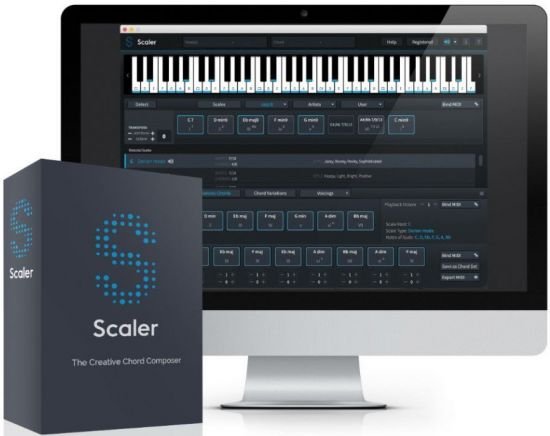
Plugin Boutique Scaler 2.3.1


th-Ddg-EGg8hl-Y9bf-Ip8-Jy-Bhbb-W9-WUAUDUPD.jpg


File Size : 903 MB | (x64)
​
Scaler is a unique and inspirational MIDI effect that makes finding chords and progressions intuitive and fun! With note detection, scale selection and chord suggestions, Scaler is a comprehensive but easy-to-use toolbox that will help anyone make better music.

A first of its kind, Scaler can determine what key and scale you're in and suggest chords that match your music, or it can inspire a tune from scratch by providing a set of initial chords in an unexplored key. With the onboard bank of 1,728 scales and modes including genre and artist presets, there's more than enough to keep the juices flowing.
Once you've determined a scale, Scaler lays out basic diatonic chords for you to audition, and lets you take things further with dozens of chord variations and voicings to try out. Theory buffs can also get an insight into each chord's harmonic function.

Ready to put together a progression? Simply drag and drop chords into Scaler's sequencer, change up octaves and inversions, and record or drag the progression into your DAW.

Benefits
•Discover your music's key and explore alternative scales and chord sets
•Choose from hundreds of keys, and get the harmonic flavours of pro artists
•Easily audition chords and find alternative voicings and common substitutions
•Quickly build intelligent progressions by dragging chords into Scaler's chord sequencer
•Drag chords and progressions from anywhere in the plugin out to your DAW

Detect
•Discover your track's current scale with MIDI keyboard or piano roll note detection
•Get an insight into the emotional content of matching scales
•12 keys across 12 scales and modes giving you a total of 144 options to choose from
•12 unique voicing types giving you a potential 1,728 Scales and modes
•Over 50 artist chord sets from the likes of Carl Cox, MJ Cole, CeCe Rogers and Mike Huckaby
•Over 50 genre and mood-based chord sets such as Chill, Drum & Bass, Jazz, Soundtrack, EDM.
•Check how closely a given scale matches your detected input

Keyboard
•Keep an eye on notes and chords going through Scaler with real-time visual feedback
•Visualise the chosen scale as highlighted notes on Scaler's piano keyboard
•Audition chords from your chosen scale with a choice of four sounds
•Play and record one-finger chords using Scaler's Bind MIDI function
•Assign any VST / AU instrument to Scaler to control your favourite synths

Explore
•See the basic diatonic chords that can be built from your chosen scale
•Browse Chord Variations for each note to get suspended chords, extended chords, dominant sevenths and jazz chords
•Quickly get a sense of each chord's harmonic function in progressions
•Discover chord substitutions that lend variety to your progressions
•Experiment with different chord voicings to spread notes across the keyboard
•Mix and match from hundreds of artist and genre-based chord sets

Build
•Drag and drop chords from your palette into Scaler's Progression Builder
•Transpose and invert chords for even more voicing styles
•Audition your progressions and make changes with drag-and-drop
•Save your own chord sets to the preset bank for later use
•Export MIDI to your DAW simply by dragging and dropping
What's NEW
• Improve pitch naming to allow only one pitch-class per scale.
• Pentatonic scales can now use scale voicings in Section B.
• Improve pentatonic scale navigation (recall last open panel).
• Circle of Fifths can now preview chords on click.
• Circle of Fifths can now switch between natural, sharp, and flat naming.
• Prevent a crash when using the arpeggio on older macOS versions.
• Prevent hung notes when using the Windows Audio Driver.
• Prevent hung notes when performing melodies with the "Chord+Melody" profile.
• Prevent a rare crash when reloading sessions with multiple instances of Scaler.
• Improve stability on M1 systems.


-:DOWNLOAD FROM LINKS:-
NitroFlare
Код:
https://nitroflare.com/view/5FE36E06F20AA82/Scaler.v2.3.1.rar

RapidGator
Код:
https://rapidgator.net/file/9d43d3d6fe3f06d4e280ff7060494922/Scaler.v2.3.1.rar.html

​
 
FTI Forming Suite 2021.0.1 Build 30488.1 / 30409.1 (x64) Multilingual


th-g-REFZHy-Xcd-ASt-Ta39k-AXRKDGAQMKCWJH.jpg


File Size: 520.5 MB | 602.2 MB
​
Description : FormingSuite - is a modular application for the analysis of the technological parts obtained by sheet stamping, and optimization of cutting metal strip. FormingSuite consists of modules, united by a simple common interface and intended for designers, technologists and standardizers.

FormingSuite modules allow you to:
- quickly calculate the sweep shape;
- to predict the possible problems of manufacture: the formation of gaps or folds, utyazhka material;
- determine the final shape of the part with regard to metal springback;
- analyze the geometry of the stamp and calculate the stamping force;
- optimize the cutting of blanks from the tape;
- calculate the cost of each product.

Whats New:
official site does not provide any info about changes in this version.


-:DOWNLOAD FROM LINKS:-
NitroFlare
Код:
https://nitroflare.com/view/7CDF673F89018BF/FTI.Forming.Suite.2020.0.1.30409.1.rar
https://nitroflare.com/view/7BEE02EC3832216/FTI.Forming.Suite.2021.0.1.30448.1.rar

RapidGator
Код:
https://rapidgator.net/file/32019d09b2564cfc82665c0909c90ea4/FTI.Forming.Suite.2020.0.1.30409.1.rar.html
https://rapidgator.net/file/3f3efb9cd307c69eb0aca3ddafc6c501/FTI.Forming.Suite.2021.0.1.30448.1.rar.html

​
 
iMachining 2.0.16 (64bit) for NX


th-wkh193-Jf-Zg-LA5-FTc-SH1-FUpt38fo-VDh-R1.jpg


File Size: 386.2 MB
​
The Revolutionary CNC Milling Technology - now integrated inSiemens NX. Finally, all the promises of a TRUE REVOLUTION in CNC machining are actually delivered - breakthrough Technology brought to Reality by iMachining!

iMachining - with its unique patented "morphing spirals", intelligent island separation and moating, achieves the shortest cycle times in any industry - in any material, on any machine.

The cutting angle constantly adjusts between a minimum and a maximum value, while the feed is dynamically adjusted to ensure constant mechanical and thermal load on the tool - providing you with the longest tool life at the highest Material Removal Rate (MRR) possible.

Since spirals have higher MRR than Trochoidal tool paths, iMachining utilizes various, patented strategies that enable it to use spirals much more often than Trochoidals.

iMachining automatically reduces vibrations to prevent excessive tool wear and also decreases the likelihood of forming temporary thin walls that often lead to costly tool damage.
Using advanced rest material knowledge, iMachining maintains the highest level of cutting tool engagement by avoiding "air-cuts" and repositioning moves.
The iMachining Technology Wizard provides automatic, optimal feed and speed values for different materials and CNC machines to ensure "first-cut" success.

Saves 70 % and more in CNC Machining Time
The unique iMachining toolpath, with fully optimized feeds & speeds, keeps the cutter at maximum efficiency and ensures a maximum material removal rate. Exact stock rest material machining and finish cuts eliminate air cutting and unnecessary tool retracts.

Drastically extends Tool Life
With iMachining, the average Tool life increases by 5 times or more. Machining at full depth-of-cut ensures that the entire tool is utilized rather than only the bottom part. Optimum cutting conditions reduce tool wear and increase process stability to avoid uncontrolled tool breakage especially when using small and fragile tools. iMachining eliminates the cost of premium and specialty tooling for hard materials.

Shortens Programming Time
The Technology-Wizard provides optimal feeds & speeds, and step-over to ensure time-saving first-part success. The much shorter and simpler programming procedure of iMachining results in greatly increased CAM productivity.

iMachining Technology Wizard
The exclusive, patented Technology Wizard takes out the guesswork by automatically providing all machining parameters. The industry's first and only TRUE Wizard uses an advanced, patented technology that automatically produces optimized feeds, speeds, depth and width of cuts - all specifically for your CNC machines, your materials and your tools.

The iMachining Wizard
The Technology Wizard is the perfect tool for even the most seasoned machinist for getting it perfectly dialed in, the first time - or for the less experienced machinist, iMachining will turn them into an expert in no time.

The "iMachining Level" lets the user choose from 8 levels to automatically adjust for "real-world" fixture, tool holding and CNC machine conditions. The levels make it easy to overcome common challenges with spindle-rigidity, fixture-rigidity and excessive tool deflection.

Seamless Integration of iMachining in Siemens NX
The proven iMachining technology is now available as an integrated plugin for Siemens NX. CAM users can now insert iMachining 2D and 3D operations directly inside NX CAM, using all NX functionality.

Compatibility:
iMachining_for_NX18XX_2.0.16.exe - iMachining 2.0.16 for: NX 1847 Series (NX 1847-1867.xxxx), NX 1872 Series (NX 1872-1892.xxxx), NX 1899 Series (NX 1899-1919.xxxx)
iMachining_for_NX1926_2.0.16.exe - iMachining 2.0.16 for NX 1926 Series (NX 1926-1946.xxxx)
iMachining_for_NX1953_2.0.16.exe - iMachining 2.0.16 for NX 1953 Series (NX 1953-1973.xxxx)

Whats New:
official site does not provide any info about changes in this version.


-:DOWNLOAD FROM LINKS:-
NitroFlare
Код:
https://nitroflare.com/view/D73D195DCC0CD6C/iMachining.2.0.16.for.Siemens.NX-1947-1953.Series.rar

RapidGator
Код:
https://rapidgator.net/file/8a72a01c42efd38dbc8a005c2d8689e6/iMachining.2.0.16.for.Siemens.NX-1947-1953.Series.rar.html

​
 
R&B MoldWorks 2020 SP0 for SolidWorks 2015-2021


Jw-Uk-DBB7k-KKp3b-APw-Hg3-SO6-FF7-Wx-Mrnz.jpg


File Size: 254.7 MB | (x64)
​
MoldWorks is an automated mold layout. MoldWorks is used primarily to shorten the design cycle. The time for assembling a mold in the MoldWorks system takes several hours, as opposed to 1.5 - 2 weeks for conventional design, even with the use of a computer.
MoldWorks helps to optimize the size of the package and the location of its nodes, in place to edit the individual components of the mold.

With manual design, the designer cannot guarantee the complete operability of the structure at the stage of its development, which is quite difficult to do when working with individual drawing views. As a result, the mold is subjected to repeated testing and fine-tuning in the tool shop.

In the MoldWorks system, it is possible to analyze the collectibility of the mold and the operability of its nodes, to provide for the intersection of the work of individual parts in the mold (ejectors and side bars having a joint working area).

A large percentage of scrap in the manufacture of molds is associated with designer errors in the calculation of the cooling system. MoldWorks analyzes wall thicknesses to help you avoid collisions between cooling holes and other holes.

The speed of assembling molds in MoldWorks is due to the use of parametric 3-dimensional object-oriented libraries of mold parts of several international standards (DME, HASCO, NATIONAL, RABOURDIN, FUTABA, EOC, STRACK). All used mold components have a graphic and informational description and are positioned in the assembly in accordance with their purpose.

What's New
Код:
https://www.rnbusa.com/moldworks-2020-sp0-is-released


-:DOWNLOAD FROM LINKS:-
NitroFlare
Код:
https://nitroflare.com/view/3B9216BC89EC2AE/R%26B.MoldWorks.2020.SP0.rar

RapidGator
Код:
https://rapidgator.net/file/2ecb2052858ba1b1cf30e1216fd3f0e7/R&B.MoldWorks.2020.SP0.rar.html

​
 
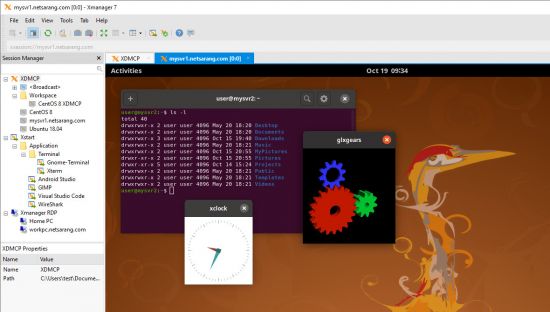
NetSarang Xmanager Power Suite 7.0.0004 Multilingual


th-fs-LJD3-WDMJB36ddjvyv-B14-Waouh-Owwlb.jpg

NetSarang Xmanager Power Suite 7.0.0004 Multilingual | 157.2 Mb
​
Xmanager Power Suite is an all-in-one solution that includes Xmanager, Xshell, Xftp and Xlpd in a single suite. Xmanager runs X window applications, and Xshell manages remote Unix/Linux servers with a secure terminal. Xftp transfers files between systems securely, and Xlpd runs local printing for remote documents on other systems.


Centralize Scattered System Resources and Reduce TCO
Companies using various operating systems may find their system resources scattered over the network due to multiple X applications and file systems. Xmanager Power Suite 6 solves this issue by allowing users to access all scattered resources directly from their desktop. Having a central location that allows users to access applications remotely, upgrades and maintenance become easily manageable and reduce TCO.

Interoperability for Maximum Productivity
All programs included in this suite share a common SSH (Secure Shell) security module to interoperate with one another conveniently and efficiently. With all the various features integrated into a single suite, customers can experience an easier time with purchase, installation, maintenance, as well as a reduced total cost of ownership.

Session Manager
As a dockable pane in your main Xmanager and Xshell window, you'll have immediate access to all the essentials required for session management. Easily view, create, edit, and delete sessions on the fly and launch multiple sessions simultaneously. It's never been easier to manage your sessions!

Dockable UI
Xmanager and Xshell main windows incorporate an all new Dockable UI. Utilize Drag & Drop to choose where to place your Session Manager, Compose Bar, Quick Command sets, etc. The UI provides even more functionality to Xmanager Power Suite's already customizable configuration.

Enhanced Password Encryption with Master Password
Set a user defined string as your Master Password to add a layer of encryption to your session file passwords. The Master Password encrypts the passphrase used to connect to the server (password), the user key's passphrase (passphrase), and the password string contained within the session file. Safely store your session files in the cloud to share between devices.

SSH PKCS#11 Support
The PKCS#11 protocol enables users to securely store the user's private keys using a hardware token(HSM) for added security. Xmanager Power Suite 6 also supports GSSAPI, Password, Public Key, and the Keyboard Interactive authentication methods.

System Requirements:
Operating System: Windows 10, Windows 8.1, Windows 7, Windows Server 2008 Service Pack 1, Windows Server 2012, Windows Vista Service Pack 1, Microsoft Windows Terminal Server, Citrix MetaFrame from Windows
CPU: Intel® Pentium or faster
Memory: 512 MB
Hard Disk: 200 MB

Home Page -
Код:
https://www.netsarang.com/


-:DOWNLOAD FROM LINKS:-

NitroFlare Link
Код:
https://nitroflare.com/view/1C028B2488F002C/NetSarang.7.0.0004.rar

RapidGator Link
Код:
https://rapidgator.net/file/32abb69dda6318cae4fd1325ac71d9fe/NetSarang.7.0.0004.rar.html

​
 
Zoner Photo Studio X 19.2103.2.314


1412003115-zoner-photo-studio.jpg

Zoner Photo Studio X 19.2103.2.314 | 165.4 MB
​
Zoner Photo Studio X helps you take control of your photos. Zoner Photo Studio is a complete toolbox for managing and processing digital photos. Acquire pictures from your camera, organize your archive, and edit and share your photos - it's never been easier! Zoner Photo Studio is useful for beginners, advanced users, and experienced photographers, who can select one out of four different variants.


This software also provides effects from fun (e.g. oil painting and posterization) to highly professional (e.g. framing and text-in-image).
• Just connect your camera, and Zoner Photo Studio handles the rest. Your imported photos are automatically sorted, and you can also rename them and back them up.
• Keep your photos organized, no matter whether you've got 100, 1,000, or 100,000. Add colored labels, rate photos, and give them map locations.
• Add color to your photos or brighten them effortlessly. The new Develop module lets you enhance photos non-destructively - your full-quality original is always at hand.
• Edit your photos, right to the last pixel. Zoner Photo Studio is your friend for collages, portrait retouching, adjusting objects' colors, and making beautiful panoramas. Its advanced photo editor will help with all this and more.

Bitmap formats: JPEG, GIF, TIFF, PNG, PSD, PSB, PCD, BMP, PCX, TGA, ICO, RLE, WPG, DIB, BMI, PSP, PSPIMAGE, THM, HDP, WDP, JP2, J2K, JPC, PNM, PPM, PAM, PBM, PGM, WBMP, BMS, JPS, PNS, DCM, KDC, MPO, JXR, HDR, ZPS

RAW formats: CRW, CR2, DNG, MRW, NEF, ORF, PEF, ARW, SRF, SR2, MEF, ERF, RAW, RAF, FFF, RWZ, RWL, 3FR, CS1, SRW
For viewing purposes only, you can expand the range of supported formats by installing extra WIC codecs (e.g. WebP)

Video formats: ASF, AVI, M1V, MOV, MP4, MPE, MPEG, MPG, MTS, OGV, QT, WMV
Install MPlayer to add support for these formats: 3GP, DIVX, DV, DVR*MS, FLV, M2T, M2TS, M2V, M4V, MKV, MPV, MQV, NSV, OGG, OGM, RAM, REC, RM, RMVB, TS, VCD, VFW, VOB

Zoner Photo Studio X Highlights:
• Optimized and faster RAW module
• Catalog, advanced picture management and archival
• Multi-exposures help you to do the "impossible"
• Transparency support
• Healing Brush and Selection Brush tool
• Direct upload to Facebook, Flickr, and Picassa Web Albums
• 64-bit program version
• A wide array of edits and effects for photo enthusiasts
• HDR, panoramas, 3D photo maker
• Convenient, time saving batch operations
• Support for GPS map data
• Easy and direct web publishing
• Templates for calendars, contact lists, and more

Operating System:
Windows® 10, Windows® 8 / 8.1, Windows® 7

Homepage -
Код:
http://www.zoner.com/


-:DOWNLOAD FROM LINKS:-

NitroFlare Link
Код:
https://nitroflare.com/view/D332A5D9E2047FC/ZPS.X.19.2103.2.314.rar

RapidGator Link
Код:
https://rapidgator.net/file/8b403f6a396455feb65e30fdb73c539a/ZPS.X.19.2103.2.314.rar.html

​
 
InPixio Photo Focus Pro 4.2.7748.20903 Multilingual REPACK


th-5-EFBQv-Wx1-KUBQDMxl-Ge-VYYfsm-UNr-NGCS.jpg

InPixio Photo Focus Pro 4.2.7748.20903 Multilingual REPACK | 57.9 Mb
​
Improve sharpness! Getting sharp photos is not always easy - especially with spontaneous snapshots. InPixio Photo Focus solves this problem in a flash and creates clear, high-resolution images.


Improve the sharpness of your photos
- Improve the sharpness of your photos
- Simple 1-click sharpening tool
- Reinforce & accentuate the focus
- Includes Tilt-Shift & Artistic Blur effects that bring the subject of the photo to life!

ONLY IN THE PRO VERSION:
- Create professional looking photos with oval frames (vignetting)
- Add customised artistic blur to achieve the perfect finish
- Save personal presets that can be used in a single click for future projects

Improve sharpness
Getting sharp photos is not always easy - especially with spontaneous snapshots. InPixio Photo Focus solves this problem in a flash and creates clear, high-resolution images.

Increase focus
You can add sharpness, soft focus and blurred areas to your images. This helps you to further accentuate the difference between the background and the sharp centre of the image.

Refocus
Not all images are always correctly centred. Redefine the centre of your images and focus the attention towards the centre of the image.

Impressive effects with tilt-shift and soft focus functions
Add horizontal soft focus (tilt-shift) to your images. This creates fantastic miniature effects that allow the focal object of your image to look like miniature!

Create structure and details
Emphasise the finest details in your images. Manage contrast and clarity - for impressive and detailed photos!

Resharpening
You can get so much more from all your photos! Even the sharpest photos can be resharpened - for perfect prints or an extremely sharp impression!

Simple
During the development stage of InPixio Photo Focus, particular attention was given to making sure the software is easy to use. The programme is intuitive and helps you through with the various 1-Click Assistants. If you need help when using the software, there are tool tips offering brief explanations next to each function.

Only in the Professional Version:

MORE! Creative Blur
Add a selected blurred area to your image through iris blurring (only available with PRO version). In photography, this effect is achieved through maximum fade-in.

MORE! Add Presets
Store your personal optimisation settings (presets) Create and save your own presets with 1 click for future use.

MORE! Vignetting module
Add oval picture frame to your photos to (vignetting) Create atmospheric shots from your photos with an oval picture frame in black or white. You can select the transparency of the frame to suit your taste and choose sharp or blurred transitions.

What's New in Version 4:

NEW! Advanced cropping module with rotation and horizon correction
Crop your photos manually or choose from the suggested crop formats: 1/1; 16/9; 3/4 etc. You can also rotate your images and adjust the angle.

NEW! Tone Curves Module
Play with the tone curves to obtain light or dark hues and adjust the RGB (Red, Green, Blue) curves one by one.

IMPROVED! interface and workspace
The new version has an attractive, ultra-modern user interface designed for even easier use.

NEW! Find tutorial videos for each Photo Focus module
To get the most out of Photo Focus features, mini videos have been added to each of the software program's modules in the form of tooltips, making it easier and more effective to use.

System Requirements:
- Windows 7, Windows 8 and Windows 10 (32-bit & 64-bit)
- Intel® Pentium® 1 GHz processor or equivalent
- 2 GB of RAM - (4 recommended)
- 500 MB of free disk space, mouse and keyboard

Home Page -
Код:
https://www.inpixio.com/


-:DOWNLOAD FROM LINKS:-

NitroFlare Link
Код:
https://nitroflare.com/view/538EBE82D73CCBF/Photo.Focus.4.2.7748.20903.rar

RapidGator Link
Код:
https://rapidgator.net/file/7f9997eb30444246367c357638263e42/Photo.Focus.4.2.7748.20903.rar.html

​
 
InPixio Photo Maximizer Pro 5.2.7748.21024 Multilingual REPACK


th-RLept-LGhb-QXgfl16kl0-Cvfp9-Pkw-Qb-Hj2.jpg

InPixio Photo Maximizer Pro 5.2.7748.21024 Multilingual REPACK | 57.7 Mb
​
Ultra powerful zoom function which can enlarge images by up to 1000%. With 7 zoom algorithms, Photo Maximizer can tell you the target size of the image in pixels or centimeters.


The required resolution can also be adjusted to give you flawless results. This is particularly important when printing your photos and guarantees you the highest quality results. High precision zoom without quality loss
- Magnify up to 1000%
- NEW! Ultra-powerful zoom - 7 algorithms
- NEW! Define presets and process in batches
- NEW! Print oversized images and posters
- NEW! Simple, intuitive interface
- NEW! Touch-ups and enhancements in one click
- IMPROVED! Enlarge your photos and improve their quality

3 Simple Steps!
InPixio Photo Maximizer has been designed to be user-friendly and even includes a helpful wizard.

- Upload an image.
- Select the subject of your photograph
- Select the zoom setting: and that's it!

Before/after comparison
Display up to four different zoom settings simultaneously! Compare the images and choose the best result!

Enlarge photos on your PC, mobile, camera, etc.
Simply transfer your photos to your PC and zoom away!

Zoom your images and maintain extremely sharp edges
Usually when you enlarge an image you get pixilation and deterioration of colour and brightness. Photo Maximizer maintains image quality and undesirable noise. With InPixio Photo Maximizer say goodbye to pixelated, grainy and blurred photos when zooming in.

Batch processing - one thousand photos in one step
Define your zoom settings and Photo Maximizer will batch process up to 1000 images simultaneously!

Print projects
Print your enlarged images as posters, photos for framing, t-shirts, postcards and more.

Settings module - New!
Temperature, Hue, Brightness, Contrast, Shadows, Highlights, Clarity, Saturation

Share Module - New!
Facebook, Twitter FlickR, InstaCards - Share your photos with your friends and family on social networks, via email or as one-of-a-kind postcards (first card free)

Noise-reduction module - Improved! (Only in Pro Version)
Use this tool to effectively limit the noise in your enlarged image.

Sharpness module - Improved! (Only in Pro Version)
Reinforce sharpness to reveal all the details of your enlarged images.

Film grain module - New! (Only in Pro Version)
Enhance your prints by adding great-looking film grain.

Print and Formatting functions - New!
Determine image quality and easily print your photos from home

Photo roll - New!
One-click access to photos! All photos in the current folder are displayed and viewable in a preview area. Now you don't have to use the Open function to view photos!

InPixio bridge - New!
With a single click, switch from one editing function (e.g. cut) to the next (e.g. delete)!

"InPixio" enlargement algorithm - Improved!
The "InPixio" enlargement method has been significantly improved, so you can enlarge images and still get enhanced definition and quality during processing. The outlines of enlarged areas are also more precise.

Creating presets - Improved! (Only in Pro Version)
Create and save your own settings (presets) so you can use them again later: turn your photos into works of art! Each image processing setting can be saved as a preset for subsequent use. Simplify your work without having to reconfigure your settings!

Batch processing - Improved! (Only in Pro Version)
Make it easier on yourself: apply a preset to 1,000 or more photos and automate the image-processing step. Process large amounts of images with a single click.

New interface and workspace - New!
The new version has an attractive, ultra-modern user interface designed for even easier use.

Home screen - New!
Access all functions directly from a centralised start-up screen!

Getting started tutorial - Improved!
Interactive introductory lesson (tutorial) This short demonstration teaches you how to use the software and repeat the exact same steps on your own.

System Requirements:
- Windows 7, Windows 8, Windows 10
- Pentium IV 1.2 GHz and compatible processors
- 1 GB RAM (2 GB RAM for Windows 7/Vista)
- 15 MB hard disk memory

Home Page -
Код:
https://www.avanquest.com/


-:DOWNLOAD FROM LINKS:-

NitroFlare Link
Код:
https://nitroflare.com/view/FCF39F5D15AC80E/Photo.Maximizer.5.2.7748.21024.rar

RapidGator Link
Код:
https://rapidgator.net/file/a573937bf5b665b9d6ef6271babfc288/Photo.Maximizer.5.2.7748.21024.rar.html

​
 
InPixio Photo Studio 11.0.7748.20733 (x64) Multilingual


th-USjj-Y0-L0flr-Pn2xl8-KWqi-SNUIEio-Tn-SE.jpg

InPixio Photo Studio 11.0.7748.20733 (x64) Multilingual | 480.9 MB
​
InPixio Photo Studio delivers professional photo editing & photo organizing features, spectacular special effects and professional-quality photo projects - all together in one powerful editing suite. InPixio Photo Studio makes it easier than ever to unlock the power of your digital camera.


Create beautiful photos - with 1 click!
- Add filters & photo effects: warm, black & white, pink lady, negative, sepia, science fiction, vintage.
- Cut & crop: change the focus and size of your photos without being a pro.
- Edit your photos: change the colour & brightness etc. to get the most out of your favourite shots!
- Automatic correction in 1 click
- Correct perspective in your photos
- Selective retouching module

Viewing your photos
Relax, Photo Editor is really quick to master. You will be able to easily navigate between the various tools. For viewing your photos you can choose a simple view but also:

- A double viewing window
- A before-and-after view
- Use the Zoom feature to enhance the view and make your alterations in the closest detail.

Batch processing
Apply changes to multiple photos at once

Save your own settings
Which you can call up again in just one click during future projects

High precision zoom without quality loss
- Magnify up to 1000%
- Ultra-powerful zoom - 7 algorithms
- Define presets and process in batches
- Print oversized images and posters
- Touch-ups and enhancements in one click
- Enlarge your photos and improve their quality
- NEW! Tone Curve module to adjust RGB

Ultra powerful zoom function which can enlarge images by up to 1000%
With 7 zoom algorithms, Photo Maximizer can tell you the target size of the image in pixels or centimeters. The required resolution can also be adjusted to give you flawless results. This is particularly important when printing your photos and guarantees you the highest quality results.

Zoom your images and maintain extremely sharp edges
Usually when you enlarge an image you get pixellation and deterioration of colour and brightness. Photo Maximizer maintains image quality and undesirable noise. With InPixio Photo Maximizer say goodbye to pixelated, grainy and blurred photos when zooming in.

Before/after comparison
Display up to four different zoom settings simultaneously! Compare the images and choose the best result!

Enlarge photos on your PC, mobile, camera, etc.
Simply transfer your photos to your PC and zoom away!

Print projects
Print your enlarged images as posters, photos for framing, t-shirts, postcards and more.

Batch processing - one thousand photos in one step - Pro Version
Define your zoom settings and Photo Maximizer will batch process up to 1000 images simultaneously!

Creating presets
Create and save your own settings (presets) so you can use them again later: turn your photos into works of art! Each image processing setting can be saved as a preset for subsequent use. Simplify your work without having to reconfigure your settings!

Improve the sharpness of your photos
- Improve the sharpness of your photos
- Simple 1-click sharpening tool
- Reinforce & accentuate the focus
- Includes Tilt-Shift & Artistic Blur effects that bring the subject of the photo to life!
- Create professional looking photos with oval frames (vignetting)
- Add customised artistic blur to achieve the perfect finish
- Save personal presets that can be used in a single click for future projects

Improve sharpness
Getting sharp photos is not always easy - especially with spontaneous snapshots. InPixio Photo Focus solves this problem in a flash and creates clear, high-resolution images.

Increase focus
You can add sharpness, soft focus and blurred areas to your images. This helps you to further accentuate the difference between the background and the sharp centre of the image.

Refocus
Not all images are always correctly centred. Redefine the centre of your images and focus the attention towards the centre of the image.

Impressive effects with tilt-shift and soft focus functions
Add horizontal soft focus (tilt-shift) to your images. This creates fantastic miniature effects that allow the focal object of your image to look like miniature!

Create structure and details
Emphasise the finest details in your images. Manage contrast and clarity - for impressive and detailed photos!

Resharpening
You can get so much more from all your photos! Even the sharpest photos can be resharpened - for perfect prints or an extremely sharp impression!

Simple
During the development stage of InPixio Photo Focus, particular attention was given to making sure the software is easy to use. The programme is intuitive and helps you through with the various 1-Click Assistants. If you need help when using the software, there are tool tips offering brief explanations next to each function.

System Requirements:
- Windows 10, Windows 8, Windows 7 (64-bit)
- 1 GHz Intel® Pentium® processor or equivalent
- 1 GB RAM CD/DVD ROM drive
- 100 MB hard disk space, mouse and keyboard

Homepage -
Код:
https://www.inpixio.com


-:DOWNLOAD FROM LINKS:-

NitroFlare Link
Код:
https://nitroflare.com/view/0BCF3CB5BF4468A/Photo.Studio.11.0.7748.20733.rar

RapidGator Link
Код:
https://rapidgator.net/file/fa23c3022ef968894e77797145d81427/Photo.Studio.11.0.7748.20733.rar.html

​
 
Jar2Exe 2.5.4.1285


q4l9-Pd-GOvt-Cq-Jfne-Wr-Nf-Lw6-BOM2-MZx-Sq.png

Jar2Exe 2.5.4.1285 | 17.5 Mb
​
Wrap, run, protect and enhance your java program into binary file for Windows, Linux and Mac OS X. Jar2Exe is to convert jar files to executive binary files for Windows and Linux. Why should we select to wrap jar files into exe files with Jar2Exe, because it makes java program more convenient:


- Find JRE on host by itself
- Encrypt and protect your java program
- Run as Service without special coding
- Embed jar libraries into binary
- Enhanced configurability
- It makes java program more easy to run.
- It makes java program more safe to redistribute by encryption.
- It makes java program more powerful by function enhancement.

Jar2Exe is different
Jar2Exe is growing from 2006 and is always actively upgraded and maintained. Comparing with other similar software, why should you select Jar2Exe:

- Jar files encryption, encrypted program will not write temporary files when it runs
- Service type of application, without special coding.
- Friendly to use, Jar2Exe has wizard mode and command line mode to run
- Both Windows and Linux, no difference to be protected and to run as service on windows and Linux

Solution advices
You can follow the steps of these solution advices to get to know how to use Jar2Exe. Of course, Jar2Exe can do more than these solutions.

- Console tool, a common java program to start at command line, usually with arguments
- Desktop window, a window program to display a window from Java
- Background service, to run as background service, it can automatically starts up when System starts up
- Webapp to a single exe, encrypt and wrap webapp as a standalong server, in a single exe file
- More safety, try our best to let java program safer

System Requirements:
- Jar2Exe tool requires: Windows 2000 or above.
- Generated binary file requires: Windows 98/NT 4 or above; Linux 2.6.x; Mac OS X 10.6 or above.

Homepage -
Код:
http://www.jar2exe.com/


-:DOWNLOAD FROM LINKS:-

NitroFlare Link
Код:
https://nitroflare.com/view/9F70180F6603B83/Jar2Exe.2.5.4.1285.rar

RapidGator Link
Код:
https://rapidgator.net/file/4b877755c265f1224bff1e26efcdd737/Jar2Exe.2.5.4.1285.rar.html

​
 
Tenorshare 4uKey for Android 2.2.3 Multilingual


th-z-Jqg-DEWfl-EFb2-Obmvt-Ngo-ILc3-Bi-WEl-Yd.jpg

Tenorshare 4uKey for Android 2.2.3 Multilingual | 36.7 Mb
​
Unlock Android Just One Click Away. Remove Android password, pattern, PIN & fingerprint lock. Remove Google account from Samsung device without password. Secure unlocking in minutes with easy operations.


Completely Remove FRP Lock (NEW!)
Your Samsung device stuck in Google account verification, and how to remove samsung account without password? Tenorshare 4uKey for Android will solve these problems with high rate.

- Delete Samsung account without password
- Fully control your device without any limiations
- Support 99% Samsung devices, including Samsung Galaxy S10+, S10

Remove Any Android Screen Locks in Minutes
Tenorshare Android unlocker is capable of removing any formats of screen lock on your Android device. One can easily handle it without professional knowledge. Easy and quick.

Auto System Detection before Unlocking Android
For each Android device that has a password lock, it will prepare corresponding test profile to detect whether your device is ready to perform the next operation, making it's less likely to get your Android device bricked when you reset Android screen lock.

Never Worried When Locked out of Android Phones
No matter what reasons caused your Android phone getting locked, this smart tool can easily solve the problem and bypass Android lock screen in minutes. Quick and Easy.

Operating System: Windows XP, Vista, 7, 8/8.1, 10

Home Page -
Код:
https://www.tenorshare.com/


-:DOWNLOAD FROM LINKS:-

NitroFlare Link
Код:
https://nitroflare.com/view/8E9BF88119CA3C9/4uKeyforAndroid2.rar

RapidGator Link
Код:
https://rapidgator.net/file/3d25b48f95ccf19272d6415a92fcbd28/4uKeyforAndroid2.rar.html

​
 
PassFab Android Unlocker 2.2.3 Multilingual


z-Hxq-QS8gux3-DWn6t7-Ux-O2-FYf-NAOhpg-YY.jpg

PassFab Android Unlocker 2.2.3 Multilingual | 42 Mb
​
Unlock Android Lock Screen and Samsung FRP Lock in Minutes. No matter you are locked out of your Android phone because you forgot PIN, pattern or another password, PassFab Android Unlocker can help you solve this problem easily.


Unlock Android Pattern, PIN, Fingerprint, password
Remove Samsung FRP Lock without passwordNEW
Work on 99% Android Phones including Galaxy S20 Ultra 5G

All Types of Android Lock Screen Removal
No matter you are locked out of your Android phone because you forgot PIN, pattern or another password, This Android password remover can help you remove screen lock easily.

Remove FRP Lock on Samsung Devices
Stuck on Google account verification stage and don't know how to do? This Google lock removal enables you to remove Google FRP lock with one click.
Get rid of all restrictions to enjoy all features
Bypass Samsung Google account without password
99% Samsung devices are supported
Note: Only available on Windows system currently.

Get Unlocked Android Phones in Safest Way
Worry not it will damage your Android device, This Android screen unlocker will automatically detect and match your system. At the same time, protect your device while removing Android password.
Disabled smartphone
Locked Folding phone
Second-hand Flip phone

System Requirements:
- Operating System: Windows 10/Windows 8.1/Windows/Windows 7/Vista/XP(32-bit/64-bit)
- CPU: 1 GHz (32 bit or 64 bit) and above
- RAM: 256 MB(1028 MB Recommended)
- Hard Disk: 200 MB free space and more

Home Page -
Код:
https://www.passfab.com/


-:DOWNLOAD FROM LINKS:-

NitroFlare Link
Код:
https://nitroflare.com/view/D2993A1AEFD5364/AndroidUnlocker2.rar

RapidGator Link
Код:
https://rapidgator.net/file/cf4d201dc335440823ae401282bf7c3f/AndroidUnlocker2.rar.html

​
 
3D-Coat 4.9.72 (x64) Multilingual


1615133936-3d-coat-free-download.png

3D-Coat 4.9.72 (x64) Stable Multilingual | 1.07 GB
​
3DCoat is the one application that has all the tools you need to take your 3D idea from a block of digital clay all the way to a production ready, fully textured organic or hard surface model.


Key Features:
- Possibility to attach Smart Materials to layers! Materials managing becomes even easier.
- Improved Curvature calculation. This is crucial for Smart Materials to be looking even more realistic.
- New Primitives in Retopo room: cylinder, torus, cube, ellipse, spiral, etc. We are getting closer and closer to a low-poly modeling!
- Possibility to change resolution of textures, attached materials will automatically be re-sampled!
- Smart Materials usage history.
- Render scene in Renderman. Yep, you heard it right!
- Proxy Slider. Set your proxy degree with an easy slider movement.
- Baking Scan. Paint baking depth with brush. Now you can define with an ease of a brush stroke how big the depth of scanning will be.
- 4K monitors support. Now UI elements and font size will automatically fit your screen resolution.
- Rotation mode quick switch - around Y or free rotation. See navigation panel.

Operating System: Windows Vista, 7, 8/8.1, 10 (64-bit only)

Home Page -
Код:
https://3dcoat.com/


-:DOWNLOAD FROM LINKS:-

NitroFlare Link
Код:
https://nitroflare.com/view/24BD757DAF4FCB0/3d-Coat.4.9.72.part1.rar
https://nitroflare.com/view/4716CDF7B053C75/3d-Coat.4.9.72.part2.rar

RapidGator Link
Код:
https://rapidgator.net/file/a8240df6c63be23bbfc2f0f32a3501de/3d-Coat.4.9.72.part2.rar.html
https://rapidgator.net/file/07831056011d171f07c3fb48f640da04/3d-Coat.4.9.72.part1.rar.html

​
 
Назад
Сверху