• Здравствуйте. Сайт заработал в архивном режиме форум www.old.nado.in

Dl4ever Software

Imagenomic Realgrain 2.1.2 Build 2122 (Win/macOS)


f839ee3d1494a6cade21c5c3df5c047c.jpg

Imagenomic Realgrain 2.1.2 Build 2122 (Win/macOS) For Adobe Photoshop | 6.5 Mb
​
Imagenomic Realgrain Plug-in - B&W, toning, film. If you are looking for a superior black-and-white conversion, toning and color effects or long for the darkroom age to achieve the soft, warm graininess of film, then Realgrain is the plugin for you.


Imagenomic Realgrain Features:
- Because Realgrain enables you to automatically adjust the grain size based on the physical image dimensions, it can dynamically render accurate grain patterns for varying image sizes.
- Realgrain's controls for grain balance, tonal and color fine-tuning enable you to generate superior output quality and picture vibrancy, and are simple and easy-to-use for a truly intuitive workflow experience.
- Plus, Realgrain comes with precision presets for a range of default effect options. You can also capture your own signature workflow through custom presets tailored to your specific requirements and individual photographs.

How to shoot Film with a Digital camera?
Imagenomic RealGrain - If you long for the darkroom age, the soft, warm graininess of the film, or you seek to infuse that fuzzy, retro look or perhaps enhance your digital photos by simulating the greater range and texture of traditional film, then RealGrain is the plugin for you. RealGrain features versatile methods for simulating the grain patterns, the color and the tonal response of different films and different scan resolutions to convey a truly film-like image effect. Because RealGrain enables you to automatically adjust the grain size based on the physical image dimensions, it can dynamically render accurate grain patterns for varying image sizes.

RealGrain's controls for grain balance, tonal and color fine-tuning enable you to generate superior output quality and picture vibrancy, and are simple and easy-to-use for a truly intuitive workflow experience. Plus, RealGrain comes with precision pre-sets for a range of default effect options. You can also capture your own signature workflow through custom presets tailored to your specific requirements and individual photographs.

Unique Features:
Realgrain 2 is a new milestone in image effects and incorporates the second generation of Imagenomic's effects engine. Realgrain 2 not only looks different, it features plenty of improvements under the surface as well.

- Improved multi-core support provides up to 4x processing speed increase.
- Full 64bit compatibility on Windows.
- New Preset Manager with unlimited number of presets, multiple categories, notes and import/export.
- New History control with unlimited number of history steps.

Requirements: For Adobe Photoshop CC 2015.5 and up and Photoshop Elements 14/15

Home Page -
Код:
https://imagenomic.com


-:DOWNLOAD FROM LINKS:-

RapidGator
Код:
https://rapidgator.net/file/cbb40347e231e046e9629328f93ff4f1/Imagenomic_Realgrain_Ps_2.1.2_2122.dmg.html
https://rapidgator.net/file/6a4b1e1b3680267ed5eaba0957f399a0/Realgrain.2.1.2.2122.rar.html

NitroFlare
Код:
https://nitroflare.com/view/65958B0679983F7/Imagenomic_Realgrain_Ps_2.1.2_2122.dmg
https://nitroflare.com/view/E4C5E2FBF04E649/Realgrain.2.1.2.2122.rar

​
 
Imagenomic Noiseware 5.1.2 Build 5128 (Win/macOS)


9f06cf56cbf0c775b154fd860dff7bab.jpg

Imagenomic Noiseware 5.1.2 Build 5128 (Win/macOS) For Adobe Photoshop | 4.7 Mb
​
Imagenomic Noiseware Plug-in - Noise Removal. Award-winning noise suppression software tool designed to decrease or eliminate noise from digital photo or scanned images.


The Better way to remove Noise
Noiseware is the highly-acclaimed, award-winning software tool from Imagenomic that is setting the standard for digital image noise reduction. Noiseware leads the field for speed, quality and ease-of-use in restoring image fidelity by eliminating digital noise and unwanted artifacts introduced by high ISO photography and less than optimal environmental conditions. Unlike most image processing software techniques that utilize simple methods (such as median filters) to treat digital noise in images, Noiseware features a sophisticated yet fast noise filtering algorithm. Using the adaptive noise profile capability and sharpening function, Noiseware greatly reduces the visible noise while keeping the details in the images.

Click-less Workflow
Intuitive and Intelligent: True to its Easy-to-Use principle, Noiseware further streamlines sophisticated workflow into an intuitive experience. No camera profiles needed - just click once. Noiseware's IntelliProfileTM algorithm, with its Self-Learning mechanism, will automatically calibrate a precision noise profile and choose the optimal settings for each individual image. The manual region sampling method is also available, if preferred.

Color and tonal range - Frequency - DetailGuard
New Unique Features: Noiseware includes three new control sets to enable a wide range of fine-tuning and superior output quality. Now you can adjust detected noise levels as well as noise suppression levels by tonal and color ranges. Noiseware's new DetailGuard preserves image details based on tonality range and processing degree, safeguarding picture details from excessive alteration.

Unique Features:
Noiseware includes three new control sets to enable a wide range of fine-tuning and superior output quality. Now you can adjust detected noise levels as well as noise suppression levels by tonal and color ranges. Noiseware's new DetailGuard preserves image details based on tonality range and processing degree, safeguarding picture details from excessive alteration.

- Improved algorithm retains more details and is 25% more effective
- Improved multi-core support provides up to 4x processing speed increase
- Full 64bit compatibility on Mac and Windows
- New Preset Manager with unlimited number of presets, multiple categories, notes and import/export
- New History control with unlimited number of history steps

Requirements: For Adobe Photoshop CC 2015.5 and up and Photoshop Elements 14/15

Homepage-
Код:
https://imagenomic.com


-:DOWNLOAD FROM LINKS:-

RapidGator
Код:
https://rapidgator.net/file/d78668a9053831beeeacd8b56e38d6f2/Imagenomic_Noiseware_Ps_5.1.2_5128.dmg.html
https://rapidgator.net/file/eaa1b6964f5e4b7ae276e3dd7b589e46/Noiseware.5.1.2.5128.rar.html

NitroFlare
Код:
https://nitroflare.com/view/E8FB10F18473D36/Imagenomic_Noiseware_Ps_5.1.2_5128.dmg
https://nitroflare.com/view/6A7DA6B614AE0D7/Noiseware.5.1.2.5128.rar

​
 
myCollections Pro 7.3.3.0


42601ca71b239e3b6b14b9097f9392a8.jpg

myCollections Pro 7.3.3.0 Multilingual | 28.2 Mb
​
An accessible program that comes with a modern interface allowing you to better organize and keep track of your multimedia collections myCollections is a software application developed to help you organize your program, book, game, and movie collections in a clean and interactive environment. The user-interface is intuitive enough to be configured without having to consult the help manual or watch online tutorials.


Organize and manage your numeric collection (Movie, Book..)
Best way to manage : Movies, Books, Music, TvShow, Games and Adult Content.

All-in-one organizer
What makes it really stand out among other similar software is that it is able to catalog all of your content-apps, books, games (there is even a specific category for NDS games), movies (including X-rated), music, and TV series. The multimedia content can be stored electronically on your computer or it can be physical media.

Scanning a Barcode
myCollections can simply scan the barcode on the media and then search multiple online databases to retrieve all the information on the item saving you countless hours of typing.

Share your collections
In addition to cataloging your media, you can also keep track of who you loan your media to, thanks to its integrated loan manager. It also makes it easy to look up what a particular movie or book is about, or to find a particular album you might be looking for. You can also export your collection to HTML, XML, or PDF to share on the web

Export Cover for multimedia device
With myCollections, you will be able to export covers and background for Media Players like Dune, Zapitti, Tvix..

Requirements: Windows® 10, Windows® 8/8.1, Windows® 7 and Windows® Vista.

Home Page -
Код:
http://www.mycollections.fr


-:DOWNLOAD FROM LINKS:-

RapidGator
Код:
https://rapidgator.net/file/bb49bea85bb70dbc0151799f24f4335c/myCollections.7.3.3.0.rar.html

NitroFlare
Код:
https://nitroflare.com/view/80F53DBDDC4A7C9/myCollections.7.3.3.0.rar

​
 
Squirrels AirParrot 3.1.2.127


5c29c0083f8f2d71d1e3bc57f0bb10ef.jpg

Squirrels AirParrot 3.1.2.127 | 71.5/74 Mb
​
Wirelessly mirror your screen or stream media files to a variety of receivers. AirParrot quickly finds available media receivers on your network and uses quick connect to connect directly to any device running Reflector 3. Easily mirror your screen, extend your desktop or stream files to share videos, audio, presentations and much more!


Mirror
Use AirParrot to mirror Windows and macOS screens. Everything you do on your computer is wirelessly mirrored without cables or adapters.

Extend
AirParrot turns any supported receiver into an extended desktop. Gain more workspace without buying a new monitor or plugging in wires!

Stream
Stream media files in 5.1 surround sound without quality loss. Create the ultimate entertainment solution and add unlimited content to any TV.

No Adapters Required
Share wirelessly with everyone in the room without the need for cables and adapters. AirParrot gives anyone the ability to share and engage the classroom, boardroom or beyond. Focus on what matters most and send content from any device to a receiver connected to a television or projector. Our patent-pending Quick Connect technology and Bluetooth discovery allows you to quickly discover and connect to devices, even when network configurations prevent it.

Use AirParrot with Multiple Receievers
AirParrot sends content to a number of media receivers, even simultaneously. Broadcast to multiple devices like Apple TV and Chromecast, or share audio around the house to AirPlay-enabled speakers. Use AirParrot in combination with Reflector to create a seamless mirroring experience to any computer or device. Never worry about compatibility issues again; share from any device, to any device!

OS Requirements:
- Windows 10 or newer

Network Specifications:
- Wireless 802.11n or ethernet highly recommended.

Receiver Requirements:
- Apple TV 2, 3 or 4 running the latest OS update¹
- Chromecast device
- AirPlay-compatible audio device
- Reflector for Mac 2.7.3 or later, Reflector for Windows 2.7.7 or later

Home Page -
Код:
https://www.airsquirrels.com

-:DOWNLOAD FROM LINKS:-

RapidGator
Код:
https://rapidgator.net/file/5785ff52710857a9907d22a078afe3ce/AirParrot.3.1.2.127.rar.html
https://rapidgator.net/file/aa316bdb220c57108a144ff7621d2e63/AirParrot.3.1.2.127.x64.rar.html

NitroFlare
Код:
https://nitroflare.com/view/76A205C7FBD702D/AirParrot.3.1.2.127.rar
https://nitroflare.com/view/3F2B280E6AD1087/AirParrot.3.1.2.127.x64.rar

​
 
InPixio Photo Studio Ultimate 10.06.0 Multilingual + Portable


686ec51768439e6ed49915d2f7f4022e.jpg

InPixio Photo Studio Ultimate 10.06.0 Multilingual + Portable | 487/342 MB
​
Photo Studio describes exactly what our software is today: a fully-fledged editing program that lets you create your pictures in your way. We're really excited about this new identity and hope you like the new name as much as we do. And rest-assured, the name might be changing but all the things our users love about Photo Clip are here to stay: Photo Studio 10 will still be a user-friendly photo editing software, full of fun content to help you create the perfect photos and photo montages. Read on to find out more about all the new features and improvements in Photo Studio 10.


Photo Clip is now Photo Studio
The first thing to know about version 10 of Photo Clip is that it has a new name: Photo Studio. Why change the name? Because the latest version of the software is so packed full of features that we decided it was time for an upgrade. Our flagship Photo Clip software has evolved a lot over the years, from a program for making background cutouts to a multi-functional suite of applications, covering a range of editing needs from erasing to enhancing.

Cutout and background erasing is now just one aspect of the program. Recent versions of the software also include:
- Advanced photomontage possibilities, such as adding new images, backgrounds, text and stickers to a photo.
- Erase tools, which remove distracting items from your photos, while preserving the original background.
- Tools for correcting and enhancing your photos. For example, the auto-correction function, which adds color and brightness to photos with just a single click.

New in Photo Studio 10:
As with every new release, we have updated Photo Studio to provide even more editing possibilities. This time, we have also put a big focus on improving performance and usability so that you can edit better and faster than ever. Here is a selection of the top new features to look forward to in Photo Studio 10.

Perspective tool
The perspective tool is a smart new feature that is useful for correcting photos of buildings and architecture.

You have probably had that experience where you want to photograph a beautiful building but you can't get far enough way to get it in shot, so instead you have to shoot "upwards" or from an angle. This leads to something called perspective distortion in your image, where the lines of your building don't appear straight. For example, if you photograph a tall building, such as a cathedral, from below, the result may look tilted as if the structure is leaning away from you.

The Perspective tool helps you to remove this distortion and correct any tilted or skewed appearance in your photos. If this sounds complicated, don't worry: the tool is very easy to use with three automatic settings, for horizontal, vertical and full correction. After the auto correct has done its work, you can use simple sliders to make the final adjustments yourself. Finally, if you want to have full control over the process there is also a manual mode where you can apply guides to your photo to make a precise correction. In short, you can say goodbye to (unwanted) slanting in your architecture photos, thanks to this new tool.

inPixio Photo Transfer
To coincide with the launch of Photo Studio, we are releasing a complimentary new app that you can download from the App Store or Google Play. With the inPixio Photo Transfer app, you can copy photos easily from your smartphone to your PC or Mac using Wi-Fi.

The app was designed as a helpful tool to facilitate photo editing with PC and Mac-based inPixio software. With a few clicks and a Wi-Fi connection, you can transfer your entire photo library to your laptop and download images ready for editing in Photo Studio. There is no need for a cable, cloud service, or software and your photos remain safe with no external storage. The app is also a useful way to back up your photos to your computer and save space on your cell phone.

EXIF data and Histogram
EXIF metadata is a set of information attached to a photo and stored automatically in your camera or smartphone. This can include date, location and more. When you upload a photo to Photo Studio, you can now view and edit all of this information. For example, you can add tags and ratings or even copyright information to a photo. This is useful for organizing your photos to help you quickly find what you're looking for. It's also especially useful if you upload your photos to online platforms such as Flickr.

Another new source of information in Photo Studio 10 is the Histogram. This measures exposure levels in your photo so you can get a better idea of the light and dark areas in an image. Referring to the histogram when editing exposure settings can help you to get the right level of brightness in your image.

New Local Adjustments
The selective retouching tab allows you to adjust specific sections of your photo with gradients or the paintbrush.

In Photo Studio 10, we have added new sliders to the selective retouching tab, meaning that you can now make even more edits to your photos. The new local adjustments are hue, whites, blacks, dehaze, sharpness and noise reduction.

RAW Images
Photo Studio 10 now supports RAW format images. Raw images are not pre-processed and compressed like standard image formats such as JPEG, meaning they take up a lot of disk space. Because raw images are heavy and because the format varies between camera manufacturers, it is often difficult to open them in software programs. However, thanks to improvements made by inPixio developers, now you can open and edit all you raw images in Photo Studio.

Interactive Film Strip
We mentioned usability improvements, and this is one of the big ones. The filmstrip is the panel at the bottom of the Photo Studio interface that displays all the images in a selected file. In Version 10, it is now fully interactive. This means that in Photo Editor you can filter images easily by date taken, camera, file type and a range of other criteria. You can also apply edits directly from the filmstrip. For example, you can autocorrect an image with a simple right-click without opening it in the workspace. You can also delete edits in the same way.

Video Tutorials
Even with the easiest software, you may need a little extra help from time to time. Our video tutorials are designed to guide you through some of the main tools and the main uses of Photo Studio, so that you can get to know the program more quickly and get the best possible results. Photo Studio 10 comes with a new section for Video Tutorials: simply click on the link to access the playlist of tutorials. A database of support resources is also available from the Assistance section of the menu.

New Content
Our users requested it and we are more than happy to oblige! In Photo Studio 10, you will find a selection of new backgrounds and other visual content in both the Photo Cutter and Photo Editor modules. Try personalizing the new stickers by editing colors and more. And of course, don't forget to try out the new backgrounds in your photomontages. We particularly love the new Hollywood background and cannot wait to see what our users do with this!

System Requirements:
- Windows 10, Windows 8, Windows 7
- 1 GHz Intel® Pentium® processor or equivalent
- 1 GB RAM CD/DVD ROM drive
- 100 MB hard disk space, mouse and keyboard

Homepage -
Код:
https://www.inpixio.com


-:DOWNLOAD FROM LINKS:-

RapidGator
Код:
https://rapidgator.net/file/eccf063805906cd35c8f1f6bc017f6bf/Photo.Studio.10.06.0.rar.html
https://rapidgator.net/file/52cd9f95bc7b21fe2e0683e0512ce9e9/Photo_Studio_Ultimate_10.06.0.Portable.rar.html

NitroFlare
Код:
https://nitroflare.com/view/E119D861D59798D/Photo_Studio_Ultimate_10.06.0.Portable.rar
https://nitroflare.com/view/B5C738B5EAB2170/Photo.Studio.10.06.0.rar

​
 
TechSmith Snagit 2021.0.2 Build 7599 (x86/x64) Multilingual


372db5e6b08f6cc2891338514de522e6.jpg

TechSmith Snagit 2021.0.2 Build 7599 (x86/x64) Multilingual | 288/318 Mb
​
Techsmith Snagit - the award-winning screen-capture software. Using SnagIt, you can select and capture anything on your screen, then easily add text, arrows, or effects, and save the capture to a file or share it immediately by e-mail or IM. Capture and share an article, image, or Web page directly from your screen. Or, capture and share any part of any application that runs on your PC. Automatically save in one of 23 file formats, or send to the printer, to your e-mail, or to the clipboard.


Use SnagIt's built-in editors to modify, annotate, and enhance your images and the Catalog Browser to organize your files. Increase your productivity while quickly creating professional presentations and flawless documentation. With powerful new features that allow you to edit previously placed objects, capture embedded links and add interactivity to your captures,SnagIt 8 makes it easier than ever before to capture, edit, and share anything on your screen.

Features of SnagIt:
» Capture - if you can see it, you can snag it!
» Don't waste time cropping your captures. Snag exactly what you need, with just a click.
» Profiles make it easy. SnagIt comes with eleven preset buttons that make screen capture a cinch! Capture a region of your screen, text from a window, the contents of a tall page that scrolls, all the images on a Web page, you get the idea.
» Custom suits you. Don't feel limited by the eleven profiles-create your own combinations for nearly unlimited capture possibilites. What's that? You want to set up a keystroke that captures a menu along with the mouse pointer.adds a drop shadow.and sends the image directly to your ***** dot com blog? Sure, no problem!

Edit - the right tools, right now!
» You don't need a million confusing options, you need the right tools at the right time. Unlike expensive, complex image editing suites,SnagIt makes everyday screen capture tasks one-click easy.
» Say more with pictures+words. Use an arrow to direct attention. Add a text callout to explain clearly. Apply ready-made objects from the menus.and your picture is worth 1,000 more words!
» Look like a pro. Make your screenshot pop with a drop shadow. Give it perspective, spotlight an area, or add other nifty effects.
» Convey complex ideas simply. Combine multiple images, callouts, shapes, and clip art stamps into a rich and detailed information graphic.
» Have fun! Add a speech balloon to that photo of your cat.

Share - send captures where they need to go.instantly!
» Yes, you can save your captures in all the common-and a few uncommon-image formats. But with SnagIt's free output accessories you can do so much more!
» Collaborate in a flash. Click a button to send a screen capture by email, AIM, or Skype.
» Be social. Share screenshots on Flickr. Post images directly to your blog. Publish to your Web site via FTP. No technical degree required!
» Get projects done quicker. Embed images directly into your Microsoft Office projects, MindManager map, or OneNote page.

Organize - SnagIt keeps track, so you don't have to
» Save nothing.save everything. SnagIt stores every capture automatically and keeps the most recent visible. A huge timesaver!
» Find your stuff. Whether or not you saved it, find that capture later with the new visual search pane. Remember just one detail-like the approximate date or the Web site you captured-and find your capture instantly.
» Get organized (if you want to). As you capture images for next month's big project, tag them with "big project" or set the "Important" flag. No need to save anything in folders.just come back next month and view all your big project files with a click!

System Requirements
Microsoft Windows 10 (1703, 1607, and 1511), Windows 8.1, Windows 7 SP1, Windows Server 2016, or Windows Server 2012 R2 (64-bit only)
.NET 4.6 or later
2.4 GHz single core processor (dual core i5 required for video capture)
1 GB of RAM (4 GB required for video capture)
500 MB of hard-disk space for program installation
Video and Panoramic capture on Windows N requires the Media Feature Pack for Windows N
We recommend the 64-bit Snagit installation when using multiple monitors or a 4k display

Home Page -
Код:
https://www.techsmith.com/


-:DOWNLOAD FROM LINKS:-

RapidGator
Код:
https://rapidgator.net/file/7a87e3b3965fa0920901ea74364dfbca/Snagit.2021.0.2.x64.rar.html
https://rapidgator.net/file/b7e4298785884ad80b0f53d09ca834ad/Snagit.2021.0.2.x86.rar.html

NitroFlare
Код:
https://nitroflare.com/view/5FB200F0D91D162/Snagit.2021.0.2.x64.rar
https://nitroflare.com/view/F9A472536262800/Snagit.2021.0.2.x86.rar

​
 
Zoner Photo Studio X v19.2009.2.283


17cd248d097830a8ca946fe64889afa5.jpg

Zoner Photo Studio X v19.2009.2.283 | 156 MB
​
Zoner Photo Studio X helps you take control of your photos. Zoner Photo Studio is a complete toolbox for managing and processing digital photos. Acquire pictures from your camera, organize your archive, and edit and share your photos - it's never been easier! Zoner Photo Studio is useful for beginners, advanced users, and experienced photographers, who can select one out of four different variants.


This software also provides effects from fun (e.g. oil painting and posterization) to highly professional (e.g. framing and text-in-image).
• Just connect your camera, and Zoner Photo Studio handles the rest. Your imported photos are automatically sorted, and you can also rename them and back them up.
• Keep your photos organized, no matter whether you've got 100, 1,000, or 100,000. Add colored labels, rate photos, and give them map locations.
• Add color to your photos or brighten them effortlessly. The new Develop module lets you enhance photos non-destructively - your full-quality original is always at hand.
• Edit your photos, right to the last pixel. Zoner Photo Studio is your friend for collages, portrait retouching, adjusting objects' colors, and making beautiful panoramas. Its advanced photo editor will help with all this and more.

Bitmap formats: JPEG, GIF, TIFF, PNG, PSD, PSB, PCD, BMP, PCX, TGA, ICO, RLE, WPG, DIB, BMI, PSP, PSPIMAGE, THM, HDP, WDP, JP2, J2K, JPC, PNM, PPM, PAM, PBM, PGM, WBMP, BMS, JPS, PNS, DCM, KDC, MPO, JXR, HDR, ZPS

RAW formats: CRW, CR2, DNG, MRW, NEF, ORF, PEF, ARW, SRF, SR2, MEF, ERF, RAW, RAF, FFF, RWZ, RWL, 3FR, CS1, SRW
For viewing purposes only, you can expand the range of supported formats by installing extra WIC codecs (e.g. WebP)

Video formats: ASF, AVI, M1V, MOV, MP4, MPE, MPEG, MPG, MTS, OGV, QT, WMV
Install MPlayer to add support for these formats: 3GP, DIVX, DV, DVR*MS, FLV, M2T, M2TS, M2V, M4V, MKV, MPV, MQV, NSV, OGG, OGM, RAM, REC, RM, RMVB, TS, VCD, VFW, VOB

Zoner Photo Studio X Highlights:
• Optimized and faster RAW module
• Catalog, advanced picture management and archival
• Multi-exposures help you to do the "impossible"
• Transparency support
• Healing Brush and Selection Brush tool
• Direct upload to Facebook, Flickr, and Picassa Web Albums
• 64-bit program version
• A wide array of edits and effects for photo enthusiasts
• HDR, panoramas, 3D photo maker
• Convenient, time saving batch operations
• Support for GPS map data
• Easy and direct web publishing
• Templates for calendars, contact lists, and more

Operating System:
Windows® 10, Windows® 8 / 8.1, Windows® 7

Homepage -
Код:
http://www.zoner.com/


-:DOWNLOAD FROM LINKS:-

RapidGator
Код:
https://rapidgator.net/file/60ecb87a6dde81eb873ca7c9b30ba8e5/ZPS.X.19.2009.2.283.rar.html

NitroFlare
Код:
https://nitroflare.com/view/FB30B8D99E0D530/ZPS.X.19.2009.2.283.rar

​
 
DiskTrix UltimateDefrag v6.0.72.0


e96946e1757811fbe90707851f5d2925.png

DiskTrix UltimateDefrag v6.0.72.0 | 26 Mb
​
UltimateDefrag6 gives you unlimited power and flexibility for defragmenting and, more importantly, OPTIMIZING your file system, by placing your most frequently used files on the fastest part of your hard drive, the outer tracks, to give you optimum hard drive performance! UltimateDefrag6 gives you features that no other defragmentation software product in the world gives you and virtually every feature you could ever want in your defragmentation software, to enable you to squeeze every millisecond of performance from your hard drive.


Out Now! UltimateDefrag Version 6!
A brand new version, more powerful than ever, for hard drive performance faster than ever so you can continue to experience a Windows® PC where everything just happens faster!

You now have more power and flexibility than ever before for keeping your hard drive not only defragmented but also optimized for absolute maximum performance possible. All other defragmentation software only defragments. which is only part of the hard drive performance degradation equation. the other two more important causative factors are 1. "where" on the drive your files are and 2. how "scattered" your files are relative to each other.

UltimateDefrag is the only software product addresses all three causes of reduced hard drive performance to make your Windows PC, as well as all your favorite games and applications, perform at absolute maximum performance possible from a file access point of view.. up to four times faster than "factory averages" and with one of the new features, six to eight times faster! This raw performance increase is real!

UltimateDefrag is now also a fully featured NTFS file compression tool
UltimateDefrag6 now gives you more available space on your hard drive and an average of 50% faster file read performance on regular mechanical hard drives. NTFS compressed files read faster because today's processors can decompress files faster on-the-fly than the hard drive can read them. e.g. it is almost twice as fast to access and decompress a 1 Gb compressed file than it is to access its 2 Gb uncompressed version.

New Defragmentation methods and enhanced existing ones
We've added new methods of defragmenting your hard drive such as being able to divide your drive into virtual zones. We've also added the ability to compress as you defragment, compress files that are archived to save space or moved to High Performance for even higher performance. Other methods have been enhanced and include a feature to reduce strictness of sorting for faster defragmentation times while rearranging your entire hard drive. The fast Fragmented Files Only method gives you advanced options that let you prioritize which files are given priority which enables you to defragment really quickly and better pack the files for both better performance and less free space fragmentation.

More ways to select files for high performance
We have further enhanced High Performance and Archive file selection options so that now there is literally no limit in the combination of files you choose for High Performance and archive.

Fragmented Files Explorer
Is a very powerful way of selecting and sorting files for defragmentation. You can browse and sort the fragmented files on your hard drive 10 ways and you can select and defragment a select a group of files. For example you may only want to select and defragment the files you used in the past 7 days. Just sort the list, click and then select Defragment Now. Only those files will be defragmented.

The Absolute Easiest Way Ever To Defragment Files In A Folder!
Just go to Command Prompt. Navigate to a folder/directory. Enter the command UltimateDefrag *.* and every file in the folder/directory will be defragmented. Usually in just a minute or two. For subdirectories/subfolders just enter UltimateDefrag *.*\ and all files in all subdirectories will be defragmented. For users who are familiar with creating batch files, you could create a batch file that runs daily in a schedule to defragment all the files in your Windows Directory to keep your Windows tuned for fastest performance - all of the time! You could do the same for your Program Files folder etc etc.

Need to chip away at a large heavily fragmented drive?
If you have a large 4 Tb drive with millions of fragments and don't want to try to defragment it all at once (which could take many hours), you can set UltimateDefrag to defragment for any amount of time .e.g 1 hour and then exit the program. So before you shut down your PC for the day, you can start the defragmentation run, set UltimateDefrag to run for 1 hour and then have it exit the program and put your computer to sleep. Just do this everyday for a few days and your drive will eventually be completely defragmented and performing as fast as it should be.

Very accurate analysis of expected performance from your hard drive
UltimateDefrag6 performs a complete analysis on file use frequency and the current file layout to give you an intelligent and accurate assessment of the expected performance you will achieve based upon the current drive status.

A re-engineered boot time system file defragmentation screen
The improved interface corrects a few bugs and produces a better outcome for your system file defragmentation. No other product anywhere on planet earth enables you to defragment and custom-place these NTFS system metafiles.

Many other fine tweaks, new features and enhancements
We've left no stones unturned in giving you absolute ultimate functionality that you would want in a defragmenter and hard drive performance optimizer and have introduced numerous other tweaks and enhancements and improved functionality. This version has evolved UltimateDefrag into as optimal a product as it can be in enabling you to realize the maximum performance possible from your hard drive. UltimateDefrag is Nirvana for system tweakers. You can squeeze literally every millisecond of performance out of your hard drive!

The most important thing is left untouched.. the graphical user interface.
There's nothing worse than upgrading to a new version of software and it looks and works nothing like its predecessor. This is not the case with UltimateDefrag. The user interface introduced in version 3 was optimal for the program and Version 6 maintains that optimality. You are using the same familiar product graphical user interface with most information essential to operating the program accessible from the one main screen.

System Requirements:
UltimateDefrag works with ALL versions of Windows® from XP through to Windows 10, 64 bit, and server editions too. Works with all hard drive configurations such as RAID, internal hard drives, external USB hard drives, flash drives, SSDs and works on virtual machines too!

Home Page -
Код:
http://www.disktrix.com/


-:DOWNLOAD FROM LINKS:-

RapidGator
Код:
https://rapidgator.net/file/a5ee5a20edae9e710447f9238b19c978/Defrag.6.0.72.0.rar.html

NitroFlare
Код:
https://nitroflare.com/view/60DDBF175F77A97/Defrag.6.0.72.0.rar

​
 
Marmoset Toolbag 4.0 (64bit)


74c11c3138be1d27a73fea0bf867ebef.png

Marmoset Toolbag 4.0 (64bit) | 147.4 Mb
​
A full-featured 3D real-time rendering, animation, and baking suite, providing artists a powerful and efficient workflow for all stages of production.


INTRODUCING TOOLBAG 4
The highly anticipated third version of Marmoset Toolbag is now available for Windows! We've been working diligently to make sure that Toolbag 4 exceeds expectations. Check out some of the key features in the video below.

LONG LIVE THE KING
The third release of Toolbag, our real-time rendering suite, ushers forth a new standard in image quality. A slew of exciting new features ensure that you're able to tackle any challenge, while our modular shaders and responsive scene editor empower you to work at the speed of light.

IN MOTION
From previewing run and jump cycles to staging an epic short film, our new animation tools will bring your cinematic vision to life. Enjoy entirely new systems for importing and keyframing meshes, lights, cameras, post effects, and more.

LIGHT IT UP
Global illumination teams up with exceptional image-based lighting to provide awesome occlusion, beautifully bounced light, and spectacular reflections. Toolbag's lighting tools are now better than ever.

BAKED GOODS
Our artist-friendly baking tools provide the instant feedback needed to revolutionize your texturing workflow. Real-time updates, bake groups and interactive 3D painting makes baking a piece of cake. Check out the Toolbag Baking Tutorial to learn more.

PRINCE OF PORTFOLIOS
Create impressive images with our refreshed renderer, vibrant videos with our new animation tools, and tantalizing WebGL presentations with Marmoset Viewer.

TAKE A SHOT
From look-dev to final presentation, our physically accurate renderer makes it easy to create gob-smacking promotional material for your game, film, or product launch.

PRODUCTION WIZARD
Toolbag makes getting to work easier than ever with Unity and Unreal Engine export. Share your art with the world by blasting off renders and Marmoset Viewer scenes directly to ArtStation.

Operating System: Windows 7, 8/8.1, 10 (64-bit only)

Home Page -
Код:
https://www.marmoset.co/toolbag/


-:DOWNLOAD FROM LINKS:-

RapidGator
Код:
https://rapidgator.net/file/6f4a56f8383d030df2775a6e46124b81/Toolbag.4.rar.html

NitroFlare
Код:
https://nitroflare.com/view/BAEA86BBD65BC9D/Toolbag.4.rar

​
 
NCH DrawPad 6.55 Pro Beta


fb108ef314bd813553138f007ccef441.jpg


File size: 5.8 MB
​
DrawPad is an easy-to-use image composition and manipulation program, and an essential tool for all types of graphic design projects.

Features:
Pencil and brush tools for drawing, sketching and painting
Ability to edit pencil & brush strokes
Tablet & touchpad pressure sensitivity
Work with both raster and vector images
Image layers allow for non-destructive editing
Layers allow you to easily rearrange elements
Add effects such as bevels and shadows
Fill areas with solid colors, gradients, patterns or textures
Editing features including crop, rotate, resize and flip
Insert shape objects, including circles, rectangles, polygons, stars, word/thought bubbles and more
Insert text and edit the font, size, color and weight
Save graphics as png, bmp, jpg, gif, pdf, or svg files
Choose a design template to get your project started

Supported Input Formats
Scalable Vector Graphics (*.svg)
Graphics Interchange Format (*.gif)
JPEG Image (*.jpg; *.jpeg)
Windows Bitmap Image (*.bmp)
Microsoft Icon (*.ico)
PNG Image (*.png)
Tagged Image File Format (*.tif; *.tiff; )
Most major graphic file formats

Supported Output Formats
PNG Image (*.png)
JPEG Image (.jpg; *.jpeg)
Windows Bitmap Image (*.bmp)
Microsoft Icon (*.ico)
Scalable Vector Graphics (*.svg)
Portable Document Format (*.pdf)
Encapsulated Postscript (*.eps)


-:DOWNLOAD FROM LINKS:-
RapidGator
Код:
https://rapidgator.net/file/cd39db48e8ea3da52a82fa6f49690807/DrawPad6.5.rar.html

NitroFlare
Код:
https://nitroflare.com/view/10A23369AC79531/DrawPad6.5.rar

​
 
Topaz Gigapixel AI 5.3.1 (64bit)


e09cad45a71fd425e4867f2b1a898206.png

Topaz Gigapixel AI 5.3.1 (64bit) | 2.38 Gb
​
Beautiful photo enlargements using machine learning. Enlarging your image without losing detail has always been impossible. until now. Upscale your photos by up to 600% while perfectly preserving image quality.


Enlarge Images by up to 600%
Create a beautiful 80 x 60 inch print from a simple iPhone photo. Or transform your DSLR photos into sharp and ultra-detailed 100MP images.

Use truly intelligent upscaling
After being trained with millions of sample images, Gigapixel can now enlarge your images with a surprising level of quality.

Get crisp and clear results.
Gigapixel performs around 2 million operations per pixel to get you results with as much detail and sharpness as possible.

No more fuzzy enlargements.
Breathtakingly sharp prints. High-resolution cropping in post-production. iPhone photos that look like they came out of a DSLR. No matter why you're enlarging your photos, you always want the best possible quality for your results. AI Gigapixel is currently the only photo enlargement product available that can actually add detail back to your upscaled photo.

Recover real details for actual sharpness
Increasing edge contrast is the simplest way to make an image look "sharp", and how most other upscaling software works. Gigapixel is different: it increases the actual sharpness of your upscaled photo by recovering real detail in your image. This is only possible through training and exposure to millions of test images.

Crisp photos that look like they were never upscaled
It's hard to believe that the crisp output image above was enlarged 4x, but it was. Gigapixel AI successfully determines which image features are stars (detail) and what's noise. Then, it naturally accentuates and recovers detail while suppressing noise in your upscaled photo.

The highest-quality image upscaling that you can get anywhere
Because of these exceptional results, Gigapixel AI is used by everyone from leading photographers, to video game modders, to major motion studios. If you ever need to upscale your photo while preserving beautiful detail, take advantage of the most modern technology in the space and give Gigapixel AI a try.

Image enlargement: interpolation vs machine learning

Interpolation-based photo enlargement software has been around for decades. Gigapixel's new approach based on machine learning is a giant leap ahead: state-of-the-art "deep learning" methods allow it to enlarge images while actually adding new details.

Interpolation
Interpolation algorithms work by approximating new pixels from the colors of surrounding ones. This does not add any detail to the image, it just smoothes out the transition between pixels.

Neural Network (Gigapixel AI)
A neural network analyzes thousands of photo pairs to learn how details usually get lost. The algorithm learns to "fill in" information in new images based on what it has learned. effectively adding new detail to your photo.

Operating System Version:
- Windows 7 x64
- Windows 8/8.1 x64
- Windows 10 x64

Hardware Requirements:
- System RAM: 8GB / 16GB recommended
- GPU VRAM: 2GB / 4GB recommended

Graphics Card Requirements:
- NVIDIA: GeForce GTX 770 2GB / GeForce GTX 960 4GB recommended
- AMD: Radeon HD 8570 2GB / Radeon R9 270 4GB recommended
- Intel: HD Graphics 5000 / Iris Plus Graphics 640 recommended

Home Page -
Код:
https://topazlabs.com/ai-gigapixel/


-:DOWNLOAD FROM LINKS:-

RapidGator
Код:
https://rapidgator.net/file/eb6f9e43fbed6e662833be20a8fda0c6/GigapixelAI-5.3.1.part1.rar.html
https://rapidgator.net/file/6c51e8b77338b0c882e6af7b9fcaafcf/GigapixelAI-5.3.1.part2.rar.html
https://rapidgator.net/file/1766c223206c4a4499625aa8d400588f/GigapixelAI-5.3.1.part3.rar.html

NitroFlare
Код:
https://nitroflare.com/view/A54A348604568FE/GigapixelAI-5.3.1.part1.rar
https://nitroflare.com/view/EE447312EC4A9C2/GigapixelAI-5.3.1.part2.rar
https://nitroflare.com/view/BC5844A20BCD466/GigapixelAI-5.3.1.part3.rar

​
 
eDocPrinter PDF Pro 7.61 Build 7611 (x86/x64)


ff92940b663763d10f2b940bb3d1a1dc.jpg

eDocPrinter PDF Pro 7.61 Build 7611 (x86/x64) | 17.8 Mb
​
eDocPrinter PDF Pro creates PDF files from applications in Windows 2000, Windows XP, or above . It works as a printer under windows environment, hence users can print from whatever application utilizing windows GDI printing device.


eDocPrinter PDF Pro natively supports Windows Terminal Service Environment and Citrix MetaFrame terminal service environment of Windows 2000 Server / .Net Server. By our proprietary run-time detection and auto configuration, a single installation package is available to download for both on ordinary windows environment and terminal service environment. Terminal Server License should be purchased for running under Terminal Service Environment.

eDocPrinter PDF Pro provides basic functions like compression, font embedding, and document information setting. It gives fully support of TrueType Font embedding. By native Unicode support, it handles DBCS (CJK, Chinese, Japanese, Korean) correctly, including subset embedding and vertical layout support. Hence users can print multilingual documents from English Windows versions. Though costing only $29, eDocPrinter PDF Pro also supports many advanced features like N-up, adding security setting, auto link detection, auto bookmark (outlines) generation, watermark support (text, image, and compound), automatically email PDF file as attachment, optimized for fast web view, destination control (silent printing, merge with existing PDF by [Insert before], [Append to] or [Overlay], create PDF layers and etc.

eDocPrinter PDF Pro supports many advanced features:
- MUI (Multi-Lingual UI) Selection (English, German, French, Spanish, Portuguese, Brazilian Portuguese, Italian, Dutch, Danish and Swedish)
- Office-Addins support (including Word, PowerPoint, and Excel)
- Word Form ==> PDF Form
- Auto bookmark generation by text attribute matching
- Merge with existing PDF by [Append to] , [Insert Before], or [Overlay]. It's a real PDF Merge function rather than only concatenating proprietary spool or ps file. More about Merge PDF Feature.
- Create PDF Layers (PDF 1.5 feature)
- Smart N-up (1, 2, 3, 4, 6, 8, 9, 16 pages per sheet),
- Manually scaling by percentage
- Define and Add Custom Forms
- Standard PDF security setting (both 40bit and 128bit),
- Watermark support (text, image, and compound, PDF1.4 transparency)
- PDF-Stationary, PDF-Overlay (Overlay with existing PDF file as template)
- URL action for text watermark,
- Live URL and local file pattern detection
- Font embedding (True Type and Type1, support CJK, Non-Ansi, and Unicode fonts),
- Email PDF as attachment (MAPI and SMTP)
- Optimized for Fast Web View
- Destination control and PostAction (silent batch printing, default saveas path, auto-numbered filename .)
- Full Escape control for developers (refer SDK guide)

Operating System: Windows XP or later

Home Page -
Код:
http://www.iteksoft.com/


-:DOWNLOAD FROM LINKS:-

RapidGator
Код:
https://rapidgator.net/file/5a68a16d1cfbb727681d3872ddd53af3/epdf7611.rar.html

NitroFlare
Код:
https://nitroflare.com/view/ACDE6D012F3EF22/epdf7611.rar

​
 
Abelssoft SSD Fresh Plus 2021 10.03.29


868cffcbd51cee446685a94240e0af18.jpg


File size: 3.0 MB
​
Freebie: Increase the lifetime of your SSD. Did you know that your precious SSD drive has a limited lifetime (number of write accesses per memory cell)? Do you want to increase the life of your SSD? SSD Fresh helps you to deactivate all unnecessary write acritivites of your system.

Increase the lifetime of your SSD drive
View drive information
Get information about your drive and the manufacturer. SSD Fresh displays general information suitable for the hard drives that are installed in the computer. You can see for example the storage capacity and how much space is already occupied.

View S.M.A.R.T. data
Modern hard drives use a system for self-monitoring, called S.M.A.R.T. (Self-Monitoring, Analysis and Reporting Technology) system. It analyzes the disk and already indicates defects before they can cause data loss. SSD Fresh reads this information and displays it in the window.

Disabling the Windows defragmentation
Since SSDs have the same access time for all memory cells, there is no need to store them coherently. In addition this, the defragmentation process generates write hits, which reduce the lifetime of the SSD. Therefore, it is highly recommended to deactivate the defragmentation process.

Timestamp deactivation
Windows stores the access time for each file access. This produces unnecessary write hits and thus will reduce the lifetime of your SSD. Disabling of this feature is highly recommended.

Prefetch off
Prefetch supports preloading of frequently used applications into RAM. Because of the fast access times off SSDs, this function is useless and can be disabled.

Disabling the defragmentation of boot files
Because of the way that files are stored in SSDs, a defragmentation of boot files makes no sense and should be disabled as it reduces the lifetime of your SSD.

Deactivation of the Windows event logging
Windows permanently records system configuration changes, as well as crashes and other events from various services and programs. This creates unnecessary write accesses and reduces the lifetime of your SSD.

Storing short name off
For compatibility with old 16-bit DOS applications, Windows creates short names for folders and files, which results in additional write accesses to your SSD. Current applications do not need those names, which is why they can be disabled.

Whats New:
Updates: official site does not provide any info about changes in this version


-:DOWNLOAD FROM LINKS:-
RapidGator
Код:
https://rapidgator.net/file/68e0c141366bfc554aec098843a51389/SSDFresh10.03.29.rar.html

NitroFlare
Код:
https://nitroflare.com/view/892729EDA1A09F7/SSDFresh10.03.29.rar

​
 
Microsoft Office Professional Plus 2016-2019 Retail-VL 2011 Build 13426.20274


16fe41c6497562a237a71a2ee1944f04.png

Microsoft Office Professional Plus 2016-2019 Retail-VL 2011 Build 13426.20274 (x64) Multilingual | 6.27 GbLanguages:Arabic,English,German,Greek,French,Spanish,Italian,Portuguese-Portuguese,Portuguese-Brazil,Turkish
​

Office 365 ProPlus, the cloud-connected version of Office, delivers the most productive and most secure Office experience-with the lowest total cost of ownership for deployment and management. However, for customers who aren't ready for the cloud, Office 2016-2019 provides new features and updates to the on-premises apps for both users and IT professionals. Like Windows Long Term Servicing Channel (LTSC) releases, Office 2016-2019 provides a set of valuable enhancements for customers who can't be cloud-connected or receive regular updates.


The new enhancements in Office 2016-2019 are a subset of a long list of features that have been added to Office 365 ProPlus over the last three years. Office 2016-2019 is a one-time release and won't receive future feature updates. However, we'll continue to add new features to Office 365 ProPlus monthly, including innovations in collaboration, artificial intelligence (AI), security, and more. Office 2019 delivers features across apps to help users create amazing content in less time. In PowerPoint 2019, you can create cinematic presentations with new features like Morph and Zoom. And improved inking features across the apps in Windows-like the roaming pencil case, pressure sensitivity, and tilt effects-allow you to naturally create documents.

Microsoft Office 2016-2019 Select Edition includes:
Microsoft Office 2016-2019 Professional Plus
Microsoft Access 2016-2019
Microsoft Excel 2016-2019
Microsoft Lync 2019
Microsoft OneNote 2016-2019
Microsoft Outlook 2016-2019
Microsoft PowerPoint 2016-2019
Microsoft Publisher 2016-2019
Microsoft Visio Viewer 2019
Microsoft Word 2016-2019
Microsoft Visio pro 2016-2019
Microsoft Project Pro 2016-2019
Skype for business 2016-2019
OneDrive for Business 2016-2019
Office Shared Features
Profing Tools Only 2019
And many more

System Requirements:
OS:Windows 7/8/8.1/10

Instruction:
1) Download the ISO
2) mount it or extract
3) run .exe
5) choose Microsoft office 2016 or 2019 and language click install
6) When installation is done, go to utilities tab and -click Office RETAIL >= VL button
7) on utilites after done the VL process click on activation button.

Languages: Arabic,English,German,Greek,French,Spanish,Italian,Portuguese-Portuguese,Portuguese-Brazil,Turkish

Home Page -
Код:
https://www.microsoft.com/


-:DOWNLOAD FROM LINKS:-

RapidGator
Код:
https://rapidgator.net/file/4d79192e22652ac2571e81a91a148dc0/Office_2016_2019_x64_16.0.13426.20274.part1.rar.html
https://rapidgator.net/file/9b9ba201b60be6ab512b749b7c5a2d85/Office_2016_2019_x64_16.0.13426.20274.part2.rar.html
https://rapidgator.net/file/95fb4f84709604cccc3f5d490370ff4e/Office_2016_2019_x64_16.0.13426.20274.part3.rar.html
https://rapidgator.net/file/d41620559a02e439c22255a88148ff53/Office_2016_2019_x64_16.0.13426.20274.part4.rar.html
https://rapidgator.net/file/beade286f5f432dc91ef702c98ad8563/Office_2016_2019_x64_16.0.13426.20274.part5.rar.html
https://rapidgator.net/file/3daccfc2c5b81d2da7264aa9bf539522/Office_2016_2019_x64_16.0.13426.20274.part6.rar.html

NitroFlare
Код:
https://nitroflare.com/view/40AF353D845A7B8/Office_2016_2019_x64_16.0.13426.20274.part1.rar
https://nitroflare.com/view/F968977998DFBE2/Office_2016_2019_x64_16.0.13426.20274.part2.rar
https://nitroflare.com/view/FD25A740817B863/Office_2016_2019_x64_16.0.13426.20274.part3.rar
https://nitroflare.com/view/378494AC0B97A6A/Office_2016_2019_x64_16.0.13426.20274.part4.rar
https://nitroflare.com/view/F95E7D8904E59E4/Office_2016_2019_x64_16.0.13426.20274.part5.rar
https://nitroflare.com/view/F5F6524BB0CFC83/Office_2016_2019_x64_16.0.13426.20274.part6.rar

​
 
Esko Store Visualizer 20.0.1


8824789aae91e46577f1f3c5aaf2a9d9.jpg


x64 | Languages:Multilanguage | File Size: 832 MB
​


Use virtual reality to create better packaging, keep presentations, and quit caps. Test the visual impact of your latest design in the environment where it all happens: the store. Create a virtual retail environment with Studio Store Visualizer.See your new designs on the shelf next to the competition; present a complete product launch in 3D, including retail-ready packaging, displays and other branded items.

Test the impact in the environment where it all happens
-Test your designs in a virtual retail environment
-Interact with packaging in a virtual environment
-See your designs on the shelf next to the competition

Realism in the point of sale material
-Real-time rendering offers an unmatched level of reality. The details make it complete: the shadows at the back of the shelves, the randomness of the product's position on the shelf; the way materials and prints are rendered. The animation offers freedom and life-like physics add even more realism.

-You can place items anywhere - the floor, shelves or walls. Dress up the shelves with branded fronts and dividers. Create a complete store concept for your brand.

Create your custom environment
-With Studio Store Visualizer you can build your own store, pick floor and ceiling style, configuring aisle and shelf layouts.

-Planograming is easy when you can do it virtually. You can also work with a spherical (360 degree) photograph of a real store and put virtual mock-ups on the empty spots - blending in almost perfectly.

Realistic refraction
-Using VR, store walk throughs are as real as can be. Wander the store, pickup products to see the up close and even add them to your virtual shopping cart!

-Stereoscopic rending makes it possible to view your virtual store on a 3D screen - or use Oculus Rift or HTC Vive googles.

Store Visualizer features

Build your store
-Configure your own virtual store: floor and ceiling style, aisle, and shelf layout
-Industry standard libraries of furniture and fixtures to select from
-Import files from Esko Studio or Esko ArtiosCAD
-Import 3D files from other 3D modeling software
-Import and convert planograms quickly

onsumer insights for Store Visualizer features

Conduct Research
-Capture participant data: eye-tracking devices or eye-tracking in virtual reality
-Simulate an interactive shopping experience, track movement of research participants

Analyze your results
-Live playback of heat maps of one or many participants
-Examine participant shopping experience and movement
-Playback fixation points
-Export data to other analytics packages

Put product on-shelf
-Place single packaging objects or fill available space with an array
-Swap objects, rearrange shelves
-Add floor standing units, posters

Consumer insights for Store Visualizer features

Interact with product
-Walk around and pick-up objects
-Physics: Gravity, collision, friction
-Touch screen capability
-Virtual reality (with Oculus Rift and HTC Vive)

System Requirements:
OS:Windows 8/10 All Editions (x64)
CPU:Minimum: Intel Core i5 or higher (or compatible AMD), recommended: Core i9 with 8 Cores or more
Memory:Minimum 8 GB RAM, recommended 32 GB RAM.
GPU:Minimum: OpenGL 4 compliant graphics card with 2 GB VRAM. 4GB or more are needed with larger environments. Recommended: 11 GB or more. Ideal Configuration: GeForce RTX 2080 Ti or TITAN RTX or more recent high-end cards
Space:50 GB free hard disk space.

Eye Tracking Devices
-HTC Vive Pro Eye
-Gazepoint GP3 and GP3 HD
-Tobii Pro devices: Nano, Spectrum, TX300, T60XL, X2-30, X2-60, X3-120
-Tobii X60, T60, X120, T120
-Varjo VR/XR


-:DOWNLOAD FROM LINKS:-
RapidGator
Код:
https://rapidgator.net/file/f41b0effceb9f2ad139a9e3ef4928f26/Esko_Studio_Store_20.0.1.rar.html

NitroFlare
Код:
https://nitroflare.com/view/75C29F049A3B58C/Esko_Studio_Store_20.0.1.rar

​
 
Esko ArtPro+ Advanced 20.1


c1f7a3d2047add4391b18e90f1260a04.png


x64 | Languages:Multilanguage | File Size: 764 MB
​

ArtPro+ is a native PDF editor for packaging prepress. ArtPro+ reduces unintentional errors when editing. You can work directly on PDF files with a solid set of editing features.

-ArtPro+ imports normalized PDF and ArtPro files, saving metadata such as barcode information or screening information.
-PDF files edited with ArtPro+ are self-contained. They hold all image, font and profile information for trouble-free output & file sharing.
-ArtPro+ complies with latest PDF for packaging standards, such as ISO 19593.

efficiency with ArtPro+
-With an intuitive user interface to increase operator efficiency, ArtPro+ requires minimal training: one swipe reveals all the tools required.

-A tool selector wheel works like a compass to provide instant access to the right tools on screen, without repetitive toolbar navigation.

-Swipe, click and go. Focus only on what really matters with ArtPro+.

Trapping
ArtPro+ offers expert trapping functionality with the Instant Trapper and Automatic Trapper. With the aesthetic trapping technology trapping even complex designs becomes a matter of minutes.

Web and sheet layout
With ArtPro+ Advanced step and repeat layouts can be created. Graphic objects can be upgraded to Dynamic Mark with smart coloring and positioning parameters so decorating sheets with printer marks is a one-click operation.

PDF Action Lists
Do a job once, add it to the list, and it's automated for the next time.
PDF Action Lists allow operators to automate the prepress task without special programming or scripting skills. Simply drag actions in to a list and its done.

ArtPro+ text recognition
ArtPro+ recognizes text objects in PDF and recombines them to meaningful textboxes. New character and font recognition functionality also turn outlined fonts into editable text for easy amends

Simple PDF editing
-ArtPro+ combines smart selection tools, breadcrumbs (graphical control elements) and a set of simple icons to provide easy viewing and access to graphical objects and their properties
-Easy setting and changing of clippings, masks, transparency and blend modes
-Effectively analyze and edit fills and strokes with straightforward color and gradient inspectors
-The interactive gradient tool changes the position of color stops to rebuild gradients easily
-Interactive and numeric tools make transformation of objects easy

Native PDF editing in ArtPro+
-ArtPro+: Prepress quality control tools
-Touch of a button

quality control
Check files against Enfocus PitStop preflight profiles with smart view modes to alert the prepress professional to mistakes before making plates.

-ArtPro+ is the world's first application supporting ISO-19593. Accurate preflighting helps to avoid expensive rejects.

Native PDF workflow in ArtPro+
-ArtPro+ opens any classic ArtPro file or normalized PDF file and turns it into native PDF. You can now process PDF files natively, share it with packaging stake holders with no conversion! Users can process jobs 40% faster.

PDF Action List
Reap the benefits of a native PDF workflow!

Screening made easy
-The screening quality tool enables operators to view, control and apply screening on separate parts of the artwork. Different colors project different screening applications without the need to rip the job.
Trapping

-Manually trapping packaging artwork can take hours and requires highly skilled professionals.

-The new trapper in ArtPro+ 20 handles highly complex packaging designs. ArtPro+ can trap files fully automatically. Exceptions can be saved and will be used after a change is made to the file, so there's no need to retrap the whole file.

-ArtPro+ features a new automatic trapping mode for reverse trapping. This makes creating bi-directional gaps for dry offset very easy!

Text recognition
ArtPro+ recognizes text objects in a PDF and combines them in to meaningful textboxes. New character and font recognition functionality also turn outlined fonts into editable text for easy amends. Text changes in outlined text can now be performed as efficiently as live text.
ArtPro+ text recognition
Integration with Extensis Universal Type Server

Font Activation
Integration with Extensis Universal Type Server significantly reduces time spent on copy changes and amends. The necessary fonts are activated automatically, and text changes can be completed with total confidence.

PDF Action Lists
PDF Action Lists automate prepress tasks without special programming or scripting skills. In ArtPro+, simply drag actions into a list. These can be used directly in ArtPro+ or run fully automated in an Esko Automation Engine workflow. It's the perfect way to get rid of repetitive tasks that take time but must be performed manually time and again.
-ArtPro+: PDF Action List
-ArtPro+: Dimension Lines

Dimension Lines
Adding measurement information to packaging artwork is labor intense and slow. The new configurable dimensioning tool helps draw dimension lines to any selected object.

Barcode Recognition
-In ArtPro+, barcodes that were supplied with the artwork (but might not be verified) can safely be converted into reliable Esko barcodes. A compare feature highlights any deviation to make sure that customizations are captured. Doing it with ArtPro+ you can work faster and eliminate the chance of making mistakes while creating a new barcode.
-ArtPro+: Barcode Recognition
-ArtPro+: Non-destructive warping

Non-destructive warping
-ArtPro+ can warp graphics to compensate for distortions during the packaging production process. Any graphic in a native PDF files can be warped using ArtPro or PackEdge grid files (.grd, .grid).

-With the new non-destructive warping feature, files stay fully editable allowing the design to be changed at any moment.

Web- and Sheet Layout
-With ArtPro+ Advanced, step and repeat layouts for labels, flexibles and folding carton workflows can be created. Graphic objects can be upgraded to a 'Dynamic Mark' with smart coloring and positioning parameters so printing sheets with printer marks is a one-click operation.
-Video Thumbnail

Interactively pre-distort graphics for shrink sleeves
-Creating warp grids for non-symmetrical shapes is an iterative process that requires skilled professionals and can take hours or days to finalize.

-Studio Toolkit for Shrink Sleeves is now available in ArtPro+. Users can now interactively pre-distort graphics for shrink sleeves production. What took hours, takes now minutes!

System Requirements:
OS:Windows 8.1/10 Pro/Enterprise
CPU:x64 (64-bit) compatible dual-core processor (Intel or AMD), minimum dual-core.
Memory:Minimum 4 GB RAM (recommended: 8 GB RAM).
GPU:Supporting OpenGL 2.1 (or newer).
Screen:1024 x 768 screen resolution (1280 x 1024 recommended).


-:DOWNLOAD FROM LINKS:-
RapidGator
Код:
https://rapidgator.net/file/d5a171ce1a5a7b0f9009df423692ff73/ArtPro_20.1.rar.html

NitroFlare
Код:
https://nitroflare.com/view/BDC0AC16890D130/ArtPro_20.1.rar

​
 
PassFab iPhone Unlocker 2.2.8.12


7bdc3b14fb8aa4145c521cfd2545d90c.jpg


Languages: Multilingual | File size: 17.9 MB
​
PassFab iPhone Unlocker - One click to bypass iPhone and iPad passcode for locked, disabled, broken screen. Remove Apple ID without password from any iDevices. With iPhone Unlocker you can easily remove Apple ID and locked screens when you forgot the passcode on iPhone and iPad, or you just don't know the password on a second-hand iOS device.

You'll Need It If You Are in These Troubles
With iPhone Unlocker you can easily remove Apple ID and locked screens when you forgot the passcode on iPhone and iPad, or you just don't know the password on a second-hand iOS device.

- Forgot iPhone/iPad/iPod Touch passcode after recent change.
- Unknown screen password which accidentally set by children or somebody else.
- iPad or iPhone is disabled after exceeding incorrect passcode attempt limits, but iTunes can't restore device.
- Apple ID has been disabled or locked, forgot Apple ID or password.
- The second-hand iDevice is locked by 4/6-digit passcode, Touch ID, or Face ID.
- Want to remove iCloud from iOS device without password.
- Want to wipe private data but the broken screen doesn't allow you to enter the password.
- Other similar locked situations on iOS device...

Unlock iPhone Passcode within Minutes
Your iPhone/iPad gets locked or disabled? With this tool, you can unlock lock screen in emergency situations. It safely removes passcode in just minutes and helps you regain full access to your iOS device.

Supported Lock Screen - All Types
This iPhone unlock program enables you to unlock iPhone/iPad lock screens in different situations. Also, it's fully compatible with all iOS devices and all types of lock screens on the device.

- Touch ID / Face ID
- 4-Digit/6-Digit Numeric Code
- Custom Numeric Code
- Custom Alphanumeric Code

Factory Reset iPhone - No Passcode
Want to factory reset iPhone or iPad but it asks for entering your passcode? This professional iPhone passcode removal enables you to restore factory resetting without screen passcode.

- Erase iPhone or iPad without passcode[/b]
- Erase all content and settings on iPhone or iPad without passcode
- Restore iPhone or iPad to factory settings without passcode

Bypass Apple ID without Password
Apple ID is locked or disabled for security reasons? Forgot Apple ID password and can't reset it? This application helps you remove existing Apple ID and iCloud on activated device without any hassle.

Support Activated iDevice - Multiple Scenarios
If you have the following problems when you try to enter password for existing Apple ID on activated iOS device, it's a good choice to bypass current login prompt, set up your device with another sign in account or create a new Apple ID.

- Can't sign in Apple ID with the correct password[/b]
- Can't login Apple ID with primary or rescue email address
- Can't recover Apple ID after an account recovery waiting period
- Can't unlock Apple ID with security questions, trusted phone number or device
- Can't reset Apple ID password with two-factor authentication, two-step verfication or recovery key

Enjoy Any Features & Benefits - After Removal
After bypassing original Apple ID successfully using this perfect removal tool, you can reagain all Apple ID advantages, iCloud services, iTunes store pruchase and more in a few clicks on all supported iPhone/iPad/iPod touch.

- You can switch to a different Apple ID or create a new one
- you can enable or disable Find My iPhone option
- You can listen to Apple Music and download Podcasts
- You can take full control over your iPhone, iPad or iPod touch
- You can make better use of any iCloud service and enjoy all Apple ID features
- You can update to newer iOS version wirelessly without losing newly acquired Apple ID
- Your device won't be tracked via previous(bypassed) Apple ID
- Your device won't be remotely blocked by prior Apple ID user
- Your device won't be distantly erased by previous Apple ID user
- Your device will be removed from previous iCloud account

Whats New:
official site does not provide any info about changes in this version.

Technical Specification:
Work for almost all iOS devices and computer systems, so there's no need to worry about the supportive problem.

Computer System:
Windows 10, 8.1, 8, 7, Vista, XP (32-bit/64-bit); macOS 10.15 Catalina, 10.14 Mojave, 10.13 High Sierra, 10.12 Sierra and below

iPhone:
iPhone 11 Pro Max/11 Pro/11, iPhone XR/XS Max/XS/X, iPhone 8/8 Plus, iPhone 7/7 Plus, iPhone 6s/6s Plus, iPhone SE, etc.

iOS System:
iOS 13.4.1/13.4/13.3/13.2/13.1/13, iPadOS 13.4.1/13.4/13.3/13.2/13.1/13, iOS 12/11/10, etc.

iPad:
New iPad Pro, iPad Air 2, iPad Air, iPad mini 4/3/2, iPad mini, iPad 4 (iPad with Retina Display), iPad 3 (the New iPad), iPad 2, iPad

iTunes:
iTunes 12.10, iTunes 12.9/12.8/12.7, etc.

iPod:
iPod touch 7/6/5/4 (including iPod touch 6G, 5G, 4G), iPod Nano, iPod shuffle, and iPod classic


-:DOWNLOAD FROM LINKS:-
RapidGator
Код:
https://rapidgator.net/file/74df62e2b8261925db9f8512064cc50c/iPhone_Unlocker_2.2.8.12.rar.html

NitroFlare
Код:
https://nitroflare.com/view/40B9BDD4AE2AAF2/iPhone_Unlocker_2.2.8.12.rar

​
 
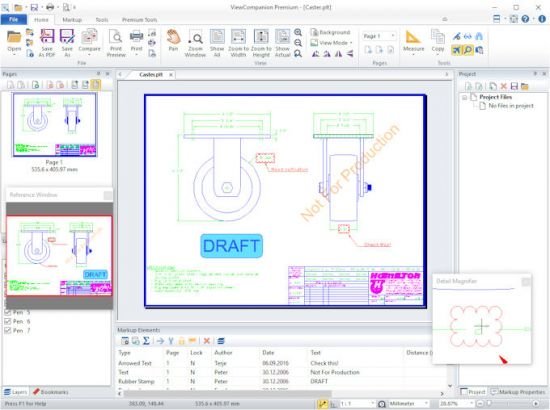
ViewCompanion Premium 13.01


eHQq0ZIVDkIfnvCSvGPfiW92CSX96U8k.jpg


Languages: Multilingual | File size: 56.1 MB
​
ViewCompanion Premium® is the most powerful member of the ViewCompanion family. ViewCompanion Premium can view, print and convert PLT plot files, Adobe PDF, Autodesk DWF, Postscript, CGM, TIFF, CALS and many other formats. ViewCompanion Premium support PLT plotter files using HPGL, HPGL/2, HP-RTL and Calcomp formats.

If you need to distribute drawings, e.g. on the Internet, you can convert your drawings to Autodesk Drawing Web Format (DWF), Scalable Vector Graphics (SVG) or Adobe PDF. All these formats are very popular for distributing drawings.
You can convert multiple files of different formats to a single multi-page PDF, DWF or TIFF file.
ViewCompanion can split a multi-page PDF, PDF or DWF files into several single paged files.
Your PLT, PDF, CGM and DWF files can be converted to Autodesk DXF format, which can be read by almost all CAD application, e.g.: Autodesk AutoCAD and Microstation.

Both batch conversion and printing is included. The software can be configured to monitor a user selected folder, and all files copied to that folder will be automatically printed.

ViewCompanion gives you advanced functions for zooming and panning, and you can view your files fast and accurate.

Use Viewcompanion's precise tools to measure dimension lengths and areas. You can measure using snap to drawing geometry for highest accuracy. Calibration of the measurement tools is available to make sure you get correct results if your drawings are not 1:1. The measurement results may be exported to csv, which can be loaded into Excel or any other spreadsheet application.

With ViewCompanion Premium you can add markups to the loaded file. Supported markup elements include rectangles, lines, dimension lines, area measurements, ellipses, polygons, text, arrows, stamps and images.
You can select one of the predefined stamps or create your own. User defined symbol libraries makes it easy to add frequently used symbols as markups. Hyperlinks can be added to markup elements, and a hyperlink can either open another drawing inside ViewCompanion, or open an Internet location (URL) using the default browser.

All markup elements are stored in a separate file and the original file will be left unmodified.
The markup elements can optionally be included when the viewed file is printed or converted.
You can export markup elements as Autodesk DXF, Autodesk DWF, CGM and other formats.

Features:
View, markup, convert and print files of many different formats.
Convert to a large number of output formats, please see the complete list of formats below.
Batch printing and conversion is included.
Color, Black & White or Grayscale printing and conversion.
Scaled print or fit to paper.
Poster mode for printing big format drawings on multiple sheets, e.g. print an A0 drawing in full size using multiple A4 sheets.
N-up printing mode, also known as multiple pages per paper sheet printing.
Hot folder printing. Monitor a folder and print all files that are copied to this folder.
Add footer and header containing date, scale, time, filename or custom text to the printed file.
Annotate your files by adding text, symbols, stamps, barcodes, images, measurements and more.
Include annotation during printing and conversion.
Precise measurement with snap to drawing geometry.
Send the viewed file by e-Mail, either as a PDF, as a JPEG or in the original format.
Conform, or convert, any PDF file into PDF/A standard for archiving. Batch and single file supported.
Compare two files and visualize the differences.
Compare multi-page PDF files, page by page.
Merge different PDF files into a single multipage PDF file.
Split a multipage PDF file into individual files.
Digitally sign PDF files.
Optimize PDF files.
Split a multipage TIFF file into individual files.
Scan and create a new file or add as page to active file.
Use raster processing tools like deskew, cleanup and more.
Overlay up to 10 files and print as one drawing.
Apply watermark using text, or an image, to the printed file.
Use pen table for full control of colors, styles and widths.
Copy a selected region, or whole drawing, to clipboard, and paste into other applications.
Text search and extract.
Store commonly used files in projects.
Shell Extension for easy access to functions inside the Explorer Window and a full preview of the selected file.
Extensive set of command line parameters for conversion and printing.
Delete pages from multipage files (e.g. TIFF and PDF).
Use the PDF to CAD tool to convert your PDF files into editable DXF, DWF, PLT, SVG and CGM files.

Whats New:
Updates: official site does not provide any info about changes in this version.


-:DOWNLOAD FROM LINKS:-
RapidGator
Код:
https://rapidgator.net/file/6990935451d92071df82e7d3c325e339/Companion_Premium_13.01.rar.html

NitroFlare
Код:
https://nitroflare.com/view/A3F652C051E4212/Companion_Premium_13.01.rar

​
 
CompanionLink Professional 9.0.9038


3aa84a3628865859b943a436c087ba40.png


Languages: Multilingual | File size: 37.9 MB
​
CompanionLink Professional is a reliable application designed to facilitate the data synchronization between your preferred organizer program and a mobile phone. Alternatively, the program supports data transfer between various accounts, such as Google, Exchange or Office 365 Cloud.

Features :

Sync multiple devices:
Sync with up to five of your devices. Want to sync your PC data with your BlackBerry, iPad, and a Google account? Get Pro!

Sync multiple databases:
CompanionLink Professional allows you to sync from multiple data sources. Maybe you want to sync with both ACT! and Outlook, or sync with multiple Outlook folders? Configure up to 5 sync profiles with Pro.

Advanced sync options:
CompanionLink Professional lets you sync your ACT! opportunities and secondary contacts. You can also map calendar activities by type to either the calendar or tasks list on the phone.

Realtime sync between two PC databases:
Sync ACT! with Outlook or Lotus Notes in realtime! DoubleLook mode lets you make a change in one database, and the other database is instantly updated. Never miss a beat with Pro.


-:DOWNLOAD FROM LINKS:-
RapidGator
Код:
https://rapidgator.net/file/ccbbe5f604a6e237fdf398a0dd573fd8/CompanionLink_Professional_9.0.9038.rar.html

NitroFlare
Код:
https://nitroflare.com/view/000584D8E59F1A4/CompanionLink_Professional_9.0.9038.rar

​
 
Perfectly Clear Complete 3.11.1.1892 (x64)


84fb1752f0b2afa73d38c568fa6e753a.png

Perfectly Clear Complete 3.11.1.1892 (x64) Multilingual | 124.7 Mb
​
Built for precision. Made for beauty. Above all, you want better photos. But what if you could have better photos faster? Perfectly Clear has mastered the science of intelligent image correction - creating superior quality photos in record time, so you can get back to doing what you really love.in no time.


Spend less time in front of your computer.
With Perfectly Clear, you'll get results faster so you can spend more time behind the camera and less time in front of the computer. Take advantage of intelligent image analysis to find and fix numerous camera flaws automatically. Plus, you can quickly add your favorite finishing touch with our stylized LOOKs.

Take complete control.
Our presets are just the starting point. Easily apply only the adjustments you need for the perfect image. Use our powerful sharpening and noise reduction, which goes beyond what other tools can do, to unlock a whole new image. Keep an eye on your color and exposure with a dynamic histogram that tracks exposure and color clipping.

A custom experience.
Every photographer is different, and so is Perfectly Clear. Our adaptive interface lets you hide tools you don't need while you work, allowing you to focus on your image. Plus, you can make and manage your own presets, which intelligently adapt to each photo.

Why change your workflow?
Rather than move your entire image library or change your workflow, we'll make your existing workflow better. We support several platforms and have more coming soon. With powerful batch processing and up to 30 corrections in one click, we'll make everything better.

We've got image correction down to a science.
Creating our award-winning technology took more than a decade of R&D, multiple patented processes, and over a dozen unique algorithms. We cracked the code on correcting every pixel independently. The proof is in your pictures.

System Requirements:
- Windows 7, 8 or 10 (64-bit only)
- Photoshop CS6 or Creative Cloud
- Photoshop Elements 13,14,15
- Corel PaintShop Pro X6, X7, X8, X9, 2020
- Lightroom 4 or newer, including v6 and CC
- 4 GB RAM or more
- OpenGL v2.0 or newer

Home Page -
Код:
https://eyeq.photos/perfectlyclear


-:DOWNLOAD FROM LINKS:-

RapidGator
Код:
https://rapidgator.net/file/7364e6a5e6db644810f1cd2648100758/Clear.Complete.1892.rar.html

NitroFlare
Код:
https://nitroflare.com/view/2F3382A0FF1EECA/Clear.Complete.1892.rar

​
 
Назад
Сверху