• Здравствуйте. Сайт заработал в архивном режиме форум www.old.nado.in

Dl4ever Software

ExpanDrive v7.6.2


th-3n3-H7-Ml7-Uiv-WCRKgbx7-IE7va83j79yvj.png


Languages: English | File Size: 145.33 MB
​
The Best Gets Even Better - Say Hello to ExpanDrive 7. ExpanDrive is a fast network drive and browser for cloud storage. Securely access the cloud from any application, including Finder and Explorer.

New Features:

Built into Finder and Explorer
ExpanDrive adds cloud storage like Google Drive, Dropbox, Amazon S3, SFTP, Box, OneDrive and Sharepoint to Finder and Explorer. Don't bother with an extra app just to move data around. ExpanDrive connects cloud storage to every application on your computer including Office 365, Photoshop, and VS Code.

Smart Offline Sync (New!)
Choose files for offline access and work without an internet connection. Synchronization to the cloud takes place automatically when you're back online. Other files are accessed on-demand from the cloud, taking no disk space.

Hello, Linux (New!)
Major storage providers have left you behind and we're here to help. ExpanDrive adds native cloud storage access into Linux for all major Linux distributions, including Ubuntu, Mint, CentOS, Redhat, and more.

Integrated Search (New!)
ExpanDrive hooks into Spotlight Search on Mac and Windows file search. Quickly search your remote storage for whatever you're looking for. The integrated storage browser has additional support for blazing-fast server side search.

Multi-user file locking (New!)
ExpanDrive now propagates lock files in Microsoft Office documents across the cloud. If a user is editing an Office document, other users will only be able to open that document read-only until the editing user closes it.

File Version Management (New!)
Easily access older versions of files on cloud storage backends that support versioning, including Box, Dropbox, S3, Google Drive, OneDrive and Sharepoint.

Connect to any Cloud
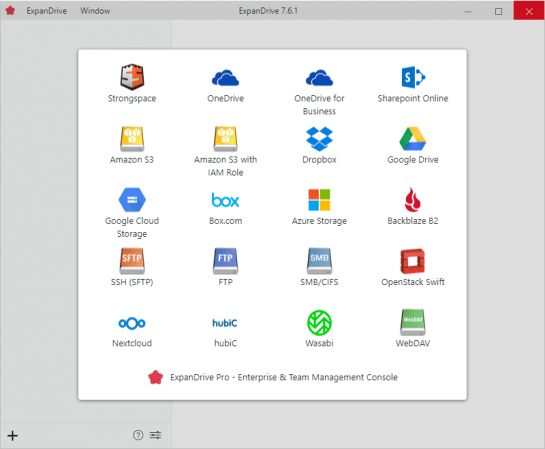
Connect to all major cloud storage providers, or your own server. With a single app you can connect to:

- Dropbox
- Google Drive and Google Team Drives
- Amazon Drive
- Box
- OneDrive and OneDrive for Business
- Sharepoint
- Nextcloud (New!)
- Wasabi (New!)
- Backblaze B2
- SFTP/FTP, WebDAV
- SMB/Windows File Sharing

Cloud storage in every application
Add cloud storage, like Google, Dropbox, Amazon S3, Sharepoint, and more to every application on your computer. ExpanDrive builds a secure connection from the filesystem to the cloud. Open, edit, and save files to remote computers from within your favorite programs - even when they are on a server half a world away.

Super-fast background uploads (New!)
ExpanDrive has multi-threaded connection engine that is up to 500% faster that previous version. ExpanDrive performs parallel transfers in the background so that you have a reliable transfer even in the face of unreliable internet. Keep working and stop waiting for transfers to complete.
Release Notes- Re-done background office file saving should speed up and make more resilient saving office files during transient errors

- GUI improvements
- Improved sharepoint site management
- Lowered time to flush to wire in most scenarios
System Requirements:
- Windows 7 through Windows 10 including Windows Server
- Supports 32-bit and 64-bit installations
- Supports Windows Server editions, including terminal server
- Contact support for a multi-user MSI based installer
- Does not support Windows RT


-:DOWNLOAD FROM LINKS:-
RapidGator
Код:
https://rapidgator.net/file/a513566b9a8bc8ec2d5cc347139269cc/ExpanDrive.7.6.2.rar.html

NitroFlare
Код:
https://nitroflare.com/view/0DB1A0C1CEC3736/ExpanDrive.7.6.2.rar
​
 
Nero Platinum Suite 2021 v23.0.1000 + Contents


zspk3-L0-Gh1-Qwcj4nx-Ej-G5-FXjj1mr8-BJM.jpg

Nero Platinum Suite 2021 v23.0.1000 Multilingual + Contents | 446 MB | 1.9 GB
​
Nero Platinum - 7in1 Multimedia Suite. Nero Platinum offers 7 powerful and well-matched programs in a multimedia suite for your Windows PC. Discover the new version with many new features now.


What's New:

Nero Platinum leaves virtually nothing to be desired:
- With Nero Platinum, you can manage your everyday digital life, at home and on the road - guaranteed!
- Now equipped with brand-new functions.

7 powerful programs in one suite:

Rely on the market leader
Seven perfectly harmonized programs let you master your multimedia everyday life. Find out what you can expect. Here we go:

1. Cleans your photo archive quickly and reliably
Nero DuplicateManager Photo: Have you lost track of your photo archives on your PC? Multiple copies of duplicate photos and so many similar photos through image editing or HDR? Nero DuplicateManager Photo's brand new'Find similar images' mode provides quick help. It finds duplicated and similar photo folders and photo duplicates quickly and securely, restores order to your photo archive, valuable storage space, and even cleans up your Nero MediaHome media center.

2. Import, Create & Edit
Nero Video: The video editing program offers you full creativity with the easiest handling and best results for your film projects. Create perfect movies and slideshows with 1-Click Video Story. With the new Nero LifeThemes PRO you automatically create authentic moods. You can then add music, over 1000 effects and the automatic 1-Click bar remover to your videos - making any photo and video material ready for the optimal film experience. Even upright videos and photos from your phone can be easily imported and edited as vertical video and perfectly staged thanks to brand-new vertical video templates. You can also create and burn high-quality video DVDs and Blu-Ray Discs™ with numerous new menu templates.

3. Organize, Play & Stream
Nero MediaHome: In Nero MediaHome, you can now access your OneDrive online files (Files On Demand) and download them directly. This saves a lot of storage space on your PC and you still have your pictures, videos and music directly available for your project at any time. And of course, you can play everything in the usual way, whether it's a video DVD, music CD, music files, photos, slideshows, videos, films or TV series. Stream your photos, movies and TV series including movie titles wirelessly to TV in your living room.

4. Secure, Encrypt & Compress
Nero BackItUp: Back up your valuable media files with the integrated Nero BackItUp. Sit back and rest assured that all your data is in good hands. Use Nero BackItUp to protect all memories on your PC or laptop. All you have to do is click a single button to set up your backup and your files are protected, either continuously or at the desired backup interval. Brand new: You can now back up files to your favorite cloud services (Google Drive, OneDrive) and restore data online from your cloud storage.

5. Rip & Convert
Nero Recode: Bring together what belongs together: Import all formats up to high quality HEVC (H.265) and convert them to almost any format you need. Rip video DVDs*, AVCHD* and Blu-ray Discs™* and simply continue using the files for new projects. New: Convert your video files specifically for use in video discs (DVD-Video™, AVCHD, Blu-ray Disc™) and let the fully compatible files be transferred directly to your video projects. Thanks to Nero SmartEncoding, you can significantly reduce the creation times for your video discs. With the 1-click conversion you can also transfer audio CDs including cover art directly to your connected mobile device.

6. Stream & Download
Audials Music Recorder: The Nero Music Recorder included in Nero Platinum is your ticket to the world of music: Listen to the hits of your favorite bands and discover new songs by accessing over 100,000 online radio stations and thousands of concerts, music videos, and fan content. Music Recorder records music as a non-DRM-protected MP3 file. These can then be copied to your mobile device.

7. Burn, Copy & Archive
Nero Burning ROM: A class of its own. Whether CD, DVD, Blu-ray Disc™: Copy and burn precious data with the proven burning specialist in Nero Platinum. With SecurDisc 4.0, including 256-bit encryption, password protection and disc optimization technology, you can also rest assured that your files will last a lifetime. Even burn audio CDs with automatic sound enhancement and album art.

Minimum System Requirements:
- Windows® 7 SP1 Home Premium, Professional or Ultimate (32/64 bit), Windows® 8 (32/64 bit), Windows® 8.1 (32/64 bit) with April 2014 Update, Windows® 10 (32/64 bit)
- 2 GHz AMD or Intel® processor
- 1 GB RAM
- 5 GB hard drive space for a typical installation of all components (including templates, content and temporary disk space)
- Microsoft® DirectX® 9.0 compliant graphics card
- DVD disc drive for installation and playback
- CD, DVD, or Blu-ray Disc recordable or rewritable drive for burning
- Windows Media® Player 9 or higher
- Internet Explorer 11 and higher
- Third party components such as Microsoft .NET® 4.5.2, Microsoft® DirectX® or Adobe Flash are shipped with the product or automated download if not included in the package
- For some services an Internet connection is required. Internet connection charges are the user's responsibility
- DriveSpan App: Android 4.4 and higher, iOS 9.3 and higher
- Nero AirBurn App: Android 4.0 and higher, iOS 8.0 and higher
- Nero Streaming Player App and WiFi+Transfer App: Android 4.4 and higher, iOS 9.0 and higher
- WiFi+Transfer MAC App: macOS 10.10
- Ultra HD (4K) Editing requires 64 bit operating systems: Windows® 7 SP1 Home Premium, Professional or Ultimate, Windows® 8, Windows® 8.1 with April 2014 update, Windows® 10
- Streaming highest quality resolution requires Intel Haswell (i7-4770 and above). It is recommended leaving the streaming setting in auto mode. If you experience performance problems with highest quality streaming, just use a lower quality setting

Nero Software supports the following languages:
- 中文 (Simplified)
- 中文 (Traditional)
- Čeština
- Dansk
- Nederlands
- English
- Suomi
- Français
- Deutsch
- Ελληνικά
- Magyar
- Italiano
- 日本語
- 한국어
- Norsk
- Polski
- Português (Brazil)
- Русский
- Español
- Español (Latin America)
- Svenska
- ภาษาไทย
- Türkçe

Home Page -
Код:
http://www.nero.com/


-:DOWNLOAD FROM LINKS:-

RapidGator
Код:
https://rapidgator.net/file/abf74c0308d30c69df9e9fbc30f5c082/N2021.Content.part1.rar.html
https://rapidgator.net/file/ef24ab815de6c3e7cf4b1ce00bfe6a6a/N2021.Content.part2.rar.html
https://rapidgator.net/file/e1204cf12eb55a9450f32a84e2ec6707/N2021.rar.html

NitroFlare
Код:
https://nitroflare.com/view/2CC166EB7968B88/N2021.Content.part1.rar
https://nitroflare.com/view/7EC6411525C8928/N2021.Content.part2.rar
https://nitroflare.com/view/13AADCEDF94388E/N2021.rar

​
 
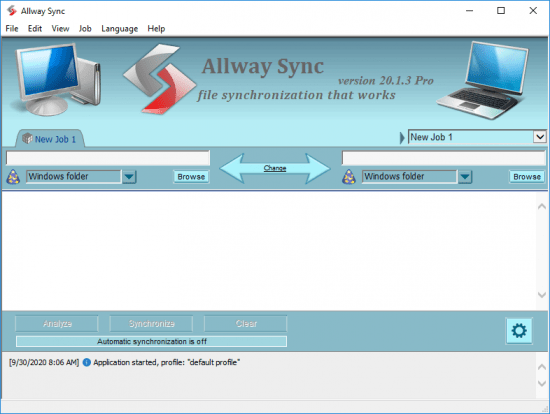
Allway Sync Pro v20.1.3


th-Aagyix0-Cpf6msx-FOFXrts-Ox-LQUy-OATs9.png

Allway Sync Pro v20.1.3 Multilingual | 38.7 Mb
​
Allway Sync uses innovative synchronization algorithms to synchronize your data between desktop PCs, laptops, USB drives, remote FTP/SFTP and WebDAV servers, various online data storages and more. Data compression and encryption are supported. It combines bulletproof reliability with extremely easy-to-use interface. Allway Sync also can synchronize your PC data with a Mac via Sync Gateway.


Synchronize all your devices
Sync data between your desktop PCs, laptops, tablets and more.

Easy user interface
Easy-to-use Windows graphical user interface.

Synchronization history
File modifications and deletions are tracked in a local database, so Allway Sync knows the true history of your files - no unnecessary questions asked.

Differences report
Generates a full report of differences between synchronization folders.

Synchronize any file system
Allway Sync virtually supports any file system (FAT, NTFS, SAMBA, Netware, X-Drive and more).

Synchronize multiple folders
Capable of synchronizing more than two folders.

Multiple synchronization jobs
Specify independent synchronizarion parameters for any number of sets of folders (multiple jobs).

Bring your data with you
Or just synchronize with a removable device (USB key, flash drive) so that you always have your data with you.

Flexible configuration
Flexible configuration and customization.

True synchronization
Performs true bi-directional and n-way file and folder synchronization. Forget about backup and restore routines.

Data loss prevention
Our innovative, proprietary algorithms do not rely on the accuracy of the system clock or network connection quality. So, Allway Sync helps prevent data loss.

Detection of deletions
Synchronizes folders well. Allway Sync detects when folders are removed from one device and removes them from any other corresponding synchronization targets.

Backup and restore
A good way to backup and restore files if you run Allway Sync in one-way synchronization mode.

Network synchronization
Synchronize data between your desktop PCs and laptops over a network.

Synchronize via an intermediate device
Transfer documents from one computer to another using an intermediate removable drive.

No file size limits
Supports files of any size that is supported by source and destination file system.

Operating System: Windows 7/8/8.1/10/Server 2008/2012/2016/2019

Home Page -
Код:
https://allwaysync.com/


-:DOWNLOAD FROM LINKS:-

RapidGator
Код:
https://rapidgator.net/file/abb1de7e96aa5d505f999f0c036163db/Allway.20.1.3.rar.html

NitroFlare
Код:
https://nitroflare.com/view/1E4FBF9C2D4F1BE/Allway.20.1.3.rar

​
 
WinZip Pro 25.0 Build 14273


th-ap-F8-RQvx1j-Y9n-C0-STGPn09n5-B00pd2-Un.jpg

WinZip Pro 25.0 Build 14273 Multilingual | 277.3 Mb
​
With just a click, open all major compression formats, including Zip, Zipx, RAR, 7Z, TAR, GZIP, VHD, XZ and more. Easily find, open, edit, move and share your files, whether they are on your computer, network or cloud service. Easily encrypt files as you zip to secure information and data. Create read-only PDFs and add watermarks to deter copying. Easily share large files by email, cloud services, social media and instant messaging. Quickly share links to your cloud files.


NEW! Prompt to unzip on open
Now you can instantly unzip any Zip file in Explorer, or from the WinZip Files Pane, the WinZip Ribbon or File menu. Easily unzip files to the folder that it originated from, your Documents folder, or a folder that you choose!

NEW! Unzip to file pane folder
With a single click of a button, you can unzip any file to the selected folder in the Files Pane.

NEW! Faster start-up performance
Now you can strictly focus on the task at hand and not on whether the WinZip application has launched because WinZip now takes half the time to start up. Work faster and eliminate the risk of launching multiple WinZip windows.

NEW! Image Format Conversion
Quickly and easily reduce image file size and convert images from one format to another, for example, from jpg to png. Add to a Zip file or save to your desktop for multi-use.

NEW! Remove personal data from files
Easily remove personal data (EXIF) from various files so that when they are shared, your information is not included. Secure any of the following file types to ensure they do not contain additional data that, while not typically visible, may be personal: DOC/DOCX, GIF, JPG (JPEG), PDF, PNG, PSD, PPT/PPTX, and XLS/XLSX.

NEW! POSIX TAR support
You can now open and unzip POSIX TAR files in the updated compression format.

NEW! WinZip Express copy to clipboard
WinZip Express enables you to share files in many ways, now including the clipboard! Easily place a cloud link for any file onto the clipboard where it may be pasted into other apps for sharing.

NEW! Address Book options
You can now send a message via WinZip emailer to a one-time recipient and not add it to your contacts list. There is also a new option to never add recipients that are manually entered. This is particularly useful during a job search or any repetitive activity whereby a message is sent to a receiver you will likely never communicate with a second time.

NEW! Enterprise-Wide Password Protection
Enterprises can recover encrypted files left by past employees or during forensic audits, quickly and easily, to avoid significant downtime.
Enterprise only.

NEW! Hide Enterprise Ribbon Buttons
In the enterprise version of WinZip, buttons for disabled features will no longer be shown and therefore cannot be clicked on. No more confusion around what is and isn't available, sparing needless cycles and erroneous admin tickets.
Enterprise only.

NEW! Slack Support
Now Enterprise users can enjoy WinZip's file sharing features using their Slack enterprise solution. Share files and zip files via Slack IM and choose contacts from within Slack's Contacts; streamlining workflow and eliminating unnecessary steps.
Enterprise only.

NEW! UI Configuration
Now Enterprise users largely interested in compression functionality may tap into the Classic interface, which hides the files and actions pane and displays only the ribbon. This can be facilitated upon initial set up and users may later change settings if they prefer to use features beyond compression.
Enterprise only.

NEW! Job Wizard Skip EDP Work Files
Enterprise users may now use the Job Wizard to back up personal files in a Windows Protected Environment (WIP), without having to manually suppress work files.
Enterprise only.

ENHANCED! Zip File Encryption
You can now easily encrypt an existing Zip file with a click of a button on the Tools ribbon. The WinZip tools tab on the ribbon makes it simple to choose all or selected files in an existing open Zip file, and encrypt them in one step. This time-saving technique vastly eliminates room for error.

ENHANCED! Encryption options for new files
When updating a Zip file which contains encrypted files, WinZip automatically applies encryption to the replacements. Prompting of the password for the original file protects against unauthorized access.

ENHANCED! Password Protection
Encrypted files within a Zip file cannot be deleted without knowing the password. This new default minimizes erroneous file deletion.

ENHANCED! "Move" files more easily
A new Move button alongside the Add button makes it clearer for you to either add or move files into a Zip file.

System Requirements
Windows 10
Windows 8
Windows 7
Windows Vista
Internet Explorer 8 or later

Home Page -
Код:
http://www.winzip.com/


-:DOWNLOAD FROM LINKS:-

RapidGator
Код:
https://rapidgator.net/file/a3e44ba86f1ae5ed6d694e4f4a9b8ada/WinZip.Pro.25.0.14273.rar.html

NitroFlare
Код:
https://nitroflare.com/view/E4754C963F3DD58/WinZip.Pro.25.0.14273.rar

​
 
Gillmeister Rename Expert v5.21.7 + Portable


th-fzd2074-Dhzdgno-A7wr-Jm1-Qu-Lb-M9u-YTQb.png


Language: English, German | File size: 26 MB
​

Rename Expert is a versatile and powerful tool for the editing of folder and file names. The program allows you to rename thousands of files within the shortest time. With a few clicks, file names can be adjusted flexibly. Because of the clear user interface, the learning curve is very short.

Various renaming functions
Replace, insert, move, swap, or remove name parts.
File extensions can be changed, added or removed.
Encryption of folder or file names.
Use of hash values(MD5, SHA1, SHA256, CRC32) of the file content as part of the file name.
Rename, add, remove, or change the case of file extensions.
The upper and lower case of names or parts of names can be arbitrarily changed; in addition, the spelling can be specified in a list.
Names of the parent folders can be used for naming.
Folders and files can be numbered with many settings options.
Rename file and folder names as specified in CSV files.
Usage of file content of documents for file names.
Use of random characters (uppercase characters, lowercase characters and/or digits) for file or folder names.
Support for regular expressions.

Additional functions and features
Renaming of folders along with subfolders and contained files in a single step.
Command line support
Detailed view displays file properties and metadata contained.
Any criteria that can become part of the name, can be used as sorting criteria (e.g., metadata, file size, modification date).
Extensive filtering options.
Support for Unicode characters in file names/folder names.
Moving/copying and renaming of files with full network support.
Real-time preview and conflict testing.
Reads files and folders with long paths (more than 260 characters).
Drag & drop support.
Renaming functions can be combined arbitrarily.
All settings can be saved as a profile for reuse
Previous names can be restored using Undo and Redo.
Lots of templates (e.g., for creating web-safe names) are included.
Lists with file and directory names can be imported and exported.
When copying or moving files, subfolders can be created dynamically from file properties (e.g., creation date, the image width).

Support of numerous metadata
Photo taken date.
Exif data (camera manufacturer, camera model, photographer, description, commentary, image width/height, horizontal/vertical resolution, flash use).
Image data (width/height, horizontal/vertical resolution, bit depth).
Audio data (artist, album, title, year, comment, track, genre, bit rate, album artist, composer, disc number).
IPTC data (country, country code, state, city, location, title, photographer, description, provider, source).
PDF data (version, author, title, subject, keywords, creator, producer, page count).
Video data if the plugin is installed (width, height, frame rate, standard, aspect ratio, audio codec, video codec, overall bitrate, video bitrate, audio bitrate, audio compression, duration, title).


-:DOWNLOAD FROM LINKS:-
RapidGator
Код:
https://rapidgator.net/file/1574e03dc15f0af5659bedfd2533acb1/Rename_Expert_v5.21.7.rar.html

NitroFlare
Код:
https://nitroflare.com/view/B3915C72182A51D/Rename_Expert_v5.21.7.rar

​
 
Total Commander Ultima Prime 7.9


n-LYKMNk-UIYgn-OTm-Bo1-LKp-Jl-Qd-Lo-WDVrj.png

Total Commander Ultima Prime 7.9 Multilingual | 571 Mb
​
Total Commander Ultima Prime is a collection of the software and customized settings sets gathered in one installation package for enhancing Total Commander (file manager) possibilities. One of the most important aspects of a computer is that you should be able to manage files quickly and easily. Of course, Windows Explorer has always been the default file manager of some people, while others have always preferred Total Commander.


A thorough setup process
Ultima Prime is a very nice improvement of Total Commander, where you have additional features available, that will help you organize your files and folders more efficiently. The installation process comes with several steps in which you can configure some aspects of Total Commander, so take your time.

A friendly interface you are used to
The interface is as user-friendly as Total Commander has always been, only having new features included. On the top of the window you have a lot of buttons, so that you can access a feature by making one single click. Style can be selected from one of the steps you take in the installation process.

Equipped with everything you need
The good thing about Total Commander Ultima Prime is that it comes bundled with all sorts of useful plugins, so that you won't need any other software. For example, you can add/remove programs, access autorun, CD/DVD burning, e-mail, virtual disks, a web browser, Notepad++, TeamViewer, Universal Extractor, uTorrent, Virtual Dub, and many others, but also be able to shut down or restart the computer.

Putting no stress on your computer
The software is great overall, but it doesn't give you the possibility of selecting the exact plugins you want and don't want to install, and most people are not interested in using everything an application (in this case, a file manager) has to offer. Nevertheless, Total Commander continues to use less CPU and memory than Windows Explorer, and that "feature" is always welcome.

System Requirements:
- Windows 10 32/64 bit
- Windows 8 32/64 bit
- Windows 7 32/64 bit

Home Page -
Код:
http://tcup.pl/index.php?l=en


-:DOWNLOAD FROM LINKS:-

RapidGator
Код:
https://rapidgator.net/file/593a4af34f95ab812ac815b5ba935f5e/tcup79.rar.html

NitroFlare
Код:
https://nitroflare.com/view/B192D7B08F0E550/tcup79.rar

​
 
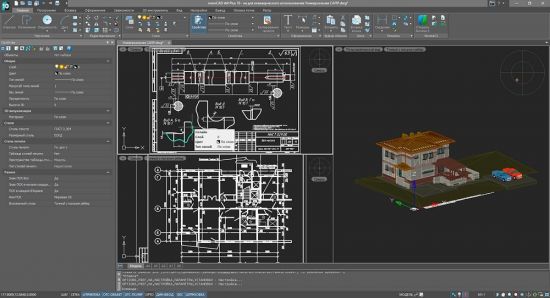
NanoCAD Plus v20.0.5147.3538 build 5247


th-Mee-Ho-XFc-GZNRSx-W1-SSDGu-Cb-C4s8o4s-Lj.jpg


Languages: English | File size: 606 MB
​
nanoCad Plus is a smart tool able to produce professional designs and drafts in valid formats and of high quality. It has a wide price range and affordable for both beginners and professionals. Its functionality allows creating simple to complex designs and drafts for modeling, projecting, construction. Solve bigger problems and save time and money.

Features:

Architecture :
2D Drawing
3D Modeling
Bills of material
Building Information Modeling
Contact Management
Contract Management
Document Management
Drafting
Presentation Tools
Project Management

Engineering CAD :
2D Drawing
3D Modeling
Chemical
Civil
Collaboration
Design Analysis
Design Export
Document Management
Electrical
Mechanical
Mechatronics
Presentation Tools

What's New :
Drawing Comparison & System Variable Monitor panels
Dynamic Input
Undo after Saving
Undo for Navigation Commands
Preview of Undo/Redo
External References Notification
Popup Menu for Multifunctional Grips
Coordinate Filters
Bounding Prism - Viewport 3D Clip
Built-in Batch Editor
And more!


-:DOWNLOAD FROM LINKS:-
RapidGator
Код:
https://rapidgator.net/file/66832a3615edc7d70af6c2c5cf30390c/NanoCAD_Plus_20.0.5147.3538.rar.html

NitroFlare
Код:
https://nitroflare.com/view/524A29043DE04A1/NanoCAD_Plus_20.0.5147.3538.rar

​
 
Acronis 2k10 UltraPack v7.28.1


I22-DNGE53fk-S1fh-GGRLg69-UA506q3-Rv-U.jpg


File size: 697.7 MB
​
Acronis 2k10 UltraPack - boot disk, which is based on the boot loader BOOTMGR (Windows 8), Isolinux / Syslinux 4.06 and Grub4Dos 0.4.6c. The disc consists of a large number of products Acronis, Paragon, etc., to download vozmozhnostyu c CD, USB Flash Drive, USB-HDD and conventional HDD. The main purpose - preparing to install the OS HDD, creation / deployment system images, restore / copy data. This CD is a collection of DOS and Linux-based versions of the product assembly "Multiboot 2k10", adapted to the size of CD-ROM.

List programs in assembly:
• USB-driver PLOP v.5.0.11
• Linux-version of Acronis DDS v.10.2169 (rus)
• Linux-version of Acronis DDH v.12.0.3270 (rus)
• Linux-version Acronis TIES v.9.7.8398 (rus)
• Linux-version of Acronis TI Premium 2014 v.17.0.6673 (rus)
• Linux version of Acronis Snap Deploy v.5.0.1416 (rus)
• Linux version of Acronis Align Tool for WD / Hitachi v.2.0.154 (eng)
• Linux version of Paragon HDM 12 v.10.1.21.471 (rus)
• Linux-version of Paragon HDM 15 v.10.1.25.813 (rus)
• Linux-version of MiniTool Partition Wizard Server Edition v.9.1 (eng)
• Linux version of TeraByte Image for Linux v.3.39 (eng)
• DOS version of Acronis DDS v.10.2169 (rus)
• DOS version of Acronis TIES v.9.7.8398 (rus)
• DOS version of Paragon HDM 15 v.10.1.25.813 (rus)
• A large set of various DOS utilities.

Brief description of products:

Acronis Disk Director Suite - an integrated software package that includes partition manager, download manager and tools for editing entries on the hard disk.

Acronis Disk Director 11 Home - the most functional product to manage disks. If you need the maximum disk performance and data security, this package offers the best tools for creating, resizing, moving or combining partitions without losing data. Acronis Disk Director 11 Home offers powerful new features - support for Windows® 7, support for dynamic and GPT-ROM drive, the distribution of volumes across multiple disks and much more.

Acronis True Image Echo Enterprise Server - a complete solution centralized backup, storage and recovery of data on servers that are part of a corporate computer network.

Acronis True Image Home - a reliable solution for complete backup and restore for workstations. The product allows you to create exact disk images of a working computer that will provide the most complete data protection. Backup disk image is a file that includes absolutely all data, including boot records, operating system, applications, data files, photos and movies, e-mail updates and configuration, and any other data on the disc.

Acronis Backup & Recovery - application for backup and disaster recovery of servers and laptops running Windows across physical and virtual environments. It is a next generation family of Acronis True Image is a powerful tool and server protection.

Acronis Snap Deploy - a program that creates a complete disk image of the chosen standard configuration, including operating system, configuration files and applications. It then simultaneously deploy that image to multiple systems, making it an ideal solution for quick installation on the "bare metal" for servers and PCs.

MiniTool Partition Wizard - manager to manage hard disk partitions. Utilities downloads on cwer.ws, you can resize the partition, create a new partition on your hard drive, delete and format the existing partitions. It can work not only with the individual hard drives, but also drives combined into a RAID-arrays.

Paragon Hard Disk Manager - multifunctional and user-friendly solution that has full maintenance cycle hard drive. With this program you can manage the download process, make disk partitioning, performed backup and recovery operations, to ensure the security of the system and the data output from the drive operation. The program is convenient and practical tool to work with hard drives and data archiving for users of all skill levels. It is equally well can save data as a personal user and the enterprise.

Paragon Home Expert - functional software package utilities designed to resolve almost all the major problems that can face the computer owner. Paragon Features include all aspects of the life cycle of a computer to perform all kinds of operations with partitions to install the system from scratch and ensure reliable data protection and secure disposal of hard drives.

R-Studio Emergency is run from diskettes, CD / DVD or removable drive when you need to recover data from a computer that will not boot Windows due to corrupted or system files.

R-Drive Image is a potent utility providing disk image files and data backup. A disk image file contains the exact, "byte by byte" hard disk copy, partition or logical disk and can be created without having to reboot the computer and with different levels of data compression. Created a disk image can be stored in a variety of places, including various removable media such as a CD-R (W) / DVD, Iomega Zip or Jazz disks. R-Drive Image - this is one of the best backup and restore data to prevent catastrophic loss after a fatal system failure or hardware.

TeraByte Image - a program that is designed to back up the disk file system. The backup can be removed from any hard drive, including network drives. The program has direct access to the FAT, FAT32, NTFS, as well as USB2, IEEE1394, ATAPI or ASPI (discs CD-R / RW or DVD + RW / + R / -R / -RW).

Hiren's BootCD - stunningly competently and professionally assembled, the most popular boot "all-in-one" disc, literally everyone, including administrators and administrators for the repair work on the computer.

Checksums:
CRC32: 8D3EDA98
MD5: DF64769EEADC7509CD60E56F481F4C81
SHA-1: E4AF0BBAB0D6D7E48CF991DF1811C4B3A7A953C8

Interface language: Russian / English
WHATS NEW• Updates: official site does not provide any info about changes in this version


-:DOWNLOAD FROM LINKS:-
RapidGator
Код:
https://rapidgator.net/file/71e9a87bd11c983ab48a96fd9ed01ab4/UltraPack_2k10_7.28.1.iso.html

NitroFlare
Код:
https://nitroflare.com/view/22695782F104EC6/UltraPack_2k10_7.28.1.iso

​
 
Abelssoft SSD Fresh Plus 2021 v10.0.9


th-1-YRXYsxx-Fgr-U16-Pfh-Vcm-EAXGhx-Ub-L6-QN.jpg

Abelssoft SSD Fresh Plus 2021 v10.0.9 Multilingual | 3 Mb
​
Because of the way they are built, the life expectancy of solid state drives mainly depends on the written access times. SSD Fresh is a tool that can help you optimize your system for SSD usage so as to enhance its overall performance, while prolonging the lifetime of the solid state drive.


Adjust the system to the SSD
SSD Fresh fits your Windows system to the use of an SSD.

Avoid write access
SSD Fresh reduces the number of read and write operations and thus increases the lifetime of your drive.

Increase performance
By disabling unnecessary services also the system performance is increased.

Optimize SSD Settings
SSD Fresh increases the performance of your SSD after a complete analysis by disabling useless services and disabling unnecessary write accesses.

View drive information
Get information about your drive and the manufacturer. SSD Fresh displays general information suitable for the hard drives that are installed in the computer. You can see for example the storage capacity and how much space is already occupied.

View S.M.A.R.T. data
Modern hard drives use a system for self-monitoring, called S.M.A.R.T. (Self-Monitoring, Analysis and Reporting Technology) system. It analyzes the disk and already indicates defects before they can cause data loss. SSD Fresh reads this information and displays it in the window.

Ready for Windows 10
This application has been already optimized for Windows 10. This means for you: You don't have to care which Windows operating system you have installed, you can buy this application today and even when you are switching to Windows 10 you can continue using this application without problems.

Operating System: Windows 10, Windows 8.1, Windows 7

Home Page -
Код:
https://www.abelssoft.de/en/windows/System-Utilities/SSD-Fresh


-:DOWNLOAD FROM LINKS:-

RapidGator
Код:
https://rapidgator.net/file/5b935ed69c3c4fd9bf470adc835e02b7/SSD.Fresh.Plus.2021.10.0.9.rar.html

NitroFlare
Код:
https://nitroflare.com/view/DE3AEE2D682DF60/SSD.Fresh.Plus.2021.10.0.9.rar

​
 
O&O SafeErase Professional 15.9 Build 78 (x86/x64)


Q6kawv-U4n-Y8xxnit-Ge-P2z-YXo6-X4-O1-GPS.jpg

O&O SafeErase Professional 15.9 Build 78 (x86/x64) | 51.3 Mb
​
Your personal photos and confidential documents can easily fall into the wrong hands when you sell, give away or dispose of your old PC or hard drives. Identity theft is now a widespread security threat. This is because clicking on "Delete" does not mean your files are permanently deleted. Even formatting the hard disk is not enough to permanently delete data. O&O SafeErase permanently deletes your confidential files using recognized methods so that a recovery is never possible, not even when using the best file recovery software.


There is a good chance your personal photos or business data will easily fall into the wrong hands whenever you want to sell, give away or dispose of your old computer. This is because clicking on "Delete" doesn't automatically mean your data is irrevocably destroyed. Even formatting the hard disk is not enough to completely destroy your data. O&O SafeErase allows you to permanently delete your data using recognized methods so that a recovery is never possible, not even when using specialized software.

New and enhanced functions
In addition to many minor enhancements, O&O SafeErase includes an analytical tool that scans your computer for temporary and unsafely deleted files. With just a few clicks, you can clean your computer so that unauthorized parties never have a chance to spy out old files for possible misuse. SSDs can also be detected, and deletions made on them will be done sparing resources. Advanced and improved management of reports make using O&O SafeErase even more convenient.

Internet security
When surfing the Internet, your browser usually stores Internet files unnoticed on your hard drive. These files can provide information about websites you've visited or the passwords you've entered. It makes no difference whether it involves cookies, data entered on forms, or browsing history - O&O SafeErase lists all the information saved for each browser you use, and you can then delete them individually or together. Once deleted, nobody will be able to detect your Internet traces and your online accounts are protected from data thieves or hackers. Version 15 supports Microsoft Edge, the successor to Internet Explorer, as well as Internet Explorer, Google Chrome and Firefox.

Safe erase your entire computer
Deleting the entire computer allows you to permanently delete all confidential files before you dispose of, sell, or give your computer away. All files, settings, applications and the operating system itself are deleted so that a file recovery is impossible. You can be sure that nobody will ever restore your confidential information and misuse it, protecting yourself against identity theft. With O&O SafeErase you can even delete your entire computer without a start medium (e.g. a Boot CD).

Six deletion methods for maximum security
O&O SafeErase allows you to choose from among six different deletion methods. The methods of deletion differ in the number of runs and the type of overwriting process. These methods ensure maximum security, whatever your requirements. In addition to standardized deletion methods of the U. S. Department of Defense (DoD) and the German Federal Office for Information Security (BSI) you can also select a complex mathematical method (the Gutmann method), which complies with the highest security levels. In this scientifically approved method of data deletion, corresponding areas of the hard disk are overwritten 35 times using precisely defined rules along with fixed and random values. In this way, O&O SafeErase exceeds even the requirements of the DoD and the BSI. Quick deletion can also be made by just overwriting data with zeros.

SolidErase
As of version 12.3, O&O SafeErase includes the feature SolidErase, which was developed especially for the deletion of SSDs. SolidErase uses resources sparingly and thoroughly so that the data is not recoverable and the SSD is exposed to the least possible strain.

Product features:
"Instant Erase": Selecting files over the context menu prompts a mini-dialog from where deletion can immediately take place
Permanent deletion of files, folders, Memory cards and USB sticks
Delete an entire computer, no boot medium necessary
Delete internet traces and temporary program files
Six methods to permanently delete confidential data
Detailed reports as proof of deletion
Analysis tool to search for unsafe deleted files
Adapted deletion method for SSDs (Solid State Disks) with SolidErase (link to paragraph with further infos)
Enhanced report and activity management
.Net Framework 4.7.1

Operating System: Windows 10, Windows 8.1 and Windows 8

Home Page -
Код:
https://www.oo-software.com/


-:DOWNLOAD FROM LINKS:-

RapidGator
Код:
https://rapidgator.net/file/70f6f4a780551a65ee3c30e6d5a2204c/SafeErase15.9.rar.html

NitroFlare
Код:
https://nitroflare.com/view/47423B84134D345/SafeErase15.9.rar

​
 
Geekbench 5.2.4 (x64) Pro


s-ZX2-G7-AGf-O4-Kew-HYUls-Oqy0-Dclk0-LGKe.jpg

Geekbench 5.2.4 (x64) Pro | 123.2 Mb
​
Geekbench 5 is a cross-platform benchmark that measures your system's performance with the press of a button. How will your mobile device or desktop computer perform when push comes to crunch? How will it compare to the newest devices on the market? Find out today with Geekbench 5.


CPU Benchmark
Geekbench 5 measures your processor's single-core and multi-core power, for everything from checking your email to taking a picture to playing music, or all of it at once. Geekbench 5's CPU benchmark measures performance in new application areas including Augmented Reality and Machine Learning, so you'll know how close your system is to the cutting-edge.

Compute Benchmark
Test your system's potential for gaming, image processing, or video editing with the Compute Benchmark. Test your GPU's power with support for the OpenCL, CUDA, and Metal APIs. New to Geekbench 5 is support for Vulkan, the next-generation cross-platform graphics and compute API.

System Requirements:
Windows 10 (64-bit) or later
2GB of RAM

Home Page -
Код:
http://www.geekbench.com/


-:DOWNLOAD FROM LINKS:-

RapidGator
Код:
https://rapidgator.net/file/221a3cef39c44efb352dfcaca3b9b589/GeekbenchPro5.rar.html

NitroFlare
Код:
https://nitroflare.com/view/DC721C433D41E71/GeekbenchPro5.rar

​
 
Acronis Cyber Backup 12.5 Build 16363 BootCD


th-I6-HSUW2j-Vr-CGWBqfn-V5pu-N1-H9qs-ERzch.jpg


File size: 194 MB
​
Acronis Cyber Backup delivers the data protection that meets today's demands. It keeps your business running, protecting any workload, scaling without limits, and saving you money.

Why Acronis Cyber Backup is Better
Packed with innovative security features, Acronis Cyber Backup sets a high bar for new-generation data protection. Learn what makes Acronis different and how its unique technologies safeguard data with one easy, affordable and versatile solution.

Proactive Ransomware Protection
Avoid downtime by actively protecting files from unauthorized modification and/or encryption. Acronis Active Protection uses artificial intelligence and machine learning technologies and white-listing to keep your data safe.

Instant Restore
Manage your recovery time objectives (RTO) and minimize process disruption to seconds, all while maintaining your company's overall productivity with our unique runVM technology.

Complete Protection
Keep your infrastructure and data completely secure, whether you're facing growing amounts of data, adopting new business processes, or migrating to new applications, platforms or cloud. Acronis Cyber Backup protects 20+ platforms - physical, virtual, cloud or mobile.

Blockchain Notarization
Ensure data integrity with our innovative blockchain-based Acronis Notary technology which prevents damage to or tampering with your files by attacks targeting archive files.

Unmatched Simplicity
Save on licensing, education, integration and daily operations with a simple, scalable tool that manages any data protection task. Our easy-to-learn solution protects data with less effort, so IT generalists can perform backup tasks efficiently.

Hybrid Cloud Architecture
Manage all forms of data protection within one workflow through a centralized management and unified control interface. Back up to any kind of storage and recover any piece of data easily with minimum downtime.

Complete Business Protection
Disk-Imaging Backup
Protect your entire business with complete and reliable backup images of your entire system, files, or data.
Store backups to a variety of storage devices, including local disks, network storage, and the cloud.

Easily recover a complete image or selected files, folders, items, and applications.

#1 Virtual Server Protection
EXCLUSIVE
Mitigate risks with agentless and agent-based backup and recovery of your virtual machines and hosts on any of six supported hypervisors.
Migrate between different hypervisors and to/from physical machines (P2V, V2V, V2P, and P2P) or the cloud.

Cloud Protection
Increase user service availability by protecting your Office 365 mailboxes, Microsoft Azure VMs, and Amazon EC2 cloud workloads.

Migrate workloads easily between various clouds, virtual systems, and physical machines (P2C, V2C, C2C, C2V, and C2P).


-:DOWNLOAD FROM LINKS:-
RapidGator
Код:
https://rapidgator.net/file/f96613da437edcd3f73a215143f3ec9c/Boot_media.rar.html

NitroFlare
Код:
https://nitroflare.com/view/14B53B77D8E4B53/Boot_media.rar

​
 
Avast Premium Security 20.8.2429 (Build 20.8.5653)


th-WOp-F0q5-QWd-Wl1-ETKZ3w-Ih9-IB3-In-FKx-Jr.jpg

Avast Premium Security 20.8.2429 (Build 20.8.5653) Multilingual | 502 Mb
​
This top of the range antivirus is not like the others. Because it blocks all webcam-hacking, and stops ransomware before it starts. It protects your PC, home network, and passwords against zero-second threats with smart cloud-based detection. It updates your apps automatically and shreds your data permanently when you say so. That's why you've never seen protection like this before.


Keep spies and snoops off your webcam
Can hackers really hijack your webcam? Yes - until now. Webcam Shield makes anything and anyone get your permission before they can use it so nobody takes a peek unless you say so. You can even disable your camera for good - and enable it again. Go on, do your happy dance - no one's watching.

Keep hostage-takers off your files
Hackers demand an average of $643 from ransomware victims. Ransomware Shield keeps your most important files from being encrypted and held hostage, and lets only trusted apps alter them in any way.

Update your apps against security gaps
Automatic Software Updater keeps your apps and programs up to date with the very latest safety patches and performance upgrades, so you're not exposed to hackers finding security holes from out of date versions. Safe and convenient.

No data left behind
Thinking of selling your PC, or maybe lending it to someone? You'd be surprised at how easy it is for others to retrieve your "deleted" files and data. Your Data Shredder makes sure your personal photos, bank statements and other private documents get obliterated - for good.

Look inside Avast Premier

Firewall
Keep hackers on the other side of the wall with this essential security feature that monitors and controls what goes in and out of your computer.

Anti-spam
Dodge spam and other malicious content, so you can focus on the emails that truly matter.

Real Site
Protect yourself from hackers who attempt to hijack your DNS (Domain Name System) settings, redirect you to fake sites and steal your banking details.

Wi-Fi Inspector
Automatically detect weaknesses in your home Wi-Fi and strangers piggybacking on your network.

Intelligent Antivirus
Detect and block viruses, malware, spyware, ransomware and phishing. We use smart analytics to stop threats before they affect you.

CyberCapture
Automatically send suspicious files for analysis in the cloud, and push a cure to all Avast users if it's a threat.

Behavior Shield
Spot and block suspicious behavior patterns for zero-second protection against unknown threats and ransomware.

Smart Scan
Find all those cracks which allow malware to slip in, from unsafe settings and passwords to suspicious add-ons and out-of-date software.

Ransomware Shield
Block ransomware and other untrusted apps from changing, deleting, or encrypting your personal photos and files.

Automatic Software Updater
Old and outdated programs can slowly chip away at your security wall. Keep your software up to date automatically and you'll be less vulnerable to attacks.

Sandbox
Test and play with suspicious files in a safe environment before you let them run on your computer, making sure they don't wreak havoc on your PC.

System requirements:
Windows 10, 8.1, 8 or 7*, 1 GB RAM and 2 GB of hard disk space.

Home Page -
Код:
https://www.avast.com/


-:DOWNLOAD FROM LINKS:-

RapidGator
Код:
https://rapidgator.net/file/ad676d83251dc6c008dbef351f06ad4e/Avast.Premium.Security.20.8.rar.html

NitroFlare
Код:
https://nitroflare.com/view/57FCF79915B1840/Avast.Premium.Security.20.8.rar

​
 
Icecream PDF Editor Pro 2.33


NC6TrDY.jpg

Icecream PDF Editor Pro 2.33 Multilingual | 21.2 Mb
​
Icecream PDF Editor - software that enables you to edit PDF files easier than ever before. Get access to all the tools and PDF editing modes you need with the help of smart tools panel. You can edit text, add notes, redact, protect files, manage pages and much more with the PDF editor. Learn how to edit a PDF document in a hassle-free way!


Edit text
Edit any text in a PDF document with ease.

Manage pages
Visually combine and reorder PDF pages, split and merge PDF files.

Edit objects
Edit PDF objects: move, resize, rotate, etc.

Protect PDF
Set password or limit editing/copying rights for document protection purposes.

Annotate PDF
Add notes, highlight areas, strike through or highlight text, add comments and more.

Add stamps
Create custom stamps for better and quicker PDF proofreading.

System Requirements:
OS: Windows 10, Windows 8.1, Windows 8, Windows 7
2.33Ghz Intel®, AMD or any other compatible processor / faster processor for netbooks;
2GB of RAM (4GB for better performance); 200MB to 2GB of free disk space

Home Page -
Код:
https://icecreamapps.com/


-:DOWNLOAD FROM LINKS:-

RapidGator
Код:
https://rapidgator.net/file/34f9cbe631beecedaeca15b3fb9f475c/PDF.Editor.2.rar.html

NitroFlare
Код:
https://nitroflare.com/view/E127646C6065DC4/PDF.Editor.2.rar

​
 
ORPALIS PDF Reducer v3.1.17 Professional


LvMhGu4.png

ORPALIS PDF Reducer v3.1.17 Professional | 20 Mb
​
Use ORPALIS PDF Reducer to select either individual files or entire folders to minimize the size of your PDFs and images. Make web publishing of PDFs a snap allowing fast web view or just save time when sending them via internet. And get everything done really fast!


Features:
PDF Reducer includes powerful, innovative and sophisticated features developed by worldwide recognized experts in document imaging.

ORPALIS PDF Reducer is a super fast and powerful PDF compression Software for general public and developers meant to help anyone to get existing PDF files reduced up to 80% more than concurrent products. To achieve that, ORPALIS PDF Reducer provides different innovative and highly sophisticated size-reducing techniques which can be optionally applied by user selection.

Unrivaled lossless data re-compression
Innovative and highly sophisticated techniques which restructure existing content and apply the most effective compression scheme based on data type. Documents are printable and zoomable without loss of quality. PDF Reducer is able to serialize several compression algorithms on images in order to (surpass) the limitations of some compression schemes.

Remove unwanted or unused objects
You might have received PDFs containing additional, unwanted objects: let PDF Reducer remove them for you.

Automatic color detection and layout analysis
Usually, scanning batches of papers under scanner's color-mode implies mixing together colored and B&W documents. PDF Reducer automatically identifies the B&W ones and encodes them as plain B&W thus dramatically reducing the file size.

Raster images re-sampling and re-composing
Decrease un-necessary high resolution to dramatically reduce the file size without affecting the viewing experience.

Content segmentation and optimal compression
Segments embedded images, separates text, finds similar bitmap sections and makes optimized recompression.

Input file formats
With PDF Reducer version 3 you can downsize a large variety of images and documents. Nearly 100 input files formats are now available besides PDF, including raster images formats such as TIFF, JPEG, PNG, JPEG 2000 and RAW camera formats.

Multi-threading support
Executes PDF processing via multiple, simultaneous and concurrent threads, decreasing processing time by using CPU resources most efficiently.

Command line interface support
Automate PDF processing with commands without needing repetitive actions control via the GUI (graphic user interface).

Unlimited batch processing fully available in On-Premises Editions, segmented in Cloud Edition
Executes PDF processing via multiple, simultaneous and concurrent threads, decreasing processing time by using CPU resources most efficiently.

Drag'n drop support
Do it fast, don't mind Windows Explorer.

Language & Interface
Default user interface language in ORPALIS PDF Reducer is English. Based on your Windows language settings, ORPALIS PDF Reducer automatically displays the localised version of the interface, if it exists among ORPALIS PDF Reducer translated interface versions. Currently, available languages for ORPALIS PDF Reducer interface are: English and French.

Requirements: Windows Vista or higher. PC with at least 512 MB RAM.


-:DOWNLOAD FROM LINKS:-

RapidGator
Код:
https://rapidgator.net/file/f35302e17de67e2514b83ec1d8f80523/PDF.Reducer.3.1.17.rar.html

NitroFlare
Код:
https://nitroflare.com/view/9AA365B1F8758F7/PDF.Reducer.3.1.17.rar

​
 
VSDC Video Editor Pro 6.5.4.216/217


aUQqITH.png

VSDC Video Editor Pro 6.5.4.216/217 Multilingual | 199 Mb
​
The video editor is intended for editing video files and creating videos of any complexity involving various visual and audio effects. The program offers rich functionality and yet has a simple and intuitive interface, allowing you to create videos with a bare minimum of efforts.


Non-linear video editor
Our editor is a non-linear tool. This means that unlike in most other editors, where scenes come one after another in a linear sequence and certain order, our software allows objects to be placed in any position on the timeline and have any size. Besides, various parameters, shape and position of objects can change arbitrarily over time.

Visual and audio effects
You can apply various visual and audio effects to your videos to achieve the necessary result. Since the number of available visual effect is very high, they are split into five categories for ease of navigation: color correction, object transformation, object filters, transition effects and special fx.

Blending modes and Instagram-like filters
One more way of changing the look of your video image according to your preferences is color blending. Using a wide array of adjustable parameters, you can attach a unique professional style to your video. Newbies or those, who would like to save time, can benefit from stylish Instagram-like filters applied in one click.

Masking
VSDC Free Video Editor allows for creating different shaped masks for hiding, blurring or highlighting certain elements in your video. You can use it to apply special effects inside or outside the masked area. One of the most common reasons for masking are to blur a face to protect the identity or remove unwanted marks.

Subpixel accuracy
Objects in a scene are positioned with subpixel accuracy, which makes for smooth animation, rotation, transformation and precise relative positioning.

Support of popular formats
Our software supports virtually all video, image and audio formats and codecs. That is why you won't need any additional conversion tools to edit your files, as is often the case with other programs.

Creation of videos for specific multimedia devices
Thanks to a large set of preconfigured profiles, you can easily create videos for most popular multimedia devices, such as DVD players, iPod/iPhone/iPad, PSP, any smartphones and regular phones, Sony PlayStation, Xbox, Zune, Archos, iRiver, Creative Zen, Blackberry, MP4 players and many others.

Working with charts
You can create diagrams of different kinds, including 3D diagrams: Bar, Stacked Bar, Point, Bubble, Line, Scatter Line, Fast Line, Step Line, Spline, Area, Spline Area, Stacked Area, Stacked Spline Area, Range Bar, Gantt, Pie, Pie 3D, Torus 3D, Radar Point, Radar Line, Radar Area, Radar Spline, Radar Spline Area, Funnel, Pyramid, Pyramid 3D, High Low, Candle Stick. These objects can be based on dynamically changing data of different types. Besides, the appearance of diagrams is fully customizable (appearance of charts, coordinate axes, user-defined axes, legends, names of charts and axes, lines, labels and other elements), which will help you tailor them to your specific needs. Integrated color themes make it possible to quickly change the way your charts look.

Video library (to be included in the next program release)
The editor software lets you create your own library of multimedia files with brief or detailed descriptions. This will help you organize your video collection and simplify access to the necessary files.

Built-in DVD burning tool
The editor comes with a DVD burning tool, allowing you to easily burn the results of your work to optical discs.

Video File Converter
The application is designed to quickly convert video files from one format to another. It has some basic features for editing videos: removing unneeded segments, splitting your video into parts, and merging several files into one.

Desktop video capture
The video editor features a desktop video capture utility that saves captured footage to a video file for subsequent processing in the editor.

Video capturing
Another feature of the our editor is the ability to capture video from various video tuners, webcams, IP сameras and save the captured footage on your computer in an arbitrary format for subsequent editing.

System Requirements
Operating system: Microsoft Windows XP SP3 / Vista / Win7 / Win8 / Win10 (we recommend to install the latest updates and service packs as well)
Intel, AMD or compatible processor with the work frequency at 1.5 GHz or higher
Screen resolution: 1024x768 pixels with 16-bit color or higher
RAM 256Mb for the program
Microsoft DirectX 9.0с or higher
At least 50 MB of free disk space

Home Page -
Код:
http://www.videosoftdev.com/

Language: Multilingual


-:DOWNLOAD FROM LINKS:-

RapidGator
Код:
https://rapidgator.net/file/ba1e85cfe78bc16972b0d686c9b77411/VSDC_Video_Editor_Pro_6.5.4.216217.rar.html

NitroFlare
Код:
https://nitroflare.com/view/60B89A6DF0A3423/VSDC_Video_Editor_Pro_6.5.4.216217.rar

​
 
AxCrypt Premium / Business 2.1.1606.0


nQUjyIu.jpg

AxCrypt Premium / Business 2.1.1606.0 Multilingual | 20.3 Mb
​
File encryption application that uses the AES algorithm with 128-bit keys and that integrates within Windows Explorer context menus. AxCrypt is a software that enables you to easily encrypt files and folders. It's essential when you are sharing your computer with multiple users and want to maintain your privacy.


-:DOWNLOAD FROM LINKS:-

RapidGator
Код:
https://rapidgator.net/file/8ffb7a1cf0ce561300361533064ff4d2/AxCrypt.2.1.1606.0.rar.html

NitroFlare
Код:
https://nitroflare.com/view/AAE8A431EC573CA/AxCrypt.2.1.1606.0.rar

​
 
UltraMixer Pro Entertain 6.2.7 (x86/x64) Multilingual


FCWb7do-VFQZy-RU7bbihvaf-Nogq-GFp1-E4.jpg

UltraMixer Pro Entertain 6.2.7 (x86/x64) Multilingual | 307/310.3 Mb
​
UltraMixer is the perfect tool to entertain your party crowd. With UltraMixer 6 you will become a "Mobile DJ 2.0": Besides all common DJ-mix functions UltraMixer 6 brings a lot of new entertainment possibilities..


Just play music videos and karaoke songs as easily as "normal" audio songs. In case you do not have enough videos, UltraMixer brings live visuals in HD quality with 14 effects, to have always a suitable screen. By fireing up your images to a flat screen or a beamer your audience will be amazed.

UltraMixer 6 unifies multiple software in one - an easy to use photo slide show comes along with the live visuals and video playback. Furthermore you can display a beautiful background image, an on-screen logo or your own images (e.g. menu cart or flyers). Finally the live text function (like "buffet is open") and party games with the live camera function on a beamer are rounding up the portfolio. Even a transmission of a football world championship is possible due to the integration of network cameras.

High stability Audio Engine with Auto-Sync function
Crystal clear and 100% true sound & profi mixing with a single mouse click

UltraMixers well known and highly precise audio engine brings crystal clear and 100% unchanged (no artificial filters) sound. The stability of the audio playback is ensured even if the system is under high load circumstances. The integrated Auto-Sync mixes two music titles perfectly together and makes transitions easy - with a single mouse click. You will be supported by 7 real time effects, a unique 31-band equalizer, 6 hot cue buttons, smart synchronized loop and built-in 16 channel sample player.

Impressive Auto-DJ - Automatic transitions with equalized volume and automatic music for hours
Hours of music with perfect transitions - the integrated Auto-DJ makes it possible. It is perfect, especially for the time right before the manual mixing (e.g. at a dinner), automated background music in restaurants or a replacement for a real DJ at parties.

There are different blending curves (K,T,X) that can be chosen as well as the possibility to create your own blends for a perfect mix. UltraMixer supports your mix with the built-in loundness normalization for equalized volume. Your audience will appreciate it.

Clean, adjustable user interface - Modern user interface - adjustable by widgets
Countless widgets make it possible to easily adapt UltraMixer to your own needs. Even font sizes and font types can be changed with a simple mouse click.

Different skins and color schemes bring diversity and individuality.
The intelligent colored waveform visualizes music through the use of different colors. Therefore you see with just one glance, where beats and silent parts are. Red parts are beats and bases, green show planes and vocals, blue parts show treble. Those sketches help you to understand the music even without head phones.

UltraMixer 6 provides a modern and intuitive designed user interface, that is without gimmicks on purpose. Less is more.

Data based music archive - True data base for professional music management
UltraMixer has one of the most powerful music archives on the market. The technology base is a real data base, where you can quickly manage even more than hundred thousands music files.

Finding suitable music is just a matter of seconds. Even a search in Youtube is possible and music files can be loaded and mixed directly in UltraMixer. It is possible to create virtual groups, playlists and wishlists. The colorized marker and sorting options are helpful. With the help of "intelligent groups" you can create automated playlists, with music titles and special automated criterias. Those groups are filled automatically by your given rules e.g. 100 - 120 BPM.

While editing meta data (ID3-tags) of particular files or even entire groups an automatic cover search for your MP3 is extremly helpful. An import of iTunes or BPM-Studio archives into UltraMixer is possible with a single mouse click.

70+ native supported MIDI-Controller through Plug'n'Play
Support for all common Controllers like Pioneer, Denon, Numark, Reloop, American DJ and so much more.

UltraMixer 6 can be controlled by mouse & keyboard or all common MIDI-DJ controller. More than 70 controller mappings are directly included in UltraMixer - plugin and play. New midi controller are constantly integrated and provided by free software updates. The integrated MIDI mapper makes it possible to create your own MIDI mappings and change predefined mappings. All common brands like Pioneer, Denon, Reloop, Numark, American DJ, Hercules, Behringer, M-Audio or EKS are supported.

Requirements: Windows 10, Windows 8(.1), Windows 7, Vista, XP.

Home Page -
Код:
http://www.ultramixer.com


-:DOWNLOAD FROM LINKS:-

RapidGator
Код:
https://rapidgator.net/file/b45b36a9cf132d91b73f17fcffb30d58/UltraMixer.v6.2.7.rar.html
https://rapidgator.net/file/c424e2255c99453dc7e3df80174caf16/UltraMixer.v6.2.7.x64.rar.html

NitroFlare
Код:
https://nitroflare.com/view/C36ED6BE0C46C90/UltraMixer.v6.2.7.rar
https://nitroflare.com/view/F7256AB9AC006AE/UltraMixer.v6.2.7.x64.rar

​
 
SysTools SSD Data Recovery 8.0.0.0 (x64)


nwrj-OHcax-Mpi-UP3-W8-M5mn-Bnecz-T8-ECl-V.png

SysTools SSD Data Recovery 8.0.0.0 (x64) Multilingual | 28 Mb
​
Loss of crucial data from SSD drive is a great disaster that demands a reliable solution to rescue the missing files. SysTools SSD Data Recovery Software is an automated tool, specially designed to recover permanently deleted, formatted, corrupted and lost data items from exFAT, FAT, and NTFS partitions of SSD drives in Windows OS. This Solid State Drive Data Recovery Software is reviewed by MVP and marked it as best.


Highlights:
- Successfully recover deleted data from solid state disk drive
- Restores and saves shift deleted files and folders from SSD
- Retrieves lost files from corrupt and formatted solid state drive
- Supports recovering data from SSD drive: Internal and External
- Provides formatted SSD data recovery from exFat, Fat & NTFS systems
- Ability to restore multimedia, documents, Images, and all other file types
- SSD recovery tool perform recovery from m.2 and NVMe type SSD disk
- Easily detects any connected external SSD drive with Refresh option
- Capable of restoring lost files from GPT & MBR partitions of SSD disk
- Red mark indicates recovered permanently deleted data from SSD
- Software support to recover data from all brand Solid State Drive
- Install Solid State Drive Recovery Tool All Windows Operating System Versions

Recover Files from Corrupted SSD
The improper functioning of controller chip, presence of bad sectors in SSD drives, and some other dangerous factors makes SSD drive data inaccessible. The Advanced SSD Recovery Tool is capable enough to recover data from a minor level or highly corrupted SSD disk drives. It scans all corrupted files/ folders and recovers them in a healthy state within a few simple clicks.

Recover Deleted Data From SSD Drive
With this SSD Recovery Tool, you can easily recuperate data files that have been lost due to intentional or accidental deletion. It performs deep scanning of drive and recovers entire shift deleted data items within a few minutes. In order to avoid inconvenience, it highlights permanently deleted data in red color after performing recovery. So, it is the best utility to recover permanently deleted data from SSD.

- Recover normal deleted data from SSD drives
- Recover permanently deleted (shift + delete) files from SSD
- Retrieve and export deleted files and folders from SSD computer
- Support recovery from internal and external SSD drives
- Recover images, docs, and all other multimedia items from SSD
- Extract data from GPT and MBR partitions of SSD disk

Recover Data After Formatting SSD Drives
Solid State Drive uses solid-state flash memory to store crucial data items. However, sometimes due to data accumulation and other external threats, users need to format their SSD drives. In such cases, the SSD Recovery Software proves handy as it is has a strong potential to rescue entire lost files even if the Solid State Drives gets formatted. Follow the steps below to recover files after formatting SSD:

- Launch SSD Recovery Tool and select the SSD partition
- Click on Formatted Scan and scanning process will begin
- All the recovered files and folders will be listed by the tool
- Search desired files as per their file type and apply date filter
- Save selected or entire recovered data items in a single go
- Support recover after formatting SSD in FAT and NTFS file system

Recover Lost Data from SSD Laptop
If you are using solid state drive on your computer, laptop or pc. And thinking that your saved files, images, videos, documents and other files are safe. Then, you are wrong, the data loss can also be occur in SSD. In this, you need a reliable solution to recover lost files from solid state drive. The SysTools SSD file recovery software is the best utility for tech and non-tech users.

- Recover deleted files from inbuilt SSD in computer
- Retrieve lost files from external SSD on Laptop
- Get Back files from SSD after formatting computer
- Complete data recovery from solid state drive laptop

Complete SSD Data Recovery
SSD drives contain all types of file including data files, documents, audio/ video files, images, PDFs, etc. This tool is capable of recovering all data contained by an SSD disk drive. It can restore any file from SSD drive in their original format.

Recover Formatted SSD Drive Data
Formatting in NTFS or FAT, usually removes all files and folders from a solid state drive. However, SSD Data Recovery software is capable of recovering files from a formatted or reformatted solid state drive. During scanning, it will detect the available partitions and show these to the users.

Restore Data from m.2 and NVMe SSD
There are two types of SSD drive available in the market: NVMe and m.2. This tool is designed to restore deleted files from both types of SSD disk drive (NVMe recovery and m.2 Recovery). No matter which type of SSD you own, this utility will come handy for you.

Recover Permanently Deleted Files from SSD
Often, important files get accidentally shift-deleted from SSD disks. In that case, users should take help of SSD Data Recovery Software. It can retrieve shift deleted files and folders from both FAT and NTFS type SSD drive without a short time. Download the software and recover permanently deleted files from solid state drive easily.

Recover Files from Corrupted SSD
Damaged or corrupted SSD disks can become the cause of user inconvenience. Usually, files of a corrupted SSD disk become irretrievable, but not in the case of SSD Data Recovery Software. The application is capable of restoring files even from highly corrupted solid state drives.

Selective Saving of Recovered Data
Besides recovering data from corrupted SSD disk, this SSD recovery software also allows users to extract and save the data. From the Preview, users can select the files they need to save. The tool will save only those files on any location of the local system.

Features of Quick Scan and Preview
Two useful features of this software provide convenience to its users. Quick Scan recovers deleted files from SSD drive in a short time. Preview shows the retrieved files with attributes like file name, type, creation date, modification date, size, etc. For permanently deleted file recovery from ssd select Scan option and for formatted ssd recovery hit on Formatted Scan.

Search Option within Retrieved Items
Once the lost or deleted SSD drive files are found, users can find out any particular file out of these. The smart searching option offers filters such as "creation date" or "modification date". Using these filters, users can easily locate any file of their choice. The software easily list recovered data into solid state drive file recovery software panel.

Retains On-Disk Folder Structure
You can recover all the corrupted, lost, and formatted data from your SSD in a couple of clicks using this professional SSD recovery software and save the recovered data without any manipulation. In order to avoid user inconvenience, the entire data recovered by the tool will be saved with its original folder hierarchy.

GPT and MBR Partition Recovery
No matter if your SSD is failed, corrupted or inaccessible, the SSD Recovery Tool is an efficient way to recover all the data from it. You can use this software to restore lost multimedia items from GPT as well as MBR partitions of your Solid State Drive. It allows to fix SSD unallocated partition issue.

Auto Detect New Attached External SSD
The software is designed in such a manner that it can auto-detect all the connected external solid state drives to a computer. Users can select any desired drive and check all its basic attributes such as Device ID, Device Media Type, Device Model, File System Type, Total Space, Free Space etc.

Supports all Versions of Windows OS
Solid State Drive Recovery Tool can be operated in any Windows OS. You can download and run this tool on Windows 10, Windows 8, Windows 7, and all below versions of Microsoft Windows OS to retrieve data from any brands' SSD regardless of its size.

Supported Editions:
- Microsoft Windows - 2000, 2003, 2008, XP, Vista, or Windows 7/8/8.1,10 2008/2012 (32-bit & 64-bit)
- Supports Recovery for File Systems - FAT 32, FAT 16, ExFAT , NTFS File System & Cross-Formats between NTFS & Other Formats like FAT16 & FAT32
- Supported Partition - GPT and MBR

Application Pre-Requisites:
- If you are using Window 10/8.1/8/7 or Vista, then please launch the tool as "Run as Administrator".
- Microsoft .NET framework 4.5 or above

Home Page -
Код:
https://www.systoolsgroup.com


-:DOWNLOAD FROM LINKS:-

RapidGator
Код:
https://rapidgator.net/file/0d09cccc91e1f3cb4235301f39f72f73/SSD_Data_Recovery_8.0.0.0.rar.html

NitroFlare
Код:
https://nitroflare.com/view/E1949D0F3466E81/SSD_Data_Recovery_8.0.0.0.rar

​
 
Ashampoo Photo Commander 16.2.1


p2fd-WR6b-Tanetl-SJYxc3-WHv-GVz-Sa6v-Mv.png

Ashampoo Photo Commander 16.2.1 Multilingual | 390 Mb
​
The new Ashampoo Photo Commander 16 will amaze you right off the bat! The modern user interface will quickly learn your favorite features and adapt itself accordingly for quicker access. Slideshow images now appear in stunning 4K and the new panorama feature will steal the show. Experience more visual clarity with the decade view, benefit from new search filters and the enhanced file selection and work with fresh card designs and new transition effects for your videos. Make the most out of your photos!


The true all-rounder to view, edit and organize your photos
The new Ashampoo Photo Commander 16 is the complete solution to view, edit and organize your photos. Bring order to your collection, optimize multiple images in one go and create calendars, photo cards and entire slideshows with ease. Whether you're a beginner, novice or professional photographer, excellent results are always just a few clicks away.

Automatic photo enhancements
The built-in auto-correction can turn even the miserablest of snapshots into precious holiday memories by instantly remove scratches, digital noise or red eyes! Multiple auto-features take most of the work off your shoulders and the integrated batch processing can enhance all your photos in one go.

Create collages, calendars and photo cards
Use the many included templates to create photo cards with ease or give in to your love for detail and design your own calendars. Even stunning collages no longer pose no problem! Ashampoo Photo Commander 16 offers a wealth of options to put make your ideas a reality!

Create slideshows
Ashampoo Photo Commander 16 creates slideshows in high definition 4K! New transitions make for more beautiful and versatile scene transitions while added support for more audio formats allows for richer background audio. Finished slideshows are instantly previewable in real time with the new video playbar control.

Present photos in style
Whether you're enjoying your photos on your own or with friends, you'll love the new presentation mode. Use your primary display to control the flow and your secondary display to present your photos! Also great for beamers, modify your photos in real time without leaving the presentation!

Set, use and edit geotags
Modern cameras and cellphones use geotagging to save the location of each shot. Ashampoo Photo Commander 16 can add and edit this information and use it to sort your photos. The program can even process this data to determine the exact country, city and street for each photo! Retrace the stages of your vacation on a map from beginning to end in the comfort of your own home!

Crop and edit photos
Trim your images down to size, straighten horizons or set color accents. Cut out persons and objects or modify perspectives. Apply great effects and go professional with gradation curves and tonal corrections.

A modern, adaptive interface
Ashampoo Photo Commander 16 not only comes with a sleek new look but adapts to your working method. Frequently used functions automatically appear in the quick access menu so they're always just one click away for faster results! Naturally, you can always switch back to the classic view if you prefer that.

Bring order to your photo collection
Ashampoo Photo Commander 16 provides more visual clarity. New file filters enable you to track down photos more efficiently, e.g. by combining location and time-based searches! The flexible group view allows you to instantly select files and preview their EXIF data in the new status bar. Seasoned photographers will appreciate the new decade view that provides a completely new look on their photo collections.

Design and rescue photos
Unleash your creativity with Ashampoo Photo Commander 16! The newly developed panorama function creates breath-taking widescreen images. A built-in automatic takes care of overexposed or faded images for excellent results every time. Multiple included motives make it incredibly easy to create cards for every occasion.

Set new trends with PNG
PNG is already one of the most common image formats on the Internet with PNG animations posing an interesting alternative to GIF animations. Ashampoo Photo Commander can drastically reduce the file sizes of PNGs to save space and traffic particularly on mobile devices. Animations can also be quickly created, converted or extracted.

Customer wishes fulfilled
We heard you. EXIF and IPTC metadata is now displayed in the status bar and freely editable and exportable. The popular duplicate file finder has been greatly accelerated. Multiple pages can now be scanned in one go and converted into PDF if needed. The always important zoom feature has also been sped up significantly.

Operating System: Microsoft Windows 10, 8/8.1, 7

Home Page -
Код:
https://www.ashampoo.com/


-:DOWNLOAD FROM LINKS:-

RapidGator
Код:
https://rapidgator.net/file/818fe0531d13bfb19f1854d1f004dddc/Photo.Commander.16.2.1.rar.html

NitroFlare
Код:
https://nitroflare.com/view/20469216013EE9B/Photo.Commander.16.2.1.rar

​
 
Назад
Сверху