
• Здравствуйте. Сайт заработал в архивном режиме форум www.old.nado.in

Dl4ever Software

Power Shelling 1.0 for DS SolidWorks (x64)

007c03e7-medium.jpg

Power Shelling 1.0 for DS SolidWorks | 289.3 mb
​
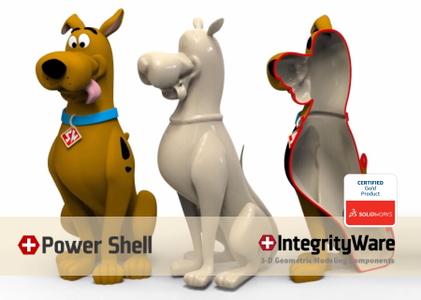
nPower Software / IntegrityWare, Inc announces the release of a new Power Shell product and technology for SOLIDWORKS. Power Shell introduces new technology to handle Shelling / Thicken cases that previously failed. When regular Shall fails, Power Shell prevails.


San Diego, June 8, 2020 - Press Release

The new technology behind Power Shell solves a common problem with CAD software. For years, CAD users have struggled with Shelling. In most CAD systems, Shelling fails in many common circumstances. CAD models with small radii, large shell thickness, tight corners, small features, disappearing features, narrowing areas, self intersections and other difficult geometry cause the standard shelling algorithm to fail. The new technology and new approach of Power Shell deal with these difficult geometric configurations so that it can Shell virtually any CAD model with any size of Shell thickness. Instead of spending time trying to modify your models so that the Shell tool can work, why not save valuable time and try the Power Shell tool?

Power Shell can shell out faces, or hollow out the interior of a model; it can offset inward or outward. And the Power Thicken tool can offset and thicken a surface model. These tools can handle extremely complex geometry including difficult organic shapes.

The Power Shell and Power Thicken features are similar to other SolidWorks features (like Shell and Thicken). They show up in the feature history tree and will update in a similar manner.

Power Surfacing is the premier industrial design solution for SOLIDWORKS. With its tight integration inside of SOLIDWORKS, and its rich and powerful feature set, Power Surfacing has become the tool of choice for industrial designers who want to quickly generate beautiful designs that can easily be turned into manufactured solutions.


Powerful new Shell and Thicken technology able to handle difficult self-intersections, small radius of curvature and complex geometry.

Shelling (and Thicken) failures are a common issue for virtually all CAD systems. Power Shell introduces new patent pending technology that finally addresses this important issue. Power Shell and Power Thicken use a new process for dealing with the complex Shelling and Offsetting failing cases typically encountered in CAD systems.

Power Shell & Power Thicken complement the SolidWorks Shell / Thicken tools. When Shell & Thicken fail, Power Shell & Power Thicken prevail. Power Shell and Power Thicken are intended to be used in the cases that fail the SolidWorks Shell / Thicken commands. When the SolidWorks Shell (or Thicken) command fails, you should use Power Shell to get the job done (instead of wasting time trying to modify your design so that the Shell command might work).

Video introducing new Power Shell add-in for SOLIDWORKS.


IntegrityWare, Inc. is a company specializing in supplying 3-D geometric modeling and graphics technology solutions to vendors in a variety of industries. As a full service provider, IntegrityWare offers consulting services, NURBS-based software libraries, and Polygon-based software libraries.

Product: Power Shelling
Version: 1.0
Supported Architectures: x64
Website Home Page :
Код:
http://www.npowersoftware.com
Language: english
System Requirements: PC *
Software Prerequisites: DS SolidWorks 2016-2020
Size: 289.3 mb


-:DOWNLOAD FROM LINKS:-

NitroFlare
У Вас недостаточно прав для просмотра ссылок. Войдите или зарегистрируйтесь.


RapidGator
У Вас недостаточно прав для просмотра ссылок. Войдите или зарегистрируйтесь.

​
 
ScreenHunter Pro 7.0.1117


screenhunter-pro.png

ScreenHunter Pro 7.0.1117 | 133.1 Mb
​
ScreenHunter Pro is the most advanced version of ScreenHunter with all the necessary tools included for your screen capture needs. It's the total screen capture solution to save you time and boost productivity. With ScreenHunter Pro, you can immediately see the benefits of numerous time-saving features and deliver the highest quality screenshots. As well, it offers easy-to-use user interface and maximum flexibility for a more interactive capture experience. Powerful and intelligent, ScreenHunter Pro has proven to be an incomparable helper of your business.


Capturing Features
• Rectangular area
• Adjustable rectangle
• Object / Window
• Auto-scroll
• Multi-object
• Text
• Active Window
• Fixed area (user defined)
• Specific window (lock-in window)
• Full screen
• DOS program
• DirectX / Screen saver
• Movie / video
• Freehand
• Round area (Ellipse)
• Round Rectangular area
• Polygon
• Web capture
• Scanning images

Addition Features
• Mouse pointer
• Multiple monitors
• Transparent window
• AutoText (date/time stamps, note)
• Watermark
• Border

Timing Features
• Delayed capture
• Timed auto-capture
• Scheduled auto-capture
• Recurring capture

Viewing and Editing Features
• Image editing, adding text & annotation
• Advanced image processing
• High-quality zooming, resizing & cropping
• Viewing 100 images & conversion
• Drag & drop images from desktop

Saving Features
• Automatic naming and saving to files
• Clipboard
• Auto-email
• Auto-scale
• Saving in the smallest file size
• Optimized JPEG, GIF and PNG
• High quality and transparent GIF
• Saving to TIFF

Other Features
• Screen Color Picker
• System tray
• Zoombox
• Flexible hotkey
• Multiple hotkey
• Direct printing
• Wysiwyg printing
• Developer support

Operating System: Windows 7, 8/8.1, 10

Home Page -
Код:
http://www.wisdom-soft.com/


-:DOWNLOAD FROM LINKS:-

NitroFlare
У Вас недостаточно прав для просмотра ссылок. Войдите или зарегистрируйтесь.


RapidGator
У Вас недостаточно прав для просмотра ссылок. Войдите или зарегистрируйтесь.

​
 
VovSoft Copy Files Into Multiple Folders 3.6


82-Em-IHVV9njs-GZo-Din-MLi-Rc-Ho-Wz-Rf-C5n.png


File Size: 3.2 MB
​
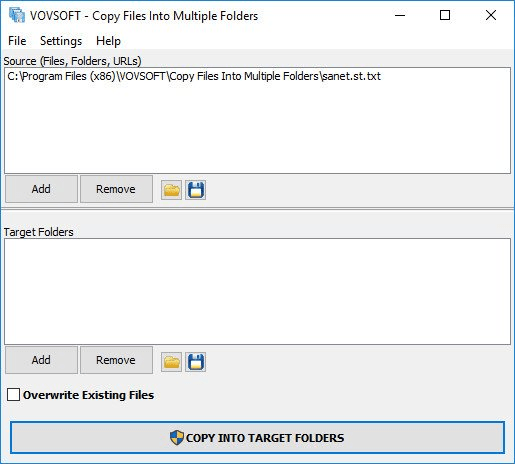
Copy one or multiple files to several folders, with or without overwriting existing content, with this lightweight, easy-to-use program. If you often need to copy a large number of files to multiple locations, performing this task the old-fashioned way is both tedious and time-consuming.

Copy Files Into Multiple Folders is a handy piece of software that, as its name implies, enables you to copy files to multiple directories in one quick operation. It is very simple-to-use. This application is great for those who only wish to transfer a set of files to multiple directories in an effortless manner. First-time users should not run into any issues, as the programs functions are self-explanatory.
Files can be added to the list using drag and drop actions, and you can specify whether or not existing items should be replaced. A processing log is displayed in a separate window after the operation has been launched. It lets you know which files have been copied or skipped.


-:DOWNLOAD FROM LINKS:-
NitroFlare
У Вас недостаточно прав для просмотра ссылок. Войдите или зарегистрируйтесь.


RapidGator
У Вас недостаточно прав для просмотра ссылок. Войдите или зарегистрируйтесь.


​
 
Waves 11 Complete 10.9.2020 WIN


th-r-I8-EUa-Ba20-FYf-UZz6527-B3h-I0t-QJo-Sfl.jpg


WIN | 13 September 2020 | 5.21 GB
​
We are pleased to announce a new version of Waves plugins, Waves V11. Update to V11 to future-proof your sessions, ensure compatibility with the latest DAWs and operating systems (including MacOS 10.15 Catalina), enjoy plugin updates including new versions of the Renaissance plugins, get new plugins added to premium bundles, and more.

Instructions
1. Go to waves folder and Install Waves Central and Run
2. Select Offline Installer and Click Install from an Offline Installer
3. Browse the Waves folder you downloaded
4. Select the plugins you like and Install!
5. Apply patch and Enjoy

Whats new in this version:
September 10th, 2020
New release - Driver software is now available for DSPRO StageGrid 1000 (Fw v10.3.51.265 Control Panel v10.0.2.288).
Firmware update for DSPRO StageGrid 4000 (Fw v10.3.51.265 Control Panel v10.0.2.288).: Fixes recovering from 100MBit connection to 1GBit.

September 8th, 2020
New release - Kaleidoscopes: Available as a single plugin as well as in Mercury, Pro Show, and SD7 Pro Show.

System Requirements
CPU:
Intel Core i5 / i7 / Xeon / AMD Quad-Core

Memory:
8 GB RAM
8 GB free disk space on the system drive

Operating System:
Windows 10 64 bit
OSX: 10.12.6 - 10.15


-:DOWNLOAD FROM LINKS:-
NitroFlare
У Вас недостаточно прав для просмотра ссылок. Войдите или зарегистрируйтесь.

У Вас недостаточно прав для просмотра ссылок. Войдите или зарегистрируйтесь.

У Вас недостаточно прав для просмотра ссылок. Войдите или зарегистрируйтесь.

У Вас недостаточно прав для просмотра ссылок. Войдите или зарегистрируйтесь.

У Вас недостаточно прав для просмотра ссылок. Войдите или зарегистрируйтесь.

У Вас недостаточно прав для просмотра ссылок. Войдите или зарегистрируйтесь.


RapidGator
У Вас недостаточно прав для просмотра ссылок. Войдите или зарегистрируйтесь.
У Вас недостаточно прав для просмотра ссылок. Войдите или зарегистрируйтесь.

У Вас недостаточно прав для просмотра ссылок. Войдите или зарегистрируйтесь.

У Вас недостаточно прав для просмотра ссылок. Войдите или зарегистрируйтесь.

У Вас недостаточно прав для просмотра ссылок. Войдите или зарегистрируйтесь.

У Вас недостаточно прав для просмотра ссылок. Войдите или зарегистрируйтесь.


​
 
IObit Software Updater Pro 3.3.0.1855


dqt-NDYry2mu4-Ke-GQne-L4bybrb-TBHQFuk.jpg


File size: 14.92 MBI
​
Obit Software Updater - Update Your Software in Real time & No Beta version or even Bundleware Bothered. Outdated software may leave some risks to your PC. It's better to keep all software up-to-date. With 180% larger software database, IObit Software Updater can automatically scan and update your software in a scheduled time without bothering you, and you just need to list your software in the "Auto-Update List".

The 1-click update solution frees you from updating outdated programs one by one from different sources or websites, which can save you a lot of time and work. Meanwhile, IObit Software Updater 2 enables you to check and update programs automatically at a scheduled time and shut down/ reboot your computer automatically after the update is completed.

Besides, IObit Software Updater provides a large and rapid-growing software database for featured must-have software in various categories: Browsers, Security, Social, Multimedia, Runtimes, and Utilities & Tools. You can easily and quickly install all selected software with 1-click without worrying about annoying ads and/or bundleware, even malware. It must be your best choice when you need to install many programs, especially when you get a new computer or after you reinstall, format, or upgrade your computer.

Easily Get Must-have Software
Having no idea which software is the right one or bothering to install your needed software one by one on websites? IObit Software Updater gives you the best solution by recommending trustworthy and popular programs for you to install from within this software. All these programs have been already well classified according to their functions, so you can select and install your needed ones instantly and easily.

Auto-Keep your Software Up-to-date
Outdated software may leave some risks to your PC. It's better to keep all software up-to-date. With 180% larger software database, IObit Software Updater can automatically scan and update your software in a scheduled time without bothering you, and you just need to list your software in the "Auto-Update List".

Faster Download and Safer Installation
Worried about the software updating process? You don't have to. To avoid of long time waiting during software downloading, the latest IObit Software Updater used a new algorithm to help downloading process 10% faster. Also IObit Software Updater use strict criteria to make sure you've got the clean software and not annoyed by ads or bundleware or even malware while installing software.
Release Notes
+ Newly supports updating 10 more programs including OBS Studio, OpenShot Video Editor
+ Added the support for installing 11 new popular programs with 1-click
+ Optimized update algorithms of some programs for faster download and update
+ Fixed minor bugs
Requirements: Windows XP/Vista/7/8/8.1/10


-:DOWNLOAD FROM LINKS:-
NitroFlare
У Вас недостаточно прав для просмотра ссылок. Войдите или зарегистрируйтесь.


RapidGator
У Вас недостаточно прав для просмотра ссылок. Войдите или зарегистрируйтесь.

​
 
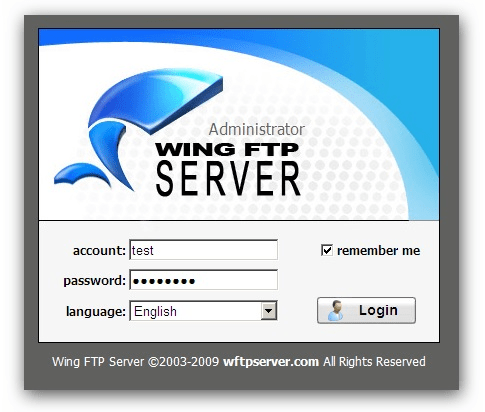
Wing FTP Server Corporate 6.4.2


7p-PZlr-Hzqu-Zla-Uh-FOfl-P9-N78-Ek3ry-Ni-G.png

Wing FTP Server Corporate 6.4.2 Multilingual | 14.6 Mb
​
Wing FTP Server is a highly functional, easy-to-use and secure FTP Server solution that can be used in Windows, Linux, Mac OSX and Solaris. It supports multiple file transfer protocols, including FTP, HTTP, FTPS, HTTPS and SFTP, giving your end-users flexibility in how they connect to the server. And it provides administrators with a web based interface to administrate the server from anywhere. You can also monitor server performance and online sessions and even receive email notifications about various events taking place on the server.


The supported transfer protocols are listed as follows:
- FTP (File Transfer Protocol)
- HTTP (Hyper Text Transfer Protocol)
- FTPS (FTP over SSL)
- HTTPS (HTTP over SSL)
- SFTP using SSH2 (File Transfer over Secure Shell)

Corporate Edition:
- Unlimited accounts number
- Unlimited concurrent connections
- Database storage of accounts via ODBC
- Database storage of accounts via Mysql
- Event Manager
- Task schedulers with lua script
- Windows Authentication (NTLM or Active Directory)
- LDAP Authentication
- All features in the secure edition

System Requirements:
- Memory: 128 MB of system memory (RAM)
- Disk space: 30 MB free hard disk drive space
- Display: SVGA(1024 x 768) or higher is required when using the administration program

Home Page -
Код:
http://www.wftpserver.com/


-:DOWNLOAD FROM LINKS:-

NitroFlare
У Вас недостаточно прав для просмотра ссылок. Войдите или зарегистрируйтесь.


RapidGator
У Вас недостаточно прав для просмотра ссылок. Войдите или зарегистрируйтесь.

​
 
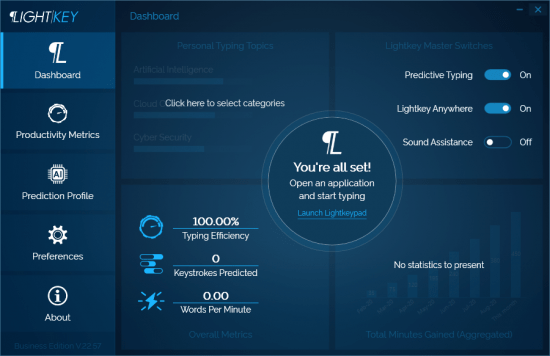
Lightkey 22.57.20200723.1418 Business Edition Multilingual


th-lgh151-Bhzega-S8-US1-Ga-U1ji-OGYMZarjl.png

Lightkey 22.57.20200723.1418 Business Edition Multilingual | 238 Mb
​
Boost your productivity by turning to this application that lets you auto-complete your words by using a comprehensive suggestion database. If your job mainly revolves around text editors and word processors, you probably want to find an effective way to boost your productivity. One of the most efficient solutions would be turning to third-party applications such as Lightkey that can improve your speed by auto-completing your text.


Helps you auto-complete your texts
This application can help you save time typing by suggesting potential completions for your words based on your typing behavior. That means that the application studies the way you work and develops a profile so that it can fit your needs as efficiently as possible. When you launch the application, you are prompted to input your name, select a typing style, specify prediction languages and choose from a broad range of prediction categories and subcategories. Typing styles indicate whether you're focusing on the screen or keyboard while you're typing.

Integrates with several text editors
Although this application comes with its own text editor, called the "Lightkeypad", you can also use its capabilities with other text editing applications. Lightkey integrates its functions well with products from the Microsoft Office suite, including Word, Outlook and PowerPoint, boosting its overall efficiency by extending your possibilities.

Comes with a user-friendly interface
This application's interface is a smooth one, and consists of various intuitive functions, making it possible that even novices can benefit from its features without significant efforts. After you configure its initial parameters, you can access a handy tutorial that offers you information regarding shortcut usage. The main window of the Control Center component lets you toggle app integration on or off, according to your needs. Therefore, you can choose not to use this utility with Word, PowerPoint and Outlook or use it with all of them.

Lightkey. Type At The Speed Of Your Mind
Express yourself faster, avoid spelling and grammar mistakes, save energy and gain time.

Being Creative Has Never Been More Productive
Whether it's a casual email, blog-post, legal document, or a research paper, Lightkey helps you get it done.

Increase Your Typing Efficiency
Save up to 70% of your keystrokes using Lightkey's inline prediction technology.

Sharpen Your Message. Instantly
Avoid spelling and grammar mistakes while typing in more than 80 languages.

Lightkey. Anywhere
Increase your typing efficiency, in any text field and any desktop application.

Unlock Your Key Productivity Metrics
Follow your typing speed (WPM), time gained and overall productivity improvement.

System Requirements:
Lightkey supports the following MS Windows OS versions: 7, 8, 8.1 and 10.

Homepage -
Код:
https://www.lightkey.io


-:DOWNLOAD FROM LINKS:-

NitroFlare
У Вас недостаточно прав для просмотра ссылок. Войдите или зарегистрируйтесь.


RapidGator
У Вас недостаточно прав для просмотра ссылок. Войдите или зарегистрируйтесь.

​
 
CrossFTP Enterprise v1.99.5


DLzw-ZEgsv0-T8u-KNog-JYYNK8-Ise-Bhe-Ol-F.jpg

CrossFTP Enterprise v1.99.5 | 86.1 Mb
​
CrossFTP Enterprise is a powerful FTP, FTPS, SFTP, FXP, WebDav, Amazon S3, Amazon Glacier, Microsoft Azure, and Google Storage client for Windows. Compared with CrossFTP Pro, it further features CrossFTP Commander, site-local-site transfer and Email notifications to automate your data sync/migration between any sites and protocols.


Classic interface
It comes wrapped in a very simple user interface that presents the remote and local file repositories in a classical manner.
Getting to any location is achieved quickly and there is the possibility to store favorite paths as bookmarks for reaching them fast. On the same note, the program keeps a history of the recently accessed locations and includes tab support for working with multiple folders at the same time.

Plenty of options under the hood
Unlike other FTP clients, CrossFTP Pro is capable of scheduling transfer operations for a list of selected entries; furthermore, the process can be set to run recurrently. This way should there be any modifications in the target locations they are immediately uploaded to the remote folder.
The application brings to the table a hefty set of tools and among them is the possibility to run a synchronization routine between a remote and a local folder. Also available are options for splitting and merging files as well as verifying the CRC checksums of the selected items.
The list of features present in the product is pretty impressive as apart from connecting to FTP servers it can also be used to get files from Amazon S3 on-demand storage, Google Cloud Storage or Amazon Glacier.
There are encryption options for the data to be protected before it leaves the client in order to keep it safe from prying eyes.

Conclusion
As expected, CrossFTP Pro includes all the basic functionality a regular user requires from such software but it also combines powerful features so that experienced users can use it for advanced operations.

Operating System: Windows 98/ME/NT/2000/XP/Vista/7/8/10

Home Page -
Код:
http://www.crossftp.com/


-:DOWNLOAD FROM LINKS:-

NitroFlare
У Вас недостаточно прав для просмотра ссылок. Войдите или зарегистрируйтесь.


RapidGator
У Вас недостаточно прав для просмотра ссылок. Войдите или зарегистрируйтесь.

​
 
Advanced SystemCare Pro 13.7.0.305


ascp.png

Advanced SystemCare Pro 13.7.0.305 Multilingual | 53.7 Mb
​
Advanced SystemCare PRO provides an always-on, automated, the all-in-one PC optimization utility. It specializes in ONE-Click solutions to detect, clean, repair, speed up and eventually protect PC. Advanced SystemCare is a PC maintenance program that's incredibly easy to use, the World's Top System Utility for Superior PC Health! With the novel system technology, Advanced SystemCare empowers you to run your computer faster. Ensures more stably and more efficiently than with any other system utilities.


In most of old and slow PCs, there might be lots of troubles to slow them down. Equipped with Advanced SystemCare, your PC will stay error-free and smoother than ever.

IObit Advanced SystemCare has the New Performance Monitor, that can release memory by one click to smooth PC running within seconds.

To better protect users' online privacy with Advanced SystemCare, "Protect" tab is newly added. It provides quick access to protect browsing frombeing tracked by automatically cleaning privacy traces once browser closed. Also it detects and resists the attack of malicious plugin or toolbar by Browser Anti-Tracking and Plugin/Toolbar Cleaner in this tab.

Toolbox is always offering effective tools, such as new Startup Manager, a 1-click solution to conspicuously diminish system startup time by optimizing unnecessary Startup and Service.

Advanced SystemCare Key Benefits:
Keeps your PC running at peak performance. Fully optimizes Windows for ultimate system performance and top Internet speed. It turns your PC into a business PC, a productive workstation, an entertainment center, a game machine, or a scientific computing PC.
Defends PC security with extra protection. Detects and analyzes Windows security environment. Scans and removes spyware and adware using up-to-date definition files. In conclusion, it prevent spyware, hackers and hijackers from installing malicious programs on your computer. Erases and updates your PC's activity histories.
One click to solve as many as 10 common PC problems. With one click, it scans and repairs ten PC problems and protects your PC from hidden security threats.
Real-time optimization with ActiveBoost function. This technology actively runs in the background intelligently managing system resources in real-time. And constantly detects inactive resources and optimizes CPU and RAM usage.
Cloud technology to keep database up-to-date. The new "Cloud" technology ensures the database is kept updated at all times. So that you can benefit from the latest definitions and configurations.
More than 20 dedicated smart tools. The Toolbox feature has tools for system cleaning, optimizing and repairing, tools for security enhancement. Also the tools for full control over the PC system.

Other Features:
Boost your PC for working and gaming. You now have two Turbo Boost options, Work Mode and Game Mode. In addition, you can now adjust the configuration of each mode from the main screen.
Next-generation registry deep clean and optimizer. Safely cleans registry junk, compacts registry bloats. Also defragments the whole registry for maximum performance. Finds and fixes the registry errors that other utilities miss with "Deep Scan" technology.
Automatically works in the background. This powerful utility works continuously, automatically and quietly in the background on your PC. You can set the program on a regular schedule or just let it work automatically when your PC is idle.
Improved Care module. The new developments in the "Care" module include features such as "Start-up Optimization", which will scan and clean your PC much more effectively.
Powerful hard drive defragmentation. Fast, powerfully and incredibly effective Disk Defrag function to defragment hard drives. Up to 10 times faster than other defragmentation tools.

Languages: English, Arabic, Belarusian, Bulgarian, ChineseSimp, ChineseTrad, Czech, Danish, Dutch. Finnish, French, German, Greek, Hungarian, Italian, Japanese, Korean, Nederlands. Polish, Portuguese (PT-BR), Portuguese (PT-PT), Russian, Serbian (cyrillic). Serbian (latin), Slovenian, Spanish, Swedish, Turkish, Vietnamese.

Supported Operating Systems: Windows XP, Vista, Windows 7, 8, 8.1, 10 (32-bit, 64-bit).

Home Page -
Код:
http://www.iobit.com/


-:DOWNLOAD FROM LINKS:-

NitroFlare
У Вас недостаточно прав для просмотра ссылок. Войдите или зарегистрируйтесь.


RapidGator
У Вас недостаточно прав для просмотра ссылок. Войдите или зарегистрируйтесь.

​
 
IObit Start Menu 8 Pro 5.3.0.1


iobit-start-menu.jpg

IObit Start Menu 8 Pro 5.3.0.1 Multilingual | 12 Mb
​
Better Solution for Windows 8 & Windows 10 Start Menu! Some Windows 8/10 users might not get used to the new style of start menu. Start Menu 8 can help them change their system default start menu and bring back Win7 style start menu, and easily switch start icon at will.


Faster & More Accurate File Search
To avoid of suffering from long time searching in start menu, Start Menu 8 optimized its search engine. Then with 20% faster search speed, Start Menu 8 can provide search results in less time, and the accurate results avoid of repeatedly typing keywords for the same file.

StartMenu8 Features:

More Efficiency and Convenience
It not only brings back the convenient Start Menu to Windows 8, but also allows you to bypass Metro screen on start of Windows 8 and boot to desktop directly.

Easily Switch between Metro and Desktop interface
You can easily switch between two modes by pressing and holding the Windows key, depending on your preference.

Faster Access to Programs and files
It brings back Start Menu where you can get quicker access to programs, documents and files, control panel and settings.

Quicker Searching
Unified and instant Searching for both desktop and Metro apps decreases the time taken in Searching and makes your work more efficient.

Customizable to your needs
You can pin programs to Start Menu and Taskbar for quicker access to your favorite programs. It's easily customizable to have everything you need at just one click.

New and Important Changes in Start Menu 8:
As a desktop customized tool for Windows users, Start Menu 8 is designed especially to bring back the start button and start menu for Windows 8/8.1/10.

Customized Icon (NEW!)
Start Menu8 allows users to set unique start icon at will.

No Ads Disturb (NEW!)
Ads are disabled completely, so you can enjoy 100% clean start menu.

Operating System: Windows XP, Vista, 7, 8/8.1, 10

Home Page -
Код:
https://www.iobit.com/


-:DOWNLOAD FROM LINKS:-

NitroFlare
У Вас недостаточно прав для просмотра ссылок. Войдите или зарегистрируйтесь.


RapidGator
У Вас недостаточно прав для просмотра ссылок. Войдите или зарегистрируйтесь.

​
 
R-Studio 8.14 Build 179597 Network (x64)


0-DBf-Hg7-Ohk-Yix77bau-Kg-M0pqt-Z3-P8-PP9.jpg

R-Studio 8.14 Build 179597 Network (x64) Multilingual | 61.2 Mb
​
Empowered by the new unique data recovery technologies, R-STUDIO is the most comprehensive data recovery solution for recovery files from NTFS, NTFS5, ReFS, FAT12/16/32, exFAT, HFS/HFS+ (Macintosh), Little and Big Endian variants of UFS1/UFS2 (FreeBSD/OpenBSD/NetBSD/Solaris) and Ext2/Ext3/Ext4 FS (Linux) partitions. It also uses raw file recovery (scan for known file types) for heavily damaged or unknown file systems. It functions on local and network disks, even if such partitions are formatted, damaged or deleted. Flexible parameter settings give you absolute control over data recovery.


In addition to being a full-featured data recovery utility, R-Studio also includes:
An advanced RAID reconstruction module
A feature-rich text/hexadecimal editor
An entire advanced disk copying/imaging module in one single piece of software, which makes R-Studio your ideal complete solution for creating a data recovery workstation.

R-Studio utilities recover files:
Deleted without Recycle Bin, or when Recycle Bin has been emptied;
Removed by virus attack or power failure;
After the partition with the files was reformatted, even for different file system;
When the partition structure on a hard disk was changed or damaged. In this case, R-Studio utilities can scan the hard disk trying to find previously existing partitions and recover files from found partitions.
From hard disk with bad sectors. R-Studio Data Recovery Software can first copy the entire disk or its part into an image file and then process the image file. This is especially useful when new bad sectors are constantly appearing on the hard disk and remaining information must be immediately saved.

Features
Standard Windows Explorer - style interface.
Data recovery over the Network. Files can be recovered on network computers running Win2000/XP/2003/Vista/2008/Windows 7/8/8.1/10/Windows Server 2012/2016.
Supported file systems: FAT12, FAT16, FAT32, exFAT, NTFS, NTFS5, ReFS / ReFS2+ (Resilient File System, Windows 2012/2016 Server), HFS/HFS+ (Macintosh), Little and Big Endian variants of UFS1/UFS2 (FreeBSD/OpenBSD/NetBSD/Solaris) and Ext2/Ext3/Ext4 FS (Linux).
Scan for Known File Types (raw file recovery): if the disk file system is heavily damaged or unsupported, R-Studio searches for specific data patterns ("file signatures") typical for certain file types (Microsoft Office documents, jpgs, etc.). Such known file types can be custom-defined.
Recognition and parsing of Basic(MBR), GPT, and BSD (UNIX) partitions layout schema, and the Apple partition map. Support for Dynamic volumes (Windows 2000-2016/8.1/10) over MBR and GPT.
Support for
- Windows Storage Spaces (created by Windows 8/8.1 and 10/Threshold 2/Anniversary update);
- Apple software RAIDs, CoreStorage, File Vault, and Fusion Drive;
- Linux Logical Volume Manager (LVM/LVM2) and mdadm RAIDs.
R-Studio can automatically recognize and assemble the components of these disk managers even if their databases are slightly damaged. Their components with severe corrupted databases can be added manually.
Damaged RAID recovery. If the OS cannot recognize your RAID, you can create a virtual RAID from its components. Such virtual RAID can be processed like a real one. Standard RAID levels supported: 0, 1, 4, 5, 6. Nested and non-standard RAID level supported: 10(1+0), 1E, 5E, 5EE, 6E. Support for parity delays in all applicable levels. Support for customer-specified RAID layouts.
Automatic RAID parameter recognition.R-Studio can recognize all RAID parameters for RAID 5 and 6. This feature helps the user to solve one of the most difficult problems in RAID recovery.
Creates IMAGE FILES for an entire Hard Disk, Partition or its part. Such image files can be compressed and split into several files to put it on CD/DVD/flash or FAT16/FAT32/exFAT. Then the image files can be processed like regular disks.
Data recovery on damaged or deleted partitions, encrypted files (NTFS 5), alternative data streams (NTFS, NTFS 5), from NTFS with data deduplication.
Recovering data if:
FDISK or other disk utilities have been run;
VIRUS has invaded; FAT is damaged; MBR is destroyed.
Recognizes localized names.
Recovered files can be saved on any (including network) disks accessible by the host operating system. Recovered files may be saved on a disk on a connected remote computer rather than be transferred over network to the local one.
File preview to estimate recovery chances. Most of the file types can be previewed even when their applications are not installed.
File or disk content can be viewed and edited with the advanced hexadecimal editor. The editor supports NTFS file attribute editing.
S.M.A.R.T. attribute monitoring. R-Studio can display S.M.A.R.T. (Self-Monitoring, Analysis and Reporting Technology) attributes for hard drives to show their hardware health and predict their possible failures. Any unnecessary work with such hard drives should be avoided if S.M.A.R.T. warnings appear.
Integration with DeepSpar Disk Imager, a professional HDD imaging device specifically built for data recovery from hard drives with hardware issues. Such integration provides R-Studio with a low-level fine-tuned access to drives with a certain level of hardware malfunction. Moreover, it allows disk imaging and analyzing be performed simultaneously. That is, any sector R-Studio accesses on the source disk will be immediately cloned to a clone disk and any other data recovery operation will be made from that clone disk avoiding further deterioration of the source disk and great reduction in processing time.

Operating System: Windows 2000, XP, 2003 Server, Vista, 2008 Server, Windows 7, Windows 8/8.1/10, Windows Server 2012/2016

Home Page -
Код:
http://www.r-studio.com/


-:DOWNLOAD FROM LINKS:-

NitroFlare
У Вас недостаточно прав для просмотра ссылок. Войдите или зарегистрируйтесь.


RapidGator
У Вас недостаточно прав для просмотра ссылок. Войдите или зарегистрируйтесь.

​
 
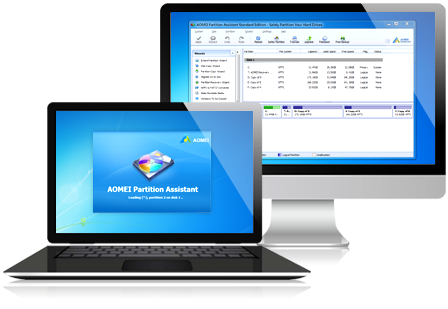
AOMEI Partition Assistant Professional 8.10 WinPE (x64)


aomei-partition-assistant.png

AOMEI Partition Assistant Professional 8.10 WinPE (x64) Multilingual | 423 Mb
​
AOMEI Partition Assistant is a highly-efficient, easy-to-use and multifunction partition management software, with user friendly operations to assist you mange the partitions of your hard drives. Under the help of Partition Assistant, you can easily & fast create/delete and merge/split the partition and the most advantage is that it resize/move your partition to readjust the partition volume on the basis that it ensures the security of your data.


AOMEI Partition Assistant Professional Edition is reliable and professional disk partition software for computer. It provides you with the most popular disk partition technology which snap-in Basic Disk Partition Manager, Convert dynamic disk to basic and Dynmiac Disk Partition Manager. This professional tool could help you manage Primary partition, Logical Partition, Simple, Spanned, Striped(Raid0), Mirrored(Raid) and RAID-5 volume.

Main Capabilities:
Extend/Shrink partition
Resize/Move partition
Merge/Split partition
Allocate Free Space
Copy disk/partition
Create/delete/format partition
Set partition label
Wipe partition/wipe hard drive
Rebuild MBR
Convert to GPT/MBR disk
Disk surface test
View properties of partition and disk

Advanced Capabilities:
Change and Remove drive letter
Hide and Unhide drive
Convert Logical to Primary or contrary
Set drive as active
Convert FAT/FAT32 to NTFS
Check partition
Wipe unallocated space
Change partition type
Change serial number
Partition Alignment

Disk & Partition Wizard:
Extend Partition Wizard
Disk Copy Wizard
Partition Copy Wizard
Migrate OS to SSD or HDD
Partition Recovery Wizard
Create Bootable CD Wizard

Operating System:
PRO: Windows 10, XP, Vista, 7 (SP1 included), 8 and 8.1, Windows PE, both 32/64 bit
Unlimited, Technician and Server: Windows XP/Vista/2000/7/8/8.1/10, Windows Server 2000/2003/2008/2012/2016 (included R2 version), Windows SBS 2000/2003/2008/2011 and Windows Home Server

Home Page -
Код:
https://www.extend-partition.com/


-:DOWNLOAD FROM LINKS:-

NitroFlare
У Вас недостаточно прав для просмотра ссылок. Войдите или зарегистрируйтесь.

У Вас недостаточно прав для просмотра ссылок. Войдите или зарегистрируйтесь.


RapidGator
У Вас недостаточно прав для просмотра ссылок. Войдите или зарегистрируйтесь.

У Вас недостаточно прав для просмотра ссылок. Войдите или зарегистрируйтесь.


​
 
Zoner Photo Studio X 19.2009.2.272


th-Ham-Mg-Urlo1k-Nj-Fz-Bm-O5o-Or3m-Krw-HRP7z.jpg

Zoner Photo Studio X 19.2009.2.272 | 112 MB
​
Zoner Photo Studio X helps you take control of your photos. Zoner Photo Studio is a complete toolbox for managing and processing digital photos. Acquire pictures from your camera, organize your archive, and edit and share your photos - it's never been easier! Zoner Photo Studio is useful for beginners, advanced users, and experienced photographers, who can select one out of four different variants.


This software also provides effects from fun (e.g. oil painting and posterization) to highly professional (e.g. framing and text-in-image).
• Just connect your camera, and Zoner Photo Studio handles the rest. Your imported photos are automatically sorted, and you can also rename them and back them up.
• Keep your photos organized, no matter whether you've got 100, 1,000, or 100,000. Add colored labels, rate photos, and give them map locations.
• Add color to your photos or brighten them effortlessly. The new Develop module lets you enhance photos non-destructively - your full-quality original is always at hand.
• Edit your photos, right to the last pixel. Zoner Photo Studio is your friend for collages, portrait retouching, adjusting objects' colors, and making beautiful panoramas. Its advanced photo editor will help with all this and more.

Bitmap formats: JPEG, GIF, TIFF, PNG, PSD, PSB, PCD, BMP, PCX, TGA, ICO, RLE, WPG, DIB, BMI, PSP, PSPIMAGE, THM, HDP, WDP, JP2, J2K, JPC, PNM, PPM, PAM, PBM, PGM, WBMP, BMS, JPS, PNS, DCM, KDC, MPO, JXR, HDR, ZPS

RAW formats: CRW, CR2, DNG, MRW, NEF, ORF, PEF, ARW, SRF, SR2, MEF, ERF, RAW, RAF, FFF, RWZ, RWL, 3FR, CS1, SRW
For viewing purposes only, you can expand the range of supported formats by installing extra WIC codecs (e.g. WebP)

Video formats: ASF, AVI, M1V, MOV, MP4, MPE, MPEG, MPG, MTS, OGV, QT, WMV
Install MPlayer to add support for these formats: 3GP, DIVX, DV, DVR*MS, FLV, M2T, M2TS, M2V, M4V, MKV, MPV, MQV, NSV, OGG, OGM, RAM, REC, RM, RMVB, TS, VCD, VFW, VOB

Zoner Photo Studio X Highlights:
• Optimized and faster RAW module
• Catalog, advanced picture management and archival
• Multi-exposures help you to do the "impossible"
• Transparency support
• Healing Brush and Selection Brush tool
• Direct upload to Facebook, Flickr, and Picassa Web Albums
• 64-bit program version
• A wide array of edits and effects for photo enthusiasts
• HDR, panoramas, 3D photo maker
• Convenient, time saving batch operations
• Support for GPS map data
• Easy and direct web publishing
• Templates for calendars, contact lists, and more

Operating System:
Windows® 10, Windows® 8 / 8.1, Windows® 7

Homepage -
Код:
http://www.zoner.com/


-:DOWNLOAD FROM LINKS:-

NitroFlare
У Вас недостаточно прав для просмотра ссылок. Войдите или зарегистрируйтесь.


RapidGator
У Вас недостаточно прав для просмотра ссылок. Войдите или зарегистрируйтесь.

​
 
EaseUS Todo Backup Home 12.8


9-QXk-XQhv-STe-Q6-BHTt-Qkn-C0kpw-Ze2-Hyq-Q.png

EaseUS Todo Backup Home 12.8 Multilingual | 93.9 Mb
​
EASEUS Todo Backup is a complete and reliable backup and disaster recovery solution to backup system, data, files and folders, hard drive partition. It not only provides convenient user-interface to simplify your tasks but also enables you to backup and restore an image of your partitions or entire hard disk.


EASEUS Todo Backup enables users to backup and restore data in multiple ways for their data security. This backup manager enables users to reproduce the saved state of the files, partitions or entire hard disk.
EASEUS Todo Backup also allow users clone a hard disk, in order to replace the old one or transfer to another one.

EASEUS Todo Backup Home is a file backup and disaster recovery software, protecting your data, including photos, music, videos, documents, financial data and applications. Back up what you want, when you want. Users are faced with the essential challenge: the need to secure their PC and important files, such as system, family photos, music, applications, personal data and financial documents.
Protect your PC with EASEUS Todo Backup Home by just a few quick steps. If you lose any files you like or need to go back to an earlier version, don't worry, you can recover them in time. It is a complete free backup and recovery solution for home users.

Backup Benefits:
System backup. Full system protection allows you to easily back up and recover your entire operating system when disaster happens.
Disk imaging. Block-level disk imaging quickly and efficiently backs up the entire disk or volumes.
File backup. File-level backup allows you to selectively back up specific files, folders or file types, including network shared files.
Hot backup. Back up specific files and volumes without interrupting any current operations, especially for open files backup.
Outlook Email backup. Disaster recovery for Outlook Express or Outlook 2003/2007/2010/2013/2016.
Incremental and differential backup. Only back up changes made since the previous backup, saving time and storage space.
Schedule backup. Flexible backup scheduler allows backups to run based on daily, weekly, monthly or event.

Recovery Benefits:
System restore. Quickly recover your entire Windows system backup in minutes to the original or new location using a Linux or WinPE bootable media.
Flexible disk restore. Quickly restore what you need, recover granular files, folders, volumes, or all from a single disk image.
Selective file restore. Recover individual files and folders from a file backup image without restoring an entire image.
Pre-OS recovery environment. If your system won't boot, simply select EaseUS Todo Backup from boot menu to launch Pre-OS and then recover your system.

Special Benefits:
Migration and clone. Fast, easily and safely migrate system to an SSD or a bigger HDD for disk replacement or upgrade.
Backup management. Easily manage backup job and automatically delete the out-of-date backup images, saving storage space.
Browse image file. Browse backup with Windows Explorer and simply copy-paste files/folders.
Compatible with GPT/UEFI. Create a WinPE bootable media for 64-bit Windows system resided on GPT to start up PC recovery in case of emergency.

System Requirements: Windows 10, Windows 8.1, Windows 8, Windows 7, Windows Vista, Windows XP

Home Page -
Код:
https://www.easeus.com/


-:DOWNLOAD FROM LINKS:-

NitroFlare
У Вас недостаточно прав для просмотра ссылок. Войдите или зарегистрируйтесь.


RapidGator
У Вас недостаточно прав для просмотра ссылок. Войдите или зарегистрируйтесь.

​
 
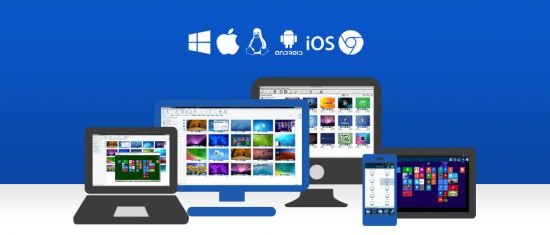
NetSupport Manager (Control & Client) 12.80.6


th-hcjioznw6e-Pa-Nxbh5-VWKpwh-MAb-ZQdp1m.jpg

NetSupport Manager (Control & Client) 12.80.6 | 83.3 Mb
​
NetSupport Manager continues to deliver the very latest in remote access, PC support and desktop management capabilities. From a desktop, laptop, tablet or smartphone, monitor multiple systems in a single action, deliver hands-on remote support, collaborate and even record or play back sessions. When needed, gather real-time hardware and software inventory, monitor services and even view system config remotely to help resolve issues quickly.


Designed to operate over your LAN, WAN or the internet, securely and without the need for firewall configuration, NetSupport Manager provides a single solution for remote support - without the need for a third party service or ongoing subscription costs. Adding to traditional 1:1 remote control capabilities, NetSupport Manager excels as a 1:many solution; from monitoring multiple systems in real-time, to showing the operator screen to multiple recipients for training, to file distributions across the network.

Platform Flexibility
Deliver powerful remote control and system diagnostics from any Windows, Mac, Android or iOS device. Connect to any remote Windows, Mac, Linux, Chrome OS (or legacy CE, DOS, Solaris) device.

Monitoring Systems with Interactive Thumbnails
The Monitor Mode feature allows a user to display a thumbnail view of all connected Client workstations simultaneously. The size of these thumbnails can be adjusted to suit. In addition, the user can mouse over a specific thumbnail for an expanded view of each selected PC.

This unique feature allows a user to keep a constant eye on target systems and immediately identify whether intervention is required. The view also provides key visual information such as OS type, network address, WiFi signal strength and battery life (where appropriate), the current logged-on user and the computer name for easy identification. Users can even choose to view a selected monitor from multi-monitor systems.

This view can be switched to Icon Mode, where all known devices are listed and overlaid with optional OS icons, location flags, WiFi and battery details, and more.

Remote Control
Watch, Share or Control the screen, keyboard and mouse of any PC irrespective of colour depth, resolution or operating system. NetSupport Manager delivers the fastest and most secure remote control available. During a remote control session, capture screenshots, annotate the screen to highlight areas of focus for an end user or use the Audio functions on multimedia-capable PCs to talk to your users while providing support. Best of all, record your remote control session and store as a replay file for future use.

For training purposes, NetSupport Manager can also do the reverse of Remote Control: namely, "show" the Control screen back to all selected end users, delivering a simple and powerful instructional training tool. Show the full desktop, a selected monitor or just a selected application to any number of connected computers in real time. Utilise a range of on-screen annotation tools to aid in your presentation or training.

Auto-Grouping of Remote Systems
The Control "tree view" provides an instant overview of your IT infrastructure by grouping the remote systems based on pre-defined criteria such as Operating System, PC type (laptop, all-in-one, desktop, tablet, virtual PC etc), even country. In addition, all devices are auto-grouped by NetSupport version, ensuring upgrades are easy to manage.

As you would expect, users can create groups themselves to reflect their own company structure as well as having quick access to a "recent" list of connected devices.

File Transfer
A user can transfer files between their PC and a user's workstation using a simple drag and drop interface - even drop a file directly onto the desktop when viewing a remote machine. Directories can be automatically synchronised on two workstations and appropriate file types can be edited. NetSupport Manager utilises intelligent Delta File Transfer to reduce data transfer times when overwriting files that already exist, by checking individual blocks of data within a file and only transferring changed data.

Moving files from one PC to another may be useful, but the real benefits come with NetSupport Manager's ability to copy files from one PC to many in a single action - or "File Distribution". A user can distribute files or folders from their PC to multiple Client PCs simultaneously with the minimum of effort. Using this feature, files can be distributed to all connected Client (end user) PCs, selected PCs or a pre-defined group. Files can also be quickly dropped onto the desktop or 'My Documents' folder.

The latest version of NetSupport Manager also features live folders. When initiating a file transfer to a remote PC, the path to any open folders (Explorer windows) on its desktop is displayed at the top of the file transfer view to ease quick selection.

Remote Inventory and System Information
A user can obtain a real-time view of the hardware and software installed on each remote PC workstation directly from within their NetSupport Control. NetSupport Manager collects over 80 items of information, specifically about the hardware or environment of each PC.

In addition, a full software inventory of current installed applications is provided as well as all installed OS hot fixes. To aid further in remote support and diagnostics, a user can also remotely view and, security permitting, control applications in memory, all processes running and currently installed services.

Connectivity
Remote control products fundamentally rely on flexibility in their approach to finding and connecting to end user devices. NetSupport Manager is designed to work over a LAN, WAN or the internet, with support for both TCP/IP and HTTP communications (and even legacy IPX and NetBIOS support). A unique "gateway" module is provided as standard allowing systems across the internet to connect securely and communicate without the need to use a third party-hosted solution.

The new "PIN Connect" feature allows quick connectivity with users simply by sharing a matching code, while the "always available" capabilities of NetSupport Manager ensure computers can be connected to at any time of day, remotely powered on and off with "wake on LAN" and, in the case of Intel® vPro™ systems, even remotely managed at the BIOS level.

Geo Location
New to NetSupport Manager is a simple but flexible feature aimed at making the grouping of remote devices much easier for companies supporting multiple sites. When a user connects to a remote PC, if enabled, the location of the device will be calculated based on its external details.

This information allows NetSupport Manager to provide an approximate location of each remote device, displaying the town, state and country (with supporting flag) within the Control application. Devices are automatically grouped by country for easier management. The feature can be enabled or disabled at both the Control and Client or simply managed via Group Policy.

Chat, Messages, Help Requests and Audio Support
Within NetSupport Manager, a user can conduct a two-way chat session between any number of selected users in either text or full audio mode.

Should the Chat recipient not respond, an audible alert can be sent to each workstation. The Chat progress can be sent to late arrivals using the "Send Discussion History" feature and, of course, the contents of a Chat session can be stored for future reference. A user can also send a text-based message to one or more chosen PCs, or even broadcast to all PCs on the network - ideal for alerting your users about an impending server shutdown or similar.

NetSupport Manager features extended audio support allowing one-way talk, listen or full bi-directional audio conversations (both within and outside of a remote control session), as well as seamless streaming of the remote PC's audible application sounds. Audio support is available over all LAN/WAN and internet-based communications.

End users can also, when enabled, send help requests directly to your helpdesk when they need assistance. The help request can either be sent to all available NetSupport operators, or directed to specific operators based on user-defined accounts. Incoming requests are displayed within the NetSupport Manager Control UI.

Flexibility
NetSupport Manager includes a wealth of supporting features to make remote support as simple and flexible as possible. Just a few of these features include a remote clipboard, remote printer re-direction, a full scripting and scheduling suite to automate tasks, a network deployment tool, the ability to remotely launch applications, a remote command prompt, registry editor and so much more.

Security above everything
NetSupport Manager has been recognised for the last 20 years as delivering the most secure remote control available. The latest version continues to expand our security from activity logs, to user acknowledgement to 256bit encryption, smart card support, AD integration and much more. NetSupport Manager is the choice of military and financial institutions across the globe.

Integration
NetSupport Manager has been designed to work both standalone and as a key part within existing systems. With that in mind, NetSupport provides a command line interface, feature access using command line "switches" and support for variables to ensure no matter what your environment, NetSupport Manager can be accessed and utilised directly.

PC Requirements:
Windows 10, 8 and 8.1 (32bit and 64bit), Windows Server 2012, Windows 7 (32bit and 64bit), 2008 (32bit, 64bit and R2), Vista (32bit and 64bit), 2003, XP (Service Pack 3 and above).

Homepage -
Код:
http://www.netsupportmanager.com/


-:DOWNLOAD FROM LINKS:-

NitroFlare
У Вас недостаточно прав для просмотра ссылок. Войдите или зарегистрируйтесь.


RapidGator
У Вас недостаточно прав для просмотра ссылок. Войдите или зарегистрируйтесь.

​
 
VMware Workstation Player v16.0.0 Build 16894299 (x64) Commercial


xo-OVU6-Qul-N1kzq-DPh-M9-D5k2-Sf-ZMTIRI3.jpg


File size: 219 MB
​
VMware Workstation Player (formerly known as VMware Player ) is a streamlined desktop virtualization application. It runs one or more operating systems on the same computer without rebooting. VMware Workstation Player has simple user interface, provides unmatched operating system support and portability. It's now easier than ever for IT professionals to get their users up and running with a corporate desktop. In addition, allows IT professionals to efficiently create and deliver a virtual desktop to employees, contractors or customers.

Run corporate virtual machines, experiment with new operating systems. Or safely try and test new software in an isolated virtual environment on a Windows or Linux PC.
VMware Workstation Player allows academic professionals to quickly deliver complete virtual desktops to students preconfigured with all the lessons, applications and tools required for the course while increasing control and security.

VMware Discounts and Desktop Promotions:
Easy PC Virtualization for Windows and Linux
VMware Workstation Player provides a streamlined user interface for creating, running and evaluating operating systems and applications in a virtual machine on Windows or Linux PCs. Easily interact and exchange data between applications running in the virtual machine and the desktop.

Unmatched OS Support for Ultimate Compatibility
VMware Workstation Player supports hundreds of guest operating systems - old and new. Therefore you can continue to run the applications you need in a virtual machine for as long as you want. VMware Workstation Player is the best way to run multiple operating systems and corporate desktops in an isolated and protected environment on modern hardware.

Virtual Machine Portability
With VMware Workstation Player, complete desktop environments including the operating system, applications and user configurations can be containerized in a virtual machine and easily shared. Instead of buying and shipping additional hardware, reduce cost by simply providing VMware Workstation Player along with a virtual machine containing your secure desktop image.

Run Restricted Virtual Machines
VMware Workstation Player has the ability to run restricted virtual machines created by VMware Workstation or VMware Fusion Pro. Restricted virtual machines are the easiest way to secure corporate desktops with encryption, runtime password protection, USB access restriction, isolation between the host and guest OS, and time limitation.

Consolidate and Recycle Old PC Hardware
Use the free VMware vCenter Converter utility accessible from VMware Workstation Player to turn existing Windows and Linux based computers into virtual machines. And eliminate the need to re-install and re-configure your existing OS and applications. Once converted, use Workstation Player to manage and run all your virtual machine on new hardware.

System Requirements:
Systems using Processors (CPUs) launched in 2011 or later are supported, except for the following:
Intel Atom processors based on the 2011 Bonnell micro-architecture. For example, Atom Z670/Z650 and Atom N570.
Systems using Intel Atom processors based on the 2012 Saltwell micro-architecture. For example, Atom S1200, Atom D2700/D2500, and Atom N2800/N2600.
Systems using AMD processors based on the Llano and Bobcat micro-architectures. For example, code-named Hondo, Ontario, Zacate, and Llano.
The following systems are also supported: Systems using Intel processors based on the 2010 Westmere micro-architecture. For example, Xeon 5600, Xeon 3600, Core i7-970, Core i7-980, and Core i7-990.

Container and Kubernetes Support:
Note: Windows 10 1809 or higher is required

Host Operating System (64-bit):
Windows 8 or higher
GNU/Linux with NVIDIA drivers that support OpenGL 4.5 and above
Guest Operating System
Windows 7 or higher
GNU/Linux with vmwgfx


-:DOWNLOAD FROM LINKS:-
NitroFlare
У Вас недостаточно прав для просмотра ссылок. Войдите или зарегистрируйтесь.


RapidGator
У Вас недостаточно прав для просмотра ссылок. Войдите или зарегистрируйтесь.

​
 
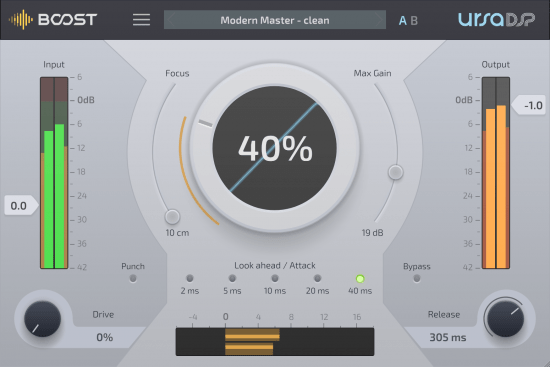
UrsaDSP Boost v1.1.32 WiN


th-Ur-LAOOBWq-Xgbuhnn7p-UUSv-L0-NNi-Pqfz7.png

UrsaDSP Boost v1.1.32 WiN | 5 Mb
​
Coming from UrsaDSP, Boost increases the loudness of audio material. Use it as a signal enhancer during mastering, or to reveal hidden details while mixing or creating new sounds. Set the Output Ceiling, dial in Attack and Release times, and use the main Boost dial to get anything from a gentle increase in average loudness to an all-out smashed-up signal. UrsaDSP Boost applies transparent signal maximization for a professional sound, and thanks to the unique Focus control, you can maximize a signal upwardly, applying more gain to quieter sounds - NO CLIPPING, ever. A Drive control (plus extra Punch setting for transients) are on-hand to add energy and warmth to the signal.


FEATURES
Increase average loudness with no clipping and minimal distortion
UrsaDSP's Trajectory Technology detection algorithm maximizes gain at every step
Focus control can push quiet sections harder than loud sections and reveal hidden details in audio with up to 52dB dynamic gain
Set Input gain up to 28dB and Output ceiling up to 0dB - Boost's algorithms mean there's no clipping, ever
Choose Attack and Release times to complement your audio
Add harmonic distortion using the Drive control
Activate the extra Punch setting to add more power to transients
Set Max Gain to keep very quiet sounds unaffected
Compare signals with the Bypass button


-:DOWNLOAD FROM LINKS:-

NitroFlare
У Вас недостаточно прав для просмотра ссылок. Войдите или зарегистрируйтесь.


RapidGator
У Вас недостаточно прав для просмотра ссылок. Войдите или зарегистрируйтесь.

​
 
VMware Workstation Pro v16.0.0 Build 16894299 (x64)


vmware-workstation.png


File size: 638 MB
​
VMware Workstation Pro is the industry standard for running multiple operating systems as virtual machines (VMs) on a single Linux or Windows PC. IT professionals, developers and businesses who build, test or demo software for any device, platform or cloud rely on Workstation Pro. Workstation Pro Delivers a Data Center in Your Laptop.

Run Multiple OSs on a Single PC
VMware Workstation Pro allows you to run multiple operating systems at once on the same Windows or Linux PC. Create real Linux and Windows VMs and other desktop, server, and tablet environments, complete with configurable virtual networking and network condition simulation, for use in code development, solution architecting, application testing, product demonstrations and more.

Develop and Test for Any Platform
Workstation Pro supports hundreds of operating systems and works with cloud and container technologies like Docker.

Connect to VMware vSphere
Securely connect with vSphere, ESXi or other Workstation servers to launch, control and manage both virtual machines (VMs) and physical hosts. A common VMware hypervisor maximizes productivity and enables easy transfer of VMs to and from your local PC.

Secure and Isolate Environments
Run a secure second desktop with different privacy settings, tools and networking configurations, or use forensic tools to investigate OS vulnerabilities. Workstation provides one of the most secure hypervisors in the industry and delivers powerful features for IT security professionals.

Features:
Sphere Connectivity
Use Workstation Pro to connect to vSphere, ESXi or other Workstation Pro servers. Drive remote Linux or Windows VMs (and others), command power operations, or transfer VMs to and from vSphere environments. A common VMware hypervisor enables simple portability.

Clones for Rapid Duplication
Save time and effort and ensure an exact duplicate when repeatedly creating the same VM setup. Use "Linked Clones" to quickly duplicate a VM while significantly reducing physical disk space. Use "Full Clones" to create fully isolated duplicates that can be shared with others.

Helpful Snapshots
Create a rollback point to revert to on the fly, which is perfect for testing unknown software or creating customer demos. Multiple snapshots make it easy to test a variety of different scenarios without the need to install multiple operating systems.

Powerful Virtual Networking
Create complex IPv4 or IPv6 virtual networks for VMs, or integrate with third-party software to design full data center topologies using real-world routing software and tools. New in Workstation is Network Simulation for introducing packet loss, latency and bandwidth restrictions.

High-Performance 3D Graphics
VMware Workstation Pro supports DirectX 10 and OpenGL 3.3, to deliver a fluid and responsive experience when running 3D applications. You can run the most highly demanding 3D apps like AutoCAD or SOLIDWORKS with near-native performance in a Windows VM.

High Resolution Display Support
Workstation Pro is optimized to support high-resolution 4K UHD (3840x2160) displays for desktops and QHD+ (3200x1800) displays used in laptops and x86 tablets. It also supports multiple monitors with different DPI settings, such as a new 4K UHD display along with an existing 1080p HD display.

Cross Compatibility
Create Linux or Windows VMs that can run across the VMware product portfolio or create restricted VMs for use in Horizon FLEX. We even support the open standard so you can create and play VMs from other vendors.

Monster Virtual Machines
Create massive VMs with up to 16 vCPUs, 8 TB virtual disks, and 64 GB of memory to run the most demanding desktop and server applications in a virtualized environment. Give graphics-intensive apps an additional boost by allocating up to 2GB of available host video memory to a VM.

Restricted Access to Virtual Machines
Protect corporate content by restricting access to Workstation VM settings like drag-and-drop, copy-and-paste and connections to USB devices. Virtual machines can be encrypted and password-protected to ensure only authorized users have access.

Shared Virtual Machines
Quickly share and test applications in a simulated production environment. Run VMware Workstation Pro as a server to share a repository of pre-loaded Linux and Windows VMs in every desired configuration with your teammates, department or organization.

System Requirements:
Systems using Processors (CPUs) launched in 2011 or later are supported, except for the following:
Intel Atom processors based on the 2011 Bonnell micro-architecture. For example, Atom Z670/Z650 and Atom N570.
Systems using Intel Atom processors based on the 2012 Saltwell micro-architecture. For example, Atom S1200, Atom D2700/D2500, and Atom N2800/N2600.
Systems using AMD processors based on the Llano and Bobcat micro-architectures. For example, code-named Hondo, Ontario, Zacate, and Llano.
The following systems are also supported: Systems using Intel processors based on the 2010 Westmere micro-architecture. For example, Xeon 5600, Xeon 3600, Core i7-970, Core i7-980, and Core i7-990.

Container and Kubernetes Support:
Note: Windows 10 1809 or higher is required

Host Operating System (64-bit):
Windows 8 or higher
GNU/Linux with NVIDIA drivers that support OpenGL 4.5 and above
Guest Operating System
Windows 7 or higher
GNU/Linux with vmwgfx


-:DOWNLOAD FROM LINKS:-
NitroFlare
У Вас недостаточно прав для просмотра ссылок. Войдите или зарегистрируйтесь.


RapidGator
У Вас недостаточно прав для просмотра ссылок. Войдите или зарегистрируйтесь.

​
 
Adobe Media Encoder 2020 v14.4.0.35 (x64)


adobe-media-encoder.png


x64 | Languages:Multilingual | File Size: 1.00 GB
​

Ingest, transcode, create proxies, and output any format you can imagine. This powerful media management tool allows you to work with media in a unified way across applications. Tight integration with Adobe Premiere Pro CC, After Effects CC, and other applications provides a seamless workflow.

Key Features:
- Support for 8K H.264 export
- Export XAVC QFHD Long GOP 4:2:2 formats
- Hardware-accelerated HEVC encoding on Windows 10 with 7th Generation (or later) Intel® Core™ processors and Intel Graphics enabled
- Improved RED camera format decoding
- Improved Sony RAW/X-OCN camera format decoding
- Hardware-accelerated H.264 encoding on Windows 10 with 6th Generation (or later) Intel® Core™ processors and Intel Graphics enabled
- Hardware-accelerated H.264 and HEVC encoding on Mac OS 10.13 systems with supported hardware
- Support for importing Canon C200 camera formats
- Support for importing Sony Venice camera formats
- RED camera Image Processing Pipeline [IPP2] support
- Destination Publishing support for new Twitter 280-character limit
- Channel selection when publishing to YouTube and Vimeo
- Playlist selection when publishing to YouTube
- Page selection when publishing to Facebook
- Add custom titles when publishing to YouTube, Facebook, or Vimeo
- Add custom video thumbnails when publishing to YouTube
- Notification for missing items in queue before encoding
- H.264 adaptive bitrate presets automatically choose best output bitrate based on source frame size and frame rate
- Animated GIF export on macOS and Windows
- Time Tuner effect improvements
- Newly optimized list of H.264 presets
- Format support for RF64 WAV Decode/Encode, decode for Sony X-OCN, and QuickTime DNx Smart Rendering
- Warning when importing non-native QuickTime sources
- Timecode modification for 720p 59.94 media
- Destination Publishing to Adobe Stock Contributor
- Adobe Team Projects support
- Support for Color Profiles from After Effects sources
- Automatically relinked assets when importing a sequence
- Option to maintain playback in Premiere Pro while rendering in Media Encoder
- Streamlined bit depth and alpha channel settings (QuickTime only)
- Export support for ambisonic audio (H.264 only)
- Support for Hybrid LOG Gamma (HLG)
- Support for HDR in HEVC (H.265) export Export support for Panasonic AVC-Long GOP Op1b

System Requirements:
- Processor: Intel 6thGen or newer CPU
- Operating system: Microsoft Windows 10 (64-bit), version 1703 or later (required)
- RAM: 16 GB of RAM
- Hard disk space: 4GB of available hard-disk space; additional free space required during installation (cannot install on removable flash storage devices)
- Monitor resolution: 1920 x 1080 or greater display resolution
- GPU: Adobe-recommended GPU card for GPU-accelerated performance (see Premiere Pro System Requirements)
- Ethernet: 10 Gigabit ethernet for 4K shared network workflows (1Gb for HD-only)


-:DOWNLOAD FROM LINKS:-
NitroFlare
У Вас недостаточно прав для просмотра ссылок. Войдите или зарегистрируйтесь.


RapidGator
У Вас недостаточно прав для просмотра ссылок. Войдите или зарегистрируйтесь.

​
``
 
KLS Backup 2019 10.0.2.5 Professional


X8-Bnmm4-QTKQLCOp1js8c-Dn4h7n1-C4-Mo1.jpg


Windows (x86/x64) | Languages:English | File size: 60.6 MB
​
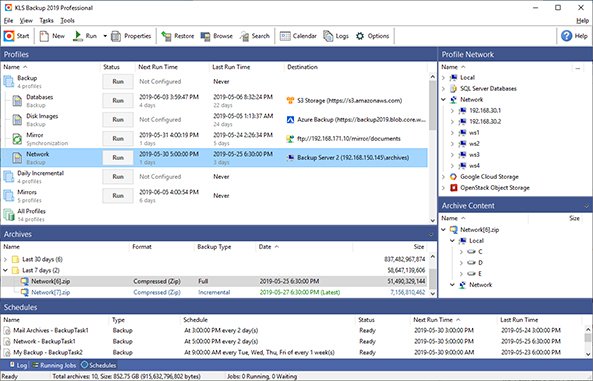
KLS Backup is a powerful backup and synchronization program that allows you to backup or synchronize your data to local and network drives or cloud storage. The backup files can be stored uncompressed or compressed in standard Zip or 7z format. KLS Backup 2019 can backup: files and folders from local drives, network locations or cloud storage, databases, mail boxes and other application specific data (profiles). Advanced version management, makes possible to find and restore any backup version within seconds. The synchronization feature allows you to easily synchronize the contents of two different folders.

Features:

Easy-to-use but powerful integrated workspace
Backup data from local and network drives, cloud storage, SFTP, FTP and WebDAV servers
Backup of databases (Microsoft SQL Server, MySQL) and application data (Outlook, Thunderbird)
Backup to local and network drives, SFTP, FTP and WebDAV servers, CD/DVD media
Backup to cloud: Microsoft Azure, Amazon S3, Google Cloud Storage, OpenStack, OneDrive, Google Drive

Full, incremental and differential backups
Backup of open files and NTFS permissions
Highly configurable backup profiles and plugins
Standard Zip compression, Zip64 support, 7z and a custom encryption format
Powerful archive management and search functions
Selective restore of files and folders to original or custom locations
Secure archives with AES encryption, SSL/TLS support for remote transfers
Two-way file synchronization engine with version support
Automated backups with the built-in scheduler service
Detailed backup logs and email notifications
Web Interface (Monitor)
Command Line Interface (Console)
Compatible with Windows 7, 10 and Windows Server 2019

System requirements:
Windows 10/8.1/8/7 32/64bit (all editions)
Windows Server 2019/2016/2012R2/2012/2008R2 (all editions)
Hard drive with at least 200MB free disk space for installation

У Вас недостаточно прав для просмотра ссылок. Войдите или зарегистрируйтесь.


Whats New:
Updates: official site does not provide any info about changes in this version.


-:DOWNLOAD FROM LINKS:-
NitroFlare
У Вас недостаточно прав для просмотра ссылок. Войдите или зарегистрируйтесь.


RapidGator
У Вас недостаточно прав для просмотра ссылок. Войдите или зарегистрируйтесь.


​
 
Назад
Сверху