• Здравствуйте. Сайт заработал в архивном режиме форум www.old.nado.in

Dl4ever Software

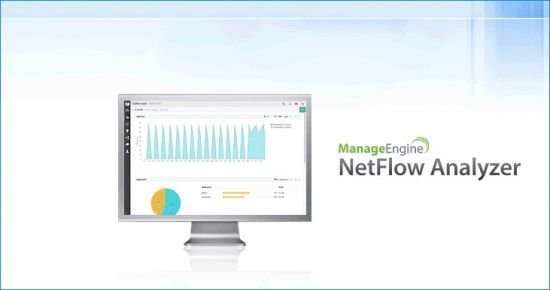
ManageEngine NetFlow Analyzer 12.5.160 (x64) Enterprise


0520c544b87495946c68f24b726aea91.jpg


File size: 178 MB
​
NetFlow Analyzer, a complete traffic analytics tool, leverages flow technologies to provide real time visibility into the network bandwidth performance. NetFlow Analyzer, primarily a bandwidth monitoring tool, has been optimizing thousands of networks across the World by giving holistic view about their network bandwidth and traffic patterns. NetFlow Analyzer is a unified solution that collects, analyzes and reports about what your network bandwidth is being used for and by whom. NetFlow Analyzer is the trusted partner optimizing the bandwidth usage of over a million interfaces worldwide apart from performing network forensics and network traffic analysis.

Get to the root of traffic analysis using NetFlow
Bandwidth Monitoring & Traffic Analysis Bandwidth Monitoring & Traffic Analysis
Monitor network bandwidth and traffic patterns at an interface-specific level
Drill down into interface level details to discover traffic patterns and device performance.
Get real-time insight into your network bandwidth with one minute granularity reports.
Network Security Network Forensics and Security Analysis
Detect a broad spectrum of external and internal security threats using Continuous Stream Mining Engine technology.
Track network anomalies that surpass your network firewall.
Identify context-sensitive anomalies and zero-day intrusions using NetFlow Analyzer.

NBAR App-centric Monitoring and Shape app traffic
Recognize and classify non-standard applications that hog your network bandwidth using NetFlow Analyzer.
Reconfigure policies with traffic shaping technique via ACL or class-based policy to gain control over bandwidth-hungry applications.
NetFlow Analyzer leverages on Cisco NBAR to give you deep visibility into layer 7 traffic and recognize applications that use dynamic port numbers or hide behind well-known ports.
Capacity Planning and Billing Capacity Planning and Billing
Make informed decisions on your bandwidth growth using capacity planning reports
Measure your bandwidth growth over a period time with long term reporting
Accurate trend over extended historic periods.
Generate on-demand billing for accounting and departmental chargebacks.

Cisco IP SLA Monitor Voice, Video and Data effectively
Analyze IP service levels for network-based applications and services using NetFlow Analyzer IP SLA monitor.
Ensure high level of data and voice communication quality using Cisco IP SLA technology.
Keep a tab on key performance metrics of voice and data traffic.
NetFlow Monitoring Multivendor Support & Flow Technology
Collect, Analyze flows from major devices like Cisco, 3COM, Juniper, Foundry Networks, Hewlett-Packard, extreme and other leading vendors
Report on all major flow formats like NetFlow, sFlow , cflow, J-Flow , FNF, IPFIX, NetStream, Appflow and so on.


-:DOWNLOAD FROM LINKS:-
RapidGator
Код:
https://rapidgator.net/file/9039a259dbecc5fa057e7db9755d8b01/NetFlowAnalyzer12.5.160.rar.html

NitroFlare
Код:
https://nitroflare.com/view/98C7EC61EC016D9/NetFlowAnalyzer12.5.160.rar

​
 
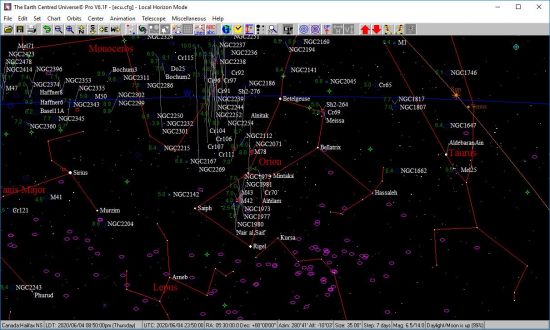
The Earth Centered Universe Pro 6.1G


3f052d4b0b0abd8c9bd31e4b16a5fb3c.jpg


File Size: 254.1 MB
​
The Earth Centered Universe (ECU) Pro V6.1 is a planetarium and telescope control program capable of simulating most of the phenomenon of the Earth's sky. Designed for the demanding requirements of an observing amateur astronomer, it also provides extraordinary accuracy as a planetarium program for the "armchair" astronomer or any other person interested in learning about astronomy.

Highlights:
Known for its ease of use, rich feature set, high-accuracy, and lightning fast speed.
Includes extensive databases such as the Hubble Guide Star Catalog; the detailed, amateur oriented, SAC deep sky database; the huge Principle Galaxy Catalog; the General Catalog of Variable Stars; the Washington Visual Double Star catalog; a dedicated planetary nebulae database; the Sun and Moon; the planets; 700,000+ asteroids (downloaded from Lowell Observatory); and add your own comets, asteroids and tens of thousands of your own objects too.
Comprehensive control of most computerized telescopes on the market (even many discontinued ones too). Interfaces to many telescopes and mounts natively, but also supports the ASCOM Inititive's telescope and focuser "drivers".
High quality printed star charts.
Written by an observer for observers.
Written by a CCD imager for imagers.
Powerful animation mode.
A large detailed up-to-date User's Manual with context sensitive help.

Included and Supported Databases:
The Yale Bright Star Catalog (9,100 stars to magnitude 6.5) - included are many "common" names for the bright stars
The SAO Star Catalog (about 250,000 stars to magnitude 9.5)
The Tycho-2 Star Catalog (about 2,500,000 stars to magnitude 12-13)
The Hubble Guide Star Catalog (about 15,000,000 stars to an average magnitude of about 14)
Support is provided to read the US Naval Observatories A-2.0 (~500,000,000 stars!) and SA-2.0 (~50,000,000 stars)
The Saguaro Astronomy Club deep sky database (V8.1) which contains 10,342 objects of all types, including of course the Messier Catalog
The Principle Galaxy Catalog (2002 edition - about 1 million galaxies)
The General Catalog of Variable Stars (September 2015 version - 52,011 stars)
The Washington Visual Double Star Catalog (2016Mar25 version - 135,098 pairs of stars)
The Wallace-SEC galactic planetary nebulae database (V7 - 1143 objects)
The Lowell Minor Planet Database (over 700,000 minor planets). This database is updated from within ECU over the Internet.
Enter the orbital elements for up to 10,000 comets and minor planets (asteroids) (comets and asteroids can be automatically downloaded from within ECU from the International Astronomical Union's Minor Planet Center)
The eight planets (and Pluto!), the Sun, Anti-Sun, and the Moon
Add up to 50,000 of your own objects

Main Features:
ECU is lightning fast compared to many other astronomy programs and runs very well on older computers that you might use in the field (e.g. older laptops).
ECU is very easy to use. Most operations are performed with the mouse. A "toolbar" is provided for most common functions and for those who prefer to use the keyboard, there are many hot-keys.
The sky can be drawn as either in Sky Atlas (north is up) mode, Local Horizon (up in the local sky is up) mode or with the sky rotated at any arbitrary angle.
It exhibits a colorful display - the colors of all screen elements are controllable by user. Fonts can also be set.
High quality star charts can be printed (in black and white and in full color) which are highly customizable by the user including titles, legend, fonts, and border dimensions. You can also print two charts per page at different zoom levels.
ECU status displays include the local time, universal time, latitude and longitude, RA/DEC, AZ/ALT, field size, magnitude limits, sky darkness, hour angle, sidereal time, and Julian date.
Stars can be drawn in color based on either their spectral type or B-V color index.
Deep sky objects are drawn their correct size, shape, and orientation (when this information is included in the database).
There is advanced control over magnitude limits for all types of objects.
Clicking on an object causes an information box to pop up. All objects provide their RA, DEC, azimuth, altitude, rise and set times, magnitude (if known), air mass, extinction, galactic latitude, and galactic longitude. Other information provided is as follows:
The Sun: distance in AU, kilometers, and light travel time; angular size; solar longitude
The Moon: distance in kilometers; angular size; phase angle; phase age in days; its illuminated fraction in percent
The planets: distance in AU, kilometers, and light travel time; angular size; phase; rates of motion; ecliptic latitude and longitude
Comets and asteroids: distance to the Sun and the Earth in AU, kilometers, and light travel time; solar elongation; phase (for asteroids); rates of motion; ecliptic latitude and longitude
Yale stars: Yale number; HD number; SAO number; Flamsteed/Bayer designation, color (B-V); spectral type; proper motion
SAO stars: SAO number; spectral type
Tycho-2 stars (when information is available): Tycho-2 number, Hipparcos number, HD number, magnitude (B and V), proper motion, and parallax (with error estimate)
Hubble Guide Stars: GSC catalog number; estimated position error; magnitude band; Plate ID
SAC deep sky objects: a varying amount of information, but usually their name (and alternate name); Dreyer description, angular size; position angle; object class; notes
PGC galaxies: the primary and up to four other names; morphological type; angular size; position angle; object class; radial velocity; implied distance in light years
Variable stars: minimum and maximum magnitude; designation; type of variability; period; rising time (or duration of eclipse); time of previous maximum
Double stars: combined magnitude of the pair; discoverer code; DM number; magnitudes of both stars; separation and position angle at up to two dates; spectral type
User objects: user number; text description
The user can display up to 50 images of an object.
The user can add observing notes about any object.
The user can measure angular distances and position angles on the sky with the mouse. Several angular formats are provided.
All user settings can be saved to named configuration files for later retrieval. Comet and asteroid elements can be saved to or loaded from separate ASCII files.
The time can be set as local mean time, UTC, Julian Date, or from the computer's clock (local or UTC). Dates can be entered from 4713BC to 9999AD. For Canada, US and Europe Daylight Saving time can be automatically set.
The observer's location is entered by latitude and longitude or from a list of cities (add your own, too).
Sync your time and/or location using a GPS receiver.
The effects of observer's parallax, nutation, precession, light travel time, aberration, and atmospheric refraction can be individually controlled.
The sky can be displayed as white on black or black on white, or, of course, in full color. Special "night vision" modes protect your night vision when ECU is used in an observatory.
ECU displays the horizon line, custom horizon lines set to match your observing sites, ecliptic line, meridian line, RA/DEC grid (auto scaling), Local Horizon grid (auto scaling), constellation lines, boundary lines, galactic equator line, etc.
Extensive text labels are provided for all types of objects. Text labels can be intelligently placed to avoid overlap.
Several field "targets" of programmable angular size, including rotatable rectangles, can be drawn to represent the field of view of your main telescope and finder scope respectively. You can place up to 100 of these "targets" anywhere on the sky.
The user can center the display at any RA/DEC, AZ/ALT, Hour Angle/DEC, bright star, constellations, Messier object, named deep sky object, point on the horizon (north, south, etc.), or solar system object.
The object databases can also be extensively searched.
Powerful tools to search and filter comet and asteroid elements by brightness, sky position, visibility, Earth distance, etc.
Create detailed reports (that you can import into a spreadsheet or database program such as Excel) of objects plotted on the screen or on printed charts.
ECU's animation mode allows time increments from 1 second to four years. The display can be "locked" to the Sun, Moon, a planet, a comet or asteroid, an AZ/ALT or an RA/DEC. Trails of objects with time labels can be drawn.
A dialog box to display the rise/set times of the Sun and Moon on the current day is provided. It also shows the times of civil, nautical, astronomical twilight, the phase of the Moon, the length of the day and night, and the length of nautical and astronomical darkness.

The Earth Centered Universe (ECU) Pro V6.1 is a planetarium and telescope control program capable of simulating most of the phenomenon of the Earth's sky. Designed for the demanding requirements of an observing amateur astronomer, it also provides extraordinary accuracy as a planetarium program for the "armchair" astronomer or any other person interested in learning about astronomy.

Highlights:
Known for its ease of use, rich feature set, high-accuracy, and lightning fast speed.
Includes extensive databases such as the Hubble Guide Star Catalog; the detailed, amateur oriented, SAC deep sky database; the huge Principle Galaxy Catalog; the General Catalog of Variable Stars; the Washington Visual Double Star catalog; a dedicated planetary nebulae database; the Sun and Moon; the planets; 700,000+ asteroids (downloaded from Lowell Observatory); and add your own comets, asteroids and tens of thousands of your own objects too.
Comprehensive control of most computerized telescopes on the market (even many discontinued ones too). Interfaces to many telescopes and mounts natively, but also supports the ASCOM Inititive's telescope and focuser "drivers".
High quality printed star charts.
Written by an observer for observers.
Written by a CCD imager for imagers.
Powerful animation mode.
A large detailed up-to-date User's Manual with context sensitive help.

Whats New:
Sky Chart/Print Features
◦The split chart now has separate settings for horizontal and vertical flips.
◦The number of objects that can be plotted on-screen has been increased to 30,000.

Databases
◦The General Catalog of Variable Stars database has been updated to the current (V5.1) version, and it now contains 54,919 stars.
◦The number of comet/asteroid orbits that can be active at any given time has been increased to 25,000.
◦Added download of and full support for the IAU Minor Planet Center's asteroid orbit database.
◦Added support for download of the MPCs bright minor planets at opposition list.
◦The master orbit file is now called 'masterorbit.orb'.

Searching
◦You can now search for a specific equatorial position as an RA in hours and minutes OR hours and minutes and seconds and a Dec in degrees and minutes OR degrees and minutes and seconds.

Automation Interface
◦The Search method now returns the found object's primary object name.
◦Added the ClearOrbits, LoadOrbits, SaveOrbits methods.

Miscellaneous
◦Updated the URL for General Catalog of Variable Stars web searches.
◦Orbits now accept eccentricities up to 5 (for the new class of interstellar asteroids).
◦Better error handling in the loading of orbit files.
◦The angular separation calculation uses a more accurate "haversine" algorithm.
◦Telescope serial interface routines now use an external COM Port Driver (developed by Nova Astronomics).

Bug Fixes
◦Some problems with dialog box sizing on some computers has been resolved.
◦Broader ASCOM exception handling was added.
◦Some mathematical overflows and other problems were fixed there were caused by the new "interstellar" asteroids and orbits with hyberbolic orbits.
◦Add better error handling for parallax calculations.
◦Improved program shutdown if started by the automation interface.
◦Fix bug where sky was not redrawn on alignment stars during encoder interface alignments.
◦Fix bug where telescope interface was sometimes causing an error when disabling it.
◦Fix bug where alignment star names were not shown during encoder interface alignments.


-:DOWNLOAD FROM LINKS:-
RapidGator
Код:
https://rapidgator.net/file/a8902599f6a54e345584bf8fc79d16a6/Universe.Pro.6.1G.rar.html

NitroFlare
Код:
https://nitroflare.com/view/33CA474B8C9C194/Universe.Pro.6.1G.rar

​
 
Hot Door CADtools 12.1.3 for Adobe Illustrator (x64)


749d7d795d7ff4d2cdc00b2c504ba9f2.png

Hot Door CADtools 12.1.3 for Adobe Illustrator (x64) Multilingual | 196.7 MB
​
For Adobe Illustrator 2020 (v24)

CADtools - Precision drawing and dimensioning power inside Adobe Illustrator. Click and drag dimensions or labels on every possible object, path, or point in space. Live dimensions follow and respond to artwork changes.

Top new features in CADtools 12:
- Six new engineering and construction calculators
- Structured label designer
- Panel and tool improvements
- Preview labels and dimensions
- Compress panels by hiding sections you don't use
- Completely rewritten Revision Bubble tool

Draw, dimension & label anything in scale
Click and drag dimensions or labels on every possible object, path, or point in space. Live dimensions follow and respond to artwork changes.

Works just like other Illustrator tools!
CADtools adds 92 drawing, editing, labeling, dimensioning, transformation, creation, and utility tools organized in 10 tool groups in the Adobe Illustrator tool panel.

- 2D Drawing
- 2D Dimensioning
- Axonometric Drawing
- Axonometric Dimensioning
- CAD Walls
- 2D Editing
- Labeling
- Transformation
- Creation
- Utility

Click-drag tools with seamless integration
CADtools adds 92 tools to the tool panel. Red dots indicate the number and placement of mouse-clicks to edit or create an object, label or dimension. Recent tools include Scale Line, Repeat, Repeat Along Path, Scaled Type, Grid, and Wave tools.

Document or layer scales and scale calculator
Select from a wide range of engineering and architectural scales or create an unlimited number of custom scales. Figuring out scale is easy with the Scale Calculator.

Unlimited styles for dimensions and labels
Create beautiful live dimensions as measurements, letter, number, or custom text. Create custom labels with text, numbers, alphabet or object geometry.

3D-style cubes, cylinders, and planes
Create art with custom 3D-like view angles using the CADaxonometric panel. Dimension with axonometric dimension tools or flatten into front, side, or plan views.

CADunits cover all possibilities
Set up units and precision for dimension values as well as numeric input, CADrulers and CADtools panel options. Add polish to professional docs with clever compact fractions.

Guides and grids your way
With CADguides, customize scaled rulers and grids that can snap with CADtools drawing tools. Show full screen cursors to easily create and edit CADtools objects.

CADshortcuts and automatic dimensions
Instantly apply dimensions to artwork by using the CADshortcuts panel. Save time by applying custom presets that retain CADtools settings.

Measure and transform objects in scale
Numerically move and transform objects in scale with CADtracker. View angle, perimeter, length, and area of one or more paths or placed images.

CADdashboard and CADhelp
Quickly access all tools and panels with CADdashboard. The context-sensitive CADhelp panel shows step-by-step details and video tutorials for the current tool or panel.

System Requirements:
- Requires Adobe Illustrator 2020 (v24) and higher
- CADtools can be used in English, Japanese, Simplified and Traditional Chinese independent of the OS language setting

Home Page -
Код:
https://www.hotdoor.com


-:DOWNLOAD FROM LINKS:-

RapidGator
Код:
https://rapidgator.net/file/fc82a0f1bb52395ca369b0f2c9547201/CADtools.12.1.3.rar.html

NitroFlare
Код:
https://nitroflare.com/view/7242A57714ADE59/CADtools.12.1.3.rar

​
 
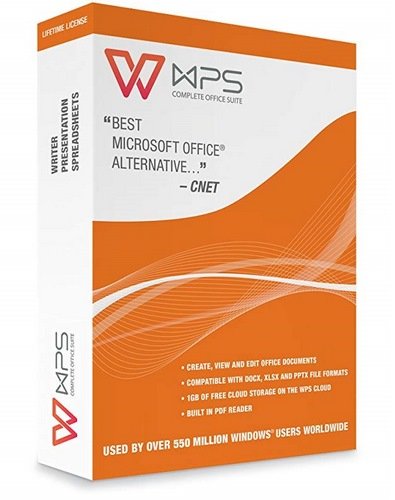
WPS Office 2019 v11.2.0.9453


d389a993cbce7db2e762e762069f7c6a.jpg

WPS Office 2019 v11.2.0.9453 Multilingual | 149.25 Mb
​
A visually appealing office suite, that you can use in a variety of situations, delivered as a complex yet very user-friendly application package. WPS Office 2019 is a comprehensive office suite that provides you with the ability to perform a wide array of tasks related to the creation, editing and display of text documents, slideshows and data tables. Your dream solution for a low-budget, no-commitment, free productivity office suite. The smallest size office suite consisting of Writer, Presentation, and Spreadsheets.


Three tools with intuitive and straightforward looks
This software package offers three distinct components, namely Kingsoft Writer, Kingsoft Presentation and Kingsoft Spreadsheets, each with their own individual purpose and numerous functions.

Create and edit written documents, slideshows and workbooks
Kingsoft Writer is a text editor that features countless options and tools. Aside from being able to change fonts, colors, alignment types, insert bullets, or special characters and symbols, you can also add tables or pictures, shapes or charts, or date and time stamps. Moreover, it comes with a series of 'Recommended Templates' for letters, invoices, resumes, memos, timetables, agreements and other standardized documents that you can use to ease your work.

All In One Mode
Document, Spreadsheets, Presentation, PDF, all tabs in one window like browser.

Skin Center
Multiple skins to show your personality.

WPS Office - Rich Content
Now it's getting simple to make a more good-looking document. Newly-designed charts feature modern colors and graphics. You can directly adjust the effect of wordarts in preview page as professional graphics software does. Everything is for you to compile and create a better document.

WPS Office - Synchronize Your Work
Automatically synchronize document on any devices, anywhere and anytime. You can log in your account to activate the synchronization service. Any change on any of your devices will be applied on all your devices.

Required Operating System:
Windows XP / Windows Vista (32bit, 64bit) / Windows 7 (32bit, 64bit) / Windows 8 / Windows 10

Basic Configurations:
- CPU: Pentium II 266 MHz or higher
- Memory: at least 128 MB
- Hardware: at least 200 MB available space

Recommended Configurations:
- CPU: Pentium III 450 MHz or higher
- Memory: 256 MB or larger
- Hardware: 250 MB available

Home Page -
Код:
https://www.wps.com


-:DOWNLOAD FROM LINKS:-

RapidGator
Код:
https://rapidgator.net/file/22f597d7c84f55fad2c16998c89d7b20/WPSO.11.2.0.9453.rar.html

NitroFlare
Код:
https://nitroflare.com/view/124CB9B6AEE2F64/WPSO.11.2.0.9453.rar

​
 
Easy Projects Outlook Add-In for Desktop v3.2.13.0


eaac60270055d3200e9b144a27004fcf.jpg

Easy Projects Outlook Add-In for Desktop v3.2.13.0 | 76.3 Mb
​
Easy Projects is a project management platform that replaces the mess of spreadsheets, emails, and whiteboards into a single, simplified work-space. Perfect for project tracking, task checking, quick task updating and attaching files without leaving Outlook.


Easy Projects Outlook Add-In for Desktop
- Two-ways synchronization
- Project and task management
- Convert and link emails with activities
- Time tracking

Two-Way Sync
Sync native Outlook tasks and folders

Task Management
Easy way to manage your teamwork

Time Tracking
Automated time tracking of email processing time

Linked Emails
Emails converting and linking with activities

Sync projects and tasks
Import Easy Projects items into native Outlook tasks and folders.Tasks are displayed hierarchically inside project folders. Use Outlook flexibility to configure view mode and task filtering.

Tasks-to-calendar import
Easy Projects tasks that is assigned to you will be imported to the Outlook calendar.

Calendar-to-project export
Choose calendar and specify destination project. Convert meetings and appointments into tasks.

Project and task management
Create and update teamwork items right from Outlook.

Weekly time logs
Form your weekly time logs in convenient window. One week - one record. 2 minutes to fill.

Mailwork time tracking
Automatically log time spent on mailwork.

System Requirements:
- Windows 10 32/64 bit
- Windows 8 32/64 bit
- Windows 7 32/64 bit
- Windows Vista
- Windows XP

License Type: Professional, Enterprise

Home Page -
Код:
https://www.easyprojectsaddin.com/


-:DOWNLOAD FROM LINKS:-

RapidGator
Код:
https://rapidgator.net/file/b070fe3f08089ce9d3861eb1d1c897d0/Easy.Projects.3.2.13.0.rar.html

NitroFlare
Код:
https://nitroflare.com/view/316BAF4C4448CE2/Easy.Projects.3.2.13.0.rar

​
 
iDevice Manager 10.0.10.0 Pro Edition Multilingual


94391c3890dce3329db5b5f4335cf0fb.png

iDevice Manager Pro Edition 10.0.10.0 Multilingual | 49.3 Mb
​
The iDevice Manager Pro Edition is an extension of the free iDevice Manager 10.0 to backup of iPhone and iPad files on your Windows computer and to create new unlimited ringtones from MP3 files. Together with the free iManager App is it possible to upload address book contacts, photos and videos to the iPad and iPhone.


iDevice Manager your iTunes alternative
- iPhone 11, 11 Pro, 11 Pro MAX and older
- Copy Photo, Video onto Computer
- Transfer Photo, Video onto iPhone
- Copy Contact vCard files to iPhone
- Explore the iPhone and iPad Filesystem
- Convert High Efficiency Image Format to JPG
- Transfer Photos from iPhone to PC
- Transfer Videos from iPhone to PC
- Photos and images upload to iPhone
- Video transfer to iPhone
- Transfer of Contacts to iPhone
- File Transfer in File System

Transfer Photos and Videos from iPhone onto Computer
Easy coping of your iPhone photos and videos from iPhone or iPad to your computer without iTunes. For safely storing of your photos, use you alternatively copy directly to your online storage Dropbox or OneDrive. The annoying buffering and manual transfer of the pictures is done by the iDevice manager for you.

Copy Photos and Videos to iPhone
Copying of photos and videos from computer to iPhone and iPad is just as easy as downloading from iPhone. Connect your iPhone with the USB cable on the computer and start the iDevice Manager. Select the photos and videos, which you want to transfer and start the process when the iManager app is also paired to the computer.

High Efficiency Image Format Converter
Since iOS 11, the iPhone has been offering the High Efficiency Image format for high-resolution photos instead of the JPG format. Because these photos cannot be easily viewed on the Windows computer, offers the iDevice Manager a converter to convert such images to JPG. The iDevice Manager contains a converter with which high quality photos (HEIC and HEIF) can be converted into JPG. If you want, can you activate this function in the settings for permanently converting of HEIC to JPG, if you transfer HEIC images to the Computer.

File Explorer to download any files
Who wants to sniff the iPhone file system e.g. want to download files, has the right software within iDevice Manager (formerly iPhone Explorer). The latest version also has a File Explorer like in Windows Explorer to find files and data.

Supported Devices:
- Apple iOS 13, 12, 11 firmware devices
- iPad Pro, iPad Air, iPad, iPad mini
- iPhone 11 & Pro & Pro MAX, XS & MAX, XR, iPhone X, iPhone 8 Plus, 8, iPhone 7 Plus, 7, 6S Plus, 6S, 6 Plus, 6

Supported Windows Versions:
- Windows 10
- Windows 8, 8.1
- Windows 7

Homepage -
Код:
https://www.software4u.info


-:DOWNLOAD FROM LINKS:-

RapidGator
Код:
https://rapidgator.net/file/c4fd76f9032c2ea4ac55b71a0f1b199c/iDevice.Manager.10.0.10.0.rar.html

NitroFlare
Код:
https://nitroflare.com/view/7AA2710370D98C1/iDevice.Manager.10.0.10.0.rar

​
 
GridinSoft Anti-Malware 4.1.53


58fef7c25cf23e80123b887b6fc61653.png

GridinSoft Anti-Malware 4.1.53 Multilingual | 92.5 Mb
​
GridinSoft Anti-Malware (formerly Trojan Killer) is an intuitive application that packs comprehensive features for detecting and eliminating Trojans, spyware, adware, rogue agents and other e-threats from your computer, mainly addressing professional users.


Get thorough details on scanned files
An automatic scan for signature definitions is performed at startup, immediately followed by a computer scan.
Statistics reveals total memory items, registry items and scanned files, along with detected Trojan infections. Log details show the name, virus type and targeted file path for each infected item. This report is automatically saved to a plain text document.

Making sure files are not left infected
Some selections detected during the scan may require an in-depth analysis, so you can submit them for a thorough inspection. As for the remaining items, you can either remove them from the machine or mark them as false positives.

Various advanced options to manage
Power users may tinker with settings to enable deep scan mode (slow but effective), terminate memory threats while scanning, disable heuristics rules, as well as to ignore suspicious packers, loaders, incomplete files, and files whose size surpasses 16Mb.

It is possible to disable logging, set GridinSoft Anti-Malware to autorun at startup, choose the program startup scan mode (standard, quick, full, removable), edit proxy parameters, and disable notification sounds.

Browse the Internet the safe way
Another notable feature is represented by a real-time scanner that prevents e-threats from infiltrating into your system. Extra tools let you reset browser settings, update policies and the Hosts file, scan Windows components (ActiveX, Windows services, IE extensions, startup links), collect system information and check out all GridinSoft Anti-Malware log files, plus the quarantine list.

Requiring a decent amount of resources
The feature-packed antivirus system offers multilingual support and has a very good response time. However, it demands a massive amount of memory to work properly, so users might experience stability issues on older OS platforms. Other than that, GridinSoft Anti-Malware offers a simple solution for successfully eliminating viruses rapidly, backed up by a highly intuitive environment.

Operating System: Windows XP, 7, 8/8.1, 10

Home Page -
Код:
https://anti-malware.gridinsoft.com/

Language: Multilingual


-:DOWNLOAD FROM LINKS:-

RapidGator
Код:
https://rapidgator.net/file/28333af71f9931c3620670b777ecab6e/Anti-Malware.4.1.53.rar.html

NitroFlare
Код:
https://nitroflare.com/view/4842AB6DA87A2A3/Anti-Malware.4.1.53.rar

​
 
Loaris Trojan Remover 3.1.37


decc13c4d7ef197d24b90b2c140189ec.png

Loaris Trojan Remover 3.1.37 Multilingual | 75.7 Mb
​
Loaris Trojan Remover aids in the removal of Malware - Trojan Horses, Worms, Adware, Spyware - when standard anti-virus software either fails to detect them or fails to effectively eliminate them.


Standard antivirus programs are good at detecting this Malware, but not always good at effectively removing it. The majority of Anti-Malware Scanners well detects malicious software - Trojan Horses, Internet Worms, Adware and Spyware. But they are not always efficient in removing them once they have been triggered.

Loaris Trojan Remover goal is specifically to disable or remove Malware without the user having to manually edit system files or the Registry. The program also removes the additional system modifications some Malware carries out which are ignored by some standard antivirus scanners.

Loaris Trojan Remover scans ALL the files loaded at boot time for Adware, Spyware, Remote Access Trojans, Internet Worms and other malware. Two types are available. The Standard scan quickly scans the system with no need for further configuration of the scan parameters. The Custom scan allows the user to select any of the folders for scan.

The malware programs have the ability to track your browsing habits and even steal personal information. Such as bank account numbers and passwords. Spyware has the power to install more parasites on your computer without your consent. Everything you do and everything you type is being recorded right now! Hackers will access your PC and do anything they wish. Also they can even steal your Identity and You would never be the wiser!

Reset Internet Explorer Home/Start/Search Page Settings
Some Malware programs make changes to the Internet Explorer Home, Start and Search Page settings in order to re-direct the web browser to different websites. Loaris Trojan Remover will reset the Home, Start, Search pages to standard Defaults. You can then manually reset your Home Page to your website of choice.

Reset HOSTS file
The Windows HOSTS file is a text file which stores website addresses. The file can be used to speed up access to websites you visit often. By equating the website name (e.g. microsoft.com) with its DNS address, the web browser can find the website more quickly as it does not have to query a DNS Name Server. Some Malware programs add entries to this file, to either deny access to websites. Usually, security-related or antivirus company websites. Or it re-direct access to websites of their choosing.

Reset Windows Update Policies
Some Malware programs attempt to prevent Windows Update from running. And inhibit access to resetting Windows Update. Also blank out the Windows Update options on the Update configuration screen. Loaris Trojan Remover will check the current Windows Update settings and correct them where necessary.

Operating System: Windows XP, Vista, 7, 8/8.1, 10

Home Page -
Код:
https://loaris.com/


-:DOWNLOAD FROM LINKS:-

NitroFlare
Код:
https://rapidgator.net/file/803e6efb77da4113823f4c8008c45395/Trojan_Remover_3.1.37.rar.html

RapidGator
Код:
https://nitroflare.com/view/38EEE65588F7045/Trojan_Remover_3.1.37.rar

​
 
Trojan Killer 2.1.33


a5e0b7270f9a69a80eaeba9448ee1b20.png


File Size: 75.2 MB
​
Trojan Killer is the effective anti-malware tool for your memory stick. Be sure that you're safe from the internet threats wherever you go!

Scan your PC right now...
With the perfect virus removal tool! Fast, effective and reliable. The ultimate anti-malware solution with awesome features that leaves no chance for any cyber threats

What's New:
official site does not provide any info about changes in this version.


-:DOWNLOAD FROM LINKS:-
RapidGator
Код:
https://rapidgator.net/file/c7e02ebae3cd9db9d8a2573bee05d638/Trojan.Killer.2.rar.html

NitroFlare
Код:
https://nitroflare.com/view/874F6A00D085D4F/Trojan.Killer.2.rar

​
 
All About PDF 3.1059


37d306322c3b12d25d3e03a2261d7428.png

All About PDF 3.1059 | 176.25 Mb
​
All-About-PDF is a fast and powerful Windows application that is built to take advantage of your computer's multiple processing cores for blazingly fast PDF processing.


All-About-PDF is a multi-threaded 64-bit application that utilizes your computer's multiple CPU cores for blazingly speedy PDF processing.

All-About-PDF can take multiple PDF files and merge them into a single file. You can also go the other way by taking a single PDF file and splitting it into multiple documents. This is done by either specifying multiple page ranges to split by or you can simply tell the application to split the PDF every N pages (for example, you can split a PDF from pages 1 to 5 and 6-10 or just every 3 pages).

You can add Owner and User passwords to your PDF using 256-bit encryption. With an Owner password set on your PDF, you can specify user permission such as:
ability to copy from the document
ability to print the document
ability to annotate the document
ability to modify the PDF attributes
ability to modify the PDF contents and more

System Requirements:
OS: Windows 7 SP1, 8/8.1, 10 and Server 2008 R2, 2012, 2016 and 2019
Microsoft .NET Framework 4.6.1 or above

Home Page -
Код:
https://allaboutpdf.com/


-:DOWNLOAD FROM LINKS:-

RapidGator
Код:
https://rapidgator.net/file/07ff789e659ebbea55b975933324d83a/All.About.PDF.3.rar.html

NitroFlare
Код:
https://nitroflare.com/view/5CE44958D2A98A8/All.About.PDF.3.rar

​
 
JP Software CMDebug 26.02.41 (x64)


dada60154aaf8f5b9325afb599738e1c.png


File Size: 21.9 MB
​
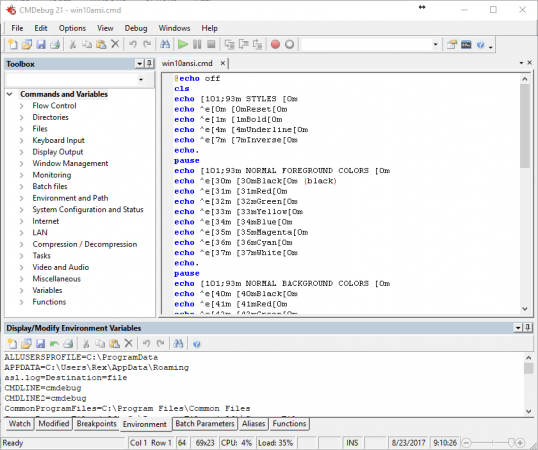
CMDebug is a stand-alone version of the Take Command IDE and batch debugger component. CMDebug is intended for developers who need to develop batch files to run in CMD.EXE or TCC-RT (runtime).

CMDebug allows you to create and debug your batch scripts with the integrated graphical IDE. CMDebug includes tabbed edit windows and a sophisticated debugger with single stepping, breakpoints, syntax coloring, tooltips, bookmarks, and tabbed variable and watch windows. Windows batch file programming has never been easier or more powerful!

You can use CMDebug to develop either CMD-compatible batch files (.BAT or .CMD), or TCC-RT-compatible scripts (.BTM). If you select the "TCC Syntax" option, CMDebug provides the full TCC-RT command set. If you select the "CMD Syntax" option, CMDebug will maximize CMD compatibility and disable TCC-only internal commands, variables, and functions. Some internal CMD / TCC commands will also behave slightly differently or modify their display output in order to match CMD's behavior more closely.
Using CMDebug with TCC-RT allows you to write (and encrypt) scripts using the TCC command language, and then distribute them with the free TCC-RT runtime on an unlimited number of target machines.

Features:
Create and debug your batch scripts with the integrated graphical IDE. The IDE includes tabbed edit windows and a sophisticated debugger with single stepping, breakpoints, syntax coloring, tooltips, bookmarks, tabbed variable and watch windows. Windows batch file programming has never been easier or more powerful!
The TCC-RT scripting language is a massive superset of the Windows CMD shell, with 220+ internal commands, 367+ internal functions, and 289+ system variables. Almost all of the CMD command line commands (e.g. DIR, COPY, DEL, START, etc.) are enhanced with hundreds of additional options. And TCC adds more than 180 new commands. TCC-RT can usually do in one or two lines what requires dozens CMD commands (when CMD can do it at all).
The scripting language includes a complete set of extended flow control structures including IF-Then-Else, DO and FOR loops, SWITCH, subroutines, batch libraries, and more.
When using TCC-RT syntax, most interactive commands (such as COPY, DEL, DIR, MOVE, REN, START, etc.) have command dialogs that allow you to select filenames and options and see your command line before executing it. The most powerful Windows command processor is also the easiest to use!
Monitor your system's hardware and software events, and execute commands when an event is triggered. You can monitor directory changes, the clipboard, event logs, Ethernet and WiFi connections, services, processes, and USB and Firewire connections.
Environment variable substitution is greatly enhanced, including nested variables, delayed expansion, indirect variables, multidimensional array variables, and direct access to the system, user, and volatile variables in the registry.
Select or exclude files by date, time, size, owner, and extended wildcards or regular expressions for extraordinary flexibility in file management.
Specify multiple filenames for most file processing commands (i.e., COPY, DEL, DIR, MOVE, etc.), or optionally the name of a file that contains the filename arguments. (COPY even supports multiple targets as well as multiple sources.)
Multiple types of I/O redirection are available, including redirecting and piping to STDERR, "in-process" pipes, "here-document" and "here-string" redirection, and Tee and Y pipe fittings.
Send keystrokes to any application (console or GUI).
TCC-RT includes internal compression and extraction commands for ZIP, 7ZIP, TAR, JAR, GZIP, and BZIP files.
You can access FTP, TFTP and HTTP (including SSL and SSH) directories and files in all command processor file-handling commands (COPY, DEL, MOVE, etc.).
Internal support is included for Perl, Lua, REXX, Python, Tcl/tk, and any Windows Active Scripting language. You can even combine multiple languages in your batch scripts.
And many thousands more -- see our online help for details.

CMDebug is compatible with any version of Microsoft Windows 7, Server 2008R2, Windows 8, Server 2012, Windows 10, and Server 2016, including 64-bit Windows. CMDebugis available in both 32-bit and 64-bit versions.


-:DOWNLOAD FROM LINKS:-
RapidGator
Код:
https://rapidgator.net/file/e02120ca30e7744f3973b6dad0be83aa/CMDebug.26.rar.html

NitroFlare
Код:
https://nitroflare.com/view/244BBDF0D972C83/CMDebug.26.rar

​
 
JP Software TCC v26.02.41


e172ab8903b5ec5337c6668cc5488f52.png


File Size: 29.4 MB
​
TCC is our console mode Windows command shell (formerly known as 4NT). TCC is a replacement for the CMD command line (the default Windows command prompt). TCC is a superset of CMD, with 246 internal commands (CMD has fewer than 40), 695+ internal variables and functions, and hundreds of enhancements to existing CMD commands.
TCC works with your existing command line applications and batch files, but offers major improvements in command line and batch file capabilities, and adds thousands of new features to your command prompt windows.

Benefits:
TCC is a CMD replacement command processor that is compatible with your existing CMD commands and batch files, while adding thousands of new features. You're immediately more productive, and you can learn and add TCC's new features at your own pace.
Create and debug your batch scripts in a fraction of the time with the integrated editor and batch file debugger.
The integrated and familiar environment means you are immediately more productive with your interactive command prompt and batch file development tasks.
The consistent syntax reduces your learning and development time.
The comprehensive help (including context-sensitive popup help for command line syntax), speeds your development time and reduces syntax errors.


-:DOWNLOAD FROM LINKS:-
RapidGator
Код:
https://rapidgator.net/file/c0b1718b532cfaa8899fc87512821826/TCC.26.rar.html

NitroFlare
Код:
https://nitroflare.com/view/D6D496723F75AFC/TCC.26.rar

​
 
JP Software Take Command 26.02.41 (x64)


2bf00ada4fc9194738fd13656d240e28.png


File Size: 36.6 MB
​
Take Command is a comprehensive interactive GUI and command line environment that makes using the Windows command prompt and creating batch files easy and far more powerful. Take Command displays your command line applications in tabbed windows, with optional Explorer-style integration for a visual look at your folders. Take Command includes hundreds of major enhancements to the command line and CMD commands such as COPY, DEL, and DIR, and adds more than 140 new commands, 460 internal variables and functions, a batch file IDE / debugger, and thousands of other features.

Command Line Features:
· Modify and re-execute previous commands with a powerful command line editor
· Copy, delete, move, and rename groups of files and directories, not just individual ones
· Extended directory searches allow you to change to a directory anywhere on your system by entering only part of its name
· Quickly locate files or text within files anywhere on your system
· Built-in file viewer includes scrolling, search, and print capabilities
· Select or exclude files by date, time, size, and/or extended wildcards for extraordinary flexibility in file management
· Redefine commands, create new commands and functions for your regular tasks, even assign frequently used commands to a single keystroke
· Direct access to FTP, TFTP and HTTP (including SSL) directories and files in all file-handling commands
· Complete configuration adjustment, either through interactive dialogs or on the command line
· File descriptions up to 511 characters long provide information that can't fit in a filename

Batch File Features:
· Batch debugger with singlestepping, breakpoints, syntax coloring, bookmarks, popup variable windows, variable watch windows, and editing
· An improved batch language adds subroutines, IF/THEN/ELSE logic, DO loops, SWITCH statements, error and exception handling, and more than 130 internal commands, while retaining compatibility with batch files written for CMD
· More than 130 built-in variables include system configuration, device status, network drive detection, and free memory and disk space
· More than 200 variable functions assist with manipulation and display of strings, characters, numbers, date and time, file names, etc

Windows Features:
· Start graphical and character-mode applications with ease - even run most console programs in the Take Command window
· Built-in screen scrollback buffer lets you review or print output from past commands at any time
· Customizable toolbar gives you quick access to frequently used commands and applications
· Find File dialog lets you search quickly for files or text, anywhere on your system - or search from the command line with the new FFIND command
· Dialogs, accessible from the Options and Utilities menus, for editing environment variables, aliases, file descriptions, and startup parameters
· New commands such as ACTIVATE, MSGBOX, and QUERYBOX that allow you to use GUI features and control GUI applications from your batch files


-:DOWNLOAD FROM LINKS:-
RapidGator
Код:
https://rapidgator.net/file/b9cba599f224c8ed6504cd5c86f820d9/Take.Command.26.rar.html

NitroFlare
Код:
https://nitroflare.com/view/25C0F9EB977B57B/Take.Command.26.rar

​
 
Corel Perfect Authority v1.5


c58747ff2e751c011082d00db099e9c2.jpg


File size: 16.2 MB
​
Discover a better way to create a Table of Authorities with new Corel® Perfect Authority. Instead of hand-marking citations, let Perfect Authority locate, alphabetize and cross-reference them for you in minutes. The easy-to-use interface lets you quickly create a variety of customizations, so you can easily meet the formatting requirements of different districts or courts. Whether you're a sole practitioner or a partner at a large law firm, Perfect Authority saves you hours each week and that adds up to a rapid return on investment and a better bottom line.

Fast: Save time and boost your productivity by creating Tables of Authority automatically-in minutes!

Highly accurate: Includes Style Guides based on The Bluebook® and the California Style Manual.

Customizable: Create different customizations with formatting that meets the needs of different attorneys, agencies or courts.

Revenue generating: Grow revenue and reduce costs by dramatically reducing the time you spend creating Tables of Authority. Perfect Authority pays for itself after just a few briefs!

Automatic Table of Authorities creation

Save hours by letting Perfect Authority find, alphabetize and cross-reference the cases, statutes and constitutions in your document for you.

Based on industry standards

Rely on the Perfect Authority Style Guides-based on The Bluebook® and the California Style Guide-to ensure that your Tables of Authority (TOA) are accurate.

Intuitive interface

Start using the software right away thanks to the simple interface.

Accurate results

Count on Perfect Authority to automatically insert the correct page numbers for you. Plus, the TOA is inserted at the cursor or in a separate file, so your original content is protected.

Customizable formatting

Create different customizations with specific formatting so you can easily meet the needs of different attorneys, agencies and courts. You can also select how different cases and statutes are ordered and grouped.

Customizable dictionary

Add commonly used abbreviations, regional reporters and history phrases to the dictionary if they are not already there.

Easy to Update

Refresh the page numbers in your TOA whenever you need to or delete and recreate your TOA in minutes when your document changes.
Release NotesThis update requires your previous version of Perfect Authority be uninstalled prior to installing 1.5. Before uninstalling your previous version note your serial number as this will be needed to install 1.5.

Perfect Authority 1.5, which works with WordPerfect version X5-X9 includes an update to recognize the latest version of WordPerfect Office and short form citations.

Important: If you have customized your option sets, your changes will be lost. It is recommended that you review and note option-set modifications before installing so you can easily replicate in Perfect Authority 1.5.

Additions that you've made to a dictionary in a previous version of Perfect Authority are not automatically added to the Perfect Authority 1.5 dictionary. Follow these steps to transfer your customizations to Perfect Authority 1.5.
System Requirements

Supports Corel WordPerfect Office X8, WordPerfect Office X7, WordPerfect Office X6 and WordPerfect Office X5*
Windows 10, Windows 8.1, or Windows 7, in 32-bit or 64-bit edition, all with the latest Updates and Service Packs installed
1 GHz or faster (x86) or an AMD64 processor
1 GB RAM (x86) or 2 GB RAM (AMD64)
1.5 GB hard disk space for application files
1024 x 768 screen resolution
Mouse or tablet
DVD drive (required for box installation)
Microsoft Internet Explorer 11 or higher


-:DOWNLOAD FROM LINKS:-
RapidGator
Код:
https://rapidgator.net/file/25de6d4eae7b094f753e9af2273d80db/COREL_PERFECT_AUTHORITY_V1.5.rar.html

NitroFlare
Код:
https://nitroflare.com/view/279BADE1B393743/COREL_PERFECT_AUTHORITY_V1.5.rar

​
 
GiliSoft Screen Recorder 10.6 Pro


45283b046b059016473e69441b10ab13.jpg


File Size: 53 MB
​
GiliSoft Screen Recorder Pro is a professional video program for screen recording and editing / converting video to PC. This program is suitable for creating video tutorials or even entire lectures, manuals on the use of various applications or reviews of video games.
Screen Recorder pro is a program for recording screen video and editing video in the integrated video editor and converting it into any video format that captures what is happening on the screen, program sounds and your voice at the same time, saving the recording to a compressed video file in real time.

Main features of the program:
Full screen recording mode.
Windows in write mode.
Recording area mode.
Support for computer games based on DirectX and OpenGL.
Customizable audio / video quality
High performance screen capture driver for older PCs.
Good audio / video synchronization.
Capture settings from speakers, microphone and external lines.
Writing to FLV files.
The ability to capture the mouse cursor or not.
Capture a screenshot of the desktop or active window in Windows.
Automatically split video files by time or by size.
Easy to use
Indicator of the record or frame rate in the game.
Customizable hotkeys.
Convert video and audio of all popular formats.
Convert HD and AVCHD to popular formats.
Extract audio from m4a, wma, wav, mp3, aac, ac3, ape, mka, ogg, etc. video files
Crop video to create the perfect picture for different screen sizes.
Transfer all your video files to your favorite format.
Adding special effects to videos, such as discoloration, embossing, negative and old film.
Add any text, image or watermark, change the color of your video files.
Add and edit subtitles in .MKV files, create plug-in subtitles in SRT format.
Setting video / audio output parameters such as resolution, frame rate,
encoder, level and bit rate.
Set brightness, contrast, saturation and volume.
Support converting multiple files at once.

What's new:
official site does not provide any info about changes in this version.


-:DOWNLOAD FROM LINKS:-
RapidGator
Код:
https://rapidgator.net/file/c2891a2e117507521779cd792dd25a5f/Screen.Recorder.Pro.10.rar.html

NitroFlare
Код:
https://nitroflare.com/view/069B924CB972627/Screen.Recorder.Pro.10.rar

​
 
Firetrust MailWasher Pro 7.12.41


70ff67b3eda0283021f5387c2c9e9109.jpg

Firetrust MailWasher Pro 7.12.41 Multilingual | 23.8 Mb
​
MailWasher Pro - the program allows users to view messages that are on various email accounts, before you download them to your computer. With MailWasher Pro, you can delete or return unneeded letters back to the sender with a message that the recipient is unknown.


Includes virus protection, provides access to POP3, IMAP4, SMTP, WebMail and WAP using SSL, provides filtering attachment / content-mail and MAPS / USER-DEFINED anti-spam database.
Works with multiple domains, you can create automated replies notification by SMS, create a shared and public folders, backup mail database, and secure remote administration. Available anti-virus plug-ins from McAfee and F-Secure.

There is the usual simple solutions in the form of black, white, a private list, renvoi letter with a note that the sender is unknown, preview, check-test of loyalty return address, an overlay of 25 e-mail message headers in the second, work on schedule, and more., Including Shared plugins antivirus from McAfee and F-Secure.

The main features of this program:
View mail before it gets to your computer
Destruction of unwanted mail before downloading it
Analysis of each message as soon as it arrives and warns you of suspicious content
Easy to organize and ease the work
Work with your existing e-mail programs - The Bat, Outlook, Outlook Express, Eudora, Netscape, Incredimail or other
Function Quick Reply - quick response c interface MailWasher Pro
Restoration of the destroyed mail
Unlimited number of mailboxes, support for POP3, AOL, Hotmail & MSN and IMAP.
Fast loading headers, speed up to 25 messages per second
A comprehensive guide and FAQ (also includes instructions and an animated guide)
Automatic e-mail client after checking mail;
Support new mail sound file;
Cyclic check mail with an additional opportunity to specify the time when its conduct is not necessary.

Operating System: Windows XP, Vista, 7, 8/8.1, 10

Home Page -
Код:
https://www.firetrust.com/


-:DOWNLOAD FROM LINKS:-

RapidGator
Код:
https://rapidgator.net/file/8f7358fba45b902e68b7a43e113ecb42/MailWasherPro7.rar.html

NitroFlare
Код:
https://nitroflare.com/view/FE4ABE8B143313A/MailWasherPro7.rar

​
 
Ezee Graphic Designer 2.1.1.0 All Editions


107f2447ae5233c449bbb3f39265c3de.jpg

Ezee Graphic Designer 2.0.22.0 All Editions | 88.5 Mb
​
Make eye-catching graphical announcements, blog images, brochures, business cards, calendars, flyers, coupons, infographics, invitations, letterheads, postcards, posters, presentations, recipe books, social media images, strut cards, etc.


Operating System: Windows 7, 8/8.1, 10

Home Page -
Код:
https://www.ezeegraphicdesigner.com


-:DOWNLOAD FROM LINKS:-

RapidGator
Код:
https://rapidgator.net/file/4f6d487b864f27f1ee6337bb09fdc0ff/EzeeGD.2.1.1.0.rar.html

NitroFlare
Код:
https://nitroflare.com/view/F6FE26A4F8B1B10/EzeeGD.2.1.1.0.rar

​
 
TriSun Duplicate File Finder Plus 13.0 Build 061


65430402a375b6eb70d07877195e680f.jpg


Multilingual | File size: 2.17 MB
​
Duplicate File Finder Plus - Quickly finds the duplicate files on your drives relied on file contents, you can remove the unwanted files as you expect to recover your valuable disk space, reduce the management costs and avoid the unnecessary confusion. It works very fast because of our high-speed file comparison algorithm is built-in. And the result (duplicate files) is 100% accurate due to it compares files relied on file contents, not file name, last modified date or file size.
Also, it is very easy to use, only need to select the resources (drive(s), folder(s), files), size(s), type(s), and then click the "Find now" button to get your want. Even, you can simply click this button directly by using the suggested search conditions.

Once the finding is done, you will see the result (duplicate files list) instantly. It checks the unwanted files automatically with the smart selection feature, sorts the result by size in descending, and marks the adjacent duplicate file groups by different colors, in order to let you operate the duplicate files conveniently. You can also do some common actions for the checked duplicate files / highlighted file in the result listing, such as Save, Load, Move to Recycle Bin, Delete, Open/Run, Open File Location, Find, Uncheck All, Invert Checks and Show Properties.

Sure, you can use some useful options (e.g. smart selection, comparing algorithm for large files, whether scan the system / hidden files or not, and exclude folders, etc.) to affect the final result.
RELEASE NOTES


-:DOWNLOAD FROM LINKS:-
RapidGator
Код:
https://rapidgator.net/file/c25f6dba855001a7e33963d8b72c398d/Duplicate_File_Finder_Plus_13.0_Build_061.rar.html

NitroFlare
Код:
https://nitroflare.com/view/AB53987D2303775/Duplicate_File_Finder_Plus_13.0_Build_061.rar

​
 
ANSYS SPEOS 2020 R2 for Siemens NX Series


764cb30a041e080431a332186b273579.jpg


x64 | File Size: 657 MB
​

ANSYS SPEOS for Siemens NX is a comprehensive solution for calculating natural and artificial lighting in the design, optimization, visualization and validation of optical systems in a Siemens NX environment

ANSYS SPEOS is a software product based on OPTIS optical technologies for modeling and virtual prototyping of optical systems and components. It allows you to simulate the illumination and optical characteristics of the developed physical systems, reducing the time and financial costs of creating a prototype.
ANSYS SPEOS provides wide functionality for the design of lighting systems, optical sensors, indicators on the windshield (ILS), equipment for the far infrared region of the spectrum, autonomous driving systems and other electronic devices of the next generation, allowing you to simulate the behavior of products when changing lighting parameters, to conduct them validation and verification of compliance with industry norms and standards.

ANSYS SPEOS has analysis tools for lighting in a wide range of radiation frequencies: from UV to near and far infrared, providing high-quality visualization based on the capabilities of human vision.

ANSYS SPEOS has an intuitive, user-friendly interface, and is fully compatible with the ANSYS Multiphysics ecosystem. Using HPC (High Performance Computing) technologies, SPEOS allows you to get results much faster and with greater accuracy. Access to ANSYS SpaceClaim Direct Modeler speeds up the development process. SPEOS Light Box exports the optical system with all its properties and dependencies to an encrypted file so that you can share your work with partners, while maintaining intellectual property in complete security. ANSYS SPEOS can be integrated with the main solvers of the ANSYS platform for experiment planning, model optimization and interdisciplinary analysis, for example, optical-mechanical or optical-thermal.

Key Features of ANSYS SPEOS

Extensive optical library

More than 4000 models of light sources (LEDs, fluorescent lamps, gas discharge lamps, incandescent lamps, etc.), materials for modeling the surface, texture or color, sensors, cameras and lenses, as well as SAE and ECE standards.

Infrared Analysis
Design of vision and detection systems (ground-based systems, unmanned aerial vehicles and satellites) operating in the visible region, near and far infrared regions of the spectrum (wavelength more than 2000 nm).

Changing production parameters
Analysis of the sensitivity of the product in terms of appearance, performance and functionality to changes in production parameters, such as shape or position, verification of compliance with regulatory requirements and analysis of tolerances.

Details:
ANSYS SPEOS 2020 R2 for Siemens NX 11.0-1899 Series Win64
Year/Release Date:2020
Version:2020 R2
Developer:Ansys Inc.
architecture:64bit
Interface language:English
Tabletka:Present (TeAM SolidSQUAD-SSQ)

System requirements:
Siemens NX 11.0
Siemens NX 12.0
Siemens NX 1847 Series
Siemens NX 1872 Series
Siemens NX 1899 Series
Siemens NX 1926 Series is not officially supported! Unofficial forced installation under the NX 1926 Series is possible, but work without bugs is not guaranteed

Whats New:
Updates: official site does not provide any info about changes in this version.


-:DOWNLOAD FROM LINKS:-
RapidGator
Код:
https://rapidgator.net/file/c0f98f93d295f451fb2ed68af776caf0/SPEOS.2020.R2.for.NX.11.0-1899.Series.rar.html

NitroFlare
Код:
https://nitroflare.com/view/7BCE127E4F8A8DE/SPEOS.2020.R2.for.NX.11.0-1899.Series.rar

​
 
ANSYS SPEOS 2020 R2 for CREO Parametric


6d2866cbf4eee1e168c1ab9d917178e3.jpg


x64 | File Size: 566 MB
​

ANSYS SPEOS for Creo Parametric- a comprehensive solution for calculating natural and artificial lighting in the design, optimization, visualization and validation of optical systems in a PTC Creo Parametric environment

ANSYS SPEOS is a software product based on OPTIS optical technologies for modeling and virtual prototyping of optical systems and components. It allows you to simulate the illumination and optical characteristics of the developed physical systems, reducing the time and financial costs of creating a prototype.

ANSYS SPEOS provides wide functionality for the design of lighting systems, optical sensors, indicators on the windshield (ILS), equipment for the far infrared region of the spectrum, autonomous driving systems and other electronic devices of the next generation, allowing you to simulate the behavior of products when changing lighting parameters, to conduct them validation and verification of compliance with industry norms and standards.
ANSYS SPEOS has lighting analysis tools in a wide range of radiation frequencies: from UV to near and far infrared, providing high-quality visualization based on the capabilities of human vision.

ANSYS SPEOS has an intuitive, user-friendly interface, and is fully compatible with the ANSYS Multiphysics ecosystem. Using HPC (High Performance Computing) technologies, SPEOS allows you to get results much faster and with greater accuracy. Access to ANSYS SpaceClaim Direct Modeler speeds up the development process. SPEOS Light Box exports the optical system with all its properties and dependencies to an encrypted file so that you can share your work with partners, while maintaining intellectual property in complete security. ANSYS SPEOS can be integrated with the main solvers of the ANSYS platform for experiment planning, model optimization and interdisciplinary analysis, for example, optical-mechanical or optical-thermal.

Key Features of ANSYS SPEOS

Extensive optical library
More than 4000 models of light sources (LEDs, fluorescent lamps, gas discharge lamps, incandescent lamps, etc.), materials for modeling the surface, texture or color, sensors, cameras and lenses, as well as SAE and ECE standards.

Infrared Analysis
Design of vision and detection systems (ground-based systems, unmanned aerial vehicles and satellites) operating in the visible region, near and far infrared regions of the spectrum (wavelength more than 2000 nm).

Changing production parameters
Analysis of the sensitivity of the product in terms of appearance, performance and functionality to changes in production parameters, such as shape or position, verification of compliance with regulatory requirements and analysis of tolerances.

Details:
ANSYS SPEOS 2020 R2 for CREO Parametric 3.0-6.0 Win64
Year/Release Date:2020
Version:2020 R2
Developer:Ansys Inc.
architecture:64bit
Interface language:English
Tabletka : Present (TeAM SolidSQUAD-SSQ)
System requirements:Preset
PTC Creo Patametric 3.0 Win64
PTC Creo Patametric 4.0
PTC Creo Patametric 5.0
PTC Creo Patametric 6.0
PTC Creo Patametric 6.0 NOT SUPPORTED!

Whats New:
Updates: official site does not provide any info about changes in this version.


-:DOWNLOAD FROM LINKS:-
RapidGator
Код:
https://rapidgator.net/file/655d0da0f0e254f9f5863d18e2f03eb4/SPEOS.2020.R2.for.CREO.Parametric.3.0-6.0.rar.html

NitroFlare
Код:
https://nitroflare.com/view/3FF8F7D29A6E959/SPEOS.2020.R2.for.CREO.Parametric.3.0-6.0.rar

​
 
Назад
Сверху