• Здравствуйте. Сайт заработал в архивном режиме форум www.old.nado.in

Dl4ever Software

pdfFactory Pro 7.26


2005200800510095.jpg

pdfFactory Pro 7.26 Multilingual | 11.9 Mb
​
pdfFactory offers award-winning PDF creation features at an affordable price. pdfFactory Pro has all the features of pdfFactory and adds bookmarks, job ordering, letterheads and automated email functions. Only pdfFactory allows printing to paper or PDF without printing twice. Acrobat is not needed for printing. Increases the convenience of document delivery by having a single PDF that contains material from different sources. Just keep printing documents to pdfFactory and they will automatically be combined. Allows quick, accurate previewing of the PDF, including up to 400% zoom, without saving the file first and without opening Acrobat.


Features:
- Create PDF or print to paper
- Combines multiple documents into a single PDF
- Preview
- Protect your PDFs
- Font embedding
- Page insertion and deletion
- Send via email
- AutoSave
- Live URL Links
- Easy server deployment
- Create PDFs on letterhead
- Add page numbering, headers, footers, watermarks
- Bookmarks and Table of Contents
- Integrated Jobs Tab
- Custom Drivers
- Set Initial Acrobat Display Properties

Operating System: Windows 10, 8, 7, Vista, XP sp2 or higher

Home Page -
Код:
http://www.fineprint.com


-:DOWNLOAD FROM LINKS:-

RapidGator
Код:
https://rapidgator.net/file/2c176b7b50942ae36e1ad976f75e5f68/pdfFactory.Pro.7.rar.html

NitroFlare
Код:
https://nitroflare.com/view/AE68DA78868FD6A/pdfFactory.Pro.7.rar

​
 
GridinSoft Anti-Malware 4.1.45.4945


00717bab_medium.jpg

GridinSoft Anti-Malware 4.1.45.4945 Multilingual | 86.5 Mb
​
GridinSoft Anti-Malware (formerly Trojan Killer) is an intuitive application that packs comprehensive features for detecting and eliminating Trojans, spyware, adware, rogue agents and other e-threats from your computer, mainly addressing professional users.


Get thorough details on scanned files
An automatic scan for signature definitions is performed at startup, immediately followed by a computer scan.
Statistics reveals total memory items, registry items and scanned files, along with detected Trojan infections. Log details show the name, virus type and targeted file path for each infected item. This report is automatically saved to a plain text document.

Making sure files are not left infected
Some selections detected during the scan may require an in-depth analysis, so you can submit them for a thorough inspection. As for the remaining items, you can either remove them from the machine or mark them as false positives.

Various advanced options to manage
Power users may tinker with settings to enable deep scan mode (slow but effective), terminate memory threats while scanning, disable heuristics rules, as well as to ignore suspicious packers, loaders, incomplete files, and files whose size surpasses 16Mb.

It is possible to disable logging, set GridinSoft Anti-Malware to autorun at startup, choose the program startup scan mode (standard, quick, full, removable), edit proxy parameters, and disable notification sounds.

Browse the Internet the safe way
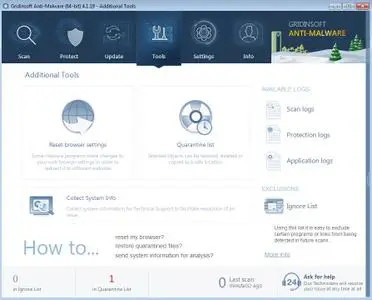
Another notable feature is represented by a real-time scanner that prevents e-threats from infiltrating into your system. Extra tools let you reset browser settings, update policies and the Hosts file, scan Windows components (ActiveX, Windows services, IE extensions, startup links), collect system information and check out all GridinSoft Anti-Malware log files, plus the quarantine list.

Requiring a decent amount of resources
The feature-packed antivirus system offers multilingual support and has a very good response time. However, it demands a massive amount of memory to work properly, so users might experience stability issues on older OS platforms. Other than that, GridinSoft Anti-Malware offers a simple solution for successfully eliminating viruses rapidly, backed up by a highly intuitive environment.

Operating System: Windows XP, 7, 8/8.1, 10

Home Page -
Код:
https://anti-malware.gridinsoft.com/


-:DOWNLOAD FROM LINKS:-

RapidGator
Код:
https://rapidgator.net/file/aada18a59261769523288bcaf2f7e0cd/GridinSoft.Anti-Malware.4.1.45.4945.rar.html

NitroFlare
Код:
https://nitroflare.com/view/5F3709BA25C11ED/GridinSoft.Anti-Malware.4.1.45.4945.rar

​
 
Loaris Trojan Remover 3.1.30.1484


2005201746420096.jpg

Loaris Trojan Remover 3.1.30.1484 Multilingual | 75.7 Mb
​
Loaris Trojan Remover aids in the removal of Malware - Trojan Horses, Worms, Adware, Spyware - when standard anti-virus software either fails to detect them or fails to effectively eliminate them.


Standard antivirus programs are good at detecting this Malware, but not always good at effectively removing it. The majority of Anti-Malware Scanners well detects malicious software - Trojan Horses, Internet Worms, Adware and Spyware. But they are not always efficient in removing them once they have been triggered.

Loaris Trojan Remover goal is specifically to disable or remove Malware without the user having to manually edit system files or the Registry. The program also removes the additional system modifications some Malware carries out which are ignored by some standard antivirus scanners.

Loaris Trojan Remover scans ALL the files loaded at boot time for Adware, Spyware, Remote Access Trojans, Internet Worms and other malware. Two types are available. The Standard scan quickly scans the system with no need for further configuration of the scan parameters. The Custom scan allows the user to select any of the folders for scan.

The malware programs have the ability to track your browsing habits and even steal personal information. Such as bank account numbers and passwords. Spyware has the power to install more parasites on your computer without your consent. Everything you do and everything you type is being recorded right now! Hackers will access your PC and do anything they wish. Also they can even steal your Identity and You would never be the wiser!

Reset Internet Explorer Home/Start/Search Page Settings
Some Malware programs make changes to the Internet Explorer Home, Start and Search Page settings in order to re-direct the web browser to different websites. Loaris Trojan Remover will reset the Home, Start, Search pages to standard Defaults. You can then manually reset your Home Page to your website of choice.

Reset HOSTS file
The Windows HOSTS file is a text file which stores website addresses. The file can be used to speed up access to websites you visit often. By equating the website name (e.g. microsoft.com) with its DNS address, the web browser can find the website more quickly as it does not have to query a DNS Name Server. Some Malware programs add entries to this file, to either deny access to websites. Usually, security-related or antivirus company websites. Or it re-direct access to websites of their choosing.

Reset Windows Update Policies
Some Malware programs attempt to prevent Windows Update from running. And inhibit access to resetting Windows Update. Also blank out the Windows Update options on the Update configuration screen. Loaris Trojan Remover will check the current Windows Update settings and correct them where necessary.

Operating System: Windows XP, Vista, 7, 8/8.1, 10

Home Page -
Код:
https://loaris.com/


-:DOWNLOAD FROM LINKS:-

NitroFlare
Код:
https://rapidgator.net/file/df593f2c12cc94ee0eb9b62d2f32c04b/ltr.3.1.30.1484.rar.html

RapidGator
Код:
https://nitroflare.com/view/8866B06CFFEBB90/ltr.3.1.30.1484.rar

​
 
WinTools.net Professional / Premium / Classic 20.5


2005201751050095.png

WinTools.net Professional / Premium / Classic 20.5 Multilingual | 6.7 Mb
​
WinTools.net is a suite of tools for increasing MS Windows operating system performance. WinTools.net cleanly removes unwanted software from disk drives and dead references from the MS Windows registry. WinTools.net puts you in control of the Windows startup process, memory monitoring and gives you the power to customize desktop and system settings to fit your needs. Adds more speed and stability for your connection. Ensures your privacy and keep sensitive information secure. WinTools.net Premium contains tools: Clean Uninstaller, Scan Files, Scan Shortcuts, Scan Registry, Startup Manager, Tweak UI, Net Tweaker, Your Privacy, Invisible Man, File Shredder.


WinTools.net: Clean Uninstaller
Used for both correctly removing software and for monitoring changes made to the hard drive, MS Windows registry and system files during program installations.

WinTools.net: Scan Files
Used for periodic cleaning of your hard drive from dead references, junk and obsolete files produced by different software. These files and references remain on the hard disk and increase drive access time.

WinTools.net: Scan Shortcuts
Used for periodic cleaning of your Desktop, Start-menu, Application data and hard drives from dead shortcuts, These shortcuts remain on the hard disk and increase drive access time.

WinTools.net: Scan Registry
Used for periodic cleaning of the MS Windows registry from unused applications remaining after uninstallation and from invalid references which decrease system speed and system loading time.

WinTools.net: Startup Manager
This tool allows you to monitor, add, remove, enable and/or disable individual startup items. You can also adjust applications initialized during the loading process of the operating system.

WinTools.net: Tweak UI
This is a set of additional adjustments related to safety, system capacity and user preferences and which are not included in the basic components of MS Windows.

WinTools.net: Net Tweaker
The tool is used for speed increasing of data transfer and for greater stability of connection by changing hidden network settings. Available only in "Professional" edition.

WinTools.net: Your Privacy
This is a kit of tools which ensure your privacy and keep sensitive information secure. Available only in "Professional" edition.

WinTools.net: Invisible Man
This tool is used for saving private information and its later restoration. This is useful if you don't want any information saved by the system.

WinTools.net: File Shredder
This tool is used for full secure deleting documents, programs, and any other files without possibility to restore them.

WinTools.net: IE Favorites
Little tools for quick delete, backup and restore Internet Explorer Favorites. Remove unused or damaged links.

WinTools.net: RAM Memory Booster
This tool serves for monitoring, cleaning and optimisation of RAM. It is used for increasing of operating system performance and for releasing RAM for usage by other processes. If you have a possibility, we recommend to use RAM Saver Pro instead of RAM Memory Booster.

Operating System: Windows 10/8.1/8/7/VISTA/XP/2k8/2k3/2k

Home Page -
Код:
http://www.wintools.net/


-:DOWNLOAD FROM LINKS:-

RapidGator
Код:
https://rapidgator.net/file/4b2c61f286cf6f0aa7db958a2f32083b/WinTools20.5.rar.html

NitroFlare
Код:
https://nitroflare.com/view/0CC435245F6A0ED/WinTools20.5.rar

​
 
Any Video Converter Professional / Ultimate 7.0.0 Multilingual


2005201755110088.png

Any Video Converter Professional / Ultimate 7.0.0 Multilingual | 69/90.4 Mb
​
Any Video Converter Professional is an All-in-One video converting tool with easy-to-use graphical interface, fast converting speed and excellent video quality. It can convert video files from mpg, avi, divX, mpg, vob, wmv (Windows Media Video formats), 3gp (mobile phone format), asf, mov, rmvb and more into mp4, avi, mpeg and wmv files. If you have iPod, iPhone, Zune, PSP, Apple TV, PS3, Archos, Walkman, Sandisk Sansa, iRiver PMP, Creative Zen, Wii or Xbox 360, Any Video Converter is right for you! You can also download and convert YouTube videos and Google Videos.


Any Video Converter Pro. makes batch file conversion simple. Create a batch list of any different formats and convert them all to a single selected format. The converted files will be saved to a pre-selected directory folder and the original files will remain untouched.

Any Video Converter Pro. is a YouTube Video Converter which can download video from YouTube.com and convert YouTube videos to other formats. With the "downloading + converting" one-step solution, Any DVD Converter Pro. easily downloads and converts YouTube videos to play on your iPod, iPhone, PSP, Zune, 3GP mobile phone, Apple TV, etc.

You could use Any Video Converter to download FLV videos from YouTube.com or Google Video to your computer. You are also able to download and convert FLV files on YouTube or Google Video to other videos formats, such as AVI, MPEG, MP4, WMV, 3GP, H.264/MPEG-4 AVC, H.264/PSP AVC, MOV, RM, ASF, FLV, SWF, etc.

Any Video Converter is also the best iPhone converter software to convert all video files such as MOV, MP4, RM, RMVB, DivX, ASF, VOB, 3GP, WMV, MPEG, AVI to iPhone movies. Any DVD Converter helps you watch music video, movies on your iPhone and computer easily with great quality.

As iPhone music converter software, Any Video Converter can convert iPhone music MP3, WAV, M4A from popular music files, such as WMA, MP2, OGG, RA, AC3, APE, CDA. It can also extract audio from movies or music video; convert to iPhone music MP3, WAV, M4A.

System Requirements
Supported OS: 2000 SP4*, XP, Vista (32bit & 64bit), Windows 7 (32bit & 64bit), Windows 8 and Windows 10
Processor: 1GHz Intel/AMD processor or above
RAM: 256MB RAM (512MB or above recommended)
Free Hard Disk: 70MB for installation

Home Page -
Код:
http://www.any-video-converter.com/


-:DOWNLOAD FROM LINKS:-

RapidGator
Код:
https://rapidgator.net/file/95dc405e0374bc06699720d6beebc797/AnyVideoConverterPro7.rar.html
https://rapidgator.net/file/c4ef761258c0a756484e9b288a946b9a/AnyVideoConverterUlt7.rar.html

NitroFlare
Код:
https://nitroflare.com/view/83958E34562EB68/AnyVideoConverterPro7.rar
https://nitroflare.com/view/EF631F8EEFEF4C3/AnyVideoConverterUlt7.rar

​
 
PDF Annotator 8.0.0.802 (x64)


2005201757460102.png

PDF Annotator 8.0.0.802 (x64) Multilingual | 90.5 Mb
​
PDF Annotator lets the user open any PDF file and add annotations, using the mouse or a Tablet PC pen, directly on the PDF file's pages. The annotated documents can then be saved directly back to PDF format. In this way, anyone can read or print the annotated PDF documents. Annotated documents can also be easily attached to emails.


Previously, annotating, commenting or proofreading a document received for review in PDF file format was possible only by using multiple software products in a row-or only by printing the document and adding comments manually. With PDF Annotator, annotations can also be added in a natural way-using a pen-but everything remains in digital format. PDF Annotator allows commenting of PDF files in a single step.

Annotation Manager in the Sidebar
• Get a quick overview of all annotations in a document.
• Navigate to any annotations quickly.
• Perform operations on any selection of annotations.

Filter Annotations
• Only display a filtered subset of your annotations in the new Annotations sidebar.
• Filter by type, color, or page number.

Print Annotations Overviews
• Print a detailed list with small previews of every single annotation in a document.
• Print an overview only outlining the pages containing annotations.

Operating System: Windows 7, 8.1, 10 (64-bit only)

Home Page -
Код:
http://www.pdfannotator.com/en/index


-:DOWNLOAD FROM LINKS:-

RapidGator
Код:
https://rapidgator.net/file/282c84955580be2a875cec34cfa05635/PDF.Annotator.8.0.0.802_x64.rar.html

NitroFlare
Код:
https://nitroflare.com/view/1B08FA869E74640/PDF.Annotator.8.0.0.802_x64.rar

​
 
XLN Audio RC-20 Retro Color v1.1.1.2 WiN


2005201758480102.png

XLN Audio RC-20 Retro Color v1.1.1.2 WiN | 43 Mb
​
RC-20 Retro Color is a creative effect plugin that adds life and texture to any recording. It easily recreates the warm, cozy feeling of vintage recording equipment, but also works perfectly in any modern production setting.


6 Unique FX Modules

RC-20's six unique FX modules can replicate everything from vinyl records to VHS machines, adding noise, wobble and dropouts to your tracks. Its raw distortion and crunchy bit reduction will add grit to your bass and drums. The space and chorus effects will make your guitar sing like never before and the filtering effects fit right into the most modern club track.

Flux Engine

Our exclusive Flux Engine adds subtle (or not so subtle) instability and fluctuations to all of the FX modules, providing the character, warmth and analog goodness of yesteryear's best technology.

Magnitude Slider

The Magnitude slider controls the intensity of all processing. Easily accessible all the time - even when browsing presets - it makes it easy to find the perfect sound and processing amount. Automate this control for awesome intros, breakdowns and transitions in your song.


-:DOWNLOAD FROM LINKS:-

RapidGator
Код:
https://rapidgator.net/file/8b37e973deead40f933ea158f8deca4c/RC-20.Retro.Color.v1.0.5.rar.html

NitroFlare
Код:
https://nitroflare.com/view/E29DDE3776901E0/RC-20.Retro.Color.v1.0.5.rar

​
 
Remo Recover Windows v5.0.0.52


2005201759520087.jpg

Remo Recover Windows v5.0.0.52 | 27.4 Mb
​
Remo Recover (Windows) is the best solution to recover your deleted or lost data in an easy way. Data lost due to emptying Recycle Bin, formatting, corrupt partitions, accidental deletion using Shift + Delete keys or due to any other reason will be recovered. With its friendly interface, even a non-tech savvy user can recover data without any hindrances.


Remo Data Recovery software is designed with strong scanning mechanisms that helps in restoring data lost even in complex data loss situations like improper partitioning, unbootable drives, after OS reinstallation etc. You might have lost your text documents, spreadsheets, PowerPoint presentations, pictures, videos, RAW images, PDFs, EXE files etc., the software restored them all back, and actually it can restore more than 300 types of files.

Key Features:
- Deleted file recovery, even after using "Shift+Del"
- Recover files Emptied from recycle bin
- Choose and recover variety of files using Raw search
- Recover professional RAW Photo files
- Recover photos, videos and music files
- Create disk images to skip bad sectors
- Recover data from disk images created using Remo Recover
- Recover data after Windows Re-Installation
- Add new file types for recovery using Raw Signature Search
- Recover data from accidentally formatted, re-formatted partitions
- Recover data from lost / deleted partitions
- Recover data from re-partitioned drives

System Requirements
Operating System - Microsoft Windows 10, Windows 8.1, Windows 8.0, Windows 7, Vista, XP, Windows Server 2003, Windows Server 2008 and Windows Server 2012
RAM - 512 MB (Recommended, 1 GB RAM)
Free disk space - 50 MB (for installation)
You must log in to your Windows PC as Local System Administrator to install and use this software
Supports 32-bit, 64-bit PC

Home Page -
Код:
https://www.remosoftware.com/remo-recover-windows


-:DOWNLOAD FROM LINKS:-

RapidGator
Код:
https://rapidgator.net/file/c664700fa4055a45e147ab9fce4bb83c/Remo.Recover.5.0.0.52.rar.html

NitroFlare
Код:
https://nitroflare.com/view/18F6DC5D476AB33/Remo.Recover.5.0.0.52.rar

​
 
VisualCron Pro 9.2.0 Build 25459


2005201802590081.jpg


Languages: Multilingual | File Size: 261.11 MB
​
VisualCron is an automation, integration and task scheduling tool for Windows. VisualCron is a complex automation utility that delivers a user-friendly, yet feature-rich working environment for easy task scheduling. The plethora of options it comes with makes it stand out, and the array of predefined tasks it bundles helps you automate repetitive or time-consuming tasks without any programming or scripting knowledge.

No programming skills
You do not have to have a programming background to learn and create Tasks with VisualCron.

Easy to use interface
Drag, click and create. The interface is consistent and easy to learn.

Tasks for everything
With 300+ custom Tasks for different technologies we are sure we can solve and automate your problems.

Customer driven development
We base our development on feature requests from our customers.

Fast and accurate support
We know our product inside out as well as Windows environment in general.

Extended logging
With audit, Task and Job logs, as well as output for each Task you will have enough information for debugging.

Flow and error handling
React and control flow based on error type and output.

Interact with anything
A range of Tasks uses common protocols for file transfer and script execution across different platforms.

Programming interface
Interact with VisualCron on a programming level by using our API

Save time and money
Automating Tasks along with easy configuration saves your company time and money.

Eliminate human errors
By automating advanced Tasks and handle errors automatically you eliminate human errors and downtime.
Release NotesSystem Requirements:
- VisualCron is designed for Windows based computers
- VisualCron works on the following operating systems: 2008 R2/2012/2016/2019/Windows 7/Windows 8/Windows 10
- VisualCron works on both 32-bit and 64-bit processors
- Requires .NET 4.8


-:DOWNLOAD FROM LINKS:-
RapidGator
Код:
https://rapidgator.net/file/5a1cfc43232c57ea7ceae51dfa42a31f/VisualCron.9.2.0.rar.html

NitroFlare
Код:
https://nitroflare.com/view/4F45592181FA48E/VisualCron.9.2.0.rar

​
 
Disk Savvy Ultimate / Enterprise 12.8.16 (x86/x64)


2005201808130105.png

Disk Savvy Ultimate / Enterprise 12.8.16 (x86/x64) | 27.3 Mb
​
Disk Savvy is a disk space usage analyzer capable of analyzing disks, network shares, NAS devices and enterprise storage systems. Users are provided with multiple disk usage analysis and file classification capabilities allowing one to gain an in-depth visibility into how the disk space is used, save reports and perform file management operations.


DiskSavvy Main GUI Application
The DiskSavvy main GUI application provides the user with the ability to analyze one or more disks, directories, network shares or NAS storage devices, categorize and filter disk space analysis results, save disk space analysis reports to the HTML, PDF, Excel, XML, text or CSV formats, perform file management operations and much more.

Disk Space Analysis Profile Dialog
The disk space analysis profile dialog allows one to specify disks, directories and/or network shares to analyze and provides the ability to configure advanced disk space analysis options.

Disk Space Analysis Categories and Filters
DiskSavvy is capable of categorizing and filtering disk space analysis results by the file type, size, user name, file extension, etc. The bottom part of the main GUI application shows the available file categories and allows one to set one or more file filters, generate various types of pie charts, save disk space analysis reports and perform file management operations on filtered disk space analysis results.

Disk Space Usage Pie Charts
The pie charts dialog is capable of showing the amount of used disk space and the number of files per directory, file extension, file type, user name, last access, modification and creation dates, etc. In addition, the user is provided with the ability to copy the chart image to the clipboard allowing one to easily integrate DiskSavvy charts into user-custom presentations and documents.

File Classification Results
DiskSavvy provides the user with the ability to classify disk space analysis results using a number of file classification plug-ins allowing one to understand what types of files are using the disk space in one or more disks or directories.

Analyzing Network Servers and NAS Storage Devices
DiskSavvy allows one to scan the network, discover network servers and NAS storage devices, automatically detect all accessible network shares and analyze disk space usage in hundreds of network servers and NAS storage devices.

Supported Operating Systems:
Windows XP, Vista, 7, 8, 8.1, 10 Server 2003, 2008, 2008 R2, 2012, 2012 R2, 2016

Home Page -
Код:
https://www.disksavvy.com/


-:DOWNLOAD FROM LINKS:-

RapidGator
Код:
https://rapidgator.net/file/dde8487338d46e4a8eddc40a6dd1b940/DiskSavvy12.8.rar.html

NitroFlare
Код:
https://nitroflare.com/view/61D6B4D9D27157A/DiskSavvy12.8.rar

​
 
Windows 10 Enterprise LTSC 2019 Version 1809 Build 17763.1217 May 2020


2005210849580095.jpg


English US | Windows x64 | File Size: 3.7 GB
​

General Info:
File: LTSCX64.ENU.MAY2020.iso
Size: 3,72GB
Format: Bootable ISO
SOURCE: X21-96425
CRC32: 4f085e6d
MD5 : 28e83cd829f51ab18dceb92557afcf52
SHA-1: 4efc5fcf27ed6843dd718244b2178ffa675f331c

What's New:
Servicing Stack Update: KB4549947
CumulativeUpdate: KB4551853
NET Framework 3.5
NET Framework 4.8: KB4486153

Editions Included:
Windows 10 Enterprise LTSC 2019 - STD
Windows 10 Enterprise LTSC 2019 - KMS
STD = Standard installation - For those with own License Key
KMS = Activated by KMS38


-:DOWNLOAD FROM LINKS:-
RapidGator
Код:
https://rapidgator.net/file/ed6f160360daaffdb3e5d8b539b3b072/LTSC.X64.ESD.ENU.MAY2020.part1.rar.html
https://rapidgator.net/file/26565299ab256ff48b86171a668f355d/LTSC.X64.ESD.ENU.MAY2020.part2.rar.html
https://rapidgator.net/file/b7e68044008cf8e4da0ad1b0c9fba1ab/LTSC.X64.ESD.ENU.MAY2020.part3.rar.html
https://rapidgator.net/file/83e6c1b5776fb07fdae02b8ba058c9ea/LTSC.X64.ESD.ENU.MAY2020.part4.rar.html

NitroFlare
Код:
https://nitroflare.com/view/B0E00486F323488/LTSC.X64.ESD.ENU.MAY2020.part1.rar
https://nitroflare.com/view/F9A0A158AF59383/LTSC.X64.ESD.ENU.MAY2020.part2.rar
https://nitroflare.com/view/F66F7CD6C9A5B6E/LTSC.X64.ESD.ENU.MAY2020.part3.rar
https://nitroflare.com/view/DE1A7A5D1121432/LTSC.X64.ESD.ENU.MAY2020.part4.rar

​
 
Windows 10 Pro for Workstations Version 2004 Build 19041.264 May 2020


2005210916490088.jpg


English US | Windows x64 | File Size: 4.1 GB
​
It's the most powerful Windows yet, with faster data handling and storage, a new file system that finds and repairs faults, and support for the next generation of PC hardware, up to 4 CPUs and 6TB of memory.

The Windows 10 May 2020 Update (also known as version 2004 and codenamed "20H1") is the ninth major update to Windows 10. The first preview was released to Insiders who opted in to the exclusive Skip Ahead ring on February 14, 2019. Microsoft will released Windows 10 May 2020 Update 20H1 2004.10.0.19041.207 on all pc's through Windows Update for Upgrade your Machines the new official microsoft iso's msdn / visual will Released The May 2020.

General Info:
File: W10PRO.X64.WSTN.ENU.MAY2020.iso
Size: 4,07GB
Format: Bootable ISO
CRC32: 845a064d
MD5 : d260e8d64a7e61755a580e7bed53be34
SHA-1: 455b6d48dac0c1ab584eb013379029fd55f4c125

What's New:
CumulativeUpdate:
-We have fixed a performance issue in Windows Mixed Reality (WMR) that prevents it from working correctly for many users.
-We fixed an issue that prevents cleaning tools, such as Disk Cleanup, from removing previously installed updates.
-We have updated the 2020 start date for daylight saving time (DST) in the Kingdom of Morocco. For more information, see KB4557900.
-Security updates to Internet Explorer, the Microsoft Scripting Engine, Windows App Platform and Frameworks, Microsoft Graphics Component, Windows Input and Composition, Windows Media, Windows Shell, Microsoft Xbox, Microsoft Edge, Windows Fundamentals, Windows Cryptography, Windows Authentication, Windows Kernel, Windows Virtualization, Windows Update Stack, Windows Core Networking, Internet Information Services, Windows Network Security and Containers, Windows Active Directory, Windows Server, and the Microsoft JET Database Engine.

Editions Included:
Windows 10 X64 Pro for Workstations
Activated by Digital License Activation (HWID)


-:DOWNLOAD FROM LINKS:-
RapidGator
Код:
https://rapidgator.net/file/7d00cad44f339c39f6fffec6806e8cbd/10PRO.X64.WSTN.ENU.MAY2020.part1.rar.html
https://rapidgator.net/file/c35b5184abfd3815f3d0b2af86224fef/10PRO.X64.WSTN.ENU.MAY2020.part2.rar.html
https://rapidgator.net/file/3c13c545121756a290d669a83324640d/10PRO.X64.WSTN.ENU.MAY2020.part3.rar.html
https://rapidgator.net/file/2dccac95edc3de6d87a79e69d1048736/10PRO.X64.WSTN.ENU.MAY2020.part4.rar.html
https://rapidgator.net/file/244d572c1b9d54164f4c51e0fd1a4d32/10PRO.X64.WSTN.ENU.MAY2020.part5.rar.html

NitroFlare
Код:
https://nitroflare.com/view/D46B017BF6AB31F/10PRO.X64.WSTN.ENU.MAY2020.part1.rar
https://nitroflare.com/view/B6C02C10977C292/10PRO.X64.WSTN.ENU.MAY2020.part2.rar
https://nitroflare.com/view/A550315790904A7/10PRO.X64.WSTN.ENU.MAY2020.part3.rar
https://nitroflare.com/view/E1C1DDA356CF01A/10PRO.X64.WSTN.ENU.MAY2020.part4.rar
https://nitroflare.com/view/FA7988486116161/10PRO.X64.WSTN.ENU.MAY2020.part5.rar

​
 
Windows 10 Pro Version 2004 Build 19041.264 incl. Office 2019 ProPlus May 2020


2005210919500102.png


English US | Windows x64 | File Size: 4.9 GB
​
The Windows 10 May 2020 Update (also known as version 2004 and codenamed "20H1") is the ninth major update to Windows 10. The first preview was released to Insiders who opted in to the exclusive Skip Ahead ring on February 14, 2019. Microsoft will released Windows 10 May 2020 Update 20H1 2004.10.0.19041.207 on all pc's through Windows Update for Upgrade your Machines the new official microsoft iso's msdn / visual will Released The May 2020.

General Info:
File: W10X64.PRO.OFF19.ENU.MAY2020.iso
Size: 4,96GB
Format: Bootable ISO
CRC32: f83e2f04
MD5 : b1916edb855d7dce0da31ddbbccc933a
SHA-1: 700648b708c3014f104667b3b88200e237e838c4

What's New:
Office 2019 ProPlus VL 64bit
CumulativeUpdate:
-We have fixed a performance issue in Windows Mixed Reality (WMR) that prevents it from working correctly for many users.
-We fixed an issue that prevents cleaning tools, such as Disk Cleanup, from removing previously installed updates.
-We have updated the 2020 start date for daylight saving time (DST) in the Kingdom of Morocco. For more information, see KB4557900.
-Security updates to Internet Explorer, the Microsoft Scripting Engine, Windows App Platform and Frameworks, Microsoft Graphics Component, Windows Input and Composition, Windows Media, Windows Shell, Microsoft Xbox, Microsoft Edge, Windows Fundamentals, Windows Cryptography, Windows Authentication, Windows Kernel, Windows Virtualization, Windows Update Stack, Windows Core Networking, Internet Information Services, Windows Network Security and Containers, Windows Active Directory, Windows Server, and the Microsoft JET Database Engine.

Editions Included:
Windows 10 Pro
Office 2019 ProPlus
Activators: HWID and Online KMS


-:DOWNLOAD FROM LINKS:-
RapidGator
Код:
https://rapidgator.net/file/587dd12ef6120dbe20513d5f47781fd0/10X64.PRO.OFF19.ENU.MAY2020.part1.rar.html
https://rapidgator.net/file/61204a6506d2ee86679268d8e3c1116c/10X64.PRO.OFF19.ENU.MAY2020.part2.rar.html
https://rapidgator.net/file/40dda1fada7960dfa42d087ea45e7306/10X64.PRO.OFF19.ENU.MAY2020.part3.rar.html
https://rapidgator.net/file/6b28d3cd7b98e38a999d62b5adfd8251/10X64.PRO.OFF19.ENU.MAY2020.part4.rar.html
https://rapidgator.net/file/b3b5226b11e737790c19608efa95f7c9/10X64.PRO.OFF19.ENU.MAY2020.part5.rar.html

NitroFlare
Код:
https://nitroflare.com/view/38503BB6B759BF0/10X64.PRO.OFF19.ENU.MAY2020.part1.rar
https://nitroflare.com/view/88CFF62FCC82A6A/10X64.PRO.OFF19.ENU.MAY2020.part2.rar
https://nitroflare.com/view/1803F5E135EB64A/10X64.PRO.OFF19.ENU.MAY2020.part3.rar
https://nitroflare.com/view/7E7DAADE2B7B161/10X64.PRO.OFF19.ENU.MAY2020.part4.rar
https://nitroflare.com/view/9432452EED8E671/10X64.PRO.OFF19.ENU.MAY2020.part5.rar

​
 
Windows 10 Home Pro Version 2004 Build 19041.264 4in1 May 2020


2005210946210097.jpg


Windows x86 | File Size: 8.9 GB
​
Languages: Arabic, Brazilian, Croatian, Danish, Dutch, English GB, English US, Estonian, Finnish, French, German, Greek, Hungarian, Italian, Latvian, Norwegian, Polish, Portuguese, Russian, Slovenian, Spanish, Swedish, Turkish, Ukranian

The Windows 10 May 2020 Update (also known as version 2004 and codenamed "20H1") is the ninth major update to Windows 10. The first preview was released to Insiders who opted in to the exclusive Skip Ahead ring on February 14, 2019. Microsoft will released Windows 10 May 2020 Update 20H1 2004.10.0.19041.207 on all pc's through Windows Update for Upgrade your Machines the new official microsoft iso's msdn / visual will Released The May 2020.
General Info:
This release contains one ISO [SOURCE ISO] and 23 executable svf-files.
All exe-files are created from original MSDN releases.
This is done with SmartVersion, a program that calculates the difference between two files (one of which is used as the source) and then creates an svf-file based on that difference.

What's New:
CumulativeUpdate:
-We have fixed a performance issue in Windows Mixed Reality (WMR) that prevents it from working correctly for many users.
-We fixed an issue that prevents cleaning tools, such as Disk Cleanup, from removing previously installed updates.
-We have updated the 2020 start date for daylight saving time (DST) in the Kingdom of Morocco. For more information, see KB4557900.
-Security updates to Internet Explorer, the Microsoft Scripting Engine, Windows App Platform and Frameworks, Microsoft Graphics Component, Windows Input and Composition, Windows Media, Windows Shell, Microsoft Xbox, Microsoft Edge, Windows Fundamentals, Windows Cryptography, Windows Authentication, Windows Kernel, Windows Virtualization, Windows Update Stack, Windows Core Networking, Internet Information Services, Windows Network Security and Containers, Windows Active Directory, Windows Server, and the Microsoft JET Database Engine.

Editions Included:
Windows 10 Home - STD
Windows 10 Home - DLA
Windows 10 Home - OEM
Windows 10 Pro- - - STD
Windows 10 Pro- - - DLA
Windows 10 Pro- - - OEM

STD = Standard installation - For those with own License Key
DLA = Digital License Activation (HWID)
OEM - Will automatically activate if installing same version on original equipment


-:DOWNLOAD FROM LINKS:-
RapidGator
Код:
https://rapidgator.net/file/8431561812f64059cff744eacef1b4ef/10_X86_2004_Home_Pro_4in1.part01.rar.html
https://rapidgator.net/file/2ee7d302bb6aec72a646806a9f9271d1/10_X86_2004_Home_Pro_4in1.part02.rar.html
https://rapidgator.net/file/697d05ac15b288925f609966bc190fcd/10_X86_2004_Home_Pro_4in1.part03.rar.html
https://rapidgator.net/file/55f327f3bdfbabb97032d671170141bc/10_X86_2004_Home_Pro_4in1.part04.rar.html
https://rapidgator.net/file/f4652e101cb672f23659348e1d0a8316/10_X86_2004_Home_Pro_4in1.part05.rar.html
https://rapidgator.net/file/44aa1dc0d66455bf64158f907a4b58ff/10_X86_2004_Home_Pro_4in1.part06.rar.html
https://rapidgator.net/file/b3d87aae9b5a431e6eca51f28755fe20/10_X86_2004_Home_Pro_4in1.part07.rar.html
https://rapidgator.net/file/bfbb333c293f1b7c9f277519f2cfdfe8/10_X86_2004_Home_Pro_4in1.part08.rar.html
https://rapidgator.net/file/cda5af1e45927ee48a4483751bba2355/10_X86_2004_Home_Pro_4in1.part09.rar.html

NitroFlare
Код:
https://nitroflare.com/view/4B37133062BB511/10_X86_2004_Home_Pro_4in1.part01.rar
https://nitroflare.com/view/A01928734068885/10_X86_2004_Home_Pro_4in1.part02.rar
https://nitroflare.com/view/CF718E14CD0AF5E/10_X86_2004_Home_Pro_4in1.part03.rar
https://nitroflare.com/view/394E8227C4589C4/10_X86_2004_Home_Pro_4in1.part04.rar
https://nitroflare.com/view/10904A466B90711/10_X86_2004_Home_Pro_4in1.part05.rar
https://nitroflare.com/view/8EC8E211D403D5D/10_X86_2004_Home_Pro_4in1.part06.rar
https://nitroflare.com/view/07DA62E2860C622/10_X86_2004_Home_Pro_4in1.part07.rar
https://nitroflare.com/view/0988F11917C5AF5/10_X86_2004_Home_Pro_4in1.part08.rar
https://nitroflare.com/view/C911D61ED05F2B4/10_X86_2004_Home_Pro_4in1.part09.rar

​
 
FontLab v7.1.2.7436


2005211050410095.png

FontLab 7.1.2.7436 | 178.2 Mb
​
FontLab 7 for Windows is a modern, professional font editor, crafted for type designers and font geeks. It lets you create, open, modify, draw, space, kern, hint and export desktop, web, color and variable OpenType fonts for any Unicode writing system, from Latin, Cyrillic and Greek, to Arabic, Hebrew and Indic, all the way to Chinese, Japanese, emoji, symbols and icons.


Boost your design productivity
You can draw smooth, consistent glyphs, autotrace bitmaps, create overlaps, simplify paths, equalize stems, scale outlines while keeping stroke thickness. You can draw in fractional or integer coordinates, see view numeric and visual measurements, find & fix contour imperfections.

Next-generation drawing
Creating Bézier curves is no longer "mastery or mystery."

Seriously better Béziers
We love curves so much that we are making them better.

Complete color support
In FontLab 7, everything is color-enabled. Draw multi-color contours, bring in color outlines, improved SVGs and bitmap images, overlay layered fonts and create emoji or chromatic fonts for all Color OpenType-enabled platforms: Adobe Photoshop and Illustrator CC 2018+, macOS, Windows 8+, iOS, Android and modern web browsers.

Integrated ScanFont
You've made your drawings somewhere else? No problem. Copy-paste glyph outlines or color vector graphics from Adobe Illustrator, FontLab Studio, or other vector drawing or font apps, import SVG drawings, bitmap images and new PDF graphics. Arrange them on the Sketchboard, optionally turn bitmaps into smooth vector graphics using autotrace, then automatically assign the letterforms to glyphs to create a fully working font in a few minutes. No need for a separate ScanFont app!

Sketchboard
Our Sketchboard is a a virtual desk or canvas that allows you to draw and experiment outside of any glyph. It's great for collecting sketches, separating artwork into glyph images, or just drawing logos and symbols using all of FontLab's juicy Bézier magic. You can also arrange text frames showing different fonts you're working on, and export the contents into a PDF or SVG for proofing.

Pixel-savvy
Drag-drop or copy-paste pixel images in most formats, with mono, grayscale, full color and transparency support. Improved Split and autotrace or place the images into the img layer for reference to draw over them. Rotate and scale imported graphics, crop, blur, remove noise and background.

For design space explorers
A font family consists of fonts that have different locations on one or more design space Axes, such as width, weight, slant or optical size. To create interpolated instances or a variable OpenType (TT or new CFF2) font from one or more Font masters, use Font Info to add the axes and assign axis locations for all font masters within your FontLab font.

In an instance
Easily plan your Instances for an extensive font family or a variable font. With axis instances, define per-axis interpolation locations and style phrases, and FontLab will automatically build a matrix of all instances for all axes, with correct Style names and Style groups.

From Multiple Master to Variations
Thanks to our Variations engine based on MutatorMath, your Masters no longer need to stand in the MM corners, but can be placed freely within the design space. Unlimited axes, intermediate font masters, glyph masters that affect only certain glyphs give you complete freedom in designing interpolable font families and variable OpenType fonts.

Intelligent interpolation
To create intermediate designs via interpolation, you need all your glyph masters to have the same number and geometric structure of contours and nodes. FontLab can help you automatically match your masters by sorting contours, relocating start points and correcting path direction.

A match made in 7. masters
Whether you have two, four, seven or a dozen masters, the improved Matchmaker tool helps you make their point structure compatible for interpolation. Matchmaker works on Sections, which are sequences of line or curve segments.

Distraction-free spacing
Perform metrics and improved kerning editing in a multi-line Metrics Window, with an adjustable, distraction-free UI and intuitive keyboard shortcuts. Step through your phrases with the Pairs & Phrases panel, or dive into details using slanted sidebearings and the Measurement line.

Linked & adaptive metrics
Want the O sidebearing to always be 60% of H? Link metrics and set up complex spacing relationships with our live math expressions engine. Bind the sidebearings and they will remain constant-even when you change the outline. New Easily copy expressions between masters.

Kerning that just works
Class kerning is now compatible with UFO and OpenType, without key glyphs, and conflict-free. Preview the Kerning Classes clouds as you kern and compare your decisions with live autokerning suggestions. New Find visual kerning collisions with Audit Kerning.

Powerful anchors
Position Anchors manually or link their positions to other anchors or guides with math expressions. FontLab will display all matching diacritical marks in the Anchor Cloud, and will use your anchors to generate composite glyphs and the mark/mkmk OpenType features.

Components, References, and Auto layers
Use Components to build accented letters or ligatures from other glyphs - the composite glyphs you create will inherit outlines, guides and anchors from the component sources. Or turn on Auto layer, and the metrics and component positions in the composite glyph layer will always stay up-to-date.

Flag and tag glyphs
Sort glyphs by the Color Flags (marks), and organize your glyphs with Tags: assign multiple labels to your glyphs, then assign the same tags to font guidelines, stems and zones, and they'll only appear in the tagged glyphs.

Glyph and character search
Just type. We can find glyphs by glyph name, Unicode character name, script, codepage, encoding, range - you name it. FontLab also has improved friendly alternatives to standard glyph names built in. Use friendly names for development but export industry-standard fonts, with no added effort. New Batch-rename glyphs with a few clicks.

Full Unicode & OpenType
Test your OpenType features with the built-in HarfBuzz OpenType Layout engine with complete complex-script support. Search for glyphs based on Unicode character names and Unicode scripts.

TrueType Hinting
We've completely revamped FontLab's beloved visual TrueType Hinting (TTH) engine, and added TTFAutohint as an alternative engine. FontLab 7 includes a true Microsoft ClearType preview (even on the Mac version), has a streamlined user interface, allows you to attach visual TTH commands to PostScript outlines and overlapping paths, and has built-in functionality to copy TTH commands from one font to another, or from one glyph in a font to a similar one.

Express export with Profiles
Trying to duplicate a bunch of preference settings to output a specific font could be painful. In FontLab, we have introduced Profiles for font generation. Each profile is a group of settings for generating output fonts in a particular format. FontLab 7 has a set of improved profiles for all our standard output formats, and you can easily create new profiles to meet your particular needs.

Embracing your workflow
Type designers use various tools and workflows. FontLab 7 does not lock you into a proprietary file format. Got fonts in another format? FontLab opens it: OpenType (TT, PS, Variable TT, new Variable PS, SVG, sbix, CBDT, COLR, TTC), Web (WOFF2, WOFF, EOT), FontLab VFB, Fontographer, improved Glyphs, improved DesignSpace+UFO, PostScript Type 1, TrueType, Ikarus, even old Mac fonts on Windows (in a Zip container)! Instead of reinventing the wheel, FontLab 7 uses the industry's best solutions: Adobe FDK for OpenType, Microsoft ClearType, TTFAutohint, MutatorMath, fontTools with varLib, HarfBuzz, ICU, Python (APIs compatible with FontLab Studio and RoboFab), the KLTF kerning optimizer and a SpeedPunk-style curvature view.

System Requirements:
The for Windows x64 version is recommended for 64-bit Windows systems.
* The for Windows x86 version works on any modern Windows system (32- or 64-bit), and on Linux with Wine.

Home Page -
Код:
https://www.fontlab.com/


-:DOWNLOAD FROM LINKS:-

RapidGator
Код:
https://rapidgator.net/file/ffb0d8917e0d670a68b1b6695c001e3d/FontLab.7.1.2.7436.rar.html
https://rapidgator.net/file/e6438938b9f1d9b6438e59c15c8bd554/FontLab.7.1.2.7436.x64.rar.html

NitroFlare
Код:
https://nitroflare.com/view/29C69C17C7D99F8/FontLab.7.1.2.7436.rar
https://nitroflare.com/view/8430D7C9F540FFD/FontLab.7.1.2.7436.x64.rar

​
 
ARES Commander 2020.1 Build 20.1.1.2024 (x64)


2005211052150109.jpg

ARES Commander 2020.1 Build 20.1.1.2024 (x64) Multilingual | 448.9 Mb
​
Experience the flexibility of ARES Commander Edition, the powerful CAD software for day-to-day work as well as complex projects. Leverage the productive tools and intelligent features for drafting and design that you have come to expect from top CAD products, at a significant cost savings. Create 3D objects using the ACIS® 3D Solid Modeler which is tightly integrated within the software.


Get Started with ARES Commander
ARES Commander is a switch made easy - providing a familiar look & feel that is intuitive for any experienced CAD user. Much more than a cost-effective alternative for DWG-editing, ARES Commander is making no compromises in features and innovations.

New Features in ARES Commander 2020:
The ARES CAD Software offers you more than a cost-effective alternative to create or modify drawings in DWG. Discover below some of the latest and greatest innovations for ARES Commander

Modern DWG Editing for Desktop, Mobile and Cloud
Discover the unrivaled agility of our Trinity of CAD concept. With ARES Commander you keep enjoying the comfort and performance of fully-installed CAD software for your daily work. Yet, the close interaction with our mobile and cloud versions bring your productivity to the next level.

Drawing Compare
- Compare two versions of a drawing to display the differences with colors
- The new Drawing Compare palette allows you to compare the current drawing with another one.
- E.g.: Understand modifications made by a colleague, compare two options for the same project, show before and after. etc.

Data Extraction
- Extract information from entities or blocks
to a table or a CSV file
- The Data Extraction wizard enables you to quickly create a bill of materials or to extract other types of information from your drawings.
- Select entities and filter only the data you want to extract. You can further insert it as a table in the drawing or generate a file that can be imported in a spreadsheet.

Custom Blocks Improvements
Equivalent to the dynamic blocks in other CAD software, you can use the custom blocks to create smarter entities, which size and look will adapt parametrically with additional grips. You may also include a dropdown menu to switch between different types and options for the same block.

Convert dynamic blocks into custom blocks
You can use dynamic blocks created with AutoCAD as they are. They will keep their intelligence and parameters in ARES Commander. But now you may alternatively use the CBCONVERT command to convert them into custom blocks which definition can be further modified with ARES Commander.

Grip Editing of Hatches and Gradients
Manipulate the contour of your hatch or gradient hatch like if it was a Polyline. Select any hatch entity and you will see grips that will help you to manipulate directly the shape. Hovering over a grip point displays also a contextual menu with editing options.

Associative Patterns
Array copies of the same entity along multiple lines and columns and modify the pattern as you wish. Patterns allow you to replicate an entity following a linear or circular organization or along a path. These patterns are now associative. You can now edit them using grips or by a double-click on the associative pattern.

Lasso Selection
New selection method to save time! Use the lasso selection method to specify entities within an irregularly formed contour specified by dragging the cursor.

PCX Print Configuration Files
Equivalent to the PC3 format in other CAD software. Import PC3 files or create and save new printer configuration files in PCX format. It makes it easy to reuse and share with colleagues the same configuration for successive printings.

Work Faster in 3D
New OFFSETEDGES and CONVERTEDGES commands. These new commands help you to extract 2D entities from the edges of 3D solids or surfaces. This is in particular useful to extract construction entities you will use as a reference to create other 3D shapes combining with boolean operations or Push/pull actions.

Customize Your Workspaces
New CAD General workspace. The CAD General workspace offers an alternative ribbon to the default "Drafting & Annotation" workspace of ARES Commander. Icons are reorganized to facilitate the switch from AutoCAD or other similar CAD software.. Easily create and save your workspaces. Reorganize the user interface of ARES Commander as you wish and save your configuration as a new workspace.

New Markup Features
The new markup features let you share comments and feedback with a new type of annotation features. Unlike other annotation tools such as text or dimensions, markups do not insert any entity in the drawing, they are like a collaboration layer on top of the drawing. Markups can be created from ARES Commander, ARES Touch, and ARES Kudo. They are synchronized in real-time across all the ARES users and their devices. For that reason, it is a service operated in the cloud. To use markups it is therefore required to use ARES Commander's Cloud storage palette to save the drawing in Cloud storage.

New BIM Features
The version 2020 represents the first step of Graebert's revolutionary roadmap to build the best-in-class CAD platform to document BIM projects.

Requirements: Windows 8 or 10 (64-bit)

Home Page -
Код:
http://www.graebert.com


-:DOWNLOAD FROM LINKS:-

RapidGator
Код:
https://rapidgator.net/file/e23165d1aa5cd80763785d6893478cac/ARES.Commander.20.1.1.2024.rar.html

NitroFlare
Код:
https://nitroflare.com/view/8734315CF957695/ARES.Commander.20.1.1.2024.rar

​
 
Fast Video Cataloger 6.35.0.0 (x64)


2005211055170086.jpg

Fast Video Cataloger 6.35.0.0 (x64) | 106 Mb
​
Fast Video Cataloger is a professional Windows video software for searching, browsing and organizing digital video files Search, browse, find and play all your video files fast and easy. Fast Video cataloger is the fastest local video content management system available for Windows PC. Don't take our words for it, test our video software on your own video files. You can download the fully functional program for free without providing any email address. The installation is client only and does not require any IT department support for server setups. You can be up and testing in less than 3 minutes.


With Fast Video Cataloger you will:
- Index all your videos automatically and save hours
- Always find scenes and videos you are looking for
- Jump to the right scene by video thumbnails
- Browse your archived video files visually
- Enrich your videos and scenes with metadata, images and keywords

Instantly find scenes in your videos
Fast Video Cataloger automatically create evenly spaced thumbnails for each clip to assist searching through large collections of video clips on your PC in the fastest possible way. You can have all your videos organized without effort. We support video clips on your PC, External hard drives, usb sticks, DVDs, Dropbox. You can easily search, browse and get an overview of all your videos even if the devices with the video files are disconnected because you are on the road

Find the right scenes fast
Navigate your videos fast and smart Fast video cataloger supports several ways of finding your video or scene inside huge collections.

Play from video thumbnails
Fast video cataloger comes with an integrated video player that can start playing videos right from the time of a captured thumbnail.

Archive video files
Fast Video Cataloger keeps archived videos searchable and browsable with thumbnails and keywords while raw files are stored externally.

Flexible video Keywording
Keywording on videos and scenes will support your workflow, empower your team and make your work on videos faster.

Customize with scripting
Fast video cataloger 5.x supports integrated scripting in c#. Customize the program or use it as a base to build your own video solutions. The installer includes examples to get you started as well as extensive api documentation.

Extend with custom meta data
Add custom meta data to videos and customize the your catalogs. Companies using Fast Video Cataloger often needs to store some company specific meta data with the video. Now you can add extra fields to your catalog and store custom meta data with your video. The custom data is also available through the scripting interface.

Contact sheet images
Printable and shareable contact sheet images make up overviews of your videos for discussions, presentations and notes.

Requirements: 64 bit versions of Windows 7, Windows 8, Windows 8.1, Windows 10.

Home Page -
Код:
https://videocataloger.com/


-:DOWNLOAD FROM LINKS:-

RapidGator
Код:
https://rapidgator.net/file/23cc4f204a74104bf80b45f5b9e153b2/Fast.Video.Cataloger.6.35.0.0.rar.html

NitroFlare
Код:
https://nitroflare.com/view/F091FD7C23E850C/Fast.Video.Cataloger.6.35.0.0.rar

​
 
WinAutomation 9.2.0.5733 Professional Plus


2005211101120103.jpg

WinAutomation 9.2.0.5733 Professional Plus | 266 MB
​
WinAutomation is a powerful and easy to use Windows based platform for building Software Robots. Software robots are apps that live in your computer and can be instructed to do whatever a real user does. Teach them to perform effortlessly any of your tasks, leveraging WinAutomation Macro and Web Recorders.


Some of the tasks you can automate with WinAutomation:
- Automatically fill and submit web forms with data from local files.
- Retrieve and parse your emails and update a database with the data contained in the emails.
- Launch applications, move, resize, close and manipulate windows, take screenshots.
- Convert your tasks into your very own applications that you can share with others, with the press of a button.
- Harvest web sites and extract data from any web page into Excel or text files.
- Copy, move, edit, rename, compress, uncompress and manipulate files and folders in any possible way.
- Read and write data to Excel files, connect to SQL databases and manipulate text files.
- Run any task using the built-in scheduler, when you press a hotkey, when a file is created or deleted, when your site is down or when you receive an email.
- Send prerecorded mouse clicks and keystrokes to any desktop application.
- Automate your FTP transfers: Download and upload files or entire folders at schedule.
- Include logic to automate even the most complex tasks.
- Combine all the above to design custom tasks for your specific needs.

Macro Recorder
Perform the task you would like to automate on your screen once and the Macro Recorder will convert it into a series of Actions that can be repeated as many times as you like. After the recording you can further customize the macro to your liking using the Job Designer.

Web Automation
Just browse through your favorite parts of the Web and collect data, fill forms, download files - do all the things you usually do online and the Web Recorder will convert these into a Macro you can run whenever you need.

Visual Job Designer
The Visual Job Editor that will make your fiddling with automation more entertaining than playing around with a pile of toy bricks.

Task Scheduler
The built-in Task Scheduler allows you to execute any of your tasks automatically based on your chosen timeframe. Set up your tasks to be done exactly when you need them by selecting from the different options in the schedule menu.

Keyboard Macro
The keyboard has been the longest standing unchanged piece of hardware binded along with our computers ever since they became personal, so it is high time we gave them a 'turn-of-the-milenium' twist. Queue keyboard macro automation.

System Monitoring
System Monitoring allows you to execute any of your tasks automatically based on your chosen event. Set up your tasks to run exactly when you need them by selecting any of the different options in the trigger menu.

UI Designer
The built-in UI Designer will add some flare to your dialog windows. Whenever your Jobs will require some user input, no longer will the user be greeted by the same boring grey dialog - your only limit is your level of CSS expertice, so start customising!

Email Automation
Inbox management has become so cumbersome and bulky that if you were to actualy go through all email your receive you would be wasting a lifetime. WinAutomation and its built-in email Automation Actions are here to tell your computer how to sort through all this mess.

Job Compiler
Well, now you can start sharing right away with anyone running Windows on their PC and Server, and without the need to have WinAutomation installed.

Excel Automation
Read and write data, manipulate worksheets and do pretty much anything with Excel, that once needed you to learn Visual Basic to do Macros.

Files & Folders Automation
Automate files and folders operations, batch rename, move, resize and do anything with your filesystem, and do it the clever way!

FTP Automation
Want to update your CMS the moment the update comes out and never have anything to do with it ? Maybe download all logs and copy them to Excel? Or setup some other automated process to handle your uploading and downloading to FTP? WinAutomation has the answer yet again!

System Requirements:
- Windows Server 2016
- Windows 10 32/64 bit
- Windows Server 2012
- Windows 2008 32/64 bit
- Windows 8 32/64 bit
- Windows 7 32/64 bit
- Windows Vista 32/64 bit

Homepage -
Код:
http://www.winautomation.com


-:DOWNLOAD FROM LINKS:-

RapidGator
Код:
https://rapidgator.net/file/b7b38d9118f66bbf42e2a0b225b9b3ec/WA.9.2.0.5738.rar.html

NitroFlare
Код:
https://nitroflare.com/view/D8CCAD29CD24DF4/WA.9.2.0.5738.rar

​
 
Parted Magic v2020.05.20


2005211106410111.jpg

Parted Magic v2020.05.20 | 801.9 Mb
​
Powerful Tools for Home or Office! - Parted Magic is a complete hard disk management solution. PartedMagic has the tools to get the job done. With the Partition Editor you can re-size, copy, and move partitions. You can grow or shrink your C: drive. Create space for new operating systems. Attempt data rescue from lost partitions.


Disk Partitioning
PartedMagic has the tools to get the job done. With the Partition Editor you can re-size, copy, and move partitions. You can grow or shrink your C: drive. Create space for new operating systems. Attempt data rescue from lost partitions.

Disk Cloning
Clone a computer's entire disk or a single partition. The cloned data could be saved as an image-file or as a duplicated copy of the data. The data could then be saved to a locally attached storage device, an SSH server, a Samba Server, or a Network File System share. The clone file can then be used to restore the original when needed.

Data Rescue
PartedMagic allows you to easily reset or change Windows passwords. Recover lost files. Rescue files from devices with disk read errors.

Disk Erasing
PartedMagic comes with easy to use solutions for conventional overwrite. Internal Secure Erase. Wiping of only Free Space.

Benchmarking
All the benchmarking tools you would ever need! Bonnie++, IOzone, Hard Info, System Stability Tester, mprime, and stress.

Supported Hardware:
- PartedMagic requires at least a 686 processor with 1GB of RAM.
- 512MB in Live mode.
- Compatible with Secure Boot Windows machines.
- Runs well on Intel Macs.

Home Page -
Код:
http://partedmagic.com/


-:DOWNLOAD FROMLINKS:-

NitroFlare
Код:
https://rapidgator.net/file/2fea0dd47bb19cf25498feb09690e1c6/Parted.Magic.2020.05.20.rar.html

RapidGator
Код:
https://nitroflare.com/view/A9218B81351DE55/Parted.Magic.2020.05.20.rar

​
 
Wipe 2020.12 Professional Multilingual


2005211109240096.jpg

Wipe 2020.12 Professional Multilingual | 6 Mb
​
This powerful program can remove a lot of gigabytes of garbage on your computer and recover many free disk space. In addition, it will protect your privacy on the Internet - it removes records about personal activity on PC.


You will be able to delete browser history and cache, index.dat files, registry, internet cookies files, autocomplete-history, temporary internet files and many many other items. This program also erases any other tracks of personal activity which you made when used your PC, and no matter in which program: Windows, Internet Explorer, FireFox, Chrome, Opera or any other.

To prevent recovery of deleted data the program uses the following security methods: DoD 5220.22-M method, Gutmann method ( full 35 steps ), Russian GOST and other. You can also customize cleaning process and choose which items to remove and which is not. Or you can view detailed information about areas where garbage located on your computer.

Operating System: Windows XP, Vista, 7, 8, 10

Home Page -
Код:
https://privacyroot.com/


-:DOWNLOAD FROM LINKS:-

RapidGator
Код:
https://rapidgator.net/file/9698ad750be1e29a5f70ce5e8312d398/Wipe.2020.12.rar.html

NitroFlare
Код:
https://nitroflare.com/view/B8209EDA43C3859/Wipe.2020.12.rar

​
 
Назад
Сверху