• Здравствуйте. Сайт заработал в архивном режиме форум www.old.nado.in

Dl4ever Software

CivilStorm CONNECT Edition 10.03.00.76 Update 3

2005050929190103.jpg

CivilStorm CONNECT Edition Update 3 | 953.9 mb​
The Hydraulics and Hydrology development team is pleased to announce the availability of CivilStorm CONNECT Edition Update Update 3 (version 10.03.00.76). This release includes fixes to various user-reported issues from the previous release, providing an overall more stable experience.

Bentley CivilStorm CONNECT Edition Update 3 Readme

The new CONNECT Edition Update 3 release of SewerGEMS, CivilStorm, SewerCAD, and StormCAD (build 10.03.00.xx) introduces improvements to help you be more successful.

Note: this was initially release as version 10.03.00.75 but later re-released as 10.03.00.77 (and 10.03.00.78 for SewerGEMS) to incorporate address a few issues (missing implicit calculation options, AutoCAD 2020 integration issue, Z coordinate not showing on mouse-over a terrain model and chart options showing in Chinese)


CivilStorm CONNECT is the first and only fully-dynamic, multi-platform (GIS, CAD, and Stand-Alone) sanitary and combined sewer modeling solution. With CivilStorm CONNECT, you will analyze all sanitary and combined sewersystem elements in one package and have the option of performing the analyses with the SWMM algorithm or our ownimplicit solution of the full Saint Venant equations.

Simply put, CivilStorm CONNECT offers the most comprehensive solution available for optimizing Best ManagementPractice (BMP) designs and meeting sanitary sewer overflow (SSO) and combined sewer overflow (CSO) regulations.

Bentley's Martin Pflanz demonstrates the power of automated Catchment Delineation in CivilStorm, SewerGEMS and StormCAD.


Bentley Systems, Incorporated is the global leader dedicated to providing architects, engineers, constructors, and owner-operators with comprehensive architecture and engineering software solutions for sustaining infrastructure. Founded in 1984, Bentley has nearly 3,000 colleagues in more than 45 countries, $500 million in annual revenues, and, since 2001, has invested more than $1 billion in research, development, and acquisitions.

Product: Bentley CivilStorm
Version: CONNECT Edition Update 3 (version 10.03.00.76)
Supported Architectures: 32bit / 64bit
Website Home Page :
У Вас недостаточно прав для просмотра ссылок. Войдите или зарегистрируйтесь.

Language: english
System Requirements: PC *
Supported Operating Systems: *
Size: 953.9 mb

The minimum system configuration for installation:

Operating System: Windows 7, SP1 (32bit/64bit), Windows 8, 8.1 (32bit/64bit), Windows 10 (32bit/64bit)
Software Prerequisites: Microsoft .NET Framework version 4.5 (Installer will attempt to download and install this prerequisite if it is not present during installation)
Platform Requirements: Bentley CivilStorm CONNECT does not require any additional CAD or GIS software to work as a stand alone application. However CivilStorm CONNECTcan run on the following platforms (if available):
- MicroStation V8i SELECTseries 4 and earlier (CONNECT Edition Integration is not yet supported)
- AutoCAD 2019, 2020 (32 bit/64 bit) *
ProjectWise Support: CivilStorm CONNECTis compatible with ProjectWise V8 XM Edition or later.
SELECTserver: Bentley CivilStorm CONNECT requires SELECTserver XM Edition or later and will not run with SELECTserver 2004 Edition.

* (CivilStorm CONNECT for AutoCAD license required) While CivilStorm CONNECTwas tested on these versions of platform software, it may run on earlier or later releases. However, if users want to use earlier versions of platform software, it may be advisable to use an older version of CivilStorm CONNECT.

Minimum Profile

The minimum recommended workstation profile for running CivilStorm CONNECT(e.g., for simple systems) is:

Processor: As per minimum operating system requirements.
RAM: As per minimum operating system requirements.
Hard Disk: The software itself requires approximately 1.4 Gigabytes (GB) of disk space for installation, and approximately 200 Megabytes (MB) of disk space for optional lesson and sample files. Additional space is also required for user model and data files.
Display: As per minimum operating system requirements.

When running CivilStorm CONNECTin the AutoCAD or ArcGIS platforms, the minimum requirements are superseded by the minimum requirements listedfor those platforms.

-:DOWNLOAD FROM LINKS:-
RapidGator
Код:
https://rapidgator.net/file/191cdcf572ad7690598417595b9b02d7/CivilStorm_CONNECT_Edition_Update_3.rar.html

NitroFlare
Код:
https://nitroflare.com/view/ACBB3241EB5807E/CivilStorm_CONNECT_Edition_Update_3.rar

​
 
RecFusion Pro 2.0.7 (x64)


2005050932000097.png

RecFusion Pro 2.0.7 (x64) | 99.3 Mb
​
With RecFusion you can create 3D models of people, pets, furniture and many other objects, even your motorcycle! All you need is a depth-sensor like the Microsoft Kinect or the Asus Xtion. Just move the sensor around the object and you can see the model building up on your screen in real-time and in color. Use the built-in post-processing functions to prepare your models for 3D printing and publish your models on the web to show them to your friends.


Real-time reconstruction
Reconstruct objects interactively in real-time. See how the 3D model builds up on your screen and adjust the camera movement to get the best result.

High-quality texture map
Apply texture mapping from acquired keyframes to create more photo-realistic meshes

Record sequences
Record the depth and color data for later viewing and reconstruction. This allows you to try different reconstruction settings on the same sequence to obtain the best result. You can also record and reconstruct simultaneously.

Support of multiple depth sensors
Azure Kinect
Intel RealSense D415, D435, D435i, SR305, SR300
Orbbec Astra, Astra S, Astra mini, Astra mini S
PrimeSense depth sensors
Kinect v1 (Microsoft Xbox 360 Kinect)
Asus Xtion Pro Live
Sensor Settings
Adjust sensor settings to achieve the best possible results

Use of the full color sensor resolution yielding high quality colors
Support for disabling auto-exposure and setting manual exposure and white balance for sensors supporting this to improve surface color consistency
Mesh post-processing
Clean up the reconstructed 3D model using the built-in post-processing tools.

Close holes in the mesh to make it suitable for 3D printing
Smooth the mesh and reduce the number of triangles
Remove unwanted geometry by removing small connected components or cropping the mesh
Add socket to reconstruction for easier 3D printing
Specify size of exported mesh
Create hollow mesh for less material use when 3D printing
View the keyframes used for texturing as overlays on top of the mesh

Minimum system requirements
Windows 10
2 GHz multi-core CPU or faster
4 GB RAM
Mid-range or higher NVIDIA or AMD GPU with 2 GB of graphics memory

Home Page -
Код:
https://www.recfusion.net/


-:DOWNLOAD FROM LINKS:-

RapidGator
Код:
https://rapidgator.net/file/e7bc9ecbff5f3fdec509178062a32e0a/RecFusion_2.0.7.rar.html

NitroFlare
Код:
https://nitroflare.com/view/3688D1DE44F9D0F/RecFusion_2.0.7.rar

​
 
Adobe XD v28.8.12 (x64)


iCQeQ9UNaypJvIEke0R2NoLw0LZr3y2Y.jpg


x64 | Language:Multilanguage | File Size: 377 MB
​

XD CC Adobe - is the new creative tools from Adobe for the design of high-quality prototypes of user interfaces for mobile and Web applications. This tool is specifically designed for building rapid prototypes, as well as for high-fidelity user interface and design. With the help of Adobe XD CC anyone can create frames, high fidelity interactive prototypes and design applications and web sites. Once you will have a prototype, you can import visuals into Visual Studio or IDE of your choice to start creating the final application.

Publish prototypes and get feedback
Generate weblinks to your designs that you can share with others to get feedback. Or embed it into a web page, For example on Behance. Comments can be attached directly to the prototype or to specific components of your design. You will be notified as soon as a comment has been added. To see your changes, checkers simply need to reload the link in the browser.

Liquid working with drawing surfaces
Whether you work with one or hundreds of workspaces, it does not matter: You can rely on the performance of XD. Create any number of designs for different screens and devices within a project. Pan and zoom without jerking or stuttering. Choose a template or define your own drawing area. Copy design elements between drawing faces while the layout is preserved.

repeating grid
Select an item in your design, Such as a contact list or a photo gallery, and duplicate it as often in the horizontal or vertical direction. All styles and distances are preserved. When you edit the item, the changes are applied to the entire design.
Platform-wide support

Control panel "Elements"
Colors and character formats are handy and reusable when you add them to the "Elements" panel (formerly "Symbols"). This panel also contains the icons. When you edit a color or format in the panel, the change is automatically performed throughout the document.

Next generation symbols
Work with time-saving symbols. The ready-to-use design components make it unnecessary to search for and edit each instance of an item in a document. When you edit an instance, all other instances are automatically updated. Overwriting certain entities is also possible. The symbols can be vector graphics, raster images or text objects, which you can also use as objects within repeating screens.

Creative Cloud libraries
With integration with Creative Cloud libraries, Adobe XD CC lets you access colors and character formats created in Photoshop CC, Illustrator CC, or any other Creative Cloud application, and use them in your design.

System Requirements:
OS:Windows 10 Creators Update OR higher
CPU:Intel® or AMD processor with 64-bit support
Display:1280 x 800
RAM:4 GB of RAM
Graphics:Minimum Direct 3D DDI Feature Set: 10. For Intel GPU, drivers released in 2014 or later are necessary. To find this information, launch "dxdiag" from the Runmenu and select the "Display" tab.


-:DOWNLOAD FROM LINKS:-
RapidGator
Код:
https://rapidgator.net/file/bac0bcf87fd51c2d967f1c2e2528a0eb/XD_28.8.12.rar.html

NitroFlare
Код:
https://nitroflare.com/view/14955B1ADC5346B/XD_28.8.12.rar

​
 
Emurasoft EmEditor 19.8.4 Professional Multilingual


2005061337240112.png

Emurasoft EmEditor Professional 19.8.4 (x86/x64) Multilingual | 73.3 MB
​
EmEditor Professional - professional version of the powerful text editor for programmers, Web developers and ordinary users with the illumination of syntax and Unicode support. Editor features such as search and replace in files using regular expressions, auto-detection coding, highlighting the links and email addresses, block selection mode, configure the button bar, menu, font and color elements. For each language, you can create a separate configuration. The program also has the support of powerful macros written in javascript or VBScript, allowing you to capture virtually any action, used often or occasionally.


This editor is an ideal tool for editing HTML, PHP, JSP and XML files. When you specify a web browser as an external application, you will be able to view HTML files during editing.
Supports syntax highlighting ASP, C #, C, CSS, HTML, Java, javascript, JSP, Pascal (Delphi), Perl, Python, PHP, SQL, VBScript and other programming languages, function Drag & Drop, opening files size up to 248 GB the possibility of connecting additional external applications and plug-ins. In addition, the program allows to work with macros written in javascript or VBScript, and based on the Windows Scripting Host (WSH) engine, allows you to automate virtually any action. Adjustable backlight HTML and scripting languages makes it easy to detect spelling errors and typos.

Features:
• Support for file sizes up to 248 GB
• Edit binary files
• Optimized search and relocation
• Improved design plug-ins
• Ability to display panel functions
• Optimized speed when each row has a greater length
• Auto-panning by clicking the mouse wheel
• Supports Drag and drop
• Specify the temporary folder in the program settings
• Import INI files in the registry
• Unicode
• Syntax highlighting for ASP, C, CSS, HTML, javascript, JSP, Pascal, Perl, Python, PHP, SQL, VBScript and other
• User-friendly interface with customizable toolbar

EmEditor Professional Features List:
* Large File Support
* Unicode Support
* Macros
* Vertical Selection Editing
* Tabbed Windows, Drag and Drop
* Lightweight Design
* Regular Expressions
* Binary Editing
* Crash Recovery
* Grab Text

Supported OS: Windows 10/8.1/8/7/Vista/Server 2012/Server 2008

Home Page -
Код:
http://www.emeditor.com/


-:DOWNLOAD FROM LINKS:-

RapidGator
Код:
https://rapidgator.net/file/d9390aa8abab5fb7a75b2fb22c83288d/EmEditor.19.rar.html

NitroFlare
Код:
https://nitroflare.com/view/520EE7C08D9811E/EmEditor.19.rar

​
 
Duplicate Files Fixer v1.2.0.9513


2005061339150107.jpg

Duplicate Files Fixer v1.2.0.9513 | 13.4 Mb
​
Recover disk space in seconds by removing duplicates! Did you know that your system often accumulates too many duplicate files which eat up a lot of storage space? Duplicate Files Fixer is a simple tool designed to find and delete all such duplicate files effortlessly!


Incredible Features
This nifty tool makes your system more organized!

Accurate identification of duplicates
Duplicate Files Fixer identifies all identical file formats accurately. Find identical texts, photos, audio, and video files is easy with this extremely user-friendly software.

Create Backups Before Deleting
You need not think about recovering deleted files. Duplicate Files Fixer gives you the option to backup all your files before you delete them. No worries there!

Folders exclusion supported
You might not want to scan all your folders for copies. This software gives you the option to exclude the files you do not want to scan. That makes your scanning faster too.

External device supported
All the files and folders you want to scan might not be stored in your Windows. So you can simply attach pen drives and external disks and Duplicate Files Fixer will scan them too.

Rapid & accurate results
So you have got loads of files to be scanned. But that's perfectly alright. Duplicate Files Fixer will give you a speedy yet accurate scan irrespective of volume of files you have.

Scanning criteria can be set
You can set the scanning criteria for the software to get a more comprehensive scan result. You can also have a look at your scan history and adjust the settings for better results.

Operating System: Windows XP, Vista, 7, 8/8.1, 10

Home Page -
Код:
https://www.duplicatefilesfixer.com/


-:DOWNLOAD FROM LINKS:-

RapidGator
Код:
https://rapidgator.net/file/ebf62a1ab26b8610597a39d2f72402a7/Files.Fixer.1.2.0.9513.rar.html

NitroFlare
Код:
https://nitroflare.com/view/1A5B0ADA27FF6DE/Files.Fixer.1.2.0.9513.rar

​
 
Artlantis 2020 v9.0.2.22042 (x64)


2005061340340118.jpg

Artlantis 2020 v9.0.2.22042 (x64) Multilingual | Incl. Artlantis Media | 260.46 MB | 3.05 GB
​
Artlantis 2020 - 3D Rendering Software. A pioneer in architectural visualization and compatible with all the 3D modeling software on the market, Artlantis is the easiest and fastest solution for creating photorealistic renderings and animations.


Artlantis 2020 - Main Features:

Interface
Designed with an extremely clear and ergonomic interface, Artlantis is both easy and comfortable to learn and use. At all times, the necessary tools are at hand near the real-time preview window, which allows you to see the results of each adjustment.

Simplicity
You don't have to be skilled in computer graphics - learning and using Artlantis is easy and very fast. Artlantis is used by experts, advanced users and beginners alike to simulate, present and communicate their projects, by producing both high quality still images and animations with striking photo-realism in record time!

Real time preview
The reputation and success of Artlantis are based primarily on its founding concept: a preview of the scene allowing users continuous control of each change. Right from opening a 3D scene, navigating, changing shaders and objects, lights or 3D environment - all are immediately visible in the preview window.

Speed
The speed of displaying the scene, navigating, space positioning or light dispersion - in the preview and in the final rendering - is exceptional. While the Global Illumination, which assures the realism of scenes, is known to take a lot of calculation time, Artlantis is the only rendering software on the market to provide an efficient quality / time ratio. A "draft" mode allows a fast display of the preview during the preparation phases.

2D window
In addition to the 3D preview, Artlantis has a 2D window for positioning cameras or sequences, making it easy to set up a panorama path to explore the project.

Viewpoints
Define and save as many views as you want: in perspective, in parallel view, in insertion or panorama, each with its own light settings.

Depth of field
Just as a photographer chooses an apperture, in Artlantis, you can set the depth of field, the ISO and the shutter speed for as many views as you want. Whether you focus on an object, on a specifc point in space or infinity, you can easily set the blur with the help of a slider.

Parallel views
Parallel views (projections and cuts) can be set in the dedicated inspector, based on the type of projection (elevation, axonometry, top view), camera positioning, view width, or the definition of the cutting planes . A control bar allows you to edit the main settings of the project in its environment.

Perspectives and verticals
Each point of view has its own infinite ground, level, materials and background or foreground images easy to manipulate, resize or even adjust the edges in the preview. Artlantis has a vertical function that makes a perspective mode particularly interesting for high-rise projects.

Shaders & Textures
With a simple drag and drop from the catalog onto a surface from a scene, you can instantly dress the surface with the designated material and set its attributes like color, tint, opacity, reflection and diffraction, orientation and pattern scale, etc. For more realism, you can fine tune the settings and change the outlook of the surface by modifying the reflectiveness, or shininess, or bump .

Objects and 3D Characters
For scenerys of stricking reality reflecing the abundance of life, Artlantis offers a amazing object manager. You can manipulate objects in 3D or in 2D, and relate their behaviors to the scene specificity by controling their hierarchy, anchor, and season. Or, you can olso set their characteristics like being always vertical to the floor like a floor lamp for example, while a wall lamp has to hung perpendicularly to the wall.

MediaStore
Thousands of additional media are available for purchase in Medias Store directly accessible from inside of Artlantis. It laso a Media Converter for media belonging to the previous versions."

3D vegetation
Plants, grass, lawn and 3D trees are simple objects, to be aplyed with drag and drop.
In addition, they possess the astonishing peculiarity of adapting the density and the tint of their foliage to the season.
Artlantis offers a placement tool spécific to objects featuring vegetation. It allows to place objects individually by drag-and-drop or by zone.

Postcards
A Postcard is a snapshot of a scene saving all settings assigned to materials (colors, shaders and textures) for later usage or shareing. Similar to shaders, objects or images, the Postcards are also considered as media.

Integrated media catalog
Artlantis owes its fame to its rich and easy-to-use catalog: more than 1000 media are organized in an intuitive maner to be explored in your 3D scenes directly.

Site insertion
Essential tool permitting to simulate a building project in its future site for building permits, a feature unique to Artlantis. Its sequenced inspector leads you step by step through the space recognition settings immediately displayed in preview. The process is simple and fluid. You can even asign transparency to the foreground images directly. Once the insertion finished, the final project is revealed in the preview window in a record time.

White model
This type of rendering allows you to automatically transform all surfaces of a scene - except for the transparent ones - into white material to better appreciate the project volumes. As for the lights, they maintain their colors to create very elaborate atmospheres.

White balance
White balance allows you to adjust the color cast of an image, automatically, from the chosen reference color.

Ambient occlusion
Ambient occlusion creates shadows in the indoor and outdoor scenes, which gives scenes more depth and relief and therefore, more realism.

Pre-defined settings
Choose from several pre-recorded modes (indoor, outdoor, low light) and different definitions (speed, medium, quality), to quickly obtain an optimal result!

Adaptive antialiasing
Artlantis intelligent antialiasing adapts to the areas to be treated to improve image quality by reducing the effect of noise and aliasing contours.

Post-Processing
Apply different effects to the current view and set the brightness, contrast, and color of a rendering. Save time and add effects, like grain, paint or pastel; highlight contours directly in Artlantis.

Artlantis 2020 - New Features:

RAL Colors
Artlantis 2020 offers 243 codified colors and tints from Ral Effect, RAL Design and RAL Classic color chart, which are the defining paint standards in the world of architecture and building construction.

Denoiser tool
Decrease, or even cancel, the noise from your renderings, typically produced by the reflection from shaders. Want a little noise in your image? Decide for yourself to activate this option or not. The Denoiser tool analyzes the image's pixels and reduces the noise.

3D Grass
The integrated Media catalog offers 4 new grass types and 6 updated types of 3D grass enhanced with new settings: adjust the color of the grass tufts, apply density variations - the size is automatically calculated zone by zone."

Portals tool
Portals: a new optimization setting for managing light in Artlantis. When using low settings for a fast calculation of your renders, this option improves the lighting of your indoor scenes and removes the noise from the image.

Recommended Configuration:
- Intel® Core i7, 4+ Core
- RAM: 16 GB
- System: Windows 10 (64 bits)
- Graphic Card: 2 GB managing OpenGL *
- Display: 1920 x 1080 pixels
* Graphic chipsets are not supported

Home Page -
Код:
https://artlantis.com


-:DOWNLOAD FROM LINKS:-

RapidGator
Код:
https://rapidgator.net/file/1a66a172001dca3003c95247a6de4f4e/Artlantis.Media.2020.0.1.part4.rar.html
https://rapidgator.net/file/b55c730aefcd8461968de5d498d18c17/Artlantis.Media.2020.0.1.part3.rar.html
https://rapidgator.net/file/c55194557eaf36c28515fb6558254eb7/Artlantis.Media.2020.0.1.part1.rar.html
https://rapidgator.net/file/a82069ca6cdebc0464f4e2f31c99716e/Artlantis.Media.2020.0.1.part2.rar.html
https://rapidgator.net/file/049ba2589ff684dcc2f823634f80927a/Artlantis.9.0.2.22042.rar.html

NitroFlare
Код:
https://nitroflare.com/view/9D77755DE3BC170/Artlantis.9.0.2.22042.rar
https://nitroflare.com/view/DFA2B428DBD9CA3/Artlantis.Media.2020.0.1.part1.rar
https://nitroflare.com/view/8CC83AEF7A5A421/Artlantis.Media.2020.0.1.part2.rar
https://nitroflare.com/view/2EFB0E1D0939B6F/Artlantis.Media.2020.0.1.part3.rar
https://nitroflare.com/view/B24B289E18EABEC/Artlantis.Media.2020.0.1.part4.rar

​
 
Wipe 2020.11 Professional Multilingual


2005061343190101.png

Wipe 2020.11 Professional Multilingual | 6 Mb
​
This powerful program can remove a lot of gigabytes of garbage on your computer and recover many free disk space. In addition, it will protect your privacy on the Internet - it removes records about personal activity on PC.


You will be able to delete browser history and cache, index.dat files, registry, internet cookies files, autocomplete-history, temporary internet files and many many other items. This program also erases any other tracks of personal activity which you made when used your PC, and no matter in which program: Windows, Internet Explorer, FireFox, Chrome, Opera or any other.

To prevent recovery of deleted data the program uses the following security methods: DoD 5220.22-M method, Gutmann method ( full 35 steps ), Russian GOST and other. You can also customize cleaning process and choose which items to remove and which is not. Or you can view detailed information about areas where garbage located on your computer.

Operating System: Windows XP, Vista, 7, 8, 10

Home Page -
Код:
https://privacyroot.com/


-:DOWNLOAD FROM LINKS:-

RapidGator
Код:
https://rapidgator.net/file/f446717d660609c4ee440d03442400e4/Wipe.2020.11.rar.html

NitroFlare
Код:
https://nitroflare.com/view/AF62D767FF9C90F/Wipe.2020.11.rar

​
 
Abelssoft FileCryptor 2020 1.0.50


2005061345240108.png

Abelssoft FileCryptor 2020 1.0.50 | 5.5 Mb
​
You want to protect a file or folder aginst view? No problem with this tool! There is no faster and easier way to encrypt data.


Passwort-Generator
If desired, ultra-secure passwords can be generated and used for encryption. These combinations cannot be guessed even by dictionary algorithms.

Highest security level
The latest security standards are used for encryption. The AES-256 algorithm ensures absolute security. Files and folders are thus always secure.

Operating System: Windows 8/8.1, 10

Home Page -
Код:
https://www.abelssoft.de/


-:DOWNLOAD FROM LINKS:-

RapidGator
Код:
https://rapidgator.net/file/290bc5c3b231edb9631eda1bb9895dcc/FileCryptor.2020.v1.0.50.rar.html

NitroFlare
Код:
https://nitroflare.com/view/139A603B0A30D1A/FileCryptor.2020.v1.0.50.rar

​
 
Artlantis 2019 8.0.2.22041 (x64)


2005061346580102.jpg


File size: 259 MB
​
A pioneer in VR imagery, Artlantis has conquered nearly 100,000 architects, interior designers, landscapers, urban planners, and space planners.in more than 110 countries. A CPU-based application, Artlantis is used by experts, advanced users and beginners alike, to simulate, present and communicate their ideas with striking photo-realism. Artlantis 2019 unifies in one powerful application Artlantis Render and Artlantis Studio, integrating all their features, and offering the entire set of presentation modes: perspectives and parallel views; and the creation of images, panoramas, VR objects and animations calculated in very high quality and record time!

Interface
Designed with an extremely clear and ergonomic interface, Artlantis is both easy to learn and use. At all times, the necessary tools are at hand near the real-time preview window, which allows you to see the results of each adjustment.

2D View
In addition to the 3D preview, Artlantis has a 2D window, too, to position cameras or edit sequences, making it easier to create paths or panoramas.

Viewpoints library
Artlantis makes it possible to save as many viewpoints, in both perspective and parallel projection, as you want, and to edit them at any moment, adjust, set lights, the environment or shaders.

Postcards
All shaders' customized settings in a viewpoint can be saved for later use. Each scene can be saved in the library as a postcard in which any material setting can be reused with a simple drag & drop onto the surface to be modified.

Global illumination
With Artlantis, it's fast and easy to create light studies of a building based on the geographic orientation and location, and the chosen date. Based on irradiance calculations, Artlantis very accurately evaluates the light energy for radiosity simulation, adding realism to rendered images.

Unique and universal
Handling DXF, DWG, OBJ, FBX and 3DS formats, Artlantis is compatible with almost all 3D modelers currently on the market.
Specific plug-ins for ARCHICAD, Rhinoceros, Vectorworks, Autodesk Revit, SketchUp and Arc + allow exports to Artlantis.
and more...

New features:
Site insertion tool
A unique feature of Artlantis 2019, this essential tool allows you to visualize a building project in the context of its future site for building permits or insert it into an image of the 3D model.
The method for calculating the site insertion has been completely redesigned for a simpler and easier use, with step-by-step settings to guide you through the process. The results are immediately displayed in the preview window.

3D grass
Artlantis 2019 includes new shaders that help generate 3D grass, enhancing the realism of the scene.

Vegetation tool
Artlantis offers a new tool allowing you to blanket a pre-defined area with a selection of 3D vegetation.

Media catalog
Large choice of additional tree varieties, as well as characters and vehicles.

Automatic exposure
As a default setting, the automatic adjustment of the camera allows you to calculate the exposure accurately. Your scenes are never under-exposed or over-exposed - scenes automatically benefit from the best exposure possible.

System Requirements:
Minimum:
Intel® Core i3 4 Cores 2 GHz or equivalent
RAM: 8 GB
Windows 7 64 bit

Whats New:
Fixed Billboard brightness, removed unused Contrast items
New SketchUp 2020 Import plugin
Modified all Exporters to export only visible Instances

-:DOWNLOAD FROM LINKS:-
RapidGator
Код:
https://rapidgator.net/file/48f5655c524ea4d8385aa6e143c2fe27/Artlantis2019.2.22041.rar.html

NitroFlare
Код:
https://nitroflare.com/view/7CBF5EC75A8D80A/Artlantis2019.2.22041.rar

​
 
V-Ray Next Build 4.20.02 for (Rhinoceros 5-6-7)


2005061348480095.jpg


File Size: 427 MB
​

V-Ray Next for Rhino is much more than a do-it-all smart renderer that creates gorgeous images of your designs. It is also a full suite of tools to help you accomplish more in Rhinoceros than ever before. V-Ray Next makes it easier to manage everything in your scene - even the crazy complex ones. It is 50% faster overall, with GPU rendering 2x as fast and 7x faster using the Adaptive Dome Light. V-Ray Next for Rhino is compatible with Rhino 5 and 6 on Windows only.

Superior Grasshopper support:With V-Ray Next, you can do more in Grasshopper than ever before and get advantage of powerful capabilities. Render your parametric designs directly without "bakes" or exports. Animate Grasshopper definitions as well as cameras and sun, and measure real-world illumination values - all right in Grasshopper.

-Adaptive Dome Light: Render faster, cleaner and more accurate image-based lighting that's up to 7x faster. The new Adaptive Dome Light also removes the need to set up Portal lights for interiors.

-Powerful asset management: The new asset management system helps you keep track of everything in your scene and streamlines your entire workflow. Now it is quick and easy to preview and manage lights, materials, textures and more all from a single location.

-Simplified Render controls: V-Ray Next for Rhino includes a redesigned interface that is more intuitive and easy to use. From the new camera layout to the simplified render controls, you'll spend less time navigating and more time designing.

-Material metalness: The V-Ray Material adds native support for metallic reflections (Metalness) for greater compatibility with PBR materials from applications like Substance Designer.

-Automatic exposure & white balance: Capture the perfect exposure every time. The new Auto Exposure and Auto White Balance camera controls make rendering as simple as point and shoot.

-Optimized materials: V-Ray materials have been fine-tuned for faster render speeds, improved GPU rendering, and Chaos Cloud compatibility

-Licensing and backward compatibility: The upgrade to V-Ray Next for Rhino will allow customers to use either V-Ray Next for Rhino or V-Ray 3 for Rhino. V-Ray 3 for Rhino Workstation licenses will work with V-Ray Next Render Node licenses. V-Ray Next for Rhino will work only with V-Ray Next Render Node licenses (Perpetual and Rentals). With the launch of V-Ray Next for Rhino, support for V-Ray 1.5 and 2.0 for Rhino is discontinued.

System Requirements:
OS:Windows 7,Windows 8.1,Windows 10(64-bit versions only)
CPU:Intel® Pentium ® IV or compatible processor with SSE3 support.
RAM:4 GB RAM and 4 GB swap minimum - recommended 8 GB or more RAM, 8 GB or more swap file
Rhino 5:Rhino 5.14 or later
Rhino 6:Rhino 6.6.18117 or later
Whats New
What's new
-Quality Presets - The updated quality slider presets provide consistent image quality between CPU, CUDA and RTX engines, and progressive and bucket sampler types.
-Region rendering - Added full support for the Rhino viewport region rendering commands.
-Grasshopper improvements - Object animation frames can now be rendered together with the Rhino project. Use a V-Ray Bitmap component to texture preset materials and take advantage of the extended script access.
-Stability - Improved stability across specific workflows related to MultiMatte render elements, Material ID colors, viewport rendering, displacement in Grasshopper and more.

New Feature
-Add a new Render Animation in Rhino function to the Render in Project component
-Allow V-Ray animation workflows in GH C#/Python scripts

Improvement
-Update the quality presets in Grasshopper
-Significant difference in noise amount between CPU and GPU engine using the same Quality preset
-Allow for the Mtl Preset to use a Bitmap texture input
-Vertex color does not work with Proxy meshes in Grasshopper

New Feature
-Expand Scripting access features
-Improve the 'Render in window' functionality

[Task]
(*) Export proxy button tooltip needs to be edit

Bug
-Imported vrmat file gets duplicated in specific scene
-Importing a file with proxy creates a faulty duplicated materials
-Render in Project component does not function in Rhino 7 (WIP)
-Grasshopper shows warning if V-Ray for Rhino is disabled
-Leftover files after uninstallation
-Animation with specific frame range is exported incorrectly from Grasshopper
-Incorrect texture coordinates for polysurface objects in Grasshopper
-Unhandled exception upon duplicating an object with displacement with another one from Grasshopper during interactive rendering
-The Multimatte Materials render element doesn't work with the new shader structure
-Randomize Material ID color doesn't work
-Render regions set prior to any rendering are disregarded after the first render
-Decreasing the VPR size percentage causes issues
-Specific proxies lose materials and lead to crashes


-:DOWNLOAD FROM LINKS:-
RapidGator
Код:
https://rapidgator.net/file/e75abfeb1786873ac8d3dcf2fa0beab0/vray_42002_rhino.rar.html

NitroFlare
Код:
https://nitroflare.com/view/19B97EDDCC1E47B/vray_42002_rhino.rar

​
 
Allegorithmic Substance Painter 6.1.1.256 (x64)


2005061350420108.jpg

Allegorithmic Substance Painter 6.1.1.256 (x64) Multilingual | 1.7 GB
​
Substance Painter is a brand new 3D Painting app with never before seen features and workflow improvements to make the creation of textures for 3D assets easier than ever. It is acknowledged as the most innovative and user-friendly 3D Painter out there.


Power to the artists
- Substance Painter gives you all the tools you need to texture your 3D assets.

What You See Is What You Get
- The PBR real-time viewport lets you work on asset look development.
- Create in Substance Painter and get real-time feedback in UE4 and Unity thanks to the live link.

Augmented Artistry
- Unleash your creativity with powerful tools and a non-destructive workflow.

Smart Materials
- Tear and wear, scratches and dust instantly appear where they're supposed to.

Smart Masks
- Apply the same mask preset on any type of object and have it adapt automatically.

Integrated 8K Bakers
- Baking is where it all starts. Bake high quality maps in an instant directly within Substance Painter.

Bring VFX to the Top
- Support for Linux, 8K export, color management, UDIM management and Scripting API make integrating Substance Painter into VFX workflows easier than ever.

Open to the world
- Get 1:1 engine exports and share directly to portfolio sites with dedicated formats.

Minimum:
- OS: Windows 7 / 8 / 10 - (64 bit)
- Memory: 8 GB RAM
- Graphics: VRAM 2GB
- DirectX: Version 11
- Resolution: 1280px width (≥ 1 Mega Pixels)

Recommended:
- OS: Windows 7 / 8 / 10 - (64 bit)
- Memory: 16 GB RAM
- Graphics: VRAM 4GB
- DirectX: Version 11
- Resolution: 1920x1080px

Supported GPUs:
- Intel HD 5000 / IRis Pro 6200 and above
- NVIDIA GeForce GTX 600 and above
- NVIDIA Quadro K2000 and above
- AMD Radeon HD 7000 and above
- AMD Radeon Pro WX-serie / Pro Duo and above
- AMD FirePro W-series / FirePro S-series and above

Languages Supported:
- English, 日本語, 中文.

Homepage -
Код:
https://www.allegorithmic.com


-:DOWNLOAD FROM LINKS:-

RapidGator
Код:
https://rapidgator.net/file/613bf24fd0509212b7058b0d0463c7ad/Painter.6.1.1.256.part1.rar.html
https://rapidgator.net/file/18efcb4acdf7ccb60beb34198c37b18e/Painter.6.1.1.256.part2.rar.html

NitroFlare
Код:
https://nitroflare.com/view/A46F4276D975048/Painter.6.1.1.256.part1.rar
https://nitroflare.com/view/004F6C571C563AB/Painter.6.1.1.256.part2.rar

​
 
BurnAware (Professional / Premium) 13.3 Multilingual


2005061352120116.jpg

BurnAware (Professional / Premium) 13.3 Multilingual | 21.8 Mb
​
BurnAware is a family of full-featured and free burning software to create CD, DVD and Blu-ray discs of all types. Home users can easily burn bootable discs, multisession discs, high-quality audio CDs and video DVDs, make, copy and burn disc images. Power users will benefit from BurnAware's advanced options, including control of boot settings, UDF partition and versions, ISO levels and restrictions, session selection, CD text for tracks and discs, data recovering, disc spanning and direct copying.


Support of a wide range of optical disc data storage, including CD, DVD, Blu-ray discs, Double Layer discs, rewritable and extra large capacity DVD and Blu-ray media.

BurnAware covers all daily burning tasks such as disc burning, backup, verification, image creation, copying, erasing, data recovery, audio track extraction.

One of the most noticeable feature is an user interface - clean, effective, easy-to-use and multilingual. Another great benefits are low CPU usage while burning and very stable burning process.

Besides standard options, BurnAware offers many advanced options such as BOOT settings, UDF partition and versions, ISO levels and restrictions, session selection, CD-Text for track and disc, byte by byte verification, direct copying, disc spanning and many more.

BurnAware Features:
Burn your files to CD, DVD or Blu-ray DiscsBurnAware screenshot
Append or update Multisession discs
Create Bootable CD or DVD
Create Audio CDs and MP3 discs
Create DVD-Video and BDMV discs
Make standard or boot disc images
Copy disc to ISO image
Copy CD, DVD or Blu-ray Discs
Erase or format rewritable disc
Burn data across multiple discs (disc spanning)
Extract files from multisession or corrupted discs
Write ISO to multiple recorders simultaneously

BurnAware Additional Features:
Creates and burns standard / bootable Data CDs, DVDs, Blu-ray
Creates and burns Audio CDs, MP3 Discs, DVD-Videos, BDMV / AVCHD
Creates standard / bootable ISO Images, burns various Disc Images
Copies standard / multimedia CDs, DVDs, Blu-ray to Disc Images
Burns data across multiple CDs, DVDs, Blu-ray discs
Erases rewritable Discs, verifies Discs, displays Disc / Drive details
Copies from Disc to Disc, direct CD, DVD, Blu-ray copying
Extracts audio tracks in various formats from Audio CDs
Recovers files from unreadable Discs and separate sessions
Burns ISO Image to multiple drives simultaneously
Usage in commercial organizations or with commercial purposes

Supports Windows XP, Vista, 7, 8, 8.1, 10 (32 and 64 bit) and does not require the .NET framework to operate.

Home Page -
Код:
http://www.burnaware.com/


-:DOWNLOAD FROM LINKS:-

RapidGator
Код:
https://rapidgator.net/file/f04b526a4ee41540e9165110ce296bcf/burnaware13.3.fix.rar.html

NitroFlare
Код:
https://nitroflare.com/view/818473131FC37EB/burnaware13.3.fix.rar

​
 
Corel WordPerfect Office 2020 v20.0.0.200 Professional


2005061353450105.jpg

Corel WordPerfect Office 2020 v20.0.0.200 Professional | 1.6 GB
​
Depend on the trusted power of WordPerfect® Office Professional 2020 to create and deliver impressive documents, presentations, spreadsheets, and more. With built-in PDF functionality, enhanced Reveal Codes, eBook publishing, and the Paradox database management system, you'll have all the support and familiar tools you need to work more efficiently. Collaboration is made simple with support for more than 60 file types, including the latest Microsoft Office formats. Plus, tap into user-suggested enhancements to streamline your most important workflow requirements.


The office suite tailored for your business needs
- Built-in PDF forms
- Legal specific tools and features
- Extensive file compatibility, including Microsoft
- File-based Paradox database management system

WordPerfect
The legendary word processor that so many swear by to create documents, letters, brochures, resumes, and more. With compatibility of over 60 file-formats, including Microsoft, and powerful Reveal Codes, document control has never been easier.

Quattro Pro
Take advantage of Quattro Pro to build comprehensive spreadsheets for budgets, invoices, expenses, and receipts. Open, edit and create files, including Microsoft Excel, to organize, analyze and share data.

Presentations
Prepare, design, then deliver captivating presentations. Slideshows, proposals, demos, and interactive reports are all made easy with Presentations 2020. Compatibility with Microsoft PowerPoint files and wireless remotes ensure efficiency.

WordPerfect Lightning
Use WordPerfect Lightning to collect text and images from multiple sources then reuse what you need by exporting a document, sending an email, or posting it to a blog.

Paradox Database Management
Use Paradox to easily track, manage, and retrieve data. Paradox offers reliability, flexibility, and control when dealing with mission critical data.

MultiCam Capture Lite
Video capture software that lets you capture video on multiple cameras, including built-in webcams and your computer screen, and uses your PC as a capture hub so all videos are synchronized and ready to compile into a seamless video production.

Powerful features designed with your productivity in mind:

Favorite features
- Enhanced! Reveal Codes
- Redaction
- Metadata Removal
- Bates Numbering
- WordPerfect eBook Publisher

Productivity
- Macro Manager
- Find it With Favorites
- Mail Merge Expert
- Keystroke Menu
- Make It Fit

Compatibility
- File Format Support
- Save to Multiple Formats
- Publish to HTML

PDF Support
- PDF Form Feature
- PDF Import
- PDF Export
- PDF Security and Archiving

Customization and support
- Function Key Template
- Web Services Integration
- Legal Toolbar

File previewing and viewing
- New! Open Footnotes and Endnotes for Editing in a Click
- Template Viewer
- Windows Explorer and Microsoft Outlook File Previewing
- Open More Documents

What's New in WordPerfect 2020?

New!
Open Footnotes and Endnotes for Editing in a Click

New!
Save WordPerfect Files to OpenDocument Text File Format

New!
Save WordPerfect Files as EPUB eBooks

Enhanced!
Reveal Codes

Enhanced!
QuickWords

Enhanced!
Printing

New!
Set Default Magnification Level for New Quattro Pro Spreadsheets + more!

Tech Specs:
- Windows 10*, Windows 8.1 or Windows 7 with the latest updates/service packs
- 1 GHz or faster (x86) or an AMD64 processor
- 1 GB RAM (x86) or 2 GB RAM (AMD64)
- 2.75 GB hard disk space for application files
- 1024 x 768 screen resolution
- Mouse or tablet
- DVD drive (Required for box installation)
- Microsoft Internet Explorer 11 or higher

Homepage -
Код:
https://www.wordperfect.com


-:DOWNLOAD FROM LINKS:-

RapidGator
Код:
https://rapidgator.net/file/3fe7058273390d3859d45178d9255d39/Office_Professional_2020_v20.0.0.200.part1.rar.html
https://rapidgator.net/file/5253d2f6df7d4c009d29f1dc0c9efc80/Office_Professional_2020_v20.0.0.200.part2.rar.html

NitroFlare
Код:
https://nitroflare.com/view/66335A9A6A367A1/Office_Professional_2020_v20.0.0.200.part1.rar
https://nitroflare.com/view/FB7BB526E54887B/Office_Professional_2020_v20.0.0.200.part2.rar

​
 
EF Commander 20.05


2005061357100090.jpg

EF Commander 20.05 Multilingual | 11.5 Mb
​
EF Commander is a complex and multi-featured file manager that a wide range of users, from beginners to professionals, will find easy to use. It is the result of many requests received by the author. The first version was written in 1994, under the OS/2 operating system using Presentation Manager, as a personal replacement for the old DOS program Norton Commander™. In 1996 it was ported to the 32-bit Microsoft Windows operating system.


Here are some key features of "EF Commander":

Easy to use
The modern interface helps you to have full control over your files and folders.

Tabbed interface
Define just the views you need in each pane for your folders and files.

Thumbnails
Quickly and easily get an overview your photos or other image collections.

32 bit multi-threading, parallel file operations
All long operations are run with multi-tasking. You can run any number of different operations at the same time, or several instances of the same operation - for example, you can have several "copy" commands going simultaneously.

Direct link to PDAs with Windows CE
EF Commander was the first file manager worldwide with this feature. Handle your data in the same way as on your desktop or laptop computer.

Internal packers for more than 20 archive formats
Use EF Commander to pack files or whole folders in any of the common archive formats. No external programs are required.
Supported formats: 7-Zip, ACE, ARC, ARJ, BZIP2, CAB, CPIO, GZIP, IMG, ISO (ISO9660), LHA, RAR, RPM, SFX, SQX, TAR, TBZ, TGZ, ZIP, ZOO

Internal viewer for more than 30 file formats
View picture files and movies, and play MP3, Ogg/Vorbis, FLAC, WMA and WAV audio files, without having to use any other software.

Use XnView and IrfanView as add-ons
Enlarge the number of available formats to 400 or more. EF Commander runs quietly in the background, but remains fully available to you. Files can also be managed in the internal viewer, in the quick view mode, or as thumbnails.

Fast FTP-client
The built-in FTP client features resume download and FxP (server to server transfers).

Internal text and HEX editor
EF Commander has full text and hex editors for files that are limited only by your system resources.

Functions to split/join large files
Split large files into smaller parts, and recombine the parts.

Create/Verify checksums
Check the integrity of your data. EF Commandersupports the SFV, MD5 and SHA1 formats.

Synchronize function
Synchronize your notebook or your LAN with your work station.

Built-in media player
Play MP3, Ogg/Vorbis, FLAC, WMA and WAV.

External plug-in support for packers, viewers, file system and contents
Extend the functionality of EF Commander with external plugins. Supported formats include WLX, WCX, WFX and Winamp decode plugins.

The following languages are included in the package: English, German, Bulgarian, Catalan, Chinese, Croatian, Czech, Danish, Dutch, French, Galician, Hungarian, Italian, Korean, Latvian, Lithuanian, Macedonian, Polish, Portuguese, Romanian, Russian, Slovak, Spanish, Swedish, Taiwan, Ukrainian.

Operating System: Windows 7, 8/8.1, 10

Home Page -
Код:
http://www.efsoftware.com/


-:DOWNLOAD FROM LINKS:-

RapidGator
Код:
https://rapidgator.net/file/455a794ac403c4cb8eda5a23afbaacad/EFCommander20.05.rar.html

NitroFlare
Код:
https://nitroflare.com/view/B34E6B3829DB0CE/EFCommander20.05.rar

​
 
Roxio Secure Burn 4.2.56.4


2005061358400104.jpg

Roxio Secure Burn 4.2.56.4 Multilingual REPACK | Mb
​
Bring a new level of security to your organization with Roxio Secure Burn, the solution designed to ensure confidential information is always protected on CDs, DVDs and USBs. With powerful administrative controls and a convenient drag-and-drop workflow for users, it's crucial for building a fail-safe security environment.


Remove the risk from removable media
- New! WinZip compression technology
- New! Encrypt to multiple USB drives simultaneously
- New! Set master passwords and groups
- Enhanced! Read Controls
- Enhanced! Write Controls
- Enhanced! Network Deployment

Powerful administrative tools
Set and enforce security policies with administrative tools that can be tailored to your organization's security needs. Customize settings for individuals or groups, and monitor activity as required.

Seamless for users
With drag and drop gadget, and automatic security features, Roxio Secure Burn Enterprise is convenient for users with virtually no impact on their workflow.

Protection you can count on
Meet government and legal requirements for protecting confidential data with support for FIPS 140-2 compliance and powerful 256-bit AES encryption.

New Features:

Drag and drop burning and encryption
Simple drag and drop interface let users easily burn or save files to CDs, DVDs, Blu-ray Discs or USB drives. Adding and removing files, adding new folders and burning to multiple discs or encrypting to multiple USBs is easy and secure. Security protocols are applied and user is prompted if action is required.

New! Maximize storage space
Using the power of the award-winning WinZip engine, Roxio Secure Burn now lets you set controls to compress files when encrypting data to preserve space wherever files are stored, helping users store more files on discs and USB drives.

Enhanced! Hassle-free security
With IT-enabled security measures like read and write permissions, forced encryption and automatic passwords, Roxio Secure Burn Enterprise works in the background, adding a layer of security while remaining convenient and hassle-free for users.

Powerful encryption
Support for FIPS 140-2 certified encryption* and password protection lets your organization comply with government and industry security standards, and protect intellectual property and private customer information. Roxio Secure Burn Enterprise also secures files with powerful 256-bit AES encryption and supports the SHA-2 standard.

Fail-safe protection
Roxio Secure Burn Enterprise is an affordable way to add another layer of security to protect your organization's valuable data and information-one that extends to portable media. And because protocols are controlled by IT, your organization's security procedures cannot be bypassed or forgotten by users.

Enhanced! Flexible administrative tools & simplified network deployment
Easily introduce custom security protocols across your organization with tools that let IT set and change read and write permissions for groups and individuals at any time. Control whether discs are forced closed after burning, force encryption when data is burned, set password protocols and more. With software protocols easily rolled out and enforced by IT, your organization's security procedures cannot be bypassed or forgotten by users.

Easy monitoring
Enable logging to keep track of a variety of information, including date, computer name, user name, files and folders saved to removable media. You can access the logged information using Windows Event Viewer or by using a log server solution.

Minimum System Requirements:
- Microsoft® Windows® 7 SP1, 8, 8.1, 10 Ultimate, Professional, or Enterprise; 32-bit or 64-bit with latest service pack
- Windows Server 2008, 2012 R2 or 2016
- Hard drive with at least 150MB free space for installation
- Windows Media Player version 10, 11 or 12
- Internet Explorer 7, 8, 9, 10 or 11

Supported Removal Media:
- USB drives and storage devices
- SD memory card
- Discs : CD-R/RW, DVD-R/+R/-RW/+RW/+R DL/-R DL, DVD-RAM, BD-R/RE/-R DL, BD-R XL (100 and 128 GB), M-Disc DVD, M-Disc BD
- DVD and Blu-ray disc burners

Homepage -
Код:
https://www.roxio.com


-:DOWNLOAD FROM LINKS:-

RapidGator
Код:
https://rapidgator.net/file/1a5fadaac0af8c2cdd696e1bf9623ede/Secure.Burn.4.2.56.4.rar.html

NitroFlare
Код:
https://nitroflare.com/view/867F7618478FAAB/Secure.Burn.4.2.56.4.rar

​
 
O&O SafeErase 15.3 Build 64 Professional


2005061400270108.jpg

O&O SafeErase 15.3 Build 64 Professional (x86/x64) | 51 Mb
​
Your personal photos and confidential documents can easily fall into the wrong hands when you sell, give away or dispose of your old PC or hard drives. Identity theft is now a widespread security threat. This is because clicking on "Delete" does not mean your files are permanently deleted. Even formatting the hard disk is not enough to permanently delete data. O&O SafeErase permanently deletes your confidential files using recognized methods so that a recovery is never possible, not even when using the best file recovery software.


There is a good chance your personal photos or business data will easily fall into the wrong hands whenever you want to sell, give away or dispose of your old computer. This is because clicking on "Delete" doesn't automatically mean your data is irrevocably destroyed. Even formatting the hard disk is not enough to completely destroy your data. O&O SafeErase allows you to permanently delete your data using recognized methods so that a recovery is never possible, not even when using specialized software.

New and enhanced functions
In addition to many minor enhancements, O&O SafeErase includes an analytical tool that scans your computer for temporary and unsafely deleted files. With just a few clicks, you can clean your computer so that unauthorized parties never have a chance to spy out old files for possible misuse. SSDs can also be detected, and deletions made on them will be done sparing resources. Advanced and improved management of reports make using O&O SafeErase even more convenient.

Internet security
When surfing the Internet, your browser usually stores Internet files unnoticed on your hard drive. These files can provide information about websites you've visited or the passwords you've entered. It makes no difference whether it involves cookies, data entered on forms, or browsing history - O&O SafeErase lists all the information saved for each browser you use, and you can then delete them individually or together. Once deleted, nobody will be able to detect your Internet traces and your online accounts are protected from data thieves or hackers. Version 15 supports Microsoft Edge, the successor to Internet Explorer, as well as Internet Explorer, Google Chrome and Firefox.

Safe erase your entire computer
Deleting the entire computer allows you to permanently delete all confidential files before you dispose of, sell, or give your computer away. All files, settings, applications and the operating system itself are deleted so that a file recovery is impossible. You can be sure that nobody will ever restore your confidential information and misuse it, protecting yourself against identity theft. With O&O SafeErase you can even delete your entire computer without a start medium (e.g. a Boot CD).

Six deletion methods for maximum security
O&O SafeErase allows you to choose from among six different deletion methods. The methods of deletion differ in the number of runs and the type of overwriting process. These methods ensure maximum security, whatever your requirements. In addition to standardized deletion methods of the U. S. Department of Defense (DoD) and the German Federal Office for Information Security (BSI) you can also select a complex mathematical method (the Gutmann method), which complies with the highest security levels. In this scientifically approved method of data deletion, corresponding areas of the hard disk are overwritten 35 times using precisely defined rules along with fixed and random values. In this way, O&O SafeErase exceeds even the requirements of the DoD and the BSI. Quick deletion can also be made by just overwriting data with zeros.

SolidErase
As of version 12.3, O&O SafeErase includes the feature SolidErase, which was developed especially for the deletion of SSDs. SolidErase uses resources sparingly and thoroughly so that the data is not recoverable and the SSD is exposed to the least possible strain.

Product features:
"Instant Erase": Selecting files over the context menu prompts a mini-dialog from where deletion can immediately take place
Permanent deletion of files, folders, Memory cards and USB sticks
Delete an entire computer, no boot medium necessary
Delete internet traces and temporary program files
Six methods to permanently delete confidential data
Detailed reports as proof of deletion
Analysis tool to search for unsafe deleted files
Adapted deletion method for SSDs (Solid State Disks) with SolidErase (link to paragraph with further infos)
Enhanced report and activity management
.Net Framework 4.7.1

Operating System: Windows 10, Windows 8.1 and Windows 8

Home Page -
Код:
https://www.oo-software.com/


-:DOWNLOAD FROM LINKS:-

RapidGator
Код:
https://rapidgator.net/file/e4af2d05fd3ce0f464164cb86b39f6df/SafeErase15.3.rar.html

NitroFlare
Код:
https://nitroflare.com/view/CF92C84773FD8CA/SafeErase15.3.rar

​
 
Foxit PhantomPDF Business 10.0.0.35798


2005061402450110.jpg

Foxit PhantomPDF Business 10.0.0.35798 Multilingual | 696 Mb
​
Foxit PhantomPDF is a business ready PDF toolkit to create professional looking PDF documents and forms. You can do that for tasks such as developing personal documents, implementing workgroup collaboration, designing company forms. Produce company collateral, finalizing agreements, applying digital signatures, or document archiving.


Award winning Foxit PhantomPDF allows you to produce great looking PDF document and forms quickly, affordably, and securely. This is the perfect solution for home/home offices, small and medium sized businesses, and large enterprises. Foxit PhantomPDF comes in three versions to fit the diverse use cases that different users require.

Foxit PhantomPDF can combine, split or repackage various PDF files. The documents can be merged or split based on page numbers, page outlines or bookmarks. Plus, this Suite can batch convert existing documents to a single or multiple PDF files.

Foxit PhantomPDF Business
Complete Business Ready PDF solution that expands upon PhantomPDF Standard by offering advanced editing, shared review initiation, higher security, additional file compression, PDF A/E/X creation, and bates numbering.

Highlighted features of PhantomPDF Business include:
XFA Form Filling. XFA (XML Form Architecture) form allows you to leverage existing XFA forms.
High Performance. Up to 3 times faster PDF creation from over 200 of the most common office file types and convert multiple files to PDF in a single operation.
One Click PDF Creation. Create PDF document with a single mouse click from Microsoft Office applications like Word, PowerPoint, and Excel.
Advanced PDF Editor. Allows you to modify any page contents in any PDF documents, select, insert, change, remove, rotate, copy and paste text, images, graphics and shadings.
Robust Document Security. Use password protection, certificate encryption, and digital signature tools.
Redaction. Permanently remove (redact) visible text and images from PDF documents.
Document Certification. Indicates you approve of its content and allows you to specify the types of changes that are permitted for the PDF to remain certified.

Other features:
Microsoft Active Directory RMS Protector and Policy Manager. Extends the usage control benefits of Microsoft Windows Server Active Directory Rights Management Service to all your PDF documents. And allows the author the control of document features within each PDF.
Form Design. Easy to use electronic forms design tools to make your office forms work harder. Enables you to create or convert static PDF files into professional looking forms. Form data import tools allow data to be automatically imported into a form reducing manual key entering and input errors.
Form Action Creation. Tools allow you to custom javascript actions to gain increased customization options, you can connect to a database for the purpose of inserting new data, updating information, and deleting database entries.
Optical Character Recognition. OCR support to make scanned or image-based PDFs selectable and searchable.
PDF/A Validation. Verify that the document is compliant with PDF/A-1a or PDF/A-1b for long term archiving.
PDF Optimizer. Optimize PDF document to reduce the file size.
High Compression of scanned documents.
Email and Phone Support - help when you need it.

Supported Operating Systems: Windows 7, 8, 8.1, 10 (32-bit, 64-bit).

Home Page -
Код:
https://www.foxitsoftware.com/

Language: Multilingual


-:DOWNLOAD FROM LINKS:-

RapidGator
Код:
https://rapidgator.net/file/f51128a186f71d1499d7b3a33b9fe77a/PhantomPDF_Business_10.0.0.35798.rar.html

NitroFlare
Код:
https://nitroflare.com/view/A5D4A010AC43106/PhantomPDF_Business_10.0.0.35798.rar

​
 
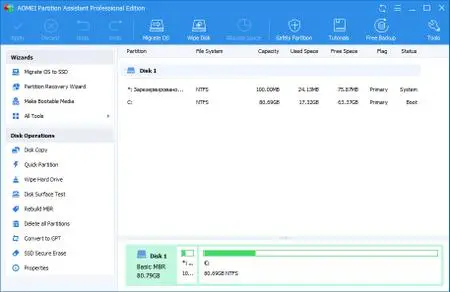
AOMEI Partition Assistant 8.8 Multilingual (All Editions)


00620e1f_medium.jpg

AOMEI Partition Assistant 8.8 All Editions Multilingual | 24.3 Mb
​
AOMEI Partition Assistant is a highly-efficient, easy-to-use and multifunction partition management software, with user friendly operations to assist you mange the partitions of your hard drives. Under the help of Partition Assistant, you can easily & fast create/delete and merge/split the partition and the most advantage is that it resize/move your partition to readjust the partition volume on the basis that it ensures the security of your data.


AOMEI Partition Assistant Professional Edition is reliable and professional disk partition software for computer. It provides you with the most popular disk partition technology which snap-in Basic Disk Partition Manager, Convert dynamic disk to basic and Dynmiac Disk Partition Manager. This professional tool could help you manage Primary partition, Logical Partition, Simple, Spanned, Striped(Raid0), Mirrored(Raid) and RAID-5 volume.

Main Capabilities:
Extend/Shrink partition
Resize/Move partition
Merge/Split partition
Allocate Free Space
Copy disk/partition
Create/delete/format partition
Set partition label
Wipe partition/wipe hard drive
Rebuild MBR
Convert to GPT/MBR disk
Disk surface test
View properties of partition and disk

Advanced Capabilities:
Change and Remove drive letter
Hide and Unhide drive
Convert Logical to Primary or contrary
Set drive as active
Convert FAT/FAT32 to NTFS
Check partition
Wipe unallocated space
Change partition type
Change serial number
Partition Alignment

Disk & Partition Wizard:
Extend Partition Wizard
Disk Copy Wizard
Partition Copy Wizard
Migrate OS to SSD or HDD
Partition Recovery Wizard
Create Bootable CD Wizard

Operating System:
PRO: Windows 10, XP, Vista, 7 (SP1 included), 8 and 8.1, Windows PE, both 32/64 bit
Unlimited, Technician and Server: Windows XP/Vista/2000/7/8/8.1/10, Windows Server 2000/2003/2008/2012/2016 (included R2 version), Windows SBS 2000/2003/2008/2011 and Windows Home Server

Home Page -
Код:
https://www.extend-partition.com/


-:DOWNLOAD FROM LINKS:-

RapidGator
Код:
https://rapidgator.net/file/3430529c0d207194518a1d4797815119/AOMEI.Partition.Assistant.8.8.rar.html

NitroFlare
Код:
https://nitroflare.com/view/07C05DC2E8AD6B4/AOMEI.Partition.Assistant.8.8.rar

​
 
CoolUtils PDF Combine Pro 4.2.0.23


2005061757420087.png


File size: 93.2 MB
​
Do you need a utility that could combine several PDF files into one PDF? PDF Combine can do this easily. Are you looking for a program that could be easy-to-use and have enough options to satisfy your requirements? PDF Combine is the most efficient and handy program available in the market. And, you will be happy with the price!

PDF Combine from CoolUtils easily:
- Combines different pages of invoices, bank statements, contracts, or e-books
- Allows the selection of as many PDF files as you like
- Combines files by folders or common name part.
- Keeps your folder's structure, if you combine subfolders within a folder.
- For e-books PDF Combine can create a Table of Contents. Each file name of the combined files becomes a bookmark. You can set your own bookmarks as well. So you get easy navigation within the combined PDF file.
- Sets document properties (key words, author, creator, etc.)
- Encrypts PDF (you can allow or forbid users to print/annotate/modify PDF file)
- Signs combined PDF with your digital signature
- The Pro version combines Word, XLS, RTF, TXT, TIFF, JPEG files into one PDF.
- New! PDF Combine can add headers and footers to PDF pages. So you may add date or page count to each page of the output PDF document.

The interface of the program is so simple that even a newbie will master it in seconds. Check the files that you want to combine, set the destination folder and press Start! Also, PDF Combine may be run from the command line to be launched from within other programs.

Our pricing is clear and concise. Pay once you get all the upgrades and fast technical support for 1 year free. All emails are answered within 1 working day. That's right! No additional charges! Want a discount? To combine PDF files on Windows web or SQL servers use PDF Combine X (includes Active X for registered users, has no GUI).

Key Features:
- Creates table of contents
- Combines PDF files by folders
- Combine PDFs by common name part
- Creates bookmarks
- No need for Adobe Acrobat
- Command line and GUI
- Fast and accurate
- ActiveX and Server version
Whats NewUpdates: official site does not provide any info about changes in this version.


-:DOWNLOAD FROM LINKS:-
RapidGator
Код:
https://rapidgator.net/file/1dffadcbe6e26bc05f9958c9a2d34853/PDF_Combine_Pro_4.2.0.23.rar.html

NitroFlare
Код:
https://nitroflare.com/view/573B6629B178ECF/PDF_Combine_Pro_4.2.0.23.rar

​
 
Ableton Live Suite 10.1.13 (x64)


2005061800360102.jpg

Ableton Live Suite 10.1.13 (x64) Multilingual | 1.87 GB
​
Live is fast, fluid and flexible software for music creation and performance. It comes with effects, instruments, sounds and all kinds of creative features-everything you need to make any kind of music. Create in a traditional linear arrangement, or improvise without the constraints of a timeline in Live's Session View. Move freely between musical elements and play with ideas, without stopping the music and without breaking your flow.


What's New in Ableton Live Suite 10:

Create with new devices
Meet Wavetable, Echo, Drum Buss and Pedal: new devices that mean colorful new sounds are possible with Live's instruments and effects.

Stay in the flow
You'll find improvements to Live that help you stay in the flow at every stage of your creative process, whether you're getting ideas down, organizing your setup or editing the details of your music.

Do even more from Push
Live 10 brings new functionality and new high-res visualizations to Push. Now you'll spend even less time with the computer-whether you're composing ideas, editing MIDI or shaping and mixing sounds.

New library of sound
With new collections of Packs, Live 10 has more sounds that are ready for finished music, right out of the box. They're set up for tweaking to your needs or taking in different directions. Plus the library has been reorganized to make it easier to find what you're looking for.

Max for Live - no limits, built in
Max technology is now fully integrated into Live 10 Suite. No additional download or set up is required to create with and customize Max For Live devices. They just work. Plus new devices and capabilities bring more possibilities for musicians and device developers.

Live 10 Minimum System Requirements:

Windows:
- Windows 7, Windows 8 or Windows 10
- 64-bit Intel® or AMD multi-core processor. Intel® Core™ i5 processor or faster recommended.
- 4 GB RAM (8 GB or more recommended)

Homepage -
Код:
https://www.ableton.com


-:DOWNLOAD FROM LINKS:-

RapidGator
Код:
https://rapidgator.net/file/f2d456fd94a348e9c519d4635037faa5/ABS.10.1.13.part1.rar.html
https://rapidgator.net/file/5eb5c351839204b02d11144d2c8edff9/ABS.10.1.13.part2.rar.html

NitroFlare
Код:
https://nitroflare.com/view/70C96070B98A2BC/ABS.10.1.13.part1.rar
https://nitroflare.com/view/3AF5A22DF7E09D9/ABS.10.1.13.part2.rar

​
 
Назад
Сверху