• Здравствуйте. Сайт заработал в архивном режиме форум www.old.nado.in

Dl4ever Software

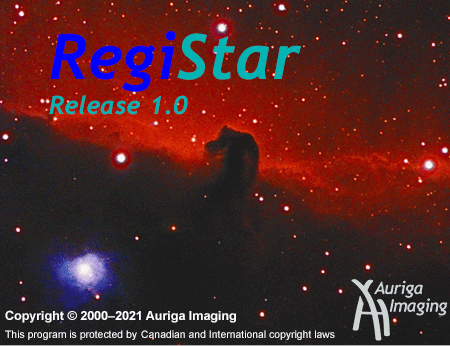
RegiStar 1.0.10 Build 9334

UQSzru7-I9jp-Ju-Kwn-Le7-U1m15s-Upbgdo-R.png

File Size: 22.5 MB | (x64)
​
RegiStar is a one-of-a-kind program that fully automates the task of aligning digital astronomical images. RegiStar shifts, rotates, flips, and deforms as needed to precisely align images, even if they are at different scales or orientations or have been produced with different optical systems. RegiStar works on digital or film images, automatically rejecting noise including hot pixels. RegiStar can register all images in a directory with a single command, and has other powerful batch-processing capabilities.

RegiStar is an image alignment, or registration, program that was designed to work specifically with astronomical images. RegiStar finds the stars in an image, and uses their positions to align this image to another image or group of images. RegiStar uses a sophisticated matching algorithm that allows images at different scales and orientations to be registered. RegiStar automatically corrects for geometric distortions including reflections, so it works on images taken with different optical systems. Also, it works on image pairs that have only a small overlap. RegiStar accurately registers most images that have at least a 1% overlap and at least 10 stars in common, even if they contain a large amount of noise such as hot pixels.

RegiStar requires no user input to complete a registration, other than the specification of the images. The matching and alignment are performed automatically without the input of any matching points or parameters.

RegiStar includes the capability of processing several images at once, in a batch. An entire directory of images can be registered using a single command, and several other commands can also handle multiple images.

RegiStar also includes some tools to assemble and manipulate images after they have been registered. These tools were designed specifically to automate tasks commonly done by digital astrophotographers, such as forming mosaics, forming tricolor images, and stacking exposures.

TIFF, JPEG, and FITS images are supported. RegiStar supports 8- and 16-bit depth internally, but will read higher depth FITS images.

RegiStar is not an image-editing program. It is designed to register and assemble images, and, except for the ability to calibrate one image to another, does not have any commands for adjusting brightness or contrast, removing flaws, or otherwise editing images. It is assumed that RegiStar will be used in conjunction with another program that has these capabilities. RegiStar is designed so that other programs can easily be used together with it.

What's new
Credits: @ByTESRam/Tsrh

-:DOWNLOAD FROM LINKS:-
NitroFlare
Код:
https://nitroflare.com/view/C2496E602B09BF8/RegiStar.1.0.10.rar

RapidGator
Код:
https://rapidgator.net/file/b8162faf12f6edf1ec3763686804ab76/Digital_Signer_Lite_11.3.0.0.rar.html
​
 
DikDik 4.4.0.0


bo6cn0-PIAa0duxck-Zh-Xmw-Ob-Slq-Pwzc-Xz.jpg

Windows x64 | File size: 52 MB
​
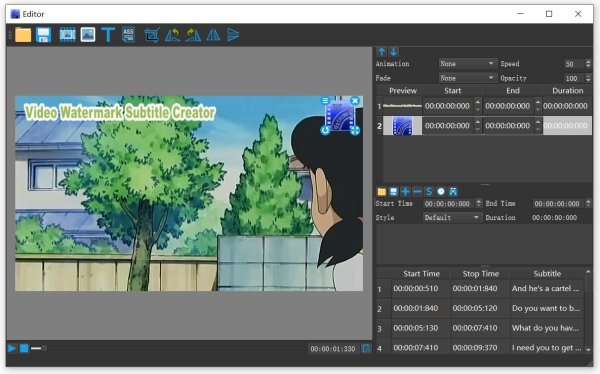
We're rebranding Video Watermark Subtitle Creator as DikDik. The software is an best video watermark software for editing video, adding watermark and subtitle, It can add video,audio, image, words and subtitle in WYSIWYG, and can set time of appearance, position, size and animated effects for watermark and subtitle to video, and preview at will. It can add watermark and subtitle to videos in batch, splitting and merging video in batch.

Put watermarks to videos in batch
1. Edit WordArt effects in WYSIWYG.
2. Create dynamic watermark effects (e.g. Expand, Scroll, Flash and Fade In).
3. Insert coypright symbols C, R or TM to video.
4. watermarks (video,pictures, text).

Add subtitles to videos in batch
1.Edit subtitle in WYSIWYG.
2.Create dynamic subtitle effects (e.g. Expand, Scroll, Flash and Fade In).
3.Add .srt or .ssa subtitles to videos.

Split video in batch
1.Set number of parts or a duration of each clip.
2.Set start and end points for every part.

Resize videos in batch
1.Video resizing serves the same purpose as splitting. Video resized or video spilting.

Merge videos in batch
1.Add title sequence to videos in batch.
2.Add tail leader to vides in batch.

Convert videos in batch
1.Support multi-core processor and concurrent conversion of multiple files.

Extract sounds from videos in batch
1. Convert videos to mp3
2. Merge multiple mp3 files into one.
3. Split an MP3 into multiple MP3s.

System Requirements: Windows 7, 8, 10 (64 bit)

У Вас недостаточно прав для просмотра ссылок. Войдите или зарегистрируйтесь.

-:DOWNLOAD FROM LINKS:-
NitroFlare
Код:
https://nitroflare.com/view/8ABB9B54496BF76/DikDik_4.4.0.0.rar

RapidGator
Код:
https://rapidgator.net/file/0a50be1816b29ff359e0b02cbccd20d0/DikDik_4.4.0.0.rar.html

​
 
BluffTitler Ultimate 15.3.0.2 Multilingual


1619126550-blufftitler-ultimate.jpg

Windows (x64) | Languages: Multilingual | File size: 56.1 MB
​
Create dazzling 3D titles for your videos with BluffTitler. Want to impress your friends and clients with cool 3D titles? But don't want to spend a fortune on professional 3D animation and video titling software? BluffTitler is the easiest way to add spectacular 3D text animations to your photos and videos! Other 3D programs always seemed too hard to learn and too expensive to justify. But thanks to BluffTitler, I can finally create all of the cool animations I only dreamed of before!

Effects that can be created with BluffTitler include:
• golden beveled titles
• blood dripping titles
• JPG textured titles
• MPG textured titles
• slimy titles
• hairy titles
• exploding titles
• reflection mapped titles
• twisted titles
• cartoon shaded titles
• golden glowing titles
• spooky lightened titles
• titles with silver spikes
• jumbling titles
• inverted titles
• bouncing titles
• powerfield emitting titles
• titles with flying hearts
• pumping titles
• plasma backgrounds
• background videos morphing into donuts
• particle effects
• MP3 audio
• morphing JPG pictures
• exploding video backgrounds
• fractal backgrounds

У Вас недостаточно прав для просмотра ссылок. Войдите или зарегистрируйтесь.


-:DOWNLOAD FROM LINKS:-
NitroFlare
Код:
https://nitro.download/view/C17194367A3BA48/BluffTitler_Ultimate_15.3.0.2.rar

RapidGator
Код:
https://rapidgator.net/file/9735b4dc42d26620dcab84e5af944ff5/BluffTitler_Ultimate_15.3.0.2.rar.html

​
 
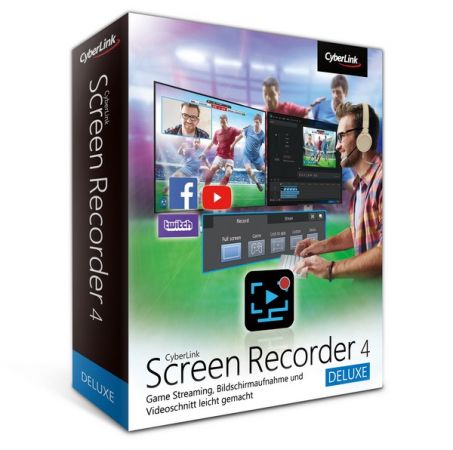
CyberLink Screen Recorder Deluxe 4.2.7.14500 Multilingual


th-r-QE2n-Bfp9-Kuwz-C4j-DLM7-Jt-Gk-TBi-Fme-JO.jpg

Languages: Multilingual | File Size: 342.98 MB
​
CyberLink Screen Recorder 4 delivers robust desktop capture and video streaming in a single application. No longer do game casters and online content creators need to juggle multiple applications or services for multistreaming video, or editing desktop capture to publish on YouTube or Facebook. Screen Recorder couples the easy-to-use editing features of PowerDirector - The No.1 Choice for Video Editors - with responsive, high-quality screen casting and capturing technology, making it the all-in-one solution for recording or streaming gameplay, vlogging, or sharing screen content with an online audience.

For Gamers & Streamers
Go beyond just streaming in-game action and start creating content that engages with your followers on Twitch, YouTube or Facebook. Integrate webcam commentary into livestreams, or record and edit gameplay to focus on the best bits.

For YouTubers & Vloggers
Powered by CyberLink's industry-leading video editing tools Screen Recorder is more than just screen capturing software. Record & edit content to provide your audience with videos that are detailed, high-quality, and informative.

For Work & Business
Make presentations more interactive with screen sharing through livestreams. Record video conferences, or create more effective training material by recording your presentations and editing them quickly with easy-to-use tools.

Livestream to Twitch, YouTube and Facebook (Enhanced!)
Using Screen Recorder you can connect directly to the platform of your choice and stream video in up to Full HD quality. Livestreaming gameplay to Twitch, YouTube or Facebook is a great way to share your love of gaming with the world.

Use a Custom Streaming Server (NEW!)
Not only does Screen Recorder let you stream to your favorite platforms like Twitch, Facebook & YouTube Live, it also lets you use custom streaming servers to reach your audience.

Multistream to Twitch, YouTube, Facebook and Custom Servers (NEW!)
Screen Recorder lets you multistream to up to five different services. This means you can simultaneously livestream to Twitch, YouTube, and Facebook, plus up-to two additional custom servers. It's an easy to reach a wider audience without the need for additional relay servers.

Reduced System Footprint
We understand that CPU and GPU processing power is vital for smooth gameplay and streaming. While other screen capturing solutions consume far too much of the precious processing power that gamers require, we've taken every step possible to ensure Screen Recorder minimizes CPU & GPU load as much as possible for your gameplay.

Integrate Your Webcam into Livestreams (Enhanced!)
Share more than just your gameplay. Share your gaming secrets, reactions and commentary with your viewers by integrating webcam & microphone audio and video on top of your in-game footage, even when you're streaming from a gaming console. You can also use chroma key to apply a custom background.

Record with Chroma Key (NEW!)
Get creative when adding webcam footage to your screen recordings. Remove the background from your webcam footage thanks to a powerful chroma key engine, and replace it with your own cool, creative background image.

Add Overlay Objects to Recordings (NEW!)
Overlay objects to your desktop and webcam recordings. It's an easy way to brand your videos, promote a sponsor, or add a unique watermark to your recordings.

Customizable Hotkey Support (Enhanced!)
Get recordings started quicker, mute and unmute instantly, pause without having to touch your mouse, and quicklt take screenshots by setting customized hotkeys for recording and streaming.

Record from PC or Connected Device
Whether you're a vlogger, gamer, or how-to expert, Screen Recorder will have you producing high-quality, detailed videos in next to no time. Record your whole screen, just a window, or lock to a specific app. For gamers, you can record gameplay from your PC even in exclusive mode, and also capture directly from your gaming console!

Easy-to-use Editing Tools (Enhanced!)
Don't spend hours figuring out how to edit your footage. Screen Recorder comes with a remarkably simple editing interface that allows you to quickly import and trim your footage, add titles and transitions, and also now add two unique audio tracks.

Real-time Webcam & Mic Preview (NEW!)
Setup recordings faster with real-time webcam & mic previews. See exactly what you'll look like before you hit record using the preview window, and quickly adjust resolution and settings. The microphone preview allows you to quickly adjust volume and preview audio levels.

Record & edit presentations
Allow staff to review presentations by recording, editing, and publishing them online. Perfect for visually explaining things to collegues, creating tutorials or interactive visual training guides for your teams.

Livestream directly to your audience
It's the easiest way to hold interactive presentations and connect with customers and staff.
Release Notes- Minor bug fixes
System Requirements:
- Microsoft Windows 10, 8.1, 7 SP1 (32-bit and 64-bit)
- Intel Core™ i-series or AMD Phenom® II and above
- Desktop recording: 1GB VGA VRAM or higher
- Game recording: 3GB VGA VRAM or higher
- 2GB Memory
- 600MB for product installation
- Windows compatible sound card is required


-:DOWNLOAD FROM LINKS:-
NitroFlare
Код:
https://nitro.download/view/AA1CCAEDF2A5420/Dl4eVeR.SR.4.2.7.14500.rar

RapidGator
Код:
https://rapidgator.net/file/86f2773a67a3a37d72c4dfdc5af000c5/Dl4eVeR.SR.4.2.7.14500.rar.html

​
 
Symantec Encryption Desktop Professional 10.5.0 MP1


th-om-W30of5mfzi-YSGsx-FQ4b-XUg-Sif-Ude-Bs.jpg

Languages: Multilingual | File Size: 110.1 MB
​
Symantec Encryption Desktop Professional is a comprehensive suite of encryption applications which provides flexible, multi-layered encryption by bundling Drive Encryption to secure the files stored on local hard drives, and Desktop Email Encryption to secure confidential data in email.

Key Features
- Hard drive encryption software locks down the entire contents of a laptop, desktop, external drive, or USB flash drive, including boot sectors, system, and swap files.
- Enables encrypted email and secure AIM® Instant Messages.
- Creates storage-independent encrypted containers for transport and sharing of specific files using included utilities; PGP Self-Decrypting Archive, PGP Virtual Disk, and PGP Zip.
- Includes PGP Shredder which can completely destroy unwanted disk-based files and folders.
- Drive Encryption can be centrally deployed and managed by Symantec Encryption Management Server.

Key Benefits
- Secures email without burdening users, to improve compliance with policies and regulations without hindering productivity.
- Allows users to easily and transparently share encrypted files and folders, improving data security without impacting user productivity.
- Management by Encryption Management Server centralizes creation, deployment and management of data security policies and reporting.

New Features:

Compatibility with Microsoft Windows 10
This release supports the installation of Symantec Encryption Desktop on systems running Microsoft Windows 10, both 32- and 64-bit versions.

User Interface for Microsoft Windows Pre-Installation Recovery
Microsoft Windows Pre-Installation (WinPE) provides a bootable recovery tool to recover data from an encrypted drive that has been damaged or corrupted. You can now boot to a system that has been damaged or corrupted using a WinPE recovery CD or USB drive and then use the new graphical user interface to recover an encrypted drive.

New Pre-Boot Smart Card Compatibility
Added compatibility with Gemalto TOP DM GX4 72k (FIPS) cards for pre-boot authentication for Symantec Encryption Desktop for Windows.
Release NotesWhat's new in this release:
The Symantec Encryption Desktop 10.5 Maintenance Pack 1 (MP1) for Windows release includes support for Windows 10 version 20H2 and fixes for various customer-reported issues.

- Support for Microsoft Windows 10 version 20H2
- This release supports installation of Symantec Encryption Desktop on Windows 10, version 20H2 (October 2020 Update), Enterprise, and Pro editions, 32-bit and 64-bi
System Requirements:
- Windows 8.1, Windows 10, Windows Server 2012, 2016, 2019 (32-bit and 64-bit editions)
- 1 GB of RAM
- 300 MB hard disk space


-:DOWNLOAD FROM LINKS:-
NitroFlare
Код:
https://nitro.download/view/8A80113A1180E79/Dl4eVeR.Encryption.Desktop.10.5.0.MP1.rar

RapidGator
Код:
https://rapidgator.net/file/08585939631aadea05e763f5b854cb1d/Dl4eVeR.Encryption.Desktop.10.5.0.MP1.rar.html

​
 
Atrise Lutcurve 4.0.4 Multilingual


th-1-SZpe7x-KHu-Il-RTXs6-Xj-Je-JBDW3dj-UXYf.png

File size: 1.0 MB
​
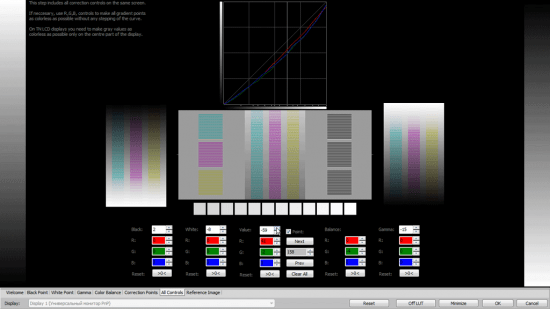
This program will help you to calibrate your monitor without a hardware calibrator device. High accuracy calibration is achieved by the high sensitivity of the human eye to neutral-color shades. The generated test patterns are based on an scientific article "Measurement of display transfer characteristic (gamma)" by A. Roberts. Multiple display configurations or notebook displays are supported.

As compared to other programs in this class, Lutcurve has high accuracy and flexibility in configuring virtually any monitor. This allows you to get great results even in low-quality TFT LCD displays based on TN-matrix. Best results are on IPS and PVA.

Users Who Should Use Calibrated Displays
Users working with videos and photos.
Designers and artists who work with drawings.
Professional photographers and enthusiasts.
Software developers and web designers.
Just web surfers who love the image quality.

Disadvantages of Non-calibrated Displays
Inaccurate reproduction of colors and shades.
The loss of image detail in dark and light areas.
Incorrect image brightness and gamma.
Ugly and unkempt appearance of web pages.
Eye strain when working at a computer.

Calibration of Any Display
Atrise Lutcurve lets you correct nonlinearity of displays, especially noticeable on LCD monitors. The count of calibration points is not limited, which means you can calibrate even an aging display. The quality of the calibration depends on your carefulness and may be very approximate to hardware calibration results and better.

Easy Steps to Calibrate
The program walks you through adjustments in a step-by-step manner.

See Before and After
Once the display is calibrated, it takes a bit of time to get over the gee whiz factor that comes from seeing that the images on your display closely match reality.

Technical Specifications for LUT
Calibration points: up to 256 (full range).
LUT precision: 16 bit (full range).
Curve interpolation: smooth spline.

System Requirements
OS: Windows® XP, Vista, 7, 8, 8.1 or 10. 32 or 64 bit.
Manufacturer video card driver installed. Most default Windows drivers cannot change the LUT Table, so visit AMD, NVIDIA or Intel web site to get better one.
Manufacturer ICM Profile is recommended.
Minimal display resolution: 1024x768.


-:DOWNLOAD FROM LINKS:-
NitroFlare
Код:
https://nitro.download/view/2506B91A53C0530/Dl4eVeR.Lutcurve4.rar

RapidGator
Код:
https://nitro.download/view/2506B91A53C0530/Dl4eVeR.Lutcurve4.rar

​
 
SDL Trados Studio 2021 SR1 Professional 16.1.5.4270


r-GKu-Dy-SYDrh-RXH5-PGbo-Ah5xse-V0j-EXy-E.png

Languages: English | File Size: 343.41 MB
​
Translate faster and smarter while presenting a unified brand to the world. SDL Trados Studio is the complete translation environment for language professionals who want to edit, review and manage translation projects whilst in the office or on the move. Deliver world-class localized content to support your global sales and marketing efforts with software trusted by over 270,000 translation professionals worldwide.

Key Benefits
Discover a wealth of innovative features and create high-quality translations, faster.

- Translate more content.
- Maintain brand consistency.
- Increase team productivity.
- Reduce translation cost.
- Easily manage translation projects.

Powerful translation memory technology
Easily reuse previously translated and approved content across all of your projects with intelligent translation memory (TM) technology. The more you add to your TM, the faster your team can automatically match and translate subsequent translations, increasing translator productivity by as much as 80% and improving consistency across your content.

Sophisticated terminology management
Protect your brand values and ensure a consistent tone of voice across all languages by managing terminology. Your translation teams can create and share approved terminology across the organization to do more in less time, maintain consistency across every translation, all while reducing costs.

Efficient translation project management
Create and deliver translation projects quickly and easily in multiple languages with the project management capabilities found in SDL Trados Studio and SDL Trados GroupShare. Combine Studio with GroupShare for volume projects and complete control over security.

Innovative Neural Machine Translation
Our neural machine translation keeps improving from input by receiving and learning corrections dynamically. Incorporate our unique self-learning machine translation technology into existing translation workflows to complete projects faster and double your productivity levels.

Collaborate for even greater efficiency
Reduce the time required to complete translation projects. Enable your team to work together seamlessly with secure, shared access to centralized translation files, translation memories, and terminology.

Discover What's New in SDL Trados Studio 2021:
SDL Trados Studio 2021 is the ground-breaking, dynamic translation solution offering true flexibility for busy translators and project managers. Work on the Studio desktop app on your PC or laptop for maximum productivity, plus keep projects moving when you're away from your desk through SDL Trados Live - Studio's new cloud companion that works seamlessly across PC, mobile, and tablet.

Studio 2021's new, powerful features and enhancements will ensure everyone in your team achieves their full potential. The future way of working is here. The future of translation software is Studio 2021.

Flexibility to work wherever you are
The dynamic combination and flexibility offered by Studio 2021 and SDL Trados Live will benefit everyone - from individual translators through to project managers running large teams.

Higher quality translations can be delivered faster as you can:
- Manage your translations on the Studio 2021 desktop app when you're in the office
- Control your projects on any device, such as a tablet, through SDL Trados Live or the new SDL Trados Live mobile app, when you're away from your desk.

Designed to raise your productivity
When under pressure to deliver increasing volumes of translations within short timeframes, it's essential to find ways to be more productive.

Studio 2021 offers many enhancements:
- Improved automation and quality assurance (QA) with the ability to customize your recognition settings for Placeables such as dates, times, currencies, and measurements
- More powerful search with an upgrade to the Advanced Display Filter
- Enhanced Translation Quality Assessment (TQA) interface.

Personalize your Studio for increased functionality
It's now easier than ever to personalize your Studio. You can access the SDL AppStore directly from Studio 2021 making it faster and easier to find, manage, update, and remove apps with fewer clicks and effort.

Apps are used by thousands of our customers to customize and extend the functionality of Studio to:
- Improve and automate your translation, review or terminology processes
- Connect to third-party machine translation providers
- Fine-tune your verification checks to enhance the quality of your translations.
Release NotesSystem Requirements:
- SDL Trados Studio 2021 will work on Windows 7*, Windows 8.1 and Windows 10. We recommend Windows 10.
- As a minimum requirement, we recommend an Intel or compatible CPU-based computer with 8 GB RAM and a screen resolution of 1024x768.


-:DOWNLOAD FROM LINKS:-
NitroFlare
Код:
https://nitro.download/view/F33417319D8D959/Dl4eVeR.SDL16154270.rar

RapidGator
Код:
https://rapidgator.net/file/1c682c3dce87f664311537e270446be9/Dl4eVeR.SDL16154270.rar.html

​
 
FameRing Smart Cutter for DV and DVB 1.9.7


th-4-FDYLHn8ujjki-ISzz-ZZDc-YO4b4-TX5-W7a.png

File size: 11.5 MB
​
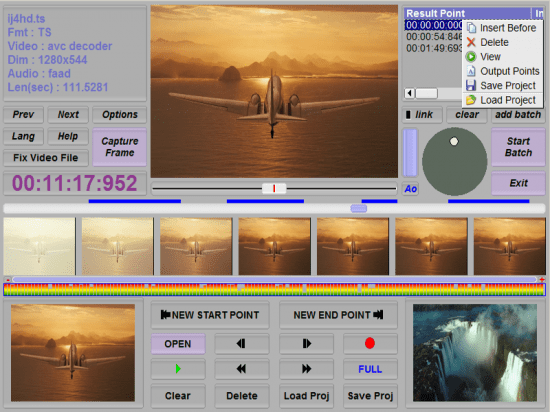
The world's first H.264 AVCHD MPEG2 frame accurate cutter without re-encoding! Cuts videos from DV Camcorder and HD PVR quickly in several mouse clicks. Supporting M2TS, TS, MP4, MOV, PS, TP, TRP, MTS, MPG, VOB; H.264 AVC, AVCHD, MPEG2, DVD etc. Especially, it is Frame Accurate! You can observe each scene thoroughly, cut or merge segments of movies. Cut commercials out of video stream.

Especially, only small parts on start and end points will be re-encoded, the middle part will remain untouched, lossless. This gives highest speed while reserving highest video quality. So it is called 'Smart Rendering'.

No need to be worried about formats, frame rate or file sizes, the functions of video join, split and cut can be easily achieved by Smart Cutter. The video editing software allows you to edit video files in all popular formats from DV Camcorder and HD PVR. All subtitles and audios in the movie will also be cut and saved without re-encoding.

As a video joiner, splitter and cutter, Smart Cutter has an intuitive interface and makes it easy to turn original videos into works of art. And also you can watch the video in the preview window. Smart Cutter is well worthy of having a try.

- Join multiple videos and combine them into one
- Split one video into several segments
- Cut off the unwanted segments of your video

Smart Seek to locate any frame in movies easily and fast:
Since version 1.2.0, the long slider's seeking speed is much faster than old versions, it makes fast jumping through different scenes in the H.264 AVCHD video much easier.

This major improvement is based on our new technology 'smart seek', which was accomplished by our developers after hard optimization. Since long time ago, the mostly experienced difficulty while editing H.264 AVCHD video was: it is very hard to locate the video frame you desired in the H.264 AVCHD movie; after you dragged the mouse wheel, it usually takes too much waiting before the video scene you
wanted to be displayed.

But now, with the help of 'smart seek', you can reveiw and jump to the H.264 AVCHD video scenes as fast as you did to AVI MPEG and other 'simpler' video formats. After you found the scene you needed by the long slider, the short slider will help you to locate every single video frame efficiently. Now, You need not to click the mouse button so many times, step by step dozens(H.264 AVCHD mostly has GOP of more than 33 frames) of frames to your desired one.
Just drag the short slider, each frame will be shown continuously and smoothly. You can decide the cut point very easily and fast.

Stream Fix to ensure a correct output:
Unlike the MPEG2 video streams, the H.264 AVCHD video takes some special elements into its stream structure for playback control. If some video cutter simply chops the H.264 AVCHD video stream apart, then feeds the cut movie into some post-processing pipelines, such as transport stream re-multiplexing, Blue Ray disk authorizing; then, there may(even must) arise the problems of green glitch, mozaic, or audio/video in-sync.

The inner stream-fix function will solve such kind of problems. It was done automatically during the process of video transcoding.

Accurate grabber to capture any frame in movies:
Capture any frame in all popular video formats. Fit for professional users.


-:DOWNLOAD FROM LINKS:-
NitroFlare
Код:
https://nitro.download/view/3104E27B06EB557/Dl4eVeR.SmartCutter1.9.7.rar

RapidGator
Код:
https://rapidgator.net/file/99dce66e8a6b415b0fc3e6787eee3c8a/Dl4eVeR.SmartCutter1.9.7.rar.html

​
 
Adobe Acrobat Pro DC 2021.001.20155 Multilingual


th-zqu-R4-G4-LSc-UGUo-Wi-PQht-Fak-Mikmfo-Zx-Y.jpg

File size: 974 MB
​
Adobe Acrobat Pro DC is the leading PDF converter and much more. Adobe Acrobat Pro DC software lets you deliver professional PDF communications. It's packed with smart tools that give you even more power to communicate. Create and edit PDF files with rich media included, share information more securely, and gather feedback more efficiently.

Adobe Acrobat Pro DC software is the advanced way for business professionals to create, combine, control, and deliver more secure, high-quality Adobe PDF documents for easy, more secure distribution, collaboration, and data collection.

Assemble electronic or paper files into reliable PDF documents that are easy to share with others using free Adobe Reader. You can assemble even Web sites, engineering drawings, and e-mail.

With Adobe Acrobat Pro DC you can manage document reviews, synthesizing feedback from multiple reviewers while preserving document format and integrity. Extend commenting capabilities to anyone using Adobe Reader. Windows users can design intelligent Adobe PDF forms that include business logic, such as calculations and data validations, to help increase the accuracy of data collection while reducing the costs of manual data entry.

Use Adobe Acrobat Pro DC to create high-impact PDF communications, collaborate more easily, and streamline reviews. Adobe Acrobat Dynamic PDF helps you get more done - easier, faster, better.

Operating Systems: Windows Server 2008 R2, 2012, 2012 R2 and Windows 7, 8, 8.1, 10 (32-bit and 64-bit).


-:DOWNLOAD FROM LINKS:-
NitroFlare
Код:
https://nitro.download/view/C3339D019A7BF66/Dl4eVeR.AdobeAcrobatProDC2021.rar

RapidGator
Код:
https://rapidgator.net/file/0e2a63bb8fb8dd26973de45b8f410b62/Dl4eVeR.AdobeAcrobatProDC2021.rar.html

​
 
ICard Xpress Pack 5.0 5.1 Multilingual


6-Ok-YXEqok3-Dvt-IOOv-Jr-QBfyj-CIJ6r-NIN.jpg

File size: 392/405 MB
​
Ultimate ICARD solution for everyone! Get Data From Anywhere. Flexible data connectivity for each type of ICARD need. Multi format supporting. Import data files in CSV and XLS formats. Maintain fonts and languages of data as it is. Dynamic mapping of data with fields on i card design.

Database
Multi format supporting. Import data files in CSV and XLS formats. Maintain fonts and languages of data as it is. Dynamic mapping of data with fields on i card design.

Data Entry
Simplified data entry process with the fields of user's choice. Make data entry more smarter by just defining type of data field from text, list, time, date, multiline text, etc.

Get Photos From Anywhere
Multiple ways to bring in photos.

Database
Import photos with data. A column in excel sheet with photo's file names and photo folder path will import and match photos with data.

Folders/Gallery
Simplified individual photo selection from folders. ICARD Xpress mobile app takes you to gallery for photo selection.

Quick Photo Assignment
Bulk photo assignment to contacts. Drag and drop photos on contacts in a simple way.

Camera
Camera connectivity for on the spot photo capturing at events. Suitable for exhibitions, secured premises. Capturing photo with integrated or connected webcam. Zooming and panning in live camera input for accurate capturing.

Edit Photo
Make photos ready for ICARDs.

On Screen Crop & Rotate
Single screen photo management with data. Zoom & pan photo in reference to face area guide to fulfill face area visibility condition. Automatic cropping according to visibility set by you. Clockwise and counterclockwise rotation with one click.

Advance Editing
Further color correction of photos to give it a fine touch. Manage RGB and brightness, contrast of the photo. More editing possibility with tools like curve and level.

Design ICard
Design ICARDs before you get data.

Flexible Data Fields
Data field flexibility according to business type. Flexibility in terms of defining additional fields according to requirements. Even more easy data field building with types like text, list, date, time, multiline texts. Automatic ID number generating with desired prefix and suffix.

Barcode
Automatic barcode generation of any data field. Different barcode types for numeric and alphanumeric data fields.

Whats New:
Updates: official site does not provide any info about changes in this version.


-:DOWNLOAD FROM LINKS:-
NitroFlare
Код:
https://nitro.download/view/9870B0892EC5F5D/Dl4eVeR.ICardXpressPack5.0x64.rar
https://nitro.download/view/F2BFFFA00BDCAFA/Dl4eVeR.ICardXpressPack5.1x86.rar

RapidGator
Код:
https://rapidgator.net/file/68936a19fd5c1aed9b8aeb923ab394f6/Dl4eVeR.ICardXpressPack5.0x64.rar.html
https://rapidgator.net/file/f4620f2277a30a76573e415d28bca627/Dl4eVeR.ICardXpressPack5.1x86.rar.html

​
 
iMyFone AnyRecover 5.1.1.4 Multilingual


th-q8q8-GK05-RUlb-PAm-Q6v1-Ow3-Rb-QPn-Exhmv.jpg

Windows x64 | File size: 110.16 MB
​
Loosing or deleting files that weren't planned for termination is a common issue among users that are storing a lot of data and docs on their systems. While some files can be restored from the Recycle Bin, others are way past that step. This is where iMyFone AnyRecover for Windows comes in, scanning for files that are long gone.

• Restore deleted, lost, formatted or corrupted files from any storage device.
• Recover 1000+ file types: photos, videos, office documents, emails, audios, etc.
• Easily get back all lost files by yourself, no tech required

Intuitive UI
The interface is very simple to use and follow. The app starts with a panel of all categories that can be recovered from. If pan the cursor over the groups, you'll notice some information about that action. Also, every class has its own window from where you can choose what file types you want to scan for, or what partitions to scan.

Also, when if you need to come back to the main pane, click on the orange house icon at the top left of the UI.

Recover data from any environment
iMyFone AnyRecover for Windows can recover files from most of the internal or external environments. You can use it to get files back from HDD, SSD, USB flash drives, or mobile phones. It can also search through the emptied Recycle Bin and formatted or damaged devices.

Want to recover files from your PC or SD card? Let AnyRecover data recovery for Windows help you find any traces of files you have deleted; It can get back lost data from any re-writable storage media you have.

Supports over 1000 file types
This powerful app can detect and recover almost any files used on a daily basis. It covers from the most popular formats to the less known ones as well as older ones.

Furthermore, the tool helps you recover lost files 100% safely without overwriting original data. The recovered files can only be accessed by you.

In conclusion,
iMyFone AnyRecover for Windows is a handy tool that can recover almost any file from some of the most used environments and devices. It's very aesthetic and intuitive, so both technical and in-experienced users can operate it.
Release Notes
1. Fixes some minor bugs.


-:DOWNLOAD FROM LINKS:-
NitroFlare
Код:
https://nitro.download/view/4BDBD716875F5CD/Dl4eVeR.AnyRecover.5.1.1.4_x64.rar

RapidGator
Код:
https://rapidgator.net/file/fdd20fe807d57f3d0b476c2ea4a3a684/Dl4eVeR.AnyRecover.5.1.1.4_x64.rar.html

​
 
Adobe Audition 2021 v14.2.0.34 Multilingual


th-c7-X85rqc9c-Jnxc6e2-Cy-I6dr-Mlt6-Vw-D1g.jpg

File Size: 451.3 MB | (x64)
​
Adobe Audition. A professional audio workstation. Create, mix, and design sound effects with the industry's best digital audio editing software. Audition is a comprehensive toolset that includes multitrack, waveform, and spectral display for creating, mixing, editing, and restoring audio content. This powerful audio workstation is designed to accelerate video production workflows and audio finishing - and deliver a polished mix with pristine sound. Edit, mix, record, and restore audio.Audition is a comprehensive toolset that includes multitrack, waveform, and spectral display for creating, mixing, editing, and restoring audio content. This powerful audio workstation is designed to accelerate video production workflows and audio finishing - and deliver a polished mix with pristine sound.

What is Audition?
Meet the industry's best audio cleanup, restoration, and precision editing tool for video, podcasting, and sound effect design.

Record, edit, and integrate music clips.
This step-by-step tutorial guides you through the robust audio toolkit that is Adobe Audition, including its seamless workflow with Adobe Premiere Pro.

New interactive tutorials, right in app.
Add oomph to your audio. Use the Essential Sound panel to achieve professional-quality audio - even if you're not a professional.

Create a podcast
Learn the basic steps to record, mix, and export audio content for a podcast - or any other audio project..

Remix to fit.
Easily and automatically rearrange any song to fit any duration with Remix in Audition.

Repair and restore
Get best practices for fixing audio, including how to use the spectral frequency display, Diagnostics panel, effects, and more.

System Requirements:
- Processor: Multicore processor with 64-bit support
- Operating system: Microsoft® Windows 10 (64 bit) version 1703 or higher.
- RAM: 4GB of RAM
- Hard disk space: 4GB of available hard-disk space for installation; plus additional free space required during installation (cannot install on removable flash storage devices)
- Monitor resolution: 1920x1080 or larger display
- OpenGL: OpenGL 2.0 capable system
- Sound card: Sound card compatible with ASIO protocol, WASAPI, or Microsoft WDM/MME
- Control surface support : USB interface and/or MIDI interface may be required for external control surface support (see manufacturer's specifications for your device)
- CD burning: Optical drive is used for CD burning (optional)


-:DOWNLOAD FROM LINKS:-
NitroFlare
Код:
https://nitro.download/view/8BBA91E6E268297/Dl4eVeR.Audition.2021.14.2.rar

RapidGator
Код:
https://rapidgator.net/file/946a870cb1dc7c67dd64f0bc711d22a3/Dl4eVeR.Audition.2021.14.2.rar.html

​
 
iPixSoft Flash ScreenSaver Maker 4.0.0


th-q8q8-GK05-RUlb-PAm-Q6v1-Ow3-Rb-QPn-Exhmv.jpg
File size: 33.47 MB
​
iPixSoft Flash ScreenSaver Maker is powerful screensaver software helps you to create animated Screen Savers from photos and music with professional designed templates, transition effects, text captions, funny cliparts, sounds, etc. It enables you to publish an SCR file into your Windows directory or output an installation Exe file.

Key Features of iPixSoft Flash ScreenSaver Maker

Slideshow Management
• Add/Delete/Rename the slide show folders
• Set the slideshow folder path
• Create a new slide show
• Open/Rename/Move/Delete the slide show you have created
Add Photos and Music
• Add up to 500 images in one slideshow
• Edit photos such as brightness, contrast,corp, etc.
• Apply various filter effects to photos
• Add audio file (wav, mp3, wma) as background music
47 Designed Templates
• Simply choose from 65 pre-designed templates
• Template config such as Size, Display and Thumb option
• Change buttons, photo frames for the template
Transition Effects
• 70+ transition effects include swift and push effects
• Controllable transition and photo duration
• Randomize transition effects for slideshow in seconds
Slideshow Decoration
• Decorate with 150+ high quality animated clipart
• Pick from 100+ sounds to make your slideshow more funny
• Add your own swf,jpg,bmp,png files to decorate slideshow
Multiple Output Formats
• Make Screen Saver
Other Highlights
• Add hyperlink to each slide
• Enable and set Intro & Credit Movie

What's new
• official site does not provide any info about changes in this version


-:DOWNLOAD FROM LINKS:-
NitroFlare
Код:
https://nitro.download/view/BFE74647FA4D3DA/Dl4eVeR.FSMaker.4.0.0.rar

RapidGator
Код:
https://nitro.download/view/BFE74647FA4D3DA/Dl4eVeR.FSMaker.4.0.0.rar

​
 
Adobe After Effects 2021 v18.2.0.37 Multilingual


th-r0-Ho-Xz-Vv-ACNZJyh-PPKWEk-Ls-Ed-BOd-K6a-J.png

File Size: 2.58 GB | (x64)
​
Make a big scene bigger. Create cinematic movie titles, intros, and transitions. Remove an object from a clip. Start a fire or make it rain. Animate a logo or character. With After Effects, the industry-standard motion graphics and visual effects software, you can take any idea and make it move.

There.s nothing you can.t create with After Effects.
Animators, designers, and compositors use After Effects to create motion graphics and visual effects for film, TV, video, and the web.

Roll credits. Spin words. Twirl titles.
Create animated titles, credits, and lower thirds. Start from scratch or with one of the animation presets available right inside the app. From spin to swipe to slide .?there are countless ways to make your text move with After Effects.

Explosive effects. Mind-blowing results.
Combine videos and images to send a UFO across the sky or create an explosion . the possibilities are endless. Remove objects like booms, wires, or even people. Apply hundreds of effects to do anything from adding fog to making it snow. And create VR videos to drop your audience right into the center of the action.

Get animated.
Set anything in motion.from logos to shapes to cartoons.with keyframes or expressions. Or use presets to kick-off your designs and get unique results.

Plays well with others.
After Effects works seamlessly with other Adobe apps. Create comps and immediately see how they look in Premiere Pro with Adobe Dynamic Link. Import work from Photoshop, Illustrator, Character Animator, Adobe XD, and Animate. Use Team Projects to collaborate with editors no matter where they.re located. And After Effects is integrated with 300+ software and hardware partners.

Remove objects from video clips fast and easy
Want an object or person gone from your footage? With Content-Aware Fill, remove unwanted items quickly . no need to mask or cut out frame by frame.

Supercharge your animation flow
A JavaScript expression engine delivers up to a 6x boost in performance. And a new Expressions Editor makes writing easier and faster, including automatically identifying errors in your code.

Get depth passes from native 3D elements
Apply depth effects such as Depth of Field, Fog 3D, and Depth Matte so elements look natural . or use depth data to simulate 3D looks.

У Вас недостаточно прав для просмотра ссылок. Войдите или зарегистрируйтесь.


System Requirements:
- Processor: Multicore Intel processor with 64-bit support
- Operating system: Microsoft Windows 10 (64 bit) versions 1703 (Creators Update) and later
- RAM: 8 GB minimum (16 GB recommended)
- 4 GB of GPU VRAM
-Hard disk space
- 5GB of available hard-disk space; additional free space required during installation (cannot install on removable flash storage devices)
- Additional disk space for disk cache (10GB recommended)
- Monitor resolution 1280x1080 or greater display resolution


-:DOWNLOAD FROM LINKS:-
NitroFlare
Код:
https://nitro.download/view/5A558283DE0FC70/Dl4eVeR.Adobe.After.Effects.2021.18.2.0.37.part1.rar
https://nitro.download/view/4FAA9F204363B04/Dl4eVeR.Adobe.After.Effects.2021.18.2.0.37.part2.rar
https://nitro.download/view/6B6C35E9FC08CD3/Dl4eVeR.Adobe.After.Effects.2021.18.2.0.37.part3.rar

RapidGator
Код:
https://rapidgator.net/file/80dc5d63b9391b65dfaacd172ebeb2e2/Dl4eVeR.Adobe.After.Effects.2021.18.2.0.37.part2.rar.html
https://rapidgator.net/file/18c9d9b8c0265f41f9d4e0565451acdf/Dl4eVeR.Adobe.After.Effects.2021.18.2.0.37.part1.rar.html
https://rapidgator.net/file/3672b008c0e2cdc924a37d8972252c05/Dl4eVeR.Adobe.After.Effects.2021.18.2.0.37.part3.rar.html

​
 
Zoom Player MAX 16.0 Build 1600


th-Blemim-Ckb1-Caqn6g-Ipis-SJCLz-KRj-KFtb.jpg

File size: 34 MB
​
Zoom Player is the most Powerful, Flexible and Customizable Media Player application for the Windows PC platform. Based on our highly-touted Smart Play technology, more media formats play with less hassle, improved stability and greater performance Behind Zoom Player's classic media player look, hides a powerful Media Center application designed with a simple 5-Key (up/down/left/right/select) fullscreen navigation interface. The 5-Key system provides simple navigation with advanced interfaces. Interface such as the Media Library, File Browser, Playlist, Color Control, Audio Equalizer, Bookmarks, Play History and many more. Zoom Player's media center simplicity makes it ideal for users with no previous computer experience.

With Zoom Player, you can instantly Convert any PC into a Home Entertainment Center (HTPC) with no specialized hardware requirement or operating system. Zoom Player runs with every version of Windows.

Utilizing Zoom Player's modular design and flexibility, you can easily design a safe viewing environment, limiting or extending functionality, making it ideal for both newbies and professionals.

Zoom Player is fully scalable, supporting the latest media formats and interfaces. New features are incorporated constantly with release schedules and feature integration clearly announced on our support Forum, Twitter and Facebook pages.

Install Center:
Zoom Player's Install Center quickly scans your system for missing or outdated media components and automatically present you with an installation list of recommended updates, keeping your system up to date with the latest technology.

Supported Video Formats:
DVD, BluRay (Decrypted Main Movie playback), Matroska (MKV), MPEG2 Transport (TS/TP/TSP/TRP/M2T/M2TS/MTS/PVA/TOD), H.264 & AVCHD (MPEG4 AVC), H.265 & HEVC, WebM, XVID, DIVX, AVI, Flash Video (FLV), Windows Media (WMV/ASF), QuickTime (MOV/HDMOV), Ogg Movie (OGM), Theora (OGV), Real Media (RM/RMVB), VideoCD (VCD), Super VideoCD (SVCD), MPEG (MPG), MPEG2 Program (M2V/VOB/MOD), MPEG4 (SP/ASP), MPEG4 ISO (MP4), General Exchange Format (GXF), Material Exchange Format (MXF), Media Center DVR (DVR-MS), CamCorder (MOD/TOD), Digital Video (DV), DVCPRO, VP3, VP6, VP7, Motion JPEG (MJPEG), Motion JPEG 2000 (MJPEG2000), Flash (SWF), Cellphone 3GPP (3GP/3G2), FLIC (FLI/FLC) and more . . .

Supported Audio Formats:
MP3, Free Lossless Audio CODEC (FLAC), Advanced Audio Coding (AAC), Windows Media (WMA), OGG Vorbis (OGG), OPUS (OPUS), CD-Audio (CDA), Dolby Digital (AC3), Digital Theatre Surround (DTS), Matroska (MKA), Wave Audio (WAV), SHOUTcast (Streaming), Cell Phone (AMR), Monkey Audio (APE), Real Media (RA), MusePack (MPC), OptimFROG (OFR), Shorten (SHN), True Audio (TTA), WavPack (WV), Apple Lossless Audio Coding (ALAC), LPCM, MIDI, AIFF, MO3, IT, XM, S3M, MTM, UMX and more . . .

Supported Interactive Formats:
DVD, Hypertext Markup Language (HTML), Flash (SWF).

Supported Image Formats:
JPEG (JPG), PNG, GIF, BMP, ICO, WMF, EMF, JFIF, RLE, WIN, VST, VDA, TGA, ICB, TIFF, FAX, EPS, PCX, PCC, SCR, RPF, RLA, SGI, BW, PSD, PDD, PPM, PGM, PBM, CEL, PIC, PCD, CUT, PSP, PN and more.


-:DOWNLOAD FROM LINKS:-
NitroFlare
Код:
https://nitro.download/view/B3EBC83E1BD0C06/Dl4eVeR.ZoomPlayer15.rar

RapidGator
Код:
https://rapidgator.net/file/0c8396dcc2239baa11d5df6bc6de3a86/Dl4eVeR.ZoomPlayer15.rar.html

​
 
Topaz Gigapixel AI 5.5.2


au-Wt-Bkt-Tva2to3-U3vf-Ajx0-Em0y-MCx2-RF.jpg

File Size: 1.7 GB | (x64)
​
Beautiful photo enlargements using machine learning. Enlarging your image without losing detail has always been impossible. until now. Upscale your photos by up to 600% while perfectly preserving image quality.

Enlarge Images by up to 600%
Create a beautiful 80 x 60 inch print from a simple iPhone photo. Or transform your DSLR photos into sharp and ultra-detailed 100MP images.

Use truly intelligent upscaling
After being trained with millions of sample images, Gigapixel can now enlarge your images with a surprising level of quality.

Get crisp and clear results.
Gigapixel performs around 2 million operations per pixel to get you results with as much detail and sharpness as possible.

No more fuzzy enlargements.
Breathtakingly sharp prints. High-resolution cropping in post-production. iPhone photos that look like they came out of a DSLR.
No matter why you're enlarging your photos, you always want the best possible quality for your results. AI Gigapixel is currently the only photo enlargement product available that can actually add detail back to your upscaled photo.

Recover real details for actual sharpness
Increasing edge contrast is the simplest way to make an image look "sharp", and how most other upscaling software works.
Gigapixel is different: it increases the actual sharpness of your upscaled photo by recovering real detail in your image. This is only possible through training and exposure to millions of test images.

Crisp photos that look like they were never upscaled
It's hard to believe that the crisp output image above was enlarged 4x, but it was.
Gigapixel AI successfully determines which image features are stars (detail) and what's noise. Then, it naturally accentuates and recovers detail while suppressing noise in your upscaled photo.

The highest-quality image upscaling that you can get anywhere
Because of these exceptional results, Gigapixel AI is used by everyone from leading photographers, to video game modders, to major motion studios.
If you ever need to upscale your photo while preserving beautiful detail, take advantage of the most modern technology in the space and give Gigapixel AI a try.

Image enlargement: interpolation vs machine learning
Interpolation-based photo enlargement software has been around for decades. Gigapixel's new approach based on machine learning is a giant leap ahead: state-of-the-art "deep learning" methods allow it to enlarge images while actually adding new details.
Train
To teach the difference between low and high quality results, we started by gathering millions of photos of all subjects and styles.

Learn
Those photos were then used to create a sophisticated neural network that gradually learned the best way to enlarge, enhance, and create natural details.

Optimize
Our proprietary A.I. engine uses your computer's graphics card to process your images quickly.


-:DOWNLOAD FROM LINKS:-
NitroFlare
Код:
https://nitro.download/view/DB2C6E708F54CA0/Dl4eVeR.Gigapixel.AI.5.part1.rar
https://nitro.download/view/338C2AA26F3B7CC/Dl4eVeR.Gigapixel.AI.5.part2.rar
https://nitro.download/view/DE1D12181D0C8EF/Dl4eVeR.Gigapixel.AI.5.part3.rar
https://nitro.download/view/A9128B3F2992B7B/Dl4eVeR.Gigapixel.AI.5.part4.rar

RapidGator
Код:
https://rapidgator.net/file/d16229aac75fd0068f1b1265b3f94a9e/Dl4eVeR.Gigapixel.AI.5.part4.rar.html
https://rapidgator.net/file/0094395de5482a6b1bd400d8bb1bbc5f/Dl4eVeR.Gigapixel.AI.5.part3.rar.html
https://rapidgator.net/file/57cb10f82b41d4c94e5ce3bab1564a12/Dl4eVeR.Gigapixel.AI.5.part1.rar.html
https://rapidgator.net/file/0d33474658276fadadfcea64fb0707d6/Dl4eVeR.Gigapixel.AI.5.part2.rar.html

​
 
Advanced SystemCare Pro 14.4.0.275 Multilingual


oi4-S4usnm-JEo5a5zh-IHDh-Dv-Fd8cxq-ZNM.png

Languages: Multilingual | File size: 60 MB
​
Advanced SystemCare PRO provides an always-on, automated, the all-in-one PC optimization utility, specializes in ONE-Click solutions to detect, clean, repair, speed up and eventually protect PC. To better protect users online privacy with Advanced SystemCare, Protect tab is newly added, which is designed to provide quick access to protect browsing frombeing tracked by automatically cleaning privacy traces once browser closed and detect and resist the attack of malicious plugin/toolbar by Browser Anti-Tracking and Plugin/Toolbar Cleaner in this tab.

IObit Advanced SystemCare has the New Performance Monitor, that can release memory by one click to smooth PC running within seconds. Toolbox is always offering effective tools, such as new Startup Manager, a 1-click solution to conspicuously diminish system startup time by optimizing unnecessary Startup and Service. In most of old and slow PCs, there might be lots of troubles to slow them down. Equipped with Advanced SystemCare, your PC will stay error-free and smoother than ever.
Features:
• Keeps your PC running at peak performance. Fully optimizes Windows for ultimate system performance and top Internet speed by unleashing the built-in power of your system, based on how you use your PC and your network configuration. It turns your PC into a business PC, a productive workstation, an entertainment center, a game machine, or a scientific computing PC.
• Defends PC security with extra protection. Detects and analyzes Windows security environment. Scans and removes spyware and adware using up-to-date definition files in order to prevent spyware, hackers and hijackers from installing malicious programs on your computer. Erases and updates your PC's activity histories.
• One click to solve as many as 11 common PC problems. Advanced SystemCare inherits the ease-of-use from previous versions, with more powerful capabilities. With one click, it scans and repairs ten PC problems and protects your PC from hidden security threats.
• Real-time optimization with ActiveBoost function. ActiveBoost, technology that actively runs in the background intelligently managing system resources in real-time, constantly detects inactive resources and optimizes CPU and RAM usage.
• More than 20 dedicated smart tools for everyday PC maintenance. Advanced SystemCare integrates IObit's latest Toolbox, with more than 20 dedicated smart tools for everyday PC maintenance as well as advanced needs. The Toolbox feature has tools for system cleaning, optimizing and repairing, tools for security enhancement, and tools for full control over the PC system.
• Cloud technology to keep database up-to-date. The new "Cloud" technology ensures the database is kept updated at all times so that you can benefit from the latest definitions and configurations.
• Boost your PC for working and gaming. You now have two Turbo Boost options, Work Mode and Game Mode. In addition, you can now adjust the configuration of each mode from the main screen.
• Next-generation registry deep clean and optimizer. Safely cleans registry junk, compacts registry bloats and defragments the whole registry for maximum performance. Finds and fixes the registry errors that other utilities miss with "Deep Scan" technology.
• Automatically works in the background. This powerful utility works continuously, automatically and quietly in the background on your PC. You can set the program on a regular schedule or just let it work automatically when your PC is idle.
• New UI technology for quicker start and less resource usage! With the new UI technology, Advanced SystemCare will start up faster using fewer system resources.
• New architecture and re-written source codes for 32bit/64bit system! These improvements will make your PC work more efficiently and steadily, stabilizing even older systems.
• Improved Care module with more powerful clean and optimization functions. The new developments in the "Care" module include features such as "Start-up Optimization", which will scan and clean your PC much more effectively.
• Powerful hard drive defragmentation. Fast, powerfully and incredibly effective Disk Defrag function to defragment hard drives - up to 10 times faster than other defragmentation tools.

Benefits:
Keeps your PC running at peak performance. Fully optimizes Windows for ultimate system performance and top Internet speed. It turns your PC into a business PC, a productive workstation, an entertainment center, a game machine, or a scientific computing PC.
Defends PC security with extra protection. Detects and analyzes Windows security environment. Scans and removes spyware and adware using up-to-date definition files. In conclusion, it prevent spyware, hackers and hijackers from installing malicious programs on your computer. Erases and updates your PC's activity histories.
One click to solve as many as 10 common PC problems. With one click, it scans and repairs ten PC problems and protects your PC from hidden security threats.
Real-time optimization with ActiveBoost function. This technology actively runs in the background intelligently managing system resources in real-time. And constantly detects inactive resources and optimizes CPU and RAM usage.
Cloud technology to keep database up-to-date. The new "Cloud" technology ensures the database is kept updated at all times. So that you can benefit from the latest definitions and configurations.
More than 20 dedicated smart tools. The Toolbox feature has tools for system cleaning, optimizing and repairing, tools for security enhancement. Also the tools for full control over the PC system.
RELEASE NOTES
+ New Al Mode provides an optimal solution to clean and speed up PC based on the status of your PC
+ New UI brings a more intuitive interaction experience
+ New Software Health updates 33% more outdated programs with just 1-click
+ New Startup Optimizer enlarges the database by 42% and adds detection for shortcuts and links, for overall
management of startup items and faster PC bootup
+ Newly supports detecting antivirus and firewall status, and enabling them directly for a secure PC
+ New Disk Check detects and repairs disk errors with only 1-click
+ Enhanced Junk File Clean and Privacy Sweep for thorough cleanup to regain more disk space and ensure higher
privacy security
+ Strengthened Registry Clean to clean up 10% more invalid entries for faster system response
+ Optimized the Surfing Protection extension and expanded its database by 8% for more secure and smoother
browsing
+ 4% larger database of Anti-Spyware for a more secure system
+ Added support for Microsoft Edge (Chromium) in Browser Protection, Spyware Removal, Privacy Sweep, Internet
Boost, and Security Reinforce
+ Optimized Advanced SystemCare's launching and scanning algorithms for faster launch and response
+ Enhanced Disk Cleaner to release more disk space
+ Cloned File Scanner adds the feature of file preview
+ Supports 37 localized languages
+ And more can be discovered by you


-:DOWNLOAD FROM LINKS:-
NitroFlare
Код:
https://nitro.download/view/3D357E5EC1793CB/Dl4eVeR.Advanced_SystemCare_Pro_14.4.0.27.rar

RapidGator
Код:
https://rapidgator.net/file/9b5539b0b4febe8356832d789618090e/Dl4eVeR.Advanced_SystemCare_Pro_14.4.0.27.rar.html

​
 
Internet Download Manager 6.38 Build 25 Multilingual


x3k-KN51v-H8n-Fk-Z5-B4q1-Qt-Yxk-N3rqe6i-L.jpg

File size: 10.5 MB
​
Internet Download Manager has a smart download logic accelerator that features intelligent dynamic file segmentation and safe multipart downloading technology to accelerate your downloads. Unlike other download accelerators and managers that segment files before downloading starts, Internet Download Manager segments downloaded files dynamically during download process.

Features:

- All popular browsers and applications are supported!
Internet Download Manager has been tested with the following browsers: Internet Explorer, MSN Explorer, AOL, Netscape Communicator, Netscape 6, Netscape 7, Mozilla, Mozilla Firefox, Mozilla Firebird, Opera, NetCaptor, UltraBrowser, Slim Browser, Avant Browser, MyIE2, Optimal Desktop, Ace Explorer, Advanced Browser, 27 Tools-in-1 Wichio Browser, WindowSurfer, 550 Access Browser, FineBrowser Freeware, Kopassa Browser, Fast Browser Pro, Enigma Browser, GoSuRF, K-Meleon, Smart Explorer, The Off By One Web Browser, Smartalec Voyager, CrystalPort AppCapture, The Family Browser, XANA Web Browser, Bluto, AutoSurf, 32bit Web Browser, BrowseMan, WrestlingBrowser, Eminem Browser, UltraBrowser, Cygsoft LDAP Browser, and Net Internet Download Manager supports all versions of popular browsers, and can be integrated into any 3rd party Internet applications.

- Easy downloading with one click.
When you click on a download link in a browser, IDM will take over the download and accelerate it. IDM supports HTTP, FTP, HTTPS and MMS protocols.

- Download Speed Acceleration.
Internet Download Manager can accelerate downloads by up to 5 times due to its intelligent dynamic file segmentation technology. Unlike other download managers and accelerators Internet Download Manager segments downloaded files dynamically during download process and reuses available connections without additional connect and login stages to achieve best acceleration performance.

- Download Resume.
Internet Download Manager will resume unfinished download from the place where they left off.

- YouTube grabber.
Internet Download Manager can grab FLV videos from popular sites like YouTube, MySpaceTV, and Google Video.

- Simple installation wizard.
Quick and easy installation program will make necessary settings for you, and check your connection at the end to ensure trouble free installation of Internet Download Manager

- Drag and Drop.
You may simply drag and drop links to IDM, and drag and drop downloaded files out of Internet Download Manager.

- Automatic Antivirus checking.
Antivirus checking makes your downloads free from viruses and trojans.

- Advanced Browser Integration.
When enabled, the feature can be used to catch any download from any application. None of download managers have this feature.

- Built-in Scheduler.
Internet Download Manager can connect to the Internet at a set time, download the files you want, disconnect, or shut down your computer when it's done.

- IDM includes web site spider and grabber.
IDM downloads all required files that are specified with filters from web sites, for example all pictures from a web site, or subsets of web sites, or complete web sites for offline browsing. It's possible to schedule multiple grabber projects to run them once at a specified time, stop them at a specified time, or run periodically to synchronize changes.

- IDM supports many types of proxy servers.
For example, IDM works with Microsoft ISA, and FTP proxy servers.

- IDM supports main authentication protocols:
Basic, Negotiate, NTLM, and Keberos. Thus IDM can access many Internet and proxy servers using login name and password.

- Download All feature.
IDM can add all downloads linked to the current page. It's easy to download multiple files with this feature.

- Customizable Interface.
You may choose the order, and what buttons and columns appear on the main IDM window.

- Download Categories.
Internet Download Manager can be used to organize downloads automatically using defined download categories.

- Quick Update Feature.
Quick update may check for new versions of IDM and update IDM once per week.

- Download limits.
Progressive downloading with quotas feature. The feature is useful for connections that use some kind of fair access policy (or FAP) like Direcway, Direct PC, Hughes, etc.

- IDM is multilingual.
IDM is translated to Albanian, Arabic, Azerbaijan, Bosnian, Bulgarian, Chinese, Croatian, Czech, Danish, Dutch, Farsi, French, German, Greek, Hebrew, Hungarian, Italian, Japanese, Korean, Lithuanian, Macedonian, Norwegian, Polish, Portuguese, Romanian, Russian, Serbian, Slovak, Slovenian, Spanish, Thai, Turkish, and Uzbek languages.


-:DOWNLOAD FROM LINKS:-
NitroFlare
Код:
https://nitro.download/view/C85868E28FF3B77/Dl4eVeR.idman6.rar

RapidGator
Код:
https://rapidgator.net/file/1e14c563acfe4b9c4727babf3188567c/Dl4eVeR.idman6.rar.html

​
 
FoneLab Android Data Recovery 3.0.58 Multilingual


q3-Fjd-E2d3-AC0-Y4-Jidb-F4-Tj5q9j-Trj73-K.jpg

File size: 44 MB
​
FoneLab Android Data Recovery enables you to restore Android phone or SD card contacts, messages, videos, photos and more without data loss.

Best Android Data Recovery to Restore Android Data
Get your files on Android phone lost? Try this fast, powerful and easy-to-use Android files recovery. It enables you to recover the lost deleted contacts, messages, messaging attachment, call history, gallery, picture library, music, video and document on Android phones. The software can get the lost data back whether your Android device is water damaged, virus attacked, or busted part as long as it can be detected by FoneLab for Android. With this Android data recovery, you can get back all your lost files within minutes.

Recover Lost Contacts, Messages, Message Attachments and Call Logs
One of the key information for Android users is contact. Losing contacts sometimes means losing connection with important friends. FoneLab Android Data Recovery could help you recover contacts, text contents and attachments.

Get Back Photo, Music and Video in Android Phone/SD Card
It brings a lot of headaches when you find your photos/music/video lost due to some mistakes or accidents. With FoneLab Android Data Recovery, you can get back the lost media files which could be precious for you.

Whats New:
Updates: official site does not provide any info about changes in this version.


-:DOWNLOAD FROM LINKS:-
NitroFlare
Код:
https://nitro.download/view/ACF4EB59A53D648/Dl4eVeR.android-data-recovery3.0.58.rar

RapidGator
Код:
https://rapidgator.net/file/0fcbdeb0724277c6f4c9dc22542999c1/Dl4eVeR.android-data-recovery3.0.58.rar.html

​
 
Bixelangelo 5.0.0.6


th-Za8i-Amp-KVg0xo94-Us-JQKvky733d-A0-Edr.jpg

Windows (x64) | File size: 5 MB
​
Bixelangelo is a Windows desktop app for creating 2D & 3D curves for use in BluffTitler. Use Bixelangelo to create logos, handwritten texts, flight paths, roller coasters, tunnels.

Bixelangelo is a vector editing app. It has been designed for creating EPS files for use in the EPS and Sketch layers of BluffTitler.

Typical use include:
logos
shapes
handwritten texts
drawings
flight paths
roller coasters
swimming pool slides
mountain roads
tunnels

У Вас недостаточно прав для просмотра ссылок. Войдите или зарегистрируйтесь.


System requirements :
• Microsoft Windows 7, 8 or 10, 64 bit
• A DirectX 11 compatible graphics card
• 4 MB available hard disk space
• BluffTitler version 14.0 or higher


-:DOWNLOAD FROM LINKS:-
NitroFlare
Код:
https://nitro.download/view/B9A988A04C5CF16/Dl4eVeR.Bixelangelo_5.0.0.6.rar

RapidGator
Код:
https://rapidgator.net/file/f057e56936635646ece2b4470fb35abe/Dl4eVeR.Bixelangelo_5.0.0.6.rar.html

​
 
Назад
Сверху