• Здравствуйте. Сайт заработал в архивном режиме форум www.old.nado.in

Dl4ever Software

NCH Express Burn Plus 10.00


cmp4-O6-Jc-Bte-Wygpmgm45w0-TZx-NOaih-Hu.jpg

NCH Express Burn Plus 10.00 | 2.1 Mb
​
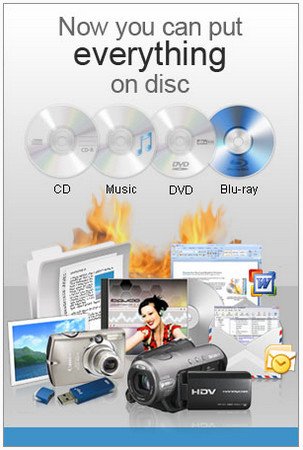
Burn Audio CDs and Data CDs, DVDs or Blu-ray Discs! Free CD burning software to create and record audio and data CDs on Windows or Mac! Express Burn is a free CD burning program that lets you create and record audio and data CDs under Windows or Mac. With Express Burn you can record a data or audio discs quickly and easily by dragging the files you want onto the icon and clicking Burn CD.


The software then does the rest, including converting the files if required. Express Burn is also the fastest CD/DVD writing program in the world using proprietary optimizing systems. But don't believe us, try it for yourself. Express Burn Plus version includes video DVD burning and the ability to burn data DVD and Blu-Ray discs. It has advanced features like the ability to create and record ISO images and support for many more file formats.

Audio CD Recording
Audio is recorded with direct digital recording so perfect audio quality is maintained
Create MP3 CDs or Audio CDs for traditional CD players
Audio CD burner supports a wide range of audio formats including wav, mp3, wma, ogg, flac and more
Normalize audio volume and customize the pause between tracks when burning audio CDs

Video DVD Authoring and Blu-ray Burning
To play on a DVD or Blu-ray player
Video files are re-encoded for standard movie discs
Video burning supports avi, mpg, vob, wmv, mp4, ogm and all video formats with a DirectShow based codec
Create and manage chapters on DVD and Blu-ray discs
Template menu screens and buttons for DVD authoring
Widescreen or standard formats for video burning
Record video files to PAL or NTSC

Data CD, DVD or Blu-Ray Writing
Perfect for creating backup discs
Burn data discs as ISO/Joliet, UDF or Hybrid
ISO burner will record ISO images to disc
Create ISO files in addition to burning to disc
Burn Blu-ray data and video discs

Advanced Disc Burning Features
Burn to recordable/re-recordable discs (CDR, CDRW)
Copy and burn DVDs and other discs
Command line operation for automation and integration with other programs

Operating System: Windows 10, XP, Vista, 7, 8 and 8.1

Home Page -
Код:
http://www.nch.com.au/


-:DOWNLOAD FROM LINKS:-

NitroFlare Link
Код:
https://nitroflare.com/view/095857A7D3A2C6B/ExpressBurn10.03.rar

RapidGator Link
Код:
https://rapidgator.net/file/18ca45d61a53ac84e8ee75504a41937d/ExpressBurn10.03.rar.html

​
 
NCH DrawPad Pro 7.06


th-OOB4-Z72-M0i-AB7a-NSikogf-Y8jiywwzp-Hn.jpg


File size: 6.0 MB
​
DrawPad is an easy-to-use image composition and manipulation program, and an essential tool for all types of graphic design projects.

Features:
Pencil and brush tools for drawing, sketching and painting
Ability to edit pencil & brush strokes
Tablet & touchpad pressure sensitivity
Work with both raster and vector images
Image layers allow for non-destructive editing
Layers allow you to easily rearrange elements
Add effects such as bevels and shadows
Fill areas with solid colors, gradients, patterns or textures
Editing features including crop, rotate, resize and flip
Insert shape objects, including circles, rectangles, polygons, stars, word/thought bubbles and more
Insert text and edit the font, size, color and weight
Save graphics as png, bmp, jpg, gif, pdf, or svg files
Choose a design template to get your project started

Supported Input Formats
Scalable Vector Graphics (*.svg)
Graphics Interchange Format (*.gif)
JPEG Image (*.jpg; *.jpeg)
Windows Bitmap Image (*.bmp)
Microsoft Icon (*.ico)
PNG Image (*.png)
Tagged Image File Format (*.tif; *.tiff; )
Most major graphic file formats

Supported Output Formats
PNG Image (*.png)
JPEG Image (.jpg; *.jpeg)
Windows Bitmap Image (*.bmp)
Microsoft Icon (*.ico)
Scalable Vector Graphics (*.svg)
Portable Document Format (*.pdf)
Encapsulated Postscript (*.eps)


-:DOWNLOAD FROM LINKS:-
NitroFlare
Код:
https://nitroflare.com/view/35CA562BF0C468C/DrawPad7.06.rar

RapidGator
Код:
https://rapidgator.net/file/ba232eadfa2b697c157d764636ded4d3/DrawPad7.06.rar.html

​
 
TriSun Duplicate File Finder Plus 16.0 Build 079 Multilingual


49-GL0la-Rw-VXN1-Rk7aqr-Bf-AMgrn-Bh-WK96.png


Languages: Multilingual | File size: 1.28 MB
​
Duplicate File Finder Plus - Quickly finds the duplicate files on your drives relied on file contents, you can remove the unwanted files as you expect to recover your valuable disk space, reduce the management costs and avoid the unnecessary confusion. It works very fast because of our high-speed file comparison algorithm is built-in. And the result (duplicate files) is 100% accurate due to it compares files relied on file contents, not file name, last modified date or file size.
Also, it is very easy to use, only need to select the resources (drive(s), folder(s), files), size(s), type(s), and then click the "Find now" button to get your want. Even, you can simply click this button directly by using the suggested search conditions.

Once the finding is done, you will see the result (duplicate files list) instantly. It checks the unwanted files automatically with the smart selection feature, sorts the result by size in descending, and marks the adjacent duplicate file groups by different colors, in order to let you operate the duplicate files conveniently. You can also do some common actions for the checked duplicate files / highlighted file in the result listing, such as Save, Load, Move to Recycle Bin, Delete, Open/Run, Open File Location, Find, Uncheck All, Invert Checks and Show Properties.

Sure, you can use some useful options (e.g. smart selection, comparing algorithm for large files, whether scan the system / hidden files or not, and exclude folders, etc.) to affect the final result.

What's new
Код:
https://duplicatefilefinder4pc.com/duplicate-file-finder-plus.htm?selectedTab=updates


-:DOWNLOAD FROM LINKS:-
NitroFlare
Код:
https://nitroflare.com/view/585389DA79E4551/Duplicate_File_Finder_Plus_16.0_Build_079.rar

RapidGator
Код:
https://rapidgator.net/file/cf2c938c0eb0f4d4f689de344144721c/Duplicate_File_Finder_Plus_16.0_Build_079.rar.html

​
 
Goversoft Privazer 4.0.20 Multilingual


privazer.png

​
Goversoft Privazer 4.0.20 Multilingual | 27.2 Mb[/b]

PrivaZer is a program that is designed to ensure the protection of personal data. It scans your hard disk for which data were on it after conventional treatment optimizers. You can then view the data and found to remove them completely, permanently. The program shows the tracks left in the process of surfing the Web, CD burning, the use of IM-clients. Also analyzes the "Start" menu, memory, registry.

Operating System: XP, Vista, Win7, Win8/8.1, Win10, 32bits & 64bits

Home Page -
Код:
http://privazer.com/


-:DOWNLOAD FROM LINKS:-

NitroFlare Link
Код:
https://nitroflare.com/view/0E800B1379EFFB4/Privazer4.rar

RapidGator Link
Код:
https://rapidgator.net/file/27c2ee182a6f7318242310ef76567f1c/Privazer4.rar.html

​
 
ANSYS 2021 R1 nCode DesignLife


00819c55-medium.jpg

ANSYS 2021 R1 nCode DesignLife | 3.2 Gb

Languages: English, Deutsch, Français, 日本語
​
HBM, a wholly-owned subsidiary company of Spectris plc, a group specialized in precision instrumentation and electronic controls, announced the release of ANSYS 2021R1 nCode DesignLife, the leading brand for engineering data analysis solutions with special concentration in fatigue and durability.


DesignLife

DesignLife - New Features

Support for NASTRAN's HDF5 FE results file format
DesignLife now supports NASTRAN's HDF5-based format for FE results files, identified by the file extension .h5. Details of the support for this file format are in section 7 below.
Virtual Sensor Velocity and Acceleration Export
In addition to displacement and force histories, it is now possible to export velocity and acceleration histories from the virtual sensor glyph.

DesignLife - Enhancements

GUI appearance
The nCode desktop application now has a more modern appearance.
More help available in HTML format
When accessing the help using Help > Help from within any of the product components of nCode, the welcome.htm page gives you access to additional documentation in HTML format. This release includes the DesignLife Worked Examples, and the help for the modules, file formats, standard processes, and metadata keywords and equation variables.
Preference to ignore sub steps
A new preference has been added so that sub steps in the FE results are ignored. This effects both the results seen in the FEInput glyph and those seen in the load mapping dialog in the CAE glyphs.
Removal of the MAT_0 Material Group
Previously, any elements in an FE results file that had no material ID assigned were included in a material group named MAT_0. These elements are generally of special types that are not included in the CAE fatigue analysis. The MAT_0 group is now only created if it is the only material group available (as is the case with FE results files that do not support material information, such as the OptiStruct .h3d format).
Stress Gradient Calculation for Solid Elements
For AveragedNodeOnElement results from solid elements, the stress gradient calculation has been modified to apply the averaged surface normal direction to the tensor component gradient vectors. This is considered to be a more accurate method and may cause small changes is results.
Stress Strain Conversion glyph
Several small improvements have been made to this glyph. It now possible to just connect one of the output pads if for example only the output stress is required. The error messages have also been improved and the output channel titles are now based on those from the input channel.
Virtual Strain Gauge Placement Coordinates
It is now possible to obtain the positions automatically out of the virtual strain gauge placement for placing physical strain gauges. This information is available in the metadata from the FEInput glyph and in the .ASG files generated by a StrainGaugePositioning analysis.
Standard Materials Database
The fatigue limit ratio and Walker mean stress parameters have been added to all FKM datasets in the standard materials database.
Extended support for vibration loading with spot welds
NASTRAN and ANSYS results are now fully supported for vibration loading in the spot weld solver. NASTRAN support was a beta feature.
Performance Enhancement for vibration loading
Performance enhancement for DesignLife vibration fatigue analysis when ComplexAlgorithm = Exact.

GlyphWorks

GlyphWorks - Enhancements

GUI appearance
The nCode desktop application now has a more modern appearance.
More help available in HTML format
When accessing the help using Help > Help from within any of the product components of nCode, the welcome.htm page gives you access to additional documentation in HTML format. This release includes the GlyphWorks Worked Examples, and the help for the modules, file formats, standard processes, and metadata keywords and equation variables.
New Unload and Revert button
Added a menu option and a (file menu) toolbar button that unloads the current flow and reloads a fresh copy of the same flow. There is an option to save the change first, if required.
Glyph palette names
Certain glyph palettes have been renamed in order to more correctly represent their contents or to remove spaces to improve readability. 'AcceleratedTesting' is renamed 'Vibration Profile Design' and 'Optimized Testing', 'Basic DSP', 'Standard Solvers', 'Advanced Solvers' and 'Composite Solvers' have all had spaces inserted to improve readability. In all cases, the software will look for custom glyphs in the new locations, so you will need to rename the corresponding parts of your custom glyphs folder in order that your saved glyphs are found.
Journal message capacity
Fixed a problem where a software failure would result if a scripting glyph sent thousands of messages to the diagnostics window journal in a short space of time.
Locked Superglyph property access
The double-click action on locked SuperGlyphs now provides access to properties belonging to glyphs belonging to the internal workspace. Only those properties specifically exposed by the designer/password holder will be visible though, so properties identified as read-only or hidden will not be seen. In general, the handling of properties in SuperGlyphs should now be more consistent.
Zipped data file support
Support has been added for zipped data files. These must contain a single test and include all the files needed for that test. If the test is folder-based, then the zip file must include the folder. The default file extension is .nczip but this can be changed through a preference
SIE SXR meta data
The SIE file format has been enhanced to import any SXR meta data from the tag "somat:source_sxr_setup" if this is found within a file.
Catman BIN file channel numbers
A new option has been added to the CanChannelHandling preference for HBM Catman files to ignore CAN channels. This has been done due to the addition of CAN channel support in version 2019.1 which caused a change in channel numbering. This preference can now be used to ignore any CAN channels and use the old internal channel location as the channel number.
Vector MDF4 library updated
The Vector MDF4 library has been updated to version 1.7.
Vector MDF4 files which have not been finalized can be read
It is now possible to read Vector MDF4 files which have not been finalized.
Dewesoft DXD library updated
The Dewesoft DWDataReaderLib64.dll library has been updated to version 4.2.0.10.
Improved support for reading Wave files
It is now possible to read uncompressed Microsoft Wave files that store the data as signed 24-bit values, as 32-bit floating point values or as 64-bit floating point values.
TSInput CombineAllTests naming
The TSInput glyph has additional properties to control how the tests are identified when the CombineAllTests property is set.
Table Display word wrap
The Table Display, which is used inside the Studio Display glyph, has a new 'word wrap' property. When this is used, the display will automatically adjust the number of lines used to display any column title text so that the column can be narrower.
XYDisplay glyph metadata title text
The XY Display glyph can now use metadata values in the overall plot title text and in the column titles for the table display it uses as the legend.
Improved PDF export of XYDisplays showing large Multicolumn datasets
When used in a Studio page to display multicolumn data, the XY Display now produces smaller PDF documents that display more quickly in many cases. This applies to datasets with large numbers of points when the PDF export type is set to vector graphics and results in fewer lines being drawn for the data traces.
Metadata Calculator glyph new keywords
The Metadata Calculator glyph can now process the 'CurrentFolder' keyword and any environment variables that are set can also be used as keywords.
New Metadata Calculator and MultiColumn Calculator functions
The Metadata Calculator and MultiColumn Calculator glyphs both have new functions to get multicolumn data values as strings rather than as numeric values. This is useful for 'enum' columns and for getting the 'feature type' from a feature list as the display text, rather than the number that is stored in the column.
Running Stats glyph - User percentile calculation
The Running Stats glyph has been extended to offer the calculation of a user specified percentile without the need to use slow-running looped calculations.
Running Stats output pads
It is no longer necessary to connect both output pads when using the Running Stats glyph with the 'Processing Mode' property set to 'featureList'. Formerly an error was issued if either the time series or multi-column output was not connected. It is now possible to work with either or both connected.
MATLAB Support - MATLAB R2020a
Matlab 2020a is now supported in the Matlab scripting glyph
Time series UFF export
Support has been added to the system to allow the export of time series data as UFF files. This is currently limited to writing type 58 records but can be output as either ASCII or binary from the Time Series Output glyph.

ANSYS 2021 R1 nCode DesignLife provides a suite of engineering software products in a single desktop environment. This is a specific version of DesignLife that is available through the ANSYS Partner Solutions Program and uses ANSYS GridWorks Units licensing. DesignLife is part of a wider range of nCode software products from HBM.

The four main product components of nCode are GlyphWorks, for graphical data processing, VibeSys, for acoustics and vibration analysis, DesignLife, for CAE fatigue analysis applications, and Automation Personal Edition, for data storage and analysis. Results and materials data from simulations within Workbench can be directly accessed by DesignLife. This provides an unparalleled combination of ease of use and powerful fatigue analysis for ANSYS users.

Fatigue of Welds using nCode DesignLife

Founded in 1970, ANSYS employs nearly 3,000 professionals, many of whom are expert M.S. and Ph.D.-level engineers in finite element analysis, computational fluid dynamics, electronics, semiconductors, embedded software and design optimization. Our exceptional staff is passionate about pushing the limits of world-class simulation technology so our customers can turn their design concepts into successful, innovative products faster and at lower cost. As a measure of our success in attaining these goals, ANSYS has been recognized as one of the world's most innovative companies by prestigious publications such as Bloomberg Businessweek and FORTUNE magazines.

Product: ANSYS nCode DesignLife
Version: 2021 R1
Supported Architectures: x64
Website Home Page :
Код:
http://www.ncode.com
Language: english
System Requirements: PC / LInux *
Software Prerequisites: ANSYS Products 2021 R1
Size: 3.2 Gb

Machine Configuration Requirements Windows:

ANSYS 2021 R1 nCode DesignLife is supported on the following Windows operating systems:
- Windows 10
The minimum hardware configuration for these platforms is:
- 2 GB storage
- 4 GB of memory (RAM)
- 1024∗768 resolution with 256 colours
Note: An OpenGL compatible graphics card to display 3D models is also required.

Hardware and Software Configurations Linux
ANSYS 2021 R1 nCode DesignLife is supported on the following hardware platforms:
Platform
Red Hat Enterprise Linux (RHEL) 64 Bit
SUSE Linux 64 Bit
Operating System and Level
- Linux RHEL7.6(64 Bit)
- SUSE Linux 12SP4(64 Bit)
ANSYS 2021 R1 nCode DesignLife requires a minimum of 4 GB of RAM. The amount of disk space required by nCode varies according to the platform. The following table is an approximate guideline to disk usage (figures in megabytes):
ANSYS 2021 R1 nCode DesignLife 1050
Full install 1940
Note that these are the installed disk space requirements. The installation process temporarily requires approximately twice this disk space to be available while files are being extracted.
OpenGL is required to be installed on each machine. This is installed as a standard component of the above operating systems. If OpenGL has been removed or not installed, ANSYS 2021 R1 nCode DesignLife will not run and an error message such as Cannot find shared library file libGL.2 is issued by the operating system.
A PDF reader needs to be installed to view the documentation. For example evince. Set the environment keyword PDFVIEWER to evince to use this pdf viewer.


-:DOWNLOAD FROM LINKS:-

NitroFlare Link
Код:
https://nitroflare.com/view/1D4AF9451B25E7B/Ansys.2021.R1.nCode.DesignLife.part1.rar
https://nitroflare.com/view/3C998B91A1C1105/Ansys.2021.R1.nCode.DesignLife.part2.rar

RapidGator Link
Код:
https://rapidgator.net/file/cc6d75baa938cebf48a9cbe1bb33a6c6/Ansys.2021.R1.nCode.DesignLife.part1.rar.html
https://rapidgator.net/file/5c5857528736ed6e70999cf6e060f117/Ansys.2021.R1.nCode.DesignLife.part2.rar.html

​
 
Creative Edge Software iC3D Suite v6.2.10 (x64) Multilingual


pqmedo-WNp8-UAa-DAN4-SOUEEwhc-ZEKIna-R.png

Creative Edge Software iC3D Suite v6.2.10 (x64) Multilingual | 571 Mb
​
iC3D is the first real-time all-in-one package design software that lets you generate live 3D virtual mockups on-the-fly.


iC3D features patented Smart Mesh which allows labels and artwork to be instantly slid over models without needing tedious UVW texture co-ordinate mapping. With its unique Shape Modeller feature, you can quickly design and generate asymmetric 3D models such as perfume bottles, trigger sprays and molded containers.

For film-wrap products, Shrink and Shrink Correction enable you to visualize in minutes how artwork or labels will distort when applied to 3D models.

Ray Tracing accurately simulates effects of light on virtual objects for photorealistic, ultra-high-resolution photo studio effects, while Light Map Editor re-creates studio lighting, editable highlights and shadows.

Dynamic Backgrounds and Perspective Control allow real-time merging of 2D photo images with 3D designs, so that you can visualize your product from every angle and in any setting, from store shelves to gondolas, chiller cabinets or freezer displays.

Whether you're working on one product or multiple items, the free cloud-based viewer and storage, iC3D opsis, makes collaboration easy. You can also share designs by email and as animated movies. Once finished you can output hi-resolution images, 3D PDFs, generate proofs or print your models with leading 3D printers.

No specialist programs, hardware, or outside assistance, just a single application using a simple Illustrator file or PDF for photorealistic results in minutes.

Home Page -
Код:
http://www.creativeedgesoftware.com/


-:DOWNLOAD FROM LINKS:-

NitroFlare Link
Код:
https://nitroflare.com/view/0E859A2FCA12629/iC3D.Suite.6.2.10.rar

RapidGator Link
Код:
https://rapidgator.net/file/526e755473c4d0d428c1161b1fc94303/iC3D.Suite.6.2.10.rar.html

​
 
Claris FileMaker Pro 19.2.2.234 (x64) Multilingual


v-NJ0fuxd9-DKD4-RZ5-Vl-PMUc1xros-Np-M1-U.jpg

Claris FileMaker Pro 19.2.2.234 (x64) Multilingual | 198.4/50.4 Mb
​
Build apps like a boss. Take on digital transformation with Claris FileMaker. Quickly build custom apps that solve your business problems today - and tomorrow. Accelerate your business, unlock your team's creative potential, and drive to better outcomes.


Tackle any task.
Need an app to solve a really sticky business problem? Build it with FileMaker. It's got all the tools you need to roll up your sleeves and DIY - or team up with pro developers for next-level expertise.

Start today.
And by today, we mean today. With built-in templates, drag-and-drop design, and an intuitive graphical UI, you'll be app-building in no time. And your work goes live the second you're ready, across every device - that's the power of FileMaker.

Get inspired by a world of FileMaker apps.
Need an app now but crunched for time? Odds are you're not alone. Explore Marketplace to find the perfect jumping off point for your own custom app - from templates and components to fully-completed vertical market apps.

- CRM
- Project Management
- Content Library
- Asset Manager
- Invoicing Details
- Contract Management
- Event Planning
- Field Research
- Supply Management
- Tour Dashboard

All devices, all the time.
Secure, real-time sharing on any device. That means your app works on mobile or desktop, on the web, on premise and in the cloud. Because apps this important should be accessible anytime, anywhere.

Power for problem solvers.

Plug and play power.
Drag and drop prebuilt add-ons for instant app development. Add charts, calendars, kanban boards, activity timelines, and more. (Coming soon.)

NEW Mobile AI.
Use smart tech such as Core ML for things like image and sentiment recognition, Siri Shortcuts for voice-enabled interactions, and NFC reading - all on mobile.

NEW Zero to cloud.
Create apps directly in the cloud with zero configuration and deployment. Add fully-integrated JavaScript to your custom apps.

Complete tooling.
Use scripts, triggers, calculation functions, graphical design tools, and relational data modeling to build robust apps that scale with your business.

Total security.
Built on Claris Core, FileMaker includes industry-standard protections to keep your data secure - both in the cloud and on premise.

Integrate. Automate. Innovate.
Connect to all kinds of web services and apps in minutes using Claris Connect. It's the best way to automate your workflows.

System Requirements:
- Windows 8.1 Standard and Pro Edition (64-bit only)
- Windows 10 Enterprise and Pro Editions (64-bit only)

Home Page -
Код:
https://www.claris.com/


-:DOWNLOAD FROM LINKS:-

NitroFlare Link
Код:
https://nitroflare.com/view/BD11B9A7F378A1E/FileMakerPro19.2.2.234.rar

RapidGator Link
Код:
https://rapidgator.net/file/c045da4a3ebaf3b22a85256b90be6baf/FileMakerPro19.2.2.234.rar.html

​
 
O&O DiskImage Professional / Server 16.1 Build 196


0-SNw-Fu-O9sr-Ihy0e-WDzo-Dzc-NXZTt-UEGt-K.jpg

O&O DiskImage Professional / Server 16.1 Build 196 (x86/x64) | 230.5 Mb
​
O&O DiskImage 16 lets you back up an entire computer or single files whenever you want - even while the computer is being used. In the event you should lose your personal data it can be quickly restored with just a few mouse clicks - even when Windows is no longer able to start. It also supports SSD drives and the latest UEFI System.


O&O DiskImage lets you carry out a system restore and to duplicate or clone an entire PC or hard drive. You can even restore this backup onto a computer whose hardware is different from the original machine, for instance, where you have changed a motherboard on the target machine or have bought a brand new PC and want to restore an old backup onto it.

A regular backup is still something that many users prefer to avoid. At least that is until they suffer their first loss of important files as a result of software, hardware or user error: that's when it becomes crystal clear just how valuable a reliable and up-to-date backup really is!

NEW: O&O DiskImage 16 with its own recovery partition
Normally with a backup or imaging program you need to create a boot medium (CD, USB) to boot up your system if something goes awry. This you have to either carry around or store somewhere safe in case disaster strikes.

Thanks to the integration into the system, the O&O DiskImage RecoveryPartition can be accessed immediately so that the last system image can be restored directly. If the Windows operating system does not start or if faulty drivers have to be uninstalled - with the integrated recovery environment, all O&O tools are available to make the system operational again as easily as possible. Not only is this much more comfortable and quicker for the user, it also provides them with an extra level of security as this medium cannot get lost or damaged as easily as a "portable", external one.

O&O DiskImage To Go
Previously, in addition to regularly backing up your machine, you also had to separately create an O&O DiskImage boot media to restore that backup. Everything is easier now! The new O&O DiskImage To Go function automatically turns an external hard drive (or USB flash drive with enough storage space) into an O&O DiskImage boot medium and marks this disk as the preferred storage medium for future system backups. As soon as you then connect this external USB hard disk to your computer, O&O DiskImage 16 automatically creates a backup. This makes it easy to create a recent backup. And if something really happens to your computer or you want to transfer your system and all your data to a new computer, then with the O&O DiskImage boot medium you can restore the backup stored on it with just one touch of a button. Without the hassle of searching for the boot medium and the external hard drive with the backup.
It has never been so easy to ensure the security of your data!

Further functions of O&O DiskImage:

All default and advanced features are combined in one single product
This backup software is the safest and easiest way to avoid losing important personal files! Options are available for both auto backup and manual settings. Thanks to a unique recovery system that includes additional system recovery tools combined with O&O DiskImage you'll quickly be able to restore all your important data - even if the backup you're using was created with an older O&O DiskImage version.

Backup entire PCs, hard drives or files with the push of a button
When you back up a PC, O&O DiskImage saves all personal files as well as hard drive information and individual settings. This not only protects irreplaceable files but, in a worst case scenario, also saves you the trouble of having to carry out a time-consuming new setup of programs and the Windows operating system. O&O DiskImage lets you back up an entire computer, system and hard drives or just individual files and folders. To make sure your backups are always up to date, we recommend creating them at short intervals from one another.

Quick and easy system restore - even onto different hardware
Restoring a backup with O&O DiskImage is as easy as pie: all you have to do is start the program, select the backup you want to restore, and you're off. Included with the software is our machine independent restoration which means your old backup can be transferred 1:1 onto a new machine. Hardware of a different make will be automatically recognized and Windows settings will be carried out by themselves.

Plug-and-play function
Anyone wanting to save data on an external hard disk has it even easier with the new O&O DiskImage 16. Thanks to the integrated plug-and -play option, selected files and folders can be backed up automatically as soon as, for example, an external hard disk is connected to the computer. This is ideal for users who forget to carry out regular backups or who don't want to go through the trouble. Once configured, the auto backup function runs by itself.

Create a boot medium directly from within the program
O&O DiskImage can bring a system back to life immediately and with no installation required. It does so by way of a Boot Medium (USB Stick or CD/DVD) which is based on the currently installed Windows system and which contains all the standard drivers required.

Made in Germany. Made in Berlin.
All O&O products are developed and serviced in Berlin. We at O&O are proud of our German heritage, and proud to represent the quality, security and satisfaction long associated with products "Made in Germany". We take the concerns of our customers very seriously because we know just how important their data is for them.

Product features:
Backup an entire computer with the push of a button
Backup system and hard drives, clone drives and entire disks
Brand new file-based backup: now twice as fast as ever before - backup and restore individual files and/or folders
Direct creation of VHDs
Monitoring and warning of security risks
Incremental/differential backup: back up only the changes
Easily restore files, folders, drives and disks
System restore onto different hardware (M.I.R.)
Create a Windows Boot system directly from within the program with driver integration
Plug-and-play: Selected files and folders are automatically backed up and synchronized
Variable pixel density settings: adjusts to the selected DPI setting of the connected monitor
New and enhanced functions Control via Command Lines

Backups that were created on older Windows versions 8 and 7 with earlier versions of O&O DiskImage can still be restored.

Operating System:
Windows 10, Windows 8.1 and Windows 8
Windows Server 2016, 2012 R2, 2012, 2008 R2, 2008

Home Page -
Код:
https://www.oo-software.com/en/


-:DOWNLOAD FROM LINKS:-

NitroFlare Link
Код:
https://nitroflare.com/view/9B82B939E063457/DiskImage16.1.rar

RapidGator Link
Код:
https://rapidgator.net/file/a562d122535d5cc92f514da2bae81484/DiskImage16.1.rar.html

​
 
Synchredible Professional 7.003 Multilingual


b-BVx-Yi-Ob-Gb-Ey-I45dwcfk-IXZa-VHW24a6f.jpg

Synchredible Professional 7.003 Multilingual | 11.8 Mb
​
Synchronize Your Folders and Drives In A Quick and Easy Way. Whether it's an individual file or an entire drive - Synchredible will synchronize, copy and save them for you. A software wizard will assist you to determine jobs that are either pre-scheduled or to be done through a USB connection. This way, you can keep your files in sync - automatically!


Over the years, our state-of-the-art technology in Synchredible has made copying files easy. It also makes matching your files a simple task while it automatically detects changes and synchronizes the most recently edited files safely and reliably! Thanks to its advanced system for identifying similar files, Synchredible saves you time - unedited files may be skipped if desired. This way, large folders are synchronized in seconds! Synchredible not only works when synchronizing files locally on your computer but also for synchronizing folders via an external network or when using a USB device. Whether you are matching data or simply backing up your files, Synchredible reliably transfers your files to any preferred location!

Synchronisations in one direction
Copy files/folders from source to destination

Bi-directional synchronisations
Synchronize files and folder structures

Synchronize to USB drives/sticks
Support of USB drives (internal/external)

Network support
Synchronize files/folders in/to local area networks

Synchronize subdirs
Synchronize all files/folders located in subdirs

Synchronize all files
Synchronize all files (including not changed data)

Skip unchanged files
Skip files which have not been changed since last synchronisation

Synchronize newer files
Synchronize newer files only

Archive bit synchronisation
Synchronisation of files with archive bit set true only / delete archive bit

Delete files/folders
Delete files in destination folder which have been deleted in source folder

Move to recycle bin
Move deleted files to recycle bin

Filter options
Filter files/folders

Synchronize newly changed files
Synchronize files which have been changed the last x days

Synchronisation preview
Preview of files/folders to be synchronized

Interval synchronisation
Execute synchronisation in selectable interval

Time synchronisation
Execute synchronisation at selectable time

Synchronisation at Windows start/log-off
Execute synchronisation when Windows starts/logs off

Restriction to days
Restrict synchronisation execution to week days or month days

Automatic synchronisation
Synchronisation without user interaction

CRC32 verification
CRC32 verification of synchronized files

Buffer size
Set buffer size of copy buffers

Desktop shortcut
Create desktop shortcut to easily execute synchronisations

Synchronisation warranty
Catch up missed synchronisations

Start by parameters
Start synchronisations by calling synchredible.exe with parameters

Actions before/after synchronisation
Execution of files, programs and system actions before/after synchronisations

Protocol
Report creation after synchronisation

Time difference
Set time difference for synchronisation to not identical file systems

Pause synchronisation
Pause and resume synchronisations

Supported operating systems:
- Windows 10(32-bit & 64-bit)
- Windows 8.1(32-bit & 64-bit)
- Windows 8(32-bit & 64-bit)
- Windows 7(32-bit & 64-bit)
- Windows Vista(32-bit & 64-bit)
- Windows XP(32-bit & 64-bit)
- Win Server 2016/2019(32-Bit & 64-Bit)
- Windows Server 2012(32-bit & 64-bit)
- Windows Server 2008(32-bit & 64-bit)
- Windows Server 2003(32-bit & 64-bit)

Home Page -
Код:
https://www.ascomp.de/


-:DOWNLOAD FROM LINKS:-

NitroFlare Link
Код:
https://nitroflare.com/view/691825B41F585EF/Synchredible_7.003.rar

RapidGator Link
Код:
https://rapidgator.net/file/70b5db3a6fe009f547933962096535c2/Synchredible_7.003.rar.html

​
 
Cleaning Suite Professional 4.002 Multilingual


k-Uo-BDju-JC9-CSw5gb8-Aa-HA7-TB85-BTStf-L.jpg

Cleaning Suite Professional 4.002 Multilingual | 11.8 Mb
​
Clean your system from unnecessary data with a total of six efficient tools. If the system boots up more and more slowly and the hard drive gets fuller, then it is high time for a thorough system cleaning! But which data can be deleted without risk, which are still needed for the smooth system and program flow? Cleaning Suite gives the answer!


Cleaning Suite: System cleaning and Tuning for Windows
A total of six helpers analyze your system and enable deep cleaning operations. For example, you can delete temporary files, clean browser histories, caches, and cookies from all popular Internet browsers, and prevent installed applications and tools from starting automatically at system startup.

Clean your system from unnecessary data with a total of six efficient tools.
If the system boots up more and more slowly and the hard drive gets fuller, then it is high time for a thorough system cleaning! But which data can be deleted without risk, which are still needed for the smooth system and program flow? Cleaning Suite gives the answer!

The Windows Registry can also be optimized by Cleaning Suite in a targeted manner. The Windows software proceeds very carefully to ensure unrestricted use of your computer even after the cleaning process. On top of that, Cleaning Suite provides advanced features for the Windows Recycle Bin.

A restore center provides the ability to undo certain actions of the software at any time. The detailed journal also provides information about the entire cleaning history.

Supported Operating Systems:
- Windows 10 (32-bit & 64-bit)
- Windows 8.1 (32-bit & 64-bit)
- Windows 8 (32-bit & 64-bit)
- Windows 7 (32-bit & 64-bit)
- Windows Server 2016/2019 (32-Bit & 64-Bit)
- Windows Server 2012 (32-bit & 64-bit)
- Windows Server 2008 (32-bit & 64-bit)

Home Page -
Код:
https://www.ascompsoftware.com


-:DOWNLOAD FROM LINKS:-

NitroFlare Link
Код:
https://nitroflare.com/view/594B2F80884CA88/Cleaning_Suite_Professional_4.002.rar

RapidGator Link
Код:
https://rapidgator.net/file/8bd42c371110c52648f3c6ce0ac0877d/Cleaning_Suite_Professional_4.002.rar.html

​
 
YT Downloader 7.3.19


th-d-Yr5-CFAWCXBDz-Lrl-Pa-EHWN7-RXLMCX8db.png


File size: 26 MB
​
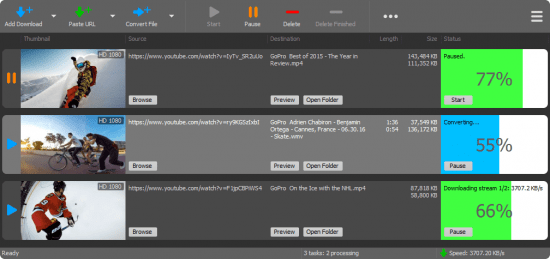
YT Downloader (ex YTD Youtube Downloader) is a simple and easy-to-use video download application. It helps you to download and convert videos from YouTube and hundreds of other video sites. YT Downloader increases your download speeds by up to 500%.

Save media content from hosting sites
YTD enables you to save your favorite clips from Youtube, Facebook, Vimeo and Dailymotion to your computer. The software supports URLs from multiple media hosting websites and allows you to download the desired content within seconds.

Simply copy the URL onto the clipboard then import it in the software, or drag and drop it into YTD's interface. The software can process the URL instantly, then download the clip when prompted. It can extract the entire video, in high quality, or save only the audio stream as MP3.

Easily manage and convert files
YTD supports downloading high definition videos to your computer, without compromising their quality, but it also can save the audio stream alone. Simply set the desired options before starting the file download. The software is capable of converting media to a multitude of video or audio formats.

Additionally, it supports saving the clip as a suitable file for mobile devices. You may select the proper device brand and let the software apply the preset format and quality settings to the file. Apple, Amazon, Android, BlackBerry, HTC, or Nokia are examples of the supported devices. When converting the YouTube content to video formats, you may also choose the desired resolution: from low 240p quality, up to HD 1080p or custom resolution.

Useful download manager, media converter and player
YTD comes bundled with a reliable media player, suitable for watching the downloaded videos or music. Moreover, you may preview the files in the queue, as they are being downloaded or converted. The software is reliable and highly capable when it comes to preserving the video or audio quality. It can also download multiple videos at once without slowing down your computer.

Whats New:
Updates: official site does not provide any info about changes in this version.


-:DOWNLOAD FROM LINKS:-
NitroFlare
Код:
https://nitroflare.com/view/E920050262E85B7/YT_Downloader_7.3.19.rar

RapidGator
Код:
https://rapidgator.net/file/9288fcf8e6d270b18de61fdeb32ede59/YT_Downloader_7.3.19.rar.html

​
 
WinTools.net Professional / Classic 21.0 Multilingual


c7-MSq-UUEm1lv-SGf2-RRn12m8c2-Iou-MUF0.png

WinTools.net Professional / Classic 21.0 Multilingual | 3.9 Mb
​
WinTools.net is a suite of tools for increasing MS Windows operating system performance. WinTools.net cleanly removes unwanted software from disk drives and dead references from the MS Windows registry. WinTools.net puts you in control of the Windows startup process, memory monitoring and gives you the power to customize desktop and system settings to fit your needs. Adds more speed and stability for your connection. Ensures your privacy and keep sensitive information secure. WinTools.net Premium contains tools: Clean Uninstaller, Scan Files, Scan Shortcuts, Scan Registry, Startup Manager, Tweak UI, Net Tweaker, Your Privacy, Invisible Man, File Shredder.


WinTools.net: Clean Uninstaller
Used for both correctly removing software and for monitoring changes made to the hard drive, MS Windows registry and system files during program installations.

WinTools.net: Scan Files
Used for periodic cleaning of your hard drive from dead references, junk and obsolete files produced by different software. These files and references remain on the hard disk and increase drive access time.

WinTools.net: Scan Shortcuts
Used for periodic cleaning of your Desktop, Start-menu, Application data and hard drives from dead shortcuts, These shortcuts remain on the hard disk and increase drive access time.

WinTools.net: Scan Registry
Used for periodic cleaning of the MS Windows registry from unused applications remaining after uninstallation and from invalid references which decrease system speed and system loading time.

WinTools.net: Startup Manager
This tool allows you to monitor, add, remove, enable and/or disable individual startup items. You can also adjust applications initialized during the loading process of the operating system.

WinTools.net: Tweak UI
This is a set of additional adjustments related to safety, system capacity and user preferences and which are not included in the basic components of MS Windows.

WinTools.net: Net Tweaker
The tool is used for speed increasing of data transfer and for greater stability of connection by changing hidden network settings. Available only in "Professional" edition.

WinTools.net: Your Privacy
This is a kit of tools which ensure your privacy and keep sensitive information secure. Available only in "Professional" edition.

WinTools.net: Invisible Man
This tool is used for saving private information and its later restoration. This is useful if you don't want any information saved by the system.

WinTools.net: File Shredder
This tool is used for full secure deleting documents, programs, and any other files without possibility to restore them.

WinTools.net: IE Favorites
Little tools for quick delete, backup and restore Internet Explorer Favorites. Remove unused or damaged links.

WinTools.net: RAM Memory Booster
This tool serves for monitoring, cleaning and optimisation of RAM. It is used for increasing of operating system performance and for releasing RAM for usage by other processes. If you have a possibility, we recommend to use RAM Saver Pro instead of RAM Memory Booster.

Operating System: Windows 10/8.1/8/7/VISTA/XP/2k8/2k3/2k
Home Page -
Код:
http://www.wintools.net/


-:DOWNLOAD FROM LINKS:-

NitroFlare Link
Код:
https://nitroflare.com/view/9EDB38F9063B98A/WinTools.21.rar

RapidGator Link
Код:
https://rapidgator.net/file/d644d64d96bc0fe4eed2e6f791b6a60c/WinTools.21.rar.html

​
 
PVSOL premium 2021 R3 Multilingual


Dcidgjk-Fof6g8-XH13u6-Nja4-We-GNjeir-T.png


Languages:Multilingual | File Size: 348 MB
​

PV*SOL premium is a dynamic simulation program with 3D visualization and detailed shading analysis for the calculation of photovoltaic systems in combination with appliances, battery systems and electric vehicles.

With PV*SOL premium, the industry standard for photovoltaic design programs, you can design and simulate all types of modern PV systems. From the small rooftop system with a few modules to medium-sized systems on commercial roofs to large solar parks - PV*SOL premium supports you with numerous tools for design and simulation.

The unique 3D visualization is the highlight of PV*SOL premium. You can visualize all common types of systems in 3D, whether roof-integrated or roof-mounted, whether on small angled roofs, large industrial halls or open spaces - with up to 7,500 mounted modules or up to 10,000 roof-parallel modules, and calculate the shading based on 3D objects. This enables you to achieve the highest reliability for your earnings forecast - because for an accurate income calculation, a realistic representation of the shading from surrounding objects is essential.

All other design types from PV*SOL are of course also available to you in PV*SOL premium. Choose the type of design that best suits you and your PV project! The detailed results provide information about the performance of your system at all times.

Whether calculating self-consumption, designing battery storage or integrating electric vehicles - with PV*SOL you can implement and present all customer wishes in no time at all.

You can use our extensive product database at any time. It currently includes over 20,000 PV modules, 4,700 inverters, 1,400 battery systems and many other products such as electric vehicles and performance optimizers.

It is updated regularly by the product manufacturers themselves, so that you can always work with the latest data.

You can generate high-quality project reports for your customers that can be configured and edited as required. Circuit diagrams with the necessary safety devices can also be created, e.g. for submission to the relevant authorities.

The current feed-in tariffs are already available in our database for the calculation of economic efficiency. Supplemented with the information on the system costs, you will receive a detailed and meaningful economic analysis of the system over 20 years. In a few minutes you will receive an initial offer that you can refine afterwards if the customer is interested.

Our technical support team and our online help support you with open questions, and in our forum you can put more complex questions to our team and other users of PV*SOL premium and quickly receive an answer.

Would you like to try out whether PV*SOL premium fits your design process? Download the free trial version now and get an impression of the program functionalities!

Product highlights

Detailed 3D shading analysis
A three-dimensional representation of surrounding objects is extremely important for determining the reduction in yield due to shading. With PV*SOL premium, you can visualize all roof-integrated and mounted systems - even in open spaces - with up to 7,500 mounted modules or up to 10,000 roof-parallel modules in 3D and calculate the shading based on 3D objects.

Extrude buildings from plans
Buildings and objects can also be created quickly and easily using floor plans, cadastral maps and map screenshots. You only have to trace the respective contours and then the building can be extruded by entering the height. This allows, for example, any type of building to be created with a flat roof.

Global climate data available
The climate data supplied in PV*SOL premium are based on Meteonorm and include a total of 8350 ground measuring stations. You can use the interactive map to conveniently select the climate data. Locations not included are interpolated using satellite data and neighboring ground measuring stations. The import of your own measurement data takes place via files in DWD, Meteonorm or WBV format.

Import of 3D models
3D models of different file formats can be imported to enter object data. This adds another important tool to the existing option of reading floor plans, cadastral maps and screenshots from web-based satellite maps (e.g. Google Earth) directly into the 3D visualization.

Module assignment in 3D view
The roof areas are covered with the maximum possible number of modules automatically, or manually by tracing the areas to be covered by PV. If required, PV*SOL premium can show you the annual radiation reduction (direct and diffuse radiation) for every point of the PV area and for each module.

Polymorphic interconnection in combination with optimizers
Flexibility has been significantly increased when interconnecting the modules that are automatically placed on an object. The new option of polystring interconnection means that completely different strings can be connected in parallel or in series to an MPP tracker. Even different modules in one string, e.g. defective modules that are no longer available, can be replaced with similar ones.

Optimization of the module interconnection
You decide whether you want to connect several module areas to one inverter or choose a separate inverter for each module area, or combine both. The current status of the system check for the complete interconnection, the individual inverters and the MPP tracker is displayed at any time in the interconnection window.

Current online databases
In our extensive product databases you can currently find data records of over 19,500 PV modules, 4,700 inverters, 1,400 battery systems and many other products such as electric vehicles and performance optimizers, which are updated by the respective manufacturers. With our online databases, you can easily make your own products available to others.

Detailed project report
Create comprehensive project reports with simulation results and technical details in 20 languages and export them as Word or PDF documents. For a professional appearance, you can add your company logo to the title page and specify which content should be shown in the report.

Grid-connected systems with battery storage
Degign your own battery storage system by selecting the batteries used and defining the battery inverter and charging strategy. Alternatively, you can charge battery systems from leading manufacturers.

Electric vehicles
Select one or more electric vehicles that are simulated in combination with the photovoltaic system. By entering the daily mileage and the downtimes, PV*SOL calculates how much PV energy can be used to charge the electric vehicles.

Summary of results
The detailed results overview contains representations of the simulation results, the results of cost-effectiveness and a detailed tabular energy balance with all the gains and losses that occur. Carpetplots immediately provide you with an annual overview of individual results.

Circuit diagram
PV*SOL supports your system design with a freely configurable circuit diagram. Both the string cable losses and the AC and DC cable losses per inverter can be determined. Numerous safety devices such as fuses, switch disconnectors and surge protection can be easily added.

Other features
Choose which models you want to use for diffuse radiation and radiation on the inclined surface. The U-I and U-P characteristics for each time step can be produced when required. Exchange your user ID to share self-created products within your company.

System Requirements:
-Currently PV*SOL requires Microsoft Windows as the operating system with the latest service packs. At least Windows 7 is required.
-A DirectX compatible graphics card is required.
-PV*SOL requires resources such as processor time, RAM and hard disk space to store temporary files. Depending on the size of the project, these requirements vary and are difficult to quantify.
-An internet connection is required.
Whats New
PV*SOL premium 2021 Release 3

-Memory leak when repeatedly opening the database dialogs.
-Crash on the project data page when using a project image and a 3D screenshot is defined as overview picture.
-Dropdown lists in 3D map tool and database dialogs did not display properly at high DPI scales greater than 100%.
-Crash in location search of 3D Map Tool.
-Crash on the Financial Analysis page if very high values for "Price of Electricity sold to third party" were defined.
-Crash when copying cells of the parts list which were empty.
-Cursor no longer shakes when moving over the parts list.
-Crash when synthesizing minute values when the climate data file was no longer available.
-Crash when canceling the automatic configuration.
-Crash when entering individual appliances.
-Crash when loading the consumption database if it has not been updated since version 2019.
-Error when entering module degradation.
-Crash when loading project report templates via network storage.
-Crash when loading the "Thermal System" page.


-:DOWNLOAD FROM LINKS:-
NitroFlare
Код:
https://nitroflare.com/view/C9AEB4675C11D01/PVSOL_premium_2021R3.rar

RapidGator
Код:
https://rapidgator.net/file/41450cab1f3f22ddf65f4c1ee9b907c0/PVSOL_premium_2021R3.rar.html

​
 
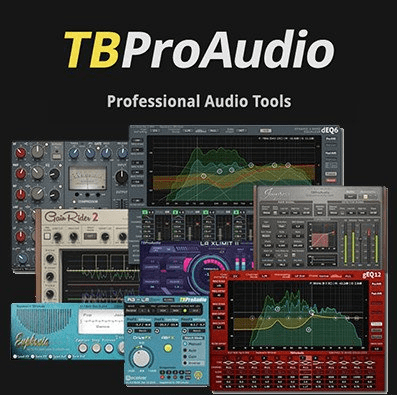
TBProAudio Bundle 2021.3


nnoq5h-UEBJ0c-Vn-GVBNr-B33-D6-KLq-C7-Q6v.png


File Size: 54 MB
​

Included:
ABLM v2.1.0 - AB Loudness Match
AMM v2.0.3 - Automatic Microphone Mixer
CS-5501 v2.0.0 - Extended Channel Strip
dEQ6 v4.0.0 - Dynamic Equalizer / Multiband Compressor
dpMeter v5.0.8 - Free Multi Channel Meter
dpMeterXT v3.0.1 - Broadcast Loudness Meter
DSEQ v3.0.0 - Dynamic Spectral Equalizer
DynaRide v2.0.1 - Vocal & Bass Riding Leveller
Euphonia2 v3.0.0 - Spectrum Balancing
FinalLoud v3.0.7 - Loudness & True Peak Finalizer Tool
GainRider v3.0.1 - Vocal Gain Riding Leveller
gEQ12V4 v4.1.4 - 12-Band Graphic Equalizer
Impress v2.0.0 - Compressor
ISOL8 v2.3.0 - Free Mix Monitoring Tool
LA xLimit IV v4.0.2 - Enhanced Limiter
mvMeter2 v2.2.0 - Free Multivariable Meter
SLM2 v2.0.3 - Smart Loudness Maximizer
ST1 v2.0.1 - Spatial Tool
sTilt v2.0.5 - Free Spectrum Tilt Filter

What's new
Код:
https://www.tb-software.com/TBProAudio/


-:DOWNLOAD FROM LINKS:-
NitroFlare
Код:
https://nitroflare.com/view/8557916589587A4/TBProAudio.bundle.2021.3.CE.rar

RapidGator
Код:
https://rapidgator.net/file/2dcd91d458704bf71ec96aac706c6281/TBProAudio.bundle.2021.3.CE.rar.html

​
 
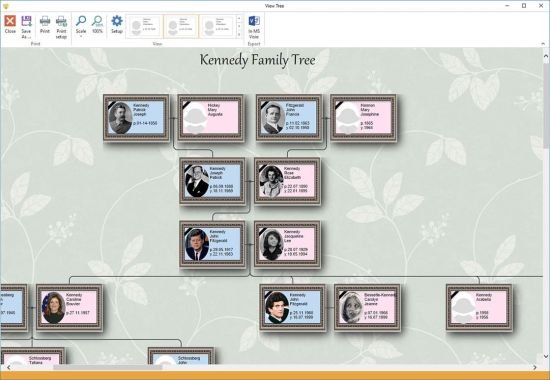
Generation Tree 1.10.0 Multilingual


th-aro-M2lmg-QG1-Dxo-S3iwdla-I30-EShf9-W7-Z.jpg

Generation Tree 1.10.0 Multilingual | 75.2 Mb
​
The Generations Tree software is designed to build a family tree (pedigree chart). With its help, you can maintain a database of people, families and events in their lives, while attaching necessary documents. The program is easy to use and has rich features when setting up the interface. Information for each object can be displayed in a table view, card view, or tree view.


Persons
Storage of information about a person and family members. It can be expanded and customized.

Family Tree
Automatic construction of a pedigree chart for any person. Advanced tree settings.

Families
Storage of information about families, family members, and events in the life of a family.

Documents
Storage of documents of any type, you can attach a document to a person, family or event,

Photo Albums
Creation of photo albums from family photo and video material.

Events
Storage of events in a person's life. You can create new types of events and customize existing types.

Creating a family site
Creating a family site based on the data entered.

Supported languages
Russian, English, German, French, Spanish, Italian.

System Requirements:
Windows XP, Vista, 7, 8, 10. Internet Explorer version 10 and higher

Home Page -
Код:
https://generatree.com/


-:DOWNLOAD FROM LINKS:-

NitroFlare Link
Код:
https://nitroflare.com/view/9561889A660E422/Tree.v.1.10.0.rar

RapidGator Link
Код:
https://rapidgator.net/file/f538104cb50861c4ae1d051a60c16815/Tree.v.1.10.0.rar.html

​
 
VueScan Pro 9.7.51 Multilingual


Yy-Uc-AWf-Htc-RFt-Dl3t-ZXY5xy8e-Ql-Lc-Y6a.png
VueScan Pro 9.7.51 Multilingual | 24 Mb
​
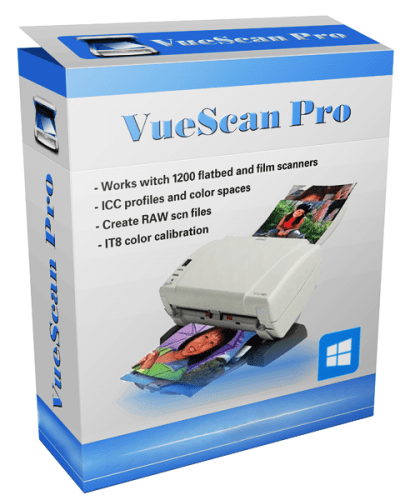
VueScan, the world's most popular scanner software, is used extensively by photographers, home users, scanning services and corporations. VueScan is a scanning program that works with most high-quality flatbed and film scanners to produce scans that have excellent color fidelity and color balance. It is very easy to use, and also has advanced features for restoring faded colors, batch scanning and other features used by professional photographers.


VueScan changes nothing on your system, installs nothing in your operating system and all other scanner software will continue to function. VueScan increases your productivity and saves you money. VueScan has advanced scanning options, powerful features, and greatly improves your scans with superior color accuracy and better color balance. VueScan supports more than 700 scanners and 209 digital camera raw files and takes about 5 minutes to download and install.

Features:
- Works with 1200 flatbed and film scanners
- Runs on Mac OS X, Windows and Linux
- Improves your productivity and quality of scans
- Has been downloaded more than 5 million times
- Create raw scan files
- ICC profiles and color spaces
- IT8 color calibration

Operating System: Windows 10, 8, 7, Vista, XP

Home Page -
Код:
http://www.hamrick.com/


-:DOWNLOAD FROM LINKS:-

NitroFlare Link
Код:
https://nitroflare.com/view/F739D7384C7B4AB/VueScan9.rar

RapidGator Link
Код:
https://rapidgator.net/file/1e611454c1ba358f65dede5c6c42ef74/VueScan9.rar.html

​
 
Unity Pro 2020 2.7f1 (x64)


WGVisj2i-Ub-FSXn-Ow-OGysrj-Qv-AAv-Yd5-Ha.png


Windows (x64) | Languages: English | File Size: 5.47 GB (In Total)
​
Unity software or video games Unity3D design and manufacture a complete set, consisting of a powerful game engine and development environment programming and development. Unity easy to do because most of the games in the graphical environment and low utilization of code, many companies and encourages users to take advantage of it. Support for popular programming languages, using three-dimensional modeling software and intelligent motor outputs physics including characteristics of the Unity Pro software.

Facilities and software features of Professional Unity:
-Visual attractive and user-friendly environment
-Mono powerful software for editing programming languages
-Support for programming languages ​​C #, JavaScript, and Boo
-Ability to import the output of three-dimensional design software such as 3ds Max, Maya, Blender, etc.
-There are a variety of Shader, effects and visual effects High Definition
-High-speed rendering operation
-Full simulation and advanced types of terrain, weather, automotive and ...
-nVIDIA PhysX engine to simulate physical, speed, friction, impact, etc.
-take advantage of new technologies lighting and shading for moving objects

System Requirements:

For development:
-OS:Windows 7 SP1+,8,10,64-bit versions only
Server versions of Windows & OS X are not tested.
-CPU:SSE2 instruction set support.
-GPU:Graphics card with DX10 (shader model 4.0) capabilities.

The rest mostly depends on the complexity of your projects.
Additional platform development requirements:
-Android:Android SDK and Java Development Kit (JDK); IL2CPP scripting backend requires Android NDK.
Universal Windows Platform: Windows 10 (64-bit), Visual Studio 2015 with C++ Tools component or later and Windows 10 SDK

For running Unity games:

Desktop:
-OS:Windows 7 SP1+
-Graphics card with DX10 (shader model 4.0) capabilities.
-CPU:SSE2 instruction set support.
-iOS player requires iOS 9.0 or higher.
-Android:OS 4.1 or later; ARMv7 CPU with NEON support or Atom CPU; OpenGL ES 2.0 or later.
-WebGL: Any recent desktop version of Firefox, Chrome, Edge or Safari.
-Universal Windows Platform: Windows 10 and a graphics card with DX10 (shader model 4.0) capabilities


-:DOWNLOAD FROM LINKS:-
NitroFlare
Код:
https://nitroflare.com/view/0946D71CA22AD06/Unity_Pro_2020_2.7f1.part1.rar
https://nitroflare.com/view/1B68AA4928E2495/Unity_Pro_2020_2.7f1.part2.rar
https://nitroflare.com/view/40A25F9F8A0713D/Unity_Pro_2020_2.7f1.part3.rar
https://nitroflare.com/view/B607450E5A4ADE1/Unity_Pro_2020_2.7f1.part4.rar
https://nitroflare.com/view/C253C5C19B96A9C/Unity_Pro_2020_2.7f1.part5.rar
https://nitroflare.com/view/83C04B917860188/Unity_Pro_2020_2.7f1.part6.rar

RapidGator
Код:
https://rapidgator.net/file/b9008b6b8ba3d75f4ee1978402bba30d/Unity_Pro_2020_2.7f1.part1.rar.html
https://rapidgator.net/file/256351e6602514347a86a1599277051b/Unity_Pro_2020_2.7f1.part2.rar.html
https://rapidgator.net/file/9068b20b05f762a9ac72b7bb3278f239/Unity_Pro_2020_2.7f1.part3.rar.html
https://rapidgator.net/file/eca0ad88a5adcbab929c48cc74a85c7b/Unity_Pro_2020_2.7f1.part4.rar.html
https://rapidgator.net/file/6435bd4084c4b20c4062bc75edcb76a8/Unity_Pro_2020_2.7f1.part5.rar.html
https://rapidgator.net/file/1375ce000666e72b6d629c6c99d77cea/Unity_Pro_2020_2.7f1.part6.rar.html

​
 
Total Commander 10.00 Beta 1a Multilingual


1446758762-total-commander-ultima-prime.jpg


Languages: Multilingual | File Size: 8 MB
​
Total Commander is a file manager for Windows similar to the Windows Explorer. But Total Commander uses a different approach: it has two fixed windows side by side like a well-known file manager for DOS.

Features:
- Two file windows side by side
- Multiple language and Unicode support
- Enhanced search function
- Compare files (now with editor) / synchronize directories
- Quick View panel with bitmap display
- ZIP, ARJ, LZH, RAR, UC2, TAR, GZ, CAB, ACE archive handling + plugins
- Built-in FTP client with FXP (server to server) and HTTP proxy support
- Parallel port link, multi-rename tool
- Tabbed interface, regular expressions, history+favorites buttons
- Thumbnails view, custom columns, enhanced search
- Compare editor, cursor in lister, separate trees, logging, enhanced overwrite dialog etc.
- Unicode names almost everywhere, long names (>259 characters), password manager for ftp and plugins, synchronize empty dirs, 64 bit context menu, quick file filter (Ctrl+S)
- New: USB port connection via special direct transfer cable, partial branch view (Ctrl+Shift+B), and many imporvements to ftp, synchronizing and other functions
- And many more!


-:DOWNLOAD FROM LINKS:-
NitroFlare
Код:
https://nitroflare.com/view/667BBA649703CDB/Total_Commander_10.00_Beta_1a.rar

RapidGator
Код:
https://rapidgator.net/file/883eaa14fe795d93a653171488fed2c5/Total_Commander_10.00_Beta_1a.rar.html

​
 
NTFS Permissions Reporter Enterprise 3.3.383.0 (x64)


KUKYBms9vf-Zyy-MJ2-Dama-Ma8-I0-Un-PX2r-R.png

NTFS Permissions Reporter Enterprise 3.3.383.0 (x64) | 57.7 Mb
​
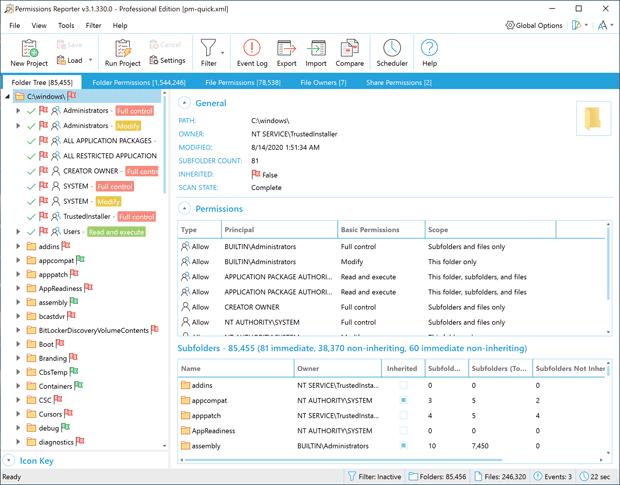
System administrators are constantly being asked to audit user permissions for specific files and folders. This is often a time-consuming task, with multiple layers of NTFS permissions and repeated adjustments over time creating a security labyrinth. You need a visual, interactive software tool to help you manage file system permissions. You need Permissions Reporter - the ultimate network-enabled NTFS permissions reporter for Windows. It allows you to validate the security posture of entire file systems quickly and efficiently. All with multiple export formats, command-line support, built-in scheduling, advanced filtering, and much more.


FEATURES:

BUILT-IN SCHEDULER
Schedule the creation and export of folder, file, owner, and share permissions report data quickly and easily. Includes support for all export file types, email integration, and more.

FOLDER PERMISSIONS REPORT
The Folder Permissions Report table view presents a "flat" view of file system permissions. It includes advanced sorting, filtering, and grouping capabilities - allowing you to create highly customized permissions reports.

FILE OWNERS REPORT
The File Owners Report view offers a hierarchical overview of disk space consumed by file type and owner. Quickly determine which users and file types are consuming valuable disk space. Includes a hierarchical treemap visualization.

SHARE PERMISSIONS REPORT
The Share Permissions Report view provides an overview of shares (local and across the network) and their permissions. Quickly see who has access to shares, along with their rights and access levels.

ADVANCED FILTERING
Permissions Report features an advanced filtering system that can be applied either at scan-time (when defined at the project level) or after the scan completes.

FILE PERMISSIONS REPORT
The File Report view shows files not inheriting or with permissions differing from their parent folders. Advanced filtering, sorting and grouping features make it easy to isolate specific entries and customize report layouts.

EXPORT FORMATS
Export permissions report data to a variety of formats, including HTML, XML, MS Excel, and CSV. Data exported to the XML file format can be re-imported at a later date for further analysis.

MPORT EXISTING DATA
Report data that has previously been exported in XML file format can be re-imported at a later date and time. This feature works well with the built-in scheduler, allowing you to generate report data during off hours and analyze it when time permits.

Flexible command line interface for integration & automation
Native 32 & 64 bit, Unicode enabled, support for long NTFS paths

Requirements: 64-bit Edition of Windows 10, 8.1, 7 (SP1) or Windows Server 2012 (R2), 2016, 2019

Home Page -
Код:
https://www.permissionsreporter.com/


-:DOWNLOAD FROM LINKS:-

NitroFlare Link
Код:
https://nitroflare.com/view/A11C0C6206ED418/Reporter.3.3.383.0.Entreprise.rar

RapidGator Link
Код:
https://rapidgator.net/file/be986631b5e1f39807494c9ba7a01efb/Reporter.3.3.383.0.Entreprise.rar.html

​
 
SimpleSoft Simple Invoice 3.23.0 Multilingual


k-Wkk8r9zva-Om8-Pe-Flh-RTs-SGrs-Lmx-RPBb.png

SimpleSoft Simple Invoice 3.23.0 Multilingual | 2.8 Mb
​
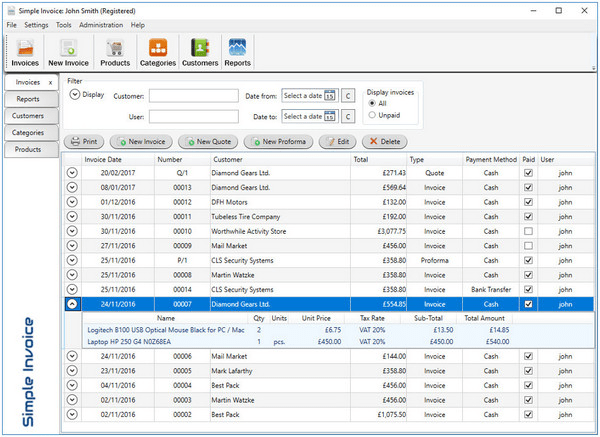
Simple Invoice is easy to use software that helps you to manage and account invoices. Simple and intuitive user interface is designed for latest Windows systems. Instalation is quick because program is very "light" for system.


Features:
Set up multiple companies.
Creating professional invoices with your own logo.
Creating Quotes (Quotation) and Proforma Invoices.
Creating Credit Invoices.
Support invoicing for UK, USA, Australia, Spain, Germany, Belgium and more.
Support Inclusive tax/fee for items.
Change any text on invoice and issue non-english invoices!
Currencies from around the world.
Rich configuration and customization.
Sales TAX, VAT, GST, MwST, IVA, BTW.
Four professional looking invoice templates.
Track all customers payments and send Statement to them.
Support for shipping - add shipping cost and print Packing Slip.
Put your own informations and messages on invoices.
Find invoices and customers quickly.
Create categories for products or services.
Set four different prices for product or service.
Quickly creating new invoice on the basics of existing invoice.
Three different invoice numbering styles.
Business reports such as sales, customers, invetory, profit, payments, overdue.
Easy backup and restore system.
Support multiple bank accounts.
Import and Export tool.

Operating System: Windows 7 (Microsoft .Net 4.5 required), 8/8.1, 10

Home Page -
Код:
http://www.simple-invoice.co.uk/


-:DOWNLOAD FROM LINKS:-

NitroFlare Link
Код:
https://nitroflare.com/view/66521B19C2220F3/Simple.Invoice.3.rar

RapidGator Link
Код:
https://rapidgator.net/file/7f009ec5832d96c2293872e2af423ce8/Simple.Invoice.3.rar.html

​
 
Назад
Сверху