• Здравствуйте. Сайт заработал в архивном режиме форум www.old.nado.in

Dl4ever Software

InventorCAM 2020 SP4 build 115989


10063b1125ad7e6059b395b41ca6830c.jpg

InventorCAM 2020 SP4 | 4.1 Gb

Languages: 中文, Čeština, Dansk, Nederlands, English, Français, Deutsch, עברית,

Magyar, Italiano, 日本語, 한국어, Polski, Português, Русский, Español, Türkçe


​
SolidCAM is pleased to announce the availability of InventorCAM 2020 SP4 - the latest version of their flagship CAM software, fully integrated in Autodesk Inventor. Last release brings major enhancements to many CAM modules available inside InventorCAM, as well as general improvements that provide an even greater ease-of-use for the end user.

InventorCAM 2020 SP4 Release Notes - Date: January 3, 2020

Bug Fixes
SOL-11204 HSS with barrel tool / offset value is doubled
SOL-14676 Geometry / Highlight of available chain entities following doesn't work correctly
SOL-14756 Revolver on Back Spindle || Wrong opos and apos in case of FLIP function in Setup
SOL-14796 Tapping cycle is not changed to drill cycle when drill tool selected
SOL-14800 General/Get crash on open
SOL-14964 Probe/getting different cycle type on POS\_TO\_MACHINE parameter change
SOL-14982 MaschSim Error
SOL-15198 Turn drill job time is incorrect if using V\(m/min\) spin rate
SOL-15207 Getting error message on running Machine Simulation
SOL-15210 Offsets check mark is not saved inside Templates
SOL-15217 fixture\_z\_min=0 fixture\_z\_max=0


About SolidCAM product family. SolidCAM, InventorCAM and the standalone SolidCAM CAD/CAM suite are the flagship products. SolidCAM and InventorCAM integrate with SolidWorks and Inventor, respectively. Officially approved partners and all that. Their CNC programming toolsets look and feel like the CAD systems as much as possible, making the learning curve shorter. You define, calculate and verify all your machining operations without leaving the CAD environment. They can handle programming 2.5- to 5-axis machining, high-speed surface milling, wire EDM, etc. Their models are fully associative, so your toolpaths update when you make a part change. There are no import/export hassles, and you don't have to learn some CAM system's idea of a CAD application to make them work.

iMachining - basically, this is a wizard-based technology - patented, BTW - that makes defining cutting conditions easy by automatically calculating the cutting conditions for your toolpath. You give it your toolpath, stock, tool material and machine specifications then it derives optimal feeds, step over depths and widths as well as cutting speeds. For you old hands, the company says iMachining can save you 70% or more in CNC machining time and extends tool life dramatically.

SolidCAM & InventorCAM Tutorial 2 | 2.5D Milling


SolidCAM Inc is a world leader in advanced tool path generation technology (CAM) running directly inside SolidWorks. SolidCAM features a full line of CNC machine programming software solutions ranging from 2 axis lathes and 3 axis mills to extremely complex multi-axis MillTurn machines and Wire Edm. All products run directly inside SolidWorks and provide the user with a true "SolidWorks look and feel" for ease of use and maximum efficiency. Along with the integrated interface and scalability for new machines, SolidCAM also has its patented "iMachining" that powers users to new levels of productivity and profits, through unmatched cycle time reduction and unrivaled tool life.

Product: InventorCAM
Version: 2020 SP4 build 115989
Supported Architectures: x64
Website Home Page :
Код:
http://www.solidcam.com
Language: multilanguage
System Requirements: PC *
Software Prerequisites: Autodesk Inventor 2021 and below
Size: 4.1 Gb

Microsoft Windows 10 x64 Professional and Enterprise Editions; Microsoft Windows 8.1 x64 Professional and Enterprise Editions (with latest Service Pack); Microsoft Windows 7 x64 Professional and Ultimate Editions (with latest Service Pack)
- Intel Xeon, Intel Core, Intel Core 2 Duo, Intel Core 2 Quad or higher (If you use other processors we assume no responsibility and no support)
- 4 GB RAM (for the processing of large components, we recommend 8 GB RAM (or more)
- 15 GB free disk space for installation
- Hard disk with at least 100 GB of storage
- NVIDIA graphics card of the current Quadro series with min. 512 MB ​​(1024 MB recommended) and current, certified graphics driver (With the use of other and on-board graphics cards, we accept no responsibility and no support)
- 1,280 x 1,024 or higher screen resolution
- Microsoft Direct3D 9 or compatible graphics card (Microsoft Direct3D 11 or higher recommended)
- USB 2.0 interface
- DVD drive


-:DOWNLOAD FROM LINKS:-

RapidGator
Код:
https://rapidgator.net/file/726b9bf367038daf5160777adf2a8c65/InventorCAM.2020.SP4.part5.rar.html
https://rapidgator.net/file/e6407a015f9d28ded84bdd7475f5ebdf/InventorCAM.2020.SP4.part4.rar.html
https://rapidgator.net/file/62e65485eb9e707b89e21bb5f9e96fe8/InventorCAM.2020.SP4.part3.rar.html
https://rapidgator.net/file/3ebd1f8f9c448b2f84e2cc4103dd80d0/InventorCAM.2020.SP4.part2.rar.html
https://rapidgator.net/file/d6d2b8c36cf5348d73bd144e439c4740/InventorCAM.2020.SP4.part1.rar.html

NitroFlare
Код:
https://nitroflare.com/view/597457C62D35ED4/InventorCAM.2020.SP4.part1.rar
https://nitroflare.com/view/ADC1AEC456A060E/InventorCAM.2020.SP4.part2.rar
https://nitroflare.com/view/06788C045D4B6F5/InventorCAM.2020.SP4.part3.rar
https://nitroflare.com/view/26768311B8D97B2/InventorCAM.2020.SP4.part4.rar
https://nitroflare.com/view/FB7DFF5FE3FAA9B/InventorCAM.2020.SP4.part5.rar


​
 
SolidCAM 2020 SP4 build 115924


4cc3d3c86221da877706921682f637e8.jpg

SolidCAM 2020 SP4 | 4.6 Gb

Languages: 中文, Čeština, Dansk, Nederlands, English, Français, Deutsch, עברית, Magyar,

Italiano, 日本語, 한국어, Polski, Português, Русский, Español, Türkçe

​

SolidCAM is pleased to announce the availability of new version CAM software - SolidCAM 2020 SP4. Last release brings major enhancements to many CAM modules available inside SolidCAM, as well as general improvements that provide an even greater ease-of-use for the end user.

SolidCAM 2020 SP4 Release Notes - Date: January 3, 2021

Bug Fixes
SOL-11204 HSS with barrel tool / offset value is doubled
SOL-14676 Geometry / Highlight of available chain entities following doesn't work correctly
SOL-14756 Revolver on Back Spindle || Wrong opos and apos in case of FLIP function in Setup
SOL-14796 Tapping cycle is not changed to drill cycle when drill tool selected
SOL-14800 General/Get crash on open
SOL-14964 Probe/getting different cycle type on POS\_TO\_MACHINE parameter change
SOL-14982 MaschSim Error
SOL-15198 Turn drill job time is incorrect if using V\(m/min\) spin rate
SOL-15207 Getting error message on running Machine Simulation
SOL-15210 Offsets check mark is not saved inside Templates
SOL-15217 fixture\_z\_min=0 fixture\_z\_max=0


SolidCAM is a CAM software that integrates directly into SolidWorks and Inventor. That does not only mean you can program tooling paths from the comfort of the CAD software you know and love, but it is also advantageous in that all tool paths retain associativity with the original CAD design. In other words, any changes made to the CAD file will instantly be reflected in updated tool paths, saving you time and money.

Take out the guesswork of milling, turning and other processes by using the patented Technology Wizard. The wizard allows you to automatically fine-tune optimized feeds, speeds, depth and width of cuts. What is more, this CAM software automatically recognizes the distinct geometrical features of your design and assigns toolpaths accordingly. Hence, this approach eliminates the need for time-consuming manual geometry definition.

The tool paths created with this CAM software rely on an advanced, patented morphing spiral that gradually conforms to the geometry of the feature being machined rather than an old-fashioned, simple spiral tool path. This increases the amount of time the tool actually works the stock and thus makes your machine more productive.

SolidCAM 2020 Advanced Mill-Turn


SolidCAM Inc is a world leader in advanced tool path generation technology (CAM) running directly inside SolidWorks. SolidCAM features a full line of CNC machine programming software solutions ranging from 2 axis lathes and 3 axis mills to extremely complex multi-axis MillTurn machines and Wire Edm. All products run directly inside SolidWorks and provide the user with a true "SolidWorks look and feel" for ease of use and maximum efficiency. Along with the integrated interface and scalability for new machines, SolidCAM also has its patented "iMachining" that powers users to new levels of productivity and profits, through unmatched cycle time reduction and unrivaled tool life.

Product: SolidCAM
Version: 2021 S4 build 115924
Supported Architectures: x64
Website Home Page :
Код:
http://www.solidcam.com
Language: multilanguage
System Requirements: PC *
Software Prerequisites: SolidWorks 2012-2021
Size: 4.6 Gb

Microsoft Windows 10 x64 Professional and Enterprise Editions; Microsoft Windows 8.1 x64 Professional and Enterprise Editions (with latest Service Pack); Microsoft Windows 7 x64 Professional and Ultimate Editions (with latest Service Pack)
- Intel Xeon, Intel Core, Intel Core 2 Duo, Intel Core 2 Quad or higher (If you use other processors we assume no responsibility and no support)
- 4 GB RAM (for the processing of large components, we recommend 8 GB RAM (or more)
- 15 GB free disk space for installation
- Hard disk with at least 100 GB of storage
- NVIDIA graphics card of the current Quadro series with min. 512 MB ​​(1024 MB recommended) and current, certified graphics driver (With the use of other and on-board graphics cards, we accept no responsibility and no support)
- 1,280 x 1,024 or higher screen resolution
- Microsoft Direct3D 9 or compatible graphics card (Microsoft Direct3D 11 or higher recommended)
- USB 2.0 interface
- DVD drive


-:DOWNLOAD FROM LINKS:-

RapidGator
Код:
https://rapidgator.net/file/8d99c676bbe35dda442a82d9f5eeffad/SolidCAM.2020.SP4.part1.rar.html
https://rapidgator.net/file/1117e2825ea32e320e9c42e0eb12f361/SolidCAM.2020.SP4.part2.rar.html
https://rapidgator.net/file/4ab769f13d30bb1450b65e107b48c48a/SolidCAM.2020.SP4.part3.rar.html
https://rapidgator.net/file/915d70440dd44bd582a44ab95cb5507b/SolidCAM.2020.SP4.part4.rar.html
https://rapidgator.net/file/856dd01319da685ec33be586e9c43cf9/SolidCAM.2020.SP4.part5.rar.html

NitroFlare
Код:
https://nitroflare.com/view/7B9A51DC99003F7/SolidCAM.2020.SP4.part1.rar
https://nitroflare.com/view/C24616C954B19F9/SolidCAM.2020.SP4.part2.rar
https://nitroflare.com/view/B338AD8CD42B06F/SolidCAM.2020.SP4.part3.rar
https://nitroflare.com/view/3291C657D97BC0C/SolidCAM.2020.SP4.part4.rar
https://nitroflare.com/view/CFBEB97E2F7FEC7/SolidCAM.2020.SP4.part5.rar
​
 
ANSYS Electronics Suite 2021 R1Suite


e9e2bc2784b5bc4a27c7ac0fd084af7e.jpg

ANSYS Electronics Suite 2021 R1 | 13.8 Gb
​
ANSYS Inc. has announced the availability of the 2021 R1 edition of its ANSYS Electronics Suite of electronics and electromagnetics simulation software solutions.


General Electronics Desktop
- Commercial release of Mechanical and EMIT design types
- Ansys Cloud enhancements:
. Multi-step job submission
. Auto extraction o freport data
. Improved robustness and useability
- AbilitytoeditdesignsettingsinthePropertieswindow
- Enhanced Minerva integration, including direct project access
- Integration of optiSlang setup in Optimetrics (Beta, Windows only)
- New 3D*modeler orientation gadget
- Support for Linux SLURM*schedulers
- Automatic use of loopback address to improve reliability when connecting and disconnecting with VPN
- Ability to schedule, submit, and monitor jobs in standalone utility
- New menu command to validate parametric setups before solving
- Enhanced useability and workflows in Network Data Explorer
- Proxy3D Components (Beta)
- Enhancements to object-oriented property scripting (Beta)
HFSS
- Performance improvements:
. Improved iterative solver
. Improved performance for designs with many sources
. Ability to disable saving adaptive pass refinement files
- Improvements for SBR+ designs:
. Ability to visualize link source geometry in the target design
. Support for composite sources
. Features for automotive radar:
.. Parametric antenna arrays
.. FMCW in Range-Doppler solutions
. Enhancements to near field excitations and post-processing
. Linked antenna array source blockage in hybrid simulations
- FEM3D components mesh assembly (Beta)
- New automatic airbox region for 3D*component arrays
- Embedded element pattern export
- Single-sided shell element field plotting
- Azimuth,elevation,andslantanglesfor far fields
- Finite Array Toolkit enhancements for amplitude tapering and sub-arrays
- Support for dispersive ports in the hybrid transient solver
- Option to prevent mesh-method fallback
- Option to suppress gamma, Zo in automatic S Parameter export
HFSS 3D Layout
- Performance improvements:
. Improved iterative solver
. Improved performance for designs with many ports
. Ability to disable saving adaptive pass refinement files
- Support for encrypted 3D components
- Q3D*DC*pointfor designs with 3D*components
- FEM*3D*components mesh assembly
- Improved dialog box for wirebond creation and editing
- Improvements to IC-mode meshing
- Support for package definitions and IDF
- Support for unencrypted iRCX technology in GDS import
SIwave
- Support for Granta material libraries
- Improved SYZ solver performance for designs with a very large number of ports
- New time-domain crosstalk scan for differential nets
- New integrated DDR wizard (Beta)
- Improved robustness of RLCG extraction
- Improved handling of CPM and Voltus models
- Option to visualize direction of incident waves
- Ability to specify location of capacitor and IBIS*library directories
- Ability to run Icepak simulations from the Electronics installation
Maxwell
- Commercial release of new A-Phi transient solver
- Commercial release of partial mesh and solution from full rotational model
- Support for temperature-dependent core loss curves
- Support for spatially-varying materials characteristics and temperatures from XYZ datasets
- Extension of Litz wire modeling to RL matrix solutions
- Ability to create field plots of average loss
- Ability to parameterize adaptive frequency in eddy current solutions
- Enhancements to electric machine toolkit workflows and performance
- Ability to output transient electromagnetic forces to motion
- Support for element-based volumetric harmonic forc eineddy-current solutions
- Support for GPU acceleration in 3D real matrix solutions
- Ability tos pecify minimum and maximum nonlinear iterations
- Support for time-dependent excitations and motion in system coupling
- New 3D AC conduction solver (Beta)
Motor-CAD
- Export Maxwell (2D/3D) custom DXF geometry
- Using Maxwell User-Defined Primitive for hairpin coil definition with parametrized elements
- Optimization ratio-based geometry
- Force analysis improvements
- Use Maxwell solver as an electromagnetic option for driving cycle analysis
- Thermal end-winding modeling improvement
Icepak
- New ability to generate LTI ROM models in Twin Builder
- New flow links and improved workflows for network schematics
- Improved meshing automation and workflows
- Enhancements to concurrent meshing of regions
- Ability to import IDF datat hrough PCB components
- New fast Optimetrics option to copy meshes and solver inputs
- Ability to scale EM losses
- Ability to include dielectric loss in links from 3D Layout
- New ability to export solver monitor and residual data
- New dynamic thermal managements control (Beta)
Mechanical
- First commercial release in Electronics Desktop
- Fully integrated workflows and solutions on Windows and Linux
- Ability to set up and solvet hermal and modal simulations
- EM loss coupling with HFSS, Maxwell, and Q3D Extractor
- Rotating fluid boundary for electric machines
- Ability to link with heat transfer coefficient calculated in Icepak
Q3D Extractor
- CommercialreleaseofAnsysPRIME meshoptionfor CGsolver
- ImprovedperformanceofCGdirectsolver
- New uniformcurrentcircuitterminalsfor theAC-RLsolver (Beta)
Circuit
- Integration of Power Module Characterization Tool in Circuit designs
- Enhanced efficiency of dynamic links to field solvers
- AMI model support for single-ended devices
- Addition of parasitic elements to L and C models
- New support for eye measurements in countour plots
- Integration of SPISim SPro functionality into Network Data Explorer
- AdditionofNexximasdefaultsimulator for SPISim
- New SPISim COM capabilities, including PowerSum, Effective Return Loss (ERL)
- Improved DC passivity preservation in state-space fitting (Beta)
EMIT
- First commercial release in Electronics Desktop
- Improved coupling link with HFSS and HFSS 3D Layout
- Enhancements to workflows and usability of schematic editor
- Improved automation and scripting API
- Support for import of projects from classic EMIT

Twin Builder

Modelica Workflow Enhancements
- Support for Modelica package creation and library management
- Support to extend existing Modelica model
- Enhanced support for graphical annotation
- Faster loading of Modelica libraries and numerous other Modelica usability enhancements
Enhancements to ROMs and ROM*Viewer
- Support for Fields Visualization in Dynamic ROM Builder
- Static ROM Builder supports geometrical parameter variation
- New Response Surface ROM Toolkit
- UI for Linear Parameter Varying (LPV) ROM
- Enhancements to the Static ROM Viewer
- Support for 3D Visualization during Simulation inside Twin Builder
Battery and EV Verticalization
- Toolkit to perform Failure Mode & Effect Analysis (FMEA)
- Motor Equivalent Circuit Toolkit for FMU export
- Battery Wizard improvement
- New EV Powertrain Library
- Toshiba component library as ACT extension
Export,*Deployment, and Digital Twins
- Support for Schematic authoring, Python block, and simulation result explorer in Twin Deployer
- Export Twin project for sample deployment and DTDL for Microsoft Azure Digital Twin deployment
- Enhanced interoperability with all-inclusive Tool-coupling FMU
- Support for FMU (fixed step) export from Simulink for Twin Builder
- Improved compilation of FMUs and Twin Builder Fluent component on Linux
- Improved UI for adaptor for flsim in Fluent
Support for Enterprise Workflow
- Ansys Minerva integration in Twin Builder
- Ansys optiSLang integration in Twin Builder
General
- Numerous*Useability and Performance Enhancements
For complete details on the new features of Ansys Electronics 2021 R1 please refer to the
ANSYS Electronics Desktop is a comprehensive platform that enables electrical engineers to design and simulate various electrical, electronic and electromagnetic components, devices and systems. It is a unified interface which creates and analyzes electromagnetic (EM), thermal and circuit designs.

Engineers can access gold-standard tools such as ANSYS HFSS, ANSYS Maxwell, ANSYS Q3D Extractor and ANSYS Icepak using electrical CAD (ECAD) and mechanical CAD (MCAD) workflows. In addition, the Electronics Desktop includes direct links to the full ANSYS portfolio of thermal, fluid and mechanical solvers for comprehensive multiphysics analyses.

Engineers can integrate rigorous 2D and 3D physics analyses with system and circuit simulations, all inside a single framework called ANSYS Electronics Desktop. Any combination of products within the Electronics Desktop can be inserted into a single project. For instance, you can combine disparate design types such as HFSS, Circuit and Icepak into a single project. Schematics can be used to wire up different field solver models and create a model of a high-level system through dynamic links that combine 3D EM and SPICE circuit analyses.

Engineers can efficiently manage complex projects that require several different analysis tools to predict the operation of their electronic products. Designs can also be parameterized. With Optimetrics, design variations can be studied and made available to other modules when the designs are included in a higher-level simulation. This allows engineers to conduct what-if experiments and study the effects of component design parameter variations on the behavior of the entire system.

Ansys Electronics Suite 2021 R2, sneak peak.


Founded in 1970, ANSYS employs nearly 3,000 professionals, many of whom are expert M.S. and Ph.D.-level engineers in finite element analysis, computational fluid dynamics, electronics, semiconductors, embedded software and design optimization. Our exceptional staff is passionate about pushing the limits of world-class simulation technology so our customers can turn their design concepts into successful, innovative products faster and at lower cost. As a measure of our success in attaining these goals, ANSYS has been recognized as one of the world's most innovative companies by prestigious publications such as Bloomberg Businessweek and FORTUNE magazines.

Product: ANSYS Electronics
Version: 2021 R1 Suite
Supported Architectures: x64
Website Home Page :
Код:
http://www.ansys.com
Language: english
System Requirements: PC *
Size: 13.8 Gb

Platform Support

Defining the optimum computer infrastructure for use of Ansys software begins with understanding the computing platforms that are tested and supported by Ansys. Download the link below to learn about the computing platforms we support as well as reference system architectures recommended by valued partners.

The PDF files below provide platform support information for the current Ansys release, including certification and test information for operating systems, graphics cards, job schedules and other platform components.


-:DOWNLOAD FROM LINKS:-

RapidGator
Код:
https://rapidgator.net/file/21e1b7e25103685282cec413a365d5fc/Electronics.2021.R1.part01.rar.html
https://rapidgator.net/file/cfac8cba8dcc0c0633592e6d8510557d/Electronics.2021.R1.part02.rar.html
https://rapidgator.net/file/d27fcef784913ba07554965b124ba89a/Electronics.2021.R1.part03.rar.html
https://rapidgator.net/file/455f3f70b129e715d978b00d3062bfc2/Electronics.2021.R1.part04.rar.html
https://rapidgator.net/file/0ac4080e56ac8a10f44fa7da310007db/Electronics.2021.R1.part05.rar.html
https://rapidgator.net/file/3de6462cb53099fca035155e3f700800/Electronics.2021.R1.part06.rar.html
https://rapidgator.net/file/6e826c87ad883d39e4809835bc0d45c9/Electronics.2021.R1.part07.rar.html
https://rapidgator.net/file/27549de4a00a8d1b6b1afdd2c7cfcd35/Electronics.2021.R1.part08.rar.html
https://rapidgator.net/file/c18ab917496caf9818fcd5cbeff1dd7a/Electronics.2021.R1.part09.rar.html
https://rapidgator.net/file/41a80fa35b1e5122c65aa4b16d8efba6/Electronics.2021.R1.part10.rar.html
https://rapidgator.net/file/1d1846a219e5df5e9ee4b4bfe5d9acec/Electronics.2021.R1.part11.rar.html
https://rapidgator.net/file/13f81f8628b8ffdc3c8c226a6bbb9b38/Electronics.2021.R1.part12.rar.html
https://rapidgator.net/file/f36c2acb44d1b5ffa93188aa98e1689e/Electronics.2021.R1.part13.rar.html
https://rapidgator.net/file/db0bdb979339af62bc91c8768126c999/Electronics.2021.R1.part14.rar.html

NitroFlare
Код:
https://nitroflare.com/view/C97CC7ECBD16E1A/Electronics.2021.R1.part01.rar
https://nitroflare.com/view/BF9082007327958/Electronics.2021.R1.part02.rar
https://nitroflare.com/view/BAB46EC7A752D9D/Electronics.2021.R1.part03.rar
https://nitroflare.com/view/5C1262D3CE1AEFE/Electronics.2021.R1.part04.rar
https://nitroflare.com/view/FBA2ABFF995DC86/Electronics.2021.R1.part05.rar
https://nitroflare.com/view/712E625649584B5/Electronics.2021.R1.part06.rar
https://nitroflare.com/view/BC823893570941A/Electronics.2021.R1.part07.rar
https://nitroflare.com/view/6FD3CCE8E17BE83/Electronics.2021.R1.part08.rar
https://nitroflare.com/view/83D4B61CE90401F/Electronics.2021.R1.part09.rar
https://nitroflare.com/view/E5817FDC042CD3D/Electronics.2021.R1.part10.rar
https://nitroflare.com/view/283B310127C1F7A/Electronics.2021.R1.part11.rar
https://nitroflare.com/view/918F3DC0A92F2D7/Electronics.2021.R1.part12.rar
https://nitroflare.com/view/910FA36841C8B95/Electronics.2021.R1.part13.rar
https://nitroflare.com/view/F6617837E67221C/Electronics.2021.R1.part14.rar

​
 
Camnetics Suite 2021 Build 01.06.2021


53e9286674c6526f381477915a4097d2.jpg

Camnetics Suite 2021 | 212.0 mb
​
The Camnetics product team is pleased to announce the availability of Camnetics Suite 2021 (Build 01.06.2021). This softwares provides the designer advanced tools for creating solid models of drive components and assemblies.


Camnetics Suite is an object oriented/property driven gear design programs. It is not the intent of Camnetics Suite to replace your CAD system but to augment the CAD system with a user interface that will allow the gear designer to accurately visualize the components before they are modeled in the CAD system.

GearTrax has a predetermined number of components. For example, the spur tab always has 2 gears, a pinion and a gear. For bevel gears this is important because bevels are normally defined as a set. The number of teeth in both gears defines such properties as the pitch angles. When GearTrax creates in CAD, the user can select between creating only the individual models or the models and the assembly. GearTrax is programmed in the USA using 100% renewable energy.

A GearTeq component can be a CAD part by itself. The component can be part of a set of components that make up a single CAD part. For example, a spur gear is a single component but this spur gear may have an internal spline as a child mate that is defined as a bore. When created in CAD, the spur gear will be created and the internal spine will be added features of the spur gear. This is also true for mating parts that are defined as joined.

A CamTrax64 base component is either a cylinder or a cube. A cylinder can have paths inserted on both ends and/or the cylindrical surface. A cube can have paths inserted on the upper or lower surface. Each path has a single cam follower. This follower can be translating or oscillating. A path may also be a dual follower (two cam followers of the same diameter) so a ridge is created along the centerline of the path. A path may also be conjugate to another path (master). The conjugate path may have a follower of a different diameter than the master path

Demonstrates how to create a rack and pinion set in GearTrax.


Camnetics, Inc. incorporated in 1997 with the goal to provide engineers and designers with tools for creating solid models of drive components. Camnetics, Inc. offers easy to use software so the designer can be creating these special type of models with very short learning curve.

Product: Camnetics
Version: Suite 2020 (Build 01.06.2021) *
Supported Architectures: x64
Website Home Page :
Код:
http://www.camnetics.com
Language: english
System Requirements: PC
Supported Operating Systems: Windows 7even or newer
Size: 212.0 mb

CamTrax64 Autodesk Inventor version 2021.25.1.301
CamTrax64 SolidEdge ST4-ST10 version 2021.221.1.301
CamTrax64 SolidWorks version 2021.29.1.301

GearTeq Autodesk Inventor version 2021.25.1.561
GearTeq SolidEdge ST4-ST10 version 2021.221.1.561
GearTeq SolidWorks version 2021.29.1.561

GearTrax Autodesk Inventor version 2021.25.1.454
GearTrax SolidEdge ST4-ST10 version 2021.221.1.454
GearTrax SolidWorks version 2021.29.1.454


-:DOWNLOAD FROM LINKS:-

RapidGator
Код:
https://rapidgator.net/file/6ca5685608b9109f449d78c0be0d8239/Camnetics.Suite.2021.rar.html

NitroFlare
Код:
https://nitroflare.com/view/79B971DC537A7C9/Camnetics.Suite.2021.rar

​
 
MathMagic Pro Edition for (Adobe InDesign) 8.7.1.47


ac02a88b6feb3b5e0814192a4e0d471f.png

MathMagic Pro Edition for (Adobe InDesign) 8.7.1.47 | 32 MB
​
MathMagic Pro Edition for Adobe InDesign is an equation editor mainly for use with Adobe InDesign software in editing any mathematical expressions and symbols with WYSIWYG interface and various powerful features.


MathMagic Plug-in provides you with the user interface(a menu and a tool button) which enables you to create and edit equations inside the InDesign document. Then, it communicates with the external MathMagic Pro application seamlessly.

You can make any equations with MathMagic Pro application very fast, and then send back to InDesign. MathMagic Plug-in allows you to place equations inside a text box as inline graphics, or floating graphic objects in EPS format. Once created, all equations are handled by InDesign just like other EPS graphic objects. But you can still edit those equations anytime just by double-clicking on it.

MathMagic Plug-in recognizes the baseline of equations automatically so that all equations match well with the baseline of the text line, even it allows you to shift the baseline manually as well.

Why MathMagic?
- There are many reasons why professional users choose MathMagic products.
- But simply, the superior productivity and equation quality of MathMagic make users happy all the time.
- The overall productivity that can save a lot of time and labor returns you the investment on software normally within 1 week ~ 1 month. The equation quality and customizable features meet the high-end users' complicated requirements.

Productivity
- Intelligent WYSIWYG editor with automatic equation formatting
- Various & flexible keyboard shortcuts for power users
- Configurable User Item palette and Clips palette for easier access and repeated use
- StyleSet management for group-wide sharing of editing environment and quick applying of other StyleSets

Features
- Many pre-defined Templates and Symbols in palettes that cover Mathematics, Physics, Electronics, Accounting, and other higher education
- Various formats for compatibility with other software: EPS, PDF, SVG, JPG, PNG, GIF, MS Word, MathType™, LaTeX, Wiki, MathML, .

Quality
- Wide range of quality fonts for mathematical symbols in OpenType and TrueType formats
- Ability to customize Template shapes, thickness, gaps, position, and size up to 2400dpi resolution
- EPS with Color separation and Spot color support

Ease of Use
- All graphic user interface, plus fast keyboard input support for many common templates and symbols
- Multiple Undo & Redo, Drag&Drop, visual settings and Preview
- Similar User Interface with Equation Editor™ and MathType™ to reduce any additional learning cost

System Requirements:
- Windows XP, Vista, 7, 8, 10
- Adobe InDesign CS3 or newer including CC 2020
- About 30MB of hard disk space

Home Page -
Код:
http://www.mathmagic.com/


-:DOWNLOAD FROM LINKS:-

RapidGator
Код:
https://rapidgator.net/file/666856af5962451ec8e90bc5a24cca18/MathMagic.Pro.Edition.8.71.47.rar.html

NitroFlare
Код:
https://nitroflare.com/view/FDEA5457EBE5F91/MathMagic.Pro.Edition.8.71.47.rar

​
 
Corel WinDVD 12.0.0.243 Pro SP7 Multilingual


b0382ab7df356fd613353cf33f809064.png


Languages: Multilingual | File Size: 126.19 MB
​
Bring Hollywood home with the leading video playback, Blu-ray and DVD software, Corel® WinDVD® Pro 12. From high-resolution 4K videos and HEVC (H.265*), to 3D video, DVDs and Blu-ray, enjoy a huge range of formats with stunning quality, Dolby sound and more. Intuitive controls in an updated, modern interface let you easily fine-tune video and audio. Plus, enjoy smoother playback with new 240 fps performance.

Leading Blu-ray & DVD software
- New 4K video support
- New More files supported, including HEVC (H.265)
- New Clean, modern interface
- Enhanced Smooth high frame rate playback

#1 DVD and Blu-ray player software
Create the movie theater experience at home, anytime you want, with complete DVD and Blu-ray software. With over 300 million copies sold, WinDVD is a leader in video playback and DVD software, and one of the world's most recognized products.

Best picture. Big sound.
Immerse yourself in high-quality picture and sound with powerful video and audio controls, and new 4K video support. Enhance color, stabilize shaky video and enjoy smoother playback with higher frame rate support. Boost audio levels, reduce noise and enjoy quality Dolby audio.

Play all popular formats, including 3D
Play all popular formats with the click of your mouse. Jump into the action with advanced 3D technology that delivers an incredibly dynamic viewing experience. You can even convert your standard videos into 3D for more lifelike movies!

What's New in WinDVD Pro 12:

#1 DVD and Blu-ray player software
Trust your viewing experience to one of the world's most recognized products, with leading Blu-ray 3D player technology and over 300 million copies sold. WinDVD Pro 12 plays all of the most popular formats, including Blu-ray Disc, BDXL, MP4, WMV-HD, DVD and AVCHD.

Standard to HD video upscaling
Make your video look its best with proven upscaling technology that delivers near-HD quality video from standard DVDs. The GPU-accelerated upscaling works across different platforms.

Color correction and lighting controls
Fine-tune to get just the look you want with easy adjustments for richer color and enhanced lighting. Use presets to improve picture, adjust brightness, contrast and more.

Optimized 3D mode
If you have a NVIDIA graphics card with 3D Vision support on your PC, WinDVD Pro 12 automatically enters an exclusive mode to play high-definition video files in 3D mode, greatly optimizing your 3D playback experience.

3D Blu-ray software
Enjoy high-definition Blu-ray and Blu-ray 3D movies, HD-quality and theatre-like surround sound. With leading 3D technologies, you can experience 3D playback your way.

2D to 3D video conversion
Convert and enjoy your 2D movies in full 3D definition for the most lifelike viewing experience! 2D to 3D conversion is supported for DVD-Video, and standard and high-definition video files.

Playback interface
Optimize your viewing experience with the easy-to-access video and audio controls in the new, modern interface. Create playlists, take screenshots or video clips of a favorite scene, enhance quality and more. These tools are just a click away.

Playlists and Bookmark tools
Select your favourite movies and create your own playlists. Plan your next rainy day or big event and enjoy continuous video playback. Even mark your favorite scenes while the video is playing to watch them again.

Powerful video playback
Get closer to the action and catch every detail with smooth, high frame rate video playback that supports up to 240 frames per second. You can also increase frame rate and interpolate frames to remove the jitters from fast motion video.

Capture the action
Easily capture a screenshot of your favorite movie scene as a still picture or video clip. Save it as a file and upload and share it with your friends. Even zoom or crop your video to take a closer look and get closer to the action.

Time Stretch
Short on time? Watch your movie on your time. Adjust the speed of the video playback to fit the time you have available. You can speed up playback up to 2 times faster, or slow down to half speed.

Enhanced performance and extended battery life
Thanks to optimization for new CPUs and GPUs from NVIDIA, Intel and AMD, WinDVD 12 is faster than ever before. Plus, extended power-saving capabilities give you more life from your laptop.

File support
Enjoy crisp, vivid playback of all the most popular file formats, including new 4K video and HEVC (H.265). Also enjoy Blu-ray 3D, BD-Live, BDXL, AVCREC, DivX, FLV, Windows Media (WMV), DVD-Video, MPEG, MTS, M2TS, MKV, MP4, 3GP and much more!

Cinematic surround sound
Blow yourself away with cinematic surround sound, supported by industry leaders Dolby and DTS. WinDVD Pro 12 offers a broad range of support for the most powerful audio technologies available.

Special audio effects
Set your audio to match your environment. In a busy, noisy location? Set your controls to 'Noisy' and boost the audio levels. At home? Try the 'Theater' effect to preserve the original dynamic range of the movie and deliver theater-quality sound.
Release Notes- Release notes were unavailable when this listing was updated.
System Requirements:
- Windows 10, Windows 8.1, Windows 7, 64-bit OS highly recommended

Processor:
- Minimum: Intel® Pentium® 4 2.8GHz or equivalent AMD Athlon processor for DVD disc playback
- Intel Core Processor Family or AMD Athlon 64 X2 3800+ 2.0 GHz for Blu-ray and HD playback
- Intel Core II Duo T2400 1.83 GHz or AMD Athlon 64 X2 3800+ 2.0 GHz for Blu-ray 3D playback
- Intel Core i5 or equivalent for 4K playback

Memory:
- Minimum: 256 MB RAM for DVD disc playback
- 1GB RAM for Blu-ray and HD playback
-- 1GB+ RAM for Blu-ray 3D playback
2 GB RAM for 4K playback

Graphics card:
- Minimum: AGP or PCI Express graphic accelerator card with DirectDraw Overlay support for DVD disc playback
- NVIDIA G8x and above, AMD M7x and above, or Intel Core Processor Family integrated graphics for Blu-ray and HD playback
- NVIDIA® GeForce® 500/400/300/200 or higher, AMD Radeon HD 6000 series or higher, Intel® H5x/G4x series or higher for Blu-ray 3D playback
- Intel HD Graphics (4th Generation Core/Haswell) or equivalent for 4K playback
- HEVC playback requires 4th Generation Intel Core Processor (Haswell) or higher
- Windows-compatible sound card
- 128 MB graphics memory/VRAM minimum, 256 MB recommended
- Minimum 250 MB HDD space for full installation

Accessories:
- Windows-compatible optical drive for DVD/AVCHD playback (DVD-ROM, DVD-ROM/CD RW combo, DVD-R/RW, DVD+RW, or DVD-RAM drive)
- Windows-compatible BD drive for BD playback

Formats Supported:
- VIDEO: DVD-Video, Blu-ray and Blu-ray 3D Video (multiple formats), VCD, Super VCD,ASF, AVCHD, AVCREC, AVI, DAT FLV, 3GP, 3GPP, 3G2, H.264 AVC, H.265 HEVC, MPEG, MPEG-2, MPEG-4, MTS, M2TS, M4V, MKV, VC-1, VOB, WMV
- AUDIO: Dolby Digital (multiple formats), DTS (multiple formats), CD-Audio, AAC, MPEG-2 audio, MP3, Linear PCM, WMA

Supported Languages:
- Dutch, English, French, German, Italian, Japanese, Polish, Spanish, Traditional Chinese.


-:DOWNLOAD FROM LINKS:-
RapidGator
Код:
https://rapidgator.net/file/d800f959328eb5dff0669fe66820abcb/WinDVD.12.0.0.243.rar.html

NitroFlare
Код:
https://nitroflare.com/view/76E6CA7C76FF0B8/WinDVD.12.0.0.243.rar

​
 
Norton Utilities 17.0.6.847 Premium Multilingual


3a33f345339ed45b0e9002d7b448ee85.jpg

Norton Utilities 17.0.6.847 Premium Multilingual | 25 MB
​
Norton Utilities Premium - Get the tools you need to get your PC running like new. Nothing is more frustrating than having a sluggish PC. Norton Utilities Premium helps you automatically optimize your PC's processing power, memory and hard drive. It fixes common issues and frees up space to provide faster access to the programs you want, when you want them.


Norton Utilities Premium Features:
- Automatically optimizes your PC's processing power, memory and hard drive when you launch high-demand apps to help give you a smoother gaming, editing and streaming experience
- Cleans and speeds up your PC by fixing common issues that can cause frustrating slowdowns or crashes
- Identifies and helps you remove unwanted startup programs that slow you down
- Frees up space on your hard drive to allow you faster access to programs
- Helps you securely dispose of personal documents while preventing others access to them
- Helps maintain your digital privacy by enabling you to erase your browser file downloads
- Easy to use interface that lets you perform 1-Click Optimization for your PC
- Automated PC care that works when your PC is idle

Keeps your PC healthy
It's inevitable that anything that ages slows down. The average life span of a PC is between three and five years. But computer crashes can happen at any time. Norton Utilities Premium fixes common issues that can cause PC slowdowns - or worse, crashes - and helps keep your PC running smoothly for longer.

Enjoy comprehensive PC performance improvements
Nothing is more frustrating than having a sluggish PC. Norton Utilities Premium helps you automatically optimize your PC's processing power, memory and hard drive. It fixes common issues and frees up space to provide faster access to the programs you want, when you want them.

Automated PC care that works when your PC is idle
Advanced cleaning and repair removes clutter and fixes more problems than ever before, going to work whenever your PC is idle so when you return to your PC, it is all tuned up for you.

Keep your online activity and personal information private
We are living in the digital era, so it's typical to store personal files on your PC. Now it's easy to keep your digital life private. Norton Utilities Premium helps you maintain your digital privacy by enabling you to erase your browser file downloads. You can also use the file shredder to securely dispose of personal documents for good, so no one can access them.

System Requirements:
- Microsoft Windows 7, 8/8.1 and 101,2
- CPU: 1 GHz
- Memory: 1 GB for 32-bit, 2 GB for 64-bit

Additional Hardware Requirements:
- 100 MB of available hard disk space
- SVGA (1024 x 768) video

Home Page -
Код:
https://us.norton.com


-:DOWNLOAD FROM LINKS:-

RapidGator
Код:
https://rapidgator.net/file/8068b502a02425d65655b199384ab82c/NU.17.0.6.847.rar.html

NitroFlare
Код:
https://nitroflare.com/view/875FF2F9DBB1E43/NU.17.0.6.847.rar

​
 
PDF Document Scanner 4.32.0 Premium


891040be477f16fd91f23290c6a3d5bf.png

PDF Document Scanner 4.32.0 Premium | 420 Mb
​
Why keep filing cabinets full of old documents and paperwork? It's the 21st century after all. Sure those tax returns from 1976 are fun to dig out and look at from time to time, but do you really still need the paper copy after all these years? Fear not, now there is an easy way to create digital copies of your old documents with PDF Document Scanner!


Features:
- Create digital copies of your old documents with PDF Document Scanner!
- PDF Document Scanner is quick and easy to use.
- Simply set your document on the table and then frame it up on the screen.

PDF Document Scanner is quick and easy to use. Simply set your document on the table and then frame it up on the screen and take a picture. The document will be converted to a PDF file and stored on your device! Create multiple page PDF document projects and save them to cloud storage for backup, burn them to DVD, or whatever else you choose!

How does it work?
It's quite simple. Once you load the app, your next move is to select the source of the scan. It can be a photo or image file on your computer, or you could directly capture a photo with a mobile device or webcam. Either will work wonders. It's quite easy to get a scan loaded into the app, and the options you gain access to afterwards make your job much easier.

Does it perform well enough?
The application works like magic. There are no stutters, and errors are something you will not encounter while using this app. It will definitely make life easier for you. It's useful, and it will definitely prove its worth once you get the chance to use it. PDF Document Scanner is an application that should not be missed if you have plenty of documents to scan and not that much time to actually do it with a normal scanner. It's fast and almost as reliable as the hardware variant would be. Furthermore, this application has a couple of added features that you would not get otherwise with normal scanning equipment.

Supported Platforms: Windows 10 (32bit or 64bit)

Home Page -
Код:
https://apps.ape-apps.com/pdf-document-scanner/


-:DOWNLOAD FROM LINKS:-

RapidGator
Код:
https://rapidgator.net/file/4045d97f6f56079f69b35c29fa15f644/PDF.Document.Scanner.4.32.0.rar.html
https://rapidgator.net/file/bb72eaa7b2c3a34ed552c7a29ed3673d/PDF.Document.Scanner.4.32.0.x64.rar.html

NitroFlare
Код:
https://nitroflare.com/view/0166AB6D6DE4F61/PDF.Document.Scanner.4.32.0.rar
https://nitroflare.com/view/77216D6FBD9137A/PDF.Document.Scanner.4.32.0.x64.rar

​
 
Windows 7 AIO 52in1 + Tweaks + Office 2019 JAN2021


76cb9e535b15da1cc05702c36633016d.jpeg

Windows 7 AIO 52in1 + Tweaks + Office 2019 JAN2021
Program version: 01/09/21
Official website: MS
Build Author : SmokieBlahBlah
Interface language: Russian, English
Treatment: included, optional ( checkbox "Windows activation" )
​
13 editions of Windows 7 (Russian and English) with IE 11, important and recommended updates until December 2020 (except for unwanted ones) and integrated system libraries +13 of the same editions with built-in MS Office 2019 Pro Plus x86 ( you can choose whether to install Office . Check mark before starting installation. ). The office language depends on the selected OS language. Starting from version 09.01.21 Office files have been moved to a separate image office.esd, which can be easily removed from the assembly.


Nothing is cut or changed, except: see the spoiler "Changes from the original images".

There is a "Setup setup" when unpacking OS files.
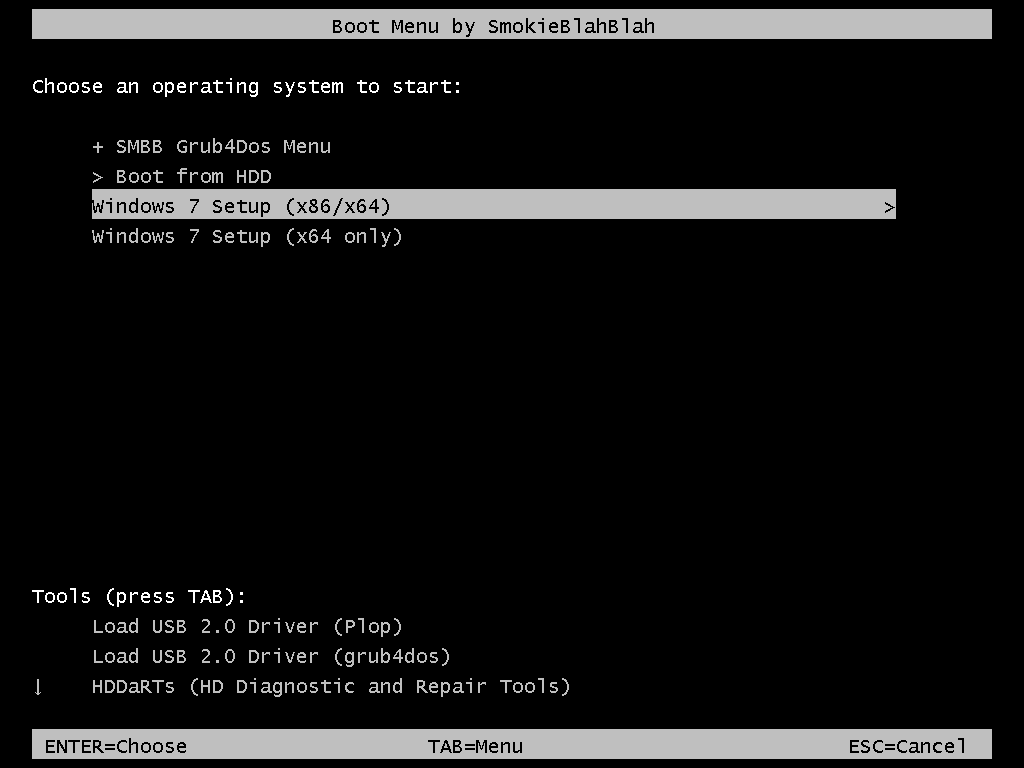
The 32-bit installer (boot.wim) integrates software (see the 3rd screenshot).
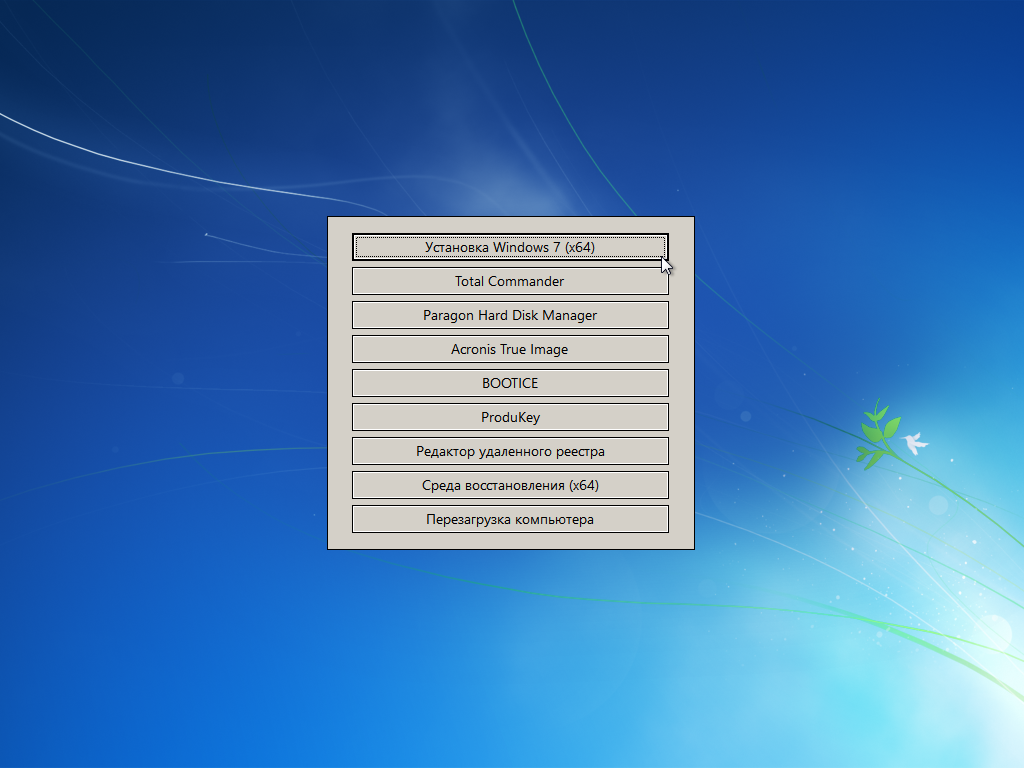
The 64-bit installer (boot.wim) integrates Total Commander, Paragon HDM 15, Acronis True Image, etc. (see 4th screenshot).
There is support for USB 3.0 (drivers integrated) and NVMe (updates and drivers integrated).
There is no possibility to install / update from under Windows! Installation only by booting the computer from a disk or flash drive (from the BIOS).
* any questions about installation via WinNTSetup will be ignored

WHAT'S NEW:​
December 2020 updates​
Now the assembly includes Office 2019 and a new "format" for its installation - in "Programs and components" each part of the office (Word, Excel, PP, etc.) can be removed separately (see the spoiler "Screenshots of the installation process of the Russian version" )​
The office is placed in a separate file (office.esd, which is unpacked after unpacking the Windows files), which, if unnecessary, can be easily removed from the assembly . And the image of the office will be the same and common for all my future builds from Windows 7 to 10​
Incompatible Hardware "and Update Blocking in Windows 7 and 8.1
In early March 2017, Microsoft announced that it would block updates for Windows 7 and 8.1 on computers with next generation processors. This generation includes: Intel Kaby Lake (aka 7th generation Core), AMD RYZEN, Snapdragon 820 and above. That is, this hardware will only work stably with ten.

The Incompatible Hardware window and the Update Center blocking is a purely commercial measure from Microsoft to "force" users to switch to Windows 10. The company artificially restricts the user's choice so that he does not install the "outdated" 7 on new hardware. To disable this message and unlock the Update Center, folk craftsmen have created a patch that is present in this assembly
By default, to avoid problems, this patch(WUFUC) will be disabled. The shortcuts to manage it will be in the Start menu (run as administrator).

List of editions included in the assembly:
Windows 7 Starter x86 (32-bit)

Windows 7 Home Basic x86 (32-bit)
Windows 7 Home Basic x64 (64-bit)
Windows 7 Home Premium x86 (32-bit)
Windows 7 Home Premium x64 (64-bit)
Windows 7 Professional x86 (32-bit)
Windows 7 Professional x64 (64-bit)
Windows 7 Professional VL x86 (32-bit)
Windows 7 Professional VL x64 (64-bit)
Windows 7 Ultimate x86 (32-bit)
Windows 7 Ultimate x64 (64-bit)
Windows 7 Enterprise x86 (32-bit)
Windows 7 Enterprise x64 (64-bit)

Windows 7 Starter x86 + Office 2019 x86 (32-bit)
Windows 7 Home Basic x86 + Office 2019 x86 (32-bit)
Windows 7 Home Basic x64 + Office 2019 x86 (64-bit)
Windows 7 Home Premium x86 + Office 2019 x86 (32-bit)
Windows 7 Home Premium x64 + Office 2019 x86 (64-bit)
Windows 7 Professional x86 + Office 2019 x86 (32-bit)
Windows 7 Professional x64 + Office 2019 x86 ( 64-bit)
Windows 7 Professional VL x86 + Office 2019 x86 (32-bit)
Windows 7 Professional VL x64 + Office 2019 x86 (64-bit)
Windows 7 Ultimate x86 + Office 2019 x86 (32-bit)
Windows 7 Ultimate x64 + Office 2019 x86 (64-bit)
Windows 7 Enterprise x86 + Office 2019 x86 (32-bit)
Windows 7 Enterprise x64 + Office 2019 x86 (64-bit)


The assembly does not include updates:
KB2952664, KB3021917, KB3068708, KB3080149

For these updates, stubs are applied ("simulators" of updates installed)
KB3133977 is also excluded (the recommended update KB3133977 breaks some Windows 7 x64 computers)


Changes from the original images:
.NET Framework 4.8, Microsoft Visual C ++ 2005-2019, RuntimePack Lite and DirectX 9.0c are

integrated. Added wufuc (disables checking for new processors). To enable the patch, run the "On wufuc" shortcut.
There is support for USB 3.0 (drivers are integrated) and NVMe (updates and drivers are integrated).
The WinSxS \ Backup
folder is cleaned The WinSxS \ ManifestCache folder is cleaned


Activating the "Install drivers" checkbox:
Place the Snappy Driver Installer (it does not matter, the assembly is Origin or the usual one) in the Drivers folder at the root of any disk.

That is, if you go to this Drivers folder, it should look like this:
Drivers
Indexes
Tools
SDI.cfg
SDI * .exe
, etc.
If this checkbox is checked, only missing drivers will be installed at the first login. Nothing will be updated (you will do it yourself, manually, after installation).


Checkbox "Activate Windows (Office)":
The activation is fully automatic. In case of successful activation, the system (and Office) will be in an activated state when the desktop first appears (in the case of editions from Starter to Ultimate - after a reboot).

For Retail editions (from Starter to Ultimate), an activator from m0nkrus is used.
For Pro VL and Enterprise editions, as well as Office 2019, the AAct activator is used.
A shortcut for AAct will be created in the Start \ All Programs menu just in case.
A task for periodic reactivation will be created in the task scheduler. Add the C: \ Windows \ AAct_Tools folder to your antivirus exclusions!


Checkbox "Apply set of tweaks":
Tweaks are located on the bootable media in the paths smbb \ Setup \ 7_ $ oem $ \ $$ \ Setup \ Scripts \ Tweaks and smbb \ Setup \ $ oem $ _scripts_shared \ Tweaks . Open the reg files with a text editor. There are descriptions for all tweaks. Edit for yourself as you like.

Recording to a USB flash drive:
For example, UltraISO or Rufus
The FAT32 file system is required to support booting a USB flash drive in UEFI / GPT mode!
ATTENTION! The size of the ISO image (over 4GB) is not important for FAT32. What matters is the contents of the ISO image, each file of which does NOT exceed 4 GB!

Screenshots:
ca118f517b655aeb0278354c64530c09.png

81c47db3f5bb4637093728354f99be22.png


-:DOWNLOAD FROM LINKS:-

RapidGator
Код:
https://rapidgator.net/file/c04949f66d590073927de56532f14bd8/Win7.AIO.52in1.Office.2019.JAN2021.part1.rar.html
https://rapidgator.net/file/0b86518634275ccebcd55ff31f3a8a76/Win7.AIO.52in1.Office.2019.JAN2021.part2.rar.html
https://rapidgator.net/file/05bedbefe6232960b17b80f755059710/Win7.AIO.52in1.Office.2019.JAN2021.part3.rar.html
https://rapidgator.net/file/d0e965d853247a39ff421e9410c15559/Win7.AIO.52in1.Office.2019.JAN2021.part4.rar.html
https://rapidgator.net/file/3797c532de15e23e318a9019b1d5e1b7/Win7.AIO.52in1.Office.2019.JAN2021.part5.rar.html

NitroFlare
Код:
https://nitroflare.com/view/68805A274327164/Win7.AIO.52in1.Office.2019.JAN2021.part1.rar
https://nitroflare.com/view/F6B9CBA92488836/Win7.AIO.52in1.Office.2019.JAN2021.part2.rar
https://nitroflare.com/view/DCBCE0ED2669863/Win7.AIO.52in1.Office.2019.JAN2021.part3.rar
https://nitroflare.com/view/3A5DE376B191DF2/Win7.AIO.52in1.Office.2019.JAN2021.part4.rar
https://nitroflare.com/view/A8D600CFF3D3429/Win7.AIO.52in1.Office.2019.JAN2021.part5.rar

​
 
Wondershare Recoverit 9.5.0.39 (x64) Multilingual


5e0a4e55a6e096ba1117d3a32184f7ff.png

Wondershare Recoverit 9.5.0.39 (x64) Multilingual | 167 MB
​
We Recover Data Recoverit recover your deleted, lost data with high recovery rate. Data recovery is easier, faster, and more reliable than ever before.


As time passed, the data that could be stored on our computers hasgrown to be able to have greater and greater value, either from an economic or sentimental standpoint. This makes data safekeeping an important aspect of our lives, and using a suitable software solution in case of failures and deletions, such as Recoverit, can be a good backup plan to have.

A modern looking software application
The moment you first launch the app you are greeted by a modern looking UI that is reminiscent of Windows 10 store apps. Everything is arranged in an intuitive and minimalist manner, so you will always know what you have to do.

All scanning processes are divided into several categories, ranging from the typical recovery of accidentally deleted files to the recovery of files lost due to partition format or failure.

A data recovery tool that offers support for a wide range of file formats
Once you select a recovery category, you will be greeted by a wizard-like process that will guide you step by step, ultimately finishing up with it displaying the scanning results of the selected media.

You have the option of choosing what file categories you want to recover, such as only the pictures, music, common MS Office files or even Outlook-specific mail files such as OST or PST.

There are no variables regarding how long a file scan lasts, expect maybe the amount of data that could be recovered, or your PC's general processing power. Finally, once the app successfully recovers all of the data you want, you may export it to a specified file directory.

An overall good file recovery software tool
Recoverit is a good piece of software when it comes to recovering deleted or lost items. The response times are short, and the interface is user-friendly, making it a good addition to anyone's digital library.

Operating System:
Windows® 10, Windows® 8 / 8.1, Windows® 7

Homepage-
Код:
http://www.wondershare.com/

Language: Multilingual


-:DOWNLOAD FROM LINKS:-

RapidGator
Код:
https://rapidgator.net/file/3e604420da8246cf2aeb9b413ca321f8/Recoverit_v9.5.0.39.rar.html

NitroFlare
Код:
https://nitroflare.com/view/9A03666872C033B/Recoverit_v9.5.0.39.rar

​
 
Karaosoft Karma v2021.1.10


da3d60b6c8a69f075f4b420239002a4c.jpg

Karaosoft Karma v2021.1.10 | 26.6 Mb
​
Manage your karaoke shows with ease. Clickless search, drag-n-drop functionality, and many other unique features designed to bring you the most simplified management of your karaoke shows. Karma is the culmination of years of research into every known method of running karaoke shows on the PC, to produce a product that is both robust yet simple to use and time saving. Karma eliminates many time wasting tasks to free you up for more enjoyable things like interacting with the crowd or even taking a break!


Features:
- Paperless slips - Let your singers use SingNext.com to send paperless slips right from their phones, without having to leave their seat.
- Triple display support - Optional triple display mode with 3 separate video outputs for KJ, singer, and crowd. Automatically shows lyrics to singer display while showing the crowd a different view with customizable information and displays during performances. For music videos, video automatically switches to crowd display when no singer is assigned.
- Private Messaging - Send private messages to singer screen (like "back off the mic" without embarrassing the singer), or vice versa with the crowd display.
- Superior Audio/Video Quality - Utilizes Karaosoft's custom hybrid audio/video engine for flawless sound and key changes without low end distortion. Post decoding video throughput for the smoothest video playback and synchronization on any hardware!
- Simplified Song Search - No need to take the time to drag your mouse to the search box. Just start typing!
- Drag and Drop songs and singers with ease. Change a singer's position in rotation by a simple drag and drop (mouse or touch), and watch the playlist order automatically change to suite the new rotation order!
- Touch screen scrolling with inertia
- Automatic Playlist sorting on any song add or rotation change. Any queued DJ music automatically stays in place while songs assigned to singers are automatically sorted around them.
- Auto-Play / Auto-Pitch - Set pitch ahead of time for individual songs to automatically be set when the song is played. Set DJ music to Autoplay one after another with automatic crossfade so you can take a break without worry.
- Panel Layout insures no window will ever overlap another during your show and all show related controls are always onscreen. Panels can be arranged in one of 64 different layouts, and then personally sized to fit your custom screen needs.
- On-The-Fly Lyrics timing - Ever have the lyrics ahead or behind the music? AV synch control can be changed on the fly.
- Version Changer - Singer didn't want to sing that version? Click the "Now Playing" bar and view all of the available versions for a quick change.
- Automatic Crossfader, Multiplex routing, and more!

System Requirements:
- Windows 10, or Windows 8.1
- 2 Ghz or faster processor
- 4 GB RAM
- 1280 minimum resolution width for primary display

Home Page -
Код:
http://www.karaosoft.com/


-:DOWNLOAD FROM LINKS:-

RapidGator
Код:
https://rapidgator.net/file/cd2b36741055426ca13327ac79ba51b7/Karma2021.1.10.rar.html

NitroFlare
Код:
https://nitroflare.com/view/3BE4A52B3A115BA/Karma2021.1.10.rar

​
 
Geometric NestingWorks 2021 SP0 (64bit) for SolidWorks


4409bed9fa78107e16291278553844ad.jpg


File size: 179 MB
​
NESTINGWorks software leverages the industry-leading NESTLib® true-shape 3D technology - known to nesting application developers worldwide as one of the fastest and most fully featured automatic true-shape nesting libraries available in the industry. With NESTINGWorks, product designers can efficiently optimize sheetstock layouts - including specifications for grain direction - so they can produce the maximum number of parts from a single piece of raw material in a matter of minutes, saving time, while simultaneously minimizing material usage.

BENEFITS & FEATURES
TRUE SHAPE NESTING
to orient parts true to shape, to optimize how parts can fit on a shape. Many simple nesting tools just draw a box around a part and nest the box, wasting valuable material.

PART-IN-PART NESTING
enable the ability to maximize material usage by fitting smaller parts in open areas and cutouts on larger parts of the same thickness.

AUTOMATIC LAYOUT OF PARTS WITH VARIED THICKNESSES
Many assemblies have parts of various thicknesses that need to be nested. NESTINGWorks can sort the parts in an assembly and automatically group and nest parts of the same thickness.

USER-SPECIFIED GRAIN DIRECTION
Sheet stock has directional material properties that are important in many designs.

ASSOCIATIVITY TO SOLIDWORKS
As your design changes, any NESTINGWorks layouts will update.

COMPATIBILITY WITH DOWNSTREAM MANUFACTURING TOOLS
NESTINGWorks creates 3D SOLIDWORKS® assemblies that can be used to communicate with any manufacturing application.

Compatibility: SolidWorks 2020-2021

Whats New:
Updates: official site does not provide any info about changes in this version.


-:DOWNLOAD FROM LINKS:-
RapidGator
Код:
https://rapidgator.net/file/305fb1085399aa82e8a826e2d92f1720/NestingWorks.2021.SP0.rar.html

NitroFlare
Код:
https://nitroflare.com/view/6FCF66310C1CBA9/NestingWorks.2021.SP0.rar

​
 
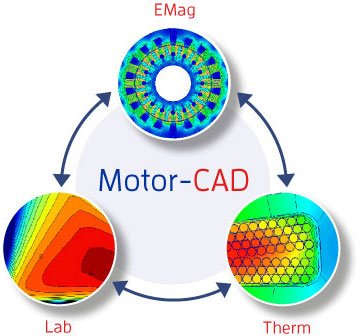
ANSYS Motor-CAD 14.1.2 (64bit)


227bd866c7aec2557c2388dde6724a03.jpg


File size: 500 MB
​
Motor Design Limited (MDL) is a world leader in the development of advanced software design tools for electrical machines. MDL uses its expert knowledge of electric motor design to provide software and support to electric machine designers at some of the world's most prestigious companies. The consultancy arm of MDL has gone from strength to strength with projects ranging from simple problem solving, such as solving thermal issues, to complete electric motor design for various and complex industrial applications. One thing all MDL customers have in common is the reassurance of knowing that their needs will be met by our team of skilled motor designers whose commitment to customers and after-sales service is renowned.

Whats New:
Updates: official site does not provide any info about changes in this version.


-:DOWNLOAD FROM LINKS:-
RapidGator
Код:
https://rapidgator.net/file/2d42f251c3eaf06c8d9de37b0aa43045/Motor-CAD,14,1,2.rar.html

NitroFlare
Код:
https://nitroflare.com/view/B0F017123DC815D/Motor-CAD%2C14%2C1%2C2.rar

​
 
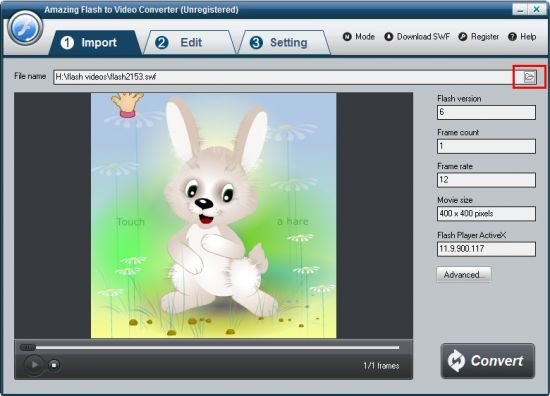
Amazing Flash to Video Converter v4.0.0


e924a0a8eed5e46c3b706851422df398.jpg

Amazing Flash to Video Converter v4.0.0 | 18.3 Mb
​
Amazing Flash to Video Converter is a powerful SWF to Video Converter tool which allows users to batch convert flash .swf files to popular video formats at one time in a click including MP4, AVI, WMV, MKV, FLV, MOV, MPG, HTML5 video and GIF files.


Flash to Video Converter enables you to add customized watermark on the output file to present or claim your authority, color your video in a unique way, crop video to create video with different screen size to meet your digital players' need, customize the frame rate, bit rate, resolution and even aspect ratio for an ideal playback effect.

Its plug-in SWF Video Downloader can download .swf file from internet directly. If you want to convert online SWF file to other video format, just input URL address, and then start SWF to video conversion.

Home Page:
Код:
http://amazing-share.com/flash-to-video-converter.html

Language: English


-:DOWNLOAD FROM LINKS:-

RapidGator
Код:
https://rapidgator.net/file/f12b3a9cdf614337447f8ad13d4d2edd/Flash_to_Video_Converter_4.0.0.rar.html

NitroFlare
Код:
https://nitroflare.com/view/09418734B7418C5/Flash_to_Video_Converter_4.0.0.rar

​
 
Bitsum Process Lasso Pro v9.8.8.59 BETA Multilingual


pP5bDVOB7IJMb92e6I2cTmgG9TbzPhWu.jpg


File size: 5.6 MB
​
Process Lasso is a unique new technology that will, amongst other things, improve your PCs responsiveness and stability. Windows, by design, allows programs to monopolize your CPU without restraint - leading to freezes and hangs. Process Lassos ProBalance (Process Balance) technology intelligently adjusts the priority of running programs so that badly behaved or overly active processes won't interfere with your ability to use the computer!

Process Lasso also offers an assortment of ways to take full control of how your CPUs are allocated to running programs. You can choose at what priority processes should run, and which CPUs (cores) should be assigned to them. You can also disallow certain programs from running, log all programs run, and so much more (see list below).

Once you install Process Lasso, it'll just start working. More advanced users can tweak the configuration, but you needn't touch anything to have it instantly improve your system responsiveness and prevent stalls in high load situations.

For network admins, Proces Lasso works wonderfully on Terminal Servers and in multi-user environments. We have many clients that have been using Process Lasso on their Terminal Servers for years.

Best of all, Process Lasso is written in native C++, not .NET. This means it consumes very few system resources - considerably less than any similar software.

Process Lasso Features:
Prevent processes from monopolozing the CPU(s)
ProBalance dynamic priority optimization
CPU throttling (new)
Save process priorities for future instances
Save process CPU affin


-:DOWNLOAD FROM LINKS:-
RapidGator
Код:
https://rapidgator.net/file/d8ed76dfbd02fe5fd054467a7bb8bb7a/ProcessLassoPro9.rar.html

NitroFlare
Код:
https://nitroflare.com/view/1CBB005D477EC01/ProcessLassoPro9.rar

​
 
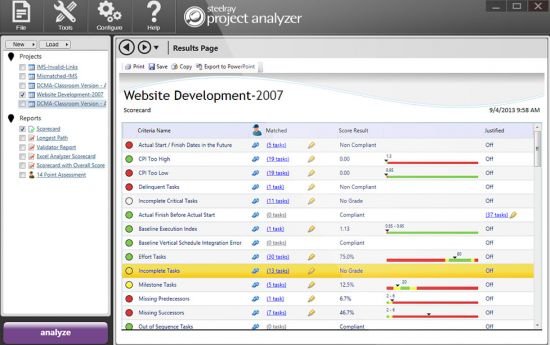
Steelray Project Analyzer version 7.3.0


ccc2b46fb7d417385835da17da9f2e62.jpg

Steelray Project Analyzer version 7.3.0 | 329.4 Mb
​
Steelray Project Analyzer is software that takes the pain out of creating, maintaining and delivering quality schedules. With Analyzer, you can evaluate your project schedule for quality and performance in minutes and produce understandable results. Schedules can be analyzed against project management best practices, internally defined best practices and government best practices. Analyzer supports Microsoft Project, Primavera P6 and UN/CEFACT XML.


Easy to Read Scorecard
Our innovative scorecard shows you the results of each check at a glance, using easy to read green, yellow, and red indicators. Our innovative score strip shows you a great deal of information in a compact space. Each scale is completely customizable.

Powerful report gallery
Analyzer comes pre-configured with all of the reports needed to analyze the quality of your schedule. In addition to our innovative scorecard, Analyzer includes the DCMA 14 Point Assessment, a schedule comparison report, a validation report, a longest path tool, and many more.

DCMA EVAS and 14 Point Metrics
The Defense Contract Management Agency EVAS Metrics and 14 Point assessment are a series of checks that help ensure that your schedule has a trustworthy critical path. Steelray Project Analyzer provides reports that run these assessments on your schedule and explains the results in a clear, easy to understand format.

Built-In Scheduling Enyclopedia
Steelray Project Analyzer includes The Coach, a built-in encylopedia that dives deeper into your results, explaining the in simple terms. For some users, The Coach teaches them the fundamentals of schedule quality. For others, it serves as a quick reference.

Jump to the Native Schedule
When tasks are flagged by Analyzer, simply click on a hyperlink to filter those tasks in the native scheduling application (e.g. Microsoft Project). Steelray Project Analyzer provides a smooth workflow to fixing schedule quality issues.

System requirements:
Microsoft .NET Framework v3.5 SP1
Microsoft Visual C++ 2010 Redistributable Package (x86)
(Note: Administrator privileges may be required for installation these prerequisites.)
Available Disk Space for Analyzer and Prerequisites: 500MB
Processor Speed: 1Ghz or better
Supported Operating Systems:Vista, Windows 7 (32/64), Windows 8 (32/64) and Windows 10 (32/64)
Project Version: Project 2003 SP3 or greater
Memory: 512MB Required, 1GB recommended
Display Resolution: 1024x768 or higher

Home Page -
Код:
https://www.steelray.com/ProjectAnalyzer/Analyzer.php


-:DOWNLOAD FROM LINKS:-

RapidGator
Код:
https://rapidgator.net/file/018bb5d9e9219ea9a2757f207c097c9a/spa7.3.0.rar.html

NitroFlare
Код:
https://nitroflare.com/view/C5158B2FAE0FC67/spa7.3.0.rar

​
 
MiniTool ShadowMaker Pro Ultimate 3.6 (64bit) WINPE


02ba83867115da79bd01cacfbfc96cf9.png


x64 | Languages:English | File Size: 554 MB
​

MiniTool ShadowMaker is a capable backup tool with a lot of features. It can back up your Windows Operating System, important files/folders, selected partitions, and even the whole disk. It is an all-in-one data protection and disaster recovery solution for PCs. With a copy of backup, you are able to restore data once a disaster occurs, like system crash, hard drive failure, and more. There are no settings or features that seemed difficult to work out. It also lets you create a bootable media to restore system to a normal state when a computer fails to boot. With its help, hard drive maintaining is not a difficult issue.

MiniTool ShadowMaker brings easy file backup, system backup and disk/partition backup to Windows users. It comes with clear interface and works fast. In addition, this data backup software offers full, differential, incremental and scheduled backups that really make it easy to customize your backup plan.

Essential Backup Features:
-File/Folder Backup
-System Backup
-Disk/Partition Backup
-Disk Clone

Features:
To ensure data security, this Windows backup software puts forward file backup, system backup, and disk/partition backup in case of any accidents. Besides, the WinPE bootable rescue media helps get operating system back to its prior state even it fails to boot.

File/Folder Sync
File and Folder Sync feature can help to synchronize files and folders to other locations so that users can effectively keep their data safe.

File/Folder Backup
For those who pay great attention to some files or folders, File Backup is absolutely the best way to keep them safe.

System Backup
Operating system can crash by serious virus invasion or after an unstable Windows update. Regular system backup keeps your PC running after restore.

Disk/Partition Backup
When lots of important files are saved on the same location, it is better to create a disk/partition backup image in this case.

Disk Clone disk clone
MiniTool ShadowMaker offers Disk Clone feature to copy basic disk and dynamic disk within only a few clicks. In addition, Disk Clone makes sense when it comes to upgrading HDD to SSD.

Quick Disaster Recovery:
Compared with the products of the same kind, MiniTool ShadowMaker takes less time for disaster recovery, allowing you to restore systems, disks, partitions or files to previous state immediately.

With WinPE bootable media builder, MiniTool ShadowMaker is able to restore computer from backup image files in the following situations:
hard drive failure; blue screen error; ransomware attack; system crash; human error.

PRO features:
Support Windows 7/8/10
Support Workstation
File backup & restore
System backup & restore
Disk backup & restore
Manage remote computer
Back up on event
Change backup scheme
Support SSL encryption
Change data encryption method
Back up using Command Line
Support network booting
Support Universal Restore
Back up in WinPE
Manage backups in WinPE
View logs in WinPE
Support command shell in WinPE

System Requirements
OS:Windows XP/10
CPU:Processor Pentium 1 GHz
Memory:2GB RAM for 64-bit OS


-:DOWNLOAD FROM LINKS:-
RapidGator
Код:
https://rapidgator.net/file/4e00fc1909e762a7baf2ec4326ac280e/ShadowMaker.3.6.WINPE.rar.html

NitroFlare
Код:
https://nitroflare.com/view/EA57F3EBF35F86A/ShadowMaker.3.6.WINPE.rar

​
 
Abelssoft Converter4Video 2021 7.02.15


d789778810d3acd08b3ca811fbac2602.jpg

Abelssoft Converter4Video 2021 7.02.15 Multilingual | 31.6 Mb
​
Easy video conversion.Converter4Video allows you to easily convert every video file. With just a few mouse clicks you can ensure that your video is playable on your favourite device.


Fast video conversion
Converter4Video deploys the most recent converting and compression technologies in order to ensure a video conversion without any damages or losses.

Easy handling
Due to the very intuitive handling the conversion of videos with Converter4Video is made uncomplicated, so you do not need any previous knowledge.

Wide range of supported formats
Converter4Video supports nearly all popular formats to convert from or in. You just have to select the desired format and Converter4Video will do the rest.

Supported devices and hardware profiles
You do not know which format your device needs? No problem. Converter4Video offers you a list box of popular devices and well-known producers where you can pick up your device.

Processing videos for the web
Regretfully the web does not support all existing formats. But Converter4Video can process your video file to be easily embedded on a website.

Extract an audio trace from a video
Converter4Video enables you to extract the audio trace (music, voices, noise) from any video file and to save it separately as a MP3 file.

Direct video upload to YouTube
With Converter4Video you can process your video file with an ease and upload it to YouTube without the need to open the YouTube site itself.

Operating System: Windows 7, 8/8.1, 10

Home Page -
Код:
https://www.abelssoft.de/en/windows

Language: Multilingual


-:DOWNLOAD FROM LINKS:-

RapidGator
Код:
https://rapidgator.net/file/f6636940d19a2958f935e644f1835c45/Converter4Video_2021_7.02.15.rar.html

NitroFlare
Код:
https://nitroflare.com/view/7EFAD6EED736669/Converter4Video_2021_7.02.15.rar

​
 
Adobe Illustrator 2021 v25.1.0.90 (64bit) Multilingual


bab53c5fa74bb5e9840528a7936ce979.jpg

Adobe Illustrator 2021 v25.1.0.90 (64bit) Multilingual | 1.44 Gb
​
The industry-standard vector graphics software is used by millions of designers and artists to create everything from gorgeous web and mobile graphics to logos, icons, book illustrations, product packaging, and billboards.


Iconic work at any size.
Get all the drawing tools you need to turn simple shapes and colors into sophisticated logos, icons, and graphics. Illustrator artwork is vector-based design software, so it can scale down for mobile screens and up to billboard size . and always look crisp and beautiful.

Gorgeous typography that says it all.
Incorporate a company name into a logo, create a flyer, or mock up a website design with the best type tools out there. Add effects, manage styles, and edit individual characters to create typographic designs that perfectly express your messages.

Draw attention everywhere.
Create freehand drawings, or trace and recolor graphics to turn them into works of art. Use your illustrations anywhere, including printed pieces, presentations, websites, blogs, and social media.

Pro power comes standard.
Illustrator launches, saves, and renders effects faster than ever before. Reuse your vector graphics and quickly access unlimited fonts. Work seamlessly with other Creative Cloud apps like Photoshop, InDesign, XD, and Premiere Pro. Your graphics, styles, and text are stored in the cloud, so they.re always up to date and at your fingertips.

Minimum system requirements for Illustrator:
Processor: Multicore Intel processor (with 64-bit support) or AMD Athlon 64 processor
Operating system: Microsoft Windows 7 (64-bit) with Service Pack 1 or Windows 10* (64-bit)
RAM: 8 GB of RAM (16 GB recommended)
Hard disk: 2 GB of available hard-disk space for installation; additional free space required during installation; SSD recommended
Monitor resolution: 1024 x 768 display (1920 x 1080 recommended)
To use Touch workspace in Illustrator, you must have a touch-screen-enabled tablet/monitor running Windows 10 (Microsoft Surface Pro 3 recommended).
GPU: OpenGL 4.x
Optional: To use GPU Performance: Your Windows should have a minimum of 1GB of VRAM (4 GB recommended), and your computer must support OpenGL version 4.0 or greater.

Home Page -
Код:
https://www.adobe.com/


-:DOWNLOAD FROM LINKS:-

RapidGator
Код:
https://rapidgator.net/file/9982b36a669d08c7e9b11ef501d821ff/Illustrator.2021.25.1.0.90.part1.rar.html
https://rapidgator.net/file/10a8d85727785b68590a103df66bcaf9/Illustrator.2021.25.1.0.90.part2.rar.html

NitroFlare
Код:
https://nitroflare.com/view/4F16665F9ECF5A5/Illustrator.2021.25.1.0.90.part1.rar
https://nitroflare.com/view/2FC66F55C1F2A1F/Illustrator.2021.25.1.0.90.part2.rar

​
 
GridinSoft CHM Editor v3.2.0 Multilingual


bde25126909519670f4ed9b5381d36c8.png


File Size: 23.7 MB
​
CHM Editor is a handy WYSIWYG editor which can be used for editing and translating CHM files. You can translate your e-Books in CHM format easily and quickly. Besides, this is perfect tool for localization your CHM Help files. You can solve several tasks at once by using CHM Editor: This is a powerful tool for editing CHM, you can change and save chm file without downloading any additional tools or editors.

Because the software may include Help File in an unknown language to you, it could lead to difficulties, and sometimes impossible to use the program you need. The CHM editor handles the problem with one click on the mouse! You get a translated document with the same formatting as in the original language. For translation you can choose one of the internet services the program works with. There are tens of languages available for translation.

The CHM Editor is an excellent choice for people who deal with electronic documentation, have difficulties in using programs with CHM Help File in a foreign language, for professional translators, and those, who collect an electronic library. The program is an efficient tool that everyone should have on their PC!

With the CHM Editor you will be able to tackle several tasks simultaneously:
- This is a powerful tool for editing CHM, you can change and save chm file without downloading any additional tools or editors.
- It allows you translate any chm-file using one of available translation services

Whats New:
Official site does not provide any info about changes in this version


-:DOWNLOAD FROM LINKS:-
RapidGator
Код:
https://rapidgator.net/file/d9c039a46bce654ecca6c23ea45d8b11/CHM.Editor.3.2.0.rar.html

NitroFlare
Код:
https://nitroflare.com/view/90A0234CA905A07/CHM.Editor.3.2.0.rar

​
 
Назад
Сверху