• Здравствуйте. Сайт заработал в архивном режиме форум www.old.nado.in

Dl4ever Software

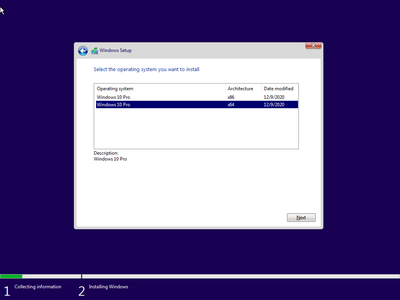
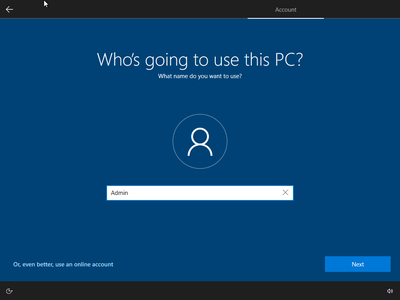
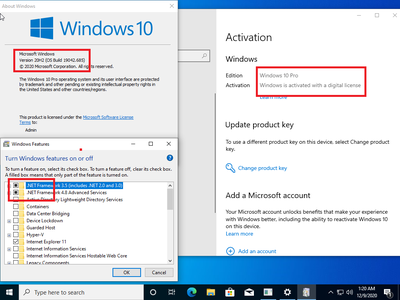
Windows 10 Pro 20H2 10.0.19042.685 Preactivated December 2020

201117075445117108.png

Windows 10 Pro 20H2 10.0.19042.685 (x86/x64) Preactivated Multilingual December 2020 | 6.31 GB

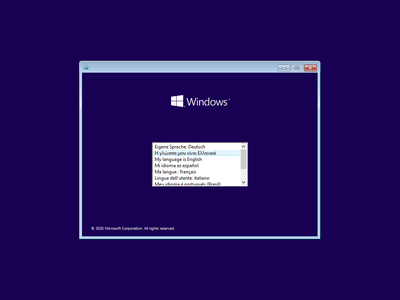
Languages: English,German,Greek,French,Spanish,Italian,Portuguese-Portuguese,Portuguese-Brazil,Turkish
​
Windows 10 is a series of personal computer operating systems produced by Microsoft as part of its Windows NT family of operating systems. It is the successor to Windows 8.1, and was released to manufacturing on July 15, 2015, and to retail on July 29, 2015. Windows 10 receives new releases on an ongoing basis, which are available at no additional cost to users. Devices in enterprise environments can receive these updates at a slower pace, or use long-term support milestones that only receive critical updates, such as security patches, over their ten-year lifespan of extended support.

One of Windows 10's most notable features is support for universal apps, an expansion of the Metro-style apps first introduced in Windows 8. Universal apps can be designed to run across multiple Microsoft product families with nearly identical code*-*including PCs, tablets,smartphones, embedded systems, Xbox One, Surface Hub and Mixed Reality. The Windows user interface was revised to handle transitions between a mouse-oriented interface and a touchscreen-optimized interface based on available input devices*-*particularly on 2-in-1 PCs, both interfaces include an updated Start menu which incorporates elements of Windows 7's traditional Start menu with the tiles of Windows 8. Windows 10 also introduced the Microsoft Edge web browser, a virtual desktop system,a window and desktop management feature called Task View, support for fingerprint and face recognition login, new security features for enterprise environments, and DirectX 12.

Net 3.5 Enabled
Converted:Install.wim<Install.esd

007eae28-medium.png

007eae29-medium.png

007eae2a-medium.png

007eae2b-medium.png

System Requirements:
Processor: 1 gigahertz (GHz) or faster.
RAM: 1 gigabyte (GB).
Free space on hard disk: 16 gigabytes (GB).
Graphics card: DirectX 9 graphics device or a newer version.
Additional requirements to use certain features.
To use touch you need a tablet or monitor that supports multitouch.
To access the Windows store to download and run apps, you need an active Internet connection and a screen resolution of at least 1024 x 768 pixels

HomePage -
Код:
http://www.microsoft.com


-:DOWNLOAD FROM LINKS:-

RapidGator
Код:
https://rapidgator.net/file/c9c1a8c3785e52c9f3397fd68beaaf92/19042.685.part1.rar.html
https://rapidgator.net/file/f7d52b873916f12a0aeb6a64406d85e8/19042.685.part2.rar.html
https://rapidgator.net/file/505d32f24de05a79e8565b6a2d790c52/19042.685.part3.rar.html
https://rapidgator.net/file/39127ffa605413a527f3ec26a1a225ab/19042.685.part4.rar.html
https://rapidgator.net/file/3f2d5041a3505de54e90bf2dff69f452/19042.685.part5.rar.html
https://rapidgator.net/file/f94ba0ad60fac0c35e4437dbe4e80d62/19042.685.part6.rar.html
https://rapidgator.net/file/35d206ebb0c34cd4766788e112218e57/19042.685.part7.rar.html

NitroFlare
Код:
https://nitroflare.com/view/D06FEE08FA0FE59/19042.685.part1.rar
https://nitroflare.com/view/CF5DB7F2FB0F94E/19042.685.part2.rar
https://nitroflare.com/view/B56C2A0DE1072D5/19042.685.part3.rar
https://nitroflare.com/view/6B43052D20A2847/19042.685.part4.rar
https://nitroflare.com/view/9B5BE916AA9CABE/19042.685.part5.rar
https://nitroflare.com/view/01A4B8997A2D97A/19042.685.part6.rar
https://nitroflare.com/view/2F010BE8B76138B/19042.685.part7.rar

​
 
Luminar AI 1.0.0 (7326) (x64) Multilingual


th-q-MX4l-Yx4z-Xjkdf-Ypa6-Zam-Mf0-Orq-ZL4-Ed.jpg

Luminar AI 1.0.0 (7326) (x64) Multilingual | 830 Mb
​
AI photo editing. Awesome. Faster. The first image editor fully powered by artificial intelligence. With Luminar AI, creating striking photos is fun and surprisingly easy. Add realistic atmospheric effects with 3D depth - fog, mist, haze, steam, drizzle - with Atmosphere AI. Create a magical mood without masks and layers.


Atmosphere AI
Add realistic atmospheric effects with 3D depth - fog, mist, haze, steam, drizzle - with Atmosphere AI. Create a magical mood without masks and layers.

Structure AI
Enhance details in all the right places, without overdoing it. Structure AI recognizes people, water, skies and objects. Add depth and clarity to a scene to just the needed areas.

Sky AI
Сhange the sky in your photo in seconds and create a whole new mood. It works perfectly even with tiny details intersecting your sky. Relight the entire photo so the colors of the original image shift to match the lighting and colors of your new sky.

Color Harmony
Move beyond Saturation and Vibrance. Take complete control over color depth and refine color for balance. The perfect finishing touch.

Supercontrast
Adding detail brings new depth to a photo. Precisely adjust tone with six controls spanning highlights, midtones and shadows.

Mood
Bring color to life with our Mood tool. Experiment with new color palettes that transform the style and emotion of your image.

Achieve great composition from any angle
You'll always get the perfect crop with Composition AI. Smart engine blends the golden rules of composition plus the expertise of the world's best photographers.

Give a magic touch. For people & portraits.
The revolutionary AI works magic on faces and bodies of all shapes, ages and colors.

The best part?
You don't perform manual selections, masking, layering and other tedious tasks of traditional photo editors.

Body AI
Make bodies appear lighter or add weight where needed, for a realistic and stunning effect.

Iris AI
Create expressive and breathtaking eyes, with a natural spark that brings a face to life.

Face AI
Improve faces naturally, enhance lips, teeth; remove unwanted dark circles and more.

Skin AI
Instantly remove blemishes while preserving pores, texture and hair.

Accent AI
Get natural lighting and life-like color for every portrait with a single "magic" slider.

Bokeh AI
Emulate the stunning background haziness of a high-quality lens. Let the person in the photo stand out.

Yes. You're in complete control.
Luminar AI lets you deliver your creative vision as fast as possible. Artificial intelligence takes care of the dull and routine work. But you can edit and fine-tune every step of the way.

Your story matters not the process
Let's face it - traditional photo editing can be tedious and time-consuming. Luminar AI is all about the results, not the process. It automates the most common editing tasks and simplifies complexity so you have more time to tell an engaging story.

Powerful doesn't mean complex
The actual power of Luminar AI is hidden under the hood. Luminar AI is packed with incredible next-gen technologies, giving you more capabilities than any traditional editor.

System Requirements:
- Hardware: Windows-based hardware PC with mouse or similar input device
- Processor: CPU Intel® Core™ i5 or better, AMD Ryzen™ 5 or better
- OS version: Windows 10 (only 64-bit OS).
- RAM: Memory 8 GB RAM or more (16+ GB RAM is recommended)
- Disk space: Hard disk 10 GB free space; SSD for best performance
- Display: 1280x768 size or better
- Graphics: Open GL 3.3 or later compatible graphics card

Homepage -
Код:
https://skylum.com


-:DOWNLOAD FROM LINKS:-

RapidGator
Код:
https://rapidgator.net/file/93fe3c91a6617c4960afb769649d5ce1/LAI1007326.rar.html

NitroFlare
Код:
https://nitroflare.com/view/87FF3A7EE8149C4/LAI1007326.rar

​
 
Foxit PhantomPDF Business 10.1.1.37576


63-S6-Ix-JB8xbj72-TIFpbvf-Jg-TM67-YZhe6.jpg

Foxit PhantomPDF Business 10.1.1.37576 Multilingual | 802.7 Mb
​
Foxit PhantomPDF is a business ready PDF toolkit to create professional looking PDF documents and forms. You can do that for tasks such as developing personal documents, implementing workgroup collaboration, designing company forms. Produce company collateral, finalizing agreements, applying digital signatures, or document archiving.


Award winning Foxit PhantomPDF allows you to produce great looking PDF document and forms quickly, affordably, and securely. This is the perfect solution for home/home offices, small and medium sized businesses, and large enterprises. Foxit PhantomPDF comes in three versions to fit the diverse use cases that different users require.

Foxit PhantomPDF can combine, split or repackage various PDF files. The documents can be merged or split based on page numbers, page outlines or bookmarks. Plus, this Suite can batch convert existing documents to a single or multiple PDF files.

Foxit PhantomPDF Business
Complete Business Ready PDF solution that expands upon PhantomPDF Standard by offering advanced editing, shared review initiation, higher security, additional file compression, PDF A/E/X creation, and bates numbering.

Highlighted features of PhantomPDF Business include:
XFA Form Filling. XFA (XML Form Architecture) form allows you to leverage existing XFA forms.
High Performance. Up to 3 times faster PDF creation from over 200 of the most common office file types and convert multiple files to PDF in a single operation.
One Click PDF Creation. Create PDF document with a single mouse click from Microsoft Office applications like Word, PowerPoint, and Excel.
Advanced PDF Editor. Allows you to modify any page contents in any PDF documents, select, insert, change, remove, rotate, copy and paste text, images, graphics and shadings.
Robust Document Security. Use password protection, certificate encryption, and digital signature tools.
Redaction. Permanently remove (redact) visible text and images from PDF documents.
Document Certification. Indicates you approve of its content and allows you to specify the types of changes that are permitted for the PDF to remain certified.

Other features:
Microsoft Active Directory RMS Protector and Policy Manager. Extends the usage control benefits of Microsoft Windows Server Active Directory Rights Management Service to all your PDF documents. And allows the author the control of document features within each PDF.
Form Design. Easy to use electronic forms design tools to make your office forms work harder. Enables you to create or convert static PDF files into professional looking forms. Form data import tools allow data to be automatically imported into a form reducing manual key entering and input errors.
Form Action Creation. Tools allow you to custom javascript actions to gain increased customization options, you can connect to a database for the purpose of inserting new data, updating information, and deleting database entries.
Optical Character Recognition. OCR support to make scanned or image-based PDFs selectable and searchable.
PDF/A Validation. Verify that the document is compliant with PDF/A-1a or PDF/A-1b for long term archiving.
PDF Optimizer. Optimize PDF document to reduce the file size.
High Compression of scanned documents.
Email and Phone Support - help when you need it.

Supported Operating Systems: Windows 7, 8, 8.1, 10 (32-bit, 64-bit).

Home Page -
Код:
https://www.foxitsoftware.com/


-:DOWNLOAD FROM LINKS:-

RapidGator
Код:
https://rapidgator.net/file/0c107ccf4bf411160323acb411e555bf/PDF.Bus.10.1.1.37576R.rar.html

NitroFlare
Код:
https://nitroflare.com/view/5FD617634FA671F/PDF.Bus.10.1.1.37576R.rar

​
 
Adobe Acrobat Pro DC 2020.013.20074 Multilingual


th-ci01vp6-SXQAAGXm-ILqv-Nje-VLc-HJi-R464.jpg

Adobe Acrobat Pro DC 2020.013.20074 Multilingual | 968.1 Mb
​
Adobe Acrobat Pro DC is the leading PDF converter and much more. Adobe Acrobat Pro DC software lets you deliver professional PDF communications. It's packed with smart tools that give you even more power to communicate. Create and edit PDF files with rich media included, share information more securely, and gather feedback more efficiently.


Adobe Acrobat Pro DC software is the advanced way for business professionals to create, combine, control, and deliver more secure, high-quality Adobe PDF documents for easy, more secure distribution, collaboration, and data collection.

Assemble electronic or paper files into reliable PDF documents that are easy to share with others using free Adobe Reader. You can assemble even Web sites, engineering drawings, and e-mail.

With Adobe Acrobat Pro DC you can manage document reviews, synthesizing feedback from multiple reviewers while preserving document format and integrity. Extend commenting capabilities to anyone using Adobe Reader. Windows users can design intelligent Adobe PDF forms that include business logic, such as calculations and data validations, to help increase the accuracy of data collection while reducing the costs of manual data entry.

Use Adobe Acrobat Pro DC to create high-impact PDF communications, collaborate more easily, and streamline reviews. Adobe Acrobat Dynamic PDF helps you get more done - easier, faster, better.

Edit PDF files
With Adobe Acrobat Pro DC, you can make minor edits to text and images right in your PDF file without requiring the original document or graphic. Edit text in a PDF. Fix a typo, change a font, or add a paragraph to your PDF as easily as you do in other applications using a new point-and-click interface. Edit images in a PDF. Resize, replace, and adjust images in your PDF with no need to track down the original file or graphic.

Export from PDF files
Reduce the time you spend retyping information stuck in PDF files. Convert PDF files to editable Microsoft Office documents. And save fonts, formatting, and effort.
Convert PDF files to Word. Save your PDF as a Microsoft Word document and take your fonts, formatting, and layouts with you. Convert PDF files to Excel. Turn your PDF or just part of it into an editable Excel spreadsheet you can use for data analysis right away. Convert PDF files to PowerPoint. Get a head start on new projects by saving a PDF file as a fully editable PowerPoint presentation.

Create PDF files
Stop worrying about whether the files you send will look right on other people's screens. Turn documents into PDF files anyone can reliably view with free Adobe Reader.
Convert Word, Excel, or PowerPoint to PDF. Right from your Office application in Windows, you can create PDFs, start a shared review, restrict PDF edits, and more. Print to PDF. Convert files to PDF from virtually any application that prints simply by selecting Adobe PDF as your printer. Scan to PDF. When you need to turn a paper document or form into a digital file, just scan it to create a searchable PDF file you can edit. Convert HTML pages to PDF. Save web pages as PDF files to archive web content, review the pages offline, or print them more reliably.

Create and analyze forms
Cut the time you spend creating forms, rekeying data, and correcting errors. Distribute forms online, and then collect responses and analyze results in real time.
Create new PDF and web forms. Customize professional templates or design from scratch with the Adobe FormsCentral desktop app included in Adobe Acrobat Pro DC. Collect form responses with FormsCentral. Easily collect responses by moving your PDF or web forms online with the Adobe FormsCentral online service. Convert existing forms to fillable PDFs. Type less, gather more. Quickly convert your paper, Word, or Excel forms to fillable PDF forms. Collect form responses using Adobe Acrobat tools. Compile returned forms into one PDF, or host forms using a network folder or Microsoft SharePoint server.

System Requirements:
1.5GHz or faster processor
Windows Server 2008 R2 (64 bit), 2012 (64 bit), 2012 R2 (64 bit), or 2016 (64 bit); Windows 7 (32 bit and 64 bit), Windows 8, 8.1 (32 bit and 64 bit), or Windows 10 (32 bit and 64 bit)
1GB of RAM
4.5GB of available hard-disk space
1024x768 screen resolution
Internet Explorer 11; Firefox (ESR); or Chrome
Video hardware acceleration (optional)

Home Page -
Код:
http://www.adobe.com/


-:DOWNLOAD FROM LINKS:-

RapidGator
Код:
https://rapidgator.net/file/04acd99e15ece2c569c87f55258bfc60/Acrobat.Pro.DC.2020.rar.html

NitroFlare
Код:
https://nitroflare.com/view/8CF850FEA8A6C36/Acrobat.Pro.DC.2020.rar

​
 
Rhinoceros 7.1.20343.09491 (x64)


8-VENXrv05-T28-Ucbu-NYl-L8wxg-P7-L5eq2w.jpg

Rhinoceros 7.1.20343.09491 (x64) | 300.8 Mb
​
Rhino 7 is the most significant upgrade in our history. You can create organic shapes with our new SubD tools. Run Rhino and Grasshopper as a Revit® Add-On with Rhino.Inside.Revit. Use the robust QuadRemesh algorithm to create a beautiful quad mesh from NURBS geometry or meshes. With this release, we've unlocked completely new modeling workflows and refined many steadfast features.


New in Rhino 7:

SubD
For designers who need to explore organic shapes quickly, SubD is a new geometry type that can create editable, highly accurate shapes. Unlike other geometry types, SubD combines free-form accuracy while still allowing quick editing.

Rhino.Inside.Revit
Rhino.Inside.Revit brings the power of Rhino and Grasshopper to the Autodesk Revit® environment.

QuadRemesh
Quickly create a quad mesh from existing surfaces, solids, meshes, or SubDs-ideal for rendering, animation, CFD, FEA, and reverse-engineering.

Presentation
In Rhino 7, we've improved the presentation tools, streamlining the workflow with a major update to the Rhino Render engine, so the same look you get in your Raytraced viewport can be rendered without any changes. We've added support for PBR materials, a LayerBook command, and more.

Rhino Refined
In Rhino 7, we've fixed hundreds of bugs, but we've also added workflow improvements like Named Selections, Mold Making tools, a Single-Line font for engraving, and improved interoperation with third-party file formats.

Display
We are always refining Rhino's display pipeline to keep up with modern graphics hardware. In Rhino 7, some models will display significantly faster on both Windows and Mac. We've also made several refinements to the Display Modes to make them even more eye-popping while you work.

Documentation
Modeling is just one part of the design process; you also need to show how to build what is on the screen. We've improved many parts of the documentation workflow while also focusing on the more graphically-rich illustration tools like transparency and gradient hatches.

Grasshopper
Grasshopper seems to be everywhere lately. As usual, we're having a hard time keeping up (you might even see that familiar canvas in other applications). In Rhino 7, we've added some new components, but we've also made it easier to turn your programs into plugins.

Development Platform
Rhino 7 brings major improvements to our free SDKs, with API refinements, better documentation, and some major new features that broaden and deepen the foundations of the geometry development platform.

System Requirements:

Hardware:
- 64-bit Intel or AMD processor (Not ARM)
- No more than 63 CPU Cores.
- 8 GB memory (RAM) or more is recommended.
- 600 MB disk space.
- OpenGL 4.1 capable video card is recommended.
- 4 GB Video RAM or more recommended.
- A Multiple-button mouse with a scroll wheel is recommended.
- SpaceNavigator optional
- Apple Intel hardware with Boot Camp optional.
- (Boot Camp is not supported on Apple Silicon. M1 Macs.)

Windows Operating Systems:
- Windows 10 or 8.1.

Home Page -
Код:
https://www.rhino3d.com


-:DOWNLOAD FROM LINKS:-

RapidGator
Код:
https://rapidgator.net/file/c6f5c1fd303c15340a3033e2a03aa955/Rhinoceros.7.1.20343.09491.rar.html

NitroFlare
Код:
https://nitroflare.com/view/B94A4B817667717/Rhinoceros.7.1.20343.09491.rar

​
 
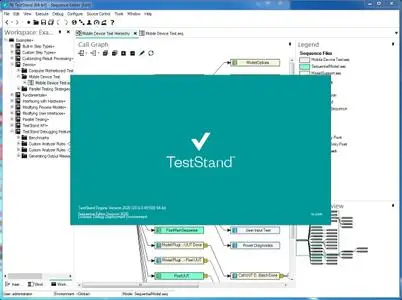
NI TestStand 2020 version 20.0.0 (32bit / 64bit)


007ea9b3-medium.jpg

NI TestStand 2020 version 20.0.0 | 5.5 Gb
​
The LabVIEW development team is pleased to announce the availability of TestStand 2020 version 20.0.0 is a flexible and open test management framework for building, customizing, and deploying a full-featured test management system.


TestStand 2020 New Features
The following list summarizes the new features in TestStand 2020 and other changes since TestStand 2019:

- TestStand Sequence Editor Visual Design Updates
- Python Adapter Improvements
- Regular Expression Support
- InstrumentStudio Integration Improvements

TestStand Sequence Editor Visual Design Updates
TestStand 2020 introduces a streamlined visual design to the TestStand Sequence Editor. In addition to cosmetic changes, the sequence editor has the following changes:

- By default, the sequence editor toolbar now only displays buttons that are global in scope. Buttons that provide functionality restricted to a single window or pane are now located in the relevant window or pane.
- Panes or tabs that provide configuration options for a single window are fixed to the relevant window.
- On the Steps pane, steps now have syntax highlighting. The icon color for a step indicates which type of step it is.
- Checkboxes in the Select Sequence File Callbacks dialog box simplify the process of selecting callback sequences.

Python Adapter Improvements
TestStand 2020 adds support for Python 3.8. You can now use the Python Adapter to perform the following tasks:

- Pass COM objects between TestStand and Python code modules.
- Map enums in TestStand to enums in Python code modules.
- Map arrays of numbers in TestStand to NumPy arrays in Python code modules.
- Include or exclude subproperties of a container of a named data type when passing it between TestStand and a Python code module.
- Enter either an individual file or a directory as a code module path for the Python Adapter.

Regular Expression Support
Regular expressions are now a supported comparison type for String Value Test steps. You can also use regular expressions as parameters for the CheckStrLimit, FindPattern, MatchPattern, and SearchPatternAndReplace expression functions.

InstrumentStudio Integration Improvements
TestStand 2020 introduces improvements to integration with InstrumentStudio. You can now perform the following tasks:

- Use Python code modules with IO Configuration step types.
- Pass the NI_IOSession data type between TestStand and Python code modules.

007ea9b4_medium.jpg

NI TestStand is application software that helps engineers quickly develop robust automated test and validation systems. You can extend the functionality of your system by developing test sequences in TestStand that integrate code modules written in any programming language. You can use built-in functionality to profile and optimize speed and parallelism before deploying test systems to production. TestStand provides extensible plug-ins for reporting, database logging, and connectivity to other systems, meeting the needs of any environment. With TestStand, you can confidently deploy test systems with increased throughput that run at the speed of production. TestStand users with an active Standard Service Program (SSP) membership are eligible to upgrade to TestStand.

This is a TestStand Tutorial that i put together to show the functionality and implementation of this tool as Test management SW, running LabVIEW based test modules and Scripting Language tests including Python & Perl. Showing its functionality for Sequential and Parallel/Batch test runs, using NI TestStand.


Since 1976, National Instruments has equipped engineers and scientists with tools that accelerate productivity, innovation and discovery. NI's graphical system design approach to engineering provides an integrated software and hardware platform that speeds the development of any system needing measurement and control. The company's long-term vision and focus on improving society through its technology supports the success of its customers, employees, suppliers and shareholders.

Product: NI TestStand
Version: 2020 version 20.0.0
Supported Architectures: 32bit / 64bit
Website Home Page :
Код:
http://www.ni.com
Language: english
System Requirements: PC *
Size: 5.5 Gb

National Instruments recommends the system requirements described in the following table to run TestStand 2020.

Processor Pentium G1 or equivalent (minimum Pentium 4/M or equivalent)
Memory 2GB (minimum 1Gb)
Disk space for TestStand (32- or 64-bit) 1GB
Disk space for Microsoft .NET Framework version 4.6.2, if not already installed 2.5 GB
Disk space for device drivers from the National Instruments Device Drivers DVD Amount of space required varies depending on the drivers you install. Install only the drivers necessary for the hardware you will use.
Video adapter 1366 x 768 or higher (minimum 1024 x 768 resolution)

Supported Operating Systems

Windows Windows 7 Starter, Professional, Enterprise, Ultimate (SP1) (x86-x64)
Windows 8.1 (x86-x64)
Windows 10 Professional, Enterprise Build 2004, 1809
Windows Server 2016 (x64)
Windows Server 2012 R2 (x64)


-:DOWNLOAD FROM LINKS:-

RapidGator
Код:
https://rapidgator.net/file/33bd90f4ea11bca4e29bea15827d8b34/NI_TestStand_2020_version_20.0.0.part1.rar.html
https://rapidgator.net/file/98bb931a12567b8f79478021bb39ce07/NI_TestStand_2020_version_20.0.0.part2.rar.html
https://rapidgator.net/file/c8a1285266bc66675ca55c56544cd7f0/NI_TestStand_2020_version_20.0.0.part3.rar.html
https://rapidgator.net/file/c65b0c9d58dbcab2f62000e7ba70307c/NI_TestStand_2020_version_20.0.0.part4.rar.html
https://rapidgator.net/file/660d72cba22cd0bf155bf95dacff169d/NI_TestStand_2020_version_20.0.0.part5.rar.html
https://rapidgator.net/file/29a440f83e083327923ad03c932fa32e/NI_TestStand_2020_version_20.0.0.part6.rar.html

NitroFlare
Код:
https://nitroflare.com/view/1D5535F08CA6B89/NI_TestStand_2020_version_20.0.0.part1.rar
https://nitroflare.com/view/887A30E2A67E588/NI_TestStand_2020_version_20.0.0.part2.rar
https://nitroflare.com/view/3626F75337F0A12/NI_TestStand_2020_version_20.0.0.part3.rar
https://nitroflare.com/view/34B9690FB287100/NI_TestStand_2020_version_20.0.0.part4.rar
https://nitroflare.com/view/3D652A98984E76F/NI_TestStand_2020_version_20.0.0.part5.rar
https://nitroflare.com/view/87FF6A6C1EC06D8/NI_TestStand_2020_version_20.0.0.part6.rar

​
 
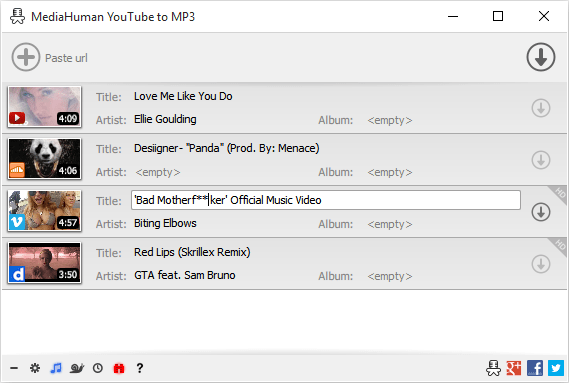
MediaHuman YouTube To MP3 Converter 3.9.9.50 (0912)


WB84-Zci7jn-YNo-ARGn-XALBIE1fg-P1jw5f.png

MediaHuman YouTube To MP3 Converter 3.9.9.50 (0912) (x86/x64) Multilingual | 110.3 Mb
​
You like to listen to music on YouTube or SoundCloud and want to save it for offline playing. Or you want to download soundtrack of a new movie. Then we recommend you to try out this software developed specifically for this purpose.


Downloads all music from playlist or channel
Downloads highest available quality up to 320 kbps
Supports YouTube, Vimeo, SoundCloud, Dailymotion, VEVO, etc.
Downloads simultaneously several tracks
Includes simple tag editor with cover art support
Works on all modern platforms (macOS, Windows, Ubuntu)
Imports into iTunes

Playlists and channels
The software supports downloading all videos of a playlist or a channel. And there is also an option for subscribing to and downloading only newly uploaded tracks.

iTunes support
In the preferences of the application you can select an option to add downloaded tracks into iTunes automatically. You can also specify iTunes playlist, where the converted track should be added.

Saves your time & traffic
The app detects audio track in YouTube video clip and downloads it, skipping the video part. As a result download speed increases dramatically, especially on HD-quality content.

Simple tag editor
Application automatically detects artist name and track title of the video and saves it in the downloaded file. But at the same time, you can easily change tags to whatever you want. You can even change a cover art image.

Original format, no conversions
You can save audio tracks in original quality without any conversion. It means that there will be no loss of quality and it greatly reduces the downloading time.

Free music
There is a great amount of music on YouTube. You can always find the one you like there. And YouTube to MP3 Converter allows you to save it on your computer for free. Just find the track you like and download it in the quality you need.

Not only YouTube
Vevo.com, Vimeo, DailyMotion, Soundcloud, Bandcamp, HypeMachine, MixCloud, UOL and many other sites are also supported. So you can download music as easy as from YouTube.

Clipboard tracking
The program tracks the content of the system clipboard. It means that you can easily add a video clip without switching from your favorite browser. Just copy an URL into the clipboard and it will be added to the download queue.

Multilingual interface
Localized to: Arabic, Armenian, Azerbaijani, Bulgarian, Catalan, Chinese (Taiwan), Croatian, Czech, Danish, Dutch, English, Esperanto, French, German, Greek, Hebrew (Israel), Hungarian, Indonesian, Italian, Japanese, Korean, Latvian, Lithuanian, Malay, Norwegian Bokmål, Polish, Portuguese, Portuguese (Brazil), Romanian, Russian, Spanish, Swedish, Turkish, Vietnamese

Operating System: Windows 7, 8/8.1, 10

Home Page -
Код:
https://www.mediahuman.com/


-:DOWNLOAD FROM LINKS:-

RapidGator
Код:
https://rapidgator.net/file/c12455a50a8fc2834d6fd4b6f0966536/YouTube_To_MP3_Converter_3.9.9.50_0912.rar.html

NitroFlare
Код:
https://nitroflare.com/view/9299A09540E0514/YouTube_To_MP3_Converter_3.9.9.50_0912.rar

​
 
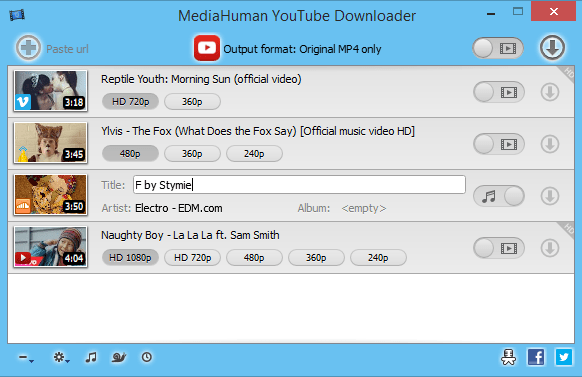
MediaHuman YouTube Downloader 3.9.9.50 (0912)


3-W6b-Xw-H50xi-PUx8b-AUSisnb-CGYDEja-Zn.png

MediaHuman YouTube Downloader 3.9.9.50 (0912) Multilingual (x86/x64) | 112.4 Mb
​
MediaHuman YouTube Downloader is a handy application for those who found a favorite music video or trailer of a new movie and wants to keep it on your computer for viewing offline. Or you need to download a video lesson/tutorial. Our video downloader is an ideal solution for such kind of tasks.


Simultaneous downloads
- Supports Ultra High resolutions up to 4K
- Download whole playlists and channels
- YouTube, Vimeo, Dailymotion, Soundcloud
- Extract audio track and save it as MP3
- iTunes support
- VEVO support

Operating System: Windows 7, 8/8.1, 10

Home Page -
Код:
https://www.mediahuman.com/


-:DOWNLOAD FROM LINKS:-

RapidGator
Код:
https://rapidgator.net/file/a0c1a50f3b6f3eb26ff13cfbef768f2d/YouTubeDownloader3.rar.html

NitroFlare
Код:
https://nitroflare.com/view/67E03422ACAC69F/YouTubeDownloader3.rar

​
 
Avast Premium Security 20.10.2442 (Build 20.10.5824) Multilingual


th-WOp-F0q5-QWd-Wl1-ETKZ3w-Ih9-IB3-In-FKx-Jr.jpg

Avast Premium Security 20.10.2442 (Build 20.10.5824) Multilingual | 502 Mb
​
This top of the range antivirus is not like the others. Because it blocks all webcam-hacking, and stops ransomware before it starts. It protects your PC, home network, and passwords against zero-second threats with smart cloud-based detection. It updates your apps automatically and shreds your data permanently when you say so. That's why you've never seen protection like this before.


Keep spies and snoops off your webcam
Can hackers really hijack your webcam? Yes - until now. Webcam Shield makes anything and anyone get your permission before they can use it so nobody takes a peek unless you say so. You can even disable your camera for good - and enable it again. Go on, do your happy dance - no one's watching.

Keep hostage-takers off your files
Hackers demand an average of $643 from ransomware victims. Ransomware Shield keeps your most important files from being encrypted and held hostage, and lets only trusted apps alter them in any way.

Update your apps against security gaps
Automatic Software Updater keeps your apps and programs up to date with the very latest safety patches and performance upgrades, so you're not exposed to hackers finding security holes from out of date versions. Safe and convenient.

No data left behind
Thinking of selling your PC, or maybe lending it to someone? You'd be surprised at how easy it is for others to retrieve your "deleted" files and data. Your Data Shredder makes sure your personal photos, bank statements and other private documents get obliterated - for good.

Look inside Avast Premier

Firewall
Keep hackers on the other side of the wall with this essential security feature that monitors and controls what goes in and out of your computer.

Anti-spam
Dodge spam and other malicious content, so you can focus on the emails that truly matter.

Real Site
Protect yourself from hackers who attempt to hijack your DNS (Domain Name System) settings, redirect you to fake sites and steal your banking details.

Wi-Fi Inspector
Automatically detect weaknesses in your home Wi-Fi and strangers piggybacking on your network.

Intelligent Antivirus
Detect and block viruses, malware, spyware, ransomware and phishing. We use smart analytics to stop threats before they affect you.

CyberCapture
Automatically send suspicious files for analysis in the cloud, and push a cure to all Avast users if it's a threat.

Behavior Shield
Spot and block suspicious behavior patterns for zero-second protection against unknown threats and ransomware.

Smart Scan
Find all those cracks which allow malware to slip in, from unsafe settings and passwords to suspicious add-ons and out-of-date software.

Ransomware Shield
Block ransomware and other untrusted apps from changing, deleting, or encrypting your personal photos and files.

Automatic Software Updater
Old and outdated programs can slowly chip away at your security wall. Keep your software up to date automatically and you'll be less vulnerable to attacks.

Sandbox
Test and play with suspicious files in a safe environment before you let them run on your computer, making sure they don't wreak havoc on your PC.

System requirements:
Windows 10, 8.1, 8 or 7*, 1 GB RAM and 2 GB of hard disk space.

Home Page -
Код:
https://www.avast.com/


-:DOWNLOAD FROM LINKS:-

RapidGator
Код:
https://rapidgator.net/file/1d4a320ae31572202c2511b17051ee54/AvastPremiumSecurity20.rar.html

NitroFlare
Код:
https://nitroflare.com/view/E013291079604BA/AvastPremiumSecurity20.rar

​
 
AnyTrans for iOS 8.8.0.20201208


DBGJ8j7-Ca-Reb-Vo7f-Jwz-Kqy-Xu-CODR1-Xe-O.jpg

AnyTrans for iOS 8.8.0.20201208 (x86/x64) | 161.8/163.5 Mb
​
Update Your iPhone Experience with More Possibilities. Unlock more possibilities in managing and transferring your iPhone, iPad, iPod, even iTunes and iCloud content. Experience an easier and happier i-Life now. AnyTrans breaks the sync boundaries to bring you full-way transfer across iPhone, iPad, iPod, iTunes, iCloud and computer. Now it takes one step further to get it done by simple drag and drop or one quick click. Your data and files can fly straight to anywhere you want without a hassle.


Be The Master of Your Music
Set yourself free from iTunes restrictions, and transfer music freely between iPhone, iPad, iPod, computer and iTunes. You can export songs from iPhone to computer or iTunes library. Drag music you like to iPhone without erasing anything existing. Take your favorite playlists to your new iPhone. Everything that's impossible with iTunes is now easy in one click.

Take Care of Your iPhone Photos
iPhone photos record your life moments, and AnyTrans keeps them safe for you. In a single click, it smartly and rapidly exports photos to computer by category, like Live Photos, Selfies, or albums you created - even converts photos from HEIC to JPG if you need. You can then batch remove photos that are safely backed up from your iPhone, and make room for more memories.

Personal Info
Remove old contacts and messages to keep your list clear. Export important ones for backup. Or, move them to new iPhone and ensure your connections are always at your fingertips.

Apps
It's a breeze to download, install, update, remove and manage iPhone/iPad apps and app data from computer. You can even share app files between iPhone and computer seamlessly.

Messaging Apps
AnyTrans keeps WhatsApp/LINE/Viber chats and files right within your reach. Whether you want to move them to new iPhone, or create a backup to avoid accidents, it's a click away.

Files & Documents
Turn your iPhone into a USB flash drive to store files and documents. Using AnyTrans iOS app, you can then browse these files by category, and preview or share them directly from iPhone.

Warm Your New iPhone with Sweet Memories
Got a new iPhone? Warm it up with your sweet memories. No matter you're upgrading from an old iPhone or Android phone, AnyTrans migrates all your essentials in one simple click - photos you shot, music you enjoyed, contacts you kept, messages you saved, or anything you need. You can even move apps and app data at one go. Don't have to download apps one by one manually any more. What about the old phone? AnyTrans can permanently wipe everything on it, keeping your private info safe from falling into the wrong hands.

Never Worry About Data Loss Any More
Keeping a complete and up-to-date backup is the best way to protect you from unexpected data loss. Now AnyTrans provides a more complete iPhone backup solution, as well as a more flexible restore solution. It makes sure you can get back your valued data in an easy, quick and preferred way.

Use Your iCloud Easily and Securely
As the innate partner of iOS devices, iCloud is indispensable but complicated for most of us. Now no worries. AnyTrans lets you manage iCloud files easily as you do locally with Windows Explorer or Mac Finder. You can view and extract iCloud backups, delete old files to save precious iCloud storage, batch save photos to computer, move files seamlessly between iCloud accounts, etc. Every access is protected by Apple's encryption algorithm to keep your privacy absolutely private.

Update iTunes Experience As Well
AnyTrans breaks iTunes restrictions to give you better sync experience. With its 2-way transfer, you can not only transfer music and videos from iTunes library to iPhone, but also rebuild damaged iTunes library by exporting songs and playlists from iPhone, iPad
e done without erasing anything. So, feel free to enrich your iPhone music library from multiple iTunes libraries as you want.

System Requirements:
- Windows OS: Windows 10, 8, 7, Vista (both 32bit and 64bit)
- iOS: iOS 13, 12, 11, 10, 9, 8, 7, 6, 5
- Resolution: 1024x768 display or above
- CPU: Pentium IV 2.4 GHz or above

Home Page -
Код:
https://www.imobie.com

-:DOWNLOAD FROM LINKS:-

RapidGator
Код:
https://rapidgator.net/file/e829b4fa0079352718dac916bc38ec5e/AnyTrans.iOS.8.8.0.20201208.rar.html
https://rapidgator.net/file/7a72858ad27ce70e8267fdc4be58cfc8/AnyTrans.iOS.8.8.0.20201208.x64.rar.html

NitroFlare
Код:
https://nitroflare.com/view/3C3905F6F6EAF45/AnyTrans.iOS.8.8.0.20201208.rar
https://nitroflare.com/view/7231F8DA49EE0E7/AnyTrans.iOS.8.8.0.20201208.x64.rar

​
 
Boris FX Mocha Pro 2021 v8.0.1 (Build 101)


3-DIhdp-R2-OLw-XQfw4plch2-L41g-Wc-Ftv8x.jpg

Boris FX Mocha Pro 2021 v8.0.1 Build 101 | Standalone + Plug-ins for Adobe, OFX | 147.3/237.2/237.2 Mb
​
Mocha Pro 2021 is here! Mocha is the world's most recognized and powerful planar tracking tool for VFX and post-production. Mocha Pro features GPU-accelerated tracking and object removal, advanced masking with edge-snapping, stabilization, lens calibration, 3D camera solver, stereo 360/VR support, and more.


Mega Plate module:
Use planar tracking and temporal frame analysis to create extended stitched frames for advanced effects and clean up tasks.

- Area Brush: Dynamic new paint tool with Quick Mask mode to quickly create tracking and masking layers.
- OpenColorIO: color management for high-end VFX and finishing workflows.
- Python scripting: now updated to support Python 3.0.

EXTENDED CLEAN PLATES
Mega Plate is a unique new module building on Mocha Pro's most powerful core technologies - planar tracking and temporal frame analysis - to create a stitched extended frame for visual effects tasks. Working with Mega Plates is a new way to visualize and work on a larger than raster "Mega" canvas for common VFX tasks such as object removal, clean plating, sky replacements, matte painting, and set extensions.

CREATE MOCHA LAYERS EVEN FASTER
Area Brush is a new paint tool that speeds up Mocha's most common core task - creating shapes. Area Brush with Quick Mask mode brings fluid gestural paint functionality into Mocha to define planar tracking and masking search areas. Instead of clicking and dragging spline points, add and subtract paint strokes are converted to vector splines - greatly speeding up and simplifying multi-shape tracking and masking set-ups. The Area Brush also supports Wacom tablets for pressure-sensitive scaling.

COLOR MANAGEMENT
Mocha Pro 2021 adds industry-standard OpenColorIO color management for consistent and predictable color display across industry workflows. OCIO support is compatible with the Academy Color Encoding Specification (ACES) and enables improved color-managed workflows with high-end post-production and VFX applications such as Silhouette, Foundry's NUKE, Autodesk Flame, Avid Media Composer, and more.

THE INDUSTRY'S MOST RELIABLE TRACKING
Planar tracking is at the heart of all Mocha Pro modules and is used to drive tracking, masking, object removal, stabilization, and more. Unlimited tracking layers and the advanced AdjustTrack module helps handle reflections, occlusions, noise, and even areas with motion blur or low details.

ROTO WITH LESS KEYFRAMES
Mocha's masking workflow features planar tracked spline tools to speed up shape creation and reduce manual keyframes.

PLUG-IN OPTION
Mocha Pro's integrated plug-in option delivers a fast & efficient workflow using the host's media engine. Launch Mocha Pro from within your favorite editing and effects hosts.

GPU-ACCELERATED OBJECT REMOVAL
Remove unwanted elements, wires, rigs, tracking marks, and 360 cameras. Generate clean plates for massive time-savings.

INSERT MODULE
Render accurate match moves and screen inserts with realistic motion blur or mesh warp distortions.

STABILIZE
Smooth camera jitter and lock down shots with the Stabilize Module. The stabilize module can lock down camera motion or stabilize moving objects based on planar tracking. Smooth option with selectable anchor frames helps reduce high frequency jitters while maintaining original camera motion. Center, scale or crop stabilized footage based on user driven tracking.

LENS MODULE
Calibrate, correct and remove lens distortion. This simple and easy-to-use interface allows users to calibrate the distortion introduced by camera lenses. Unwanted lens distortion can be removed or matched for realistic compositing. For 360/VR, a simplified Undistort/Distort workflow makes mono or stereo clean-ups on equirectangular footage easy.

STEREOSCOPIC WORKFLOW
Stereo 3D planar tracking, masking, and object removal workflow. Mocha supports native stereo 3D and 360/VR stereo formats. This unique workflow uses planar tracking analysis on "both eye views" to reduce manual offsets and tedious keyframe work on stereo 3D rotoscoping, tracking, 3D camera solve, and object removal.

3D CAMERA SOLVER
Solve 3D match moving capabilities with planar ease. Unlike feature based camera tracking, Mocha solves the 3D camera based on user-selected planar data. This fast and easy-to-use solution is ideal for set extensions, 3D text, and particle tracking. Additionally the 3D solver can be used to assist other 3D tracking applications on difficult shots with low detail or significant foreground occlusions.

360/VR POST-PRODUCTION TOOLKIT
Award-winning 360° video tools for tracking and masking, horizon stabilization, Camera and Object Removal, Nadir Patching, and spherical video post. A native mono and stereo 360° optimized workflow simplifies spherical video post-production challenges: work across seams with less pre-comps, nesting or rendering.

System Requirements:
- Windows: Windows 7, 8, 8.1 or 10 on x64
- Processor: Intel Core 2 Duo or equivalent
- Memory: 16 GB +
- Disk: High-speed disk array or NVMe SSD
- Graphics Card: NVIDIA Quadro K4000 or equivalent
- Monitor: 1920x1080 or higher

Home -
Код:
https://borisfx.com]https://borisfx.com


-:DOWNLOAD FROM LINKS:-

RapidGator
Код:
https://rapidgator.net/file/1f3e3e0403914d53482c1b421c7b81b3/Mocha.8.0.1.Adobe.rar.html
https://rapidgator.net/file/917745f45f4d510cc97be7ae38a061e6/Mocha.8.0.1.OFX.rar.html
https://rapidgator.net/file/6b0312d5003a7f41e9fed4525d739065/Mocha.8.0.1.SAL.rar.html

NitroFlare
Код:
https://nitroflare.com/view/2C243F6158782AC/Mocha.8.0.1.Adobe.rar
https://nitroflare.com/view/F673AE0D25D7E29/Mocha.8.0.1.OFX.rar
https://nitroflare.com/view/1DE029A005B0A32/Mocha.8.0.1.SAL.rar

​
 
Ablebits Ultimate Suite 2021.1.2588.959 for Excel Business Edition


e-Xgu-Vk-WMc1-Cs0b-G5j-Z6y-Di-NNc7-Wc-A7-NP.jpg

Ablebits Ultimate Suite 2021.1.2588.959 for Excel Business Edition | 25.6 Mb
​
With this collection of 60+ professional tools, you can accomplish any task impeccably without errors or delays. It's 15 years of experience with Office development embodied in the perfect code of solutions that work flawlessly on all Excel versions and all datasets.


Make your text data as perfect as numbers
Microsoft Excel is not all about numbers and formulas, but also text. Regrettably, it doesn't provide that many ways for managing text content. Luckily, Ultimate Suite makes up for that omission with a selection of lovely utilities to remove excess spaces, get rid of extra blanks, extract substrings, change case, delete or replace unwanted characters, clear formatting and convert text to numbers.

Manage formulas and selections with a click
The Ultimate Suite offers 9 beautiful tools to manage formulas and select cells that meet certain criteria. Using these features you can swiftly replace formulas with their values, count and sum cells by color, filter by selected cells, recalculate ranges, select cells of a certain type, all with a single button click!

Little time-savers that make a big difference
The Ultimate Suite was designed to address the needs of all users that work with Excel on a daily basis. So, why don't we add a few more tools to make your life a little easier and your work a bit more comfortable? Just think of them as a nice bonus to help you manage your workbooks, watermarks, comments and blanks.

Combine data from different sources in no time
If you deal with large worksheets, hundreds or thousands of rows in each, matching and merging data is always a nightmare. unless you have a few specialized wizards at your fingertips. From joining individual cells to consolidating multiple workbooks, the Ultimate Suite covers all of the merging tasks you perform in Excel.

Slice and dice your tables the easy way
The Ultimate Suite will revolutionize the way you manage and analyze data in Excel. With the ability to combine entries from multiple rows, ignoring duplicates and skipping empty cells, you can make your tables compact and clear. Or look at your data from different viewpoints with a set of splitting tools.

Elegant solutions to remove duplicates and find uniques
Duplicates may crawl into your worksheets in so many ways. The Ultimate Suite delivers three essential tools to eliminate them. Powerful and versatile, they will help you quickly find duplicate and unique entries within a table or compare two different worksheets.

Rearrange ranges effortlessly
Data in an Excel file may be arranged in a way that simply doesn't work. With multipurpose range transformation capabilities, you can reshape your worksheets on the fly. A number of simple-yet-beautiful solutions enable you to transpose, unpivot, rebuild, convert, flip and swap your ranges to adjust the layout to your liking.

Fill blanks and get random data sets in a flash
Empty cells in your worksheets can be troublesome, if not downright destructive. The Ultimate Suite protects the integrity of your data by offering a quick way to fill blanks with values from adjacent cells, upwards or downwards.

Keep your data accurate, consistent and up-to-date
Maintaining data accuracy in large worksheets is increasingly difficult as your data evolves. But who says it has to be that way? Leverage handy at-a-glance options to find and fix broken links, fuzzy matches, typos and similar entries. Use the advanced find capabilities to search and replace in several workbooks at a time.

Ultimate Suite Features:

Merge and Consolidate
- Merge two tables and add missing columns and rows.
- Match and merge two tables based on key columns.
- Summarize data from several ranges into one sheet.
- Copy data from the selected ranges to one worksheet.
- Turn workbooks to worksheets and place the resulting sheets to one file.
- Combine identically named worksheets into one.
- Copy the selected worksheets to one workbook.
- Merge the selected rows or columns.
- Join several cells keeping all data.

Dedupe and Compare
- Compare two tables for duplicate and unique values.
- Find unique values in one table.
- Find and delete, select, color, copy or move duplicates in one Excel table.
- Find and process duplicates and their 1st occurrences.

Combine and Split
- Combine duplicate rows and paste unique data to one line.
- Split a big table into separate lists by values in the selected column.
- Split multi-part names into several columns.

Transform and Reshape
- Convert summary table to a flat list.
- Transform your table into label cards.
- Swap two ranges in your sheet or workbook.
- Flip the selected range vertically or horizontally.
- Convert rows to columns and vice versa.

Randomize and Fill
- Generate unique random numbers.
- Get random dates and Booleans.
- Save custom lists with values to get random data from them.
- Generate strong passwords, codes, and testing data.
- Shuffle cells in rows, columns, or in the selected range.
- Select certain number or percentage of data at random.
- Fill empty cells with value above or below.

Find and Check
- Find partial duplicates, typos and misspelled words.
- Search and replace data in values, formulas, hyperlinks, and comments.
- Search and export or select the found values.
- Find and fix broken references to other workbooks.

Trim and Clean
- Trim extra leading, trailing, in-between spaces, and  .
- Add text to the selected cells by position.
- Split a column with text to several columns.
- Change text case in your Excel table.
- Convert numbers stored as text to numbers.
- Extract text.
- Remove characters by position.
- Clear formatting in your table.
- Remove non-printing, numeric, text characters, symbols and punctuation marks.
- Convert line break and other characters to any custom symbol.

Select and Calculate
- Count and sum cells based on their color.
- Select certain color to count or sum cells.
- Apply Average/Max/Min functions to the colored data.
- Select cells by type.
- Select cells by value.
- Keep the same selection when switching between sheets.
- Select any value in your list to filter your table.
- Search cells based on their value or color.
- Apply basic calculations to the selected cells.

Quick Utilities
- Delete empty rows, columns and sheets.
- See all open workbooks and sheets on one pane.
- Instantly move columns in your table.
- Insert a watermark in Excel
- Add a Table of Contents
- Get cell or range address to Clipboard.
- Convert formulas to relative or absolute.
- Insert a picture comment in 2 clicks.
- Change a comment shape.
- Manage comments.
- Replace formulas with values.

Supported Windows versions:
- Windows 10
- Windows 8.1
- Windows 8
- Windows 7
- 32-bit and 64-bit

Supported Excel versions:
- Excel 2019
- Excel 2016
- Excel 2013
- Excel 2010
- Excel 2007
- 32-bit and 64-bit
- Desktop Excel included in Office 365 / Office 365 ProPlus

Home Page -
Код:
https://www.ablebits.com


-:DOWNLOAD FROM LINKS:-

RapidGator
Код:
https://rapidgator.net/file/70a6e5c8bf020582a90413ebd8ba0d59/USEB.2021.1.2588.959.rar.html

NitroFlare
Код:
https://nitroflare.com/view/88908746168C732/USEB.2021.1.2588.959.rar

​
 
Pixologic ZBrush 2021.5 (x64) Multilingual


th-MXOi-Pow-Li-U7x-Mdp-ZKLu1k3eg-Je0-GG5wc.jpg

Pixologic ZBrush 2021.5 (x64) Multilingual | 1.5 GB
​
ZBrush sets the industry standard for digital sculpting and painting. Its features enable you to use customizable brushes to shape, texture and paint virtual clay in a real-time environment that provides instant feedback. When you use ZBrush you'll be empowered by the same tools employed by film studios, game developers, toy/collectible makers, jewelry designers, automotive/aviation designers, illustrators, advertisers, scientists and other artists the world over.


Base Mesh Generation
As with anything else in life, where you can go is usually determined by where you begin. Having a great finished model requires a quality base mesh. ZBrush provides an arsenal of tools to assist with this task, ensuring that no matter what you have in mind, there is a way to get the perfect base to then take to the next level. The best known of these systems are explained here.

Sculptris Pro
Ignore the constraints of polygon distribution and simply - sculpt! Sculptris Pro will dynamically add (tesselate) and remove (decimate) polygons wherever and whenever needed. It does this during your brush stroke in a real-time process called Tessimation. This frees you to focus entirely on the look you're trying to achieve.

Dynamesh
DynaMesh is a perfect solution for free-form sculpting because it removes all need for focusing on topological constraints. Change the overall shape of the model by pushing or pulling, adding various pieces of geometry to combine into one, or even remove geometry in a manner similar to what can be done with Boolean operations. Where Sculptris Pro dynamically adjusts the triangles in your mesh as you sculpt, DynaMesh redistributes the model's polygons as quads on command.

Mesh Detailing
Whether created in ZBrush or imported from elsewhere, once you have your base mesh it is time to start detailing. ZBrush features a robust suite of tools to accomplish this. Those listed below are just the tip of the iceberg.

Sculpting Brushes
The main workflow for creating with ZBrush is based on a system of brushes which can also be modulated using pen pressure from a graphics tablet. ZBrush will reproduce the natural feeling of a real paint brush or sculpting tool, using the pressure applied to the pen tip to transform your digital stroke in a variety of ways. There are brushes to pinch, move, build up the surface, chisel into it, slice through the model and much more. You can even use other 3D models as brushes, inserting their geometry into your surface.

Noisemaker
In addition to being able to add detail by hand, ZBrush provides a system for procedurally generating surface detail through noise patterns. Choose a detail type, adjust a few simple parameters, then apply that pattern to your model in its entirety or by restricting it to a certain region. You can even combine different noise types to create highly complex effects. The Noise system is ideal for both hard surface work and organic details.

PolyPaint
Because ZBrush works with tens of millions of polygons in real-time, you can paint directly on the surface of the model without first assigning a texture map or UV's. This offers significant advantages compared to a standard workflow. The resolution of the texture map does not need to be decided in advance. This is particularly valuable if you find you need more detailing on an area than you thought you would. Instead of repainting a new, larger texture map you can simply transfer the existing surface detail to that larger map without any reworking. You don't even need to do UV unwrapping before you begin this painting. In fact, thanks to the way that ZBrush can project details (both sculpted and painted) from one model to another you can have a fully painted model before you even have a finalized animation mesh. Instead, you can copy everything to the final base mesh once it has been signed off on.

UV Master
In order create or use a texture map, a model first needs UV's. These are 2D coordinates that tell all 3D applications how to apply a texture to your model. With most programs, creating those UV's has been a time consuming challenge that requires a high level of technical expertise and has little room for creativity. With UV Master you are able to create very efficient UV's for your model - in most cases with a single click. If you need more control over this automatic process there are features that refine where seams will be placed or increase the amount of pixel space given to certain regions of your model. It's both intuitive and fast, letting you get back to being creative with minimal fuss.

Rendering
Whether you are using ZBrush by itself as an illustration tool or as part of a production pipeline for animation, you will at some point want to show your work to others. ZBrush makes this possible through a powerful rendering system called BPR (Best Preview Render).

System Requirements:
Highly Recommended:
OS: 64-bit editions of Windows Vista or newer.
CPU: Intel i5/i7/Xeon technology or AMD equivalent.
RAM: 8 GB required for working with multi-million poly models. (16+ GB preferred.)
HDD: 100 GB of free hard drive space for ZBrush and its scratch disk. (SSD drive highly recommended.)
Pen Tablet: Wacom or Wacom compatible. (WinTab API.)
Monitor: 1920x1080 monitor resolution or higher with 32-bit color.
Video card: Most cards manufactured 2008 or newer. Must support OpenGL 3.3 or higher.

Home Page -
Код:
http://pixologic.com/


-:DOWNLOAD FROM LINKS:-

RapidGator
Код:
https://rapidgator.net/file/11a78ded4e2ae72022226ea349f38e43/ZB.2021.5.part1.rar.html
https://rapidgator.net/file/87313ca5da24b3a0133b6ec451af0b7c/ZB.2021.5.part2.rar.html

NitroFlare
Код:
https://rapidgator.net/file/11a78ded4e2ae72022226ea349f38e43/ZB.2021.5.part1.rar.html
https://rapidgator.net/file/87313ca5da24b3a0133b6ec451af0b7c/ZB.2021.5.part2.rar.html

​
 
Statgraphics Centurion v19.1.2


th-A0-Uv-Ipym93rf1k-RJwc3-Z7rf-Viv-Sr-Esk2.jpg

Statgraphics Centurion v19.1.2 | 356 Mb
​
Statgraphics Centurion is a comprehensive Windows desktop product for statistical analysis, data visualization and predictive analytics. It is designed to make the power of data science available to everyone who collects data. The latest version, Statgraphics 19, features an easy-to-use GUI that does not require learning a complicated command language. Especially helpful to practitioners is the StatAdvisor, which explains the results of statistical analyses in a manner suitable for presentation to non-statisticians.


Statgraphics 19 includes over 290 statistical procedures and special features, with many recent additions in the areas of data visualization, predictive analytics, data mining and machine learning.

Operating System: Windows 7, 8/8.1, 10

Home Page -
Код:
https://www.statgraphics.com/


-:DOWNLOAD FROM LINKS:-

RapidGator
Код:
https://rapidgator.net/file/be992368bc72d9f70f1913e1842fbe00/Centurion.19.1.2.rar.html

NitroFlare
Код:
https://nitroflare.com/view/CE87C8BC65CA0CB/Centurion.19.1.2.rar

​
 
Easy Translator 16.0.2 Portable


007c04b4-medium.jpg

Easy Translator 16.0.2 Multilingual Portable | 6.8 Mb
​
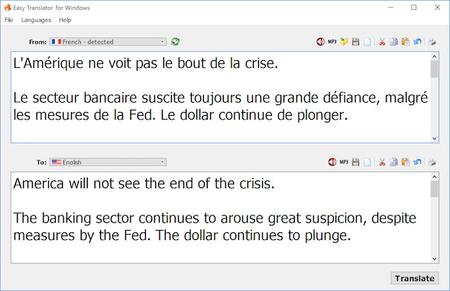
Easy Translator for Windows employs the power of Internet machine language translation engines, and enables you to easily translate Web contents, letters, chat, and emails between major International languages.

The new version supports translation between 104 languages, and with text-to-speech (TTS) support for 59 languages, which makes it an ideal language learning app as well.

This translation software can also convert text to MP3 audio files so that you can listen to the audio in your favorite music player.

Operating System: Windows 7, 8/8.1, 10

Home Page -
Код:
https://www.acetools.net/


-:DOWNLOAD FROM LINKS:-

RapidGator
Код:
https://rapidgator.net/file/1d75f4bbddbb05e2fe557d36b2e0ba4e/Easy.Translator.16.0.2.Portable.rar.html

NitroFlare
Код:
https://nitroflare.com/view/33382417814559E/Easy.Translator.16.0.2.Portable.rar

​
 
LizardSystems Wi-Fi Scanner 5.1.0.299


wi-fi-scanner.png

LizardSystems Wi-Fi Scanner 5.1.0.299 | 5.8 Mb
​
Wi-Fi Scanner allows you to easily locate visible wireless networks and its corresponding information. The tool obtains the network name (SSID), signal strength (RSSI) and quality, MAC address (BSSID), channel, maximum and achievable data rate, security, and much more.


Wi-Fi Scanner is useful for normal access point users who need to find out the signal strength distribution for their wireless network at home, or choose a position for their access point for optimal signal quality.

Using Wi-Fi Scanner, you can evaluate the allocation of wireless networks by channel and select the least congested bandwidth for their access point, allowing them to increase their connection speed significantly.

In addition, Wi-Fi Scanner is an indispensable tool for corporate network administrators in performing tasks such as configuration, planning and monitoring security parameters on business wireless networks.

Key features
Simple, fast wireless network search
Support for 802.11ac and 802.11a/b/g/n
Support for 2.4 and 5 GHz frequency bands
Support for 20, 40, 80, 160 and 80+80 MHz channel widths
Display detailed information for wireless network: network name (SSID), signal level (RSSI), MAC address (BSSID), signal quality, channel, achievable and maximum data rate, encryption, channel utilization, clients etc.
Show detailed description of information elements (IE)
Detect security standards WEP, WPA or WPA2 for wireless networks
Support for WPS 1.0 and WPS 2.0
Device name and model number discovery of access points
Display changes in signal level over time in graphical form
Display signal spectrum mask for each wireless network
Customizable graph color for any wireless network
Filter list of detected wireless networks by specified parameters (quality, network mode, security, etc.)
Connect to detected networks
Display Wi-Fi radio state (software, hardware)
Display wireless connection parameters
Display wireless connection statistics in the form of graphs and tables
Manage wireless connection profiles
Disconnect/connect wireless adapters

Supported OS: Windows 7, 2008R2, 8, 8.1, 2012, 2012R2, 10, 2016

Home Page -
Код:
https://lizardsystems.com/wi-fi-scanner/


-:DOWNLOAD FROM LINKS:-

RapidGator
Код:
https://rapidgator.net/file/a101f84db68a86e6eb0b48d958d136b9/WiFiScanner5.1.0.rar.html

NitroFlare
Код:
https://nitroflare.com/view/DCDB28C28E71B95/WiFiScanner5.1.0.rar

​
 
WonderFox DVD Video Converter 21.3


wonderfox-dvd-video-converter.png

WonderFox DVD Video Converter 21.3 Multilingual | 87.1 Mb
​
WonderFox DVD Video Converter provides the easiest solution to convert DVD and video files. It enables to back up encrypted DVD and convert DVD video to any HD/SD video format at your will. You can use this powerful DVD video converter to edit or design output video by merging, clipping, cropping video or adding special effects.


Batch mode and unique encode technology makes the conversion speed 30-50X Faster than before. What's more, it supports Variable biteate (VBR) which offers better quality with smaller file size.

You can even use WonderFox DVD Video Converter to easily download online video from YouTube, Facebook, vimeo, liveleak and other popular online video websites. Furthermore, a video player is built-in which you can use to play almost all kinds of video files.

Rip DVD Content - Include Latest Encrypted Technology DVDs

WonderFox DVD Video Converter is able to remove DVD copy protections including DVD CSS, region code, RCE, Sony ArccOS, UOPs, Disney X-project DRM and the latest encrypt technology DVDs. DVDs released by Metro-Goldwyn-Mayer (MGM), Paramount Pictures, SonyPicturesEntertainment,Inc., Warner Bros Pictures, Universal Picture, UNITED ARTISTS, 20th Century Fox and TheWaltDisneyCompany are all supported. Furthermore, the DECSS technology is continuously updated to handle new protected DVDs.

Besides powerful DVD decrypted technology, WonderFox DVD Video Converter can flawlessly rip out DVD content, without any quality loss and with fast speed. All your DVD backup requirements will be realized here.

Convert DVD/Video to Popular Videos and Portable Devices (100+ Video Formats)

Convert DVD to (HD) Video: Enable to convert DVD video to all popular normal video files or HD video files including HD AVI, HD MP4, HD MOV, FLV, HD WMV, AVI, MP4, VOB, MKV, WMV, MPEG, etc.

Convert All Popular (HD) Video files between each other. Support 100+ video formats.

Convert DVD and (HD) video into portable devices including iPad mini, The New iPad, iPad 2, iPhone 5, iPhone 4s/4, iPod series, Apple TV, BlackBerry Cell Phones and PlayBook, Sumsung Galaxy series, Tab, Note, Nexus, HTC Flyer, Vivid, One, Sensation, EVO 4G, Desire, Nokia Lumia 900, N9, N8, 5800, Sony cell phone and game player, Microsoft Surface, XBox, Zune, etc.

Online Video Downloader - Download Video from YouTube, Facebook, vimeo, liveleak, metacafe, etc.

WonderFox DVD Video Converter latest version build-in a convenient online video downloader. With only a few clicks, you can easily download online video files and then transfer to any of your portable devices.
1. Download online video from YouTube, Facebook, Vimeo, Liveleak, metacafe and other popular online video sources.
2. Enable to choose high-definition source video to download from YouTube.
3. Enable to download 5 online videos at one time.

Super Fast Conversion Speed - 50X Faster than ever before

Video conversion speed should be one of the most important elements which could tell you how good the product is. WonderFox DVD Video Converter improved a lot on video conversion speed.

A 120-minute video with 1280*720 resolutions can be converted out in 3-7 minutes with 0-Quality-Loss. The conversion speed is much faster than all current mainstream (even hot popular) video converters.
1. Support Intel® Core™ Technology
2. Allow to use multiple CPU cores and set CPU utilization.
3. GPU (NVIDIA® CUDATM and AMD®) acceleration is available.
4. Unique encode technology which offers 30X-50X faster conversion speed than ever before.
5. Batch Conversion Mode enables to convert max 10 items at one time.

Operating System: Windows 10/8.1/8/7/Vista/XP

Home Page -
Код:
http://www.videoconverterfactory.com/


-:DOWNLOAD FROM LINKS:-

RapidGator
Код:
https://rapidgator.net/file/46b86da74d3458cd66059ee1cc17ba82/DVDVideoConverter21.3.rar.html

NitroFlare
Код:
https://nitroflare.com/view/CF2399ADB21B9B2/DVDVideoConverter21.3.rar

​
 
Firetrust MailWasher Pro 7.12.49


D4l-Vy-ZIKgs3v-RSqh1g6g-CZQGAr-Vi-Tu6x.jpg

Firetrust MailWasher Pro 7.12.49 Multilingual | 24.6 Mb
​
MailWasher Pro - the program allows users to view messages that are on various email accounts, before you download them to your computer. With MailWasher Pro, you can delete or return unneeded letters back to the sender with a message that the recipient is unknown.


Includes virus protection, provides access to POP3, IMAP4, SMTP, WebMail and WAP using SSL, provides filtering attachment / content-mail and MAPS / USER-DEFINED anti-spam database.
Works with multiple domains, you can create automated replies notification by SMS, create a shared and public folders, backup mail database, and secure remote administration. Available anti-virus plug-ins from McAfee and F-Secure.

There is the usual simple solutions in the form of black, white, a private list, renvoi letter with a note that the sender is unknown, preview, check-test of loyalty return address, an overlay of 25 e-mail message headers in the second, work on schedule, and more., Including Shared plugins antivirus from McAfee and F-Secure.

The main features of this program:
View mail before it gets to your computer
Destruction of unwanted mail before downloading it
Analysis of each message as soon as it arrives and warns you of suspicious content
Easy to organize and ease the work
Work with your existing e-mail programs - The Bat, Outlook, Outlook Express, Eudora, Netscape, Incredimail or other
Function Quick Reply - quick response c interface MailWasher Pro
Restoration of the destroyed mail
Unlimited number of mailboxes, support for POP3, AOL, Hotmail & MSN and IMAP.
Fast loading headers, speed up to 25 messages per second
A comprehensive guide and FAQ (also includes instructions and an animated guide)
Automatic e-mail client after checking mail;
Support new mail sound file;
Cyclic check mail with an additional opportunity to specify the time when its conduct is not necessary.

Operating System: Windows XP, Vista, 7, 8/8.1, 10

Home Page -
Код:
https://www.firetrust.com/


-:DOWNLOAD FROM LINKS:-

RapidGator
Код:
https://rapidgator.net/file/eab177bdd1b66fd5a801924aea73384c/MailWasher7.rar.html

NitroFlare
Код:
https://nitroflare.com/view/5F2D840547DD550/MailWasher7.rar

​
 
Topaz Sharpen AI 2.2.2 (64bit)


00753689_medium.jpg

Topaz Sharpen AI v2.2.2 (64bit) | 3.1 GB
​
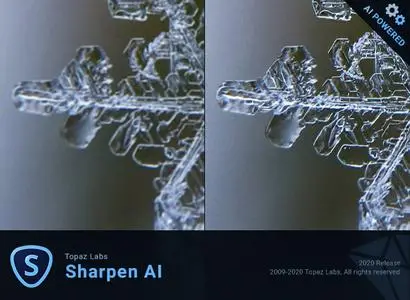
Create tack-sharp images with no artifacts or halos.Sharpen AI is the first sharpening and shake reduction software that can tell the difference between real detail and noise. Create tack-sharp images even when you're shooting handheld, at night, or with a shallow depth of field.


Three kinds of sharpening for a perfect photo
There's nothing worse than the feeling of taking the perfect photo, rushing home, opening it up on your computer. and realizing that it's blurry at 100%. When this happens, it's usually caused by one of three problems: camera shake, focus issues, or general softness. Sharpen AI includes a separate module to handle each one.

Stabilize: Natural shake reduction
Even the steadiest hands don't compare to a tripod when it comes to image sharpness. Unlike a tripod, though, you always have your hands with you! Sharpen AI's Stabilize module has been trained to reverse motion blur and make handheld images look like they were taken from a tripod.

Focus: Better focus correction
Focus correction is a notoriously difficult problem that's easy to get wrong, but Sharpen AI's Focus module excels at correct up to ten pixels of focus blur. This is perfect for sharpening out-of-focus eyes or correct issues caused by incorrect in-camera focus. Tip: use selective adjustments for best results!

Sharpen: General input sharpening
Even with no motion blur or focus issues, images generally come out of the camera soft. Sharpen AI includes the Sharpen module that specializes in correcting small amounts of general softness without any artifacts or halos. It's the most natural-looking sharpening tool that you will ever use.

Powered by AI
Sharpen AI was trained with millions of images so it could learn the characteristics of detail vs. noise - and then enhance just the detail. In some cases, it can even recover image detail.

Seamless integration
Works wherever you currently edit your photos. Use Sharpen AI either as a standalone software or as a plug-in for Topaz Studio / Photoshop / Lightroom Classic.

Constantly improving
Through continuous AI training, Sharpen AI's enhancement model becomes both faster and higher-quality with time. You'll get the latest and greatest when the model improves.

Fast performance
Sharpen AI is now optimized for Intel CPU and iGPUs with Intel OpenVINO support. This means you can get up to 5x faster processing speeds with an Intel graphics card (6th Gen + higher)!

The perfect time to make images tack-sharp
There's nothing worse than the feeling of taking the perfect photo, rushing home, opening it up on your computer and realizing that it's blurry at 100%. When this happens, it's usually caused by one of three problems: camera shake, focus issues, or general softness. Sharpen AI includes a separate module to handle each one.

System Requirements:

Operating System Version:
- Windows 7 x64
- Windows 8/8.1 x64
- Windows 10 x64

Hardware Requirements:
- System RAM: 8GB / 16GB recommended
- GPU VRAM: 2GB / 4GB recommended

Graphics Card Requirements:
- NVIDIA: GeForce GTX 770 2GB / GeForce GTX 960 4GB recommended
- AMD: Radeon HD 8570 2GB / Radeon R9 270 4GB recommended
- Intel: HD Graphics 5000 / Iris Plus Graphics 640 recommended

Home Page -
Код:
https://topazlabs.com/


-:DOWNLOAD FROM LINKS:-

RapidGator
Код:
https://rapidgator.net/file/4331134b7cd2ef1b8b095d43c3db6553/SharpenAI2.2.2.part1.rar.html
https://rapidgator.net/file/e78382dc866ccc7062ec37db18c721ab/SharpenAI2.2.2.part2.rar.html
https://rapidgator.net/file/9c042a290d96b239af390251349d755a/SharpenAI2.2.2.part3.rar.html

NitroFlare
Код:
https://nitroflare.com/view/A0B38D55A311E99/SharpenAI2.2.2.part1.rar
https://nitroflare.com/view/5E5F0427EB68B43/SharpenAI2.2.2.part2.rar
https://nitroflare.com/view/2D2BC8EE58B2EF7/SharpenAI2.2.2.part3.rar

​
 
Topaz Gigapixel AI 5.3.2 (64bit)


d-Ix-B8342n2sd-ULV1-ZMGbp-RGZo-LNfe2-Uf.jpg

Topaz Gigapixel AI 5.3.2 (64bit) | 2.45 GB
​
Beautiful photo enlargements using machine learning. Enlarging your image without losing detail has always been impossible. until now. Upscale your photos by up to 600% while perfectly preserving image quality.


Enlarge Images by up to 600%
Create a beautiful 80 x 60 inch print from a simple iPhone photo. Or transform your DSLR photos into sharp and ultra-detailed 100MP images.

Use truly intelligent upscaling
After being trained with millions of sample images, Gigapixel can now enlarge your images with a surprising level of quality.

Get crisp and clear results.
Gigapixel performs around 2 million operations per pixel to get you results with as much detail and sharpness as possible.

No more fuzzy enlargements.
Breathtakingly sharp prints. High-resolution cropping in post-production. iPhone photos that look like they came out of a DSLR. No matter why you're enlarging your photos, you always want the best possible quality for your results. AI Gigapixel is currently the only photo enlargement product available that can actually add detail back to your upscaled photo.

Recover real details for actual sharpness
Increasing edge contrast is the simplest way to make an image look "sharp", and how most other upscaling software works. Gigapixel is different: it increases the actual sharpness of your upscaled photo by recovering real detail in your image. This is only possible through training and exposure to millions of test images.

Crisp photos that look like they were never upscaled
It's hard to believe that the crisp output image above was enlarged 4x, but it was. Gigapixel AI successfully determines which image features are stars (detail) and what's noise. Then, it naturally accentuates and recovers detail while suppressing noise in your upscaled photo.

The highest-quality image upscaling that you can get anywhere
Because of these exceptional results, Gigapixel AI is used by everyone from leading photographers, to video game modders, to major motion studios. If you ever need to upscale your photo while preserving beautiful detail, take advantage of the most modern technology in the space and give Gigapixel AI a try.

Image enlargement: interpolation vs machine learning

Interpolation-based photo enlargement software has been around for decades. Gigapixel's new approach based on machine learning is a giant leap ahead: state-of-the-art "deep learning" methods allow it to enlarge images while actually adding new details.

Interpolation
Interpolation algorithms work by approximating new pixels from the colors of surrounding ones. This does not add any detail to the image, it just smoothes out the transition between pixels.

Neural Network (Gigapixel AI)
A neural network analyzes thousands of photo pairs to learn how details usually get lost. The algorithm learns to "fill in" information in new images based on what it has learned. effectively adding new detail to your photo.

System Requirements:

Operating System Version:
- Windows 7 x64
- Windows 8/8.1 x64
- Windows 10 x64

Hardware Requirements:
- System RAM: 8GB / 16GB recommended
- GPU VRAM: 2GB / 4GB recommended

Graphics Card Requirements:
- NVIDIA: GeForce GTX 770 2GB / GeForce GTX 960 4GB recommended
- AMD: Radeon HD 8570 2GB / Radeon R9 270 4GB recommended
- Intel: HD Graphics 5000 / Iris Plus Graphics 640 recommended

Home Page -
Код:
https://topazlabs.com/


-:DOWNLOAD FROM LINKS:-

RapidGator
Код:
https://rapidgator.net/file/12e85dcef05c764295afe178c5a33a93/GigapixelAI5.3.2.part1.rar.html
https://rapidgator.net/file/b3bc96d4923070da8d4870b97cd0645c/GigapixelAI5.3.2.part2.rar.html
https://rapidgator.net/file/20764c4a8f7e3d9c4f29f307a649d16b/GigapixelAI5.3.2.part3.rar.html

NitroFlare
Код:
https://nitroflare.com/view/FF3856A4E3C6715/GigapixelAI5.3.2.part1.rar
https://nitroflare.com/view/63029D3CD255ADD/GigapixelAI5.3.2.part2.rar
https://nitroflare.com/view/7B268F4725A0524/GigapixelAI5.3.2.part3.rar

​
 
Назад
Сверху