
• Здравствуйте. Сайт заработал в архивном режиме форум www.old.nado.in

Dl4ever Software

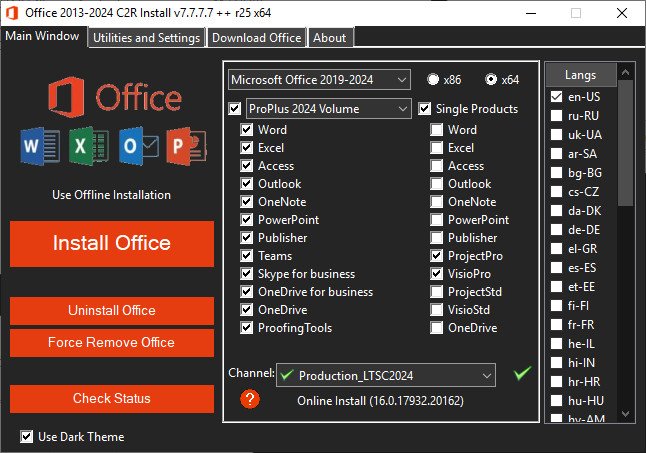
Office 2013-2024 C2R Install Lite v7.7.7.7 r25

04030f0d9ed1775cffd8d2452edd0d8b.jpg


File size: 58.4 MB
​


This program designed for on-line installation and activation Microsoft Office 2013/2016/2019/2021 C2R. You also can create custom installation of Office off-line for using later.

How to use the program
1. Uninstall Office via (Control panel) applet "Add or remove Programs".
2. Uninstall Office using the "Force Remove Office" and restart your computer.
3. Install Office by clicking the "Install Office" button.
4. Go to "Utilities" tab and do the conversion "Office RETAIL - VL".
5. Then click "Activate Office" button.

How to use Bookmark Download Office
Bookmark Download Office serves to create the off-line installation varying versions and editions of Microsoft Office
with the possibility for the subsequent installation of the product without receiving files from outside..

1. Select the appropriate version of Office, bit and language. I recommend to make a full x86-x64 distribution.
To do this, select the tab-width All (the lowest). Click the Download button and choose a folder to the distribution files.
You can select the folder of the previous session of the program to further develop distribution, or will start a new session.
2. If you want to make multilingual distribution - after complete loading of the first language, switch to the pre-
Executive language, click the Download button, and select the same download folder.
3. After downloading all required bit and spoken recommend creating ISO-image office suite.
To do this, click Create ISO.
4. As a result, in the selected folder you will see a ready to use off-line installer Microsoft Office
chosen version.
In one session, downloading files does not use different versions of MS Office 2016 and 2013. It is possible to manipulate
with x86-x64 and languages, but not versions. Or use a different folder assignment is. Otherwise you will get unusable distribution.
5. Now you can create multiple projects distributions of return, additions and corrections have
downloaded. You can choice the versions builds. For Office 2013 Branch-choice and does not matter. Always will
be download the most current build. For Office 2016, you can choose the source of download (branch). Button Check version
has been added to check the build number the selected Branch.

Whats New
Updates: official site does not provide any info about changes in this version

HomePage:
Код:
https://msfree.su/

-:DOWNLOAD FROM LINKS:-​
Download From RapidGator
У Вас недостаточно прав для просмотра ссылок. Войдите или зарегистрируйтесь.

Download From NitroFlare
У Вас недостаточно прав для просмотра ссылок. Войдите или зарегистрируйтесь.

 
μTorrent Pro 3.6.0 Build 47168


22042e975f55f3a934927aa78e8ca0aa.png


File size: 10.8 MB
​


μTorrent - a quick, easy, free and compact torrent klent. Client μTorrent, today, is one of the most popular solutions for network BitTorrent. The program combines optimum functionality with a small amount. Supports the work regardless of the trekkers, lets you download multiple files at once, has a customizable bandwidth, rapid restoration of interrupted downloads, and more.

μTorrent - a totally free software for file sharing on P2P technology in the file-sharing network BitTorrent. From other clients uTorrent features a small size distribution, although in the present day "terabytes and gigahertz," the size of uTorrent, called the sole and unique advantage will probably be wrong, but on the other hand it is confirmation of the quality and professionalism of the uTorrent programmers who can write a "compact" code.

One of the best uTorrent has become a convenient, well thought out, very nice interface and fast response to user actions. It supports all the necessary functions for operation in BitTorrent P2P-network.

There are some features
uTorrent supports parallel loading;
Rational use of bandwidth and allows you to customize it;
Built-in scheduler uTorrent manages tasks;
uTorrent has the ability to set the priority of traffic and adjust the speed;
It has features a quick stop and resume downloads;
uTorrent supports UPnP and NAT-PMP, as well as popular protocol extensions;
It has low memory consumption and small size of the program;
Supports reading RSS-feeds and download torrent-announcements;
Interacts with other customers without the need for the main tracker (DHT);
uTorrent supports the Protocol Encryption;
Interface uTorrent has supported the change order and the possibility of translation into other languages;
In uTorrent integrated remote control via HTTP-protocol, using web-interface (WebUI);
uTorrent works in all versions of OS Windows;
It is also possible to use uTorrent in Linux using Wine.

μTorrent is one of the most popular BitTorrent clients, with plenty of features such as bandwidth prioritization, RSS auto-downloading, scheduling and Mainline DHT (which is compatible with BitComet, another well-known BitTorrent client), Protocol Encryption joint specification (used also by Azureus 4.7.0.0 and above, BitComet 1.30 +) and peer exchange.

μTorrent was written with efficiency in mind. Unlike many torrent clients, it does not hog valuable system resources - typically using less than 6 MB of memory, allowing you to use the computer as if it weren't there at all. Additionally, the program itself is contained within a single executable less than 750 KB in size.

Features of μTorrent
- Multiple simultaneous downloads
- Configurable bandwidth scheduler
- Global and per-torrent speed limiting
- Quick-resumes interrupted transfers
- RSS Downloader
- Trackerless support (Mainline DHT)

What's New
Код:
https://blog.utorrent.com/releases/windows

HomePage:
Код:
https://www.utorrent.com

-:DOWNLOAD FROM LINKS:-​
Download From RapidGator
У Вас недостаточно прав для просмотра ссылок. Войдите или зарегистрируйтесь.

Download From NitroFlare
У Вас недостаточно прав для просмотра ссылок. Войдите или зарегистрируйтесь.

 
Perfectly Clear WorkBench 4.6.1.2707 (x64)


574ffabdade9084e37f471e63f981d0c.png


Language: Multilingual | File size: 197 MB
​


Perfectly Clear Workbench is an application that uses Athentech's Perfectly Clear image correction libraries and is made available to demonstrate the capabilities of the Perfectly Clear processing libraries, face detection library and to allow a quick export of the processing settings for use.

Supported Image Formats
Perfectly Clear requires RGB-formatted images in either 8 or 16-bit color depth. Any image file that Photoshop or Lightroom can open and convert to this format may be used in Perfectly Clear. Monochrome and CMYK images must be converted to RGB before using Perfectly Clear. RAW files must be opened through Adobe Camera RAW and loaded into Photoshop to be accessible to Perfectly Clear.

What's New in Perfectly Clear WorkBench 4
1. Beautiful new interface
2. New image correction tools
a. Preprocessing section for Input Looks and "Image Ambulance" for manual exposure corrections
b. "Face Aware" exposure for more accurate auto-exposure corrections in portraits and group photos
c. Black Point tool to deepen blacks
d. New Color Vibrancy tool to complement our previous "Vibrancy" control (now renamed to Color Restoration)
e. Sky and Foliage enhancements
3. Existing tools have been improved
a. Added strength sliders to Light Diffusion and Vibrancy for better control
b. Better 'color pickers' for Skin Tone and Blush adjustments
4. Manually identify faces that are not detected automatically
5. One-click to zoom to individual faces
6. Modify facial regions to provide the best corrections
7. Histogram
8. Much improved preset management Whats New
Код:
https://eyeq.photos/news

Supported Operation Systems
macOS 10.10 or later

HomePage:
Код:
https://eyeq.photos/

-:DOWNLOAD FROM LINKS:-​
Download From RapidGator
У Вас недостаточно прав для просмотра ссылок. Войдите или зарегистрируйтесь.

Download From NitroFlare
У Вас недостаточно прав для просмотра ссылок. Войдите или зарегистрируйтесь.
 
APU Software APU Dynamics Optimizer 3.0.6


5dd522a23544e95c797c000e706c510f.png


File size: 15.6 MB
​


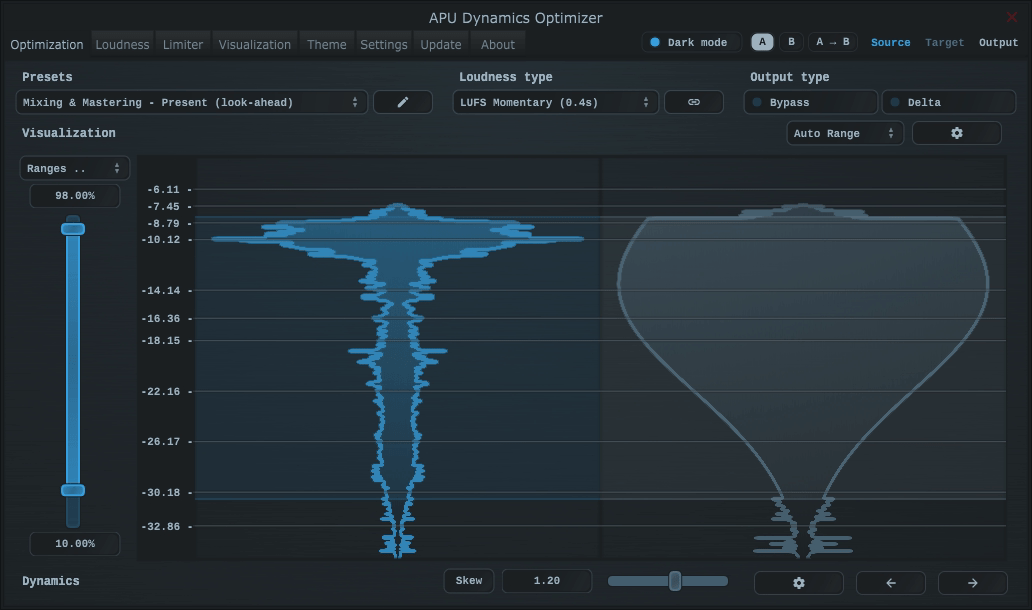
The APU Dynamics Optimizer is a dynamics optimization tool designed to support modern loudness types (LUFS, True Peak). Underneath the hood, the optimizer uses the same compression engine as the APU Loudness Compressor, but benefits from the full audio waveform instead of real-time measurements. This allows the gain envelope to be meticulously optimized across the entire waveform.

The design of this tool allows you to very precisely target a specific average LUFS and dynamic range. Once the gain envelope has been optimized, you can playback the result in real-time while adjusting the character of the sound with the same collection of parameters from the compressor plug-in.

Walkthrough
When you first open an audio file, the optimizer will analyze the audio file's loudness timeline. You'll then be presented with a pair of histograms. On the left, you'll see the audio file's current loudness distribution. On the right, you'll see a target distribution. The optimizer's job is to dynamically compress and expand the audio throughout the entire audio file strategically to match the target distribution.

Before continuing to the next step, you can make adjustments to the source percentiles. This allows you to exclude any unwanted audio from the optimization process. By default, the percentiles are set to match the LRA standard from LUFS. This generally does a good job capturing the main body of the audio.

Once you're happy with the source percentile range, you can then press the right arrow to continue to the next step.

Once optimization is complete, you can play the result in real-time while adjusting the character of the sound with the same collection of parameters from the compressor plug-in. Use the play/stop buttons and seek slider to navigate the audio while making any adjustments you'd like.

Once you're happy with the result, you can export the optimized audio to a new file. This file is always stored with the same samplerate as the original audio, using 32-bit floating point wave format. This ensures the highest quality audio is preserved. This format also allows samples over 0 dBFS, which ensures no clipping occurs.

You can listen and export with or without limiting. The built-in limiter can be configured in the Limiter tab, or you can bypass the limiter entirely and use your own external limiter after export.

Dynamics shaping
The dynamics optimizer allows you to reshape the full dynamics spectrum of your audio file. You can choose between Uniform or Normal distribution, with the ability to skew the latter toward the top or bottom of the distribution. This allows you to shape the dynamics of your audio in a variety of ways. The optimizer takes this information and uses it to make many tiny adjustments to the compress/expand ratio over time. Something you'd never be able to do with a traditional compressor.

The optimizer can be configured to use the following distribution types

Uniform
Uniform distribution type is a flat distribution across the entire loudness range. This is a good starting point for most audio files, as it doesn't favor any particular loudness range. The result is an extremely balance loudness profile.

Normal
Normal distribution type is a bell curve distribution which can be skewed toward the top or bottom of the distribution. This allows you to dial in a very particular shape of your choosing, whether it's to more closely match the original audio or for creative effect.

Whats New
Updates: official site does not provide any info about changes in this version

HomePage:
Код:
https://apu.software/optimizer/

-:DOWNLOAD FROM LINKS:-​
Download From RapidGator
У Вас недостаточно прав для просмотра ссылок. Войдите или зарегистрируйтесь.

Download From NitroFlare
У Вас недостаточно прав для просмотра ссылок. Войдите или зарегистрируйтесь.
 
APU Software APU Loudness Limiter 3.0.6


cfbdda7d8bb964338a2e0c7d995ffdae.jpg


File size: 55.6 MB
​


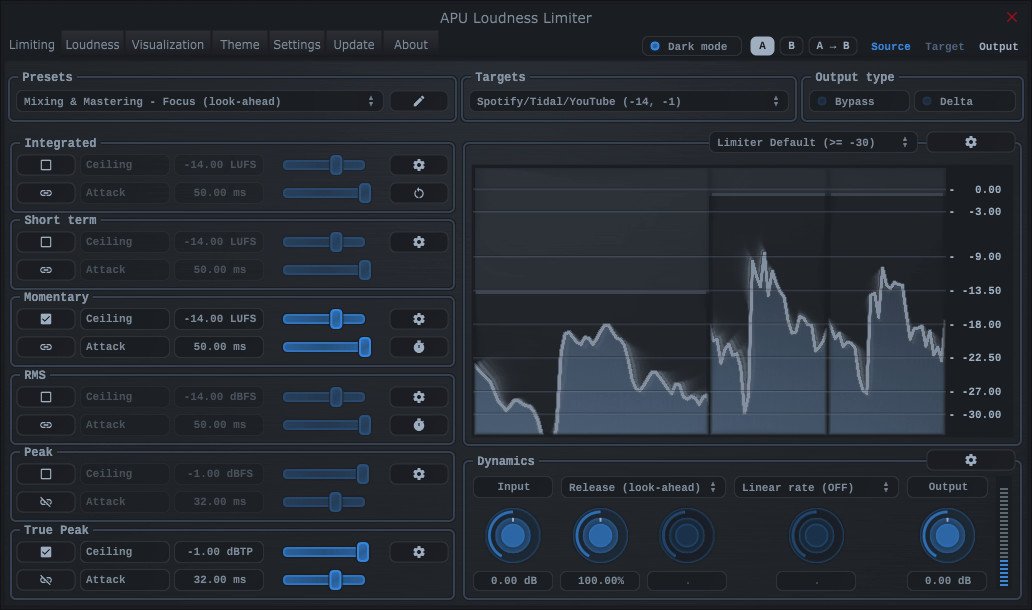
The APU Loudness Limiter is a real-time limiter designed to support multiple loudness types simultaneously. The limiter can be configured to use LUFS, True Peak, RMS, and/or Peak loudness types. This allows you to target multiple requirements simultaneously, such as a specific LUFS target and a specific True Peak target. Internally, the ballistics of the limiter are adjusted to accommodate the different loudness type limiter settings.

Loudness flavors
One of the key features of this limiter is its support for a variety of loudness types. The limiter's detection circuitry can be configured to use either LUFS and/or traditional measurement units (RMS, Peak). You can also choose to split or link channels, which is particularly useful for multi-channel audio formats such as Dolby Atmos®.

The limiter's detection circuitry can be configured to use any of the following loudness types

Momentary
Momentary is a short duration LUFS measurement (400ms), which is useful for processing the audio's moment-by-moment dynamics. This mode is responsive but also transparent. K-weighting and channel weighting are applied to the compressor's detection circuitry, improving perceptual accuracy.

Short-Term
Short-Term is a longer duration LUFS measurement (3 seconds), which is useful for processing the audio's large scale dynamics. Given the longer duration, this mode is less responsive than momentary, but it can be useful for adjusting the bigger picture of the audio's dynamics. K-weighting and channel weighting are applied as with momentary.

Integrated
Integrated is an infinite duration LUFS measurement. K-weighting and channel weighting are applied as with momentary, as well as both relative and absolute gating. This loudness type can be useful for continuously wrangling the audio's integrated loudness toward a specific target.

RMS
RMS loudness types use a rolling time interval of 150ms by default, which can be adjusted. RMS is a traditional loudness measurement, which is a good first-order approximation of perceived loudness. This mode doesn't apply K-weighting or channel weighting to the limiter's detection circuitry, giving it a more traditional character.

True Peak
True Peak loudness types are similar to traditional peak measurements, but they are more accurate as they take into consideration inter-sample peaks. These measurements use a time interval equal to the configured block size (1ms by default). This mode prevents clipping inter-sample peaks, which can be useful for mastering.

Whats New
Код:
https://apu.software/download/

HomePage:
Код:
https://apu.software/

-:DOWNLOAD FROM LINKS:-​
Download From RapidGator
У Вас недостаточно прав для просмотра ссылок. Войдите или зарегистрируйтесь.

Download From NitroFlare
У Вас недостаточно прав для просмотра ссылок. Войдите или зарегистрируйтесь.
 
Apisonic Audio Speedrum v2.2.1


e0c177b7cf2df936d479ec641b21b48d.jpg


File size: 72.1 MB
​


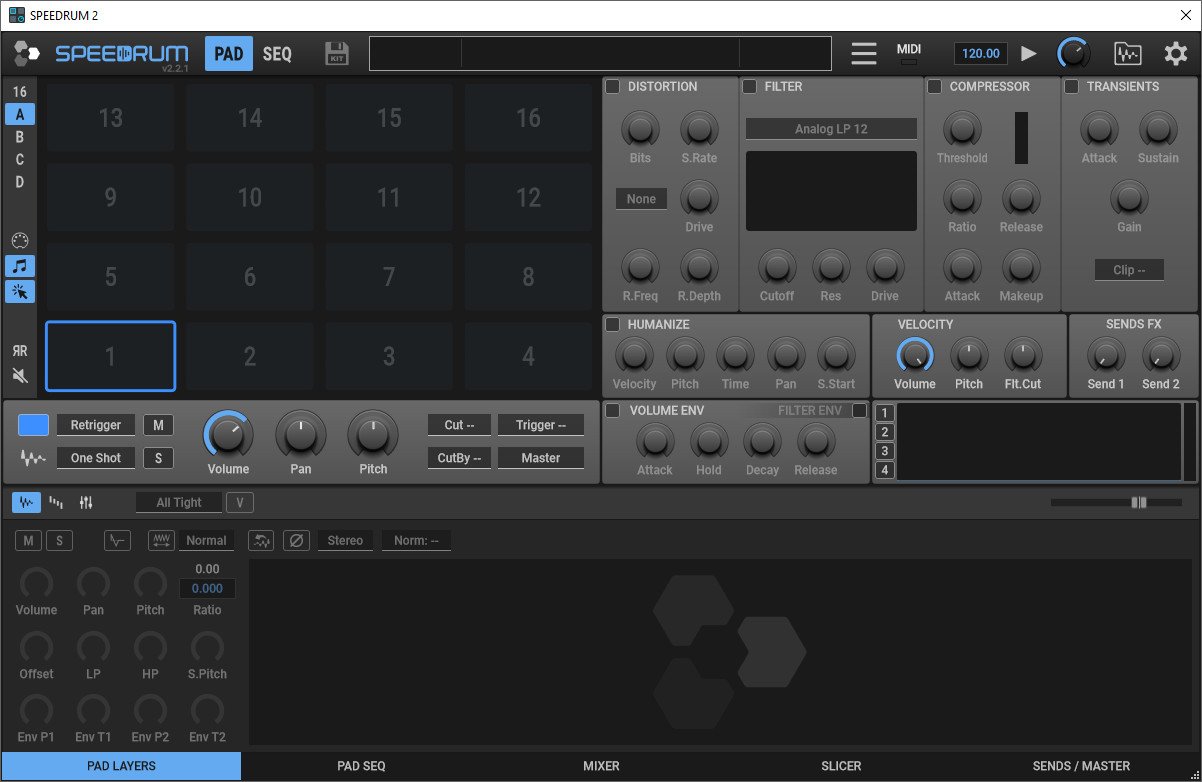
Drum/percussion sampler plugin. Fast and easy for use. Speedrum is an MPC style drum sampler. Designed for easy startup and fast workflow, but with powerful features if you need them. 32 pads with essential effects, and with 8 sample layers per pad. With the addition of a loop slicer.

Features
Speedrum is an MPC style drum sampler.
Designed for easy startup and fast workflow, but with powerful features if you need them.
32 pads with essential effects, and with 8 sample layers per pad.
With the addition of a loop slicer.

Two layouts
16 pads layout A/B with view to all pad FX or 32 pads layout with one FX view at a time

Mpc style pads layout
Pads can be triggered by MIDI notes
Multi-pad editing, copy and swap, delete, drag and drop.
Multi-pad controls changing, including FX controls
Midi-learn for every pad, save/load trigger maps

Resizable
Resizable GUI from 60% to 200% of default window size.

Easy-to-use user interface
Preferences for default behaviors
Supported Saving and Loading of drum kits
WAV, AIF, FLAC, MP3, OGG file format support
In VST, VST3 and AU plugin format
Written in native C++ code for high performance and low CPU usage

Main Pad controls
All essential controls for fast control: Mute, Solo, Volume, Pan, Pitch .

All pads knobs parameters have midi-learn capability
Voice Mode: Retrigger or Poly
8 "Cut" (choke) and "Cut By" groups, and Trigger pad
Every pad can be set to one of 16 available stereo outputs
12 color to highlight a particular pad or a group
Humanization of Velocity, Pitch, Time and Pan
Volume and Pitch envelope for every pad
Easily control of send FXs

Essential FX
Four essential effects for further tuning a drum-pad

Multiple types of a distortion
Easy adjustable multimode filter
VCA type Compressor for percussive material
Transient shaper
Overall gain control and Hard clipper
In an "all or one" layout

Sample Layers
8 sample layers for each pad with dedicated editor

Every layer has essential controls plus Lowpass and Highpass filter
Multiple layers playing Mode
Rearrange layers with drag and drop
Layers multi-editing

Waveform
Non-destructive editor, easily zoomable

Waveform view of loaded sample
Adjustable Start, End, Attack and Decay of sample
Arrow buttons to cycle through all samples in the current folder
Adjustable Velocity ranges in Velocity Mode

Loop Slicer
Slicing loops into individual drum hits

Add or delete slicer markers with easy
Drag and drop slices to populate pads or layers
Same zooming/navigation as on Layer waveform

Two slicing modes
Different algorithms for different results

Transients - with Threshold and Length controls
BPM - with Bpm and Divisions controls

Pad Sends
Two Send FX or Output channel

Delay Send FX
Reverb Send FX
Or send all pads outputs to specific Output channel

Master
Dynamics for Master channel

VCA type Compressor for percussive material
Soft/Hard clipper
Output controls

Browser
Integrated sample and drumkit browser

With drag and drop sample loading
Sample or Drumkit info
10 slots for favorite folders
Sample preview capability
Selectable output channel

Whats New
Код:
https://www.doc.apisonic-audio.com/speedrum2/changelog.html

HomePage:
Код:
https://www.apisoniclabs.com/speedrum.html

-:DOWNLOAD FROM LINKS:-​
Download From RapidGator
У Вас недостаточно прав для просмотра ссылок. Войдите или зарегистрируйтесь.

Download From NitroFlare
У Вас недостаточно прав для просмотра ссылок. Войдите или зарегистрируйтесь.
 
APU Software APU Loudness Compressor 3.0.6


31e8c1b55ba4590f5bfbe540277834e1.png


File size: 56 MB
​


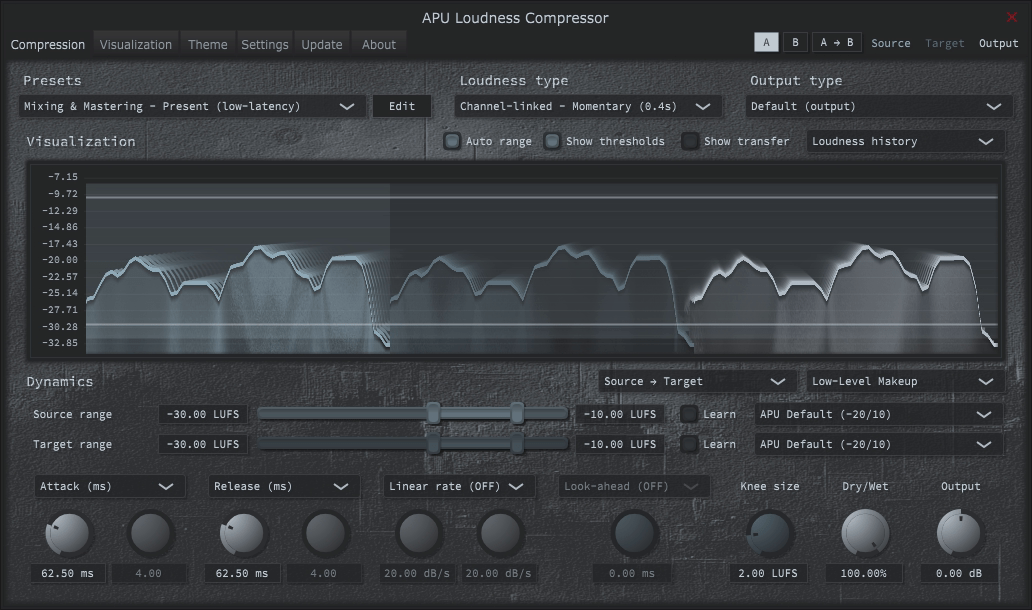
The APU Loudness Compressor is a compressor/expander designed to support modern loudness types (LUFS, True Peak). The result is a compressor which sounds more transparent. The compressor is also capable of operating in a more traditional manner, using RMS and Peak units of measurement, so you can have your cake and eat it too. For more information on the differences between RMS/Peak and LUFS, you can review my LUFS blog post.

With "learn" mode enabled, the compressor will automatically adjust the source or target range to match the source material. This can be a great way to get started with the compressor and can be used as a starting point for further fine-tuning.

By default, the compressor operates using a "source range" and "target range" in place of threshold + ratio controls. You can also enable the traditional threshold + ratio controls if you prefer. A drop-down menu located at the top-right of the compressor's dynamics section allows switching between these modes of operation and others, such as expander, limiter, etc.

You can try out the compressor for free; it'll automatically start a 30-day trial. No username is required, and the trial comes without limitations.

Check it out to see if it fits into your workflow. If you have any questions or feedback, don't hesitate to reach out using the "Contact the Developer" beacon on this website.

Whats New
Код:
https://apu.software/download/

HomePage:
Код:
https://apu.software/compressor/

-:DOWNLOAD FROM LINKS:-​
Download From RapidGator
У Вас недостаточно прав для просмотра ссылок. Войдите или зарегистрируйтесь.

Download From NitroFlare
У Вас недостаточно прав для просмотра ссылок. Войдите или зарегистрируйтесь.
 
Bloatynosy Nue 0.87.100


30d01ea90767f08ca16d7f2914e6ce95.png


File Size : 0.1 Mb
​


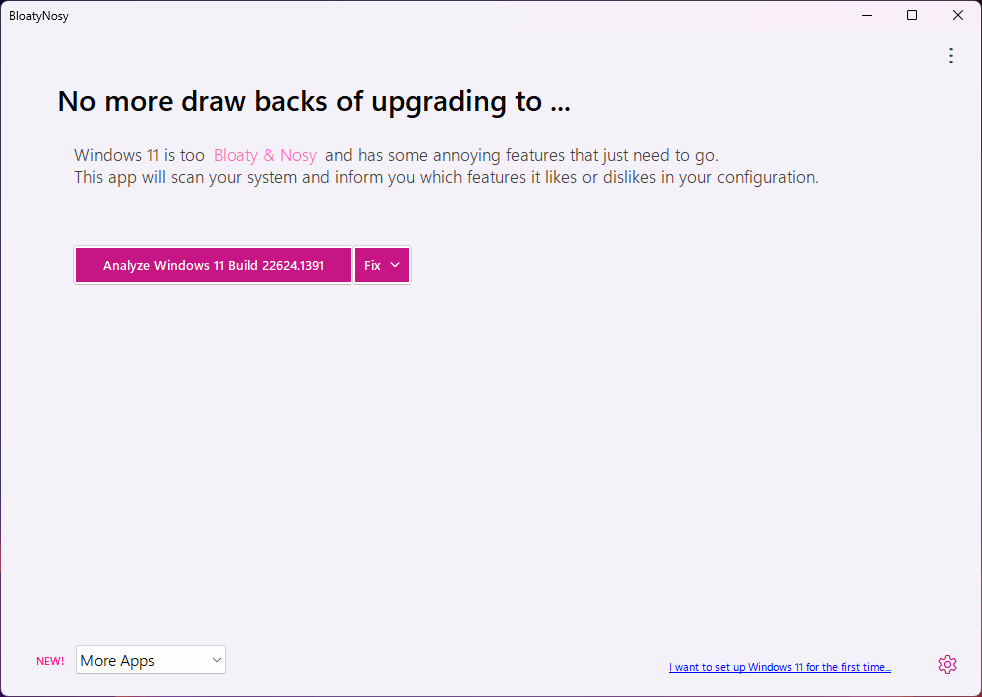
This debloater for Windows 11 can help clean up your machine and disable the redundant features of Microsoft's new OS, while also featuring some additional tools for convenience.

Analyzes your system
Before coming up with any suggestions, the software will first run a system analysis to look for anything odd. This should take a minute at most, and the resulting suggestions will be based on your configuration. What helps is that the software assigns a priority rating to each of its suggestions, which can help users ascertain whether a fix is worth applying.
As usual, these fixes are varied in nature. Whether they're with regard to your Explorer, Desktop, Taskbar, Privacy, and other such categories, everything is compartmentalized so that it's easier to get an idea on the fixes that are worth prioritizing in your use cases.
Also features a few additional nice-to-haves
Through InstaPackage, users can easily install a few essential programs for their machine. Think of this as a good way to install software after a fresh Windows install: the list of available software is generous enough to get you started off on the right foot. Simply select the packages you wish to install, and the tool will handle the rest.
In addition, BloatFinder can help you dispense with other elements from your system you might find irrelevant or undesirable. These include default Windows apps that you may never use, such as YourPhone, the Xbox app, and so on.
A solid Windows debloater
BloatyNosy makes debloating your Windows 11 machine accessible for all, thanks to an intuitive process that is almost automatic.

HomePage:
Код:
https://github.com/builtbybel/BloatyNosy

-:DOWNLOAD FROM LINKS:-​
Download From RapidGator
У Вас недостаточно прав для просмотра ссылок. Войдите или зарегистрируйтесь.

Download From NitroFlare
У Вас недостаточно прав для просмотра ссылок. Войдите или зарегистрируйтесь.
 
COAA PlanePlotter 6.6.9.4


_1667c54dc6ecfcb4976fe31ae247d00c.jpeg


File Size: 7.5 MB
​


PlanePlotter receives and decodes live digital position reports from aircraft and plots them on a chart. Using PlanePlotter, you can see a radar-like display of all those aircraft around you that are transmitting the appropriate digital messages including ACARS, ADS-B and HFDL.

PlanePlotter - Features
The animated screen grab from PlanePlotter (left) was kindly provided by John Locker.

Message display
PlanePlotter shows a table display of messages received and decoded from live aircraft transmissions.

Data saving
PlanePlotter archives all the digital data that it receives and decodes to a log file.

Chart display
PlanePlotter plots aircraft positions, altitudes and times decoded from the message traffic that it receives. These include embedded position reports, AMDAR reports and ADS reports contained in ACARS messages, ADS-B position reports received by the Kinetic SBS1™ or AirNav System RadarBox™ Mode-S receivers, and position reports on HF using Charles Brain's PC-HFDL software. The plot can be superimposed on a suitable aeronatical chart that you have prepared, or PlanePlotter can download satellite imagery and plot the aircraft symbols on that. Where altitude information is available (eg Mode-S messages), you can select the data by altitude band to distinguish low level and high level traffic.

Google Earth server
If you are receiving Mode-S ADS-B position reports, PlanePlotter can interface to Google Earth to display aircraft positions over the Google Earth base map. It can even give you a dynamic real-time view from the flight deck of an aircraft that you designate.

Direction finding
PlanePlotter can determine and display the direction of any transmission using a simple passive antenna switch. This allows aircraft to be located even if they are not equipped with ACARS or Mode-S/ADS-B.

Whats New
official site does not provide any info about changes in this version.

HomePage:
Код:
https://www.coaa.co.uk/planeplotter.htm

-:DOWNLOAD FROM LINKS:-​
Download From RapidGator
У Вас недостаточно прав для просмотра ссылок. Войдите или зарегистрируйтесь.

Download From NitroFlare
У Вас недостаточно прав для просмотра ссылок. Войдите или зарегистрируйтесь.
 
Astrology House Janus 6.2.5


1d77cf54d301bc60654533fbd6261f11.jpg


File size: 146 MB
​


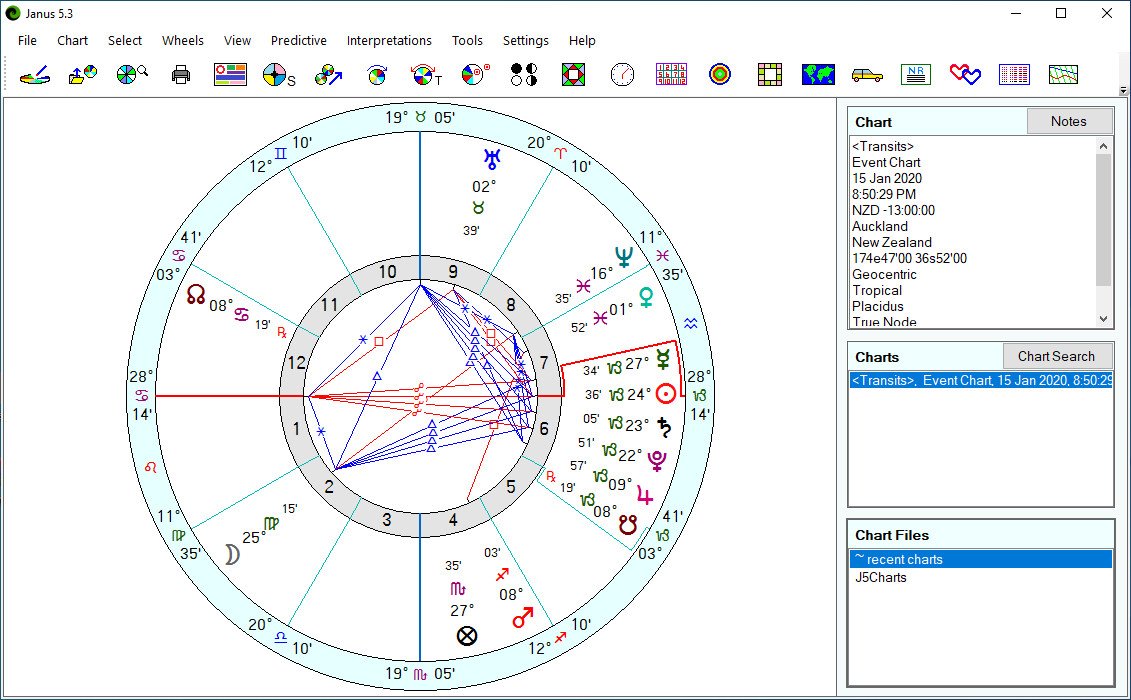
Janus 6 has all of the standard calculation features expected of a top of the line astrology software program, including natal and transit reports, astro-mapping, Arabic Parts, fixed stars, progressed charts and return charts. It also has specialist modules for Traditional Western Medieval, Hellenistic, Horary and Electional Astrology; Vedic, Cosmobiology and Uranian Astrology.

While Janus has been designed to meet the computing needs of professional astrologers, beginners, too, will find it has much to offer. It combines user-friendliness and technical precision with the most extensive list of features found in any astrology program. And, regardless of your level of astrological or computer ability, you will find Janus easy to use.

Whats New
Код:
https://www.astrology-house.com/janus/index.cfm

HomePage:
Код:
https://www.astrology-house.com/

-:DOWNLOAD FROM LINKS:-​
Download From RapidGator
У Вас недостаточно прав для просмотра ссылок. Войдите или зарегистрируйтесь.

Download From NitroFlare
У Вас недостаточно прав для просмотра ссылок. Войдите или зарегистрируйтесь.
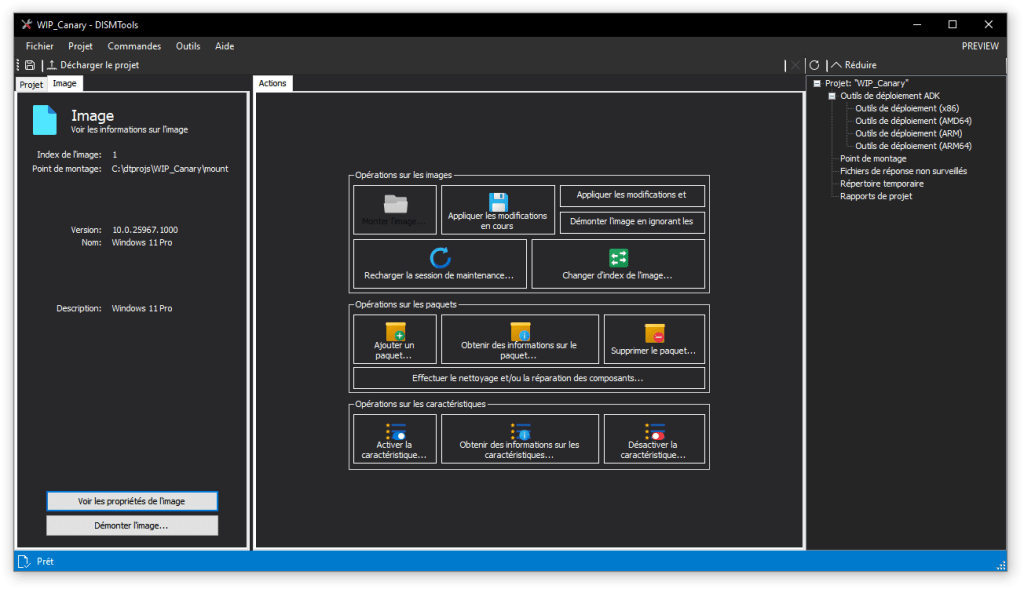
 
DISMTools 0.5.1 Update 3


50fde3c458462d6bc0c9fedf6ccb5809.png


File Size : 47.5 Mb
​


DISMTools is a front-end for DISM that lets you manage your Windows Imaging (WIM) files and a whole lot more.

Key features
DISMTools is the first project-based GUI. Projects store the mounted image and unattended answer files you want to apply (using the command line at this time), while also providing a scratch directory for temporary operations
DISMTools is also smart, checking first if an action can be performed before doing it

Supported actions
The following actions are supported by DISMTools
This program is in beta stages, so not every possible action is implemented. Check the "Unsupported actions" section for more details
Image management
WIM/SWM/ESD file application
Image capture
Image commits
Volume image removal (removal of unnecessary Windows editions)
Image mounting and unmounting
Image servicing session reloads
Image index switches
WIM -> ESD and viceversa conversion
SWM file merger
Component cleanup
Image splitting
OS packages and features
Package addition and removal
Feature enablement and disablement
AppX package servicing
Application addition and removal
Capabilities
Capability addition and removal
Drivers
Driver addition and removal
Provisioning packages
Add provisioning packages to an image
Other
Get complete information of an image
Using the project's or program's scratch directory
Get information of packages, features, AppX packages, capabilities, and drivers
Configure Windows PE settings
Basic automation

HomePage:
Код:
https://github.com/CodingWonders/DISMTools

-:DOWNLOAD FROM LINKS:-​
Download From RapidGator
У Вас недостаточно прав для просмотра ссылок. Войдите или зарегистрируйтесь.

Download From NitroFlare
У Вас недостаточно прав для просмотра ссылок. Войдите или зарегистрируйтесь.
 
Dotec-Audio All Products v1.8.1


5e6e372c1cf0f8fb1c798747f7488beb.jpg


Team R2R | 2024.11.24 | 101.1 MB
​


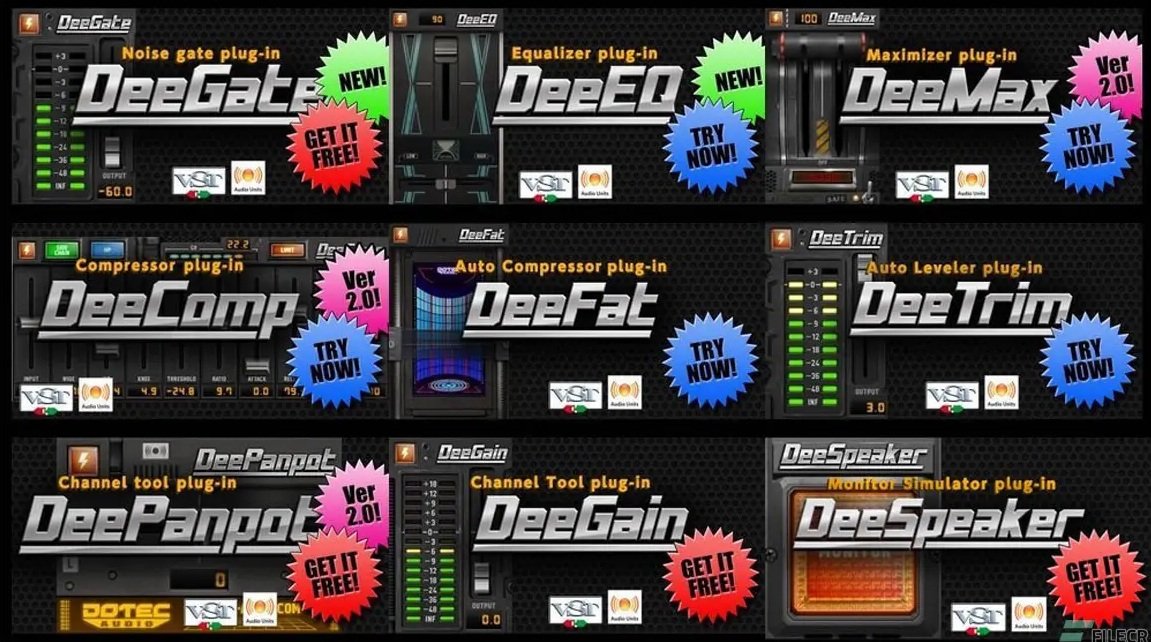
All DOTEC-AUDIO products for Windows, are now compatible with VST2 as well as VST3.

* DeeChannelTool
* DeeComp
* DeeCrystal
* DeeEQ
* DeeFat
* DeeFX
* DeeGain
* DeeGate
* DeeGraphComp
* DeeMMax
* DeeMax
* DeePanpot
* DeeSideIn
* DeeSpeaker
* DeeSubBass
* DeeTrim
* DeeWider

Whats new in this version
Official site does not provide any info about changes in this version.

System Requirements
Windows 7+

HomePage:
Код:
https://dotec-audio.com/index.html?lang=en

-:DOWNLOAD FROM LINKS:-​
Download From RapidGator
У Вас недостаточно прав для просмотра ссылок. Войдите или зарегистрируйтесь.

Download From NitroFlare
У Вас недостаточно прав для просмотра ссылок. Войдите или зарегистрируйтесь.
 
Extreme Picture Finder 3.66.13 Multilingual


17bca5509ba9da225faf60de0370c540.jpg


File size: 106.26 MB
​


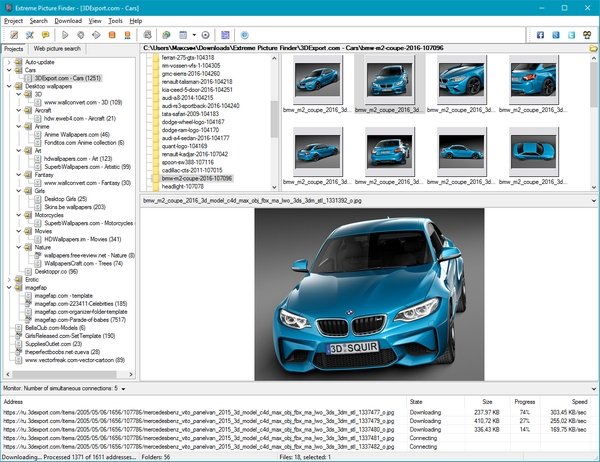
Extreme Picture Finder is a powerful batch image downloader. Download all images from any website automatically and very fast. But not only images! It allows you to download music, video or any other files - just enter the website address, choose what files to download and where to save them and let Extreme Picture Finder do the rest for you. And you can instantly view the downloaded files in the built-in image viewer.

The program can be configured to download images from password-protected websites, forum threads, even social networks. Using advanced settings you can make Extreme Picture Finder skip certain parts of websites, like entire folders or single pages to make the download process even faster. Don't know where to start downloading? Extreme Picture Finder offers a built-in online projects database with thousands of website addresses sorted by category: Desktop Wallpapers, Cars, Girls, Nature and many, many others.
Another great feature of the program is, as the name suggests, a built-in picture finder. Just enter the keyword and the program will find and download thousands of pictures for you. It has different search modes allowing you vary the level of your interaction with the download process. You can let the program find and download only thumbnails and you'll see hundreds of images flying to you in a matter of seconds - this is the fastest search mode.
Then you can choose which full-size images to download manually. Of course, you can make Extreme Picture Finder find, download and save both thumbnails and full-size images automatically, or only full-size images. Plus the program can save all images that were found on the same page, where the original full-size image is located - the related images.

Features
- Download your choice of images, music, video or any other files from websites automatically
- Download from TGP and password-protected sites
- Download list of URLs (fusker links)
- Built-in web picture finder
- Up to 30 simultaneous downloads - you'll have your files very fast
- Built-in database with thousands of website addresses
- Built-in picture viewer with thumbnails and slide-show mode
- User-friendly interface was translated into many languages

What's new
Код:
https://www.webimagedownloader.com/version-history

HomePage:
Код:
https://www.webimagedownloader.com/

-:DOWNLOAD FROM LINKS:-​
Download From RapidGator
У Вас недостаточно прав для просмотра ссылок. Войдите или зарегистрируйтесь.

Download From NitroFlare
У Вас недостаточно прав для просмотра ссылок. Войдите или зарегистрируйтесь.

 
FontLab 8.4.3.8984


5e660d735eb8937b41871376b27a499f.png


File size: 133 MB
​


FontLab 8 for macOS is a modern, professional font editor, crafted for type designers and font geeks. It lets you create, open, modify, draw, space, kern, hint and export desktop, web, color and variable OpenType fonts for any Unicode writing system, from Latin, Cyrillic and Greek, to Arabic, Hebrew and Indic, all the way to Chinese, Japanese, emoji, symbols and icons.

FontLab also gives you groundbreaking new drawing tools and responsive contour operations to make your design process easier and more efficient, whether you're an expert or a beginner. FontLab now supports color and variability, so you can explore these new possibilities and expand your creative reach.

Supported Operation Systems
macOS 10.13 or later

HomePage:
Код:
https://www.fontlab.com

-:DOWNLOAD FROM LINKS:-​
Download From RapidGator
У Вас недостаточно прав для просмотра ссылок. Войдите или зарегистрируйтесь.

Download From NitroFlare
У Вас недостаточно прав для просмотра ссылок. Войдите или зарегистрируйтесь.
 
GiMeSpace RAM Folder Pro 2.2.2.40


e9ae6a60851d98599922234028f9fa5c.jpg


File Size: 3.8 MB
​


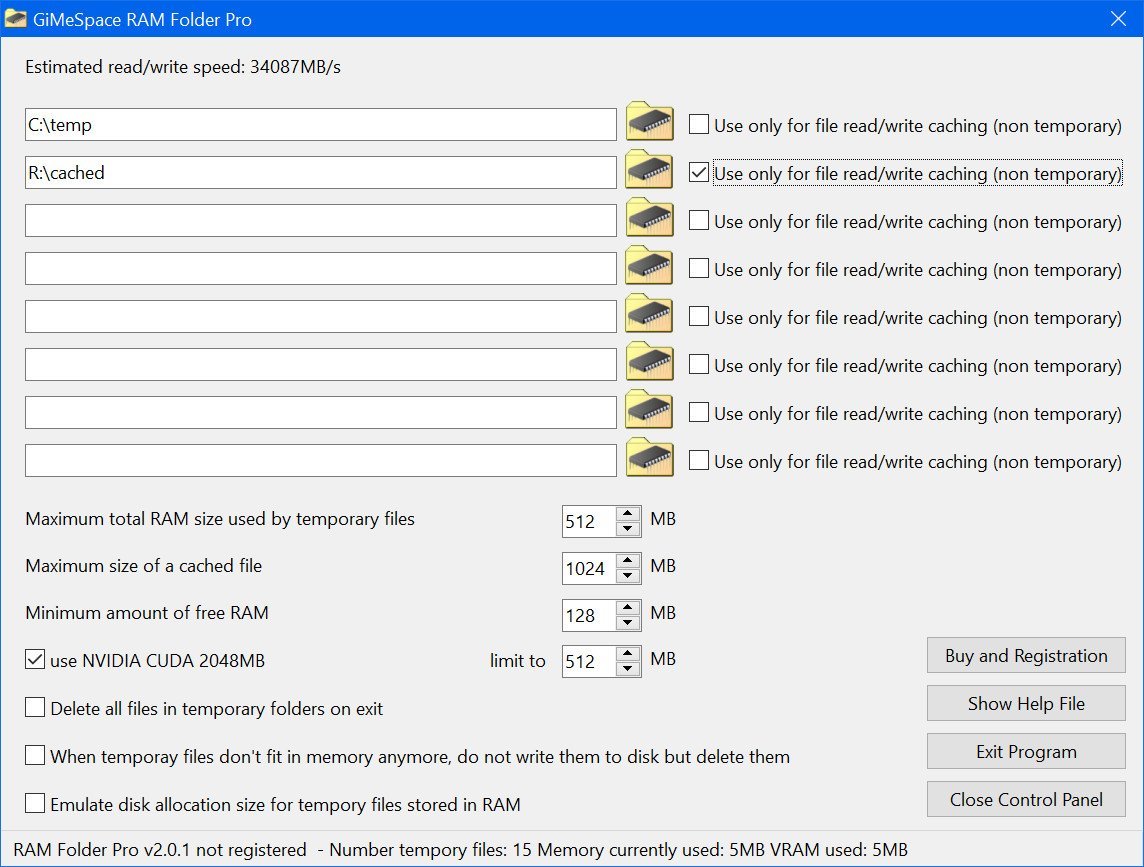
GiMeSpace RAM Folder Pro makes it possible to assign folders that will only store files in the RAM memory instead of on your disk as well as providing a safe write caching for file writes. So it combines the best of both RAM disk and disk caching programs but with minimal overhead making this program even faster than those programs.

What is the use of this?
- The windows temporary folder is usually full of needless files that keep piling up wasting you disk space. This program can keep all of them in RAM and discard them when no longer needed.
- By assigning as specific folder as a RAM folder you get file access that is as fast as your RAM access which can greatly speedup certain programs including games. Because it has much smaller overhead, this program is even much faster than the fastest RAM disk programs. Tests show it is between 2x (sequential access) and 20x (random access) faster than tradition RAM Disks!
- Excess disk writes on a SSD disk can wear out the disk over time. This program can help you extend the life time of a SSD disk by avoiding disk writes.
- Some programs use your disk as external memory even if you have enough RAM available. Examples are audio/video editors and many other programs that use a lot of memory. This program will instead use your RAM and avoids needless disk access while at the same time speeding up these programs because RAM is much faster than even the fastest SSD.
- This program can even use the VRAM of your dedicated graphics card to store files making sure you use all the fast storage memory that is available in your system.

The Pro version has a special option to enable smart write caching on a folder. This means that files in those folders will be written to the disk once the program has finished with them. This is useful when you want to accelerate heavy file IO and avoid needless disk access. Windows read cache is already very good, but the native Windows write cache is very conservative, always trying to write data to files as soon as possible. Windows does this to make sure your files are always up to date and you will not likely lose any data in case of a crash. There are many disk caching programs that enable write caching which greatly reduces the number of writes to your disk meaning that your SSD is not wearing out that quickly and greatly speeding up your programs. But these programs have one danger: If a program or even Windows crashes, you lose the data in the cache and even disk corruption can occur. GiMeSpace RAM folder has a smarter way to do write caching: It never caches disk management writes or any system/kernel access. It only caches the files of your user programs. It caches the content of files until a program is completely done with it and then writes the whole file in one go to the disk. This way the chance that a file is corrupted is even lower then when you use the native Windows write caching because it ensures only the latest finalized version of the file is written to disk and not all the intermediary stages like what Windows is doing.
Version 2.2.x is now even faster than previous versions!

Whats New
official site does not provide any info about changes in this version

HomePage:
Код:
https://gimespace.com/products/ram-folder.html

-:DOWNLOAD FROM LINKS:-​
Download From RapidGator
У Вас недостаточно прав для просмотра ссылок. Войдите или зарегистрируйтесь.

Download From NitroFlare
У Вас недостаточно прав для просмотра ссылок. Войдите или зарегистрируйтесь.
 
ImDisk Toolkit 20241123 Multilingual


5672e86b4c0fb58852f03ea5c6f1f20e.jpg


File Size : 1.4 Mb
​


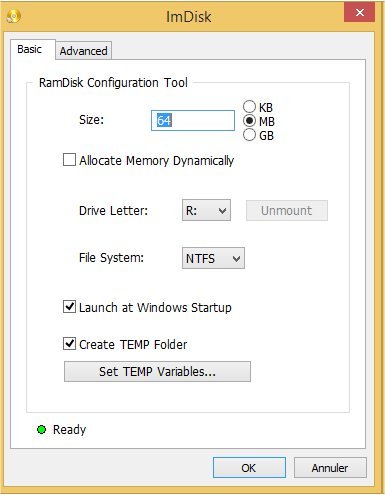
ImDisk Toolkit includes the ImDisk Virtual Disk Driver, the DiscUtils library and an easier to use graphical user interface (GUI).ImDisk Toolkit will let you mount image files of hard drive, cd-rom or floppy, and create one or several RamDisks with various parameters.

The full ImDisk Toolkit package supports the following image file formats (non exhaustive list)
vhd, vdi and vmdk (static, dynamic and vmdk multipart)
iso, nrg, bin (read-only)
raw formats (img, ima, raw, vfd...)
dmg
sdi (some versions only)

Some other formats may work but require tests, and the non Windows file systems may need additional drivers.

HomePage:
Код:
https://sourceforge.net/projects/imdisk-toolkit/

-:DOWNLOAD FROM LINKS:-​
Download From RapidGator
У Вас недостаточно прав для просмотра ссылок. Войдите или зарегистрируйтесь.

Download From NitroFlare
У Вас недостаточно прав для просмотра ссылок. Войдите или зарегистрируйтесь.
 
IsMyMemoryOK 1.04 Multilingual


4ca7f9f7318ca850e839a8501b255298.jpg


File Size : 0.4 Mb
​


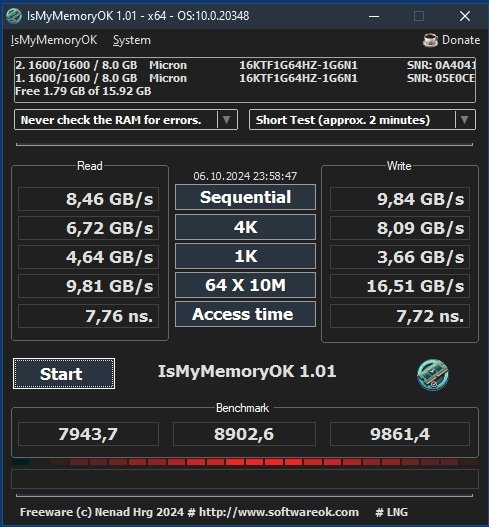
IsMyMemoryOK is a small but highly effective program that allows you to quickly and accurately test your computer's RAM (Random Access Memory). It supports all common RAM types, such as DDR5, DDR4, DDR3, and more, making it ideal for regular performance checks on your Windows system.

Key Features of the RAM Test Tool
- Compatible with various RAM types
DDR5, DDR4, DDR3, and others
- Memory benchmarking
Evaluate your RAM's performance
- Customizable test durations
- Quick test (approx. 1 minute)
- Short test (approx. 2 minutes)
- Long test (approx. 3 minutes)
- Very long test (approx. 4 minutes)

- Additional specifications and advantages
- Very small, portable program
- Multilingual interface
- Ability to capture a screenshot after the benchmark

HomePage:
Код:
https://www.softwareok.com/

-:DOWNLOAD FROM LINKS:-​
Download From RapidGator
У Вас недостаточно прав для просмотра ссылок. Войдите или зарегистрируйтесь.

Download From NitroFlare
У Вас недостаточно прав для просмотра ссылок. Войдите или зарегистрируйтесь.
 
Karaosoft File Synchronizer 5.0.3


bf68aaa9d303f241b025383c256b490b.jpg


File size: 5.1 MB
​


Great for synchronizing large collections of media files such as MP3s, Videos, etc...between two hard drives without copying every file. Save time by only copying the files that are new or different. Use "Clone Mode" to synchronize a folder to match a master folder.

- Works with external drives and computers connected over wired or wireless networks.
- Also works as a great backup utility. Backup only the files that have changed for speedy backups.

Whats New
Updates: official site does not provide any info about changes in this version

HomePage:
Код:
https://www.karaosoft.com

-:DOWNLOAD FROM LINKS:-​
Download From RapidGator
У Вас недостаточно прав для просмотра ссылок. Войдите или зарегистрируйтесь.

Download From NitroFlare
У Вас недостаточно прав для просмотра ссылок. Войдите или зарегистрируйтесь.

 
Karaosoft Request Slip Generator 2.2.1


22ac77e58f5e77330542444fd2d1c9da.jpg


File size: 7.4 MB
​


Generate professional song request slips for use in Karaoke and DJ shows. Simple to use interface makes the task of making professional request slips a breeze. Various options include custom sheet arrays and sizes, custom fonts and font sizes, optional border styles, and the ability to add your own custom logo, or simply choose from one of the built-in generic logos.

- Customizable paper sizes for international users
- Ability to export sheet of slips to PDF format (make once, print many times later)
- Over 30 generic logos included!
- NEW touch gesture support for touch screens

Whats New
Updates: official site does not provide any info about changes in this version

HomePage:
Код:
https://www.karaosoft.com

-:DOWNLOAD FROM LINKS:-​
Download From RapidGator
У Вас недостаточно прав для просмотра ссылок. Войдите или зарегистрируйтесь.

Download From NitroFlare
У Вас недостаточно прав для просмотра ссылок. Войдите или зарегистрируйтесь.
 
DxO PhotoLab 8.1.0 Build 434 Elite


41cb5ea5325313732ebb7a341f5a4324.jpg


Windows x64 | File size: 928.88 MB
​


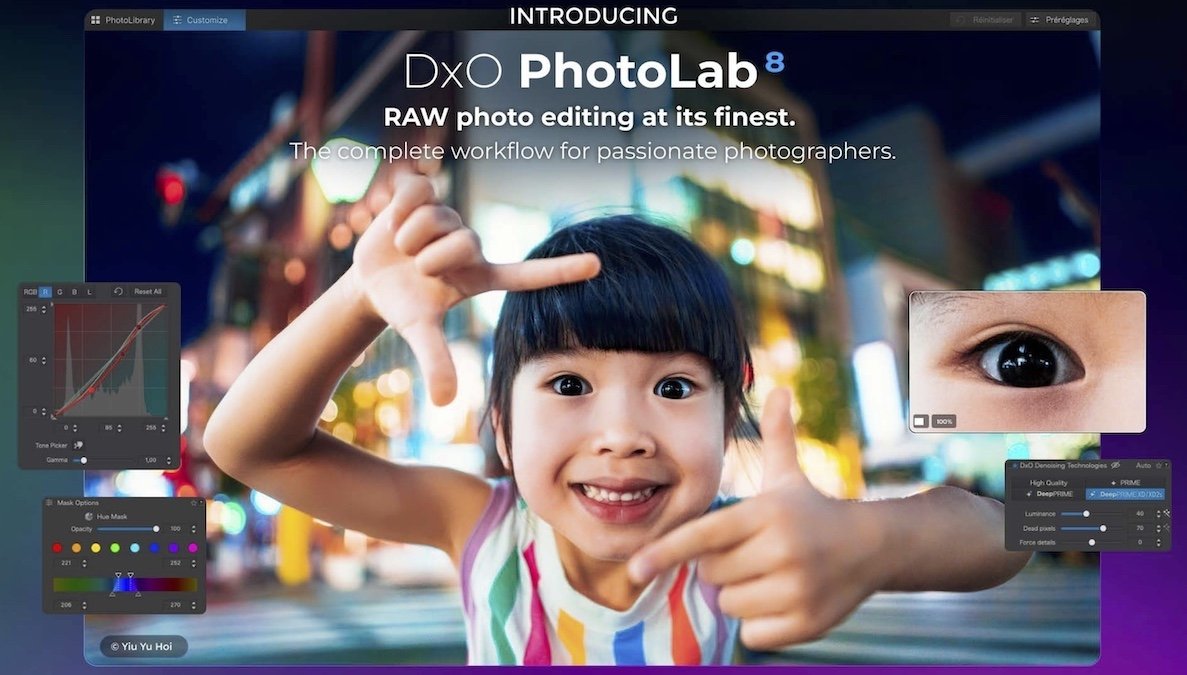
DxO PhotoLab 8 - RAW photo editing at its finest. The complete workflow for passionate photographers.

Unbeatable noise reduction and detail extraction
Cleaner and more detailed images than you ever thought possible.
Our DeepPRIME XD2s technology is at the cutting edge of machine learning. Get unbelievable image quality that's real, and make even previous generation cameras look amazing.

The answer to lens softness
Superior science for sharper images
Don't settle for second best. Use lab-grade lens profiles that sharpen images exactly where needed, now with an improved algorithm for even less fringing and artifacts.

Effortless local adjustments
Fast, intelligent, precise: Exclusive U Point™ technology.
Local adjustments shouldn't be complicated. U PointTM keeps it simple with tools that give instant, intuitive results with absolute control.

Breathtaking color at every step
From calibration to creative tools and everything in between.
Embrace colors with total accuracy. Enjoy tools that will unleash your creativity. What's new DxO PhotoLab 8 Enjoy a host of upgrades including new tools and an improved workflow.

Image correction & enhancement
DxO's pioneering Optics Modules are renowned for giving photographers the best possible performance from their gear, and are applied automatically depending on metadata. Lens softness adjustments are tailored according to the idiosyncrasies of individual lenses. They don't simply sharpen uniformly across the entire image like in other software.

Groundbreaking denoising technologies
Noise reduction powered by machine learning. DeepPRIME, DeepPRIME XD, and DeepPRIME XD2s eliminate noise, recover detail, and improve color reproduction. Two legacy technologies - PRIME and High Quality - are included when speed is crucial. Choose the automatic settings or dial them in manually. Use the new large live preview magnifier to see the impact of denoising - plus all of your other edits.

Color rendering and fidelity
Extra-wide gamut working color space (DxO Wide Gamut) ensures accurate rendering throughout the workflow. Soft Proofing mode ensures accurate colors when preparing files for print or display. Simulate ink and paper via ICC profiles. Create calibrated color profiles using industry-standard color charts to ensure precision.

Control exposure, contrast, color & tonality
Use ColorWheel to manipulate colors and customize color channels. Adjust Exposure compensation, edit the Tone Curve (enhanced in v8), tweak Contrast and Microcontrast. Plus White Balance with color picker, Color Accentuation to set saturation/vibrancy, Black-and-white palette with channel mixer, and Selective Tone for greater control over tonal ranges.

Color rendering
As well as DxO's camera-calibrated profiles and classic film renderings, import and apply DCP profiles, or apply color rendering from your camera. Start your editing process with DxO Styles to open up new creative possibilities.

Smart, automated tools
DxO PhotoLab contains two innovative tools to speed up your editing: DxO Smart Lighting quickly balances brightness levels between shadows and highlights. DxO Clearview Plus reduces atmospheric haze and enhances local contrast.

LUTs
Import and apply LUTs to open up endless creative color options. Choose from 32 pre-installed LUTs and set intensity.

Presets and toning
Create and share presets. Duplicate, rename, import/export presets, and organize into folders. Edit existing presets and create partial presets. Use the Style / Toning palette to apply Simple Toning (e.g., Sepia) and access Split Toning by installing DxO FilmPack.

ReTouch tool
More than just a cloning/healing tool, rotate, scale, and mirror the source area for absolute control. Edit the shape of the area to be retouched using a brush/eraser. Switch between Clone/Repair modes. Remove unwanted elements with automatic source selection (or set manually).

Crop, horizon & perspective tools
Adjust the horizon and crop images using a common or custom ratio - all automatically or manually. Adjust perspective distortion with dedicated tools: force parallels, rectangle, or 8-point guides.

Local Adjustment tools
U Point™ technology features Control Points and Control Lines for intelligent masks without the need for complex layers. Use Brush, Gradient, Eraser, and Auto Mask tools. Create complex adjustments using Hue Masks (new in v8). Toggle visibility and set opacity of masks, and duplicate/invert mask content. Set Control Point/Control Line sensitivity according to Luminance or Chrominance.

Available corrections
The corrections available as local adjustments include
- Exposure, Contrast, Microcontrast
- Highlights, Midtones, Shadows, Blacks
- Hue, Saturation, Luminance (via ColorWheel)
- Vibrancy, Saturation, Hue, Sharpness, Blur
- White Balance and Tint (RAW only)

Advanced History & Quick Compare
Advanced History palette provides a full editing history including specific values and changes. Grouped corrections can be expanded when applying presets in order to track individual changes. Quick Compare Mode puts your edit alongside the original image with a vertical or horizontal split. You can compare your current image with output versions and virtual copies, or choose a reference image (new in v8).

Virtual Copies
Create Virtual Copies for multiple variations of an image without copying the RAW file. Compare quickly with the original image, and selectively copy/paste settings between images.

Customizable workspaces
Highly customizable workspace: reposition/hide panels, collapse/expand palettes, and use a search field to quickly find tools. Add your most-used tools to a favorites palette, or create custom palettes. Filter displayed corrections by category. Display only the tools actively making changes to an image. Use multiple monitors and palettes. Place the grid view navigator on a second display.

Histogram
Display RGB, individual colors, and luminosity channels. Indicate where highlights and/or shadows have been clipped. Display the RGB value of an individual pixel.

Powerful functionality, catalog-free
Don't import images; simply browse your disk and edit your images on the fly. Select/search/filter photos with ease. Apply star ratings, color tags, pick/reject images, and choose from a range of criteria when searching, including color tags. For faster searching, simply direct PhotoLab to index specific folders.

Metadata management
Add and manage keywords, create keyword hierarchies, drag/drop keywords to organize them in a tree view list. Import and manage Exif and IPTC metadata, and selectively copy/paste metadata from one image to multiple others. Synchronize metadata changes with third-party applications.

Projects & other organizational tools
Create Projects to gather selections of images, independent of their folder. Create groups of Projects and drag/drop to organize virtual collections. Batch rename files, adjust capture time, drag files to folders to copy/move them, and sort/select files according to flexible options.

Customizable export settings
Choose the size/location of files, set up custom export presets, create multiple parallel exports, and apply original or custom ICC profile, sRGB, or Adobe RGB profiles. Right-click to export to a specific application. Send images directly to other applications. With Nik Collection installed, you have direct access to all plugins.

Watermarks
Create your own watermarks. Use both text and images together, adjust the size, opacity, blend modes, and save as presets. What's new
Код:
https://download-center.dxo.com/Support/docs/PhotoLab_v8/release-notes/PL8_release-note_win_EN.pdf

Recommended system configuration
● Intel® Core™ processor or AMD Ryzen™ with 8 cores
● 16 GB RAM
● 4 GB available disk space
● 1920 x 1080 display
● Microsoft® Windows® 10 version 22H2 or 11 version 22H2 (64-bit)
● For DeepPRIME, DeepPRIME XD and DeepPRIME XD2s
o NVIDIA RTX™ 2080, AMD Radeon™ RX 6700 with latest drivers with 8GB of VRAM
• official site does not provide any info about changes in this version

HomePage:
Код:
https://www.dxo.com/

-:DOWNLOAD FROM LINKS:-​
Download From RapidGator
У Вас недостаточно прав для просмотра ссылок. Войдите или зарегистрируйтесь.

Download From NitroFlare
У Вас недостаточно прав для просмотра ссылок. Войдите или зарегистрируйтесь.
 
Назад
Сверху