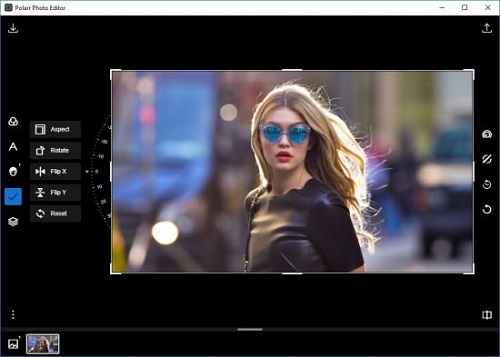
• Здравствуйте. Сайт заработал в архивном режиме форум www.old.nado.in

EkThaTiger's Softwares

JetBrains PyCharm Professional 2019.3.2

198aceb23e7701d3d2b6c216e587027b.jpg


JetBrains PyCharm Professional 2019.3.2

File Size: 368 MiB

​

The Most Intelligent Python IDE. Enjoy productive Python, Django, and Web development with PyCharm, an intelligent Python IDE offering unique coding experience. PyCharm's smart code editor provides first-class support for Python, JavaScript, CoffeeScript, TypeScript, CSS, popular template languages and more. Take advantage of language-aware code completion, error detection, and on-the-fly code fixes!

Python & Web Development

Intelligent Python Support
Enjoy outstanding coding assistance with smart code completion, code inspections, on-the-fly error highlighting, auto-fixes, along with automated code refactorings and rich navigation capabilities for all major Python implementations.

Smart Cross-technology Support
In addition to Python, Pycharm supports JavaScript, CoffeeScript, TypeScript, HTML/CSS, Cython, template languages, AngularJS, Node.js, and more.

Web Development Frameworks
PyCharm offers great framework-specific support for modern web development frameworks such as Django, Flask, Google App Engine, Pyramid, and web2py.

Remote Development Capabilities
Run, debug, test, and deploy applications on remote hosts or virtual machines, with remote interpreters, integrated ssh terminal, Docker and Vagrant integration.

Built-in Developer Tools
An amazing suite of tools right out of the box: an integrated debugger and graphical test runner; a built-in terminal; integration with Git, SVN, and Mercurial; built-in Database Tools & SQL support.

Customizable and Cross-platform IDE
PyCharm works on Windows, Mac OS or Linux with a single license key. Enjoy a fine-tuned workspace with customizable color schemes and key-bindings, with VIM emulation available.

System requirements:
64-bit versions of Microsoft Windows 10, 8, 7 (SP1)
4 GB RAM minimum, 8 GB RAM recommended
1.5 GB hard disk space + at least 1 GB for caches
1024x768 minimum screen resolution
Python 2: versions 2.6 and 2.7 or Python 3: from the version 3.4 up to the version 3.7

У Вас недостаточно прав для просмотра ссылок. Войдите или зарегистрируйтесь.


DownLoad

NitroFlare
Код:
https://nitroflare.com/view/639D6E29F347256/JetBrains.PyCharm.Professional.2019.3.2.rar

RapidGator
Код:
https://rapidgator.net/file/6135184fea79bfcab31f7f04f2086d2f/JetBrains.PyCharm.Professional.2019.3.2.rar.html

UploadGiG
Код:
https://uploadgig.com/file/download/024e1585a8fe6d20/JetBrains.PyCharm.Professional.2019.3.2.rar
 
JetBrains WebStorm 2019.3.2

e2f18179d6ddff261dbeca12c0b6ce3c.jpg


JetBrains WebStorm 2019.3.2

File Size: 261 MiB

​

WebStorm brings you smart coding assistance for JavaScript and compiled-to-JavaScript languages, Node.js, HTML and CSS. Enjoy code completion, powerful navigation features, on-the-fly error detection, and refactorings for all of these languages.

Features:

Modern frameworks
WebStorm provides advanced coding assistance for Angular, React and Meteor. Enjoy support for PhoneGap, Cordova and Ionic for mobile development and develop for server-side with Node.js. All in one IDE!

Smart editor
The IDE analyzes your project to provide the best code completion results for all supported languages. Hundreds of built-in inspections report any possible issues right as you type and suggest quick-fix options.

Navigation & Search
WebStorm helps you get around your code more efficiently and save time when working with large projects. Jump to a method, function or variable definition in just one click, or search for the usages.

Debugging, tracing and testing
WebStorm provides powerful built-in tools for debugging, testing and tracing your client-side and Node.js applications. With minimum configuration required and thoughtful integration into the IDE, there tasks are much easier with WebStorm.

Debugging
WebStorm provides a built-in debugger for your client-side code (that works with Chrome) and Node.js apps. Place the breakpoints, step through the code, and evaluate expressions - all without leaving the IDE.

Unit testing
Perform unit testing with ease, as WebStorm integrates with Karma test runner and Mocha. Run and debug tests right inside the IDE, view results in a nice and visual format, and navigate to the test code.

Tracing and profiling
WebStorm features spy-js, a built-in tool that helps you trace your JavaScript code. Explore how files are connected with function calls and efficiently identify any possible bottlenecks.

Seamless tool integration
WebStorm integrates with popular command line tools for web development, providing you with a productive, streamlined development experience without using the command line.

Build tools
Enjoy a simple unified UI for running Grunt, Gulp or npm tasks right from the IDE. All tasks are listed in a special tool window, so simply double-click on the task name to start it.

Code quality tools
In addition to hundreds of WebStorm's own inspections, it can run JSHint, ESLint, JSCS or JSLint against your code and highlight any issues on the fly, right in the editor.

Project templates
Start new projects from the Welcome screen using popular project templates like Express or Web starter kit, and access even more project generator thanks to integration with Yeoman.

IDE features
WebStorm is built on top of the open-source IntelliJ Platform, which we at JetBrains have been developing and perfecting for over 15 years. Enjoy the fine-tuned, yet highly customizable experience it provides to fit your development workflow.

VCS
WebStorm provides a unified UI for working with many popular Version Control Systems, ensuring a consistent user experience across git, GitHub, SVN, Mercurial, and Perforce.

Local history
Whether you're using VCS or not, Local history can be a real code saver. At any time you can inspect the history of either a particular file or directory, and roll back to any of its previous versions.

Customization
WebStorm is extremely customizable. Adjust it to perfectly suit your coding style, from shortcuts, fonts and visual themes to tool windows and editor layout.

System requirements:
Microsoft Windows 10/8/7/Vista/2003/XP (incl.64-bit)
Intel Pentium III/800 MHz or higher (or compatible)
2 GB RAM minimum
4 GB RAM recommended
1024x768 minimum screen resolution

У Вас недостаточно прав для просмотра ссылок. Войдите или зарегистрируйтесь.


DownLoad

NitroFlare
Код:
https://nitroflare.com/view/4C0320B1A847801/JetBrains.WebStorm.2019.3.2.rar

RapidGator
Код:
https://rapidgator.net/file/5b9ee42e39e2889f05cf16e1b21a7fb7/JetBrains.WebStorm.2019.3.2.rar.html

UploadGiG
Код:
https://uploadgig.com/file/download/Afc3277e211da9f5/JetBrains.WebStorm.2019.3.2.rar
 
Microsoft Office Professional Plus 2019 Retail-VL v1912 Build 12325.20344

83e7505f1db790bf05a1541123fd3f66.png


Microsoft Office Professional Plus 2019 Retail-VL v1912 Build 12325.20344

File Size: 3.50, 3.70 GiB
Languages: English, German, Greek, French, Spanish, Italian
Portuguese-Portuguese, Portuguese-Brazil, Russian

​

Office 365 ProPlus, the cloud-connected version of Office, delivers the most productive and most secure Office experience-with the lowest total cost of ownership for deployment and management. However, for customers who aren't ready for the cloud, Office 2019 provides new features and updates to the on-premises apps for both users and IT professionals. Like Windows Long Term Servicing Channel (LTSC) releases, Office 2019 provides a set of valuable enhancements for customers who can't be cloud-connected or receive regular updates.

The new enhancements in Office 2019 are a subset of a long list of features that have been added to Office 365 ProPlus over the last three years. Office 2019 is a one-time release and won't receive future feature updates. However, we'll continue to add new features to Office 365 ProPlus monthly, including innovations in collaboration, artificial intelligence (AI), security, and more. Office 2019 delivers features across apps to help users create amazing content in less time. In PowerPoint 2019, you can create cinematic presentations with new features like Morph and Zoom. And improved inking features across the apps in Windows-like the roaming pencil case, pressure sensitivity, and tilt effects-allow you to naturally create documents.

Microsoft Office 2019 Select Edition includes:
Microsoft Office 2019 Professional Plus
Microsoft Access 2019
Microsoft Excel 2019
Microsoft Lync 2019
Microsoft OneNote 2019
Microsoft Outlook 2019
Microsoft PowerPoint 2019
Microsoft Publisher 2019
Microsoft Visio Viewer 2019
Microsoft Word 2019
Skype for business 2019
Office Shared Features
Office Tools
And many more

System Requirements:
OS:Windows 7/8/8.1/10

WHATS NEW

Updates:official site does not provide any info about changes in this version yet.
У Вас недостаточно прав для просмотра ссылок. Войдите или зарегистрируйтесь.


DownLoad

NitroFlare
Код:
https://nitroflare.com/view/D27C320AADFE4AA/x64.v16.0.12325.20344.Multi.part1.rar
https://nitroflare.com/view/109D690B0C66F87/x64.v16.0.12325.20344.Multi.part2.rar
https://nitroflare.com/view/209A69B664C6F59/x64.v16.0.12325.20344.Multi.part3.rar
https://nitroflare.com/view/FDBCC42061FB2BA/x64.v16.0.12325.20344.Multi.part4.rar

Код:
https://nitroflare.com/view/397505C24E98194/x86.v16.0.12325.20344.Multi.part1.rar
https://nitroflare.com/view/0B0B4B9419DB6FD/x86.v16.0.12325.20344.Multi.part2.rar
https://nitroflare.com/view/069518A9D380090/x86.v16.0.12325.20344.Multi.part3.rar
https://nitroflare.com/view/F5A20FF7659D7F3/x86.v16.0.12325.20344.Multi.part4.rar

RapidGator
Код:
https://rapidgator.net/file/4a22ea1e6526997e5ae3422422b38095/x64.v16.0.12325.20344.Multi.part1.rar.html
https://rapidgator.net/file/f526a7af2ba43b9d877a7a7d79ce5c0d/x64.v16.0.12325.20344.Multi.part2.rar.html
https://rapidgator.net/file/b1c93600a872cc90e377d9809a0bc48f/x64.v16.0.12325.20344.Multi.part3.rar.html
https://rapidgator.net/file/ddf1cdff66748aaf4167156d13b31ff2/x64.v16.0.12325.20344.Multi.part4.rar.html

Код:
https://rapidgator.net/file/ed6eb99aa0ef5294b8789b2018efdd40/x86.v16.0.12325.20344.Multi.part1.rar.html
https://rapidgator.net/file/18d5466f54fc309fbc481a8623b693d2/x86.v16.0.12325.20344.Multi.part2.rar.html
https://rapidgator.net/file/3be0d234717b8f78f8fc241aa6c8b689/x86.v16.0.12325.20344.Multi.part3.rar.html
https://rapidgator.net/file/a50008959300b6648fc1c59e6ad1205b/x86.v16.0.12325.20344.Multi.part4.rar.html

UploadGiG
Код:
https://uploadgig.com/file/download/05364046856663b7/x64.v16.0.12325.20344.Multi.part1.rar
https://uploadgig.com/file/download/dBA4d8f2b0dc0f22/x64.v16.0.12325.20344.Multi.part2.rar
https://uploadgig.com/file/download/c07c6D854Ff31905/x64.v16.0.12325.20344.Multi.part3.rar
https://uploadgig.com/file/download/18998af461d474c0/x64.v16.0.12325.20344.Multi.part4.rar

Код:
https://uploadgig.com/file/download/80d4eeC3C5a3542a/x86.v16.0.12325.20344.Multi.part1.rar
https://uploadgig.com/file/download/9Cb6142633b20791/x86.v16.0.12325.20344.Multi.part2.rar
https://uploadgig.com/file/download/95a74638b0bAa7E9/x86.v16.0.12325.20344.Multi.part3.rar
https://uploadgig.com/file/download/28411cd443560d2E/x86.v16.0.12325.20344.Multi.part4.rar
 
The Foundry Nuke Studio 12.0v4 x64

8748a0e799af2301c9a278c8a1fbca6a.jpg


The Foundry Nuke Studio 12.0v4 x64

File Size: 830 MiB

​

Nuke®, NukeX® and Nuke Studio® offer cutting-edge toolkits for node-based compositing, editorial and review. The Nuke family's unparalleled flexibility and collaborative workflows help you get the highest quality results-fast.

Compositing and much more
All the tools you need to get the job done, no matter how you're working. From advanced node-based compositing, to 3D tracking and model building, to editorial and conform, the Nuke range can scale to suit your needs.

Highest quality results
Used by many of the best VFX houses in the industry, the Nuke family's state-of-the-art tools make producing pixel perfect, film-grade results both painless and creatively satisfying.

Power and performance
Built to meet the needs of modern production work, the Nuke family offers unparalleled levels of power and performance, whether you're a team with a deadline or tackling a solo project.

Collaborative workflow
Efficient, collaborative workflows lie at the heart of the Nuke range. Easily communicate, share and work together with others, whether you're sitting side by side or across the globe.

Speed and efficiency
Work fast and interactively with Nuke's cutting-edge toolkits, GPU acceleration and fluid workflows. Everything you need to complete your project on time is built in and ready to go.

The perfect fit for your pipeline
Open and customizable, Nuke fits perfectly into your pipeline, with major operating system support, low hardware requirements, support for industry standards like OCIO and Alembic, and a Python API and Pyside included.

2D compositing and visual effects
Nuke's industry-leading nodel toolset making compositing and review faster and easier than ever before

With over 200 creative nodes, Nuke delivers everything you need to tackle the diverse challenges of digital compositing. This includes industry-standard keyers, rotoscope, vector paint tools, color correction and so much more.

Nodal toolset
With over 200 creative nodes, Nuke delivers everything you need to tackle the diverse challenges of digital compositing. This includes industry-standard keyers, rotoscope, vector paint tools, color correction and so much more.

Deep Image compositing
Deep Image compositing tools let you create and work with images that contain multiple opacity, color and camera-relative depth samples per pixel, so there's no need to re-render CG elements when content changes.

3D compositing and visual effects
3D Camera Tracker
The integrated Camera Tracker in NukeX® and Nuke Studio replicates the motion of a 2D camera with an animated 3D camera or point cloud in Nuke's 3D space, allowing you to composite 2D/3D elements accurately with reference to the original camera used for the shot. Refinement options, advanced 3D feature preview and lens distortion handling improve efficiency and accuracy on the trickiest tracking tasks.

3D workspace
Nuke offers a limitless, integrated 3D environment that lets you create and render complex scenes composed of 2D footage, 3D models, cards, basic geometry, cameras, lights, and meshes. Great for camera projections for set replacements and other tasks where you need to simulate a "real" environment.

Collaboration
User presets and node toolsets
Nuke's time-saving user presets enable you to set and save tailored node parameters for effects to use across multiple projects. Node toolsets let you automate your workflow by creating grouped configurations of nodes for specific tasks.

Versioning
Nuke's powerful versioning functionality allows you to bring new versions of shots into Nuke Studio's timeline or Nuke's nodegraph and swap between them quickly and easily. This capability makes comparing and reviewing work at different stages, and work done by different artists, simple.

Editorial
SDI broadcast monitor support
All Nuke editions provide SDI broadcast monitor support on compatible AJA and Blackmagic SDI-out hardware. With this support, you can accurately check color space and aspect ratios on broadcast content during the review process.

Multi-track editorial timeline
Nuke Studio® comes complete with a multi-track editorial timeline that lets you playback, review and edit multi-layered sequences of video, CG and audio tracks. You can stack unlimited tracks containing as many clips as you need and blend tracks to easily create overlays. Create timeline effects and flip them into the node graph, or edit and render compositions right from the timeline.

Performance and pipeline
Python API and PySide
Available across the entire Nuke® family, the Python API can be used for full pipeline integration and automating common tasks and procedures. PySide is also included to allow users to build custom user interfaces via Python and the Qt frameworks.

OpenColorIO color management
With OpenColorIO (OCIO), the open-source color management solution from Sony Picture Imageworks, Nuke can setup a single profile to provide consistent colors across all compatible applications to simplifying the color management process.

Supported operating systems:
For full details on the requirements for GPU Acceleration see the release notes.
Windows 7 or Windows 10 (64-bit only)
*Note: Other operating systems may work, but have not been fully tested

У Вас недостаточно прав для просмотра ссылок. Войдите или зарегистрируйтесь.


DownLoad

NitroFlare
Код:
https://nitroflare.com/view/919A7BC446FAD37/The.Foundry.Nuke.Studio.12.0v4.x64.rar

RapidGator
Код:
https://rapidgator.net/file/fcabf939c68e65d08ac36ef205539b6c/The.Foundry.Nuke.Studio.12.0v4.x64.rar.html

UploadGiG
Код:
https://uploadgig.com/file/download/da00F6d9f1E23C34/The.Foundry.Nuke.Studio.12.0v4.x64.rar
 
Adobe Illustrator 2020 v24.0.3 macOS

8717ab7c1ff0ba04524d6a76cca53bc8.png


Adobe Illustrator 2020 v24.0.3 macOS

File Size: 2.49 GiB
Languages: Multilingual

​

The industry-standard vector graphics software lets you create logos, icons, drawings, typography, and illustrations for print, web, video, and mobile. Millions of designers and artists use Illustrator to create everything from web icons and product packaging to book illustrations and billboards.

Iconic work at any size.
Get all the drawing tools you need to turn simple shapes and colors into sophisticated logos, icons, and graphics. Illustrator artwork is vector-based, so it can scale down for mobile screens and up to billboard size - and always look crisp and beautiful.

Gorgeous typography that says it all.
Incorporate a company name into a logo, create a flyer, or mock up a website design with the best type tools out there. Add effects, manage styles, and edit individual characters to create typographic designs that perfectly express your messages.

Draw attention everywhere.
Create freehand drawings, or trace and re-color imported photos to turn them into works of art. Use your illustrations anywhere, including printed pieces, presentations, websites, blogs, and social media.

Fast asset export for screens
Select assets from your artboards and export them to multiple sizes, resolutions, and formats with one click.

Puppet Warp
Modify a graphic naturally, without having to adjust individual paths or anchor points.

SVG Color Fonts
Design with SVG OpenType fonts that include multiple colors, gradients, and transparencies.

Artboard enhancements
Create up to a thousand artboards on your canvas, and select multiple artboards at one time to move, resize, and more.

Supported Operation Systems:
macOS 10.13 or later 64-bit

У Вас недостаточно прав для просмотра ссылок. Войдите или зарегистрируйтесь.


DownLoad

Single Link
Код:
https://nitroflare.com/view/BBDB1030791BC5F/Adobe.Illustrator.2020.v24.0.3.macOS.dmg

Код:
https://rapidgator.net/file/3939e5aae71689a72a2089f25afa57ae/Adobe.Illustrator.2020.v24.0.3.macOS.dmg.html

Код:
https://uploadgig.com/file/download/c0d6e903748f19dE/Adobe.Illustrator.2020.v24.0.3.macOS.dmg

NitroFlare
Код:
https://nitroflare.com/view/82B6CC4FC1F8C2B/Adobe.Illustrator.2020.v24.0.3.macOS.part1.rar
https://nitroflare.com/view/13AF5BB9704DA97/Adobe.Illustrator.2020.v24.0.3.macOS.part2.rar
https://nitroflare.com/view/B37524C1CB48C23/Adobe.Illustrator.2020.v24.0.3.macOS.part3.rar

RapidGator
Код:
https://rapidgator.net/file/1a66ca8ad7fe07017b5839a71ebab4d8/Adobe.Illustrator.2020.v24.0.3.macOS.part1.rar.html
https://rapidgator.net/file/00263d150efd2d7875f6eb4084a413f7/Adobe.Illustrator.2020.v24.0.3.macOS.part2.rar.html
https://rapidgator.net/file/dc08a0a3bb49f5595558a72fb6862946/Adobe.Illustrator.2020.v24.0.3.macOS.part3.rar.html

UploadGiG
Код:
https://uploadgig.com/file/download/88b36184861eee41/Adobe.Illustrator.2020.v24.0.3.macOS.part1.rar
https://uploadgig.com/file/download/fa341322D02e6bf5/Adobe.Illustrator.2020.v24.0.3.macOS.part2.rar
https://uploadgig.com/file/download/7aD4cf3369b49b3b/Adobe.Illustrator.2020.v24.0.3.macOS.part3.rar
 
Adobe Photoshop 2020 v21.0.3 macOS

8136f8c7efb1a1d4e507342a1ed683d9.png


Adobe Photoshop 2020 v21.0.3 macOS

File Size: 1.98 GiB
Languages: Multilingual

​

Adobe Photoshop 2020, the industry standard for digital image processing and editing, delivers a comprehensive package of professional retouching tools, and is packed with powerful editing features designed to inspire.

If you can think it, you can make it with Photoshop, the world's best imaging and graphic design software. Create and enhance photographs, illustrations, and 3D artwork. Design websites and mobile apps. Edit videos, simulate real-life paintings, and more. It's everything you need to make any idea real.

Designed for anyone to design anything.
From posters to packaging, basic banners to beautiful websites, unforgettable logos to eye-catching icons, Photoshop keeps the creative world moving. With intuitive tools and easy-to-use templates, even beginners can make something amazing.

Not just photo taking. Breathtaking.
Whether you're looking for everyday edits or total transformations, our graphic design software offers a complete set of professional photography tools to turn your snapshots into works of art. Adjust, crop, remove objects, retouch, and repair old photos. Play with color, effects, and more to turn the ordinary into something extraordinary.

Power to the paintbrush.
Draw and paint whatever you dream up with tools designed especially for illustrators. Paint in perfectly symmetrical patterns. Get polished looks with stroke smoothing. And create with pencils, pens, markers, and brushes that feel real - including more than 1,000 from celebrated illustrator Kyle T. Webster.

Supported Operation Systems:
macOS 10.13 or later 64 bit

У Вас недостаточно прав для просмотра ссылок. Войдите или зарегистрируйтесь.


DownLoad

Single Link
Код:
https://nitroflare.com/view/619698A73D38017/Adobe.Photoshop.2020.v21.0.3.macOS.dmg

Код:
https://rapidgator.net/file/da9379eae4f5789f72511610f62cf79b/Adobe.Photoshop.2020.v21.0.3.macOS.dmg.html

Код:
https://uploadgig.com/file/download/5255378f8aC7d995/Adobe.Photoshop.2020.v21.0.3.macOS.dmg

NitroFlare
Код:
https://nitroflare.com/view/61CC78CE06F9D49/Adobe.Photoshop.2020.v21.0.3.macOS.part1.rar
https://nitroflare.com/view/CA2CB8851117EC3/Adobe.Photoshop.2020.v21.0.3.macOS.part2.rar

RapidGator
Код:
https://rapidgator.net/file/ac8f347440f4262aab7e041ee9970bbb/Adobe.Photoshop.2020.v21.0.3.macOS.part1.rar.html
https://rapidgator.net/file/9319f14b097c838dc9851770288960d2/Adobe.Photoshop.2020.v21.0.3.macOS.part2.rar.html

UploadGiG
Код:
https://uploadgig.com/file/download/4b6b0D18Ab89b050/Adobe.Photoshop.2020.v21.0.3.macOS.part1.rar
https://uploadgig.com/file/download/0B99D32c9261d833/Adobe.Photoshop.2020.v21.0.3.macOS.part2.rar
 
Adobe XD v25.3.12 macOS

4c7376d8b5ef879480323557c26d9bbb.png


Adobe XD v25.3.12 macOS

File Size: 395 MiB
Languages: Multilingual

​

Adobe XD is made for designers like you, by designers like us. It's the fastest way to design, prototype, and share any user experience, from websites and mobile apps to voice interactions, and more.

Adobe XD reimagines the way designers create experiences with fast, intuitive tools that get you into your designs and get out of your way. Power up prototypes with voice. Automatically resize elements for different screens. Create amazing animations between artboards without timelines. It's everything you need for what's next in UX - and it's only in XD.
Release notes were unavailable when this listing was updated.

Supported Operation Systems:
macOS 10.12 or later 64 bit

У Вас недостаточно прав для просмотра ссылок. Войдите или зарегистрируйтесь.


DownLoad

NitroFlare
Код:
https://nitroflare.com/view/7CAFD70879886A1/Adobe.XD.v25.3.12.macOS.dmg

RapidGator
Код:
https://rapidgator.net/file/c29db0b955ce246e46f8ad3c4207a263/Adobe.XD.v25.3.12.macOS.dmg.html

UploadGiG
Код:
https://uploadgig.com/file/download/4471452d2fd0aA4a/Adobe.XD.v25.3.12.macOS.dmg
 
QuarkXPress 2019 v15.1.3 Multilingual

b272ae4e7d5bb23f1857616db2604b63.jpg


QuarkXPress 2019 v15.1.3 Multilingual

File Size: 554 MiB
Languages: Multilingual
OS: Windows x64

​

The Most Flexible Software for Print and Digital Design. QuarkXPress introduces Flex Layouts, a first in digital publishing for graphic designers. Flex Layouts is a new layout space that lets designers create truly responsive HTML5 Web pages in a WYSIWYG environment. Flex Layouts do not require any HTML or CSS coding skills, which means graphic designers can start creating banner ads, landing pages, microsites, and more.

New Features:

Modern Web Design
Transform your print designs into modern web pages with Flex Layouts that enable users to deliver responsive web design without coding. Bring layouts to life with native HTML5 and CSS3 effects including drop shadows, gradients, vector shapes, video and a wealth of interactive elements.

Truly Responsive Experiences
The HTML output from the Flex Layout space is responsive to any device aspect ratio, including desktop, tablet and mobile phone screens. Designers can add any interactive element QuarkXPress supports, apply a parallax effect on background images, and test responsiveness without ever leaving QuarkXPress

Graphic Design to Web Design
The responsive HTML5 output from Flex Layouts complies with emerging Web standards, which means graphic designers can create native, app like experiences for the web directly in QuarkXPress. Once a Flex Layout is complete, designers can export and upload the code to any Web hosting service - or - use Flex Layouts as your prototyping tool and share the code with your web team.

Flex features include:
- Design and Export Responsive Web Pages
- Test responsiveness within the layout
- Design Using Preset or Custom Grids
- Prebuilt Responsive Layout Blocks
- Apply Native HTML5 Drop Shadows
- Support for Advanced Typography
- Create Vector Shapes and Illustrations
- Non-destructive image effects and filters
- Use Videos as backgrounds
- Use exported responsive layouts in iOS and Android apps
- And More

Tables Reimagined
Tables are a powerful tool for simplifying the presentation of complex information. However, it can be time consuming for designers to create and update tabular content. In QuarkXPress , Quark completely reimagined tables introducing its new table object that combines creative freedom with time saving automation.

A Powerful New Table Model
The new table model in QuarkXPress introduces new styling rules for table, row, column and cell level formatting along with text styling rules. You can apply table styles to any table regardless of whether you created directly in QuarkXPress or auto imported a table from Excel. What's more, if you change the source Excel table, the data is updated in QuarkXPress without impacting your table design.

Easy Access to Table Styles
No restrictions! All table styling can be done in QuarkXPress through a new and intuitive user interface. Designers can access table styles from the measurement palette, which offers much finer control over formatting tables at the cell level, plus unlimited opportunity to format borders and shading.

Save Time, Boost Productivity
To get you started quickly, QuarkXPress includes predefined table styles, which have all of the formatting options preset or you can build your own. When importing tables from Excel, you can even automatically create a table style as part of the import process.

Professional Image Export
Push image export to a new limit. For the first time you can now export your designs from QuarkXPress as professional grade images in JPEG, TIFF and PNG formats. Need an banner image for your email? No need to open another photo editing application! Use presets to control pixel DPI, quality, color profile, and file format when exporting your QuarkXPress layout or selected objects or images for use in other applications.

Performance Boost for Mac and Windows
QuarkXPress improves image cache handling with dedicated multithreading support to make operations much faster on MacOS and Windows. Additionally, QuarkXPress Windows users will now benefit from Direct2D hardware acceleration to boost graphic engine performance. While this improves overall image handling, it also makes layout operations like scrolling, panning, image editing and many other operations faster for image heavy documents.

Complete PDF Accessibility Support
When exporting PDFs for digital consumption, ensure you meet the latest accessibility requirements and regulations. QuarkXPress now supports all PDF accessibility standards so you can export PDFs that are compliant with the PDF/UA (ISO 14289), PDF/A, and WCAG 2.0 requirements.

9-Point Reference Grid
When creating or adjusting boxes and lines on a page, you often want to align items to specific coordinates or to other objects. To make this eas-ier, QuarkXPress adds a new grid-based selector that lets you specify the exact coordinates of an object and all four corners and four edges of a box.

Spring Loaded Cursor
No more back and forth between your layout and your image library! It takes time to import images individually, especially in image heavy layouts. Speed up the process by loading up your cursor with multiple images (or text files) at once and then populate existing boxes or create new boxes one at a time with the click of your mouse.

Additional New Features in QuarkXPress 2019:
- Auto Growing Text Boxes
- Enhanced Paragraph Formatting
- Directional Spine Alignment
- Easy Access to Merge Shapes
- Enhanced Border Formatting Control
- Enhanced Retina Support

UNSURPASSED TYPOGRAPHY
- New First-Class OpenType Controls
- New Color Fonts Support
- New Upgraded Font Listing
- New Hyphenation Strictness Levels
- New OpenType Support for Digital

PROFESSIONAL PRINT PUBLISHING
- New Direct InDesign IDML Import
- New New PDF Print Engine
- New Tagged/Accessible PDF
- New Built-in JavaScript ES6+ V8
- New Digital-to-Print Conversion

UNLIMITED DIGITAL PUBLISHING
- New Unlimited Android Apps
- New Digital Preview Improvements
- New HTML5 Export Optimizations
- New Grouped Interactivity
- New Collect for Output Digital

RELEASE NOTES:
- This is a free update for QuarkXPress 2019 that further improves quality and stability.

System Requirements:
- Microsoft Windows 7 SP1 (64 Bit)
- Windows 8.1 (64 Bit) with April 2014 update rollup update (KB2919355) and March 2014 servicing stack update (KB2919442)
- Windows 10 Version 1607 (64 Bit)
- Microsoft .NET Framework 4.0 or later
- An update for Universal C Runtime is required on Windows 7 and 8.x.

У Вас недостаточно прав для просмотра ссылок. Войдите или зарегистрируйтесь.


DownLoad

NitroFlare
Код:
https://nitroflare.com/view/4F1A38F0DF37F40/QuarkXPress.2019.v15.1.3.Multilingual.rar

RapidGator
Код:
https://rapidgator.net/file/5c8ff2c143dc81f8d4ea6c2deb5c093f/QuarkXPress.2019.v15.1.3.Multilingual.rar.html

UploadGiG
Код:
https://uploadgig.com/file/download/26a637e6a41b0C73/QuarkXPress.2019.v15.1.3.Multilingual.rar
 
Tableau Desktop Professional Edition 2019.4.2

21469807f2e783606879bb63b5a2eb6d.png


Tableau Desktop Professional Edition 2019.4.2

File Size: 441 MiB
Languages: Multilingual
OS: Windows x64

​

Answer questions at the speed of thought with Tableau Desktop. Tableau Desktop Pro is a business intelligence tool that allows you to easily visualise, analyse and share large amounts of data. Visual analysis in a click - Powerful analytical tools-at your fingertips.

Filter data dynamically, split trends across different categories or run an in-depth cohort analysis. Double-click geographic fields to put data on a map. All without writing a single line of code. Deep statistics - Go deeper into your data with new calculations on existing data. Make one-click forecasts, build box plots and see statistical summaries of your data.

Get actionable insights fast
Leave chart builders behind. Live visual analytics fuel unlimited data exploration. Interactive dashboards help you uncover hidden insights on the fly. Tableau harnesses people's natural ability to spot visual patterns quickly, revealing everyday opportunities and eureka moments alike.

Connect to more data
Connect to data on prem or in the cloud-whether it's big data, a SQL database, a spreadsheet, or cloud apps like Google Analytics and Salesforce. Access and combine disparate data without writing code. Power users can pivot, split, and manage metadata to optimize data sources. Analysis begins with data. Get more from yours with Tableau.

Answer deeper questions
Exceptional analytics demand more than a pretty dashboard. Quickly build powerful calculations from existing data, drag and drop reference lines and forecasts, and review statistical summaries. Make your point with trend analyses, regressions, and correlations for tried and true statistical understanding. Ask new questions, spot trends, identify opportunities, and make data-driven decisions with confidence.

Put your data on the map
Answer the "where" as well as the "why." Create interactive maps automatically. Built-in postal codes mean lightning-fast mapping for more than 50 countries worldwide. Use custom geocodes and territories for personalized regions, like sales areas. We designed Tableau maps specifically to help your data stand out.

Let everyone in on it
Ditch the static slides for live stories that others can explore. Create a compelling narrative that empowers everyone you work with to ask their own questions, analyzing interactive visualizations with fresh data. Be part of a culture of data collaboration, extending the impact of your insights.

Get even more from Tableau Desktop.

Big data, live or in-memory
When you want to take data offline or bring it in-memory, Tableau lets you extract massive data for limitless exploration in seconds. It combines advances in database and computer graphics technology so you can analyze huge datasets on a laptop.

Sharing and collaborating securely
Communicate with data in a whole new way. Share visualizations and underlying data securely using Tableau Server or Tableau Online. Create an environment where everyone in your organization can share and collaborate on trusted data.

Designing for a mobile-first world
Your content needs to perform at any size, on any device. Device designer is our simple, yet powerful tool that helps you design, customize, and publish optimized dashboards for desktop, tablet, and phone.

Always innovating
Tableau's software moves as fast as you do. There's a reason that the award-winning research scientists, design gurus, and visualization experts choose Tableau. We invest more in R&D than anyone else in the industry, so there's always a new release around the corner.

System Requirements:
- Microsoft Windows 7 or newer (64-bit)
- Microsoft Server 2008 R2 or newer
- Intel Pentium 4 or AMD Opteron processor or newer
- 2 GB memory
- 1.5 GB minimum free disk space

У Вас недостаточно прав для просмотра ссылок. Войдите или зарегистрируйтесь.


DownLoad

NitroFlare
Код:
https://nitroflare.com/view/09D40E37A44CE66/Tableau.Desktop.Professional.Edition.2019.4.2.rar

RapidGator
Код:
https://rapidgator.net/file/753a3e3db33ed24dce53df3e24ebb339/Tableau.Desktop.Professional.Edition.2019.4.2.rar.html

UploadGiG
Код:
https://uploadgig.com/file/download/b4b8Bbf41ccC9750/Tableau.Desktop.Professional.Edition.2019.4.2.rar
 
Adobe Photoshop 2020 v21.0.3.91 x64 Portable

177e666aa2d1ffd90e3d29b762c7b0a2.png


Adobe Photoshop 2020 v21.0.3.91 x64 Portable

File Size: 1.67 GiB
Languages: Multilingual
OS: Windows x64

​

Reimagine reality with Photoshop. Millions of designers, photographers, and artists around the world use Photoshop to make the impossible possible. From posters to packaging, basic banners to beautiful websites, unforgettable logos to eye-catching icons, Photoshop keeps the creative world moving. With intuitive tools and easy-to-use templates, even beginners can make something amazing.

The creative world runs on Photoshop.
Millions of designers, photographers, and artists around the world use Photoshop to make the impossible possible.

Designed for anyone to design anything.
From posters to packaging, basic banners to beautiful websites, unforgettable logos to eye-catching icons, Photoshop keeps the creative world moving. With intuitive tools and easy-to-use templates, even beginners can make something amazing.

Not just photo taking. Breathtaking.
Whether you're looking for everyday edits or total transformations, our graphic design software offers a complete set of professional photography tools to turn your snapshots into works of art. Adjust, crop, remove objects, retouch, and repair old photos. Play with color, effects, and more to turn the ordinary into something extraordinary.

Power to the paintbrush.
Draw and paint whatever you dream up with tools designed especially for illustrators. Paint in perfectly symmetrical patterns. Get polished looks with stroke smoothing. And create with pencils, pens, markers, and brushes that feel real - including more than 1,000 from celebrated illustrator Kyle T. Webster.

Symmetry mode
Paint in perfect symmetry with a new mode that lets you define your axes and choose from preset patterns like circular, radial, spiral, and mandala.

New Content-Aware Fill experience
A dedicated workspace lets you select the exact pixels to use for fills, and Adobe Sensei makes it easy to rotate, scale, and mirror them.

Frame tool
Create shape or text frames to use as placeholders on your canvas. Drag and drop images to fill the frames and they'll scale to fit.

What's New

Minimum Requirements:
- Processor: Intel® Core 2 or AMD Athlon® 64 processor; 2 GHz or faster processor
- Operating system: Microsoft Windows 10 (64 bit) versions 1703 (Creators Update) and later
- RAM 2 GB or more of RAM (8 GB recommended)
- Hard disk space: 3.1 GB or more of available hard-disk space for 64-bit installation; additional free space required during installation (cannot install on a volume that uses a case-sensitive file system)
- Monitor resolution: 1024 x 768 display (1280x800 recommended) with 16-bit color and 512 MB or more of dedicated VRAM; 2 GB is recommended**
- Graphics processor acceleration requirements OpenGL 2.0-capable system

Photoshop is available in the following languages:
Dansk, Deutsch, English, Español, Français, Français*, Hebrew*, Hungarian, Italiano, Nederlands, Norwegian, Polish, Português (Brasil), Suomi, Svenska, Turkish, Ukrainian, čeština, Русский , 日本語, 简体中文, 繁體中文, 한국어

8186bfb8db86ecec2f458bb709836969.jpg


У Вас недостаточно прав для просмотра ссылок. Войдите или зарегистрируйтесь.


DownLoad

NitroFlare
Код:
https://nitroflare.com/view/9866BFBE46CF722/Adobe.Photoshop.2020.v21.0.3.91.x64.Portable.part1.rar
https://nitroflare.com/view/0169DB94FCE28BD/Adobe.Photoshop.2020.v21.0.3.91.x64.Portable.part2.rar

RapidGator
Код:
https://rapidgator.net/file/29c4c3ac3a61f890934139ad54c7af53/Adobe.Photoshop.2020.v21.0.3.91.x64.Portable.part1.rar.html
https://rapidgator.net/file/0db4cbe2cafcb31e312eefbce59fd1ef/Adobe.Photoshop.2020.v21.0.3.91.x64.Portable.part2.rar.html

UploadGiG
Код:
https://uploadgig.com/file/download/1404e450d12048ad/Adobe.Photoshop.2020.v21.0.3.91.x64.Portable.part1.rar
https://uploadgig.com/file/download/2c2466a67e14E35a/Adobe.Photoshop.2020.v21.0.3.91.x64.Portable.part2.rar
 
ManageEngine Desktop Central 10.0.509 Enterprise Multilingual

aa928c6fb10e46de9cb5ae3783ab5155.jpg


ManageEngine Desktop Central 10.0.509 Enterprise Multilingual

File Size: 340, 342 MiB

​

Desktop Central is a unified endpoint management solution that helps in managing servers, laptops, desktops, smartphones, and tablets from a central location. Automate regular endpoint management routines like installing patches, deploying software, imaging and deploying OS, managing assets, software licenses, monitoring software usage statistics, managing USB device usage, taking control of remote desktops, and more. Desktop Central supports managing Windows, Mac and Linux operating systems. Manage your mobile devices to deploy profiles and policies, configure devices for Wifi, VPN, Email accounts, etc., apply restrictions on using camera, browser, etc., and to secure your devices like enabling passcode, remote lock/wipe, etc. Manage all your iOS, Android and Windows smartphones and tablets.

Features:

Patch Management
Automate patch deployment related to OS and other third party applications and shield Windows and Mac from security threats.

Software Deployment
Simplify software distribution to install and uninstall software with built-in templates for package creation.

Remote Control
Troubleshoot remote desktops with multi-user collaboration, file transfer, video recording, and more.

Asset Management
Manage your IT assets, Software Metering, Software License Management, Prohibited Software, and more.

Windows Configurations
25+ pre-defined configurations including Power Management, USB Device Management, Security Policies, and so on.

Service Pack Installation
Scan and detect missing service packs of OS and Applications and automate deployment to stay up-to-date.

Active Directory Reports
100 + out-of-the-box reports provides a quick and complete insight of the Active Directory infrastructure.

User Administration
Define roles with selective privilege and delegate users to these roles for effective management

OS Deployment
It is the most comprehensive disk imaging and deployment feauture that supports image deployment needs both on the offline and online mode.

У Вас недостаточно прав для просмотра ссылок. Войдите или зарегистрируйтесь.


DownLoad

NitroFlare
Код:
https://nitroflare.com/view/D1D897830B66ACF/ManageEngine.Desktop.Central.10.0.509.Enterprise.x64.rar
https://nitroflare.com/view/9D388545E1F0B1D/ManageEngine.Desktop.Central.10.0.509.Enterprise.x86.rar

RapidGator
Код:
https://rapidgator.net/file/85a106c3db1879908fa65ed528c695ce/ManageEngine.Desktop.Central.10.0.509.Enterprise.x64.rar.html
https://rapidgator.net/file/75c7b601720251ea2e4f470407aed49a/ManageEngine.Desktop.Central.10.0.509.Enterprise.x86.rar.html

UploadGiG
Код:
https://uploadgig.com/file/download/78E6c89667fD4641/ManageEngine.Desktop.Central.10.0.509.Enterprise.x64.rar
https://uploadgig.com/file/download/BCa97a678ad442ab/ManageEngine.Desktop.Central.10.0.509.Enterprise.x86.rar
 
ManageEngine OpManager Enterprise 12.4.180 Multilingual

5134d6d59cf0c3bfe9d66aa526191ca8.jpg


ManageEngine OpManager Enterprise 12.4.180 Multilingual

File Size: 155, 206 MiB

​

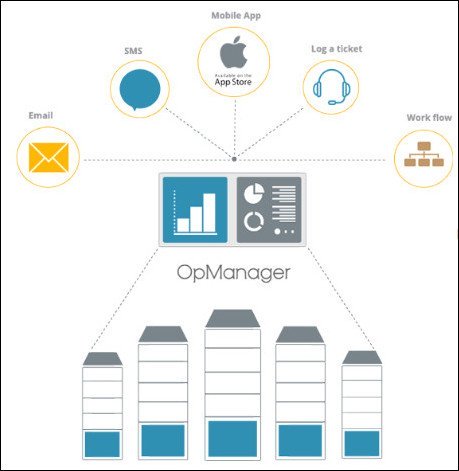
ManageEngine OpManager, the trusted network monitoring software. Businesses rely on networks for all operations. Hence, network monitoring is very crucial for any business. Today, networks span globally, having multiple links established between geographically separated data centers, public and private clouds. This creates multifold challenges in network management. Network admins need to be more proactive and agile in monitoring network performance. However, this is easier said than done.

Introducing ManageEngine OpManager, an easy-to-use, and affordable network monitoring solution. It monitors network devices such as routers, switches, firewalls, load balancers, wireless LAN controllers, servers, VMs, printers, storage devices, and everything that has an IP and is connected to the network. OpManager continuously monitors the network and provides an in-depth visibility and control over it. In case of a fault, you can easily drill down to the root cause and eliminate it before operations are affected.

Real-time network monitoring
With over 2000 built-in network performance monitors, monitor health and critical metrics such as packet loss, latency, speed, errors and discards, and analyze performance bottlenecks.

Physical and virtual server monitoring
Monitor CPU, memory, and disk utilization of Windows and Linux servers. Also monitor the performance of Host and VMs of VMware, Hyper-V and Xen virtualization platforms.

Multi-level thresholds
Proactively monitor network performance with multi-level thresholds. For every critical performance monitor, set multiple thresholds and get instant alerts for violation.

Customizable dashboards
Assess default dashboards or create your own dashboards by making use of over 200 performance widgets available and view performance of your network at-a-glance.

WAN Link monitoring
Monitor key metrics such as latency, jitter, RTT, and packet loss to eliminate network issues. View hop-by-hop performance to find what's causing latency and fix it quickly.

Affordable and easy to set up
ManageEngine OpManager requires no costly consultation or training for installation and user education. It's the only network monitor tool to offer a transparent device-based pricing model.

У Вас недостаточно прав для просмотра ссылок. Войдите или зарегистрируйтесь.


DownLoad

NitroFlare
Код:
https://nitroflare.com/view/905E90991329CE5/ManageEngine.OpManager.Enterprise.12.4.180.x64.rar
https://nitroflare.com/view/495E6A44243E149/ManageEngine.OpManager.Enterprise.12.4.180.x86.rar

RapidGator
Код:
https://rapidgator.net/file/abc31691e4b7ee289c73a81c00c91e4b/ManageEngine.OpManager.Enterprise.12.4.180.x64.rar.html
https://rapidgator.net/file/480189d150698f12277aa31ebc9c6283/ManageEngine.OpManager.Enterprise.12.4.180.x86.rar.html

UploadGiG
Код:
https://uploadgig.com/file/download/9b9D489bD4357e57/ManageEngine.OpManager.Enterprise.12.4.180.x64.rar
https://uploadgig.com/file/download/c7c116e65413b733/ManageEngine.OpManager.Enterprise.12.4.180.x86.rar
 
Premier System X7 17.7.1261 Multilanguage incl Keygen-rG

86dc2f9d467b739514080dbc94b5d845.jpg


Premier System X7 17.7.1261 Multilanguage incl Keygen-rG

File Size: 575 MiB

​

Premier System X7 is a complex economic software (ERP system) specifically designed for small and medium businesses (SMB). The range of PREMIER system® modules covers all business agendas (economy, trade and services, HR, production, engineering, etc.) and in combination with extension modules and specialized solutions forms a compact structure suiting practically any industry and any type of business. An advanced and complete economic software (original Windows application) whose unique graphic design and ergonomic environment offer a wide number of options to suit the program to individual needs and requirements of the client.

MODULARITY
The system modularity allows clients to choose a variant best meeting their requirements for an information system. Thus especially small businesses (individual users) can find advantageous categories and packages that can serve as a basis for future extension depending on the growth of their business. The high level of universality and comprehensiveness predetermine that the program is applicable in any branch of business.

GROWTH AND RELIABILITY
By choosing the PREMIER system® software you choose reliability, high-quality performance, immediate availability of information, and - first and foremost - general growth of your business. The quality implementation and development are based on the Company's ISO 9001 certification.

HISTORY AND KNOW-HOW
- Over 10 year PREMIER system® has worked its way up to the head of software products for small and medium sized businesses
- With its portfolio of almost 1650 clients (approx. 8-9 thousand licenses) PREMIER system® belongs to those which rank among most widespread software products in the Czech Republic
- Genuine Czech software closely connected to the up-to-date legislation and supporting the latest technologies
- Quality comes through the customers' satisfaction - references

USER-FRIENDLY AND UNDEMANDING
- Extremely easy to use and well-arranged screens
- Principle of nesting and minimum number of function keys
- Control options: mouse and keyboard
- Hotkeys of the user's choice for the most frequent tasks and modules
- Window-oriented program (more than one open window at a time)
- Exceptional graphic environment and excellent ergonomy
- Does not require a high-level user; minimum training costs

ADVANCED TECHNOLOGIES, EASY INSTALLATION AND ADMINISTRATION
- Easy installation carries minimum implementation costs
- Easy administration of the program incl. remote administration
- Stable running does not require constant maintenance
- Branch office data on-line processing using the terminal server Growth in clients in 1999-2005

FLEXIBILITY, MODIFICATIONS AND CUSTOM-TAILORED ADAPTATIONS
The pillar of the PREMIER system® success is the know-how and professional approach to needs of the large client portfolio. From its very outset, the Company's priority is the client-centred and individual approach and flexible response to the client's requests, suggestions, and changes in its working processes. The system openness enables fast implementation of changes, incl. automatic update over the Internet. The system offers a variety of tools to accommodate user's needs: creation of view modes and view gallery, definable and unlimited number of output reports, automatic generation of printout reports according to defined view modes, user preferences, and a sophisticated system of access rights. The product features fast and easy adaptability to legislative changes, development, and client's needs.

OTHER ADVANTAGES OF Premier System
- Perfect linkage between all modules integrated into one compact structure,
mutual check between agendas, special linkage between related documents
- Up-to-date user environment concept and ergonomy
- Compatible with Microsoft Office (Word, Excel)
- Advantageous price compared to those of competitors' in the same category
of software; the best price-performance ratio
- Non-conventional process procedures - ergonomic and graphic excellence
- Above-standard features and a wide variety of expansion modules - products
- Exports to external formats: *.doc, *.pdf, *.html, *. jpg, and *. xml
- Open solutions - two-way homebanking (all banks in the Czech Republic,
factoring, EDI format)
- Independent of one operating system - Microsoft, Linux, Novell
- Inbuilt database - no need to buy a database machine
- Reliable performance in network configuration, easy to interconnect
with remote branch offices, terminal server

Whats New:
Updates: official site does not provide any info about changes in this version

У Вас недостаточно прав для просмотра ссылок. Войдите или зарегистрируйтесь.


DownLoad

NitroFlare
Код:
https://nitroflare.com/view/EBF690986217AFF/Premier.System.X7.17.7.1261.Multilanguage.incl.Keygen-rG.rar

RapidGator
Код:
https://rapidgator.net/file/2156ade3fc0866dfc6ebd0c7dcf0e277/Premier.System.X7.17.7.1261.Multilanguage.incl.Keygen-rG.rar.html

UploadGiG
Код:
https://uploadgig.com/file/download/eFd84b24167C1fdB/Premier.System.X7.17.7.1261.Multilanguage.incl.Keygen-rG.rar
 
TeraByte Drive Image Backup & Restore Suite v3.37 + WinPE And WinRE

7d1bde87932e7701228564f8876fe823.png


TeraByte Drive Image Backup & Restore Suite v3.37 + WinPE And WinRE

File Size: 1.88 GiB
Languages: Multilingual
Incl. WinPE and WinRE Boot Images

​

Image for Windows provides an easy and convenient way to completely backup all your hard drive's data, programs and operating systems. Your backups can be saved directly to external USB and FireWire™ drives, to internal or network drives, and even directly to CD, DVD, or BD. The suite includes an easy-to-use MakeDisk wizard for creating a recovery boot disk. To restore your data, programs and operating systems back to the way they were when the backup was created, simply boot the recovery disk and restore the partition(s) or drive(s) you need to recover. It's that easy.

As a key component of the TeraByte Drive Image Backup and Restore Suite, Image for Windows utilizes the technology provided by Volume Shadow Copy Service (VSS) or PHYLock™, an add-on component included in the suite. VSS and PHYLock™ allows you to continue using your computer while the backup is locked to a point-in-time. This eliminates the inconsistencies typically experienced while backing up a partition that is in use.

Image for Windows runs under the Windows operating system, yet it can backup or restore any partition, including those of DOS or Linux, and even partitions encrypted by third-party software.

The TeraByte drive image files produced by Image for Windows are compatible across all TeraByte Unlimited disk imaging products of the same major version number (i.e. all 3.x products are compatible with other 3.x products). This gives you the flexibility to restore disk images using your component of choice.

The TeraByte Drive Image Backup and Restore Suite includes Image for Windows, Image for Linux, Image for DOS, and the OSD Tool Suite. Image for DOS and Image for Linux support the same powerful drive image functionality without requiring a working Windows installation.

Bonus:
The TeraByte OS Deployment Tool Suite (TBOSDTS) Pro version contains a set of powerful scripts that, among other things, will help you deploy Windows to completely different hardware.

Image for Windows Features:

Total Reliability
Provides the option to verify each and every byte it backs up.

Convenience
Runs directly from Windows and when used with the free PHYLock™ add-on, it can create a true image of the Windows partition itself, without requiring a reboot.

Security
Your backups can be secured using simple password protection, or full 256-bit AES encryption.

Backup Changed Data
Change only backup option allows you to backup only data that has changed since the last backup was created.

Simple, Wizard-Driven interface
Easy to use the first time, and every time.

Compression
Speed or size, several reliable compression options are available.

Maximum Speed
Fast, yet reliable techniques are used to create the backups quickly.

Optical Drive Support
You can save directly to a CD, DVD, DVD-DL, BD.

Bootable Rescue Discs
Whenever you save directly to a CD, DVD, DVD-DL, BD, it will automatically become a bootable restore disc.

Large drive support
GPT compatible supporting drives larger than 2TiB.

Restore Individual Files or Folders
Using the free TBIView and TBIMount add-ons, you can view the contents of the drive image files, and optionally restore individual files or folders within them.

Compatibility
Automatically recognizes and backs up used area of FAT16, FAT32, NTFS, HFS+, Ext2, Ext3, Ext4, ReiserFS, and XFS partitions. It also recognizes and backs up used areas of ReFS and exFAT partitions using Windows support. Partitions with other file system types can be backed up in their entirety. Supports all standard partitions in an MBR, EMBR, or GPT

Windows Servers
Supports both Workstation and Server versions of Windows.

Multicasting
Supports multicasting to reduce network traffic when deploying multiple Workstations.

Cost Effectiveness
Includes Image for DOS, Image for Linux, and TBOSDT at no additional charge, making it a uniquely affordable and complete disk imaging solution.

Flexibility
Restore partitions, regardless of the file system on the partition being restored. This gives you the power to restore NTFS partitions from Windows 98 or even DOS (as just a couple of examples).

Wide-Ranging Device Support
Compatible with NVMe, SAS, SCSI, PATA, SATA, USB, IEEE 1394, and more.

Power
Using Image for DOS or Image for Linux (each of which is included with the purchase of Image for Windows) versions gives you the ability to recover your data, even if Windows won't start.

Network Support
Save backups to any drive accessible to Windows itself.

RAID Support
Works seamlessly with on-board hardware- and firmware-based RAID.

Command Line Support
Powerful, complete command line support is built in, allowing you to automate backup or restore procedures.

Scheduling
Leverages the built-in Windows scheduler via the simple click of a Schedule Backup button.

Image File Validation
Allows you to thoroughly check the integrity of the disk image files, either as part of the backup process, or at any time thereafter. TeraByte imaging products are renown for their thorough and accurate validation process.

Restored Partition Expansion
When restoring an image, you can expand the restored partition to occupy any free space that would be left over.

Selectable Image File Sizes
If desired, you can specify a maximum size for the disk image files that are created. This allows you to create image files that readily fit on the removable media of your choice.

Hardware Independent Restore
Restore Windows to completely different hardware and then use the TeraByte OSD Tool Suite to install the drivers required to support the new hardware.

Physical to Virtual
Scripts included to automatically convert your physical machine to a virtual machine, either directly or from a backup image.

Virtual to Physical
Convert your virtual machine to a physical machine using the included scripts.

System Requirements:
- Compatible with Windows x86 and Windows x64 versions.
- Compatible with Windows NT4, 2000, XP, Vista, 7, 8, 10.
- Compatible with Windows Server and SBS versions (NT4, 2000, 2003, 2008, 2008R2, 2011, etc..).

TeraByte Drive Image Backup & Restore Suite Components:
- Image for Windows
- Image for DOS
- Image for Linux
- OSD Tool Suite

У Вас недостаточно прав для просмотра ссылок. Войдите или зарегистрируйтесь.


DownLoad

NitroFlare
Код:
https://nitroflare.com/view/FC47DA26EECF89F/TeraByte.Drive.Image.Backup.Restore.Suite.v3.37.WinPE.WinRE.part1.rar
https://nitroflare.com/view/6C241C9DCF535FC/TeraByte.Drive.Image.Backup.Restore.Suite.v3.37.WinPE.WinRE.part2.rar

RapidGator
Код:
https://rapidgator.net/file/ef0f393474d4ecac3192c3d1446ec74b/TeraByte.Drive.Image.Backup.Restore.Suite.v3.37.WinPE.WinRE.part1.rar.html
https://rapidgator.net/file/7d24f1569489270a0931000d2ddeb7c1/TeraByte.Drive.Image.Backup.Restore.Suite.v3.37.WinPE.WinRE.part2.rar.html

UploadGiG
Код:
https://uploadgig.com/file/download/2a13006673b6183f/TeraByte.Drive.Image.Backup.Restore.Suite.v3.37.WinPE.WinRE.part1.rar
https://uploadgig.com/file/download/3Ea635307fE5EBe0/TeraByte.Drive.Image.Backup.Restore.Suite.v3.37.WinPE.WinRE.part2.rar
 
Capture One 20 Pro 13.0.2.13 x64 Multilingual

a9f1e836d5f7bd760df1b1a7c444c5a0.jpg


Capture One 20 Pro 13.0.2.13 x64 Multilingual

File Size: 138 MiB

​

Capture One continues to lead the way in RAW file image editing. Expertise from creating customized color profiles for more than 400 cameras, combined with our relentless dedication to creative freedom has brought recognition to Capture One's workflow, our exceptional color handling, and precision editing tools. We develop our software with the ambition of enabling you to achieve your creative vision through a smooth, efficient workflow; making it the professional's choice in imaging software.

Full Control
Every tool in Capture One is designed to give you full control of all aspects of the editing process - preserving, recovering and optimizing all information from your RAW files. The full range of tools offer extensive possibilities to always achieve perfect results.

The benefit of RAW
Capturing RAW files enables a broad scale of possibilities for tweaking your images, as RAW files have the full range of the captured information available from your camera. Capture One is focused on getting the most out of every RAW file. All supported camera models and lenses have custom tailored profiles to ensure the best colors and details available. Capture One provides a solid solution for editing any supported RAW file.

Tethered Capture
Capture One's Industry leading tethered capture is fast, flexible and reliable, for those photography sessions where speed and accuracy is important. Shoot directly to your computer for an almost instant viewing experience - with or without instant adjustments. Enable Live View for easier composing when shooting still-life photography.

Workflow and Performance
From customizable tools, keyboard shortcuts to graphics acceleration and instant tethered capture - Capture One is built to minimize your workload and maximize your efficiency. Design your own workspace and decide your own way of working in Capture One.

Features:

All About Color
Capture One is known for its exceptional handling of color. Thanks to our custom camera profiling, every RAW file shines - straight from the camera. Whether you seek creative color grading tools or want to ensure natural colors in your images, Capture One delivers powerful and precise tools to achieve your vision.

Workflow and Performance
From customizable tools and keyboard shortcuts to graphics acceleration and instant tethered capture; Capture One is built to minimize your workload and maximize your efficiency. Design your own workspace and find your way of working in Capture One.

Asset Management
Asset management is important for every photographer, be it management of images from individual day-to-day jobs or large collections with thousands of images. Capture One offers tools and solutions for every type of photographer, making asset management simple, fast and effective.

Full Control
Capture One has been developed with image quality and ease of use in mind. Every tool is designed to give you full control of all aspects of the editing process - preserving, recovering and optimizing all information from your RAW files. The full range of tools offer extensive possibilities to always achieve perfect results.

Details and Lens Profiles
With image quality as the driving factor, Capture One is developed to squeeze every RAW file to the limit, providing the highest level of details possible. Each supported lens applies a custom-made lens profile, providing precise tools for minimizing distortion and light fall-off.

У Вас недостаточно прав для просмотра ссылок. Войдите или зарегистрируйтесь.


DownLoad

NitroFlare
Код:
https://nitroflare.com/view/B36BF5F912FCAEC/Capture.One.20.Pro.13.0.2.13.x64.Multilingual.rar

RapidGator
Код:
https://rapidgator.net/file/a1f10922cd0567e9b9d51176a21d86f2/Capture.One.20.Pro.13.0.2.13.x64.Multilingual.rar.html

UploadGiG
Код:
https://uploadgig.com/file/download/704c0c00b0d2AF19/Capture.One.20.Pro.13.0.2.13.x64.Multilingual.rar
 
Fritz 17.5 Multilingual

a59b86b0f4f67682f505631227dbda74.jpg


Fritz 17.5 Multilingual

File Size: 1.73 MiB
Languages: Multilingual
Incl. Database, Opening Book, Fat Fritz

​

At the turn of the century, Fritz fascinated the chess world with victories over Garry Kasparov and then-reigning World Champion Vladimir Kramnik. The "most popular chess program" (according to German magazine Der Spiegel) offers you everything you will need as a dedicated chess enthusiast, with innovative training methods for amateurs and professionals alike, plus access to the full suite of ChessBase web apps, including the Playchess playing server.

The neural chess engine "Fat Fritz"
In December 2017, a press release from Google shook the chess world to the core: its subsidiary Deep Mind built a neural network, dubbed Alpha Zero, which "learned" chess solely by playing millions of games against itself, yet was strong enough to beat Stockfish 8, a leading chess engine. This news was sobering and fascinating at the same time. Sobering in the sense that the decades old tradition of chess programming had been relegated to the shadows by a self-learning system. Fascinating because it was possible to hope that one could learn really new stuff about chess from this radical approach.

Nobody had expected that a cooperative effort by chess developers would soon make this technology generally available. The Open-Source- Project LCZero began to retrace the trail blazed by Google and in the meantime has acquired considerable strength. Suddenly a chess engine was available whose different analysis results provided new ideas on all fronts. LCZero too follows the Google philosophy, that the neural network only learns from games played against itself. The idea soon came to use our existing base of hundreds of thousands of good grandmaster games to shorten this learning process. This approach was followed logically by our longserving technical editor Albert Silver and based on the LCZero technology he trained a neural network for a whole year with GM games.

The result is so convincing that we are now publishing it as "Fat Fritz" along with Fritz17. As things stand, Fat Fritz defeats in a direct comparison all traditional chess programs and even LCZero. The moves suggested in analysis are often extremely human and planned. With a painfully practical limitation: Fat Fritz needs (like LCZero) a very high performance Nvidia graphics card ("GPU") in order to achieve its full playing strength. Nevertheless, here for the rst time in many years we can record a real breakthrough in chess programming. Fat Fritz and LCZero are already beginning to change opening theory.

Methodical opening training
Every average human brain is light years ahead of neural networks when it comes to mastering everyday situations. However, it is in some ways tiresome imprinting on one's own neural network knowledge about opening variations. Therefore Fritz 17 has new functions to offer to considerably simplify the constructing, administration and above all the transfer to memory of an opening repertoire. What use is the finest variation tree if one can't remember it? Fritz 17 introduces a repertoire administration which is not based on whole variations but on moves. You decide on a move: "at's the one I want to play myself " and thereupon the whole variation is taken over into your repertoire. The advantage: with some decisions and a few clicks you can set up a useable repertoire. This repertoire is online, i.e. it can be accessed immediately by any computer and on the web.

Drill and play
Once you have clicked together a repertoire in that way, the fun begins: you now learn it by drilling. To do so you play your variations and Fritz replies in such a way that, as far as possible, you remain within your repertoire. At first the moves come according to their frequency in theory. After some time it becomes clear what you have mastered properly and what not. The problematic systems are then repeated more often so that you can achieve certainty quickly with the minimum of effort. This system is known from the learning of foreign languages.

For it to be fun, Fritz measures the size of the theoretical area you have mastered and enters it into a ranking list as a number of points. Helpful for practice is also the fact that in your drilling when you reach the end of a variation you can decide if you want to carry on as a training game. Drilling can also be done with any variation tree you wish to load (traditional ChessBase repertoire), even with a sole game if you would like to learn it by heart.

Ready-made repertoires included
Included with Fritz 17 is access to pre-prepared up-to-date repertoires. You can either drill with these as they come or incorporate them into your own repertoire with the usual clicks to mark moves.

Here are the highlights:
- Now with "Fat Fritz" * : An extremely strong neural net engine inspired by Alpha Zero, which produces human-like strategic analyses of world class quality.
- Improved Fritz 17 engine with traditional brute force search and evaluations technology
- Convenient one-click management of your opening repertoires
- Opening training with success control, measure your progress with e-learning technology
- Hundreds of ready-made repertoires included • "Blitz & Train": Fritz generates tactical puzzles from your own blitz games
- Perfect analysis of endgames with up to seven pieces, access to "Let's Check" • Improved 3D chess boards thanks to real-time ray tracing**

RELEASE NOTES:

- Release notes were unavailable when this listing was updated.

System Requirements:
- Minimum (without Raytracing and FatFritz): Dual Core, 2 GB RAM, Windows 7 or 8.1,
- DirectX11, graphics card with 256 MB RAM, DVD-ROM-drive, Windows Media Player 9 and internet access.

Recommended:
- PC Intel i5 or AMD Ryzen 3 (Quadcore), 8 GB
- RAM, Windows 10 with 64-Bit (current version), NVIDIA RTX graphic card with 6 GB RAM and current driver (FatFritz on older NVIDIA cards or older graphic cards: drastic loss of performance, on CPU only for demonstration purposes) , Windows Media Player 11, (DVD-ROM drive)

Languages: English, German, French, Spanish, Italian

У Вас недостаточно прав для просмотра ссылок. Войдите или зарегистрируйтесь.


DownLoad

NitroFlare
Код:
https://nitroflare.com/view/55022E7507819D0/Fritz.17.5.Multilingual.part1.rar
https://nitroflare.com/view/97C593DC0443EA6/Fritz.17.5.Multilingual.part2.rar

RapidGator
Код:
https://rapidgator.net/file/ce21de64fbcc143950f8e1613aefd456/Fritz.17.5.Multilingual.part1.rar.html
https://rapidgator.net/file/4c20ce3f4bee6805cf319c99df5c57a1/Fritz.17.5.Multilingual.part2.rar.html

UploadGiG
Код:
https://uploadgig.com/file/download/95b4a28Ea3b4c4E8/Fritz.17.5.Multilingual.part1.rar
https://uploadgig.com/file/download/81a300a312A7b60B/Fritz.17.5.Multilingual.part2.rar
 
Polarr Photo Editor Pro 5.9.5 Multilingual

7b3ac20d06c1f01d3f115b5dd9bda73f.jpg


Polarr Photo Editor Pro 5.9.5 Multilingual

File Size: 779 MiB
Languages: Multilingual
OS: Windows x64

​

It doesn't matter if you're new to photography or a pro, Polarr has it all. Novices will appreciate that Polarr offers advanced auto-enhance tools and sophisticated filters to edit all the details of your photo. Pro photographers will look forward to our layer support, curve tools, local adjustments and so much more.

Main Features:
- Custom overlay and complex blending modes
- Dual lens effects and depth adjustments
- Complete set of masking and local adjustment tools
- Advanced suite of face-editing tools with smart detection
- Create, customize and share your own filters
- Batch exporting

Overview
- Custom overlay and complex blending modes
- Dual lens effects and depth adjustments
- Complete set of masking and local adjustment tools
- Advanced suite of face-editing tools with smart detection
- Create, customize and share your own filters
- Batch exporting

Filters
- Make and share your own custom Filters
- Get started with basic filters, grow with pro filters
- Sync filters between all of your devices

Layers and blending modes
- Superimpose photos with 10 and more blending modes
- Add photorealistic effects like clouds, weather effects, light leaks, flares and more
- Duotone your photos with our presets or create your own unique flavor

Local adjustments include
- Depth mask: Adjust photo based on depth using the dual camera
- Brush mask: Draw your mask with an advanced edge-aware brush
- Color mask: Selective adjustment with color
- Radial mask: Circular adjustment over your photo
- Gradient mask: Adjusting photo over a gradient
- Luminance mask: Selective adjustment based on brightness.
- Additional local tools: Lens blur, feathering, invert, and more
- Blend any local adjustment mask with an overlay
- Unlimited stacking of local adjustments.

Global adjustments include
- Intelligent auto enhance for exposure and white balance
- Color: Temperature, Tint, Vibrance, Saturation
- Light: Dehaze, Exposure, Brightness, Contrast, Highlights, Shadows, Whites, Blacks, Diffuse
- Detail: Clarity, Sharpen, Denoise (Color and Luminance)
- Vignette: Amount, Highlights, Roundness
- Lens: 8-point perspective distortion tool, horizontal, and vertical perspective
- Effect: Custom fringing, Pixelate, Noise amount and size
- HSL: Hue, Saturation, Luminance for eight color channels
- Curves: Master, blue, red, green channels
- Toning: Highlight and shadow tone, tone balancing
- Denoise: Focus, enhancement, and clarity
- LUT: Import and export 3D LUT
- Border tool: add a border that auto-suggests colors based on the content of your photo

Polarr is customizable
- Select from dark or white color themes or create and share your own
- Two workspaces available: Pro and Express
- Rearrange icons to make the app yours

RELEASE NOTES:

- New: We made the app take up less space on your device by making overlay assets downloadable!
- Fixed: Various bugs and performance improvements

System Requirements:
- Microsoft Windows 7 (64bit) or later
- Memory: 4 GB
- Intel i3 5th generation processors or above

У Вас недостаточно прав для просмотра ссылок. Войдите или зарегистрируйтесь.


DownLoad

NitroFlare
Код:
https://nitroflare.com/view/49CF4875E6A7785/Polarr.Photo.Editor.Pro.5.9.5.Multilingual.rar

RapidGator
Код:
https://rapidgator.net/file/5979305f996178863daa47d92d5c68ab/Polarr.Photo.Editor.Pro.5.9.5.Multilingual.rar.html

UploadGiG
Код:
https://uploadgig.com/file/download/32e7FDE72bc6f208/Polarr.Photo.Editor.Pro.5.9.5.Multilingual.rar
 
SketchUp Pro 2020 v20.0.363 Multilingual

885b2b05316f825accccbd9ee1f28d83.jpg


SketchUp Pro 2020 v20.0.363 Multilingual

File Size: 264 MiB
Languages: Multilingual
OS: Windows x64

​

SketchUp is useful from the earliest stages of design to the end of construction. Programming, diagramming, design development, detailing, documentation, RFIs-wherever you need drawings, you need SketchUp Pro.

SketchUp Pro
The SketchUp you know and love. and so much more.

3D modeling for professionals? We've got you.
A great mix of our classic desktop software, our shiny new SketchUp for Web modeler, and all sorts of things you've been asking for over the years - including the ability to publish, share, and store projects in the cloud with Trimble Connect.

Tools for your 3D modeling toolbox:

SketchUp Pro for Desktop
Fast, easy 3D modeling for anything you can imagine.

SketchUp for Web
Our powerful web modeler, with all the features you need to turn your designs into real things.

Unlimited cloud storage
Share, collaborate, and store your projects in the cloud. Gain flexibility and peace of mind.

2D design documentation
Create scaled drawing sets in 2D with LayOut.

VR model viewing
Wow your clients with a walkthrough of their project on Microsoft HoloLens, HTC Vive, or Oculus, on your phone or tablet.

Features that make your projects yours
Make your project look like only you can with custom Styles, Materials, and Outliner. And, make that work smooth and easy with Dynamic Components.

RELEASE NOTES:

What's New in SketchUp 2020.0?
We've spent a lot of time in 2019 learning more about what you, the user, wish SketchUp did better. We've been eyeing your comments on the forum and discussing ideas during our training events to see what trips up your workflow. So, thanks for speaking up! You helped us discover how you're using SketchUp and how we can improve your design process, resulting in workflow improvements galore! They're so good you'd think we'd been sneaking into design firms or something

SketchUp Desktop 2020: your [3D] creative space
This year, we focused on data structures and modeling behaviors. We want to make sure we continue to be the more intuitive, easier to use software that boosts your ability to crank out those stunning design projects.

Outliner
This leads us to our BIG model organization change. In an effort to increase model performance, you no longer have to create Layers upon Layers. You can do your main model organization straight within Outliner. We recommend using this (and our friendly eyeball icon) to toggle between the major chunks of your model.

Grips on bounding boxes and automatic transparency
Grab that sofa and put it in the corner! Just try it out, we need not explain more.

Hidden objects
Announcing a big change to hiding objects in your models! You'll notice in your drop-down menu that we decoupled hiding objects from hiding geometry. How will this change your workflow? Well, this will give you the ability to better manage hidden geometry and hidden objects for an even easier modeling experience. For example, let's say you want to edit hidden edges in a landscape or smoothed surface, but you still want to be able to hide objects that are nearby (like trees, bushes, or a building)... yes you can do that in SketchUp! Landscape architects, rejoice!

The SketchUp Universe: Nomenclatures
After many conversations, we decided to update some of our naming conventions. This won't change your workflow, but we want you to know that it's not just you - we are talking about a few things differently now. We think they make logic a little more prevalent.

What's New in LayOut 2020.0?
It's all about taking back control...document control that is! For LayOut, we focused on improving the interaction between SketchUp & LayOut to save you time and [brain] energy. Way less going back and forth updating scenes in SketchUp to ensure your drawing comes out perfectly, now you have more editing ability right in LayOut.

System Requirements:
- Windows 10, Windows 8+ and Windows 7+
- Microsoft® Internet Explorer 9.0 or higher.
- SketchUp Pro requires .NET Framework version 4.5.2.

У Вас недостаточно прав для просмотра ссылок. Войдите или зарегистрируйтесь.


DownLoad

NitroFlare
Код:
https://nitroflare.com/view/96B2845EC4419E8/SketchUp.Pro.2020.v20.0.363.Multilingual.rar

RapidGator
Код:
https://rapidgator.net/file/984cee659d20e4c05359d241e27b92c1/SketchUp.Pro.2020.v20.0.363.Multilingual.rar.html

UploadGiG
Код:
https://uploadgig.com/file/download/C3edA0720003a14d/SketchUp.Pro.2020.v20.0.363.Multilingual.rar
 
SketchUp Pro 2020.0 v20.0.362 Multilingual macOS

d6e6ac185c5e1c7fe0600053e6f9908e.png


SketchUp Pro 2020.0 v20.0.362 Multilingual macOS

File Size: 680 MiB
Languages: Multilingual

​

SketchUp is an easy-to-learn 3D modeling program that enables you to explore the world in 3D. With just a few simple tools, you can create 3D models of houses, sheds, decks, home additions, woodworking projects - even space ships.

Programming, diagramming, design development, detailing, documentation, RFIs-wherever you need drawings, you need SketchUp Pro.

A great mix of our classic desktop software, our shiny new SketchUp for Web modeler, and all sorts of things you've been asking for over the years - including the ability to publish, share, and store projects in the cloud with Trimble Connect.

Tools for your 3D modeling toolbox:

SketchUp Pro for Desktop
Fast, easy 3D modeling for anything you can imagine.

SketchUp for Web
Our powerful web modeler, with all the features you need to turn your designs into real things.

Unlimited cloud storage
Share, collaborate, and store your projects in the cloud. Gain flexibility and peace of mind.

2D design documentation
Create scaled drawing sets in 2D with LayOut.

VR model viewing
Wow your clients with a walkthrough of their project on Microsoft HoloLens, HTC Vive, or Oculus, on your phone or tablet.

Features that make your projects yours
Make your project look like only you can with custom Styles, Materials, and Outliner. And, make that work smooth and easy with Dynamic Components.

Languages: English, Deutsch, Español, Français, Italiano, 日本語, 한국어, Português (Brasil), Русский, Svenska, 中文 (简体), 中文 (繁體)

Supported Operation Systems:
macOS 10.12 or later 64-bit

У Вас недостаточно прав для просмотра ссылок. Войдите или зарегистрируйтесь.


DownLoad

NitroFlare
Код:
https://nitroflare.com/view/F3B288C1B9108CD/SketchUp.Pro.2020.0.v20.0.362.Multilingual.macOS.dmg

RapidGator
Код:
https://rapidgator.net/file/3a6dc0c952b2b17d6877b932a0fe8ebe/SketchUp.Pro.2020.0.v20.0.362.Multilingual.macOS.dmg.html

UploadGiG
Код:
https://uploadgig.com/file/download/1379393f900b0C89/SketchUp.Pro.2020.0.v20.0.362.Multilingual.macOS.dmg
 
BarTender Enterprise 2019 R6 11.1.147532 Multilingual

e4a97f11669b8ec1abdac965989f400c.jpg


BarTender Enterprise 2019 R6 11.1.147532 Multilingual

File Size: 480, 470 MiB
Languages: Multilingual

​

BarTender Enterprise Edition - Complete management of your entire enterprise label system. Ideal for businesses that operate in heavily regulated industries or span multiple locations and need to control design and printing throughout the organization.

Powerful software for demanding requirements
The world's largest companies trust their production lines and supply chains to BarTender.

Centralized control across continents
Manage, secure and control your entire solution across thousands of printing locations.

Librarian for optimized workflow
Centralize your label repository, track and trace label revisions, assign roles with procedures, and recall previous label revisions.

Create sophisticated integrations and processes
Seamlessly connect BarTender's automated label printing processes to your existing business systems.

Print from browsers, smartphones or tablets
Use the device of your choice to select label designs, complete print-time data forms and launch print jobs to any printer on the internet.

Easy, flexible, powerful design with Intelligent Templates
BarTender's Intelligent Templates improve design quality, reduce label maintenance, maximize printing performance and help you stay in compliance with changing standards.

SAP certified, Oracle validated
Leverage our trusted integration methods with Oracle and SAP to unlock automated label and document printing quickly and with confidence.

Operating System:
- Windows 10, 8.1, 8, and 7 with the latest Windows updates installed.
- Windows Server 2019, 2016, 2012, 2012 R2, 2008 R2 with the latest Windows Server updates installed.
- Includes all 32-bit and 64-bit (x64) editions.

Complete BarTender Suite utilization (32-bit)
- Memory: 4 GB RAM
- Hard drive: 20 GB (to allow sufficient space for logs)

Complete BarTender Suite utilization (64-bit)
- Memory: 8 GB RAM
- Hard drive: 20 GB (to allow sufficient space for logs)

Designer-only usage (32-bit)
- Memory: 1 GB RAM
- Hard drive: 20 GB (to allow sufficient space for logs)

Designer-only usage (64-bit)
- Memory: 2 GB RAM
- Hard drive: 20 GB (to allow sufficient space for logs)

Display resolution
- 1024 x 768 (Minimum)
- 1920 x 1080 or better (Recommended)

.NET Framework
- The .NET Framework 3.5 AND 4.5.2 or newer is required.

У Вас недостаточно прав для просмотра ссылок. Войдите или зарегистрируйтесь.


DownLoad

NitroFlare
Код:
https://nitroflare.com/view/9B46637EC9AB716/BarTender.Enterprise.2019.R6.11.1.147532.x64.Multilingual.rar
https://nitroflare.com/view/1369213E0465D1D/BarTender.Enterprise.2019.R6.11.1.147532.x86.Multilingual.rar

RapidGator
Код:
https://rapidgator.net/file/7bd7ccc330d9883f71a3d6dbdf92f6ec/BarTender.Enterprise.2019.R6.11.1.147532.x64.Multilingual.rar.html
https://rapidgator.net/file/b09c36fa6c77b38c184d88d88ce2f556/BarTender.Enterprise.2019.R6.11.1.147532.x86.Multilingual.rar.html

UploadGiG
Код:
https://uploadgig.com/file/download/E515183340A2b1C9/BarTender.Enterprise.2019.R6.11.1.147532.x64.Multilingual.rar
https://uploadgig.com/file/download/EaaC3483586fe664/BarTender.Enterprise.2019.R6.11.1.147532.x86.Multilingual.rar
 
Назад
Сверху