• Здравствуйте. Сайт заработал в архивном режиме форум www.old.nado.in

Anthony's Software !!!

Copernic Desktop Search 7.1.1 Build 13217
7d6fb378-6277-4639-bd2c-14930b3a6c28.png

Languages: English | File Size: 159.62 MB

Desktop Search allows you to search your computer files & emails.​

It is designed to find the most relevant information on your PC, including Office files, Outlook emails & attachments, text documents and muldia files. As a standalone application, it creates a keyword map (index) to unlock unstructured data. Instead of investing in a large & expensive enterprise search solution, a desktop search is a quick & easy installation to increase your productivity while being extremely secure. The Desktop Search is offered on a yearly subscription so that our clients always get the latest and newest features as soon as it is available. - Microsoft Visio diagrams extension

- Adobe Photoshop pictures extension

- Autodesk AutoCAD extension

- Image Text Recognition

- Based on OCR Technology

With the launch of Version 7, we added a brand new technology that greatly complements our search ee. You are working and you need to digitize a document. You could lose a lot of to re-create the document or you could use our Copernic Desktop Search with Image to Text Recognition (Additional fee may apply from the full version) to convert your documents into digital formats in a few seconds using a scanner and an Optical Character Recognition software (OCR).

Optical Character Recognition (OCR) is a technology allowing you to convert different types of documents, such as scanned paper documents into editable and searchable content.

Most organization needs to buy a search ee plus an Optical Character Recognition software. The advantage of having Copernic Desktop Search with Image to Text Recognition is you only have to buy one tool compared to Abby or OmniPage, and it does everything!

You receive an invoice by mail and need to import it into your accounting system but from to , you need to be able to search all your invoices. A scanned document will not be very helpful as the content won't be searchable. By scanning it, you only create an image or a snapshot of the document, which is nothing more than a collection of black and white. To extract the data from scanned documents, you need an OCR software that would convert pdf into searchable text and put them into words, thus enabling you to extract and search the content of the original document.

Using Copernic Desktop Search with Image Text Recognition is very simple as you have no manipulation to do except to scan the document. So, you start by scanning your document, you open Copernic Desktop Search with an activated Image Text Recognition module, you let Copernic index the content of your files & documents and then you launch a search. DONE! You simply continue using Copernic as you were before but as it needs to scan and convert the content of those scanned documents, the indexing process may be slowed down.
Windows 10, Windows 8/8.1, and Windows 7


DOWNLOAD
uploadgig
Код:
https://uploadgig.com/file/download/8595132a3070f970/lUK8oyzx_.Search.7.1.rar

rapidgator
Код:
https://rapidgator.net/file/3dd5ce9047a4f09c22c2415e1f7f6a47/lUK8oyzx_.Search.7.1.rar

nitroflare
Код:
http://nitroflare.com/view/E018130EFC4843D/lUK8oyzx_.Search.7.1.rar

 
Desktop Calendar 2.3.71.4814 Multilingual

64a277ae-66e1-48bd-a3e8-6aceec35f7f1.png

File Size : 3.4 Mb

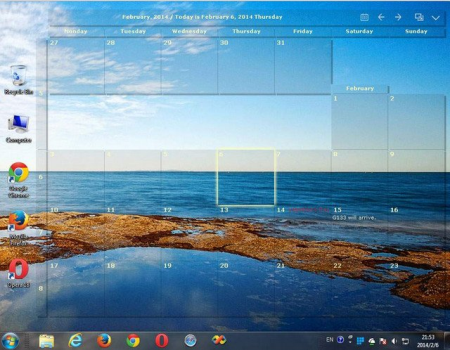
DesktopCal is a very useful piece of software that helps change your normal desktop into a calendar, so that management can be done with more ease.​

The interface of the application is pretty straightforward, thus allowing any type of person to easily work with it. Moreover, the interface is highly customizable, enabling users to change the background colors, level of transparency, font of all the text, and gaps between the cells. The utility can also control the entire desktop and what it looks like. For example, you can leave the wallpaper existent, delete it altogether or loop certain pictures of your choosing. The latter option enables you to add entire folders with hundreds of files and program them to change every 5, 10, 20, 30 minutes or even more. The position of the images can be modified, from "Fill" to "Stretch," "Center," "Fit" or "Tile".

All of the features aforementioned make this software tool highly efficient and should suit any person's taste.

The interface supports multiple languages such as English, French, Vietnamese, Chinese and Spanish.

In order to make annotations to a certain date in the calendar, all you have to do is double click on the corresponding panel and write. You should also know that each and every cell can be colored in a different way, so as to help you color-code specific events according to importance.

All in all, DesktopCal is a very useful piece of software, if you like being organized. You are able to input important occasions and meetings to the calendar with just two clicks, use a color-coded system, while also being able to manipulate the desktop.

· Record anything by double clicking on the windows desktop.

· Offers a variety of common festivals, anniversaries and other information.

· Move your data from one deveice to another with powerful tools.

· Print any page of calendar with wallpaper as you work.

· Set background color for any day you want. So, the days are colorful.

· Powerful and easy-to-use settings allows you to easily customize your own calendar.


DOWNLOAD
uploadgig
Код:
https://uploadgig.com/file/download/73c6AB1b635900bb/q6tVY64I_desktopcals.rar

rapidgator
Код:
https://rapidgator.net/file/e98ffd86e82a4841f7128974cdee075f/q6tVY64I_desktopcals.rar

nitroflare
Код:
http://nitroflare.com/view/71712453D819E4E/q6tVY64I_desktopcals.rar
 
NetSupport School 14.00.0000

b662c245-e66b-4e3d-83d0-ef5cea69bc9e.png

File Size: 151 MB

NetSupport School has been at the forefront of classroom management for over 25 years and, over that , the functionality required has evolved from the traditional "Stop, Block and Lock" student management features, to also include tools that promote assessment, collaboration and facilitate orchestrating student learning in the classroom.​

Beyond features, NetSupport School has also embraced the chag IT landscape in schools, now offering dedicated versions for all leading desktop and mobile platforms. The latest version builds on this pedigree, delivering efficiencies in performance and operability as well as a fully future-proofed solution that continues to keep pace with the latest platform developments.

Monitor Students

View thumbnails of all student screens or, for more detailed monitoring, view the screen of an individual student. Student Registration

Gather a student attendance register containing standard and custom information.

Lesson Objectives

Share lesson objectives and expected outcomes with students.

Internet/Application Monitoring

Monitor and restrict Internet and application use. Includes support for the new Microsoft Edge browser and control of both desktop and store apps.

Launch applications and websites

Remotely launch applications (including Office 365 apps), websites and browser-based curriculum resources on student screens.

Student Assessment

Conduct quick end of lesson surveys; use Q&A mode to deliver instant student and peer assessment, bounce questioning, scores and team play.

Communicate with students

Initiate chat sessions with individual students, broadcast messages to the class and monitor student requests for help.

Lock and Blank screens

Lock or blank students screens to gain attention.

File Transfer

Distribute documents and classroom resources to all or selected students.

Optimised touch capabilities

Provides extended support for touch-based Windows devices - everything from the new touch-optimised Student Information Bar to redesigned class survey and assessment dialogs - giving students clear access to all of NetSupport School's collaborative features.

Enhanced performance

The latest version includes key updates for legacy Windows operating systems, further network efficiencies, extended browser monitoring support, increased cross platform support - and many more minor enhancements.

Fully Windows 10 ready

Full integration with Windows 10 enhancements: includes direct support for monitoring and control of activity in the new Microsoft Edge browser, keeping your school's network up to date with the latest operating system developments.

Integration with Windows Store apps

Opening up new educational possibilities by closer integration with Windows 8.1 and 10 apps - including the ability to orchestrate the employment of desktop and store apps in the classroom, by launching, monitoring and controlling their use.


DOWNLOAD
uploadgig
Код:
https://uploadgig.com/file/download/07eaD39b4dfdF949/1hje3LKh_NetSupport_.rar

rapidgator
Код:
https://rapidgator.net/file/c7cb0c9d9da5300ab4efa60c08322f29/1hje3LKh_NetSupport_.rar

nitroflare
Код:
http://nitroflare.com/view/25867F13BB9CB49/1hje3LKh_NetSupport_.rar
 
Advanced ETL Processor Professional 6.3.6.8 (Site License) (x86/x64)

ce9b80c6-8c8a-4439-9998-9c05dfcc388c.png

(x86/x64) English | File size: 144 MB

Advanced ETL Processor Professional is a straightforward and reliable piece of software designed to automate all your business processes.​

It saves you so you can concentrate on the main aspects important for your company.

Connect to a repository of choice

Using this ETL utility you are able to perform complex data validation and transformation actions, create Insert statements from any data source and simply load data from files into BLOB fields. The main window provides a number of settings for the three stages of reading, transformation and writing. This is facilitated by the main tool bar and a list of available objects.

The left panel located in the Design tab enables you to connect to whatever repository you want, then handle any kind of database be it Oracle, Microsoft Access, SQL Server, MySQL, PostgreSQL or Excel spreadsheets. The program provides a mechanism by which a number of different systems and protocols can interact in order to help you process a number of tasks from start to finish. It can handle a number of different functions and services such as processing databases, e-mail protocols and Office documents.

Integrate multiple data sources and execute SQL statements

The Maintain tab enables you to organize all the available databases, analyze ODBC drivers and start the execution agent. Also, you are able to create a new repository by selecting the application type such as Visual Importer, then specify details such as name, file and user credentials.

You can navigate to the 'Execution Log' tab if you want to analyze the activities of individual processes during their execution. It displays the file type and the description for each process.

What's more, by accessing the 'Run SQL' tab you can view all the available connections and execute your own SQL statements. This way, the utility lets you easily integrate data from multiple data sources or split data from one database to many files.

To end with

Being designed to automate everyday routine tasks, Advanced ETL Processor Professional is a reliable and effective solution when it comes to generating reports, saving attachments, sending e-mails and exporting data from any database.

Multiple Delimited or Fixed width Text files

Multiple Excel files + Multiple Excel Spreadsheets

Multiple MS Access Databases

Multiple DBF Files

Any ODBC compliant database

Full support for ODBC connection strings

OLE DB Datasource

MS SQL Server

MySQL

PostgreSQL

Interbase/Firebird

Oracle

Multiple Tables

POP3 + SSL

File System

XML

190 Validation Functions

String Validation

Number Validation

Date Validation

Validation

Validation Against list of values

Regular Expressions: Post codes, Phone Numbers, VAT Numbers ETC

15 Transformation Functions

String Transformation

Number Transformation

Date Transformation

Multiple Date Formats

Sorting

Grouping

Deduplication

Translating coded values (e.g., if the source system stores 1 for male and 2 for female, but the warehouse stores M for male and F for female)

Deriving a new calculated value (e.g., sale amount = qty * unit price)

Joining together data from multiple fields

Summarizing multiple rows of data (e.g., total sales for each store, and for each region)

Generating surrogate key values

Transposing or pivoting (turning multiple columns into multiple rows or vice versa)

Splitting a column into multiple columns (e.g., putting a comma-separated list specified as a string in one column as individual values in different columns)

Customised Transformation

Multiple Data Targets

Delimited or Fixed width Text files

MS Access Databases

Microsoft Excel Files

DBF Files

Oracle 7-11g database (using OCI API)

Full support for Oracle Instant Client

SQL server 7-2008 (using BCP API)

MySQL

PostgreSQL

Interbase/Firebird

Any ODBC compliant database (Using ODBC API)

Ole DB

Full support for ODBC connection strings

Generate Sql Insert Script

SMTP + SSL

XML

File System

There are two ways of loading available:

Oracle direct path loading

Conventional path

SQL server:

This software uses the same API as Microsoft DTS service

Updates: official site does not provide any info about changes in this version


DOWNLOAD
uploadgig
Код:
https://uploadgig.com/file/download/d6291C992e555587/bm9HCaid_Advanced_ET.rar
https://uploadgig.com/file/download/bbc51d06dFBe9d58/bm9HCaid_Advanced_ET_.rar

rapidgator
Код:
https://rapidgator.net/file/cbec96f6c00cf486d6de426d79e8b851/bm9HCaid_Advanced_ET.rar
https://rapidgator.net/file/f3a325e27ee19a691c4818a42da8f5bf/bm9HCaid_Advanced_ET_.rar

nitroflare
Код:
http://nitroflare.com/view/D331C7376ED40DB/bm9HCaid_Advanced_ET.rar
http://nitroflare.com/view/393E14A02D157D2/bm9HCaid_Advanced_ET_.rar
 
Fast Video Cataloger 6.30.0.0

26601712-2d64-41f8-97a4-c9edacd3bd23.png

Windows x64 | Languages: English | File Size: 105.54 MB

Fast Video Cataloger is a professional Windows video software for searching, browsing and organizing digital video files Search, browse, find and play all your video files fast and easy.​

Fast Video cataloger is the fastest local video content management system available for Windows PC. Don't take our words for it, test our video software on your own video files. You can the fully functional program for free without providing any email address. The installation is client only and does not require any IT department support for server setups. You can be up and testing in less than 3 minutes.- Index all your videos automatically and save hours

- Always find scenes and videos you are looking for

- Jump to the right scene by video thumbnails

- Browse your archived video files visually

- Enrich your videos and scenes with metadata, images and keywords

Fast Video Cataloger automatically create evenly spaced thumbnails for each clip to assist searching through large collections of video clips on your PC in the fastest possible way. You can have all your videos organized without effort. We support video clips on your PC, External hard drives, usb sticks, DVDs, Dropbox. You can easily search, browse and get an overview of all your videos even if the devices with the video files are disconnected because you are on the road

Navigate your videos fast and smart Fast video cataloger supports several ways of finding your video or scene inside huge collections.

Fast video cataloger comes with an integrated video player that can start playing videos right from the of a captured thumbnail.

Fast Video Cataloger keeps archived videos searchable and browsable with thumbnails and keywords while raw files are stored externally.

Keywording on videos and scenes will support your workflow, empower your team and make your work on videos faster.

Fast video cataloger 5.x supports integrated scripting in c#. Customize the program or use it as a base to build your own video solutions. The installer includes examples to get you started as well as extensive api documentation.

Add custom meta data to videos and customize the your catalogs. Companies using Fast Video Cataloger often needs to store some company specific meta data with the video. Now you can add extra fields to your catalog and store custom meta data with your video. The custom data is also available through the scripting interface.

Printable and shareable contact sheet images make up overviews of your videos for discussions, presentations and notes.
64 bit versions of Windows 7, Windows 8, Windows 8.1, Windows 10.


DOWNLOAD
uploadgig
Код:
https://uploadgig.com/file/download/dddB2fb6F5109F1E/excnmpNx_.Fast.Video.rar

rapidgator
Код:
https://rapidgator.net/file/574d9216b76a58cc13827926e9839e64/excnmpNx_.Fast.Video.rar

nitroflare
Код:
http://nitroflare.com/view/938283C18EAB76A/excnmpNx_.Fast.Video.rar
 
PTC Arbortext Layout Developer 12.0.0.1 Multilingual

610c818d-6894-4acf-afb3-7ad5d21e1922.png

File size: 321 MB

PTC Arbortext Layout Developer is a product that was originally named Advent 3B2, and which originated as a high-end typesetting tool.​

It differed from DTP applications with its large number of automation features and its SGML-based syntax for applying style. This made it ideal for the emeg markets in technical documentation and STM journals. These two markets needed the rapid production s and flexible layout control provided by 3B2. Another area of growth for 3B2 was the financial typesetting market where 3B2's tables, job 'subbing' and alternate outputs proved valuable. PTC Arbortext Layout Developer grew from an interactive product. Its WYSIWYG component allows users to immediately see the result of their formatting rules and style changes. Automation and interactivity in PTC Arbortext Layout Developer allow it to be used for manual touchup and for building pages manually. It also means that PTC Arbortext Layout Developer has a great number of tools which allow users to create visually appealing output. When combined with the automation tools these provide a very powerful print ee.

Updates: official site does not provide any info about changes in this version.


DOWNLOAD
uploadgig
Код:
https://uploadgig.com/file/download/97d8C4d08d55036E/h8BTy9Ys_PTC.Arborte.rar

rapidgator
Код:
https://rapidgator.net/file/7b3a9ce4367ab39a0ccbc769d9234167/h8BTy9Ys_PTC.Arborte.rar

nitroflare
Код:
http://nitroflare.com/view/A31FA397AF7F758/h8BTy9Ys_PTC.Arborte.rar
 
Pixologic ZBrush 2020.1.3 Multilingual

d4933a65-bf0a-4c8d-8b84-16bc7191a799.png

Windows x64 | Languages: Multilingual | File Size: 1.38 GB

ZBrush sets the industry standard for digital sculpting and painting.​

Its features enable you to use customizable brushes to shape, texture and paint virtual clay in a real- environment that provides instant feedback. When you use ZBrush you'll be empowered by the same tools employed by film studios, game developers, toy/collectible makers, jewelry designers, automotive/aviation designers, illustrators, advertisers, scientists and other artists the world over. In fact, we have even received an Academy Award for the technology that powers ZBrush. In short, ZBrush is an art tool created by artists, for artists. It allows you to create models and illustrations limited only by your imagination, at a speed that allows you to stand out in today's fast paced industry. As with anything else in life, where you can go is usually deteed by where you b. Having a great finished model requires a quality base mesh. ZBrush provides an arsenal of tools to assist with this task, ensuring that no matter what you have in mind, there is a way to get the perfect base to then take to the next level. The best known of these systems are explained here.

Ignore the constraints of polygon distribution and simply - sculpt! Sculptris Pro will dynamically add (tesselate) and remove (decimate) polygons wherever and whenever needed. It does this during your brush stroke in a real- process called Tessimation. This frees you to focus entirely on the look you're trying to achieve.

DynaMesh is a perfect solution for free-form sculpting because it removes all need for focusing on topological constraints. Change the overall shape of the model by pushing or pulling, adding OS: 64-bit editions of Windows Vista or newer.

- CPU: Intel i5/i7/Xeon technology or AMD equivalent.

- RAM: 8 GB required for working with multi-million poly models. (16+ GB preferred.)

- HDD: 100 GB of free hard drive space for ZBrush and its scratch disk. (SSD drive highly recommended.)

- Pen Tablet: Wacom or Wacom compatible. (WinTab API.)

- Monitor: 1920x1080 monitor resolution or higher with 32-bit color.

- Video card: Most cards manufactured 2008 or newer. Must support OpenGL 3.3 or higher.


DOWNLOAD
uploadgig
Код:
https://uploadgig.com/file/download/96E793FadD4103B8/Q5nDnJYQ_.ZBrush.202.part1.rar
https://uploadgig.com/file/download/7a914e585d1Db07d/Q5nDnJYQ_.ZBrush.202.part2.rar

rapidgator
Код:
https://rapidgator.net/file/fae007b1208ba497b62742b509294880/Q5nDnJYQ_.ZBrush.202.part1.rar
https://rapidgator.net/file/40ea66b2e2f94d194d02e13a524801e9/Q5nDnJYQ_.ZBrush.202.part2.rar

nitroflare
Код:
http://nitroflare.com/view/B645E5A4CBA0ED9/Q5nDnJYQ_.ZBrush.202.part1.rar
http://nitroflare.com/view/8322F450DAB0A0B/Q5nDnJYQ_.ZBrush.202.part2.rar
 
SafeCP 1.3.7406

d1cef4e5-24de-44a4-925c-2538c0ec483f.png

File Size : 10.4 Mb

SafeCP uses raw disk access to read all common filesystems.​

Available for Windows XP, Vista, 7, 8.x, or 10, you can read FAT, NTFS, HFS+, exFAT, ReFS, APFS, EXT, UFS partitions. Both MBR and GPT partitioning schemes are supported. A common use of SafeCP is to recover user profile folders from externally connected disks. Whether the disk is from a Windows, Mac or Linux computer, SafeCP makes it easy to retrieve the files. Although not a substitute for data recovery service, disks with bad sectors or filesystem corruption can benefit from SafeCP's cautious approach to reading filesystems. It's common for disks with bad sectors to stall Windows Explorer due to automatic drive letter assignment. You can use the easy to access controls to disable automount. Then you can connect your disk and open it with SafeCP.

Transferring files from a Windows disk is easier since SafeCP does not process file permissions. The disk is opened in read-only mode so that the source is not modified.

Scan button on main window to quickly calculate transfer size

Image preview available for all common and raw raster formats

Default save path changed to user desktop directory


DOWNLOAD
uploadgig
Код:
https://uploadgig.com/file/download/ab0bdf83C66Cf4a3/ZTJUjBmA_safecpsetup__.rar

rapidgator
Код:
https://rapidgator.net/file/28d6762b5af5ad934dbc36fdc0b58cb2/ZTJUjBmA_safecpsetup__.rar

nitroflare
Код:
http://nitroflare.com/view/3CE4AEE1F878ED7/ZTJUjBmA_safecpsetup__.rar
 
BDtoAVCHD 2.9.4

79c8f372ff14cbe74eba436a87e11b1b.png

File size: 35 MB

BDtoAVCHD is a tool to create AVCHD discs from Blu-Ray or HD MKV files.​

As output we get the folder structure ready to burn to a DVD5 or DVD9. The AVCHD format allows playback the same type of content that a Blu-Ray and holding high definition (1080p) but on DVD5 or DVD9 media. It is ideal for backing up Blu-Ray with much smaller size and maintaining high quality. The recorded discs obtained are compatible with almost any Blu-Ray player and PS3. Also can convert Blu-Ray to MKV and Blu-Ray 3D to MKV 3D SBS (side-by-side).Finds the main .m2ts file for the movie by just selecting the BDMV folder or Blu-Ray root.

Extract all information from the audio tracks, video and subtitles: length, language, format, etc.

Extract chapter information or allows to add it.

Select default audio track based on the language preferences and most appropriate criteria for the best quality but can also be set manually.

Calculates the video bitrate to fill the DVD5 / DVD9 (most of the s gets filled between 99-100%).

Converts audio (only if necessary): PCM to AC3, DTS-HD MA to DTS Core, DTS to AC3, etc.

Detect delays in the original audio tracks and transfers them to the final job.

Recompress the video using x264 64-bit if the computer supports it.

Do not use external codecs like avisynth or ffdshow or Haali splitter in the process of video conversion.

We can select a forced subtitle track is active by default when playing the disc.

Allows to program multiple conversions in the queue and execute them one after another automatically.

Multitasking: be can add new jobs in the queue while processing others.

Various output sizes: DVD5 / DVD9 / USB 4GB / BD-25 and Custom.

Ability to create a BD-25 without re-compressing video (BDRemux).

MKV as alternate output: allows to convert Blu-Ray to MKV recoding the video or without recoding (BDremux).

3D ready: from Blu-Ray 3D we can get a AVCHD 3D or MKV 3D SBS/TAB.

MVC encoding: ability to shrink 3D Blu-Ray to BD25/BD9 maintaining 3D MVC format (Intel Quick Sync encoder).

Ability to encode MKV's using x265/HEVC codec.


DOWNLOAD
uploadgig
Код:
https://uploadgig.com/file/download/Cda8F951572B49ab/36W7yRuu_BDtoAVCHD_v2.9.4..rar

rapidgator
Код:
https://rapidgator.net/file/41a12b3e2d25a32c214da6fe952b27f8/36W7yRuu_BDtoAVCHD_v2.9.4..rar

nitroflare
Код:
http://nitroflare.com/view/48E07B6912668F0/36W7yRuu_BDtoAVCHD_v2.9.4..rar
 
Debotnet 0.7.7

ad2b05a4c7373bdf4e7ea42df45700e5.png

File Size : 1.4 Mb

Debotnet is a free and portable tool for controlling Windows 10's many privacy-related settings and keep your personal data private.​

Once the app is extracted and run, you are presented with numerous options. Select all is an option, but there are no preconfigured recommendations to speed up the process of the 71 choices. There are, however, some options listed as recommended.

Each option will open a window to the right explaining what the option will accomplish.

Uninstalling preinstalled Windows 10 app

Disable Windows tips

Remove Adobe Photoshop Express

Clean-up Windows (installs Clea+)

Disable Cortana

Disable Windows Error reporting

Neutralize

Disable forced updates

Remove Game Bar

And more

At the moment backup is currently unavailable but it will be in a future version - setting a restore point, however, is possible if you're feeling anxious, this is done via the shipped script Create a System Restore point allowing you a little safeguard before making any tweaks.


DOWNLOAD
uploadgig
Код:
https://uploadgig.com/file/download/37a3289326348807/i3vLIbCy_debotnet_.rar

rapidgator
Код:
https://rapidgator.net/file/818a08a89969a48d682093ded43c85ae/i3vLIbCy_debotnet_.rar

nitroflare
Код:
http://nitroflare.com/view/9B67FEE4FC2DBEC/i3vLIbCy_debotnet_.rar
 
JP Software CMDebug 26.01.33 (x64) Multilingual

27318ec5-bbd8-4116-afbf-3b07912f7029.png

File size: 23 MB

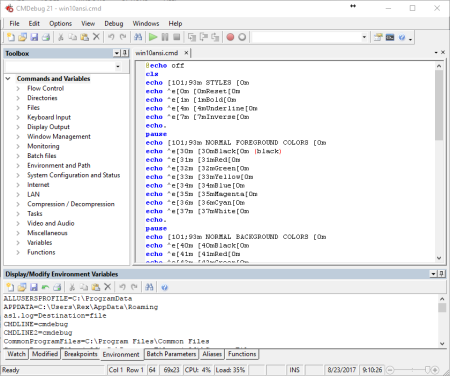
CMDebug is a stand-alone version of the Take Command IDE and batch debugger component.​

CMDebug is intended for developers who need to develop batch files to run in CMD.EXE or TCC-RT (run). CMDebug allows you to create and debug your batch scripts with the integrated graphical IDE. CMDebug includes tabbed edit windows and a sophisticated debugger with single stepping, breakpoints, syntax coloring, tooltips, bookmarks, and tabbed variable and watch windows. Windows batch file programming has never been easier or more powerful!

You can use CMDebug to develop either CMD-compatible batch files (.BAT or .CMD), or TCC-RT-compatible scripts (.BTM). If you select the "TCC Syntax" option, CMDebug provides the full TCC-RT command set. If you select the "CMD Syntax" option, CMDebug will maximize CMD compatibility and disable TCC-only internal commands, variables, and functions. Some internal CMD / TCC commands will also behave slightly differently or modify their display output in order to match CMD's behavior more closely.

Using CMDebug with TCC-RT allows you to write (and encrypt) scripts using the TCC command language, and then distribute them with the free TCC-RT run on an unlimited number of target machines.

Create and debug your batch scripts with the integrated graphical IDE. The IDE includes tabbed edit windows and a sophisticated debugger with single stepping, breakpoints, syntax coloring, tooltips, bookmarks, tabbed variable and watch windows. Windows batch file programming has never been easier or more powerful!

The TCC-RT scripting language is a massive superset of the Windows CMD shell, with 220+ internal commands, 367+ internal functions, and 289+ system variables. Almost all of the CMD command line commands (e.g. DIR, COPY, DEL, START, etc.) are enhanced with hundreds of additional options. And TCC adds more than 180 new commands. TCC-RT can usually do in one or two lines what requires dozens CMD commands (when CMD can do it at all).

The scripting language includes a complete set of extended flow control structures including IF-Then-Else, DO and FOR loops, SWITCH, subroutines, batch libraries, and more.

When using TCC-RT syntax, most interactive commands (such as COPY, DEL, DIR, MOVE, REN, START, etc.) have command dialogs that allow you to select filenames and options and see your command line before executing it. The most powerful Windows command processor is also the easiest to use!

Monitor your system's hardware and software events, and execute commands when an event is triggered. You can monitor directory changes, the clipboard, event logs, Ethernet and WiFi connections, services, processes, and USB and Firewire connections.

Environment variable substitution is greatly enhanced, including nested variables, delayed expansion, indirect variables, multidimensional array variables, and direct access to the system, user, and volatile variables in the registry.

Select or exclude files by date, , size, owner, and extended wildcards or regular expressions for extraordinary flexibility in file management.

Specify multiple filenames for most file processing commands (i.e., COPY, DEL, DIR, MOVE, etc.), or optionally the name of a file that contains the filename arguments. (COPY even supports multiple targets as well as multiple sources.)

Multiple types of I/O redirection are available, including redirecting and piping to STDERR, "in-process" pipes, "here-document" and "here-string" redirection, and Tee and Y pipe fittings.

Send keystrokes to any application (console or GUI).

TCC-RT includes internal compression and extraction commands for ZIP, 7ZIP, TAR, JAR, GZIP, and BZIP files.

You can access FTP, TFTP and HTTP (including SSL and SSH) directories and files in all command processor file-handling commands (COPY, DEL, MOVE, etc.).

Internal support is included for Perl, Lua, REXX, Python, Tcl/tk, and any Windows Active Scripting language. You can even combine multiple languages in your batch scripts.

And many thousands more -- see our online help for details.

CMDebug is compatible with any version of Microsoft Windows 7, Server 2008R2, Windows 8, Server 2012, Windows 10, and Server 2016, including 64-bit Windows. CMDebug is available in both 32-bit and 64-bit versions.

Updates: official site does not provide any info about changes in this version.


DOWNLOAD
uploadgig
Код:
https://uploadgig.com/file/download/82790d8943Cf21A3/B656T7W5_cmdebug26_.rar

rapidgator
Код:
https://rapidgator.net/file/f454f337b97ee655f5b049d068baf60a/B656T7W5_cmdebug26_.rar

nitroflare
Код:
http://nitroflare.com/view/6EBB35427983391/B656T7W5_cmdebug26_.rar
 
JP Software TCC 26.01.33 (x64)

0e1b7248-56c6-4a9d-8a3a-30d91911db3a.png

File size: 31 MB

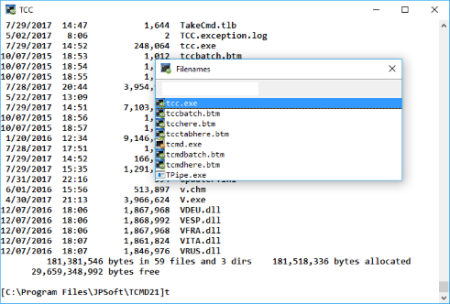
TCC is our console mode Windows command shell (formerly known as 4NT).​

TCC is a replacement for the CMD command line (the default Windows command prompt). TCC is a superset of CMD, with 246 internal commands (CMD has fewer than 40), 695+ internal variables and functions, and hundreds of enhancements to existing CMD commands. TCC works with your existing command line applications and batch files, but offers major improvements in command line and batch file capabilities, and adds thousands of new features to your command prompt windows.

TCC is a CMD replacement command processor that is compatible with your existing CMD commands and batch files, while adding thousands of new features. You're immediately more productive, and you can learn and add TCC's new features at your own pace.

Create and debug your batch scripts in a fraction of the with the integrated editor and batch file debugger.

The integrated and familiar environment means you are immediately more productive with your interactive command prompt and batch file development tasks.

The consistent syntax reduces your learning and development .

The comprehensive help (including context-sensitive popup help for command line syntax), speeds your development and reduces syntax errors.

Updates: official site does not provide any info about changes in this version.


DOWNLOAD
uploadgig
Код:
https://uploadgig.com/file/download/c13abbd579070EbA/mvgC2hS7_tcc26_.rar

rapidgator
Код:
https://rapidgator.net/file/1a6f65b3d08262559e557ee66fba38e4/mvgC2hS7_tcc26_.rar

nitroflare
Код:
http://nitroflare.com/view/4FFD031E30758CC/mvgC2hS7_tcc26_.rar
 
JP Software Take Command 26.01.33 (x64) Multilingual

7fcf764d-67d0-4745-8d9a-eec5d3174c82.png

File size: 38 MB

Take Command is a comprehensive interactive GUI and command line environment that makes using the Windows command prompt and creating batch files easy and far more powerful.​

Take Command displays your command line applications in tabbed windows, with optional Explorer-style integration for a visual look at your folders. Take Command includes hundreds of major enhancements to the command line and CMD commands such as COPY, DEL, and DIR, and adds more than 140 new commands, 460 internal variables and functions, a batch file IDE / debugger, and thousands of other features.· Modify and re-execute previous commands with a powerful command line editor

· Copy, delete, move, and rename groups of files and directories, not just individual ones

· Extended directory searches allow you to change to a directory anywhere on your system by entering only part of its name

· Quickly locate files or text within files anywhere on your system

· Built-in file viewer includes scrolling, search, and print capabilities

· Select or exclude files by date, , size, and/or extended wildcards for extraordinary flexibility in file management

· Redefine commands, create new commands and functions for your regular tasks, even assign frequently used commands to a single keystroke

· Direct access to FTP, TFTP and HTTP (including SSL) directories and files in all file-handling commands

· Complete configuration adjustment, either through interactive dialogs or on the command line

· File descriptions up to 511 characters long provide information that can't fit in a filename

· Batch debugger with singlestepping, breakpoints, syntax coloring, bookmarks, popup variable windows, variable watch windows, and editing

· An improved batch language adds subroutines, IF/THEN/ELSE logic, DO loops, SWITCH statements, error and exception handling, and more than 130 internal commands, while retaining compatibility with batch files written for CMD

· More than 130 built-in variables include system configuration, device status, network drive detection, and free memory and disk space

· More than 200 variable functions assist with manipulation and display of strings, characters, numbers, date and , file names, etc

· Start graphical and character-mode applications with ease - even run most console programs in the Take Command window

· Built-in screen scrollback buffer lets you review or print output from past commands at any

· Customizable toolbar gives you quick access to frequently used commands and applications

· Find File dialog lets you search quickly for files or text, anywhere on your system - or search from the command line with the new FFIND command

· Dialogs, accessible from the Options and Utilities menus, for editing environment variables, aliases, file descriptions, and startup parameters

· New commands such as ACTIVATE, MSGBOX, and QUERYBOX that allow you to use GUI features and control GUI applications from your batch files


DOWNLOAD
uploadgig
Код:
https://uploadgig.com/file/download/71b824fC65D52b39/bFFVtx4M_tcmd26_.rar

rapidgator
Код:
https://rapidgator.net/file/03687e0633dd54240697c387f3beb75c/bFFVtx4M_tcmd26_.rar

nitroflare
Код:
http://nitroflare.com/view/7D4DBA37332067B/bFFVtx4M_tcmd26_.rar
 
Notepad3 5.20.411.2 Multilingual

f1886f1e-6809-4ee4-ad0a-eda24e233240.png

File Size : 6.6 Mb

Furthermore, Notepad3 has the following features: code folding, bracket matching, automatic indentation, word auto-completion, convert character encoding between various formats (ASCII, UTF-8, and UTF-16), newline format conversion (between DOS (CR/LF), Unix (LF), and Macintosh (CR) formats), multiple undo or redo, bookmarks, and regular expression-based find and replace.​

SUPPORTED LANGUAGES

Previously we mentioned that Notepad3 can handle almost any programming job and we are not lying. Just take a look at the list of supported programming languages below and spot your favorite.

It offers syntax highlighting support for ASP, assembly language, AutoHotkey, AutoIt3, AviSynth, Bash, BAT, C, C++, C#, CMake, CoffeeScript, Common Gateway Interface (CGI), Cascading Style Sheets (CSS), DIFF, HTML, INF, INI, Inno Setup, Java, JavaScript, LaTeX, Lua, Markdown, NSIS, Pascal, Perl, PHP, Python, REG, Ruby, SQL, Tcl, Visual Basic (VB), VBScript, VHDL scripts, XHTML, XML, YAML and improved support for NFO ANSI art.


DOWNLOAD
uploadgig
Код:
https://uploadgig.com/file/download/7fd19F1f4EE23d02/yr1yqRPR__Notepad3_.rar

rapidgator
Код:
https://rapidgator.net/file/e4adeec1023dfbae9488fc32c9c90220/yr1yqRPR__Notepad3_.rar

nitroflare
Код:
http://nitroflare.com/view/66CA82F085ACF7A/yr1yqRPR__Notepad3_.rar
 
PassMark OSForensics Professional 7.1 Build 10106

ed62a47f-5733-426a-9607-29a9cd626d30.png

File size: 159.5 MB

OSForensics lets you extract forensic evidence from computers quickly with high performance file searches and indexing.​

Identify suspicious files and activity with hash matching, drive signature comparisons, e-mails, memory and binary data. Manage your digital investigation and create reports from collected forensic data. OSForensics allows you to identify suspicious files and activity with hash matching, drive signature comparisons, e-mails, memory and binary data.

It lets you extract forensic evidence from computers quickly with advanced file searching and indexing and enables this data to be managed effectively.

Discover Forensic Evidence Faster

- Find files faster, search by filename, size and

- Search within file contents using the Zoom search ee

- Search through email archives from Outlook, ThunderBird, Mozilla and more

- Recover and search deleted files

- Uncover recent activity of website visits, s and logins

- Collect detailed system information

- Password recovery from web browsers, decryption of office documents

- Discover and reveal hidden areas in your hard disk

- Browse Volume Shadow copies to see past versions of files

- Verify and match files with MD5, SHA-1 and SHA-256 hashes

- Find misnamed files where the contents don't match their extension

- Create and compare drive signatures to identify differences

- line viewer provides a visual representation of system activity over

- File viewer that can display streams, hex, text, images and meta data

- Email viewer that can display messages directly from the archive

- Registry viewer to allow easy access to Windows registry hive files

- File system browser for explorer-like navigation of supported file systems on physical drives, volumes and images

- Raw disk viewer to navigate and search through the raw disk bytes on physical drives, volumes and images

- Web browser to browse and capture online content for offline evidence management

- ThumbCache viewer to browse the Windows thumbnail cache database for evidence of images/files that may have once been in the system

- SQLite database browser to view the and analyze the contents of SQLite database files

- ESEDB viewer to view and analyze the contents of ESE DB (.edb) database files, a common storage format used by Prefetch viewer to identify the and frequency of applications that been running on the system, and thus recorded by the O/S's Prefetcher

- Plist viewer to view the contents of Plist files commonly used by MacOS, OSX, and iOS to store settings

- $UsnJrnl viewer to view the entries stored in the USN Journal which is used by NTFS to track changes to the volume


DOWNLOAD
uploadgig
Код:
https://uploadgig.com/file/download/18c8E68Ee971b2aB/6dsQHg4O_PassMark.OS.rar

rapidgator
Код:
https://rapidgator.net/file/d635579529c770474f08d9b0485760c7/6dsQHg4O_PassMark.OS.rar

nitroflare
Код:
http://nitroflare.com/view/5F7A512C2A64C97/6dsQHg4O_PassMark.OS.rar
 
Stepok Recomposit Pro 6.5.0.1 Portable

5c35e92d-2e83-4148-88cb-3cc9488e2633.png

Windows x64 | File size: 5 MB

The Stepok Recomposit is state-of-the art photo composite software to assist photographers of all types.​

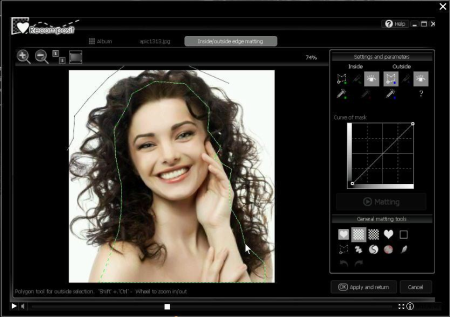
It allows you to cut an object from its background while maintaining all detail and transparency. Cutting out an object, masking an object or extracting an object from the background can be difficult task for many users but, Recomposit makes it easy. Providing advanced, professional methods such as one click chromakey masking, stroke based masking and inside/outside edge masking or trimap matting, Recomposit makes quality photo composition a breeze. The software also includes a complete environment for photo composing with expert, easy to use editing functions and tools. Recomposit supports Photoshop as a plugin too.

QUICK and EASY

Recomposit save you . You can drastically reduce the usual spent on a masking job. Easy to use, easy to understand, our software will have you extracting objects in no .

CREATIVITY

Once you mask and separate the image you can let your creativity run free.

Multiple Ways of Masking

Chromakey masking, inside/outside masking, stroke based masking and manually drop-keep brush...

What You See Is What You Get

Supports 4 ways -gray block, BW block, alpha channel and pure colour- of previewing plus on "push-to-show original" mode.

Full Editing Supported

Support layers, areas and a full-set of tools for photo compositing. Powerful image filters are included too.

Functions After Masking

Special 'smart erase' function and 'lens blurring' function allow you do more creative.

Professional Kernel

16 bits loss-less editing kernal plus on direct RAW supporting.

Work with Photoshop

Providing standard Photoshop filters in ".8bf" format, for masking mode.

official site does not provide any info about changes in this version


DOWNLOAD
uploadgig
Код:
https://uploadgig.com/file/download/9fEc4fCE7ffa619A/gEYC6vRh_Stepok.Reco.rar

rapidgator
Код:
https://rapidgator.net/file/170850a6ab696d0708a091ea07658452/gEYC6vRh_Stepok.Reco.rar

nitroflare
Код:
http://nitroflare.com/view/D12895C9588C76C/gEYC6vRh_Stepok.Reco.rar
 
save2pc 5.5.9.1595

6106f41d-4308-4a68-9767-98efb89d8046.png

File size: 16 MB

save2pc (formerly known as YouTube er) is a free tool that s videos from Youtube or Google Video and saves it as Avi or Mpeg or Flv file to your local computer.​

save2pc allows you to easily grab and save desired youtube video. The user interface of save2pc is very simple, so you don't need any technical knowledge to use it. No need to use scripts for web browsers. Just run save2pc and start ing! save2pc is a small, fast, useful, practical and powerful. It has a clean, simple interface. Simply paste the URL of a video into the program, press Start , and the AVI, MPEG or FLV file will be ed into the selected folder. You dont need any players to play flash video just play it on the defult media player clasic. save2pc is a completly Software. It contains absolutely NO ADWARE, NO SPYWARE, NO REGISTRATION, NO POPUPS, NO MALWARE or other unwanted software.

Simply paste the URL of a video into the program, press Start , and the AVI, MPEG or FLV file will be ed into the selected folder. You dont need any players to play flash video just play it on the defult media player clasic.

- Easy to use

- from Youtube

- from Google Video

- Save youtube video as an AVI file

- Save youtube video as an MPEG file

- Save youtube video as an FLV file
Ultimate / Professional / Standard

Updates: official site does not provide any info about changes in this version


DOWNLOAD
uploadgig
Код:
https://uploadgig.com/file/download/Fdeb8Cf02f70cD4b/VnRa8xhs_save2pc5.5.rar

rapidgator
Код:
https://rapidgator.net/file/d84aafe0c3dae0d41c918485408b7bc8/VnRa8xhs_save2pc5.5.rar

nitroflare
Код:
http://nitroflare.com/view/1A6FA62D0E240FF/VnRa8xhs_save2pc5.5.rar
 
GoodSync Enterprise 10.11.5.5 Multilingual

4db14b2b-f6dc-4b03-bc67-c573efca9cd7.png

File Size: 46.5 MB

GoodSync is an easy and reliable file backup and file synchronization software.​

It automatically analyzes, synchronizes, and backs up your emails, precious family photos, contacts, MP3s, financial documents, and other important files locally - between desktops, laptops, servers, external drives, and Windows Mobile devices, as well as remotely through FTP , SFTP, WebDAV, and more. GoodSync file synchronization software combines bulletproof reliability with an extremely easy to use interface to compare, synchronize, and backup your emails, contacts, photos, iTunes, MP3s, and other important files. Automatically synchronize and back up your important files between desktops, laptops, servers, and external drives over a network or the Internet. Using an innovative synchronization algorithm - GoodSync file sync software is years ahead of the pack when it comes to file synchronization.

bidirectional synchronization to prevent data loss

unidirectional synchronization for backup

Synchronize folders, not only Windows, but also FTP, WebDAV, SFTP

Synchronization with smartphones and PDAs to the Windows platform

Selective File Synchronization

Flexible and Easy Sync Automation

Monitoring the file system is not required

Syncing multiple devices, providing maximum comfort

Synchronize FTP file modification

Translation of the modification of files for non-Preserving File Systems

Easily synchronize only the modification of files

Real- monitoring

Visualization of changes

Ease and flexibility of display

Task tab, make it easier to work with several tasks

Counters size for each level

Dialogue to facilitate the selection of synchronized folders

Identification of required free space

Reports on actions and changes

Tags jobs to removable drives

Backing up the network over an encrypted channel.


DOWNLOAD
uploadgig
Код:
https://uploadgig.com/file/download/1d4b5238463d206f/dkmn8NuF_GoodSync.En.rar

rapidgator
Код:
https://rapidgator.net/file/caa707a4316849e820d74fb71a8c7afb/dkmn8NuF_GoodSync.En.rar

nitroflare
Код:
http://nitroflare.com/view/BF9EDAE4C2DA679/dkmn8NuF_GoodSync.En.rar
 
Keysight Advanced Design System (ADS) 2020.2 (x64)

6b375dea-2b9c-4a1b-b57d-0cc31b68b2cc.png

File size: 2.05 GB

Advanced Design System is the world's leading electronic design automation software for RF, microwave, and high-speed digital applications.​

ADS pioneers the most innovative and powerful integrated circuit-3DEM-thermal simulation technologies used by leading companies in the wireless, high-speed networking, defense-aerospace, automotive and alternative energy industries. For 5G, IoT, multi-gigabit data link, radar, satellite and high-speed switched mode power supply designs, Keysight ADS provides an integrated simulation and verification environment to design high-performance hardware compliant with the latest wireless, high speed digital and military standards. Watch our How To videos to see ADS in action.-Complete schematic capture and layout environment

-Innovative and industry leading circuit and system simulators

-Direct, native access to 3D planar and full 3D EM field solvers

-Largest number of process design kits (PDKs) developed and maintained by leading foundry and industry partners

-EDA and Design Flow Integration with companies such as Cadence, Mentor, and Zuken

-Optimization Cockpit for real- feedback and control when using any of 12 powerful optimizers

-X-parameter model generation from circuit schematic and Keysight's NVNA for nonlinear high-frequency design

-Up-to-date Wireless Libraries enable design and verification of the latest emeg wireless standards

OS:Windows 7 Enterprise (64-bit) / Windows 10 Enterprise (64-bit)

RAM:8 GB RAM or higher / 32 GB RAM or higher

CPU:64-bit, multi-core CPU

Hard Disk Space:256 GB free disk space for the general operating system, ADS installation and design/simulation storage / 8 GB free disk space for the ADS installation directory and 100 GB for design/simulation storage

Screen Resolution:1920x1080 display resolution with true color (at least 32bit color)

Visual Studio 2017


DOWNLOAD
uploadgig
Код:
https://uploadgig.com/file/download/0101d32140fc06d1/M1XSpqp0_Keysight.AD.part1.rar
https://uploadgig.com/file/download/5Efac79d2cf3994d/M1XSpqp0_Keysight.AD.part2.rar
https://uploadgig.com/file/download/fb1b83E82A8056e3/M1XSpqp0_Keysight.AD.part3.rar

rapidgator
Код:
https://rapidgator.net/file/2d8b94fe76e78dd016544b8948af1097/M1XSpqp0_Keysight.AD.part1.rar
https://rapidgator.net/file/36fce051f9e369177bbf680a56632395/M1XSpqp0_Keysight.AD.part2.rar
https://rapidgator.net/file/72e7eef78461a131bee6cfdaa9f2bab8/M1XSpqp0_Keysight.AD.part3.rar

nitroflare
Код:
http://nitroflare.com/view/F0060061F037706/M1XSpqp0_Keysight.AD.part1.rar
http://nitroflare.com/view/EF497B611B7A6F2/M1XSpqp0_Keysight.AD.part2.rar
http://nitroflare.com/view/877E44C103C0A44/M1XSpqp0_Keysight.AD.part3.rar
 
Keysight MBP 2020 (x64)

f20d593f-0cd6-4941-bda0-622c4d89cec8.png

File Size: 772 MB

Model Builder (MBP) is a complete solution that provides automation and simulation flexibility for silicon-based sonductor devices.​

The MBP program includes powerful built-in capabilities for modeling and deteing device parameters, as well as an open interface for setting up a simulation strategy. The unique Task Tree architecture allows you to adapt the model extraction process to specific data and enables developers to use modern competitive modeling techniques. Ready-to-use solution for creating SPICE models

A set of software packages for model extraction for MOSFETs, bipolar transistors, diodes and passive components

Support for modern models, including BSIM6, BSIM-IMG, BSIM-CMG, and others.

Ability to create aging models, operating models under conditions of overload, models of high-voltage devices

Ability to automate and customize the extraction process

Friendly user interface and a wide range of auxiliary programs for modeling


DOWNLOAD
uploadgig
Код:
https://uploadgig.com/file/download/08C72771e46A1ef0/CdGWHHzs_Keysight.MB.rar

rapidgator
Код:
https://rapidgator.net/file/004880475e201a91a4d4a4d21c67c097/CdGWHHzs_Keysight.MB.rar

nitroflare
Код:
http://nitroflare.com/view/5054F874E53E296/CdGWHHzs_Keysight.MB.rar
 
Назад
Сверху