• Здравствуйте. Сайт заработал в архивном режиме форум www.old.nado.in

Anthony's Software !!!

Autodesk Fabrication CAMduct 2021 (x64)
7a2fc310-c137-45d9-8aa0-069e06355ced.png

x64 | Languages:English | File Size: 2.15 GB

The Autodesk Fabrication products help extend Building Information Modeling (BIM) workflow to mechanical, electrical, and plumbing (MEP) specialty contractors for designing, estimating and fabricating ductwork, pipework, electrical containment and other mechanical systems used in buildings.​

These products let you use manufacturer-specific content to generate better estimates, create more accurate detailed models, and directly drive MEP fabrication. Autodesk Fabrication CAMduct is a powerful HVAC manufacturing and ductwork fabrication software appplication, as well as a production management tool, used to efficiently produce HVAC systems. CAMduct uses comprehensive libraries of 3D parametric fixtures and fittings to help you meet manufacturing requirements.

-Added manufacturer content and patterns: Select from thousands of added imperial content items and pattern templates. For example, additional patterns templates, such as round ductboard, floor drains and cleanouts, vented crossovers, and plugs, are available.

-Material-specific nesting parameters: Users can set different nesting parameters for different materials, such as insulation, ductboard, and sheet metal, to help avoid nesting the job multiple s.

-Bar coding and QR coding: CAMduct supports bar codes and QR codes to add data-rich bar codes and QR codes to labels and worksheets.

-Database Export/Import: Use a single command for database export and import, as well as optional insulation specifications and sections.

-Shared content libraries and databases: All Autodesk Fabrication products share libraries and databases for more seamless estimating, detailing, fabrication, and installation workflow.

-Duct fabrication component library: Access an extensive library of 3D parametric rectangular, round, and oval ductwork components with their associated developments.

-Simple graphical interface: An easy-to-use graphical user interface (GUI) allows both novice and experienced software users to enter job data and edits.

-Sheet metal and linear nesting: Advanced nesting algorithms and options help deliver better material utilization.

-NC writing and machine support: With post processors built in to support aAdvanced job costing tools: Estimate jobs based on aAdditional software tools: CAMduct comes with additional software tools, such as CAMduct Components, Tracker, and RemoteEntry that extend and optimize functionality within the Autodesk Fabrication software products.

OS:Microsoft Windows 7 SP1, Microsoft Windows 8.1, or Microsoft Windows 10 (anniversary edition) operating system.

CPU:AMD Athlon 64 processor with SSE2 technology, AMD Opteron processor with SSE2 technology, Intel Xeon processor with Intel EM64T support and SSE2, or Intel Pentium 4 with Intel EM64T support and SSE2 technology

Memory:4 GB RAM or greater

Graphics:1,280 x 1,024 (1,600 x 1,050 or higher recommended) true color video display adapter 128 MB or greater with OpenGL-capable graphics card

Space:2 GB of free hard drive space for installation and data storage


DOWNLOAD
uploadgig
Код:
https://uploadgig.com/file/download/53Db3cFf52f769Ad/rFYxbl8o__CAMDCT_202.part1.rar
https://uploadgig.com/file/download/7932E8296e55dd46/rFYxbl8o__CAMDCT_202.part2.rar
https://uploadgig.com/file/download/58bf7361C3e2695a/rFYxbl8o__CAMDCT_202.part3.rar

rapidgator
Код:
https://rapidgator.net/file/018c68280fbb9df3935fa8ed4d545dd8/rFYxbl8o__CAMDCT_202.part1.rar
https://rapidgator.net/file/6067d9a112adb950cda76d6dce320e7e/rFYxbl8o__CAMDCT_202.part2.rar
https://rapidgator.net/file/34a18e9a939dab364ad78c4ba36ce305/rFYxbl8o__CAMDCT_202.part3.rar

nitroflare
Код:
http://nitroflare.com/view/39E0E973B817A63/rFYxbl8o__CAMDCT_202.part1.rar
http://nitroflare.com/view/16D9637E9FB769E/rFYxbl8o__CAMDCT_202.part2.rar
http://nitroflare.com/view/AB251AE44712F73/rFYxbl8o__CAMDCT_202.part3.rar
 
Autodesk Robot Structural Analysis Professional 2021 (x64) Multilanguage

d01f6333-3deb-41a4-84a1-b448c4488bb9.png

x64 | Languages:Multilanguage | File Size: 2.60 GB

Autodesk Robot Structural Analysis Professional software provides structural eeers with advanced building simulation and analysis capabilities for large, complex structures.​

The software offers a smooth workflow, enabling eeers to more quickly perform simulation and analysis of aThere is a range of linear and nonlinear structural analysis tools and behaviors

-Dynamic analysis of complex structures

-Check and simulate the pressures and normal loads such as earthquakes

-establishing two-way communication with Autodesk Revit software

-The integrated design of concrete and steel with more than 40 international codes for steel and concrete For more than 30

-Having direct analysis method (Direct Analysis Method or abbreviated DAM)

-Ability to simulate wind tunnel and created the wind load

-Microsoft Windows 10 (64-bit edition) Microsoft Windows 10 Home

-Microsoft Windows 10 Pro

-Microsoft Windows 10 Enterprise

-Microsoft Windows 10 Education

-Microsoft Windows 10 Enterprise LTSB

-Microsoft Windows 10 Pro Education

-Microsoft Windows 7 (64-bit edition)

-Microsoft Windows 7 SP1

-Microsoft Windows 7 SP1 Professional

-Microsoft Windows 7 SP1 Enterprise

-Microsoft Windows 7 SP1 Ultimate

Memory:8 GB RAM, or more

Display:

-At least 1280 x 1024 monitor and display adapter capable of 24-bit color.

-Dedicated video card with hardware support for OpenGL spec 1.4 or later, and support for DirectX 9 or later.

Space:1 GB free disk space for the installation (5 GB if not installed from DVD) + 5 GB free disk space left after installation.


DOWNLOAD
uploadgig
Код:
https://uploadgig.com/file/download/d08893C3b0e31297/oOueWMIw__Robot_Stru.part1.rar
https://uploadgig.com/file/download/8dc861d04709A05c/oOueWMIw__Robot_Stru.part2.rar
https://uploadgig.com/file/download/B6233901257a852c/oOueWMIw__Robot_Stru.part3.rar

rapidgator
Код:
https://rapidgator.net/file/5e9b02dba19b5b9a6aaf5446d66cddaa/oOueWMIw__Robot_Stru.part1.rar
https://rapidgator.net/file/e66d3f9ceabf2b2ac1c3fdc68c0e5ea4/oOueWMIw__Robot_Stru.part2.rar
https://rapidgator.net/file/1818078eb643c43f260c426d9726ddfb/oOueWMIw__Robot_Stru.part3.rar

nitroflare
Код:
http://nitroflare.com/view/2BD6323613687BF/oOueWMIw__Robot_Stru.part1.rar
http://nitroflare.com/view/4C98428F756D51C/oOueWMIw__Robot_Stru.part2.rar
http://nitroflare.com/view/8EA6DDAA27D3BE6/oOueWMIw__Robot_Stru.part3.rar
 
ChrisPC VideoTube Downloader Pro 12.04.08 Multilingual

0efbfd14-4324-4edf-b06f-dee784602dbe.png

Multilingual | File size: 75.8 MB

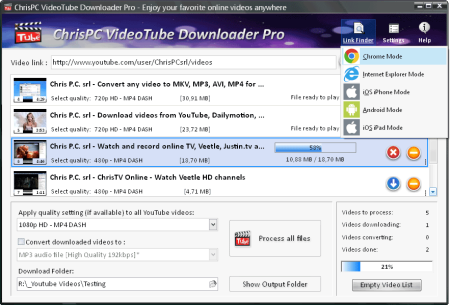
ChrisPC VideoTube er Pro is a powerful software with a friendly user interface that allows you to videos and playlists from YouTube, videos from Dailymotion, BBC iPlayer, ITV Player, ABC, FOX, CBS.​

com, Vimeo, Prosieben, Metacafe, Blip.tv, CBC.ca many more video websites. Once the videos are ed, you can convert them to formats compatible with iPad, iPhone, iPod, MPEG-4 H.264, MP3, AC3.

Version 11 comes with many improvements


DOWNLOAD
uploadgig
Код:
https://uploadgig.com/file/download/ea4F32f4b05C8c3a/oV5bHiHx_.ChrisPC_Vi.rar

rapidgator
Код:
https://rapidgator.net/file/381f89d36f540da1fa7bd61ba35e9767/oV5bHiHx_.ChrisPC_Vi.rar

nitroflare
Код:
http://nitroflare.com/view/8B45BE9485F7C52/oV5bHiHx_.ChrisPC_Vi.rar
 
Expresii 2020.04.08 Multilingual

4915ac52-a470-476a-80e5-dec2c5a3a2f2.png

File size: 62 MB

Beautiful digital Eastern watercolor, Real , Ultra-HD!​

Expresiiis an advanced digital painting system. After years of development Expresii has finally been released. The ink painting software uses fluid dynamics to simulate watercolor and other natural media, and features GPU-accelerated water-based paint, organic brushes simulation and ultra-deep zoom capabilities. Expresii, the startup founded by former Adobe and Microsoft graphics researcher Nelson Chu, has shipped Expresii 1.0, the first commercial release of its promising digital brush-and-ink painting system. In development for several years - we covered an early tech demo back in 2013 - Expresii mimics the behavior of real inks on paper, including the way they flow under gravity and the way colors blend.

It's designed to replicate traditional Eastern painting - the brush ee mimics the deformations of an actual calligraphy brush - but as the demo videos show, it can be used to create Western-style watercolor effects. The software can generate images up to 12K resolution, and is GPU-accelerated to smooth out panning and zooming, although the hardware requirements are quite low: a $60-100 graphics card is recommended.

It supports both pen and touch input, and if you've got a device with a tilt sensor (or a game controller), you can even tilt your virtual paper to control the flow of the ink. Images can be saved in PNG or PSD formats, with support for alpha channels and PSD layers. Moxi Paint Ee... We harnesses the GPU to bring watercolor sim to a whole new level! Yibi Brush Ee... Giving you power to create organic shapes like wielding a real brush! Youji Rendering Ee... Zoom in to see your work as if done on a real piece of paper. No more fat pixels! Let virtual ink flow and blend on virtual paper.

Moxi Paint Engine

We harnesses the GPU to bring watercolor sim to a whole new level!

Yibi Brush Ee

Giving you power to create organic shapes like wielding a real brush!

Youji Rendering Ee

Zoom in to see your work as if done on a real piece of paper. No more fat pixels!


DOWNLOAD
uploadgig
Код:
https://uploadgig.com/file/download/8322c88425121033/leabmIX3_Expresii_20.rar

rapidgator
Код:
https://rapidgator.net/file/1c69194cd0675ac82a1a75562c8d81ff/leabmIX3_Expresii_20.rar

nitroflare
Код:
http://nitroflare.com/view/40842329E018C7E/leabmIX3_Expresii_20.rar
 
Mirillis Action! 4.5.0 Multilingual

761aa69e-0bab-4509-b70a-23895b085964.png

File size: 107.6 MB

Action!​

allows real- recordiapture of Windows Aero desktop in a superb HD video quality. With Action! you can record web player videos, your gameplay, display game framerates, add live audio commentary to create high quality tutorials, record music, capture screenshots... and more! Record your gameplay in HD. Benchmark games performance.

Action! outstanding performance and GPU utilization allows the smoothest real- HD gameplay video recording ever! Display current and average game framerate (FPS) during gameplay and save your benchmark results.

Smooth Windows Aero HD desktop recording, easy tutorial creation!

Action! defines a new standard of performance and user experience for real- desktop recording software. Record smooth high framerate HD videos of your dekstop and applications activity, add microphone audio commentary and create great tutorials with ease!

Real- web videos recording. Record what you see.

Record videos from websites and other applications in real-. Action! allows to record videos from defined display region, selected application window or in fullscreen mode. With Action! you can record videos from ANY web player, no matter which video service you are using!

Export your recordings to popular formats and devices!

Select one of many predefined profiles and push a button to export your recordings to popular formats, favorite muldia devices, Facebook or YouTube™. Save energy and using optimized and hardware accelerated video exporting with NVIDIA CUDA™ or Intel Quick Sync Video technologies.

Upload to YouTube or Facebook

Export and upload your recordings to popular services and social networks like YouTubeâ„¢ and Facebook. Action! provides predefined exporting profiles for YouTubeâ„¢ and Facebook, just push a button to export and automatically upload your recordings to your favorite service fast and easy.

Capture screenshots

With Action! you can capture multiple screenshots of your games or desktop. Just press a hotkey and screenshot will be saved directly to a file on your hard disk without interrupting your work or gameplay.

Record live audio commentary

Action! allows to record additional live audio commentary during gameplay or dekstop recording making easy creation of tutorials and game walk-through videos. Microphone settings provide full control of microphone input volume and mixing level with system sounds.

User friendly and stylish interface

Action! is compact, stylish and user friendly.

Built-in managers for recordings, benchmarks and screenshots allow to browse, delete selected items and export recordings to popular formats and devices. With outstanding performance and sleek design Action! defines new standard of user experience for games benchmarking, gameplay and desktop real- recording software.

Record what you hear!

Action! can record everything you hear on your PC. Audio recording function allows to record all sounds, music and game audio. Using microphone you can easily create podcasts. Additionaly Action! can encode in real- the recorded audio in M4A format, making the recorded audio files small and compact.

M4A audio recording will be avialable in free update.

Play in HD - record in SD.

Ultra-efficient video recording!

With Action! ultra-efficient 480p video recording you can record your HD gameplay or HD desktop for a very long , saving disk space. Optimized 480p video recording mode offloads your computers CPU and hard disk allowing smooth and comfortbale gaming and working.

Easy video recordings playback.

Action! includes an internal ultra responsive player optimized for raw high-bitrate video recordings playback. Double click video recording thumbnail on the Action! list to start playback!


DOWNLOAD
uploadgig
Код:
https://uploadgig.com/file/download/d677857F83d0B2F7/p4zan9OJ_Mirillis.Ac.rar

rapidgator
Код:
https://rapidgator.net/file/1c66a1debaa6820e9d7053282722dc59/p4zan9OJ_Mirillis.Ac.rar

nitroflare
Код:
http://nitroflare.com/view/0FFCB8955C448AD/p4zan9OJ_Mirillis.Ac.rar
 
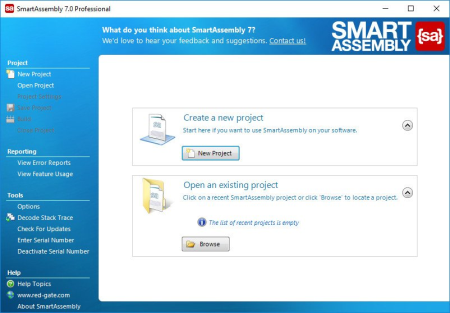
Red Gate SmartAssembly 7.4.1.3456

47879b16-e8da-4e50-adfc-9c073bf43a46.png

File size: 16.3 MB

SmartAssembly is an obfuscator that helps protect your application against reverse-eeering or modification, by making it difficult for a third-party to access your source code.​

If your entire business rests on the IP embodied in your software or you don't want your C# or VB.NET code exposed internationally, then obfuscating your code becomes a necessity, not a luxury. With SmartAssembly, you get a comprehensive set of obfuscation features, including name mangling, control flow obfuscation, strings encoding, reference dynamic proxy, and declarative obfuscation.

Key features

Name mangling

Changes the names of methods and fields to make it hard to understand their purpose.

Control flow obfuscation

Converts the code inside methods to 'spaghetti code' to make it difficult to see how the application works.

References dynamic proxy

Creates a proxy for calls to methods outside of your assembly to make it hard to find external calls.

Strings encoding

Encodes the strings used in your software to hide such information as passwords and SQL queries.

Resources compression and encryption

Compresses and encrypts managed resources to make them hard to understand, and to reduce the size of the assembly.

Pruning

Removes non-useful metadata to make the code harder to reverse-eeer, reduce the size of the assembly, and improve loading .

Dependencies meg

Takes all the DLLs and merges dependencies into the main assembly, so you don't have to load lots of DLL files, and so that they can also be obfuscated.

Dependencies compression and embedding

Compresses and embeds your dependencies into your main assembly, simplifying the deployment of your software and reducing the size of your program.

Method parent obfuscation

Moves methods in your code by chag the class they are in, making it harder to understand how methods and classes relate to each other.

Strong name signing with tamper protection

Signs your assembly and helps to protect it against modification (the additional tamper protection is not available in the Standard edition).

Declarative obfuscation

Excludes a member from obfuscation using custom attributes directly in your code.

Updates: official site does not provide any info about changes in this version.


DOWNLOAD
uploadgig
Код:
https://uploadgig.com/file/download/44927cb3123555aB/hI8iADCt_SmartAssemb.rar

rapidgator
Код:
https://rapidgator.net/file/f40c91b0eb8106f54071bfd1a81a4d96/hI8iADCt_SmartAssemb.rar

nitroflare
Код:
http://nitroflare.com/view/DEABCF5CAA82039/hI8iADCt_SmartAssemb.rar
 
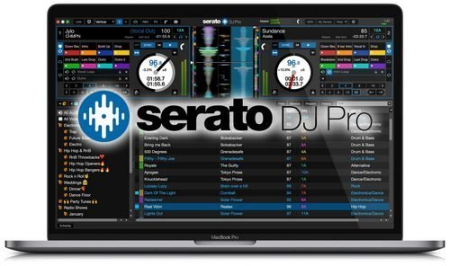
Serato DJ Pro 2.3.4 Build 1547 Multilingual

64b3423e-a50e-4a9f-b126-29d0689e4071.png

Windows x64 | Languages: Multilingual | File Size: 527.87 MB

Professional DJ software - From the unknown to the greatest, Serato DJ Pro is the most popular DJ software globally.​

When you're talking about Hip-Hop, Dance, and everything in between, you're looking at the standard.Serato DJ Pro is renowned for its reliability and trusted by DJs to deliver incredible performances. That's why it powers the world's top artists on some of the biggest stages.

Serato DJ Pro officially supports over 90 pieces of hardware by industry leaders. Every piece is tightly integrated to ensure the best experience possible.

Whatever your style, you can DJ with freedom. Your creative potential will be unlocked through innovative features and an intuitive interface.

A range of new features and improvements as Serato DJ became Serato DJ Pro.

- Practice Mode

- New UI with Performance Pad view

- Optimised for high resolution screens

- Bigger Libraries and rock-solid reliability

- Improved help and support

- Windows 10 (64-bit)

- Windows 8.1 (64-bit)

- Windows 7 (64-bit)


DOWNLOAD
uploadgig
Код:
https://uploadgig.com/file/download/eBAee3e52E2e8a64/TvmlEN2J_.Serato.2.3.rar

rapidgator
Код:
https://rapidgator.net/file/b84d34d26e0b96314afd5a9ff860fcda/TvmlEN2J_.Serato.2.3.rar

nitroflare
Код:
http://nitroflare.com/view/3E7DCA44209056A/TvmlEN2J_.Serato.2.3.rar
 
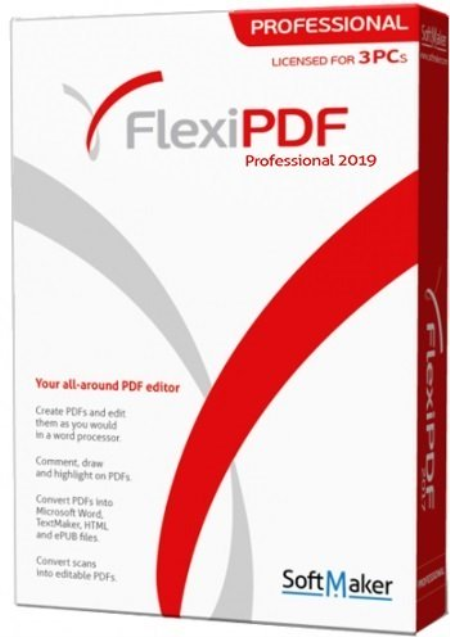
SoftMaker FlexiPDF 2019 Professional 2.0.7

4aa95fcc-8a8e-445a-b59d-a573d927bd46.png

Languages: Multilingual | File Size: 262.42 MB

With FlexiPDF, creating, editing and commenting in PDF files is just as quick and easy as exporting them for further editing in TextMaker or Microsoft Word.​

FlexiPDF always delivers excellent results-whether you insert or edit text and images, rearrange the layout or reorder the pages of a PDF file. FlexiPDF converts your PDF files into text documents that you can edit with TextMaker and Microsoft Word. FlexiPDF Professional also uses OCR to convert scanned pages into editable and searchable PDF files. FlexiPDF is an indispensable tool for anyone who works with PDFs.Have you ever wanted to edit the text of a PDF? Insert or replace images in a PDF file? Convert scanned pages to editable documents?

- Creating, editing and commenting in PDF files is just as quick and easy as exporting them for further editing in TextMaker or Microsoft Word.

- The FlexiPDF printer driver creates high-quality PDF files from inside any Windows program.

- In FlexiPDF Professional, built-in automatic character recognition (OCR) converts pages from the scanner to editable and searchable PDFs.

With FlexiPDF, you can change, add, delete and format text in PDF files across paragraphs, columns and pages. The built-in multi-language spell checker helps to avoid writing errors, and automatic hyphenation ensures that your text looks good. Search and replace goes far beyond other PDF editing programs. You can search and replace not only text, but also fonts and colors, giving your documents a new look with a single click. It's just as easy to search and replace in hyperlinks or even across multiple files.

Do you want to delete a specific page from a PDF? Insert a blank page for further editing? Split a multi-page PDF into several single-page documents? No problem at all. FlexiPDF lets you rearrange PDF documents as you need them. Add, reorder and delete pages. Crop and rotate pages, insert pages from other PDF files or combine several PDF files into one.

FlexiPDF allows you to insert comments into PDF files, highlight important details with drawings and emphasize text passages with the colored highlighter. You can also mark documents with preset and custom stamps, such as "Approved" or "Confidential."

With FlexiPDF, you can insert and edit graphics and drawings in PDF files wherever you like. It is easy to move or crop photos and graphics, or add them to pages as watermarks. You can also clone graphic elements from one page to another to quickly create repetitive elements.

FlexiPDF Professional uses advanced OCR technology to convert scanned pages into editable and searchable PDF files. You can edit them in FlexiPDF or export them to TextMaker or Microsoft Word.

FlexiPDF Professional can export the content of a PDF to a format suitable for translation using popular translation tools such as SDL Trados Studio, MemSource and MemoQ. After translation, the text can be re-imported back into the PDF. FlexiPDF places the translated text exactly where the original text used to be. You can use the new side-by-side comparison feature to compare two PDFs and to scroll them synchronously - handy not only for comparing translated PDFs, but also for comparing different versions of the same PDF file. If you wish to revise a document, you can activate tracked changes, so that all your edits and deletions are highlighted in color.

FlexiPDF lets you not only fill out interactive forms, but also the much more common static forms that have been saved as PDF files. Because organizations often provide only such static forms, FlexiPDF saves you you would otherwise use to print the forms and fill them out by hand. FlexiPDF Professional goes one step further by enabling you to create your own interactive forms - including interactive checkboxes, selection lists, input fields, etc.

Thanks to the built-in secure AES encryption, PDF files can be protected from opening, editing, printing, or copying text. You decide what the recipient of a PDF file is allowed to do. If a PDF document contains confidential text or graphics, FlexiPDF Professional lets you redact them so that such sensitive information cannot be read or restored.
FlexiPDF for Windows can be used with Microsoft Windows 10, 8, 7 and Windows Vista. It is compatible with application servers such as Citrix XenApp and Microsoft Teal Server.

English, German, French, Italian, Spanish, Portuguese (Portugal), Portuguese (Brazil), Dutch, Danish, Swedish, Finnish, Polish, Czech, Slovak, Hungarian, Slovenian, Serbian, Romanian, Turkish, Russian, Chinese (Simplified), Chinese (Traditional)

English (United States), English (United Kingdom), Welsh, Irish, French, Italian, Spanish, Portuguese (Portugal), Portuguese (Brazil), German, Dutch, Danish, Icelandic, Swedish, Finnish, Estonian, Czech, Polish, Hungarian, Slovenian, Croatian, Romanian, Turkish, Bulgarian, Ukrainian, Russian


DOWNLOAD
uploadgig
Код:
https://uploadgig.com/file/download/6e9d06415C4589b5/oUEsLDSV_.FlexiPDF.2.rar

rapidgator
Код:
https://rapidgator.net/file/f6a56f513a2357ab57d55906b81533b3/oUEsLDSV_.FlexiPDF.2.rar

nitroflare
Код:
http://nitroflare.com/view/CF88B50512DB54B/oUEsLDSV_.FlexiPDF.2.rar
 
Tor Browser 9.0.9 (x64)

19b55a5d-283c-4a11-ad8d-518d4803ab5e.png

File Size: 65 MB

Tor is a toolset for a wide range of organizations and people that want to improve their safety and security on the Internet.​

Using Tor can help you anonymize web browsing and publishing, instant messaging, IRC, SSH, and other applications that use the TCP protocol. Tor also provides a platform on which software developers can build new applications with built-in anonymity, safety, and privacy features. The Tor Browser Bundle lets you use Tor on Windows, Mac OS X, or Linux without needing to install any software. It can run off a USB flash drive, comes with a pre-configured web browser to protect your anonymity, and is self-contained. Surfing anonymously provides a powerful shield against network surveillance and traffic analysis. Protecting your online privacy can only be achieved by additional software tools that can hide your location and can prevent your online information and browsing habits from being revealed to anyone.

If you're ever in need of such a tool, Tor Browser Bundle is one suggestion you can add to the list. The application relies on a network of virtual servers in order to make your browsing sessions anonymous. Tor makes available a set of rules and algorithms that routes the communications through various servers all over the world. Thus, all the traffic is randomized so tracking the source becomes an almost impossible task.

The package is a self-extracting archive that includes the Tor application itself, which can be run from command line, a cross platform controller GUI named Vidalia and a custom-made version of Firefox equipped with a set of addons that ensure online anonymity.

We advise the average user to consider using the Vidalia application, because the graphical interface puts you through a lesser ordeal than the command prompt version of Tor. When you first run Vidalia, it automatically connects to the Tor network and if the process is successful, a status will be displayed in the main window.

Vidalia's interface encases a collection of shortcuts that allow you to stop the service, to start setting up the relays, to trigger a global view of the network and most important of all, it sports a button for using a new identity any you wish. If you're interested in bandwidth usage, Vidalia features a separate utility just for showing a bandwidth graph that measures the receive/send rate of the packets.

The portable Firefox version included in the package is customized with a few extensions that make the anonymous surfing experience easier. These include: Torbutton - allows you to create a new identity each you start a browsing session, NoScript - blocks scripts from untrusted domains and HTTPS Everywhere - enables you to encrypt the communication with a lot of popular sites.

With all the components it encases, Tor Browser Bundle is one of the most trustworthy anonymous surfing tools out there. It can be configured from command prompt, run from its dedicated GUI controller - Vidalia and comes with a pre-configured web browser. Whichever of these methods you choose the result is a safe and controlled Internet browsing experience.


DOWNLOAD
uploadgig
Код:
https://uploadgig.com/file/download/D305fD9965e1A31c/IVhgmxzT_torbrowserinstallwin649.0.9_enUS..rar

rapidgator
Код:
https://rapidgator.net/file/66ddd1e64461324cd33697bb27408f6b/IVhgmxzT_torbrowserinstallwin649.0.9_enUS..rar

nitroflare
Код:
http://nitroflare.com/view/EAC59F407F1EDD3/IVhgmxzT_torbrowserinstallwin649.0.9_enUS..rar
 
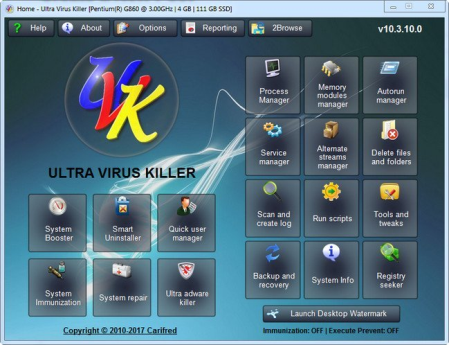
UVK Ultra Virus Killer 10.16.0.0

118b4a3e-6e89-42a0-a38a-345efd418356.png

File Size : 16.2 Mb

UVK is a powerful virus removal and Windows repair tool.​

With simple and intuitive interface, UVK allows users to detect and delete all types of malware and spyware from infected systems. It also includes lots of tools to repair windows after the disinfection.

Process manager:

Filter all the running processes by their executable path.

Select and manage several processes at once.

Kill processes.

Kill several processes with the same path at once.

Kill processes and delete the parent files simultaneously.

Kill all the listed processes.

Kill all the listed processes except the system processes.

Kill all non trusted processes.

Pause and resume processes.

Verify the processes files signatures.

Search information about a process over the internet.

Submit one or more processes MD5 to VirusTotal using the VT API.

Open the processes files locations.

View the processes executable files properties.

Startup entries and scheduled tasks:

Delete startup entries, scheduled tasks and corresponding files simultaneously.

Select and manage several entries at once.

Verify the startup entries files signatures.

Hide Microsoft signed files from the list.

Search information about a startup entry file over the internet.

Submit one or more startup entries files MD5 to VirusTotal using the VT API.

Jump to the registry key where the startup entry is located.

Open the startup entries files locations.

View the startup entries files properties.

Maximizable window in this section for a more comfortable view.

Windows services and drivers:

Delete services or drivers, and the corresponding files simultaneously.

Perform all common service management tasks: Stop, start, pause, resume services, and set their startup type.

Select and manage several services or drivers at once.

Stop all non Microsoft services.

Choose the services and drivers to be displayed: Show all services and drivers. Hide inactive services and drivers, Hide Microsoft services and drivers, Hide inactive and Microsoft services and drivers.

Verify the services/drivers files signatures.

Search information about a service/driver file over the internet.

Submit one or more services/drivers files MD5 to VirusTotal using the VT API.

Jump to the registry key where the service/driver is located.

Open the service/driver file location.

View the service file properties.

Maximizable window in this section for a more comfortable view.

Delete or replace file or folder:

Delete files and folders even if they're being used by applications.

Delete running executable files.

Delete files and folders you can't normally delete using the Windows explorer.

Choose to whether delete the files definitely or move them to the recycle bin.

Replace or copy files.

Expand compressed files.

Replace files even if they are loaded in the memory.

Scan & create log:

Perform a full analysis of your system and save it to a text file that you can send to a friend or professional, post in a forum, or analyze it yourself.

Choose the areas you want to scan and show in the log.

Choose whether to show Microsoft signed files in the log.

Choose where to save the log.

Choose whether to verify the scanned files digital signatures.

Search for recently created files, and write them to the log.

Perform other custom scans, live retrieving specific information on files, folders, registry entries, or automatically get the VirusTotal analysis result for a file.

Run UVK Scripts:

Disinfect your computer by pasting lines from the UVK log to delete corresponding registry entries and files.

Use custom commands to files, execute programs, delete or add registry entries, teate processes, delete files and folders, run cmd batch scripts, register system files or run the UVK Fixes.

Create system restore points, empty the recycle bin and all users temporary folders.

Create and run scripts that perform complete system repair and maintenance.

Automatically run any of the UVK fixes or scans.

UVK tools:

Retrieve al sorts of information on any file.

Generate VirusTotal MD5 reports, deny or grant access or perform an sfc scan for any file.

Search information on files and registry entries over the internet.

Grant access or prevent changes to registry keys.

Enumerate all the restore points.

Select and delete one or several restore points.

Create system restore points.

Enable or disable the system restore.

UVK System repair:

Fix your computer with more than fifty exclusive fixes: Fix file extensions, register system dlls, enable and repair Windows update, clear dns cache and the hosts file, reset user default registry settings, fix installation problems, empty all browsers cache, reset security settings, defragment and optimize the hard drives, install Java, Flash, DirectX, .Net Framework, Fix the WMI and the system restore, delete all restore points, fix the windows shell, reset the user shell folders and much more.

System Info:

Show information that can be very useful specially if you're going to reinstall windows or if you need to diagnose a performance or hardware problem. This includes the processor, memory and page file usage, OS and office product keys, and hardware and users info.

Export this info to a comprehensive html file.

UVK immunization:

Prevent the most vulnerable registry and file system areas from being infected.

Prevent adding programs to the windows startup and logon.

Prevent creating/deleting browser helper objects, Internet explorer toolbars and search providers.

Prevent modifying the internet settings and the Internet explorer startup pages.

Backup and restore the Windows registry.


DOWNLOAD
uploadgig
Код:
https://uploadgig.com/file/download/2b280aafcb601415/xX5C2kNw_UVKInstaller_.rar

rapidgator
Код:
https://rapidgator.net/file/3dbaaa03fdb91fa4fc5c78afae868334/xX5C2kNw_UVKInstaller_.rar

nitroflare
Код:
http://nitroflare.com/view/320AD352ECDCAA2/xX5C2kNw_UVKInstaller_.rar
 
Veritas System Recovery Disk 21.0.0.57158 (x64)

782778ee-4abe-4611-b37c-51a540408c5e.png

x64 | Languages:multilingual | File Size: 962 MB

Ensuring rapid, reliable disaster recovery across your entire infrastructure can be complicated and costly.​

With Veritas System Recovery, you can minimize down and avoid the impact of disaster by easily recovering in minutes, whether you're restoring a single file or email to an entire machine-physical or virtual.. Reduce complexity with a single solution that protects servers, laptops and virtual machines

Protect data and systems quickly, efficiently and frequently with image-based backup

Minimize the disruption of system failure with fast, flexible, reliable recovery

Easily protect and recover business-critical assets

Use one interface to protect laptops, servers, and virtual machines

Run a single backup job to protect a whole machine, including the system, data, and applications

Restore granular objects direct from the storage device

Protect quickly, frequently, and effectively

Gain cloud resiliency including Amazon S3 and Azure

Minimize storage consumption by protecting only those data blocks that have changed

Benefit from rapid performance with image-based backup

Realize quick, automated restore, direct to the data source

Ensure recovery whatever your choice of hardware

Get trusted bare metal restore to the same or different hardware

Recover individual Exchange emails, SharePoint documents, files, and folders or whole machines

Automatically duplicate backup data to the cloud or a second site for additional resiliency

Fast backup to leading public cloud storage including Amazon S3 and Microsoft Azure

Automatically duplicate backup data to the cloud or a second site for additional resiliency

Support for Microsoft's latest Server Operating System, including Restore Anyware technology for dissimilar hardware and P2V restoration

Enhanced Linux Environment Support

Improved security with new support for SMTP with TLS (Transport Layer Security) and SSL (Secure Sockets Layer)

OS:Windows7/8.1/10

Veritas System Recovery Disk: 1.5 GB (dedicated)

Space:1 GB is required for a full install

Memory:Veritas System Recovery Agent: 512 MB


DOWNLOAD
uploadgig
Код:
https://uploadgig.com/file/download/cb8D60fDbcD990F2/OaJdE10M__Veritas.Sy.rar

rapidgator
Код:
https://rapidgator.net/file/0ff7eadcd4c716b5a097a426a5a5d173/OaJdE10M__Veritas.Sy.rar

nitroflare
Код:
http://nitroflare.com/view/4F622FD1767A712/OaJdE10M__Veritas.Sy.rar
 
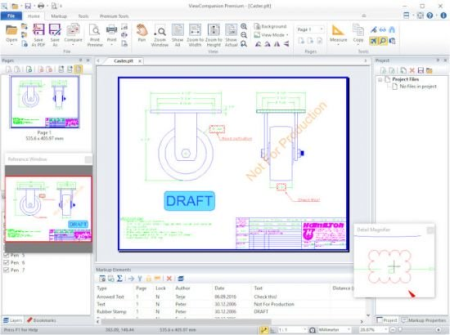
ViewCompanion Premium 12.33 (x86/x64) Multilingual

70be6303-3e8f-4c3a-a313-5490cd6bb914.png

(x86/x64) Multilingual | File size: 69.4 MB

ViewCompanion Premium is the most powerful member of the ViewCompanion family.​

ViewCompanion Premium can view, print and convert PLT plot files, Adobe PDF, Autodesk DWF, Postscript, CGM, TIFF, CALS and many other formats. ViewCompanion Premium support PLT plotter files using HPGL, HPGL/2, HP-RTL and Calcomp formats.

If you need to distribute drawings, e.g. on the Internet, you can convert your drawings to Autodesk Drawing Web Format (DWF), Scalable Vector Graphics (SVG) or Adobe PDF. All these formats are very popular for distributing drawings.

You can convert multiple files of different formats to a single multi-page PDF, DWF or TIFF file.

ViewCompanion can split a multi-page PDF, PDF or DWF files into several single paged files.

Your PLT, PDF, CGM and DWF files can be converted to Autodesk DXF format, which can be read by almost all CAD application, e.g.: Autodesk AutoCAD and Microstation. Both batch conversion and printing is included. The software can be configured to monitor a user selected folder, and all files copied to that folder will be automatically printed.

ViewCompanion gives you advanced functions for zooming and panning, and you can view your files fast and accurate.

Use Viewcompanion's precise tools to measure dimension lengths and areas. You can measure using snap to drawing geometry for highest accuracy. Calibration of the measurement tools is available to make sure you get correct results if your drawings are not 1:1. The measurement results may be exported to csv, which can be loaded into Excel or any other spreadsheet application.

With ViewCompanion Premium you can add markups to the loaded file. Supported markup elements include rectangles, lines, dimension lines, area measurements, ellipses, polygons, text, arrows, stamps and images.

You can select one of the predefined stamps or create your own. User defined symbol libraries makes it easy to add frequently used symbols as markups. Hyperlinks can be added to markup elements, and a hyperlink can either open another drawing inside ViewCompanion, or open an Internet location (URL) using the default browser.

All markup elements are stored in a separate file and the original file will be left unmodified.

The markup elements can optionally be included when the viewed file is printed or converted.

You can export markup elements as Autodesk DXF, Autodesk DWF, CGM and other formats.

View, markup, convert and print files of many different formats.

Convert to a large number of output formats, please see the complete list of formats below.

Batch printing and conversion is included.

Color, Black & White or Grayscale printing and conversion.

Scaled print or fit to paper.

Poster mode for printing big format drawings on multiple sheets, e.g. print an A0 drawing in full size using multiple A4 sheets.

N-up printing mode, also known as multiple pages per paper sheet printing.

Hot folder printing. Monitor a folder and print all files that are copied to this folder.

Add footer and header containing date, scale, , filename or custom text to the printed file.

Annotate your files by adding text, symbols, stamps, barcodes, images, measurements and more.

Include annotation during printing and conversion.

Precise measurement with snap to drawing geometry.

Send the viewed file by e-Mail, either as a PDF, as a JPEG or in the original format.

Conform, or convert, any PDF file into PDF/A standard for archiving. Batch and single file supported.

Compare two files and visualize the differences.

Compare multi-page PDF files, page by page.

Merge different PDF files into a single multipage PDF file.

Split a multipage PDF file into individual files.

Digitally sign PDF files.

Optimize PDF files.

Split a multipage TIFF file into individual files.

Scan and create a new file or add as page to active file.

Use raster processing tools like deskew, cleanup and more.

Overlay up to 10 files and print as one drawing.

Apply watermark using text, or an image, to the printed file.

Use pen table for full control of colors, styles and widths.

Copy a selected region, or whole drawing, to clipboard, and paste into other applications.

Text search and extract.

Store commonly used files in projects.

Shell Extension for easy access to functions inside the Explorer Window and a full preview of the selected file.

Extensive set of command line parameters for conversion and printing.

Delete pages from multipage files (e.g. TIFF and PDF).

Use the PDF to CAD tool to convert your PDF files into editable DXF, DWF, PLT, SVG and CGM files.

Updates: official site does not provide any info about changes in this version.


DOWNLOAD
uploadgig
Код:
https://uploadgig.com/file/download/df9429493d32f505/NTexhZ6W_.ViewCompan.rar
https://uploadgig.com/file/download/e0ea8e1830082d9c/NTexhZ6W_.ViewCompan_.rar

rapidgator
Код:
https://rapidgator.net/file/1417f81248315e8a1c5ce7761f319b8c/NTexhZ6W_.ViewCompan.rar
https://rapidgator.net/file/313fb55d6f5bec2d51ef3667bd11cdbb/NTexhZ6W_.ViewCompan_.rar

nitroflare
Код:
http://nitroflare.com/view/22B8C916BF0FEC2/NTexhZ6W_.ViewCompan.rar
http://nitroflare.com/view/DE8EF0432E5A942/NTexhZ6W_.ViewCompan_.rar
 
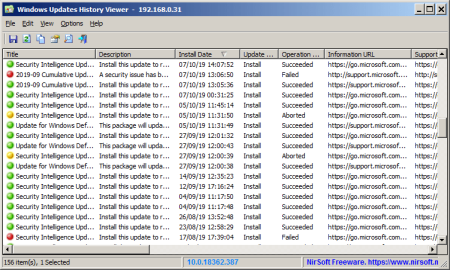
WinUpdatesView 1.11

1251f33e-aa61-4f88-8410-064a2bef63c1.png

File Size : 0.1 Mb

WinUpdatesView is a simple tool that displays the history of Windows updates on your system.​

WinUpdatesView can load the Windows updates history from your local system, using API, and it can also read and parse the Windows updates database file (DataStore.edb) from external drive or from remote computer on your network.For every Windows update history record, WinUpdatesView displays the following fields: Title, Description, Install Date, Update Operation (Install, Uninstall, Not Started, In Progress), Operation Result (Succeeded, Succeeded With Errors, Failed, Aborted), Category, Information URL, Support URL, Uninstall Notes, Client Application ID, Service ID, Update ID, Revision Number, Unmapped Result Code, Server Selection, hResultVersion 1.11

Added 'KB Number' column.


DOWNLOAD
uploadgig
Код:
https://uploadgig.com/file/download/1a97d1f6eD27635d/dYTxn3Vb__WinUpdates.rar

rapidgator
Код:
https://rapidgator.net/file/e2cbacf64a5d2b707f437e35d61ce650/dYTxn3Vb__WinUpdates.rar

nitroflare
Код:
http://nitroflare.com/view/93BDE2192A99065/dYTxn3Vb__WinUpdates.rar
 
Wireshark 3.2.3

e9acf8fd-04bf-4bbc-b50b-97f1673d647f.png

File Size : 109 Mb

Wireshark is a network protocol analyzer that enables you to capture and examine data from a live network or from a capture file on disk.​

You can interactively browse the capture data and view summary and detail information for each packet. Wireshark has several powerful features, including a rich display filter language and the ability to view the reconstructed stream of a TCP session. The program,can read capture files from tcpdump (libpcap), NAI Sniffer (compressed and uncompressed), Sniffer Pro, NetXray, snoop, Shomiti Surveyor, AIX s iptrace, Microsoft Network Monitor, Novell s LANalyzer, RADCOM s WAN/LAN Analyzer, HP-UX nettl, ISDN4BSD, Cisco Secure IDS iplog, the pppd log (pppdump-format), and the AG Group s/Wildpacket Etherpeek.

Wireshark can also read traces made from Lucent/Ascend WAN routers and Toshiba ISDN routers. Any of these files can be compressed with gzip and Wireshark will decompress them on the fly.

Data can be captured "off the wire" from a live network connection, or read from a capture file.

Wireshark can read capture files from tcpdump (libpcap), NAI's Sniffer (compressed and uncompressed), Sniffer Pro, NetXray, Sun snoop and atmsnoop, Shomiti/Finisar Surveyor, AIX's iptrace, Microsoft's Network Monitor, Novell's LANalyzer, RADCOM's WAN/LAN Analyzer, HPUX nettl, i4btrace from the ISDN4BSD project, Cisco Secure IDS iplog, the pppd log (pppdumpformat), the AG Group's/WildPacket's EtherPeek/TokenPeek/AiroPeek, or Visual Networks' Visual Up. It can also read traces made from Lucent/Ascend WAN routers and Toshiba ISDN routers, as well as the text output from VMS's TCPIPtrace utility and the DBS Etherwatch utility for VMS. Any of these files can be compressed with gzip and Ethereal will decompress them on the fly.

Live data can be read from Ethernet, FDDI, PPP, Token*Ring, IEEE 802.11, Classical IP over ATM, and loopback interfaces (at least on some platforms; not all of those types are supported on all platforms).

Captured network data can be browsed via a GUI, or via the TTY*mode "tethereal" program.

Capture files can be programmatically edited or converted via command*line switches to the "editcap" program.

602 protocols can currently be dissected

Output can be saved or printed as plain text or PostScript.

Data display can be refined using a display filter.

Display filters can also be used to selectively highlight and color packet summary information.

All or part of each captured network trace can be saved to disk.


DOWNLOAD
uploadgig
Код:
https://uploadgig.com/file/download/f39f43eE0f58e9F5/xMLcu934__Wireshark__.rar

rapidgator
Код:
https://rapidgator.net/file/9a0a54d7b9a346c6c5e308bc9aa9c483/xMLcu934__Wireshark__.rar

nitroflare
Код:
http://nitroflare.com/view/2F6BB92D8BD12A9/xMLcu934__Wireshark__.rar
 
Applian Replay Video Capture 9.1.1

7076f39d-e52d-4e8a-b123-f533dcb63c5b.png

File size: 40 MB

Replay Video Capture - Best For: Recording ANY Online Video Using Screen Capture!​

Replay Video Capture is the best way to make production quality video recordings from hard-to-record sources. Use it to record ANY online video. Save all or part of a DVD. Or just make a high quality movie file from any area of your screen. If you can watch it, you can turn it into a high quality video. Capture High Quality Videos from ANYTHING Playing on Your PC

- Screen Record ANY Online Video Feed

- Background Mode records from hidden windows

- Ideal for Webcams, Chat Sites and Webinars

- Supports Dual Monitor Setups

- Super High Quality - Up to 50 FPS

- Run from USB/Thumb drives

Replay Video Capture is the ONLY screen capture application that allows you to capture videos using Background Mode. Go ahead and hide the video, or cover it with another window. Replay Video Capture will continue capturing without disrupting your recording! Unlike other video capture programs, Replay Video Capture is designed for the highest quality video output.

How Does it Work?

Replay Video Capture expertly captures video from ANY online source with perfect quality. If you can watch it, you can save it! It records video from ANY website regardless of format. It can even record DVD's playing on your PC. And because it does not circumvent DRM or any copy protection technology, it's 100% legal worldwide.

Super Easy to Use

Using Replay Video Capture is easy! Just press the Get Video button to automatically detect the video window on your screen, then click Record to start. Once you're recording, just click Stop to end, or Pause to pause and resume. It's that simple!

High Quality, Small Files

With the Replay Video Capture screen recorder, you'll get amazing video quality, or compact portable files. You can choose between high-quality, high-speed MPEG-2 files, or smaller Windows Media (WMV) files. You can even run Replay Video Capture 7 from a USB/Thumb drive and save videos externally.

· Improved, complete redesign of the Thumb Mode

Thumb mode allows you to run Replay Video Capture from a USB external drive (thumb drive). You can use this to record your favorite videos on any computer you have access to without the need to reinstall the software. All recordings and settings are saved on the USB drive not on the host computer.

· New improved audio recording

New Virtual Audio Plus audio driver. This driver was specifically designed for Windows 10 but it can be also used with any Windows version including XP.

· Improved Background recording

Background recording was always one of the main requested features of Replay Video Capture. Recording videos without showing the actual video on the screen allows you to use the desktop to do other things during recording. Enable Background mode, click Hide to make the video window disappear from the screen then open other windows or programs.

· Picture in Picture

When using the Background mode, enable the PIcture in PIcture option in Settings then mark your video on the screen,. Click Hide then Detach. Now your selected video window plays as Picture in PIcture on your desktop.


DOWNLOAD
uploadgig
Код:
https://uploadgig.com/file/download/42f65ecb9227FE4f/ZMwxcVNq_ReplayVideo.rar

rapidgator
Код:
https://rapidgator.net/file/a5df4794c5a0ebc988ed442addd68081/ZMwxcVNq_ReplayVideo.rar

nitroflare
Код:
http://nitroflare.com/view/5D5100A70F54E57/ZMwxcVNq_ReplayVideo.rar
 
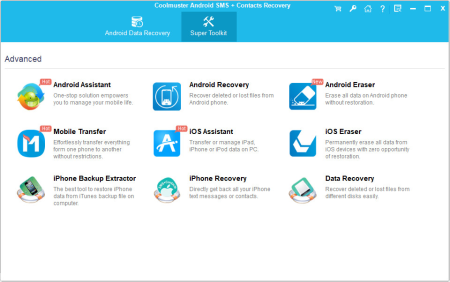
Coolmuster Android SMS + Contacts Recovery 4.4.39

e6803327-1c99-475e-a7af-955bab14e4c2.png

File size: 21 MB

Exclusive SMS & Contacts Recovery Software for Android Smartphones!​

Ferret about a way to retrieve back your lost or deleted text messages and contacts from your Android phone? Just look no futher than Coolmuster SMS+Contacts Recovery, which is fully capable of recovering SMS and contacts from Android handset with ease. - Recover deleted or lost SMS messages and contacts from Android mobile phones directly without quality loss.

- Preview recoverable messages and contacts before recovery.

- Support several Android phones: Samsung, HTC, Motorola, etc.

Hassle-free to Recover Lost Android SMS & Contacts

Contacts and Text Messages are the two basic compositions of an Android phone, which help users easily communicate and pass on information with each other. But due to Recover not only phone numbers and text messages, but also contact name, address, company, email, SMS attachments and so on.

- Please note before you get the software workable on your Android phone, you need to root your device at first. Here is the easy guide show you How to Root Your Android Devices.

Backup Recovered Android Data on PC for Futher Use

It is always more important to take precautions than rack your brains to find a way to solve the problem has already gone wrong. After recovery by this Android SMS Recovery and Android Contacts Recovery, you can sync the recovered data to your Android devices again, or you can backup them to your computer for futher record.

- Recovered Android text messages and contacts will be saved as common readable and printable formats like .txt, .html, .xml, or .csv. You can save them on your Windows PC for backup or future use.

- You can also re-sync the recovered text messages and contacts to your Android mobile phones once again, with the help of Coolmuster Android SMS+Contacts er.

Preview and Selectively Check to Recover

To let you enjoy a more accurate and quicker data recovery process, this software provides you with considerate Preview feature that allows you to preview all the scanned out text messages and contacts information before recovery.

- First thing the program will to do is scanning your Android phones deeply and quickly, and all the scanned out SMS messages and contacts can be previewed with details, including contact person data and SMS attachments.

- The permission of previewing the scanned out messages and phone numbers enables you to confirm which one is indeed one you really need to recover or not.

Read-only and Compatible with Multiple Android Handsets

Coolmuster Android SMS+Contacts Recovery works on almost all Android-based mobile phones. It only reads your device and won't damage, delete or modify your original data at all.

- Works for almost all popular Android smartphones available in the market, such as Samsung, HTC, LG, Sony, Motorola, ZTE, Huawei, etc. and compatible with There is no need to worry about your private information revealing thanks to the 100% read-only and risk-free features of this SMS & Contact recovery software.


DOWNLOAD
uploadgig
Код:
https://uploadgig.com/file/download/d151a7E83a0AD8d4/htkXzOCL_coolandroid.rar

rapidgator
Код:
https://rapidgator.net/file/83a887555dfb38d9171467f38e0b1a4c/htkXzOCL_coolandroid.rar

nitroflare
Код:
http://nitroflare.com/view/7E546B9220B8AA5/htkXzOCL_coolandroid.rar
 
JP Software CMDebug 26.00.32 (x64) Multilingual

27318ec5-bbd8-4116-afbf-3b07912f7029.png

File size: 23 MB

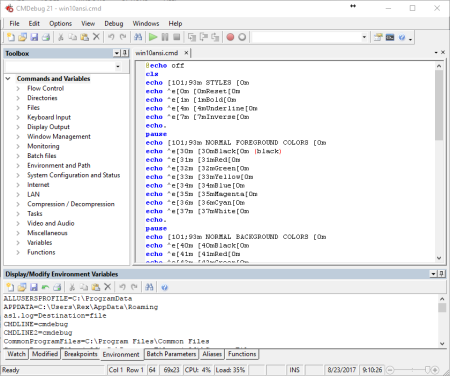
CMDebug is a stand-alone version of the Take Command IDE and batch debugger component.​

CMDebug is intended for developers who need to develop batch files to run in CMD.EXE or TCC-RT (run). CMDebug allows you to create and debug your batch scripts with the integrated graphical IDE. CMDebug includes tabbed edit windows and a sophisticated debugger with single stepping, breakpoints, syntax coloring, tooltips, bookmarks, and tabbed variable and watch windows. Windows batch file programming has never been easier or more powerful!

You can use CMDebug to develop either CMD-compatible batch files (.BAT or .CMD), or TCC-RT-compatible scripts (.BTM). If you select the "TCC Syntax" option, CMDebug provides the full TCC-RT command set. If you select the "CMD Syntax" option, CMDebug will maximize CMD compatibility and disable TCC-only internal commands, variables, and functions. Some internal CMD / TCC commands will also behave slightly differently or modify their display output in order to match CMD's behavior more closely.

Using CMDebug with TCC-RT allows you to write (and encrypt) scripts using the TCC command language, and then distribute them with the free TCC-RT run on an unlimited number of target machines.

Create and debug your batch scripts with the integrated graphical IDE. The IDE includes tabbed edit windows and a sophisticated debugger with single stepping, breakpoints, syntax coloring, tooltips, bookmarks, tabbed variable and watch windows. Windows batch file programming has never been easier or more powerful!

The TCC-RT scripting language is a massive superset of the Windows CMD shell, with 220+ internal commands, 367+ internal functions, and 289+ system variables. Almost all of the CMD command line commands (e.g. DIR, COPY, DEL, START, etc.) are enhanced with hundreds of additional options. And TCC adds more than 180 new commands. TCC-RT can usually do in one or two lines what requires dozens CMD commands (when CMD can do it at all).

The scripting language includes a complete set of extended flow control structures including IF-Then-Else, DO and FOR loops, SWITCH, subroutines, batch libraries, and more.

When using TCC-RT syntax, most interactive commands (such as COPY, DEL, DIR, MOVE, REN, START, etc.) have command dialogs that allow you to select filenames and options and see your command line before executing it. The most powerful Windows command processor is also the easiest to use!

Monitor your system's hardware and software events, and execute commands when an event is triggered. You can monitor directory changes, the clipboard, event logs, Ethernet and WiFi connections, services, processes, and USB and Firewire connections.

Environment variable substitution is greatly enhanced, including nested variables, delayed expansion, indirect variables, multidimensional array variables, and direct access to the system, user, and volatile variables in the registry.

Select or exclude files by date, , size, owner, and extended wildcards or regular expressions for extraordinary flexibility in file management.

Specify multiple filenames for most file processing commands (i.e., COPY, DEL, DIR, MOVE, etc.), or optionally the name of a file that contains the filename arguments. (COPY even supports multiple targets as well as multiple sources.)

Multiple types of I/O redirection are available, including redirecting and piping to STDERR, "in-process" pipes, "here-document" and "here-string" redirection, and Tee and Y pipe fittings.

Send keystrokes to any application (console or GUI).

TCC-RT includes internal compression and extraction commands for ZIP, 7ZIP, TAR, JAR, GZIP, and BZIP files.

You can access FTP, TFTP and HTTP (including SSL and SSH) directories and files in all command processor file-handling commands (COPY, DEL, MOVE, etc.).

Internal support is included for Perl, Lua, REXX, Python, Tcl/tk, and any Windows Active Scripting language. You can even combine multiple languages in your batch scripts.

And many thousands more -- see our online help for details.

CMDebug is compatible with any version of Microsoft Windows 7, Server 2008R2, Windows 8, Server 2012, Windows 10, and Server 2016, including 64-bit Windows. CMDebug is available in both 32-bit and 64-bit versions.

Updates: official site does not provide any info about changes in this version.


DOWNLOAD
uploadgig
Код:
https://uploadgig.com/file/download/E716ccfc2a0a9f5F/y8TUdjt9_cmdebug26_.rar

rapidgator
Код:
https://rapidgator.net/file/e5d14f36734dd25b2534dca594a2816a/y8TUdjt9_cmdebug26_.rar

nitroflare
Код:
http://nitroflare.com/view/21F926B600BBE9F/y8TUdjt9_cmdebug26_.rar
 
JP Software TCC 26.00.32 (x64)

0e1b7248-56c6-4a9d-8a3a-30d91911db3a.png

File size: 31 MB

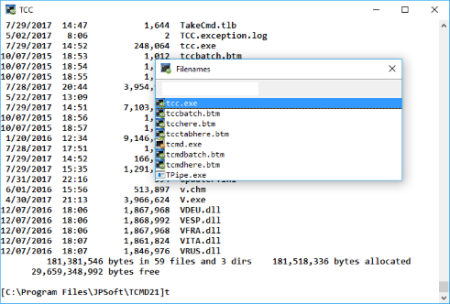
TCC is our console mode Windows command shell (formerly known as 4NT).​

TCC is a replacement for the CMD command line (the default Windows command prompt). TCC is a superset of CMD, with 246 internal commands (CMD has fewer than 40), 695+ internal variables and functions, and hundreds of enhancements to existing CMD commands. TCC works with your existing command line applications and batch files, but offers major improvements in command line and batch file capabilities, and adds thousands of new features to your command prompt windows.

TCC is a CMD replacement command processor that is compatible with your existing CMD commands and batch files, while adding thousands of new features. You're immediately more productive, and you can learn and add TCC's new features at your own pace.

Create and debug your batch scripts in a fraction of the with the integrated editor and batch file debugger.

The integrated and familiar environment means you are immediately more productive with your interactive command prompt and batch file development tasks.

The consistent syntax reduces your learning and development .

The comprehensive help (including context-sensitive popup help for command line syntax), speeds your development and reduces syntax errors.

Updates: official site does not provide any info about changes in this version.


DOWNLOAD
uploadgig
Код:
https://uploadgig.com/file/download/6A13e63faBd5cDa1/VM8xlPsJ_tcc26_.rar

rapidgator
Код:
https://rapidgator.net/file/446b958c6c1111b20be9f42f5d724c71/VM8xlPsJ_tcc26_.rar

nitroflare
Код:
http://nitroflare.com/view/AB9716164CB9E05/VM8xlPsJ_tcc26_.rar
 
JP Software Take Command 26.00.32 (x64) Multilingual

7fcf764d-67d0-4745-8d9a-eec5d3174c82.png

File size: 38 MB

Take Command is a comprehensive interactive GUI and command line environment that makes using the Windows command prompt and creating batch files easy and far more powerful.​

Take Command displays your command line applications in tabbed windows, with optional Explorer-style integration for a visual look at your folders. Take Command includes hundreds of major enhancements to the command line and CMD commands such as COPY, DEL, and DIR, and adds more than 140 new commands, 460 internal variables and functions, a batch file IDE / debugger, and thousands of other features.· Modify and re-execute previous commands with a powerful command line editor

· Copy, delete, move, and rename groups of files and directories, not just individual ones

· Extended directory searches allow you to change to a directory anywhere on your system by entering only part of its name

· Quickly locate files or text within files anywhere on your system

· Built-in file viewer includes scrolling, search, and print capabilities

· Select or exclude files by date, , size, and/or extended wildcards for extraordinary flexibility in file management

· Redefine commands, create new commands and functions for your regular tasks, even assign frequently used commands to a single keystroke

· Direct access to FTP, TFTP and HTTP (including SSL) directories and files in all file-handling commands

· Complete configuration adjustment, either through interactive dialogs or on the command line

· File descriptions up to 511 characters long provide information that can't fit in a filename

· Batch debugger with singlestepping, breakpoints, syntax coloring, bookmarks, popup variable windows, variable watch windows, and editing

· An improved batch language adds subroutines, IF/THEN/ELSE logic, DO loops, SWITCH statements, error and exception handling, and more than 130 internal commands, while retaining compatibility with batch files written for CMD

· More than 130 built-in variables include system configuration, device status, network drive detection, and free memory and disk space

· More than 200 variable functions assist with manipulation and display of strings, characters, numbers, date and , file names, etc

· Start graphical and character-mode applications with ease - even run most console programs in the Take Command window

· Built-in screen scrollback buffer lets you review or print output from past commands at any

· Customizable toolbar gives you quick access to frequently used commands and applications

· Find File dialog lets you search quickly for files or text, anywhere on your system - or search from the command line with the new FFIND command

· Dialogs, accessible from the Options and Utilities menus, for editing environment variables, aliases, file descriptions, and startup parameters

· New commands such as ACTIVATE, MSGBOX, and QUERYBOX that allow you to use GUI features and control GUI applications from your batch files


DOWNLOAD
uploadgig
Код:
https://uploadgig.com/file/download/73B32b641A6B22e4/nZhw7Lo9_tcmd26_.rar

rapidgator
Код:
https://rapidgator.net/file/e0eb3f236354a55ed44315dd5dba11ad/nZhw7Lo9_tcmd26_.rar

nitroflare
Код:
http://nitroflare.com/view/07E4631E0D73659/nZhw7Lo9_tcmd26_.rar
 
Karaosoft Karma 2020.4.8

e1b5e7a7-0c1c-4964-9a03-5fc9ef91b523.png

File size: 27 MB

Manage your karaoke shows with ease.​

Clickless search, drag-n-drop functionality, and many other unique features designed to bring you the most simplified management of your karaoke shows. Karma is the culmination of years of research into every known method of running karaoke shows on the PC, to produce a product that is both robust yet simple to use and saving. Karma eliminates many wasting tasks to free you up for more enjoyable things like interacting with the crowd or even taking a break!

Clickless search, drag-n-drop functionality, and many other unique features designed to bring you the most simplified management of your karaoke shows. Karma is the culmination of years of research into every known method of running karaoke shows on the PC, to produce a product that is both robust yet simple to use and saving. Karma eliminates many wasting tasks to free you up for more enjoyable things like interacting with the crowd or even taking a break!

- Paperless slips - Let your singers use SingNext.com to send paperless slips right from their phones, without having to leave their seat.

- Triple display support - Optional triple display mode with 3 separate video outputs for KJ, singer, and crowd. Automatically shows lyrics to singer display while showing the crowd a different view with customizable information and displays during performances. For music videos, video automatically switches to crowd display when no singer is assigned.

- Private Messaging - Send private messages to singer screen (like "back off the mic" without embarrassing the singer), or vice versa with the crowd display.

- Superior Audio/Video Quality - Utilizes Karaosoft's custom hybrid audio/video ee for flawless sound and key changes without low end distortion. Post decoding video throughput for the smoothest video playback and synchronization on any hardware!

- Simplified Song Search - No need to take the to drag your mouse to the search box. Just start typing!

- Drag and Drop songs and singers with ease. Change a singer's position in rotation by a simple drag and drop (mouse or touch), and watch the playlist order automatically change to suite the new rotation order!

- Touch screen scrolling with inertia

- Automatic Playlist sorting on any song add or rotation change. Any queued DJ music automatically stays in place while songs assigned to singers are automatically sorted around them.

- Auto-Play / Auto-Pitch - Set pitch ahead of for individual songs to automatically be set when the song is played. Set DJ music to Autoplay one after another with automatic crossfade so you can take a break without worry.

- Panel Layout insures no window will ever overlap another during your show and all show related controls are always onscreen. Panels can be arranged in one of 64 different layouts, and then personally sized to fit your custom screen needs.

- On-The-Fly Lyrics timing - Ever have the lyrics ahead or behind the music? AV synch control can be changed on the fly.

- Version Changer - Singer didn't want to sing that version? Click the "Now Playing" bar and view all of the available versions for a quick change.

- Automatic Crossfader, Multiplex routing, and more!


DOWNLOAD
uploadgig
Код:
https://uploadgig.com/file/download/1752bA5c2777Fab1/H69SLGNI_Karma2020.4.rar

rapidgator
Код:
https://rapidgator.net/file/74bc059677d15df812ea15d0ee8be17b/H69SLGNI_Karma2020.4.rar

nitroflare
Код:
http://nitroflare.com/view/0FF33F5A12E5F1D/H69SLGNI_Karma2020.4.rar
 
Назад
Сверху