• Здравствуйте. Сайт заработал в архивном режиме форум www.old.nado.in

Anthony's Software !!!

Kaspersky Lab Products Remover 1.0.1462.0
1e49c43c-936d-49e3-8272-7a9ab9baf9e6.png

File Size : 14.2 Mb

Kaspersky is one of the leading antivirus companies with a very good background in antivirus solutions.​

Kaspersky offers its customers state of the art antivirus solutions and security products to keep their systems safe from all kinds of digital threats. Kaspersky offers its customers state of the art antivirus solutions and security products to keep their systems safe from all kinds of digital threats.

Unfortunately, when you try to uninstall these products via the built-in uninstaller in Windows, various errors may occur. The applications might not be uninstalled completely and remnants of the programs may still be found on your system.

Kaspersky Anti-Virus Remover is a small utility that enables you to easily uninstall various Kaspersky products from your computer.

The application can remove the following programs from your PC: Kaspersky Small Office Security 2 for Personal Computer / for File Server, Kaspersky PURE / PURE R2, Kaspersky Anti-Virus (all versions), Kaspersky Internet Security (all versions), Kaspersky Password Manager (all versions), AVP Tool driver and Kaspersky Lab Network Agent 8.

By default, the application automatically detects Kaspersky programs and offers to uninstall them. However, if the product was not detected, you can manually select it from the given list.

When you are not sure about which Kaspersky product is installed on your machine the "Remove all known products" option can come in handy. Selecting it automatically removes all traces of all the supported applications from your system without the need of pointing it to any of them.

After you have chosen the desired product you have to enter a security code in order to start the removal process.

If you want to safely uninstall your Kaspersky products and remove all traces from your hard drive, Kaspersky Anti-Virus Remover will do the trick.

AVP Tool Driver

KPM 8 MR1/MR2

Kaspersky Anti-Virus 2009

Kaspersky Anti-Virus 2010

Kaspersky Anti-Virus 6.0 FS MP4

Kaspersky Anti-Virus 6.0 SOS MP4

Kaspersky Anti-Virus 6.0 WKS MP4

Kaspersky Anti-Virus 6.0 for Windows Servers

Kaspersky Anti-Virus 6.0 for Windows Workstations

Kaspersky Anti-Virus 8.0 for Windows Servers Enterprise Edition (x64)

Kaspersky Anti-Virus 8.0 for Windows Servers Enterprise Edition (x64) MR1

Kaspersky Anti-Virus 8.0 for Windows Servers Enterprise Edition (x64) SP2

Kaspersky Anti-Virusflnternet Security 2011

Kaspersky Anti-Virusflnternet Security 2012

Kaspersky Anti-Virusflnternet Security 2013

Kaspersky Anti-Virusflnternet Security 2014

Kaspersky Anti-Virusflnternet Security 2015

Kaspersky Anti-VirusInternet SecurityKaspersky Total Security 15.0.1.415

Kaspersky Anti-VirusInternet SecurityKaspersky Total Security 15.0.2.361

Kaspersky Anti-VirusInternet SecurityKaspersky Total Security 2016

Kaspersky Anti-VirusInternet SecurityKaspersky Total Security 2017

Kaspersky Anti-VirusInternet SecurityKaspersky Total Security 2018

Kaspersky Endpoint Security 10 for Windows

Kaspersky Endpoint Security 10 for Windows Service Pack 1 MRl

Kaspersky Endpoint Security 8

Kaspersky Fraud Prevention for Endpoint

Kaspersky Fraud Prevention for Endpoint 2015

Kaspersky Fraud Prevention for Endpoint 2016

Kaspersky Internet Security 2009

Kaspersky Internet Security 2010

Kaspersky Lab Network Agent 8,9

Kaspersky Network Agent 10

Kaspersky PURE 2.0 / CRYSTAL

Kaspersky PURE 3.0 / CRYSTAL

Kaspersky PURE/CRYSTAL

Kaspersky Password Manager 4/5

Kaspersky Security Scan

Kaspersky Small Office Security

Kaspersky Small Office Security 15.0.2.361

Kaspersky Small Office Security 3

Nifty Security24 Internet Security

Nifty Security24 Internet Security 2013

Updates: official site does not provide any info about changes in this version


DOWNLOAD
uploadgig
Код:
https://uploadgig.com/file/download/33e0d70d11692B5f/nffRN7iM_kavremvr..rar

rapidgator
Код:
https://rapidgator.net/file/2fe6d47d9d899fdf4026ad69d4d972a1/nffRN7iM_kavremvr..rar

nitroflare
Код:
http://nitroflare.com/view/105CB998358BA6B/nffRN7iM_kavremvr..rar
 
LosslessCut 3.7.0

9cedaa0a-fa19-4cfe-9e2e-46d33eeb4342.png

File Size : 75.5 Mb
Cut is a simple, cross platform video editor for lossless trimming / cutting of videos.​

Great for rough processing of large video files taken from a video camera, GoPro, drone, etc. Lets you quickly extract the good parts from your videos and discard GB of data without losing quality. It doesn't do any decoding / encoding and is therefore extremely fast. Also allows for taking JPEG snapshots of the video at the selected . Also supports lossless cutting in the most common audio formats . Since LosslessCut is based on Chromium and uses the HTML5 video player, not all ffmpeg supported formats will be supported. The following formats/codecs should generally work: MP4, MOV, WebM, MKV, OGG, WAV, MP3, AAC, H264, Theora, VP8, VP9 For more information about supported formats / codecs, see


DOWNLOAD
uploadgig
Код:
https://uploadgig.com/file/download/649446376259FA18/WxKLWbkg_LosslessCut.rar

rapidgator
Код:
https://rapidgator.net/file/d7e82f3ea8a671e9a318c5e8749236d2/WxKLWbkg_LosslessCut.rar

nitroflare
Код:
http://nitroflare.com/view/46B5E017AFBE576/WxKLWbkg_LosslessCut.rar
 
My Notes Keeper 3.9.3 Build 2174

dcb6a368-72f7-4e95-997a-3f586b09d91d.png

File size: 9.0 MB

My Notes Keeper is the prr notes/outliner application for Windows It allows you to store all of your notes and information in an easy-to-use outline, where you can quickly find what you need.​

My Notes Keeper is a 'swiss-army-knife' PIM program, powerful yet easy to use ... With My Notes Keeper, creating your own freeform database and getting organized couldn't be easier.My Notes Keeper is a free-form notes/outliner application for Windows XP/Vista/7/8/10. It allows you to store all of your notes and information in an easy-to-use outline, where you can quickly find what you need. My Notes Keeper is a 'swiss-army-knife' PIM program, powerful yet easy to use ... With My Notes Keeper, creating your own freeform database and getting organized couldn't be easier...

Many Uses

Knowledge Base, eBook Creator, Customer Data Management, Contact Manager, Notes Manager, Document Manager, Address Book, Phone Book, Password Keeper, Photo Album and much more!

icoIncrease Efficiency

Convenient tabbed + tree-structured form of notes representation. Locate needed information in seconds, using MyNoteskeeper's easy to navigate tree-structure. Unlimited notes size and number of notes in notebook.

icoEasy to Use

MyNotesKeeper has an extremely easy to use

interface that requires no technical knowledge

whatsoever. The installation takes less than 10

seconds, and even a non-technical novice can

get MyNotesKeeper up-and-running in minutes.

icoPowerful Text Editor

Powerful Text Editor has all of the standard Text and Paragraph Editing functions that MS Word has (font, color, size, background color, tables, images, symbols, etc.)

icoFully Compatible with MSOffice

Full compatible with Microsoft Office(Word, Excel), like import and export(or paste from and paste to) from *.txt, *.wri, *.rtf, *.doc, *.html and more...

icoKeep your Data Safe

High reliability, repair file in case of hardware failure or operating system error caused by another application. Advanced file encryption and password protection.


DOWNLOAD
uploadgig
Код:
https://uploadgig.com/file/download/a8fE3F0059796D62/px4f189q_NotesKeeper3_.rar

rapidgator
Код:
https://rapidgator.net/file/60a9c19968f252045e03f9d2936c9e24/px4f189q_NotesKeeper3_.rar

nitroflare
Код:
http://nitroflare.com/view/1E848776201EC5B/px4f189q_NotesKeeper3_.rar
 
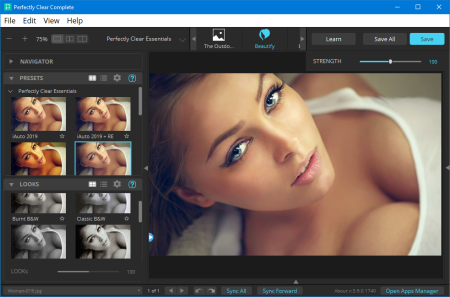
Perfectly Clear Complete 3.9.0.1749 (x64)

ce28350b-8811-4b51-81bb-f224fa70ed00.png

Windows x64 | Standalone & Plug-in & Addons | File size: 97.37 MB

Built for precision.​

Made for beauty. Above all, you want better photos. But what if you could have better photos faster? Perfectly Clear has mastered the science of intelligent image correction - creating superior quality photos in record , so you can get back to doing what you really love...in no .With Perfectly Clear, you'll get results faster so you can spend more behind the camera and less in front of the computer. Take advantage of intelligent image analysis to find and fix numerous camera flaws automatically. Plus, you can quickly add your favorite finishing touch with our stylized LOOKs.

Our presets are just the starting point. Easily apply only the adjustments you need for the perfect image. Use our powerful sharpening and noise reduction, which goes beyond what other tools can do, to unlock a whole new image. Keep an eye on your color and exposure with a dynamic histogram that tracks exposure and color clipping.

Every photographer is different, and so is Perfectly Clear. Our adaptive interface lets you hide tools you don't need while you work, allowing you to focus on your image. Plus, you can make and manage your own presets, which intelligently adapt to each photo.

Rather than move your entire image library or change your workflow, we'll make your existing workflow better. We support several platforms and have more coming soon. With powerful batch processing and up to 30 corrections in one click, we'll make everything better.

Creating our award-winning technology took more than a decade of R&D, multiple patented processes, and over a dozen unique algorithms. We cracked the code on correcting every pixel independently. The proof is in your pictures.

You became a photographer to go out and capture the beauty of the world, not sit inside at an editing desk. We invented our automatic image corrections to take away the tedium and give you back your freedom. So let Perfectly Clear handle the editing chores while you devote your day to doing what you do best-creating incredible images.

- Up to 20 auto corrections with one click

- Batch process 1000s of images in minutes

- Stay within your workflow

- Unlock the details in every image

- Tap into professionally created presets

- Save countless hours of manual editing

- Fine tune details with precise controls

Creating our award-winning technology took more than a decade of R&D, multiple patented processes, and over a dozen unique algorithms. We cracked the code on correcting every pixel independently. That's how we make a 12-megapixel photo look like it was taken with 12 million separate apertures. The proof is in your pictures.

At Athentech, we're committed to solving problems faced by photographers. Every year, we continue to innovate with R&D work by our team of physicists, eeers, and photographers. Every day, we invest in making your photos look their best.

- Perfect Exposure. More effective than traditional brightness, Perfect Exposure lets you maintain Real Color Photography without clipping or washing out. Our technology overcomes the distortions caused by a single aperture by replicating the way your eye gathers light and correcting your exposure pixel by pixel.

- Depth. Brings out the contrast in a photo without messing up the other colors. Perfectly Clear uses a patented algorithm that manages the dynamic range in a unique way, revealing the detail needed to produce this kind of depth.

- Light Diffusion. Perfectly Clear lets you create a softer look with warmer tones and captures the perfect portrait even in broad daylight.

- Skin & Depth bias. For realistic lighting on skin.

- Photoshop is powerful, but for Full Color Spectrum, Light Diffusion, automatic red-eye removal, you have to turn to Perfectly Clear.

- Vibrancy. Perfectly Clear mimics how the eye adjusts saturation, providing a color-vibrant photo. Somes digital cameras can cause photos to look washed out/faded because they have a linear response to light. But our solution overcomes this problem by looking at each channel independently.

- Fidelity. We reproduce the full visual spectrum of colors seen by the eyes, enabling you to capture purples properly every .

- Tint. In the days of film, you had to carry around different films and filters for different s of day-all to get the lighting source correct. To remove nasty tints-from tungsten, fluorescent, incandescent, IR-Perfectly Clear searches for an abnormal tint, then reveals the great photo underneath.

- Sharpening. Traditional sharpening methods also sharpen weak signal and introduce halos. Perfectly Clear only searches for strong signal and creates sharp, clear photos with zero artifacts.

- Noise removal. Perfectly Clear automatically reduces noise 2-3 stops with one click (unlike Ps or Lr which requires multiple slider bar adjustments). ISO 1600 is effectively reduced to ISO 200-400 without blurring or losing details.

- Red-eye. We sourced this technology from our wonderful partner FotoNation, which is embedded in hundreds of millions devices. It detects and corrects imperfections as quickly as 5 images per second with no manual intervention.

- Unlike Photoshop, Perfectly Clear not only removes red eye automatically, it also includes Eye Enhance, Eye Enlarge, Dark Circle removal, and the ability to automatically add 5 different Catchlights.

Perfectly Clear lets you smooth and tone skin, adjust blush, and remove infrared, shine and blemishes. Our robust, automatic correction uses advanced facial detection techniques to identify age, gender and key facial features including texture and skin tone. As a result, we're able to detee the precise amount of corrections to apply automatically. All of our Beautify corrections are much faster than doing this manually in Ps or Lr which will takes minutes per image instead of seconds.

Perfectly Clear lets you whiten teeth for the perfect smile and saves a painful trip to the dentist. Plus, it can sharpen the look of your lips and tone your face shape for a more slender and youthful appearance.

Windows 7, 8 or 10 (64-bit only)

Photoshop CS6 or Creative Cloud

Photoshop Elements 13,14,15

Corel PaintShop Pro X6, X7, X8, X9

Lightroom 4 or newer, including v6 and CC

4 GB RAM or more


DOWNLOAD
uploadgig
Код:
https://uploadgig.com/file/download/b97d40c7857c8a3e/4zSbmSh4__Perfectly.rar

rapidgator
Код:
https://rapidgator.net/file/7d117ad70d3e633ad354d0bc5f8dad87/4zSbmSh4__Perfectly.rar

nitroflare
Код:
http://nitroflare.com/view/D83D248C38B14DA/4zSbmSh4__Perfectly.rar
 
UpdatePack7R2 20.2.21 Multilingual

d14a9bc3-41de-486d-9b6a-93f76383a95c.png

File size: 853 MB

UpdatePack7R2 - the set allows you to update the operating system, and also to integrate updates into the distribution.​

Can be installed on any revision of Windows 7 and Server 2008 R2, any bit depth and any language. Includes updates for all versions of Internet Explorer, all critical, recommended and security updates.The system must have at least 10 GB of free space on the hard drive and preferably not less than 1 GB of free RAM.

For flexible installation of the set, you can use the following keys and their combinations:

· Key / Reboot to automatically reboot, if required.

· / S key for completely silent installation without windows and messages. The register matters.

· Key / Silent for passive installation - you can see the progress, but the installation is completely automatic.

· Key / IE11 to install Internet Explorer 11 and localize it.

· The / Temp = key allows you to specify a temporary working directory. It does not have to be empty, but it must exist.

· The / NoSpace key allows you to skip checking for free space on the system partition, it is not recommended to use it.

· You must automatically install all the updates, IE11 and restart the computer: UpdatePack7R2.exe / ie11 / silent / reboot

· You need to hide all updates to existing products, do not change the version of IE, you do not have to restart the computer: UpdatePack7R2.exe / S

The following keys are intended to integrate updates into the distribution:

· The / WimFile = key specifies the location of the wim file, you must specify an absolute path.

· / Index = specifies the index of the system in the wim-file, for each index it is necessary to perform the integration again.

· The / Index = * key allows one-by-one integration of updates into all indexes of the wim-file.

· Before you specify an index, it's useful to run the command: Dism / Get-WimInfo /WimFile:C:\install.wim (replace the path with your own).

· Not all updates can be integrated (see table), but they will not affect the security of the system.

Examples:

· It is necessary to integrate IE11 and all updates into 1 index: UpdatePack7R2.exe / ie11 /WimFile=C:\install.wim / Index = 1

· It is necessary to integrate IE11 and all updates into all indexes: UpdatePack7R2.exe / ie11 /WimFile=C:\install.wim / Index = *

· It is necessary to integrate only updates to existing products, the version of IE does not change: UpdatePack7R2.exe /WimFile=C:\install.wim / Index = 1

1. It is possible to automatically install SP1 if it is not installed on the system. To do this, you need to place the Windows6.1-KB976932-X86.exe and Windows6.1-KB976932-X64.exe files in the same directory as the set.

2. If there is UpdatePack7R2Start.cmd next to the set, it will be performed before installing updates, UpdatePack7R2Finish.cmd - after installation, UpdatePack7R2Wim.cmd - after integration of updates. By default, the console windows will be displayed. To hide them, the first line in the cmd file should start with ": hide" (without the quotes). The set of updates tracks the exit code from the cmd-files, in case of need to reboot. This code is 3010 (exit 3010).

3. If you want to apply your tweaks after installing Internet Explorer 11 on the production system, place the ie11.reg file in the folder with the set and it will be imported automatically.

4. Some keys can be replaced by renaming the file of the set itself. So to install IE11, you can add the word "ie11" to any place in the file name of the set, "-" for automatic reboot and "++" for passive installation.

Examples:

It is necessary to automatically install the set on the working system together with IE11 and restart the computer: Rename UpdatePack7R2.exe to UpdatePack7R2 - ie11 ++. Exe

This will be the same as using the following keys: UpdatePack7R2.exe / ie11 / silent / reboot
Windows 7 SP1 and Server 2008 R2 SP1

Added KB4537820-x86-x64 with disabling telemetry and processor verification (replaces KB4534310-x86-x64)

Added KB4537829-x86-x64 (replace KB4536952-x86-x64)

Certificate renewal similar to KB931125 and KB2917500 for February 2020


DOWNLOAD
uploadgig
Код:
https://uploadgig.com/file/download/281C28ee6f62F5a4/DaWpFNqr_UpdatePack7R220.2.21..rar

rapidgator
Код:
https://rapidgator.net/file/67e3395ccc786ce6cce9e29ba71c35bf/DaWpFNqr_UpdatePack7R220.2.21..rar

nitroflare
Код:
http://nitroflare.com/view/A3948D39D3F5AE3/DaWpFNqr_UpdatePack7R220.2.21..rar
 
ACDSee Photo Editor 11.1 Build 97

a4127982-dcd4-40d9-b230-75e9b24fde1d.png

Windows x64 | File size: 119.43 MB

Fast-track your photo editing with software that skips straight to the fun part.​

Load images into ACDSee Photo Editor 11 and jump straight into GPU-accelerated layered editing with pixel-based precision targeting tools, filters, and adjustments. Photo Editor 11 is now stocked with RAW support for over 600 camera models, blended cloning, the ability to create your own color adjustments, enhanced control over text and layers, and dozens of new features to give you the flexibility to actualize composites, manipulations, polished photography, and compelling graphics with ease.Add text as layers. Customize font, size, color, style, justification, opacity, and much more, while layering, blending, and adding effects for the ultimate composites.

Retouch portraits by moving pixels, not chag them, for limitless photo manipulations.

Customizable rulers and guidelines make placing layers, text, and objects foolproof. Snap layers to guidelines. Lay as many guidelines as you like. Control the unit of measure, color, and visibility.

Snap objects, text, and images to the top, bottom, sides, or corners of your canvas while moving. Display a grid for precision situating.

Copy color images and paste them as luminance masks on other layers, including adjustment layers.

Use Pixel Targeting to direct selections and masks to exact colors, brightness values, and even skin tones.

Share your Actions with other users by exporting them as convenient, compressed packages, or receive Actions made by friends, enjoying the limitless creative potential of recorded Actions.

Create selections based on the brightness in your images. The brighter a pixel is, the stronger a selection will be on that pixel.

Develop your own LUTs using an infinite combination of colorful adjustment layers. Seamlessly color grade your images by importing and applying LUTs as non-destructive filters.
Microsoft Windows 7 (SP1), Windows 8, Windows 8.1, & Windows 10 (64-bit editions only)


DOWNLOAD
uploadgig
Код:
https://uploadgig.com/file/download/5724181f591cf7a3/8ReYNjP3__ACDSee.Pho.rar

rapidgator
Код:
https://rapidgator.net/file/7a79b91812e7314394acd1cc49236d38/8ReYNjP3__ACDSee.Pho.rar

nitroflare
Код:
http://nitroflare.com/view/97766F385B391F2/8ReYNjP3__ACDSee.Pho.rar
 
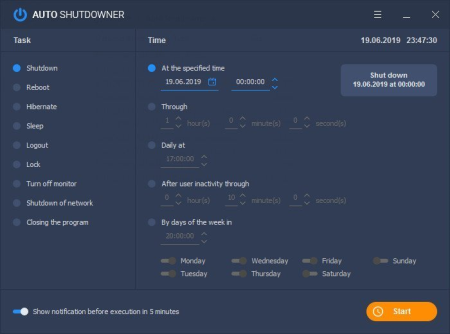
Auto Shutdowner 1.3.1

0d009b46-754a-4da1-8131-3766c9fad195.png

File size: 7.2 MB

There are many reasons why you would want to schedule shutting down or rebooting your PC.​

For example, restarting is beneficial for you RAM, while automatic shutdowns could be used to prevent wasting energy. You may also want to program such an action for security reasons. Scheduling an auto shutdown in Windows (or other similar tasks) may seem like a complicated process to the average user. However, there are programs you can use to plan these actions, and Auto Shutdowner is one of them. A versatile application

Even though it's lightweight, Auto Shutdowner offers you a lot options (all of them present in the program's interface). You can choose to schedule one of the following tasks: Shutdown, Reboot, Hibernate, Sleep, Logout, Lock or Turn off monitor. These can be planned to happen at a specific hour, minute and second, after a certain period of or only on certain days of the week.

Auto Shutdowner can also show you a notification five minutes before it performs a certain task, if you choose so. As I already mentioned, all these options are directly available in the main interface, which makes the program one that is very easy-to-use (that is, if you just look past a few bad translations from Russian to English).

A few more options

From the Settings menu, you can set Auto Shutdowner to run at Windows startup and b any task that you may have set. This can be very useful if you don't want to bother too much with scheduling shutdowns and reboots; choose to minimize the app in the system tray and get on with your work.

While Auto Shutdowner is certainly not one of a kind, it offers you a lot of options when it comes to actions and scheduling and packs them in a well-designed interface. Also, it comes in both a standalone and portable version, meaning you can easily run it on any PC, without installing it.

Fixed bugs in the calendar.


DOWNLOAD
uploadgig
Код:
https://uploadgig.com/file/download/7Bf154a8b40E4f4c/USagsblb_Auto_Shutdowner_Setup..rar

rapidgator
Код:
https://rapidgator.net/file/e6fa61b9586352927e6cddd4789c2764/USagsblb_Auto_Shutdowner_Setup..rar

nitroflare
Код:
http://nitroflare.com/view/FF661EAE1E51D77/USagsblb_Auto_Shutdowner_Setup..rar
 
Cockos REAPER 6.04

72fb2c29-170e-4178-9dd1-1ee130249e5c.png

File size: 25 MB

REAPER is a powerful but sensible Windows application that lets you record, arrange, edit, and render multi-track waveform audio.​

It provides an extensive set of features, but is a very small and lightweight application (the installer is less than 1 megabyte, and includes many effects and a sample project). REAPER supports ASIO, Kernel Streaming, WaveOut, and DirectSound for playback and recording. It reads WAV, OGG, and MP3 files, and records WAV files. You can arrange any number of items in any number of tracks and use audio processing plug-ins (DirectX and Jesusonic). REAPER also supports volume, pan controls and envelopes per track, multi-layer undo/redo, and user creatable color themes.- Portable - supports running from USB keys or other removable media

- 64 bit audio ee

- Excellent low-latency performance

- Multiprocessor capable

- Direct multi-track recording to many formats including WAV/BWF/W64, AIFF, WavPack, FLAC, OGG, and MIDI.

- Extremely flexible routing

- Fast, tool-less editing

- Supports a wide range of hardware (nearly any audio interface, outboard hardware, many control surfaces)

- Support for VST, VSTi, DX, DXi effects

- ReaPlugs: high quality 64 bit effect suite

- Tightly coded - installer is just over 2MB

- Tool-less mouse interface -- spend less clicking

- Drag and drop files to instantly import them into a project

- Support for mixing any combination of file type/samplerate/bit depth on each track

- Easily split, move, and resize items

- Each item has easily manipulated fades and volume

- Tab to transient support

- Configurable and editable automatic crossfading of overlapping items

- Per-item pitch shift and stretch

- Arbitrary item grouping

- Markers and envelopes can be moved in logical sync with editing operations

- Ripple editing - moving/deletion of items can optionally affect later items

- Multiple tempos and signatures per project

- Ability to define and edit project via regions

- Automation envelopes


DOWNLOAD
uploadgig
Код:
https://uploadgig.com/file/download/d2cdEf487e7629Da/s2LtZKsQ_Reaper6_.rar

rapidgator
Код:
https://rapidgator.net/file/506432670e1c3d5ece1ad4c1d9712525/s2LtZKsQ_Reaper6_.rar

nitroflare
Код:
http://nitroflare.com/view/350F18AE436A45C/s2LtZKsQ_Reaper6_.rar
 
MiTeC Paradox Data Editor 3.5.0

eacf28a9-277f-4999-8e14-fce8bf140121.png

File size: 6.0 MB

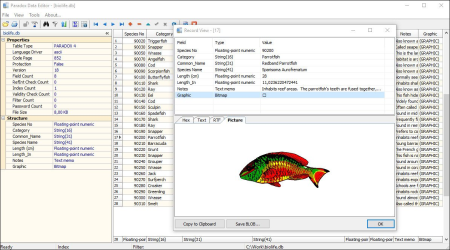
This is viewer and editor for Paradox tables.​

It has password protection removing and fix & repair ability. It uses BDE. Built-in BLOB viewer, filtering and searching, column statistics, index management and structure viewer are tools that covers most needed operations. Data can be exported to many formats e.g. HTML, SYLK, Excel, RTF or XML and CSV and printed. Data can be imported from XML and CSV. Windows XP

Windows 2003

Windows Vista

Windows 7

Windows Server 2008

Windows 8

Windows 8.1

Windows 10

Various bug fixes and improvements.


DOWNLOAD
uploadgig
Код:
https://uploadgig.com/file/download/0709b4c801e9A4Df/pVMxtGHt_PDESetup..rar

rapidgator
Код:
https://rapidgator.net/file/fa0af5e30df07fb56e794ac9c5d1fc1c/pVMxtGHt_PDESetup..rar

nitroflare
Код:
http://nitroflare.com/view/D57001408132E0E/pVMxtGHt_PDESetup..rar
 
Office Timeline Plus / Pro Edition 4.03.00.00

5d81904a-fb85-4ba3-8dba-ca5ed7143cb5.png

Languages: English | File Size: 18.17 MB

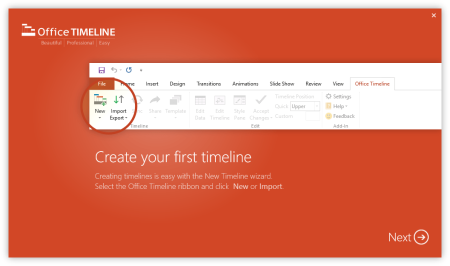
The #1 PowerPoint line Maker for Windows and Office.​

Create PowerPoint lines or roadmaps as fast as clients and executives need them. Simple but powerful PowerPoint add-in that anyone can use to quickly make and manage impressive lines.Build stunning PowerPoint lines without the effort and cost.

Office line helps you make lines, Gantt charts and Swimlanes in PowerPoint almost instantly. Customize them with just a few clicks to create clear, elegant high-level presentations that everyone will understand.

Office line works with all versions of PowerPoint. Give them stunning PowerPoint slides that can be viewed, edited and shared by anyone who has Microsoft Office.

The plugin's powerful Data wizard and drag & drop Visual Editor make line management agile and intuitive. Updating lines when projects and plans change is quick and easy.

No complex steps. No learning curve. No hassle!

The line wizard was designed to make it simple. It all starts by selecting the type of line you want to make.

Once you've selected a line template, enter or import your key milestones and tasks. Set their dates, click the Create button, and voilà! line created.

Use Drag & Drop to instantly rearrange or update your visual. Then customize it your way - colors, shapes, date formats, task duration, percent complete. change any detail, anyway you want.

While the Free edition is fully functional, Office line Plus brings more! Plus Edition unlocks predesigned templates and gives you the freedom to add as much data as needed, so you can create detailed, unique PowerPoint lines and Gantt charts.

Office line Pro gives you everything you get with the Plus add-in, but adds powerful extra features. Pro Edition creates impressive Swimlanes and roadmaps, so you can manage complex projects with big-picture visuals that anyone can understand.

- Microsoft Windows Vista, Windows 7 (SP1), Windows 8, or Windows 10 (LTSB, CBB and CB). Office line does not run on Windows 10 S. The add-in is functional on Windows XP and Windows Server but unsupported.

- 32-bit versions of Microsoft Office 2007 (SP3), 2010, 2013, or 2016. Although Office line works with 64-bit versions of Office, we do not formally test or support it on 64-bit. The .NET Framework 4.5.2 or greater.


DOWNLOAD
uploadgig
Код:
https://uploadgig.com/file/download/b3F57f543d1955da/EX6FrFBW_.Office.Tim.rar

rapidgator
Код:
https://rapidgator.net/file/3507a00fd0c7632e94ea73edfd8e91cd/EX6FrFBW_.Office.Tim.rar

nitroflare
Код:
http://nitroflare.com/view/61C426CC9DCF6AF/EX6FrFBW_.Office.Tim.rar
 
PureSync 5.0.6

ee6de9a8-063b-4dd4-8186-9955a54b750d.png

File size: 10.5 MB

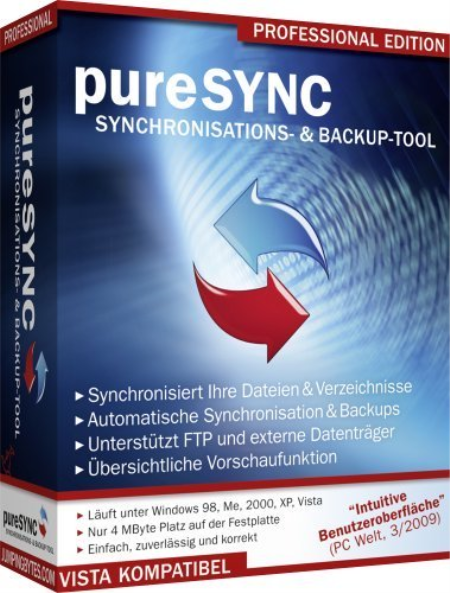
The PureSync application was designed to be a file synchronizer and backup tool.​

PureSync lets you compare, synchronize and backup file, easy to use, but still many features, such as conflict detection and resolving, multiple backups. Synchronize: Synchronize files and folders, FTP

Backup: Backup of files and complete folders

Compare view: Control what will be synced in which direction

Easy to use, clear user interface: E.g. there are wizard and tool tips, support for Drag & Drop of folders

Automatic synchronization and backups: Scheduler when a file has been modified

Special Foto-Sync for digital cameras: Copy e.g. only the new fotos from the camera-. Though fotos that have been sorted out but still at the camera are not copy again.


DOWNLOAD
uploadgig
Код:
https://uploadgig.com/file/download/D35daA5dfa172c1f/oGIC3jCg_PureSyncInst..rar

rapidgator
Код:
https://rapidgator.net/file/f272b96758152e07fed227d6737e1884/oGIC3jCg_PureSyncInst..rar

nitroflare
Код:
http://nitroflare.com/view/B0A2C43433100F2/oGIC3jCg_PureSyncInst..rar
 
R-Wipe & Clean 20.0 Build 2266

6d536b75-b00a-4945-a8b4-b8a7256a0b11.png

File size: 21 MB

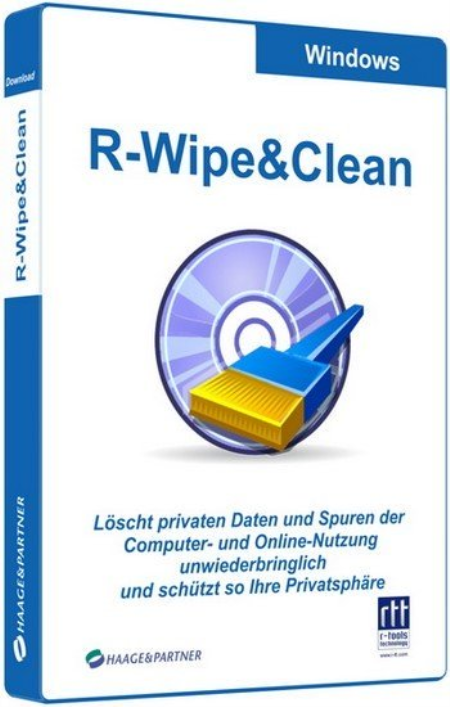
R-Wipe & Clean is a complete R-Tools solution to wipe useless files and maintain your computer privacy.​

It irretrievably deletes private records of your online and off-line activities, such as temporary Internet files, history, cookies, autocomplete forms and passwords, swap files, recently opened documents lists, Explorer MRU (most recently used) lists, temporary files, and traces from more than 300 third-party applications, thus freeing up your disk space. The utility wipes files and unused disk space using either fast or secure-erase algorithms. All files and folders may be entered in wipe lists to erase them in a single procedure. Supports both the FAT and NTFS file systems. You can combine separate wiping and cleaning tasks and launch them to b erasing immediately or set them to b erasing procedures as a background task at predefined s or events.

New R-Wipe & Clean supports Windows 10, 8.1, and 8, removes traces from more than 600 third-party applications, including Microsoft Office 2016 and Skype(!), and supports all recent versions of Microsoft Edge, Internet Explorer, Mozilla/Mozilla Firefox, Opera, Safari, Flock, Netscape, AOL, MSN, Google Chrome, SeaMonkey, BT Yahoo!, Konqueror, and K-Meleon, as well as the Google, Windows Live, Yahoo!, and MSN toolbars.

- The following items are added to the Internet (Skype) tab: Business Intelligence Statistics, Emoticons Cache, Internal Database, Media Transfer Cache, Stored Emoticons Information, Stored File Transfer Information, Stored Media Transfer Information.

- A new item Update Logs is added to the Microsoft OneDrive tab in the Application Traces section.

- The Typed URLs item is added to the Internet (Microsoft Edge) section.

- Three new items are added to the System section: Component-Based Servicing Log, Deployment Image Service and Management Log, Startup File Renaming Log.

- Four new items are added to the Setup Logs tab: Delta Package Expander Setup Log Files, Driver Package Installer Logs, Local Security Authority Setup Log Files, Setup Cleanup Task Log Files.

- The Swap file can be wiped and cleaned for Metro/Universal applications.

- Full support for Windows 10 and Microsoft Edge browser.

- 2 new items are added to the Internet (Google Chrome) section: Web Applications File System's Files and Google Cloud Messaging Traces.

- 7 new items are added to the Program Data section: Windows Defender Activity Logs, Windows Defender Detection Logs, Windows Defender Network Inspection Service Log, Windows Defender Scan Results, Windows Defender Quick Scan Results, Windows Defender Scan Logs, Windows Defender WPP Files.

- iCloud is added to the Application Traces section.


DOWNLOAD
uploadgig
Код:
https://uploadgig.com/file/download/5a6f82eFfE58fd74/yduUo0yY_RWipeClean20_.rar

rapidgator
Код:
https://rapidgator.net/file/2bd12ececb739074d0f43e4e939ce704/yduUo0yY_RWipeClean20_.rar

nitroflare
Код:
http://nitroflare.com/view/A7F5FA2EB966D62/yduUo0yY_RWipeClean20_.rar
 
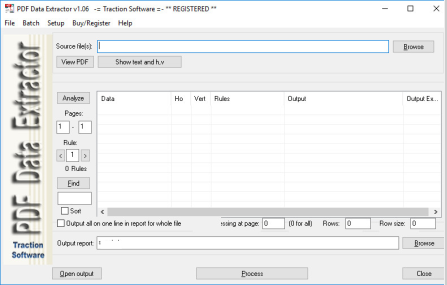
PDF Data Extractor 1.06

Capture.png

File size: 6.4 MB

PDF Data Extractor can extract certain text information within the PDF, This is an ideal product if you had for example a PDF statement that you need to extract data like Account Number, Name, Address and output this information into an Excel CSV file.​

It uses horizontal, vertical text position matching and for more advanced matching it has a rules system for conditional matching, e.g.
Only take match when Account Number: text is on the same page. Different fields can also be merged into one, so say First Name and Surname can be output as one field in the CSV file, convert spreadsheet format pdf's to csv files, many options are available: Data Extraction, Run on the command line, Header output, page number field, filename field, Batch list of files to process.

1. Supports Windows 95, 98, ME, NT4, Windows 2000 (NT5), XP, 2003, 2008, windows 7 & Vista, 8/8.1, 2012, 2016, 10

2. Stand Alone version i.e. Does NOT require Adobe Acrobat

3. Extract data from multiple page pdf's

4. Multiple output fields from the source pdf

5. Conditional matching rules system

6. Output fields such as: Total pages, page number matched, filename

7. Process batch list of pdfs

8. Optionally run on the command line for automation

9. Supports all pdf types except encrypted and protected

10. Automatically saves settings for later use

11. Installer

12. Full HTML & PDF Help.

fix with loading rules limit when more than 20.


DOWNLOAD
uploadgig
Код:
https://uploadgig.com/file/download/2af2c680dA37704A/JuIU6pdD_PDFDataExtr.rar

rapidgator
Код:
https://rapidgator.net/file/81577f811b70f7dc57fedd2893055e90/JuIU6pdD_PDFDataExtr.rar

nitroflare
Код:
http://nitroflare.com/view/1387BC8278C762A/JuIU6pdD_PDFDataExtr.rar
 
VovSoft SEO Checker 2.1

67c5a58d-a439-42bb-ae07-4d2932759be8.png

File size: 7.2 MB

Search ee optimization (SEO) or organic search marketing, refers to software designed to improve the ranking of websites in search ee results pages (SERP) without paying for placement.​

These products provide insights through features, such as keyword analysis and backlink tracking to identify the best strats for improving search relevance. SEO Checker is an easy to use website crawler, able to crawl both small and very large websites efficiently, while allowing you to find broken links, analyze the results in real-, gather onsite data, distinguish internal and external links, check dofollow and nofollow links, analyze META descriptions, H1, H2, H3 tags.

"Two forward slashes" are now recognized in href attributes

All sequential redirected URLs are now displayed

"sponsored" and "ugc" link attributes are now displayed in addition to "nofollow" and "dofollow".


DOWNLOAD
uploadgig
Код:
https://uploadgig.com/file/download/4990e1bD4d2cFa7C/8QXPH6Vz_SEOChecker2.rar

rapidgator
Код:
https://rapidgator.net/file/8ada1d2a26fc62ed3f7449ed1a38024e/8QXPH6Vz_SEOChecker2.rar

nitroflare
Код:
http://nitroflare.com/view/D7EB6E7FFD07178/8QXPH6Vz_SEOChecker2.rar
 
Calibre 4.11.1 Multilingual

343ac9d7-f42f-4cd8-8d6f-3d835a9bf1e3.png

File size: 105/118 MB

Effortlessly keep your e-book library thoroughly organized with the help of this efficient and straightforward software solution.​

Calibre is an e-book library management application. It is free, open source and cross-platform in design and works on Linux, OSX and Windows.Calibre is meant to be a complete e-library solution and thus includes, library management, format conversion, news feeds to ebook conversion as well as e-book reader sync features. Calibre is an application that allows you to view, convert and organize e-books in a simple manner.

The user interface of the program is simple to use. You can add e-books (from a single or multiple directories) by using the file browser or the "drag and drop" function. You can also add books by entering their ISBN code.

In the tag browser you can sort e-books according to their author, language, series, format, publisher, rating, as well as news, tags and identifies.

So, you can or edit metadata individually or in bulk, get covers, merge e-book records, convert e-books individually or in bulk (in the XML, CSV, EPUB, MOBI and other formats), as well as send e-books to devices.

You can also use the "Fetch news" feature to news from websites and convert them into a preferred e-book format. It is possible to schedule news s, add a custom sources or all scheduled news sources as well.

Calibre allows you to create libraries and toggle between them, as well as rename, delete, backup and restore libraries, connect to iTunes, start a content server, search and sort e-books, and more.

The program uses a high amount of system resources and contains a comprehensive help file. It didn't freeze or crash during our tests. Calibre is easy to use and provides a great solution for viewing and organizing e-books in various formats.
Windows XP, Windows Vista, Windows 7, 8, 8.1, 10 (32-bit, 64-bit).


DOWNLOAD
uploadgig
Код:
https://uploadgig.com/file/download/7944c3882a65cfb1/GnaTdRTo_calibre4.11.1..rar
https://uploadgig.com/file/download/4ca1a6e3F0841Eb4/GnaTdRTo_calibre64bit4.11.1..rar

rapidgator
Код:
https://rapidgator.net/file/e640076bf76d143837288c96a4ba7d29/GnaTdRTo_calibre4.11.1..rar
https://rapidgator.net/file/5878de3a0cc660c077766f3344dc7507/GnaTdRTo_calibre64bit4.11.1..rar

nitroflare
Код:
http://nitroflare.com/view/9623B3094C874A5/GnaTdRTo_calibre4.11.1..rar
http://nitroflare.com/view/61A44CE6A64E73D/GnaTdRTo_calibre64bit4.11.1..rar
 
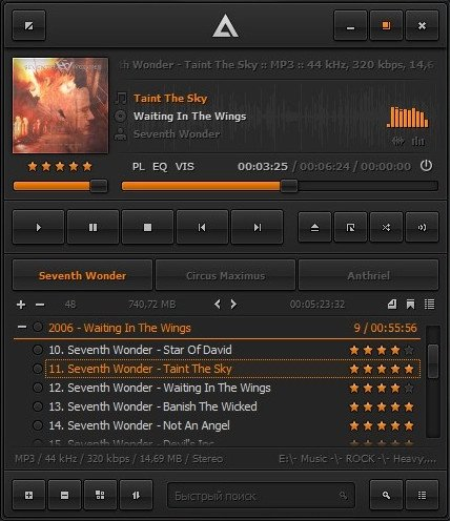
AIMP 4.60 Build 2176 Multilingual portable

67fcc012-ebb9-45a2-99d0-4e79398f1e7c.png

File Size : 29 Mb

AIMP is a powerful audio player that allows you to listen to your favorite music with an outstanding sound quality.​

Its appearance resembles that of another classical audio player (Winamp), so you'll get used to it very quickly. It can also be customized with skins. The program includes a 18-band equalizer, a visualization window to display rhythmic visual effects and a playlist editor to organize your audio files. A nice fading effect makes your list of songs look like an endless music loop and a handy volume normalizing feature avoids drastic volume changes between tracks. Also, the player's main functions can be conveniently controlled by global hotkeys. Besides playing music, AIMP features three extra utilities which also enable you to record any sound on your computer, convert audio files from one format to another and view or edit tags. AIMP is based on the well-known audio ee BASS, so it's easy to connect new plug-ins (from the plug-in library included in the program) and expand the player's functionalities. Audio Lirary, Sound Recorder, Audio Converter/CD Grabber and Tag Editor...

Support for large number of formats and playlists ...

Work with multiple playlist immediately, creation of bookmarks, playback queue ...

Design Great functionality and user-friendly interface ...

* Audio formats supported: MP1, MP2, MP3, MPC, MP+, AAC, AC3, OGG, FLAC, APE, WavPack, Speex, WAV, CDA, WMA, S3M, XM, MOD, IT, MO3, MTM, UMX

* Good functionality and friendly user interface

* 18-sliders equalizer and build-in sound effects: Reverb, Flanger, Chorus, Pitch, Tempo, Echo, Speed

* 32-bit sound processing: for crystal clear sound

* Works with few playlists: Listern one, work with other

* Plug-Ins support: You can add new utils or extend already exists, and connect some winamp plugins: Input, Gen, DSP

* Autoshutdown manager

* Internet-Radio: Listern and Capture!

* Bookmarks and Queues

* Hotkeys: Customizable local and global hotkeys

* Multilingual interface

* Multiuser mode support: Few users works unders one computer? It's no problem!

* Full Unicode support

* File search: File search by all opened playlists

* Many program options

* Small distributive size

* Audio Converter: Any supported audio file can be encoded to WAV, MP3, WMA or OGG format

* Audio Grabber: Audio CD Track can be encoded to WAV, MP3, WMA or OGG format

* Sound Recorder: Capture sound from any audio device in your system to mp3, ogg, wav or wma format

* Advanced Tag Editor: Edit ID3v1, ID3v2, Vorbis, WMA tags. Grouping rename, group editing and sort files by one of templates.

* Audio Library


DOWNLOAD
uploadgig
Код:
https://uploadgig.com/file/download/41c74033f428a8F1/lKD3v0Wu_AIMP_port_.rar

rapidgator
Код:
https://rapidgator.net/file/b2f410b937eb864a93b9dda4ae65f5fa/lKD3v0Wu_AIMP_port_.rar

nitroflare
Код:
http://nitroflare.com/view/D964267C63B1DCB/lKD3v0Wu_AIMP_port_.rar
 
AIMP 4.60 Build 2176 Multilingual

67fcc012-ebb9-45a2-99d0-4e79398f1e7c.png

File Size : 11.4 Mb

AIMP is a powerful audio player that allows you to listen to your favorite music with an outstanding sound quality.​

Its appearance resembles that of another classical audio player (Winamp), so you'll get used to it very quickly. It can also be customized with skins. The program includes a 18-band equalizer, a visualization window to display rhythmic visual effects and a playlist editor to organize your audio files. A nice fading effect makes your list of songs look like an endless music loop and a handy volume normalizing feature avoids drastic volume changes between tracks. Also, the player's main functions can be conveniently controlled by global hotkeys. Besides playing music, AIMP features three extra utilities which also enable you to record any sound on your computer, convert audio files from one format to another and view or edit tags. AIMP is based on the well-known audio ee BASS, so it's easy to connect new plug-ins (from the plug-in library included in the program) and expand the player's functionalities. Audio Lirary, Sound Recorder, Audio Converter/CD Grabber and Tag Editor...

Support for large number of formats and playlists ...

Work with multiple playlist immediately, creation of bookmarks, playback queue ...

Design Great functionality and user-friendly interface ...

* Audio formats supported: MP1, MP2, MP3, MPC, MP+, AAC, AC3, OGG, FLAC, APE, WavPack, Speex, WAV, CDA, WMA, S3M, XM, MOD, IT, MO3, MTM, UMX

* Good functionality and friendly user interface

* 18-sliders equalizer and build-in sound effects: Reverb, Flanger, Chorus, Pitch, Tempo, Echo, Speed

* 32-bit sound processing: for crystal clear sound

* Works with few playlists: Listern one, work with other

* Plug-Ins support: You can add new utils or extend already exists, and connect some winamp plugins: Input, Gen, DSP

* Autoshutdown manager

* Internet-Radio: Listern and Capture!

* Bookmarks and Queues

* Hotkeys: Customizable local and global hotkeys

* Multilingual interface

* Multiuser mode support: Few users works unders one computer? It's no problem!

* Full Unicode support

* File search: File search by all opened playlists

* Many program options

* Small distributive size

* Audio Converter: Any supported audio file can be encoded to WAV, MP3, WMA or OGG format

* Audio Grabber: Audio CD Track can be encoded to WAV, MP3, WMA or OGG format

* Sound Recorder: Capture sound from any audio device in your system to mp3, ogg, wav or wma format

* Advanced Tag Editor: Edit ID3v1, ID3v2, Vorbis, WMA tags. Grouping rename, group editing and sort files by one of templates.

* Audio Library


DOWNLOAD
uploadgig
Код:
https://uploadgig.com/file/download/3d069a5138D0d76f/ibEoCsqt_aimp_latest_version..rar

rapidgator
Код:
https://rapidgator.net/file/1ed649a56b5feaa2860f133aafeaa685/ibEoCsqt_aimp_latest_version..rar

nitroflare
Код:
http://nitroflare.com/view/F35D730D429E640/ibEoCsqt_aimp_latest_version..rar
 
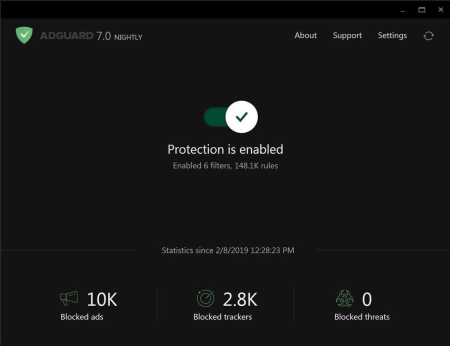
Adguard Premium 7.4.3121.0 Nightly Multilingual

f19aaa39-0024-4663-b962-99c1c36727f3.png

File size: 31.8 MB

Adguard is a unique program that has all the necessary features for the best web experience.​

First of all, it's an ad blocker. Adguard lets you fully enjoy the Internet without any distractions. Watch the videos you want to watch, not annoying pre-rolls, and browse websites for content not tons of banners. Adguard gives you freedom of choice and saves your nerves. It also makes the Internet a safer place: blocks the loading of dangerous websites, speeds up the page loading, secures your privacy and much more. Works perfectly with all browsers!

- Ad Blocker. Blocking of all kinds of ads, high-quality filtering of traffic on the background. Ads are removed even before pages are loaded in the browser.

- Browsing Security. Protection from phishing and malicious websites. Adguard checks every page for any malicious content using our databases, and blocks requests from potentially dangerous ones.

- Stealth Mode. This module will not allow anyone to track your activities on the Internet. Blocking of third-parties cookies, hiding IP address and other features for protection of your personal data.

- Parental Control. Protection of children online. Blocks access to inappropriate websites, removes obscene materials from search results and much more.

- Adguard works in all browsers. Safari, Chrome - you name it. No exceptions.

- Easy to install. A couple of clicks, and your PC is protected from ads. You don't have to struggle with overcomplicated settings - just surf the net and Adguard will do all the work.

- Blocking video ads. Any video ad, on any site - Adguard will block it.

- Application filtering. Adguard blocks ads of any kinds and not only in all browsers, but in programs as well! Even in Windows UI applications (apps from Windows Store).

- Adguard has intuitive and simple UI with such additional features like Adguard Assistant, Filter editor and Filtering log.

- Daily ad filters and phishing databases updates.

- Adguard user interface has been completely redesigned. Now has a modern Adguard "tile" design.

- Adguard been translated into many languages. This includes a user interface assistant Adguard, filters, etc.

- The positions of the application window is now saved and restored when you restart the application.

- in the notification menu redesigned, improved availability of different options through the notification area.

- The interface of the new version is much more friendly to blind users or users with low vision.

- The speed of the user interface and loading speed were significantly optimized memory consumption greatly reduced.

- Now, when you first start Adguard shows the welcome screen for you to detee Adguard and briefly telling about its capabilities.

- Upgrading to a new version of Adguard 5 is now possible and does not lead to a loss of settings.

- New ability to change the channel updates on "Beta" and get all the beta updates, including updates Assistant and extensions.

- Anti tracking - a new module has been added. It protects your personal information online in Improved support for application filtering. Now Adguard automatically detects the applications installed on your computer and offers filtering them. This applies to the Windows app store.

- Editor filters and filtration magazine have been completely redesigned. You will find a fresh design and improved functionality.

- You can now use the new search feature throughout the program for any keyword by typing it in the text box in the upper right corner.

- Now you can add any filter to the URL or set the path to a local file on your computer, and Adguard will automatically track it changes.

- Extensions were made into a separate module that can be turned on and off as a whole.

- Security custom extensions has been greatly improved.

- numerous additions and improvements to the filtering process were made, separately worth noting the support of the new rules and modifiers accelerate filtration.

- Many other changes, which are impossible to list all the changes in the list.
Hello! Anybody here? There hasn't been a new Windows beta for so long, we are not sure anymore ???? Hopefully, you are still aboard, and you will find the new beta worth the spent. We believe it is - among other important stuff we greatly reduced the build size, almost twice compared to its former self. Oh, and there's a new update channel now - Nightly. Intrigued? You should be. Read on to find the details.


DOWNLOAD
uploadgig
Код:
https://uploadgig.com/file/download/e1E599f6c27Ff6E5/eEg78RQr_Adguard.Pre.rar

rapidgator
Код:
https://rapidgator.net/file/2432c1ef6cf12efbaa6b6fd0b13aaa24/eEg78RQr_Adguard.Pre.rar

nitroflare
Код:
http://nitroflare.com/view/C1AF71AF255A597/eEg78RQr_Adguard.Pre.rar
 
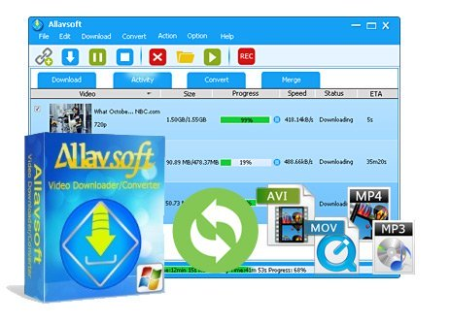
Allavsoft Video Downloader Converter 3.22.2.7355 Multilingual

e6fb2941-a8f0-4b14-a642-0464954e8db9.png

File size: 31 MB

This powerful Video er supports ing movies, music videos, playlist, sport videos, lectures and more from free video sharing website like Facebook, Dailymotion, eHow, and more than 100 video sharing sites.​

Besides ing video in its original format, Allavsoft also features one-click to as well as convert the ed video to popular video format like MP4, AVI, WMV, MOV, MPEG-1, MPEG-2, VOB, ASF, RMVB, DV, TS, Apple ProRes, WebM, FLV, OGV and etc. This ideal Web Video er app enables selecting among all video qualities available for ing like videos in ultra high definition (4K), 3D video, HD 2k, HD 1080p, HD 720p, and stand definition 480p, 360p, and 240p. This professional Video ing and Converting tool also helps to extract and audio from online music video or movies as well as convert to popular audio format like MP3, WMA, WAV, AAC, AAC, Apple Lossless M4A, AIFF, RA, FLAC, OGG, AU and etc.

Batch and convert

Allavsoft supports adding multiple video URLs and batch ing and converting multiple videos at a .

When web video files, this wonderful Video er will automatically detects advertisements and does not them.

Preview and playback ed video files

There is a built-in video player in Allavsoft for us to preview and playback the ed video files.

Breakpoint Resume

You can pause and resume ing at any . It is very convenient to use.

Action after done

You can set automatically shut down computer after all the tasks are finished, if you have lots of videos to and want to leave your Windows on to them.

Keep history for ing.

Updates: official site does not provide any info about changes in this version.


DOWNLOAD
uploadgig
Код:
https://uploadgig.com/file/download/1477769aB6309241/w33OYVo7_Allavsoft.3_.rar

rapidgator
Код:
https://rapidgator.net/file/8bffe789bcfb96f95d7d77870553ba22/w33OYVo7_Allavsoft.3_.rar

nitroflare
Код:
http://nitroflare.com/view/D80A78150129CCC/w33OYVo7_Allavsoft.3_.rar
 
Autodesk InventorCAM Ultimate 2020.3.1 Hotfix Only (x64)

8022029e-5c85-42bf-9952-94a73db3f497.png

x64 | File Size: 291 MB

Autodesk Inventor Cam Ultimate powerful products company capable of Autodesk, a solution integrated software in the field of CAD / CAM in the field of mechanical parts in the form of a plug-in software Inventor also delivers all the capabilities of modeling and simulation program, designers, eeers and CNC programmers helps to put their projects directly and more quickly turn to car parts.​

Autodesk Inventor HSM Ultimate changed too inventor CAM. Using Autodesk Inventor Cam Ultimate all the advantages of toolpath (cut) models 2.5D, 3D, 3 + 2, and 5-axis to achieve better performance at your fingertips. HSM stands for High Speed ​​Machining means high-speed machining. Currently this application because Nqssh performance inAll features of the software Inventor

-5-axis and multi-axis operation

-toolpath three-dimensional, curved and diagonal

-The possibility of finding the best cut routes

-Read, write and convert data from GIS, CAD to high range of formats

-Toolpath simulation withTake advantage of theAdvanced analytical tools such as size and distance calculations, physical details and estimated of machining

-Support for 3-axis milling and positioning 2 + 3

-Improve productivity with support from old ways

-Autodesk Inventor CAM 2020 supports Microsoft Windows 7 64-bit and Windows 10 64-bit.

-Inventor CAM 2020 is compatible with the 2017, 2018, 2019 and 2020 versions of Inventor, Inventor Professional, and Inventor LT.


DOWNLOAD
uploadgig
Код:
https://uploadgig.com/file/download/28713f5f74B23dec/m5SaEGCL__InventorCA.rar

rapidgator
Код:
https://rapidgator.net/file/694f1be9fb65fd8f1270ad379b692a99/m5SaEGCL__InventorCA.rar

nitroflare
Код:
http://nitroflare.com/view/6FEE92300D4E537/m5SaEGCL__InventorCA.rar
 
Назад
Сверху