• Здравствуйте. Сайт заработал в архивном режиме форум www.old.nado.in

Anthony's Software !!!

MEmu Android Emulator 7.1.1 Multilingual

43733442-0a71-4971-bd3d-53c1de9675a1.png

File size: 333 MB

MEmu is an Android emulator that specializes in video games.​

With MEmu you can enjoy many exclusive titles that you can find for the Android platform, directly on your computer. You don't need to adjust any complicated settings and configure the controls, just install it and start playing. With MEmu, you can install Android games quite easily, simply click the APK button on the right side of the interface, select the APK of the game you want to install, and wait. It really is that easy. As with most emulators, the controls are already set up, so you can play any game with either the mouse or the keyboard. With MEmu, though, if you don't like how the controls are configured, you can always modify them, or even use an Xbox 360 controller if you are more comfortable with console gaming.
There are numerous Android emulators available, but MEmu is an exceptional choice. It gives you access to a vast array of games for Android, right on your PC. The levels of compatibility, customization, and file organization is better than some of the more well known alternatives on the market.
Full Android experience with an elegant desktop
Flexible customization (CPU#, memory size, resoluton, device model, nav bar location, root mode, etc.)
Keyboard / joystick mapping to touch screen for much better game experience
Pass through sensor data (e.g. accelerometer) to Android, so you can play car-racing like games
Fast APK installation by dragging and dropping
File sharing between Windows and Android
One-click android system creation / clone / deleting, and you can run multiple Android instances

DOWNLOAD
uploadgig
Код:
https://uploadgig.com/file/download/24cd5990c71Bd4C8/gEI1fC8p_MEmuSetup7.1.1hac21548f4..rar

rapidgator
Код:
https://rapidgator.net/file/513d2055a927795f44b6165ad7506402/gEI1fC8p_MEmuSetup7.1.1hac21548f4..rar

nitroflare
Код:
http://nitroflare.com/view/FD5AB311C9E9B3D/gEI1fC8p_MEmuSetup7.1.1hac21548f4..rar

 
Navicat for MariaDB 15.0.6

17f793cb-993d-447c-8691-270091dd1683.png

File size: 71 MB

Navicat for MariaDB provides a native environment for MariaDB database management and development.​

Connect to local/remote MariaDB servers and compatible with Amazon RDS. Navicat for MariaDB supports most of the additional features like new storage engines, microseconds, virtual columns, and more.Seamless Data Migration
Data Transfer, Data Synchronization and Structure Synchronization help you migrate your data easier and faster for less overhead. Deliver detailed, step-by-step guidelines for transferring data across databases. Compare and synchronize databases with Data and Structure Synchronization. Set up and deploy the comparisons in seconds, and get the detailed script to specify the changes you want to execute.
Diversified Manipulation Tool
Use Import Wizard to transfer data into a database from diverse formats, or from ODBC after setting up a data source connection. Export data from tables, views, or query results to formats like Excel, Access, CSV and more. Add, modify, and delete records with our spreadsheet-like Grid View together with an array of data editing tools to facilitate your edits. Navicat gives you the tools you need to manage your data efficiently and ensure a smooth process.
Easy SQL Editing
Visual SQL Builder will help you create, edit and run SQL statements without having to worry about syntax and proper usage of commands. Code fast with Code Completion and customizable Code Snippet by getting suggestions for keywords and stripping the repetition from coding.
Intelligent Database Designer
Create, modify and manage all database objects using our professional object designers. Convert your databases into graphical representations using a sophisticated database design and modeling tool so you can model, create, and understand complex databases with ease.
Increase your Productivity
Our powerful local backup/restore solution guides you through the backup process and reduces the potential for errors. Compile professional high-quality reports in minutes using an interactive design interface and efficient workflow, and set an automation for repeatable deployment process like report generation, database backup, and script execution at a specific time or day. No matter where you are, you can always get the job done.
Make Collaboration Easy
Synchronize your connection settings, models, queries and virtual groups to our Navicat Cloud service so you can get real-time access to them, and share them with your coworkers anytime and anywhere. With Navicat Cloud, you can leverage every minute of your day to maximize your productivity.
Advanced Secure Connection
Establish secure connections through SSH Tunneling and SSL ensure every connection is secure, stable, and reliable. Support different authentication methods of database servers such as PAM authentication. Navicat 12 provides more authentication mechanisms and high-performance environments so you never have to worry about connecting over an insecure network.

DOWNLOAD
uploadgig
Код:
https://uploadgig.com/file/download/d4c7F417013888A5/Zu1tjMcw_navicat150_.rar

rapidgator
Код:
https://rapidgator.net/file/5249997118259c4081a34644e028765b/Zu1tjMcw_navicat150_.rar

nitroflare
Код:
http://nitroflare.com/view/AC390E84307D899/Zu1tjMcw_navicat150_.rar
 
Navicat for MongoDB 15.0.6

9b3ace08-4684-4124-99e6-a6e187f81e8d.png

File size: 79 MB

Navicat for MongoDB gives you a highly effective GUI interface for MongoDB database management, administration and development.​

Connect to local/remote MongoDB servers with MongoDB Atlas and Huawei Cloud compatibility. Navicat for MongoDB offers remarkable features for managing, monitoring, querying, and visualizing your data. You can easily increase productivity of routine MongoDB operations.Seamless Data Migration
Data Transfer and Data Synchronization help you migrate your data easier and faster for less overhead. Deliver detailed, step-by-step guidelines for transferring data across databases. Compare and synchronize databases with Data Synchronization. Set up and deploy the comparisons in seconds, and get the detailed script to specify the changes you want to execute.
Diversified Manipulation Tool
Use Import Wizard to transfer data into a database from diverse formats, or from ODBC after setting up a data source connection. Export data from collections, views, or query results to formats such as Excel, Access, CSV and more. Add, modify, and delete documents with our built-in editors and MongoDB 4 Transaction support, you can facilitate your edits in Tree View, JSON View, and the classic spreadsheet-like Grid View. With MongoDB 4 Transaction support, Navicat gives you the tools you need to manage your data efficiently and ensure a smooth process.
Easy Query Editing
Visual Query Builder will help you create, edit and run queries without having to worry about syntax and proper usage of commands. Code fast with Code Completion and customizable Code Snippet by getting suggestions for keywords and stripping the repetition from coding.
Intelligent Object Designer
Create, modify, and manage all database objects using our professional object designers. Preview results on each step and debug the sampled data before running your MapReduce jobs. Store and retrieve files from your MongoDB databases using our well-designed GridFS form that allows parallel upload/ process.
Increase Your Productivity
Our intuitive GUI for MongoDBDump Utility guides you through the backup process and minimizes potential errors. Set an automation for repeatable deployment process like MapReduce job and script execution at a specific time or day. No matter where you are, you can always get the job done.
Smart Schema Analyzer
Discover and explore your schema with our built-in schema visualization tool. Analyze your documents and displays rich structures within your collections, so you can understand your data's schema, find schema anomalies, and inspect outliers easily.
Make Collaboration Easy
Synchronize your connection settings, queries and virtual groups to our Navicat Cloud service so you can get real-time access to them, and share them with your coworkers anytime and anywhere. With Navicat Cloud, you can leverage every minute of your day to maximize your productivity.
Advanced Secure Connection
Establish secure connections through SSH Tunneling and SSL ensure every connection is secure, stable, and reliable. Support different authentication methods of database servers such as Kerberos and X.509 authentication. Navicat 12 provides more authentication mechanisms and high-performance environments so you never have to worry about connecting over an insecure network.

DOWNLOAD
uploadgig
Код:
https://uploadgig.com/file/download/266bfFf5a3F0cBb0/4KupAeEp_navicat150_.rar

rapidgator
Код:
https://rapidgator.net/file/d708ea779ffc3c7c9e4f9d729840c582/4KupAeEp_navicat150_.rar

nitroflare
Код:
http://nitroflare.com/view/666F5C1120B325E/4KupAeEp_navicat150_.rar
 
Navicat for MySQL 15.0.6

40c2670c-16f9-4e99-a026-a1bb58dc41ab.png

File size: 72 MB

Navicat for MySQL is the ideal solution for MySQL/MariaDB administration and development.​

It is a single application that allows you to connect to MySQL and MariaDB databases simultaneously. Compatible with cloud databases like Amazon RDS, Amazon Aurora, Oracle Cloud and Google Cloud. This all-inclusive frontend provides an intuitive and powerful graphical interface for database management, development, and maintenance.Seamless Data Migration
Data Transfer, Data Synchronization and Structure Synchronization help you migrate your data easier and faster for less overhead. Deliver detailed, step-by-step guidelines for transferring data across databases. Compare and synchronize databases with Data and Structure Synchronization. Set up and deploy the comparisons in seconds, and get the detailed script to specify the changes you want to execute.
Diversified Manipulation Tool
Use Import Wizard to transfer data into a database from diverse formats, or from ODBC after setting up a data source connection. Export data from tables, views, or query results to formats like Excel, Access, CSV and more. Add, modify, and delete records with our spreadsheet-like Grid View together with an array of data editing tools to facilitate your edits. Navicat gives you the tools you need to manage your data efficiently and ensure a smooth process.
Easy SQL Editing
Visual SQL Builder will help you create, edit and run SQL statements without having to worry about syntax and proper usage of commands. Code fast with Code Completion and customizable Code Snippet by getting suggestions for keywords and stripping the repetition from coding.
Intelligent Database Designer
Create, modify and manage all database objects using our professional object designers. Convert your databases into graphical representations using a sophisticated database design and modeling tool so you can model, create, and understand complex databases with ease.
Increase your Productivity
Our powerful local backup/restore solution guides you through the backup process and reduces the potential for errors. Compile professional high-quality reports in minutes using an interactive design interface and efficient workflow, and set an automation for repeatable deployment process like report generation, database backup, and script execution at a specific time or day. No matter where you are, you can always get the job done.
Make Collaboration Easy
Synchronize your connection settings, models, queries and virtual groups to our Navicat Cloud service so you can get real-time access to them, and share them with your coworkers anytime and anywhere. With Navicat Cloud, you can leverage every minute of your day to maximize your productivity.
Advanced Secure Connection
Establish secure connections through SSH Tunneling and SSL ensure every connection is secure, stable, and reliable. Support different authentication methods of database servers such as PAM authentication. Navicat provides more authentication mechanisms and high-performance environments so you never have to worry about connecting over an insecure network.

DOWNLOAD
uploadgig
Код:
https://uploadgig.com/file/download/B5C5511bef292b8c/4EkbLnu1_navicat150_.rar

rapidgator
Код:
https://rapidgator.net/file/42b91b602f3f020db01d338c083b323d/4EkbLnu1_navicat150_.rar

nitroflare
Код:
http://nitroflare.com/view/7C84F91AB77BF71/4EkbLnu1_navicat150_.rar
 
Navicat for Oracle 15.0.6

188b2a7a-f2b5-4c20-899d-b732c4a88eb9.png

File size: 90 MB

Navicat for Oracle improves the efficiency and productivity of Oracle developers and administrators with a streamlined working environment.​

Optimizing your Oracle development - create, organize, access, and share information quickly and securely. Navicat for Oracle is compatible with cloud databases like Amazon RDS and Oracle Cloud, and supports local/remote Oracle servers.Seamless Data Migration
Data Transfer, Data Synchronization and Structure Synchronization help you migrate your data easier and faster for less overhead. Deliver detailed, step-by-step guidelines for transferring data across databases. Compare and synchronize databases with Data and Structure Synchronization. Set up and deploy the comparisons in seconds, and get the detailed script to specify the changes you want to execute.
Diversified Manipulation Tool
Use Import Wizard to transfer data into a database from diverse formats, or from ODBC after setting up a data source connection. Export data from tables, views, or query results to formats like Excel, Access, CSV and more. Add, modify, and delete records with our spreadsheet-like Grid View together with an array of data editing tools to facilitate your edits. Navicat gives you the tools you need to manage your data efficiently and ensure a smooth process.
Easy SQL Editing
Visual SQL Builder will help you create, edit and run SQL statements without having to worry about syntax and proper usage of commands. Code fast with Code Completion and customizable Code Snippet by getting suggestions for keywords and stripping the repetition from coding.
Intelligent Database Designer
Create, modify and manage all database objects using our professional object designers. Convert your databases into graphical representations using a sophisticated database design and modeling tool so you can model, create, and understand complex databases with ease.
Increase your Productivity
Our powerful local backup/restore solution guides you through the backup process and reduces the potential for errors. Compile professional high-quality reports in minutes using an interactive design interface and efficient workflow, and set an automation for repeatable deployment process like report generation, database backup, and script execution at a specific time or day. No matter where you are, you can always get the job done.
Make Collaboration Easy
Synchronize your connection settings, models, queries and virtual groups to our Navicat Cloud service so you can get real-time access to them, and share them with your coworkers anytime and anywhere. With Navicat Cloud, you can leverage every minute of your day to maximize your productivity.
Advanced Secure Connection
Establish secure connections through SSH Tunneling and SSL ensure every connection is secure, stable, and reliable. Support different authentication methods of database servers such as PAM authentication. Navicat 12 provides more authentication mechanisms and high-performance environments so you never have to worry about connecting over an insecure network.

DOWNLOAD
uploadgig
Код:
https://uploadgig.com/file/download/d70d9a15cd6e606F/ViSjYRiK_navicat150_.rar

rapidgator
Код:
https://rapidgator.net/file/e6ef8b5c4c14f14fd978c1c26e73948c/ViSjYRiK_navicat150_.rar

nitroflare
Код:
http://nitroflare.com/view/256610584590787/ViSjYRiK_navicat150_.rar
 
Navicat for PostgreSQL 15.0.6

34a7a383-3834-4685-9c15-797ed04fa482.png

File size: 71 MB

Navicat for PostgreSQL is an easy-to-use graphical tool for PostgreSQL database development.​

From writing simple SQL queries to developing complex databases, Navicat for PostgreSQL is designed to accommodate a wide range of users, from PostgreSQL beginners to seasoned developers. Connect to local/remote PostgreSQL servers and compatible with cloud databases like Amazon Redshift, Amazon Aurora, Amazon RDS and Google Cloud, and all PostgreSQL database objects.Seamless Data Migration
Data Transfer, Data Synchronization and Structure Synchronization help you migrate your data easier and faster for less overhead. Deliver detailed, step-by-step guidelines for transferring data across databases. Compare and synchronize databases with Data and Structure Synchronization. Set up and deploy the comparisons in seconds, and get the detailed script to specify the changes you want to execute.
Diversified Manipulation Tool
Use Import Wizard to transfer data into a database from diverse formats, or from ODBC after setting up a data source connection. Export data from tables, views, or query results to formats like Excel, Access, CSV and more. Add, modify, and delete records with our spreadsheet-like Grid View together with an array of data editing tools to facilitate your edits. Navicat gives you the tools you need to manage your data efficiently and ensure a smooth process.
Easy SQL Editing
Visual SQL Builder will help you create, edit and run SQL statements without having to worry about syntax and proper usage of commands. Code fast with Code Completion and customizable Code Snippet by getting suggestions for keywords and stripping the repetition from coding.
Intelligent Database Designer
Create, modify and manage all database objects using our professional object designers. Convert your databases into graphical representations using a sophisticated database design and modeling tool so you can model, create, and understand complex databases with ease.
Increase your Productivity
Our powerful local backup/restore solution guides you through the backup process and reduces the potential for errors. Compile professional high-quality reports in minutes using an interactive design interface and efficient workflow, and set an automation for repeatable deployment process like report generation, database backup, and script execution at a specific time or day. No matter where you are, you can always get the job done.
Make Collaboration Easy
Synchronize your connection settings, models, queries and virtual groups to our Navicat Cloud service so you can get real-time access to them, and share them with your coworkers anytime and anywhere. With Navicat Cloud, you can leverage every minute of your day to maximize your productivity.
Advanced Secure Connection
Establish secure connections through SSH Tunneling and SSL ensure every connection is secure, stable, and reliable. Support different authentication methods of database servers such as PAM authentication. Navicat 12 provides more authentication mechanisms and high-performance environments so you never have to worry about connecting over an insecure network.

DOWNLOAD
uploadgig
Код:
https://uploadgig.com/file/download/d272d5cb0c37eDad/4hz0sTrW_navicat150_.rar

rapidgator
Код:
https://rapidgator.net/file/a8e6c8c1389bb835f46e60c3abb9b904/4hz0sTrW_navicat150_.rar

nitroflare
Код:
http://nitroflare.com/view/31A5650EAAF94A4/4hz0sTrW_navicat150_.rar
 
Navicat for SQL Server 15.0.6

9d7de605-9904-4c0e-a942-fe876c1c8960.png

File size: 90 MB

Navicat for SQL Server gives you a fully graphical approach to database management and development.​

Quickly and easily create, edit, and delete all database objects, or execute SQL queries and scripts. Connect to any local/remote SQL Server, and compatible with cloud databases like Amazon RDS and SQL Azure.Seamless Data Migration
Data Transfer, Data Synchronization and Structure Synchronization help you migrate your data easier and faster for less overhead. Deliver detailed, step-by-step guidelines for transferring data across databases. Compare and synchronize databases with Data and Structure Synchronization. Set up and deploy the comparisons in seconds, and get the detailed script to specify the changes you want to execute.
Diversified Manipulation Tool
Use Import Wizard to transfer data into a database from diverse formats, or from ODBC after setting up a data source connection. Export data from tables, views, or query results to formats like Excel, Access, CSV and more. Add, modify, and delete records with our spreadsheet-like Grid View together with an array of data editing tools to facilitate your edits. Navicat gives you the tools you need to manage your data efficiently and ensure a smooth process.
Easy SQL Editing
Visual SQL Builder will help you create, edit and run SQL statements without having to worry about syntax and proper usage of commands. Code fast with Code Completion and customizable Code Snippet by getting suggestions for keywords and stripping the repetition from coding.
Intelligent Database Designer
Create, modify and manage all database objects using our professional object designers. Convert your databases into graphical representations using a sophisticated database design and modeling tool so you can model, create, and understand complex databases with ease.
Increase your Productivity
Our powerful local backup/restore solution guides you through the backup process and reduces the potential for errors. Compile professional high-quality reports in minutes using an interactive design interface and efficient workflow, and set an automation for repeatable deployment process like report generation, database backup, and script execution at a specific time or day. No matter where you are, you can always get the job done.
Make Collaboration Easy
Synchronize your connection settings, models, queries and virtual groups to our Navicat Cloud service so you can get real-time access to them, and share them with your coworkers anytime and anywhere. With Navicat Cloud, you can leverage every minute of your day to maximize your productivity.
Advanced Secure Connection
Establish secure connections through SSH Tunneling and SSL ensure every connection is secure, stable, and reliable. Support different authentication methods of database servers such as PAM authentication. Navicat 12 provides more authentication mechanisms and high-performance environments so you never have to worry about connecting over an insecure network.

DOWNLOAD
uploadgig
Код:
https://uploadgig.com/file/download/D88022Cc4cc84aac/UrkIBGT2_navicat150_.rar

rapidgator
Код:
https://rapidgator.net/file/790c50acdff37c9b11d4e6d8dbb3702c/UrkIBGT2_navicat150_.rar

nitroflare
Код:
http://nitroflare.com/view/30DCE691144499B/UrkIBGT2_navicat150_.rar
 
lions den

Hi!
Write only if you are serious! Jess. Age 25.
My new photos and sexy videos here

У Вас недостаточно прав для просмотра ссылок. Войдите или зарегистрируйтесь.


У Вас недостаточно прав для просмотра ссылок. Войдите или зарегистрируйтесь.


free online dating sites for singles over 50
best free dating apps 2019 in india
top gay dating apps in usa
best dating site in lagos nigeria
free dating apps uk over 50


adult store
bumblebee
radioactive
free gay dating websites
adult halloween costumes
 
Navicat for SQLite 15.0.6

e681f0ff-dce0-4255-b75b-2f2aad65bc24.png

File size: 69 MB

Navicat for SQLite is a powerful and comprehensive SQLite GUI that provides a complete set of functions for database management and development.​

Optimizing your SQLite workflow and productivity - you can quickly and securely create, organize, access, and share information.Seamless Data Migration
Data Transfer, Data Synchronization and Structure Synchronization help you migrate your data easier and faster for less overhead. Deliver detailed, step-by-step guidelines for transferring data across databases. Compare and synchronize databases with Data and Structure Synchronization. Set up and deploy the comparisons in seconds, and get the detailed script to specify the changes you want to execute.
Diversified Manipulation Tool
Use Import Wizard to transfer data into a database from diverse formats, or from ODBC after setting up a data source connection. Export data from tables, views, or query results to formats like Excel, Access, CSV and more. Add, modify, and delete records with our spreadsheet-like Grid View together with an array of data editing tools to facilitate your edits. Navicat gives you the tools you need to manage your data efficiently and ensure a smooth process.
Easy SQL Editing
Visual SQL Builder will help you create, edit and run SQL statements without having to worry about syntax and proper usage of commands. Code fast with Code Completion and customizable Code Snippet by getting suggestions for keywords and stripping the repetition from coding.
Intelligent Database Designer
Create, modify and manage all database objects using our professional object designers. Convert your databases into graphical representations using a sophisticated database design and modeling tool so you can model, create, and understand complex databases with ease.
Increase your Productivity
Our powerful local backup/restore solution guides you through the backup process and reduces the potential for errors. Compile professional high-quality reports in minutes using an interactive design interface and efficient workflow, and set an automation for repeatable deployment process like report generation, database backup, and script execution at a specific time or day. No matter where you are, you can always get the job done.
Make Collaboration Easy
Synchronize your connection settings, models, queries and virtual groups to our Navicat Cloud service so you can get real-time access to them, and share them with your coworkers anytime and anywhere. With Navicat Cloud, you can leverage every minute of your day to maximize your productivity.
Advanced Secure Connection
Establish secure connections through SSH Tunneling and SSL ensure every connection is secure, stable, and reliable. Support different authentication methods of database servers such as PAM authentication. Navicat 12 provides more authentication mechanisms and high-performance environments so you never have to worry about connecting over an insecure network.

DOWNLOAD
uploadgig
Код:
https://uploadgig.com/file/download/bEea1aeA20D338b2/ae1fcwBb_navicat150_.rar

rapidgator
Код:
https://rapidgator.net/file/0370169c0f457033f2d21c037f323194/ae1fcwBb_navicat150_.rar

nitroflare
Код:
http://nitroflare.com/view/A3A95C9D84DC4D2/ae1fcwBb_navicat150_.rar
 
Richardson RazorSQL 9.0.3

401aa333-1ba5-4ecc-be57-cf94c148a254.png

File size: 130 MB

RazorSQL is a unversal database query tool, SQL editor, and database navigator.​

It includes a relational database engine that requires no configuration. Some of the main features contained in RazorSQL are visual tools for creating, editing, describing, altering, dropping, and viewing tables; tools for importing and exporting data; a database browser for the viewing of database objects and structures; and a robust programming editor with support for SQL, PL/SQL, TransactSQL, SQL PL, Java, XML and many other programming languages. Built-in support for DB2, Derby / JavaDB, Firebird, FrontBase, HSQLDB, Informix, MySQL, OpenBase, Oracle, PostgreSQL, SQLite, SQL Server, Sybase Adaptive Server Enterprise, and Sybase SQL Anywhere. Also can connect to any database that supports JDBC or ODBC (Windows only) such as Access, Daffodil, H2, Ingres, Interbase, Mimer SQL, Mckoi, Paradox, Pervasive, Pointbase, Solid, and Teradata.
MySQL, PostgreSQL, and MS SQL Server PHP bridges for connecting to MySQL, PostgreSQL, and SQL Server databases via PHP. Allows remote access to MySQL, PostgreSQL or SQL Server databases /running behind PHP enabled web servers
A MS SQL Server ASP bridge for connecting to SQL Server databases via ASP. Allows remote access to SQL Server databases running behind ASP enabled web servers
A RazorSQL JDBC Bridge for connecting to databases via a JEE/J2EE Application Server or Servlet Container
Create, Alter, and Drop Tables and Views
*Create and Drop Indexes and Sequences
*Create and Drop Stored Procedures, Functions, Packages, and Triggers
*Create and Drop Databases and Users
Edit Table Tool
*Edit Stored Procedures, Functions, Packages, and Triggers
Describe Tables and Views
Generate DDL Tool for generating table, view, and index DDL.
View contents of Tables and Views
*View contents of Stored Procedures, Functions, Packages, and Triggers
SQL Query Builder for Select, Insert, Update, and Delete Statements
Export Data in text, HTML, XML, Excel, delimited file format or as insert statements
Import Data into tables from delimited files, Excel files, or fixed width files
Execute Stored Procedures
*SQL Explain Plan Tool
SQL Query Scheduler
Compare Table Data or Query Results
File Compare Tool
Zip Utility for viewing/extracting Zip and Jar files
File System Browser
Database Meta Data Viewer (Functions, Types, etc.)
Command Line Interface for running RazorSQL tools from the command line.
Syntax Highlighting for SQL, PL/SQL, TransactSQL, SQL PL, Batch, C, COBOL, CSS, C++, C#, Java, javascript, JSP, HTML, PHP, Perl, Python, Ruby, Shell Script, and XML
Auto Completion for tables and columns
Automatic Column Lookup
Automatic Table Lookup
SQL Formatter
Support for parameterized queries
Execute, Execute Fetch All, and Execute Batch functions
Multi-Tabular Display of Query Results
Sortable Query Results
Filterable Query Results
Searchable Query Results
SQL History for All Queries, and Query Logging Per Connection
Auto-function lookup for all supported programming languages and auto-method lookup for Java and JSP
Query List, Tag List, and Function / Method List options for clickable display of queries, tags, or functions / methods contained in the editor
File tools such as head, tail, get section, search / regex search, move, copy, rename, delete, size, and get info.
Key Ahead functionality for one-click population of user-defined text
Regular Expression Find, Find/Replace, Find/Replace in Files
Bracket Matching, Tag Matching, and Goto Line commands
Printing Support for Editor Content and Query Results
Support for dozens of file encodings
Built-in and Custom User Templates
Connection Keep-Alive
Plugin API (Allows users to add custom functionality to RazorSQL)
A tree structure to navigate database objects
Use RazorSQL provided database specific system queries or user supplied queries for database navigation, or navigate the database structures using the default JDBC/ODBC driver settings.

DOWNLOAD
uploadgig
Код:
https://uploadgig.com/file/download/b5296aef124e1Ae6/AFrpD4tu_razorsql9_0.rar

rapidgator
Код:
https://rapidgator.net/file/9a5022df1ea82f3e822cc886ef43c1ca/AFrpD4tu_razorsql9_0.rar

nitroflare
Код:
http://nitroflare.com/view/595C86CCC8B93FD/AFrpD4tu_razorsql9_0.rar
 
ScreenHunter Pro 7.0.1039

a07b3e53-e663-48ca-8fdc-da211d8ae038.png

File size: 122.96 MB

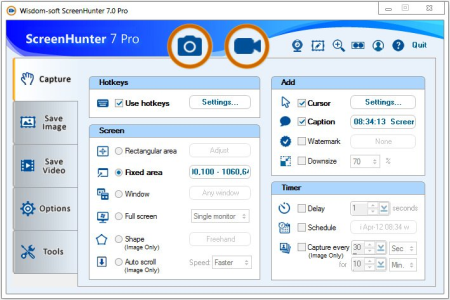
ScreenHunter 7 is an award-winning solution to all-in-one image capture, print, edit and video recording.​

It's the total capture solution to save you time and boost productivity. Also with auto-scroll web pages, auto-capture, webcam and video screen capture. It captures what you see as an image even whilst recording. It has an easy-to-use interface. All the features are visible in 4 easy-to-use tabs, so everyone from beginners to professionals can use ScreenHunter 7. The process is simple, the options are easy to manage, and the results are flawless. Powerful and intelligent, ScreenHunter has proven to be an incomparable helper of your business. The software supports full screen capture up to 6K for multiple monitors and records 4K videos for a single monitor. Supports frame rate up to 100 fps.
Using DirectX lets ScreenHunter 7 produce professional quality videos. It is a perfect tool for recording movies and courses online.
Moreover, ScreenHunter 7 captures and records windows covered by another window or even minimized windows. Optimal for automatic or scheduled captures and recording.
Furthermore, you can show your webcam anywhere at any given time, so you can integrate it into your recording the way you want.
ScreenHunter Pro 7 is the most advanced version with all the necessary tools included for your screen capture needs. It's the total capture solution to save you time and boost productivity. With this tool, you can capture screen to image or PDF files, immediately see the benefits of numerous time-saving features and deliver the highest quality screenshots. As well, it offers easy-to-use user interface and maximum flexibility for a more interactive capture experience.
Rectangular area
Adjustable rectangle
Object / Window
Auto-scroll
Multi-object
Text
Active Window
Fixed area (user defined)
Specific window (lock-in window)
Full screen
DOS program
DirectX / Screen saver
Movie / video
Freehand
Round area (Ellipse)
Round Rectangular area
Polygon
Web capture
Scanning images
Mouse pointer
Multiple monitors
Transparent window
AutoText (date/time stamps, note)
Watermark
Border
Delayed capture
Timed auto-capture
Scheduled auto-capture
Recurring capture
Image editing, adding text & annotation
Advanced image processing
High-quality zooming, resizing & cropping
Viewing 100 images & conversion
Drag & drop images from desktop
Automatic naming and saving to files
Clipboard
Auto-email
Auto-scale
Saving in the smallest file size
Optimized JPEG, GIF and PNG
High quality and transparent GIF
Saving to TIFF
Screen Color Picker
System tray
Zoombox
Flexible hotkey
Multiple hotkey
Direct printing
Wysiwyg printing
Developer support

DOWNLOAD
uploadgig
Код:
https://uploadgig.com/file/download/1c6b4c43d1E668b6/GOENSycO__ScreenHunt.rar

rapidgator
Код:
https://rapidgator.net/file/dee8bc086cabaaef5964f8a4f1bf7e76/GOENSycO__ScreenHunt.rar

nitroflare
Код:
http://nitroflare.com/view/E431B73F75F133F/GOENSycO__ScreenHunt.rar
 
SmartFTP Enterprise 9.0.2733.0 Multilingual

fc3d6cb5-ef7b-4a1a-9083-5cd8d54c2c9e.png

File Size: 56 MB

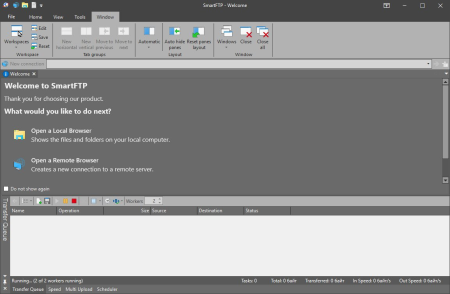
SmartFTP is an FTP (File Transfer Protocol), FTPS, SFTP, WebDAV, Amazon S3, Backblaze B2, Google Drive, OneDrive, SSH, Terminal client.​

It allows you to transfer files between your local computer and a server on the Internet. With its many basic and advanced Features SmartFTP also offers secure, reliable and efficient transfers that make it a powerful tool. SmartFTP can be used for:
- Web site publishing and maintenance
- Upload and of images, documents, movie and music files
- Managed file transfers. Automate file transfer processes.
- Backup and synchronize local and remote files:
Protocols
FTP and FTPS (Secure FTP)
SFTP over SSH
WebDAV
Amazon S3 (Enterprise Edition)
Google Drive (Ultimate Edition)
Google Cloud Storage (Enterprise Edition)
Backblaze B2 Cloud Storage (Enterprise Edition)
Microsoft OneDrive (Ultimate Edition)
Terminal Emulator (Ultimate Edition)
Integrated Editor
HIPAA 5010 compliant
FIPS 140-2, 186-4 compliant
Modern Graphical User Interface (GUI)
High DPI support
File/Folder Synchronization
Multilingual (more than 20 languages)
Thumbnails View and Preview
Visual Compare
Advanced Schedule
IPv6
On-the-fly Compression (MODE Z)
UTF-8 Support
Support for KeePass, LastPass, 1Password password manager
Multiple Connections
Auto reconnect and resume of broken transfers
Transfer Integrity
Verified Transfers (XCRC, XMD5, XSHA)
FXP (Server-To-Server Transfer) support
Remote Edit of files
Search for files and folders on the server
Local Browser
Bulk Rename
Software Development Kit (SDK)
Enhanced NAT/UPnP Support
UPnP (Universal Plug and Play), ICS, ICF
Transfer Queue
Scheduling (Enterprise Edition)
Uploads/Downloads/FXP
Unlimited simultaneous threads
International Domain Names (IDN)
Proxy / Firewall support
SOCKS5, SOCKS4, SOCKS4A, HTTP Proxy
Wingate, Winproxy, CSM, Checkpoint FW-1, Raptor
URL Watcher
FTP command line
Custom Commands
CHMOD (Properties)
Section 508 compliant
and much more ...

DOWNLOAD
uploadgig
Код:
https://uploadgig.com/file/download/388920bc44E25245/r78Ozc42_SmartFTP.En.rar

rapidgator
Код:
https://rapidgator.net/file/cf88ed4e75458d9582be661ce5bf923f/r78Ozc42_SmartFTP.En.rar

nitroflare
Код:
http://nitroflare.com/view/951B161291E44FC/r78Ozc42_SmartFTP.En.rar
 
VovSoft Webcam Capture 1.9

86be8c17-2563-4cb1-80c5-fda805cfa9dc.png

File size: 2.5 MB

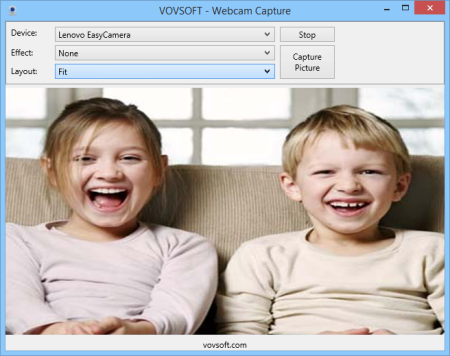
Webcam Capture is a very simple software solution that enables you to monitor your webcam video from a streamlined, minimalistic user interface.​

It offers several visual effects and can help you modify your webcam properties. You can click Start button and here you go. You can easily change your webcam device properties using the software. Webcam Capture is a native Windows application. So you don't need to install Java or .NET Framework. It only requires DirectX 9 which is already installed in Windows XP SP2 or later operating systems. You can capture screenshot using Webcam Capture by clicking the Capture Picture button on the screen.
Displays available resolutions and framerates

DOWNLOAD
uploadgig
Код:
https://uploadgig.com/file/download/310DC307901a82b1/de3H4GTo_webcamcapture..exe

rapidgator
Код:
https://rapidgator.net/file/457b324ea72f82b8a3a766e72f831554/de3H4GTo_webcamcapture..exe

nitroflare
Код:
http://nitroflare.com/view/29B2E2CE45AA88E/de3H4GTo_webcamcapture..exe
 
iMonitor EAM Live 9.626

0df71dca-1557-46a6-af49-519c7c1e9774.png

File size: 36 MB

iMonitor EAM is an easy-to-use surveillance software that provides total employee monitoring solution to enterprises at any size - from large ones to SMES.​

Record every employee computer activities, include keystrokes, clipboard activities, screen shots, file documents(copy, move, paste, delete, rename, create), print jobs, E-mail, web-mail(GMail, Yahoo mail, Hotmail and all other popular web-mail), on-line storage usage, FTP file transfer, websites, searches, file s, program usage and time, Skype, QQ, ICQ, AIM, Google talk chat, Facebook, Twitter activities, removable storage usage, application network traffic, system events and so on.
Investigate Employees
When confronting a situation of investigating an employee's wrongdoing, you need to act in time with a discrete investigations. Secure and quick collection, review, and report on on-line and communications activity are indispensable for you to find the lead.
Avoid security breach and intellectual property leakage
Most employers believe insiders are the biggest threat to confidentiality security. Almost half of breaches and are a result of inappropriate employee behavior. Insider Threats require detection in advance to result in early warning, so that informed and rapid response will be performed in time. By recording all PC activity and alerting on suspicious behavior, iMonitor EAM reduces the risk of unauthorized transactions and communication of sensitive data to protect your intellectual property.
Increase Work Efficiency
A sustainable and rapid development of your company depends on highly perfect employee performance and productivity. Benchmark and evaluate employees' work flow with accurate and reader-friendly reports without taking a lot of time collecting and analyzing data. Thus Increases productivity by reducing employees' nonproductive Internet usage.
Guarantee the data security
Tremendous loss and damage will be inevitable in the case of data loss triggered by hardware&software malfunction or human factor. iMonitor EAM is capable of backing up the entire files and data in employees' workstation automatically, with the result that you can rest easy without worrying about the trouble of any data breach.
Centralized Monitoring Solution
Monitor 1000+ client computers with 1 server, you can group the computers by departments or work places. All records will be collected from clients computers and saved in server database. The agent program will work in totally stealth mode, no pop-up window, and can not be ended.
Updates: official site does not provide any info about changes in this version.

DOWNLOAD
uploadgig
Код:
https://uploadgig.com/file/download/3B5f8f8dC565186c/qd8poOng_EAM9.626.rar

rapidgator
Код:
https://rapidgator.net/file/158fc31e1d5dae11d839218ff8a3a253/qd8poOng_EAM9.626.rar

nitroflare
Код:
http://nitroflare.com/view/E668D07CB86D4BA/qd8poOng_EAM9.626.rar
 
Easy Invert 1.2.2.23

9699d2c3-fd0b-41c7-9c21-224d22d054f2.png

File size: 0.1 MB

One of the major inventions in Windows 10 Fall Creators Update is the built-in colour filter.​

The colour filter radically change the appearance of your screen and its application can significantly improve your visual experience. Easy Invert makes it easier and automatable the use of the built-in colour filter feature. Using the colour filter can be a great help for the visually impaired as well as in situations where the information being displayed is hard to interpret visually e.g.
outdoors in strong sunlight
in the night or in a dark environment
if the software being used has an inappropriate visual design
in case of tiredness etc.
The built-in colour filter has only a few settings and its use may slow down your work because of its complicated activation and deactivation. These are the settings:
Settings - Colour & High Contrast - Apply colour filter
or the key combination Win+Ctrl+C
In the first case, you need to change your settings on the control panel, which can be reached through several steps, while in the second scenario you need to switch from using your mouse to your keyboard and then back. Both methods makes its use inconvenient.
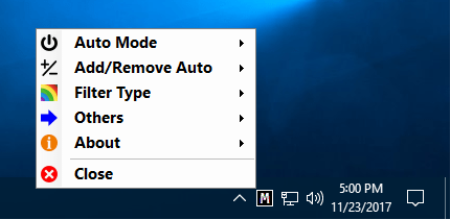
Easy Invert creates an icon on the system tray. Clicking on the icon with your mouse toggles the colour filter between activated/deactivated. All settings are available in the icon's menu.
One of the important additions to default settings is Auto Mode which activates the filter based on the name of the software in the foreground and/or the title of the window of the foreground. Using this you avoid having to activate the manual filter every time you start your frequently used programs; instead, Easy Invert will do the job in the background based on a list.
The benefits of Easy Invert:
An effective add-on to the built-in colour filter feature
Easy to use
In Auto Mode it activates/deactivates the colour filter in the background based on a configurable list
Free to use
No installation needed

DOWNLOAD
uploadgig
Код:
https://uploadgig.com/file/download/c10c810659fD5913/gTHKoD6O_easyinvert..rar

rapidgator
Код:
https://rapidgator.net/file/28199866b493a83a9492a48084992309/gTHKoD6O_easyinvert..rar

nitroflare
Код:
http://nitroflare.com/view/F8B057409A4B8CD/gTHKoD6O_easyinvert..rar
 
Expedition 10.14.4 MAX

28a4eb9d-489f-413d-ace8-93f598578332.png

English | File size: 90.2 MB

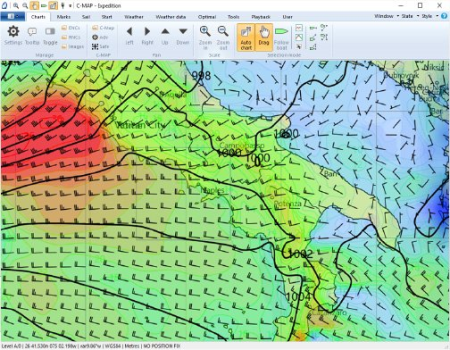
Expedition has been created as a navigational tool for yacht races.​

It provides a large set of features that can help finding the best path in the waters in order to make the most of the weather and the vessel's capabilities.
Clear-cut, appealing interface
Installing the application is not complicated and following the brief instructions on the screen is enough for smooth sailing till the operation completes. The interface looks very clean and presents the data in a manner that even a regular user would consider appealing and clear, with a nautical map dominating most of the main application window and the menus and options available in the top part.
Charting, weather information and buoy racing functionality
The chart is the main tool in water navigation and in this case it comes with plenty of details, especially for the more popular waters. Information such as minimum and maximum depth of the water or the territory it belongs to.
Built into the application is a chart plotter that can select the necessary chart as well as rotate it for a better view. The program works with C-Map NT+ and MAX, some versions of Bsb, Softcharts, NV-Verlag and Maptech PCX.
Expedition also provides weather tools that connect to various services to retrieve not only the latest reports but also details about tides and currents. Moreover, the application can show the navigator the optimum routes as far as the weather is concerned.
Buoy racing functionality has been integrated into the software, too, offering a slew of options for creating and correcting the course, calculate the handicap, checking the sail chart or viewing the optimal routing.
Comprehensive tactical and navigation software
Expedition's full potential can be uncovered by actually using it on the water. Apart from providing great charting tools and options it can retrieve information from various services and offers the possibility to calculate the best route under the current conditions.
Chart-plotter that seamlessly selects, moasaics and rotates charts
Advanced weather display and tools
Simply the best weather routing available
Start display and advanced buoy racing functions
Instrument connectivity with all popular instrument systems
Fix for ENC performance issue,
Updated simple world chart,
Updates to MyGrib,
Update to Grib Lambert projection support,
Enable verbose installer logging,
Various performance, interface & reliability updates.

DOWNLOAD
uploadgig
Код:
https://uploadgig.com/file/download/3fe917c964cB3f33/5XWP0384_Expedition_.rar

rapidgator
Код:
https://rapidgator.net/file/03adf0c5c18e17207da8293c9199dd3c/5XWP0384_Expedition_.rar

nitroflare
Код:
http://nitroflare.com/view/040F7FBFA5C5BD9/5XWP0384_Expedition_.rar
 
Gunamoi GreatCirc 3.3 (x86/x64)

b64d479a-5f33-40da-b1bf-a6efa108ce11.png

(x86/x64)English | File size: 12.2 / 14 MB

GreatCirc is a tool for calculating Great Circle distances on the earth's surface, and plotting points and great circle paths on a world map.​

The "great circle path" is the shortest direct route between two points on the earth's surface. Because the earth is a globe, the shortest path between any two points lies on a circle which is centred at the earth's core and passes around the surface of the world. Such a path will appear to be a curved line when drawn on a flat world map because of the distortion inherent in mapping the globe onto a flat map.Great Circle Distance calculation: find the shortest distance and direction between two points. (example)
Great Circle End Point calculation: find the end point of a great circle path, given start, distance and direction.
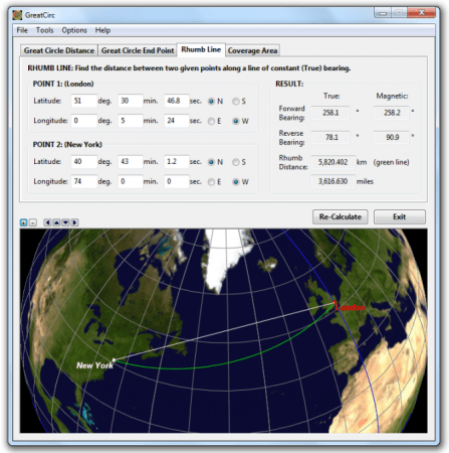
Rhumb Line Calculation: find the distance between two points along a line of constant bearing.
Enter map points by clicking on the world map. Left-click for Point 1, right click for Point 2.
Choose map points from a built-in list of Major Cities.
Enter map points using Australian Map Grid (AMG) coordinates.
Perform calculations using a simple spherical earth model, or the WGS84 standard ellipsoid.
Lite Features:
Improvements to the installer, especially when installing in multi-user environments.
Improved un-installer access for Windows 8 and above.
Improved animated wait cursor for Windows 7 and later.
Added "Check for Updates" option in Help menu.
Pro Features:
Batch Mode has been removed from the File menu. MapList-Flat and MapList-Globe apps now provide this functionality.
The option to save a Batch Report of multiple Great Circle calculations to a single report file is still provided, and is now available via the main File Menu.
Save Image now allows a selection of image file types, not just BMP.
Save Report and Batch Report now include the option of saving to PDF format. The single calculation PDF report includes both the report table seen in the HTML report, as well as the current map image, all together on the one PDF page.
Minor improvements to formatting of HTML report.
GreatCirc now suggests descriptive filenames for saved images, paths, and reports, based on calculation type and point locations.
The Magnetic Azimuth dialog, now includes site names, as per main dialog, if applicable.
Bug Fixes & Other Refinements:
Fixed bug where clicking on zoomed Globe view selected incorrect lat,long point when near edge of globe.

DOWNLOAD
uploadgig
Код:
https://uploadgig.com/file/download/5940463A656C559b/wa5NMY5u_GreatCirc_3.rar
https://uploadgig.com/file/download/1cBb87eE1EBb6dad/wa5NMY5u_GreatCirc_3_.rar

rapidgator
Код:
https://rapidgator.net/file/fc4b29ec7c3b2a8aa4aaf9b40b73e05a/wa5NMY5u_GreatCirc_3.rar
https://rapidgator.net/file/38312522eeeece85fc7d13c53a45d653/wa5NMY5u_GreatCirc_3_.rar

nitroflare
Код:
http://nitroflare.com/view/42BCCD8CEB656A8/wa5NMY5u_GreatCirc_3.rar
http://nitroflare.com/view/B43405B4FFEDB28/wa5NMY5u_GreatCirc_3_.rar
 
Navicat Essentials Premium 15.0.7

6b303978-c46f-4c85-9562-7b93fe24fcb2.png

File size: 126 MB

Navicat Essentials is a compact version of Navicat which provides the basic and necessary features you will need to perform simple database development.​

Navicat Essentials is for commercial use and is available for MySQL, MariaDB, SQL Server, PostgreSQL, Oracle, and SQLite databases. If you need to administer all aforementioned database servers at the same time, there is also Navicat Premium Essentials which allows you to access multiple servers from a single application. The All-New Engine
We focus strongly on improving responsiveness, usability, and performance. We engineered an entirely new mechanism and applied multithreading, so you can run certain tasks in parallel to increase the overall efficiency of your database development.
Cloud Database Navigation
Manage both on-premises and cloud databases such as Amazon RDS, Amazon Aurora, Amazon Redshift, SQL Azure, Oracle Cloud, and Google Cloud. Just simply establish connection using the pertinent information that your cloud databases provide.
Effortless Deployment Toolkit
Add your favorite tabs to On Startup and have them open automatically when Navicat launches, and use MacBook Pro Touch Bar to easily access Navicat features and controls.
Diversified Manipulation Tool
Use Import/Export Wizard to have data conversion from plain text formats such as TXT, CSV, XML and JSON. Add, modify, and delete records with our spreadsheet-like Grid View together with an array of data editing tools to facilitate your edits. Navicat Essentials gives you the tools you need to manage your data efficiently and ensure a smooth process.
Make Collaboration Easy
Synchronize your connection settings and queries to our Navicat Cloud service so you can get real-time access to them, and share them with your coworkers anytime and anywhere. With Navicat Cloud, you can leverage every minute of your day to maximize your productivity. Learn more >
Advanced Secure Connection
Establish secure connections through SSH Tunneling and SSL ensure every connection is secure, stable, and reliable. Support different authentication methods of database servers such as PAM authentication for MySQL and MariaDB, and GSSAPI authentication for PostgreSQL. Navicat 12 provides more authentication mechanisms and high-performance environments so you never have to worry about connecting over an insecure network.

DOWNLOAD
uploadgig
Код:
https://uploadgig.com/file/download/f1f0dE0e327B610C/VCVG9bLr_navicatess1.rar

rapidgator
Код:
https://rapidgator.net/file/d568cf1f2c2f9d432e848030eaf6507c/VCVG9bLr_navicatess1.rar

nitroflare
Код:
http://nitroflare.com/view/688C3FE8325E16B/VCVG9bLr_navicatess1.rar
 
Navicat Premium 15.0.7

b5fc96f6-6a36-46ee-abc8-f5d62121c3b9.png

File size: 128 MB

Navicat Premium is a database development tool that allows you to simultaneously connect to MySQL, MariaDB, SQL Server, Oracle, PostgreSQL, and SQLite databases from a single application.​

Compatible with cloud databases like Amazon RDS, Amazon Aurora, Amazon Redshift, SQL Azure, Oracle Cloud and Google Cloud. You can quickly and easily build, manage and maintain your databases.Seamless Data Migration
Data Transfer, Data Synchronization and Structure Synchronization help you migrate your data easier and faster for less overhead. Deliver detailed, step-by-step guidelines for transferring data across various DBMS. Compare and synchronize databases with Data and Structure Synchronization. Set up and deploy the comparisons in seconds, and get the detailed script to specify the changes you want to execute.
Diversified Manipulation Tool
Use Import Wizard to transfer data into a database from diverse formats, or from ODBC after setting up a data source connection. Export data from tables, views, or query results to formats like Excel, Access, CSV and more. Add, modify, and delete records with our spreadsheet-like Grid View together with an array of data editing tools to facilitate your edits. Navicat gives you the tools you need to manage your data efficiently and ensure a smooth process.
Easy SQL Editing
Visual SQL Builder will help you create, edit and run SQL statements without having to worry about syntax and proper usage of commands. Code fast with Code Completion and customizable Code Snippet by getting suggestions for keywords and stripping the repetition from coding. Quickly locate and correct PL/SQL and PL/PGSQL coding errors using our debugging component such as setting breakpoints, stepping through the program, viewing and modifying variable values, and examining the call stack.
Intelligent Database Designer
Create, modify and manage all database objects using our professional object designers. Convert your databases into graphical representations using a sophisticated database design and modeling tool so you can model, create, and understand complex databases with ease.
Increase your Productivity
Our powerful local backup/restore solution and intuitive GUI for Oracle Data Pump/SQL Server Backup Utility guides you through the backup process and reduces the potential for errors. Set an automation for repeatable deployment process like database backup and script execution at a specific time or day. No matter where you are, you can always get the job done.
Make Collaboration Easy
Synchronize your connection settings, models, queries and virtual groups to our Navicat Cloud service so you can get real-time access to them, and share them with your coworkers anytime and anywhere. With Navicat Cloud, you can leverage every minute of your day to maximize your productivity. Learn more >
Advanced Secure Connection
Establish secure connections through SSH Tunneling and SSL ensure every connection is secure, stable, and reliable. Support different authentication methods of database servers such as PAM authentication for MySQL and MariaDB, and GSSAPI authentication for PostgreSQL. Navicat 12 provides more authentication mechanisms and high-performance environments so you never have to worry about connecting over an insecure network.

DOWNLOAD
uploadgig
Код:
https://uploadgig.com/file/download/7320338ac2b0F5d4/LFK3PXZ4_navicat150_.rar

rapidgator
Код:
https://rapidgator.net/file/6db5184951b5dec490dae7ece61bf9ba/LFK3PXZ4_navicat150_.rar

nitroflare
Код:
http://nitroflare.com/view/2EDE08ECF2EB36A/LFK3PXZ4_navicat150_.rar
 
Tor Browser 9.0.4

95cc54cc-9587-4e9a-bf32-d63d1a2a1c07.png

File size: 64 MB

Tor is a toolset for a wide range of organizations and people that want to improve their safety and security on the Internet.​

Using Tor can help you anonymize web browsing and publishing, instant messaging, IRC, SSH, and other applications that use the TCP protocol. Tor also provides a platform on which software developers can build new applications with built-in anonymity, safety, and privacy features. The Tor Browser Bundle lets you use Tor on Windows, Mac OS X, or Linux without needing to install any software. It can run off a USB flash drive, comes with a pre-configured web browser to protect your anonymity, and is self-contained. Surfing anonymously provides a powerful shield against network surveillance and traffic analysis. Protecting your online privacy can only be achieved by additional software tools that can hide your location and can prevent your online information and browsing habits from being revealed to anyone.
If you're ever in need of such a tool, Tor Browser Bundle is one suggestion you can add to the list. The application relies on a network of virtual servers in order to make your browsing sessions anonymous. Tor makes available a set of rules and algorithms that routes the communications through various servers all over the world. Thus, all the traffic is randomized so tracking the source becomes an almost impossible task.
The package is a self-extracting archive that includes the Tor application itself, which can be run from command line, a cross platform controller GUI named Vidalia and a custom-made version of Firefox equipped with a set of addons that ensure online anonymity.
We advise the average user to consider using the Vidalia application, because the graphical interface puts you through a lesser ordeal than the command prompt version of Tor. When you first run Vidalia, it automatically connects to the Tor network and if the process is successful, a status will be displayed in the main window.
Vidalia's interface encases a collection of shortcuts that allow you to stop the service, to start setting up the relays, to trigger a global view of the network and most important of all, it sports a button for using a new identity any time you wish. If you're interested in bandwidth usage, Vidalia features a separate utility just for showing a bandwidth graph that measures the receive/send rate of the packets.
The portable Firefox version included in the package is customized with a few extensions that make the anonymous surfing experience easier. These include: Torbutton - allows you to create a new identity each time you start a browsing session, NoScript - blocks scripts from untrusted domains and HTTPS Everywhere - enables you to encrypt the communication with a lot of popular sites.
With all the components it encases, Tor Browser Bundle is one of the most trustworthy anonymous surfing tools out there. It can be configured from command prompt, run from its dedicated GUI controller - Vidalia and comes with a pre-configured web browser. Whichever of these methods you choose the result is a safe and controlled Internet browsing experience.

DOWNLOAD
uploadgig
Код:
https://uploadgig.com/file/download/25cbabBf75D64227/hacpLF0E_torbrowserinstallwin649.0.4_enUS..rar

rapidgator
Код:
https://rapidgator.net/file/e12b92d12adcb1cac524a173f250d327/hacpLF0E_torbrowserinstallwin649.0.4_enUS..rar

nitroflare
Код:
http://nitroflare.com/view/D12A643C3BB78EE/hacpLF0E_torbrowserinstallwin649.0.4_enUS..rar
 
Назад
Сверху