• Здравствуйте. Сайт заработал в архивном режиме форум www.old.nado.in

Anthony's Software !!!

JP Software CMDebug 25.00.21 Multilingual
4ea61c468a27aa1014be31b504d4cf09.png

File size: 23 MB

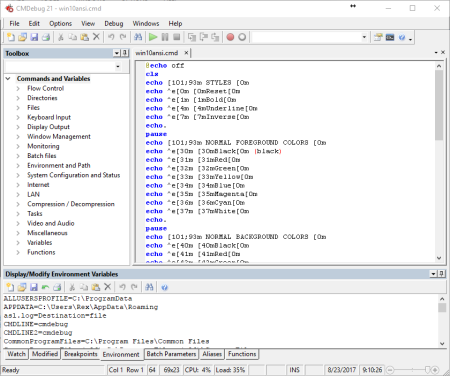
CMDebug is a stand-alone version of the Take Command IDE and batch debugger component.​

CMDebug is intended for developers who need to develop batch files to run in CMD.EXE or TCC-RT (runtime).
CMDebug allows you to create and debug your batch scripts with the integrated graphical IDE. CMDebug includes tabbed edit windows and a sophisticated debugger with single stepping, breakpoints, syntax coloring, tooltips, bookmarks, and tabbed variable and watch windows. Windows batch file programming has never been easier or more powerful!
You can use CMDebug to develop either CMD-compatible batch files (.BAT or .CMD), or TCC-RT-compatible scripts (.BTM). If you select the "TCC Syntax" option, CMDebug provides the full TCC-RT command set. If you select the "CMD Syntax" option, CMDebug will maximize CMD compatibility and disable TCC-only internal commands, variables, and functions. Some internal CMD / TCC commands will also behave slightly differently or modify their display output in order to match CMD's behavior more closely.
Using CMDebug with TCC-RT allows you to write (and encrypt) scripts using the TCC command language, and then distribute them with the free TCC-RT runtime on an unlimited number of target machines.
Create and debug your batch scripts with the integrated graphical IDE. The IDE includes tabbed edit windows and a sophisticated debugger with single stepping, breakpoints, syntax coloring, tooltips, bookmarks, tabbed variable and watch windows. Windows batch file programming has never been easier or more powerful!
The TCC-RT scripting language is a massive superset of the Windows CMD shell, with 220+ internal commands, 367+ internal functions, and 289+ system variables. Almost all of the CMD command line commands (e.g. DIR, COPY, DEL, START, etc.) are enhanced with hundreds of additional options. And TCC adds more than 180 new commands. TCC-RT can usually do in one or two lines what requires dozens CMD commands (when CMD can do it at all).
The scripting language includes a complete set of extended flow control structures including IF-Then-Else, DO and FOR loops, SWITCH, subroutines, batch libraries, and more.
When using TCC-RT syntax, most interactive commands (such as COPY, DEL, DIR, MOVE, REN, START, etc.) have command dialogs that allow you to select filenames and options and see your command line before executing it. The most powerful Windows command processor is also the easiest to use!
Monitor your system's hardware and software events, and execute commands when an event is triggered. You can monitor directory changes, the clipboard, event logs, Ethernet and WiFi connections, services, processes, and USB and Firewire connections.
Environment variable substitution is greatly enhanced, including nested variables, delayed expansion, indirect variables, multidimensional array variables, and direct access to the system, user, and volatile variables in the registry.
Select or exclude files by date, time, size, owner, and extended wildcards or regular expressions for extraordinary flexibility in file management.
Specify multiple filenames for most file processing commands (i.e., COPY, DEL, DIR, MOVE, etc.), or optionally the name of a file that contains the filename arguments. (COPY even supports multiple targets as well as multiple sources.)
Multiple types of I/O redirection are available, including redirecting and piping to STDERR, "in-process" pipes, "here-document" and "here-string" redirection, and Tee and Y pipe fittings.
Send keystrokes to any application (console or GUI).
TCC-RT includes internal compression and extraction commands for ZIP, 7ZIP, TAR, JAR, GZIP, and BZIP files.
You can access FTP, TFTP and HTTP (including SSL and SSH) directories and files in all command processor file-handling commands (COPY, DEL, MOVE, etc.).
Internal support is included for Perl, Lua, REXX, Python, Tcl/tk, and any Windows Active Scripting language. You can even combine multiple languages in your batch scripts.

DOWNLOAD
uploadgig
Код:
https://uploadgig.com/file/download/0927A7c074769141/G8Ea14VN_CMDebug25.0..rar

rapidgator
Код:
https://rapidgator.net/file/d9b9e9287a080e8df73c40cb8d30f8de/G8Ea14VN_CMDebug25.0..rar

nitroflare
Код:
http://nitroflare.com/view/A7A909631584333/G8Ea14VN_CMDebug25.0..rar
 
JP Software TCC 25.00.21

b371640e2f92e662323b77228c6446a9.png

File size: 32.3 MB

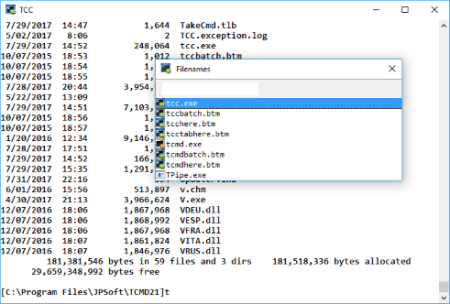
TCC is our console mode Windows command shell (formerly known as 4NT).​

TCC is a replacement for the CMD command line (the default Windows command prompt). TCC is a superset of CMD, with 246 internal commands (CMD has fewer than 40), 695+ internal variables and functions, and hundreds of enhancements to existing CMD commands.
TCC works with your existing command line applications and batch files, but offers major improvements in command line and batch file capabilities, and adds thousands of new features to your command prompt windows.
TCC is a CMD replacement command processor that is compatible with your existing CMD commands and batch files, while adding thousands of new features. You're immediately more productive, and you can learn and add TCC's new features at your own pace.
Create and debug your batch scripts in a fraction of the time with the integrated editor and batch file debugger.
The integrated and familiar environment means you are immediately more productive with your interactive command prompt and batch file development tasks.
The consistent syntax reduces your learning and development time.
The comprehensive help (including context-sensitive popup help for command line syntax), speeds your development time and reduces syntax errors.
Updates: official site does not provide any info about changes in this version.

DOWNLOAD
uploadgig
Код:
https://uploadgig.com/file/download/Fb37aE2f164753d6/1XQdQGj8_TCC25..rar

rapidgator
Код:
https://rapidgator.net/file/aaeb505bb265338cd4bfa36af6c83791/1XQdQGj8_TCC25..rar

nitroflare
Код:
http://nitroflare.com/view/70A3EB1456A5D28/1XQdQGj8_TCC25..rar
 
JP Software Take Command 25.00.21 Multilingual

38acb423bc628af5d7869e4e09e33c61.png

File size: 40 MB

Take Command is a comprehensive interactive GUI and command line environment that makes using the Windows command prompt and creating batch files easy and far more powerful.​

Take Command displays your command line applications in tabbed windows, with optional Explorer-style integration for a visual look at your folders. Take Command includes hundreds of major enhancements to the command line and CMD commands such as COPY, DEL, and DIR, and adds more than 140 new commands, 460 internal variables and functions, a batch file IDE / debugger, and thousands of other features.

· Modify and re-execute previous commands with a powerful command line editor
· Copy, delete, move, and rename groups of files and directories, not just individual ones
· Extended directory searches allow you to change to a directory anywhere on your system by entering only part of its name
· Quickly locate files or text within files anywhere on your system
· Built-in file viewer includes scrolling, search, and print capabilities
· Select or exclude files by date, time, size, and/or extended wildcards for extraordinary flexibility in file management
· Redefine commands, create new commands and functions for your regular tasks, even assign frequently used commands to a single keystroke
· Direct access to FTP, TFTP and HTTP (including SSL) directories and files in all file-handling commands
· Complete configuration adjustment, either through interactive dialogs or on the command line
· File descriptions up to 511 characters long provide information that can't fit in a filename
· Batch debugger with singlestepping, breakpoints, syntax coloring, bookmarks, popup variable windows, variable watch windows, and editing
· An improved batch language adds subroutines, IF/THEN/ELSE logic, DO loops, SWITCH statements, error and exception handling, and more than 130 internal commands, while retaining compatibility with batch files written for CMD
· More than 130 built-in variables include system configuration, device status, network drive detection, and free memory and disk space
· More than 200 variable functions assist with manipulation and display of strings, characters, numbers, date and time, file names, etc
· Start graphical and character-mode applications with ease - even run most console programs in the Take Command window
· Built-in screen scrollback buffer lets you review or print output from past commands at any time
· Customizable toolbar gives you quick access to frequently used commands and applications
· Find File dialog lets you search quickly for files or text, anywhere on your system - or search from the command line with the new FFIND command
· Dialogs, accessible from the Options and Utilities menus, for editing environment variables, aliases, file descriptions, and startup parameters
· New commands such as ACTIVATE, MSGBOX, and QUERYBOX that allow you to use GUI features and control GUI applications from your batch files

DOWNLOAD
uploadgig
Код:
https://uploadgig.com/file/download/b4929f07b5ebFe31/49ZnbAdT_TakeCommand25.0..rar

rapidgator
Код:
https://rapidgator.net/file/be9307b2134046a1cea4405c298a744c/49ZnbAdT_TakeCommand25.0..rar

nitroflare
Код:
http://nitroflare.com/view/2BAF2F03A8480FE/49ZnbAdT_TakeCommand25.0..rar
 
Karaosoft Song List Generator 5.1.5

212833d66ae1f87d4702d6f843613687.png

File size: 11 MB

Generate professional song books from your MP3, MP3+G karaoke, or video files in just a few clicks!​

Song List Generator simply reads the music files right from your hard drive and creates a printable book of songs, sliced and diced any way you want (by Artist, Title, DiscID, multi-column, various font sizes, custom messages, custom paper and margin sizes). Exports to PDF format that you can have professionally printed or posted on your web site to ! Advanced users can export raw song data to Microsoft Excel for further processing. If you use binders with punch holes and want to print double sided, Song List Generator can alternate the left and right margins on odd/even pages for maximum space on each page.
- Reads the files right from your hard drive. No database maintenance required! Reads either file name format or MP3 ID tag.
- Save space by adjusting font size and generating multiple columns per page
- Save space in your karaoke song books by eliminating song duplicates and displaying the different versions all on the same line
- Utilize the maximum space on your pages with adjustable margins
- For pages with binder punch holes, alternate left and right margins on odd and even page numbers for double sided printing
- Automatically correct for underscores and common capitalization problems
- NEW! touch screen support with finger scrolling and pinch to zoom.
AAC AIF AVI BIN DIVX FLAC FLV GVI KAR KFN KMA KMF KMH KOK M4A MID MOV
MP3 MP3+G MP4 MPG MPEG OGG RA RAM ST3 VOB WAV WMA WMV ZIP
Updates: official site does not provide any info about changes in this version

DOWNLOAD
uploadgig
Код:
https://uploadgig.com/file/download/118d5ba96dF107Db/zoRogssn_KaraosoftSongListGenerator5..rar

rapidgator
Код:
https://rapidgator.net/file/fc91248c94aca51ba91d998896039089/zoRogssn_KaraosoftSongListGenerator5..rar

nitroflare
Код:
http://nitroflare.com/view/8ACD40E44DD2456/zoRogssn_KaraosoftSongListGenerator5..rar
 
Key Metric FolderSizes 9.0.250 Enterprise

1f537b62983a35392bb645425eb8b269.png

File size: 36 MB

Desktop PCs and servers can quickly end up accumulating large quantities of unused, temporary, and duplicate files.​

Before you know it, you're out of drive space, backups are taking far too long to run, and users can't find the data they need when they need it. You need a visual, interactive software tool to help you manage disk usage. You need FolderSizes. FolderSizes is an award-winning, network-enabled disk space analysis tool. It can quickly isolate large, old, temporary, and duplicate files, or even show file distribution by type, attributes, or owner. All with multiple export formats, command-line support, shell context menu integration, and much more.
FolderSizes goes far beyond the capabilities of competing solutions by combining several tools into one: Disk Space Explorer - Awesome detail view, coupled with stunning graphical bar and pie graphs Duplicate File Report - Quickly isolate and manage duplicate files within any folder or volume Largest Files Report - FolderSizes can quickly show you which files are eating up the most space Oldest Files Report - Use your own criteria to find old files that may no longer be needed Temporary File Report - Eliminate temp file clutter left over from software installs, s, browsing, etc. File Owners Report - Discover which users are consuming the most space on local and network drives File Types & Attributes Reports - See the distribution of disk space by file type or attributes Drive Space Monitor - Instant, at-a-glance view of any local, mapped, or removable disk File Sizes, Names & Dates Reports...
FolderSizes provides an engaging, interactive disk space analysis experience that you must try yourself to truly appreciate. More than just a series of great-looking reports, FolderSizes allows you to visualize your disk space usage from multiple perspectives.
FolderSizes has a world-wide user base of IT professionals, power users, and enterprises of all sizes - each looking to maximize their storage resources and minimize waste. It employs an amazing, multi-threaded file system scanning engine that shows you results immediately - as the scan is progressing!
Explore, visualize, and comprehend local and network storage
Reclaim gigabytes of drive space - fast!
Improve storage capacity planning capability
Find the disk space hogs with just a few clicks
Manage and monitor disk space across the network (Pro edition only)
Publish disk usage reports right to your web server share
Streamline file systems to optimize backups
Monitor and enforce employee data storage policies
Find excessively long file names that interfere with CD storage, etc.
Find recently saved files without knowing their names (find recently modified)
Find files owned by a specific individual or group
View the "size on disk" (actual space consumed) for any file or folder
Visualize the distribution of files by file type, age, and size
Find and eliminate empty folders
Search files by nearly any file attribute combination
Schedule the generation of nearly any FolderSizes report (Pro edition only)
Hierarchical folder map visualization (based upon treemap technology)
Integrated scheduler (Pro edition only)
Unicode file and folder name support
Interactive, dynamic, full-color bar and pie graphs
Fast, multi-threaded, network-aware file system scanning
Isolate largest, oldest, duplicate, and temporary files
View disk space utilization by file type / attributes
View local & network disk space usage by owner / group
Command line interface for scripting & integration (Pro edition only)
FilterZip regular-expression based compression system
See total & free space for fixed, removable, network drives
Export reports in HTML, XML (Pro edition only), CSV, and more
Integrates with the Windows shell context menu (32 and 64 bit support!)
Extremely configurable - colors, fonts, print options, etc.
Flexible, multi-path oriented search and file reporting systems
Strong support for viewing allocated disk space (e.g. "size on disk")

DOWNLOAD
uploadgig
Код:
https://uploadgig.com/file/download/bDD1779956e8A8fd/PQLSUVCW_FolderSizes9..rar

rapidgator
Код:
https://rapidgator.net/file/22cd5e30575c2a4f5b00a470323d245b/PQLSUVCW_FolderSizes9..rar

nitroflare
Код:
http://nitroflare.com/view/65B6F62AE0F38CE/PQLSUVCW_FolderSizes9..rar
 
McAfee Endpoint Security 10.6.1.1386.8 Multilingual

cb00764ea0d269b660e161e3bf29589d.png

Languages: Multilingual | File Size: 226.85 MB

Our new endpoint protection suites emphasize integration, automation, and orchestration as the foundation of the threat defense lifecycle.​

Harnessing the power of machine learning to detect zero-day threats in near real time, our suites streamline the ability to quickly expose and remediate advanced attacks so productivity isn't compromised.
The volume and sophistication of endpoint threats has steadily grown as adversaries target these often mobile and remote assets as initial attack footholds. Adding to the challenge, security teams, after years of bolting endpoint security point products together, are now managing an average of ten different agents and five different consoles-with little to no integration or automation.
McAfee has re-imagined our endpoint security offerings to provide a consolidated platform for endpoint defense that enables simpler investigations and one-click correction across the entire organization. Through a single agent architecture with deep integration and automation, we remove silos between once-isolated capabilities to enhance efficiency and protection.
McAfee endpoint security products combine established capabilities such as firewall, reputation, and heuristics with cutting-edge machine learning and containment, along with endpoint detection and response into a single platform agent, with a single management console. The resulting integrated protection keeps users productive and connected while stopping zero-day malware, like ransomware, before it can infect the first endpoint.
In NSS Labs tests, McAfee Endpoint Security achieved a security effectiveness rating of 98.98% without any false positives.
With McAfee Endpoint Security 10, you can integrate advanced threat defense for faster incident response.
Today's advanced attacks require more than traditional antivirus defenses. The good news is that it doesn't have to be overwhelming thanks to our endpoint protection suites. Our enterprise endpoint security offerings are centrally managed and defend against the full threat spectrum from zero-day exploits to advanced targeted attacks.
Offers essential protection using multiple integrated endpoint protection software and technologies that collaborate in real time to analyze and combat threats. This product replaces McAfee Endpoint Protection Suite.
Provides advanced defenses that prevent, contain, and take action against zero-day threats and sophisticated attacks. This endpoint protection solution replaces McAfee Complete Endpoint Protection-Enterprise.
Secures patient zero by containing malicious actions before they can execute at the endpoint, using machine learning to classify suspect behavior, and then evolving to combat future attacks.
Combines behavior-based protection with continuous visibility and powerful insights to rapidly detect, contain, investigate, and eliminate advanced endpoint threats at patient zero. This endpoint protection platform includes McAfee Active Response, which is no longer available as a standalone product.

DOWNLOAD
uploadgig
Код:
https://uploadgig.com/file/download/8fc693aBf7BDb9Bc/aosjs3FN_.Endpoint.Security.10.6.1.1386.8.rar

rapidgator
Код:
https://rapidgator.net/file/5105a5cc757fc4495eb9d0b92dcb2a95/aosjs3FN_.Endpoint.Security.10.6.1.1386.8.rar

nitroflare
Код:
http://nitroflare.com/view/BE9E5F3C2DBC5C7/aosjs3FN_.Endpoint.Security.10.6.1.1386.8.rar
 
NCH Switch Plus 7.33

22005e2d9dd0db61d0205c22749470ba.png

File size: 2.8 MB

Switch is one of the most stable, easy-to-use, and comprehensive multi format audio file converters available.​

Convert between over 40 audio file formats
Music tags preserved for supporting formats
(e.g., MP3, WAV, WMA, FLAC and OGG)
Import and convert a playlist (M3U and PLS)
Extract audio from DVDs and video files
(e.g., AVI, MOV, MPEG)
Access online database to add song information
Listen to tracks prior to conversion
Batch convert many audio files at once
Convert from multiple file formats at one time
Use your right click menu to convert audio files directly from Windows Explorer
Automatically normalize audio while converting
MP3 encoder for constant or variable bit rates
WAV encoder and FLAC converter supports a range of sample rates
Use as a command line plugin for automation with software to convert or compress audio files
Updates: official site does not provide any info about changes in this version

DOWNLOAD
uploadgig
Код:
https://uploadgig.com/file/download/dC9491b87Dd2dfc6/tNf0j7dt_NCH.Switch.7.33..rar

rapidgator
Код:
https://rapidgator.net/file/7b5a4e6476301c796ea800b6940cb98e/tNf0j7dt_NCH.Switch.7.33..rar

nitroflare
Код:
http://nitroflare.com/view/FFBF5C336452D22/tNf0j7dt_NCH.Switch.7.33..rar
 
Neevia Document Converter Pro 7.0.0.80

3e119b8bf18d0c4540d021d61163978e.png

File size: 26.4 MB

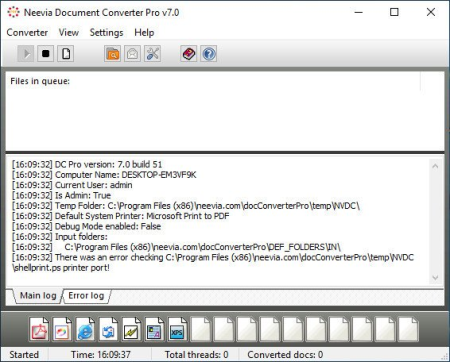
Neevia Document Converter Pro is a software product that dynamically converts Microsoft Office 2003/2007/2010/2013/2016/2019/365, WordPerfect, HTML, AutoCAD DWG/DWF, EML, MSG, PostScript and many other document types to PDF, PDF/A, PostScript, JPEG, TIFF, PNG, PCX, BMP.​

It operates in both a batch mode via directory or email scanning and in direct mode via a COM (ActiveX) component. Document Converter can be configured to recognize text - this is known as OCR - for the converting Image and PDF files and comes with support for printing the input files directly to a physical printer instead of converting them to PDF or Image.
With clustering and multi-threading support Neevia Document Converter Pro offers a reliable and stable conversion process.
Document Converter Pro is easy to install and is used by companies in the legal, pharmaceutical, insurance and in many other areas that generate voluminous documents. The goal of Neevia Document Converter Pro is to help your company create one PDF/Image standard that can be integrated into your workflow with ease and affordability.

DOWNLOAD
uploadgig
Код:
https://uploadgig.com/file/download/C19EB8cB0dd3ba7b/58zEeWpg_Neevia_Document_Converter_Pro_7.0.0.80..rar

rapidgator
Код:
https://rapidgator.net/file/470a5546cb054ff05fc7e66225ad94a7/58zEeWpg_Neevia_Document_Converter_Pro_7.0.0.80..rar

nitroflare
Код:
http://nitroflare.com/view/BF0198233B11648/58zEeWpg_Neevia_Document_Converter_Pro_7.0.0.80..rar
 
Notepad++ 7.8 Multilingual

379186ada2f4cf2aee86313a100582ed.png

File Size : 8.4 Mb

Notepad++ has all the same great features of Notepad++ including support for multiple languages and an extensive plugin system, but there's nothing to install.​

Supported languages:
C C++ Java C# XML HTML
PHP CSS makefile ASCII art (.nfo) doxygen ini file
batch file Javascript ASP VB/VBS SQL Objective-C
RC resource file Pascal Perl Python Lua TeX
TCL Assembler Ruby Lisp Scheme Properties
Diff Smalltalk Postscript VHDL Ada Caml
AutoIt KiXtart Matlab Verilog Haskell InnoSetup
CMake YAML WYSIWYG
If you have a colour printer, print your source code (or whatever you want) in colour.
User Defined Syntax Highlighting
It allows user to define his own language : not only the syntax highlighting keywords, but also the syntax folding keywords, comment keywords and the operators. ( screenshot1, screenshot2, screenshot3, screenshot4 ).
Auto-completion
For most supported languages, user can make his/her own API list (or the api files from dowload section). Once the api file is ready, type Ctrl+Space to launch this action (see screenshot). For more information about Auto-completion, please see Auto-completion HOWTO.
Multi-Document
You can edit several documents at the same time.
Multi-View
You have two views at same time. That means you can visualize (edit) 2 different documents at the same time (screenshot). You can visualize (edit) in the 2 views one document at 2 different positions as well. The modification of document in one view will carry out in another view (i.e. you modify the SAME document when you are in clone mode).
Regular Expression Search/Replace supported
You can search and replace one string in the document by using the regular expression.
Full Drag 'N' Drop supported
You can open a document by drag & drop. You can also move your document from a position (or even a view) to another by drag & drop.
Dynamic position of Views
The user can set the position of the views dynamically (only in 2 views mode : the splitter can be set in horizontal or in vertical), see screenshot.
File Status Auto-detection
If you modify or delete a file which opened in Notepad++, you will be notified to update your document (reload the file or remove the file).
Zoom in and zoom out
That's another fantastic function of Scintilla component. Just see screenshot.
Multi-Language environment supported
The Chinese, Japanese, Korean, Arabic and Hebrew Windows environments are supported. See Notepad++ under the Chinese Windows , under the Arabic Windows and under the Hebrew Windows in action screenshot.
Bookmark
User can just click on the bookmark margin (located right side of line number margin) or type Ctrl+F2 to toggle a book mark. To reach the bookmark, type just F2 (Next bookmark) or Shift+F2 (Previous bookmark). To clear all bookmarks, click the Menu Search->Clear All bookmarks. See screenshot.
Brace and Indent guideline Highlighting
When the caret stay beside of one of those symbol { } [ ] ( ) , the symbol beside of caret and its symmetric opposite symbol will be highlighted, as well as the indent guideline (if any) in order to locate the block more easily. See screenshot1, screenshot2 .
Macro recording and playback
You can save several macros and edit their keyboard shorcuts for the next use.

DOWNLOAD
uploadgig
Код:
https://uploadgig.com/file/download/a185fa65afd7EB42/MVy6SHqE_Notepad..rar

rapidgator
Код:
https://rapidgator.net/file/8762d8dc486148c65e72f09b3ffb8cec/MVy6SHqE_Notepad..rar

nitroflare
Код:
http://nitroflare.com/view/A1D8253DF33C509/MVy6SHqE_Notepad..rar
 
Notepad++ 7.8 portable

164fbe7b6be312aa5a3173fd1e928733.png

File Size : 10 Mb

Notepad++ has all the same great features of Notepad++ including support for multiple languages and an extensive plugin system, but there's nothing to install.​

Supported languages:
C C++ Java C# XML HTML
PHP CSS makefile ASCII art (.nfo) doxygen ini file
batch file Javascript ASP VB/VBS SQL Objective-C
RC resource file Pascal Perl Python Lua TeX
TCL Assembler Ruby Lisp Scheme Properties
Diff Smalltalk Postscript VHDL Ada Caml
AutoIt KiXtart Matlab Verilog Haskell InnoSetup
CMake YAML WYSIWYG
If you have a colour printer, print your source code (or whatever you want) in colour.
User Defined Syntax Highlighting
It allows user to define his own language : not only the syntax highlighting keywords, but also the syntax folding keywords, comment keywords and the operators. ( screenshot1, screenshot2, screenshot3, screenshot4 ).
Auto-completion
For most supported languages, user can make his/her own API list (or the api files from dowload section). Once the api file is ready, type Ctrl+Space to launch this action (see screenshot). For more information about Auto-completion, please see Auto-completion HOWTO.
Multi-Document
You can edit several documents at the same time.
Multi-View
You have two views at same time. That means you can visualize (edit) 2 different documents at the same time (screenshot). You can visualize (edit) in the 2 views one document at 2 different positions as well. The modification of document in one view will carry out in another view (i.e. you modify the SAME document when you are in clone mode).
Regular Expression Search/Replace supported
You can search and replace one string in the document by using the regular expression.
Full Drag 'N' Drop supported
You can open a document by drag & drop. You can also move your document from a position (or even a view) to another by drag & drop.
Dynamic position of Views
The user can set the position of the views dynamically (only in 2 views mode : the splitter can be set in horizontal or in vertical), see screenshot.
File Status Auto-detection
If you modify or delete a file which opened in Notepad++, you will be notified to update your document (reload the file or remove the file).
Zoom in and zoom out
That's another fantastic function of Scintilla component. Just see screenshot.
Multi-Language environment supported
The Chinese, Japanese, Korean, Arabic and Hebrew Windows environments are supported. See Notepad++ under the Chinese Windows , under the Arabic Windows and under the Hebrew Windows in action screenshot.
Bookmark
User can just click on the bookmark margin (located right side of line number margin) or type Ctrl+F2 to toggle a book mark. To reach the bookmark, type just F2 (Next bookmark) or Shift+F2 (Previous bookmark). To clear all bookmarks, click the Menu Search->Clear All bookmarks. See screenshot.
Brace and Indent guideline Highlighting
When the caret stay beside of one of those symbol { } [ ] ( ) , the symbol beside of caret and its symmetric opposite symbol will be highlighted, as well as the indent guideline (if any) in order to locate the block more easily. See screenshot1, screenshot2 .
Macro recording and playback
You can save several macros and edit their keyboard shorcuts for the next use.

DOWNLOAD
uploadgig
Код:
https://uploadgig.com/file/download/57c7F12C7529189d/XRi0ghno_notepad__port..rar

rapidgator
Код:
https://rapidgator.net/file/9b8d2ed28b57738b9d163e37bce1b80b/XRi0ghno_notepad__port..rar

nitroflare
Код:
http://nitroflare.com/view/066C6F8E6012CAC/XRi0ghno_notepad__port..rar
 
Ultimate Settings Panel 6.5

04cf408b89d6e481444abd35ad120700.png

File Size : 3.1 Mb

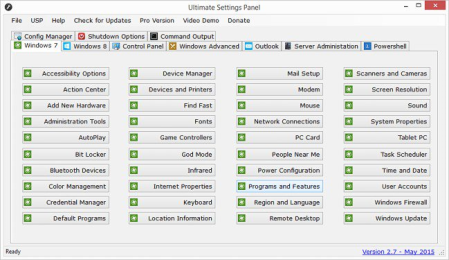
Ultimate Settings Panel is an all in one settings solution for a multitude of configuration options in Windows 7, 8.​

1 and 10, Microsoft Office, Windows Server and System Center Configuration Manager. The latest release now has 10 different configuration tabs including Windows 8.1 and a total of 224 configuration items spanning across all versions of Windows, Powershell, Outlook, Server Administration and Configuration Manager.

DOWNLOAD
uploadgig
Код:
https://uploadgig.com/file/download/75b8ef4591113b2b/tquPZDao_uspv65..zip

rapidgator
Код:
https://rapidgator.net/file/ef3cc64416396ae6de44e8dbdd8a90f9/tquPZDao_uspv65..zip

nitroflare
Код:
http://nitroflare.com/view/B509BC86765D99F/tquPZDao_uspv65..zip
 
LastPass Password Manager 4.34 Multilingual

70c6c600255c725c136320b53aeb48b4.png

File size: 28/35 MB

LastPass Password Manager is a convenient program to help you keep all of your log-in information secure without having to memorize all of it.​

You can use LastPass to automatically log in to any site once you've entered the information once, so you'll never have to worry about forgetting your password again.
Browser integration: LastPass integrates with Chrome, Firefox, Internet Explorer, Safari, and more, so you can continue to use your favorite browser and still get all of the benefits from this app. You can choose to install only plug-ins for specific browsers, or you can use the universal installer, which will work on most major browsers and is the easiest option for novice users.
Nice interface: This app has a streamlined interface that makes the process of storing, accessing, and managing your log-ins a snap. Once you're logged in to the app, a button will pop up each time you enter log-in information for another site. Just click this button to add that log-in to the Vault, and you'll be able to manage it from there going forward.
unlimited storage of passwords and secure notes
automatic backup and synching for one device
automated filling of login credentials and forms
Security Challenge password audit
Multi factor authentication and one time passwords
New: LastPass 4.0 has received a completely new interface password vault, expand the menu browser and web stores. The new design includes enhanced web icons, simplified navigation and a deep tone;
NEW: Switch between viewing the grid and list the repository for easy management of user data. The grid used larger tiles for easy detection of a specific object, and the list of icons used less. The two viewing modes allow you to edit, share, move, and delete objects;
New: The Clearinghouse provides a convenient platform to manage all the objects that you have shared, and shared with you, including shared folders. The new component is available on the left navigation menu of storage;
NEW: including emergency access - a new feature that allows you to transfer family or authorized persons access to storage in the event of unforeseen circumstances. The new feature is available on the left navigation menu of storage;
NEW: Multiple Choice in LastPass vault. Users can now move, delete, or share by several objects in the repository.

DOWNLOAD
uploadgig
Код:
https://uploadgig.com/file/download/c3b5f93c9cB394c5/y6sEHjQs_lastpass..rar
https://uploadgig.com/file/download/0e62c4a60d24Ca15/y6sEHjQs_lastpass_x64..rar

rapidgator
Код:
https://rapidgator.net/file/716e562d807ac21b6261c9ac864744c9/y6sEHjQs_lastpass..rar
https://rapidgator.net/file/65c4473194bde4edeee3202014a8c793/y6sEHjQs_lastpass_x64..rar

nitroflare
Код:
http://nitroflare.com/view/77AF445EA19E752/y6sEHjQs_lastpass..rar
http://nitroflare.com/view/F8FF5712F28D011/y6sEHjQs_lastpass_x64..rar
 
Lighten PDF to Word Converter 6.2.3 Multilingual

08b933c56004b29d638dae929741e36d.png

File size: 7.8 MB

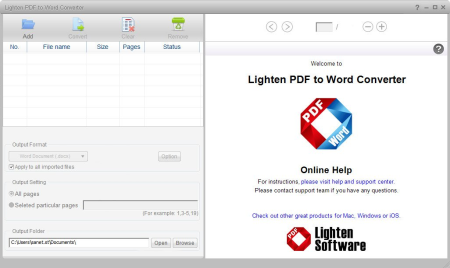
With Lighten PDF to Word Converter, you can convert PDF to Microsoft Word (.​

docx) for easy editing, and move all the content to Word without spending lots of time retyping or copying and pasting. Lighten PDF to Word Converter has ability to preserve original font style, color, size, graphic, table and page layouts as accurate as possible. As we all know, time is money, Lighten PDF to Word Converter is definitely the right choice for PDF conversion. Please a free trial to see the difference in accuracy and editability between Lighten PDF to Word converter and the rest.

Easy and quick PDF to Word Converter
-You can start PDF conversion quickly without learning thanks to the intuitive interface.
-Simply add PDF files, choose the output folder and click 'Convert' button, you'll get a well converted Word document within seconds.
-With the built-in PDF Reader, you can also preview PDF files, mark table or image areas manually and flexibly for better conversion result.
Excellent Conversion Accuracy
-As we all know that PDF and Microsoft Word are different document formats with different structures and features. With advanced algorithm, Lighten PDF to Word Converter can convert PDF with high accuracy, preserving most of the content from the original PDF file, so you do not have to have to spend lots of time tweaking the converted .docx file.
Higher Efficiency
-As a productivity application, efficiency is the goal. Lighten PDF to Word Converter allows you to select unlimited quantities of PDFs at one time. And it can convert PDFs in high speed, after much test, it takes only about 1 minutes to convert a 100-page PDF document to Word doc. And you can also convert only particular pages, free yourself from unnecessary waiting.
The Best Table Conversion Feature
-Many PDF files have table data. With the intelligent and flexible table conversion features, Lighten PDF to Word Converter can convert detect and convert table automatically, and let you manually mark table areas, add rows and columns, merge or split cells before conversion. So it can retain table accurately no matter how complex your table data is with these flexible features.
Other Features
* Convert unlimited PDFs at one time;
* Support PDF with copying and printing restrictions;
* Built-in PDF reader lets you preview PDFs before conversion;
* Convert PDF with copying, printing and editing permission password without problem.
Updates: official site does not provide any info about changes in this version.

DOWNLOAD
uploadgig
Код:
https://uploadgig.com/file/download/83b33f466c3538f6/2SvX7DKJ_pdftowordconverterv623.rar

rapidgator
Код:
https://rapidgator.net/file/990562c5b41e1781d4a42ea0b5f11c2e/2SvX7DKJ_pdftowordconverterv623.rar

nitroflare
Код:
http://nitroflare.com/view/E52996133E1910D/2SvX7DKJ_pdftowordconverterv623.rar
 
NetTraffic 1.59 Multilingual

2eda26028ec6abf675e61e979e4b88e7.png

File size: 0.4 MB

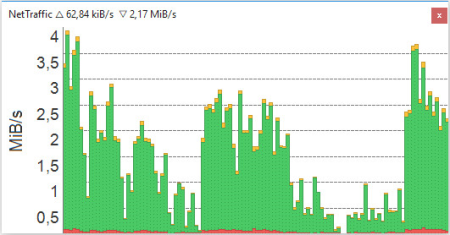
NetTraffic is a simple-to-use application that monitors incoming and outgoing network traffic, catering to all users who are interested in evaluating statistics, such as network administrators.​

After a brief and uneventful setup procedure that does not require special attention from the user, you can run the app. It creates an icon in the system tray area and immediately starts monitoring the input and output packets.
Clicking the icon brings up a small panel in the bottom-right corner of the screen, where you can view a graphical representation of real-time results. It can be set to always stay on top of other programs.
Recorded statistics include total, sent and received packets, elapsed time, and cursor position when it comes to the current state, average one, and prognosis. This applies per hour, day, month and year.
You can also view charts and tables for a specific time frame, choose the time unit, as well as pick the chart mode between traffic, time and cursor. Statistics can be reset with the click of a button. In addition, you can import and export data.
As far as program options are concerned, you can switch to a different UI language, enable the tool to autorun at system startup, select the network interface, adjust the transparency level, set automatic updates checkup, and others.
NetTraffic uses a very light amount of CPU and RAM, so it does not affect the overall performance of the computer. It is very responsive to commands and shows accurate information. We have not come across any issues in our tests, since the app did not hang, crash or pop up error dialogs. All in all, NetTraffic gets the job done and includes an interesting set of options.

DOWNLOAD
uploadgig
Код:
https://uploadgig.com/file/download/332472Af249504e3/D4lCoBPk_NetTraffic_1.59.0.rar

rapidgator
Код:
https://rapidgator.net/file/78f95f2d9871cd4e5972b83ef3c594cb/D4lCoBPk_NetTraffic_1.59.0.rar

nitroflare
Код:
http://nitroflare.com/view/6D19E4F107A1900/D4lCoBPk_NetTraffic_1.59.0.rar
 
IObit Smart Defrag Pro 6.3.5.189 Multilingual

058c4f3e714d9cdd75c0504338bb09e1.png

File Size: 15.7 MB

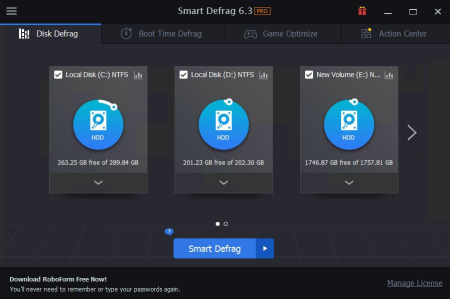
IObit Smart Defrag is a Disk Defragmenter, that accelerates the whole system with fast and efficient disk defragment.​

Based on IObit latest disk defrag engine and "Boot Time Disk Defrag" technology, Smart Defrag 5 is created with the world's leading defragmentation ability. It not only provides defragmentation, but also intelligently streamlines your files based on using frequency, thus accelerating disk speed and the whole system for top performance!
IObit Smart Defrag works fast, automatically and quietly in the background and is suitable for large hard drives. It helps defragment your hard drive more efficiently than any other product on the market - free or not. It is known that disk fragments has been a primary cause of slow and unstable PC performance.
IObit Smart Defrag is such a FREE tool that provides extremely fast and efficient defragmentation to your hard drives intelligently for faster file loading and high disk performance. With install it and forget it feature, the program works automatically and quietly in the background on your PC, keeping your hard disk running at its top speed.
Extremely Fast and Efficient Defragmentation - Enhanced
Using IObit's latest defrag engine and the new "Boot Time Defrag" technology, Smart Defrag 5 has not only the world's fastest defragmenting speed but also the most advanced defragmenting ability. It's been specially designed for modern, large hard drives, which eliminates the long waiting time.
Designed for Top Disk Performance - Enhanced
The program doesn't just provide simple defragmentation. It also streamlines your file system, places the frequently used files and directories into the fastest area of the disk, enabling your computer to run at top speed with the most stability.
Always-on Automatic Defragment - Enhanced
The program works automatically and quietly in the background, so it continually and constantly keeps your computer fragment-free.
"Boot Time Defrag" Technology - New!
The new "Boot Time Defrag" technology allows you to defrag files during the system boot process, while these files cannot be defragged or are not safe to move after the system is already boot-up.
Guaranteed Data Safety and Disk Stability - Enhanced
Unlike other "Automated" Defragmenters, Smart Defrag 5 does NOT constantly perform analysis and defrag, which damages your hard drive and shorten its life. It has a "Safe Intelligence" technology that can assure the health of your disk by deciding When and How to execute defragmentation.
On-schedule Disk Defragment - Enhanced
Your PC's performance is better maintained when it is defragged on a regular basis. The program offers a flexible way that allows you to schedule disk defragmentation according to your needs.
Extremely Easy to Use - Enhanced
Smart Defrag has taken on a new look. While it's still intuitive and easy to navigate, the new interface is undoubtedly more exquisite and professional, making it the ideal utility for complete computer novice.
Up to 200% Faster File Access Speed.
Boot Time Defragment for Quicker PC Startup.
Automatically & Intelligently Defragment Fragmented Files.
Customizing Defrag Mode & Disks/Files to Be Defragged.
DMA Applied for Better, Faster & More Stable Data Transfer.
Auto Update to the Latest Version.
Free 24/7 Technical Support on Demand.
Supported Operating Systems: Windows XP, Vista, 7, 8, 8.1, 10 (32-bit, 64-bit).
+ Improved UI for a better user experience.
+ Optimized the registration process to make it easier and more stable.
+ Fixed the occasional display failure of Disk Cleanup result.
+ Fixed minor bugs.

DOWNLOAD
uploadgig
Код:
https://uploadgig.com/file/download/16431dA24E7d175b/XGbpxBFY_IObit.Smart.Defrag.Pro.6.3..rar

rapidgator
Код:
https://rapidgator.net/file/a2772cf88f9f400b6d693dddd25b7d64/XGbpxBFY_IObit.Smart.Defrag.Pro.6.3..rar

nitroflare
Код:
http://nitroflare.com/view/6FE588CBDCC73D5/XGbpxBFY_IObit.Smart.Defrag.Pro.6.3..rar
 
JixiPix Artista Impresso Pro 1.8.10

e00226ef398119bdabb672baa63b1d2f.png

Windows x86/x64 | File size: 147.84 MB

For professionals who like creative control we give them Layers for blending multiple paint styles and brushes to paint on and off the impressionism strokes.​

We have also included an ultra-impressionism effect called 'Tache' to cover the painting with broken brush strokes or dabs of color that literally stand out, apply them sparsely or cover the entire painting, the choice is yours.
The 19th century brush-wielding Impressionist artists were crazy about flowers and gardens, and it was good. With flowing brush strokes and thickly painted texture, Van Gogh made his Sunflowers immortal with harmonious movement of color, contrast, and form. Monet made his Water Lilly Pond a celebrity. It took their genius and a lifetime of practice navigating the riot of their senses, but these extraordinary artists took what they saw and felt in the petals and leaves and transferred their impressions onto canvasses full of beauty, mood and meaning.
Lucky you, 21st century software wielding seer and lovers of beauty, Impresso gives you the same enduring attention to detail, light, color and texture by transforming your photos into multi-textured, stroke-filled Impressionist masterpieces. Keen eyes will love how Impresso maintains the balance of your piece! The results are captivating paintings brimming with passion, life, and beauty.
A pro workflow adds impressionism styles per layer. With Layers, users can blend styles using brushes to paint on or off areas in the painting! Also, included is the powerful Ellipse Detail tool to add finely painted details to faces, flowers or to create focal points in landscapes. Once completed , resize then hit the 'Apply' button to render small brushstrokes inside the Ellipse. With layers photographers and artists now have the power to composite multiple impressionism styles for impressive results.
('wet-on-wet' or 'all-at-once')-is great for portraits! This beautiful paint style starts by filling the painting with an abundance of brushstrokes. A library of artistic finishes compliments this style by adding light, color and movement with controls over strength.
(in open air) is perfect for landscapes. This stroke-filled effect consists of eight artists' palettes created by famous impressionists. Use them as they are or edit the paint colors to make your own palette. The Save Preset feature keeps the palette and all the layers intact for future projects.
('spot' or 'blot') applies broken brushstrokes throughout the image. This technique of laying thick patches, flecks and dabs of color is great for making paint look as if it stands out from the surface. Apply a light spackling of strokes or fill the painting with dabs of color-the choice is up to you!
layer is added to each painting created. By creating a canvas layer, it can now be turned on or off for viewing strokes created on previous layers. As with traditional methods, the canvas is an integral part of the painting, so we have locked the layer to keep it from being accidentally deleted.
Three stroke styles: #1 is a series of straighter strokes, #2 combines the first style with curved ones, and #3 is an abstract set. Then the Tache effect has its own custom set of brushes designed for depth.
Three Impressionism styles: Alla Prima, En Plein Air and Tache (pronounced tash)
Pro Layers with built-in Impressionism styles for multi-layer types and options to duplicate, reorder, and delete them
Control over detail ellipse tool, stroke size, stroke volume, bristle strength & depth, artistic finishes and the painted edge
Save Preset to save customized paint palettes and keep all strokes & layers intact for future projects
Smart brushes to remove or add impressionism effect-the brushes are smart because they remove the effect by stroke
Mask with fill, invert and clear to support brushes and layers
Canvas and linen texture
8 Impressionist palette styles
One-touch paint styles
70 Artistic finishes
One-of-a-kind ellipse detail tool renders small brush strokes inside the placed area

DOWNLOAD
uploadgig
Код:
https://uploadgig.com/file/download/b9fC4c4473152596/1QTQXRL6__Impresso.Pro.1.8.10.rar

rapidgator
Код:
https://rapidgator.net/file/c4e5a637f5db094db135aea2f6b83dd7/1QTQXRL6__Impresso.Pro.1.8.10.rar

nitroflare
Код:
http://nitroflare.com/view/E9F4B7FCA503CC7/1QTQXRL6__Impresso.Pro.1.8.10.rar
 
JixiPix Chromatic Edges 1.0.9

6f08e10e138d96ab21a9ed9c87b30a88.png

Windows x64 | File size: 517.47 MB

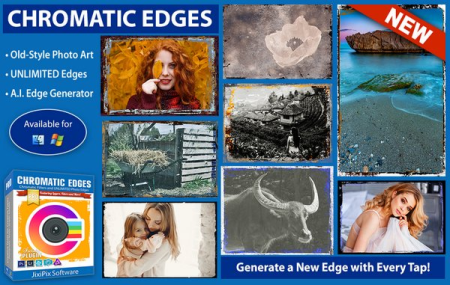
JixiPix takes vintage to a whole new extreme.​

Gone are the days of having a few tiny choices when it comes to adding flare to your imagery. Chromatic Edges brings back the subtle magic of photo processing with glass, silver and paper plates all with a few taps and your unique photo.

It's all about the edge! There is something artistic about the old days of plate photography. The silky smooth images and fabulously artistic edges are just amazing to look at.
Before the days of digital or film photography, photographers had to process their images using glass plates, metal plates, and paper to get their final image. These processes took tremendous skill and passion to produce the final product. Some of the processing techniques even required the processing of the glass plate within minutes of taking the photograph. Boy have times changed!
Until today you had only a few choices if you wanted to recreate some of the old-style photo art. You would pick a stock photo and blend it into your photography. And since there are only a few choices you were left with your artwork starting to look oh-so-familiar. Chromatic Edges changes all that and gives you unlimited artistic photography styles while only taking a few steps to create.
Having fun with your edges is the key ingredient to making great images! We at JixiPix have found unique ways to use Machine Learning to generate unlimited edges. Just tap the "Generate" button to see the magic happen. Chromatic Edges will, Quickly and effortlessly, create a completely unique edge. If you find that you love it, its super simple to tap the '+' to save it for later.
To create this powerful technology took thousands of artistic man hours of meticulously painting edges. These edges were then processed through our deep learning algorithm and used to teach the 'machine' how to create them on its own. Now you, the user, get to use this power to 'edge' your photo and never have two of the same edge again. And the great thing is.even if you know nothing about the fabulous photo techniques from a hundred years ago you will still appreciate the possibilities and creativity you can achieve with Chromatic Edges.
Chromatic Edges is filled to the brim with styles. Easily create Calotypes, Cyanotypes, Daguerreotypes, Gelatin Silver Plates, Tintype, Autochrome, Ambrotype, Carbon Print, Aristotype, Salted Paper Print, colored edges, and thousands of styles in between.
Calotype or talbotype is an early photographic process introduced in 1841 by William Henry Fox Talbot, using paper coated with silver iodide. The term calotype comes from the Greek (kalos), "beautiful", and tupos, "impression".
Cyanotype is a photographic printing process that produces a cyan-blue print. In a cyanotype, a blue is usually the desired color; however, there are a variety of effects that can be achieved. These fall into three categories: reducing, intensifying, and toning.
Daguerreotype was the first commercially successful photographic process (1839-1860) in the history of photography. Named after the inventor, Louis Jacques Mandé Daguerre, each daguerreotype is a unique image on a silvered copper plate.
Edges is sometimes referred to as a "natural" black border, like those often seen in the days of contact prints. Edges happen automatically when you print the entire negative without cropping, allowing the clear film or glass around the photo to print as well.
Gelatin Silver process is the photographic process used with currently available black-and-white films and printing papers. A suspension of silver salts in gelatin is coated onto a support such as glass, flexible plastic or film, baryta paper, or resin-coated paper.
Negative can be more commonly referred to as glass plate negatives and will encompass a few areas and styles. Photographic plates preceded photographic film as a capture medium in photography. The light-sensitive emulsion of silver salts were coated on a glass plate, typically thinner than common window glass, instead of a clear plastic film.

DOWNLOAD
uploadgig
Код:
https://uploadgig.com/file/download/48c51c6E4c906B55/rJNGA61g__Chromatic.Edges.1.0.9_x64.rar

rapidgator
Код:
https://rapidgator.net/file/1c64cdf0169890f7632fddb3a662646f/rJNGA61g__Chromatic.Edges.1.0.9_x64.rar

nitroflare
Код:
http://nitroflare.com/view/EB2B008B950D0E7/rJNGA61g__Chromatic.Edges.1.0.9_x64.rar
 
JixiPix Hand Tint Pro 1.0.10

b976a79c316c7b211bcf0ff22271bc79.png

Windows x86/x64 | File size: 127.02 MB

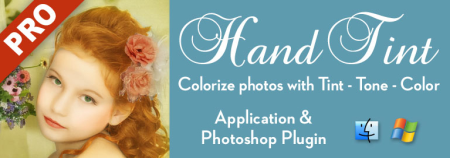
Hand Tint Pro supplies everything you need-color palettes, paper and smart brushes-for creating beautiful and timeless hand painted photography.​

Like all art forms, preparing a good base for hand coloring is like stretching a canvas for painting, so every image placed in the app is stripped of color and transformed into a classic Black & White, a dreamy Luminescent or an aged Vintage photo we call a Background Effect. To keep your painting organized and in control, we give you Layers and a handy Selective Color tool to define areas for accurate brushing. Both pro features are designed to keep color where you want them.
Photo tinting or hand tinting adds soft, otherworldly colors to a photo, and can lend an antique feel to even the most modern subjects. Brush on color to add a life-like blush to the cheeks of a child, or draw attention to a single element, like a flower or sunset. Hand painting is a beautiful technique to take photography to a higher realm. The key is simplicity, light tinting each photography, scrapbook or craft project lends a nostalgic and timeless quality to every project you will love.
An easy workflow with a professional layering system has modes for tint, tone, color, multiply, soft paint or paint that can be changed per layer, and a powerful color selection tool to keep brushing inside isolated areas for fast colorization and accuracy. It is important to have fun while creating beautiful photo memories so a forgiving erase brush is there to wash away mistakes occurred during the painting process. If you need to stop, not a problem! Use the save project feature and return to finish when you are ready.
-turns a photo into a classic black and white with options to adjust the RGB channels. A strength slider gradually blends the photo's original colors back in, if desired, for a variety of customized looks before the tinting process begins.
-adds dreamy brightness combined with subtle texture-that you control, as you brush on color, tint or tone
-ages the photo with image toning and adds distressed paper for a beautiful and unique basis of your tinting project
3 Photo Effects-Black & White, Luminescent & Vintage (also known as background effects, creates the base photo layer for hand tinting)
3 Layer Styles-Colorize Layer allows the original color to be brushed back in, Paint Layer allows customizable coloring using paintbrushes and color palettes, Auto Paint Layer allows original color to be removed, and a base layer called Background Effect to change photo effects styles on-the-fly without changing the hand colored layers above it-this allows you to be creative without repainting the image.
Layer Modes-on every layer feature Color, Tint, Tone, Multiply, Soft Paint and Paint modes. These modes are designed to change the look of painted or colorized areas for unique and infinite variations.
RGB Sliders-found on the Background Effect allow for pro mixing of light and dark areas in the Black & White and Luminescent effects.
Film Grain Slider
Soften Slider
6 Paper Surface Textures
25 Color Palettes-consist of multiple swatфches created for seasons, hair color, eye color and skin tones plus 2 Romantic palettes for dreamy gardens and seascapes.
36 Textures for adding an aged and worn paper effect
15 One-touch customizable Presets-create the Background Effect
3 Paint Presets-with layer styles and brush colors already in place for learning and understanding the layering process.
Save Project-will save your hand tint project externally, or share projects with co-workers and friends. This feature keeps all layers and brush colors in tact.
Randomize Button-automatically changes the settings on the Background Effects

DOWNLOAD
uploadgig
Код:
https://uploadgig.com/file/download/bcA1611c963c0C9f/7hHcNuWr__Hand.Tint.Pro.1.0.10.rar

rapidgator
Код:
https://rapidgator.net/file/1fc75936c5ef573e9707ae87a24faabf/7hHcNuWr__Hand.Tint.Pro.1.0.10.rar

nitroflare
Код:
http://nitroflare.com/view/D4685189ADE52DE/7hHcNuWr__Hand.Tint.Pro.1.0.10.rar
 
JixiPix Premium Pack 1.1.11

1f0322c34321956986cf56b203d9401c.png

Windows x86/x64 | File size: 857.03 MB

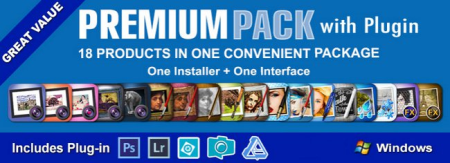
For maximum savings and convenience, the Premium Pack bundles 18 incredible creative apps into one powerful package: Aquarella, Artista Haiku, Artista Oil, Artista Sketch, Artoon, Chalkspiration, Dramatic Black&White, Grungetastic, Kyoobik Photo, Moku Hanga, NIR Color, Pop Dot Comics, Portrait Painter, Rainy Daze, Romantic Photo, Simply HDR, Snow Daze and Vintage Scene.​

The Premium Pack comes wrapped together for convenience - one application, one installer, one interface, and a plugin for Photoshop, Elements, Lightroom and PaintShop Pro.

18 Incredible Products bundled for convenience! Includes one installer, one interface and a Plugin for Photoshop, Elements, Lightroom and PaintShop Pro.
Included in the Premium Pack is a Plugin-which is the perfect complement to Photoshop, Elements, Lightroom and PaintShop Pro. Having the products within Adobe's applications saves valuable time with batch processing and actions, while the products themselves offer a level of creativity beyond using Photoshop alone.
Photoshop Plugin
Allows quick access to 18 Jixi products from inside Photoshop, Elements, Lightroom and PaintShop Pro. Supports actions, transparency, blending, last filter command, batch processing and 16bit RGB/Greyscale modes.
PLUGIN HOST REQUIRMENTS
Adobe Photoshop CS3+, CC, CC 2014, CC 2015, Photoshop Elements 10+ and Lightroom 4+ (Mac/Win)
Corel PaintShop Pro X7 and X8 (Mac/Win)
- Support for high resolution images and output
- Multiple undo
- Randomize button
- Quick previewing
- Customizable settings
- Superior customer service
- Contact us any time we are committed to your long term satisfaction!

DOWNLOAD
uploadgig
Код:
https://uploadgig.com/file/download/9D6607787c06d945/RwX1k8WE__Premium.Pack.1.1.11.rar

rapidgator
Код:
https://rapidgator.net/file/95cb148500bae5350ef51fa472bf477f/RwX1k8WE__Premium.Pack.1.1.11.rar

nitroflare
Код:
http://nitroflare.com/view/3AB30D107A23825/RwX1k8WE__Premium.Pack.1.1.11.rar
 
JixiPix Spektrel Art 1.1.3

05c94dda96628df446b43a5277aef6be.png

Windows x86/x64 | File size: 20.32 MB

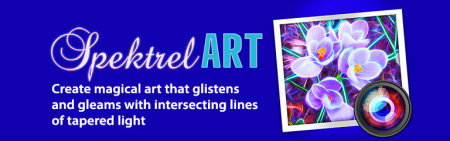
Spektrel Art is an extravagant otherworldly display of undulating movement that glimmers and gleams with intersecting lines of tapered light.​

Applied to photos, this medium of imaginative and magical art form transcends the ordinary to extraordinary creating something wild, sparkling with life and colorful spaces.

- Light glimmers and gleams with white tapered light
- Dark creates a stark contrast of black intersecting lines
- Presets to start you off
- Detail slider to increase the amount of intersecting lines
- Glow options add colorful edges and splendrous brillance
- Taper Length and Sharpen sliders to add twinkle
- Lighten and Brighten sliders to make it illuminate
- Edge Detail slider to exaggerate the lines
- Smoothing slider to softens lines
- Color Boost for enhanced color
- Brushes to soften or remove effect
- Infinite variation for illuminated twinkles, fluid lines and ethereal softness
- Support for high-resolution images and output
- Multiple undo
- Randomize button
- Quick previewing
- Customizable settings
- Superior customer service

DOWNLOAD
uploadgig
Код:
https://uploadgig.com/file/download/1C0cb55b7b1bE036/I0bJYr0W__Spektrel.Art.1.1.3.rar

rapidgator
Код:
https://rapidgator.net/file/aede6a69937256418545955eedb040c5/I0bJYr0W__Spektrel.Art.1.1.3.rar

nitroflare
Код:
http://nitroflare.com/view/133A5C7A5AC04E9/I0bJYr0W__Spektrel.Art.1.1.3.rar
 
Назад
Сверху