• Здравствуйте. Сайт заработал в архивном режиме форум www.old.nado.in

Anthony's Software !!!

Actual File Folders 1.14.1 Multilingual
003b24f6_medium.jpeg

Actual File Folders 1.14.1 Multilingual | 8.08 Mb

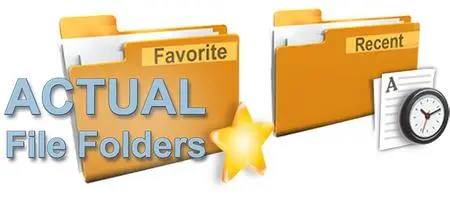
Actual File Folders adds two title buttons, called Favorite Folders and Recent Folders. These buttons extend through the entire Windows operating system. It means that you can use them in any common Windows Explorer window, file manager app, and any other software that use system file-related dialog windows, for example, Microsoft Word, Internet Explorer, or Total Commander.​

The Favorite Folders ia a file folders extension lets you create the list of shortcuts to the folders you use the most often. Then, you can invoke this list in any file-related window of any program and access any of your favorite folders instantly in a single click. This is a good replacement for the tedious clicking to navigate to the required folder through the folders hierarchy. This resembles a list of bookmarks for your favorite websites in your web browser: instead of typing the URL each time you'd like to open your favorite website, you invoke the list of bookmarks and click that site's bookmark to get to it instantly.
You can manage the list of Favorite Folders shortcuts on the Favorite Folders panel. Then, you can invoke this list by clicking the special title button . When enabled, this button will be added to the title bar of any supported window.
The Recent Folders is a file folders extension tracks automatically which folders you have been visiting recently and keeps the the list of shortcuts to those folders so that you could get back to them instantly in a single click. This resembles the browsing history in your web browser: you can quickly return to a web page you visited some time ago if circumstances require.
Most of file manager programs (including Windows Explorer itself) offer such service; however, the browsing history is available either while the window remains open or in that particular file manager only.
Instead, Actual File Folders keeps the browsing history globally, no matter which program you have used the folder in. This means that, for example, you can open the document in Microsoft Word from some folder, switch to Microsoft Excel and then jump there to the same folder using the Recent Folders history.
You can adjust the Recent Folders options on the Recent Folders panel. The list of recent folders can be invoked by clicking the special title button . When enabled, this button will be added to the title bar of any supported window.
Windows 10 / 8.1 / 8 / 7 / Vista / XP / 2000 (both 32-bit and 64-bit editions)
Windows Server 2016 / 2012 R2 / 2012 / 2008 R2 / 2008 / 2003 / 2000 (both 32-bit and 64-bit* editions)
-
Multilingual

DOWNLOAD
uploadgig
Код:
https://uploadgig.com/file/download/E3D600A654ab6a08/whiW3W3E_Actual.File.Folders.1.14.1.rar
rapidgator
Код:
https://rapidgator.net/file/509cfd067fbd67ccd001072b9cd5e806/whiW3W3E_Actual.File.Folders.1.14.1.rar

nitroflare
Код:
http://nitroflare.com/view/FBE15A6E6D78C02/whiW3W3E_Actual.File.Folders.1.14.1.rar
 
Alzex Finance Pro 6.0.1.5191 Multilingual

00696bd8_medium.jpg

Alzex Finance Pro 6.0.1.5191 Multilingual | 18.62 Mb

Alzex Personal Finance is an elegant, super easy home accounting software. The concept behind this personal accounting software lies in grouping expenses into categories. This is useful because one can see where money is going and how much is spent at a single glance.​

You can see at once from the summary view the way your money was spent, total sum and percentage structure for categories, balance on accounts, as well as overall balance. The system of categories is designed as a tree that may have the unlimited number of sub categories. Unlimited tags for each transaction.
- Several users can work with a single database and synchronize changes over the Internet.
- Users can work with a single file from several computers at the same time (on the network).
This personal accounting software enables anyone to manage income and expenses with ease.
Alzex Personal Finance software is easy for beginners to get started with, requires no efforts to track finances and offers a wide range of functionality and settings for professional users. It will help you control your finances - understand where your money is going, pinpoint the areas of excessive expenditure and cut down unnecessary expenses.
Several people can work with the same database file. It allows you to track users who create transactions, protect transactions from changes with a password and hide them from other users.
A possibility to undo and redo any changes. Batch editing (grouping, renaming and other actions over sets of records). Transaction grouping, sorting and a flexible system of filters.
The program contains almost all currencies of the world, plus precious metals. Automatically exchange rates.
The scheduler lets you create recurring transactions. These transactions will be created automatically, without any user intervention, or with his confirmation, if needed.
You can borrow and lend money, and it will be displayed in the program. To repay debts, you can use any account and any currency.
Alzex Personal Finance software makes it easy to monitor progress in achieving your financial goals and control expenses.
Whether you need to make a more realistic budget, want to get out of debt, or teach your children how to make a budget. With a glance at its summary view, reports and graphs, the user will gain deep insight into the financial health of the family budget, pinpoint areas of excessive expenditure and trim the budget. Featuring the scheduler, personal accounting software also enables you to track expected income, spending and see how much money you'll have at a future date.
- New icons set.
- Transaction time, which allows you to arrange transactions within one day.
- Windows 10 32/64 bit
- Windows 8 32/64 bit
- Windows 7 32/64 bit
- Windows Vista 32/64 bit
- Windows XP
:
Multilingual

DOWNLOAD
uploadgig
Код:
https://uploadgig.com/file/download/a8503e3933bCf7b1/j7SOaEPl_Alzex.Finance.Pro.6.0.1.5191.rar

rapidgator
Код:
https://rapidgator.net/file/cfd2d3e0e0b1c4afea8f6971bf85afeb/j7SOaEPl_Alzex.Finance.Pro.6.0.1.5191.rar

nitroflare
Код:
http://nitroflare.com/view/A8435B7E4C0720A/j7SOaEPl_Alzex.Finance.Pro.6.0.1.5191.rar
 
Rhinoceros 6.16.19190.07001 (x64)

0051ded3_medium.jpg

Rhinoceros 6.16.19190.07001 (x64) | 262 Mb

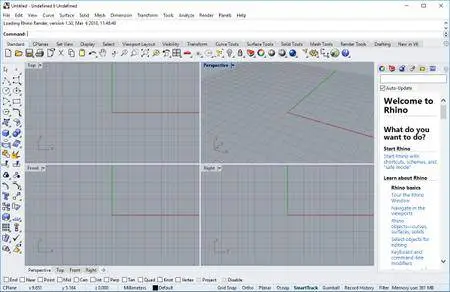
In Rhino 6 for Windows, we've fully embraced Grasshopper - the wildly popular visual programming language - by "baking it in." Grasshopper is no longer beta; it's a stable development environment. We've also rewritten some features and renovated workflows that needed fundamental overhauls to make them truly productive.​

The long beta period is over: Grasshopper, the world's most beautiful programming language, is now a full-fledged part of Rhino. Used in some of the most ambitious design projects of the past decade, Grasshopper, like Rhino, has become a robust development platform. Grasshopper provides the solid foundation for many incredible third-party components ranging from environmental analysis to robotic control.
Presentation is key: during nearly every phase of design, you need to communicate, getting "buy-in" from clients, customers, collaborators, or the public at large. We've improved Rhino with the aim of helping you present your work: be it "quick and dirty" or "high-res glossy." With major changes to Rendering, Materials, or just plain capturing the viewport, it's now easier and faster to present, discuss, make decisions, and iterate.
Rhino's new display pipeline is faster, more stable, and uses features found on modern graphics hardware, like GPU sensitive shaders and memory optimizations. This results in fewer GPU-specific display glitches and more consistent, beautiful, and frequent frames, even with large models. In some conditions, display speed can be up to 300% faster.
Modeling is just one part of the design process; you also need to show how to build what is on the screen. We've refined many parts of the documentation workflow, from a completely reworked annotation-style interface, to better DWG support, and RichText throughout. It's now easier to convey accurately and clearly the what and the how of your design.
We have worked hard to make Rhino easier to install, license, and configure. There's a great new option to license Rhino using the Cloud Zoo.
Make2D has been completely rewritten to provide faster, better, cleaner, more customizable results.
Small quirks add up to painful paper cuts over the course of a prolonged modeling session. In Rhino 6, we've fixed hundreds of minor bugs and consolidated disparate - but similar - features into single commands, making Rhino much more refined.
Rhino is more than just a modeler. With a rich ecosystem of plugins and an open set of development tools, Rhino is quickly becoming the development platform for those seeking to push the envelope of design. Rhino 6 brings major improvements to our free SDKs, with API refinements, better documentation, and more access to Rhino commands from Grasshopper.
We're constantly improving Rhino. Rhino 6 users have access to the Serengeti community and our Work-In-Progress (WIP) builds. The WIP builds are where we are developing future features like SubD support, Grasshopper 2, a new real-time rendering engine, and much more.
- Windows 10, 8.1, or 7
- 8 GB memory (RAM) or more is recommended.
- 600 MB disk space.
- OpenGL 4.1 capable video card is recommended.
- No more than 63 CPU Cores.
- Multiple-button mouse with scroll wheel is recommended.
- The SpaceNavigator is supported.
- Apple hardware is supported with Bootcamp.
Windows 8
Windows XP 64-bit
Windows Vista, NT, 95, 98, ME, or 2000
Windows 32-bit all versions
-
English

DOWNLOAD
uploadgig
Код:
https://uploadgig.com/file/download/5A6d0a9164E8411e/o5LLRWNc_Rhino.6.16.19190.07001.rar

rapidgator
Код:
https://rapidgator.net/file/fd6c315977619fa86ce0824aa4e3363b/o5LLRWNc_Rhino.6.16.19190.07001.rar

nitroflare
Код:
http://nitroflare.com/view/56EDDDBCBD6DF2B/o5LLRWNc_Rhino.6.16.19190.07001.rar
 
Actual Window Minimizer 8.14.1 Multilingual

005cef4b_medium.jpg

Actual Window Minimizer 8.14.1 Multilingual | 8.25 Mb

Since Windows operating system doesn't provide the default ability to minimize any window to the system tray, Actual Window Minimizer was developed for this single purpose but being developed for years now it performs this single function flawlessly.​

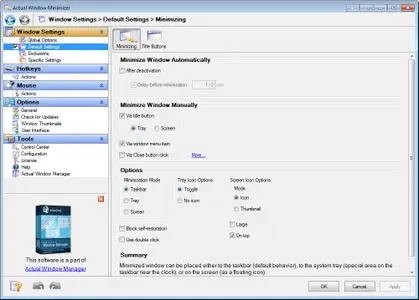
Actual Window Minimizer is a small but powerful utility which is only needed to be installed to bring the minimize-to-tray ability online in a most quick and easy way: it adds an extra Minimize-to-Tray button to every window's title bar so that you can send any window to the system tray in a single mouse click! You can use Actual Window Minimizer for free for 60 days after it is installed so just and try it yourself now!
Besides the extra button Actual Window Minimizer offers many other ways to perform the minimize-to-tray action. For example, you can override the default behavior of any window's standard Minimize button and use it for the alternative minimization. Also you can hide windows in the tray automatically upon their startup or deactivation. Comprising the experience of thousands of its users Actual Window Minimizer is the ultimate solution for the 'Minimize-to-Tray' problem!
Windows 10 / 8.1 / 8 / 7 / Vista / XP / 2000 (both 32-bit and 64-bit editions)
Windows Server 2016 / 2012 R2 / 2012 / 2008 R2 / 2008 / 2003 / 2000 (both 32-bit and 64-bit* editions)
-
Multilingual

DOWNLOAD
uploadgig
Код:
https://uploadgig.com/file/download/1f9964e2e65d2F80/tgtcgcTl_Actual.Window.Minimizer.8.14.1.rar

rapidgator
Код:
https://rapidgator.net/file/3cd780d7b91027ec6330427298824b36/tgtcgcTl_Actual.Window.Minimizer.8.14.1.rar

nitroflare
Код:
http://nitroflare.com/view/B2D8D6FA4BAECFE/tgtcgcTl_Actual.Window.Minimizer.8.14.1.rar
 
Actual Window Rollup 8.14.1 Multilingual

003c566b_medium.jpg

Actual Window Rollup 8.14.1 Multilingual | 8.22 Mb

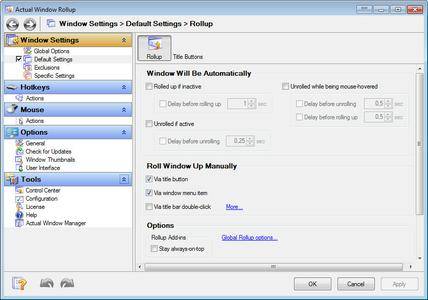
Actual Window Rollup fills up the functionality gap that users, familiarized with Unix/Linux/MacOS window managers, notice while managing workspace in Windows. The program allows you to roll up and down windows by clicking on the special Roll Up button added to window's title bar.​

This feature has proven to be a more efficient way of organizing your workspace while working with multiple windows. Now it will only take a single click or keystroke to hide a window and move to the information in the underlying window or on the desktop.
Besides the default Roll Up button and ability to enable this function from the system menu of the program offer several ways of rolling up your windows automatically. It's possible to set the program to instantly roll down active and roll up inactive windows. With Actual Window Rollup, you can also manage windows via keyboard using the Hotkey feature. Easy access to features comes along with great compatibility. It means that Actual Window Rollup recognizes and works with all kinds of windows, including the command prompt type (also known as console/CMD/DOS windows). Actual Window Rollup is a tiny utility that will set you free from a huge amount of redundant manipulations, such as searching in the taskbar, minimizing and maximizing windows.
Here are some key features of "Actual Window Rollup":
· Manual Windows Shade: Toggle window rollup/unroll by double clicking the title bar. Title bars are easier to find than programs minimized to icons. You won't have to hunt for the windows you were using! Click on a window and it becomes a title bar; Click on the title bar and restore it to an open window!
· Automatic window rollup/unroll: Selected windows will automatically roll up into title bars whenever they become inactive. The rolled-up title bars will then automatically unroll when you want to work with them again!
· Temporarily Unroll the Window: This will make a window temporarily unroll when the mouse cursor hovers over it. Simply pass your mouse cursor over them and they unroll! Easier than clicking!
· RollupUnroll title button: The button 'Roll upUnroll Window' is may be added to a window title bar. Now you can roll up or unroll window just pressing it.
· System menu: New item 'Roll up Window' is may be added to the system menu of a window.
· Hotkeys support: A keystroke Win+< roll upunroll the active window.
· Individual window settings: Mix manual and automatic controls in various ways to your preferences and for individual programs. Your configuration for each window will remain set after every bootup until you change it.
· Multilingual support: Actual Window Rollup supports English, German, Spanish, French, Italian, Portuguese, Swedish, Danish, Catalan, Turkish and Polish languages.
· Possibility to improve almost each program: Actual Window Rollup is useful for working with office tools (Microsoft Word, Microsoft Excel, Adobe PhotoShop, Corel Draw etc.); e-mail clients (Microsoft Outlook, Outlook Express, Eudora, Incredimail etc.); media players (Windows Media Player etc.); internet browsers (Internet Explorer, Opera etc.); offline browsers or ftp-clients; and many other kinds of programs.
Windows 10 / 8.1 / 8 / 7 / Vista / XP / 2000 (both 32-bit and 64-bit editions)
Windows Server 2016 / 2012 R2 / 2012 / 2008 R2 / 2008 / 2003 / 2000 (both 32-bit and 64-bit* editions)
-
Multilingual

DOWNLOAD
uploadgig
Код:
https://uploadgig.com/file/download/f06d7fa559604b09/9qcPdsXO_Actual_Window_Rollup_8.14.1.rar

rapidgator
Код:
https://rapidgator.net/file/523b69267c0bc27303cc78cf919f9f13/9qcPdsXO_Actual_Window_Rollup_8.14.1.rar

nitroflare
Код:
http://nitroflare.com/view/5E12969D009A9B4/9qcPdsXO_Actual_Window_Rollup_8.14.1.rar
 
Actual Virtual Desktops 8.14.1 Multilingual

005cee92_medium.jpg

Actual Virtual Desktops 8.14.1 Multilingual | 8.29 Mb

Actual Virtual Desktops provides a "virtual" space - as if you have several logical monitors instead of a single physical one. You can extend the real estate of the workspace and move a window from virtual desktop 1 to virtual desktop 2 etc.​

The actual number of virtual desktops is not limited!
As a multi-tasking OS, Windows allows you running multiple programs simultaneously. As a result, you have a few windows open at any time. But when working with lots of applications, your desktop can easily become overcrowded. Actual Virtual Desktops will help you resolve this problem - you can allocate and classify all of your windows by moving them to virtual desktops.
Windows 10 / 8.1 / 8 / 7 / Vista / XP / 2000 (both 32-bit and 64-bit editions)
Windows Server 2016 / 2012 R2 / 2012 / 2008 R2 / 2008 / 2003 / 2000 (both 32-bit and 64-bit* editions)
-
Multilingual

DOWNLOAD
uploadgig
Код:
https://uploadgig.com/file/download/5d96aB03dbc4e5cb/zi6FQHdY_Actual.Virtual.Desktops.8.14.1.rar

rapidgator
Код:
https://rapidgator.net/file/735ea1066c32b451585e4097364a10e5/zi6FQHdY_Actual.Virtual.Desktops.8.14.1.rar

nitroflare
Код:
http://nitroflare.com/view/2149B1830251385/zi6FQHdY_Actual.Virtual.Desktops.8.14.1.rar
 
Actual Title Buttons 8.14.1 Multilingual

003c5099_medium.jpeg

Actual Title Buttons 8.14.1 Multilingual | 8.46 Mb

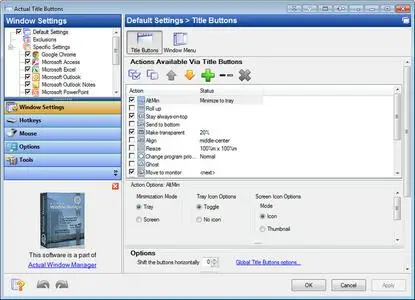
Windows concept is quite usable when it comes to minimizing, maximizing and restoring a window. However, there are still possibilities to unleash. Actual Title Buttons is the unique window management tool which offers extended window manipulation capabilities by adding new buttons to a window caption.​

By clicking these buttons as you are used to do with the standard ones, you can take advantage of hidden Windows features, such as:
- making any window semi-transparent
- rolling windows up
- minimizing any window to Windows notification area (also known as system tray)
- making any window always-on-top
- quickly resizing any window to most appropriate size
- quickly placing any window to most appropriate position
- changing window's program priority on-the-fly
- "ghost" any window (it will pass through mouse clicks)
- easily move any window between monitors in a multi-monitor system
- quickly copy to clipboard window contents
- quickly paste clipboard contents to any window
These new buttons look native in all standard XP and Vista visual themes and as easy to use as general Minimize/Maximize/Close ones. You can define which buttons should be actually added as to all windows as specify an individual set of buttons for any particular window.
With the help of Actual Title Buttons you can apply the above features to almost any program:
- e-mail clients: Microsoft Outlook, Outlook Express, Mozilla Thunderbird, Eudora, Incredimail, etc.;
- instant messengers: ICQ, Windows/MSN Messenger, Yahoo! Messenger, etc.;
- media players: Windows Media Player, Winamp, etc.;
- office tools: Notepad, Adobe Acrobat Reader, Microsoft Word, Microsoft Excel, etc.;
- graphics suites: Adobe Photoshop, Corel Draw, etc.;
- development tools: Microsoft Visual Studio, CodeGear Developer Studio, etc.;
- offline browsers or FTP clients;
- and many other kinds of programs
Windows 10 / 8.1 / 8 / 7 / Vista / XP / 2000 (both 32-bit and 64-bit editions)
Windows Server 2016 / 2012 R2 / 2012 / 2008 R2 / 2008 / 2003 / 2000 (both 32-bit and 64-bit* editions)
-
Multilingual

DOWNLOAD
uploadgig
Код:
https://uploadgig.com/file/download/265b549b7c2D296e/5pn5qHNu_Actual.Title.Buttons.8.14.1.rar

rapidgator
Код:
https://rapidgator.net/file/7ff1f9f711b36e71b0c71083e0efb028/5pn5qHNu_Actual.Title.Buttons.8.14.1.rar

nitroflare
Код:
http://nitroflare.com/view/D4CE9D6ED5A9A2B/5pn5qHNu_Actual.Title.Buttons.8.14.1.rar
 
Macroplant iExplorer 4.3.0.22413

0046387c_medium.png

Macroplant iExplorer 4.3.0.22413 REPACK | 29.79 Mb

iExplorer is the ultimate iPhone manager. It transfers music, messages, photos, files and everything else from any iPhone, iPod, iPad or iTunes backup to any Mac or PC computer. It's lightweight, quick to install, free to try, and up to 70x faster and more resource efficient than the competition.​

Intelligently Transfer Music to iTunes
iExplorer lets you easily transfer music from any iPhone, iPod or iPad to a Mac or PC computer and iTunes. You can search for and preview particular songs then copy them to iTunes with the touch of a button or with drag and drop. Looking to transfer more than just a few tracks? With one click, iExplorer lets you instantly rebuild entire playlists or use the Auto Transfer feature and copy everything from your device to iTunes.
Export iPhone Text Messages
Call them what you want, in the last few years we've seen texting (SMSs, iMessages, text messages, etc.) rocket in popularity. These messages are replacing phone calls, voicemails and even emails. We understand that your SMSs and iMessages can be priceless to you and that's why we've spent so much time developing the best tool to help you view, export and archive your messages and attachments. The iExplorer SMS client looks great and even works with group messages, images, and other message attachments too!
Export Voicemails, Address Book Contacts, Calendar Events, Reminders, Notes & More.
We've crafted seven magnificent utilities into iExplorer that allow you to browse, preview, save, and export the most important information in the databases of your iPhone or iPad.
View your appointments, calendar events, and your call history. Listen to your iPhone's voicemail messages and export them to a folder on your computer. Everything is always just a couple of clicks away. Be in charge of your content.
Access Photos, Files & Everything Else
With iExplorer, you can access more files and folders without modifying (jailbreaking) your device than ever before. Need to access photos on your iPhone or iPod? Can do. Want to access the files and folders of your device's apps? Done. How about browsing through your iTunes backups? Check. What about the media folders containing your iTunes purchases? We've got that too. What about files in apps that are synced to iCloud? Yes, even that.*
iExplorer also works great if your iPhone is Jailbroken. With AFC2 access, the app can read and write to the iOS device's real root (For advanced users only!). *iCloud access is for Mac only.
Mount iPhone & iPad to Mac's Finder & Windows Explorer
iExplorer's disk mounting features allow you to use your iPhone, iPod or iPad like a USB flash drive. You can view your iPhone's photos directly in Finder or Windows Explorer like you would from any other digital camera. You're also able to get file system access to data contained within the apps or other directories on your device.
Want to back up or move your games' high scores from one device to another? How about saving files directly to or from your favorite file manager such as iExplorer's iOS App iExplorer Mobile? iExplorer can do all of that and more.
Operating System: Windows 7, 8, 10 or later and iTunes
-
English

DOWNLOAD
uploadgig
Код:
https://uploadgig.com/file/download/ab668a88b468b72A/Ece7EMQ4_iExplorer.4.3.0.rar

rapidgator
Код:
https://rapidgator.net/file/2e826fea51c08e0a6b43c4a0ebca8cb8/Ece7EMQ4_iExplorer.4.3.0.rar

nitroflare
Код:
http://nitroflare.com/view/AEE952E6E0507CE/Ece7EMQ4_iExplorer.4.3.0.rar
 
QuarkXPress 2019 v15.0 Multilingual

00696b77_medium.jpg

QuarkXPress 2019 v15.0 Multilingual | 550.21 MB

QuarkXPress is the leading graphic design and page layout software for creative professionals. It's used by hundreds of thousands of users around the world who value quality and performance in their daily production of print and digital products.​

QuarkXPress is the new version that raises the bar for design and productivity. With non-destructive graphics and image editing directly within your layout, you no longer have to choose between efficiency and output quality. Create responsive HTML5 Publications as well as "unlimited"* single iOS apps and more. QuarkXPress is driven by five initiatives:
- Introducing new graphics and image editing capabilities
- Enhancing and extending text and typography features
- "Wish list" features requested by our users
- Continued digital publishing innovation
- Retaining the perpetual lifetime license model
- Non-destructive image editing (adjustments and filters)
- Transparency blend modes
- New shape tools
- More multi-color gradients
- Gradients for frames
- Item format painter
- Text stroking
- Text shading
- Column spanning/splitting
- Non-breaking text attribute
- Merge text boxes
- Automatic line between columns
- Proportional leading
- Additional smart quotes
- Smart text linking
- Word import enhanced
- Footnotes enhanced
- "Unlimited"* iOS single apps
- Adaptive layout conversion
- Automatic table-of-content
- Responsive HTML5 Publications
- (multi device output)
- Adaptive layout conversion
- Convert to Native Objects
- Mac and Win UI enhancements
- Cursor key can control increments/decrements
- List most recent fonts
- Find/Change enhanced
- Cross References enhanced
- Built-in cache cleaner
- XTensions Manager enhanced
- Microsoft Windows 7 SP1 (64 Bit)
- Windows 8.1 (64 Bit) with April 2014 update rollup update (KB2919355) and March 2014 servicing stack update (KB2919442)
- Windows 10 Version 1607 (64 Bit)
- Microsoft .NET Framework 4.0 or later
- An update for Universal C Runtime is required on Windows 7 and 8.x.
-
Multilingual

DOWNLOAD
uploadgig
Код:
https://uploadgig.com/file/download/243c6D965Df181cc/a21VXj56_QX15.rar

rapidgator
Код:
https://rapidgator.net/file/d25d3c0e035e2e419e24c8f831864d7b/a21VXj56_QX15.rar

nitroflare
Код:
http://nitroflare.com/view/419D9F7D083C44E/a21VXj56_QX15.rar
 
Actual Multiple Monitors 8.14.1 Multilingual

00398f65_medium.jpeg

Actual Multiple Monitors 8.14.1 Multilingual | 10.67 Mb

Actual Multiple Monitors is the comprehensive solution to improve the functionality of MS Windows user interface for comfortable and effective work with multi-monitor configurations. The smart app emulates standard Windows services on secondary monitors, and offers new window management services to free you from routine clicking and let you concentrate on your work undisturbed.​

Powerful yet easy-to-use, Actual Multiple Monitors emulates the original Windows Taskbar on the secondary displays, allowing you to manage windows in your usual manner. Such Taskbar can work in the individual mode, displaying only the tasks running on the same monitor, or in the mirror mode, displaying all the tasks running on all monitors in your setup.
Start menu
notification area a.k.a. system tray
clock
Jump Lists support under Windows 7
Pin to Taskbar
grouping similar buttons
preview thumbnails (with the Aero Peek feature under Windows 7)
progress bars on taskbar buttons under Windows 7
Show Desktop button under Windows 7
Quick Launch and other toolbars
dragging the taskbar buttons with the mouse on systems before Windows 7
dragging the system tray icons with the mouse on systems before Windows 7
semi-transparent taskbars on systems before Windows 7
native look in any visual theme - from Windows Classic to Windows 7 Aero
Alt-Tab Task Switcher window on each monitor
new window controls specially designed for a work with multiple monitors
additional button in each window's title bar to put a window instantly to any monitor
additional button in each window's title bar to maximize a window to entire desktop
special hotkeys to put a window instantly to the next/previous monitor
automatic placement of windows by default to the monitor which the mouse pointer is on
automatic placement of certain windows to the specified monitors
easy dragging/sizing of windows - by clicking anywhere inside a window
snapping a dragged/sized window to desktop boundaries and other windows ("sticky borders")
emulation of Windows 7 Aero Snap on Windows XP/Vista
single-click maximization of windows - to entire desktop, to monitor's width, to monitor's height
custom wallpaper - single on entire desktop or individual per monitor (with the ability to run a background slideshow)
custom screen saver - single on entire desktop or individual per monitor
custom desktop profiles - switch between various desktop configuration in a flash!
keeping the order of desktop icons after the desktop configuration/resolution has been changed
desktop mirroring - observe various parts of desktop (windows, monitors, arbitrary areas) in separate floating windows called mirrors
Windows 10 / 8.1 / 8 / 7 / Vista / XP / 2000 (both 32-bit and 64-bit editions)
Windows Server 2016 / 2012 R2 / 2012 / 2008 R2 / 2008 / 2003 / 2000 (both 32-bit and 64-bit* editions)
-
Multilingual

DOWNLOAD
uploadgig
Код:
https://uploadgig.com/file/download/3b6C2b07E17144d2/UtCa28PL_Actual.Multiple.Monitors.8.14.1.rar

rapidgator
Код:
https://rapidgator.net/file/f1fbc835facd5d6fad4c705765e6cbb3/UtCa28PL_Actual.Multiple.Monitors.8.14.1.rar

nitroflare
Код:
http://nitroflare.com/view/4FA6ABCCBE7F1DB/UtCa28PL_Actual.Multiple.Monitors.8.14.1.rar
 
Remote Utilities Viewer 6.10.10.0 Multilingual

005fe32f_medium.jpg

Remote Utilities Viewer 6.10.10.0 Multilingual | 22.32 Mb

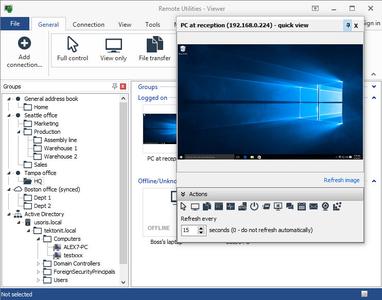
Remote Utilities is highly configurable and secure remote desktop software for IT professionals. You can view screens remotely, send keystrokes, control the mouse pointer, transfer files and do any other operation just as if you were physically sitting in front of the remote PC.​

Connect to a remote desktop from anywhere over a secure connection. View the remote screen, move the remote mouse pointer and send keystrokes.
Easily integrate Remote Utilities into your Active Directory environment. Add new domain controllers, push-install the program across your AD network and connect in one click.
Use the built-in MSI Configurator to create a custom Host installer for further deployment across your network.
Enhance Remote Utilities capabilities with an on-premises server and build a 100% autonomous remote support solution to comply with strictest security requirements.
Prefer to use RDP? No problem. Use Remote Utilities to manage your saved RDP sessions and connect to a remote computer over the Internet using the RDP protocol.
Windows 10/8/7/Vista/XP
Windows Server 2016/2012/2008/2003
32- and 64-bit OS support
No special hardware requirements
-
Multilingual

DOWNLOAD
uploadgig
Код:
https://uploadgig.com/file/download/d29b0cD1485af0a9/szuUN2aZ_Remote.Utilities.6.10.10.rar

rapidgator
Код:
https://rapidgator.net/file/b3d27b96949efb514768a1fe271a2d93/szuUN2aZ_Remote.Utilities.6.10.10.rar

nitroflare
Код:
http://nitroflare.com/view/C0B372EA04D3426/szuUN2aZ_Remote.Utilities.6.10.10.rar
 
Actual Transparent Window 8.14.1 Multilingual

003b40eb_medium.jpg

Actual Transparent Window 8.14.1 Multilingual | 8.23 Mb

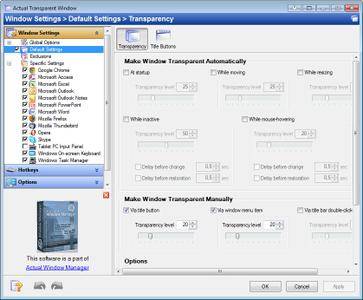
Actual Transparent Window is an innovative Windows desktop enhancement which allows setting any level of transparency for any particular window in the system.With Actual Transparent Window it is very easy to organize the simultaneously opened windows.​

It is a truly new approach to desktop space organization. Now you do not have to minimize and restore windows every time. Along with common techniques of switching between windows Actual Transparent Window offers the depth-based window ordering thanks to a fully customizable transparency levels that are saved individually for each window. When a brilliant idea is combined with a good realization, the results are outstanding!
Actual Transparent Window is intended for a broad range of Windows users who value their time and long for an aesthetic pleasure of modern computing. Windows is multifunctional, and sometimes we work with several different applications. While typing something in Microsoft Word you need, for example, to follow some information in your Internet browser. Push Win+T (toggle transparency), and the desired window becomes transparent, and you will solve your task easily. Besides, usage of semi-transparent windows reduces the negative effect on your eyes!
Features
Individual transparency rate:
Actual Transparent Window lets you set individual transparency rate for each window. You can change transparency from 0% (solid) to 100% (fully transparent) to achieve the desired effect.
Inactive window transparency:
Actual Transparent Window has option to set transparency only when window becomes inactive. And when you activate this window it becomes non-transparent again. This option may be especially useful for your instant messenger (ICQ, Windows Messenger, Yahoo! Messenger or any other).
Ghost mode:
You can also activate the ghost mode. In this case all mouse clicks and moves to be made through the transparent window to underlying windows.
Apply transparency effect while window is moved or is resized:
Apply transparency effect only when you move/drag or resize the window across the desktop. Note that this does not affect your transparency setting for windows while they are not being moved or resized.
Toggle transparency\opaque window state by double click on title bar:
To toggle a window from transparent to opaque, double-click the title bar. To toggle a window from opaque to transparent, double-click the title bar again.
"Make Transparent" button:
The new "Make Transparent" button is may be added to a window title bar. Now you can switch the semi-transparency on/off just by pressing it.
You can select a different transparency level for any window on-the-fly, while it is open! Right-click the "Make Transparent" title button to display its context menu where you can choose one of the predefined transparency levels. It's a very gorgeous effect, try it - and you'll like it very much!
Actual Transparent Window is available in English, German, French, Spanish, Russian, Ukrainian, Japanese, Chinese Simplified and Chinese Traditional languages.
Windows 10 / 8.1 / 8 / 7 / Vista / XP / 2000 (both 32-bit and 64-bit editions)
Windows Server 2016 / 2012 R2 / 2012 / 2008 R2 / 2008 / 2003 / 2000 (both 32-bit and 64-bit* editions)
-

DOWNLOAD
uploadgig
Код:
https://uploadgig.com/file/download/0efF339d5d39b05A/ADlNZnTe_Actual.Transparent.Window.8.14.1.rar

rapidgator
Код:
https://rapidgator.net/file/f126093e20bb7116978ce171a7a06216/ADlNZnTe_Actual.Transparent.Window.8.14.1.rar

nitroflare
Код:
http://nitroflare.com/view/BB8748AD617C3E2/ADlNZnTe_Actual.Transparent.Window.8.14.1.rar
 
Actual Window Guard 8.14.1 Multilingual

003b4c32_medium.jpeg

Actual Window Guard 8.14.1 Multilingual | 8.18 Mb

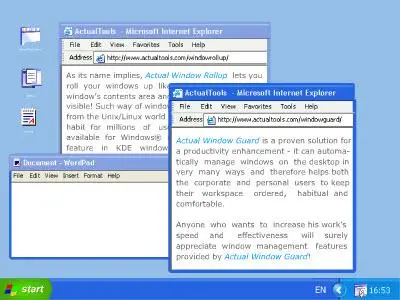
Actual Window Guard is what you need to keep your workspace in optimal condition for efficient and comfortable work. It has many settings helping to organize windows on the desktop and keep them in the order you prefer.​

It means you won't have to spend time resizing and positioning windows as it will be done automatically. And there are many other features in the program which you can use to skip everyday routine and get better productivity.
The program even enables you to change options which standard controls don't provide (for example, you can remove windows from the taskbar or change individual settings, such as window's icon and title). What's more, the tool supports multi-monitor systems allowing you automatically place particular windows to required monitor and specify window dimensions as per cent values of current monitor's resolution.
Not only Actual Window Guard serves well to facilitate your work with other applications but the program itself is very easy-to-use. The interface is made to be intuitive and friendly, so that you can get accustomed to it right away and quickly make needed adjustments. It's also handy that the tool offers functions for specified types of windows and has features applicable to all types at a time. With Actual Window Guard, it won't take much time to create and manage a system of rules for optimizing each and every detail of your workspace related to windows.
The rules can be applied to windows of almost any types of applications, including x64 ones. Moreover, at the moment Actual Window Guard is the only program of that kind, allowing you to manage command prompt (a.k.a. console/CMD/DOS) windows.
This utility is the final step to optimize your everyday Windows experience and make it far more comfortable!
Windows 10 / 8.1 / 8 / 7 / Vista / XP / 2000 (both 32-bit and 64-bit editions)
Windows Server 2016 / 2012 R2 / 2012 / 2008 R2 / 2008 / 2003 / 2000 (both 32-bit and 64-bit* editions)
-
Multilingual

DOWNLOAD
uploadgig
Код:
https://uploadgig.com/file/download/625c481290cf4fcD/oyFa0h0G_Actual.Window.Guard.8.14.1.rar

rapidgator
Код:
https://rapidgator.net/file/1bcd1d7665df714aa2255208389c562e/oyFa0h0G_Actual.Window.Guard.8.14.1.rar

nitroflare
Код:
http://nitroflare.com/view/C5EBCD1549069E4/oyFa0h0G_Actual.Window.Guard.8.14.1.rar
 
Key Metric Software FolderSizes 9.0.246 Enterprise Edition

006746e7_medium.jpg

Key Metric Software FolderSizes 9.0.246 Enterprise Edition | 33.86 Mb

Desktop PCs and servers can quickly end up accumulating large quantities of unused, temporary, and duplicate files. Before you know it, you're out of drive space, backups are taking far too long to run, and users can't find the data they need when they need it.​

You need a visual, interactive software tool to help you manage disk usage. You need FolderSizes. FolderSizes is an award-winning, network-enabled disk space analysis tool. It can quickly isolate large, old, temporary, and duplicate files, or even show file distribution by type, attributes, or owner. All with multiple export formats, command-line support, shell context menu integration, and much more.
Explore, visualize, and comprehend local and network storage
Reclaim gigabytes of drive space - fast!
Improve storage capacity planning capability
Find the disk space hogs with just a few clicks
Manage and monitor disk space across the network (Pro edition only)
Publish disk usage reports right to your web server share
Streamline file systems to optimize backups
Monitor and enforce employee data storage policies
Find excessively long file names that interfere with CD storage, etc.
Find recently saved files without knowing their names (find recently modified)
Find files owned by a specific individual or group
View the "size on disk" (actual space consumed) for any file or folder
Visualize the distribution of files by file type, age, and size
Find and eliminate empty folders
Search files by nearly any file attribute combination
Schedule the generation of nearly any FolderSizes report (Pro edition only)
Hierarchical folder map visualization (based upon treemap technology)
Integrated scheduler (Pro edition only)
Unicode file and folder name support
Interactive, dynamic, full-color bar and pie graphs
Fast, multi-threaded, network-aware file system scanning
Isolate largest, oldest, duplicate, and temporary files
View disk space utilization by file type / attributes
View local & network disk space usage by owner / group
Command line interface for scripting & integration (Pro edition only)
FilterZip regular-expression based compression system
See total & free space for fixed, removable, network drives
Export reports in HTML, XML (Pro edition only), CSV, and more
Integrates with the Windows shell context menu (32 and 64 bit support!)
Extremely configurable - colors, fonts, print options, etc.
Flexible, multi-path oriented search and file reporting systems
Strong support for viewing allocated disk space (e.g. "size on disk")
"Command Prompt from Here" in all context menus
Super-fast, in-memory database provides stunning performance
Support for direct entry of UNC network paths in all reports
Optional symbolic link skipping
Any edition of Windows 10, 8, 7, Vista, XP, Server 2003, Server 2008, Server 2012, and Server 2016.
Both 32 and 64 bit environments are fully supported.
-
English

DOWNLOAD
uploadgig
Код:
https://uploadgig.com/file/download/bcdF4EB95a585ee3/2egtDOR4_FolderSizes.9.0.246.rar

rapidgator
Код:
https://rapidgator.net/file/0cd15ae971238bef16d32ba5dd70b7d0/2egtDOR4_FolderSizes.9.0.246.rar

nitroflare
Код:
http://nitroflare.com/view/1C1D35C9A963A05/2egtDOR4_FolderSizes.9.0.246.rar
 
Key Metric Software Duplicate File Detective 6.2.58.0 Professional / Enterprise

0067ccfd_medium.jpg

Key Metric Software Duplicate File Detective 6.2.58.0 Professional / Enterprise | 84.7 Mb

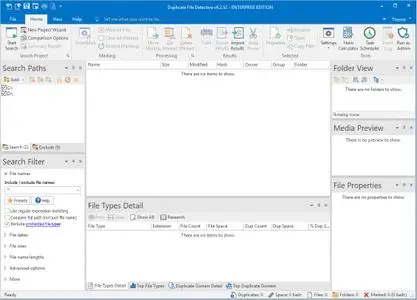
Duplicate File Detective uses state-of-the-art file content analysis technology to show you exactly where your duplicate files are (even when the file names are different). You can search multiple folders, drives, removable storage devices, even network shares - all in a single pass.​

Then move, zip, or remove duplicate files safely with assistance from our innovative SmartMark duplicate file selection system.
Find exact duplicates based upon file contents (with optional byte-for-byte matching)
Built-in scheduler makes it easy to run reports on a scheduled or recurring basis
Choose which duplicate files to process using our SmartMark assisted selection technology
Support for master search paths, allowing users to check for duplicates against an authoritative source folder
Powerful file hash caching technology improves file comparison performance.
Move, delete, or zip duplicate files with the built-in Duplicate File Manager tool
Replace duplicate files with shell, symbolic, or hard links to the originals
Remove empty folders while deleting or moving duplicate files
Move duplicate files while retaining the original folder structure
Extremely robust command line interface for integration and automation support
Find duplicate music files via audio tag extraction and analysis
Comprehensive search filtering - limit searches by file name, date, size, length, and more
Search multiple local and network paths in a single pass
Export duplicate file search results in XML, HTML, CSV, TXT, PDF, and Excel file formats
Re-import duplicate file search results from XML data files
Compare the contents of individual files within zip archives
Powerful file type reports shows which duplicate file types are consuming the most space
Built-in file hash / checksum calculation tool (supports CRC32, ADLER32, MD5, SHA1, SHA256 and SHA512)
Amazing enterprise-grade scalability - handles even the largest file systems with ease
Media preview window with support for common image, video, and audio file formats
Highly customizable duplicate file search report with sorting, printing, and much more
File content hash / checksum caching technology for improved performance
Email support allows reports to be sent via the command line or scheduler interfaces
Support for low-priority I/O operational mode on Windows Vista and later
Automatic NTFS compression of qualified file types (HTML, CSV, XML) during export
Robust shell context menu provides access to duplicate search from within Windows Explorer, etc.
Automatic update checking with optional HTTP proxy authentication support
Project-based architecture allows you to save and load duplicate search projects with ease
Fully customizable, easy-to-use ribbon bar interface
Powerful operational logging through all phases of file discovery and comparison
Windows 10, 8, 7, Vista and Windows Server 2019, 2016, 2012, 2008
-
English

DOWNLOAD
uploadgig
Код:
https://uploadgig.com/file/download/882f87B76E91c82a/JxTNcARm__DFD.6.2.58.0.Ent.rar
https://uploadgig.com/file/download/619e8f8F628d6bb1/JxTNcARm_DFD.6.2.58.0.Pro.rar

rapidgator
Код:
https://rapidgator.net/file/bd91009b7aef68a1f6f94653caa09aad/JxTNcARm__DFD.6.2.58.0.Ent.rar
https://rapidgator.net/file/853fdc481bc35b589a49deea28d7c1ae/JxTNcARm_DFD.6.2.58.0.Pro.rar

nitroflare
Код:
http://nitroflare.com/view/FBE0404E72E99E2/JxTNcARm__DFD.6.2.58.0.Ent.rar
http://nitroflare.com/view/3BEE640E26087D9/JxTNcARm_DFD.6.2.58.0.Pro.rar
 
MiniTAB Quality Companion 5.3

005312c3_medium.jpg

MiniTAB Quality Companion 5.3 | 241.9 Mb

The Quality Companion software from Minitab provides project file organization and execution services. These are engineered with Roadmaps that outlines an operator's approach and shares the data entered in one tool to the entire project.​

This feature results in quicker project progress with minimal margins of error. Moreover, these programs allow users to modify and customize tools and create templates.
Give your team access to over 100 best-in-class process improvement tools.
Companion's project Roadmaps make it easy to execute, share, and replicate projects across your organization.
Communicate priorities and allocate resources effectively - from project conception, through execution, to closure - with formal approval processes and notifications.
Project data rolls up to the dashboard automatically, so you can track KPIs anywhere in real time.
Operating System Windows 7 SP1 or later, Windows 8 or 8.1, Windows 10
RAM 32-bit systems: 1 GB (minimum), 2+ GB (recommended); 64-bit systems: 2 GB (minimum)
Processor At least Pentium 4 or compatible processor, 1 GHz or higher
Hard Disk Space 2 GB (minimum) free space available; .NET framework 4.6.1, Microsoft Visual C++ 2015 Redistributable (x86), and Microsoft Visual C++ 2013 Redistributable (x86) are required and will be installed with the application
Screen Resolution 1024 x 768 or higher
-
Multilingual

DOWNLOAD
uploadgig
Код:
https://uploadgig.com/file/download/a3d0F9b90Ac05BAc/LCDj5Mc7_MiniTAB.Quality.Companion.v5.3F4CG.rar

rapidgator
Код:
https://rapidgator.net/file/b412983397e0b23e993003267737b59d/LCDj5Mc7_MiniTAB.Quality.Companion.v5.3F4CG.rar

nitroflare
Код:
http://nitroflare.com/view/7D8C52A3B027C0A/LCDj5Mc7_MiniTAB.Quality.Companion.v5.3F4CG.rar
 
EF Commander 19.07 Multilingual

0039381f_medium.jpeg

EF Commander 19.07 Multilingual | 8.31 Mb

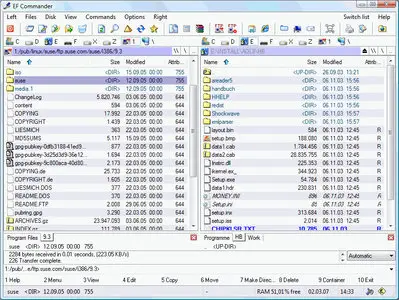
EF Commander is a complex and multi-featured file manager that a wide range of users, from beginners to professionals, will find easy to use. It is the result of many requests received by the author. The first version was written in 1994, under the OS/2 operating system using Presentation Manager, as a personal replacement for the old DOS program Norton Commander.​

In 1996 it was ported to the 32-bit Microsoft Windows operating system.
Easy to use
The modern interface helps you to have full control over your files and folders.
Tabbed interface
Define just the views you need in each pane for your folders and files.
Thumbnails
Quickly and easily get an overview your photos or other image collections.
32 bit multi-threading, parallel file operations
All long operations are run with multi-tasking. You can run any number of different operations at the same time, or several instances of the same operation - for example, you can have several "copy" commands going simultaneously.
Direct link to PDAs with Windows CE
EF Commander was the first file manager worldwide with this feature. Handle your data in the same way as on your desktop or laptop computer.
Internal packers for more than 20 archive formats
Use EF Commander to pack files or whole folders in any of the common archive formats. No external programs are required.
Supported formats: 7-Zip, ACE, ARC, ARJ, BZIP2, CAB, CPIO, GZIP, IMG, ISO (ISO9660), LHA, RAR, RPM, SFX, SQX, TAR, TBZ, TGZ, ZIP, ZOO
Internal viewer for more than 30 file formats
View picture files and movies, and play MP3, Ogg/Vorbis, FLAC, WMA and WAV audio files, without having to use any other software.
Use XnView and IrfanView as add-ons
Enlarge the number of available formats to 400 or more. EF Commander runs quietly in the background, but remains fully available to you. Files can also be managed in the internal viewer, in the quick view mode, or as thumbnails.
Fast FTP-client
The built-in FTP client features resume and FxP (server to server transfers).
Internal text and HEX editor
EF Commander has full text and hex editors for files that are limited only by your system resources.
Functions to split/join large files
Split large files into smaller parts, and recombine the parts.
Create/Verify checksums
Check the integrity of your data. EF Commandersupports the SFV, MD5 and SHA1 formats.
Synchronize function
Synchronize your notebook or your LAN with your work station.
Built-in media player
Play MP3, Ogg/Vorbis, FLAC, WMA and WAV.
External plug-in support for packers, viewers, file system and contents
Extend the functionality of EF Commander with external plugins. Supported formats include WLX, WCX, WFX and Winamp decode plugins.
The following languages are included in the package: English, German, Bulgarian, Catalan, Chinese, Croatian, Czech, Danish, Dutch, French, Galician, Hungarian, Italian, Korean, Latvian, Lithuanian, Macedonian, Polish, Portuguese, Romanian, Russian, Slovak, Spanish, Swedish, Taiwan, Ukrainian.
Windows 7, 8/8.1, 10
-

DOWNLOAD
uploadgig
Код:
https://uploadgig.com/file/download/bb49a9261399fe5B/zphp62Nm_EF.Commander.19.07.rar

rapidgator
Код:
https://rapidgator.net/file/f5bf3bfa99e75c9cac4d81676b9caff8/zphp62Nm_EF.Commander.19.07.rar

nitroflare
Код:
http://nitroflare.com/view/8B43032F47ED162/zphp62Nm_EF.Commander.19.07.rar
 
Minitab 19.11 Multilingual

00683ed5_medium.jpg

Minitab 19.11 Multilingual | 167/187 Mb

Minitab provides the tools you need to analyze data and find meaningful solutions to your toughest business problems.

Capability analysis

Hypothesis tests *

DOE

Scatterplots, matrix plots, boxplots, dotplots, histograms, charts, time series plots, etc.
​

Minitab provides the tools you need to analyze data and find meaningful solutions to your toughest business problems.
Measurement systems analysis
Capability analysis
Graphical analysis
Hypothesis tests *
Regression
DOE
Control charts
Scatterplots, matrix plots, boxplots, dotplots, histograms, charts, time series plots, etc.
Contour and rotating 3D plots
Probability and probability distribution plots
Automatically update graphs as data change *
Brush graphs to explore points of interest *
Export: TIF, JPEG, PNG, BMP, GIF, EMF
Descriptive statistics
One-sample Z-test, one- and two-sample t-tests, paired t-test
One and two proportions tests
One- and two-sample Poisson rate tests
One and two variances tests
Correlation and covariance *
Normality test
Outlier test
Poisson goodness-of-fit test
Linear and nonlinear regression *
Binary, ordinal and nominal logistic regression *
Stability studies
Partial least squares
Orthogonal regression
Poisson regression
Plots: residual, factorial, contour, surface, etc.
Stepwise: p-value, AICc, and BIC selection criterion *
Best subsets *
Response prediction and optimization *
ANOVA
General linear models
Mixed models
MANOVA
Multiple comparisons
Response prediction and optimization *
Test for equal variances
Plots: residual, factorial, contour, surface, etc.
Analysis of means
Operating System: Windows 7 SP 1 or later, Windows 8 or 8.1, Windows 10
RAM* 32-bit systems: 2 GB of memory or more recommended; 64-bit systems: 4 GB of memory or more recommended
Processor Intel Pentium 4 or AMD Athlon Dual Core, with SSE2 technology
Hard Disk Space 2 GB (minimum) free space available
Screen Resolution 1024 x 768 or higher
-
Multilingual

DOWNLOAD
uploadgig
Код:
https://uploadgig.com/file/download/86B8f24252951228/eMQvLfX5_MiniTAB.v19.11.x64F4CG.rar
https://uploadgig.com/file/download/24bBbcF82c779062/eMQvLfX5_MiniTAB.v19.11.x86F4CG.rar

rapidgator
Код:
https://rapidgator.net/file/84ee4b1be980474936f2be2c0b9d75ce/eMQvLfX5_MiniTAB.v19.11.x64F4CG.rar
https://rapidgator.net/file/456fc4bd8b72a0ed8ea17f97cf4e31ec/eMQvLfX5_MiniTAB.v19.11.x86F4CG.rar

nitroflare
Код:
http://nitroflare.com/view/99CED94CBCF0F70/eMQvLfX5_MiniTAB.v19.11.x64F4CG.rar
http://nitroflare.com/view/B8BA454351F8F3E/eMQvLfX5_MiniTAB.v19.11.x86F4CG.rar
 
ExtendOffice Office Tab Enterprise 14.00 Multilingual

0069715b_medium.png

ExtendOffice Office Tab Enterprise 14.00 Multilingual | 55.41 Mb

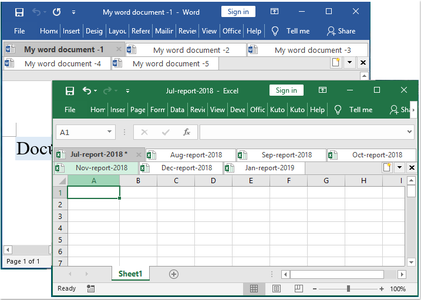
Office Tab supports opening, viewing, editing multiple Office documents in a single tabbed window, like the web browsers - Google Chrome, Firefox and so on.It brings the tabbed interface to Microsoft Office 2019, 2016, 2013, 2010, 2007, 2003 and Office 365 (include Word, Excel, PowerPoint, Publisher, Access, Project and Visio).​

A key advantage of Office Tab is that you can save time by consolidating your actions! For example, if you've opened multiple files, you don't have to save and close them individually; just click "Save All" from the Context menu and all your files are saved. Want to close all opened files? Simply select "Close All" and all your files will be closed.
In Office Tab, you can add a saved Microsoft Office file to a group. You can quickly open a group of documents or a group of Excel files and so on. With this Favorites Group feature, you can apply the following operations to a group of documents in Microsoft Office applications easily.
You don't have to open the "Save As" dialog to rename a file. Just click "Rename" on the Context Menu in the tab and enter the new file name-it's that simple! If you want to save the file in another folder, select "Save As" from the Context Menu.
If a file name is long, typically, the Windows taskbar displays only a small part of it, which is often a problem. However, with Office Tab installed, you will able to see the entire file name on the Tab Bar, no matter how long it is.
Right-click on a tab or Tab Bar to access the tab/tab bar context menu. Office Tab also combines some common command items in Microsoft Office, letting you access those items more quickly.
The tabbed interface allows you to open multiple documents in a single window. Each document appears as a new tab within the window (not a new window) and can be accessed with one click. This feature improves your efficiency when working with Microsoft Office programs (Word, Excel, PowerPoint, Project, Publisher, Access and Visio).
Office Tab is based on the standard Microsoft Office Add-in Technology. It does not impact the performance of the standard application and has an extremely small file size.
Tabs can be moved easily by dragging. You can switch between tabs using the mouse or you can activate a tab by pressing Alt + N ("N" being the tab order "1, 2, 3.").
The colors of the tabs and the Tab Bar are customizable. There are 11 styles for you to choose from. Within each style, the font style and the name of each tab can be changed to suit your preference (to apply these changes, you will need to close and restart Microsoft Office).
Windows XP, Vista (32/64), Windows 8 / 8.1 (32/64), Windows 7 / 10 (32/64), Windows Server 2003, 2008 and 2012, Citrix System and Windows Terminal (Remote Desktop) Server.
-
Multilingual

DOWNLOAD
uploadgig
Код:
https://uploadgig.com/file/download/d42798b70D103de9/RTPcPff2_OfficeTab.Enterprise.14.00.rar

rapidgator
Код:
https://rapidgator.net/file/89326ba65907bd3566b4ae86615fc597/RTPcPff2_OfficeTab.Enterprise.14.00.rar

nitroflare
Код:
http://nitroflare.com/view/AC2C8BC374CDBDA/RTPcPff2_OfficeTab.Enterprise.14.00.rar
 
Youtube Music Downloader 9.9.1.2

003c1dc6_medium.jpg

Youtube Music Downloader 9.9.1.2 | 41.8 Mb

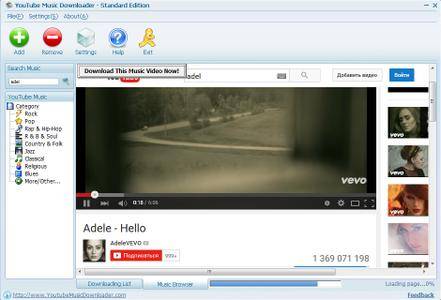
An easy-to-use Windows software to YouTube music videos and convert them to MP3, AVI, WMV, MOV, MP4, 3GP formats. You can millions of music from YouTube and listen them on your iPod, MP3 Player or watch them on your PC, iPod, iPhone.​

Unlimited 6,000,000+ music from YouTube, get started now.
YoutubeGet is an all-in-one software designed to make quick and easy work to Youtube videos and convert them. Offering a multitude of methods to acquire the video, this application has all the power you need while still remaining small and easy to use. After ing videos it will auto convert FLV files to MP4, 3GP, AVI, WMV, MOV etc. Soon, you can see youtube videos on your MP4 or Cell phone.
Download Youtube Videos to Cell Phone
YoutubeGet will auto convert Youtube Videos to 3GP Cell Phone Format, then you can see all youtube videos on your Cell Phone!
Download Youtube Videos to iPod
You can youtube videos and save them as iPod MOV or MP4 format, and play them anywhere!
Download Youtube Videos to PSP
After playing games on your PSP, would you like to see some cool videos? YoutubeGet will youtube videos and save them as PSP format!
Download Youtube Videos and Burn to a CD/DVD
Download youtube videos and save as AVI or WMV. It is much easier to burn these funny videos to a CD/DVD by this two formats.
Clipboard Monitor Helps You to Download Youtube Videos Much Easier
YoutubeGet monitors your Clipboard all the time. when you are copying a Youtube Video URL, immediately the Add New Download window will auto pop up.
FLV Converter (Free in YoutubeGet V4 Suite)
You can convert your local FLV files to AVI, WMV, MOV, 3GP, MP4 etc.
Youtube Browser
Search Youtube Videos and Preview them before ing. When you want to them you just one-click on Download Now Button.
Windows 7, 8/8.1, 10
-
English

DOWNLOAD
uploadgig
Код:
https://uploadgig.com/file/download/944Fd2aB21284279/UUDWCZpl_Youtube.Music.Downloader.9.9.1.2.rar

rapidgator
Код:
https://rapidgator.net/file/4ebb5b3170a01b6532419e5ee8e86704/UUDWCZpl_Youtube.Music.Downloader.9.9.1.2.rar

nitroflare
Код:
http://nitroflare.com/view/39356195BA102DF/UUDWCZpl_Youtube.Music.Downloader.9.9.1.2.rar
 
Назад
Сверху