• Здравствуйте. Сайт заработал в архивном режиме форум www.old.nado.in

Anthony's Software !!!

Comic Life 3.5.15 (v36483)

d4fa7713-147b-491d-8012-cb966bbdd960.png

File size: 83 MB

Presenting Comic Life 3, the app with everything you need to make a stunning comic from your own images.​

Packed with fonts, templates, panels, balloons, captions, and lettering art, Comic Life is a fun, powerful and easy-to-use app with endless possibilities. Whether it is photos of friends or hand drawn comic characters, Comic Life is the ultimate app for turning your images into a comic. Want to recount your holiday adventures or tell a life-story in an engaging style? Comic Life is the answer. What about creating an original story featuring you and your friends? That's easy with Comic Life.

It's the app with everything you need to make a stunning photo comic. Fonts, templates, panels, balloons, captions and lettering art. Simply add your photos and some words and very quickly you'll have a finished story. Comic Life is also great for doing school projects, how to guides, flyers for your business or group, storyboarding, lesson plans, book reports, Internet memes; and that's just to name a few!

Creating an original work is easy with the script editor. From script to comic page it's never been easier with the new Script Editor in Comic Life. When you're ready for a photo shoot, you can use the panel descriptions as a shooting guide! Then put it all together in Comic Life with the easy drag and drop feature for elements and lettering. It's your story from start to finish.

Photo filter effects and customizable lettering options really make your photos come alive. It really makes turning your pictures into comic artwork a snap. When you're done you can share your masterpiece with your fans in a variety ways.

30 New Beautiful Templates!

We went back to the drawing board and created a fresh set of templates that highlight the incredible tools you have at your fingertips in Comic Life 3.5.

These templates take advantage of Comic Life design features including full color halftone, page texture, 3D lettering, custom panels, and speedlines. We built these templates to make every page look like a professionally created composition. The best part is we have new templates for every comic category!

Script Editor!

Got a story idea that you want to make into a comic book? Write it out in the script editor so you're ready to take or find the photos you need to make the story come alive on the page. And taking your words to the comic page is easy with the SmartScript recognition system. Now with Comic Life 3.5, for example, dropping caption text from your script on top of a caption element on the page replaces the text instead of adding a new caption.

Advanced Filters!

New parametric filters make your photos even more amazing than before, including awesome new options like Rotoscope, Retro, and Sketch.

Instant Alpha!

Use the instant alpha tool to quickly knock out the background of your photos so you can place your characters in new locations or on dynamic comic book style backgrounds.

New Graphic Options

Brush strokes give your elements a hand drawn look. 3D lettering for stand out titles. New fill options for full color halftones, speedlines, textures and more to liven up your panels and lettering.

New Editing Controls

Parametric balloon shapes for more variety. Bendable connecting tails for extension bubbles. Rulers, alignment and spacing guides. Two up page display including facing pages. Master page for elements that need to be on every page.


DOWNLOAD
uploadgig
Код:
https://uploadgig.com/file/download/E845f1bD523cdffB/Rc7PJs1Z_CL3_.rar

rapidgator
Код:
https://rapidgator.net/file/63a1b651a0080cfd3374359638d7031d/Rc7PJs1Z_CL3_.rar

nitroflare
Код:
http://nitroflare.com/view/91E6F2C0F0C09C6/Rc7PJs1Z_CL3_.rar

 
OBS Studio 25.0.1

cdee16ac-0103-4f44-8c02-9cb354a1a48e.png

File Size : 136.8 Mb

OBS Studio is an application designed for gamers, artists, developers or amateur users who enjoy creating tutorials and streams that they share over the Internet.​

Create high quality recording with OpenGL or Direct3D on your desktop and stream them on the Internet via this intuitive software solution. Works with multiple streaming services, including Twitch The setup is quick and uneventful, so it is unlikely that you can encounter any issues at this stage. Upon launch, you are welcomed by a minimalistic, yet clean and intuitive interface that displays all available features and functions. You should know that the program allows you to connect to the major streaming services, such as Twitch, YouTube or DailyMotion, for instance. Alternatively, you can add your custom streaming service or save the recordings on your local drives in high-quality formats (MOV, FLV, MKV, MP4, TS and M3u8).

As you would expect, the application pes you to configure the stream, so that you can be sure that the audience watching your live recording gets quality. Therefore, you can change the resolution, adjust the FPS, alter the delay and set the maximum bitrate, so that they are suitable for a wider range of devices.

Enables you to add muldia files into the stream easily

Even though the primary goal of the initial releases was to make the application work on multiple platforms, there are some notable differences between this too and Open Broadcaster Software.

For starters, the program comes with a more dynamic API that enables developers to create their own plugins, so that they can have a more efficient control over the streaming experience. In addition, the Studio version allows you to include more type of files into the streaming, such as Audio Input and Output Capture, Display Captures, Images and Browser, for instance.

Perhaps the most noteworthy difference is the Studio mode that enables you to compare scenes and customize transitions with just a few clicks. It is worth mentioning that both applications allow you to record videos from various sources and integrate text, media, desktop recording, game capture or webcam streams into the content.

A tool that allows you to better manage the streaming process

Irrespective of whether you are creating a tutorial to upload for your gamers friends or you want to exhibit a highlight feature of a product that you want to launch in the near future, OBS Studio enables you to make live recordings that you stream or save locally effortlessly.


DOWNLOAD
uploadgig
Код:
https://uploadgig.com/file/download/aa7b821F206ce926/s2cjFV3v_OBS_Studio__.rar

rapidgator
Код:
https://rapidgator.net/file/42cb1674beb0c81a5b023cdea9e8ef90/s2cjFV3v_OBS_Studio__.rar

nitroflare
Код:
http://nitroflare.com/view/EF90716746B7800/s2cjFV3v_OBS_Studio__.rar
 
Dropbox 93.4.273

f0547446-13f6-4b98-a6fe-49b12f0a7dac.png

File Size : 116.4 Mb

Dropbox is a free service that lets you bring all your videos, photos and docs anywhere and share them easily.​

This means that any file you save to your Dropbox will automatically save to all your computers, phones and even the Dropbox website. The program also makes it super easy to share with others, whether you're a student or professional, parent or grandparent. Even if you accidentally spill a latte on your laptop, have no fear! You can relax knowing that Dropbox always has you covered, and none of your stuff will ever be lost. The application works just like any other folder on your computer, but with a few differences. Any files or folders inside Dropbox will get synchronized to Dropbox's servers and any other computer linked to your account.

Synchronization:

Once installed, any file you drop into your Dropbox folder will synchronize and be available on any other computer you've installed Dropbox on, as well as from the web. Also, any changes you make to files in your Dropbox will sync to your other computers, instantly.

Backup:

Let's say you accidentally delete that 8 page report that you were supposed to have for a meeting tomorrow. A handy Dropbox feature is the ability to undelete files or pull up any previous versions of it.

Sharing:

You can also share files and folders with whomever you choose, whether it be music with buddies, docs with colleagues or photos with grandma, even if they're not Dropbox users.

Speed:

We obsess over speed, and it shows. Dropbox is very smart about the way it handles files. For example, if you make a change to a huge file, dropbox will only update the piece of the file that changed.

Security:

All files are transported over SSL and encrypted using AES-256 (banks use this too)


DOWNLOAD
uploadgig
Код:
https://uploadgig.com/file/download/a00F1c8c5aC62ea1/mHbBG5n0_Dropbox_93.4.273_Offline_Installer..rar

rapidgator
Код:
https://rapidgator.net/file/16d6d8fc18b07be0f6c0d2c4189de422/mHbBG5n0_Dropbox_93.4.273_Offline_Installer..rar

nitroflare
Код:
http://nitroflare.com/view/DCA75BDDF7E393B/mHbBG5n0_Dropbox_93.4.273_Offline_Installer..rar
 
High-Logic FontCreator 13.0.0.2613

a6c1c4d1-0645-467d-855d-2ebacbb482f7.png

File size: 37.7 MB

With over 4.​

5 million s to date, FontCreator is the world's most popular font editor. An advanced feature set makes it the tool of choice for professionals, and its intuitive interface is straightforward enough for users at any expertise level. Create your own fonts, redesign existing characters, edit the spacing in font sets, and much more. When you create or open a font, FontCreator displays an overview of all available characters. You can simply add missing characters, or select an existing character, and modify its appearance. You can import (scanned) images of your signature or company logo, or make a font from your own handwriting. With FontCreator you can also fix character codepoints, font names, kerning pairs, and at all s you can preview your typefaces before installing.

Font Overview with Categories

The glyph and character category panel gives you quick and easy access to the glyphs, character subsets and Unicode ranges.

Work with OpenType, TrueType and Web fonts

FontCreator supports Open Type, True Type and Web Open Font Format (WOFF) fonts which can be used on Windows, Mac OS X, Linux, and in all modern web browsers.

Design High Quality Fonts

The standard and professional edition include font validation features which enable you to improve the quality of your fonts by locating and solving common glyph problems.

Optimize Contours

Optimizing glyph outlines will reduce the number of points that make up the contour(s).

Import SVG Images

High quality vector graphics can be easily imported. You can even copy and paste between FontCreator and your favorite vector editing software.

Import Raster (bitmap) Images

Import (scanned) images and convert them into glyphs. Create your own handwriting font by scanning your handwriting and import it into FontCreator.

Scalable Color Fonts

FontCreator is the first font editor to support the new scalable color fonts extension. This new feature allows you to create multi-colored glyphs for systems that support it, while maintaining backwards compatibility for systems that do not. Watch the video above for a quick introduction on how to create color fonts with FontCreator.

Visual OpenType Designer

The intuitive OpenType Designer allows you to easily add and modify OpenType Layout Features for glyph positioning. The build-in anchor manager makes adding and editing Mark to Base and Mark to Mark positioning a breeze!

OpenType Layout Scripts Editor

The Script Editor allows you to quickly add and modify OpenType Glyph Substitutions through an easy to learn scripting language.

OpenType Layout Features Made Easy

Common OpenType layout features are automatically added to your fonts and with the standard and professional editions you can take full control over these features through custom scripts.

Easy Access to Common Glyph Properties

The glyph properties toolwindow gives you easy access to the glyph's name, codepoints and bearings.

Kerning

Manually add kerning to your font or let the Autokerning take care of kerning for you in the standard and professional edition.

Optical Metrics

The Optical metrics feature in the professional edition simplifies one of the most complex and consuming tasks in font design. It analyzes a set of most common characters to find the best left and right side bearings of each of these glyphs.

Test Your Fonts

At any during your font development, you can test it in other applications. You can even generate a local webpage to test it as a Web font.

Powerful Transform Wizard

The standard and professional edition come with a powerful transform wizard that allows you to easily transform glyphs with just a few clicks. Transform your font to Italic, Bold, automatically add characters for other languages, small capitals and more.

Easily Rename Fonts

On the font properties dialog you can view and edit the font name, legal and copyright information, embedding rights and more.

Complete Composites

The standard and professional edition allow intelligent generation of outlines for more than 2,200 (mostly accented) composite characters.
Home, Standard, Professional


DOWNLOAD
uploadgig
Код:
https://uploadgig.com/file/download/cc7E0452D334ed70/WwvVSQL7_FontCreator.rar

rapidgator
Код:
https://rapidgator.net/file/b4c415babb9131db525250cc11016e4f/WwvVSQL7_FontCreator.rar

nitroflare
Код:
http://nitroflare.com/view/09FCE42C5148E4D/WwvVSQL7_FontCreator.rar
 
InPixio Photo Studio Ultimate 10.0.0 Multilingual

fd25f6e7-5b9f-4cdb-a9f2-109396be67cb.png

Languages: Multilingual | File Size: 506.05 MB

Photo Studio describes exactly what our software is today: a fully-fledged editing program that lets you create your pictures in your way.​

We're really excited about this new identity and hope you like the new name as much as we do. And rest-assured, the name might be chag but all the things our users love about Photo Clip are here to stay: Photo Studio 10 will still be a user-friendly photo editing software, full of fun content to help you create the perfect photos and photo montages. Read on to find out more about all the new features and improvements in Photo Studio 10.The first thing to know about version 10 of Photo Clip is that it has a new name: Photo Studio. Why change the name? Because the latest version of the software is so packed full of features that we decided it was for an upgrade. Our flagship Photo Clip software has evolved a lot over the years, from a program for making background cutouts to a multi-functional suite of applications, covering a range of editing needs from erasing to enhancing.

- Advanced photomontage possibilities, such as adding new images, backgrounds, text and stickers to a photo.

- Erase tools, which remove distracting items from your photos, while preserving the original background.

- Tools for correcting and enhancing your photos. For example, the auto-correction function, which adds color and brightness to photos with just a single click.

As with every new release, we have updated Photo Studio to provide even more editing possibilities. This , we have also put a big focus on improving performance and usability so that you can edit better and faster than ever. Here is a selection of the top new features to look forward to in Photo Studio 10.

The perspective tool is a smart new feature that is useful for correcting photos of buildings and architecture.

You have probably had that experience where you want to photograph a beautiful building but you can't get far enough way to get it in shot, so instead you have to shoot "upwards" or from an angle. This leads to something called perspective distortion in your image, where the lines of your building don't appear straight. For example, if you photograph a tall building, such as a cathedral, from below, the result may look tilted as if the structure is leaning away from you.

The Perspective tool helps you to remove this distortion and correct any tilted or skewed appearance in your photos. If this sounds complicated, don't worry: the tool is very easy to use with three automatic settings, for horizontal, vertical and full correction. After the auto correct has done its work, you can use simple sliders to make the final adjustments yourself. Finally, if you want to have full control over the process there is also a manual mode where you can apply guides to your photo to make a precise correction. In short, you can say goodbye to (unwanted) slanting in your architecture photos, thanks to this new tool.

To coincide with the launch of Photo Studio, we are releasing a complimentary new app that you can from the App Store or Google Play. With the inPixio Photo Transfer app, you can copy photos easily from your smartphone to your PC or Mac using Wi-Fi.

The app was designed as a helpful tool to facilitate photo editing with PC and Mac-based inPixio software. With a few clicks and a Wi-Fi connection, you can transfer your entire photo library to your laptop and images ready for editing in Photo Studio. There is no need for a cable, cloud service, or software and your photos remain safe with no external storage. The app is also a useful way to back up your photos to your computer and save space on your cell phone.

EXIF metadata is a set of information attached to a photo and stored automatically in your camera or smartphone. This can include date, location and more. When you upload a photo to Photo Studio, you can now view and edit all of this information. For example, you can add tags and ratings or even copyright information to a photo. This is useful for organizing your photos to help you quickly find what you're looking for. It's also especially useful if you upload your photos to online platforms such as Flickr.

Another new source of information in Photo Studio 10 is the Histogram. This measures exposure levels in your photo so you can get a better idea of the light and dark areas in an image. Referring to the histogram when editing exposure settings can help you to get the right level of brightness in your image.

The selective retouching tab allows you to adjust specific sections of your photo with gradients or the paintbrush.

In Photo Studio 10, we have added new sliders to the selective retouching tab, meaning that you can now make even more edits to your photos. The new local adjustments are hue, whites, blacks, dehaze, sharpness and noise reduction.

Photo Studio 10 now supports RAW format images. Raw images are not pre-processed and compressed like standard image formats such as JPEG, meaning they take up a lot of disk space. Because raw images are heavy and because the format Windows 10, Windows 8, Windows 7

- 1 GHz Intel Pentium processor or equivalent

- 1 GB RAM CD/DVD ROM drive

- 100 MB hard disk space, mouse and keyboard


DOWNLOAD
uploadgig
Код:
https://uploadgig.com/file/download/597Edc89f2D3669f/WJ6xkwwN_.Photo.Stud.rar

rapidgator
Код:
https://rapidgator.net/file/d3c48a088a918ef30ad46d061daee5d1/WJ6xkwwN_.Photo.Stud.rar

nitroflare
Код:
http://nitroflare.com/view/93A285CB90F082E/WJ6xkwwN_.Photo.Stud.rar
 
Macrium Reflect 7.2.4797 (x64)

5b914014-f2bb-4739-b06e-b67309b8d044.png

File Size: 344.6 MB

Macrium Reflect - Our image based backup and disaster recovery solutions have taken another big step forward in speed, simplicity and power.​

Our entire focus is helping organisations protect business critical data and systems, without fuss and budget breaking costs. - New Backup Ee: Incremental and differential images up to 60 s faster

- Instant virtual booting of backup images: instantly create, start and manage Microsoft Hyper-V virtual machines

- Ultra-fast Live imaging of windows systems, physical and virtual

- Restore images to dissimilar hardware using Macrium ReDeploy

- Greatly simplified administration including pre-defined Backup Plans for popular backup strats

- Fully featured file and folder level backup and recovery

- Updated support for all the latest Windows Operating Systems and disk formats

- Backup your entire PC to a single compressed image file.

- Backup files and folders to a single compressed archive file.

- Recover partitions and entire disk images with just a few clicks of your mouse

- Dynamic disk support

- MBR and GPT disk support

- Restore images to dissimilar hardware using Macrium ReDeploy

Reflect Server

This fast and super reliable solution once again sets the standard for image based server backup solutions. Macrium Reflect Server Edition comes with a full set of updated features that provides the fastest to first backup and peace of mind for full image or file and folder level restores.

- New Backup Ee: Incremental and differential images up to 60 s faster

- Instant virtual booting of backup images: instantly create, start and manage Microsoft Hyper-V virtual machines

- Rapid Delta Restore reduces image restore by 90% or more

- Rapid Delta Cloning

- Incrementals Forever and Synthetic Full images

- All current Windows Server platforms supported

- Physical and Virtual Server backup

- Restore images to dissimilar hardware using Macrium ReDeploy - Including Server ReDeploy

- Backup your entire physical or virtual Server to a single compressed image file.

- Backup files and folders to a single compressed archive file.

- Recover partitions and entire disk images with just a few clicks of your mouse

- Dynamic disk support

- MBR and GPT disk support

- Restore images to dissimilar hardware using Macrium ReDeploy

Reflect Server Plus

Macrium Reflect Server Plus is a fully featured and sophisticated tool for backing up the most critical of servers running applications such as Microsoft Exchange email, and SQL databases. IT professionals will be able to very quickly install and run backups using Server Plus. You can rely on it to protect your critical systems and provide rapid and trouble free recovery.

- Microsoft Exchange Server 2003 / 2007 / 2010 / 2013 / 2016

- Microsoft SQL Server 2005 / 2008 / 2012 / 2014

- Exchange Mailbox Restore (Granular Recovery)

- SQL Continuous Backup

- Full SQL & Exchange server backup & recovery

- Backup your entire PC to a single compressed image file.

- Backup files and folders to a single compressed archive file.

- Recover partitions and entire disk images with just a few clicks of your mouse

- Dynamic disk support

- MBR and GPT disk support

- Restore images to dissimilar hardware using Macrium ReDeploy

- Windows Event logging
Workstation / Server / Server Plus.


DOWNLOAD
uploadgig
Код:
https://uploadgig.com/file/download/33e2e0c509E1a2Ea/lfVNPdU5_Macrium.Ref.rar

rapidgator
Код:
https://rapidgator.net/file/a5766d28e2b5fd69ec5e718abc3ac9d9/lfVNPdU5_Macrium.Ref.rar

nitroflare
Код:
http://nitroflare.com/view/05996101D7688AC/lfVNPdU5_Macrium.Ref.rar
 
Norton Power Eraser 5.3.0.71

45158ae2-db07-4f4a-8488-b9a0b932d56b.png

File Size : 9.1 Mb

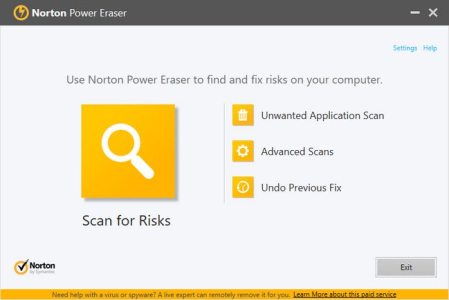
Norton Power Eraser is a last-resort, extreme tool that may help you cleanup special types of security risks.​

If a program has hijacked your computer and you have tried your Norton product and the Norton Bootable Recovery Tool without success, try Norton Power Eraser. This tool focuses on security risks that impersonate limate applications and are known as "scareware" or "rogueware" or "scamware". Norton Power Eraser uses more aggressive technologies than your Norton product, hence there is a risk that it will flag good programs for removal. You should carefully review the scan results page before removing files.Updates: official site does not provide any info about changes in this version


DOWNLOAD
uploadgig
Код:
https://uploadgig.com/file/download/aD84572648F51600/B04HeeJv_NPE..rar

rapidgator
Код:
https://rapidgator.net/file/bcedd98541b2c8d186e648d178341ff4/B04HeeJv_NPE..rar

nitroflare
Код:
http://nitroflare.com/view/6622BB14A349B5C/B04HeeJv_NPE..rar
 
WAU Manager (Windows Automatic Updates) 2.5.0.0

7004ff61-076d-4f0c-b5af-f8deca6c5fcd.png

File Size : 0.7 Mb

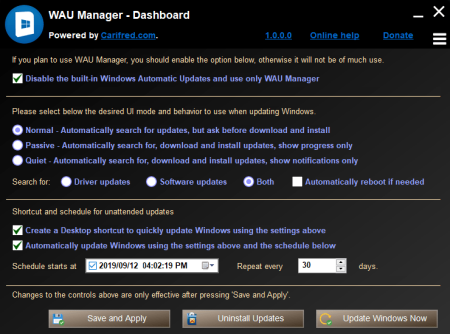
WAU Manager (Windows Automatic Updates Manager) is a fully featured replacement for the built in Windows Updating interface.​

This tool gives you full control of the Windows Updates, such as when and how they are installed, and has full uninstall and maintenance support for Windows updates.Update manually when desired with just one click on a dedicated desktop shortcut

Update automatically with the desired frequency. Once a day, once a month or once a year, or whatever you decide.

You get to choose whether the available updates are automatically ed and installed or not.

Easily uninstall several updates at once.

The Install updates module, which searches for available updates, and installs the desired ones. You can also hide updates from this module. Hidden updates are not displayed as available for install.

The Uninstall Updates module, which lets you uninstall or hide updates that were previously installed.

The Unhide Updates module, which lets you view hidden updates and unhide the desired ones.

The View update history module, which displays the Windows Update history and lets you perform maintenance actions related to Windows Update.

Updates: official site does not provide any info about changes in this version


DOWNLOAD
uploadgig
Код:
https://uploadgig.com/file/download/2c15378D217fcaF3/hmxsFjl4_WAU_Manager..rar

rapidgator
Код:
https://rapidgator.net/file/e5da0e4cd06972225972da0efd225b99/hmxsFjl4_WAU_Manager..rar

nitroflare
Код:
http://nitroflare.com/view/E63C2979ED45B00/hmxsFjl4_WAU_Manager..rar
 
Grub2Win 2.1.3.3

52e9f264-f128-4486-972b-667ad68ffd42.png

File Size : 3.1 Mb

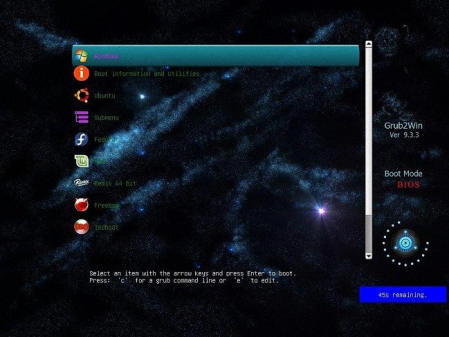
Grub2Win provides you with a boot manager that allows you to boot from various operating systems every single you power your computer on.​

First things first, boot managers resolve the problem that many users interfere with whenever they want to install different OSes on their PC. For instance, one may want to have Windows, a few Linux distributions and even a Mac OS X deployed on the same system. Without a boot manager, the boot sequence chooses the same OS over and over again and boots to it. Therefore, a boot manager is a must for any similar situation. Generally, a boot manager allows for every operating system to be installed to a separate partition, thus limiting the chances of potential conflicts. The thing with this trend amongst advanced users is quite simple to comprehend. If you ever find yourself dying to take a new operating system for a test run without completely switching to it, then you can install it alongside the current OSes on the computer. Thus, you don't have to install it over the one you are already running then reinstalling the old one if you don't find it any reason to keep the new one. Other than this, there are several other reasons to utilize boot managers and, implicitly, multiple operating systems. One of them can refer to developing and testing applications.

Overall, Grub2Win is a pretty nifty application that silently sits in the first primary partition of your system takes up little space and also packs several themes for you to choose the right one from. This way, you make sure you are not interfering with the Windows MBR code and that your partitions do not mix and create a gigantic headache.

Supports 64 and 32 bit EFI as well as BIOS firmware

Installs to Windows 10, 8, 7, Vista and XP

Requires just one directory on the Windows C: drive, about 15 MB disk space

Simple Windows GUI easily sets up Grub2Win in seconds

Lets you set your EFI firmware boot order from within Windows

Preview and select boot themes and animations during the install

Grub boot messages and help can be displayed in 27 major languages worldwide

Works with all filesystems including Mac hfs and Btrfs

Can search for and boot a partition by it's label. Supports advanced scripting

Works with both MBR and GPT disks - up to 128 primary partitions per drive

Supports extremely large (over 4 TB) disks and partitions

No registry changes

Safely multiboot Windows, Remix, Android, Ubuntu, Debian, Suse, Fedora, Mint and more

Grub customization is done from Windows - Configuration in Linux is not required

Runs open source GNU Grub 2.02 code. Frequent releases and enhancements

No adware or spyware - No hassles... It just works


DOWNLOAD
uploadgig
Код:
https://uploadgig.com/file/download/3A5e74522f7aff5e/e8xRs4O2_grub2win_.rar

rapidgator
Код:
https://rapidgator.net/file/3d03eab513d116ab61613c88b3d32409/e8xRs4O2_grub2win_.rar

nitroflare
Код:
http://nitroflare.com/view/7C521708CC3D648/e8xRs4O2_grub2win_.rar
 
InPixio Photo Studio Ultimate 10.0.0 Portable

7864bac7-3a1f-4f4f-8a03-da35615f4f79.png

File size: 450 MB

Photo Studio describes exactly what our software is today: a fully-fledged editing program that lets you create your pictures in your way.​

We're really excited about this new identity and hope you like the new name as much as we do. And rest-assured, the name might be chag but all the things our users love about Photo Clip are here to stay: Photo Studio 10 will still be a user-friendly photo editing software, full of fun content to help you create the perfect photos and photo montages. Read on to find out more about all the new features and improvements in Photo Studio 10. Photo Clip is now Photo Studio

The first thing to know about version 10 of Photo Clip is that it has a new name: Photo Studio. Why change the name? Because the latest version of the software is so packed full of features that we decided it was for an upgrade. Our flagship Photo Clip software has evolved a lot over the years, from a program for making background cutouts to a multi-functional suite of applications, covering a range of editing needs from erasing to enhancing.

Cutout and background erasing is now just one aspect of the program. Recent versions of the software also include:

- Advanced photomontage possibilities, such as adding new images, backgrounds, text and stickers to a photo.

- Erase tools, which remove distracting items from your photos, while preserving the original background.

- Tools for correcting and enhancing your photos. For example, the auto-correction function, which adds color and brightness to photos with just a single click.

As with every new release, we have updated Photo Studio to provide even more editing possibilities. This , we have also put a big focus on improving performance and usability so that you can edit better and faster than ever. Here is a selection of the top new features to look forward to in Photo Studio 10.

Perspective tool

The perspective tool is a smart new feature that is useful for correcting photos of buildings and architecture.

You have probably had that experience where you want to photograph a beautiful building but you can't get far enough way to get it in shot, so instead you have to shoot "upwards" or from an angle. This leads to something called perspective distortion in your image, where the lines of your building don't appear straight. For example, if you photograph a tall building, such as a cathedral, from below, the result may look tilted as if the structure is leaning away from you.

The Perspective tool helps you to remove this distortion and correct any tilted or skewed appearance in your photos. If this sounds complicated, don't worry: the tool is very easy to use with three automatic settings, for horizontal, vertical and full correction. After the auto correct has done its work, you can use simple sliders to make the final adjustments yourself. Finally, if you want to have full control over the process there is also a manual mode where you can apply guides to your photo to make a precise correction. In short, you can say goodbye to (unwanted) slanting in your architecture photos, thanks to this new tool.

inPixio Photo Transfer

To coincide with the launch of Photo Studio, we are releasing a complimentary new app that you can from the App Store or Google Play. With the inPixio Photo Transfer app, you can copy photos easily from your smartphone to your PC or Mac using Wi-Fi.

The app was designed as a helpful tool to facilitate photo editing with PC and Mac-based inPixio software. With a few clicks and a Wi-Fi connection, you can transfer your entire photo library to your laptop and images ready for editing in Photo Studio. There is no need for a cable, cloud service, or software and your photos remain safe with no external storage. The app is also a useful way to back up your photos to your computer and save space on your cell phone.

EXIF data and Histogram

EXIF metadata is a set of information attached to a photo and stored automatically in your camera or smartphone. This can include date, location and more. When you upload a photo to Photo Studio, you can now view and edit all of this information. For example, you can add tags and ratings or even copyright information to a photo. This is useful for organizing your photos to help you quickly find what you're looking for. It's also especially useful if you upload your photos to online platforms such as Flickr.

Another new source of information in Photo Studio 10 is the Histogram. This measures exposure levels in your photo so you can get a better idea of the light and dark areas in an image. Referring to the histogram when editing exposure settings can help you to get the right level of brightness in your image.

New Local Adjustments

The selective retouching tab allows you to adjust specific sections of your photo with gradients or the paintbrush.

In Photo Studio 10, we have added new sliders to the selective retouching tab, meaning that you can now make even more edits to your photos. The new local adjustments are hue, whites, blacks, dehaze, sharpness and noise reduction.

RAW Images

Photo Studio 10 now supports RAW format images. Raw images are not pre-processed and compressed like standard image formats such as JPEG, meaning they take up a lot of disk space. Because raw images are heavy and because the format Windows 10, Windows 8, Windows 7

- 1 GHz Intel Pentium processor or equivalent

- 1 GB RAM CD/DVD ROM drive

- 100 MB hard disk space, mouse and keyboard


DOWNLOAD
uploadgig
Код:
https://uploadgig.com/file/download/63ac56Befa8B3658/EKjrrNqN_InPixio.Pho.part1.rar
https://uploadgig.com/file/download/d32a68907acF99be/EKjrrNqN_InPixio.Pho.part2.rar

rapidgator
Код:
https://rapidgator.net/file/bac0c9293d855754e3c697e4dd19b370/EKjrrNqN_InPixio.Pho.part1.rar
https://rapidgator.net/file/0e8d85fb6109255099ffd67bf95551f2/EKjrrNqN_InPixio.Pho.part2.rar

nitroflare
Код:
http://nitroflare.com/view/5DDC2BBDCF0DA45/EKjrrNqN_InPixio.Pho.part1.rar
http://nitroflare.com/view/4D3EB20B2132643/EKjrrNqN_InPixio.Pho.part2.rar
 
Neevia Document Converter Pro 7.1.94

560189bb-3231-43b6-a4c8-957dd02d675c.png

English | File size: 33 MB

Neevia Document Converter Pro is a software product that dynamically converts Microsoft Office 2003/2007/2010/2013/2016/2019/365, WordPerfect, HTML, AutoCAD DWG/DWF, EML, MSG, PostScript and many other document types to PDF, PDF/A, PostScript, JPEG, TIFF, PNG, PCX, BMP.​

It operates in both a batch mode via directory or email scanning and in direct mode via a COM (ActiveX) component. Document Converter can be configured to recognize text - this is known as OCR - for the converting Image and PDF files and comes with support for printing the input files directly to a physical printer instead of converting them to PDF or Image. With clustering and multi-threading support Neevia Document Converter Pro offers a reliable and stable conversion process.

Document Converter Pro is easy to install and is used by companies in the legal, pharmaceutical, insurance and in many other areas that generate voluminous documents. The goal of Neevia Document Converter Pro is to help your company create one PDF/Image standard that can be integrated into your workflow with ease and affordability.


DOWNLOAD
uploadgig
Код:
https://uploadgig.com/file/download/275f69E22a92efda/8JQPRAbS_.Neevia_Doc.rar

rapidgator
Код:
https://rapidgator.net/file/582dfc83f3ff6b73e154ab9530d3bb7d/8JQPRAbS_.Neevia_Doc.rar

nitroflare
Код:
http://nitroflare.com/view/1D75ACF4B978B82/8JQPRAbS_.Neevia_Doc.rar
 
Quick Surface 2.0 Build 21 (x64)

6e1b3aa7-e9af-414c-b5dc-41279a60d928.png

File size: 27.4 MB

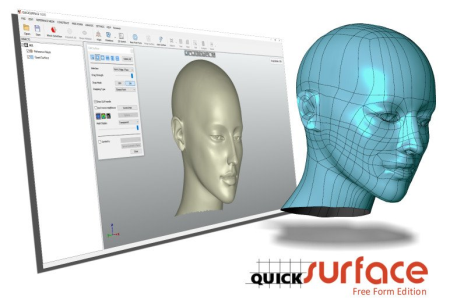
The ultimate solution for Reverse Eeering compatible with any 3D Scanner exporting STL meshes or PTX point clouds.​

Hybrid parametric modelling for both organic and prismatic shapes. Export data in standard IGES or STEP file formats or build fully parametric history tree directly into SOLIDWORKS.We don't compare our solution to other packages, but we simply highlight some of the features that make QUICKSURFACE different:

Interactive selection by the user instead of automatic sntation on reference mesh;

Constrained best fit (for example the ability to constrain the direction of the cylinder to be parallel to an axis, while still getting the best fit to the points);

Relations between extracted primitives - parallelism, perpendicularity, coincidence, offset;

Quick alignment based on extracted primitive (datum) prioritization;

Mirrored point display to check symmetry of the aligned scan object;

Real deviation colour map in 2D Sketch mode;

Proprietary snap-to-mesh technology for free form modelling;

Manipulator based accurate modification of the free form surfaces;

The ability to modify the automatic surface, if the design intent requires it;

QUICKSURFACE Free Form is not only exact surfacing, the user can manually adjust the resolution and position of control points to avoid mapping of the surface to the reference mesh which may have outliers and noise;

Real deviation in Free Form, helping to create lighter surfaces with less control points;

Control of patch size, and thus resolution on the final Free Form surface;

Parametric hybrid modelling - starting with free form and basic primitives, the user can build a complex CAD model by trimming them and can later change the surfaces based on the design intent;

QSConnect module for SOLIDWORKS never ends with "Transfer failed". The software guides the user to create an error-free model in SOLIDWORKS;

QUICKSURFACE has neither hardware integration with scanners nor mesh processing tools which the modern 3D scanners provide. As a result of this, the user does not have to pay extra for tools already included in the 3D scanners' software;

An affordable price for faster return on investment

Updates: official site does not provide any info about changes in this version


DOWNLOAD
uploadgig
Код:
https://uploadgig.com/file/download/7a3bdb19592457BB/mqgdnoEy_Quick.Surfa.rar

rapidgator
Код:
https://rapidgator.net/file/76986850f90608772f8a22f5b57a8754/mqgdnoEy_Quick.Surfa.rar

nitroflare
Код:
http://nitroflare.com/view/96034E44E24A4A0/mqgdnoEy_Quick.Surfa.rar
 
Scarab Darkroom 2.27

ab03fff9-2d31-4622-9f4a-88988f6dbfaa.png

File Size: 40.7 MB

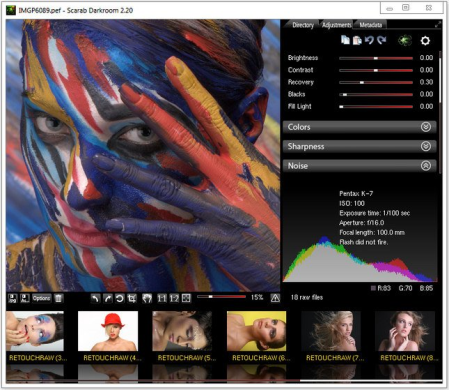
Scarab Darkroom provides a variate set of tools that work together in order to assist you in easily enhancing the quality of your RAW images and generate masterpieces that you can be proud of.​

While it does not sport the same rich feature set of its most important competitors, the extended range of supported digital cameras (various models from Canon, FujiFilm, Nikon, Olympus, Panasonic, Pentax, Samsung and Sony, even some of the latest ones) and the ease of use makes it rather popular amongst users. The straightforward approach that it goes for does not mean that it does not include a wide palette of editing tools. On the contrary, there are Fixed the missing highlight warning button in version 2.26

- Fixed wrong colours with some cameras in the 2.26 version (eg. Canon EOS 5D III)

- Fixed a missing dll in the new 64-bit installer, which prevented the program from starting on some older CPU-s, like many of the early Core 2 Duo-s

- Program automatically maximises its window on start if it was maximised the last it was closed

- A minor performance optimisation


DOWNLOAD
uploadgig
Код:
https://uploadgig.com/file/download/146Cd6b10ea7cccA/MQfFRiIe_Scarab_Dark.rar

rapidgator
Код:
https://rapidgator.net/file/69cd48ae54bf925f28ea2afff3d7b36c/MQfFRiIe_Scarab_Dark.rar

nitroflare
Код:
http://nitroflare.com/view/0A32A747FC71D20/MQfFRiIe_Scarab_Dark.rar
 
WinUpdatesView 1.10

e62bd897-7842-44f3-a647-c1ffe6d990b5.png

File Size : 0.1 Mb

WinUpdatesView is a simple tool that displays the history of Windows updates on your system.​

WinUpdatesView can load the Windows updates history from your local system, using API, and it can also read and parse the Windows updates database file (DataStore.edb) from external drive or from remote computer on your network.For every Windows update history record, WinUpdatesView displays the following fields: Title, Description, Install Date, Update Operation (Install, Uninstall, Not Started, In Progress), Operation Result (Succeeded, Succeeded With Errors, Failed, Aborted), Category, Information URL, Support URL, Uninstall Notes, Client Application ID, Service ID, Update ID, Revision Number, Unmapped Result Code, Server Selection, hResultAdded 'Hide Windows Defender Updates' option.

Fixed to save the 'Case Sensitive' option of the Quick Filter in the .cfg file.


DOWNLOAD
uploadgig
Код:
https://uploadgig.com/file/download/DEbD1ec778bd52ff/ksLhyc1m__WinUpdates.rar

rapidgator
Код:
https://rapidgator.net/file/c4bec109a0ea26c4bd36be2783d3bf45/ksLhyc1m__WinUpdates.rar

nitroflare
Код:
http://nitroflare.com/view/FFE257F851DA4F3/ksLhyc1m__WinUpdates.rar
 
HddLed Indicator 1.2.5.47

b1617b63-5270-4010-b8f8-e28bada40333.png

File Size: 0.5 MB

HddLed Indicator is a software tool to get hard disk drive and SSD activity led on screen and system tray.​

HddLed Indicator is a tool to see hard disk drive and SSD activity the same way as a hardware led. If you control your PC remotely or your laptop or ultrabook has no HDD LED at all, HddLed Indicator will help to monitor storage activity including removable flash drives. With HddLed Indicator you will choose which of the logical disks or hard drives you want to look after. Dynamic tips provides more details about rate and amount of data being read and write.Monitor multiple hard drives.

Monitor multiple logical discs.

All-in-one led - single indicator for all drives.

All-in-one led in system notification area (tray icon).

Instant indicator for removable USB HDD and flash drive.

Unique read and write activity indication within single led.

Low memory and cpu consumption.

official site does not provide any info about changes in this version.


DOWNLOAD
uploadgig
Код:
https://uploadgig.com/file/download/327676d2e9c999bf/9TKyt67H_HddLed.Indi.rar

rapidgator
Код:
https://rapidgator.net/file/e1b85300e97c13ae34ce6981784ab419/9TKyt67H_HddLed.Indi.rar

nitroflare
Код:
http://nitroflare.com/view/050B0F0729BA6B8/9TKyt67H_HddLed.Indi.rar
 
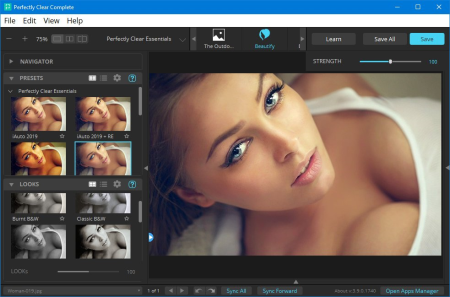
Perfectly Clear Complete 3.10.0.1771 (x64) Multilingual

228c77f7-37ac-4374-bfc7-f49577845bdf.png

Windows x64 | Standalone & Plug-in & Addons | File size: 106.83 MB

Built for precision.​

Made for beauty. Above all, you want better photos. But what if you could have better photos faster? Perfectly Clear has mastered the science of intelligent image correction - creating superior quality photos in record , so you can get back to doing what you really love...in no .With Perfectly Clear, you'll get results faster so you can spend more behind the camera and less in front of the computer. Take advantage of intelligent image analysis to find and fix numerous camera flaws automatically. Plus, you can quickly add your favorite finishing touch with our stylized LOOKs.

Our presets are just the starting point. Easily apply only the adjustments you need for the perfect image. Use our powerful sharpening and noise reduction, which goes beyond what other tools can do, to unlock a whole new image. Keep an eye on your color and exposure with a dynamic histogram that tracks exposure and color clipping.

Every photographer is different, and so is Perfectly Clear. Our adaptive interface lets you hide tools you don't need while you work, allowing you to focus on your image. Plus, you can make and manage your own presets, which intelligently adapt to each photo.

Rather than move your entire image library or change your workflow, we'll make your existing workflow better. We support several platforms and have more coming soon. With powerful batch processing and up to 30 corrections in one click, we'll make everything better.

Creating our award-winning technology took more than a decade of R&D, multiple patented processes, and over a dozen unique algorithms. We cracked the code on correcting every pixel independently. The proof is in your pictures.

You became a photographer to go out and capture the beauty of the world, not sit inside at an editing desk. We invented our automatic image corrections to take away the tedium and give you back your freedom. So let Perfectly Clear handle the editing chores while you devote your day to doing what you do best-creating incredible images.

- Up to 20 auto corrections with one click

- Batch process 1000s of images in minutes

- Stay within your workflow

- Unlock the details in every image

- Tap into professionally created presets

- Save countless hours of manual editing

- Fine tune details with precise controls

Creating our award-winning technology took more than a decade of R&D, multiple patented processes, and over a dozen unique algorithms. We cracked the code on correcting every pixel independently. That's how we make a 12-megapixel photo look like it was taken with 12 million separate apertures. The proof is in your pictures.

At Athentech, we're committed to solving problems faced by photographers. Every year, we continue to innovate with R&D work by our team of physicists, eeers, and photographers. Every day, we invest in making your photos look their best.

- Perfect Exposure. More effective than traditional brightness, Perfect Exposure lets you maintain Real Color Photography without clipping or washing out. Our technology overcomes the distortions caused by a single aperture by replicating the way your eye gathers light and correcting your exposure pixel by pixel.

- Depth. Brings out the contrast in a photo without messing up the other colors. Perfectly Clear uses a patented algorithm that manages the dynamic range in a unique way, revealing the detail needed to produce this kind of depth.

- Light Diffusion. Perfectly Clear lets you create a softer look with warmer tones and captures the perfect portrait even in broad daylight.

- Skin & Depth bias. For realistic lighting on skin.

- Photoshop is powerful, but for Full Color Spectrum, Light Diffusion, automatic red-eye removal, you have to turn to Perfectly Clear.

- Vibrancy. Perfectly Clear mimics how the eye adjusts saturation, providing a color-vibrant photo. Somes digital cameras can cause photos to look washed out/faded because they have a linear response to light. But our solution overcomes this problem by looking at each channel independently.

- Fidelity. We reproduce the full visual spectrum of colors seen by the eyes, enabling you to capture purples properly every .

- Tint. In the days of film, you had to carry around different films and filters for different s of day-all to get the lighting source correct. To remove nasty tints-from tungsten, fluorescent, incandescent, IR-Perfectly Clear searches for an abnormal tint, then reveals the great photo underneath.

- Sharpening. Traditional sharpening methods also sharpen weak signal and introduce halos. Perfectly Clear only searches for strong signal and creates sharp, clear photos with zero artifacts.

- Noise removal. Perfectly Clear automatically reduces noise 2-3 stops with one click (unlike Ps or Lr which requires multiple slider bar adjustments). ISO 1600 is effectively reduced to ISO 200-400 without blurring or losing details.

- Red-eye. We sourced this technology from our wonderful partner FotoNation, which is embedded in hundreds of millions devices. It detects and corrects imperfections as quickly as 5 images per second with no manual intervention.

- Unlike Photoshop, Perfectly Clear not only removes red eye automatically, it also includes Eye Enhance, Eye Enlarge, Dark Circle removal, and the ability to automatically add 5 different Catchlights.

Perfectly Clear lets you smooth and tone skin, adjust blush, and remove infrared, shine and blemishes. Our robust, automatic correction uses advanced facial detection techniques to identify age, gender and key facial features including texture and skin tone. As a result, we're able to detee the precise amount of corrections to apply automatically. All of our Beautify corrections are much faster than doing this manually in Ps or Lr which will takes minutes per image instead of seconds.

Perfectly Clear lets you whiten teeth for the perfect smile and saves a painful trip to the dentist. Plus, it can sharpen the look of your lips and tone your face shape for a more slender and youthful appearance.

Windows 7, 8 or 10 (64-bit only)

Photoshop CS6 or Creative Cloud

Photoshop Elements 13,14,15

Corel PaintShop Pro X6, X7, X8, X9

Lightroom 4 or newer, including v6 and CC

4 GB RAM or more


DOWNLOAD
uploadgig
Код:
https://uploadgig.com/file/download/072c011d88783Ed2/9ZGSW8la__Perfectly.rar

rapidgator
Код:
https://rapidgator.net/file/bee989896191877aeafb30cce81a0f9b/9ZGSW8la__Perfectly.rar

nitroflare
Код:
http://nitroflare.com/view/4541F0BCDFFE403/9ZGSW8la__Perfectly.rar
 
Adobe Photoshop CC 2019 20.0.9.28674 (x64) Multilingual

2aed879f-760c-4dad-8d47-d927d85bfec0.png

File size: 1.7 GB

Adobe Photoshop CC 2019 - the essential software for perfecting your images.​

It offers productivity and workflow enhancements, powerful new editing tools, and breakthrough compositing capabilities. Adobe Photoshop CC software accelerates your path from imagination to imagery. Ideal for photographers, graphic designers, and web designers. The professional standard delivers new features such as automatic layer alignment and blending that enable advanced compositing.Revolutionary new features, a fluid user experience, and improved access to the unrivaled power of Photoshop

A more intuitive user interface and new nondestructive editing features that put you in control, including the new Adjustments and Masks panels

Content-Aware Scaling - advanced auto-blending that extends depth of field, and industry-leading editing and compositing with reeeered color-correction tools

Significant productivity enhancements that provide increased flexibility and enable you to leverage the power of today's faster graphics processors

Breakthrough 3D editing and compositing capabilities and improved video controls to dramatically expand your creative options

Comprehensive image analysis with enhanced measurement and counting tools, as well as support for DICOM images and MATLAB processing routines

Artboards

Creative Cloud Libraries

Adobe Stock

Design Space (Preview)

Export artboards, layers, and more

Layer Styles

Device Preview and the Preview CC companion app

Blur Gallery | Restore noise in blurred areas

Glyphs panel

Camera Raw

3D printing

3D imaging

UI toolkit for plug-ins and scripts

Adobe Photoshop CC 2019 is part of Creative Cloud. That means you have access to all the latest updates and future releases the moment they're available. Use Save to Cloud to keep your files organized across multiple computers. And with Behance integration, you can share your projects straight from Photoshop CC and get immediate feedback from creatives around the world.

Get started faster

In-app search

Tighter integration with Adobe XD

Stock templates, 3D objects, and search

Support for SVG color fonts

New Creative Cloud Libraries capabilities

Creative Cloud Assets improvements

Introducing Typekit Marketplace

Enhanced Properties panel

Better overall performance

Processor: Intel or AMD processor with 64-bit support; 2 GHz or faster processor

Operating system: Microsoft Windows 7 with Service Pack 1 (64-bit), Windows 10 (Version 1709 or later)

RAM:2 GB or more of RAM (8 GB recommended)

Hard disk space: 3.1 GB or more of available hard-disk space for 64-bit installation; additional free space required during installation (cannot install on a volume that uses a case-sensitive file system)

Monitor resolution: 1024 x 768 display (1280x800 recommended) with 16-bit color and 512 MB or more of dedicated VRAM; 2 GB is recommended

Graphics processor acceleration requirements: OpenGL 2.0-capable system

Internet: Internet connection and registration are necessary for required software activation, validation of subscriptions, and access to online services


DOWNLOAD
uploadgig
Код:
https://uploadgig.com/file/download/0a3563fd1Cd02063/f3GE6NkE__Phshop20.0.part1.rar
https://uploadgig.com/file/download/db0a18Da57244faa/f3GE6NkE__Phshop20.0.part2.rar

rapidgator
Код:
https://rapidgator.net/file/db689641f546535a0e9f8318341cce1b/f3GE6NkE__Phshop20.0.part1.rar
https://rapidgator.net/file/006ee0ef19ebaf4307d7e5610a4d2fbc/f3GE6NkE__Phshop20.0.part2.rar

nitroflare
Код:
http://nitroflare.com/view/EBF29BA4E80B6EF/f3GE6NkE__Phshop20.0.part1.rar
http://nitroflare.com/view/9588215118B4BE9/f3GE6NkE__Phshop20.0.part2.rar
 
Firetrust MailWasher Pro 7.12.26 Multilingual

ce67cd28-ddf4-4f2b-943d-408f1f30c2f2.png

File size: 24 MB

Receiving spam is like those telemarketers who call at dinner , completely annoying and you didn't ask for it.​

Luckily you can stop this now! Now with free Android, iPhone and iPad version! Install MailWasher today to screen all your email accounts in one place and allow only the email you want in your inbox. MailWasher lets you preview all your email before it gets to your computer or mobile device, enabling you to read all your email securely, and instantly delete any unwanted or suspicious email. Your remaining good email is ed to your PC or mobile device, saving you from receiving any spam or email viruses.

When you use MailWasher, the benefits become obvious.

- Zero spam in your computer or mobile device.

- Inspect any email before it gets to your computer or mobile device.

- Never lose an email because you can't afford to.

- Intelligent spam tools ensure spam is caught and good email is not

With over 8 million users, 18 languages and features on both BBC World and CNN you can be confident that using MailWasher is one of the easiest ways to get rid of spam.

Receive only the email you want

Check your email with MailWasher first. You'll be safer with the knowledge of what's waiting for you on the server, allowing you to quickly inspect and read your email and remove any unwanted messages quickly and easily.

In 3 simple steps you'll be spam free.

1. Press the Check Mail button

2. Mark any unwanted messages for delete

3. Press the 'Wash Mail' button to remove the spam

Inspect your email before it gets to your pc

View everything about your messages before they get to your computer so you can detee if they're really spams, scams or good email. This means you can delete unwanted messages at the server so you only get the email you want. MailWasher lets you view the email safely in plain text, but you can also inspect who it's really from, who owns the company who sent it (WHOIS report) and all the hidden links. Given that you can't afford to lose any limate email, MailWasher lets you have the final say on it before letting you 'Wash' the spam away.

Intelligent spam tools

Advanced spam detection technology and tools do all the hard work for you by automatically marking spam emails. From simple friends list, blacklists and learning filters to advanced custom filters, MailWasher has you covered.

Easy setup, easy to use

The setup wizard makes setting up MailWasher a breeze. Your email account settings and contacts lists are imported in to MailWasher so you can get started right away


DOWNLOAD
uploadgig
Код:
https://uploadgig.com/file/download/c942B92428F3ba79/DQqYyb87_MailWasher7_.rar

rapidgator
Код:
https://rapidgator.net/file/a3e9d82365ee25ef3590d15ef41e4a34/DQqYyb87_MailWasher7_.rar

nitroflare
Код:
http://nitroflare.com/view/ED79DD94CA67982/DQqYyb87_MailWasher7_.rar
 
Format Factory 5.1.0 Multilingual

3c2cf71d-2cbc-4b52-bcc6-9eb18cf8ba28.png

File size: 76 MB

FormatFactory is a multifunctional media converter.​

Provides functions below: All to MP4/3GP/MPG/AVI/WMV/FLV/SWF. All to MP3//WMA/MMF/AMR/OGG/M4A/WAV. All to JPG/BMP/PIF/ICO... Rip DVD to video file , Rip Music CD to audio file. MP4 files support iPod/iPhone/PSP/BlackBerry format. Source files support RMVB. Support converting all popular video,audio,picture formats to others. Repair damaged video and audio file. Reducing Muldia file size. Support iphone,ipod muldia file formats. Picture converting supports Zoom,Rotate/Flip,tags. Format Factory is a multifunctional media converter.

All to MP4/3GP/MPG/AVI/WMV/FLV/SWF。

All to MP3/WMA/AMR/OGG/AAC/WAV。

All to JPG/BMP/PIF/ICO/GIF/TGA。

Rip DVD to video file,Rip Music CD to audio file.

MP4 files support iPod/iPhone/PSP/BlackBerry format.

Supports RMVB,Watermark,AV Mux.

1 support converting all popular video,audio,picture formats to others.

2 Repair damaged video and audio file.

3 Reducing Muldia file size.

4 Support iphone,ipod muldia file formats.

5 Picture converting supports Zoom,Rotate/Flip,tags.

6 DVD Ripper.

7 Supports 62 languages

Updates: official site does not provide any info about changes in this version.


DOWNLOAD
uploadgig
Код:
https://uploadgig.com/file/download/3C460f0dedf106ec/sUF39Bbn_FFSetup5.1.0.0..rar

rapidgator
Код:
https://rapidgator.net/file/b9d05baa86adc009310d78de019a8f0e/sUF39Bbn_FFSetup5.1.0.0..rar

nitroflare
Код:
http://nitroflare.com/view/46736B99A091C1D/sUF39Bbn_FFSetup5.1.0.0..rar
 
Ashampoo WinOptimizer 17.00.25 Multilingual

fff0d6e5-3fbe-43ff-b89b-881ca37e5266.png

File size: 19 MB

Ashampoo WinOptimizer 17 cleans, protects and optimizes your PC like no other program can.​

Gain new disk space, disable unwanted services and boost your PC performance to the max! Protect your privacy and customize Windows to your needs. Enjoy steady performance and a lean, secure system! The Swiss army jackknife for your PC

Ashampoo WinOptimizer comes packed with 38 powerful modules to make your computer life incredibly easy. It doesn't matter whether you seek to customize Windows, enhance your security and privacy or analyze your system in depth. All modules are refined and updated every year for best compatibility and performance with old and new Windows versions alike. Discover the wealth of useful features in WinOptimizer yourself!

Robust early warning system against system failure

Start page with eight optimization tools

Handy task scheduler for maintenance and optimization

More than 30 modules for the perfect Windows system

Enhanced Uninstall Manager with additional details

Brand new cleaner modules

Two program skins available

Full secure boot support

Full secure boot support

ADS Scanner for hidden data streams

Maximum security and privacy - guaranteed!

Windows collects a lot of data and makes some foul compromises regarding system security. Win10 Privacy Control and Antispy, both included in the program, give you back control of your system! You decide which passwords, telemetry data or photos are sent out or, even better, kept private. Crack down on unsolicited tracking of your PCs, personalized ads or far too nosy programs!

Indispensable: 1-click optimization

1-click optimization is so popular because it takes care of several issues at once. Three powerful modules spring into action to clean your system in-depth. Internet Cleaner eliminates web browsing traces that not only occupy space but also compromise your privacy and security. Drive Cleaner deletes redundant files to reclaim disk space and Registry Cleaner removes invalid Registry entries for improved performance and to avoid system errors. All it takes is a single click from you!

Smart auto-features for your PC

A total of three clever modules take the bulk of the work off your shoulders. Auto-Clean not only remove junk data but prevents it before it happens! Whenever you close your browser or any other program, it makes a clean sweep and gets rid of no longer needed files. Live-Tuner performs real- tweaking to accelerate program launches. You can also customize it manually to modify process priorities for that extra bit of oomph. Game-Booster teates all background processes non-essential for gaming to give your games the ultimate performance boost! Once you exit the game the changes are reverted automatically so you can continue working normally.

Our cleaners: scrupulous cleanliness guaranteed!

Cleaning modules have always been at the heart of WinOptimizer. That's why we'll never stop improving them! Where do the latest browsers or setup programs store junk files? Which files pose a risk to your privacy? New threats are constantly analyzed and detection built into the new version. But that's not all. Ashampoo WinOptimizer fully supports multi-user environments. From now on, you no longer have to clean each profile separately!

Perfect system monitoring

Ashampoo WinOptimizer shows you what's going on on your PC. For example, you will automatically be notified when the health of your drives deteriorates before disaster strikes. Detect performance bottlenecks and potential errors with ease. If you need extensive details on disk space usage, installed hardware components or running background processes, here is where you'll find them!

Your PC will feel like new

Windows changes slightly with each new update and Ashampoo WinOptimizer 17 accommodates for the latest changes! The new Task Scheduler allows you to run system maintenance or One Click Optimizer automatically at custom intervals and the new innovative ADS Scanner provides insights into the hidden world of alternate data streams. The popular cleaner modules have been updated and now delete even more junk data. Track down duplicates, remove installations in style with a more powerful Uninstall manager or fine-tune your internet connection with the revised Internet Tuner! And by the way: WinOptimizer has never looked better!

Create and forget: system maintenance schedules

Many of our customers love the system maintenance and One Click Optimizer features that perform highly effective system optimization, maintenance and cleaning. Web browsing traces, hidden data clutter, redundant Registry entries or system settings that need improving, these features make your PC better and faster. And thanks to Task Scheduler, you can have them run fully automatically at regular intervals to keep your PC in the best shape possible, always!

Reveal hidden data streams with ADS Scanner

Have you heard of alternate data streams? This feature allows programs to attach hidden information to the files as they appear in Windows Explorer, e.g. to detee whether a file was ed or is part of the system. Unfortunately, this feature can also be abused to attach malware to your files. ADS Scanner detects and lists alternate data streams to help you locate and remove dubious entries!

Continuous development

Development never stops so each version comes with improved and enhanced modules. For example, Uninstall Manager now provide more details, Duplicate Finder supports additional filters and Browser Extension Manager now supports Opera. Based on extensive customer feedback, we continuously fix issues, implement feature requests (like new Internet Tuner profiles) and optimize work flows. This ensures that your favorite feature are always up to date and that WinOptimizer never ceases to surprise you in a positive way!


DOWNLOAD
uploadgig
Код:
https://uploadgig.com/file/download/11eC6eeb0eFa72dd/hrsN0BUw_AshampooWin.rar

rapidgator
Код:
https://rapidgator.net/file/f95d1cf44e66c029462287a729b4474f/hrsN0BUw_AshampooWin.rar

nitroflare
Код:
http://nitroflare.com/view/837BD34337DF89A/hrsN0BUw_AshampooWin.rar
 
Назад
Сверху