• Здравствуйте. Сайт заработал в архивном режиме форум www.old.nado.in

Anthony's Software !!!

MixW4 1.3.0

a504d973-5fc7-4623-9279-066f1931e61f.png

File size: 47 MB

MixW 4 is a new multi-mode, multi-platform software for radio amateurs.​

A completely new outlook. Tons of new features. JT65 and FT8 modes. KiwiSDR as an external RX. More coming.

Updated and fixed many modules

Fixed crashes

Updated DigiFest QML

New contests QML v.3

Updated interface elements

New cty.dat


DOWNLOAD
uploadgig
Код:
https://uploadgig.com/file/download/B21C0e2FDCe220cb/ueyXVe7B_MixW4.1.3.0_.rar

rapidgator
Код:
https://rapidgator.net/file/84d9a6b1447f328302a18821bef831c9/ueyXVe7B_MixW4.1.3.0_.rar

nitroflare
Код:
http://nitroflare.com/view/7B5A8AE4EE4E58E/ueyXVe7B_MixW4.1.3.0_.rar
 
Prima Cartoonizer 1.4.9

27537432-f7c3-458c-913c-441300df60d8.png

Languages: English | File Size: 79.98 MB

Convert photos into cartoons with just few clicks of a mouse with our Prima Cartoonizer for PC.​

Now, you can convert all of your pictures and images into cartoon effect more quickly and precisely. You can convert large or high-quality photos into cartoons with best results. Besides, you can also edit your photos and make multiple adjustments even before or after converting them. Add many items, crop your photos, resize and adjust the brightness and contrast.

- Amazing Cartoon Effects!

- Automatic conversion process!

- It works without internet connection!

- Output image size up to 4096px!

- The good thing is that you can let the people know how you look like without sharing your actual photo but a cartoon of yourself.

- You can make cartoons of your friends, pets, house, neighborhood and especially the celebrities and the politicians.

- Cartoons will be the best gift for your family and friends. You can also use them on mugs and T-shirts.

- Undoubtedly, this software is a great fun and addictive, too. It is very easy to use and also intuitive.

- No need of great artistic skills because no manual drawing is involved.

- The software uses very novel technology to execute the whole process.

- First of all, it splits the image into solid color patterns just similar to a mosaic. After that, it converts the minute details of the image into cartoon format.

- Since it applies effects throughout the photo, the end result is always of high-quality.

- Cartoon yourelf without any Watermark or Logo!

- Standalone software!

Following a quick installation, you are prompted to add a picture to get started, an event that also brings forth the effects, features and options of the application. Therefore, on the ride side, you can use the small menu to customize the brightness, contrast and RGB. The app also comes with a zoom feature that can come in handy when adjusting these parameters.

Depending on the number of effects you want to add to your pictures the conversion process can take some . But then again, nobody is really in a hurry when processing images and overall, it's not a big setback. All in all, Prima Cartoonizer is an easy to use application that provides an effective way to add a toon effect to your images.

- You can even make all types of adjustments with the cartoonized photo.

- Avail multiple effects to make your pictures desirable and mesmerizing.

- You can conveniently convert your photos into cartoons just within seconds.

- It is extremely simple software with the main theme of turning images into cartoons.

- It allows the users to covert photos into cartoons really fast than normal process.

- With the help of crop function, you can remove any unwanted part/parts of your image.

- You can edit your images and adjust the brightness and the contrast...etc

- No other standalone program or software is needed; it does all the functions itself.

- The converted cartoon does not contain any watermark or logo.(Paid version only)

- You need not to save the photo to print it. You can do it right from within your software.

- Resize function available, you can resize your photo before or after the conversion.

- Different goodies enhance the overall fun and joy, thus brig extra colors to your cartoons.
Windows 10, Windows 8/8.1, and Windows 7


DOWNLOAD
uploadgig
Код:
https://uploadgig.com/file/download/4F0D788481669ad9/vjCQwWIO_.Prima.1.4.9_.rar

rapidgator
Код:
https://rapidgator.net/file/a7d1d9e2389334150eba35364632ee16/vjCQwWIO_.Prima.1.4.9_.rar

nitroflare
Код:
http://nitroflare.com/view/5FBC712D534FA33/vjCQwWIO_.Prima.1.4.9_.rar
 
Advanced SystemCare Pro 13.5.0.274 Multilingual

8ec44bd5-0178-47b3-852a-38c240246cc7.png

File size: 47.8 MB

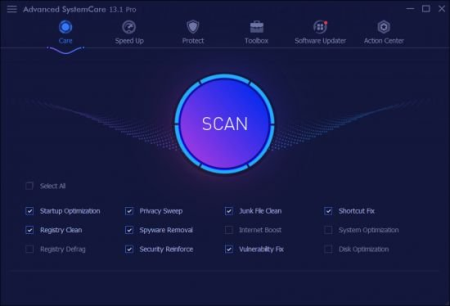
Advanced SystemCare PRO provides an always-on, automated, the all-in-one PC optimization utility, specializes in ONE-Click solutions to detect, clean, repair, speed up and eventually protect PC.​

To better protect users online privacy with Advanced SystemCare, Protect tab is newly added, which is designed to provide quick access to protect browsing frombeing tracked by automatically cleaning privacy traces once browser closed and detect and resist the attack of malicious plugin/toolbar by Browser Anti-Tracking and Plugin/Toolbar Cleaner in this tab.
IObit Advanced SystemCare has the New Performance Monitor, that can release memory by one click to smooth PC running within seconds. Toolbox is always offering effective tools, such as new Startup Manager, a 1-click solution to conspicuously diminish system startup by optimizing unnecessary Startup and Service. In most of old and slow PCs, there might be lots of troubles to slow them down. Equipped with Advanced SystemCare, your PC will stay error-free and smoother than ever.

Keeps your PC running at peak performance. Fully optimizes Windows for ultimate system performance and top Internet speed by unleashing the built-in power of your system, based on how you use your PC and your network configuration. It turns your PC into a business PC, a productive workstation, an entertainment center, a game machine, or a scientific computing PC.

Defends PC security with extra protection. Detects and analyzes Windows security environment. Scans and removes spyware and adware using up-to-date definition files in order to prevent spyware, hackers and hijackers from installing malicious programs on your computer. Erases and updates your PC's activity histories.

One click to solve as many as 11 common PC problems. Advanced SystemCare inherits the ease-of-use from previous versions, with more powerful capabilities. With one click, it scans and repairs ten PC problems and protects your PC from hidden security threats.

Real- optimization with ActiveBoost function. ActiveBoost, technology that actively runs in the background intelligently managing system resources in real-, constantly detects inactive resources and optimizes CPU and RAM usage.

More than 20 dedicated smart tools for everyday PC maintenance. Advanced SystemCare integrates IObit's latest Toolbox, with more than 20 dedicated smart tools for everyday PC maintenance as well as advanced needs. The Toolbox feature has tools for system cleaning, optimizing and repairing, tools for security enhancement, and tools for full control over the PC system.

Cloud technology to keep database up-to-date. The new "Cloud" technology ensures the database is kept updated at all s so that you can benefit from the latest definitions and configurations.

Boost your PC for working and gaming. You now have two Turbo Boost options, Work Mode and Game Mode. In addition, you can now adjust the configuration of each mode from the main screen.

Next-generation registry deep clean and optimizer. Safely cleans registry junk, compacts registry bloats and defragments the whole registry for maximum performance. Finds and fixes the registry errors that other utilities miss with "Deep Scan" technology.

Automatically works in the background. This powerful utility works continuously, automatically and quietly in the background on your PC. You can set the program on a regular schedule or just let it work automatically when your PC is idle.

New UI technology for quicker start and less resource usage! With the new UI technology, Advanced SystemCare will start up faster using fewer system resources.

New architecture and re-written source codes for 32bit/64bit system! These improvements will make your PC work more efficiently and steadily, stabilizing even older systems.

Improved Care module with more powerful clean and optimization functions. The new developments in the "Care" module include features such as "Start-up Optimization", which will scan and clean your PC much more effectively.

Powerful hard drive defragmentation. Fast, powerfully and incredibly effective Disk Defrag function to defragment hard drives - up to 10 s faster than other defragmentation tools.

Keeps your PC running at peak performance. Fully optimizes Windows for ultimate system performance and top Internet speed. It turns your PC into a business PC, a productive workstation, an entertainment center, a game machine, or a scientific computing PC.

Defends PC security with extra protection. Detects and analyzes Windows security environment. Scans and removes spyware and adware using up-to-date definition files. In conclusion, it prevent spyware, hackers and hijackers from installing malicious programs on your computer. Erases and updates your PC's activity histories.

One click to solve as many as 10 common PC problems. With one click, it scans and repairs ten PC problems and protects your PC from hidden security threats.

Real- optimization with ActiveBoost function. This technology actively runs in the background intelligently managing system resources in real-. And constantly detects inactive resources and optimizes CPU and RAM usage.

Cloud technology to keep database up-to-date. The new "Cloud" technology ensures the database is kept updated at all s. So that you can benefit from the latest definitions and configurations.

More than 20 dedicated smart tools. The Toolbox feature has tools for system cleaning, optimizing and repairing, tools for security enhancement. Also the tools for full control over the PC system.


DOWNLOAD
uploadgig
Код:
https://uploadgig.com/file/download/09d54bC5217a06dD/yYIFOcBw_.Advanced_S.rar

rapidgator
Код:
https://rapidgator.net/file/04d227972b395a8bcec17804942c5ee8/yYIFOcBw_.Advanced_S.rar

nitroflare
Код:
http://nitroflare.com/view/FEA89430DFBAF25/yYIFOcBw_.Advanced_S.rar
 
App Builder 2020.83 (x64)

ead6f418-2c2c-4557-9d93-171403dd5d7d.png

File Size: 118.5 MB

If you want to create modern desktop and mobile apps you're in the right place!​

DecSoft App Builder is a professional visual development environment to create HTML5 apps, WebApps, Progressive WebApps, Web Extensions and Hybrid apps for the modern mobile and desktop browsers, as well platforms like Google Android, Apple iOS and Microsoft Windows.
Languages

The DecSoft App Builder apps are based in HTML, CSS and Javascript. These are the languages that you must know (more or less) in order to create modern apps that run in all the mobile and desktop browsers, as well platforms like Android, iOS and Microsoft Windows. All with the same base code! This is a big reason to choose DecSoft App Builder.

Visual designer

App Builder provide us dozens of visual and non visual controls ready to be placed in the application's designer. Simply drag and drop the control that you need into the designer and then place it where you wanted.

Contextual help

DecSoft App Builder has a contextual help that point you exactly to the control, property, event reference, etc. Just press the F1 key where you are in the IDE. For your convenience, the help is also available online in: getappbuilderhelp.com

Apache Cordova

DecSoft App Builder is integrated with Apache Cordova and prepares for your app the right config file, platform icons, splash screens, batch files, shell files and JSON files. DecSoft App Builder integrates also the officials Apache Cordova plugins.

Quick code list

The DecSoft App Builder code editors provides the Quick code list for your convenience. The Quick code list helps you to write Javascript code more faster, providing all the available controls properties, methods and more.

App Files manager

The DecSoft App Builder IDE incorporates the right Files manager for your app, so you can link Javascript and stylesheet files, but also add images, other files (like JSON files) and even entire directories, to be available in your app at run.

User Functions

In addition to the available app methods and the methods provided by the app views, app dialogs, app frames, the Apache Cordova plugins methods, and, all the possible controls that you can use, its also possible to setup your own User Functions in order to be available for your app at run.

Auto scale apps

There are many themes availables for your app, and, you can also set the fixed and scaled styles, even at run. The auto scale style made the app properly show in different screen sizes.

* The app's resources list inside the app's Languages manager includes now a search input which allow us to filter the app's resources list, in a similar way than almost all the list in the IDE, which also allow us to filter it.

* Some minor enhancements in the IDE's welcome page, for example, the forum search form can deal now with the IDE theme, redirecting with the right theme to be used in the DecSoft forum website.

* Update the Fontawesome JavaScript library to the latest version: this version includes lot of new icons ready to be used in our apps. Update also the Fontawesome desktop fonts, which are used in the Icons picker dialog, and, finally udpdate the available icons lists in the referred Icons picker dialog.


DOWNLOAD
uploadgig
Код:
https://uploadgig.com/file/download/a398b5d4bDc8f054/krxnCqj7_App.Builder.rar

rapidgator
Код:
https://rapidgator.net/file/0b02babbc0239963fb07c8b7b3bdfb60/krxnCqj7_App.Builder.rar

nitroflare
Код:
http://nitroflare.com/view/364FA7D6889073C/krxnCqj7_App.Builder.rar
 
Cobra Print Viewer 3.1.2

73e07305-e811-4843-999a-5fc603cfd9a8.png

File size: 1.5 MB

Cobra Print Viewer is an enhanced Windows print management utility which allows you to easily copy, re-print and view actual images of your queued print jobs.​

Do much more with your locally queued print jobs than you can with the standard Windows print manager.

View the actual images of a print job as it will appear on the printer. See thumbnail images of all jobs queued and select individual jobs to see the image larger size or full screen. Useful to see how the print job will be laid out on the paper, or if you printed the job some ago and need a rder of exactly what the print job was.

Make copies or re-print any queued print jobs, either single copy or multiple copies, even to another printer. Useful if you later decide you wanted more than one copy of a print job.

Copy print jobs between printers. Useful if one of your printers fails and you need to quickly and easily move remaining queued jobs onto a different printer. Can even be to a different model of printer, and even one of lesser print quality capability.

Redirect print jobs to another print queue, reassign print queue to alternative printer. Useful if you have a faulty printer and need to automatically divert jobs to another printer or queue, or if you want to enable pause on print.

Export jobs from one printer and import to another on the same or different print server. Useful if you have faulty printers on a server; you can easily move them across to another printer server and get the jobs printed.

Change the position of any print job in the queue. Useful if you want to bring specific jobs forward in the queue to be printed first.

Easily see detailed information about print jobs such as paper type, print quality, single/double sided, number of pages, number of copies. Useful as a rder of what paper type to load before printing and how many sheets to load.

Rename print jobs to give them a more meaningful name as a rder later when you come to print.

Save queued print jobs to image file. All common image formats are supported.

Runs on any Windows platform that supports .NET 4.0 and above. Both 32 bit and 64 bit operating systems are supported.

Comes with comprehensive user guide and free technical support.


DOWNLOAD
uploadgig
Код:
https://uploadgig.com/file/download/7181A453fd1743ca/CkMwKDr5_Cobra_Print.rar

rapidgator
Код:
https://rapidgator.net/file/a118808748ce4e0ed2c33e55a9f54538/CkMwKDr5_Cobra_Print.rar

nitroflare
Код:
http://nitroflare.com/view/905659ADDB945D2/CkMwKDr5_Cobra_Print.rar
 
Google Web Designer 8.0.3.0603 Build 6.1.4.0

ff90f89d-2c1f-4367-afd9-9ea5fa4048d8.png

File Size : 100.5 Mb

Google Web Designer facilitates a modern and comfortable working environment for creating interactive ad banners to be used in the Google results page.​

It includes rich features in user-friendly form.
The main application window has a streamlined look which blends with the Windows 8 appearance, providing quick access to options and configuration parameters.

You can create a new banner by selecting the environment (e.g. AdMob, Generic), dimensions, HTML file name, location, and animation mode (quick or advanced).

It is also possible to establish expanded dimensions and the banner orientation mode, as well as to point out the CSS, JavaScript and XML file locations on the disk.

Google Web Designer puts at your disposal numerous image manipulation tools for objects found in each keyframe of the line, such as selection (e.g. transform control, alignment, distribution), 3D object rotation and translation, tagging (div, image, video or custom element), pen (e.g. add anchor point), text (edit font settings), rectangle and line.

As far as customization is concerned, you can modify colors, positions, sizes and styles, create a 360-degree or carousel gallery, as well as edit style sheets. The viewing mode can be toggled between design and code.

Before exporting the project, you can view it in the preferred web browser. Publishing options allow you to create ZIP archives, enable polite loading mode, and implement CSS prefix for Mozilla, among others.

Google Web Designer uses a surprisingly low amount of CPU and RAM. It has a good response and runs smoothly, without causing the OS to hang, crash or show error messages. All in all, Google Web Designer comes equipped with the essential toolkit for creating Google banners seamlessly.


DOWNLOAD
uploadgig
Код:
https://uploadgig.com/file/download/c4711D490209Ebb6/tfVEyiIR__Google_Web.rar

rapidgator
Код:
https://rapidgator.net/file/a4fd269bd5345cfded141175ffb1f148/tfVEyiIR__Google_Web.rar

nitroflare
Код:
http://nitroflare.com/view/7270894ADFE90E4/tfVEyiIR__Google_Web.rar
 
MSMG Toolkit 10.0

a8f863b2-b751-4b23-a462-c7b19b49d7d2.png

File size: 58 MB

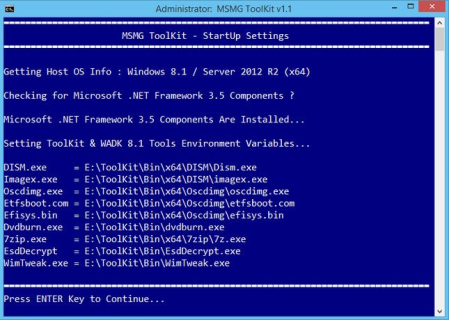
The MSMG ToolKit is basically a Tool to Service, Customize, Add or Remove Features and Components, Enable or Disable Features to Microsoft Windows Operating Systems.​

Copy Source DVD Files from DVD Drive

Extract Source DVD Files from ISO Image

Extract Source DVD Files from OEM / IMG Image

Convert Windows Store ESD Image to WIM Image

Convert Windows Media Creation Tool (MCT) Image to WIM Image

Convert Windows ESD Image to WIM Image

Convert Windows WIM Image to ESD Image

Convert Source WIM Editions

Integrate Windows Updates

Integrate Windows Setup Media Updates

Integrate Windows Language Packs

Integrate Windows Device Drivers

Integrate Microsoft .NET Framework 3.5

Integrate Microsoft .NET Framework 4.6.2

Integrate Microsoft .NET Framework 4.7.1

Integrate Microsoft Data Deduplication

Integrate Microsoft Edge Browser App

Integrate Windows Accessibility Braille

Integrate Microsoft Win32 Calculator

Integrate Open Secure Shell (SSH)

Integrate Windows Management Framework 5.1

Integrate Windows Media Feature Pack

Integrate Windows Muldia Restricted Codecs

Integrate Windows Subsystem for Linux (WSL)

Integrate Windows System Restore

Integrate Windows To Go Workspace

Integrate Remote Server Administration Toolkit (RSAT)

Integrate Microsoft Default Metro Apps

Integrate Microsoft DaRT Tools to Boot & Recovery Images

Integrate Windows Thin PC Add-on Packages

Integrate Microsoft DirectX 9.0c

Integrate Microsoft Games

Integrate Windows Sidebar

Integrate Windows 8.1 Media Center Generic Activation Tokens

Integrate Windows 8.1 Pre-Activation Data & Tokens

Integrate Teal Server Patch

Integrate Custom Themes UxTheme Patch

Integrate Custom Windows Recovery Environment (WinRE)

Integrate Custom Default User Account Pictures

Integrate Custom System Files

Integrate Windows PhotoViewer Metro Mods

Integrate Windows MediaPlayer Metro Mods

Integrate Windows Win32Calc Metro Mods

Remove Default Metro Apps

Remove Default Metro Apps Using Apps List

Remove Default Metro Apps Association

Remove Windows Components

Remove Windows Components Using Package List

Import Default Metro Apps Association from XML File

Export Default Metro Apps Association to a XML File

Import Tweaks

Make a DVD ISO Image

Burn a ISO Image to DVD

Copy Source to Bootable USB Flash Drive

Sync Source Boot and Install Images to Bootable USB Flash Drive

Burn an ISO Image to Bootable USB Flash Drive

Format a USB Flash Drive

WIM Manager to Display, Delete, Rename, Export, Split, Merge, Capture, Apply, Cleanup, CheckHealth, ScanHealth WIM Image Indexes

Load/Unload WIM Image Registry for Modification

Windows 7 with SP1 (All Editions)

Windows Embedded Standard 7 with SP1

Windows Thin PC

Windows Server 2008 R2 (All Editions)

Windows 8.1 (All Editions)

Windows Embedded 8.1 Industry (All Editions)

Windows Server 2012 R2 (All Editions)

Windows 10 Threshold 1, 2, & Redstone 1, 2, 3 (All Editions)

Windows Server 2016 R2 (All Editions)

Windows 7 with SP1 / Windows 8.1 / Windows 10 / Server 2008 R2 / Server 2012 R2 / Server 2016 R2 Installation Disc DVD/ISO.

Windows 7 with SP1 / Windows 8.1 / Windows 10 Host Operating System for Servicing Windows 7 / Windows 8.1 Source Images.

Windows 8.1/ Windows 10 Host Operating System for Servicing Windows 7 / 8.1 / 10 Source Images.

The ToolKitHelper.exe requires Microsoft .NET Framework 4.7.1.

+ Updated ToolKit's Bin folder with Windows 10 20H1 Insider Preview WADK (v10.0.19624.1000) Tools.

+ Added separate Component Removal Package List Templates for each supported Source OS inside ToolKit's <Bin\Lists> folder.

- Removed Microsoft Visual C++ Run Pack (Windows 10) for MSMG ToolKit due to a bug.

+ Updated the Feature "Remove Windows Component" to support removing the below components for Windows 10 Client v2004 Source OS.

Internet

Muldia

Privacy

+ Updated the Feature "Remove Windows Component" to support Windows 10 Client v1909 (v10.0.18363.836) Source OS.

+ Updated the Feature "Remove Windows Component" to support removing the below components for Windows 10 Client v2004 (v10.0.19041.264) Source OS.

+ Fixed a Bug in the Feature "Remove Windows Component" where Start Menu Search was not working properly when removing Cortana App for Windows 10 Client v2004 Source OS.

+ Fixed a Bug in the Feature "Remove Windows Component" where Settings App -> Search settings was not applied when removing Cortana App for Windows 10 Client v2004 Source OS.

+ Fixed Typo Errors (Thanks to MDL Member : 正义羊).


DOWNLOAD
uploadgig
Код:
https://uploadgig.com/file/download/5c90a0abdE09594e/CMGWTYEz_ToolKit_v10.rar

rapidgator
Код:
https://rapidgator.net/file/414b9a5cc372e2cfd0cf00709b8a5ebc/CMGWTYEz_ToolKit_v10.rar

nitroflare
Код:
http://nitroflare.com/view/CF389D9CC45C1C6/CMGWTYEz_ToolKit_v10.rar
 
Microsoft Edge 83.0.478.45 Stable Multilingual

c8c65a6e-d79e-49a8-aa7a-d2dba943c0f7.png

File Size : 158 Mb

Introducing the new Microsoft Edge: Rebuilt from the ground up to bring you world-class compatibility and performance, the security and privacy you deserve, and new features designed to bring you the best of the web.​

The new Microsoft Edge is a modern web browser - designed for faster, safer browsing. Get more done on the web with built-in tools for notetaking, reading and more.
The new Microsoft Edge is based on the Chromium project, so you can use the extensions/add-ons from Google Chrome extensions web store and from Microsoft Edge extensions web store for free. Choose your style

News, images, search-choose what you want to see when you open a new tab. Select a layout best for you: Focused, Inspirational, or Informational.

Take control of your data

Microsoft Edge and Bing give you more control over your data, and more transparency into what information is being collected, while you browse with new features like Tracking Prevention and InPrivate mode.

Browse with peace of mind

Microsoft Defender SmartScreen automatically protects you online from security issues, phishing schemes, and malicious software.

Browse anywhere

The new Microsoft Edge is now available on all supported versions of Windows, macOS, iOS, and Android.

Experience 4K streaming

Get the best browser for high definition media on Windows 10 with unique support for streaming in 4K Ultra HD.

Customize with extensions

The new Microsoft Edge is now compatible with your favorite extensions, so it's easy to personalize your browsing experience.


DOWNLOAD
uploadgig
Код:
https://uploadgig.com/file/download/8868e9335E1376Ba/nh2GQ0JZ_Microsoft_E.rar

rapidgator
Код:
https://rapidgator.net/file/ac2e3627dd3eb37acc03c790e851bdec/nh2GQ0JZ_Microsoft_E.rar

nitroflare
Код:
http://nitroflare.com/view/A865B83F33F8837/nh2GQ0JZ_Microsoft_E.rar
 
NCH WavePad 10.67 Beta

486f12f792706c31048ab7f84c552139.png

File size: 6.98 MB

This audio editing software is a full-featured professional audio and music editor for Windows and Mac.​

It lets you record and edit music, voice and other audio recordings. When editing audio files, you can cut, copy and paste parts of recordings, and then add effects like echo, amplification and noise reduction. WavePad works as a wav or mp3 editor, but it also supports a number of other file formats including vox, gsm, wma, real audio, au, aif, flac, ogg, and more.

Sound editing functions include cut, copy, paste, delete, insert, silence, auto-trim and more

Audio effects include amplify, normalize, equalizer, envelope, reverb, echo, reverse and many more

Integrated VST plugin support gives professionals access to thousands of additional tools and effects

Supports almost all audio and music file formats including mp3, wav, vox, gsm, wma, au, aif, flac, real audio, ogg, aac, m4a, mid, amr, and many more

Batch processing allows you to apply effects and/or convert thousands of files as a single function

Scrub, search and bookmark audio for precise editing

Create bookmarks and regions to easily find, recall and assemble snts of long audio files

Tools include spectral analysis (FFT), speech synthesis (text-to-speech), and voice changer

Audio restoration features including noise reduction and click pop removal

Supports sample rates from 6 to 96kHz, stereo or mono, 8, 16, 24 or 32 bits

Works directly with MixPad Multi-Track Audio Mixer

Easy to use interface will have you editing in minutes

Trim sound bites out of longer audio files

Reduce vocals from a music track

Cut together audio for radio broadcasts or podcasts

Save files for your iPod, PSP or other portable devices

Create ringtones from music files or recordings

Record voiceovers for muldia projects

Restore audio files by removing noise, hissing or hums

Normalize the level of audio files


DOWNLOAD
uploadgig
Код:
https://uploadgig.com/file/download/ceD4f4d5faeAcB56/UpdIMHPu__WavePad.10.rar

rapidgator
Код:
https://rapidgator.net/file/126386a5b2d282bda3fdba6381254bef/UpdIMHPu__WavePad.10.rar

nitroflare
Код:
http://nitroflare.com/view/ADCAA009FED5B3C/UpdIMHPu__WavePad.10.rar
 
Network Drive Control 1.45

72123976-85c5-49dc-8cf5-a775d2a1dbbc.png

File Size : 1 Mb

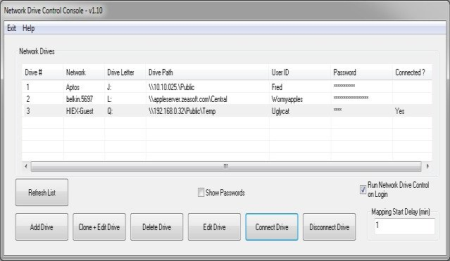
Network Drive Control (NDC) for Windows Vista, 7, 8 & higher, both 32-bit & 64-bit, is an example of a utility I wrote to solve a frustrating problem I frequently encountered, namely wanting my network servers, both at work & home, mapped to Windows drives in a network specific manner.​

While one can tell Windows to try to map all of the drives at logon, I didn't like the long delays waiting for the outs of the drive mapping for the networks that are not connected. (i.e. Waiting for the mapping of the home network drives to out when on my work network, and vice versa.) So I wrote my own utility which would examine the network environment after I logged in, and based on what network it found itself on, it would only attempt to map those drives it knew were on that network. Basically, I wanted the map network drives on login to function equivalently to the way the Windows "default printer" does by being network specific. The short of it is I wrote a two module program to do just that, and hence Network Drive Control was born.
Network Drive Control allows you to configure the automatic mapping of network drives when you logon based on the network(s) to which you are connected. And example would be to have your laptop automatically connect and map one set of network drives when at home, and another set of network drives when at work or school, and none if it detects that the PC is connected to a network where no mappings have been configured.

Network Drive Control has no limit to the number of networks or drives that can be configured (except Windows built in limits), and drive letters can be redundant. i.e. If on one network you like a resource to be mapped to drive, say, X:, and on a different network you'd like to have a different resource also mapped to X:, you can configure Network Drive Control to do so.

Network Drive Control utilizes Windows features built into Windows Vista through 10 (both 32-bit and 64-bit).

Network Drive Control is free and has a built in help function.

We add the usual weasel words that there are no warranties that this software will work correctly or will even run on your machine, and that you use it at your own risk.

Note: Cisco QuickVPN, used by some Cisco small business routers, does not allow the use of network names, and so Network Drive Control won't be able to identify the remote network. This is an flaw in Cisco QuickVPN, not in Network Drive Control. Cisco's AnyConnect used with Cisco's enterprise class routers does not have this issue.

1. The update check was broken by my website hosting company chag something in thier server setting having to do with redirection, I don't know exactly what. My old update code is something I wrote roughly 20 years ago where I was doing all of the heavy lifting. Rather than try to figure out what was going in, I wrote a new routine that uses the Windows WinInet API. In principle, this should keep working even as servers change as it gets updated as Windows & Edge get updated. When NDC asks michaelburns.net what the current version of NDC is (which it does by asking - no user info is sent), it does so via https.

2. Updated help file.


DOWNLOAD
uploadgig
Код:
https://uploadgig.com/file/download/72b4aBf25C8D080D/12LGLmLr_NDCSetup_.rar

rapidgator
Код:
https://rapidgator.net/file/ee879f25240c5c4c7dd67e9f3d45f6d3/12LGLmLr_NDCSetup_.rar

nitroflare
Код:
http://nitroflare.com/view/7D3CFD2E9569E54/12LGLmLr_NDCSetup_.rar
 
QFX KeyScrambler Professional 3.14.0.3

57805d79-2f65-4e03-98f3-3f8e40719754.png

File Size: 1.5 MB

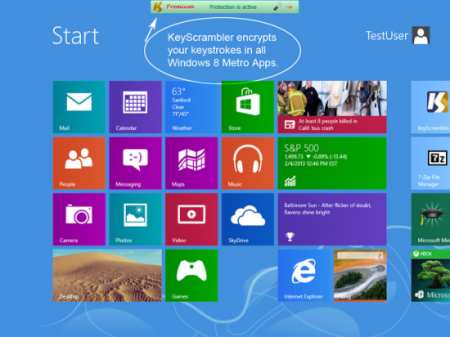
KeyScrambler encrypts your keystrokes deep in the kernel, as they travel from your keyboard to the destination app, so whatever keyloggers may be awaiting in the operating system will get only scrambled, indecipherable, useless data to record.​

This preventive approach enables KeyScrambler to stay one step ahead of the bad guys instead of running after them. It protects your data/identity even on security compromised computers, defeats both known and unknown keyloggers, and effectively closes the gap in traditional anti-virus, anti-malware programs, whose detect-and-remove method proves ineffective in dealing with new malware attacks.

The most complete protection.

If you work in public places often, use the information-sensitive applications a lot, or own a business, KeyScrambler Premium is what you need. KeyScrambler Premium starts the minute you turn on your computer and protects all your inputs in over 170 browsers and applications, adding a unique line of defense to your PC security system against online information theft.

For work, for play, for your home office and family computers, KeyScrambler Professional offers the exact level of protection that you need against keylogging. KeyScrambler Professional protects all your inputs in over 120 Windows applications, including 25 browsers, popular email and IM/VoIP programs, password managers, music programs, online games and a lot more.


DOWNLOAD
uploadgig
Код:
https://uploadgig.com/file/download/f564C11c65287e0e/3ZQUFUAZ_KeyScramble.rar

rapidgator
Код:
https://rapidgator.net/file/0e8179e0d212920a50045a356bda1004/3ZQUFUAZ_KeyScramble.rar

nitroflare
Код:
http://nitroflare.com/view/B451633B2B12E56/3ZQUFUAZ_KeyScramble.rar
 
Registry Finder 2.45

6fb0a585c19e097277005091c4b42240.png

File size: 4.4 MB

Starting with version 2.​

0 Registry Finder is not just a finder. It is a simple registry editor. It has basic facilities of the system RegEdit that is enough in most simple use-cases. Registry Finder allows you to browse the local registry; create, delete, rename keys and values; modify values as its natural data type (string, multistring, DWORD) or as a binary data. It is allowed to open multiple Registry windows. Next you start Registry Finder, those windows will be reopened on the same keys as before.
The Find operation is efficient and quick. All found items are displayed in a separate window as a list. Each line represents a single match with the search criteria. The icon shows where the match occurred: key name, value name or value data. Matched text is highlighted with red.

You can jump to any found item in the Registry window or edit/delete items right in the Find Results window.

Items in the Find Results window can be saved to file in comma separated values (CSV) or reg file format.

With the Replace feature you can easily replace all or particular occurrences of one string with another. The replacement is performed only in items that are in the Find Results window. In the Replace dialog you specify either all items or just selected ones. After replacement is done, items in the window are updated. If some item do not match the search criteria any more it still remains in the list.

All operations that alter the registry including deletion and replacement can be undone and redone. The operations are listed in the History window. To open it, click View|History in the main menu. The last performed operation is marked with a yellow arrow.


DOWNLOAD
uploadgig
Код:
https://uploadgig.com/file/download/b37b3846042D49f9/FYP5eTxk_RegistryFinderSetup2.45..rar

rapidgator
Код:
https://rapidgator.net/file/2a3fd2c4fc34c6108e74425d5e57c9b8/FYP5eTxk_RegistryFinderSetup2.45..rar

nitroflare
Код:
http://nitroflare.com/view/97BF318E378869E/FYP5eTxk_RegistryFinderSetup2.45..rar
 
Solid Scan to Word 10.1.10278.4146 Multilingual

697d9634-1cce-4119-b4ad-ca783b06404a.png

File size: 119 MB

Solid Scan to Word is a comprehensive and efficient software solution developed to help you transform non-editable text files, such as Portable Document Format files, scans or even images, to Microsoft Word-compatible items.​

- PDF to Word Converter - Convert your PDF files to Word documents for easy editing.

- Scan to Word - Scan directly from paper to well formatted, editable Word documents using Solid OCR.

Simple and user-friendly usage

Subsequent to a brief and fairly uneventful installation process, you can launch the program and b working with it right away, as its straightforward looks make it suitable for people of all levels of experience.

The main window of Solid Scan to Word lets you load the file that you need to process using the ribbon buttons, being able to 'Import PDF' or 'Import Image', as well as scan a document and add the generated picture to the application.

Load the source images or PDFs and convert them to DOCX or RTF

Among the files supported by the utility are not only Portable Document Format items, but also TIF, TIFF, JPG and PNG, allowing you to work with almost any file you may need. However, once opened, these are not displayed in full size and you can only view a thumbnail, as there is no zoom function available.

Furthermore, provided that a scanning device is connected to the host computer, Solid Scan to Word is capable of grabbing the picture generated by the scanner and display it in the main screen, also perfog Optical Character Recognition to identify and convert its contents.

In terms of output preferences, the program can export the files to RTF or DOCX format, having a series of adjustable options at your disposal. This way, you can select the 'Reconstruction Mode' (flowing, continuous or exact) as well as decide how to deal with headers and footers, annotated text and tables.

A handy OCR tool for non-editable files

Overall, Solid Scan to Word proves to be a useful and intuitive application that can successfully help you obtain editable documents out of images or PDFs, all while saving you significant and effort by perfog most of the hard work automatically.


DOWNLOAD
uploadgig
Код:
https://uploadgig.com/file/download/2503120edEb71858/jhEF0Uoi_Solid.Scan.rar

rapidgator
Код:
https://rapidgator.net/file/7332536de92ab3220fb76d1a78dc30f6/jhEF0Uoi_Solid.Scan.rar

nitroflare
Код:
http://nitroflare.com/view/77AE1056DFCC1CE/jhEF0Uoi_Solid.Scan.rar
 
SolidCAM 2020 SP2 (x64) Multilingual

c71d243becfba4961e8ae57d169cdfdd.png

File size: 10.5 GB

SolidCAM is the best solution for manufacturing inside of SolidWorks.​

The most successful manufacturing companies today are using integrated CAD/CAM systems to reduce costs and get products to market faster. In the past, integrated CAD/CAM solutions were so expensive that only Fortune 500 companies could afford them. Integrated CAD/CAM solutions were also difficult to learn and use, so a company needed degreed eeers to tackle the complexities. SolidCAM has broken that tradition by providing an easy to use, powerful pairing of applications that has a low investment and a short ROI.
SolidCAM is the fastest growing CAM application in the world, and has been for several years. It is completely integrated inside today's leading CAD solutions. All machining strats are defined without ever leaving the CAD environment. There is no loss of data or other problems with translation that plague stand alone CAM systems. Because SolidCAM is truly associative, changes to the design are automatically updated through to the tool path.

SolidCAM is an extremely powerful tool for machined part programming. The powerful geometry selection and creation tools found within your design environment are rounded out with specialist tools in SolidCAM. The combination of these tools minimizes the spent selecting areas to be machined or limited from machining. The user works in assembly mode so he/she can simply pull components from a library to model entire setups, including machine tables, fixtures, and vises. Manufacturing can be automated through the use of the built-in knowledge database. This database in not a static template, but it can be dynamically driven by changes in tools, geometry and strats.

SolidCAM provides the great value of the revolutionary and amazing iMachining technology.

iMachining saves 70% and more in CNC machining

iMachining extends cutting tool life dramatically

The unique iMachining Technology Wizard, provides optimal feeds and speeds, taking into account the toolpath, stock and tool material and machine specifications

iMachining will make you and your CNC machines more profitable and more competitive than ever before. Patented iMachining is completely unique both in its toolpath and by the method of programming with the patented Technology Wizard.

Complete CAM solution, seamlessly integrated in SOLIDWORKS and Autodesk Inventor

SolidCAM runs directly inside your existing SOLIDWORKS or Autodesk Inventor CAD system, with seamless integration and full tool path associativity - design changes initiate automatic tool path updates to the CAD model.

With the single-window integration, all machining operations can be defined and verified without leaving the parametric CAD assembly environment you're already used to.

Provides a complete CAM solution for all CNC applications

Works right inside your existing CAD: Seamless integration in both SOLIDWORKS and Autodesk Inventor

Saves and frustration: Eliminates import/export challenges

Gets you up to speed fastest: Extremely short learning curve because you're already familiar with SolidCAM's interface since it runs right inside your CAD system

Get the full picture: SolidCAM works in the CAD assembly mode to graphically show Fixtures, Tooling & Vices in simulations

SolidCAM grows as you grow: SolidCAM is scalable with packages for all CNC machine types and applications

SolidCAM gives you the most for your money: The integrated CAD/CAM-Solution SOLIDWORKS + SolidCAM is available at a competitive bundle-price
It is SolidCAMCAD 2020 SP2 Standalone. If you have SolidWorks installed, don't install SolidCAMCAD! In this case, you need a plugin for SolidWorks-SolidCAM.


DOWNLOAD
uploadgig
Код:
https://uploadgig.com/file/download/44b503b864Dd1fEb/LkmPAl6g_SolidCAMCAD.part01.rar
https://uploadgig.com/file/download/1489bBe00aA4f30f/LkmPAl6g_SolidCAMCAD.part02.rar
https://uploadgig.com/file/download/47F65427b86A5fe7/LkmPAl6g_SolidCAMCAD.part03.rar
https://uploadgig.com/file/download/428C54f5B4A7b2E5/LkmPAl6g_SolidCAMCAD.part04.rar
https://uploadgig.com/file/download/D4b936355Cb330aD/LkmPAl6g_SolidCAMCAD.part05.rar
https://uploadgig.com/file/download/98D056e213bF3108/LkmPAl6g_SolidCAMCAD.part06.rar
https://uploadgig.com/file/download/337aB1Bf0c2a66Ba/LkmPAl6g_SolidCAMCAD.part07.rar
https://uploadgig.com/file/download/6716494999242a2f/LkmPAl6g_SolidCAMCAD.part08.rar
https://uploadgig.com/file/download/8546ea8D54189a46/LkmPAl6g_SolidCAMCAD.part09.rar
https://uploadgig.com/file/download/e4a52c4C331B3B87/LkmPAl6g_SolidCAMCAD.part10.rar
https://uploadgig.com/file/download/c248BB15bef017a4/LkmPAl6g_SolidCAMCAD.part11.rar

rapidgator
Код:
https://rapidgator.net/file/bd9c3e341d0fdcfaa89315610529b72a/LkmPAl6g_SolidCAMCAD.part01.rar
https://rapidgator.net/file/9a5bcc63c90f887b374dfe13d27f75ee/LkmPAl6g_SolidCAMCAD.part02.rar
https://rapidgator.net/file/b6d3a1c3c8a402734f8c3d82301e7adb/LkmPAl6g_SolidCAMCAD.part03.rar
https://rapidgator.net/file/a42618bbbc80c684a8b65d044b097d9a/LkmPAl6g_SolidCAMCAD.part04.rar
https://rapidgator.net/file/1d9f9cabc2c599c6a58413b5957e42d8/LkmPAl6g_SolidCAMCAD.part05.rar
https://rapidgator.net/file/1260d0b219db9133d117a10924da22c2/LkmPAl6g_SolidCAMCAD.part06.rar
https://rapidgator.net/file/30a04de877085dfdb9f1d38c958d7763/LkmPAl6g_SolidCAMCAD.part07.rar
https://rapidgator.net/file/1c89e7e381f8db47cbd820ae3abb6eaa/LkmPAl6g_SolidCAMCAD.part08.rar
https://rapidgator.net/file/7aef11ee309636de918906c63c8a1a2f/LkmPAl6g_SolidCAMCAD.part09.rar
https://rapidgator.net/file/4c35e408eec6f47e08bd5be5058d15be/LkmPAl6g_SolidCAMCAD.part10.rar
https://rapidgator.net/file/f2d021a6a95fb67f2239a939d27cd7d3/LkmPAl6g_SolidCAMCAD.part11.rar

nitroflare
Код:
http://nitroflare.com/view/1FD60EE38AF5EA7/LkmPAl6g_SolidCAMCAD.part01.rar
http://nitroflare.com/view/D02ECB2990F5C54/LkmPAl6g_SolidCAMCAD.part02.rar
http://nitroflare.com/view/E944E8A519167E0/LkmPAl6g_SolidCAMCAD.part03.rar
http://nitroflare.com/view/535BB6B362AE853/LkmPAl6g_SolidCAMCAD.part04.rar
http://nitroflare.com/view/F8A88D023467E4E/LkmPAl6g_SolidCAMCAD.part05.rar
http://nitroflare.com/view/A2C4B105F82A3CC/LkmPAl6g_SolidCAMCAD.part06.rar
http://nitroflare.com/view/C8223BC2C5C60CA/LkmPAl6g_SolidCAMCAD.part07.rar
http://nitroflare.com/view/90C363A59F9E450/LkmPAl6g_SolidCAMCAD.part08.rar
http://nitroflare.com/view/3F042453EB93707/LkmPAl6g_SolidCAMCAD.part09.rar
http://nitroflare.com/view/553F4289BAC2DDD/LkmPAl6g_SolidCAMCAD.part10.rar
http://nitroflare.com/view/D21F14B01089B6C/LkmPAl6g_SolidCAMCAD.part11.rar
 
SolidCAM 2020 SP2 for SolidWorks 2012-2020 (x64)

19c0ca17f026ded1d9c3e67592f55353.png

x64 | Languages:Multilanguage | File Size: 4.65 GB

SolidCAM is a new generation CAD / CAM system developed by the Israeli company SolidCAM Ltd (Official distributor in Russia - Consistent Software).​

This system is a complete solution for the automation of metalworking production. Using a wide range of SolidCAM proposed strats for turning, milling, turning, milling and EDM, the technologist can quickly prepare the necessary set of control programs for machining the product.

Support for 64bit computing due to the availability of a special version for SW 64bit

SolidCAM provides high efficiency and precision 2.5-axis milling of parts. Various processing strats for elements such as contour, selection (with islands) and a groove are supported, as well as various types of hole machining: drilling, countersinking, threading, etc. The system has a wide range of capabilities for 2.5-coordinate processing of analytical surfaces.

SolidCAM provides a wide range of tools that can be effectively used for processing products with complex geometry (dies, molds) and prismatic parts. As geometry for 3-axis machining, a three-dimensional surface or solid model is used. The system supports various types of roughing and finishing strats, such as raster processing with a given or automatically deteed raster angle, equidistant processing, projection processing, waterline processing, etc.

In addition to the already mentioned capabilities of 2.5- and 3-coordinate processing, SolidCAM offers tools for identifying and finalizing sections that have not been processed in previous transitions. It is possible to create a database of typical technological processes. Once created, such a parameterized technological process can be repeatedly used in the future, which significantly reduces the for production preparation, increases the reliability of developed programs, unifies the style of technological developments, guarantees the use of only optimal processing technologies and ensures the independence of production from the human factor. The absence of stabbing is guaranteed by the availability of control and visualization of machining.

SolidCAM offers various tools for creating multi-axis machining control programs at 4- and 5-axis machining centers. The model is installed in a user-defined processing plane, after which the system automatically calculates all the necessary offset and rotation parameters for the part zero. As a result, the preparatory-final transition is significantly reduced and the processing accuracy is increased.

SolidCAM has a wide range of functions for automating the creation of control programs for turning and turning-milling. SolidCAM supports various types of tools, which makes it possible to effectively perform loudinal turning, trimming, grooving, etc. In addition, SolidCAM allows you to automatically rough and finish machining complex contours. Support for a rotary tool allows milling and drilling transitions at machining centers.

SolidCAM's proposed set of wire EDM strats allows you to process external and internal contours with a constant and variable angle. The possibility of 4-axis machining. A special algorithm prevents the fall of the processed material. SolidCAM provides the user with control over the physical parameters of processing along the entire path of the wire.

SolidCAM 2020 SP2 Multilang for SolidWorks 2012-2020 x64

Year / Release Date:2020

Version:2020 SP2 build 109856

Developer:SolidCAM Ltd

Architecture:64bit

Interface language:Chinese Simplified, Chinese Traditional, Czech, Danish, Dutch, English, French, German, Hebrew, Hungarian, Italian, Japanese, Korean, Polish, Portuguese, Russian, Spanish, Turkish

Tablet : Present (TeAM SolidSQUAD-SSQ)

OS:Microsoft Windows 10 x64 Professional and Enterprise Editions; Microsoft Windows 8.1 x64 Professional and Enterprise Editions (with latest Service Pack); Microsoft Windows 7 x64 Professional and Ultimate Editions (with latest Service Pack)

CPU:Intel Xeon, Intel Core, Intel Core 2 Duo, Intel Core 2 Quad or higher (If you use other processors we assume no responsibility and no support)

Memory:4 GB RAM (for the processing of large components, we recommend 8 GB RAM (or more)

Space:15 GB free disk space for installation

GPU:NVIDIA graphics card of the current Quadro series with min. 512 MB ​​(1024 MB recommended) and current, certified graphics driver (With the use of other and on-board graphics cards, we accept no responsibility and no support)

Pre-installed SolidWorks 2012-2020 64bit


DOWNLOAD
uploadgig
Код:
https://uploadgig.com/file/download/D18f3fE80a20e47f/ur9Fr8Yh__SolidCAM.2.part1.rar
https://uploadgig.com/file/download/2Ac01Be37842Fddc/ur9Fr8Yh__SolidCAM.2.part2.rar
https://uploadgig.com/file/download/996103ecDe12f3b3/ur9Fr8Yh__SolidCAM.2.part3.rar
https://uploadgig.com/file/download/939A1a0f1fd35c4d/ur9Fr8Yh__SolidCAM.2.part4.rar
https://uploadgig.com/file/download/3818c2422AbFb7c7/ur9Fr8Yh__SolidCAM.2.part5.rar

rapidgator
Код:
https://rapidgator.net/file/70e1df5cf81067f17d99a2c561a52e42/ur9Fr8Yh__SolidCAM.2.part1.rar
https://rapidgator.net/file/b592b910dbdb90c33fb6ebebc3e92d63/ur9Fr8Yh__SolidCAM.2.part2.rar
https://rapidgator.net/file/3563ee76eb28f9b4dcaa37408cab7cab/ur9Fr8Yh__SolidCAM.2.part3.rar
https://rapidgator.net/file/44630be49f15851f6d318018f9626593/ur9Fr8Yh__SolidCAM.2.part4.rar
https://rapidgator.net/file/7823e221e8ab19172ed3ec5c6e33fa7c/ur9Fr8Yh__SolidCAM.2.part5.rar

nitroflare
Код:
http://nitroflare.com/view/3BA930E58ADBC96/ur9Fr8Yh__SolidCAM.2.part1.rar
http://nitroflare.com/view/B264D48F1A70056/ur9Fr8Yh__SolidCAM.2.part2.rar
http://nitroflare.com/view/0DAAFC0146BCE28/ur9Fr8Yh__SolidCAM.2.part3.rar
http://nitroflare.com/view/69002B3BA187C5F/ur9Fr8Yh__SolidCAM.2.part4.rar
http://nitroflare.com/view/564FC9C66BA5E83/ur9Fr8Yh__SolidCAM.2.part5.rar
 
Source Insight 4.0.0115

24ed7e74-e016-4a8b-bc9b-53db72b1087a.png

File Size: 20.4 MB

Need to Understand Code?​

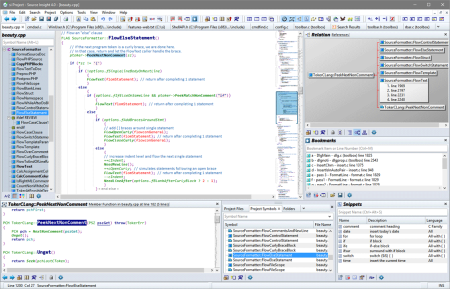
Source Insight is a powerful project-oriented programming editor, code browser, and analyzer that helps you understand code, while you work and plan. Source Insight has built-in dynamic analysis for C/C++, C#, Java, Objective-C, and more.
Understand Code

Learn an existing code base quickly, and get up to speed on new projects. Evaluate the costs of potential changes by seeing where functions and objects are used. See class inheritance and function call trees.

Quickly Navigate

Source Insight parses your whole project and let's you navigate and edit code like a breeze, while showing you information automatically. Jump easily to callers of functions or references to variables.

Discover

See where functions and variables are used. Source Insight automatically shows references to functions, variables, classes, and more - almost instantly. Search across your project using advanced search features.

Read More

Code Analysis

Source Insight has built-in dynamic analysis for C/C++, C#, Java, Objective-C, and more.

Read More

Powerful Editing

Use powerful editing features, including code snippets, symbolic auto-completion, and smart-rename.

Syntax Formatting

See live references to variables and other declarations with Syntax Formatting. Identifiers are formatted based on their declaration, scope, and usage.

Source Insight 4.0 has many exciting new features and improvements. Here are some of the highlights:

Improved language parsing for C/C++, C#, Java, and other languages.

Language support now built-in for Objective-C, Python, PHP, XML, and JSON files.

Imports symbols from external sources, such as .NET assemblies, Java JAR files, and Include files.

File Window tabs appear across the top of the main application window.

Collapsible code blocks. You can control the position and appearance.

File and directory comparing (diff).

Code beautifier that works on curly brace languages, such as C/C++ and C#.

Unicode support.

Automatic reference highlights when you click on any identifier, showing references in the correct scope.

New User Interface with Panels and user-defined Visual Themes.

New Overview scroller bar is positioned like a scroll bar, but gives you a bird's eye view of your file. It can show you the boundaries of the current function and help to orient you within long functions.

New enhanced vertical scroll bar shows more details within the scroll bar.

Multiple window layouts you can switch quickly.

Code Snippets - define reusable templates of code to insert, which can include auto-generated placeholder variables.

Improved bookmarks - book marks are now stored persistently and they are stored as a line offset from a nearby function or class name. Each project has its own book mark list.

Improved Relation window - Reference finding is faster. There is also a new relation type for functions: "calls and callers". This shows both in the same outline or graph. You can also copy the graph view to the Windows clipboard.

Maintain backup files per-project, and easily compare with backup versions, or open an older version of the current file.

Better regular expressions - now supports Perl-compatible and multi-line expressions.

Better support for large projects. The virtual memory usage has been improved so that very large projects can fit better into the memory space. Older versions could suffer from a file read error on the project index files for large numbers of symbols, leading to project corruption. This has been eliminated.

Easier project management with multiple users and machines by using a Master File List. A project can have a MFL, which can be a part of your source code repository and shared with other people. It is a simple text file that lists all the files (and/or directories) in your project.

Export project source to HTML site. You can use this to export all the files to HTML versions that contain most of the same syntax formatting you see in Source Insight. This builds a web site that can used to browse the project source code with a web browser.

Browser Mode - Source Insight behaves as a read-only code browser. Simply clicking on identifiers will jump to definitions like in a web browser.

Symbol Window pane attached to each source file window now has a collapsible outline view.

All new configuration system which keeps all your settings in XML files.

Many improvements all over the program!


DOWNLOAD
uploadgig
Код:
https://uploadgig.com/file/download/7695d4f1a059145a/sbb8F5m5_Source.Insi.rar

rapidgator
Код:
https://rapidgator.net/file/965a122484ca9e1389a9b3ff812c4b49/sbb8F5m5_Source.Insi.rar

nitroflare
Код:
http://nitroflare.com/view/7FDE221E2EE9EB2/sbb8F5m5_Source.Insi.rar
 
The Earth Centered Universe Pro 6.1F

9fa03284f093b3a682497fd68c9db23a.png

File size: 262 MB

The Earth Centered Universe (ECU) Pro V6.​

1 is a planetarium and telescope control program capable of simulating most of the phenomenon of the Earth's sky. Designed for the demanding requirements of an observing amateur astronomer, it also provides extraordinary accuracy as a planetarium program for the "armchair" astronomer or any other person interested in learning about astronomy.

Known for its ease of use, rich feature set, high-accuracy, and lightning fast speed.

Includes extensive databases such as the Hubble Guide Star Catalog; the detailed, amateur oriented, SAC deep sky database; the huge Principle Galaxy Catalog; the General Catalog of Variable Stars; the Washington Visual Double Star catalog; a dedicated planetary nebulae database; the Sun and Moon; the planets; 700,000+ asteroids (ed from Lowell Observatory); and add your own comets, asteroids and tens of thousands of your own objects too.

Comprehensive control of most computerized telescopes on the market (even many discontinued ones too). Interfaces to many telescopes and mounts natively, but also supports the ASCOM Inititive's telescope and focuser "drivers".

High quality printed star charts.

Written by an observer for observers.

Written by a CCD imager for imagers.

Powerful animation mode.

A large detailed up-to-date User's Manual with context sensitive help.

The Yale Bright Star Catalog (9,100 stars to magnitude 6.5) - included are many "common" names for the bright stars

The SAO Star Catalog (about 250,000 stars to magnitude 9.5)

The Tycho-2 Star Catalog (about 2,500,000 stars to magnitude 12-13)

The Hubble Guide Star Catalog (about 15,000,000 stars to an average magnitude of about 14)

Support is provided to read the US Naval Observatories A-2.0 (~500,000,000 stars!) and SA-2.0 (~50,000,000 stars)

The Saguaro Astronomy Club deep sky database (V8.1) which contains 10,342 objects of all types, including of course the Messier Catalog

The Principle Galaxy Catalog (2002 edition - about 1 million galaxies)

The General Catalog of Variable Stars (September 2015 version - 52,011 stars)

The Washington Visual Double Star Catalog (2016Mar25 version - 135,098 pairs of stars)

The Wallace-SEC galactic planetary nebulae database (V7 - 1143 objects)

The Lowell Minor Planet Database (over 700,000 minor planets). This database is updated from within ECU over the Internet.

Enter the orbital elements for up to 10,000 comets and minor planets (asteroids) (comets and asteroids can be automatically ed from within ECU from the International Astronomical Union's Minor Planet Center)

The eight planets (and Pluto!), the Sun, Anti-Sun, and the Moon

Add up to 50,000 of your own objects

ECU is lightning fast compared to many other astronomy programs and runs very well on older computers that you might use in the field (e.g. older laptops).

ECU is very easy to use. Most operations are performed with the mouse. A "toolbar" is provided for most common functions and for those who prefer to use the keyboard, there are many hot-keys.

The sky can be drawn as either in Sky Atlas (north is up) mode, Local Horizon (up in the local sky is up) mode or with the sky rotated at any arbitrary angle.

It exhibits a colorful display - the colors of all screen elements are controllable by user. Fonts can also be set.

High quality star charts can be printed (in black and white and in full color) which are highly customizable by the user including titles, legend, fonts, and border dimensions. You can also print two charts per page at different zoom levels.

ECU status displays include the local , universal , latitude and loude, RA/DEC, AZ/ALT, field size, magnitude limits, sky darkness, hour angle, sidereal , and Julian date.

Stars can be drawn in color based on either their spectral type or B-V color index.

Deep sky objects are drawn their correct size, shape, and orientation (when this information is included in the database).

There is advanced control over magnitude limits for all types of objects.

Clicking on an object causes an information box to pop up. All objects provide their RA, DEC, azimuth, altitude, rise and set s, magnitude (if known), air mass, extinction, galactic latitude, and galactic loude. Other information provided is as follows:

The Sun: distance in AU, kilometers, and light travel ; angular size; solar loude

The Moon: distance in kilometers; angular size; phase angle; phase age in days; its illuminated fraction in percent

The planets: distance in AU, kilometers, and light travel ; angular size; phase; rates of motion; ecliptic latitude and loude

Comets and asteroids: distance to the Sun and the Earth in AU, kilometers, and light travel ; solar elongation; phase (for asteroids); rates of motion; ecliptic latitude and loude

Yale stars: Yale number; HD number; SAO number; Flamsteed/Bayer designation, color (B-V); spectral type; proper motion

SAO stars: SAO number; spectral type

Tycho-2 stars (when information is available): Tycho-2 number, Hipparcos number, HD number, magnitude (B and V), proper motion, and parallax (with error estimate)

Hubble Guide Stars: GSC catalog number; estimated position error; magnitude band; Plate ID

SAC deep sky objects: a varying amount of information, but usually their name (and alternate name); Dreyer description, angular size; position angle; object class; notes

PGC galaxies: the primary and up to four other names; morphological type; angular size; position angle; object class; radial velocity; implied distance in light years

Variable stars: minimum and maximum magnitude; designation; type of variability; period; rising (or duration of eclipse); of previous maximum

Double stars: combined magnitude of the pair; discoverer code; DM number; magnitudes of both stars; separation and position angle at up to two dates; spectral type

User objects: user number; text description

The user can display up to 50 images of an object.

The user can add observing notes about any object.

The user can measure angular distances and position angles on the sky with the mouse. Several angular formats are provided.

All user settings can be saved to named configuration files for later retrieval. Comet and asteroid elements can be saved to or loaded from separate ASCII files.

The can be set as local mean , UTC, Julian Date, or from the computer's clock (local or UTC). Dates can be entered from 4713BC to 9999AD. For Canada, US and Europe Daylight Saving can be automatically set.

The observer's location is entered by latitude and loude or from a list of cities (add your own, too).

Sync your and/or location using a GPS receiver.

The effects of observer's parallax, nutation, precession, light travel , aberration, and atmospheric refraction can be individually controlled.

The sky can be displayed as white on black or black on white, or, of course, in full color. Special "night vision" modes protect your night vision when ECU is used in an observatory.

ECU displays the horizon line, custom horizon lines set to match your observing sites, ecliptic line, meridian line, RA/DEC grid (auto scaling), Local Horizon grid (auto scaling), constellation lines, boundary lines, galactic equator line, etc.

Extensive text labels are provided for all types of objects. Text labels can be intelligently placed to avoid overlap.

Several field "targets" of programmable angular size, including rotatable rectangles, can be drawn to represent the field of view of your main telescope and finder scope respectively. You can place up to 100 of these "targets" anywhere on the sky.

The user can center the display at any RA/DEC, AZ/ALT, Hour Angle/DEC, bright star, constellations, Messier object, named deep sky object, point on the horizon (north, south, etc.), or solar system object.

The object databases can also be extensively searched.

Powerful tools to search and filter comet and asteroid elements by brightness, sky position, visibility, Earth distance, etc.

Create detailed reports (that you can import into a spreadsheet or database program such as Excel) of objects plotted on the screen or on printed charts.

ECU's animation mode allows increments from 1 second to four years. The display can be "locked" to the Sun, Moon, a planet, a comet or asteroid, an AZ/ALT or an RA/DEC. Trails of objects with labels can be drawn.

A dialog box to display the rise/set s of the Sun and Moon on the current day is provided. It also shows the s of civil, nautical, astronomical twilight, the phase of the Moon, the length of the day and night, and the length of nautical and astronomical darkness.

The Earth Centered Universe (ECU) Pro V6.1 is a planetarium and telescope control program capable of simulating most of the phenomenon of the Earth's sky. Designed for the demanding requirements of an observing amateur astronomer, it also provides extraordinary accuracy as a planetarium program for the "armchair" astronomer or any other person interested in learning about astronomy.

Known for its ease of use, rich feature set, high-accuracy, and lightning fast speed.

Includes extensive databases such as the Hubble Guide Star Catalog; the detailed, amateur oriented, SAC deep sky database; the huge Principle Galaxy Catalog; the General Catalog of Variable Stars; the Washington Visual Double Star catalog; a dedicated planetary nebulae database; the Sun and Moon; the planets; 700,000+ asteroids (ed from Lowell Observatory); and add your own comets, asteroids and tens of thousands of your own objects too.

Comprehensive control of most computerized telescopes on the market (even many discontinued ones too). Interfaces to many telescopes and mounts natively, but also supports the ASCOM Inititive's telescope and focuser "drivers".

High quality printed star charts.

Written by an observer for observers.

Written by a CCD imager for imagers.

Powerful animation mode.

A large detailed up-to-date User's Manual with context sensitive help.

Sky Chart/Print Features

◦The split chart now has separate settings for horizontal and vertical flips.

◦The number of objects that can be plotted on-screen has been increased to 30,000.

Databases

◦The General Catalog of Variable Stars database has been updated to the current (V5.1) version, and it now contains 54,919 stars.

◦The number of comet/asteroid orbits that can be active at any given has been increased to 25,000.

◦Added of and full support for the IAU Minor Planet Center's asteroid orbit database.

◦Added support for of the MPCs bright minor planets at opposition list.

◦The master orbit file is now called 'masterorbit.orb'.

Searching

◦You can now search for a specific equatorial position as an RA in hours and minutes OR hours and minutes and seconds and a Dec in degrees and minutes OR degrees and minutes and seconds.

Automation Interface

◦The Search method now returns the found object's primary object name.

◦Added the ClearOrbits, LoadOrbits, SaveOrbits methods.

Miscellaneous

◦Updated the URL for General Catalog of Variable Stars web searches.

◦Orbits now accept eccentricities up to 5 (for the new class of interstellar asteroids).

◦Better error handling in the loading of orbit files.

◦The angular separation calculation uses a more accurate "haversine" algorithm.

◦Telescope serial interface routines now use an external COM Port Driver (developed by Nova Astronomics).

Bug Fixes

◦Some problems with dialog box sizing on some computers has been resolved.

◦Broader ASCOM exception handling was added.

◦Some mathematical overflows and other problems were fixed there were caused by the new "interstellar" asteroids and orbits with hyberbolic orbits.

◦Add better error handling for parallax calculations.

◦Improved program shutdown if started by the automation interface.

◦Fix bug where sky was not redrawn on alignment stars during encoder interface alignments.

◦Fix bug where telescope interface was somes causing an error when disabling it.

◦Fix bug where alignment star names were not shown during encoder interface alignments.


DOWNLOAD
uploadgig
Код:
https://uploadgig.com/file/download/13b454dbba3D1fF9/6pI83t8Z_ecupro61F_.rar

rapidgator
Код:
https://rapidgator.net/file/cd34d08ec0c3383c012cb14bbd6a02e7/6pI83t8Z_ecupro61F_.rar

nitroflare
Код:
http://nitroflare.com/view/939633D5D7BAD52/6pI83t8Z_ecupro61F_.rar

 
WinPIM Business 16.70.5410 Multilingual

052b3e2f-b07c-4589-addb-a0f9955d0558.png

File size: 8.7 MB

Managing your agenda is not that easy, especially if you have a full working schedule.​

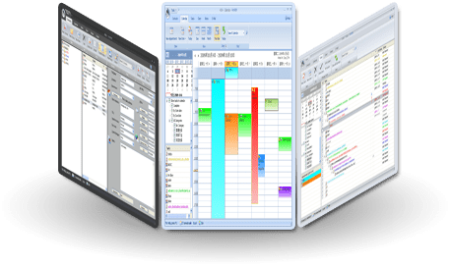
You might somes forget a meeting or the fact that you had to call someone. An electronic agenda could come in handy, as it helps you organize your efficiently. WinPIM allows you to create a contact list with the details of everyone you need. You can add their name, company and phone number easily.
Contacts:

- Storage more than 60 fields and 20 customizable fields.

- Create Tree Group to manage contacts, and can Map contacts.

- Fast Dial Phones, Send mails, fax, visit web pages.

- Rd Birthday and anniversaries.

- Support multi-print formats, support envelops and mail merge.

- Trace contact's all actions, support Caller ID

- Support Relation management and can create Relation Map

Calendar & Tasks:

- Calendar provide 7 views: Today, Day, Week, Month, Bar

- Tasks support Sub-Tasks for small project manager.

- Support Multi-Days event and tasks, and can set recurrence.

- Set Style for appointment and task, include Fore-Back color and icon.

- Show Filter, show Appointments and Tasks in the same view.

- Rder events and tasks.

- Associate contacts to trance contact's actions.

- Drag & Drop to create appointment or task quickly.

Note and Diary:

- Support HTML format.

- Tree view to navigate folder, diary and tag.

- Insert customizable emotion pictures.

- Full functional Editor, support Spell check.

- Powerful screenshot tool.

- Note has Zip code, City information etc. for quick lookup.

- Support Sound Recording for voice note.

EMail:

- Support Multi-Accounts emails

- Support POP3, STMP mail server, support SSL.

- Support IMAP mail server, support IMAP sync and mailbox management.

- Set filter so list mails.

- Full functional HTML editor, support Spell Check and Emotions.

- Anti-Spam system.

- Create mail rules for better management.

- Remote POP3 server management.


DOWNLOAD
uploadgig
Код:
https://uploadgig.com/file/download/11999398Dceb52d5/BCMehsIK_WinPIM.Busi.rar

rapidgator
Код:
https://rapidgator.net/file/6cf2abf22441b91b0c89f24fe634079b/BCMehsIK_WinPIM.Busi.rar

nitroflare
Код:
http://nitroflare.com/view/E734AA0A53144F6/BCMehsIK_WinPIM.Busi.rar
 
PDF Replacer Pro 1.8.0.0 Multilingual

23d84357-1534-4e26-8e1f-50b7d9ab1d5b.png

File size: 51 MB

PDF Replacer is a PDF text replacing software utility based on Windows.​

With this handy tool, you can easily replace text in multiple PDF documents with new text, and also you can modify the replaced text font and text decorations such as bold, italic, underline and linethrough. If you only want to replace the text in some PDF pages instead of the whole PDF document, PDF Replacer also provide you the page range option, which can enable you to replace only your selected pages essily. In addition to English, German, and French languages, PDF Replacer also supports PDFs created in more than 50 languages of almost all countries.

Replace Text in PDFs with Your New Text

Maintain Original PDF Layouts

Support Restricted & Locked PDF Documents

Replace PDF Page Range

Support Batch Replacing Multiple Words in PDFs

Batch Mode Replaces PDF Files in Bulk

Change the PDF Text Font & Decoration

Support 50+ Languages

Batch Replace sensitive words in PDF

If your PDF document contains sensitive words you don't want to be viewed by readers, you can use PDF Replacer to replace the word with a "*" or a blank space " ".

Batch replace a person or a brand name in the PDF

For example, if you need to replace a person's name or a company brand name in all PDF files, you only need to enter the name in the Find field, and then enter the new name in the Replace With field and click "Replace Now" button.

Change the date and in the PDF content in bulk

PDF Replacer also enables you to easily update the date and text in PDF files. Enter the old date and in the Find field (of course, please match the date and text in the PDF file), then enter the latest date and in the "Replace With" field, then, start replacing.

Delete a word or a sentence from PDFs in bulk

Enter a word or sentence in the "Find" text box and leave it blank in the "Replace With" and start the task to erase the word or sentence.

100% PDF Text Replacing

Unlimited PDF Files

Personal / Home Use

Commercial Use

No Watermark on Small PDF Files

No Watermark on Large PDF Files

Updates: official site does not provide any info about changes in this version.


DOWNLOAD
uploadgig
Код:
https://uploadgig.com/file/download/8033bc115456f9ab/5Zg0I6qI_PDFReplacer.rar

rapidgator
Код:
https://rapidgator.net/file/43617ae982fc58c1485c58a758acbd2a/5Zg0I6qI_PDFReplacer.rar

nitroflare
Код:
http://nitroflare.com/view/7332DD9EAF27D78/5Zg0I6qI_PDFReplacer.rar
 
Realtek High Definition Audio Drivers 6.0.8934.1 WHQL

395cf7c8-97b7-4b02-88ad-487844f032b2.png

File Size : 200 Mb

Realtek High Definition Audio Driver - there is a new driver package with native support for the upcoming OS Windows eighth Realtek High Definition Audio (HDA) is intended for ALC-8xx/2xx chipsets for Windows 7, Windows 8, Windows 10.​

Supported chips sound cards:

ALC880, ALC882, ALC883, ALC885, ALC888, ALC889, ALC861VC, ALC861VD, ALC892, ALC663, ALC662, ALC660, ALC665, ALC260, ALC262, ALC267, ALC268, ALC269, ALC270, ALC272, ALC273, ALC887, ALC670, ALC275, ALC680.

ALC861 Value HD Audio Codec

ALC861-VD-GR Value HD Audio Codec

ALC880 Series HD Audio Codec

ALC882 7.1+2 HD Audio Codec

ALC883 Value 7.1+2 HD Audio Codec

ALC888 7.1+2 Channel High Definition Audio Codec

ALC888T Advanced 7.1+2 HD Audio Codec for VoIP Applications

ALC885 7.1+2 Channel High-Performance HDA Codec with Content Protection

ALC888S 7.1+2 channel high definition audio codec with two independent s/pdif-out

ALC888S-VC 7.1+2 Channel High Definition Audio Codec with Two Independent S/PDIF-OUT

ALC888S-VD 7.1+2 Channel HD Audio Codec with Two Independent SPDIF Outputs

ALC889 7.1+2 Channel HD Audio Codec with Content Protection

ALC892 7.1+2 Channel HD Audio Codec with Content Protection

ALC662 5.1 Channel High Definition Audio Codec

ALC663 5.1 Channel High Definition Audio Codec

ALC665 5.1-Channel High Definition Audio Codec

ALC231 High Definition Audio Codec with Mono Class-D Speaker Amplifier

ALC260 HD Audio Codec

ALC262 2+2 HD Audio Codec

ALC268 2+2 Channel High Definition Audio Codec

ALC269 High Definition Audio Codec with Embedded Class D Speaker Amplifier

ALC272 4-Channel High Definition Audio Codec

Updated drivers.


DOWNLOAD
uploadgig
Код:
https://uploadgig.com/file/download/985B2a4127ec2D91/dbNbT6F9_RHDA_Driver.rar

rapidgator
Код:
https://rapidgator.net/file/292db4f1601039919cf25c957f3b1f3e/dbNbT6F9_RHDA_Driver.rar

nitroflare
Код:
http://nitroflare.com/view/0F74ECBAFC42B76/dbNbT6F9_RHDA_Driver.rar
 
Назад
Сверху