• Здравствуйте. Сайт заработал в архивном режиме форум www.old.nado.in

Anthony's Software !!!

Registrar Registry Manager Pro 9.01 build 901.30525 Retail
3e7b9b4e-ea3c-4913-bac8-ce27a63ee8da.png

File size: 29.14 MB

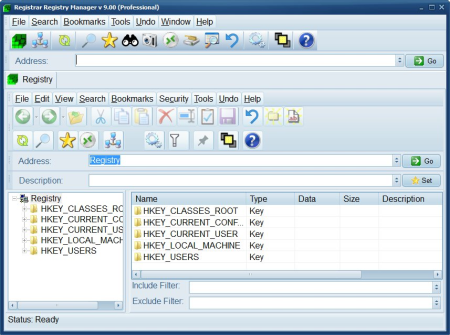
Registrar Registry Manager is an advanced and complete suite of tools that allows you to safely maintain your local registry as well as the registries on the systems of your network.​

Since many years, Registrar Registry Manager has been the expert's choice in registry management. This software offers solutions for backing up and restoring registries, fast background search and replace, a bookmark editor with categories which supports key coloring and adding descriptions to registry keys and values, detailed property pages, tools for easy navigation. The program offers multi-level undo so all registry changes can be individually undone.
The software offers a registry defragmenter as well as a registry monitor which logs registry access by the system and other applications in detail. It provides security editors which allow you to set access permissions on your registry keys. An advanced registry compare tool allows you to check the differences between two keys in detail. Registry files can be edited in a separate registry window.

Registrar Registry Manager v8 supports all versions of Windows 10, Windows 8.1. Windows 8, Windows 7 and Windows 2012 Server. For a list of supported operating systems, click here.

The Windows registry is the key to all hardware and software configuration. This powerful and reliable registry manager will help you get the most out of your system.

For each Windows operating system, there are hundreds of registry tweaks and registry key descriptions included to help you find your way in the forest of system tweaking and optimization.

Registrar Registry Manager includes the right collection of power tools which will do the right job in any registry editing situation. Tools include registry monitoring, blazing fast search and replace, backup and restore, advanced compare, bookmarks, a file reference editor, a CLSID utility and much more. Take a tour of features to see what Registrar has to offer.

The professional version of Registrar comes in both 32-bit and 64-bit editions. On an x64 version of Windows, the 64-bit edition offers significantly better performance and other advantages.

Registry file editors allow you to edit the registry files which make up the systems registry image on disk. This feature has been a life saver to many administrators who managed to recover broken Windows configurations this way.

Reliable registry backup and restore features will give you the security that new hardware or software installations will not become irreversible in the case of a failure.

On top of that, every registry operation performed with the program can be individually undone.

Get complete control of your network by using the remote features of Registrar Registry Manager. Each remote registry will be opened in a separate window and will give you the same power and flexibility as on the local registry.

The registry defragmentation tool will reclaim wasted space and keep your registry running smoothly. The advanced registry search, replace and delete tool will help you to find and destroy unwanted registry entries quickly. The new file reference editor will allow you to find registry references to non existing files.

The command line edition which offers a advanced set of batch scripting utilities for registry management is now freely included in the professional edition of Registrar Registry Manager.
Windows 10/8.1/8/7/Vista/XP/2016/2012/2008/2003/2000 (x86 and x64)


DOWNLOAD
uploadgig
Код:
https://uploadgig.com/file/download/b31e148c23D3c4ba/2TVbwDow__Registrar.rar

rapidgator
Код:
https://rapidgator.net/file/1856e7c94838a9011cd51a5f7a2c1ba5/2TVbwDow__Registrar.rar

nitroflare
Код:
http://nitroflare.com/view/AD80FF474AFD0FB/2TVbwDow__Registrar.rar

 
Security Monitor Pro 6.05 Multilingual

5977b978-a341-4802-abd0-22268f865e73.png

File size: 104 MB

Security Monitor Pro turns your PC and IP cameras into a full video security and surveillance system.​

It is easy to use and extremely reliable for day-to-day operation. Configuration takes only a few minutes, even for a novice. Currently more than 2200 different IP camera models and virtually all Webcams are supported. Security Monitor Pro is the most feature rich IP video surveillance software.
When motion is detected, you can configure the program to create a video recording of the event, take photos, sound an alarm, or send you an email notification.

Each camera has its own settings for motion detection, recording, and actions. You can schedule cameras to monitor for motion between certain s, or on particular days of the week. Security Monitor Pro can automatically upload recorded video and photos to an FTP server for backup or remote viewing on a web site.

An optional hidden mode keeps Security Monitor Pro running in the background, with no icons in the Windows taskbar. No one will know video surveillance software is running on your PC.

Events are recorded from the very bning, a few seconds before motion is detected. This allows you to see the triggering event that happens in the first few seconds. Security Monitor Pro preserves evidence of all activities in an event log by date and displayed by camera name.

Live Previewing

Control up to 32 camera feeds, simultaneously

Support for 2,200 camera models and counting

Add IP cameras and Webcams

ONVIF support for IP cameras

Display Views On Multiple Monitors

Adjust Orientation Of Preview From 1 to 360°

Smart Fit Camera Preview To Window

Cyclic view of cameras

View JPEG, MJPEG, MPEG-4 and H.264 stream from IP cameras

Pan, tilt and zoom cameras to adjust coverage areas

Supports High Res cameras, with multi-resolution recording

Export and Import cameras with individual settings

Operate in hidden mode

Recording

Record Multiple Cameras Simultaneously

Capture live events and save as video files

Add stamp and watermarks to your footage

Schedule your camera to automatically start recording

Record Audio with Video

Adjust Video Quality

Motion Detection

Set motion-triggered actions individually for each camera

Get notified by email when an alert is triggered

Detect, highlight and record the motion event

Mask an area to exclude from motion detection

Prevent false alarm by adjusting the motion trigger level

Configure Audible Alarm on Motion detection

Run A Program Or Script When Alerted

Camera Schedule

Create schedules for each camera individually or in a group

Cameras can be scheduled to monitor for motion daily, weekly or any custom table

Start Video Recording, Broadcasting or Monitoring actions at a scheduled

Review

Built-in Media Analyzer for quick review of all captured events

Filter recordings by camera and

Play videos with 4x speed and view only keyframes

Maintain a complete event log for all cameras

Auto-deletion of old recordings to free disk space

Broadcast video feeds live on the internet

Search for IP Cameras on the Network

Automatically upload video recording and photos to your website or any FTP account


DOWNLOAD
uploadgig
Код:
https://uploadgig.com/file/download/98c1cE7ffcd8F9c2/sR0dRcfJ_Security.Mo.rar

rapidgator
Код:
https://rapidgator.net/file/b3ab08f85b4aa65885a8af52e240ae9d/sR0dRcfJ_Security.Mo.rar

nitroflare
Код:
http://nitroflare.com/view/0F18B76B0549BB4/sR0dRcfJ_Security.Mo.rar
 
Format Factory 5.2.1.0 Multilingual Portable

c0d43af2-acfb-46d4-83c6-d7e106541379.png

File Size: 109.3 MB

FormatFactory is a multifunctional media converter.​

Provides functions below: All to MP4/3GP/MPG/AVI/WMV/FLV/SWF. All to MP3//WMA/MMF/AMR/OGG/M4A/WAV. All to JPG/BMP/PIF/ICO... Rip DVD to video file , Rip Music CD to audio file. MP4 files support iPod/iPhone/PSP/BlackBerry format. Source files support RMVB. Support converting all popular video,audio,picture formats to others. Repair damaged video and audio file. Reducing Muldia file size. Support iphone,ipod muldia file formats. Picture converting supports Zoom,Rotate/Flip,tags. DVD Ripper. Supports 62 languages.
Format Factory is a multifunctional media converter.

Provides functions below:

All to MP4/3GP/MPG/AVI/WMV/FLV/SWF?

All to MP3/WMA/AMR/OGG/AAC/WAV?

All to JPG/BMP/PIF/ICO/GIF/TGA?

Rip DVD to video file,Rip Music CD to audio file.

MP4 files support iPod/iPhone/PSP/BlackBerry format.

Supports RMVB,Watermark,AV Mux.

1 support converting all popular video,audio,picture formats to others.

2 Repair damaged video and audio file.

3 Reducing Muldia file size.

4 Support iphone,ipod muldia file formats.

5 Picture converting supports Zoom,Rotate/Flip,tags.

6 DVD Ripper.

7 Supports 62 languages


DOWNLOAD
uploadgig
Код:
https://uploadgig.com/file/download/4ae1620D7ca966De/m7ec8FNh_FormatFacto.rar

rapidgator
Код:
https://rapidgator.net/file/8ac3b1bc6f479a845f3f9c24eb12dd4e/m7ec8FNh_FormatFacto.rar

nitroflare
Код:
http://nitroflare.com/view/CAD430A84856DF0/m7ec8FNh_FormatFacto.rar
 
InPixio Photo Cutter 10.3.7447.32390 Multilingual

4218424f-f23a-447b-a32c-f909a207507d.png

Languages: Multilingual | File Size: 186.27 MB

inPixio Photo Cutter lets you produce creative and realistic photomontages in just a few clicks.​

Thanks to these powerful digital scissors, no more is wasted cutting out your images down to the nearest pixel since Photo Cutter does it all for you. The saved can be devoted to coming up with original photomontages that are bound to impress your friends and family.

- Cut out your photos easily

- Crop your photos to your liking

- Add a wallpaper from among the themes on offer or import your own images

- 100 stickers and text templates

- Import several images into your photomontages

With inPixio Photo Cutter, your digital scissors, cut out any detail, individual, object or even landscape in your photos. Select the outline of the person using the slider or the background to erase, and the Photo Cutter algorithm then runs automatically! Conversely, you can use the "keep" slider for important features to make sure your cut-out is perfect. Even hair, drops of water and the finest details are removed from the background down to the nearest pixel.

Then put the cut objects on the available backgrounds to make photomontages or collages in an instant! Just select your background pattern from the new original images, or your own images for unique photomontages. New backgrounds are available in version 9 and plain backgrounds of each colour have been added.

You can now import multiple photos in a single edit for spectacular and unexpected results. Also find over 100 stickers and text templates to add style to your photos and photomontages. Original content for every special occasion (birthdays, greetings, invitations, etc.).

To get the most out of Photo Studio 10's features, mini videos have been added to each of the software program's modules in the form of tooltips, making it easier and more effective to use. The old and new features of the program are explained in a fun and dynamic way. Simply hover over one of the features to reveal a demonstration of what you can do with it.
A detailed and regularly updated database is now accessible in 1 click from the interface. This resource anticipates potential user questions and provides complete answers, once again to offer improved assistance.

To help you get the best out of the features of Photo Studio, tutorials have been added to a new section for user support, providing a simpler and more effective way to get started.

- Windows 7, Windows 8, Windows 10

- 1 GHz Intel Pentium processor or equivalent

- 1 GB RAM CD/DVD ROM drive

- 100 MB hard disk space, mouse and keyboard


DOWNLOAD
uploadgig
Код:
https://uploadgig.com/file/download/19971D30c007a717/kk4FQDUy_.Photo.Cutt.rar

rapidgator
Код:
https://rapidgator.net/file/7ecab47f71ab0326afc930e67022fe21/kk4FQDUy_.Photo.Cutt.rar

nitroflare
Код:
http://nitroflare.com/view/62BBB109EC58864/kk4FQDUy_.Photo.Cutt.rar
 
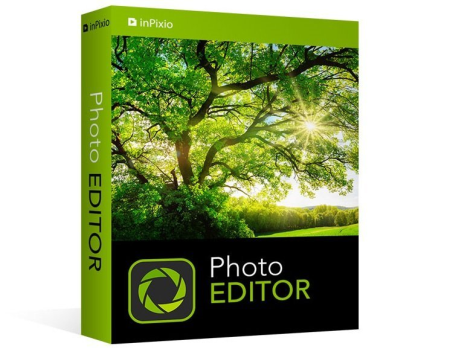
InPixio Photo Editor 10.3.7447.32247 Multilingual

c9b8b4cc-c504-4cce-9cb2-8f95d714ae3f.png

Languages: Multilingual | File Size: 199.19 MB

inPixio Photo Editor is a photo software program that is loaded with features and easy to use.​

It offers you a whole host of editing options such as photo retouching, cropping, adding filters or frames. We have added several photo retouching modules to this new version, such as as perspective correction will enhance your photos and give them an original and creative look worthy of a professional. After just a few minutes using inPixio Photo Editor, you will be turning out photographs worthy of a pro!

- Add filters & photo effects: warm, black & white, pink lady, negative, sepia, science fiction, vintage...

- Cut & crop: change the focus and size of your photos without being a pro.

- Edit your photos: change the colour & brightness etc. to get the most out of your favourite shots!

- Automatic correction in 1 click

- NEW! Correct perspective in your photos

- IMPROVED! Selective retouching module

Relax, Photo Editor is really quick to master. You will be able to easily navigate between the various tools. For viewing your photos you can choose a simple view but also:

- A double viewing window

- A before-and-after view

- Use the Zoom feature to enhance the view and make your alterations in the closest detail.

Apply changes to multiple photos at once

Which you can call up again in just one click during future projects
When taking a photo, perspective problems can arise if the camera is not far enough away from the subject. The most obvious case for perspective correction is shooting buildings from the ground. By playing with the perspective, you can easily straighten your subject.
View the exposure and tones of a photo at a glance with the histogram. By interpreting the curves you will be able to tell if your photo is overexposed or not.

New backgrounds and images added to help you design even more fun and creative pictures.

With selective retouching, you can apply edits exclusively to the desired area of your photo. You can isolate the area you want to retouch by using linear and radial gradients, as well as the correction paintbrush. Then you can adjust brightness, saturation, shadows, contrast etc. for a perfect, targeted edit. In this new version, you can now also adjust hue, temperature, whites, blacks.for even more striking variations.

When you close a photo without saving, all of your adjustments are now automatically stored by default, meaning that when you return to your project, you don't have to start over. Your photo will be configured with the most recent edits. Of course, you can also return to your original photo in 1 click.

You can now open RAW format images in Photo Studio.
A detailed and regularly updated database is now accessible in 1 click from the interface. This resource anticipates potential user questions and provides complete answers, once again to offer improved assistance.

To help you get the best out of the features of Photo Studio, tutorials have been added to a new section for user support, providing a simpler and more effective way to get started.

- Windows 7, Windows 8, Windows 10

- 1 GHz Intel Pentium processor or equivalent

- 1 GB RAM CD/DVD ROM drive

- 100 MB hard disk space, mouse and keyboard


DOWNLOAD
uploadgig
Код:
https://uploadgig.com/file/download/Fc2b6F50D6e548c2/OMiz3WWa_.Photo.Edit.rar

rapidgator
Код:
https://rapidgator.net/file/18870fabbdf8677ac6da4ae1de2d9189/OMiz3WWa_.Photo.Edit.rar

nitroflare
Код:
http://nitroflare.com/view/3B4B279CD3796A3/OMiz3WWa_.Photo.Edit.rar
 
InPixio Photo Eraser 10.3.7447.32534 Multilingual

fcc488f6-f2c2-46fa-9a3d-8f0117ee52a4.png

Languages: Multilingual | File Size: 51.16 MB

Tired of taking pictures with all those unwanted background images?​

Have you ever wanted to just get rid of that sign behind your or those people walking by? Well now you can erase anything in your picture that you don't want there with inPixio Photo Eraser.

- Remove people, objects, text, signs, logos, shade - anything you want!

- Simple and easy to use

- Clone tool and opacity

- Crop your photos

- Remove any blemishes

- Correction Patch: Cut out even in complex places

Erase function will allow you to remove any object or person from your photo without any fall-off in the optimised quality. The erase slider features automatic detection of colour contrasts, assisting you at any point in your path.

Correction Patch tool allows you to get rid of imperfections, fill in or clone part of the image with just one flick of the mouse. It makes it easier to touch up areas that are hard to "reconstruct". It can remove or add elements, even in areas that are very difficult to rebuild (steps, shading in the sky, etc.). Also use the patch to retouch portraits. Eliminate minor imperfections and make wrinkles less visible, like the glossy magazines do!

Use the Cloning stamp to perfect your editing or to clone contrasting features. Existing objects can be redrawn on the screen with the cloning stamp. Repeat this process as often as you like to create amazing double effects!

Use the Erase function to retouch portraits too. Clear up minor blemishes and reduce the appearance of wrinkles - just like the glossy magazines do!

This key function makes it possible to accentuate or attenuate the presence of features in your photos.

Set the ratio of your photos yourself (1/1, 4/3, 16/9 etc.), then adjust the angle by drawing a horizontal line on your photo.

To get the most out of Photo Eraser features, mini videos have been added to each of the software program's modules in the form of tooltips, making it easier and more effective to use.

A detailed and regularly updated database is now accessible in 1 click from the interface. This resource anticipates potential user questions and provides complete answers, once again to offer improved assistance.

To help you get the best out of the features of Photo Studio, tutorials have been added to a new section for user support, providing a simpler and more effective way to get started.

- Windows 7, Windows 8, Windows 10

- 1 GHz Intel Pentium processor or equivalent

- 1 GB RAM CD/DVD ROM drive

- 100 MB hard disk space, mouse and keyboard


DOWNLOAD
uploadgig
Код:
https://uploadgig.com/file/download/b89b01423a65c6F1/qVcsdrQk_.Photo.Eras.rar

rapidgator
Код:
https://rapidgator.net/file/3af791544550c4bc8a7190aedf0b6c29/qVcsdrQk_.Photo.Eras.rar

nitroflare
Код:
http://nitroflare.com/view/174D514F526CFBA/qVcsdrQk_.Photo.Eras.rar
 
LizardSystems LanSend 3.3.0.114

be1ef827-833f-40c4-88cd-5341bfcec933.png

File Size: 3 MB

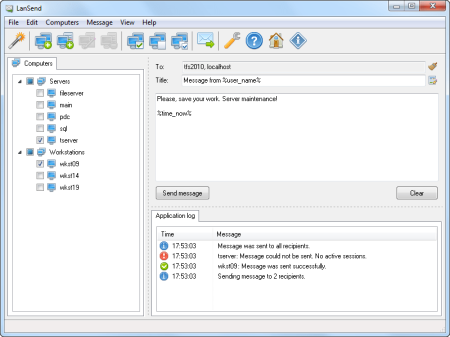
LanSend is an invaluable tool for system administrators for sending out instant messages to network users.​

LanSend has a simple, logical GUI and enables you to send a message to multiple users on your LAN with just a few mouse clicks. No additional software needs to be installed on users' machines for them to receive messages.
LanSend allows you to compose messages quickly using a variety of different templates. The creation of new templates for mass-messaging users is supported. Messages can be sent to users of all machines, including those connected locally as well as those using a remote desktop. LanSend can be minimized to the system tray and accessed with a single mouse click to send messages to recipients.

Quick and easy method of sending messages to multiple network users

Messages sent instantly

No additional software is required on recipients' computers

No dedicated server or Internet access required

Messages sent to machines running Windows XP and later

Compatibility with the Teal Server

Does not use Messenger service to send messages

Use of message templates and template variables

Ability for users to create custom groups from a list of network machines

Messaging to user groups

Logging of sent messages


DOWNLOAD
uploadgig
Код:
https://uploadgig.com/file/download/12c1c07448D1e376/cYCO37Ih_LanSend.3_.rar

rapidgator
Код:
https://rapidgator.net/file/30f1d5118b2273f20e00da202267aa7c/cYCO37Ih_LanSend.3_.rar

nitroflare
Код:
http://nitroflare.com/view/3C34986008E01B2/cYCO37Ih_LanSend.3_.rar
 
Office Tool Plus 7.6.0.0 Multilingual

2b57bcef-009e-4eb0-a813-10678677e645.png

File Size : 5.7 Mb

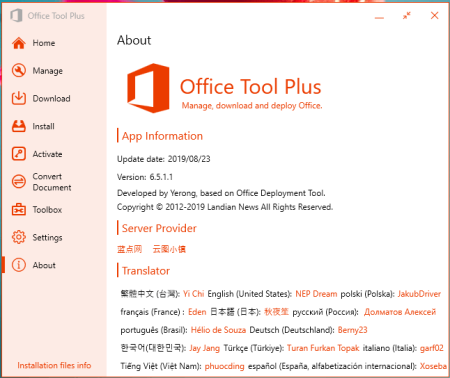
Office Tool Plus is a tool for managing, ing and installing Office.​

Office Tool Plus is based on Microsoft's Office Deployment Tool. You can customize configure your Office installation and installation files to install Office without Internet.

1. Configure the Office installation, as well as customize the installed C2R products, such as adding and removing components, language packs, etc.

2. the Office installation package or the language pack, which can be ed using the official programs Thunder, Aria or Microsoft.

3. Configure your current Office, change the update channel, delete the product language, or delete the product, or use the built-in scripts or tools to clean the Office

4. Activate your office. Easily set the product key and configure your KMS server address or convert the Office version. (PS: the tool does not have a built-in KMS activation, it simply provides the ability to configure a KMS server.)

Supported products:

MS Office 2016 -> Standard, Pro Plus, Mondo, Professional, Personal, Home Business, Home Student, O365 ProPlus, O365 Business, O365 Small Business, O365 Home Premium

MS Office 2019 -> Standard, Pro Plus, Professional, Standard 2019 Volume, ProPlus 2019 Volume, Office 365, Home Business, Home Student


DOWNLOAD
uploadgig
Код:
https://uploadgig.com/file/download/b0c1b8c06B76829F/tRQXbkQf_OfficeToolv.rar

rapidgator
Код:
https://rapidgator.net/file/40ca40cd64dea9441606b276595f11b8/tRQXbkQf_OfficeToolv.rar

nitroflare
Код:
http://nitroflare.com/view/F58003C5978743D/tRQXbkQf_OfficeToolv.rar
 
PDF Shaper Professional / Premium 10.1 Multilingual

4647c3c8-5f56-477e-a1f1-e8770a65faf5.png

File Size: 25.3 MB

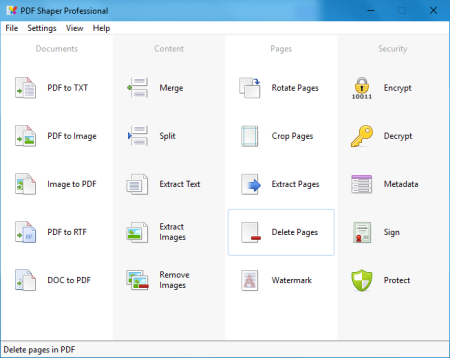
PDF Shaper - a program to convert PDF-files to different formats.​

Unlike similar programs, this product has a very simple and intuitive interface, not overloaded with unnecessary features and options - just choose the file to convert and save path. Functionality of the program also provides batch conversion, which will be useful when working with multi-page PDF documents.
PDF Shaper is a powerful and free PDF software, which offers a collection of PDF tools and utilities to modify and optimize your PDF documents and its content. With PDF Shaper you can easily split and merge any PDF documents, extract text and graphics from PDF files, encrypt / decrypt document with password and change users permissions, convert images to PDF or PDF to images, convert Word DOC / DOCX to PDF documents.

PDF Shaper makes it easy to tailor the content of PDF files. Users can split PDF files into smaller PDFs, extract or delete individual pages, and encrypt and decrypt files. It's just as simple to merge multiple PDF files into a larger file. The software rotates, crops, and normalizes pages, individually or in batch mode. It's simple to convert a PDF file's text to the popular Microsoft Word RTF format, or to convert DOC files to PDF files. Similarly, the software converts PDF pages to standalone images, and vice versa.

PDF Shaper's clean, intuitive interface allows users to become productive in just a few minutes. PDF Shaper is optimized for high-DPI monitors and low CPU resource usage, even during the CPU-intensive conversion operations. The software runs under Windows XP, Vista, 7, 8, 8.1, 10 (32 and 64 bits).

With its emphasis on security and privacy, PDF Shaper lets users update or remove PDF metadata fields such as author, title, and dates. PDF files can be encrypted with owner and user passwords. In addition, the software can protect content, set user access permissions, sign PDF files, and decrypt previously encrypted files.


DOWNLOAD
uploadgig
Код:
https://uploadgig.com/file/download/992e6752636EB1a6/eKmBpuNn_PDF.Shaper.rar

rapidgator
Код:
https://rapidgator.net/file/f31ec0bfd0f2c8dd0350b66a5c2da76e/eKmBpuNn_PDF.Shaper.rar

nitroflare
Код:
http://nitroflare.com/view/1710B6B3D677E37/eKmBpuNn_PDF.Shaper.rar
 
SoftColor Automata Pro 1.9.984

2bf480c8-050b-4c6c-b45e-fa1d920c5bb7.png

File size: 47 MB

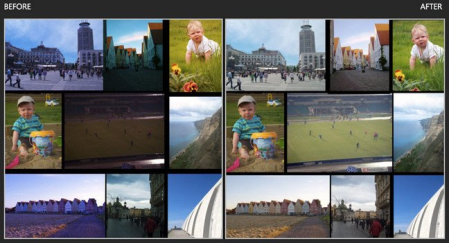
SoftColor Automata is a workflow automation software for advanced color correction, image editing and color management.​

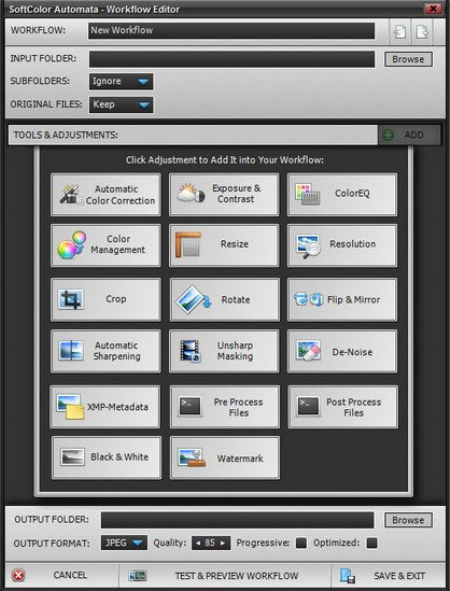
Automata works independently on the background and can work with multiple simultaneously workflows. Automata can have unlimited number of different workflows and it has support for file logistics operations. It loads automatically new and changed image files from the input folder and after processing it saves images to the output folder.
Automata's automatic color correction algorithm corrects color balance, exposure and contrast problems from original image in single step. White balance, exposure and contrast adjustments are processed as separate layers. Automata has support for standard ICC profile based color management.

Automata has tools and filters for resizing, cropping, rotating, straightening, sharping and de- noising the original image. Image editing tools and filters can be used together with color correction or separately.

Automata uses nondestructive layer based processing for color and image adjustments. This gives to you a full control to tune automatic correction adjustments.

You can also chain Automata's workflows to work together.

Updates: official site does not provide any info about changes in this version


DOWNLOAD
uploadgig
Код:
https://uploadgig.com/file/download/4e5AD377A6df0df1/fyw8HwF7_AutomataPro.rar

rapidgator
Код:
https://rapidgator.net/file/c7e44a595a054045a05ec176b30f8e85/fyw8HwF7_AutomataPro.rar

nitroflare
Код:
http://nitroflare.com/view/63C669020E60761/fyw8HwF7_AutomataPro.rar
 
SoftColor Automata Server 10.8.9

3482f6bc-4ba9-4891-98b4-ba3521a86238.png

File size: 47 MB

SoftColor Automata is a server software for advanced color correction, image editing and color management workflow automation.​

Automata works independently on the background and can work with multiple simultaneously workflows. Server Automata can have unlimited number of different workflows and it has support for file logistics operations. It loads automatically new and changed image files from the input folder and after processing it saves images to the output folder.
Agile Workflows

Server Automata's automatic color correction algorithm corrects color balance, exposure and contrast problems from original image in single step. White balance, exposure and contrast adjustments are processed as separate layers. Automata has support for standard ICC profile based color management.

Server Automata has tools and filters for resizing, cropping, rotating, straightening, sharping and de- noising the original image. Image editing tools and filters can be used together with color correction or separately.

Server Automata uses nondestructive layer based processing for color and image adjustments. This gives to you a full control to tune automatic correction adjustments.

You can also chain Server Automata's workflows to work together. Server Automata run as Windows service and can operate with multiple users simultaneously. It automatically collects all image processing events to log files.

Smart Enhancements

We have developed some special solutions to automate your daily digital image editing tasks.

Automatic Color Correction

Behind our automatic solution are in-house developed spectral illumination detection algorithms. This makes it possible to teach the computer to think about colors like a human being. For you this gives an automatic and fully customizable tools to fix white balance, exposure and contrast problems in single step. Our color correction process white balance, exposure and contrast adjustments as separate layers. This gives a full control to fine tune automatic correction intensity and other color correction adjustments.

Layer Based Processing

Layer based processing in Automata gives to you full freedom adjust processing results as you want. You can select which processing layers you want to use with your images.

- Improved Image

- Color Management

- Image Filtering

- Contrast

- Exposure

- White Balance

- Image Editing

- Original Image

Updates: official site does not provide any info about changes in this version


DOWNLOAD
uploadgig
Код:
https://uploadgig.com/file/download/5968537e36DfDA67/KdofpyZk_AutomataSer.rar

rapidgator
Код:
https://rapidgator.net/file/321f82377a105685825b4868bae6a450/KdofpyZk_AutomataSer.rar

nitroflare
Код:
http://nitroflare.com/view/D015413EB79487E/KdofpyZk_AutomataSer.rar
 
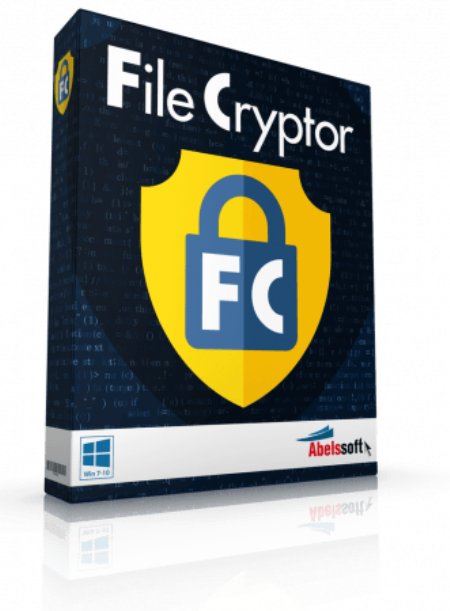
Abelssoft FileCryptor 2020 v1.1.52 Multilingual

036f5650-ba91-4eba-8f85-e214268d2c10.png

Multilingual | File size: 4.25 MB

You want to protect a file or folder aginst view?​

No problem with this tool! There is no faster and easier way to encrypt data.

If desired, ultra-secure passwords can be generated and used for encryption. These combinations cannot be guessed even by dictionary algorithms.

Highest security level

The latest security standards are used for encryption. The AES-256 algorithm ensures absolute security. Files and folders are thus always secure.


DOWNLOAD
uploadgig
Код:
https://uploadgig.com/file/download/6f1cbe2Ff4613847/1gptRzc9_.Abelssoft_.rar

rapidgator
Код:
https://rapidgator.net/file/f75a5d61e5a8439ef2fdf0bfbdc24d48/1gptRzc9_.Abelssoft_.rar

nitroflare
Код:
http://nitroflare.com/view/F31750BD0E3DABF/1gptRzc9_.Abelssoft_.rar
 
Aidfile Recovery Software 3.7.0.3

e1544640-c568-4cda-9175-533572407494.png

File size: 9.71 MB

Aidfile Recovery Software is a powerful data recovery tool for recovering files from deleted / formatted / repartition / missing drives / partition table damaged etc.​

It supports EXFAT / FAT32 / NTFS file systems. Aidfile data recovery can recover the data while there is an error happens to your software, for example: partition error writing, unintentional formatting, accidentally deletion, false backup, MBR losing, bad sector of BOOT, virus attack, Hackers Attack, conversion error, partition logic error, logical bad sectors of hard drives, partition table lost, ect. The success rate is exclusively high.

- File recovery after accidental format, even if you have reinstalled Windows.

- Get back files after a partitioning error or hard disk crash.

- Recover lost deleted partitions.

- Recover deleted or lost files emptied from the Recycle Bin.

- Recover formatted lost MS office word excel document, photo, image, video, music, email, etc.

- Recover from hard drive, USB drive, memory card, memory stick, camera card, Zip, floppy disk or other storage media.

- Support EXFAT, FAT32, NTFS file systems.

- High quality of file recovery.

- Format Recovery

When drive has been formatted, encountered not formatted error, Aidfile Recovery software is the best solution if you just formatted your hard drive partition by or memory card by mistake, drives or card reading "the drive is not formatted, do you want to format it now?". Recovering files after formatted FAT, NTFS partition with file recovery tool to recover you reformatted file.

- Deleted Recovery

Deleted File Recovery can recover deleted files, including documents, photos, mp3 and zip files, folders and all kind of damaged disks. In addition to HDD, the program supports any type of storage media (music sticks, cameras, flash drives, USB drives, etc)! It works with encrypted files and helps you to recover the lost file.

- Partition Recovery

Recover file data if the data is lost by repartition or patition table error or partition's size is changed partitons combination or partition's type is changed.

- Advance Recovery

If the folders are deleted or file's name is unknown or file's infomation (file's MFT record in NTFS file system,file's Directory entry in FAT32 file system) is overwitten, Aidfile Recovery Software can scan the hard drive by file type,such as doc, docx, jpg, mp3, mp4, 3gp, avi, etc.
Support Windows 10,8.1,XP,2003,2008,2012,Vista;Window 7,Windows 8,(32 bit & 64 bit) .


DOWNLOAD
uploadgig
Код:
https://uploadgig.com/file/download/f13e83eB5E62383e/L3LVlqze__Aidfile.Re.rar

rapidgator
Код:
https://rapidgator.net/file/d73751b4c77b734c7bd520e29b95fe19/L3LVlqze__Aidfile.Re.rar

nitroflare
Код:
http://nitroflare.com/view/0DE4A03C9FEEC6E/L3LVlqze__Aidfile.Re.rar
 
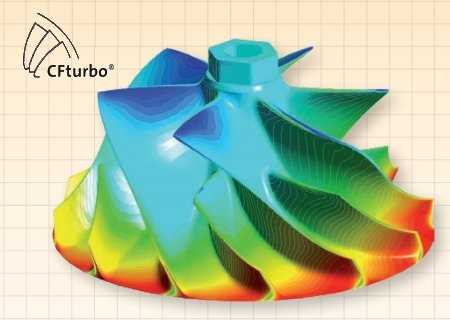
CFTurbo 2020 R1.0.31 (x64)

8d19cce0-b05b-45e7-9e94-38acee84ca5f.png

File size: 112 MB

CFTurbo is powerful, yet easy to use, pump design software that can help you design pumps from scratch or redesign existing impellers.​

Simply tell it the flow rate, head, RPM, and any (optional) pre-swirl and CFTurbo will automatically generate a pump design. You then have the option of going back and chag any details of the design with CFTurbo's guidance. This easy, but flexible, approach to pump design saves you and still lets you get exactly the pump design you want.
3D CAD model

Dynamic 3D-representation (rotate, move, zoom)

Highly configurable partial views

Export of CAD model

Import of existing geometry for comparison

Parametric geometry model

Properties of all design steps available as parameters

Parametrics can be exported

Optionally, range limits can be specified for parameter variations

Eeasy integration into optimization workflows or DoE inverstigations

Reverse Eeering

Redesign of existing geometry as starting point for optimization

Import of existing meridional curves with automated conversion to Bezier splines

Blade design based on given blade angles on leading and trailing edge or import existing meanline curves

Input or import of blade thickness distribution (blade profiles)

Comparison of imported IGES/ STEP data with the redesigned 3D model

Meridian

Meridional preview of project components

Quick access to design steps

Handling interfaces between components

Select active component

Show progressions for area, velocity, flow angle

Project management

Management of project information

Design report with the option of restoring previous design status

Display of warnings regarding specific parameters

Display of key design details

Data export

Export of points, curves, surfaces, solids

Neutral interfaces (STEP, IGES, STL, DXF)

Interfaces to important CAD and CFD systems

Implementation of special interfaces on customer request

Performance prediction

Display of performance curves for different rotational speed and impeller diameters

Calculation of fundamental impeller losses based on empirical correlations


DOWNLOAD
uploadgig
Код:
https://uploadgig.com/file/download/51421865ec478a29/QXTn9vcl_CFTurbo.202.rar

rapidgator
Код:
https://rapidgator.net/file/b99d6faeeb6e0fcc316d995ec0744559/QXTn9vcl_CFTurbo.202.rar

nitroflare
Код:
http://nitroflare.com/view/D870FE36D07DF9D/QXTn9vcl_CFTurbo.202.rar
 
GoodSync Enterprise 10.12.0 Multilingual

15503d65-be07-46c0-ba7d-623eba3d7f97.png

File size: 48 MB

GoodSync is an easy and reliable file backup and file synchronization software.​

It automatically analyzes, synchronizes, and backs up your emails, precious family photos, contacts, MP3s, financial documents, and other important files locally - between desktops, laptops, servers, external drives, and Windows Mobile devices, as well as remotely through FTP , SFTP, WebDAV, and more. GoodSync file synchronization software combines bulletproof reliability with an extremely easy to use interface to compare, synchronize, and backup your emails, contacts, photos, iTunes, MP3s, and other important files.
Automatically synchronize and back up your important files between desktops, laptops, servers, and external drives over a network or the Internet. Using an innovative synchronization algorithm - GoodSync file sync software is years ahead of the pack when it comes to file synchronization.

bidirectional synchronization to prevent data loss

unidirectional synchronization for backup

Synchronize folders, not only Windows, but also FTP, WebDAV, SFTP

Synchronization with smartphones and PDAs to the Windows platform

Selective File Synchronization

Flexible and Easy Sync Automation

Monitoring the file system is not required

Syncing multiple devices, providing maximum comfort

Synchronize FTP file modification

Translation of the modification of files for non-Preserving File Systems

Easily synchronize only the modification of files

Real- monitoring

Visualization of changes

Ease and flexibility of display

Task tab, make it easier to work with several tasks

Counters size for each level

Dialogue to facilitate the selection of synchronized folders

Identification of required free space

Reports on actions and changes

Tags jobs to removable drives

Backing up the network over an encrypted channel.


DOWNLOAD
uploadgig
Код:
https://uploadgig.com/file/download/4c07f660da464518/U8COxLit_GoodSync10_.rar

rapidgator
Код:
https://rapidgator.net/file/72e5724a573f7af8342dd84aa20000c0/U8COxLit_GoodSync10_.rar

nitroflare
Код:
http://nitroflare.com/view/785AE993F50EF43/U8COxLit_GoodSync10_.rar
 
InPixio Photo Cutter 10.3.7447.32390 Portable

223e6e07-2b4a-4d18-b3c9-6a1b5da90939.png

File Size: 171.8 MB

inPixio Photo Cutter lets you produce creative and realistic photomontages in just a few clicks.​

Thanks to these powerful digital scissors, no more is wasted cutting out your images down to the nearest pixel since Photo Cutter does it all for you. The saved can be devoted to coming up with original photomontages that are bound to impress your friends and family.
Create photomontages in a few clicks

- Cut out your photos easily

- Crop your photos to your liking

- Add a wallpaper from among the themes on offer or import your own images

- 100 stickers and text templates

- Import several images into your photomontages

Cutting out in a few clicks

With inPixio Photo Cutter, your digital scissors, cut out any detail, individual, object or even landscape in your photos. Select the outline of the person using the slider or the background to erase, and the Photo Cutter algorithm then runs automatically! Conversely, you can use the "keep" slider for important features to make sure your cut-out is perfect. Even hair, drops of water and the finest details are removed from the background down to the nearest pixel.

Choose a background

Then put the cut objects on the available backgrounds to make photomontages or collages in an instant! Just select your background pattern from the new original images, or your own images for unique photomontages. New backgrounds are available in version 9 and plain backgrounds of each colour have been added.

Even easier use and infinite creations

You can now import multiple photos in a single edit for spectacular and unexpected results. Also find over 100 stickers and text templates to add style to your photos and photomontages. Original content for every special occasion (birthdays, greetings, invitations, etc.).

Mini video Tooltips

To get the most out of Photo Studio 10's features, mini videos have been added to each of the software program's modules in the form of tooltips, making it easier and more effective to use. The old and new features of the program are explained in a fun and dynamic way. Simply hover over one of the features to reveal a demonstration of what you can do with it.

NEW! Help Tool

A detailed and regularly updated database is now accessible in 1 click from the interface. This resource anticipates potential user questions and provides complete answers, once again to offer improved assistance.

NEW! Video tutorials available for each Photo Studio module

To help you get the best out of the features of Photo Studio, tutorials have been added to a new section for user support, providing a simpler and more effective way to get started.

official site does not provide any info about changes in this version.


DOWNLOAD
uploadgig
Код:
https://uploadgig.com/file/download/eAd4300da2AeC3b2/sVtQLQl3_InPixio.Pho.rar

rapidgator
Код:
https://rapidgator.net/file/bb8ab0d0ef6e0451bbb33bd8156a63a5/sVtQLQl3_InPixio.Pho.rar

nitroflare
Код:
http://nitroflare.com/view/9B6C1DAF4D98697/sVtQLQl3_InPixio.Pho.rar
 
InPixio Photo Editor 10.3.7447.32247 Portable

b286c9f7-9671-4b63-8731-03be08be2083.png

File Size: 155.1 MB

inPixio Photo Editor is a photo software program that is loaded with features and easy to use.​

It offers you a whole host of editing options such as photo retouching, cropping, adding filters or frames. We have added several photo retouching modules to this new version, such as as perspective correction will enhance your photos and give them an original and creative look worthy of a professional. After just a few minutes using inPixio Photo Editor, you will be turning out photographs worthy of a pro!
Create beautiful photos - with 1 click!

- Add filters & photo effects: warm, black & white, pink lady, negative, sepia, science fiction, vintage...

- Cut & crop: change the focus and size of your photos without being a pro.

- Edit your photos: change the colour & brightness etc. to get the most out of your favourite shots!

- Automatic correction in 1 click

- NEW! Correct perspective in your photos

- IMPROVED! Selective retouching module

Viewing your photos

Relax, Photo Editor is really quick to master. You will be able to easily navigate between the various tools. For viewing your photos you can choose a simple view but also:

- A double viewing window

- A before-and-after view

- Use the Zoom feature to enhance the view and make your alterations in the closest detail.

Batch processing

Apply changes to multiple photos at once

Save your own settings

Which you can call up again in just one click during future projects

NEW! Perspective correction tool

When taking a photo, perspective problems can arise if the camera is not far enough away from the subject. The most obvious case for perspective correction is shooting buildings from the ground. By playing with the perspective, you can easily straighten your subject.

NEW! Histogram in Photo Editor

View the exposure and tones of a photo at a glance with the histogram. By interpreting the curves you will be able to tell if your photo is overexposed or not.

NEW! Backgrounds and cut-out objects

New backgrounds and images added to help you design even more fun and creative pictures.

IMPROVED! Selective retouching module

With selective retouching, you can apply edits exclusively to the desired area of your photo. You can isolate the area you want to retouch by using linear and radial gradients, as well as the correction paintbrush. Then you can adjust brightness, saturation, shadows, contrast etc. for a perfect, targeted edit. In this new version, you can now also adjust hue, temperature, whites, blacks.for even more striking variations.

NEW! Automatic saving of edits

When you close a photo without saving, all of your adjustments are now automatically stored by default, meaning that when you return to your project, you don't have to start over. Your photo will be configured with the most recent edits. Of course, you can also return to your original photo in 1 click.

NEW! RAW Images

You can now open RAW format images in Photo Studio.

NEW! Help Tool

A detailed and regularly updated database is now accessible in 1 click from the interface. This resource anticipates potential user questions and provides complete answers, once again to offer improved assistance.

NEW! Video tutorials available for each Photo Studio module

To help you get the best out of the features of Photo Studio, tutorials have been added to a new section for user support, providing a simpler and more effective way to get started.

official site does not provide any info about changes in this version.


DOWNLOAD
uploadgig
Код:
https://uploadgig.com/file/download/26e6fa7e5716f0C4/2HT93gB0_InPixio.Pho.rar

rapidgator
Код:
https://rapidgator.net/file/1d7359a41acdb3042a689f698448e990/2HT93gB0_InPixio.Pho.rar

nitroflare
Код:
http://nitroflare.com/view/47E3BADB43E629B/2HT93gB0_InPixio.Pho.rar
 
InPixio Photo Eraser 10.3.7447.32534 Portable

fcc488f6-f2c2-46fa-9a3d-8f0117ee52a4.png

File Size: 35 MB

Tired of taking pictures with all those unwanted background images?​

Have you ever wanted to just get rid of that sign behind your or those people walking by? Well now you can erase anything in your picture that you don't want there with inPixio Photo Eraser.
Easily remove unwanted elements from your photos!

- Remove people, objects, text, signs, logos, shade - anything you want!

- Simple and easy to use

- Clone tool and opacity

- Crop your photos

- Remove any blemishes

- Correction Patch: Cut out even in complex places

Erase

Erase function will allow you to remove any object or person from your photo without any fall-off in the optimised quality. The erase slider features automatic detection of colour contrasts, assisting you at any point in your path.

Correction Patch

Correction Patch tool allows you to get rid of imperfections, fill in or clone part of the image with just one flick of the mouse. It makes it easier to touch up areas that are hard to "reconstruct". It can remove or add elements, even in areas that are very difficult to rebuild (steps, shading in the sky, etc.). Also use the patch to retouch portraits. Eliminate minor imperfections and make wrinkles less visible, like the glossy magazines do!

Clone Tool

Use the Cloning stamp to perfect your editing or to clone contrasting features. Existing objects can be redrawn on the screen with the cloning stamp. Repeat this process as often as you like to create amazing double effects!

Reduce the appearance of wrinkles and clear up minor blemishes

Use the Erase function to retouch portraits too. Clear up minor blemishes and reduce the appearance of wrinkles - just like the glossy magazines do!

Duplication with opacity

This key function makes it possible to accentuate or attenuate the presence of features in your photos.

Cropping and 90° Rotation

Set the ratio of your photos yourself (1/1, 4/3, 16/9 etc.), then adjust the angle by drawing a horizontal line on your photo.

Find Mini Tooltips videos for each Photo Eraser module

To get the most out of Photo Eraser features, mini videos have been added to each of the software program's modules in the form of tooltips, making it easier and more effective to use.

NEW! Help Tool

A detailed and regularly updated database is now accessible in 1 click from the interface. This resource anticipates potential user questions and provides complete answers, once again to offer improved assistance.

NEW! Video tutorials available for each Photo Studio module

To help you get the best out of the features of Photo Studio, tutorials have been added to a new section for user support, providing a simpler and more effective way to get started.

official site does not provide any info about changes in this version.


DOWNLOAD
uploadgig
Код:
https://uploadgig.com/file/download/05a5a215Ad0ebB8C/PCEgZPw5_InPixio.Pho.rar

rapidgator
Код:
https://rapidgator.net/file/969d68186aafd9a4119bf8bfc50c2045/PCEgZPw5_InPixio.Pho.rar

nitroflare
Код:
http://nitroflare.com/view/F874A541ADE2F5F/PCEgZPw5_InPixio.Pho.rar
 
NewTek LightWave 3D 2020.0.1 (x64)

9e7c2bb0-be4c-4792-a23d-48726ddd9e63.png

File size: 320 MB

NewTek LightWave 3D makes it possible for anyone to become a 3D artist and animator.​

The software is affordable, complete, easy to learn and use and well established as one of the leading 3D systems on the market for producing beautiful photo-real renders as well as incredible a. This complete out-of-the-box 3D animation solution now offers real- collaborative 3D interactivity through a bridge to Unreal Ee.

Two New Global Illumination Render Ees

LightWave, long known for the beauty of its render ee, gains new advancements in LightWave 2020 with the redesign of the Global Illumination rendering ee, brig two versions for artists: Brute Force, an unbiased radiosity ee, and Irradiance Cache, an interpolated radiosity ee. Using the new render ees independently or in concert will assure you get the real-world render results you seek, with higher quality and more control.

Two New Shaders in FiberFX

The new hair shaders in LightWave 2020 deliver more realistic hair leveraging the physical based renderer. Principled Hair Material is based on the Principled BSDF settings. The five inputs: Color, Cutical Tilt, Roughness, Radial Roughness and Index of Refraction provide a simple interface for spectacular results. With AFC Hair Shader (Artist Friendly Control - a simplified approach) the specular settings are divided into two sections: Primary, for reflection of the front side of the stroke and Secondary for the reflection bounced off the backside of the stroke. Now, you have the option to select a simple artist friendly shading option or complete control for the look you desire.

OpenVDB Gets New Set of Production Tools

Leading the pack in the LightWave OpenVDB roster is support for Partio particle objects. What you gain is the power of Houdini particles with the simplicity of the LightWave interface. Also included in the new OpenVDB toolset is:

Advect Point Node - Advect particles by velocity grid

Analysis Node - Grid creation Gradient, Curvature, Laplacian, Closest Point, Divergence, Curl, Magnitude, Normalize

Combine Math Node - Combines grids using math operators

Level Set Morph - Morph between level set grids

Partio Node - Load Houdini.HClassic particle files

VectorGrid Split and Merge - Split and merge Vector grids for further expentation

Visualize Node - Grid viewer with options

Redesigned Motion System

LightWave 2020 provides the ability to change Rotation Order per item and is saved with the scene file. This allows for an easier transition from other applications to LightWave. Additionally, instances of Gimbal lock can be avoided and items you are animating can be allowed to follow a more natural rotation order.

Local Action Center

LightWave Modeler allows you to impact a group of items all at once in the Local Action Center. Select disparate edges or polygons in your model and act on them as one, locally. The Local Action Center works on multiple layers at a for fast and easy changes.

Tone Mappings

Gain greater control over the look of your render with the new Pixel Filter in LightWave 2020. Tone mapping is a technique used in image processing and computer graphics to map one set of colors to another to approximate the appearance of high - dynamic - range images in a medium that has a more limited dynamic range. Further, as a Pixel Filter it can be used in VPR for quick results.

Shedding New Light

In LightWave 2020 the Environment Light has taken on new importance. Now, Environment Lights are connected directly to the environment, adding the direct sampling of the backdrop. The updated Environment Light opens as part of the default scene in Layout, and the new light results in the streamlining of environmental systems.

Scene Editor

Improved workflow in Scene Editor allows you to manage large, complex and layered scenes with ease.

FBX Interchange

LightWave 2020 provides enhanced pipeline support, increasing access to motion capture for auto - rigging. More features are support in the FBX format, which provides greater flexibility when working with other animation tools.

Instancing

Processing for third party render ees is improved with the added ability to set Surface instances to static to stop evaluation at render

OpenGL

Updated shaders deliver visualization in the viewport that is closer than ever to the final render.

Improved SSS

Better subsurface scattering algorithm delivers fast, better SSS for your renders.

Untethered

LightWave 2020 allows you to monitor render progress on your mobile device with new applications for iOS and Android.


DOWNLOAD
uploadgig
Код:
https://uploadgig.com/file/download/6CAf66ea572dbec7/1IkSZUpD_lightwave20.rar

rapidgator
Код:
https://rapidgator.net/file/685aace51386fbc1938f31267a68041b/1IkSZUpD_lightwave20.rar

nitroflare
Код:
http://nitroflare.com/view/E05447334426DDE/1IkSZUpD_lightwave20.rar
 
Raw Disk Copier 1.0.5

1bc16ebb-9fa0-4454-a13a-101baf4db0bc.png

File Size : 0.2 Mb

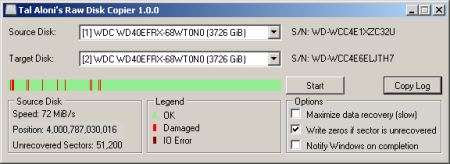
This simple utility was designed to copy the data from one hard drive to another, with the ability to handle a failing hard drive and minimize data loss.​

Hard drives write data in block units (sectors), every a hard drive update a sector, it also updates a checksum (stored immediately after the sector data). When a sector is read from your hard drive, it's expected that the sector checksum will match the sector data, if that is not a case, the hard disk knows something went wrong during the write operation, that's called a bad sector.

Power failure during write is one common reason, hard drive malfunction is another common reason.

Q: How can data loss be minimized in the case of a bad sector?

For speed reasons, copy programs (e.g. HDD Raw Copy Tool 1.10) usually read multiple sectors at a , however, when a single bad sector is encountered, the hard drive fails the entire read operation, and the program will simply skip all of those sectors without copying them.

When using the 'Maximize data recovery' option, Raw Disk Copier will attempt to read the data from each sector separately, so that only the data from the actual bad sectors will be lost.

Yes.

If the source hard drive does not have bad sectors at all, this option does not increase the copy .

The more bad sectors the source has, the more sectors has to be re-read sector-by-sector, which is a slow operation, especially in the case of bad sectors, which may trigger consuming error-handling logic at the hard drive itself.

In addition, the copy may be compounded by the slowness of a malfunctioning hard drive.


DOWNLOAD
uploadgig
Код:
https://uploadgig.com/file/download/27b076f5032916d8/gPNeMKsv_RawDiskCopi.rar

rapidgator
Код:
https://rapidgator.net/file/7e2aa7b0f391286317923ac1539d3eb1/gPNeMKsv_RawDiskCopi.rar

nitroflare
Код:
http://nitroflare.com/view/4E2944BF2F3C0D2/gPNeMKsv_RawDiskCopi.rar
 
Назад
Сверху