• Здравствуйте. Сайт заработал в архивном режиме форум www.old.nado.in

BaDshaH Software House

  • Автор темы Автор темы BaDshaH
  • Дата начала Дата начала
Malwarebytes Anti-Exploit Premium 1.12.1.81


1804100036570096.jpg

File Size: 1.9 MB

Popular software programs contain millions of line of code. Bad guys exploit flaws (vulnerabilities) in the code to deliver malware. Except when they can't. Malwarebytes Anti-Exploit wraps three layers of security around popular browsers and applications, preventing exploits from compromising vulnerable code. Not an antivirus, but compatible with most antivirus, Malwarebytes Anti-Exploit is a small, specialized shield designed to protect you against one of the most dangerous forms of malware attacks.


Malwarebytes Anti-Exploit Premium:
- Shields browsers and browsers add-ons (including Microsoft Internet Explorer, Mozilla Firefox, Google Chrome, Opera)
- Shields Java
- Shields PDF readers (including Adobe Reader, Adobe Acrobat, Foxit Reader)
- Shields Microsoft Word, Excel, and Powerpoint
- Shields media players (including Microsoft Windows Media Player, VideoLAN VLC Player, QuickTime Player, Winamp Player)
- Ability to add/manage custom shields

Whats New
Код:
https://www.malwarebytes.com/support/releasehistory

HOMEPAGE
Код:
https://www.malwarebytes.com

url.png


Download From UploadGig

Код:
https://uploadgig.com/file/download/4635d05cc13440dd/BaDshaH_Malwarebytes.Anti-Exploit.Premium.1.12.1.81.rar

Download From Rapidgator

Код:
https://rapidgator.net/file/b2a8f29e13a5d42b8ab278df0fa105a5/BaDshaH_Malwarebytes.Anti-Exploit.Premium.1.12.1.81.rar.html

​
 
AllmapSoft Google Hybrid Maps Downloader 8.334


1805102117310121.jpg

File size: 9.3 MB

Google Hybrid Maps Downloader is a cute tool that help you to get small tile hybrid map images (satellite images with labels) from google maps. All downloaded small images are saved on the disk. You can view downloaded maps by Hybrid Maps Viewer Or you can combine them into a big BMP map. It supports proxy server. And you can easily get the longitude and latitude of each downloaded small tile image.


Whats New:
Updates: official site does not provide any info about changes in this version

HOMEPAGE
Код:
http://www.allmapsoft.com

url.png


Download From UploadGig

Код:
https://uploadgig.com/file/download/075C6dB02A1Cad7c/BaDshaH-Google.Hybrid.Maps.Downloader.8.334.rar

Download From Rapidgator

Код:
https://rapidgator.net/file/4615a7597b8dd18826d68d6e9f321d0e/BaDshaH-Google.Hybrid.Maps.Downloader.8.334.rar.html

​
 
3-Heights PDF Desktop Repair Tool 4.10.26.5


1805031402220103.png

Windows x64 | File size: 10.82 MB

The 3-Heights™ PDF Analysis & Repair component detects and repairs corrupted PDF documents in automated processing procedures. It repairs defective or illegible PDF documents or restores them as far as possible.


Incorrect PDF creation or manipulation, faulty FTP transfers, system crashes during creation, network interruptions or incomplete copying can all render PDF documents illegible.
This can result in the loss of important data and, as a consequence, the loss of information or production downtimes.

The 3-Heights™ PDF Analysis & Repair component analyses PDF documents with regard to PDF specifications and repairs them where indicated. It extracts legible content such as images or page fragments from irreparable documents and saves the data as a new document.

Properties and benefits
Firstly, 3-Heights™ PDF Analysis & Repair restores files that do not meet PDF specifications. Secondly, it can read out elements such as pages or images from illegible PDF documents and save them as a new document.

The 3-Heights™ PDF Analysis & Repair tool guarantees the quality and legibility of PDF documents in all business processes. The component is characterized by its high speed, comprehensive mechanisms for analysis and repair and its suitability for a variety of operating systems.

Performance characteristics
• High sensitivity in corruption detection
• Comprehensive repair functions
• Restoration of available data from illegible documents
• High restoration speed
• Definition of customized repair profiles for different output documents
• Platform independent

RELEASE NOTES
Код:
http://www.pdf-tools.com/public/downloads/release-notes/release-notes-4.10.pdf

HOMEPAGE
Код:
http://www.pdf-tools.com/

url.png


Download From UploadGig

Код:
https://uploadgig.com/file/download/cd149c4705a04b12/BaDshaH_PDF.Desktop.Repair.Tool.4.10.26.5_x64.rar

Download From Rapidgator

Код:
https://rapidgator.net/file/56d010fba14013e2e4762edf137fe382/BaDshaH_PDF.Desktop.Repair.Tool.4.10.26.5_x64.rar.html

​
 
VueScan Pro 9.6.08 Multilingual


1803171639180105.png

File size: 21 MB

VueScan is a powerful scanning application that allows you to acquire high-quality images using a flatbed or film scanner. If you are not satisfied with the software delivered by the scanner vendor or if you want to improve it with new functions you should try this program.


Scan Documents
Whether you need to scan a single page or a hundred page book, VueScan has the tools to help you.
Scan with Flatbed and Automatic Document Feeders (ADF)
Scan to PDF (Single and Multipage)
Optical Character Recognition (OCR)
Automatic Color Detection
Small document file sizes
Automatic document deskewing

Scan Photos
Do you have a box full of photos in your drawer? Use VueScan to get them on your computer, and off your to-do list.

Scan to JPG or TIFF
Whether you're saving a few snapshots or archiving boxes of prints, VueScan has the tools you need to output your scans at either the highest possible quality or a large number of good quality scans.

Scan with Flatbed and Automatic Document Feeders (ADF)
VueScan supports over 3000+ different scanners from 35 manufacturers, even scanners that don't have drivers from their manufacturers anymore.

Preset photo sizes for faster scans
VueScan improves one of the slowest parts about scanning by scanning only the part of the flatbed where your photo is. So you can spend less time scanning, and more time enjoying your photos.

Scan multiple photos on the flatbed
Scanning multiple photos with VueScan is very simple. Just put them in the corners of the flatbed, do a preview, and manually crop each of the photos without needing to do another scan.

Automatic file naming for faster scans
Don't waste time manually naming every photo, use VueScan's auto naming feature to include dates, numbers, or other prefixes and suffixes in your file names.

Remove fading and correct colors
Stay out of photoshop and save the best version possible of your photos with VueScan's built in features to remove fading, and correct colors.

Scan Film and Slides
VueScan is the ultimate tool for all your film and slide scanning needs.
Works with almost all film/slide scanners
Scan to JPEG/TIFF/RAW
Infrared Dust Removal
Color correction
IT8 Calibration
Photoshop Integration

Whats New
Код:
http://www.hamrick.com/vuescan/vuescan.htm#changes

HOMEPAGE
Код:
http://www.hamrick.com

url.png


Download From UploadGig

Код:
https://uploadgig.com/file/download/fd422fCc1AdC1651/BaDshaH_VueScan.Pro.9.6.08.rar

Download From Rapidgator

Код:
https://rapidgator.net/file/08d83ee699e790075cce2e0a51f6bb26/BaDshaH_VueScan.Pro.9.6.08.rar.html

​
 
VERO WorkXplore 2018.2.0 (x64)


1805102208090111.jpg

File size: 367 MB

WorkXplore -the most powerful, high-speed CAD file viewer and analyzer.


Features
WorkXplore is distinguished by having a powerful combination of full feature capabilities, highest overall functionality, and incredible speed. It is specifically developed to dramatically increase collaboration, productivity and effectiveness throughout your cross-functional product development activities including: design, process development, manufacturing, quality, sales and customer communication, purchasing, product documentation and others.

The software is very easy to use and is designed for users who are not necessarily CAD experts to enable them to explore any type of 2D or 3D CAD file.

User Interface
WorkXplore has a clear, practical interface, giving users access to the full set of core functions directly from the home screen to ensure they are up and running with the software fast.

High Speed File Import/Export
WorkXplore enables users to build virtual unified prototypes or 3D models from files imported from various CAD applications. Users can work on model set up and improvements before committing time and resources to creating a real prototype.

Measurements
Even non-expert CAD users can quickly get to grips with WorkXplore's measurement functions and immediately obtain good results, by making use of the software's predefined selection modes.

Annotations
The need for 2D drawings is reduced as users can directly add dimensional and geometric measurements, annotations and labels to the 3D model.

Analysis
WorkXplore also offers a range of analysis functions which are usually only available with more costly CAD solutions. As well as being extremely fast the functions are very easy to use.

Animation
WorkXplore includes a fully functional animation kernel allowing users to generate exploded views or animated assembly movements. Setting up animations is achieved by simply initiating basic movements such as translation, rotation or following a guide.

Documentation
With WorkXplore users can generate screen captures to illustrate technical documents and assembly sheets. WorkXplore also possesses an image collector which also allows users to easily manage and distribute large volumes of images.

Publication
It is vital for company staff to be able to use communication tools that capture their personal expertize and enable this to be exploited by other staff members, whatever their CAD software skill level.

Collaboration
WorkXplore allows users to easily share their CAD models throughout the entire design and manufacturing chain with all project members, whether they are product managers, marketing, sales, outside manufacturing consultants, customers and suppliers.

Whats New
Код:
http://www.workxplore.com/release-history

HOMEPAGE
Код:
http://www.workxplore.com/

url.png


Download From UploadGig

Код:
https://uploadgig.com/file/download/2731e85545b87891/BaDshaH-WorkXplore.2018.2.0.rar

Download From Rapidgator

Код:
https://rapidgator.net/file/cb5040cd08a3794a025617a73a07fcce/BaDshaH-WorkXplore.2018.2.0.rar.html

​
 
Weather Watcher Live 7.2.115


1805020223160088.jpeg

File size: 6.7 MB

The new version of Weather Watcher Live - a unique design, which is a portable Windows-meteorological station, operating in real time. The program performs the basic meteofunktsii, such as the weather forecast for the nearest hour, week, month. There is also a siren to warn you about coming weather changes.


The program has a navigation map of the world, in the base which takes into account thousands of cities worldwide. Well-balanced interface allows you to manage the program and receive all the necessary information a few clicks of the mouse buttons. The uniqueness of the program is manifested in the fact that it creates a wallpaper showing the full real-time information about weather in any city.

Main opportunities:
* "Getting the weather forecast from the most authoritative international weather stations
* "The base of cities, which includes a list of several thousand titles
* "Show weather changes in real time
* "The system 24 / 7 (24 hours / 7 days a week)
* "Warnings about the changes of weather
* "Added 700 meteokart
* "Easy access to weather video and still images
* "Support for skins and plug-ins for visualization
* "Fully customizable view icons in the tray
* "Technology double icons for more information on mobile
* "Support for proxy

Automatically retrieve the current conditions, hourly forecast, daily forecast, detailed forecast, severe weather alerts, and weather maps for over 77,000 cities world-wide. The current conditions can be quickly viewed by holding your mouse pointer over the Weather Watcher system tray icon. Weather Watcher will allow you to automatically retrieve your weather data at a set interval, display the current temperature in a customized tray icon, display the current condition image in a tray icon, designate which weather information is displayed in the Weather Watcher system tray tooltip, convert the weather data using almost any conversion, display a weather map as your desktop wallpaper, log the weather data in any format, export the weather data in any format, customize the look of the Weather Watcher interface and icons via skins, and much more.

Top Features:
* See What's Ahead
Extensive daily & hourly forecasts help you plan for today and the week ahead.
* Real Time Updates
The fluid interface refreshes itself in real time as new weather information is available.
* Several Weather Sources
Connect to NWS weather stations, real time WeatherBug weather stations or weather stations from the WeatherBug Backyard network.
* Timely Alert Notifications
Stay on top of weather, hydrologic and climate alerts as issued by the National Weather Service.
* Weather Maps Galore
Browse through hundreds of maps or add your own from your favorite Internet sources.
* Highly Customizable Interface
Take advantage of the many interface settings to personalize Weather Watcher Live.

Whats New:
Updates: official site does not provide any info about changes in this version.

HOMEPAGE
Код:
http://www.singerscreations.com

url.png


Download From UploadGig

Код:
https://uploadgig.com/file/download/70C75d0e294FBa93/BaDshaH_Weather.Watcher.Live.7.2.115.rar

Download From Rapidgator

Код:
https://rapidgator.net/file/aba18400bb43cc8a57b2898ed1708aeb/BaDshaH_Weather.Watcher.Live.7.2.115.rar.html

​
 
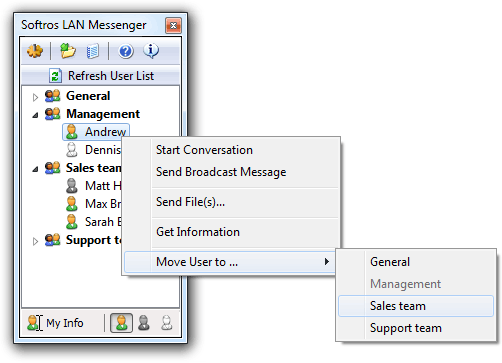
Softros LAN Messenger 9.1


eUzqARSKVwbFTKp3w5hKsy0L1oU9vMcJ.png

File size: 11.1 MB

Softros LAN Messenger is an easy-to-use LAN messaging application for safe, secure and effective intra-office communication. It does not require a server to run and is very easy to install. Softros LAN IM comes with a variety of handy features such as PC-to-PC messaging, group LAN chat rooms, broadcast messaging to quickly notify selected individuals or groups about an event, and also drag-and-drop file transfer to exchange files and folders between staff members. All messages and files exchanged by the users are securely encrypted and never go outside your local company network, which guarantees that no unauthorized person will ever read your private correspondence or access your sensitive data.


Key features:
Security, Safety and Privacy
The Softros LAN chat software encrypts all data with AES-256 and works strictly within your company network. This allows your employees to safely exchange messages and files, while discouraging them from chatting with people outside the organization. It also saves your Internet bandwidth and minimizes the number of opened firewall ports that could result in outside hacker attacks and IM worms.
Ease of Installation and Use
The instant messenger from Softros has a very intuitive interface and requires no additional training. All you need to do is install and run it on each network computer. Users themselves can easily configure the program without requesting assistance from the IT staff.
Serverless Architecture
You do not need to set up and maintain a dedicated messaging server - our IM tool is a stand-alone peer-to-peer based application.
Individual and Group Conversations
Exchange messages with just one or multiple users at the same time.
Group Messaging
Notify individual users or whole user groups about an event by sending out a broadcast message.
Offline Messaging
Send messages to users even when they are offline. Offline messages are received when the users come back online. No server or dedicated storage is required for this.
File Transfer
Easily exchange documents with your colleagues. Just drag and drop a file or folder on the recipient's icon in the user list or on the conversation you are having with them.
User Groups
Arrange your co-workers in groups by department or job title.
Message History
Keep track of your messages by saving them locally or to a network share. View, search through and print out your correspondence with other employees using the built-in History Viewer.
Terminal Services Support
Full support of Microsoft and Citrix Terminal Services environments (including the RemoteApp and XenApp application virtualization technologies).
Active Directory and Domain Support
Softros Intranet Messenger seamlessly works in a correctly set up domain controller environment with Active Directory. Users' full names retrieved from Active Directory are displayed in the user list, while their SIDs are used for identification purposes within the program.
LAN, WAN, VPN and VLAN Support
Enhanced functionality of the Sofros local chat application allows you to link your company locations or subnets into a single messaging environment. Just connect your subnets physically, virtually or with a VPN and then configure the program by referring to our detailed help system.
Network Wide Group Policy Deployment
In a domain controller environment, deploying the Softros messaging software, its license and settings across the network can be easily done through Group Policy.
Importing, Exporting and Pre-configuring User Settings
In case your company does not have a domain controller with Active Directory, Softros LAN Messenger allows you to automate distribution of its settings (network settings, user groups, license file, administrative restrictions) using certain built-in features.
Restricting User Access
Administrators can selectively restrict access to most features of the Softros communication software.

Whats New:
Updates: official site does not provide any info about changes in this version.

HOMEPAGE
Код:
https://messenger.softros.com

url.png


Download From UploadGig

Код:
https://uploadgig.com/file/download/c848f242b647bDC7/BaDshaH-Softros.LAN.Messenger.9.1.Patch.And.Custom-MPT.rar

Download From Rapidgator

Код:
https://rapidgator.net/file/2272da328940bcbfe582291d4a7ffa7b/BaDshaH-Softros.LAN.Messenger.9.1.Patch.And.Custom-MPT.rar.html

​
 
HitFilm Pro 8.0.7627.07201


1805102156260110.jpg

Windows x64 | English | File Size: 324.49 MB

One software for every step. Create breakout content and stunning VFX with one souped-up software: HitFilm Pro. Our latest release comes jam-packed with a professional editor, compositor, 800+ VFX and presets, and new built-in animation tools!


High-performance editing
Boot up, import and edit with no soul-crushing lag time. HitFilm Pro's high performance system processes your footage in the background, so you can keep editing without interruptions. Aiming for artistic perfection? Customize your video quality to get real-time playback and polished, frame-by-frame visual effects.

Professional visual effects
Make smoke rise and cities fall with one of the most extensive VFX libraries on the market. Get stiff characters to loosen up with HitFilm Pro's new Puppet Tool. Create life-like scenes with 2D characters, 3D models and custom animations -all in unified, 3D space.

Complex motion graphics made simple
Build your own galaxy using HitFilm Pro's advanced rigging and parenting animation tools. Create striking planetary rings and dicey asteroids fields with the advanced particle simulator. Add some JJ-style lens flare and 3D titles for that extra sci-fi edge.

OpenFX Support
Make your workspace your own with your favorite plugins and features. Want to use NewBlue, GenArts, Red Giant or RE:Vision products inside HitFilm? Do it. HitFilm Pro supports OpenFX plugins to make any scene possible.

Auto-saved sessions
No mistake is final with HitFilm Pro's work/life-saving history system. Redo, undo and compare options for going back to the way things were.

Customizable workspace
HitFilm Pro's HiDPI resolution and custom keyboard shortcuts make switching between edits and VFX shots simple. We also support a huge range of media formats so you don't lose precious hours of your life to tedious conversions.

Auto-export queue
Take that coffee break. HitFilm Pro's export queue lets you 'set it and forget it' by creating a self-executing export list to maximize productivity. Duplicate and modify export tasks to save time and render videos in multiple formats and resolutions. You can even set up export presets to configure your settings for high quality or high compression.

Industry standard layout
Editing, compositing and building visual effects is as intuitive as should be with HitFilm Pro. With our industry standard interface, you'll feel right at home as soon as you open your software.

Preview & pre-render
Preview and pre-render complex composite shots for high-quality, real-time playback and faster export times. HitFilm Pro's GPU acceleration and a 64-bit architecture continuously optimizes your computer's hardware as your project grows in scale -so feel free to go big.

Intelligent search
Quickly locate what you need with HitFilm Pro's 'keyword search and find' feature for all your media, effects and composite timelines. Coming from other software? No problem, our algorithm recognizes keyword links to help you find what you're looking for.

RELEASE NOTES:

• New layout panel added with controls for precisely aligning & positioning layers
• Master reset buttons have been restored to each tab of the Options dialog.
• New Rendering tab has been added to the Options dialog
• Default preferences for the Viewer panel, such as the default background color, can now be set in the Options dialog.
• Default preferences for the Editor timeline, such as track sizes and thumbnail style, can now be set in the Options dialog.
• The Options Dialog has been updated to use a vertical stack of tabs on the side, so the tabs fit better into the available space.
• The default size for video and audio tracks on the Editor has been changed to large.
• Added the ability to select multiple points on a mask by dragging a rubber band around them.
• Added support for transparency in all Plane layers.
• Improved Mask rotation so the original bounding box is retained regardless of whether the mask has been rotated or not.
• A checkerboard now indicates planes with the transparency set below 100, in the Media panel.
• A checkerboard now appears in the thumbnails of semi-transparent planes on the Editor timeline.
• A preset for the alpha channel has been added to the properties dialog of plane layers, to define their default transparency.
• New Mirror and Rotate buttons are available in the Layout panel.
• Masks can now be scaled relative to the opposite corner, rather than the center point, by using the CTRL (CMD on Mac) modifier.
• New Origin control selector for masks allows you to move the anchor point from which scale or rotation adjustments will be applied to the mask.
• Improved Mask tools include a bounding box while creating mask points, to make it easier to manipulate multiple points at once.
• Default preferences for the Media panel, such as how files are arranged, can now be set in the Options dialog.
• Changed the layout of the Options dialog so it fits all of the available options better.
• Auto-scroll now works correctly in composite shot timelines.
• Macs using Radeon Pro graphics cards now draw scopes correctly.
• Mask paths now correctly switch from closed to open when path points are deleted.
• The contextual menu for path points now correctly identifys their current linear or curved state.
• Text-based effects no longer add unwanted line returns when a project is closed and reopened.
• Editor tracks no longer lose sync when a project is loaded.
• Adjusting the Preview size of the Editor timeline no longer scrolls to the top of the timeline.
• Selecting multiple timeline objects across video and audio tracks using the CTRL (CMD on Mac) modifier now works correctly.
• Fixed an export error when motion blur is enabled on the Editor.
• Masks now consistently rotate correctly.
• Adjusted the default compression settings for PNG export to improve export times.
• Masks applied to text layers now update correctly when enabled or disabled.
• When importing composite shots from another project, all available composite shots are now listed correctly.
• The selected Workspace no longer remains highlighted after the layout of the software is reset.
• Bezier handles on masks now work correctly after a mask has been rotated.
• Adding new points to the curve of a rotated mask now works correctly.
• Improved the styling of warning dialogs shown in the Options panel.
• Points can now be removed from the puppet tool while in Edit mode.
• Selecting a property in the property tree of one panel no longer auto-expands the tree in other panels.
• Trying to export a frame containing an empty grade layer with motion blur enabled no longer causes stability issues.
• The rotation turns control now correctly moves in increments of 10 degrees when the shift modifier is used.

System Requirements:
• Windows PC - 64-bit version of Windows 7, Windows 8 or Windows 10
• Intel Core i3, Core i5, Core i7 or AMD equivalent
• 4 GB RAM (8 GB or more recommended)
• Graphics processor with at least 512 MB video memory.
• 2GB or more recommended for 4K UHD.

HOMEPAGE
Код:
https://hitfilm.com

url.png


Download From UploadGig

Код:
https://uploadgig.com/file/download/169147223e66AEeb/BaDshaH-HitFilm_Pro_8.0.7627.07201.rar

Download From Rapidgator

Код:
https://rapidgator.net/file/21baac9e5e1391521be46992d7403512/BaDshaH-HitFilm_Pro_8.0.7627.07201.rar.html

​
 
EssentialPIM Pro 7.65.1 Business Multilingual


1805090748410105.jpg

File Size: 33.3 MB

EssenialPIM Pro Business is the solution for small to medium workgroups. Sharing calendars, contacts, tasks, notes, password entries, and setting priorities - this is what the Business edition is all about.


The Business edition has all the features of EssentialPIM Pro but adds powerful network capabilities for workgroups.
You already have all the infrastructure needed to run EssentialPIM Pro Business - it does not require dedicated hardware. You already have the skills to install it - Quick start guide is straightforward and will get you up and running in 10 minutes. You can even try EssentialPIM Pro Business for free for 30 days without any obligation.

Business Edition Features
EssentialPIM Pro Business runs on an industry standard database Firebird, ensuring integrity, security and adherence to open standards. Key features include:
Easy installation which takes 10 minutes or less to set up
No need for a dedicated server - EssentialPIM Pro Business Server can run on virtually any machine, and on any version of Windows, most Linux operating systems and MacOS X
All features of EssentialPIM Pro available to Business users
Easy sharing of calendars, contacts, tasks, password entries and notes
Ability to work on the road and synchronize with the EPIM server later, to make all new data available to other users
Unlimited number of users
Flexible hierarchy of user rights, including read-only, and eyes-only items

Whats New
- Improved contacts synchronization with Outlook.com
- "Leave messages on server" option now works as expected for the POP3 type of mail accounts
- Fixed couple of minor issues for IMAP accounts when receiving mail
- Rich text signature will always look ok for plain text mail messages
- Fixed rare synchronization issue with EPIM Cloud
- Coupe of other fixes and stability improvements

HOMEPAGE
Код:
https://www.essentialpim.com/

url.png


Download From UploadGig

Код:
https://uploadgig.com/file/download/D17Bf5211ddb767d/BaDshaH-EssentialPIM.Pro.7.65.1.Business.rar

Download From Rapidgator

Код:
https://rapidgator.net/file/c02406fd7acba0a4b9f1a8f02ed73c6d/BaDshaH-EssentialPIM.Pro.7.65.1.Business.rar.html

​
 
Yamicsoft Windows 10 Manager 2.2.8 Multilingual


1804041535490098.png

File size: 27.2 MB
Windows 10 Manager is a system utility that helps you optimize, tweak, repair and clean up Windows 10. It will increase your system speed, eliminate system fault, improve system security, and meet all of your expectations. Windows 10 Manager is a system utility that helps you optimize, tweak, repair and clean up Windows 10. It will increase your system speed, eliminate system fault, improve system security, and meet all of your expectations.


Why Should I use Windows 10 Manager?
Windows 10 is the newest Operating System for home users and professionals alike. Windows 10 brings clarity to your world, so you can more safely and easily accomplish everyday tasks and instantly find what you want on your PC.

Windows 10 Manager is the powerful software tool to tweak and optimize your Windows 10, it bundles more than 30 different utilities in one and help your system faster and more stable, secure and personal!

Features and Benefits of Windows 10 Manager
Information:
Get detailed system and all hardware information on your system; help you find out the installation key of Windows, Office products; show all detailed information of running processes and threads on your machine; Windows 10 Manager offers 1-clicking Cleaner cleans your system automatically; Repair Center helps you to fix various system problems.

Optimizer:
Tweak your system to improve windows startup and shutdown speed, tweak your hardware to increase system speed and performance; Control what is started on Windows startup, check and repair the advanced starup items to restore the malicious change by viruses; Tune up and optimize system services and Task Schedule, turn off smartly some unnecessary system services and tasks to improve system performance.

Cleaner:
Find out which files or folders engross your disk space and shown with chart; Smart Uninstaller can fully delete programs from your system without residual files and Registry entries; Find and clean junk files to increase Hard Disk space; Duplicate Files Finder can scan your computer for files with the same size, name and modification time; Registry Cleaner checks and repair incorrectly linked Registry entries; Registry Defrag rebuilds and re-indexes your Registry to reduce registry access time and therefore improve application responsiveness; Desktop Cleaner can clean useless icons and files on Desktop easily.

Customization:
Customize the look of your system by tweaking system Explorer, Desktop, Start Menu, Taskbar and notification area; Manage the pinned items and can pin any files or folders to Taskbar and Start Screen; Create the quick startup items on Taskbar with the Jump List launcher; Tune up Windows 10 boot menu; Edit context menus of mouse Right-Clicking; Edit easily the Win + X menu that shown when right-click on Desktop bottom-left corner or Win + X keyboard shortcut ; Create the shortcut that executed quick on run dialog box. Visual Customizer can change system and file type icons, change the lock screen image automatically.

Security:
Improve system security by tweaking system components, UAC and login settings; Tune up System Restore options; Hide and restrict to access drives and programs; Encrypt/decrypt files, move system folders to safe locations; Undelete the files that accidentally deleted or formatted on disk; Privacy Protector can maintain your personal privacy by eliminating the tracks that you leave behind; Hide, add or delete the Control Panel entries.

Network:
Optimize your Internet connection speed, manage all shares items; Tweak your Internet Explorer easily; IP Switcher can switch your IP address easily on different networks; Edits the Hosts file to speed up surfing internet and permit only to access the specified Hosts.

Misc. Utilities:
Show the collection of Windows utilities and pin system items to Start Screen and Taskbar; split and merge any files; Automatically back up files regularly using Super Copy. Registry Tools help you to operate Registry easily.

Whats New
Код:
https://www.yamicsoft.com/windows10manager/product.html

HOMEPAGE
Код:
http://www.yamicsoft.com

url.png


Download From UploadGig

Код:
https://uploadgig.com/file/download/25d1F25977683cbF/BaDshaH-Win.10.Manager.2.2.8.rar

Download From Rapidgator

Код:
https://rapidgator.net/file/28ce2a8ada94764d819f08318894a876/BaDshaH-Win.10.Manager.2.2.8.rar.html

​
 
ByteScout Watermarking Pro 3.2.0.666 Multilingual


1805122112000109.jpg

File size: 1.81 MB

When sharing images across the Internet, there is the constant danger of them being copied and used for various purposes without your consent. Others may take credit for your original photos and you might not be able to prove ownership. Bytescout Watermarking PRO allows you to apply text and image-based watermarks to image files and supports batch processing, enabling you to stamp large amounts of photos very quickly. It features a wizard-based interface that requires you to follow a few simple steps to secure your photos, as well as resize or convert them to other formats.


Apply single or multiple watermarks
Bytescout Watermarking PRO allows you to apply a single stamp preset, consisting of a line of text, the current date, the file's name or a custom image.
It is also possible to process images using multiple presets, which is useful if, for example, you want to stamp a picture with the current date, as well as a text-based watermark.

Resize images and modify DPI values
The application enables you to resize your images in multiple ways. You can choose to specify their new size in pixels, cm or inches, as well as pick from a list of standard sizes used by various websites or devices.
Additionally, you can change an image's horizontal and vertical DPI values and have them override the photo's resolution.

Apply visual effects and edit EXIF tags
Bytescout Watermarking PRO enables you to apply various types of visual effects to the output image files, such as greyscale, sepia or blur.

Moreover, you can edit the information present in image EXIF tags, allowing you to embed data such as title, description, author and comments. This offers you the possibility of protecting your photos without negatively affecting their visual content.

All in all, Bytescout Watermarking PRO is a simple and intuitive tool, designed to help experienced and novice users protect their original photos, by applying various types of watermarks and editing EXIF tags.

Whats New:
Fixed stripe resizing artifacts.
Fixed EXIF orientation issue.
Optimized image loading.
Added few more standard resoultion to the quick pick list.
Other minor bug fixes and improvements.

System requirements:
Windows XP / Vista / 7/8/10; 50 mb of free space;
Windows Media Player and .NET Framework installed

HOMEPAGE
Код:
https://bytescout.com

url.png


Download From UploadGig

Код:
https://uploadgig.com/file/download/5F04F430a53c9EAf/BaDshH-Bytescout.WatermarkingPRO3.2.0.666.rar

Download From Rapidgator

Код:
https://rapidgator.net/file/702a094d77c83755a2ed37e5a3c0f04f/BaDshH-Bytescout.WatermarkingPRO3.2.0.666.rar.html

​
 
IdImager Photo Supreme 4.1.0.1486 Multilingual


1804242034070120.jpg

File Size: 36.9 MB

Do you own a digital camera? Then in no time you will have thousands of images on your computer, and finding that one image you are looking for will become a chore. But Photo Supreme can change all that. Whether you have 1,000 or 500,000 images in your archive, Photo Supreme's integrated photo cataloging and photo management features will help you quickly find and work with your desired image.


Extremely powerful yet easy-to-use
From the ground up, Photo Supreme was developed with easy-of-use as the primary focus. We were able to pack most of the features requested by our user base into a user interface that is clean and efficient, yet extremely powerful.

Photo Supreme comes with every essential image management feature you'll need to bring structure in your image archive. Assigning catalog labels, importing images to your computer, search features, etc. And once you have your images cataloged then you'll be able to find that one image you need within seconds to then view, duplicate, email, share on your favorite photo site, upload it to your FTP server, or edit it in your favorite photo editor.

Integrates with your favorite tools
Photo Supreme makes integration with your favorite photo editing tools seaminglessly. At installation it will automatically find and add the most common used image editing tools to the user interface.

Simply select an image and click on the application icon to start editing your image.

Unparalleled Speed
Digital Asset Management software uses a catalog database and should be optimized to work with thousands of images in the database. We took this seriously and were able to get the speed up, there where it belongs. Searches will return results in just milliseconds.

Always take your images with you
With Photo Supreme you can store previews of your images inside the database. Then, even if your images are physically located on your network, they travel with you. The previews can be stored in the size that you prefer, from small to large ones, up to 1680 pixels

Open architecture
Right from the start, Photo Supreme was designed with an open cataloging architecture in mind. Because existing industry standards are used to store its data, you can extract your information at any time, even without our software. Should you ever decide to switch applications (although once you've tried Photo Supreme, you'll never go back!), you won't have to repeat the time consuming operation of re-cataloging your data. After all, it is YOUR data, not the application's data!

Share with friends and family
Photo Supreme easily interfaces to public photo sharing sites like Facebook, Flickr, PicasaWeb, Zenfolio, or SmugMug. Resize or rename your images as you upload them to your on-line account without having to prepare them first. Also, add or remove your metadata, convert color space, or add your personal signature to your uploaded images.

Get started right away
If you already use some sort of image collection tool then Photo Supreme can help you get your existing data into Photo Supreme, saving you lots of time. There are import feature available for iPhoto™, Aperture™, Lightroom™ 3 and 4, iMatch™, and FotoTime™. At the same time, PSU is able to read and import meta-data that was written with XMP supporting tools, including Adobe products, Nikon software, iView™, MediaPro™.

Vocabularies
In addition there are import features to support market standard vocabularies, including David Rieck's ControlledVocabulary™, UltraTAG™, Lightroom™-Keyword Files, or any other tool that supports exporting to Formatted Vocabulary Files.

Main Features & Highlights:
Advanced search capabilities
Multi Tab Browsing
Import/Ingest images
Side-by-Side comparison (up to 6 images)
Keyword tagging
Advanced GEO Tagging
Image organization in portfolios
Duplicate Detection
Share images with Flickr, Smugmug, Zenfolio, Picasaweb, FTP, EMail
Dual Monitor Support
Creative Commons support
Face Detection
Area Tagging
Extensible metadata with Custom Fields
Take your previews with you while travelling
Color Managed
Lossless Image Editing
Fully Scriptable
Available for Windows and MacOSX platform
Multi-User network/server version available for PostgreSQL and SQLServer (Server Edition)
English, German, French, Italian, Dutch, Portuguese, and Russian locale

HOMEPAGE
Код:
http://www.idimager.com

Whats NEW
Код:
https://www.idimager.com/what-s-new-in-photo-supreme-v4

url.png


Download From UploadGig

Код:
https://uploadgig.com/file/download/d8d0a1390679bEc2/BaDshaH-IdImager.Photo.Supreme.4.1.0.1486.rar

Download From Rapidgator

Код:
https://rapidgator.net/file/ef93ce05c6c7dfebce9934b132d20dae/BaDshaH-IdImager.Photo.Supreme.4.1.0.1486.rar.html

​
 
Internet Download Manager 6.30 Build 9 Multilingual + Retail


1803311111090109.jpeg

File size: 7.4/7.4 MB

Internet Download Manager has a smart download logic accelerator that features intelligent dynamic file segmentation and safe multipart downloading technology to accelerate your downloads. Unlike other download accelerators and managers that segment files before downloading starts, Internet Download Manager segments downloaded files dynamically during download process.


Features:
• All popular browsers and applications are supported!
Internet Download Manager has been tested with the following browsers: Internet Explorer, MSN Explorer, AOL, Netscape Communicator, Netscape 6, Netscape 7, Mozilla, Mozilla Firefox, Mozilla Firebird, Opera, NetCaptor, UltraBrowser, Slim Browser, Avant Browser, MyIE2, Optimal Desktop, Ace Explorer, Advanced Browser, 27 Tools-in-1 Wichio Browser, WindowSurfer, 550 Access Browser, FineBrowser Freeware, Kopassa Browser, Fast Browser Pro, Enigma Browser, GoSuRF, K-Meleon, Smart Explorer, The Off By One Web Browser, Smartalec Voyager, CrystalPort AppCapture, The Family Browser, XANA Web Browser, Bluto, AutoSurf, 32bit Web Browser, BrowseMan, WrestlingBrowser, Eminem Browser, UltraBrowser, Cygsoft LDAP Browser, and Net M@nager. Internet Download Manager supports all versions of popular browsers, and can be integrated into any 3rd party Internet applications.

• Easy downloading with one click.
When you click on a download link in a browser, IDM will take over the download and accelerate it. IDM supports HTTP, FTP, HTTPS and MMS protocols.

• Download Speed Acceleration.
Internet Download Manager can accelerate downloads by up to 5 times due to its intelligent dynamic file segmentation technology. Unlike other download managers and accelerators Internet Download Manager segments downloaded files dynamically during download process and reuses available connections without additional connect and login stages to achieve best acceleration performance.

• Download Resume.
Internet Download Manager will resume unfinished download from the place where they left off.

• YouTube grabber.
Internet Download Manager can grab FLV videos from popular sites like YouTube, MySpaceTV, and Google Video.

• Simple installation wizard.
Quick and easy installation program will make necessary settings for you, and check your connection at the end to ensure trouble free installation of Internet Download Manager

• Drag and Drop.
You may simply drag and drop links to IDM, and drag and drop downloaded files out of Internet Download Manager.

• Automatic Antivirus checking.
Antivirus checking makes your downloads free from viruses and trojans.

• Advanced Browser Integration.
When enabled, the feature can be used to catch any download from any application. None of download managers have this feature.

• Built-in Scheduler.
Internet Download Manager can connect to the Internet at a set time, download the files you want, disconnect, or shut down your computer when it's done.

• IDM includes web site spider and grabber.
IDM downloads all required files that are specified with filters from web sites, for example all pictures from a web site, or subsets of web sites, or complete web sites for offline browsing. It's possible to schedule multiple grabber projects to run them once at a specified time, stop them at a specified time, or run periodically to synchronize changes.

• IDM supports many types of proxy servers.
For example, IDM works with Microsoft ISA, and FTP proxy servers.

• IDM supports main authentication protocols:
Basic, Negotiate, NTLM, and Keberos. Thus IDM can access many Internet and proxy servers using login name and password.

• Download All feature.
IDM can add all downloads linked to the current page. It's easy to download multiple files with this feature.

• Customizable Interface.
You may choose the order, and what buttons and columns appear on the main IDM window.

• Download Categories.
Internet Download Manager can be used to organize downloads automatically using defined download categories.

• Quick Update Feature.
Quick update may check for new versions of IDM and update IDM once per week.

• Download limits.
Progressive downloading with quotas feature. The feature is useful for connections that use some kind of fair access policy (or FAP) like Direcway, Direct PC, Hughes, etc.

• IDM is multilingual.
IDM is translated to Albanian, Arabic, Azerbaijan, Bosnian, Bulgarian, Chinese, Croatian, Czech, Danish, Dutch, Farsi, French, German, Greek, Hebrew, Hungarian, Italian, Japanese, Korean, Lithuanian, Macedonian, Norwegian, Polish, Portuguese, Romanian, Russian, Serbian, Slovak, Slovenian, Spanish, Thai, Turkish, and Uzbek languages.

Whats New
Код:
http://www.internetdownloadmanager.com/news.html

HOMEPAGE
Код:
http://www.internetdownloadmanager.com/

url.png


Download From UploadGig

Код:
https://uploadgig.com/file/download/d01Df46D51dc55f2/BaDshaH-idman630build9.f.rar
https://uploadgig.com/file/download/f461c275aC2Cdbb7/BaDshaH-idman630build9.rar

Download From Rapidgator

Код:
https://rapidgator.net/file/0b8691b7e8add6082519d30b623916ea/BaDshaH-idman630build9.f.rar.html
https://rapidgator.net/file/d646d0524bc8f285854e2502905bf539/BaDshaH-idman630build9.rar.html

​
 
3D-Tool 13.10 Premium


1805122147010107.jpg

Windows x64 | File Size: 536.9 MB

The CAD viewer allows the intuitive validation of 3D models in all areas of the company without CAD knowledge. 3D-Tool provides practical tools for the evaluation of 3D designs, including extensive measuring functions and analyses for toolmaking. 3D Tool Premium simplifies the processing of native 3D CAD data from customers by converting them into common 3D formats.


3D-Viewer / 2D-Viewer
Cross Section, Assembly Explode, Animation, PMI Display

Native 3D-CAD-File Formats
CATIA, Pro/E, Creo, Inventor, UG Siemens NX, SolidWorks, SolidEdge

3D-File Formats
JT, STEP, IGS, VDA, SAT, X_T, X_B, STL, VRML, PLY, 3DS, XGL, OBJ

2D-File Formats
DXF, DWG, and HPGL

3D-Measure
Distance, Angle, Radius, Edge, Wall thickness, Clearance, Points

2D-Measure
Distance, Angle, Radius, Line length

Analysis
Drafts, Undercuts, Projected Area, Wall Thickness, Model Compare

Information
Volume, Surface, Weight

Convert from:
CATIA, Pro/E, Creo, Inventor, UG Siemens NX, SolidWorks, SolidEdge, JT, STEP, IGES, VDA, SAT, Parasolid

Convert to:
CATIA V4/V5, STP, IGS, VDA, SAT, X_T, and STL

What's new
Код:
https://www.3d-tool.com/en_3d-viewer-history.php

HOMEPAGE
Код:
https://www.3d-tool.com

url.png


Download From UploadGig

Код:
https://uploadgig.com/file/download/9fa957CCe90901fe/BaDshaH-3D-Tool.13.10.rar

Download From Rapidgator

Код:
https://rapidgator.net/file/23639ff089fd97df64eb250ef0db2bb1/BaDshaH-3D-Tool.13.10.rar.html

​
 
Weather Watcher Live 7.2.117


1805122152040103.jpeg

File size: 6.7 MB

The new version of Weather Watcher Live - a unique design, which is a portable Windows-meteorological station, operating in real time. The program performs the basic meteofunktsii, such as the weather forecast for the nearest hour, week, month. There is also a siren to warn you about coming weather changes.


The program has a navigation map of the world, in the base which takes into account thousands of cities worldwide. Well-balanced interface allows you to manage the program and receive all the necessary information a few clicks of the mouse buttons. The uniqueness of the program is manifested in the fact that it creates a wallpaper showing the full real-time information about weather in any city.

Main opportunities:
* "Getting the weather forecast from the most authoritative international weather stations
* "The base of cities, which includes a list of several thousand titles
* "Show weather changes in real time
* "The system 24 / 7 (24 hours / 7 days a week)
* "Warnings about the changes of weather
* "Added 700 meteokart
* "Easy access to weather video and still images
* "Support for skins and plug-ins for visualization
* "Fully customizable view icons in the tray
* "Technology double icons for more information on mobile
* "Support for proxy

Automatically retrieve the current conditions, hourly forecast, daily forecast, detailed forecast, severe weather alerts, and weather maps for over 77,000 cities world-wide. The current conditions can be quickly viewed by holding your mouse pointer over the Weather Watcher system tray icon. Weather Watcher will allow you to automatically retrieve your weather data at a set interval, display the current temperature in a customized tray icon, display the current condition image in a tray icon, designate which weather information is displayed in the Weather Watcher system tray tooltip, convert the weather data using almost any conversion, display a weather map as your desktop wallpaper, log the weather data in any format, export the weather data in any format, customize the look of the Weather Watcher interface and icons via skins, and much more.

Top Features:
* See What's Ahead
Extensive daily & hourly forecasts help you plan for today and the week ahead.
* Real Time Updates
The fluid interface refreshes itself in real time as new weather information is available.
* Several Weather Sources
Connect to NWS weather stations, real time WeatherBug weather stations or weather stations from the WeatherBug Backyard network.
* Timely Alert Notifications
Stay on top of weather, hydrologic and climate alerts as issued by the National Weather Service.
* Weather Maps Galore
Browse through hundreds of maps or add your own from your favorite Internet sources.
* Highly Customizable Interface
Take advantage of the many interface settings to personalize Weather Watcher Live.

Whats New:
Updates: official site does not provide any info about changes in this version.

HOMEPAGE
Код:
http://www.singerscreations.com

url.png


Download From UploadGig

Код:
https://uploadgig.com/file/download/A35e376a51BcbbD2/BaDshaH-Weather.Watcher.Live.7.2.117.rar

Download From Rapidgator

Код:
https://rapidgator.net/file/f2757ae9247fd6bf086ffbcee866c669/BaDshaH-Weather.Watcher.Live.7.2.117.rar.html

​
 
Artifact Interactive Garden Planner 3.6.15


1805092138370116.jpg

File size: 99 MB

Design your dream garden with this very easy to use program. Arrange plants, trees, buildings and objects using an easy to use 'drag and drop' interface. Use tools to quickly create paving, paths and fences. Then produce a high quality color print out of your design.


Features:
• Very easy to use interface
• Save and Load your own designs.
• Use a wide range of generic plant shapes to design your garden, so you dont need to be a botanist to use it
• Produce a professional looking print out of your plan
• Use tools to quickly create paving, fences and paths.
• Generate a report of all the plants and objects in your garden
• Create a library of custom plants

Whats New:
Updates: official site does not provide any info about changes in this version

HOMEPAGE
Код:
http://smallblueprinter.com

url.png


Download From UploadGig

Код:
https://uploadgig.com/file/download/8b1C6d8f86128F1a/BaDshaH-Garden.Planner.3.6.15.rar

Download From Rapidgator

Код:
https://rapidgator.net/file/b7042847e7deb21881efe8caa23ffeb6/BaDshaH-Garden.Planner.3.6.15.rar.html

​
 
Windows 7 Sp1 Aio (x86x64) 11in2 En-us (usb3.0) May2018


1805122159440099.jpg

OS: x86-x64 | File Size: 3.50GB / 4.97 GB


General Info:-
Name :- en_windows_7_sp1_aio_x64_may_2018_dvd
en_windows_7_sp1_aio_x86_may_2018_dvd
Architecture :-x86-x64
Size:- 3.50gb & 4.97
Language :- English
Activation:- In-Complete
Updates:- Included all new updates of May 2018
Added/Removed:- Nothing , its a Complete iso with all new Updates of May 2018

Added Editions :-
Windows 7 Starter x86
Windows 7 Home Basic x86
Windows 7 Home premium x86
Windwos 7 Professional x86 (Volume)
Windows 7 Ultimate x86
Windows 7 Enterprises x86

Windows 7 Home Basic x64
Windows 7 Home Premium x64
Windows 7 Professional x64 (Volume)
Windows 7 Ultimate x64
Windows 7 Enterprises x64

**************************************************************
* Including Microsoft updates till 08.05.2018 and Internet Explorer 11
* NO tweaks or add-ons.
* NO additional programs and software added.
* NO graphics, scripts and wallpapers added or changed.
* It's the original image from Microsoft except added updates and IE11!

Change log :-
Integrated and replaced new Rollup updates

Integrated Drivers in install.wim and boot.wim
List:-
Alpine Ridge USB :-
USBController
USBHub
AMD Chipset
AMDPSP
SBDrv

Asmedia USB
Intel AHCI
Intel Chipset
ApolloLake
Baytrail-I
Braswell
Broadwell
Common
CougarPoint
Haswell
IvyBridge
Kabylake
KabyLakePCH-H
LynxPoint
Lynxpoint-HRefresh
LynxPointLP
PantherPoint
Patsburg
SandyBridge
Skylake
SunrisePoint-H
SunrisePoint-LP
ValleyView2
Wellsburg
WildcatPointLP

Intel DPTF
Intel IO
Intel MEI
Intel NVMe

[/b]Intel USB
HCSwitch
Win7

OCZ Toshiba NVMe
Plextor NVMe
Samsung NVMe

Note 1:- Dotnet 4.7.1 and Direct x already installed no need to install them
Note 2:- This time i didn't converted install.wim to install.esd i keep install.wim as its own format , its original format so the size gone over then 8gb

Check Sums:-
Name: en_windows_7_sp1_aio_x64_may_2018_dvd.iso
Date: 5/12/2018
Size: 4.97 GB (1,048,606,720 bytes)
--------
SHA-1: f28be24b2afbdf97be040e63cd9f68b0557556dd
MD5: 4f8e77a3c86ac1ce6d9c0166d66b76f2
CRC32: 4a41ff8b

Name: en_windows_7_sp1_aio_x86_may_2018_dvd.iso
Date: 5/12/2018
Size: 3.50 GB (3,765,702,656 bytes)
--------
SHA-1: 446c6d9d6d067c0937fb1b0cc316dd5b8d25e760
MD5: 25f13228e8e5d7a6bb5f957f087d3eb8
CRC32: 1aa513f7

What's New
* Including Microsoft updates till 08.05.2018 and Internet Explorer 11
* NO tweaks or add-ons.
* NO additional programs and software added.
* NO graphics, scripts and wallpapers added or changed.
* It's the original image from Microsoft except added updates and IE11

HOMEPAGE
Код:
https://www.microsoft.com/en-eg/

url.png


Download From UploadGig

Код:
https://uploadgig.com/file/download/bC63cfC8e393AEc8/BaDshaH-en_windows_7_sp1_aio_x64_may_2018_dvd.part1.rar
https://uploadgig.com/file/download/3a0433370F131E41/BaDshaH-en_windows_7_sp1_aio_x64_may_2018_dvd.part2.rar
https://uploadgig.com/file/download/Ff44110Ea7f2e414/BaDshaH-en_windows_7_sp1_aio_x64_may_2018_dvd.part3.rar
https://uploadgig.com/file/download/bB9513631f687e2F/BaDshaH-en_windows_7_sp1_aio_x64_may_2018_dvd.part4.rar
https://uploadgig.com/file/download/c43fa84067ae6290/BaDshaH-en_windows_7_sp1_aio_x64_may_2018_dvd.part5.rar

Download From Rapidgator

Код:
https://rapidgator.net/file/3406deb24df810ecb4c4b5d025d4cfe6/BaDshaH-en_windows_7_sp1_aio_x64_may_2018_dvd.part1.rar.html
https://rapidgator.net/file/a64bfcbe65d09c91300fc1d276bdb9fd/BaDshaH-en_windows_7_sp1_aio_x64_may_2018_dvd.part2.rar.html
https://rapidgator.net/file/6e4ec59d08e17061a5faf31be0097f07/BaDshaH-en_windows_7_sp1_aio_x64_may_2018_dvd.part3.rar.html
https://rapidgator.net/file/94184d18de09d8b03a0f8cda3c5b60ef/BaDshaH-en_windows_7_sp1_aio_x64_may_2018_dvd.part4.rar.html
https://rapidgator.net/file/10bcd6b448fbb3c287133d4928718ec7/BaDshaH-en_windows_7_sp1_aio_x64_may_2018_dvd.part5.rar.html

​
 
Genie Timeline Pro 2018 10.0.1.100 Multilingual


1805122317310101.jpg

File size: 13.4 MB

Genie Timeline is a Windows Time Machine that performs seamless automatic real-time backup for all your files and folders. Simply install it on your computer and set it up in just 3-simple straightforward steps in which all your important documents, photos and music are backed up to a recommended backup destination with optional security.


Powerful yet simple
Install, configure to your preference, and you're done!
- 3 step configuration
- Automatic purge to save space
- Protection level to indicate the health of the backup
- Timeline view to recover from any point at time

Backs up all your important data
It searches for your files in your computer, external and network drives so you don't have to
- Backs up your documents, pictures , music, videos and more
- Backs up new and modified files; detects changes
- keeps versions to recover older or deleted files
- Protects mobile data synced to your computer
- View your backup in its native or encrypted form
- Backs up external, network or any storage attached to your PC

Secure
Keep your backup safe with military-level encryption
- Backs up encrypted drives
- Encrypts backup with 256-AES encryption

Whats New
Код:
http://www.genie9.com/business/Genie_Timeline_Pro/release_notes.aspx

HOMEPAGE
Код:
http://www.genie9.com

url.png


Download From UploadGig

Код:
https://uploadgig.com/file/download/28Ff95525f4bEE47/BaDshaH_Genie9.Genie.Timeline.Pro.v2018.10.0.100.Keygen-SND.rar

Download From Rapidgator

Код:
https://rapidgator.net/file/7ba0647b49a95de20739eb3dc0f23a37/BaDshaH_Genie9.Genie.Timeline.Pro.v2018.10.0.100.Keygen-SND.rar.html

​
 
Dataownerclub Windows Speed Up 7.2.2


1805121547420099.png

File size: 1.1 MB

Speed up Windows computer and improve system performance especially for the old computers with poor configuration


Speed Up Intelligently
Automatically adjustment and give higher priority to the process in need by analyzing the system performance intelligently.

Compact and Practical
Dataownerclub Windows Speed Up is small in file size, which will hardly consume the system resources. The acceleration effect is remarkable especially for the old computers with poor configuration. According to the actual measurement, the system speed can be increased by more than 30 %!

Easy to use
As long as you start this Windows Speed Up software, it will automatically speed up the system without configuration or human intervention.

There is Two Speed up Level
General acceleration can improve the system speed by 10%-20%, and crazy acceleration can increase system speed by 20%-30%

Work in the Background and Customizable setting
It does not affect your current work; it can boost the computer speed in background.Flexible setting is up to you. You may set running this Windows Speed Up when computer starts and automatically update, you may also disable this setting anytime.

System request
-Microsoft Windows XP (32-Bit or 64-bit).
-Microsoft Windows 10 (32-Bit or 64-bit).
-Microsoft Windows 8/8.1 (32-Bit or 64-bit).
-Microsoft Windows 7 with Service Pack 1 (32-Bit or 64-bit).
-Microsoft Windows Vista with Service Pack 2 (32-Bit or 64-bit).

Whats New:
Updates: official site does not provide any info about changes in this version.

HOMEPAGE
Код:
https://www.dataownerclub.com

url.png


Download From UploadGig

Код:
https://uploadgig.com/file/download/0031162eab4b6aF8/BaDshaH-DataOwnerClub.Windows.Speed.Up722.rar

Download From Rapidgator

Код:
https://rapidgator.net/file/179c533673af254455a08a787f6c56ef/BaDshaH-DataOwnerClub.Windows.Speed.Up722.rar.html

​
 
CodeAndWeb TexturePacker Pro 4.7.0


1805122342170121.jpg

Languages: English | File Size: 33.97 MB | 40.5 MB

Create sprite sheets and export them to the file format most suitable for your project with this straightforward software solution. The creation of sprite sheets or atlases require special software and TexturePacker has been designed for this specific purpose.


Automatically downscale sprites for all devices
- Create high-resolution images only
- TexturePacker scales images
- Publish for all devices with a single click

Prescaled images
- reduce runtime memory consumption
- increase the frame rate

Automatically add all images:
Drag and drop your complete asset folder into the Sprites Panel.

Organize your sprites:
Sort your sprites in folders, TexturePacker inherits your folder structure.

Group animations and associated sprites:
Flash animations appear as folders.

Preserve the folder structure as part of the sprite names:
TexturePacker uses sub-folder names as part of the final sprite name.

Distribute sprites across multiple sheets:
TexturePacker creates multiple image and data files if not all sprites could be packed into a single texture.

Sort sprites to multiple texture atlases:
Have different sprite sheets for different categories, e.g. background, characters, impact objects and so on.

Use more animations and sprites:
Make your animation run smoother.

Save memory:
Compress your sprite sheet and drastically reduce memory usage.
Increase framerate:

Make your game start faster:
For maximum performance directly export to your target system's image formats like for example PVR.

Preserve visual quality:
The effect of compression or dithering is nearly invisible on high-resolution devices or moving objects.

TexturePacker can directly import the following file formats:
- PSD - Photoshop image
- SWF - Flash animations - including frame labels
- PNG - Portable network graphics
- TGA - Targa Image File
- JPG - Joint Photographic Experts Group
- TIFF - Tagged image file format
- BMP - Bitmap

5-minute setup:
Install command line client and integrate TexturePacker into your build easily

Saves hours of clicking:
Edit your .tps in GUI or command line and use it over and over again.

Automated updates of the sprite sheet:
TexturePacker updates your sprite sheets during compile time, no manual Publish needed.

Building sheets only when things change:
TexturePacker detects changes and only updates your sprite sheets when needed.

Ease of use:
Enter the encryption key in TexturePacker and copy 2 files into your Cocos2D folder, add 4 lines of code - that's all.

Memory consumption:
The runtime requires 4kB while decrypting the spritesheets. The file sizes stay the same.

Performance:
The decryption uses nearly no time at all since only parts of the spritesheet are encrypted.

Security:
It makes the data difficult to decrypt.

TexturePacker supports many game engines right out of the box:
- Unity
- Cocos2D-X
- Cocos2D
- SpriteKit
- Starling
- Sparrow
- LibGDX
- Moai
- V-Play
- Corona(TM) SDK
- Phaser
MelonJS
- Monogame
- HTML5 / CSS sprites

You can import the following file formats directly into TexturePacker:
- PSD - Photoshop image
- SWF - Flash animations - including frame labels
- PNG - Portable network graphics
- TGA - Targa Image File
- JPG - Joint Photographic Experts Group
- TIFF - Tagged image file format
- BMP - Bitmap

For export, the following image formats can be used:
- PNG - Portable Network Graphics
- PVR - PowerVR - iPhone image format (gzip or zlib compressed)
- JPG - Joint Photographic Experts Group
- BMP - Bitmap
- TGA - Targa Image File
- TIFF - Tagged image file format
- PKM - PKM with ETC1
- PPM - Netbpm (ASCII or binary)
- WebP - Google image format
- ATF - Adobe Texture Format

Trimming removes transparent pixels from the border of your sprites. This has two advantages:
- Reduces texture size
- Faster rendering

Trimming preserves the sprite's size - the framework needs special support to restore the transparent parts when rendering the sprite. Cropping, in contrast, deletes the transparent parts - making the sprite appear as if it never had any transparent border.

Alias creation
If two images are identical after trimming, only one image is placed in the sprite sheet. The duplicates will just be added to the description file, allowing you to access it with both names.

Heuristic mask
Creates transparency in images which come with a single key color. It samples the corner pixels of a sprite, identifies the background color and cuts sprites from the monochrome background.

RELEASE NOTES:
Features
- Added support for FaceBook AR Studio
- Added normal_map reference to json file's meta section (Pixi, Phaser, Generic)
- Enabled support for rotated sprites in Phaser

HOMEPAGE
Код:
https://www.codeandweb.com

url.png


Download From UploadGig

Код:
https://uploadgig.com/file/download/3042889aD19B01e2/BaDshaH_TexturePacker_Pro_4.7.0.rar
https://uploadgig.com/file/download/754d989947b7d3Fe/BaDshaH_TexturePacker_Pro_4.7.0_x64.rar

Download From Rapidgator

Код:
https://rapidgator.net/file/43678901b4a094c0d6ae172a07f5f7bf/BaDshaH_TexturePacker_Pro_4.7.0.rar.html
https://rapidgator.net/file/218fbee185e81f4e319f50edfcba1b66/BaDshaH_TexturePacker_Pro_4.7.0_x64.rar.html

​
 
Назад
Сверху