• Здравствуйте. Сайт заработал в архивном режиме форум www.old.nado.in

All mitsumi'1s Applications !! (updated daily)

  • Автор темы Автор темы mitsumi1
  • Дата начала Дата начала
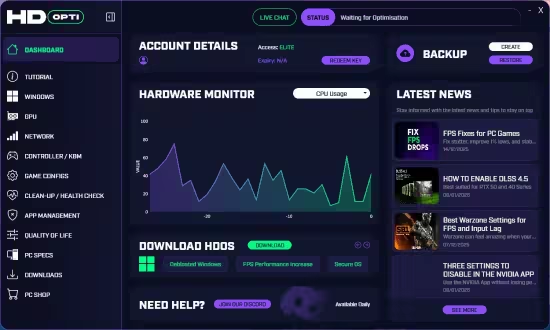
HD OPTI 4.4.2

d96a786a994f8f713deb844ac46b5e1b.avif


HD OPTI 4.4.2

File size: 94.5 MB


Unlock your PC's full potential with better FPS, smoother frame times, improved hit registration, and reduced latency.

Why Gamers Choose HD OPTI
Whether you want more frames, less lag, or better hit reg. HD OPTI is built to help you perform better, faster.

FPS Boost
Boost FPS and unlock smoother gameplay by automatically optimizing your PC's OS, background processes, and performance settings. Maximize every frame for a competitive edge.

Lower Latency
Reduce system latency and input lag with advanced optimizations designed for real-time responsiveness. Experience lightning-fast reactions and a smoother gaming experience.

Better Hit Reg
Improve online gaming performance with network enhancements that stabilize your connection, reduce jitter, and ensure better hit registration in every match.

Ease of Use
Enjoy a clean, intuitive interface built for gamers of all levels. With one-click optimizations and intelligent automation, HD OPTI makes pro-level performance accessible to everyone


HOMEPAGE


Код:
https://hdopti.com/


DOWNLOAD

Код:
https://rapidgator.net/file/95a6b751f6275706b9177cadb75431f1/HD-OPTI-4.4.2..rar.html

Код:
https://nitroflare.com/view/A73FBF04DE09B84/HD-OPTI-4.4.2..rar
 
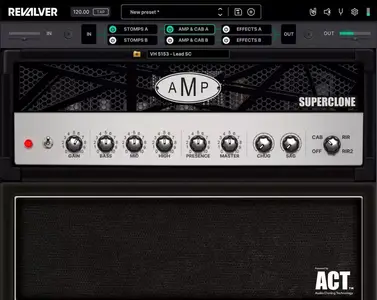
HeadRush Revalver Suite v5.1.2

12c6e51d22b6a88319d16432477d67b4.webp

Free Download HeadRush Revalver Suite v5.1.2 | 380.07 MB
THE ULTIMATE AMP MODELLING AND CAPTURING SOFTWARE


Best in class amp, cab, and effects modeling and ground-breaking amp capture software. A warehouse of amazing gear models at your fingertips and the power to capture a world of tone.
WHAT'S NEW
In ReValver 5.1
ReValver Amp Cloner & SuperClones
The ReValver platform is expanded to included amp capturing with the release of ReValver Amp Cloner 1.0. All clones created in ReValver Amp Cloner are instantly available in ReValver 5.1 and usable alongside ReValver's arsenal of amp, cab, effects, and instrument models.
ReValver Amp Cloner also introduces SuperClones that allow users to combine clones into one powerful SuperClone that morphs between clones with the turn of a knob. Like standard amp clones, SuperClones become instantly available within ReValver 5.1.
Amp Cloner Player
The ReValver Amp Cloner Player is a free module within ReValver 5.1+ that can open amp clones and SuperClones created in ReValver Amp Cloner.
Home Page-
Код:
https://revalver.headrushfx.com/

Rapidgator
Код:
https://rapidgator.net/file/e9f661587a7a78bb9c5b8e714be6ecce/14fb4.HeadRush.Revalver.Suite.v5.1.2.rar.html

Код:
https://nitroflare.com/view/A8AB914B1FFA434/14fb4.HeadRush.Revalver.Suite.v5.1.2.rar
 
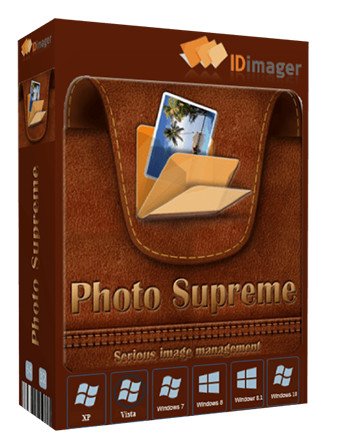
IDimager Photo Supreme 2026.2.0.8951 (x64) Multilingual

a6ca5244d31c3c5f943f09e9c56748c9.jpg


IDimager Photo Supreme 2026.2.0.8951 (x64) Multilingual

File size: 162.9 MB


Photo Supreme v2026 is a thoughtful and forward-looking release. This update has focused on smarter discovery, faster performance, and modern workflow expectations, especially around large catalogs, mobile integration, searches, and team environments.

Import and Select
One of the standout additions in Photo Supreme v2026 is the new multi-pass Import and Select workflow. This allows users to review and refine image selections in multiple stages instead of making all decisions in one pass. It's especially useful for large shoots, letting photographers cull images more deliberately and with less pressure. In addition, the Import and Select feature now loads images faster than ever. Mac users will also appreciate direct iOS device importing, which makes it possible to bring photos straight from an iPhone or iPad into the catalog without relying on intermediary software. This significantly streamlines mobile-first workflows.

Powerful Searches
Photo Supreme now supports natural language searching, allowing users to find images using plain, conversational phrases rather than rigid metadata queries. This feature is powered by AI services such as OpenAI, Google Gemini, or local models with Ollama. This gives users flexibility in how advanced features are enabled. In addition, a new classification system enhances search accuracy by grouping images into meaningful categories upon import, making it easier to surface relevant results in large or complex catalogs.

Video & Media Handling
For users working with video, Photo Supreme v2026 introduces hover-based video previews. Simply hovering over a video thumbnail now reveals a short animated preview, making it much faster to identify clips without opening them individually. Support for modern formats has also been expanded, ensuring the software keeps pace with current media standards.

Sharing with ZIP
Exporting images is more flexible in v2026 thanks to ZIP output support in transfer profiles. This makes it easy to bundle images into a single archive for delivery, backup, or client sharing, all directly from within Photo Supreme. These enhancements simplify distribution workflows and reduce the need for external tools.

GEO Maps
GEOgraphic-Mapping features can now generate maps using not only Google Maps, but also OpenFreeMap with OpenStreetMaps. This removes the need for API keys while still delivering rich, interactive map displays. This update makes location-based browsing easier to configure and more accessible for all users.

Performance and Refinements
Photo Supreme v2026 delivers notable performance enhancements, resulting in faster browsing and a more responsive overall experience. Response times are improved by up to 10%, with especially noticeable gains for large libraries containing many catalog labels.
Catalogs with numerous stacks also see significant performance improvements, particularly when displayed in stacked views.
v2026 includes a wide range of refinements, such as: "Visually similar" stack detection, numerous stability fixes and workflow enhancements, polished UI behavior in collections, searches, and metadata handling

Wait, there's more, a lot more.
New "RAW Files" and "Video Files" catalog states
Added support for Google Gemini as an AI service
Added support for OpenAI GPT-5.2 as an AI Service
Added support for Ministral3 model with Ollama
Added file management support for ACR sidecar files
Update HTTP Server with Photo Supreme Online (Server Edition)
Faster face recognition
Added "AI-Estimated GEO Location" to the AI Panel
Faster result display in the Collection Viewer
"Cascade Metadata" from image to Stack or Version Set is now a background process
A highlighted stroke has been added to the active tabs, improving navigation
Now you can display metadata charts and graphs across multiple tabs
Added support for Ctrl/Cmd+Z functionality in text and memo fields
Defined the new Affinity v3 .AF and .AVIF file format as a supported "other file format"
Switching the collection viewer's view style is faster (eg from Basic to Grid to Clean to Custom Thumb Info)
Advanced Search now has an option to search by "File Size" and "File Size MB"
Finetuned the check for "need to compact" on PostgreSQL (Server Edition)
Bookmark keyboard shortcuts are now a "toggle", similar to ratings and color labels
Expanding nodes in the Catalog Tree is ~25% faster
When using the "Dump Full to Catalog File" feature, there's now the option to create either a "catalog dump" file, or a "catalog with thumbs" dump files
Added a XMP Storage Location for "original file AND non-standard sidecar file"
In "Stacked View", you can now select a specific item from the stack to show
Support for PostgreSQL 18.
And more.

Highlights for v2026
Multi-Pass "Import and Select": Seamlessly transition through passes with a fast-culling system that optimizes your workflow.
Direct iOS Image Import on macOS: Import images directly from your iOS devices with ease.
Video Thumbnail Preview: Hover over a video thumbnail or open the Quick View to view a live video preview.
Natural Language Search Powered by AI: Search your content using plain language, with smart integration through OpenAI, Google Gemini, or Ollama models.
Transfer Profiles can now create ZIP output files: Copy or send sets of images as a single ZIP file for easier sharing.
Maps with OpenFreeMap: Display images on interactive maps using OpenFreeMap/OpenStreetMaps with no API key needed.
Server Edition Thumbnail Caching: Enjoy faster performance with local thumbnail caching, automatic cleanup, and customizable settings for retention and cache size.
Classifications: Enhance search accuracy with an automatic image classification mechanism on import.


HOMEPAGE


Код:
https://www.idimager.com/


DOWNLOAD

Код:
https://rapidgator.net/file/9719915ae664ed3c9bc59349b8d333ab/IDimager_Photo_Supreme_2026.2.0.8951.s.rar.html

Код:
https://nitroflare.com/view/80EA90740EEF82C/IDimager_Photo_Supreme_2026.2.0.8951.s.rar

 
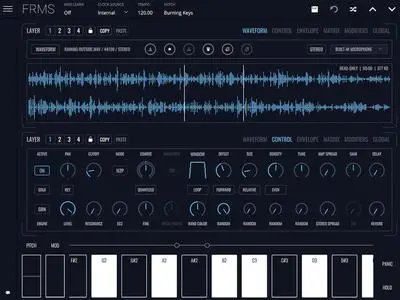
Imaginando FRMS v1.13.0

8b64f3d88ed355112e64b4f1c5763e04.webp

Free Download Imaginando FRMS v1.13.0 | 212.1 Mb
FRMS is a versatile granular synthesizer that combines granular synthesis with FM synthesis using a flexible layering system.


From heavily-dense ambient drones, to glitchy mechanical beings, turn simple sounds into complex evolving soundscapes, with up to four layers of synthesis in any combination.
Features
3 synth engines, 4 layers per voice
Granular Synthesis, FM Synthesis, Subtractive Synthesis
8 FM modes, layers as operators
Granulate Samples or Live Audio
Up to 20 grains per voice, per layer
1 modulation matrix per layer
2 EG's per layer
1 filter per layer and a master filter
8 voices polyphony
4 LFO's with 6 modes
Arpeggiator with 5 modes
Delay and Reverb FX as layer send
High Quality Sample Bank
Built-in Audio Recorder
MPE Compatible
Home Page-
Код:
https://www.imaginando.pt/products/frms-granular-synthesizer

Rapidgator
Код:
https://rapidgator.net/file/bad84d1c5950b7979b79f0c737c4845a/sbrxf.Imaginando.FRMS.v1.13.0.rar.html

Код:
https://nitroflare.com/view/04C65DFAC477D0E/sbrxf.Imaginando.FRMS.v1.13.0.rar
 
IntraWEB Ultimate 16.2.0

c08376f9fa327cb08eb135fa9c07b385.jpg


IntraWEB Ultimate 16.2.0

File size: 324 MB


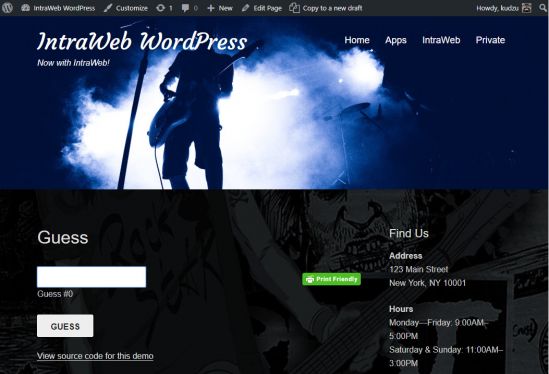
Atozed Software is a corporate sponsor to open source projects and provides web space, server resources, and significant development resources in support of these projects. AD web application development framework for Delphi and C++. Develop like a VCL Forms application, but deploy to the web as standard HTML and jаvascript.

RAD web application development framework for Delphi and C++. Develop like a VCL Forms application, but deploy to the web as standard HTML and jаvascript.

Whats New


HOMEPAGE


Код:
https://www.atozed.com


DOWNLOAD

Код:
https://rapidgator.net/file/01ab089822cd07170285c664f6516f82/IntraWEBUltimate16..rar.html

Код:
https://nitroflare.com/view/8875853CD9E07C8/IntraWEBUltimate16..rar
 
Irisdown Countdown Timer v2.0.17

50a5e99cffa8ae47407058f26431100f.webp

Free Download Irisdown Countdown Timer v2.0.17 | 1.8MB
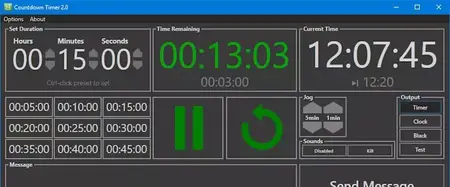
A countdown timer for Windows, written for show operators by a show operator. Simple intuitive user interface with plenty of options hidden underneath. Displays time remaining, current time and a message to a secondary display. Full network control via a suitable controller e.g. Stream Deck with Bitfocus Companion. Trigger audio clips at set timer values.


Presets
Save up to 9 presets or manually enter hours/minutes/seconds at any time.
Timer Control
No more buttons than you need - play/pause toggle and reset. Once running, the timer will show you total elapsed time and expected end time. Add or subtract from the time remaining while the timer is running with the Jog buttons.
Message
Enter a message and send to screen. Messages will briefly flash then remain until cleared.
Sounds
Add triggers to play audio files at a certain time remaining.
Home Page-
Код:
https://irisdown.co.uk/countdowntimer.html

Rapidgator
Код:
https://rapidgator.net/file/a17b774fd9d2481fab02e39801dc013c/t0yum.Irisdown.Countdown.Timer.v2.0.17.rar.html

Код:
https://nitroflare.com/view/16F20EAD09C066D/t0yum.Irisdown.Countdown.Timer.v2.0.17.rar
 
JPLAY Femto v7.0.0

ddbf87564b254a526d03e20d50a2ccb0.webp

Free Download JPLAY Femto v7.0.0 | 7.9MB
JPLAY FEMTO is a software player created by fanatical audiophiles whose only goal is pursuit for ultimate PC-based music playback. Extreme programming optimizations deliver the highest possible sound quality available.


Home Page-
Код:
https://jplay.eu/download/

Rapidgator
Код:
https://rapidgator.net/file/1ea58ddaf9fec9507fc9e050d786cd13/1e39q.JPLAY.Femto.v7.0.0.rar.html

Код:
https://nitroflare.com/view/5168869DACD5EA5/1e39q.JPLAY.Femto.v7.0.0.rar
 
Kataloger 2026.61

bcce94efe08dce36f6cad711c10cefff.jpg


Kataloger 2026.61

File size: 26.4 MB


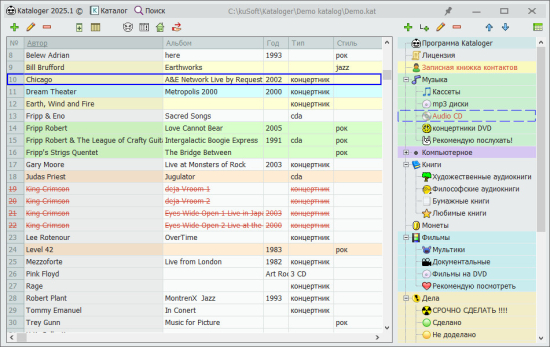
Kataloger is a universal cataloguer program with which you can catalog and systematize everything: an inventory of any thing or product (books, coins, spare parts, records, disks.), a contact notebook, your own convenient database, quick text notes, organize ideas, make plans, keep a to-do list and set priorities, control the availability of things in stock.

keep records of debts through a special function of loans, highlight important things in color and fonts, attach files, make estimates, edit tables and quickly sort them, quickly compare things according to the parameters described in the table, organize data into a tree, set icons for clarity, sort by shelves and by topic, classify, group, sort, schematize to put things in order, to organize - the Kataloger program will help you do all this!

Kataloger is a personal information manager, PIM system
1) universal cataloger
2) tree notebook outliner
3) file organizer


HOMEPAGE


Код:
https://kuzduk.ru/kataloger/


DOWNLOAD

Код:
https://rapidgator.net/file/aa2392a5d70b0477b795c50755f2fd01/Kuzduk.Kataloger.v2026.61..rar.html

Код:
https://nitroflare.com/view/ED4BAF31A84AAE8/Kuzduk.Kataloger.v2026.61..rar
 
Letasoft Sound Booster v1.12.0.544

9fa0a2cd3d73d562fbc4985e13f35d01.webp

Free Download Letasoft Sound Booster v1.12.0.544 | 8.0MB
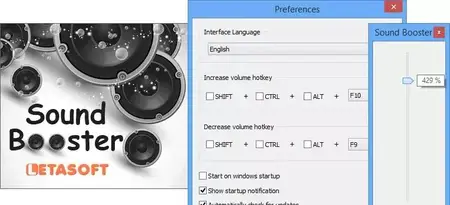
Sometimes you turn the volume up to the maximum and still can't hear what's being played well. Letasoft Sound Booster can increase the sound volume of any Windows program, even if the current system volume is at maximum.


Amplify audio output beyond system limits for all your favorite PC applications!
With Letasoft Sound Booster, you can make any program as loud as you want!
You can raise the volume to your desired level, even if the system volume is set to maximum. Sound Booster processes all audio being played on your computer and boosts it before it reaches the sound card.
No need to buy external speakers for your laptop
Considering purchasing a set of speakers for your laptop? You might want to rethink your plans. If your laptop's sound is usually loud enough, and the only issue you experience is with specific programs or media content recorded at low volume, you can resolve the issue by using Sound Booster.
Works for any application!
Sound Booster can enhance the audio of any web browser, media player, game, or other Windows application that plays sound. You can use your software as usual, without any special adjustments. No plugins or add-ons are required. Sound Booster amplifies sound in real-time, with no configuration necessary.
Home Page-
Код:
https://www.letasoft.com/

Rapidgator
Код:
https://rapidgator.net/file/71c16f603ab3ebf3138c20ff5fb3a04c/j02ux.Letasoft.Sound.Booster.v1.12.0.544.rar.html

Код:
https://nitroflare.com/view/6034C5DEAD66E76/j02ux.Letasoft.Sound.Booster.v1.12.0.544.rar
 
Lexicon PCM Native Effects Plug-in Bundle v1.3.14.8017

c28b6fed84a80839c6b1d136e68e9161.webp

Free Download Lexicon PCM Native Effects Plug-in Bundle v1.3.14.8017 | 20.1MB
Following the award-winning success of the PCM Native Reverb Bundle, Lexicon introduces a complete collection of the finest effects plug-ins available. The PCM Native Effects Bundle is the ultimate studio plug-in package for creating professional, inspirational mixes within popular DAWs such as Pro Tools®, Logic®, Nuendo® or any other AudioUnit™ or VST® compatible host.


With all the flexibility you would expect from native plug-ins, this powerhouse bundle delivers 7 Lexicon effect plug-ins - and with decades of legacy products to pull from - the PCM Native Effects Bundle includes the finest collection of Factory Presets available. Designed to bring the highest level of sonic quality and function to all of your audio applications, the PCM Native Effects Bundle will take center stage in your DAW.
Includes 7 Unique Lexicon Plugins
Pitch Shift
MultiVoice Pitch
Chorus
Resonant Chords
Random Delay
Dual Delay
Stringbox
Features
New: Current version only available on FLUX::Center app
New: iLok Manager authorize to local storage or iLok USB stick
New: Apple Silicon Native optimized
New: VST3 support
New: OS support on modern Windows and Mac
New: All LEXICON licenses allow two locations to be activated simultaneously
7 sonically brilliant Lexicon effect algorithms
Hundreds of versatile presets
Formats that work seamlessly in any AAX, VST, Audio Unit, or compatible DAW
Graphical real-time display for visualizing the effect in different ways
Stereo/Phase meters for ensuring mono compatibility
Presets can be stored in a DAW- independent format which allows custom presets to be transferred between DAWs
Full parameter control and automation
Input, output and feedback meters for quick assessment of audio levels within the algorithm
Home Page-
Код:
https://lexiconpro.com/en/products/pcm-native-effects-plug-in-bundle

Rapidgator
Код:
https://rapidgator.net/file/80dca58302b28ea05fb4736414a833e3/pib03.Lexicon.PCM.Native.Effects.Plugin.Bundle.v1.3.14.8017.rar.html

Код:
https://nitroflare.com/view/54156ED1CE5540E/pib03.Lexicon.PCM.Native.Effects.Plugin.Bundle.v1.3.14.8017.rar
 
Lexicon PCM Native Reverb Plug-in Bundle v1.3.14.8017

e0da0e7dfe334bb3cbfe4f5d7affef63.webp

Free Download Lexicon PCM Native Reverb Plug-in Bundle v1.3.14.8017 | 17.4MB
Finally, hardware quality without the hardware
For over 40 years Lexicon has been recognized as the gold standard of digital reverb and effects processing and has continuously introduced leading edge technology for the audio industry. Lexicon has again rocked the audio industry with a complete collection of the finest reverb plug-ins available. The PCM Native Reverb Plug-In Bundle is the ultimate reverb plug-in for creating professional, inspirational mixes within popular DAWs like Pro Tools, Logic, and any other AAX, VST, Audio Unit, or compatible platform.


With all the flexibility you would expect from a native plug-in, this powerhouse Bundle delivers 7 legendary Lexicon reverbs with hundreds of the most versatile and finely-crafted studio presets, including recognizable classics from Lexicon's immense library of sounds. Designed to bring the highest level of sonic quality and function to all your audio applications, the PCM Native Reverb Bundle will take center stage in your DAW.
PCM Native Reverb Plugins Bundle Includes
Vintage Plate
Plate
Hall
Room
Random Hall
Concert Hall
Chamber
Features
New: Current version only available on FLUX::Center app
New: iLok Manager authorize to local storage or iLok USB stick
New: Apple Silicon Native optimized
New: VST3 support
New: OS support on modern Windows and Mac
New: All LEXICON licenses allow two locations to be activated simultaneously
7 legendary Lexicon Reverbs
Hundreds of brilliantly crafted studio presets
Formats that work seamlessly in any AAX, VST, Audio Unit, or compatible DAW
Graphical real-time display illustrating the frequency stages of each algorithm
Visual EQ section for easy adjustment of both early and late reflections
Presets can be stored in a DAW independent format which allows custom presets to be transferred between any DAWs
Full parameter control and automation
Input and output meters for quick assessment of audio levels going to and from the reverb
Home Page-
Код:
https://lexiconpro.com/en/products/pcm-native-reverb-plug-in-bundle

Rapidgator
Код:
https://rapidgator.net/file/a99e96d7be9ad2a0e33ebc404ac436e0/vkbw8.Lexicon.PCM.Native.Reverb.Plugin.Bundle.v1.3.14.8017.rar.html

Код:
https://nitroflare.com/view/930D79A1B238809/vkbw8.Lexicon.PCM.Native.Reverb.Plugin.Bundle.v1.3.14.8017.rar
 
Luban 3d 11.04.2026

d9d0bce055fb692372a59d91f08d419a.png

Release Name: LuBan 3D 11.04.2026
Size: 68.2 MB


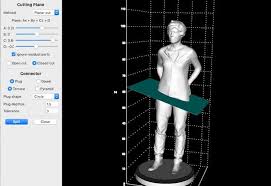
Description: LuBan is generative design software that helps designers and makers in rapid production of their creations. LuBan automatically generates 3D models in various forms, such as lithophane, stack, hash, plate, relief, module, and wireframe. The generated model can be fabricated by 3D printing, laser cutting, and CNC milling.

cd00dff6968c623d39daff8681c71a88.jpg


LuBan is actively developed by a highly focused software team, led by Lujie Chen in Singapore and Larry Sass in USA.

Eyeglasses
Design eyeglasses frames based on a template image.

Lithophane
Turn any 2D photo into a 3D printed photo.

Photo Magic
Generate 3D models from a 2D photo.

Mesh Processing
Generate 3D models from a 3D model.

Код:
https://rapidgator.net/file/4677a2065541d2d741037139ead70bc4/Luban.3d.11.04.2026.rar.html

Код:
https://nitroflare.com/view/A3DCC2E12FBA7B5/Luban.3d.11.04.2026.rar
 
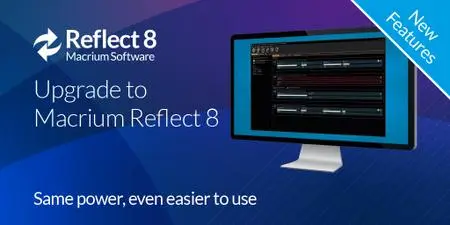
Macrium Reflect 8.1.8851 (x64) Multilingual

8c34719d58903eda27bcf0c1f5648cc9.webp

Free Download Macrium Reflect 8.1.8851 (x64) Multilingual All Editions | 732.2 Mb
Macrium Reflect - backup and recovery for individual PCs and servers. Reflect Workstation - Designed for endpoint backup of business-critical PCs and workstations. Peace of mind for organisations when backing up Windows PCs.


Solution highlights:
- New Backup Engine: Incremental and differential images up to 60 times faster
- Instant virtual booting of backup images: instantly create, start and manage Microsoft Hyper-V virtual machines
- Ultra-fast Live imaging of windows systems, physical and virtual
- Restore images to dissimilar hardware using Macrium ReDeploy
- Greatly simplified administration including pre-defined Backup Plans for popular backup strategies
- Fully featured file and folder level backup and recovery
- Updated support for all the latest Windows Operating Systems and disk formats
Macrium Reflect Features:
- Backup your entire PC to a single compressed image file.
- Backup files and folders to a single compressed archive file.
- Recover partitions and entire disk images with just a few clicks of your mouse
- Dynamic disk support
- MBR and GPT disk support
- Restore images to dissimilar hardware using Macrium ReDeploy
Minimum System Requirements:
At least 512MB RAM (1GB min recommended)
Windows XP Service Pack 3 or Windows Server 2003 Service Pack 2 or later
Home Page-
У Вас недостаточно прав для просмотра ссылок. Войдите или зарегистрируйтесь.


Rapidgator
Код:
https://rapidgator.net/file/7807b6c2ba61fd240f44f2415dc1837f/y4t1m.Macrium.Reflect.8.1.8851.x64.Multilingual.rar.html

Код:
https://nitroflare.com/view/14351459DBDC35B/y4t1m.Macrium.Reflect.8.1.8851.x64.Multilingual.rar
 
Macrium Reflect 8.1.8854 (x64) Multilingual

348e4a3a70632148dfcf07fef6fa6c5a.jpg


Macrium Reflect 8.1.8854 (x64) Multilingual

All Editions | File size: 732.5 MB


Macrium Reflect - our image based backup and disaster recovery solutions have taken another big step forward in speed, simplicity and power. Our entire focus is helping organisations protect business critical data and systems, without fuss and budget breaking costs.

Solution highlights
- New Backup Engine: Incremental and differential images up to 60 times faster
- Instant virtual booting of backup images: instantly create, start and manage Microsoft Hyper-V virtual machines
- Ultra-fast Live imaging of windows systems, physical and virtual
- Restore images to dissimilar hardware using Macrium ReDeploy
- Greatly simplified administration including pre-defined Backup Plans for popular backup strategies
- Fully featured file and folder level backup and recovery
- Updated support for all the latest Windows Operating Systems and disk formats

Macrium Reflect Workstation Features
- Backup your entire PC to a single compressed image file.
- Backup files and folders to a single compressed archive file.
- Recover partitions and entire disk images with just a few clicks of your mouse
- Dynamic disk support
- MBR and GPT disk support
- Restore images to dissimilar hardware using Macrium ReDeploy

Macrium Reflect Server Features
- Backup your entire physical or virtual Server to a single compressed image file.
- Backup files and folders to a single compressed archive file.
- Recover partitions and entire disk images with just a few clicks of your mouse
- Dynamic disk support
- MBR and GPT disk support


HOMEPAGE


Код:
https://www.macrium.com/


DOWNLOAD

Код:
https://rapidgator.net/file/3f51d8278c4e87328e443172248d5998/Macrium_Reflect_8.1.8854..rar.html

Код:
https://nitroflare.com/view/CE05D3E2A578E72/Macrium_Reflect_8.1.8854..rar
 
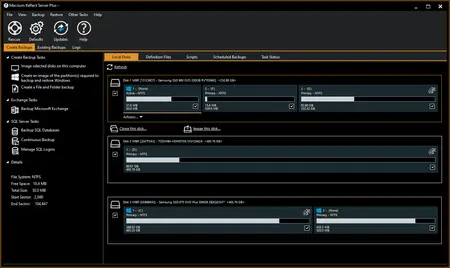
Macrium Reflect X Workstation 10.0.8843 (x64) WinPE

a463057f4bcc659a27a3d10392c44c8b.webp

Free Download Macrium Reflect X Workstation 10.0.8843 (x64) WinPE | 575 Mb
Macrium Reflect X is a fully featured and sophisticated tool for backing up the most critical of servers running applications such as Microsoft Exchange email, and SQL databases. IT professionals will be able to very quickly install and run backups using Server Plus. You can rely on it to protect your critical systems and provide rapid and trouble free recovery.


Designed for endpoint backup of business-critical servers, running Microsoft Exchange email or SQL databases, in a commercial environment. Macrium Reflect Server Plus is a reliable recovery solution for everything from individual files to entire Windows Operating Systems.
The Power of X
2X Faster Performance
Experience backup, imaging, and recovery operations twice as fast as Reflect 8.x, minimizing downtime and boosting efficiency.
Resumable Imaging
Never worry about interruptions again. Image creation seamlessly continues from where it left off, ensuring continuous protection.
Open-Source Accessibility
Our image file formats are now open source, offering full transparency and flexibility for your data recovery and system deployment.
Comprehensive Device Support
From traditional x86 systems to the latest ARM-based devices, we've got your entire fleet covered with optimized performance across all platforms.
Enhanced Backup Filtering
Tailor your backups and system images with precision, enhancing performance and optimizing storage utilization.
Air-Gapped Activation for Business
Streamlined offline license activation for all business license types, perfect for high-security and air-gapped environments.
Minimum System Requirements:
At least 512MB RAM (1GB min recommended)
Windows XP Service Pack 3 or Windows Server 2003 Service Pack 2 or later
Home Page-
Код:
https://www.macrium.com/

Rapidgator
Код:
https://rapidgator.net/file/14847f1a01bc48f1c7310ac5bc09724a/1jt7a.Macrium.Reflect.X.Workstation.10.0.8843.x64.WinPE.iso.html

Код:
https://nitroflare.com/view/526222B70A9780E/1jt7a.Macrium.Reflect.X.Workstation.10.0.8843.x64.WinPE.iso
 
ManicTime Pro 2026.1.2.1 Multilingual

73c08f2be92cf245350b15c77a0b20bb.jpg


ManicTime Pro 2026.1.2.1 Multilingual

File size: 191.1 MB


ManicTime allows you to keep up with your employees' work, send accurate progress reports, and manage your time better than ever before. This kind of software can help your business be more efficient when it comes to internal employee affairs as well as the external partnerships.

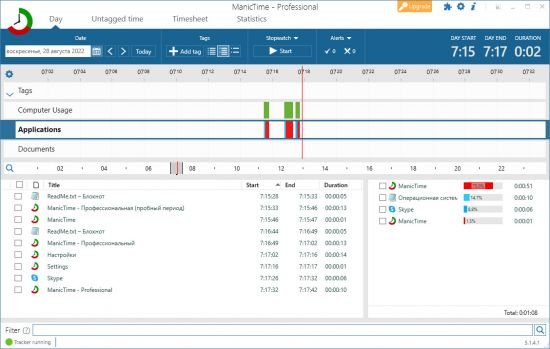
Automatic tracking
ManicTime automatically records your computer usage. It remembers which apps you've used and for how long. It will also remember which web sites you've visited and which documents you've worked on. All this data will help you keep track of your work hours.

Privacy
Data, which ManicTime collects, is stored on your machine and not sent anywhere. It is not shared with us or any third party and exists only on your machine.

Offline work
ManicTime is not a cloud based service, instead it uses a local datastore, so all recorded data will be kept on your machine. This also means that it will work the same with or without internet connection.

Accurate timekeeping
All the data ManicTime collects will be presented in a easy to understand graphical interface. This will help you to quickly figure out when you went to lunch and when you've switched tasks. From now on, your logged hours will be accurate and simple to track.

Easy timesheets
From the hours you logged its easy to create almost any kind of report. Once you create the report, you can easily copy it to Excel or some other tool and create an invoice there.

Integrate with other systems
ManicTime can integrate with task based systems, like Jira or GitHub. You can use ManicTime to enter your work hours, then send the timesheet back to specific issue.

Company wide reports
Use ManicTime in your company or your team. ManicTime Server will collect all data and generate useful reports.

Auto tagging
ManicTime captures a lot of data and you can use this data to create work activities. For example you can say that all facebook activity is "Browsing" and that all MS Word usage is "Work".

Away time
Equally important as tracking computer usage is tracking non usage. When you step away from the computer, ManicTime will track this as Away time. When you return, you can create a note of what you were doing during Away.

Stopwatch
Even though ManicTime excels at automatic time tracking, you can still use a stopwatch to manually track your time.


HOMEPAGE


Код:
https://www.manictime.com/


DOWNLOAD

Код:
https://rapidgator.net/file/a0e5b18de3616efb3be9e941d93942c5/ManicTime_Pro_2026.1.2.1..7z.html

Код:
https://nitroflare.com/view/422DA01C0DF0968/ManicTime_Pro_2026.1.2.1..7z
 
MediaMonkey Gold 2024.2.2.3218 RC1 Multilingual

bd76d76eb2a4a0aef0028314c7119316.jpg


MediaMonkey Gold 2024.2.2.3218 RC1 Multilingual

File size: 123.48 MB


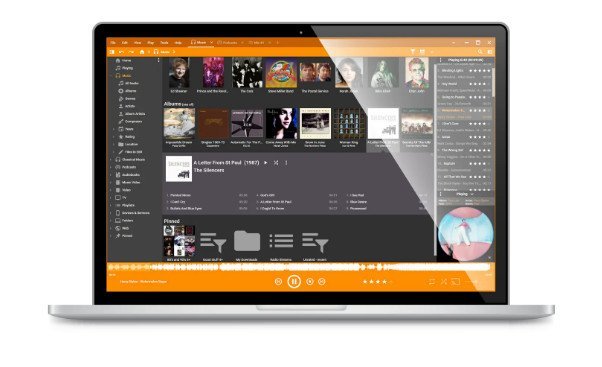
MediaMonkey is a music manager and media jukebox for serious music collectors and iPod users. It catalogs your CDs, OGG, WMA, MPC, FLAC, APE, WAV and MP3 audio files. It looks up missing Album Art and track information via Freedb and the web, and includes an intelligent tag editor and an automated file and directory renamer to organize your music library.

Its player automatically adjusts volume levels so that you don't have continually fiddle with the volume control and supports hundreds of Winamp plug-ins and visualizations; or if you prefer, it can use Winamp as the default player.
MediaMonkey includes a CD ripper, CD/DVD Burner, and audio converter for saving music, and manual or automated playlist editors for creating music mixes. It also includes portable audio device synchronization that allows you to synch tracks and play lists with devices such as the iPod and other portable audio devices.

Gold FEATURES
- Find music with advanced search functionality that digs through your collection to find tracks according to almost any criteria that you can think of. Search for Composer, Year, Beats per minute; find Lyrics, etc. and stop pulling your hair out trying to find music you know you have.
- Customize your library by setting filters to display only Artists or Albums that match criteria that you set. For example, set a filter that causes Artists to appear in the tree only if they contain Albums that are currently available, and are of any genre other than 'Children'.
- Encode unlimited MP3s without having to manually install a new MP3 encoder (the free version of MediaMonkey includes a time-limited LAME MP3 encoder. If you're so inclined, you can manually replace it with the free LAME encoder, or you can just upgrade to MediaMonkey Gold).
- Catalog your physical CDs and use the Virtual CD feature to keep track of what CDs you own and at the same time see which subset of tracks from those CDs are copied to your hard drive. Instead of tracking your CDs and tracks separately, the virtual CD function gives you an integrated view...
- Import and save audio tracks from Audio CDs and MP3 CDs with unprecedented flexibility using the Virtual CD. It allows you to sample tracks from various sources, select which ones you want to import, and then import and save the files in a single operation.
- Create Previews, short samples of audio tracks, that you can use when trying to decide which audio files you want to add to your collection.
- Use a Sleep Timer to play your music, gradually fade it over a set period of time, and then turn off your PC - perfect for listening to tunes before you go to sleep.
- Burn CDs at the maximum speed permitted by your hardware.

All MediaMonkey Gold Features
- Audio / Music Manager
- Media Player (play MP3, OGG, WMA etc.)
- Equalizer / DSP Effects / Volume Leveler
- Party Mode & Auto-DJ
- CD Ripper: Encode MP3, OGG, WMA, FLAC
- Audio Converter
- Auto Renamer / File Organizer
- Auto Tag Editor with Album Art Lookup
- Find Duplicate Tracks and Missing Tags
- Playlist Manager (auto music mixes)
- Generate reports and statistics
- Customization via scripts
- iPod and MP3 Player Synchronization
- Integrated CD/DVD Burner (Audio & Data) (up to 48x) (up to 4x)
- File Monitor (automatically updates library)
- Advanced Searches and AutoPlaylists
- Advanced Portable Device Synchronization with on-the-fly format conversion
- Unlimited MP3 encoding
- Virtual CD / Previews
- Advanced Filters
- Sleep Timer


HOMEPAGE


Код:
https://www.mediamonkey.com/


DOWNLOAD

Код:
https://rapidgator.net/file/d0bc471027c878b2ffa42238e9f5a075/MediaMonkey_2024.2.2.3218.rar.html

Код:
https://nitroflare.com/view/44B3BDFC5A1EE08/MediaMonkey_2024.2.2.3218.rar
 
Mingus Audio Mingus v1.1.0

d0bd822fbca65d509c6f6ffde612235f.webp

Free Download Mingus Audio Mingus v1.1.0 | 194.2MB
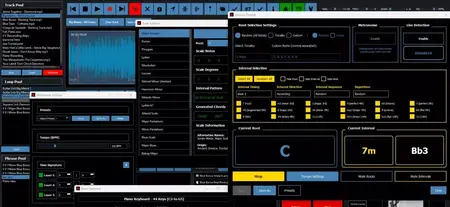
Practice music smarter with mingus. mingus is packed with an extensive set of tools for effective, consistent and creative music practice sessions.


Fill your Track Pool with your reference audio or video tracks and dive into focused practice like never before.
Instantly set loops to master specific sections of any song and load them in one click. Slow down audio and video tracks and change song Key.
Record your ideas and build your improvisation vocabulary by saving your best phrases to the Phrase Pool.
Create custom chord progressions and piano backing tracks in seconds.
Push your practice further with an Advanced Multi-layer Metronome with Beat Display, and Tempo Ramp options.
Extract Chords from complex audio, and transpose them for your Instrument. Insert chords as markers in your tracks.
How fast can you react to chord changes? Random Chord Player will just make you better at it.
Use a warm-sounding virtual piano to record tracks or spark inspiration.
Mingus Includes Scale Syllabus App and Chord Syllabus App with extensive scale and chord information and piano sound on mouse hover.
Train your ears and fingers with the powerful Intervals App.
You won't find a better Intervals Coach.
Write and transpose licks into all 12 keys, notate your music, and export PDF scores and books.
Practicing in 12 keys will make you grow as a musician.
Home Page-
Код:
https://mingusaudio.com/

Rapidgator
Код:
https://rapidgator.net/file/9bbea679be063f459185841d2cb9fac3/3hn2o.Mingus.Audio.Mingus.v1.1.0.rar.html

Код:
https://nitroflare.com/view/9C8B4550A75F4F3/3hn2o.Mingus.Audio.Mingus.v1.1.0.rar
 
Minimeters 1.0.29.251 (win/macos/linux)

046c75ea7cd7992c34972058a15e348e.jpg

Minimeters 1.0.29.251 (win/macos/linux)
File size: 231.6 MB


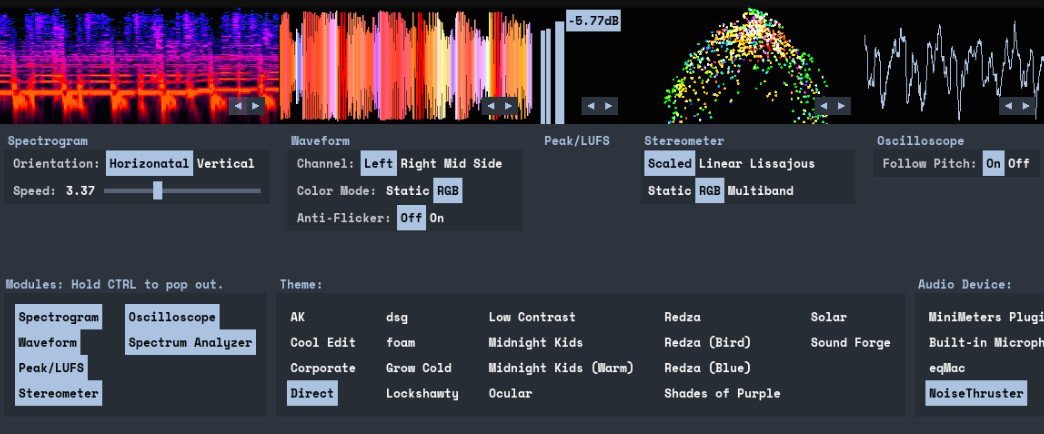
MiniMeters is a simple audio metering Application & Plug-In suite for Windows, macOS, and Linux. In the Standalone app, monitor any stereo Input, Output*, or use the included Audio Server plug-in to send audio into the MiniMeters app. New in v1.0: MiniMeters now includes plug-in versions of each meter and the new Quad Layout. Customize the layout of meters in a Horizontal bar, pop out meters to create a custom layout, or swap to the new Quad Layout for a simple display to cover most needs.
Features
7 modules to choose from to build your perfect metering setup: Spectrogram, Waveform, Loudness, Stereometer, Oscilloscope, VU, and Spectrum.
Arrange each module in any order in a Horizontal bar, pop them out to separate windows to create a custom layout.
Capture your default audio device on Windows, macOS 14.2+, or Linux.
Use the Audio Server plug-in to send audio to MiniMeters directly from your DAW or plug-in host.
Clip the last 10 or 60 seconds of audio received by MiniMeters or start a recording and capture audio from your whole system.
Dive deep and create your own color scheme to set the mood.
No copy protection, just download and install.
Includes VST3 / Audio Unit / CLAP Plug-Ins
MiniMeters: Standalone
Audio Server (Formally MiniMetersServer) Plug-In: For sending audio from a DAW or host to the MiniMeters Standalone Application
Oscilloscope Plug-In
Spectrogram Plug-In
Spectrum Plug-In
Stereometer Plug-In
VU Plug-In
Waveform Plug-In
Modules
Spectrogram
Analyze the frequency content of your audio over time.
Choose between Horizontal or Vertical display.
Waveform *Available In Demo*
Analyze the Volume of your audio over time.
Select "Multi-Band" to see a DJ-style colored Waveform.
Adjust the speed of the Waveform.
Compare the volume of the Low, Mid, and High frequencies using the "History" setting.
Peak/LUFS *Available In Demo*
View the immediate Peak and LUFS volume in this simple Module.
Stereometer
Analyze the stereo width and balance with 3 modes
"Scaled" zooms in on the lower volume audio to show detail you might be missing.
"Linear" shows a unipolar view of your audio.
"Lissajous" shows an unadulterated Lissajous function.
Switch the color to "RGB " or "Multi-band" to see stereo width and frequency content at the same time.
Oscilloscope
See a detailed waveform view of your audio immediately. With "Pitch Tracking" mode you can easily see the shape of your waveform.
Spectrum Analyzer
View the frequency content of your audio in "Left/Right" or "Mid/Side" mode.
"Frequency Readout" shows the loudest frequency in your audio. Great for finding that note or tricking your friends into thinking you have perfect pitch.
Adjust the "Slope" to create a flat target to reference your mix against.
...and more

Код:
https://rapidgator.net/file/6838268427ce97b5b4ebd02893daea63/MiniMeters1..zip.html

Код:
https://nitroflare.com/view/ED8E9B103988193/MiniMeters1..zip
 
MiniMeters 1.0.29.252 (Win/macOS/Linux)

ba3525ebfb9c0fd3b5adb20535d9c08f.webp

Free Download MiniMeters 1.0.29.252 (Win/macOS/Linux) | 231.7 Mb
MiniMeters is a simple audio metering Application & Plug-In suite for Windows, macOS, and Linux. In the Standalone app, monitor any stereo Input, Output*, or use the included Audio Server plug-in to send audio into the MiniMeters app. New in v1.0: MiniMeters now includes plug-in versions of each meter and the new Quad Layout. Customize the layout of meters in a Horizontal bar, pop out meters to create a custom layout, or swap to the new Quad Layout for a simple display to cover most needs.


Features
7 modules to choose from to build your perfect metering setup: Spectrogram, Waveform, Loudness, Stereometer, Oscilloscope, VU, and Spectrum.
Arrange each module in any order in a Horizontal bar, pop them out to separate windows to create a custom layout.
Capture your default audio device on Windows, macOS 14.2+, or Linux.
Use the Audio Server plug-in to send audio to MiniMeters directly from your DAW or plug-in host.
Clip the last 10 or 60 seconds of audio received by MiniMeters or start a recording and capture audio from your whole system.
Dive deep and create your own color scheme to set the mood.
No copy protection, just download and install.
Includes VST3 / Audio Unit / CLAP Plug-Ins:
MiniMeters: Standalone
Audio Server (Formally MiniMetersServer) Plug-In: For sending audio from a DAW or host to the MiniMeters Standalone Application
Oscilloscope Plug-In
Spectrogram Plug-In
Spectrum Plug-In
Stereometer Plug-In
VU Plug-In
Waveform Plug-In
Modules
Spectrogram:
Analyze the frequency content of your audio over time.
Choose between Horizontal or Vertical display.
Waveform *Available In Demo*:
Analyze the Volume of your audio over time.
Select "Multi-Band" to see a DJ-style colored Waveform.
Adjust the speed of the Waveform.
Compare the volume of the Low, Mid, and High frequencies using the "History" setting.
Peak/LUFS *Available In Demo*:
View the immediate Peak and LUFS volume in this simple Module.
Stereometer:
Analyze the stereo width and balance with 3 modes:
"Scaled" zooms in on the lower volume audio to show detail you might be missing.
"Linear" shows a unipolar view of your audio.
"Lissajous" shows an unadulterated Lissajous function.
Switch the color to "RGB" or "Multi-band" to see stereo width and frequency content at the same time.
Oscilloscope:
See a detailed waveform view of your audio immediately. With "Pitch Tracking" mode you can easily see the shape of your waveform.
Spectrum Analyzer:
View the frequency content of your audio in "Left/Right" or "Mid/Side" mode.
"Frequency Readout" shows the loudest frequency in your audio. Great for finding that note or tricking your friends into thinking you have perfect pitch.
Adjust the "Slope" to create a flat target to reference your mix against.
...and more
System Requirements:
Windows 10+
x64 (Intel or AMD) processor required
macOS 10.15 or newer
Intel & Apple Silicon Macs supported
Linux Kernel 5.4.0-174 or newer
x86_64 or arm64 processor required
Tested to work on Ubuntu 20.04+
Built on Ubuntu 22.04 using glibc v2.31
Stick Mode:
wlr-layer-shell is required on Wayland.
_NET_WM_WINDOW_TYPE_DOCK is required on X11.
Home Page-
Код:
https://directmusic.itch.io/minimeters

Rapidgator
Код:
https://rapidgator.net/file/3e1f9f9c604ff1d57bae44ceef380808/wi5p9.MiniMeters.1.0.29.252.WinmacOSLinux.zip.html

Код:
https://nitroflare.com/view/DC62FDA69731D4C/wi5p9.MiniMeters.1.0.29.252.WinmacOSLinux.zip
 
Назад
Сверху