• Здравствуйте. Сайт заработал в архивном режиме форум www.old.nado.in

All mitsumi'1s Applications !! (updated daily)

  • Автор темы Автор темы mitsumi1
  • Дата начала Дата начала
Starus Data Restore Pack 5.0 Multilingual
6d32d3b28c1839a83d053a8acbf1f2cb.jpg


Starus Data Restore Pack 5.0 Multilingual

All Edition | Windows x86/x64 | File size: 199.29 MB


Starus Data Restore Pack can make a full snapshot of the disk being recovered in order to perform the recovery operation on a virtual image instead of the real disk. This allows minimizing any potential ill effects a series of read operations could do to the damaged drive.

Fastest on the Market
At the time of this writing, Starus Data Restore Pack is the fastest data restore software on the market. Featuring new and improved disk analysis algorithms, the data restoration product can locate and list deleted files and folders in a snap. The performance is so high that we used Windows Explorer as a UI model for our product. With Starus Data Restore Pack, browsing deleted files and folders is as quick and easy as using Windows Explorer to browse the disk.

Dedicated Data Recovery Mode
Starus Data Restore Pack offers one quick and two dedicated file recovery modes. The "slow scan" mode helps locate files stored on corrupted, formatted and inaccessible disks (memory cards, flash drives, etc.) by reading the entire disk sector after sector. The "slow scan" mode allows restoring data from disks that are just about to fail, fix information from corrupted disks and deleted partitions.

Advanced Picture Recovery Mode
The second dedicated data restore mode is new to Starus Data Restore Pack, and involves a comprehensive scan of the disk in order to locate digital pictures and RAW files specifically. The pictures, once located, can be previewed before being recovered.

Step-By-Step Wizards
Starus Data Restore Pack offers fully guided, step-by-step wizards to make data restoration easy for even the least experienced users. The data restore wizards help choosing the right mode and configuring any settings.

Pre-Recovery Preview
What you see is what you get. Starus Data Restore Pack comes with a fully visual pre-recovery preview. Hundreds of file formats are supported including office documents, pictures and RAW files, compressed archives, email messages with attachments, music and video.

Advanced Features
Starus Data Restore Pack inherits a set of advanced features to be used by data recovery specialists and computer engineers. The data restore tool can create a full snapshot of a disk in order to commit any restoration steps to the disk image instead of the real disk. This makes the whole process so much safer, especially when nearly dead disks are in the work.

Starus Data Restore Pack can burn recovered files onto a CD/DVD or upload them over an FTP connection, helping to deal with huge amounts of information being recovered.

System Compatibility
Starus Data Restore Pack supports in all versions of Windows from Windows 95 to Vista, Windows 7 and 2008 Server. All Windows file systems are supported including FAT, FAT32, NTFS, and NTFS5, including NTFS-compressed files.

Features
• Supported file systems: FAT, FAT32, NTFS, NTFS5
• Supported storage media: hard disks, SSD drives, memory cards, USB flash memory
• Near-instant recovery or recently deleted files
• Dedicated picture recovery mode
• Support for RAW file formats (Canon, Nikon, Pentax, Olympus, SONY, Panasonic cameras)
• Slow recovery mode for restoring data from damaged disks and formatted partitions
• Full Windows 7 and Windows 2008 Server support
• Full legacy support from Windows 95 to Vista
• Fully guided, step-by-step wizards
• What you see is what you get: pre-recovery preview for hundreds of file types
• Explorer-like user interface to browse deleted files and folders
• Virtual disk images and disk snapshots for safer recovery
• FTP upload, CD/DVD and ISO image support

Supported Storage Media
Starus data restore software supports all types of magnetic and solid-state storage media, including hard disks, all kinds of memory cards, SSD drives and USB flash drives. Some MP3 players and digital cameras are also supported provided they're connected to a computer via a USB cord.

What's new
• official site does not provide any info about changes in this version

Edition: Unlimited / Commercial / Office / Home


HOMEPAGE


Код:
https://www.starusrecovery.com/


DOWNLOAD

Код:
https://rapidgator.net/file/9d07f1141b6cdd8a96c7b930f53a1910/Starus.Data.Restore.Pack.5.0.rar.html

Код:
https://nitroflare.com/view/5966FD22297FB18/Starus.Data.Restore.Pack.5.0.rar
 
Starus File Recovery 7.2 Multilingual

071539072e041e6547d4578f0dd5b2f4.jpg


Starus File Recovery 7.2 Multilingual

Windows x86/x64 | File size: 72.78 MB


Recover deleted files and folders in a snap! The latest version of Starus File Recovery is the quickest file recovery tool on the market. Featuring new and improved disk analysis algorithms, Starus File Recovery can analyze your disk in just a few seconds. Featuring the familiar look and feel of Windows Explorer, Starus File Recovery will let you browse disks and folders while displaying any deleted files discovered.

Quick and Slow Modes
While having deleted files back in a few seconds is nice, it's not always possible. Files located on formatted, inaccessible, corrupted or badly damaged disks just don't come as easy. For tough scenarios, Starus File Recovery features a comprehensive "slow" mode, performing a complete scan of the entire disk surface in order to locate and recover every little bit of usable information. But don't you worry, the "slow" mode works completely automatically and does not require anything but a bit of your patience. In its "slow" mode, Starus File Recovery can successfully restore information from deleted partitions, corrupted and repartitioned disks.

Data Recovery for Everyone
Starus File Recovery is easy to use for the novices while advanced enough to interest data recovery professionals.

Fully Guided Wizards
Featuring a fully guided, step-by-step deleted file recovery wizard, Starus File Recovery helps selecting the right mode and configuring the settings in fully visual mode. The wizard guides users through in few easy steps.

Look and Feel of Windows Explorer
Starus File Recovery looks and feels just like Windows Explorer. Anyone familiar with how Windows handles files and folders will feel immediately at home with Starus File Recovery. Imagine browsing your disk in a familiar way and seeing all the deleted files and folders in real time.

Pre-Recovery Preview
A fully visual pre-recovery preview is supported for hundreds of file formats. All popular image formats, music, most types of videos, office documents, spreadsheets and presentations, ZIP and RAR archives, emails and attachments can be previewed before undeleting.

Professional Features
Some features included in Starus File Recovery can interest professional computer users and data recovery specialists. The ability to create a full snapshot of a disk being recovered and committing any changes onto that virtual disk image is the way the professionals work. Saving files onto a CD/DVD disc or sending them over an FTP connection comes handy when recovering lots of information.

System Compatibility
Starus File Recovery works in all versions of Windows up to the latest Windows 7 and Windows 2008 Server, and supports all Windows file systems including FAT, FAT32, NTFS, and NTFS5. The latest version can recover files compressed with corresponding NTFS attributes.

What's new
• official site does not provide any info about changes in this version

Editions: Unlimited / Commercial / Office / Home


HOMEPAGE


Код:
https://www.starusrecovery.com/


DOWNLOAD

Код:
https://rapidgator.net/file/47f7624025c799590ecf2c0b63b7194b/Starus.File.Recovery.7.2.rar.html

Код:
https://nitroflare.com/view/6A0B13389F479FF/Starus.File.Recovery.7.2.rar
 
Starus Office Recovery 5.0 Multilingual

12fb85a3b174da311d692085d6f1fdc5.jpg


Starus Office Recovery 5.0 Multilingual

Windows x86/x64 | File size: 28.15 MB


Recover many types of documents that go missing! Starus Office Recovery can quickly undelete a wide range of document formats, recover them from formatted partitions and repartitioned hard drives, and extract documents from corrupted volumes and unreadable pen drives and memory cards. Starus Office Recovery can recover Word documents, Excel spreadsheets, PowerPoint presentations, Adobe PDF files and many other formats produced by Microsoft Office and OpenOffice applications.

Best in Class Recovery Engine
Starus Office Recovery implements low-level, content-aware disk scan to enable surefooted recovery from badly damaged, corrupted and inaccessible devices. Content-aware analysis obtains information from the disk surface and not just the file system, allowing the product to successfully recover documents other tools cannot even notice. Its highly sophisticated document analysis engine combined with convenient user interface deliver best-in-class performance for safe, smooth recovery even in the hands of a complete novice.

Get Exactly What You See
With Starus Office Recovery, you get exactly what you see. The tool validates documents before adding them to the list of recoverable files, ensuring that any file you see is actually 100% recoverable. It won't show you thousands of corrupted copies - but the handful of those that make it to the list are fully functional copies that passed the tool's integrity check!
The built-in preview allows you viewing the documents before recovering. The viewer is completely self-contained and requires no office applications to be installed.

Undelete Documents in the Widest Range of Formats
Starus Office Recovery supports documents produced by Microsoft Office and OpenOffice applications as well as Adobe PDF files. It can securely undelete Microsoft Word files in RTF, DOC/DOCX formats, Excel spreadsheets XLS/XLSX, RTF, OpenOffice ODT, ODS, and ODP documents, Adobe PDF, and many other formats.

Recover Accidentally Deleted Documents
Whether you deleted a document directly with Shift+Del, removed it from the Recycle Bin, or never saved it at all, Starus Office Recovery will help you get those files back in no time. In its Quick Recovery mode, the tool will only take seconds to discover and undelete the documents. The easy recovery wizard will guide you through the entire process, enabling a safe and speedy recovery experience.

Restore Maliciously Destroyed Documents
Have some documents missing, corrupted or locked up after malware activities? Use Starus Office Recovery to quickly regain access to those document files! The tool can scan the entire disk surface looking for any document still remaining - even if any trace if it is deliberately eliminated from the file system.

Recover after Virus Attacks
Virus attacks can be devastating, corrupting your hard drive or locking up entire volumes. Starus Office Recovery can access corrupted partitions and locked-up disks in low level, bypassing affected Windows mechanisms to ensure smooth, safe recovery after a virus attack.

Recover Documents You Never Saved
Did you know that Microsoft Office applications save temporary copies of documents you are working on every few minutes? This opens an opportunity to recover the latest versions of documents - even if your computer crashed while you were typing. Starus Office Recovery supports temporary files created by Microsoft Office before you save them, allowing you to recover work you never saved at all!

Recover Documents Stored on Corrupted Partitions
Cannot read the disk or getting a Windows error when accessing a flash drive? Starus Office Recovery is here to help! Accessing the device in low level, the tool can recover documents no other program will even see. Corrupted or missing file systems, raw partitions and unpartitioned space are no problem with Starus Office Recovery!

Recover Documents from Formatted Disks
Clicked "OK" in a prompt to format a USB pen drive? Formatted a disk, pen drive or memory card? Starus Office Recovery will help you recover any office documents you had on that disk! Reading the complete content of the device in low level, Starus Office Recovery employs a highly sophisticated content-aware analysis allowing the tool to identify documents even if no file system is left on the disk. Content-aware analysis works great on hard drives, USB pen drives, memory cards, and many other types of storage devices.

Recover Documents from All Types of Storage Media
Regardless of whether your documents were stored on a local hard drive, external or removable device, Starus Office Recovery will help. Working with the widest range of storage devices, Starus Office Recovery explicitly supports all versions of FAT, FAT16, FAT32, NTFS and NTFS5 used in the latest versions of Windows.

Recover Documents from Inaccessible Flash Media
Can't read a memory card? Getting the "Windows cannot access the specified drive, path or file" error message for a newly inserted USB drive? More often than not, the reason is file system corruption. Starus Office Recovery can scan the entire content of the device to ensure that all documents stored there are successfully recovered - even if the file system is badly damaged or no longer exists.

Supports NTFS Compressed Files
Do you have NTFS compression enabled? Starus Office Recovery can recover compressed files, too! The tool supports the built-in NTFS compression algorithm, enabling surefooted recovery of documents compressed with on-the-fly mechanism built into all recent versions of Windows.
Why use NTFS compression at all? Older versions of Office documents used to compress well, saving considerable space on the hard drive. With newer DOCX, XLSX and similar formats, on-the-fly compression no longer makes sense as these files are already compressed (they are, in fact, ZIP files with XML content packed inside), so if you are using a newer version of Microsoft Office, disabling NTFS compression (if it is still on) is a good idea.

Recover Documents from Faulty Hard Drives with Virtual Disk Images
If you want the safest recovery experience possible, you can use Starus Office Recovery to take a bit-precise image of your disk in one long sweep, and continue the recovery using that disk image. If the hard drive is unstable, physically damaged or badly worn (contains multiple remapped sectors or "bad blocks"), reducing the number of head movements to absolute minimum is a must. Starus Office Recovery is designed to capture virtual images of physical drives with as little read operations as possible. And of course, the tool guarantees the number of write operations to be absolute zero!

What's new
• official site does not provide any info about changes in this version

Editions: Unlimited / Commercial / Office / Home


HOMEPAGE


Код:
https://www.starusrecovery.com/


DOWNLOAD

Код:
https://rapidgator.net/file/c682211e8af16446536c37177fd1be85/Starus.Office.Recovery.5.0.rar.html

Код:
https://nitroflare.com/view/65F8A2D316D405B/Starus.Office.Recovery.5.0.rar
 
Starus Partition Recovery 5.2 Multilingual

a39eb33c06646f6b3b7888440aded5cd.jpg


Starus Partition Recovery 5.2 Multilingual

Windows x86/x64 | File size: 72.89 MB


Starus Partition Recovery is our top of the line product to repair broken partitions and recover missing information. It offers the same step-by-step recovery for lost and deleted files as our simpler products, while adding comprehensive partition recovery options to make a perfect all-in-one solution.

File Recovery: Quick and Comprehensive Modes
Starus Partition Recovery features quick and comprehensive analysis modes, allowing you to set your priorities. Files that were recently deleted from a healthy disk can be recovered by the quick more in just moments, while in comprehensive analysis mode the tool will crunch data collected from your entire hard drive in order to recover everything that still has traces on your disk.

Fix Broken Partitions
Starus Partition Recovery comes with truly innovative and unique algorithms allowing it to repair severely damaged partitions. Most partition recovery tools on the market will analyse existing system structures on the damaged disk, attempting to repair the volumes and often failing if too much damage is done to disk system data. This is a quick but not always reliable way to handle corrupted partitions. Starus Partition Recovery will only follow the easy route if there's just a light damage to disk system structures.

Rebuilding Corrupted Partitions: the Comprehensive Mode
In addition to the quick-and-easy approach, Starus Partition Recovery can perform a comprehensive refurbishing of your disk system structures, rebuilding them pretty much from scratch.

Complete Partition Refurbishing
If some parts of the file system or other system structures have been erased, overwritten or become otherwise corrupted, Starus Partition Recovery will switch into comprehensive mode, scanning the entire hard drive in order to create an indexed map of everything that still is available on that disk. After locating all files, folders and other bits of data that are still available on the damaged disk, Starus Partition Recovery will create a new file system from scratch, producing a healthy, usable volume listing all files and folders that from the scratch was able to locate.

Easy to Use
With all the advanced features offered by Starus Partition Recovery, the tool comes equipped with an amazing level of automation. You can easily use it at home or in the office with no reading or training. With many guided wizards helping you undeleting your files or recovering partitions you'll never get lost in its user interface.

Look and Feel of Windows Explorer
Speaking of user interface, Starus Partition Recovery looks and feels just like Windows Explorer. You'll see the familiar file and folder views; the only thing that's different is that those files and folders were once deleted.

System Compatibility
Designed to support all versions of Windows and all types of storage media, Starus Partition Recovery can recover all types of FAT and NTFS partitions created by all versions of Windows from Windows 95 to Windows 7, as well as 2003 and 2008 Server.

What's new
• official site does not provide any info about changes in this version

Editions: Unlimited / Commercial / Office / Home


HOMEPAGE


Код:
https://www.starusrecovery.com/


DOWNLOAD

Код:
https://rapidgator.net/file/d5f19e5765b28f7626e437bd561ff923/Starus.Partition.Recovery.5.2.rar.html

Код:
https://nitroflare.com/view/797FB47239FE545/Starus.Partition.Recovery.5.2.rar
 
Starus Photo Recovery 7.0 Multilingual

8c9dc02ae9036f54b87156b0e79ad071.jpg


Starus Photo Recovery 7.0 Multilingual

Windows x86/x64 | File size: 59.02 MB


Recover digital pictures from disks, memory cards, compact and SLR cameras in just a few clicks! Starus Photo Recovery helps amateur photographers and seasoned photo pros to get their photo session back if anything goes wrong with a memory card. Supporting a variety of storage media, Starus Photo Recovery can recover single deleted photographs and entire photo collections in few easy steps.

Recover Digital Pictures and RAW Files
Starus Photo Recovery supports a variety of digital image formats, including JPEG, TIFF, PNG, GIF, and many others. Enthusiast photographers will love the ability to recover RAW files produced by compact and SLR cameras manufactured by Nikon, Canon, Olympus, Casio, Kodak, Pentax, Panasonic, and SONY. What's best, the recovery of all file types including RAW formats is accompanied by full pre-recovery preview, allowing to estimate what's worth recovering in a single glance.

Sophisticated Photo Recovery Algorithms
Advanced picture recovery algorithms included in Starus Photo Recovery make it possible to recover digital pictures stored on badly damaged, unreadable and formatted memory cards, USB drives, and hard disks. Starus Photo Recovery can read the entire content of a memory card in order to locate and recover each and every image.

Step-By-Step Photo Recovery
Starus Photo Recovery features a fully guided, step-by-step deleted photo recovery wizard. The wizard guides users through the entire process, helping to choose the right mode and configure all the settings in few easy steps.

Full Pre-Recovery Preview
A fully visual pre-recovery preview supports all types of images and RAW files that can be recovered. Thanks to the pre-recovery preview, you can easily estimate what's worth recovering by simply glancing at the preview.

System Compatibility
Starus Photo Recovery supports in all versions of Windows from Windows 95 and up to the latest versions of Vista, Windows 7 and Windows 2008 Server. FAT, FAT32, NTFS, and NTFS5 file systems are supported.

What's new
• official site does not provide any info about changes in this version

Editions: Home, Office, Commercial, Unlimited


HOMEPAGE


Код:
https://www.starusrecovery.com/


DOWNLOAD

Код:
https://rapidgator.net/file/86f1f561c7d5eade6107b240c9aea14b/Starus.Photo.Recovery.7.0.rar.html

Код:
https://nitroflare.com/view/B807ACAA1C057B4/Starus.Photo.Recovery.7.0.rar
 
Starus RAID Restore 2.9 Multilingual

a8fc8d70a844296e01941052fbf9d1ec.jpg


Starus RAID Restore 2.9 Multilingual

Windows x86/x64 | All Editions | File size: 71.78 MB


This program recovers data from non-operational RAID systems or from disks within such systems. It reads all the information about the controller, the motherboard or the software used to create a disk array. Our product can rebuild the crashed RAID and it lets you copy all critical information from there.

The integrated constructor wizard helps you recover a failing RAID in a step-by-step mode. You can use one of the presets or chose the required data in the damaged array, and RAID Recovery™ will collect the disks together to provide you with access to the data.

Why RAID gets damaged
Recover software or hardware RAID of any type: JBOD, RAID 0, RAID 1, RAID 10, RAID 5, RAID 50, RAID 6, RAID 60, etc.

Hard disk failure
Both hard disk types, HDD and SSD, have a limited operational life. Certainly, server-type NAS or SCSI disks can last longer than their SATA counterparts intended for home use only, but there is no such thing as a hard disk that works endlessly. For most RAID arrays, the day when one or two disks fail means loss of all information, from all disks within this array. Reliability of the entire array decreases with every disk which is added to it.

Accidental array rebuilding
Mistakes when replacing one of the disks within the storage system, accidental "rebuilding" of the array instead of "restoring" it, disconnecting and reconnecting the disks in a wrong order, incorrect RAID initialization or rebuild - any of these things will certainly result in the loss of information. After such errors, RAID can't restore itself automatically.

A controller bug or failure
A controller is the element containing information of critical importance which is vital for building a disk array and gaining access to all of the files stored on the disks. A controller failure may both result in losing service data and cause several disks to fail. The most expensive controllers use an additional battery and non-volatile memory. Such elements improve the whole system's reliability and are supposed to help save data even if a power interruption occurs.

A motherboard failure
Creating a RAID based on specific motherboard features is a cheaper (though less reliable) solution in comparison with buying an expensive controller. Motherboard failures, botched BIOS updates, low CMOS battery, power surges, disconnecting or reconnecting disks - all these things may cause your RAID to crash. As the entire system is very sensitive to all kinds of power issues, problems with your power supply unit may cause crashes as well.

A system crash
Software RAID systems based on the functionality offered by an operating system - Windows, macOS, Linux, FreeBSD, Ubuntu - depend largely on the health of that operating system. Upgrading your hardware, or updating other software may cause errors that prevent the computer from booting and make the data inside such array inaccessible.
Unlike hardware RAID systems, the software-based arrays are made of logical partitions rather than physical disks. Operations that involve formatting or removing partitions can easily destroy such array.

What's new
• official site does not provide any info about changes in this version

Editions: Home, Office, Commercial, Unlimited


HOMEPAGE


Код:
https://www.starusrecovery.com/


DOWNLOAD

Код:
https://rapidgator.net/file/741892df4c03fd4775fd42af9c2e87be/Starus.RAID.Restore.2.9.rar.html

Код:
https://nitroflare.com/view/7C880F511BD65FD/Starus.RAID.Restore.2.9.rar
 
Starus Web Detective 4.1 Multilingual

e4d5482b6789bf014f75038b5fd7c85c.jpg


Starus Web Detective 4.1 Multilingual

Windows x86/x64 | All Edition | File size: 33.6 MB


Starus Web Detective helps you recover erased history and analyze a wide range of web browsers. The application will allow you to track your browsing history, bookmarks, download list and passwords, even if the user deleted this information from his browser.

Recover deleted data
Starus Web Detective will help you to find data even after browsing history is cleared, the entire browser is uninstalled or some of its files are lost, the current user is deleted from the operating system or the hard disk containing browser files is damaged.

View any browser data
This product allows obtaining such important data as browsing history, list of most frequently visited websites, saved bookmarks, list of downloads, user addresses, names and phone numbers, as well as saved logins and passwords for various websites.

Obtain information from incognito mode
In the incognito mode, user online activity data is not saved. However, Starus Web Detective will help you to restore the main information on what webpages were visited by the user and when.

Analyse user's online activity
The program lets you see what a user did online at a certain moment: what websites were visited, what words were searched and where, what texts and into what language were translated, what emails were sent or received, what social media pages, users and groups were visited, and lots of other information...

Filter data
In every section, the program features many convenient filters and ways to sort data. For example, you can set a "gambling websites" filter and view all items in this category that the user has ever visited.

Step-by-step wizard
The program interface is designed as a convenient as a step-by-step wizard. It helps you to analyze data and get the necessary information easily.

Export the obtained data
The utility allows saving the obtained data in one of the popular formats: an Excel spreadsheet, an HTML page or a PDF document. A convenient export wizard will help you prepare reporting data.

Save deleted files
If the browser is uninstalled, or a part of its files is lost, the program helps you to find and recover such files to restore normal operation of the browser, without any loss of data.

The current version of Starus Web Detective supports the following browsers
Amigo
Blisk
Cent Browser
Cốc Cốc
Comodo Dragon
Epic Privacy Browser
FreeU
GhostBrowser
Google Chrome
Internet Explorer
Maelstrom
Microsoft Edge
Microsoft Edge Beta
Mozilla Firefox
Opera Browser
Orbitum
Rambler
Safari
SeaMonkey
Slimjet
SRWare Iron
Torch
UC Browser
Vivaldi
Yandex

What's new
• official site does not provide any info about changes in this version

Editions: Home, Office, Commercial, Unlimited


HOMEPAGE


Код:
https://www.starusrecovery.com/


DOWNLOAD

Код:
https://rapidgator.net/file/891e0fc54c3431922c05755c7a5d807c/Starus.Web.Detective.4.1.rar.html

Код:
https://nitroflare.com/view/1F1AC5F1777AC88/Starus.Web.Detective.4.1.rar
 
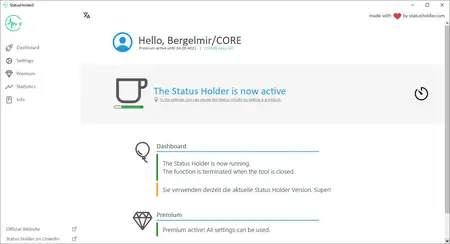
StatusHolder 9.0.0 Multilingual

940801414f79e4cc5f5ba85b246a2a4e.webp

Free Download StatusHolder 9.0.0 Multilingual Fast Links | 3.6 Mb
The topics of monitoring and data protection are very quickly slain with our tool, because with it it is possible to permanently set the status of Teams, but also of Skype for Business or other tools to Available. This means that you are online all the time.


Always available in teams
With the Status Holder it is possible to always be shown as Available in Microsoft Teams. The status is set to online throughout and thus disguises the absence.
INVISIBLE for IT
The Status Holder is a click-to-run application and does not need to be installed. Thus, the tool is also usable on the company PC and does not appear on the Install Software list.
Prevent surveillance
They are now always on green in teams and are shown as online. Thus, the actual online times are disguised and thus prevents the monitoring of the employee.
Starts automatically
In the settings, the Status Holder can be configured to start automatically. This means that you are always online in Teams as soon as you start up the computer.
Increase data protection
Is it really relevant whether you are available or absent? With the Status Holder you increase the data protection when using teams by setting the status to Available throughout.
Not only teams
The status is permanently set to Online not only in Teams, but also in Skype, Slack and other communication platforms. Thus, the areas of application are manifold.
Home Page-
Код:
https://www.statusholder.com/en/

Rapidgator
Код:
https://rapidgator.net/file/4c8452c0a0cdcc6a4a2ecd6ec9e53f2d/x6lrq.StatusHolder.9.0.0.Multilingual.rar.html

Код:
https://nitroflare.com/view/B554446F5E2C218/x6lrq.StatusHolder.9.0.0.Multilingual.rar
 
Sugar Bytes Dialekt v1.0.6

a6da9586169df25914478516da65df4c.webp

Free Download Sugar Bytes Dialekt v1.0.6 | 471.6 Mb
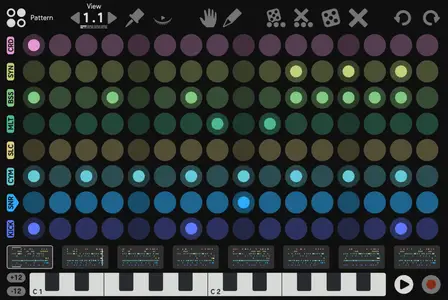
Dialekt is a groovebox in a compact, pocket-sized format, offering a wide range of high-quality synthesized and sampled sounds, along with innovative and exclusive features. Available for iPhone, iPad, and Desktop, it allows you to create ideas anywhere and seamlessly transfer them to your studio computer for further refinement. The standout feature of Dialekt is the Song Randomizer, which generates sequences and sounds based on different genre settings, delivering truly impressive results.


Key Features
Start Casual, Finish Professional
27 Different Synth Engines
8 Touch Effects with Sequencer
Mighty Song Randomizer
Trig Conditions, Rolls, Polyrhythms
Audio / MIDI Single Outs
Home Page-
Код:
https://sugar-bytes.de/dialekt

Rapidgator
Код:
https://rapidgator.net/file/1416099c4473c1b820d74a78ee3867b0/05v93.Sugar.Bytes.Dialekt.v1.0.6.rar.html

Код:
https://nitroflare.com/view/62E13816947FCB1/05v93.Sugar.Bytes.Dialekt.v1.0.6.rar
 
Symless Synergy Business 3.5.1 (Win/macOS/Linux)

10ba62cf5a161b132cc88207afa1d1fb.webp

Free Download Symless Synergy Business 3.5.1 (Win/macOS/Linux) | 164.7/293/440.6 Mb
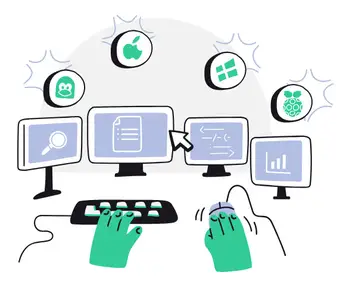
Control other computers on your local network with a single mouse and keyboard. Use the keyboard and mouse of one computer to control nearby computers. Copy and paste between all of your computers with shared clipboard.


Used by millions of hobbyists, freelancers, and more
However you use multiple computers, Synergy lets you focus on doing what you do best.
Stay in your creative flow
Many artists use a Mac for creative work and a Windows PC for specific tools or older software. Synergy lets one keyboard and mouse control both computers as if they were one, so you stay focused on creating instead of switching devices.
For serious home labs
If you run several computers at once, Synergy lets one keyboard and mouse move between them instantly. No extra keyboards on the desk, no KVM switches, no remote desktop windows. Just slide across and keep working.
Coding across multiple systems
Tinkerers and freelance developers often juggle projects across Linux, Windows, and macOS. With Synergy, one keyboard and mouse control every machine, making it easy to test, learn, and ship without the hassle of switching setups. More coding, less clutter.
No more desk chaos
Running two PCs for gaming or streaming? Synergy lets one keyboard and mouse control both, so you can control your streaming PC and get back in seconds, without breaking gameplay or dealing with clunky KVM switches or desk clutter.
Breathe new life into old devices
Have an old laptop or desktop sitting unused? Synergy turns it into a second computer for chat, music, or research, controlled from your main keyboard and mouse. No new hardware. Just better use of the machines you already have.
Home Page-
Код:
https://symless.com/synergy

Rapidgator
Код:
https://rapidgator.net/file/3e284d253bbde9c57d7ce0814d6fb4f2/jdbwl.Symless.Synergy.Business.v3.5.1.Linux.zip.html
https://rapidgator.net/file/fbad2c278e4c603193b309b3daf4c13d/jdbwl.Symless.Synergy.Business.v3.5.1.MacOS.zip.html
https://rapidgator.net/file/7569e5eb401a2be3814dcb31476477b4/jdbwl.Symless.Synergy.Business.v3.5.1.Win.x64.Incl.KeyfilemakerBTCR.rar.html

Код:
https://nitroflare.com/view/A873EC32BD0723C/jdbwl.Symless.Synergy.Business.v3.5.1.Linux.zip
https://nitroflare.com/view/335C423EB365FFD/jdbwl.Symless.Synergy.Business.v3.5.1.MacOS.zip
https://nitroflare.com/view/4F63F0717D79970/jdbwl.Symless.Synergy.Business.v3.5.1.Win.x64.Incl.KeyfilemakerBTCR.rar
 
Textaizer 7.0.9.8 Multilingual

54c12fafc11810408bf99658a2c4ebe0.jpg


Textaizer 7.0.9.8 Multilingual

File size: 27.3 MB


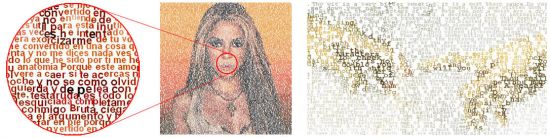
Textaizer Pro creates text art in all its creative shapes. It also includes extensive possibilities to create genuine ASCII art. And much more. A text mosaic is a picture which is built from hundreds or thousands of characters. Each character takes the colour of the area that is replaced by this character, and when looking from a distance the original source picture is recognised. If looking close-up, the individual characters can be seen. Textaizer Pro has 6 different text art engines with interesting names like 'Crazy Characters' and 'Word Art'. Below you will find examples of each of the engines. Here you find a review of Textaizer Pro.

Extraordinary text art
We believe it's just great to make something extra-ordinary out of the ordinary. You can turn any picture into a little piece of art by re-painting it with your selection of words. Choose your text or a file with many words, select your source picture and press the 'Create' button. Make a secret message, or draw and print balloons with 100's of 'Happy Birthday' words.

Print and save
The result from Textaizer Pro can be saved on harddisk and printed. Really huge prints with impressive resolution can be created. Print, or post-process, mail or publish the text mosaic. You have full control over the end result. And you can also save as .pdf and .emf for almost limitless resizing and printing. The only limitation is the size of your printer!

All in one
There are many text art creators available on the web. Some of them are great doing one thing, but does not do the other. Textaizer Pro does it all, and it offers great extra possibilities and customizations. And has unique features, like 'Crazy Characters' and the possibility to create text mosaic movies with dancing characters. All that makes Textaizer Pro truly unique.


HOMEPAGE


Код:
https://www.apphelmond.com/


DOWNLOAD

Код:
https://rapidgator.net/file/85564c5ef92fc0a18c19db6c729fd961/Textaizer_7.0.9.8..rar.html

Код:
https://nitroflare.com/view/69015BD29EFC817/Textaizer_7.0.9.8..rar
 
Topaz Gigapixel Pro 1.1.3 (x64) Multilingual

039f9d9310721176c81ea4c12e6b8dfb.jpg


Topaz Gigapixel Pro 1.1.3 (x64) Multilingual

File size: 464.5 MB


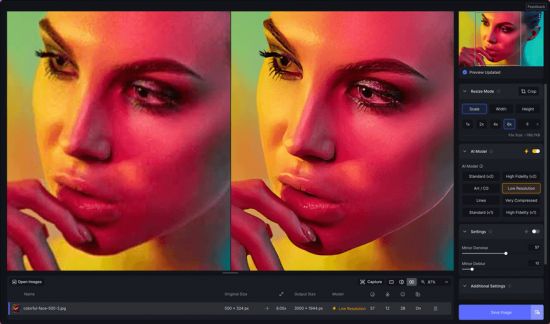
Larger. Sharper. More real. Upscale and enhance any image 16x. Take any image to 16X scale for the largest possible prints, posters, and billboard-size projects. Crop. Zoom in. Maximize photos, images, and AI-rendered art.

Sharper.
Just one click to both upscale and enhance your image at the same time. The result is an image sharper and larger than it started.

More real.
Every feature is built to bring your images closer to reality. Skin textures, fabrics, feathers, and hair. Trained using millions of images for the highest-quality detail.


HOMEPAGE


Код:
https://www.topazlabs.com/


DOWNLOAD

Код:
https://rapidgator.net/file/79ee704718cb6492b148d194ff445080/Topaz_Gigapixel_Pro_1.1.3.rar.html

Код:
https://nitroflare.com/view/3C0B6046C95FB2F/Topaz_Gigapixel_Pro_1.1.3.rar
 
Topaz Video Enterprise 1.2.2 RC (x64)

dc451f31ac00239bd9602e5cca7cca69.webp

Free Download Topaz Video Enterprise 1.2.2 RC (x64) | 197 Mb
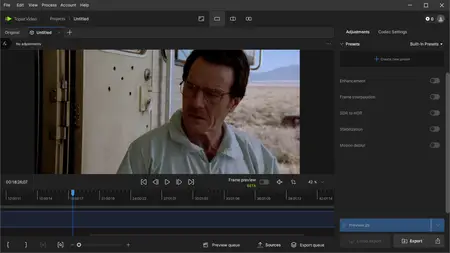
Ultra smooth. Ultra sharp. Ultra steady. Topaz Video is a professional, AI-powered video enhancement software that lets you denoise low-light footage, recover and upscale old archival videos to 4K, restore focus, and adjust frame rate by creating new frames out of thin air. Available on Mac and Windows.


Trusted by major film studios and creative pros everywhere.
Denoise with cinema-level detail. Create new frames with frame interpolation. And stabilize the camera after the moment has already passed.
Filmmakers & Editors
Restore, upscale, and refine footage for professional post-production workflows.
Archivists & Historians
Preserve and modernize archival film, VHS, and historical footage with clarity.
Creators & Influencers
Enhance social media videos with sharper detail, higher resolution, and smoother motion.
Hobbyists & Enthusiasts
Improve old family videos and personal projects to look like they were shot today.
System Requirements:
Windows Operating System: 11 (most updated version recommended)
CPU: Intel OR AMD with AVX2 instructions
System Memory (RAM): 16 GB (32 GB or more recommended)
Graphics Card (NVIDIA): NVIDIA GTX 900 series or higher, 6GB VRAM
Graphics Card (AMD): AMD Radeon 500 series or higher, 6GB VRAM
Graphics Card (Intel): Intel ARC A750
CPU Release Year: 2016 or newer
Home Page-
Код:
https://www.topazlabs.com/topaz-video

Rapidgator
Код:
https://rapidgator.net/file/4180c3694e479082e0c1cdab3f405ef3/vqx5u.Topaz.Video.Enterprise.1.2.2.RC.x64.rar.html

Код:
https://nitroflare.com/view/705C22B7EBC57D4/vqx5u.Topaz.Video.Enterprise.1.2.2.RC.x64.rar
 
VovSoft Open Multiple Files 3.3

78be3d49591dba760d81ccc254c02aa2.avif


VovSoft Open Multiple Files 3.3

File size: 5.1 MB


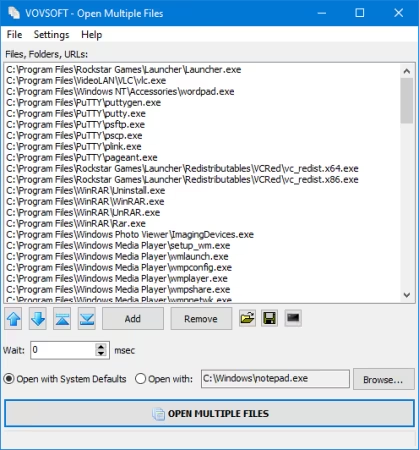
Working with multiple files, folders, apps or URLs at the same time can result in hectic situations, especially when trying to launch or open several instances at a time. Carried out manually, this process can be at least tiresome, not to mention inefficient. Open Multiple Files is an app which was developed for helping users cope with such issues and allow them to open multiple files or folders simultaneously.

Adding files or folders is a breeze and users can do so by either resorting to the dedicated menu, buttons or by dragging-and-dropping the preferred files. Once files or folders have been added, these will appear listed in the app's main viewing area, which could have benefited from the addition of a detailed-type listing, for better identification. Besides the files or folders, the app can also receive URLs as input, as well as executable files, this way providing users a broader usage palette. Running the main feature - the multi-file opener will quickly launch all the added content, simultaneously, in the inserted order.

A great feature is the ability to save the added content as a text listing, which can be opened at any time. This not only improves overall efficiency but also offers people the ability to manage their multi-file sessions better. It also adds shortcut to SendTo folder, user can right-click files and folders from the context menu.


HOMEPAGE


Код:
https://vovsoft.com/


DOWNLOAD

Код:
https://rapidgator.net/file/55d0b23e5beba4403df93c9108d7521e/VovSoftOpenMultipleFiles3..rar.html

Код:
https://nitroflare.com/view/9192BD2B4871F3C/VovSoftOpenMultipleFiles3..rar
 
WindowTop 5.29.2 Multilingual (x64)

425808d71c1f4cedfc99b4b7e83df3e1.webp

Free Download WindowTop 5.29.2 (x64) Multilingual Fast Links | 31.7 Mb
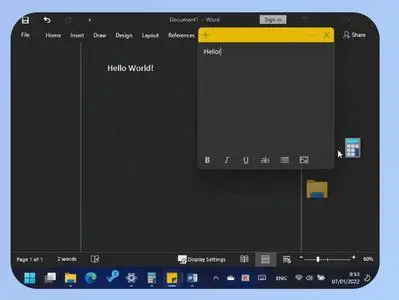
WindowTop enable you to pin any window on top, enable window transparency, even click through transparent window, set window dark/read mode, shrink the window to small size and more.


Always on Top
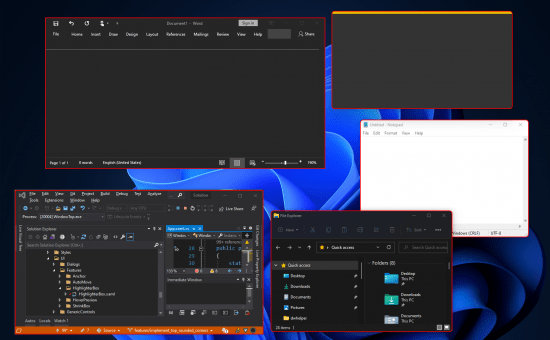
Easily set window on top and even highlight top-most window with a red frame! You can configure this behavior in settings (frame color, etc).
Anchors
The reason why you may put a window on top is to get back to it faster.
If this is your case, then Anchors is for you! Instead of using Always-on-Top, just use Anchors! They will help you to access the window with a single click! Faster than ALT+TAB, great for touch screens!
And don't worry, the anchors will not disturb you because they automatically move away from any text/image
PiP for any window!
Want to watch some video while working?
No problem! Shrink it! It will enable PiP mode.
In addition, you can even interact with the window while it is in PiP/Shrink mode (See the example!)
PiP Auto-Move!
PiP also come with auto-move option!
It will stay away from text/images for you!
Opacity
Working on something like building a website and want to see your work behind? No problem! Use opacity
Opacity + Click Through
Opacity also includes a feature that allows you to click through a transparent window. This can be useful for designers and graphic artists.
Dark Mode
Working at night? Tired of all the light coming out of the screen and unfortunately, the software does not support dark mode? No problem now!
Note: Unstable in Windows 10 (Stable in Windows 11)
Operating System:Windows 10, 11
Home Page -
Код:
https://windowtop.info/

Rapidgator
Код:
https://rapidgator.net/file/1fee926abc071de56e60e28b9f8f1ce4/vlc0n.WindowTop.5.29.2.x64.Multilingual.rar.html

Код:
https://nitroflare.com/view/73EB17EC772BF78/vlc0n.WindowTop.5.29.2.x64.Multilingual.rar
 
WindowTop Pro 5.29.2 Multilingual

8d0e07e808a8f6588022c5c9c21bec0f.png


WindowTop Pro 5.29.2 Multilingual

Windows x64 | File size: 66.09 MB


WindowTop enable you to pin any window on top, enable window transparency, even click through transparent window, set window dark/read mode, shrink the window to small size and more.

Always on Top
Easily set window on top and even highlight top-most window with a red frame! You can configure this behavior in settings (frame color, etc).

Anchors
The reason why you may put a window on top is to get back to it faster.
If this is your case, then Anchors is for you! Instead of using Always-on-Top, just use Anchors! They will help you to access the window with a single click! Faster than ALT+TAB, great for touch screens!
And don't worry, the anchors will not disturb you because they automatically move away from any text/image

PiP for any window!
Want to watch some video while working?
No problem! Shrink it! It will enable PiP mode.
In addition, you can even interact with the window while it is in PiP/Shrink mode (See the example!)

PiP Auto-Move!
PiP also come with auto-move option!
It will stay away from text/images for you!

Opacity
Working on something like building a website and want to see your work behind? No problem! Use opacity

Opacity + Click Through
Opacity also includes a feature that allows you to click through a transparent window. This can be useful for designers and graphic artists.

Dark Mode
Working at night? Tired of all the light coming out of the screen and unfortunately, the software does not support dark mode? No problem now!
Note: Unstable in Windows 10 (Stable in Windows 11)

Glass Mode
Smart transparency mode enables you to take opacity to the next level! Unlike regular transparency, you can set different opacity levels for the background around the text/controls and the images.
And you can even set the blur level.
Note that this may work slowly on 4K and will work better for NVIDIA GPUs (make use of CUDA feature)


HOMEPAGE


Код:
https://windowtop.info/


DOWNLOAD

Код:
https://rapidgator.net/file/122f523b4bc047f3a3c9386de453312f/WindowTop.Pro.5.29.2.rar.html

Код:
https://nitroflare.com/view/648BE1E657186EE/WindowTop.Pro.5.29.2.rar
 
WYSIWYG Web Builder 21.0 (x64)

7c4ba77bfa3806d0c1e639913e9b4286.png

Free Download WYSIWYG Web Builder 21.0 (x64) | 56.7 Mb
WYSIWYG Web Builder is a WYSIWYG (What-You-See-Is-What-You-Get) program used to create web pages. WYSIWYG means that the finished page will display exactly the way it was designed.


Desktop publishing for the web, build web sites as easy as Drag & Drop!
Visually design your website (What-You-See-Is-What-You-Get).
Just drag & drop objects your web pages
Navigation bars, Menu bar and many other navigation options.
"One Click Publishing" No FTP program needed. No special hosting required, use with any Hosting Service!
Easily create forms using the built-in Form Wizard plus Form validation tools and built-in CAPTCHA.
Advanced graphics tools like shapes, textart, rotation, shadows and many other image effects.
Fully integrated jQuery UI (Accordion, Tabs etc), animations, effects and built-in ThemeRoller theme editor.
Google compatible sitemap generator / PayPal eCommerce Tools
Many navigation tools available: Navigation bars, tab menus, dropdown menus, sitetree, slidemenus.
Built-in Slide Shows, Photo Galleries, Rollover images, Banners etc.
Support for YouTube, Flash Video, Windows Media Player and many other video formats.
Unique extension (add-on) system with already more than 250 extensions available!
Create HTML5 / CSS3 websites today!
HTML5 document type (optimized HTML5 output).
HTML5 audio/video and YouTube HTML5 support.
HTML5 forms: native form validation, new input types and options, web storage.
HTML5andsupport in shapes and other drawing tools.
CSS3 @font-face. Use non web safe fonts in all modern browsers.
CSS3 opacity, border radius, box shadow.
CSS3 border-image
CSS3 gradients. Add cool gradient effects using native CSS3 (no images).
CSS3 navigation menu. Create awesome menus without using jаvascript or images.
CSS3 animations and transitions. Including support for 2D and 3D transforms!
CSS3 filters and backdrop filters
Features for advanced users:
Login Tools/Page Password Protection.
Built-in Content Management System with many plug-ins (guestbook, faq, downloads, photo album etc).
Add custom HTML code with the HTML tools.
jаvascript Events: Show/hide objects (with animation), timers, move objects, change styles etc.
Layers: Sticky layer, Docking layer, Floating layer, Modal layer, Anchored layer, Strechable layer and more!
jQuery Theme Manager, create your own themes for the built-in jQuery UI widgets.
Style Manager (global styling, H1, H2, H3 etc).
Master Frames and Master Objects: reuse common elements in your website.
Flexbox Container and Flex Grid
Form conditions and calculations
and much more!
Operating System:Windows 7, 8/8.1, 10, 11
Home Page -
У Вас недостаточно прав для просмотра ссылок. Войдите или зарегистрируйтесь.


Rapidgator
Код:
https://rapidgator.net/file/92e494e351ed7349fc35039246f84bd2/v0f7l.WYSIWYG.Web.Builder.21.0.x64.rar.html

Код:
https://nitroflare.com/view/C80A6A10BCC60B6/v0f7l.WYSIWYG.Web.Builder.21.0.x64.rar
 
XRecode 3 v1.179 Final (x64) Multilingual

e6ed6891b3c277fa18f153de39e83a24.jpg


XRecode 3 v1.179 Final (x64) Multilingual

File size: 32 MB


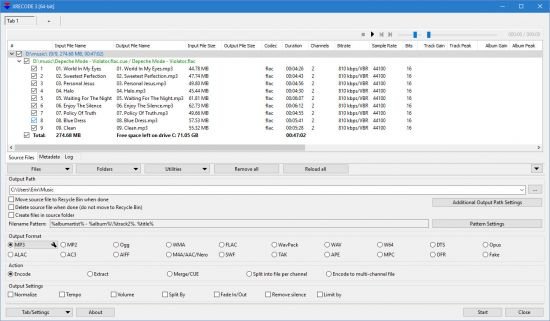
XRECODE3 is audio converter, which supports most of the common audio formats, such as mp3, wav, flac, dsd, etc. It also supports extracting audio file from most video files as well as Audio-CD grabbing. Command Line parameters are supported. Please visit Forum and Wiki for more information on how to use the program.


HOMEPAGE


Код:
https://xrecode.com/


DOWNLOAD

Код:
https://rapidgator.net/file/4d04aad822d3d6914276a24135c04fb4/XRecode3v1.rar.html

Код:
https://nitroflare.com/view/D4500855B041A36/XRecode3v1.rar
 
Youtube Downloader HD 5.9.9.9

f0d1788c2ae0353295176292c0a193da.jpg


Youtube Downloader HD 5.9.9.9
File Size : 69.3 Mb


Youtube Downloader HD is a simple yet effective solution to downloading clips from YouTube in HD. It is easy to learn and addresses all types of users, even the ones with less or no experience in such tools.

After a brief installation procedure, you can check out the regular window with the well-defined layout, representing Youtube Downloader HD's interface.

So, all you have to do is specify the video URL, output location and format, in order to proceed with the download and conversion job.

Youtube Downloader HD supports a few video types for the output, namely FLV (240p, HQ 360p or HQ 720p) and MP4 (medium quality, HD 720p or full HD 1080p).

Additionally, the tool can convert FLV to AVI (XviD) compatible with most video players, as well as to MP4, supported by iPod and QuickTime.

Youtube Downloader is very low-demanding when it comes to the CPU and system memory, so it doesn't interfere with the runtime of other active apps. It finishes a download and conversion job rapidly, and delivers clips with a very good image and sound quality. No error dialogs have been shown in our tests and the tool did not freeze or crash. All in all, Youtube Downloader delivers very good results in regard to downloading YouTube clips in HD


HOMEPAGE


Код:
https://i127.fastpic.org/big/2026/0307/da/f0d1788c2ae0353295176292c0a193da.jpg


DOWNLOAD

Код:
https://rapidgator.net/file/867185c318e905c90b0594b58dbf683b/youtube_downloader_hd..exe.html

Код:
https://nitroflare.com/view/EC9A020515AF45A/youtube_downloader_hd..exe
 
4DDiG File Repair 4.3.9.2 Multilingual + Portable

ee6570d5d1178ffd7ade0a508e619dea.webp

Free Download 4DDiG File Repair 4.3.9.2 Multilingual + Portable Fast Links | 215.4/252.3 Mb
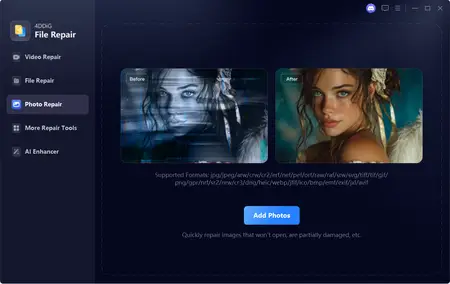
Even when shot with a good phone or a camera, photos and videos might still not meet your requirements in terms of quality. Editing graphics and footage is regular to experts, but there are applications out there that can help any passionate photographer and videographer enhance their work. One of them is called 4DDiG File Repair, a simple yet efficient tool that can improve the quality of both videos and photos in batch mode.


4DDiG File Repair is easily installed and, in a few minutes, you are presented with a user-friendly and simple interface that allows tab-based access to the two separate modules of the app: video repairing and photo fixing.
To begin, all you have to do is browse for the videos you want to fix with 4DDiG File Repair.
The input multimedia files are all displayed within the main window with a preview thumbnail and details regarding their size, duration, location and used codec. Adding and removing videos to and from the list is easy.
Once videos are repaired, they are automatically moved to the list of repaired clips. While the input list does not feature video preview, the repaired videos can be previewed before saving thanks to the embedded video player.
The photo repair module works in a similar way: you must first load the images that need retouching. 4DDiG File Repair displays their size, format, location and dimensions, allowing you to customize the input list as you wish.
The repaired photos can be previewed prior to exporting. On the downside, there are no manual adjustments to make, as is usually the case with photo editors and fixing tools. You simply hit the "Start Repair" button and hope for the best, not actually knowing what changes are made to your files.
4DDiG File Repair is a nifty tool to have around, as it allows you to repair corrupt and damaged videos, as well as pixelated or overexposed photos. However, adding a few extra editing tools to provide users with a bit more control over editing would really add to its value.
Home Page -
Код:
https://www.4ddig.net/

Rapidgator
Код:
https://rapidgator.net/file/0b0bb8cf65dccf013aeaa24c5d5848d9/kgesd.4DDiG.File.Repair.4.3.9.2.Portable.rar.html
https://rapidgator.net/file/6621ee28a2036dab5dba4d4a7fd21e90/kgesd.4DDiG.File.Repair.4.3.9.2.rar.html

Код:
https://nitroflare.com/view/6E9C799BE3B8FDF/kgesd.4DDiG.File.Repair.4.3.9.2.Portable.rar
https://nitroflare.com/view/1D954662AAE25F7/kgesd.4DDiG.File.Repair.4.3.9.2.rar
 
Назад
Сверху