• Здравствуйте. Сайт заработал в архивном режиме форум www.old.nado.in

All mitsumi'1s Applications !! (updated daily)

  • Автор темы Автор темы mitsumi1
  • Дата начала Дата начала
Cycling '74 Max 9.0.8 incl. RNBO macOS
e87588e3dbcee0f2f1a6d73b675fcaa1.jpeg


File size: 969.19 MB​

Max is a graphical environment for music, audio, and multimedia. In use for over twenty years by performers, composers, artists, scientists, teachers, and students, Max is the way to make your computer do things that reflect your individual ideas and dreams.


OBJECTS
Each object does something. Max has objects that generate sound waves, represent hardware, or provide a UI for interaction.
PATCHCORDS
Patchcords connect one object to another. This connection lets objects share their output with connected objects.
CONTROL
Connect UI objects like dials and sliders to provide control values or display results. Modulate, map and scale data to get just the right results.
Create Software Built Around You, In the Moment
• Drag in your own audio clips and start manipulating them and connecting effects
• Map your patcher with MIDI controllers as you go to start playing with your creation while you work
Expanded Ideas
Max patching starts on a blank canvas, free of any structure. This makes it natural to build and explore unique ideas that would be too complex to make elsewhere. The Max patcher automatically expands to fit your work as it grows, no matter how much space you take up.
Explore Sound without Limits
• Design a custom synthesizer with as many oscillators and effects as you wish.
• Manipulate samples in every way, including timestretch and pitch shifting.
• Build up more layered sounds using MC objects to patch multichannel audio.
Make Sound with a Gesture
In Max, you can build classic synths from scratch or get lost hacking together unusual sounds. Try the XY controls below to hear some sounds you could create with Max.
• You can do a lot with just a single oscillator and a filter.
• Add some extra modulation and try something a little more wild.
Make Visual Music
Max includes full-featured, expandable video and graphics tools with Jitter. Jitter is optimized for realtime audiovisual work, and is easy to combine with audio, sequencing, and modulation like everything else in Max.
Take Max into the World
Max patching starts on a blank canvas, free of any structure. This makes it natural to build and explore unique ideas that would be too complex to make elsewhere. The Max patcher automatically expands to fit your work as it grows, no matter how much space you take up.
Prototype and Evaluate
Flexible access to hardware makes Max a perfect environment for prototyping. Connect your development board to Max and get instant access to sensors, knobs, and switches. Watch the data stream in as you develop the interaction. Countless commercial products, art installations, and stage shows have relied on Max to glue together all the parts of their process.
Generate Audio, Video, Code
Use Gen to patch together fine-tuned processes for audio, matrix data, or texture processing. Gen lets you combine procedural commands with visual patching to simplify the creation of custom processes. Gen objects can also output source code to be used elsewhere if needed.
Extended Max
Max's built-in Package Manager offers immediate access to over 50 add-ons covering everything from computer vision to support for hardware controllers including Novation, Monome and ROLI controllers. If the feature you want doesn't exist in Max, chances are someone in the community has created it. And if they haven't, you can extend Max yourself using C++, NodeJS, Java, or JavaScript.
→ Introducing RNBO
RNBO is a new patching environment built to export software with the sound of Max.
Create web experiences, hardware music devices, audio plugins, and new Max objects all from the same patch. And when that's not enough, RNBO generates source code that you can use however you want.
This Was Made in RNBO
The example below was patched in RNBO and exported to Web Audio. RNBO Web Export also provides easy access to your patcher's interactive elements and seamlessly integrates with your HTML/Javascript code to add rich sonic experiences.
One Patch, Many Targets
A single RNBO patch can export compiled code that runs in several defined target contexts, and source code you can integrate into any C++ or Web Audio project.
• Build guitar pedals, Eurorack modules and much more with Raspberry Pi export
• Run your patch in any DAW as a VST3 or AudioUnit Plugin
• Compile your own self-contained, shareable Max object
• Increase performance and loading times of your Max for Live devices
• Embed your RNBO sound engine into a website using Web Export
Hear the Code While You Patch
The sound you hear while patching in RNBO is generated and compiled code that updates as you make changes. This running code is identical to the code you export, so your work will sound the same no matter which target you choose.
You'll Feel Right at Home
Although built on new technology, RNBO offers an instantly recognizable patching environment with many familiar objects and practices from Max. If you've used Max before, you'll be up and running in no time.
Inspired by What You Love in Max
• Full Gen integration, with the addition of event support and interactive UI objects
• Every RNBO object has its own help file, just like in Max
• Events and signals can be mixed in the patcher, just like in Max
• Use param, inport, and outport objects to define the controls for your RNBO export
• Mix patching and text-based programming directly in RNBO
• Easily make your patches, subpatches, and abstractions polyphonic with the polyphony attribute
→ What's new in Max 9?
Introducing a new version of Max that is more direct, more transparent, and full of inspiring new features that will spark your curiosity. Max 9 brings a new collection of audio objects based on Ableton's ABL library, the biggest Jitter update in years, interface improvements, reinvented coding workflows - and much more.
→ The ABL Objects
Ableton Sound for Max
We're excited to offer a suite of Max objects created with Ableton's ABL library for DSP. These objects offer a patchable interface to the internal workings of some of Ableton Live Suite's most popular devices. Whether you're looking to explore some wild distortion effects (abl.device.roar~) or dreamy reverbs (abl.dsp.shimmer~), the ABL library has got you covered.
Patching with Code
Patching in Max is even more powerful when you integrate text-based code. Max 9 presents a new vision of code integration with patching - including a fully reinvented, fast and modern Javascript V8 engine. Even if you've never tried integrating Javascript and Max, you'll definitely want to check out what is possible.
Codebox Everywhere
Stay in the flow with codebox, which enables direct text-based coding alongside visual patching. Codebox variants provide support for JS (v8), Gen (gen, gen~, jit.gl.pix, jit.gen), and Node for Max, as well as dictionary and coll editing and OSC display.
New V8 Objects for JS
To access the new performance and compatibility features of Javascript V8 in Max, we've introduced the v8, v8ui, and v8.codebox objects. With these new objects, you can make use of more modern (ES6+) language features like arrow functions and typed arrays, and in many cases enjoy a big speed improvement over the standard js object.
Introducing Jitter Geometry
In Max 9, we're going beyond the Jitter Matrix with a new way to represent 3D geometry data and several new realtime geometry objects to manipulate and fine-tune your 3D graphics in Jitter.
Enhanced Visuals with Jitter FX
The new jit.fx library of image effect objects makes creating interactive visual effects in Jitter more streamlined than ever. Enjoy a full range of realtime, shader-based processes with an easy-to-use Max interface.
Included Effects
✓ Color adjustments and corrections
✓ Stylized image manipulations
✓ Distortions and Blurs
✓ Blending and Compositing
✓ Time delay and temporal displacement
→ New in Jitter
In addition to the exciting new jit.geom objects and jit.fx, Max 9 brings exciting new additions that enrich Jitter in both practical and inspiring ways.
• In-Window UI Objects
Use jit.ui objects to build kiosk experiences or interact with your patch without leaving fullscreen mode.
• 3D Widgets
Directly edit your 3D scenes in Jitter with updated, in-window UI widgets.
• Scene Rendering
Max 9 introduces ReSTIR-based global illumination, order-independent transparency, depth-sorting, and new scene FX passes to add texture and grain.
• Jitter in Production
Switch Jitter into post-production and animation mode with new "fixed_delta" attribute for jit.world, jit.mo, and all animation-driven objects in Jitter. New objects jit.bang and jit.frame also help in syncronizing your processes with rendering.
→ Remote Control
Parameter Connect
Easily connect UI objects in Max to supported object attributes without any patchcords. This feature is currently supported by all ABL, jit.fx, and Gen objects, as well as jit.gl.slab. Javascript V8 object support can be enabled by using the new JS attribute API.
OSC Integration
A new global preference allows you to set application-wide OSC address and port settings, and all parameter-enabled objects in your patch are automatically available to OSC messages. The param.osc and osc.codebox objects let you inspect OSC state and communications.
→ Improving Your Patching Life
Thoughtful improvements to the Max environment that will enhance the way you patch, play, and explore.
• List View
Explore the objects in your patch with a list-based interface. Rapidly filter, search, and edit objects, and watch the numbers change.
• Syntax Coloring
Inspired by our favorite code editors, Max syntax coloring makes it much more comfortable to read Max patches.
• Global Record Button
Max moments are often fleeting, but now you can capture any audio from Max, in the moment, with the new Global Record Button in the Max Toolbar.
• Preset Mixing
Connect a nodes object to preset to easily create an interface that lets you mix and interpolate presets across a 2D space.
Command Your Patcher with REPL
The familiar Max Window has a new input field that turns it into a command-line interface to your patch. This input allows you to send text messages to named objects in your patch, send messages to the application itself, execute Javascript, or query the documentation.
New Tools for Learning
New Max 9 features for self-learners, teachers, and students alike
Illustration Mode
Visualize your patch running in slow motion to gain insight into how it's actually working. Illustration Mode is useful for both learning and debugging.
Examples and Tutorials Online
Visit our new
Код:
https://docs.cycling74.com/learn
to find updated Max Tutorials, Documentation, and Examples.
→ Even More Improvements
Max 9 also brings many smaller features and improvements that will likely have a big impact on your daily patching life.
✓ Object Macros enable the use of js/v8, jit.gl.slab, and other generic objects with specific source code files as named objects
✓ New loudness~ object based on EBU R 128
✓ Visual updates to waveform~ and function
✓ New hid object supports more robust interactions with HID hardware than hi
✓ Improved media and file browsing in left toolbar
✓ Access jit.gl.slab params as object attributes.
✓ Clue display on bottom toolbar provides links to relevant documentation
✓ CPU/FPS display on right toolbar
✓ Multichannel meters on toolbar volume control.
✓ Reorganized and easier to navigate Preferences window
✓ Patching Margin provides extra space while editing at the edges of a patcher window
✓ Capture your content with a new patcher window aspect ratio feature
Release Notes
Код:
https://cycling74.com/releases/max/9.0.8
Код:
https://cycling74.com/releases/rnbo/1.3.4

Supported Operation System
• macOS 11.0 or later
• Apple Silicon or Intel Core processor
Homepage:
Код:
https://cycling74.com/products/max
Код:
https://cycling74.com/products/rnbo

Download link

rapidgator.net:
Код:
https://rapidgator.net/file/582900384aa8cc2a4fc51430bf69f6ea/wvzqc.Cycling.74.Max.9.0.8.incl..RNBO.macOS.dmg.html

nitroflare.com:
Код:
https://nitroflare.com/view/CC5F2044077C8A5/wvzqc.Cycling.74.Max.9.0.8.incl..RNBO.macOS.dmg
 
Downie 4.10.7 macOS

80127a55918f729132658ab5752c1233.jpeg


Language: Multilingual | File size: 54 MB​

Ever wished you could save a video from the Internet? Search no more, Downie is what you're looking for. Easily download videos from thousands of different sites.


Key Features
- Supports many sites - currently supports over 1,000 different sites (including YouTube, Vimeo, etc.) and the number is rapidly growing.
- 4K video YouTube support - unlike many other YouTube downloaders, Downie supports HD video on YouTube, up to 4K.
- Postprocessing - need your video in MP4 for iTunes? Or want just the audio track? No problem, Downie can handle this for you automatically!
- Quick support - I respond to emails usually within 24 hours and often add support for requested sites in the next update.
- Frequent updates - Don't wait weeks for new sites to be supported, or bugs to be fixed! Downie is updated about once a week with new features, sites supported, etc.
- International - not only that Downie supports country-specific sites, it is localized into various languages.
Код:
https://software.charliemonroe.net/trial/downie/v4/rnotes.html
Supported Operation Systems
macOS 10.12.6 or later
Homepage:
Код:
https://software.charliemonroe.net/

Download link

rapidgator.net:
Код:
https://rapidgator.net/file/9e12700b3d41f8b087409912469e73db/xsbiu.Downie.4.10.7.macOS.dmg.html

nitroflare.com:
Код:
https://nitroflare.com/view/92FDBD4DF547D7B/xsbiu.Downie.4.10.7.macOS.dmg
 
Dropzone 4 Pro 4.80.68 macOS

96e8bf73563535d82891806feb057b5c.jpeg


File size: 64 MB​

Dropzone makes it faster and easier to copy and move files, open applications and share files with many different services. Dropzone is a unique and amazing app that's like nothing you've ever used before. We've paid fanatical attention to every detail and built an app that looks and feels like an integral part of macOS.


Dropzone ships with a powerful scripting API and with a little programming knowledge you can modify any of your actions or even create entirely new ones. This gives Dropzone unlimited extendability and utility. We're always thinking up new actions so Dropzone will become even more useful over time.
Dropzone also includes Drop Bar - Drop Bar makes it easy to stash files you know you'll need later. Just drop files on the Drop Bar icon in the grid and they will stick there until you're ready to use them.
Features
• Open applications, move and copy files faster than ever before.
• Shorten URLs quickly using Tinyurl shortener. Just select a URL to shorten and press Ctrl+Option+Cmd+S and the shortened URL is automatically copied to the clipboard.
• AirDrop integration lets you drop files or folders from any app and share them with your other Macs over the network.
• Imgur integration lets you share images fast and get a link for pasting.
• Upload files to Amazon S3 (Dropzone Pro feature).
• Upload files to your FTP server (Dropzone Pro feature).
• Upload files to your Google Drive (Dropzone Pro feature).
• Download and install add-on actions that let you upload to services like Google Drive, YouTube and many others (Dropzone Pro feature).
• Powerful multi-tasking engine allows you to run multiple tasks at once and track the progress of each one through the in-grid task status area.
• See how tasks are progressing at a glance in the animated menu item.
• Launch Dropzone actions with the newly added keyboard shortcuts feature (Dropzone Pro feature).
• Add applications, folders or actions to your grid easily by dragging and dropping them on the Add to Grid area.
• Develop your own actions using the updated and massively improved Ruby or Python API (Dropzone Pro feature).
Release Notes
Updates: official site does not provide any info about changes in this version

Supported Operation Systems
macOS 10.15 or later
Homepage:
Код:
https://aptonic.com

Download link

rapidgator.net:
Код:
https://rapidgator.net/file/3454adc980f9ff50477448b67e7c01a7/kgpsh.Dropzone.4.Pro.4.80.68.macOS.dmg.html

nitroflare.com:
Код:
https://nitroflare.com/view/96586D5530FA18F/kgpsh.Dropzone.4.Pro.4.80.68.macOS.dmg
 
Canvas X Pro 20.0.1009

wibzrLXn8AxiTm205MI1fs5fK59f7Itg.avif


Languages: English
File Size: 583.13 MB​

Canvas X Pro is the only technical illustration software you need. An intuitive 2D and 3D application that handles visual technical content creation from start to finish, X Pro gives you the power to visually communicate complex data with clarity and precision.

Technical illustration software that increases productivity
Working with a single, built for purpose technical illustration software to create visual technical content helps technical authors, illustrators, and visual communicators work faster and more efficiently.
Canvas X Pro does the work of numerous other applications combined by blending professional graphics tools with rich technical illustration capabilities. Enjoy easy to use 2D drawing, 3D CAD visualization, text flow, raster image handling, and vector graphics. Leverage intuitive one-click smart annotations, automatic measurements, and industrial accuracy.
Integrated 2D and 3D illustration in one application
Canvas X Pro unites the power of 3D visualization with the most versatile technical graphics and illustration software on the market. It gives you the ability to create data-rich 2D visual documentation that features precise views of 3D models and assemblies.
Because you can work directly with 3D CAD data from all leading 3D CAD packages, Canvas X Pro gives you complete control over the visualization of your 3D CAD models. Explode and rotate models, ghost parts, and interact directly with metadata to create bill of materials tables and create instant annotations.
X Pro can import and manipulate files created in Solidworks, PTC Creo, Rhino, Catia, Parasolid, Siemens NX, Autodesk, AutoCAD and more.
Instant call outs
Create smart automated callouts with just a click of the mouse.
Annotation lens
Focus your audience on precisely what they need to see in an instant.
Smart measurements
Intelligent measurement tools allow you to visualize dimensions fast.
Key Features
Vector and raster images
A uniquely integrated technical illustration software package, Canvas makes it possible to handle both vector graphics and raster images with the same powerful enhancement tools. You can apply a host of market-leading effects to both images and graphics in a single document.
Work to key standards
Create dimension objects that fully conform to existing industry and government standards, including: IEEE floating point standard, ANSI U.S. Product and industry standards, DIN (Deutsches Institut für Normung/German Institute for Standardization) internationally adopted standards, and JIS (Japanese Industrial Standard) standards
Data-driven drawing
As well as delivering 0.035 micron accuracy for an engineering and scientific user base, Canvas offers complete control over vector object coordinates. Create illustrations from geometric data, use grids and guides to position objects, and adjust objects' numerical position for absolute precision.
Unbeatable precision
With linear, chain, and baseline dimensioning tools, Canvas makes it easy to pinpoint horizontal, vertical, oblique, and perpendicular distances. Display size information as you draw, measure diameter, radius, angle, area, and perimeter, add dimension objects to illustrations, mark the center of arcs and ovals, and enjoy precise control over scale drawings.
Smart and simple annotation
Add clarity to illustrations by using the annotation tools to add labels, callouts, or comments to your diagrams or illustrations, or to create simple flowcharts. If you re-position the annotation label object, the Canvas SmartLines connecting it to the illustration move right along with it.
Comprehensive text tools
Canvas includes sophisticated word processing and document layout capabilities which enable you to create and publish entire documents within a single application. Control all aspects of formatting, create and save styles, apply effects to type, wrap text inside objects, repel text from objects, bind text to object paths, and enjoy a full range of text proofing and annotation tools.
Release Notes
- Release notes were unavailable when this listing was updated.

System requirements | hardware
- Intel® i3 or better 64-bit processor
- 8 GB RAM installed (16 GB recommended)
- 4 GB free hard disk space (8 GB recommended)
- 16-bit color or higher (True Color recommended)
- 1024x768 or higher screen resolution recommended
System requirements | software
Windows® 7, Windows® 8, Windows® 8.1, Windows® 10, Windows® 11 (all 64-bit OS)
Homepage:
Код:
https://www.canvasgfx.com

Download link

rapidgator.net:
Код:
https://rapidgator.net/file/3ef3a947a9b5e06c2734a227a8c5496c/uobqe.Canvas.X.Pro.20.0.1009.rar.html

nitroflare.com:
Код:
https://nitroflare.com/view/5E337D5FA08923D/uobqe.Canvas.X.Pro.20.0.1009.rar
 
Coolmuster Android Assistant 6.0.78 Multilingual

d5c83e0af3e78ac6b15af545ea540110.jpeg


File size: 25 MB​

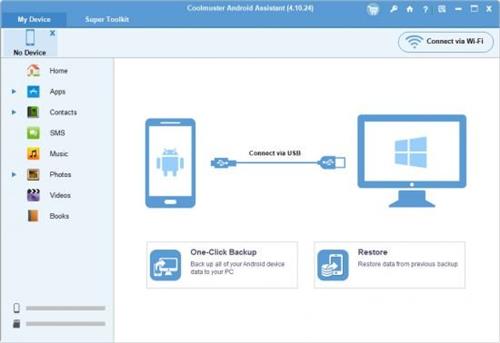
Better Manage Android Data in One Place on Windows Computer! As one-stop Android managing software, Coolmuster Android Assistant is fully capable of dealing with Android media, contacts, SMS, apps, etc. in one place on your PC! It features all the functions one may require for the management on Android devices.


- Hammer at backup and restore overall Android phone's data on PC with 1 click & retain 100% quality.
- Breezily push music, videos, photos, etc. from PC to your phone.
- Add, delete, unduplicate and edit contacts on PC.
- Send & reply text messages directly on your Computer.
How to Backup Android? 1 Click is Enough!
Various functions of the cell phone have made certain people reluctant to separate themselves from their cell phones. They almost save all their life on the portable device and are afraid to think ahead if losing these valuable data some day. Well, why not backup your Android device to computer?
- Coolmuster Android Assistant enables you to export videos, photos, music, contacts, SMS, apps, etc. from Android phone or tablet to computer, so that you can free up your Android space for new files.
- Additionally, you can restore your Android phone from the selected or all backed-up files with one click.
Want A Perfect Contacts&SMS Assistant? Here It Is!
Just end your life of group text messaging or adding contacts one by one manually on your Android phone with Coolmuster Android Assistant. Exprience a new texting way here and better manage your contacts on computer.
- Still using your Android phone to text to a group of people one by one to send the same message? This Android managing software enables you to send and reply SMS on computer and perform group texting at once to save time greatly.
- What's more, you are allowed to add new contacts, delete useless contacts, edit exsiting contacts and unduplicate contacts on computer conveniently.
Are You An App & Media Fancier? You Can Not Miss It!
If you are an app enthusiast and media fancier, Coolmuster Android Assistant will be your must-have tool because it features with all powerful functions that make you fully enjoy entertainment on the go.
- Instantly download & install your favorite apps on your computer and export them to your Android SD card with a click. You can backup all or seleted apps from your Android to computer or uninstall useless apps quickly from computer.
- Want to enjoy media files anytime and anywhere? Android Assistant helps you transfer your wanted music, photos and videos from computer to Android phone without any hassle.
Код:
https://www.coolmuster.com/upgrade-info/android-assistant.html
Homepage:
Код:
https://www.coolmuster.com

Download link

rapidgator.net:
Код:
https://rapidgator.net/file/f36302b65ce83c87ce9d05e5db4032bd/bibeo.Coolmuster.Android.Assistant.6.0.78.Multilingual.rar.html

nitroflare.com:
Код:
https://nitroflare.com/view/5045C5A6462B856/bibeo.Coolmuster.Android.Assistant.6.0.78.Multilingual.rar
 
CyberLink PhotoDirector Ultra 2026 v17.0.0901.0

th_UD0zWqK5kKdGS6JbVjRwLhs6udPxCN8w.avif


Languages: Multilingual
File Size: 400.35 MB​

Premium photo editing software for creative professionals. Create your masterpiece today. Capture. Edit. Retouch. Photo Editing, Now With AI. Split and combine color layers and reveal infinite variations around one theme. Enhance or totally replace the sky. Animate, blend, position, relight, and re-align.

Glitch Effect
Split and combine color layers and reveal infinite variations around one theme.
AI Sky Replacement
Enhance or totally replace the sky. Animate, blend, position, relight, and re-align.
Show Your True Colors
Customize colors with precision tools to edit the world the way you imagined.
Illuminate Photos
Create dreamy effects with Bokeh. Add natural glows, sparkles, or intense bursts of light.
Photo Editing Made Easier With AI
Automatically remove unwanted objects or people for a perfect shot, every time.
Precision Layer Editing
Layer, shape, and blend to create artistic scenes.
Immaculate Photo Retouching
From touch-ups to a complete overhaul, look flawless in every snap.
RAW Power
Support for all professional file formats, and the most popular cameras.
Release Notes
Код:
https://www.cyberlink.com/products/photodirector-photo-editing-software-365/whats-new_en_US.html

System Requirements
- Microsoft Windows 11, 10, 8/8.1, 7 (64 bit OS only)
- Intel Core™ i-series or AMD Phenom® II and above
- 128 MB VGA VRAM or higher
- 4GB memory required (For AI style transfer, 8GB or above recommended)
- 2GB space required
- 1024 x 768, 16-bit color or above
Supported Languages
- English
- French
- German
- Italian
- Spanish (European)
- Chinese Simplified
- Chinese Traditional
- Japanese
- Korean
- Dutch
Homepage:
Код:
https://www.cyberlink.com

Download link

rapidgator.net:
Код:
https://rapidgator.net/file/21a3a0d9c96acc1bbbd99996ff053b33/ttzum.CyberLink.PhotoDirector.Ultra.2026.v17.0.0901.0.rar.html

nitroflare.com:
Код:
https://nitroflare.com/view/0ED86871A6B07DD/ttzum.CyberLink.PhotoDirector.Ultra.2026.v17.0.0901.0.rar
 
Dashcam Viewer Plus 4.0.7 Multilingual

608a402c69df6796ed67bcaff1ad5992.jpeg


Windows x64 | File size: 114.64 MB​

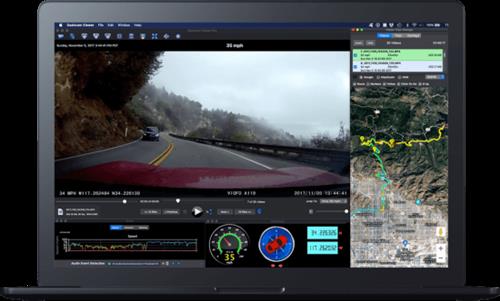
Dashcam Viewer is a software application for viewing movies, GPS data, and shock-sensor data recorded by your dashcam or action cam. Dashcam Viewer supports over 70 camera models. See below for the complete list of supported cameras and features.


Map Displays
Your vehicle's entire route and current position are displayed in an animated 2D map. The route line is color-coded based on the vehicle's speed. Click anywhere along the route to jump to that point in the video sequence. Choose between different map providers (Google, MapQuest) and themes (satellite, road, hybrid). Highlight important points in the route with Geotag markers.
Geotags
Geotags are custom markers you can drop at any point along your trip. They appear in the map and in the Geotags list view. Metadata such as the time, date, speed, latitude, longitude, street address, movie name, and movie time are stored with each geotag. Double-click a geotag in the Geotags List and you will jump instantly to that point in the video sequence. Geotags can be exported and imported for easy access.
Export GPS Data
Dashcam Viewer's Data Browser allows you to preview and export your GPS data in multiple formats, including comma-separated value (CSV), GPX, Google Earth KML, and GeoJSON. Portions of videos can be exported to short clips, with or without sound, at accelerated or decelerated playback rates. Still frames from videos can be exported to JPG, PNG, or BMP images individually or at a specific frequency.
Data Plots
Dashcam Viewer's Plot Views show a time history of your vehicle's speed, distance, and compass direction. For dashcams that record additional GPS data, the G-sensor (shock), vehicle altitude, number of GPS satellites in view, and horizontal dilution of precision (HDOP) are also displayed.
Audio Event Detection
Important events in the video series are often characterized by sudden changes in volume. For example, the sound of a collision or the sound of a horn can be heard against the normal driving noise background. Dashcam Viewer's Audio Event Detection can assist in locating key sound events in a series of videos.
Videos List
Loaded videos are shown in the Videos list. Videos that are uninteresting can be toggled off so they no longer appear in the video sequence and their GPS data is removed. To play a specific video simply double-click on it in the list. Additional information about each video is displayed alongside its filename, including file size, maximum vehicle speed, date, and time, is displayed in the list item.
Trip List
Dashcam Viewer bins videos automatically into trips. A trip is categorized as one or more contiguous videos that have no break between them greater than one minute. Dashcam Viewer then computes statistics for each trip. This includes the start date and time, duration of the trip, amount of time between trips, and the number of videos per trip.
Export & Merge Video
You can export whole videos or parts of videos into short clips or a series of images. Video clips can be exported with or without sound and at an accelerated or decelerated playback rate. Still frames can be exported to JPG, PNG, or BMP images individually or at a specific frequency. You also have the ability to merge multiple videos into a single large file. When merging, Dashcam Viewer will create a GPX file with the GPS data from the selected videos so that you can import that data back into Dashcam Viewer if needed.
Dashboard Display
Dashcam Viewer's dashboard display shows your vehicle's current metrics including position, speed, and compass heading. Speed can be shown in mph or km/h. The dashboard also shows the weather conditions at the time and location of the drive. For dashcams that support enhanced GPS data collection, Dashcam Viewer displays the altitude, number of satellites in view, and signal confidence. Choose from one of 19 compass pointer icons in the Pro version.
Код:
https://dashcamviewer.com/whats-new/
For all Windows 10 and later
Homepage:
Код:
https://dashcamviewer.com/

Download link

rapidgator.net:
Код:
https://rapidgator.net/file/c46fcc985edf534f700852899233057d/yqeto.Dashcam.Viewer.Plus.4.0.7.Multilingual.rar.html

nitroflare.com:
Код:
https://nitroflare.com/view/F10F5035F38DEB8/yqeto.Dashcam.Viewer.Plus.4.0.7.Multilingual.rar
 
Database Tour Pro 11.5.4.1905 Multilingual

6595df0b30bdc8c09b3a4113db045da7.jpeg


File size: 11.1 MB​

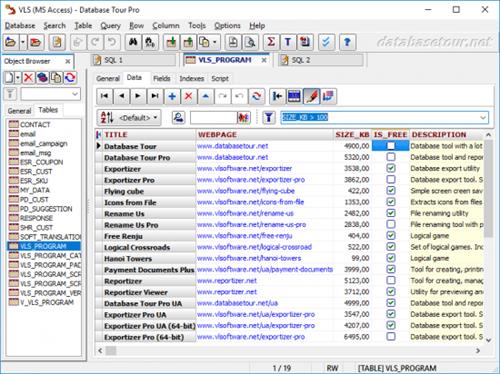
Database Tour Pro is a comprehensive software application that enables you to organize all your connected databases. It offers support for Borland Database Engine (BDE) and Microsoft ActiveX Data Objects (ADO), SQL scripts, reports, along with data conversion and exporting, among others.


Outdated, yet clear-cut interface
Wrapped up in a large window with a well-structured layout, the interface seems outdated. It contains an object browser for functions, packages, triggers, directories, users, roles, profiles, sequences, jobs, types, Java, exceptions, database links, general properties, tables, schemas, and procedures.
Manage tables and queries
Tables can be created, deleted, emptied, duplicated, renamed or packed. You can allow table editing, view deleted records, set a table password, change the language driver, add, remove, rename and resize fields, add, delete or regenerate indexes, check out the table family, as well as verify referential integrity.
When it comes to queries, Database Tour Pro lets you save, load and print SQL scripts or history, and explore a wide range of predefined query templates which can be seamlessly inserted into the project, like select, update, insert and delete, add or drop field, and create view or create table.
Encrypt databases and build reports
It's possible to isolate, start, commit and roll back transactions, review the database history, clear the password list, resort to a search-and-replace function, as well as locate objects and fields.
The software utility puts a bunch of useful tools at your disposal, including arithmetic functions, batch operations with text fields, a report builder and previewer, printer for table data, data importer and exporter, file encryption and decryption, in addition to a command-line generator.
Features
Accessing different types of databases.
Creating tables.
Viewing data.
Editing data.
Several ways to print data.
Built-in report engine, which allows to produce the reports automatically or by using a visual report designer with templates, expressions, preview etc.
Expression builder for report expressions.
Building and executing SQL queries.
Support for execution of multi statement SQL scripts.
Syntax highlighting in SQL editor.
Support for parameterized SQL queries.
Enhanced database grids, which allow to view and manipulate the data in the most convenient way, including sorting by clicking column header, changing row heights, resizing columns etc.
Creating, deleting, modifying BDE aliases.
Command line support for executing queries, opening tables, export-import operations, loading reports etc. with logging the performed operations.
Searching and replacing text in database with ability to choose fields, record range etc.
Importing data to table from another table or a query.
Exporting data from open table or query to large number of file formats like text, CSV, HTML, XLS, XML, RTF, DBF or to any of supported database formats.
Copying data to clipboard.
Calculating numeric fields (sum, avg, min, max, count).
Viewing and editing Blob data, such as MEMO, graphic, RTF.
Tools for editing text fields (trimming, changing case of symbols, replacing text).
Sorting (logical and physical) data.
Filtering data according to user's criteria.
Viewing table and database structure with ability to print, copy, sort it.
Reindexing tables.
Customized data view (font, background).
Conditional formatting data in database grids and reports.
Ability to control transactions manually.
Storing database and SQL history.
Код:
https://www.databasetour.net/history.html
Homepage:
Код:
https://www.databasetour.net

Download link

rapidgator.net:
Код:
https://rapidgator.net/file/1b810b49584d5f4706fce8ac8520b1ab/jvkyx.Database.Tour.Pro.11.5.4.1905.Multilingual.rar.html

nitroflare.com:
Код:
https://nitroflare.com/view/71AAE85153FB375/jvkyx.Database.Tour.Pro.11.5.4.1905.Multilingual.rar
 
Draftable Desktop 25.9.0

th_R55JQhmXMijRaCVZuGS3OxMjEVwHmBb8.avif


Languages: English
File Size: 503.06 MB​

Document Comparison Software for Desktop. Compare PDF, Word, PowerPoint & Excel documents side by side on your computer. Comparisons don't use the internet and your documents never leave your computer. For secure collaboration, export the comparison as a PDF, and share a password protected version of the output.


Compare anything to anything
Draftable compares any combination of files
- PDF (.pdf)
- Word (.doc, .docx, .docm, .rtf)
- PowerPoint (.ppt, .pptx, .pptm)
- Excel (.xls, .xlsx, .xlsxm, .csv)
- Text (.txt)
Confidential and private
- Comparisons don't use the internet and your documents never leave your computer.
- For secure collaboration, export the comparison as a PDF, and share a password protected version of the output
Secure collaboration with anyone
Use our powerful solution to enhance collaboration
- View comparisons in your native PDF viewer
- Built to enable secure internal and external collaboration
- Our export to PDF feature enables you to easily share comparisons
- Exported PDFs able to be password protected for increased security
Side by Side View
Our side-by-side view lets you track changes in seconds. As you scroll, both docs stay in sync.
Single Page View
Switch to a single page view to see all changes in a redline view.
Change List
See every change together in one list. Click on a change that interests you, and you'll be taken to that point in the doc.
Export to PDF
Export comparisons to PDF format for easy sharing with others. Available with both single-page and side-by-side view.
Content & Text Style Changes
It's not just about content. See changes to text styles like font, font size, bold and italics.
Release Notes
Код:
https://help.draftable.com/hc/en-us/articles/48014082360985-Release-Notes-Draftable-Legal-June-2025-v25-6-0

Minimum requirements
- Operating system: Windows 10
- Processor: 1.8 GHz Processor
- RAM: 2 GB
- Disk space: 1.5 GB (This excludes space required for document files or dependencies.)
Software requirements
- To compare Word, PowerPoint and Excel documents, Office 2007 or later is required (Both 32 & 64 bit versions supported).
- To use the 'Export to Track Changes' feature, Office 2013 Pro Plus or later (including Office 365) is required.
Recommended requirements
- Operating system: Windows 11
- Processor: Dual-core or better (>1.8 GHz) Processor
- RAM: 4 GB (Draftable Desktop will use as much RAM as needed. For larger documents, you may need more than 4 GB RAM)
- Disk space: 1.5 GB (This excludes space required for document files or dependencies.)
Software requirements
- To compare Word, PowerPoint and Excel documents, Office 2007 or later is required (Both 32 & 64 bit versions supported).
- To use the 'Export to Track Changes' feature, Office 2013 Pro Plus or later (including Office 365) is required.
Homepage:
Код:
https://www.draftable.com

Download link

rapidgator.net:
Код:
https://rapidgator.net/file/28c0bb4de0adcf90342ad86cb25a8a1e/mmbij.Draftable.Desktop.25.9.0.rar.html

nitroflare.com:
Код:
https://nitroflare.com/view/109CBEF01857150/mmbij.Draftable.Desktop.25.9.0.rar
 
dslrBooth Professional 7.48.0903.1 Multilingual

th_j5ZKTRJUN5W1OCvAoWMBmbxpzt3H42z2.avif


Windows x64 | File size: 203.87 MB​

dslrBooth - Awesome Photo Booth Software. If you're looking to run a photo booth using your dslr camera and a computer, then you've found the solution you need. We built our photo booth software out of the same necessity. dslrBooth is a straightforward app that will powers your photo booth as it does for many others all over the world. Our users rave about our software.


We built our photo booth software out of necessity. We searched the internet and found software that can do the job but all of them either were too complicated, cost an arm and a leg, or didn't do the job. So we came up with a straightforward app that bridges the missing gap of going from single pictures to professionally printed and branded photo booth prints. Of course, we made sure not to imitate the poor solutions out there, our software is simple, cheap, and simply works.
Features
- Compatible with PC and Mac.
- Triggers camera to take several photos and creates a print.
- Complete control over look and feel of final print including your own graphics, logos, and text. Includes a powerful Template Editor in Windows Edition.
- Stores all pictures and prints.
- Works with all digital dslr cameras as long as your computer can see them. Sorry, no support for webcams as we're sticklers for quality.
- Highest quality prints of all similar software thanks to your pro dslr camera combined with the latest in image processing technology. Standard Edition supports 4x6. Professional Edition adds support for all paper sizes,
- Optimized for Touch Screens.
- Optional Classic Unattended Photobooth Mode: Click a button and have a countdown with camera automatically snapping up to 4 pictures.
- Plenty of layout options in Standard Edition.
- Share Online: You can share your pictures on facebook, twitter, and a few dozen other social media sites.
- Trigger from a button or a foot switch.
- Male, Female, and Customizable Audio Prompts (Windows only).
- Allow guests to add effects similar to instagram or add them automatically (Windows only).
- View on ipad: Guests can view their prints right away on an ipad using an eye-fi card.
Professional Edition Added Features
- 4x8, 5x7, 6x8, 8x10, and all other paper sizes.
- Create custom layouts. Add your photos, position them and rotate them anywhere you wish.
- Green Screen (Chroma Keying) allowing the replacement of a green or blue background with a custom background. We're using state of the art Green Screen technology and in our usual style have taken out all the complexity of doing green screen. The process is completely automated and effortless.
- Live View which allows people to see a video of themselves before the camera takes a picture. This is supported by most recent dslr cameras.
- Automatic uploads to Facebook Pages in real-time.
Код:
https://dslrbooth.com/blog/category/windows
Operating System
- Windows 10 version 1903 (19H1 - May 2019) or greater or Windows 11 with latest updates. Set power mode to Best Performance.
Homepage:
Код:
https://dslrbooth.com/

Download link

rapidgator.net:
Код:
https://rapidgator.net/file/568aeda762ac8fb2ffb91390a214bdb1/oiere.dslrBooth.Professional.7.48.0903.1.Multilingual.rar.html

nitroflare.com:
Код:
https://nitroflare.com/view/1E096ECDDC3BE41/oiere.dslrBooth.Professional.7.48.0903.1.Multilingual.rar
 
DxO FilmPack 7.16.0.8 (x64) Multilingual

d18a5e092d656a4d05f02fc3e46a0b60.jpeg


File size: 651.4 MB​

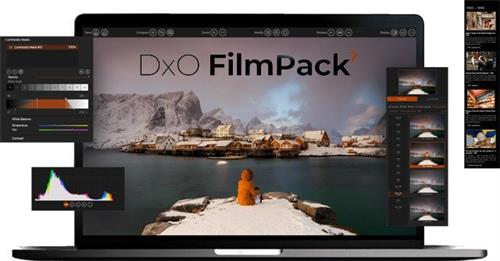
DxO FilmPack 7 is the software that takes your digital images back in time to the golden era of film photography. A tribute to the darkroom, you can explore history and get inspired by beautiful renderings, authentically recreated with scientific precision.


Refined and upgraded, the new DxO FilmPack 7 delivers
• 40 black and white and 49 color films, faithfull recreated
• Digital simulations and presets, cinematic styles, frames, textures, and light leaks
• Time Machine guides you through all of photographic history
• Set the intensity of a film stock, and modify grain
• Control exposure, highlights, midtones, shadows, and more
• Control color, create split tones, and apply luminosity masks
Rediscover the magic of film in the age of digital.
Код:
https://www.dxo.com/dxo-filmpack/whats-new/
Homepage:
Код:
https://www.dxo.com/

Download link

rapidgator.net:
Код:
https://rapidgator.net/file/9466d99d567882658f4d6d26e7b77ac0/uwmnn.DxO.FilmPack.7.16.0.8.x64.Multilingual.rar.html

nitroflare.com:
Код:
https://nitroflare.com/view/D2D082F027795C5/uwmnn.DxO.FilmPack.7.16.0.8.x64.Multilingual.rar
 
EF File Catalog 25.10 Multilingual

a7095fc5b7c2ea021c8c68ee215f6f8a.jpeg


File size: 6.2 MB​

Catalog whole disks or only single directories with familiar Explorer-like user interface and makes it available for offline browsing and searching.


Here are some key features of EF File Catalog
Internal support for all usual compressed file formats: 7-Zip, ACE, ARC, ARJ, BZIP2, CAB, CPIO, GZIP, IMG, ISO, LHA, RAR, RPM, SFX, SQX, TAR, TAR.7Z, TAR.BZ, TAR.GZ, TAR.XZ, UDF, WIM, XZ, Z, ZIP, Zip64, ZOO.
Unlimited external packer plugging support
Automatic description importing
Unlimited external description plugging support
Extract CD information from CDDB (freedb.org and local)
Fast search/search for dupes functions with wildcards, filtering support
Detailed informations
User interface with multi language support
Exports to text, CSV, HTML
The following languages are included in the package: English, German, Arabic, Bulgarian, Catalan, Chinese, Dutch, French, Hebrew, Hungarian, Italian, Japanese, Korean, Lithuanian, Macedonian, Portuguese, Romanian, Russian, Slovak, Spanish, Swedish, Turkish, Ukrainian.
Whats New
Updates: official site does not provide any info about changes in this version
Homepage:
Код:
https://www.efsoftware.com/fc/e.htm

Download link

rapidgator.net:
Код:
https://rapidgator.net/file/1e023e7a865259e1514f3693f7a4bd2b/wqelr.EF.File.Catalog.25.10.Multilingual.rar.html

nitroflare.com:
Код:
https://nitroflare.com/view/CC098ED66C47171/wqelr.EF.File.Catalog.25.10.Multilingual.rar
 
EIVA NaviEdit 9.1.0

77cc44ac5073b90f3ea1d6286d590a20.jpeg


File size: 450 MB​

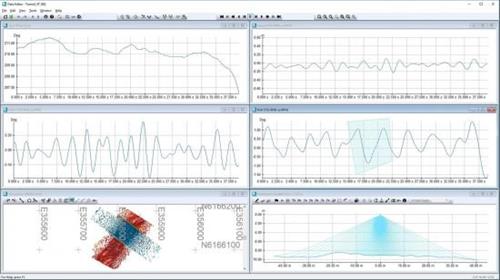
NaviEdit allows for editing of overall survey settings, raw sensor data and geodetic settings. This applies to data recorded with NaviSuite products as well as third-party software products, such as Kongsberg SIS, Hypack, GSF, etc.


NaviEdit Pro enables import of various types of laser and sonar data, including multi-beam echo sounders and side-scan sonars. Moreover, it can be used for seismic streamer positioning.
Please note that the software requires a Microsoft SQL database. The free version, SQL Server Express, is included in the software. For NaviEdit to use a data base larger than 10 GB would require a SQL Server Standard (or Enterprise) version.
Whats New
Updates: official site does not provide any info about changes in this version.
Homepage:
Код:
https://www.eiva.com/products/navisuite/navisuite-processing-software/naviedit-pro

Download link

rapidgator.net:
Код:
https://rapidgator.net/file/88a41f3ef983f6ad17f9600dee8afd80/ujjmf.EIVA.NaviEdit.9.1.0.rar.html

nitroflare.com:
Код:
https://nitroflare.com/view/BD1D4AA1E7C68AB/ujjmf.EIVA.NaviEdit.9.1.0.rar
 
DxO PhotoLab 6 ELITE Edition 6.23.0 macOS

6baf498454ab24330e7a41d5628b9e7c.jpeg


Language: Multilingual | File size: 727 MB​

DxO PhotoLab provides a complete set of smart assisted corrections that you can manually fine-tune at any time. Take control on every aspect of your photos: effectively remove noise, get rid of light constraints, recover color details, apply sophisticated optical corrections, and enhance details.


Reducing digital noise in RAW images is an ongoing challenge for most photo-editing software. But with DxO DeepPRIME we are breaking new ground. The first artificial intelligence-based (AI) technology of its kind, DeepPRIME enables you to demosaic and denoise images simultaneously. Try it out - the results speak for themselves.
Demosaicing and denoising are usually two separate processes. But with DxO DeepPRIME we've combined them to achieve even better results.
The outcome is spectacular. DxO DeepPRIME removes noise and renders photographic information without reducing color detail. Transitions are smoother and more natural, and you gain nearly two ISO sensitivity values compared to our earlier version, DxO PRIME, the benchmark software for all comparable programs currently available.
If you are an expert photographer, DxO DeepPRIME will open up a world of new possibilities by enabling you to shoot at very high sensitivities. As an amateur photographer, DeepPRIME will allow you to compensate for the drawbacks of small sensors in compact and bridge cameras that produce digital noise even at low ISO sensitivities. And if you're struggling with low quality, or older-generation cameras that are no longer suitable because of the scale of digital noise, DxO DeepPRIME will give your images a new lease of life.
New features in DxO PhotoLab 6
• Introducing DxO Wide Gamut working color space: Harness the potential of the latest printers and monitors with DxO's new color space. Avoid clipping in highly saturated areas and ensure accuracy across your workflow. Easily switch between the legacy color space (for all images coming from previous versions of DxO PhotoLab) and the new DxO Wide Gamut working color space (for your new images loaded in DxO PhotoLab 6);
• New Soft Proofing mode: For beautiful, accurate reproduction, whatever the screen or print type. Preparing your images for different output has never been easier. Achieve accurate color at every stage of your workflow;
• New DeepPRIME XD denoising option: Alongside DeepPRIME, DeepPRIME XD adds another level of performance when required. Expect less noise, more detail and smoother bokeh;
• New ReTouch tool: The brand-new ReTouch Tool gives you unprecedented control when cloning and repairing. Rotate, flip, or transform source points, and edit source areas for absolute precision;
• New nested Projects: Organize your virtual collections of images more efficiently with the new hierarchy of Projects. Create Projects and groups of Projects and simply organize them by drag-and-drop;
• Crop tool improvement: You can now rotate your images when in Crop mode;
• Embedded Perspective tools: Perspective correction tools (keystoning) are now natively available in the ELITE
version;
• New Color labels support: Identify, classify, and cull your images more easily with the new Color tags;
• New Exif & IPTC fields: For complete metadata management;
• New sticky headers in the source tree: The user interface of the source tree has been revamped;
• Keyword tokens improvement: Keyword tokens now show the full hierarchy if children have the same name;
• More than 77,000 camera/lens combinations are now available.
Release Notes
Updates: official site does not provide any info about changes in this version

Supported Operation Systems
macOS 11.6 or later
Homepage:
Код:
https://www.dxo.com

Download link

rapidgator.net:
Код:
https://rapidgator.net/file/bba0ed8af7810262ae45c395f009e4ba/alwxf.DxO.PhotoLab.6.ELITE.Edition.6.23.0.macOS.dmg.html

nitroflare.com:
Код:
https://nitroflare.com/view/004DC18FCC25DFD/alwxf.DxO.PhotoLab.6.ELITE.Edition.6.23.0.macOS.dmg
 
DxO PhotoLab 7 ELITE Edition 7.16.0 macOS

687753b3df879cffb3727446c5760f88.jpeg


Language: Multilingual | File size: 781 MB​

DxO PhotoLab provides a complete set of smart assisted corrections that you can manually fine-tune at any time. Take control on every aspect of your photos: effectively remove noise, get rid of light constraints, recover color details, apply sophisticated optical corrections, and enhance details.


Reducing digital noise in RAW images is an ongoing challenge for most photo-editing software. But with DxO DeepPRIME we are breaking new ground. The first artificial intelligence-based (AI) technology of its kind, DeepPRIME enables you to demosaic and denoise images simultaneously. Try it out - the results speak for themselves.
Demosaicing and denoising are usually two separate processes. But with DxO DeepPRIME we've combined them to achieve even better results.
The outcome is spectacular. DxO DeepPRIME removes noise and renders photographic information without reducing color detail. Transitions are smoother and more natural, and you gain nearly two ISO sensitivity values compared to our earlier version, DxO PRIME, the benchmark software for all comparable programs currently available.
If you are an expert photographer, DxO DeepPRIME will open up a world of new possibilities by enabling you to shoot at very high sensitivities. As an amateur photographer, DeepPRIME will allow you to compensate for the drawbacks of small sensors in compact and bridge cameras that produce digital noise even at low ISO sensitivities. And if you're struggling with low quality, or older-generation cameras that are no longer suitable because of the scale of digital noise, DxO DeepPRIME will give your images a new lease of life.
Release Notes
Updates: official site does not provide any info about changes in this version

Supported Operation Systems
macOS 12.6 or later
Homepage:
Код:
https://www.dxo.com

Download link

rapidgator.net:
Код:
https://rapidgator.net/file/770d012c6ea034582fbb3a286fce4347/sphkk.DxO.PhotoLab.7.ELITE.Edition.7.16.0.macOS.dmg.html

nitroflare.com:
Код:
https://nitroflare.com/view/09792A67460747F/sphkk.DxO.PhotoLab.7.ELITE.Edition.7.16.0.macOS.dmg
 
DxO PhotoLab 8 ELITE Edition 8.8.0 macOS

a160297baae4967bc334441fd393f5c1.jpeg


Language: Multilingual | File size: 823 MB​

DxO PhotoLab provides a complete set of smart assisted corrections that you can manually fine-tune at any time. Take control on every aspect of your photos: effectively remove noise, get rid of light constraints, recover color details, apply sophisticated optical corrections, and enhance details.


DxO's pioneering Optics Modules are renowned for giving photographers the best possible performance from their gear, and are applied automatically depending on metadata. Lens softness adjustments are tailored according to the idiosyncrasies of individual lenses. They don't simply sharpen uniformly across the entire image like in other software.
Noise reduction powered by machine learning. DeepPRIME, DeepPRIME XD, and DeepPRIME XD2s eliminate noise, recover detail, and improve color reproduction. Two legacy technologies - PRIME and High Quality - are included when speed is crucial. Choose the automatic settings or dial them in manually. Use the new large live preview magnifier to see the impact of denoising - plus all of your other edits.
Extra-wide gamut working color space (DxO Wide Gamut) ensures accurate rendering throughout the workflow. Soft Proofing mode ensures accurate colors when preparing files for print or display. Simulate ink and paper via ICC profiles. Create calibrated color profiles using industry-standard color charts to ensure precision.
Use ColorWheel to manipulate colors and customize color channels. Adjust Exposure compensation, edit the Tone Curve (enhanced in v8), tweak Contrast and Microcontrast. Plus White Balance with color picker, Color Accentuation to set saturation/vibrancy, Black-and-white palette with channel mixer, and Selective Tone for greater control over tonal ranges.
Choose the size/location of files, set up custom export presets, create multiple parallel exports, and apply original or custom ICC profile, sRGB, or Adobe RGB profiles. Right-click to export to a specific application. Send images directly to other applications. With Nik Collection installed, you have direct access to all plugins.
Release Notes
Updates: official site does not provide any info about changes in this version

Supported Operation Systems
macOS 13.6 or later
Homepage:
Код:
https://www.dxo.com

Download link

rapidgator.net:
Код:
https://rapidgator.net/file/beec741e1a512174e9043eab297fce53/bdxbv.DxO.PhotoLab.8.ELITE.Edition.8.8.0.macOS.dmg.html

nitroflare.com:
Код:
https://nitroflare.com/view/FF04DB8435C42D4/bdxbv.DxO.PhotoLab.8.ELITE.Edition.8.8.0.macOS.dmg
 
EverWeb Standalone 4.4.0 macOS

a12187b8b948b47395ddb5d51f1a206b.jpeg


Language: Multilingual | File size: 123 MB​

With EverWeb, anyone can create a professional website just by dragging and dropping. Use one of the built-in templates, or start completely from scratch and design the perfect website for your business or personal hobby. Add text, photos, video, widgets, and more to easily create the website you want.


Release Notes
Updates: official site does not provide any info about changes in this version

Supported Operation Systems
macOS 10.13 or later
Homepage:
Код:
https://www.everwebapp.com

Download link

rapidgator.net:
Код:
https://rapidgator.net/file/23d12f8ee438fd54a42187f765471bd8/bcrum.EverWeb.Standalone.4.4.0.macOS.dmg.html

nitroflare.com:
Код:
https://nitroflare.com/view/7B1141316DB7345/bcrum.EverWeb.Standalone.4.4.0.macOS.dmg
 
Fork 2.56.0 macOS

51f9ab64d751e73f5ea71c1bac408ed3.jpeg


File size: 46 MB​

Fast and friendly git client. Fork is getting better and better day after day and we are happy to share our results with you. Commit List - Working Directory Changes - Side by Side Diff - Repository Manager Summary and Statistics


Basic features:Fetch, pull, push | Commit, amend | Create and delete branches and tags | Create and delete remote repos | Checkout branch or revision | Cherry-pick, revert | Merge, rebase | Stashes | Submodules
Work with repository: Create, clone or add existing repos | Open recent repository quickly
Commit view: Stage / unstage changes line-by-line | Access to recent commit messages
More features: Browse the repository file tree at any commit | Intuitive merge conflict resolving | See your stashes right in the commit list
Release Notes
Updates: official site does not provide any info about changes in this version

Supported Operation Systems
macOS 10.13 or later
Homepage:
Код:
https://git-fork.com/

Download link

rapidgator.net:
Код:
https://rapidgator.net/file/8f4e7c8020641fdec7518489ce7ba8be/eemuz.Fork.2.56.0.macOS.dmg.html

nitroflare.com:
Код:
https://nitroflare.com/view/CDB5F30DAFBA43D/eemuz.Fork.2.56.0.macOS.dmg
 
Infuse Pro 8.2.4 macOS

b389cb65dcc965dc540d646dddcf63d7.jpeg


Language: Multilingual | File size: 103 MB​

Ignite your video content with Infuse - the beautiful way to watch almost any video format on your iPhone, iPad, Apple TV, and Mac. No need to convert files! Infuse is optimized for macOS 12, with powerful streaming options, Trakt sync, and unmatched AirPlay & subtitle support.


Gorgeous interface. Precise controls. And silky-smooth playback.
- PLAY MORE VIDEO TYPES
A powerful video player that plays just about anything, including the standard MP4, M4V and MOV - plus MKV, AVI, WMV, MTS, ISO, VIDEO_TS, FLV, OGM, OGV, ASF, 3GP, DVR-MS, WebM, and WTV. Includes fully certified Dolby® Digital Plus (AC3/E-AC3), DTS® and DTS-HD® audio.
Top In-App Purchases: Full Version - included.

*** You need to disable the System Integrity Protection (SIP) to perform the selected Application.

Release Notes
Код:
https://geo.itunes.apple.com/app/id1136220934

Supported Operation Systems
macOS 11.0 or later
Homepage:
Код:
https://geo.itunes.apple.com/app/id1136220934

Download link

rapidgator.net:
Код:
https://rapidgator.net/file/304d3643eae9c57c8caedac997747bf4/dxywx.Infuse.Pro.8.2.4.macOS.dmg.html

nitroflare.com:
Код:
https://nitroflare.com/view/FD6894DBE279C24/dxywx.Infuse.Pro.8.2.4.macOS.dmg
 
Eltima USB Network Gate 11.0.2724 Multilingual

th_Dqnak94ajAdhkrzKM2qjBLTsVPJhcxjh.avif


Windows x64 | File size: 12.46 MB​

With USB Network Gate you get to efficiently share multiple USB devices over Ethernet and connect to them on remote machines as if the devices were physically plugged into the computers regardless of the location or distance between them.


Share USB over IP network
USB Network Gate offers a number of handy features that make sharing USB over Ethernet an easy and quick process. Now any user can print, scan, access USB license dongles and USB hubs over Ethernet from any computer in your office, no matter how big it is and how many floors it occupies.
USB over Ethernet data traffic optimization
With USB to Ethernet Connector traffic compression option, you can drastically improve transfer speed and bandwidth utilization. This option will be especially useful in conjunction with the devices that tend to transfer data uncompressed.
Share USB over Wi-Fi safely
The most valuable resource in the modern world is information, and our USB over IP software will make sure that no third party will gain access to yours. Highly secured connection standards are provided by the embedded traffic encryption option. Moreover, you can add a password to control remote user access.
Turn your computer into a USB server
There is no need to reboot your computer or restart USB Network Gate every time you need to share another device. Just unplug the currently shared USB device and plug in another one, it's that simple! A new device will automatically appear on the remote client, thanks to the fact that the application shares a USB port over the network, not just a connected device.
Share USB over RDPThe common problem you may face when using Remote Desktop Connection is that you are unable to access local USB devices. USB Network Gate allows you to work with any local USB devices even while in a remote session. Moreover, you can set your remote machine to automatically detect and connect to shared USB devices momentarily, as if you just plugged the device in a remote machine physically.
Citrix ICA protocol support
In case you do not use Microsoft RDP or a client computer runs the operating system other than Windows, then fear not: USB device redirection can be done via Citrix ICA protocol. USB Network Gate natively supports Citrix ICA since version 7.0.
RemoteFX USB redirection support
USB Network Gate supports native RemoteFX USB Redirection (MS-RDPEUSB), allowing you to redirect shared devices from your local Linux computer to a remote Windows client without installing USB Network Gate on the latter. Note that shared USB devices have to be supported by RemoteFX USB Redirection. Otherwise, you'll need to install USB Network Gate on Windows client.
Overhauled and improved USB device isolation
One of the inconvenient features of Windows is that every connected USB device is available to all users by default. Given that Windows does not provide enough tools to control access to a particular device by a particular user, this can pose a serious problem when there are a lot of users working at the same Windows PC or at the terminal server that hosts a large number of Remote Desktop sessions. Luckily, USB Network Gate provides a unique device isolation feature which can solve that issue
Код:
https://help.electronic.us/support/solutions/articles/44001309944-what-s-new-in-this-version-for-windows
Homepage:
Код:
https://www.eltima.com/

Download link

rapidgator.net:
Код:
https://rapidgator.net/file/18f33b5ae8ba5a4b1583a1a1b671c248/unypf.Eltima.USB.Network.Gate.11.0.2724.Multilingual.rar.html

nitroflare.com:
Код:
https://nitroflare.com/view/899DE121D05E73E/unypf.Eltima.USB.Network.Gate.11.0.2724.Multilingual.rar
 
Назад
Сверху