• Здравствуйте. Сайт заработал в архивном режиме форум www.old.nado.in

All mitsumi'1s Applications !! (updated daily)

  • Автор темы Автор темы mitsumi1
  • Дата начала Дата начала
TweakNow WinSecret Plus 7.1.1
1338d6c151b191f03c3fbf81c7572ad9.jpeg


File Size: 27.6 MB​

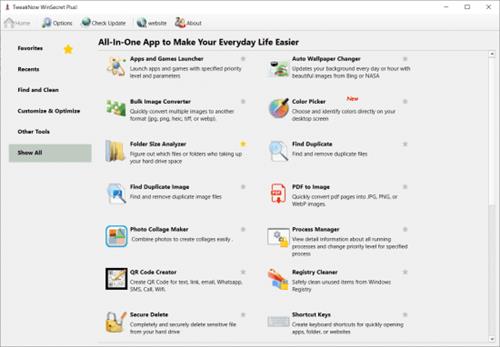
TweakNow WinSecret for Windows 10, 11 allows users to explore the hidden settings in Windows 11.


This app is specifically geared for Windows 10, 11 grouping numerous registry settings and delivering them from an easy and safe user interface.
With TweakNow WinSecret for Windows 10, 11 you can move the Windows taskbar to the top and change the taskbar size by editing the registry value. With any app modifying the registry, it is strongly advised to have a backup to restore from in the advent of an issue.
TweakNow WinSecret for Windows 10, 11 makes the process easier than directly doing it via Regedit, potentially creating critical problems for a novice user. TweakNow WinSecret for Windows 10, 11 gives you a smooth platform to perform these tweaks in a more controlled environment.
TweakNow WinSecret for Windows 10, 11 is a solid option for those that want to improve their overall experience while on Windows 10, 11 through a simple and easy-to-navigate app.
Plus Features
Auto Dark
Automatically change app and system theme mode to light or dark
Auto Wallpaper Changer
Updates your background every day or hour with beautiful images from Bing homepage
Folder Size Analyzer
Figure out which files or folders who taking up your hard drive space
Find Duplicate
Find and remove duplicate files
Process Manager
View detail information about all running processes and change priority level for specified process
Secure Delete
Completely and securely delete sensitive file from your hard drive
Smart Shortcut
Automatically specified priority level for your favourite apps
System Information
Show detail information about your system
Track Cleaner
Protect your privacy by eliminating traces of your digital activities
Transparent Taskbar
Make your Windows 10 Taskbar completely transparent
Troubleshooter
Fix problem with Internet connection, icon, thumbnail, and Microsoft Store
Windows Secret
Safely and easily explore Windows 10, 11 hidden settings
Код:
https://www.tweaknow.com/WindowsSecretPlus.php
Homepage:
Код:
https://www.tweaknow.com/

Download link

rapidgator.net:
Код:
https://rapidgator.net/file/787abc0f9aa4d8e232d6172557a5263a/jjwjv.TweakNow.WinSecret.Plus.7.1.1.rar.html

nitroflare.com:
Код:
https://nitroflare.com/view/F69B6A8BB865E07/jjwjv.TweakNow.WinSecret.Plus.7.1.1.rar

 
Ableton Live 12 Suite 12.2.2 macOS

28ee9b3f6d3ba7e438d78a155db014a0.jpeg


File size: 3.17 GB​

Ableton Live is fast, fluid and flexible software music sequencer and digital audio workstation for music creation and performance. It comes with effects, instruments, sounds and all kinds of creative features - everything you need to make any kind of music.

Create in a traditional linear arrangement, or improvise without the constraints of a timeline in Live's Session View. Move freely between musical elements and play with ideas, without stopping the music and without breaking your flow.
→ All new features and updates in Live 12:
MIDI Transformations
Create a variety of simple or complex variations to your MIDI clips: add ornaments and articulations, draw acceleration and deceleration curves, connect successive notes and chords, or simulate the strum of a guitar.
MIDI Generators
Conjure up melodies, chords and rhythms with new MIDI Generators. Give your chosen Generator custom constraints, watch it create playful and original patterns, and then turn the ideas it produces into your own.
Max for Live MIDI Tools
Max now facilitates even greater experimentation, letting you create new MIDI Transformations and Generators - either based on existing ones, or your own creations.
MIDI Editing Improvements
Arrange the order of a selection of notes by pitch, velocity or duration. Stretch, split, chop or join notes in new ways; shape the velocity of notes; transpose them into a scale; or add intervals chromatically or in key.
Keys and Scales
Set the selected clip's scale in Live's Control Bar to see its notes in any clip you create. Then edit the clip using scale highlighting as a guide, use the clip scale to transform and generate musical ideas, or sync the scale of MIDI devices and instruments to the clip being played. Any changes in Live will be reflected in Push, and vice versa.
Expanded probability
Assign a single probability rule to a group of notes so that the entire group of notes is played whenever the trigger is fired. Or select a chord and tell Live to randomly play one note from it whenever the probability trigger is fired.
Embrace and explore tunings
Follow your preferred tuning systems or try different ones more easily. Work outside the 12-tone equal temperament system, and access tunings with Live's devices as well as any MPE-capable plugin.
Meld
A bi-timbral, MPE-capable instrument designed for deep sound shaping that lets you create a wide array of textural and experimental tones with its two easy-to-use macro oscillators.
Granulator III
The latest iteration of Robert Henke's granular instrument now has MPE capability, giving you expressive control over parameters like note bend, vibrato and glissando. Plus, you can now capture audio in real time and start manipulating it immediately.
Roar
Create everything from subtle and precise mastering-grade warmth to wild and unpredictable sound degradation with Live's new coloring and saturation effect. Roar's three saturation stages can be used in series, parallel, or even in mid/side and multiband configurations - and it comes equipped with a feedback generator and an extensive modulation matrix.
New Modulation Behavior
Modulation destinations are no longer taken over by the modulation source. This means you can still adjust the parameter being modulated, even after assigning an LFO or other modulation source to it, opening up faster workflows, more possibilities for performance and continuous real-time control of parameters.
New PackLost and Found- A collection of sounds fashioned from unusual materials, percussive trinkets, unique foley recordings and expressive objects to infuse your productions with character and authenticity. Dig deep and create layers of decorative, expressive instruments, playful Drum Racks and rich sound effects.
New PackPerformance Pack- A set of innovative devices from Iftah that push the boundaries of performing with Live. Capture snapshots of your sets and deploy them later, control multiple parameters with layered macros and curves, extend performances with looping in Arrangement View and pre-arrange the structure of a performance before you have even recorded it.
Stacked Detail Views
View your devices and the Clip Editor, or automation and device parameters, at the same time - so you can work without the distraction of switching between views.
View styling
Live 12's cleaner, more minimal look removes visual complexity and keeps the focus on your music.
Mixer in Arrangement
Live's Mixer, previously available only in Session View, can now be used in Arrangement View. Toggle it on or off with Mixer View Control located in the bottom right corner or via the View menu, and configure it independently of the Arrangement Mixer.
Mixer improvements
Live's Mixer also comes with visual improvements that make it more accurate for detailed mixing decisions, and easier to read and control.
Browser Tagging and Filtered Searches
Search for your sounds in the Browser without the constraints of Live's built-in categorization. That means when you search for bass sounds, you'll see all the bass sounds in your Ableton library, whether they're samples or instrument presets.
Live 12's sound content is also tagged using a new system that acts as a more flexible alternative or addition to Collections in the sidebar. Sounds now come with sensible labels to make them easier to find - but if you need more detail, or just want to use your own method of labeling, you can also add your own.
Aside from Live 12's built-in tags, you can create your own custom categories in the sidebar for easy access to all your favorite sounds and devices in the way that makes the most sense to your workflow.
Sound Similarity Search
Start with a sample and tell Live's browser to find comparable sounds and instrument presets, with the help of a neural network.
Or swap all the samples in your Drum Rack for similar ones to quickly try out new percussive textures - like a drum machine with seemingly-infinite kits.
Browser History
Retrace your steps, and see and hear the sounds or categories you've previously searched for: Live's Browser now lets you backtrack through your search history as you would with a web browser.
Accessibility and navigation improvements
Control core workflows in Live 12 using assistive technologies like screen readers, and use new keyboard shortcuts to navigate to nearly every part of Live.
New Themes
Choose new themes and adjust them with cool, neutral or warm tones and even a high contrast mode.
Release Notes
Код:
https://www.ableton.com/en/release-notes/live-12/

Supported Operation System
• macOS 11.0 or later
• Apple Silicon or Intel Core processor
Homepage:
Код:
https://www.ableton.com/en/live

Download link

rapidgator.net:
Код:
https://rapidgator.net/file/247112d40511f045740eadc0d562962a/kdbwe.Ableton.Live.12.Suite.12.2.2.macOS.part1.rar.html
https://rapidgator.net/file/6e90a24cb554b83bebe3ce0a94c48aa2/kdbwe.Ableton.Live.12.Suite.12.2.2.macOS.part2.rar.html
https://rapidgator.net/file/1f1cc8b230f06812448b1f9cbe949bf3/kdbwe.Ableton.Live.12.Suite.12.2.2.macOS.part3.rar.html

nitroflare.com:
Код:
https://nitroflare.com/view/41CBF157BE37F6B/kdbwe.Ableton.Live.12.Suite.12.2.2.macOS.part1.rar
https://nitroflare.com/view/A234FDA285A65A7/kdbwe.Ableton.Live.12.Suite.12.2.2.macOS.part2.rar
https://nitroflare.com/view/D3B38EFA0D70A0C/kdbwe.Ableton.Live.12.Suite.12.2.2.macOS.part3.rar
 
Ableton Live Suite 12.2.2 (x64) Multilingual

08a994255fb3da480cfea11990a56f04.jpeg


File size: 2.8 GB​

Live is fast, fluid and flexible software for music creation and performance. It comes with effects, instruments, sounds and all kinds of creative features-everything you need to make any kind of music. Create in a traditional linear arrangement, or improvise without the constraints of a timeline in Live's Session View. Move freely between musical elements and play with ideas, without stopping the music and without breaking your flow.

New features and updates in Live 12
Play freely with ideas
MIDI Transformations
Create a variety of simple or complex variations to your MIDI clips: add ornaments and articulations, draw acceleration and deceleration curves, connect successive notes and chords, or simulate the strum of a guitar.
MIDI Generators
Conjure up melodies, chords and rhythms with new MIDI Generators. Give your chosen Generator custom constraints, watch it create playful and original patterns, and then turn the ideas it produces into your own.
Max for Live MIDI Tools
Max now facilitates even greater experimentation, letting you create new MIDI Transformations and Generators - either based on existing ones, or your own creations.
MIDI Editing Improvements
Arrange the order of a selection of notes by pitch, velocity or duration. Stretch, split, chop or join notes in new ways; shape the velocity of notes; transpose them into a scale; or add intervals chromatically or in key.
Keys and Scales
Set the selected clip's scale in Live's Control Bar to see its notes in any clip you create. Then edit the clip using scale highlighting as a guide, use the clip scale to transform and generate musical ideas, or sync the scale of MIDI devices and instruments to the clip being played. Any changes in Live will be reflected in Push, and vice versa.
Expanded probability
Assign a single probability rule to a group of notes so that the entire group of notes is played whenever the trigger is fired. Or select a chord and tell Live to randomly play one note from it whenever the probability trigger is fired.
Embrace and explore tunings
Follow your preferred tuning systems or try different ones more easily. Work outside the 12-tone equal temperament system, and access tunings with Live's devices as well as any MPE-capable plugin.
Surprise yourself with the sounds you create
Meld
A bi-timbral, MPE-capable instrument designed for deep sound shaping that lets you create a wide array of textural and experimental tones with its two easy-to-use macro oscillators.
Granulator III
The latest iteration of Robert Henke's granular instrument now has MPE capability, giving you expressive control over parameters like note bend, vibrato and glissando. Plus, you can now capture audio in real time and start manipulating it immediately.
Roar
Create everything from subtle and precise mastering-grade warmth to wild and unpredictable sound degradation with Live's new coloring and saturation effect. Roar's three saturation stages can be used in series, parallel, or even in mid/side and multiband configurations - and it comes equipped with a feedback generator and an extensive modulation matrix.
New Modulation Behavior
Modulation destinations are no longer taken over by the modulation source. This means you can still adjust the parameter being modulated, even after assigning an LFO or other modulation source to it, opening up faster workflows, more possibilities for performance and continuous real-time control of parameters.
New Packs
Lost and Found - A collection of sounds fashioned from unusual materials, percussive trinkets, unique foley recordings and expressive objects to infuse your productions with character and authenticity. Dig deep and create layers of decorative, expressive instruments, playful Drum Racks and rich sound effects.
Performance Pack - A set of innovative devices from Iftah that push the boundaries of performing with Live. Capture snapshots of your sets and deploy them later, control multiple parameters with layered macros and curves, extend performances with looping in Arrangement View and pre-arrange the structure of a performance before you have even recorded it.
Work more intuitively
Stacked Detail Views
View your devices and the Clip Editor, or automation and device parameters, at the same time - so you can work without the distraction of switching between views.
View styling
Live 12's cleaner, more minimal look removes visual complexity and keeps the focus on your music.
Mixer in Arrangement
Live's Mixer, previously available only in Session View, can now be used in Arrangement View. Toggle it on or off with Mixer View Control located in the bottom right corner or via the View menu, and configure it independently of the Arrangement Mixer.
Mixer improvements
Live's Mixer also comes with visual improvements that make it more accurate for detailed mixing decisions, and easier to read and control.
Browser Tagging and Filtered Searches
Search for your sounds in the Browser without the constraints of Live's built-in categorization. That means when you search for bass sounds, you'll see all the bass sounds in your Ableton library, whether they're samples or instrument presets.
Live 12's sound content is also tagged using a new system that acts as a more flexible alternative or addition to Collections in the sidebar. Sounds now come with sensible labels to make them easier to find - but if you need more detail, or just want to use your own method of labeling, you can also add your own.
Aside from Live 12's built-in tags, you can create your own custom categories in the sidebar for easy access to all your favorite sounds and devices in the way that makes the most sense to your workflow.
Sound Similarity Search
Start with a sample and tell Live's browser to find comparable sounds and instrument presets, with the help of a neural network.
Or swap all the samples in your Drum Rack for similar ones to quickly try out new percussive textures - like a drum machine with seemingly-infinite kits.
Browser History
Retrace your steps, and see and hear the sounds or categories you've previously searched for: Live's Browser now lets you backtrack through your search history as you would with a web browser.
Accessibility and navigation improvements
Control core workflows in Live 12 using assistive technologies like screen readers, and use new keyboard shortcuts to navigate to nearly every part of Live.
New Themes
Choose new themes and adjust them with cool, neutral or warm tones and even a high contrast mode.
Код:
https://www.ableton.com/en/release-notes/live-12/
Homepage:
Код:
https://www.ableton.com/

Download link

rapidgator.net:
Код:
https://rapidgator.net/file/8b048abc86d8629c30e2186207828427/jjisg.Ableton.Live.Suite.12.2.2.x64.Multilingual.part1.rar.html
https://rapidgator.net/file/25cc8f82a80137b45bbdd430ed210ce0/jjisg.Ableton.Live.Suite.12.2.2.x64.Multilingual.part2.rar.html

nitroflare.com:
Код:
https://nitroflare.com/view/03AAC80B90E1CA7/jjisg.Ableton.Live.Suite.12.2.2.x64.Multilingual.part1.rar
https://nitroflare.com/view/83661829DE8789D/jjisg.Ableton.Live.Suite.12.2.2.x64.Multilingual.part2.rar
 
Adobe Lightroom Classic 2025 v14.5 (x64) Multilingual

45752880621d0bfde8c8dfe2c336fc13.jpeg


File size: 2.41 GB​

Edit and organize your photos with the app that's optimized for desktop. Lightroom Classic gives you powerful one-click tools and advanced controls to make your photos look amazing. Easily organize all your photos on your desktop, and share in a variety of ways.


Your best shots. Made even better.
Your photos don't always reflect the scene the way you remember it. But with Lightroom Classic, you have all the desktop editing tools you need to bring out the best in your photographs. Punch up colors, make dull-looking shots vibrant, remove distracting objects, and straighten skewed shots. Plus, the latest release offers improved performance so you can work faster than ever.
- With better performance under the hood, Lightroom Classic lets you import photos, generate previews, and move from Library to Develop Module in record time.
- Use range masking tools to easily select the areas or objects you want to edit based on their color, luminance, or depth.
- Create HDR panos faster now that you can merge multiple bracketed exposures into multiple HDR photos and then stitch them into a panorama - all in one step.
The future of photography. Here today. Get to know Lightroom.
Go beyond the desktop and edit, organize, store, and share from anywhere with the cloud-based Lightroom photo service
- Store and access your full-resolution photos in the cloud
- Find photos on any device fast with auto tagging
- Edit from any device using an intuitive, streamlined interface
Accelerate image-editing with GPU support
Use the GPU of your system to enhance image-editing experience.
Organize your collections with color labels
Color labels can be added for collections, collections sets, and smart collections.
Support for new cameras and lenses
Adds support for new cameras and lens profiles.
Other enhancements
Find information about PNG export, batch merge for HDR and panoramas, and other new enhancements in this release.
Код:
https://helpx.adobe.com/lightroom-classic/help/whats-new.html
Homepage:
Код:
https://www.adobe.com/

Download link

rapidgator.net:
Код:
https://rapidgator.net/file/849fee38d9c774f146836d1debf8d016/sracc.Adobe.Lightroom.Classic.2025.v14.5.x64.Multilingual.part1.rar.html
https://rapidgator.net/file/5f93acb9c71fabbcf9e35a45ea283866/sracc.Adobe.Lightroom.Classic.2025.v14.5.x64.Multilingual.part2.rar.html

nitroflare.com:
Код:
https://nitroflare.com/view/2A342FB5CE8B096/sracc.Adobe.Lightroom.Classic.2025.v14.5.x64.Multilingual.part1.rar
https://nitroflare.com/view/7BC0F4172FE8E2D/sracc.Adobe.Lightroom.Classic.2025.v14.5.x64.Multilingual.part2.rar
 
Adobe Photoshop Lightroom 8.5 (x64) Multilingual

86cfb428c0d5d4ab2c935ec2bed5a9f0.jpeg


File size: 1.78 GB​

Photo editing made for everyone. Lightroom makes it easy to get your images just right. Edit from anywhere you are and take your photography to new places.


Make your images match the moment.
Easy ways to adjust exposure, color, and more let you create photos that capture your vision.
Editing made easy.
Wherever you are, Lightroom lets you make basic edits to brightness, contrast, and more - so you've got the perfect shots to share with friends and family.
Preset it and perfect it.
For a consistent look and feel, let Lightroom do the work with presets. Apply filters in a click with premium presets for every style - and add presets to specific areas of your photo for more focused edits.
Edit from anywhere.
Pick up where you left off with Lightroom on mobile, desktop, or web - your projects will sync automatically so you're always looking at your latest edits.
Level up your skills.
Experience informative step-by-step tutorials right inside Lightroom, and find even more inspiration from the community in Lightroom Discover.
Get down to the last detail.
Fine-tune your photos with maximum control and precision when you edit with Lightroom for desktop.
Instant removal of unwanted objects
New Content-Aware Remove lets you erase anything in seconds. Select an object or blemish and Lightroom will automatically blend it away.
Editing while comparing views
Now you can edit one photo while reviewing another to match edits or compare the two.
More precise ways to edit people
Select People instantly detects the people in your image so you can quickly make edits to facial features, clothing, and more.
Video editing in Lightroom
Trim and edit video clips using your favorite sliders and presets - and give your work a cohesive look and feel.
Ways to remix and share
Put a new spin on images from fellow photographers and inspire others with your edits.
Код:
https://helpx.adobe.com/gr_en/lightroom-cc/using/whats-new.html
Homepage:
Код:
https://adobe.com/

Download link

rapidgator.net:
Код:
https://rapidgator.net/file/18bc69e9671597cad6a2731d1bbbcc36/seexf.Adobe.Photoshop.Lightroom.8.5.x64.Multilingual.rar.html

nitroflare.com:
Код:
https://nitroflare.com/view/D90A082B406D172/seexf.Adobe.Photoshop.Lightroom.8.5.x64.Multilingual.rar
 
AIMP 5.40.2691 Multilingual

a493d195e4b517fd1e3cb8f410063137.jpeg


Windows x86/x64 | File size: 40.1 MB​

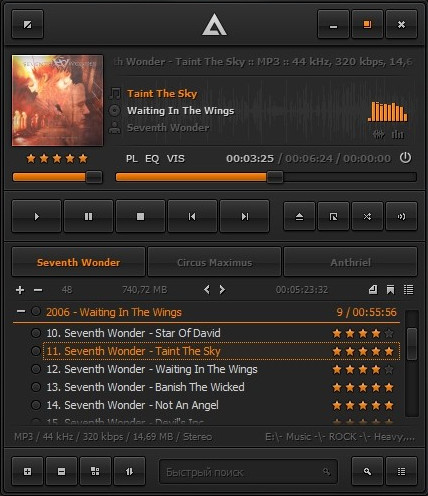
AIMP is a powerful audio player that allows you to listen to your favorite music with an outstanding sound quality. Its appearance resembles that of another classical audio player (Winamp), so you'll get used to it very quickly. It can also be customized with skins. The program includes a 18-band equalizer, a visualization window to display rhythmic visual effects and a playlist editor to organize your audio files. A nice fading effect makes your list of songs look like an endless music loop and a handy volume normalizing feature avoids drastic volume changes between tracks.


Also, the player's main functions can be conveniently controlled by global hotkeys. Besides playing music, AIMP features three extra utilities which also enable you to record any sound on your computer, convert audio files from one format to another and view or edit tags. AIMP is based on the well-known audio engine BASS, so it's easy to connect new plug-ins (from the plug-in library included in the program) and expand the player's functionalities.
- Audio Lirary, Sound Recorder, Audio Converter/CD Grabber and Tag Editor...
- Support for large number of formats and playlists ...
- Work with multiple playlist immediately, creation of bookmarks, playback queue ...
- Design Great functionality and user-friendly interface ...
Main features
* Audio formats supported: MP1, MP2, MP3, MPC, MP+, AAC, AC3, OGG, FLAC, APE, WavPack, Speex, WAV, CDA, WMA, S3M, XM, MOD, IT, MO3, MTM, UMX
* Good functionality and friendly user interface
* 18-sliders equalizer and build-in sound effects: Reverb, Flanger, Chorus, Pitch, Tempo, Echo, Speed
* 32-bit sound processing: for crystal clear sound
* Works with few playlists: Listern one, work with other
* Plug-Ins support: You can add new utils or extend already exists, and connect some winamp plugins: Input, Gen, DSP
* Autoshutdown manager
* Internet-Radio: Listern and Capture!
* Bookmarks and Queues
* Hotkeys: Customizable local and global hotkeys
* Multilingual interface
* Multiuser mode support: Few users works unders one computer? It's no problem!
* Full Unicode support
* File search: File search by all opened playlists
* Many program options
* Small distributive size
* Audio Converter: Any supported audio file can be encoded to WAV, MP3, WMA or OGG format
* Audio Grabber: Audio CD Track can be encoded to WAV, MP3, WMA or OGG format
* Sound Recorder: Capture sound from any audio device in your system to mp3, ogg, wav or wma format
* Advanced Tag Editor: Edit ID3v1, ID3v2, Vorbis, WMA tags. Grouping rename, group editing and sort files by one of templates.
* Audio Library
Код:
https://www.aimp.ru/?do=changelog
Homepage:
Код:
https://www.aimp.ru/

Download link

rapidgator.net:
Код:
https://rapidgator.net/file/6e3a39bec656c994e47c46d5ae207b97/eougg.AIMP.5.40.2691.Multilingual.rar.html

nitroflare.com:
Код:
https://nitroflare.com/view/B1250C9353BB575/eougg.AIMP.5.40.2691.Multilingual.rar
 
Automatic Email Processor 3.8.11

5bc27f09b0ea8b634e37166298d0fd58.jpeg


File size: 44.4 MB​

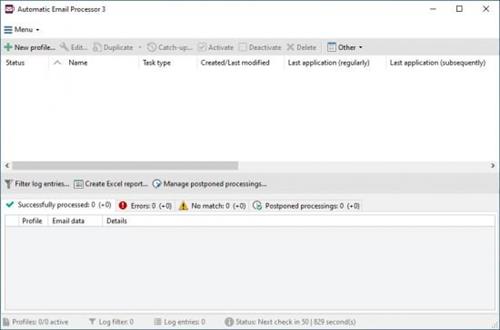
Automatic Email Processor is the complete solution for Outlook to store and print incoming emails and their attachments automatically. For this, various filters, flexible configuration options, such as individually definable storage folders and the possibility of subsequent processing are available. For example, the path of the location where you want Automatic Email Processor to save certain emails or email attachments, can be assembled dynamically from individual properties of an email.


For storing email messages, inter alia, the output format can be specified (for example, PDF, RTF, or HTML). The Outlook message format (MSG files) is for example particularly suitable to back up e-mails. The program supports the creation of an unlimited number of rules to allow separate settings for different email accounts. Rules can be additionally applied to emails of a specific time period or to any previously received emails of an Outlook folder.
WITH AUTOMATIC EMAIL PROCESSOR, YOU CAN
Automatically store respectively archive email attachments
Save emails automatically (as PDF file or in the original format)
Automatically print emails and email attachments (PDF files, Office documents etc.)
Monitor an unlimited number of Outlook folders
Create custom rules for different tasks
Filter by subject, sender, recipient, attachment file name ...
Receive information about the processing status via email
Create storage folders dynamically from properties of an email
Perform subsequent actions such as start a program with parameters, mark the message as read, or move the email into another Outlook folder
Re-process all emails (with certain criteria) of an Outlook email folder
Archive emails from any Outlook folder and period (e.g. as MSG files)
Код:
https://gillmeister-software.com/products/automatic-email-processor/changelog.aspx
Homepage:
Код:
https://gillmeister-software.com

Download link

rapidgator.net:
Код:
https://rapidgator.net/file/dde4935ffecfb2e7b444b716110fb780/ozjsy.Automatic.Email.Processor.3.8.11.rar.html

nitroflare.com:
Код:
https://nitroflare.com/view/3DCBB331CEEADEB/ozjsy.Automatic.Email.Processor.3.8.11.rar
 
DAEMON Tools Lite 12.3.0.2354 Multilingual

47a5cf4743c8bc6570a19dc64c4622a2.jpeg


File Size : 61 Mb​

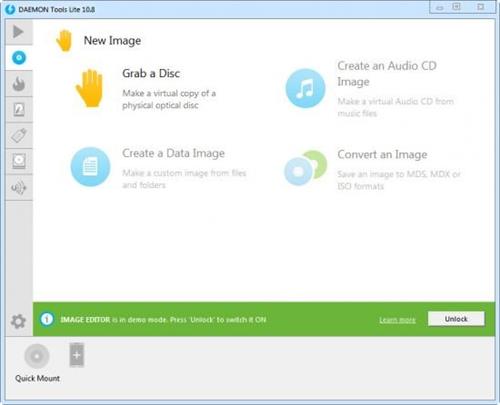
DAEMON Tools Lite offers easy tools for making simple disc image files and emulating virtual CD, DVD and Blu-ray drives. It is an advanced application for Microsoft Windows which provides one of the best optical media emulation in the industry. DAEMON Tools enables you to convert your physical CD/DVD/Blu-ray discs into "virtual discs" so called "images". You can use your CD/DVD/BD images as if they were already burned to CD/DVD/Blu-Ray. It also emulated up to 4 virtual CD/DVD/BD drives, so you can mount (insert) and unmount (eject) images. Virtual drives will appear in your OS just like real ones. Select a virtual drive then choose a disc image you want to mount. Find the created virtual drive with mounted disc image in My Computer and start working.


With DAEMON Tools Lite you can create ISO, MDS/MDF and MDX image files from original discs inserted in physical CD, DVD and Blu-ray drives.
Do you want to protect your image content from unauthorized use? DAEMON Tools enables you to set unique password and only the ones who know it will be able to mount that image and get all contained data. If you want images to take less hard drive space just enable "Compress image data" option before start disc imaging process. You could also use images created with other programs. DAEMON Tools products work with variety of image types.
Functionality
• Mount *.mdx, *.mds/*.mdf, *.iso, *.b5t, *.b6t, *.bwt, *.ccd, *.cdi, *.bin/*.cue, *.ape/*.cue, *.flac/*.cue, *.nrg, *.isz disc images to a virtual drive
• Create .iso, *.mds/*.mdf and *.mdx images of CD, DVD, Blu-ray discs
• Compress your images
• Protect images with password
• Manage your Image Collection
Media devices virtualization
• Create up to 4 virtual devices (DT and SCSI in all) to mount several images simultaneously
• Customize virtual drives: change a drive letter, DVD region, etc
Simple user interface with basic system integration
• Get quick access to all functionalities via program icon in the System Tray
• Use File Associations to mount images right from Windows Explorer
• Use powerful Command Line Interface for automation purposes
• Perform basic actions via handy DAEMON Tools Gadget on Windows Desktop
MountSpace - virtual disc usage statistic on-line service
• Keep track of the disc image usage statistic
• Find out Top 100 most popular images
• Search other discs similar to yours
• Search for disc images that you are missing
• Browsing for most relevant gameplay videos and much more
Код:
https://www.daemon-tools.cc/releasenotes/dtlite
Homepage:
Код:
https://www.daemon-tools.cc/

Download link

rapidgator.net:
Код:
https://rapidgator.net/file/008eda7a356be4eab562cf5c12cb0551/gntne.DAEMON.Tools.Lite.12.3.0.2354.Multilingual.rar.html

nitroflare.com:
Код:
https://nitroflare.com/view/5B6858A0A46F62E/gntne.DAEMON.Tools.Lite.12.3.0.2354.Multilingual.rar
 
Database Tour Pro 11.5.2.589 Multilingual

e815e8b9af100aca263ffde570f5edd3.jpeg


File size: 27 MB​

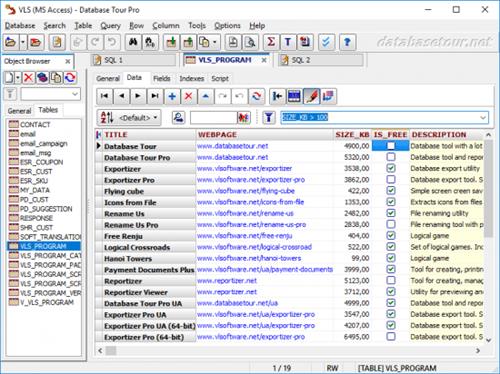
Database Tour Pro is a comprehensive software application that enables you to organize all your connected databases. It offers support for Borland Database Engine (BDE) and Microsoft ActiveX Data Objects (ADO), SQL scripts, reports, along with data conversion and exporting, among others.


Outdated, yet clear-cut interface
Wrapped up in a large window with a well-structured layout, the interface seems outdated. It contains an object browser for functions, packages, triggers, directories, users, roles, profiles, sequences, jobs, types, Java, exceptions, database links, general properties, tables, schemas, and procedures.
Manage tables and queries
Tables can be created, deleted, emptied, duplicated, renamed or packed. You can allow table editing, view deleted records, set a table password, change the language driver, add, remove, rename and resize fields, add, delete or regenerate indexes, check out the table family, as well as verify referential integrity.
When it comes to queries, Database Tour Pro lets you save, load and print SQL scripts or history, and explore a wide range of predefined query templates which can be seamlessly inserted into the project, like select, update, insert and delete, add or drop field, and create view or create table.
Encrypt databases and build reports
It's possible to isolate, start, commit and roll back transactions, review the database history, clear the password list, resort to a search-and-replace function, as well as locate objects and fields.
The software utility puts a bunch of useful tools at your disposal, including arithmetic functions, batch operations with text fields, a report builder and previewer, printer for table data, data importer and exporter, file encryption and decryption, in addition to a command-line generator.
Features
Accessing different types of databases.
Creating tables.
Viewing data.
Editing data.
Several ways to print data.
Built-in report engine, which allows to produce the reports automatically or by using a visual report designer with templates, expressions, preview etc.
Expression builder for report expressions.
Building and executing SQL queries.
Support for execution of multi statement SQL scripts.
Syntax highlighting in SQL editor.
Support for parameterized SQL queries.
Enhanced database grids, which allow to view and manipulate the data in the most convenient way, including sorting by clicking column header, changing row heights, resizing columns etc.
Creating, deleting, modifying BDE aliases.
Command line support for executing queries, opening tables, export-import operations, loading reports etc. with logging the performed operations.
Searching and replacing text in database with ability to choose fields, record range etc.
Importing data to table from another table or a query.
Exporting data from open table or query to large number of file formats like text, CSV, HTML, XLS, XML, RTF, DBF or to any of supported database formats.
Copying data to clipboard.
Calculating numeric fields (sum, avg, min, max, count).
Viewing and editing Blob data, such as MEMO, graphic, RTF.
Tools for editing text fields (trimming, changing case of symbols, replacing text).
Sorting (logical and physical) data.
Filtering data according to user's criteria.
Viewing table and database structure with ability to print, copy, sort it.
Reindexing tables.
Customized data view (font, background).
Conditional formatting data in database grids and reports.
Ability to control transactions manually.
Storing database and SQL history.
Код:
https://www.databasetour.net/history.html
Homepage:
Код:
https://www.databasetour.net

Download link

rapidgator.net:
Код:
https://rapidgator.net/file/d8c040767bcbd632ca7c8a4569f6b640/mmmek.Database.Tour.Pro.11.5.2.589.Multilingual.rar.html

nitroflare.com:
Код:
https://nitroflare.com/view/29702D469D1BBDB/mmmek.Database.Tour.Pro.11.5.2.589.Multilingual.rar
 
Deckset 2.0.42 macOS

f674cafccfc2e274553f4550a1bb91cf.jpeg


File size: 104 MB​

Deckset is a new, simple way to create presentations. Open your favourite text editor, write down your thoughts and Deckset will turn them into beautiful presentations. Focus on your ideas, not on designing slides. Deckset comes with amazing-looking themes that are designed to work for any audience, whether it's a business meeting or a tech conference.


Deckset is a new, simple way to create presentations. Open your favorite text editor, write down your thoughts, and Deckset will turn them into beautiful presentations. Focus on your ideas, not on designing slides. Deckset comes with ten amazing-looking themes that are designed to work for any audience, whether it's a business meeting or a tech conference.
Features
- 10 themes for every occasion, ranging from playful to serious
- Automatic layout and advanced typographic features
- Present code samples with syntax highlighting and "scale to fit"
- Easily include images and
More.
Release Notes
- minor bug fixes and performance improvements

Supported Operation Systems
macOS 10.13 or later
Homepage:
Код:
https://www.deckset.com

Download link

rapidgator.net:
Код:
https://rapidgator.net/file/8bdfcbe740a2c51506e81f999ba6d4f4/lgtps.Deckset.2.0.42.macOS.dmg.html

nitroflare.com:
Код:
https://nitroflare.com/view/ACC19EA071356E9/lgtps.Deckset.2.0.42.macOS.dmg
 
HalfpriceSoft ezCheckPersonal 5.0.6

650e17730722f02cd5fb8caa48c78e77.jpeg


File size: 3.6 MB​

ezCheckPersonal is the check designing and check printing software for personal use. ezCheckPersonal saves your money on checks. It is compatible with 3 or 4 checks per sheet format check paper(letter size, 8-1/2" X 11"). The default personal pocket-sized check is 6" X 2-3/4".


With ezCheckPersonal software, you can
print the regular checks on blank stock to pay bills
fill out the pre-printed blank check
print the blank check to fill in later manually or with other software
prints checks on both blank check stock and pre-printed personal bank checks.
Features
- Print unlimited professional checks on both blank stock and pre-printed checks
- Print checks with MICR encoding line
- Support unlimited bank accounts
- Print checks with logo and signature
- Supports 4-per-page and 3-check-per-page formats
- Print multiple checks with one click
- Write recurring checks easily
Whats New
Updates: official site does not provide any info about changes in this version
Homepage:
Код:
https://www.halfpricesoft.com/check-printing-software.asp

Download link

rapidgator.net:
Код:
https://rapidgator.net/file/8d472d1ffafddfd9a8be50669b067b9e/czbaw.HalfpriceSoft.ezCheckPersonal.5.0.6.rar.html

nitroflare.com:
Код:
https://nitroflare.com/view/A6C945125A7C66F/czbaw.HalfpriceSoft.ezCheckPersonal.5.0.6.rar
 
ID Photos Pro 8.16.4.1 Multilingual

17578f14c5da1f65b143b45237efef7e.jpeg


File Size: 92.7 MB​

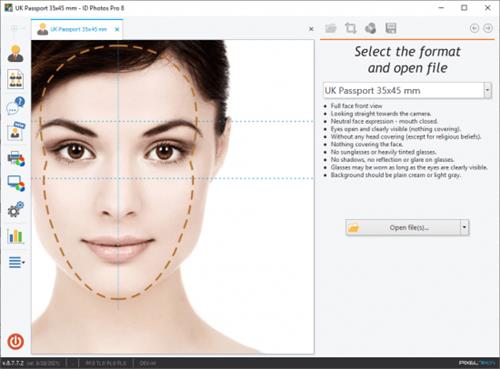
ID Photos Pro 8 it's a professional software designed for quick and automatic ID photos processing (e.g. Passport, Visa etc.) in compliance with ICAO and local regulations. Built-in database with over 250 ID formats from more than 80 countries puts ID Photos Pro 8 at the top of its class.


Unlike typical photo editing software, ID Photos Pro 8 has been developed especially for passport and ID photography. This is why it's one of the fastest and most precise tool on the market today. Only 10 seconds are needed from loading an image, its verification process and the final print.
ID Photos Pro 8 takes full advantage of our proprietary algorithms to automatically detect all relevant facial biometrics. In addition ID Photos instantly aligns and crops the image to fit local passport requirements. It detects potential issues such as mouth expression, sunglasses, reflections and much more.
ID Photos Pro 8 wizard leads the operator through 4 simple steps to perfect passport photos. For each formats, requirements are shown by giving tips as to how the photo should be taken (e.g. against what background, head view, facial expression). Thanks to this, anyone is able to make ID photo, even for the most exotic countries.
Certificate of compliance
ID Photos prints a Certificate of Compliance with ICAO standards as well as a Confirmation for the ePhoto format.
Compatible with all printers
The software operates with all type of printers. It allows also for seamless page export to digital minilabs.
Biometric algorithms
Automated facial & biometrics features detection currently in its 2nd generation. Our fast and accurate features detection allows you to automatically process multiple photos.
Statistics and job log
A comprehensive reporting function allows you to closely monitor vital statistics such as number of prints, exports, CD/DVD burns. A detailed Job Log of operator activities is also included.
French ePhoto format
ID Photos Pro 8 is one of the few software approved for France's National ePhoto Program. Operates with Wacom tablets to capture the signature required in the ePhoto application process.
Camera tethering
Live View on a PC display and picture triggering directly from the software. Most modern Canon cameras are supported. Nikon and others coming soon.
Page layout templates
The software comes with over 60 ready-to-use templates. GUI editor for additional customizations such as pictures layout, additional texts, company logo, etc.
CD/DVD Burn, Export, Email
Direct exporting of the processed photo to a file, CD/DVD burns as well as e-mail transfer to your customer.
Monitor and printer calibrations
ID Photos takes full advantage of Windows Color Management. Supports both manual corrections and ICC profiling with print colors "soft proofing".
WiFi cameras
WiFi and Watched Folder allows you to work with wireless cameras and instantly provides a photo on-screen preview.
Prompt retouch
Built-in, easy-to-use photo retouch function comes with a clone stamp as well as make-up and local adjustment tools. Integration with external software such as Photoshop is also available.
Background enhancement
ID Photos can adjust the background luminosity and uniformity by automatically isolating the head and body from its surroundings.
Photos archive
Automated archiving feature takes care of keeping all photos together. The search engine allows the Operator to find photos via customer name or date taken.
Код:
https://www.pixel-tech.eu/idphotos-pro/
Homepage:
Код:
https://www.pixel-tech.eu/idphotos-pro/

Download link

rapidgator.net:
Код:
https://rapidgator.net/file/bb874f00a786ec7ed48810a68d8039c7/mlcie.ID.Photos.Pro.8.16.4.1.Multilingual.rar.html

nitroflare.com:
Код:
https://nitroflare.com/view/0EB92B76E6B9C85/mlcie.ID.Photos.Pro.8.16.4.1.Multilingual.rar
 
VideoProc Converter AI 7.8 (2025081201) macOS

6e62b1fd342ff17b238cdd4522bbde04.jpeg


Language: Multilingual | File size: 244 MB​

Built with AI tools for video/image/audio enhancement. Remaster, upscale, restore, colorize, convert, edit, compress, download, and record with GPU acceleration. The best video converter works with videos shot with GoPro, DJI, iPhone, Android, DSLR, mirrorless, camcorders, or other 4K cameras.


VideoProc peaks Level-3 Hardware Acceleration fully powered by Intel®, AMD®, NVIDIA® GPUs, and Apple M1/M2/M3/M4 (Pro/Max/Ultra), delivering buttery smooth (4K/8K) video processing and transcoding without compromising quality.
Release Notes
Updates: official site does not provide any info about changes in this version

Supported Operation Systems
macOS 10.15 or later
Homepage:
Код:
https://www.videoproc.com/

Download link

rapidgator.net:
Код:
https://rapidgator.net/file/90d49a8a242a4098f071aa93e4200170/ilvbt.VideoProc.Converter.AI.7.8.2025081201.macOS.dmg.html

nitroflare.com:
Код:
https://nitroflare.com/view/6CBD9DD6FA36305/ilvbt.VideoProc.Converter.AI.7.8.2025081201.macOS.dmg
 
Yate 8.2.4 macOS

cc68c8004986fe471941f040fde341a2.jpeg


File size: 17 MB​

Yate was developed for people who want complete control over their tagging experience. The application was designed from the ground up for Mac users and uses its own tagging library.


The application will tag mp3 (includes mp2), m4a (AAC, ALAC), mp4 (AAC, ALAC, video), m4b, m4v, flac, aiff (aifc, aif), dff, dsf, ape, wav, ogg (single stream Vorbis and Opus), Monkey's Audio (ape) and WavPack (wv) files..
Yate has a long list of features, including an innovative scripting system called actions. The app also supports integration with AcousticBrainz, AcousticID, Beatport, Discogs, iTunes, MusicBrainz and The Movie Database (TMDb)
Код:
https://2manyrobots.com/Updates/Yate/YateRelNotes.html
Supported Operation Systems
macOS 10.10 or later
Homepage:
Код:
https://2manyrobots.com/

Download link

rapidgator.net:
Код:
https://rapidgator.net/file/e3b42cc69418f6f95698436e29c055bb/tfudf.Yate.8.2.4.macOS.dmg.html

nitroflare.com:
Код:
https://nitroflare.com/view/2553C37A73B95FD/tfudf.Yate.8.2.4.macOS.dmg
 
zFuse Pro 1.7.52 macOS

PbYRJrzM1pDFQ5BWnzZIckErCCDGBmgk.avif


Language: Multilingual | File size: 57 MB​

zFuse macOS version, with iOS version of the same light, simple and powerful, the following is a characteristic


* Simultaneously open multiple instances.
* Video rotation, you can watch movies lying down.
* Hardware acceleration.
* Supports HDR Tone Mapping on non-HDR display.
* Media preview in seeking.
* Built-in audio enhancement.
* Multi Soundtrack selection.
* Embedded/External subtitle-track selection.
* Subtitle synchronization.
* Support for external subtitle font selection .
* 0.5x-3.0x playback speed control.
* 0.5x-5.0x zoom screen.
* Can directly load Blu-ray ISO to play.
* Support audio output format switching.
* Support audio output sample rate switching.
* Support audio output channels switching.
Release Notes
Код:
https://geo.itunes.apple.com/app/id1012278958

Supported Operation Systems
macOS 10.13 or later
Homepage:
Код:
https://geo.itunes.apple.com/app/id1012278958

Download link

rapidgator.net:
Код:
https://rapidgator.net/file/529f24566c960f7201e8ab88f533db8f/jzqqf.zFuse.Pro.1.7.52.macOS.dmg.html

nitroflare.com:
Код:
https://nitroflare.com/view/1D3088D7C9801A0/jzqqf.zFuse.Pro.1.7.52.macOS.dmg
 
X Djing - Music Mix Maker 2.2.7 macOS

4ca51a7b27989ecd4fc927f0d2c8d001.jpeg


Language: Multilingual | File size: 55 MB​

X DJing is a DJ software that lets you easily mix music, set loops, and hot cues and play with audio effects.


>> POWERFUL TOOL FOR YOUR FIRST PERFORMANCE
Created according to all latest industry standards. No matter if you're a beginner DJ or an experienced artist, you will find everything to create a professional mix.
>> ADVANCED DJ TOOLS
- 8 powerful audio effects
- Automatic beatmatching and synching
- 4 hot cue points
- 3-band equalizer
- Parallel waveforms
>> AUDIO RECORDER
Record your DJ set and save it to your hard drive.
Start your DJ career with X DJing!In-App Purchases: Full Pack
Release Notes
Код:
https://geo.itunes.apple.com/app/id1280254120

Supported Operation Systems
macOS 10.12 or later
Homepage:
Код:
https://geo.itunes.apple.com/app/id1280254120

Download link

rapidgator.net:
Код:
https://rapidgator.net/file/0d5ec631f1ccd5f729966f5acc2e3c3a/dstfk.X.Djing..Music.Mix.Maker.2.2.7.macOS.dmg.html

nitroflare.com:
Код:
https://nitroflare.com/view/568CC9E5CFA2BAA/dstfk.X.Djing..Music.Mix.Maker.2.2.7.macOS.dmg
 
Notepad++ 8.8.5 Multilingual

4fff092ac7098970c3538f6f8123ef45.jpeg


File Size : 12.6 Mb​

Notepad++ has all the same great features of Notepad++ including support for multiple languages and an extensive plugin system, but there's nothing to install.


Syntax Highlighting and Syntax Folding
Supported languages
C C++ Java C# XML HTML
PHP CSS makefile ASCII art (.nfo) doxygen ini file
batch file Javascript ASP VB/VBS SQL Objective-C
RC resource file Pascal Perl Python Lua TeX
TCL Assembler Ruby Lisp Scheme Properties
Diff Smalltalk Postscript VHDL Ada Caml
AutoIt KiXtart Matlab Verilog Haskell InnoSetup
CMake YAML WYSIWYG
If you have a colour printer, print your source code (or whatever you want) in colour.
User Defined Syntax Highlighting
It allows user to define his own language : not only the syntax highlighting keywords, but also the syntax folding keywords, comment keywords and the operators. ( screenshot1, screenshot2, screenshot3, screenshot4 ).
Auto-completion
For most supported languages, user can make his/her own API list (or download the api files from dowload section). Once the api file is ready, type Ctrl+Space to launch this action (see screenshot). For more information about Auto-completion, please see Auto-completion HOWTO.
Multi-Document
You can edit several documents at the same time.
Multi-View
You have two views at same time. That means you can visualize (edit) 2 different documents at the same time (screenshot). You can visualize (edit) in the 2 views one document at 2 different positions as well. The modification of document in one view will carry out in another view (i.e. you modify the SAME document when you are in clone mode).
Regular Expression Search/Replace supported
You can search and replace one string in the document by using the regular expression.
Full Drag 'N' Drop supported
You can open a document by drag & drop. You can also move your document from a position (or even a view) to another by drag & drop.
Dynamic position of Views
The user can set the position of the views dynamically (only in 2 views mode : the splitter can be set in horizontal or in vertical), see screenshot.
File Status Auto-detection
If you modify or delete a file which opened in Notepad++, you will be notified to update your document (reload the file or remove the file).
Zoom in and zoom out
That's another fantastic function of Scintilla component. Just see screenshot.
Multi-Language environment supported
The Chinese, Japanese, Korean, Arabic and Hebrew Windows environments are supported. See Notepad++ under the Chinese Windows , under the Arabic Windows and under the Hebrew Windows in action screenshot.
Bookmark
User can just click on the bookmark margin (located right side of line number margin) or type Ctrl+F2 to toggle a book mark. To reach the bookmark, type just F2 (Next bookmark) or Shift+F2 (Previous bookmark). To clear all bookmarks, click the Menu Search->Clear All bookmarks. See screenshot.
Brace and Indent guideline Highlighting
When the caret stay beside of one of those symbol { }[ ] ( ) , the symbol beside of caret and its symmetric opposite symbol will be highlighted, as well as the indent guideline (if any) in order to locate the block more easily. See screenshot1, screenshot2 .
Macro recording and playback
You can save several macros and edit their keyboard shorcuts for the next use.
Код:
https://notepad-plus-plus.org/news/
Homepage:
Код:
https://notepad-plus-plus.org

Download link

rapidgator.net:
Код:
https://rapidgator.net/file/df592810138027d51d902cbcc0443491/ksylk.Notepad.8.8.5.Multilingual.rar.html

nitroflare.com:
Код:
https://nitroflare.com/view/4DB658C95A3901E/ksylk.Notepad.8.8.5.Multilingual.rar
 
Office Timeline 11.19.00.00

05ef95296f43004ef717d42b9e9a5ed5.jpeg


File size: 162.97 MB​

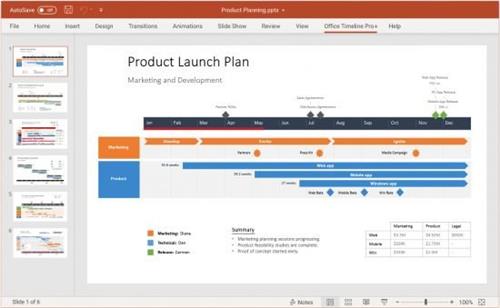
The #1 PowerPoint Timeline Maker for Windows and Office. Create PowerPoint timelines or roadmaps as fast as clients and executives need them. Simple but powerful PowerPoint add-in that anyone can use to quickly make and manage impressive timelines.


Beauty trumps complexity.
Build stunning PowerPoint timelines without the effort and cost.
Free yourself from manually building and managing visual project plans.
Office Timeline helps you make timelines, Gantt charts and Swimlanes in PowerPoint almost instantly. Customize them with just a few clicks to create clear, elegant high-level presentations that everyone will understand.
User-friendly PowerPoint timeline generator. Works the way clients and colleagues do.
Office Timeline works with all versions of PowerPoint. Give them stunning PowerPoint slides that can be viewed, edited and shared by anyone who has Microsoft Office.
Manage and change data with ease.
The plugin's powerful Data wizard and drag & drop Visual Editor make timeline management agile and intuitive. Updating timelines when projects and plans change is quick and easy.
PowerPoint timelines made easy.
No complex steps. No learning curve. No hassle!
Start from scratch or pick a template.
The timeline wizard was designed to make it simple. It all starts by selecting the type of timeline you want to make.
Enter your data and click Create.
Once you've selected a timeline template, enter or import your key milestones and tasks. Set their dates, click the Create button, and voilà ! Timeline created.
Arrange and style to impress.
Use Drag & Drop to instantly rearrange or update your visual. Then customize it your way – colors, shapes, date formats, task duration, percent complete… change any detail, anyway you want.
Enjoy more freedom with Plus Edition.
While the Free edition is fully functional, Office Timeline Plus brings more! Plus Edition unlocks predesigned templates and gives you the freedom to add as much data as needed, so you can create detailed, unique PowerPoint timelines and Gantt charts.
See the power of Pro Edition.
Office Timeline Pro gives you everything you get with the Plus add-in, but adds powerful extra features. Pro Edition creates impressive Swimlanes and roadmaps, so you can manage complex projects with big-picture visuals that anyone can understand.
Код:
https://www.officetimeline.com/updates
System Requirements
- Microsoft Windows Vista, Windows 7 (SP1), Windows 8, or Windows 10 (LTSB, CBB and CB). Office Timeline does not run on Windows 10 S. The add-in is functional on Windows XP and Windows Server but unsupported.
- 32-bit versions of Microsoft Office 2007 (SP3), 2010, 2013, or 2016. Although Office Timeline works with 64-bit versions of Office, we do not formally test or support it on 64-bit. The vast majority of the Office install base is the 32-bit version of Office. 32-bit is recommended by Microsoft unless you have very specific needs for 64-bit.
- .NET Framework 4.5.2 or greater.
License Types: Basic, Pro, Pro+, Expert
Homepage:
Код:
https://www.officetimeline.com

Download link

rapidgator.net:
Код:
https://rapidgator.net/file/1984707772ccf115c5ea8ff254d8481c/miiid.Office.Timeline.11.19.00.00.rar.html

nitroflare.com:
Код:
https://nitroflare.com/view/B5E5432F0A5F141/miiid.Office.Timeline.11.19.00.00.rar
 
PTE Video Optimiser 1.0.2.5 Multilingual

th_suX7LmqQN7CG8lgJhPGo7gU9MswrI5Mr.avif


Windows x64 | File size: 25.86 MB​

A Powerful Video Enhancement Tool. Easily enhance and optimise your videos. Stabilisation, noise reduction, trimming, colour correction, and more. Enjoy instant real-time previews of your edits and seamless batch processing for multiple files.


Video Stabilisation
Our advanced stabilisation technology analyses every frame, correcting movement and transforming unsteady footage into smooth, cinematic-quality clips. Choose between two stabilisation modes: Standard, for general use, and Camera Lock, which simulates tripod-like stability by keeping the frame steady and focused. It's perfect for vloggers, content creators, or anyone who wants their videos to look polished and professional.
Noise Reduction
Our noise reduction feature enhances videos shot in low-light conditions by effectively removing pixel noise while preserving image clarity. Achieve clean, professional-quality visuals without compromising on detail, all with minimal effort. Simply toggle a single option to enable noise reduction-quick, easy, and incredibly effective.
Colour Correction and Unsharp Mask
Enhance your videos with versatile colour correction tools, adjusting brightness, contrast, levels, and saturation to achieve the perfect look. For added effects, enable Unsharp Mask to sharpen details or apply Gaussian Blur for a smoother finish-all simple and intuitive to use.
Video Editing Tools
- Trim video
- Crop video frame
- Reverse playback
- Mirror video
- Adjust video speed. Frame interpolation for slow-motion
- Add a watermark (logo) to your video
- Mute audio or adjust the audio volume
- Export & Optimisation
- Create video with H.264 codec (MP4) or AV1 codec
- Merge multiple videos into one file
- Smart video compression with a constant quality with optimal file size.
- GPU acceleration for video encoding
- Export only the audio track from a video file as MP3 or WAV file
What's new
• official site does not provide any info about changes in this version
Homepage:
Код:
https://www.wnsoft.com/

Download link

rapidgator.net:
Код:
https://rapidgator.net/file/59bdf37c7cf3ed589f398e90063a3fec/vtete.PTE.Video.Optimiser.1.0.2.5.Multilingual.rar.html

nitroflare.com:
Код:
https://nitroflare.com/view/6125C5F9BD16110/vtete.PTE.Video.Optimiser.1.0.2.5.Multilingual.rar
 
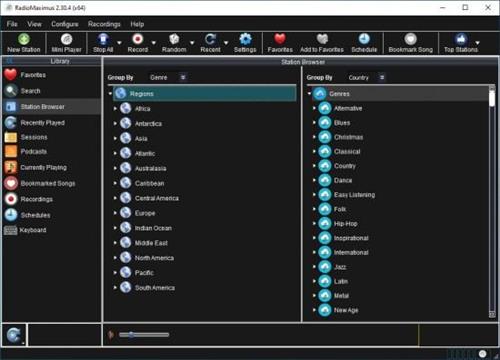
RadioMaximus Pro 2.33.11 Multilingual

6b1abc599522400cd11704f352eea38e.jpeg


File size: 94 MB​

RadioMaximus - Maximum radio and a whole lot more. With RadioMaximus you can receive and record thousands of radio stations available on the Internet.


Features
Listen to and record multiple stations simultaneously
Create a schedule for automatic recording
Save songs as bookmarks
Shows station logos
Portable installation available
Код:
https://www.raimersoft.com/radiomaximus/whatsnew.html
Homepage:
Код:
https://www.raimersoft.com/

Download link

rapidgator.net:
Код:
https://rapidgator.net/file/9d983f110eb588f1d7213bfbf90cd131/bobai.RadioMaximus.Pro.2.33.11.Multilingual.rar.html

nitroflare.com:
Код:
https://nitroflare.com/view/EF33F744EB7A8F0/bobai.RadioMaximus.Pro.2.33.11.Multilingual.rar
 
Назад
Сверху