• Здравствуйте. Сайт заработал в архивном режиме форум www.old.nado.in

All mitsumi'1s Applications !! (updated daily)

  • Автор темы Автор темы mitsumi1
  • Дата начала Дата начала
EaseUS Fixo 3.7.0 Build 20250808 Multilingual

th_ZwX0HsSJNQ41Hg2DqjfqFSKyT9kAbsrj.avif


File size: 176.29 MB​

Videos, photos or files get corrupted or fail to open? EaseUS one-stop solution will help you repair corrupted videos, photos and files regardless of the level of damage.


All-in-one File Repair Software
Video Repair
Repair Any Corrupted or Unplayable Video
Videos become corrupted or inaccessible after sudden power surges and failures, complete system crashes, updating errors, file mishandling or some other reasons? The video repair software - EaseUS Fixo enables you to repair a wide variety of video file formats including MOV, MP4, M2TS, MKV, MTS, 3GP, and more easily, no matter how it is damaged.
- Repair video formats including MP4, MOV, M2TS, MKV, MTS, 3GP, AVI, FLV, M4V, etc.
- Repair videos corrupted during shooting, recording, transferring, editing, converting or processing.
- Repair videos from cameras, Drones, CCTV DRV, dash cams, smartphones, NAS servers or any other monitor, etc.
Photo Repair
Repair Corrupted Photos from Any Device
Photos with precious memories or essential information become corrupted and unopenable? The photo repair software - EaseUS Fixo can intelligently and smartly repair your corrupted and damaged photos from your computer or other external storage devices like USB flash drives, memory sticks, SD cards, digital camera and phones regardless of their level of damage.
- Restore corrupted, blurry, overexposed, Underexposed or pixelated photos.
- Repair photo formats including JPEG, PNG, JPG, CR3, CR2, NEF, NRW, RAF, etc.
- Repair photos from PCs, USB flash drives, memory sticks, SD cards, digital cameras and phones.
- Repair photos in batch and preview repaired photos.
File Repair
Repair Corrupted Word, Excel, PPT, and PDF Files
Office files and pdf files become corrupted, inaccessible or unreadable unexpectedly for unknown reasons? EaseUS Fixo which has anintuitive interface is the best file repair software for novices to fix the corrupted office documents, including PDF, Word, Excel, and PowerPoint files.
- Repair the corrupted PDF, Word, Excel, and PowerPoint files.
- Fix unreadable files, garbled files and files not opening.
- Repair files in batch and preview repaired files.
What's new
• official site does not provide any info about changes in this version
SupportWindows 11/10/8/7/XP
Homepage:
Код:
https://www.easeus.com/

Download link

rapidgator.net:
Код:
https://rapidgator.net/file/099aa295d6b8f9122ed388d2b9c8d464/ypuvx.EaseUS.Fixo.3.7.0.Build.20250808.Multilingual.rar.html

nitroflare.com:
Код:
https://nitroflare.com/view/85B6EC1E26FEC45/ypuvx.EaseUS.Fixo.3.7.0.Build.20250808.Multilingual.rar
 
EasyCut Pro 5.122 (x64) Multilingual

61a3cc0c88663f8de65d1c74ae0ffbd7.jpeg


File size: 15.6 MB​

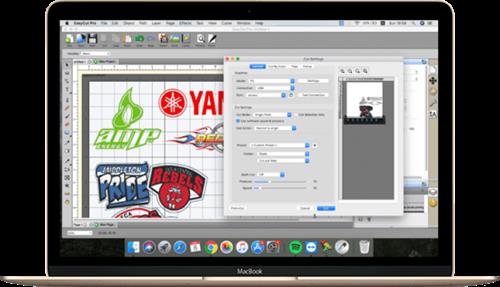
The complete solution for designing, printing, cutting and print+cut. It gives you the ability to cut any TrueType font, OpenType font, graphics, SVG, PDF, as well as your own original designs with your cutting plotter. This awesome vinyl cutting software even supports vectorize your images and built-in shape library includes hundreds of vectorial designs ready for cutting. With the intuitive user interface, Now anyone can cut designs like a pro! Professional sign cutting software for your vinyl cutter. Both Windows and Mac versions available now.


Image Tracing & Vectorizing
Unmatched image vectorization, Simply use the powerful tracing tool to create cuttable outlines from any imported raster graphics (including PNG, JPG, GIF, PSD, PDF, BMP, TGA, TIFF, etc.) or scanned images. Easily create accurate vector paths ready for cutting or make further editing.
Draw your own designs
Drawing and Designing couldn't get any easier! This powerful vinyl cutting software comes with a suite of various shape drawing and editing tools to draw and edit any shape directly on the mat. Easily draw unique shapes, modify signs, create logos, edit images, customize text with fonts on your computer plus special effects. Easy Cut Studio will make your design and cut your shapes easier than with any other sign-making software in the market today. It is a little design powerhouse for vinyl cutting.
Import/Export most file formats
Import various file formats, including PNG, SVG, EPS, PDF, AI, GSD, SCUT, WPC and other popular vector formats as editable objects. giving you the power to cut any shape and custom artworks. You can also export your design to SVG, PDF, PNG, FCM, TIFF, JPG, and BMP format.
Print and Cut (Contour Cut)
Print to Cut made easy, fast and accurate. Automatic creation of registration marks for print and cut applications. Easily print your artwork and then cut out around the printed image using your cutting plotter, which is perfect to create decals and stickers. User control over registration size, thickness and offset will help the cutter find the contour cut marks easily.
Working With Layers
Easily create complex designs using multiple layers, grouping to organize the display order of objects. Using Layers can help you more control over how you organize, edit and cut objects with Easy Cut Studio. The Shadow Layer option will create cuttable shadows from any shape.
Weld Text and Shapes Together
Welding is an advanced option allows you to make overlapping text and shapes to become a single shape, by joining shapes together wherever an overlap occurs. There are two ways to combine shapes/letters together: welding and joining.
Design and Cut Rhinestone Templates
Easily convert designs into rhinestone templates and make your own custom rhinestone designs with typeable rhinestone ready fonts. Specify stone size and spacing to make a rhinestone template and lattice shapes. Just select an object on the screen mat, and then choose "Rhinestones" from under the "Effects" menu to bring up the Rhinestone window shown below.
Features
-Works with your installed TrueType and OpenType fonts on your computer
-Works with Black Cat Cougar/Lynx™ , Bosskut Gazelle™, Craftwell eCraft™, CraftROBO/Graphtec™,
-GCC™, Foison™, Liyu™, Pazzles Inspiration/Pro™, Ramtin™, Roland™, Seki™, Silhouette
-SD/CAMEO/Portrait™, Silver Bullet™, USCutter™, Vinyl Express™, Wishblade™, & more
-Works with thousands of free TrueType, OpenType and Dingbat/Wingding fonts
-Import various file formats, including SVG, PDF, EPS, WPC
-Drawing tools to draw and edit shapes
-Auto tracing feature to automatically convert images (including jpg, bmp, gif, png) for cutting
-Create rhinestone templates and lattice shapes
-Weld overlapping letters and shapes together
-Select styles, including Shadow and Blackout, to change the look of your letters and shapes
-WYSIWYG Interface - What you see is what you cut
-Text on arch tool and text on path tool.
-Place text or objects on bezier paths.
-Convert text to outlines/paths.
-Creating multiple copies of the same object.
-Node editing tool.
-Creating the registration marks.
-Layout and special effects for your text and shapes.
-Cut font files already installed on your Mac or Windows.
-Create shadowed mat effects.
-Stencil function for bridging interior shapes.
-Unlimited undo/redo
Whats New
Updates: official site does not provide any info about changes in this version
Homepage:
Код:
https://www.easycutpro.com/

Download link

rapidgator.net:
Код:
https://rapidgator.net/file/9fd228ef99190fb484aa95947dc9ce68/ldgdg.EasyCut.Pro.5.122.x64.Multilingual.rar.html

nitroflare.com:
Код:
https://nitroflare.com/view/AD38BEB82075083/ldgdg.EasyCut.Pro.5.122.x64.Multilingual.rar
 
Estlcam 12.143

th_pWKrK7tiXfek58WDzynhNDwaRtuBm2Tg.avif


File Size: 5.6 MB​

Estlcam is a powerful program meant to assist users in designing their own 3D models for printing. The application can load DXF, STL, as well as common JPG, PNG and GIF files.


A comprehensive resource for 3D printing
One of the great features of this utility is the ability to load standard images. This can save a lot of time, although results will depend on the quality of the source file!
The best option is to just design an original model. The program allows users to define custom shapes. This is performed either by using the "Drill" or the "Spiral drill" tools. The "Engraving" feature lets users have a lot more control over their drawing.
These functions are great when designing original images. However, a distinctive flavor is really achieved only when customized text strings are inserted.
These can feature alternative fonts. The size, spacing alignment and engraving depth can also be controlled. The built-in option for rotating text is a nice touch!
An intuitive GUI that would greatly benefit from a few tweaks
The interface is somewhat easy to use, since all the core functions are neatly organized in a panel to the right of the main working window.
One downside easy to spot is the probably unintended bilingual approach. The installer is mostly in German, and considerable parts of the settings are also in two languages (English and German).
This being said, all the important features are in English. Having a consistent, single-language style would greatly improve the user experience.
This is all the more important, since some fine-tuning might require a German dictionary on hand. Future versions will surely fix these small issues.
Good for picture milling
In conclusion, Estlcam is an interesting tool for anyone preoccupied with creating 3D models. There is a variety of options to play around with and the output files can look very nice.
What's New
official site does not provide any info about changes in this version.
Homepage:
Код:
https://www.estlcam.de/

Download link

rapidgator.net:
Код:
https://rapidgator.net/file/4c914e45ce5ad55d19dec9e02532ea84/mkfsb.Estlcam.12.143.7z.html

nitroflare.com:
Код:
https://nitroflare.com/view/EC6132F0364C2E5/mkfsb.Estlcam.12.143.7z
 
Graitec Advance PowerPack 2026 For Autodesk Revit (x64)

P7xSG8rJhpqVDsmSdcERWhOcpxburPDH.avif


x64 | File Size: 2.80 GB​

Description
GRAITEC PowerPack for Autodesk® Revit® is an add-on packed with tools that deliver more functionality, better control, and more automation for Revit users across all industries.

With more than 80 tools available, the PowerPack increases the productivity of both engineers and designers, helping to ensure data reliability, whilst automating documentation and improving BIM coordination.
Three Packages are available, Standard, Professional, and Premium. Premium dedicated to the creation of Structural Reinforcement detailed description of the packages here.
Languages are available on installation: English, French, Czech, German, Italian, Polish, Romanian, and Spanish.
Numbering Tool
Elements' numbering in Revit requires a manual selection of objects, one after the other, within the project. Locating or renumbering several hundred objects can thus become a tedious, time-consuming and error-prone task. Numbering using the GRAITEC PowerPack saves time and eliminates the risk of errors such as duplicates or omissions, also preventing inherent information inconsistencies.
Link To Excel
Exporting BIM information from Revit to Excel can be a long manual operation. The "Dynamic Link to Excel" function in the PowerPack allows users to transfer data directly into Excel (BOMs) either dynamically or by a simple click. Similarly, integrating Excel data into Revit is carried out just as easily.
Family Manager
By default, Revit offers a basic families library depending on the localization country. The PowerPack "Family Manager" is the necessary step-up to optimize the BIM model creation and facilitate collaborative work! In order to guarantee effective collaboration and ensure coherence between project elements within an agency or a design office, the library is accessible to the entire team. Easy to use, this tool has a visual graphical interface that allows for very intuitive handling.
Element Lookup
Currently, certain Revit parameters are difficult to access and thus cannot be effectively exploited when Revit filters are activated. The PowerPack for Revit provides advanced searching features that offer the flexibility needed to allow easy object selection based on their characteristics, for batch-processing purposes.
Batch Exporter
Exporting Drawings and views to different file formats is time-consuming, Batch Exporter gives you the ability to export Views and Sheets from your Revit project to various file formats simultaneously. Batch exporter has over 10 different file formats available to the user, including DWG, PDF, DGN FBX, SAT, NWC. The export naming convention can also be customized to the user's needs.
Main Bars
The Main Bars tool is an intelligent interface that will automatically change depending on the type of element you wish to reinforce. The user is presented with an intuitive interface where all aspects of reinforcement related to that type of element are listed. Supported elements include Footings, Columns, Beams and Walls. A key feature in both Beams and Columns is the ability to easily create "Packages" that allow for varying distribution of Transversal bars such as stirrups.
Visibility
Setting rebar visibility in Revit can be a time-consuming job, newly created reinforcement will not automatically inherit the existing view settings. Graitec has created several tools to optimize and control the visibility of reinforcement. The Browse Reinforcement command enables users to browse all reinforcement through filters based on rebar parameters ( type, partition, mark, shape, diameter.) and highlights all corresponding instances in the view.
Bending Details
PowerPack for Revit comes with the ability to create intelligent Bar bending details based on the modeled reinforcement. It can create a 2D fully dimensioned bar bending detail, that will update as the design changes. Both the placement and scale of these details can be controlled to help increase the speed of the documentation process.
Recommended System Requirements
In addition to the minimal configuration, here is the hardware and software recommended by GRAITEC
- PC with Intel® Core™ i5 or i7 latest generation Processor
- 16 GB RAM - According to the project size and complexity, additional RAM might be required
- SSD with 50 GB free space or more
- 22" display or higher with 1920x 1080 resolution
- Graphics card with DirectX 12 or higher and OpenGL 3.0 compliancy
- Installed operating system: Windows 10 64-bit version
- Windows and AutoCAD® compatible printer or plotter.
-Supprort Autodesk Revit:2026
Whats New
Updates: official site does not provide any info about changes in this version.
Screenshots

th_8y7SEc3cAA3vITrmnbDRb1A7VqBoXsOM.avif

Homepage:
Код:
https://graitec.com/

Download link

rapidgator.net:
Код:
https://rapidgator.net/file/716b051493e3fffe9883851205488965/nwjta.Graitec.Advance.PowerPack.2026.For.Autodesk.Revit.x64.part1.rar.html
https://rapidgator.net/file/eee544a6b01aba2f10e43f4e05ef5e81/nwjta.Graitec.Advance.PowerPack.2026.For.Autodesk.Revit.x64.part2.rar.html
https://rapidgator.net/file/7c2b0345863a7b63af1a27ec98611a71/nwjta.Graitec.Advance.PowerPack.2026.For.Autodesk.Revit.x64.part3.rar.html

nitroflare.com:
Код:
https://nitroflare.com/view/8ED675447BA9B5B/nwjta.Graitec.Advance.PowerPack.2026.For.Autodesk.Revit.x64.part1.rar
https://nitroflare.com/view/A865B71372B489B/nwjta.Graitec.Advance.PowerPack.2026.For.Autodesk.Revit.x64.part2.rar
https://nitroflare.com/view/4F9D58E27984340/nwjta.Graitec.Advance.PowerPack.2026.For.Autodesk.Revit.x64.part3.rar
 
HTML Compiler 2025.13 (x64)

17d69c31d1a554d2fdfb3fc82e620b2e.jpeg


File Size: 367.1 MB​

With DecSoft HTML Compiler you can easily compile your modern HTML apps (Single Page Apps, for example) into standalone executables for both Microsoft Windows® 32 and 64 bits. Your app' files are never extracted into the user's computer and run in a modern browser environment based in Chromium.


It's secure
Your HTML apps are compiled in both Microsoft Windows 32 and 64 bits executables. Your app's files are never extracted in the final user computer except if you want to extract some particular files.
Without limits!
Put your imagination here. You can convert into executable programs for Windows almost any modern HTML app like ebooks, surveys, quizzes, magazines, presentations, photo albums and galleries, games, etc.
Super easy
You can use the user graphic interface or the command line tool in order to compile your HTML apps, just by indicating the path for your application "index.html" file.
Take a look!
The next video shown how DecSoft HTML Compiler works! In just a minute you can see how DecSoft HTML Compiler take the "Database" app sample of DecSoft App Builder and convert it into a standalone Microsoft Windows executables.
CLI support
DecSoft HTML Compiler include a command line compiler in addition with the visual environment. In this way you can compile your apps from the command line, simply and fast.
Very simple
DecSoft HTML Compiler don't shown to the user any interface element. But this is fine, because then your application looks exactly as you wanted, without any undesired interferences!
Very powerful
DecSoft HTML Compiler provide some external Javascript for your apps to go beyond the modern HTML apps capabilities, for example, to give the ability to write files, execute programs, explore folders, etc.
Whats New
* Enhance the AI Tool - Chat Conversation in order to use an HTML canvas instead of the previous plain text editor. The usage of an HTML canvas has several benefits compared to the plain text editor. For example, some Ollama models tend to use several markdown syntax when responding, and now we are allowed to convert it to HTML, so we increase the legibility of the responses. For example, we are now capable of clicking on possible links in the responses, opening them in your default system browser. We can also now copy to the clipboard individual prompted questions, individual responses, and also the entire chat in text and HTML flavors. We can also repeat the questions by just clicking a button. We can now restart the chat too, which means delete the chat history and start it from scratch. We also avoid some glitches which can be see when using the plain text editor. In few words, the AI Tool Chat Conversation is now even more usable and user friendly.
Homepage:
Код:
https://www.davidesperalta.com

Download link

rapidgator.net:
Код:
https://rapidgator.net/file/b9ac2f578e4655b50ae8866881ea0f8a/xyodt.HTML.Compiler.2025.13.x64.rar.html

nitroflare.com:
Код:
https://nitroflare.com/view/1D83890AD7E6C12/xyodt.HTML.Compiler.2025.13.x64.rar
 
HWiNFO 8.30.5800 (x64)

45ba086facd522e07a45a0ce81ae3e8d.jpeg


File size: 17.8 MB​

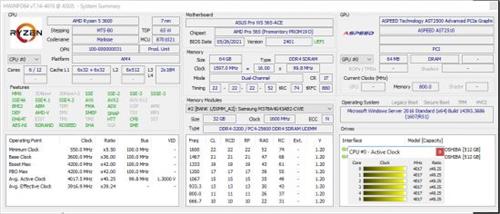
HWiNFO64 are professional hardware information and diagnostic tools supporting latest components, industry technologies and standards. These tools are designed to collect and present the maximum amount of information possible about computer's hardware which makes them suitable for users searching for driver updates, computer manufacturers, system integrators and technical experts as well. Retrieved information is presented in a logical and easily understandable form and can be exported into various types of reports.


Features
- comprehensive hardware information of your computer
- system health monitoring (Thermal, Voltage, Fan, Power)
- table, Logfile, Graph, Tray, Gadget, LG LCD reporting
- text, CSV, XML, HTML, MHTML report formats
- frequent updates
- available as SDK (custom client)
- 3rd party add-ons (Rainmeter plug-in, Samurize plug-in, Sidebar Gadget to display any sensor value, LCDHost plug-in, Mini WebServer, RivaTuner/MSI Afterburner/EVGA Precision On-Screen Display, HWiNFOMonitor Sidebar Gadget including graphs, bars, etc.)
Код:
https://www.hwinfo.com/version-history/
Homepage:
Код:
https://www.hwinfo.com/

Download link

rapidgator.net:
Код:
https://rapidgator.net/file/9d0b7e060ada22a8107e5d394b866d9a/lirws.HWiNFO.8.30.5800.x64.rar.html

nitroflare.com:
Код:
https://nitroflare.com/view/925D738A7B688DE/lirws.HWiNFO.8.30.5800.x64.rar
 
iDefender 5.0.5

th_EC4FWyWU6mYCJTPoKwqMBfqPNsVzC4fh.avif


File Size : 31 Mb​

iDefender is a cutting-edge security solution designed for home use, offering both an Intrusion Prevention System (HIPS) and Real-time Endpoint Detection and Response (EDR). This integrated system protects against potential threats, ensuring the safety and integrity of your devices by actively monitoring and responding to suspicious activities.


Ransomware Protection and More
iDefender will help combat ransomware by detecting and blocking attacks in real-time, thereby safeguarding your critical files from malicious encryption. With its advanced detection capabilities, iDefender actively monitors for suspicious activity and unauthorized encryption attempts, ensuring that your valuable data remains secure.
Advanced Threat Mitigation
In addition to ransomware prevention, iDefender is equipped to defend against advanced threats, including advanced persistent threats (APTs). It employs sophisticated techniques to block complex attack vectors, such as shellcode injection, DLL side-loading, and unauthorized remote control attempts, which are commonly used by cybercriminals to exploit vulnerabilities in systems.
iDefender also targets exploitation attempts that leverage document vulnerabilities and file-less attack vectors, effectively neutralizing threats that seek to bypass traditional security measures. Continuous scanning for these vulnerabilities provides an additional layer of protection against a wide range of attack methodologies.
OS Hardening
To bolster system integrity, iDefender hardens the operating system and application environment by managing persistence mechanisms and other high-risk behaviors. This proactive approach reduces potential attack surfaces, enhancing overall system security and resilience against intrusions.
Blocks Unauthorized Access
Privacy and data security are paramount with iDefender, which employs multiple layers of protection to conceal sensitive files and intercept unauthorized access attempts. By implementing measures such as file hiding and access control, iDefender significantly mitigates the risk of data leaks and breaches, ensuring your personal and professional information remains confidential.
Enhances Producitvity
Furthermore, iDefender is designed to enhance your day-to-day productivity by efficiently managing system resources. It blocks unnecessary processes and services during system launch, preventing resource waste and ultimately maintaining optimal endpoint performance. This means you can focus on your tasks without the burden of system slowdowns caused by background operations.
Geek Verdict
For anyone looking to safeguard their machines against a myriad of threat vectors while enjoying a seamless user experience, iDefender stands out as an exceptional choice. This powerful software delivers formidable protection against ransomware, sophisticated threats, and exploits, among a host of other vital security features. With iDefender, you can feel confident that your device will remain secure and resilient against potential attacks, providing you with peace of mind in an increasingly dangerous digital landscape.
Whats New
Updates: official site does not provide any info about changes in this version
Homepage:
Код:
https://idefender.net/

Download link

rapidgator.net:
Код:
https://rapidgator.net/file/2ad99913667a7dbeabf9c86d35332c82/zlbrg.iDefender.5.0.5.rar.html

nitroflare.com:
Код:
https://nitroflare.com/view/D17A940180AD6A3/zlbrg.iDefender.5.0.5.rar
 
IDimager Photo Supreme 2025.3.1.8006 (x64) Multilingual

d33c4244b1c2989acadfca1fd95d2dd8.jpeg


File size: 118.2 MB​

The Ultimate Digital Asset Management Solution. Whether you're a professional photographer, a creative team, or someone who simply loves capturing memories, Photo Supreme is here to transform the way you manage your photos. Organize, find, and share your images with ease using our powerful and intuitive Digital Asset Management (DAM) software.


Why Photo Supreme?
Organize with ease
Say goodbye to cluttered folders and lost files. Photo Supreme provides advanced tools to categorize, tag, and manage your images efficiently. Whether you're managing thousands or hundreds of thousands of photos, our software keeps you organized, allowing you to focus on what truly matters: your creativity.
Find what you need, fast!
Never waste time searching for the right photo again. With powerful search capabilities, including metadata filtering, facial recognition, and keyword tagging, Photo Supreme makes finding your images a breeze. Get instant access to the photos you need, whenever you need them.
Collaborate Seamlessly
For creative teams and businesses, Photo Supreme offers a server-based solution that enables multiple users to work together effortlessly. Assign roles, manage permissions, and collaborate in real-time, ensuring everyone stays in sync. Whether you're in the same office or across the globe, your team can stay connected and productive.
Connecting your data
Experience seamless data integration with Photo Supreme, built to support industry-leading metadata standards. Ensure accurate and consistent data exchange across software for improved interoperability. With flexible, standards-compliant metadata, adapt to evolving needs and enable streamlined operations. Reliable, standards-driven interoperability.
Cross-Platform compatibility
Photo Supreme is designed to work seamlessly on both macOS and Windows, making it the perfect choice for diverse teams and environments. Whether you're using a desktop, laptop, or server, our software fits right into your workflow.
Highlights
Advanced search capabilities
Find your perfect image quickly with Photo Supreme's advanced search features. Utilize deep text and tag searches, duplicate detection, similarity analysis, dynamic search combinations, and advanced filtering to effortlessly locate and manage your photos.
Get organized
Organize your images with Photo Supreme's portfolio albums and dynamic collections. Create and manage albums for static groupings, or use dynamic collections based on rule-based criteria for smart, automated grouping. Enjoy streamlined photo management with intuitive access and efficient organization tailored to your needs.
​​
Keyword tagging
Streamline your workflow with Photo Supreme's keywording, catalog labeling, face tagging and geotagging. Automatically maintain metadata while tagging, organizing, and mapping your images for quick, intuitive retrieval and efficient management.
Image Attachments
Keep your images organized by linking related files, documents, or websites that provide additional context and information, ensuring everything is seamlessly connected and easily accessible.
Import & ingest images
Streamline your image import with Photo Supreme. Customize naming conventions, apply metadata, and set stacking and versioning rules. All while effortlessly copying files to fit your workflow.
Metadata standards
Photo Supreme embraces the principle: 'Your data is Your data.' It supports IPTC, Exif, XMP, and MWG metadata standards, ensuring seamless interoperability with other software. Enjoy the freedom to move your data with your evolving needs.
Text Expansion
Boost your productivity with Photo Supreme's Text Expansion feature. Simply type a short abbreviation to automatically expand it into longer text or predefined phrases, reducing repetitive typing and streamlining your workflow.
Artificial Intelligence
Photo Supreme provides robust face detection and recognition locally, eliminating the need for online connections and ensuring your privacy. For image analysis you can use OpenAI (the engine behind ChatGPT) or a locally installed Ollama to describe and keyword images. For additional AI features, you can choose Google Vision integration for object detection, text recognition, and landmark identification.
​​Multi-tab browsing
Photo Supreme's multi-tab browsing lets you manage multiple photo sets simultaneously, using less memory and boosting efficiency.
​​Stacking and Multi Version Control
Automatically or manually create stacks and version sets using customizable matching rules, making it easier to find and manage your images.
Tethering Folder
Tethered Folders automatically imports and displays photos as soon as they're taken, streamlining your workflow and saving you time.
Код:
https://www.idimager.com/what-s-new-in-photo-supreme-2025
Homepage:
Код:
https://www.idimager.com/

Download link

rapidgator.net:
Код:
https://rapidgator.net/file/a64174e9ddba00994a6ed3153d147a21/igyie.IDimager.Photo.Supreme.2025.3.1.8006.x64.Multilingual.rar.html

nitroflare.com:
Код:
https://nitroflare.com/view/6B8DAFDBCA1BAE1/igyie.IDimager.Photo.Supreme.2025.3.1.8006.x64.Multilingual.rar
 
K-Lite Codec Pack 19.1.5 Mega/Full/Standard

c82581f3c728fc54247f53f16ca76dbb.jpeg


File Size : 64/56/36 Mb​

The K-Lite Codec Pack is a collection of DirectShow filters, VFW/ACM codecs, and tools. Codecs and DirectShow filters are needed for encoding and decoding audio and video formats. The K-Lite Codec Pack is designed as a user-friendly solution for playing all your audio and movie files. With the K-Lite Codec Pack you should be able to play all the popular audio and video formats and even several less common formats.


Some codec packs are far from being friendly with computers, as they tend to slow down Windows, break down multimedia files and make the whole movie watching experience a nuisance. This is why an efficient software has to be chosen, one that does exactly what it is supposed to without additional and unnecessary features.
Easily deployed on the system
Simply put, this is exactly what K-Lite Codec Pack Full is meant to do. This is one of the most efficient codec packs out there that is not only delivered as a very light package but is also impressively friendly with computer resources.
Installing it is quite easy, unless one is an expert who really enjoys toying around with the advanced settings. K-Lite has numerous advanced customization options but novices are advised not to spend too much time on this section, as they might erroneously modify some options and break the entire process.
View detailed info on what is installed
Furthermore, before going through the step-by-step thorough setup process, one gains access to a list that displays content, along with several details regarding each of the codecs, to give users a glimpse of what they are about to deploy.
If everything goes well and K-Lite Codec Pack Full is successfully installed, users will be able to open any multimedia files stored on their computers, without any quality loss. Furthermore, it works like a breeze from the first run, without major changes to its default settings, which is a clear indication that beginners and those who want a codec that just works have chosen the right package.
Adjust settings with a dedicated tool
Experts have the possibility to configure the audio and video decoders, as well as the DirectVobSub, in an attempt to obtain a top-notch experience when it comes to playing multimedia files. This is easily done with the help of an integrated tweaking tool that, if managed properly it can enhance the overall multimedia experience.
To sum it up
All these considered, K-Lite Codec Pack should be the first on everyone's list when it comes to codec packages. It is light, freeware, easy to use and gets along perfectly even with slower computers. It represents the first brick that needs to be placed in the multimedia entertainment wall.
Код:
https://www.codecguide.com/changelogs_mega.htm
Homepage:
Код:
https://www.codecguide.com

Download link

rapidgator.net:
Код:
https://rapidgator.net/file/3874b63323306937a81640ab57f29372/xtuxj.KLiteCodecPack1915Full..exe.html
https://rapidgator.net/file/46f4bebe17726604d80f843664a5ab04/xtuxj.KLiteCodecPack1915Mega..exe.html
https://rapidgator.net/file/8d672db5f653f59e7a0a21d0a389b94e/xtuxj.KLiteCodecPack1915Standard..exe.html

nitroflare.com:
Код:
https://nitroflare.com/view/5268FC23DFE82BF/xtuxj.KLiteCodecPack1915Full..exe
https://nitroflare.com/view/5289F22EA6425CD/xtuxj.KLiteCodecPack1915Mega..exe
https://nitroflare.com/view/A92BE88FC69EF7E/xtuxj.KLiteCodecPack1915Standard..exe
 
LDPlayer 9.1.57.1 Multilingual

89b36424a205103cd5daad881c0b373c.jpeg


File size: 757.3 MB​

LDPlayer is an Android 5.1 emulator that enables you to access mobile applications and play games using your mouse and keyboard. Whether you are looking for a simple way to debug the apps you are developing for mobiles or perhaps, you would like to enjoy Android-specific games on a larger screen, there are numerous reasons why an emulator could come in handy.


The setup is a quick and straightforward process that does not require special attention from your part. The app comes with a sleek and stylish interface and thanks to its side-panels, it enables swift navigation and browsing, similarly to the Android OS.
As indicated after installation, you need to download the APK packages for the games you want to play. Afterwards, you can simply drag over the interface to install or you can use the dedicated installation button, if you find that more convenient.
Take note that the tool comes with a quick link to Google Play and providing that you have or create an account with the service, you can find the games you want from here.
Enables you to create macros and mapping for all game genres
A noteworthy feature is that the tool comes with several advanced options to create custom mapping for the games you are playing. Therefore, you can set key and mouse discs, set the view based on the game graphics or place buttons on the screen for shooting or casting spells.
At the same time, the program allows you to create macros, which can come in handy if you are playing more advanced games that rely on sensitivity of the push, tilt, drag or click. In case none of the mapping options work for your game, then you will be happy to learn that you can create a custom one just as easily.
An intuitive and smooth Android emulator application
All in all, LDPlayer can come in handy for both users and developers who do not have an Android device, but still want to try out the latest games or perhaps, test out apps developed for this operating system.
Код:
https://www.ldplayer.net/other/version-history-and-release-notes.html
Homepage:
Код:
https://www.ldplayer.net/

Download link

rapidgator.net:
Код:
https://rapidgator.net/file/fce1ae85c6f11cc67c56461f18291679/abnfr.LDPlayer.9.1.57.1.Multilingual.rar.html

nitroflare.com:
Код:
https://nitroflare.com/view/23BC9DDF90413D7/abnfr.LDPlayer.9.1.57.1.Multilingual.rar
 
MediaHuman YouTube Downloader 3.9.16 (1208) Multilingual (x64)

afef2025e942afabb8dba0c26aac13a5.jpeg


File size: 85 MB​

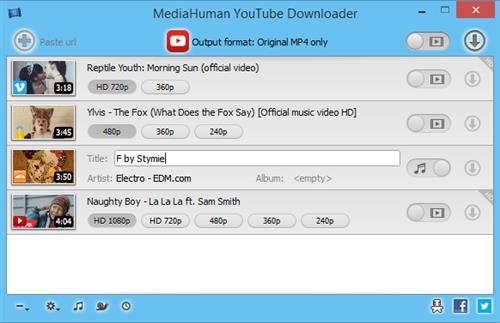
MediaHuman YouTube Downloader is a handy application for those who found a favorite music video or trailer of a new movie and wants to keep it on your computer for viewing offline. Or you need to download a video lesson/tutorial. Our video downloader is an ideal solution for such kind of tasks.


Simultaneous downloads
- Supports Ultra High resolutions up to 4K
- Download whole playlists and channels
- YouTube, Vimeo, Dailymotion, Soundcloud
- Extract audio track and save it as MP3
- iTunes support
- VEVO support
Код:
https://www.mediahuman.com/youtube-downloader/changelog.html
Homepage:
Код:
https://www.mediahuman.com/

Download link

rapidgator.net:
Код:
https://rapidgator.net/file/c644fbd443881d569740e644c8d98c1b/trggj.MediaHuman.YouTube.Downloader.3.9.16.1208.Multilingual.x64.rar.html

nitroflare.com:
Код:
https://nitroflare.com/view/C14B4ABB4816F8D/trggj.MediaHuman.YouTube.Downloader.3.9.16.1208.Multilingual.x64.rar
 
MediaHuman YouTube To MP3 Converter 3.9.16 (1208) Multilingual (x64)

c1e3b9cca99609cd094f282c629d5b43.jpeg


File size: 77 MB​

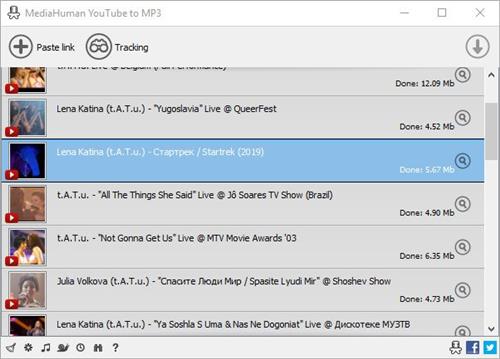
You like to listen to music on YouTube or SoundCloud and want to save it for offline playing. Or you want to download soundtrack of a new movie. Then we recommend you to try out this software developed specifically for this purpose.


Downloads all music from playlist or channel
Downloads highest available quality up to 320 kbps
Supports YouTube, Vimeo, SoundCloud, Dailymotion, VEVO, etc.
Downloads simultaneously several tracks
Includes simple tag editor with cover art support
Imports into iTunes
Main Features
Playlists and channels
The software supports downloading all videos of a playlist or a channel. And there is also an option for subscribing to and downloading only newly uploaded tracks.
iTunes support
In the preferences of the application you can select an option to add downloaded tracks into iTunes automatically. You can also specify iTunes playlist, where the converted track should be added.
Saves your time & traffic
The app detects audio track in YouTube video clip and downloads it, skipping the video part. As a result download speed increases dramatically, especially on HD-quality content.
Simple tag editor
Application automatically detects artist name and track title of the video and saves it in the downloaded file. But at the same time, you can easily change tags to whatever you want. You can even change a cover art image.
Original format, no conversions
You can save audio tracks in original quality without any conversion. It means that there will be no loss of quality and it greatly reduces the downloading time.
Free music
There is a great amount of music on YouTube. You can always find the one you like there. And YouTube to MP3 Converter allows you to save it on your computer for free. Just find the track you like and download it in the quality you need.
Not only YouTube
Vevo.com, Vimeo, DailyMotion, Soundcloud, Bandcamp, HypeMachine, MixCloud, UOL and many other sites are also supported. So you can download music as easy as from YouTube.
Clipboard tracking
The program tracks the content of the system clipboard. It means that you can easily add a video clip without switching from your favorite browser. Just copy an URL into the clipboard and it will be added to the download queue.
Multilingual interface
Localized to: Arabic, Armenian, Azerbaijani, Bulgarian, Catalan, Chinese (Taiwan), Croatian, Czech, Danish, Dutch, English, Esperanto, French, German, Greek, Hebrew (Israel), Hungarian, Indonesian, Italian, Japanese, Korean, Latvian, Lithuanian, Malay, Norwegian Bokmal, Polish, Portuguese, Portuguese (Brazil), Romanian, Russian, Spanish, Swedish, Turkish, Vietnamese
Код:
https://www.mediahuman.com/youtube-to-mp3-converter/changelog.html
Homepage:
Код:
https://www.mediahuman.com/

Download link

rapidgator.net:
Код:
https://rapidgator.net/file/ad1330249cf3ee3099242e0c4315eee3/bdsen.MediaHuman.YouTube.To.MP3.Converter.3.9.16.1208.Multilingual.x64.rar.html

nitroflare.com:
Код:
https://nitroflare.com/view/0A63EF0D3D808F7/bdsen.MediaHuman.YouTube.To.MP3.Converter.3.9.16.1208.Multilingual.x64.rar
 
Media Player Classic Home Cinema 2.5.2 Multilingual

cc84719c4c8dcddcf8f0f63a9eb8e27d.jpeg


File Size : 42 Mb​

MPC HomeCinema is comfortable in all plans for the media player. It was built on the basis of a classical player Media Player Classic and one of the best collections of media codecs ffdshow, and thus can play many formats of video and audio files without installing external codecs. This player has a large number of different functionalities: it can play DVD disks, the hardware is able to decode H.264 format popular on the latest generation graphics cards, knows how to work correctly with the second monitor (TV), supports the various type of subtitles can work with QuickTime and RealVideo formats etc.
The player is small and completely understandable, and not overloaded functions redundant interface translated into 14 languages.


It has full compatibility with Windows XP, Vista and Se7en. Media Player Classic Home Cinema is an extremely light-weight media player for Windows. It looks just like Windows Media Player, but has many additional features. You can use the player as a Media Player Classic Home Theater.
Supported Decoding
MPEG-1, MPEG-2 and MPEG-4 playback. Media Player Classic is capable of VCD, SVCD and DVD playback, without the need to install any additional software or codecs.
It has built-in codecs for MPEG-2 video and codecs for LPCM, MP2, AC3 and DTS audio, and also contains an improved MPEG splitter that supports playback of VCDs and SVCDs using its VCD/SVCD/XCD Reader. A *.mp4 and MPEG-4 Timed Text support added. An AAC decoding filter makes MPC suitable for AAC playback in MP4.
MPC Home Cinema also has H.264 and VC-1 with DXVA support, DivX, Xvid, and Flash Video formats is available in MPC HC. MPC can also use the QuickTime and the RealPlayer architectures. Media Player Classic supports native playback of OGM and Matroska container formats.
Supported Video, Audio and Image File Formats
WAV, WMA, MP3, OGG, SND, AU, AIF, AIFC, AIFF, MIDI, MPEG, MPG, MP2, VOB, AC3, DTS, ASX, M3U, PLS, WAX, ASF, WM, WMA, WMV, AVI, CDA, JPEG, JPG, GIF, PNG, BMP, D2V, MP4, SWF, MOV, QT, FLV
Additional Player Features
* Option to remove Tearing.
* Better support for Windows Vista, including a release for 64 bits platform.
* Support for EVR (Enhanced Video Renderer)
* Supports Subtitles.
* Playback and recording of television if a supported TV tuner is installed.
* Creation of minidump when MPC HC crashes.
* OSD (On Screen Display)
* Shuttle PN31 remote control support
* Support Multi-Monitor configuration
* Pixel shader to convert BT601 - BT701
* YV12 Chroma Upsampling pixel shader
* Language Translations.
* All features from the Guliverkli MPC Project from Gabest.
languages: (currently Belarusian, Brazilian, Catalan, Czech, Dutch, English, French, German, Hungarian, Italian, Japanese, Korean, Polish, Russian, Simplified & Traditional Chinese, Slovak, Spanish, Swedish, Turkish, Ukrainian.)
Код:
https://github.com/clsid2/mpc-hc/releases
Homepage:
Код:
https://github.com/clsid2/mpc-hc

Download link

rapidgator.net:
Код:
https://rapidgator.net/file/b2b4c4c8048901a13988ca26c0b5d2f6/gdodt.Media.Player.Classic.Home.Cinema.2.5.2.Multilingual.rar.html

nitroflare.com:
Код:
https://nitroflare.com/view/2D6678B355A45BF/gdodt.Media.Player.Classic.Home.Cinema.2.5.2.Multilingual.rar
 
Microsoft Malicious Software Removal Tool 5.135

15e68df3493bd2f1524ef16172b663f2.jpeg


File Size : 166 Mb​

The Microsoft Windows Malicious Software Removal Tool helps remove malicious software from your computers that are running Windows 10, Windows 8.1, Windows Server 2012 R2, Windows 8, Windows Server 2012, Windows 7, Windows Vista, Windows Server 2008.. Microsoft releases a new version of the Microsoft Malicious Software Removal Tool every month. After you download the tool, the tool runs one time to check your computer for infection by specific prevalent malicious software (including Blaster, Sasser, and Mydoom) and helps remove any infection it finds.


This article contains information about how the tool differs from an antivirus product, how you can download and run the tool, and what happens when the tool finds malicious software on your computer. The advanced user section includes information for the IT administrator and additional information about how to manage and run the Malicious Software Removal Tool.
Note In compliance with the Microsoft Support Lifecycle policy, the Windows Malicious Software Removal Tool (MSRT) will no longer be offered to or supported on Windows 2000-based systems after July 13, 2010. This date coincides with the end of the Extended Support phase for Windows 2000. For more information about the Support Lifecycle policy, go to the Microsoft Support Lifecycle website.
How the Microsoft Malicious Software Removal Tool differs from an antivirus product
The Microsoft Malicious Software Removal Tool does not replace an antivirus product. It is strictly a post-infection removal tool. Therefore, we strongly recommend that you install and use an up-to-date antivirus product.
The Microsoft Malicious Software Removal Tool differs from an antivirus product in three key ways
The tool removes malicious software from an already-infected computer. Antivirus products block malicious software from running on a computer. It is significantly more desirable to block malicious software from running on a computer than to remove it after infection.
The tool removes only specific prevalent malicious software. Specific prevalent malicious software is a small subset of all the malicious software that exists today.
The tool focuses on the detection and removal of active malicious software. Active malicious software is malicious software that is currently running on the computer. The tool cannot remove malicious software that is not running. However, an antivirus product can perform this task.
For more information about how to protect your computer, go to the Microsoft Safety & Security Center website.
Note The Microsoft Malicious Software Removal Tool focuses on the detection and removal of malicious software such as viruses, worms, and Trojan horses only. It does not remove spyware. However, you can use Microsoft Security Essentials to detect and remove spyware.
Click here to download Microsoft Security Essentials
You do not have to disable or remove your antivirus program when you install the Microsoft Malicious Software Removal Tool. However, if prevalent, malicious software has infected your computer, the antivirus program may detect this malicious software and may prevent the removal tool from removing it when the removal tool runs. In this case, you can use your antivirus program to remove the malicious software.
Because the Microsoft Malicious Software Removal Tool does not contain a virus or a worm, the removal tool alone should not trigger your antivirus program. However, if malicious software infected the computer before you installed an up-to-date antivirus program, your antivirus program may not detect this malicious software until the tool tries to remove it.
Код:
https://support.microsoft.com/en-us/help/890830/remove-specific-prevalent-malware-with-windows-malicious-software-remo
Homepage:
Код:
https://www.microsoft.com

Download link

rapidgator.net:
Код:
https://rapidgator.net/file/b6a2fd2a63dae7cf60ec578bfa7c4ef1/ibvbv.Microsoft.Malicious.Software.Removal.Tool.5.135.rar.html

nitroflare.com:
Код:
https://nitroflare.com/view/3E489F88C037F4A/ibvbv.Microsoft.Malicious.Software.Removal.Tool.5.135.rar
 
Microsoft Office 2021 LTSC v2108 Build 14334.20244 (x64) Multilingual

b30e221ca589d37309bd91f1e7410738.jpeg


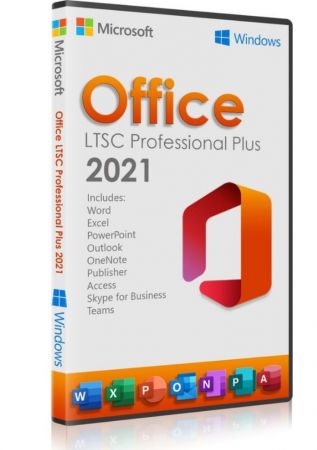
Microsoft Office 2021 LTSC v2108 Build 14334.20244 (x64) Multilingual
Languages: Arabic,English,German,Spanish,Greek,French,Italian,Portuguese-Portuguese,Portuguese-Brazil,Turkish,Dutch,Czech | File Size: 4.25 GB​

Office 365 ProPlus, the cloud-connected version of Office, delivers the most productive and most secure Office experience-with the lowest total cost of ownership for deployment and management. However, for customers who aren't ready for the cloud, Office 2021 provides new features and updates to the on-premises apps for both users and IT professionals. Like Windows Long Term Servicing Channel (LTSC) releases, Office 2021 provides a set of valuable enhancements for customers who can't be cloud-connected or receive regular updates.

The new enhancements in Office 2021 are a subset of a long list of features that have been added to Office 365 ProPlus over the last three years. Office 2021 is a one-time release and won't receive future feature updates. However, we'll continue to add new features to Office 365 ProPlus monthly, including innovations in collaboration, artificial intelligence (AI), security, and more. Office 2021 delivers features across apps to help users create amazing content in less time. In PowerPoint 2021, you can create cinematic presentations with new features like Morph and Zoom. And improved inking features across the apps in Windows-like the roaming pencil case, pressure sensitivity, and tilt effects-allow you to naturally create documents.
Microsoft Office Volume 2021 Select Edition includes
Microsoft Office 2021 Professional Plus
Microsoft Access 2021
Microsoft Excel 2021
Microsoft Lync 2021
Microsoft OneNote 2021
Microsoft Outlook 2021
Microsoft PowerPoint 2021
Microsoft Publisher 2021
Microsoft Visio Viewer 2021
Microsoft Word 2021
Microsoft Visio pro 2021
Microsoft Project 2021
Skype for business 2021
OneDrive for Business 2021
Office Shared Features
Profing Tools Only 2021
And many more
System Requirements
OS:Windows 10/11.
Код:
https://learn.microsoft.com/en-us/officeupdates/update-history-office-2021
Homepage:
Код:
https://microsoft.com

Download link

rapidgator.net:
Код:
https://rapidgator.net/file/6aba013aedfe1af6d0c9c644771fb346/cmhit.Microsoft.Office.2021.LTSC.v2108.Build.14334.20244.x64.Multilingual.part1.rar.html
https://rapidgator.net/file/66d727653854b3d53d67be8e3210fc67/cmhit.Microsoft.Office.2021.LTSC.v2108.Build.14334.20244.x64.Multilingual.part2.rar.html
https://rapidgator.net/file/b64d5d32320b6747d4b7a53966afbe0e/cmhit.Microsoft.Office.2021.LTSC.v2108.Build.14334.20244.x64.Multilingual.part3.rar.html

nitroflare.com:
Код:
https://nitroflare.com/view/CEBA9DFC99E5628/cmhit.Microsoft.Office.2021.LTSC.v2108.Build.14334.20244.x64.Multilingual.part1.rar
https://nitroflare.com/view/4C18865C8689D24/cmhit.Microsoft.Office.2021.LTSC.v2108.Build.14334.20244.x64.Multilingual.part2.rar
https://nitroflare.com/view/A73C35337012704/cmhit.Microsoft.Office.2021.LTSC.v2108.Build.14334.20244.x64.Multilingual.part3.rar
 
Nmap Security Scanner 7.98

70f9c8956ddbcf85f09c3ce4918e52e3.jpeg


File Size : 34 Mb​

Nmap ("Network Mapper") is a useful utility for network exploration or security auditing. Many systems and network administrators also find it useful for tasks such as network inventory, managing service upgrade schedules, and monitoring host or service uptime. Nmap uses raw IP packets in novel ways to determine what hosts are available on the network, what services (application name and version) those hosts are offering, what operating systems (and OS versions) they are running, what type of packet filters/firewalls are in use, and dozens of other characteristics. It was designed to rapidly scan large networks, but works fine against single hosts.


Nmap runs on all major computer operating systems, and official binary packages are available for Linux, Windows, and Mac OS X. In addition to the classic command-line Nmap executable, the Nmap suite includes an advanced GUI and results viewer (Zenmap), a flexible data transfer, redirection, and debugging tool (Ncat), a utility for comparing scan results (Ndiff), and a packet generation and response analysis tool (Nping).
Features
Flexible: Supports dozens of advanced techniques for mapping out networks filled with IP filters, firewalls, routers, and other obstacles. This includes many port scanning mechanisms (both TCP & UDP), OS detection, version detection, ping sweeps, and more. See the documentation page.
Powerful: Nmap has been used to scan huge networks of literally hundreds of thousands of machines.
Portable: Most operating systems are supported, including Linux, Microsoft Windows, FreeBSD, OpenBSD, Solaris, IRIX, Mac OS X, HP-UX, NetBSD, Sun OS, Amiga, and more.
Easy: While Nmap offers a rich set of advanced features for power users, you can start out as simply as "nmap -v -A targethost". Both traditional command line and graphical (GUI) versions are available to suit your preference. Binaries are available for those who do not wish to compile Nmap from source.
Free: The primary goals of the Nmap Project is to help make the Internet a little more secure and to provide administrators/auditors/hackers with an advanced tool for exploring their networks. Nmap is available for free download, and also comes with full source code that you may modify and redistribute under the terms of the license.
Well Documented: Significant effort has been put into comprehensive and up-to-date man pages, whitepapers, tutorials, and even a whole book! Find them in multiple languages here.
Supported: While Nmap comes with no warranty, it is well supported by a vibrant community of developers and users. Most of this interaction occurs on the Nmap mailing lists. Most bug reports and questions should be sent to the nmap-dev list, but only after you read the guidelines. We recommend that all users subscribe to the low-traffic nmap-hackers announcement list. You can also find Nmap on Facebook and Twitter. For real-time chat, join the #nmap channel on Freenode or EFNet.
Acclaimed: Nmap has won numerous awards, including "Information Security Product of the Year" by Linux Journal, Info World and Codetalker Digest. It has been featured in hundreds of magazine articles, several movies, dozens of books, and one comic book series. Visit the press page for further details.
Popular: Thousands of people download Nmap every day, and it is included with many operating systems (Redhat Linux, Debian Linux, Gentoo, FreeBSD, OpenBSD, etc). It is among the top ten (out of 30,000) programs at the Freshmeat.Net repository. This is important because it lends Nmap its vibrant development and user support communities.
Код:
https://nmap.org/changelog.html
Homepage:
Код:
https://nmap.org

Download link

rapidgator.net:
Код:
https://rapidgator.net/file/e534317e90502a470904dcbe7385170e/fcnca.Nmap.Security.Scanner.7.98.rar.html

nitroflare.com:
Код:
https://nitroflare.com/view/2AC87626B06C0F0/fcnca.Nmap.Security.Scanner.7.98.rar
 
Notepad++ 8.8.4 Multilingual

a36dfd866a90b6d60aef2eb0b4b13cc6.jpeg


File Size : 12.6 Mb​

Notepad++ has all the same great features of Notepad++ including support for multiple languages and an extensive plugin system, but there's nothing to install.


Syntax Highlighting and Syntax Folding
Supported languages
C C++ Java C# XML HTML
PHP CSS makefile ASCII art (.nfo) doxygen ini file
batch file Javascript ASP VB/VBS SQL Objective-C
RC resource file Pascal Perl Python Lua TeX
TCL Assembler Ruby Lisp Scheme Properties
Diff Smalltalk Postscript VHDL Ada Caml
AutoIt KiXtart Matlab Verilog Haskell InnoSetup
CMake YAML WYSIWYG
If you have a colour printer, print your source code (or whatever you want) in colour.
User Defined Syntax Highlighting
It allows user to define his own language : not only the syntax highlighting keywords, but also the syntax folding keywords, comment keywords and the operators. ( screenshot1, screenshot2, screenshot3, screenshot4 ).
Auto-completion
For most supported languages, user can make his/her own API list (or download the api files from dowload section). Once the api file is ready, type Ctrl+Space to launch this action (see screenshot). For more information about Auto-completion, please see Auto-completion HOWTO.
Multi-Document
You can edit several documents at the same time.
Multi-View
You have two views at same time. That means you can visualize (edit) 2 different documents at the same time (screenshot). You can visualize (edit) in the 2 views one document at 2 different positions as well. The modification of document in one view will carry out in another view (i.e. you modify the SAME document when you are in clone mode).
Regular Expression Search/Replace supported
You can search and replace one string in the document by using the regular expression.
Full Drag 'N' Drop supported
You can open a document by drag & drop. You can also move your document from a position (or even a view) to another by drag & drop.
Dynamic position of Views
The user can set the position of the views dynamically (only in 2 views mode : the splitter can be set in horizontal or in vertical), see screenshot.
File Status Auto-detection
If you modify or delete a file which opened in Notepad++, you will be notified to update your document (reload the file or remove the file).
Zoom in and zoom out
That's another fantastic function of Scintilla component. Just see screenshot.
Multi-Language environment supported
The Chinese, Japanese, Korean, Arabic and Hebrew Windows environments are supported. See Notepad++ under the Chinese Windows , under the Arabic Windows and under the Hebrew Windows in action screenshot.
Bookmark
User can just click on the bookmark margin (located right side of line number margin) or type Ctrl+F2 to toggle a book mark. To reach the bookmark, type just F2 (Next bookmark) or Shift+F2 (Previous bookmark). To clear all bookmarks, click the Menu Search->Clear All bookmarks. See screenshot.
Brace and Indent guideline Highlighting
When the caret stay beside of one of those symbol { }[ ] ( ) , the symbol beside of caret and its symmetric opposite symbol will be highlighted, as well as the indent guideline (if any) in order to locate the block more easily. See screenshot1, screenshot2 .
Macro recording and playback
You can save several macros and edit their keyboard shorcuts for the next use.
Код:
https://notepad-plus-plus.org/news/
Homepage:
Код:
https://notepad-plus-plus.org

Download link

rapidgator.net:
Код:
https://rapidgator.net/file/e1f585b3c13d222cca1e15f0176428aa/unxcq.Notepad.8.8.4.Multilingual.rar.html

nitroflare.com:
Код:
https://nitroflare.com/view/3B9261D60940C6F/unxcq.Notepad.8.8.4.Multilingual.rar
 
Office Tool Plus 10.25.54 Multilingual

80de2c6de94485551a8d5aeabaa5da78.jpeg


File Size : 21.3 Mb​

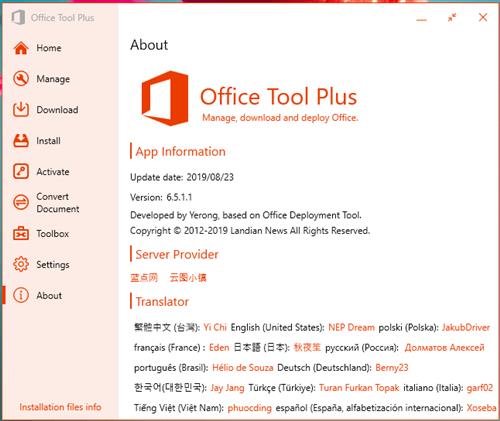
Office Tool Plus is a tool for managing, downloading and installing Office.Office Tool Plus is based on Microsoft's Office Deployment Tool. You can customize configure your Office installation and download installation files to install Office without Internet.


Opportunities
1. Configure the Office installation, as well as customize the installed C2R products, such as adding and removing components, language packs, etc.
2. Download the Office installation package or the language pack, which can be downloaded using the official programs Thunder, Aria or Microsoft.
3. Configure your current Office, change the update channel, delete the product language, or delete the product, or use the built-in scripts or tools to clean the Office
4. Activate your office. Easily set the product key and configure your KMS server address or convert the Office version. (PS: the tool does not have a built-in KMS activation, it simply provides the ability to configure a KMS server.)
Supported products
• MS Office 2016 -> Standard, Pro Plus, Mondo, Professional, Personal, Home Business, Home Student, O365 ProPlus, O365 Business, O365 Small Business, O365 Home Premium
• MS Office 2019 -> Standard, Pro Plus, Professional, Standard 2019 Volume, ProPlus 2019 Volume, Office 365, Home Business, Home Student
Код:
https://github.com/YerongAI/Office-Tool/releases
Homepage:
Код:
https://otp.landian.vip/en-us/

Download link

rapidgator.net:
Код:
https://rapidgator.net/file/5e1e666591363aa1245fa66ef8746768/bjwjp.Office.Tool.Plus.10.25.54.Multilingual.rar.html

nitroflare.com:
Код:
https://nitroflare.com/view/E997FA77B9F4513/bjwjp.Office.Tool.Plus.10.25.54.Multilingual.rar
 
QLab Pro 5.5.0 macOS

5ed234077c98c1960d87f080aef109f1.jpeg


File size: 33 MB​

QLab provides live show control for your Mac. Create media designs for theatre, dance, composition, installation, and more. Play back audio, video, and MIDI from a single workspace.


Release Notes
Код:
https://qlab.app/release-notes/5.3.3/

Supported Operation Systems
macOS 11.0 or later
Homepage:
Код:
https://figure53.com/qlab/

Download link

rapidgator.net:
Код:
https://rapidgator.net/file/6f0ee995cf15d20ce3dd05ebce02ba88/rnbof.QLab.Pro.5.5.0.macOS.dmg.html

nitroflare.com:
Код:
https://nitroflare.com/view/40F89DEBBD66C56/rnbof.QLab.Pro.5.5.0.macOS.dmg
 
Xfer Records Serum 2.0.21

th_6ohY5ZFzhUADjQKzZIaYdiJLOwjcO3X0.avif


File size: 1.27 GB​

The original motivation for creating Serum was to have a dream synthesizer that did not exist: a wavetable synthesizer with a truly high-quality sound, visual and creative workflow-oriented interface to make creating and altering sounds fun instead of tedious, and the ability to "go deep" when desired - to create / import / edit / morph wavetables, and manipulate these on playback in real-time.


Serum version 2 blasts the sonic palette wide-open, offering the user ridiculous power, control and expression over their sonic output - with many oscillator types, flexible effect routing, arpeggiator and clip sequencer - the goal with Serum 2 was to empower Serum users to fully realize their sound and music ideas into form.
WAVETABLE OSCILLATOR
Serum's now legendary Wavetable Oscillator has been refined with additional flexibility. Smooth Interpolation mode allows for near-infinite frame positions in the wavetable (no morph needed). There is filtering, FM, PD, ring mod, distortions and new wavetable warps. Even we have yet to fully explore the outer reaches of what can be achieved by the dual warps available for any of the main oscillator types.
MULTISAMPLE OSCILLATOR
Enables replication of real instruments and sounds found elsewhere. Serum 2 ships with a massive, exclusive, and original library of real instruments recorded around the world, including orchestra, choir, pianos, guitars, and much more. Create or import your own from multisample recordings using the (open standard and human-readable) sfz file format.
SAMPLE OSCILLATOR
Despite the simple premise of playing back a sample, the Sample oscillator packs a punch. Despite being really good for sample playback and offering FM/PD/Distortion types, the sample oscillator also offers looping with snap loop detection, flexible loop modulation, a Rate control for 'tape stop' effects and similar, sample slicing with realtime score extraction / playback and tails mode, and more.
GRANULAR OSCILLATOR
Serum 2 adds a powerful Granular Oscillator which despite the small look packs a host of sophisticated features, allowing you to experiment in a wide range of ways of creating new sound / breathing new life into sample material.
SPECTRAL OSCILLATOR
The Spectral Oscillator allows for realtime resynthesis of samples at the harmonic level, and transient detection processing similar to that found in advanced timestretching algorithms enables you to shape time and frequencies in radical ways.
Код:
https://static.xferrecords.com/Serum%202%20What's%20New.pdf
Homepage:
Код:
https://xferrecords.com/products/serum-2

Download link

rapidgator.net:
Код:
https://rapidgator.net/file/4caa448e0f99ef797632e719c458c57e/qvtuu.Xfer.Records.Serum.2.0.21.rar.html

nitroflare.com:
Код:
https://nitroflare.com/view/8AE04606465F8E8/qvtuu.Xfer.Records.Serum.2.0.21.rar
 
Назад
Сверху