• Форум работает в архивном режиме www.old.nado.in

All mitsumi'1s Applications !! (updated daily)

  • Автор темы Автор темы mitsumi1
  • Дата начала Дата начала
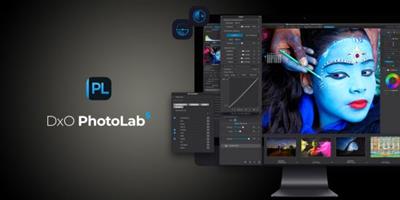
DxO PhotoLab 5.10.0 Build 4856 (x64) Elite Multilingual

df94d1feeaa0193294f8838c979dcf91.jpeg


DxO PhotoLab 5.10.0 Build 4856 (x64) Elite Multilingual
File size: 789 MB​

Produce RAW and JPEG images with the best image quality, effortlessly: DxO PhotoLab provides a complete set of smart assisted corrections that you can manually fine-tune at any time. Take control on every aspect of your photos: effectively remove noise, get rid of light constraints, recover color details, apply sophisticated optical corrections, and enhance details.

DxO SMART LIGHTING
Optimizes the dynamic range of your image and brings out the details from both under- and overexposed areas.
DxO CLEARVIEW
Intelligently boosts local contrast and effectively removes distant haze.
DxO PRIME
Automatically denoises high ISO RAW images and recovers accurate details and colors based on our exclusive algorithms.
OPTICAL CORRECTIONS
Leverage your gear with tailored automatic corrections based on DxO's renowned scientific expertise in measurement and calibration.
EXPRESS YOUR CREATIVITY WITH LOCAL ADJUSTMENTS: INTRODUCING U POINT®
Give your photos your own artistic touch by manually applying selective corrections to specific areas of your image, using exclusive DxO Local Adjustment Tools that include: Control points (U Point technology), graduated filters, manual and automatic brushes, automatic repair tool, etc.
CONTROL POINTS
Manually select your editing area by simply clicking on the part of your image you want to adjust.
BRUSH TOOL
Freely paint and manually adjust small or large areas of your image.
GRADIENT TOOL
Simulates a graduated ND filter and lets you apply artistic effects.
REPAIR TOOL
Allows you to remove dust spots or unwanted objects from your photos.
Processing large series of photos is no longer a nightmare
- Intelligent algorithms adapt settings to your gear as well as to image content
- Copy and paste settings from one image to another
- 30 built-in presets, fully customizable to give your photos the look you like
- Multiple exports in one click
- Export to multiple formats for web, printing, or backup
Export directly to social networks such as Facebook, Flickr, or to other photo editors
Fully adapted to YOUR workflow
- File management that works with your computer (no import step required)
- Direct access to images
- Seamless integration with Lightroom via plugin
- Customizable workspace to adapt to your needs - Dual-screen friendly
Whats New
New supported cameras
• Canon EOS R8
• Canon EOS R50
Bug fixes
• Minor bug fixes and improvements
With each update, please be sure to also update your GPU's driver for the best experience and to avoid any issues

Homepage:
Код:
http://www.dxo.com/

Download link

rapidgator.net:
Код:
https://rapidgator.net/file/5661f52b14fa65c7cb109ad4ed8df042/ckkac.DxO.PhotoLab.5.10.0.Build.4856.x64.Elite.Multilingual.rar.html

uploadgig.com:
Код:
https://uploadgig.com/file/download/512988ecf1cCd90C/ckkac.DxO.PhotoLab.5.10.0.Build.4856.x64.Elite.Multilingual.rar

nitroflare.com:
Код:
https://nitroflare.com/view/C591E5879D23000/ckkac.DxO.PhotoLab.5.10.0.Build.4856.x64.Elite.Multilingual.rar

1dl.net:
Код:
https://1dl.net/n32b0j9avmsz/ckkac.DxO.PhotoLab.5.10.0.Build.4856.x64.Elite.Multilingual.rar


 
DxO PhotoLab 6.5.0 Build 171 Elite Multilingual


47522699ff0d8661eb58dafd69877888.jpeg


DxO PhotoLab 6.5.0 Build 171 Elite Multilingual
Windows x64 | File size: 779.17 MB​

Produce RAW and JPEG images with the best image quality, effortlessly: DxO PhotoLab provides a complete set of smart assisted corrections that you can manually fine-tune at any time. Take control on every aspect of your photos: effectively remove noise, get rid of light constraints, recover color details, apply sophisticated optical corrections, and enhance details.

Unparalleled image quality
DxO's unique DeepPRIME denoising and exceptional color science raise the bar for RAW processing.
Legendary optical corrections
Market-leading corrections built on 20 years of research, giving you sharper images, free of imperfections.
Innovative creative tools
Master color and tone with powerful, creative editing tools that you won't find anywhere else.
Intuitive local adjustments
With DxO's exclusive U Point™ technology you can make targeted edits without tricky masks.
Powerful photo management
Search and sort your photos with simple, effective tags, keywords, and project hierarchies.
New features in DxO PhotoLab 6
- Introducing DxO Wide Gamut working color space: Harness the potential of the latest printers and monitors
with DxO's new color space. Avoid clipping in highly saturated areas and ensure accuracy across your
workflow. Easily switch between the legacy color space (for all images coming from previous versions of DxO
PhotoLab) and the new DxO Wide Gamut working color space (for your new images loaded in DxO PhotoLab
6);
- New Soft Proofing mode: For beautiful, accurate reproduction, whatever the screen or print type. Preparing
your images for different output has never been easier. Achieve accurate color at every stage of your
workflow;
- New DeepPRIME XD denoising option: Alongside DeepPRIME, DeepPRIME XD adds another level of
performance when required. Expect less noise, more detail and smoother bokeh;
- New ReTouch tool: The brand-new ReTouch Tool gives you unprecedented control when cloning and
repairing. Rotate, flip, or transform source points, and edit source areas for absolute precision;
- New nested Projects: Organize your virtual collections of images more efficiently with the new hierarchy of
Projects. Create Projects and groups of Projects and simply organize them by drag-and-drop;
- Crop tool improvement: You can now rotate your images when in Crop mode;
- Embedded Perspective tools: Perspective correction tools (keystoning) are now natively available in the ELITE
version;
- New Color labels support: Identify, classify, and cull your images more easily with the new Color tags;
- New Exif & IPTC fields: For complete metadata management;
- Keyword tokens improvement: Keyword tokens now show the full hierarchy if children have the same name;
- More than 77,000 camera/lens combinations are now available.
Код:
https://support.dxo.com/hc/en-us/categories/360003943351-DxO-PhotoLab
System Requirements
Minimum system configuration
• Any CPU supporting SSE 4.1
• 8 GB RAM
• 4 GB available disk space
• Microsoft® Windows® 10 version 20H2 or higher (64-bit, and still supported by Microsoft®)
Recommended system configuration
• Intel® Core™ processor with 6 cores or better, or AMD Ryzen™
• 16 GB RAM
• 6 GB available disk space
• NVIDIA RTX™ 2060, AMD Radeon™ RX 6600 or better with latest driver

Homepage:
Код:
https://www.dxo.com/

Download link

rapidgator.net:
Код:
https://rapidgator.net/file/300bccaa0f3b17b404b59e1809a964e6/yjgvh.DxO.PhotoLab.6.5.0.Build.171.Elite.Multilingual.rar.html

uploadgig.com:
Код:
https://uploadgig.com/file/download/C600c0ded50A6A85/yjgvh.DxO.PhotoLab.6.5.0.Build.171.Elite.Multilingual.rar

nitroflare.com:
Код:
https://nitroflare.com/view/D6209B1B26BE419/yjgvh.DxO.PhotoLab.6.5.0.Build.171.Elite.Multilingual.rar

1dl.net:
Код:
https://1dl.net/rbvacaat0hua/yjgvh.DxO.PhotoLab.6.5.0.Build.171.Elite.Multilingual.rar
 
DxO PureRAW 3.1.0 Build 532 Multilingual


a6ad68deae8e8b6b97489f54e5a7d244.jpeg


DxO PureRAW 3.1.0 Build 532 Multilingual
Windows x64 | FIle size: 455.14 MB​

DxO PureRAW Simply better RAW files, Enhance your RAW files to open up even more possibilities with Adobe Photoshop and Lightroom®.

DxO PureRAW 3 gives you unparalleled noise reduction and industry-leading optical corrections
Noise-free photos
AI-powered denoising and demosaicing gives you crisp, clean images, free of noise
Unrivaled sharpening
Lens profiles that deliver sharpening where it's needed most - not uniformly across the image
Enhance details, improve colors
Draw out stunning levels of detail and achieve more accurate colors in low light
Legendary optical corrections
Automatically eliminate lens flaws, including vignetting, chromatic aberration, and distortion

Stunning results in just a few clicks

No complex sliders or guesswork - DxO PureRAW 3 automatically provides perfect results
The perfect Lightroom® companion
Integrates seamlessly into any workflow, including Adobe Photoshop® and Lightroom®
DeepPRIME XD: cleaner images, more detail
New in DxO PureRAW 3, DeepPRIME XD is more powerful, taking noise reduction and detail recovery to another level.
Photographers report gaining the equivalent of more than 2.5 stops in noise performance.
Digital Camera World says this technology "will change your mind about what you think your camera is capable of".
The power of machine learning: DeepPRIME and DeepPRIME XD
With DeepPRIME, we used billions of image samples to train a neural network to understand the difference between noise and detail when processing a RAW file.
This AI technology converts RAW files, giving you incredible noise reduction and detail recovery at the best possible stage of the photo editing workflow.
Sharper images
DxO PureRAW 3 corrects lens softness, getting more performance from your gear than you thought possible.
Unlike other software, sharpening is not applied uniformly; instead, corrections vary across the frame depending on the idiosyncrasies of each individual lens, giving you images that are sharpened to perfection.
Код:
https://support.dxo.com/hc/en-us/categories/360004540811
System Requirements
- Intel® Core® 2 or higher (Intel® Core™ i7 4th generation or higher, or AMD Ryzen™ recommended)
- 8 GB of RAM (16 GB recommended)
- 4 GB or more of available hard-disk space
- Microsoft® Windows® 10 version 1903 (64-bit) and above, Microsoft® Windows® 11 (64-bit)

Homepage:
Код:
https://www.dxo.com/

Download link

rapidgator.net:
Код:
https://rapidgator.net/file/627bc44a5789a8e39a776765b39ec5e3/ioulb.DxO.PureRAW.3.1.0.Build.532.Multilingual.rar.html

uploadgig.com:
Код:
https://uploadgig.com/file/download/a0aDa2fd775b16CC/ioulb.DxO.PureRAW.3.1.0.Build.532.Multilingual.rar

nitroflare.com:
Код:
https://nitroflare.com/view/71417D429F6B410/ioulb.DxO.PureRAW.3.1.0.Build.532.Multilingual.rar

1dl.net:
Код:
https://1dl.net/q1vdho3g3o4v/ioulb.DxO.PureRAW.3.1.0.Build.532.Multilingual.rar
 
DxO ViewPoint 4.5.0 Build 207 Multilingual


1ab86cc2fe7460bf0730260df5d5e81e.jpeg


DxO ViewPoint 4.5.0 Build 207 Multilingual
Windows x64 | File size: 238.6 MB​

DxO ViewPoint 4 gives you complete control over lines, angles, and shapes. Adjust perspectives, fix distortions, warp specific areas, and correct wide-angle stretching for perfect images.

Get the perfect angle, every time
DxO ViewPoint 4 can be used as a standalone application, as a tool palette within DxO PhotoLab, and as a plug-in for Adobe Photoshop®, Lightroom Classic®, and Photoshop Elements®.
ReShape: A warping tool that delivers magic
In some shots, details matter more than others. Thanks to DxO ViewPoint 4's innovative new ReShape tool, fixing imperfections has never been easier.
Choose a Distortion Grid that fits the image, then simply drag points to correct individual elements within the frame. You'll quickly bring the world under your control.
Defeat distortions in an instant
Lenses aren't perfect, but DxO ViewPoint 4 makes them better. In fact, even cheap optics can look pro once they're processed with our award-winning optical correction tools.
Draw on DxO's renowned lens correction technology and fix barrel, pincushion and fish-eye distortion with a single click.
Get the right balance
When balance is key, you can achieve perfect poise with DxO ViewPoint's powerful perspective tools. Choose from four methods to get exactly the results you need, no matter what the subject.
• Auto
• 8 points
• Vertical & Horizontal
• Rectangle
All of the drama, none of the distortion
Wide-angle lenses are vital for tight spaces, getting close to subjects, and showing the dramatic scale scene. But that doesn't come for free. A wide-angle will also stretch and distort anything close to the edge of the frame.
DxO ViewPoint's Volume Deformation tool can return a subject's natural proportions in just a few clicks.
Flip and rotate your images with ease
Mirror your images through a vertical or horizontal axis in just a single click, and rotate your image to find the right composition.
Find your level the easy way
Landscape and architectural shots need a straight horizon. Anything else won't do.
ViewPoint 4's upgraded Crop Tool makes this easy with full rotation control direct from the cropping box, so it's easier to reframe your photos with absolute precision.
Get creative
Use the Miniature Effect tool to simulate a tiny world like that produced by tilt-shift lens.
The smooth bokeh produced by DxO ViewPoint 4 can also replicate a shallow depth of field, and can be used to reduce distractions and push the viewer's eye exactly where you want it - something that can be very useful when adding text to an image.
Код:
https://www.dxo.com/dxo-viewpoint/whats-new/
Versions of DxO ViewPoint 4
There are 2 versions of DxO ViewPoint
-- As a standalone application, DxO ViewPoint is completely autonomous. Images corrected using DXO Viewpoint can subsequently be opened in a host application for further processing.
-- The DxO ViewPoint plugin can be used with four applications
• DxO PhotoLab
• Adobe Photoshop (2019 to 2022)
• Adobe Photoshop Elements (2019 to 2022)
• Adobe Photoshop Lightroom Classic
System requirements
• Any CPU supporting SSE 4.1
• 8 GB RAM
• 4 GB available disk space
• Microsoft® Windows® 10 version 20H2 or higher (64-bit, and still supported by Microsoft®)

Homepage:
Код:
https://www.dxo.com/

Download link

rapidgator.net:
Код:
https://rapidgator.net/file/fb1fc4fa030936cff8f0dfb5d4538d15/edbgk.DxO.ViewPoint.4.5.0.Build.207.Multilingual.rar.html

uploadgig.com:
Код:
https://uploadgig.com/file/download/3e47C263b17814f0/edbgk.DxO.ViewPoint.4.5.0.Build.207.Multilingual.rar

nitroflare.com:
Код:
https://nitroflare.com/view/991ECD5D0231144/edbgk.DxO.ViewPoint.4.5.0.Build.207.Multilingual.rar

1dl.net:
Код:
https://1dl.net/oqtiypibwyj8/edbgk.DxO.ViewPoint.4.5.0.Build.207.Multilingual.rar
 
FastCopy 5.0.0


8c029e891bc5a1639b48200cb3d120b1.jpeg


FastCopy 5.0.0
File Size : 4.1 Mb​

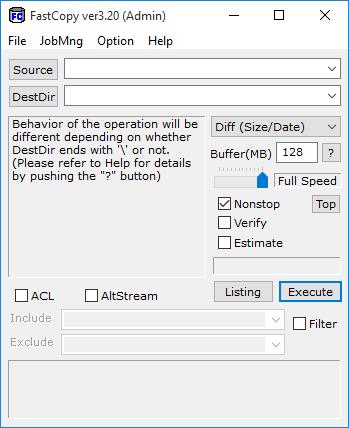
FastCopy is the Fastest Copy/Delete Software on Windows. It can copy/delete unicode and over MAX_PATH(260byte) pathname files. Automatically, after whether the copy origin and copy destinations are HDD according to same physical HDD or is judged, it operates as follows. Diff HDD: Reading and writing are done with the MultiThreading in parallel. Same HDD: Using big buffer, reading until the buffer becomes full, and writing in bulk. Because Read/Write doesn´t use the cache of OS at all, other processes (application) do not become heavy easily. Read/Write performance is a near the limit of the device. Include/Exclude Filter (UNIX Wildcard style) can be specified. It operates lightly because MFC is not used, and it makes it only from Win32 API.

download

rapidgator.net:
Код:
https://rapidgator.net/file/0e8b55a0c087919620cd40842ee8a3ec/voedl.FastCopy.5.0.0.rar.html

uploadgig.com:
Код:
https://uploadgig.com/file/download/3dcdA19C86b56aD2/voedl.FastCopy.5.0.0.rar

nitroflare.com:
Код:
https://nitroflare.com/view/4836A4F93F0470A/voedl.FastCopy.5.0.0.rar

1dl.net:
Код:
https://1dl.net/537z5p0xo7c2/voedl.FastCopy.5.0.0.rar
 
FileSeek Pro 6.8.0 Multilingual


dc7e248b62814d70ba99a0496ebaf4a2.jpeg


FileSeek Pro 6.8.0 Multilingual
File Size: 11.3 MB​

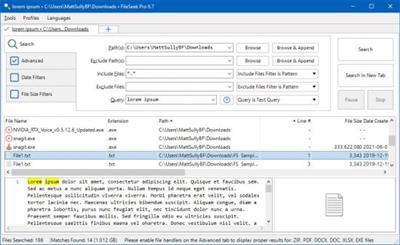
FileSeek is a simple, easy-to-use file search utility that includes advanced functionality for power users too. Search through your files using simple text queries, or use regular expressions for complete control. You can even sync your search settings between computers

Features

Lightning Fast Searching
FileSeek uses multithreading technology to improve the speed of its searches, making it able to out-perform any Windows search. With no background search indexing, FileSeek will never affect the performance of your computer while closed.

Search Profiles
Improve your workload by saving your search criteria as a Search Profile. Save, load, or modify your most common searches to make your life easier.

Tabbed Interface
With FileSeek's tabbed search interface, there is no longer any need to wait for a search to be complete before starting a new one. You can start a search in another tab without opening another window, keeping your taskbar neat and tidy.

Advanced Querying
Use FileSeek's query language or regular expressions to search for specific information inside files or folders. Give up simple searching and unpredictable results, and start obtaining the information you need from your computer.

Sync Your Settings
Sync your Search Profiles between computers for easy access anywhere you are. Syncing is automatic and keeps your Search Profiles always up-to-date.

Search Result Actions
Save search results in different formats for easy reference later, or perform common tasks such as copying, deleting, and dragging into other applications. Choose what you want FileSeek to do when you double-click on a search result by selecting from a number of pre-defined options and make your search experience entirely yours.

Refine Your Search
Include and exclude files and folders from your search, and filter through files based on when they were created, accessed, modified, or how big they are.

rapidgator.net:
Код:
https://rapidgator.net/file/c94725b2df4390ef857f8d5dd16f26e6/yzfqs.FileSeek.Pro.6.8.0.Multilingual.rar.html

uploadgig.com:
Код:
https://uploadgig.com/file/download/e4649c97a24eCdaf/yzfqs.FileSeek.Pro.6.8.0.Multilingual.rar

nitroflare.com:
Код:
https://nitroflare.com/view/BBA821676ABDEF1/yzfqs.FileSeek.Pro.6.8.0.Multilingual.rar

1dl.net:
Код:
https://1dl.net/mqm7xfgg0b6c/yzfqs.FileSeek.Pro.6.8.0.Multilingual.rar
 
Firetrust MailWasher Pro 7.12.131 Multilingual


4454baf937080bf00b6e59a03e16797f.jpeg


Firetrust MailWasher Pro 7.12.131 Multilingual
File Size: 22 MB​

Receiving spam is like those telemarketers who call at dinner time, completely annoying and you didn't ask for it. Luckily you can stop this now! Now with free Android, iPhone and iPad version! Install MailWasher today to screen all your email accounts in one place and allow only the email you want in your inbox.

MailWasher lets you preview all your email before it gets to your computer or mobile device, enabling you to read all your email securely, and instantly delete any unwanted or suspicious email. Your remaining good email is downloaded to your PC or mobile device, saving you from receiving any spam or email viruses.
Код:
https://www.firetrust.com/products/mailwasher-pro/change-log

Homepage:
Код:
http://www.firetrust.com

Download link

rapidgator.net:
Код:
https://rapidgator.net/file/1f5033bea8c9c810fb70273e987bc1da/qupxd.Firetrust.MailWasher.Pro.7.12.131.Multilingual.rar.html

nitroflare.com:
Код:
https://nitroflare.com/view/7DC4A5CA5F10D0D/qupxd.Firetrust.MailWasher.Pro.7.12.131.Multilingual.rar

1dl.net:
Код:
https://1dl.net/42qxssnrwv0t/qupxd.Firetrust.MailWasher.Pro.7.12.131.Multilingual.rar
 
FontLab 8.2.0.8458 Beta


6a94adc2bf2e497e123c52901e9f9315.jpeg


FontLab 8.2.0.8458 Beta
File size: 249.04 MB​

FontLab 8 is an integrated font editor for Mac and Windows that helps you create fonts from start to finish, from a simple design to a complex project, and brings a spark of magic into type design. With FontLab 8, you can create and edit OpenType fonts, variable fonts, color fonts and web fonts - for any Unicode writing system, from Latin, Cyrillic, Greek, Arabic, Hebrew and Indic, all the way to Chinese, Japanese, emoji, symbols and icons. Adjust spacing, kerning and hinting. Convert between font formats. Add new weights and styles to existing font families.

FontLab has been the go-to app for professional typeface designers to make smooth and consistent curves, comfortably tweak, space and kern a typeface, and then export technically solid fonts in any format. With FontLab 8, we've thoroughly revised and modernized every aspect of our powerful, versatile font editor. FontLab 8 has over 500 improvements: it's easier to learn and use, it's better, and it's faster.
Discover the new dark UI theme, adjustable Stroke and Brush sketching, polished drawing and editing, non-destructive transformations with Delta, visual and numeric measurement, glyph building with Skin and variable components, spacing and kerning with mouse and trackpad, batch font export and Actions sets, revamped color and gradients, plus support for .glyphs 3, FontForge, COLRv1, and Python 3.
EXPLORE & PREPARE NEW
Relax your eyes with the new dark or refined light interface theme. Group panels into a vertical infinite, scrollable panel dock, and intuitively navigate between the panels.
Adjust numeric values with sliders and calculations. Boost your productivity with up to 8 improved performance.
DRAFT & DRAW NEW
Draw calligraphic letterforms with new Power Stroke or improved Power Brush. Modulate thickness visually with Thickness tool.
Draw fluently with Pen and Rapid toolbox sub-tools. Draw polygons and stars with Rectangle tool.
EDIT & REFINE NEW
Make slanted selections, keep selections as you switch masters, and store them in Selections panel. Use toolbox for hands-free Power Nudge, handle Nudge and Lever precision dragging, and for easier curve cleanup with Eraser.
Adjust curve tension numerically. Align and collapse points. Reverse contours with Fill tool. Sort contours. Paste to replace selection. Fine-tune individual ink traps and smart corners.
CONSISTENCY & PRECISION NEW
Study the numeric values of your stem widths, segment lengths, curve tensions and corner angles with Auto-meter, or hold G to temporarily view these in Guides tool along with quick measurement and master relations.
View relative node offsets. Snap to continuation lines, perpendicular lines and centerlines. See coordinates for key nodes only. Edit visual TrueType Hinting like never before.
BUILD & ASSEMBLE NEW
Convert selections to components or elements. Add decoration and attach shapes to nodes or segments with updated Glue filter, or with .glyphs-compatible Skin filter in segment, dash, corner and cap modes.
Use clipping groups to mask out areas. Use text shapes to re-use scaled words or phrases from your font in existing glyphs.
METRICS & KERNING NEW
Use your mouse or trackpad to adjust metrics and kerning with high-precision Lever dragging.
Hide or reduce the visibility of spacing controls for distraction-free spacing and kerning.
Auto-space and auto-kern with one click or tap.
Код:
https://help.fontlab.com/fontlab/8/whats-new/release-notes/

Homepage:
Код:
https://www.fontlab.com/

Download link

rapidgator.net:
Код:
https://rapidgator.net/file/b7e6ebc3b128ed76eb65d1a640a4f019/umgmj.FontLab.8.2.0.8458.Beta.rar.html

uploadgig.com:
Код:
https://uploadgig.com/file/download/8646aa82bb078FF2/umgmj.FontLab.8.2.0.8458.Beta.rar

nitroflare.com:
Код:
https://nitroflare.com/view/D8C7022BEB60C2E/umgmj.FontLab.8.2.0.8458.Beta.rar

1dl.net:
Код:
https://1dl.net/nyt8kwfmwlxi/umgmj.FontLab.8.2.0.8458.Beta.rar
 
GeoGebra 6.0.772 Multilingual


5cc15d473151fd068cce2855ad81a071.jpeg


GeoGebra 6.0.772 Multilingual
File size: 95 MB​

GeoGebra is an open-source utility built specifically for helping users design mathematical objects of several types used for calculus, algebra and geometry. Since this is a Java-based application, you should make sure you have previously installed the working environment on the computer.

User-friendly interface with clear-cut options
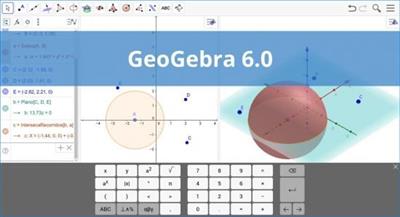
It sports a clean interface that allows users to create mathematical objects by using dedicated tools or commands. The application offers quick access to different drawing tools that can be inserted in the working pane pretty easily.
GeoGebra gives you the possibility to add points and vectors, and perform calculations with them (for example, you can measure the length of a vector), as well as include lines and axes, conic sections and arcs, curves, inequalities, intervals, and functions.

Take advantage of a wide array of math functions
The app provides features for number creation and you can use the π and Euler constants for expressions and calculations, as well as work with angles, Boolean variables, matrix operations (addition, subtraction, multiplication), embedded text messages and images.

Customize object properties
The inserted objects can be hidden or revealed in the graphical representation, filled with a color, as well as fixed to a certain position so you cannot move, redefine or delete them. Plus, it is possible to change the name of an object, label it with its value, create animations with numbers, angles or points, and enable the tracing mode for viewing an object's position.

GeoGebra offers support for two scripting languages (GGBScript and Javascript), so you can create a sequence of commands for designing or modifying the objects. What's more, you may record the values for each object in a spreadsheet list, namely numbers, points, and vectors.
The generated projects can be saved to a file (e.g. HTML, PNG, EPS, GIF), uploaded on the developer's website, or printed.

Conclusion
All in all, GeoGebra comes packed with many dedicated parameters for helping you learn or teach various mathematical objects and operations.

rapidgator.net:
Код:
https://rapidgator.net/file/990e53a76e0be6186b1e40613256b681/iupvf.GeoGebra.6.0.772.Multilingual.rar.html

uploadgig.com:
Код:
https://uploadgig.com/file/download/c9F87e29a962D7e3/iupvf.GeoGebra.6.0.772.Multilingual.rar

nitroflare.com:
Код:
https://nitroflare.com/view/B1B68E1760284A3/iupvf.GeoGebra.6.0.772.Multilingual.rar

1dl.net:
Код:
https://1dl.net/wzn3z4ptscix/iupvf.GeoGebra.6.0.772.Multilingual.rar
 
Google Chrome 112.0.5615.87 Multilingual


bfa2785984239f59d06a4d4b344836e7.jpeg


Google Chrome 112.0.5615.87 Multilingual
File Size : 174 Mb​

Google Chrome is a fast and easy to use web browser that combines a minimal design with sophisticated technology to make the web safer. It has one box for everything: Type in the address bar and get suggestions for both search and web pages. Will give you thumbnails of your top sites; Access your favorite pages instantly with lightning speed from any new tab. Google Chrome is an open source web browser developed by Google. Design goals include stability, speed, security and a clean, simple and efficient user interface.

Its software architecture was engineered from scratch (using components from other open source software including WebKit and Mozilla Firefox) to cater for the changing needs of users and acknowledging that today most web sites aren't web pages but web applications.
Sandboxing. Every tab in Google Chrome is sandboxed, so that a tab can display contents of a web page and accept user input, but it will not be able to read the user's desktop or personal files.
Google say they have "taken the existing process boundary and made it into a jail". There is an exception to this rule; browser plugins such as Adobe Flash Player do not run within the boundaries of the tab jail, and so users will still be vulnerable to cross-browser exploits based on plugins, until plugins have been updated to work with the new Chrome security. Google has also developed a new phishing blacklist, which will be built into Chrome, as well as made available via a separate public API.
Privacy. Google announces a so-called incognito mode claiming that it "lets you browse the web in complete privacy because it doesn't record any of your activity". No features of this, and no implications of the default mode with respect to Google's database are given.
Speed. Speed improvements are a primary design goal.
Stability
Multiprocessing.
The Gears team were considering a multithreaded browser (noting that a problem with existing web browser implementations was that they are inherently single-threaded) and Chrome implemented this concept with a multiprocessing architecture. A separate process is allocated to each task (eg tabs, plugins), as is the case with modern operating systems. This prevents tasks from interfering with each other which is good for both security and stability; an attacker successfully gaining access to one application does not give them access to all and failure in one application results in a "Sad Tab" screen of death. This strategy exacts a fixed per-process cost up front but results in less memory bloat overall as fragmentation is confined to each process and no longer results in further memory allocations. To complement this, Google Chrome will also feature a process manager which will allow the user to see how much memory and CPU each tab is using, as well as kill unresponsive tabs.
User interface
Features. Google Chrome has added some commonly used plugin-specific features of other browsers into the default package, such as an Incognito tab mode, where no logs of the user activity are stored, and all cookies from the session are discarded. As a part of Chrome's javascript virtual machine, pop-up javascript windows will not be shown by default, and will instead appear as a small bar at the bottom of the interface until the user wishes to display or hide the window. Google Chrome will include support for web applications running alongside other local applications on the computer. Tabs can be put in a web-app mode, where the omnibar and controls will be hidden with the goal of allowing the user to use the web-app without the browser "in the way".
Rendering Engine. Google Chrome uses the WebKit rendering engine on advice from the Gears team because it is simple, memory efficient, useful on embedded devices and easy to learn for new developers.
Tabs. While all of the major tabbed web browsers (e.g. Internet Explorer, Firefox) have been designed with the window as the primary container, Chrome will put tabs first (similar to Opera). The most immediate way this will show is in the user interface: tabs will be at the top of the window, instead of below the controls, as in the other major tabbed browsers. In Chrome, each tab will be an individual process, and each will have its own browser controls and address bar (dubbed omnibox), a design that adds stability to the browser. If one tab fails only one process dies; the browser can still be used as normal with the exception of the dead tab. Chrome will also implement a New Tab Page which shows the nine most visited pages in thumbnails, along with the most searched on sites, most recently bookmarked sites, and most recently closed tabs, upon opening a new tab, similar to Opera's "Speed Dial" page.
Код:
https://chromereleases.googleblog.com/

Homepage:
Код:
http://www.google.com/chrome

Download link

rapidgator.net:
Код:
https://rapidgator.net/file/1b7abdaadf7a22a45e0475d07f978425/ydlxg.Google.Chrome.112.0.5615.87.Multilingual.rar.html

uploadgig.com:
Код:
https://uploadgig.com/file/download/005d86d8c90c2af7/ydlxg.Google.Chrome.112.0.5615.87.Multilingual.rar

nitroflare.com:
Код:
https://nitroflare.com/view/7C2D82C749F6430/ydlxg.Google.Chrome.112.0.5615.87.Multilingual.rar

1dl.net:
Код:
https://1dl.net/32croq2x2gsu/ydlxg.Google.Chrome.112.0.5615.87.Multilingual.rar
 
GPU Caps Viewer 1.59


2d2c8865ff71c71760b28709eea7c754.jpeg


GPU Caps Viewer 1.59
File Size : 12.1 Mb​

GPU Caps Viewer is a graphics card information utility focused on the OpenGL, Vulkan, OpenCL and CUDA API level support of the main (primary) graphics card. For Vulkan, OpenCL and CUDA, GPU Caps Viewer details the API support of each capable device available in the system. GPU Caps Viewer offers also a simple GPU monitoring facility (clock speed, temperature, GPU usage, fan speed) for NVIDIA GeForce and AMD Radeon based graphics cards.

Most modern video games feature astonishing visuals which eat up a lot of your video card's resources. This does not only apply to games, specialized applications also making use of GPU. You can get details about the video card installed on your computer through tools integrated in your operating system. However, using tools such as GPU Caps Viewer you can even put it to various tests.
Quick deployment and simple interface
It does not take a lot of time to go through the setup process, in a matter of minutes the interface being brought up at your request. This sports a classic look so that it does not overwhelm you with unnecessary visual elements, which is just right for an application with the main purpose being to offer info.
Various info categories available
Your installed video card is automatically detected as soon as the application is launched. All available details are displayed and you can switch through several tabs, depending on what interests you. As such, you can analyze GPU, OpenGL, CUDA, OpenCL info, each in dedicated tabs.
Put your video card to the test
At the bottom of the main window, you have the possibility to run several test cases, regardless of the tab you currently have opened. You can run OpenGL and OpenCL demos, each with several different presets for each installed driver. Choosing to launch a demo lets you set resolution as well as the level of Multisample anti-aliasing to get an idea of how well your video card performs under pressure.
Find any info you need
You can view a breathtaking amount of info, ranging from and not limited to GPU, Meme size, GPU load, Max clock, VDDC, when it comes to GPU, OpenGL memory and extensions for OpenGL, various core and memory data if CUDA is available, compute units, constant buffer, max samplers, clock in the OpenCL tab.
Even more system details
In addition, accessing the Tools tab lets you view thorough system CPU related info, as well as display mode and total memory installed. There are also links that redirect you to web pages for the latest NVIDIA or AMD drivers to keep your device running smooth.
Save results to file
Last but not least, you can submit your info on the Geeks3D servers to compare with others or to view later on. Moreover, all data can be exported to a TXT or XML file, which comes in handy for testing and comparison purposes.
A few last words
Taking everything into consideration, we can say that GPU Caps Viewer is a handy utility, especially for test cases. The level of detail provided is staggering, with the possibility to also perform tests, save results and even compare with a large community. It's definitely a must for enthusiasts.
Whats New
+ added support of GeForce RTX 4070.
! improved detection of some Radeon (RX 5700, RX 5600, RX 470, RX 570).
- GeeXLab demos: removed the Vulkan plugin v1 as well as all related demos.
! updated: GPU Shark 0.29.2.0.
! updated: ZoomGPU 1.37.2 (GPU monitoring library).
! updated: GeeXLab 0.51.1 libs.

Homepage:
Код:
http://www.geeks3d.com

Download link

rapidgator.net:
Код:
https://rapidgator.net/file/a7a79477c15e1c4aa498d44115f4cc4c/wtbiz.GPU.Caps.Viewer.1.59.rar.html

uploadgig.com:
Код:
https://uploadgig.com/file/download/1Be3d22F50c8595a/wtbiz.GPU.Caps.Viewer.1.59.rar

nitroflare.com:
Код:
https://nitroflare.com/view/F1A6D013F03EAD8/wtbiz.GPU.Caps.Viewer.1.59.rar

1dl.net:
Код:
https://1dl.net/urcjsdf27q78/wtbiz.GPU.Caps.Viewer.1.59.rar
 
GPU Shark 0.29.2


38c9b9370c5ef0c43d0cb527021474d4.jpeg


GPU Shark 0.29.2
File Size : 0.6 Mb​

GPU Shark is a simple, lightweight and free GPU monitoring tool for GeForce and Radeon based graphics cards and is available for Windows only. GPU Shark offers a global view of all your graphics cards in a single window.

The main feature of GPU-Shark is to monitor all available GPUs and visualize them all in a single window. That's the fondamental difference with GPU Caps Viewer. Indeed GPU Caps is focused on the main graphics card, the one that can run OpenGL and Direct3D apps. With GPU Caps, you can't have access to the information of secondary cards. What's more, GPU Caps has many other features like OpenCL or CUDA data and has several real time 3D demos (OpenGL and OpenCL). All these features have a drawback: GPU Caps comes with several files (DLLs and demos data).
Whats New
+ added support of GeForce RTX 4070.
! updated: ZoomGPU 1.37.2 (GPU monitoring library)

Homepage:
Код:
http://www.geeks3d.com/

Download link

rapidgator.net:
Код:
https://rapidgator.net/file/a4a69ab4a6279215efbd8115eb20c1d4/xjbaw.GPU.Shark.0.29.2.zip.html

uploadgig.com:
Код:
https://uploadgig.com/file/download/2c9B81c5aeb8b5bE/xjbaw.GPU.Shark.0.29.2.zip

nitroflare.com:
Код:
https://nitroflare.com/view/C3B47D1BD3ADE5B/xjbaw.GPU.Shark.0.29.2.zip

1dl.net:
Код:
https://1dl.net/8xx6ye9stq5p/xjbaw.GPU.Shark.0.29.2.zip
 
HashTools 4.7


b810af794c5a1ad72171c0ef6c10797a.jpeg


HashTools 4.7
File Size : 5.1 Mb​

HashTools computes and checks hashes with just one click! Supports CRC32, MD5, SHA1, SHA256, SHA384, SHA512 and SFV's, as well as integration into the Windows Explorer context menu for one-click access. Click the "Download Now" button below to begin using HashTools.

.
HashTools works with these versions of Windows
Windows 10 (tech preview), 8.1, 8.0, 7 and Vista (32-bit and 64-bit)
Windows XP (32-bit and 64-bit, see special requirements below)
Windows Server 2012 R2, 2012, 2008 R2, 2008 and 2003 (32-bit and 64-bit)
Код:
https://www.binaryfortress.com/HashTools/ChangeLog/

Homepage:
Код:
https://www.binaryfortress.com

Download link

rapidgator.net:
Код:
https://rapidgator.net/file/16393a7a8d1f726e2c30918c6d86660b/ceowx.HashTools.4.7.rar.html

uploadgig.com:
Код:
https://uploadgig.com/file/download/63acd1F8eb30A7bC/ceowx.HashTools.4.7.rar

nitroflare.com:
Код:
https://nitroflare.com/view/23E1E60FB59E7C3/ceowx.HashTools.4.7.rar

1dl.net:
Код:
https://1dl.net/ajybek954u85/ceowx.HashTools.4.7.rar
 
ImTOO iPad Mate Platinum 5.7.41 Build 20230410 Multilingual


cc388e3edf0fa5a460cb52ce77b2486f.jpeg


ImTOO iPad Mate Platinum 5.7.41 Build 20230410 Multilingual
File size: 78 MB​

ImTOO iPad Mate Platinum provides the all-around iPad solutions which can backup all kinds of files, including music, movies, photos, eBooks, messages, contacts, apps in iPad/iPod/iPhone to computer or iTunes, transfer files from local computer to devices, convert DVD, ISO images, IFO folders, CD, audios, and videos to iPad movies and music, one-step to download and convert online videos to iPad compatible video/audio, produce iPhone ringtones from audios or videos and etc.

Main Functions
Backup iPad Files to PC/iTunesBackup iPad/iPod/iPhone Media Files to PC/iTunes
Transfer music, videos, photos, playlists, SMS messages (html and txt format) and eBooks in iPad/iPhone/iPod to computer quickly and efficiently.
Backup iPad Files to PC/iTunesConvert and Transfer CD/DVD to iPad/iPod/iPhone
Convert CD/DVD to iPad/iPod/iPhone compatible music/movies and move converted files into the devices immediately after the conversions are done.
Convert Videos/Audios to iPadConvert and Transfer Videos/Audios to iPad/iPod/iPhone
Convert and export almost all popular video and audio formats to your devices, such as WMV, FLV, MOV, MKV, AVI, MPG, MTS, RMVB, M4V, WMA, OGG, etc.
Download/Convert Videos from Top Online Video SitesDownload/Convert Videos from Top Online Video Sites
Download online and convert to the formats compatible with iPad/iPod/iPhone and transfer to the devices instantly.
Download/Convert Videos from Top Online Video SitesApp Transfer and App Document Management
Transfer application between your PC and device, and manage document for the application which supports this operation. You can even drag and drop the apps now.
Create Personalized iPhone RingtonesCreate Personalized iPhone Ringtones
Make personalized iPhone ringtones from audio and video files and move to iPhone at once.
Create Personalized iPhone RingtonesImport and Export Contacts
Import and export contacts for iPad and other Apple devices like iPhone, iPod Touch 4. Import contacts from many Address Book programs including incredimail.
Key Features
Don't bother to search for your data connection cable in case it is misplaced it supports data transfer via Wi-Fi.
NVIDIA GPU acceleration is enabled to accelerate the processing speed and promote the performance in converting and transferring operations.
Support logon on the most popular online video websites, including YouTube, Metacafe, Dailymotion, Break, Vimeo, Revver, Blip, Vidilife and Stickam to watch, download and convert online videos to the devices directly for enjoyment.
Delete songs from one playlist and then move them to another one to create your very own playlist.
Show music, movies and photos in multiple view types (e.g., songs, albums, artists and genres), and column for showing the details of file could be customized.
With ImTOO iPad Mate Platinum, you can simply create new photo albums and playlists or delete existing ones on iPod/iPhone/iPad easily.
Optimize the profiles when importing or converting multimedia files into devices.
Provide a convenient built-in player for preview DVD movies, photos or videos shot by the devices and export them willingly.
Simultaneously manage multiple devices without conflict by drag-and-drop to share your favorites with friends.
Proxy server configuration allows you to configure the network to your preference.
Simultaneously edit the ID3 information for multiple music files such as name, artist, album, and year.
Multi-lingual interfaces are offered in language of English, French, Italian, Spanish, German, Japanese, Simplified or Traditional Chinese.
Whats New
Updates: official site does not provide any info about changes in this version.

Homepage:
Код:
http://www.imtoo.com

Download link

rapidgator.net:
Код:
https://rapidgator.net/file/ed88525a17bb2165284e61a6615bda33/aitjf.ImTOO.iPad.Mate.Platinum.5.7.41.Build.20230410.Multilingual.rar.html

uploadgig.com:
Код:
https://uploadgig.com/file/download/bA1fab7e108D123f/aitjf.ImTOO.iPad.Mate.Platinum.5.7.41.Build.20230410.Multilingual.rar

nitroflare.com:
Код:
https://nitroflare.com/view/B1BC277387B05B9/aitjf.ImTOO.iPad.Mate.Platinum.5.7.41.Build.20230410.Multilingual.rar

1dl.net:
Код:
https://1dl.net/n7uifyo45lnl/aitjf.ImTOO.iPad.Mate.Platinum.5.7.41.Build.20230410.Multilingual.rar
 
ImTOO iPad to PC Transfer 5.7.41 Build 20230410 Multilingual


059a785c45e9b54c6b16316efe501913.jpeg


ImTOO iPad to PC Transfer 5.7.41 Build 20230410 Multilingual
File size: 87 MB​

ImTOO iPad to PC Transfer totally removes iTunes' restriction that only synchronizes files on your computer to iPad. This iPad transfer software supports transferring of videos and music from iPad to your computer, copying photos from photostream to PC, importing contacts from incredimail, as well as file backup from iPad to iTunes. Not only applicable to all iPad models (incl. iPad Wi-Fi, iPad Wi-Fi+3G, iPad 16GB, iPad 32GB, iPad 64GB, iPad 2, New iPad), this iPad to PC copy software also supports file transfer of iPhone and iPod. Download ImTOO iPad to PC Transfer for a free trial now to enjoy the extreme multimedia life on your iPad.

Main Functions
iPad to PC File Transfer from iPad to PC
Transfer files from iPad to PC for backup. No need to fear the loss of your iPad videos and music now.
PC to iPad File Transfer from PC to iPad
Just like iTunes but easier to copy movies, music and photos from computer to iPad.
iPad to iTunes File Transfer from iPad to iTunes
Back up videos and music from iPad to iTunes library.
Key Features
Photos and videos recorded by the device are read and exported in this iPad to PC transfer.
Data can be Synchronized via Wi-Fi
Quick Search and Filter tools are available to help you find what you want in your iPad quickly.
Simple to transfer applications and manage application document. Drag and drop apps is supported now.
Editing of music file information (incl. name, artist, album, composer, and year) helps to iPad music management and classification.
Transfer, edit, rename or delete iPhone ringtones and eBooks in PDF or EPUB format with ease.
Create your playlists according to your special requirements, edit/delete/copy iPad playlists easily.
Import and export contacts for iPad and other Apple devices like iPhone, iPod Touch 4
Delete songs from one playlist and then move them to another one to create your very own playlist.
Allow you to create, delete and rename photo albums to manage your iPad photos efficiently.
Importing one photo to multiple albums for different needs.
View your iPad files in multiple mode including songs, albums, artists and genres. You can add illustrations to iPad video and music files in thumbnails mode.
Automatically detects your iPad and displays the iPad information including model, capacity (used and available space), version, serial number and format on the main interface for your reference.
Deal with the file transfer between iPad, iTunes and PC is at fabulously high speed.
You can choose an interface language to your habits from English, German, Spanish, Italian, French, Simplified Chinese, Traditional Chinese and Japanese.
Whats New
Updates: official site does not provide any info about changes in this version.

Homepage:
Код:
http://www.imtoo.com

Download link

rapidgator.net:
Код:
https://rapidgator.net/file/bd575b072b5818f5b4899a736bb72e25/bqndk.ImTOO.iPad.to.PC.Transfer.5.7.41.Build.20230410.Multilingual.rar.html

uploadgig.com:
Код:
https://uploadgig.com/file/download/B4A4ebf29b926Bed/bqndk.ImTOO.iPad.to.PC.Transfer.5.7.41.Build.20230410.Multilingual.rar

nitroflare.com:
Код:
https://nitroflare.com/view/B1F0A2215F9294C/bqndk.ImTOO.iPad.to.PC.Transfer.5.7.41.Build.20230410.Multilingual.rar

1dl.net:
Код:
https://1dl.net/4elgbk92f97e/bqndk.ImTOO.iPad.to.PC.Transfer.5.7.41.Build.20230410.Multilingual.rar
 
ImTOO iPhone Transfer Platinum 5.7.41 Build 20230410 Multilingual


347c20d84b23020a22f9afb8c603589e.jpeg


ImTOO iPhone Transfer Platinum 5.7.41 Build 20230410 Multilingual
File size: 78 MB​

ImTOO iPhone Transfer Platinum makes it easy to transfer and backup videos, music, photos, messages, contacts, apps and eBooks from iPhone to computer/iTunes or from computer to iPhone and let you copy any DVD movie/CD music/audio/video to iPhone, download and convert online videos in one-step, create iPhone ringtones from your favorite music or movies, import contacts from incredimail. Works perfectly with iPhone/iPad/iPod, and fully support multiple devices simultaneously.

Backup iPhone music/movies/photos/eBooks/messages/contacts/apps to computer or iTunes.
Transfer multimedia files from computer to iPhone.
Convert home CD music/DVD movie and Convert all kinds of video/audio files for playback on iPhone
Download online videos from the top rated online video websites and transfer to devices instantly.
Extract audio segments from audio/video files to create iPhone ringtones.
Support all iPad/iPhone/iPod models, iOS and iTunes.
Main Functions
Transfer Files from PC to iPhoneTransfer Files from PC to iPhone
Free to transfer music, videos, photos and eBooks from computer to iPhone quickly and efficiently.
Backup iPhone to Computer/iTunesBackup iPhone to Computer/iTunes
Backup your iPhone music, movies, photos and eBooks to computer without worrying losing content when accidents happen. Copy photos from photostream to PC.
Backup iPhone to Computer/iTunesConvert and Transfer DVD/CD to iPhone
Rip and convert DVD/CD to iPhone compatible movies/music with excellent output quality, then transfer to iPhone directly.
Convert and Export Videos/Audios to iPhone Convert and Export Videos/Audios to iPhone
Convert and export almost all popular video and audio formats to iPhone, such as AVI, FLV, MOV, MKV, WMV, MPG, MTS, RMVB, M4V, WMA, OGG, etc.
Downloader, converter, transfer online video to iPhoneOnline Video Downloader and Converter
Function as an online video downloader and converter which can download and convert online videos from top online video websites. such as YouTube, Metacafe, Dailymotion, Break, Vimeo, Revver, Blip, Vidilife and Stickam.
Perfect iPhone Ringtones MakerPerfect iPhone Ringtones Maker
Make personalized iPhone ringtones from audio and video files and transfer to iPhone at once.
Key Features
- Drag and drop application between PC and iPhone, also support to manage application document.
- If you have lost your data connection cable, don't be panic, ImTOO iPhone Transfer Platinum support data sync via Wi-Fi.
- Copy music, movie and playlist not only to device or computer, you can also copy them to iTunes.
- Show music, movies and photos in multiple view types (e.g., songs, albums, artists and genres), and column for showing the details of file could be customized.
- NVIDIA GPU acceleration is enabled to accelerate the processing speed and promote the performance in converting and transferring operations.
- Simply create new photo albums and playlists or delete existing ones on iPhone easily.
- Provide a convenient built-in player for preview DVD movies, photos or videos shot by the devices and export them willingly.
- Optimize the profiles when importing or converting multimedia files into devices.
- Proxy server configuration allows you to configure the network to your preference.
- Allow you to edit iPhone audio ID3 tags such as title, artist, album, artwork, rating, genre and other information as you like.
- Recognize the connecting devices automatically and immediately.
- Multi-lingual interfaces are offered in language of English, French, Italian, Spanish, German, Japanese, Simplified or Traditional Chinese.
Whats New
Updates: official site does not provide any info about changes in this version.

Homepage:
Код:
http://www.imtoo.com

Download link

rapidgator.net:
Код:
https://rapidgator.net/file/b9e5bdacf8b5210d0bce19b92b3e3356/gadvc.ImTOO.iPhone.Transfer.Platinum.5.7.41.Build.20230410.Multilingual.rar.html

uploadgig.com:
Код:
https://uploadgig.com/file/download/5d92F2bA0B5f0119/gadvc.ImTOO.iPhone.Transfer.Platinum.5.7.41.Build.20230410.Multilingual.rar

nitroflare.com:
Код:
https://nitroflare.com/view/1548CC0BBF131F8/gadvc.ImTOO.iPhone.Transfer.Platinum.5.7.41.Build.20230410.Multilingual.rar

1dl.net:
Код:
https://1dl.net/cprqhqzx3gg3/gadvc.ImTOO.iPhone.Transfer.Platinum.5.7.41.Build.20230410.Multilingual.rar
 
ImTOO iPhone Transfer Plus 5.7.41 Build 20230410 Multilingual


d3ee32c3c38338d44e8c29b7743a85b6.jpeg


ImTOO iPhone Transfer Plus 5.7.41 Build 20230410 Multilingual
File size: 78 MB​

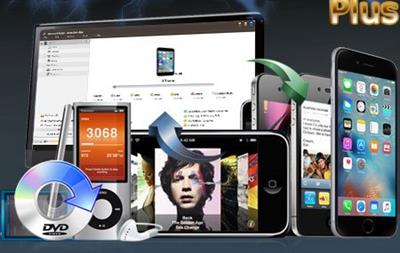
Then ImTOO iPhone Transfer Plus is the solution of your iPhone media management. Transfer files between your computer, iPhone and iTunes. With the ImTOO iPhone Transfer Plus can you transfer videos, music, ebooks, contacts, messages, apps and photos from your iPhone to computer and vice versa, plus convert and transfer nearly all video/audio files and DVD movies to iPhone in a single step. You can even backup files from your iPhone directly to iTunes.

Transferring and managing your iPhone files couldn't be simpler!
ImTOO iPhone Transfer Plus supports all iPhone/iPad/iPod models including iPad, iPad mini, iPad Air, iPad Pro, iPod, nano, iPod mini, iPod shuffle, iPod classic, iPod touch, iPhone, iPhone 3G, iPhone 3GS, iPhone 4, iPhone 5S, iPhone 5C, iPhone 6, iPhone 6 Plus, iPhone 6S, iPhone 6S Plus. In addition, with ImTOO iPhone Transfer Plus installed in your PC, you can manage files on your iPhone like a removable hard disk in Windows Explorer. Transferring and managing your iPhone files couldn't be simpler!

Key Features
ImTOO iPhone Transfer Plus fully supports latest iOS and iTunes.
Support all iPad/iPhone/iPod. Connect multiple iOS devices at one time and transfer files between them by drag-and drop.
Connect your device to Wi-Fi to sync the data in case you misplace your data connection cable
Drag and drop applications between PC and iPhone, also support to manage application document.
Import and export contacts for iPhone and other Apple devices like iPad, iPod.
Manage iPhone as a portable hard disk.
Transfer, edit and manage iPhone ringtones and eBooks in PDF or EPUB format easily.
Customize column to show file details and edit the ID3 tag info for multiple files simultaneously such as name, artist, album, and year.
Play and preview iPhone videos/music and DVD movies with the built-in resizable media player.
High-speed file transfer from computer to iPhone, iPhone to computer and iPhone to iTunes.
Find music, videos and photos as easily as iTunes with Filter and Quick Search.
Create and edit your own playlists to manage and classify your music, videos and photos.
View files in multiple 2 different modes: songs, albums, artists and genres, thumbnail and list. Add your own picture as the artwork in thumbnail mode.
Multilingual interface: English, French, Italian, Japanese, Spanish, German, and Chinese.

rapidgator.net:
Код:
https://rapidgator.net/file/4d4881136cc5fc70eaae79c859de11bd/szemy.ImTOO.iPhone.Transfer.Plus.5.7.41.Build.20230410.Multilingual.rar.html

uploadgig.com:
Код:
https://uploadgig.com/file/download/37410029CD8c3fC9/szemy.ImTOO.iPhone.Transfer.Plus.5.7.41.Build.20230410.Multilingual.rar

nitroflare.com:
Код:
https://nitroflare.com/view/9473B9DCB8D0817/szemy.ImTOO.iPhone.Transfer.Plus.5.7.41.Build.20230410.Multilingual.rar

1dl.net:
Код:
https://1dl.net/lmv7aaeyqxs6/szemy.ImTOO.iPhone.Transfer.Plus.5.7.41.Build.20230410.Multilingual.rar
 
ImTOO iPod Computer Transfer 5.7.41 Build 20230410 Multilingual


7854de4b09d595f2874079eaf937ec5a.jpeg


ImTOO iPod Computer Transfer 5.7.41 Build 20230410 Multilingual
File size: 78 MB​

Transfer music, movies, photos, ebooks, messages, contacts and apps from iPod to computer, computer to iPod, even iPod to iTunes. With ImTOO iPod Computer Transfer you can copy and backup all your audios, videos, and pictures between them. Photos and videos recorded by the device are also supported.

ImTOO iPod Computer Transfer also allows you to connect several iPods and other iOS devices and manage them simultaneously. Transfer songs, movies from iPod to iPod, iPod to iPhone and vice versa. It even offers you the ability to manage your iPhone as a portable hard disk. All iPod, iPhone models and generations and iTunes versions are supported.

Key Features
Support all generations and versions of iPod, iPhone and any version of iTunes.
Use iPhone as a portable hard disk to import/export files and contents to/from computer.
Drag and drop application between PC and iPad, also support to manage application document.
Delete songs from one playlist and then move them to another one to create your very own playlist.
Manage iPod on any computer with this iPod to Computer Transfer installed on your PC.
Transfer, edit, rename or delete iPhone ringtones and eBooks in PDF or EPUB format with ease.
Create, deleted and edit photo albums to organize your iPod photos conveniently.
Read and export videos/photos shot by the device conveniently.
Share one photo with multiple albums for your different needs.
Search and filter through files easily.
Displays device properties such as model, capacity, version, serial number and the like.
View files in multiple modes including songs, albums, artists and genres.
Select from French, Italian, Spanish, German, Japanese, Chinese language interface.

rapidgator.net:
Код:
https://rapidgator.net/file/4b8e6db5612fa04df907eb86729ec555/fskdf.ImTOO.iPod.Computer.Transfer.5.7.41.Build.20230410.Multilingual.rar.html

uploadgig.com:
Код:
https://uploadgig.com/file/download/47764b39925Ca241/fskdf.ImTOO.iPod.Computer.Transfer.5.7.41.Build.20230410.Multilingual.rar

nitroflare.com:
Код:
https://nitroflare.com/view/D860A4E61E59A0B/fskdf.ImTOO.iPod.Computer.Transfer.5.7.41.Build.20230410.Multilingual.rar

1dl.net:
Код:
https://1dl.net/az4npnu7b7pn/fskdf.ImTOO.iPod.Computer.Transfer.5.7.41.Build.20230410.Multilingual.rar
 
ImTOO iTransfer Platinum 5.7.41 Build 20230410 Multilingual


4edf1a9ff9e7cba28e0828937e906141.jpeg


ImTOO iTransfer Platinum 5.7.41 Build 20230410 Multilingual
File size: 78 MB​

ImTOO iTransfer Platinum provides the all-around iPad/iPhone/iPod solutions which can backup almost all kinds of files, including music, movies, photos, eBooks, contacts, messages and apps in iPad/iPhone/iPod to computer or iTunes, convert DVD, ISO images, IFO folders, CD, audios, and videos to iPad/iPhone/iPod movies and music, one-step to download and convert online videos to iPad/iPhone/iPod compatible video/audio files, produce iPhone ringtones from audios or videos etc.

Transfer videos, audios, photos, eBooks, messages, contacts, iPhone ringtones among iPad/iPhone/iPod and PC, iTunes
Convert and transfer home DVD/CD to iPad/iPhone/iPod without iTunes
Convert various video/audio files like AVI, MPEG, WMV, MKV, etc, and transfer to iPad/iPhone/iPod directly
Download online videos from the top rated video websites (i.e. YouTube) and transfer to devices
Make personalized iPhone ringtones from any audio or video.
Fully support latest iPhone/iPad/iPod, iOS and iTunes
Main Functions
Backup, transfer iPad/iPhone/iPod files to PC/iTunesBackup iPad/iPhone/iPod Media Files to PC/iTunes
Transfer movies, music, photos, playlists, messages, contacts and eBooks(PDF and EPUB formats) from iPad/iPhone/iPod to PC/iTunes to backup quickly and efficiently.
Backup, transfer iPad/iPhone/iPod files to PC/iTunesConvert and Transfer DVD/CD to iPad/iPhone/iPod
Convert DVD/CD to iPad/iPhone/iPod compatible movies/music, and then immediately transfer them to the devices after the conversions.
Transfer videos to iPad/iPhone/iPodConvert and Transfer Videos/Audios to iPad/iPhone/iPod
Convert almost all popular video and audio formats like WMV, FLV, MOV, MKV, AVI, MPG, MTS, RMVB, M4V, WMA, OGG, etc., and then transfer to the device.
Put online videos to iPad/iPhone/iPodDownload & Convert Online Video
Download videos from the most popular online video websites, including YouTube, Metacafe, Dailymotion, Break, Vimeo, Revver, Blip, Vidilife and Stickam, to watch and convert online videos to the devices directly with enjoyment.
Create iPhone ringtonesCreate Personalized iPhone Ringtones
Make special and interesting iPhone ringtones from audio and video files and transfer to iPhone easily.
Key Features
Don't bother for searching your data connection cable in case it is misplaced ImTOO iTransfer Platinum supports data transfer via Wi-Fi.
Simultaneously manage multiple devices easily, connect multiple devices simultaneously, just by drag-and-drop to share your favorites with friends and family (e.g. iPod to iPad, iPhone to iPad).
Drag and drop application between your PC and device, and even manage document for the application which supports this operation.
Copy music, movies and playlist to device, computer or iTunes.
Delete songs from one playlist and then move them to another one to create your very own playlist.
Multiple view types to show music, movies and photos, they are songs, albums, artists and genres.
It is easy to create new photo albums and playlist or delete existing ones on iPad/iPhone/iPod for you with ImTOO iTransfer Platinum.
The profiles are optimized when you are importing or converting multimedia files into devices.
With NVIDIA GPU acceleration is enabled, the processing speed is accelerated and the performance in converting and transferring operations is promoted.
With proxy server configuration, it's easy to configure the network to your preference.
You can find built-in player on the interface to preview DVD movies, photos or videos shot by the devices and export them willingly.
Customize column for showing file details and simultaneously music files such as name, artist, album, and year.
We provide multi-lingual interfaces in various languages of English, French, Italian, Spanish, German, Japanese, Simplified and Traditional Chinese.
Whats New
Updates: official site does not provide any info about changes in this version.

Homepage:
Код:
http://www.imtoo.com

Download link

rapidgator.net:
Код:
https://rapidgator.net/file/02ae0ab2422430574031afc7bf8317ab/flipp.ImTOO.iTransfer.Platinum.5.7.41.Build.20230410.Multilingual.rar.html

uploadgig.com:
Код:
https://uploadgig.com/file/download/e078321e2Da3eb6a/flipp.ImTOO.iTransfer.Platinum.5.7.41.Build.20230410.Multilingual.rar

nitroflare.com:
Код:
https://nitroflare.com/view/4BF447A810911A3/flipp.ImTOO.iTransfer.Platinum.5.7.41.Build.20230410.Multilingual.rar

1dl.net:
Код:
https://1dl.net/56hechvyrm70/flipp.ImTOO.iTransfer.Platinum.5.7.41.Build.20230410.Multilingual.rar
 
ImTOO PodWorks Platinum 5.7.41 Build 20230410 Multilingual


056df0b8a9078c685803fb3e0172d603.jpeg


ImTOO PodWorks Platinum 5.7.41 Build 20230410 Multilingual
File size: 78 MB​

ImTOO Podworks Platinum is an all-in-one solution which helps you to manage your iPod/ iPhone in full-scale: backup music, movies, photos, books and iPhone ringtones in iPod/ iPhone to PC or iTunes. ImTOO PodWorks Platinum also lets transfer files from PC to devices in high-speed, convert CD, DVD, audios, videos to iPad/ iPod/ iPhone music/ movies, download and convert online videos from top online video websites, create excellent iPhone ringtones from audios/ videos, move PDF /EPUB books to devices and so on.

Main Functions
Transfer iPod Contents to PC/iTunesTransfer iPod Contents to PC/iTunes
Transfer songs, videos, photos, playlists, SMS, contacts and eBooks from iPod to PC/iTunes quickly and efficiently.
Transfer iPod Contents to PC/iTunesConvert and Transfer DVD/CD to iPod
Convert all contents in DVD/CD discs and convert to iPod compatible files, transfer to the devices immediately after the conversion.
Transfer Videos/Audios to iPodConvert and Transfer Videos/Audios to iPod
Convert videos and audios to media files playable on your iPod and transfer to the devices right away.
Download/Convert/Transfer Videos from Top Online Video Sites to iPodDownload, Convert, and Transfer Videos from Top Online Video Sites to iPod
Enable you to surf on the most popular online video websites (YouTube, Metacafe, Dailymotion, Break, Vimeo, Revver, Blip, Vidilife and Stickam) within the application, download online and convert to the formats compatible with iPod and transfer to the devices instantly.
Make Personalized iPhone Ringtones Make Personalized iPhone Ringtones
Make personalized iPhone M4R ringtones from audio and video files and move to iPhone at once.
Whats New
Updates: official site does not provide any info about changes in this version.

Homepage:
Код:
http://www.imtoo.com

Download link

rapidgator.net:
Код:
https://rapidgator.net/file/7265044ef0ae2e4299c09bd748a238d7/mbasi.ImTOO.PodWorks.Platinum.5.7.41.Build.20230410.Multilingual.rar.html

uploadgig.com:
Код:
https://uploadgig.com/file/download/58f003c3bB77d0e1/mbasi.ImTOO.PodWorks.Platinum.5.7.41.Build.20230410.Multilingual.rar

nitroflare.com:
Код:
https://nitroflare.com/view/F1E197868F6F692/mbasi.ImTOO.PodWorks.Platinum.5.7.41.Build.20230410.Multilingual.rar

1dl.net:
Код:
https://1dl.net/4yd8mwdfbd8v/mbasi.ImTOO.PodWorks.Platinum.5.7.41.Build.20230410.Multilingual.rar
 
Назад
Сверху