• Форум работает в архивном режиме www.old.nado.in

All mitsumi'1s Applications !! (updated daily)

  • Автор темы Автор темы mitsumi1
  • Дата начала Дата начала
Bulk Image Downloader 6.22 Multilingual


ad5ed28d6dbeff9e06d3d96d0f180ab2.jpeg


Bulk Image Downloader 6.22 Multilingual
File size: 31.4 MB​

Bulk Image Downloader is an application specifically developed to help you download Full Sized images from almost any web gallery or web forum.

Features
Image Host Support - BID works with almost all popular image hosting sites, such as flickr, imagevenue, imagefap, imageshack, imagebam, etc.
Social Networking Sites - BID supports album downloading from sites such as facebook, myspace, and twitter related hosts like tweetphoto.com, twitpic.com, yfrog.com
Full Sized Images - BID uses an advanced heuristic scoring method to locate full sized images. This means BID can work on most galleries automatically, with no user configuration necessary.
Batch Downloading - Automatically download from huge lists of gallery URLs via the integrated Queue Manager.
Web Browser Integration - BID integrates with IE, Opera, FireFox and Chrome. Just right click inside your browser window and select "Open current page with BID"
Web Forum Support - BID can scan multi page forum threads and quickly extract all image links
Multi Page Gallery Downloads - BID can detect and download from most popular multi page web galleries out of the box.
Password Protected Websites - BID will prompt for user names and passwords if the web site requires them.
Video Downloading - It's not just for images - BID also supports VIDEO downloading from directly linked video files (.avi, .wmv, .mpeg, .mov, .flv, .mp4, etc)
Embedded images - Apart from locating and downloading full sized imaged, BID can also download images embedded on a page
Sequenced image filenames (fusker) - BID supports 'ranged' URLs for sequenced image downloading.
Image Validation - BID checks every image to make sure it's been downloaded correctly. Invalid images are retried automatically.
Resume Downloads - BID will resume downloads from the point at which the connection was broken.
Multi Threaded Downloading - BID can download up to 50 images at once. Download those galleries quickly!
Redirection Resolution -Some sites use image redirection "services" like imagecash, urlcash etc. to display adverts before redirecting to the imagehost. BID automatically resolves these types of links.
File name unmangling - BID will retrieve the correct file name from image hosts that scramble filenames (where possible), such as imagevenue, imagefap.
Generate File names - Optionally create your own sequenced file names for image hosts that scramble the file names,
Export Galleries to HTML or BB Code - Quickly generate gallery code suitable for pasting into web forums.
Advanced Configuration - BID has many advanced settings for things like Javascript processing, redirection handling, and more for those tricky galleries that thwart BID's download attempts. We're happy to help out with these settings if you get stuck - just contact us.
... and more!
Код:
https://bulkimagedownloader.com/bulk-image-downloader-version-history/

Homepage:
Код:
http://bulkimagedownloader.com/

Download link

rapidgator.net:
Код:
https://rapidgator.net/file/3295a6705039cb195413a3e0d6bfa209/cptts.Bulk.Image.Downloader.6.22.Multilingual.rar.html

uploadgig.com:
Код:
https://uploadgig.com/file/download/7a1b71Bb6491f703/cptts.Bulk.Image.Downloader.6.22.Multilingual.rar

nitroflare.com:
Код:
https://nitroflare.com/view/01ACD30F3AD2032/cptts.Bulk.Image.Downloader.6.22.Multilingual.rar

1dl.net:
Код:
https://1dl.net/dtitew32ribm/cptts.Bulk.Image.Downloader.6.22.Multilingual.rar
 
Cerbero Suite Advanced 6.3.1


47d1e8849a9671e0490a1354fbd4c4f1.jpeg


Cerbero Suite Advanced 6.3.1
File size: 66 MB​

State-of-the-art suite of tools for malware triage and file analysis. Analysis for many file formats including PE, Mach-O, ELF, Java, SWF, DEX, PDF, DOC, XLS, RTF, Zip and many more. Automatic analysis, interactive analysis, Carbon Interactive Disassembler, byte-code disassemblers (.NET MSIL, Java, DEX, ActionScript2/3, VBA, fonts), hex editor with layouts, Windows memory analysis (raw dumps, WinDmp files, hibernation files), JavaScript debugger, extremely rich Python3 SDK, extension support, C++/PDB structures importer, support for projects and bookmarks. Completely multi-platform (Windows, Linux, OS X). Visit our blog to see Cerbero Suite in action!

This is a list of some relevant features of Cerbero Suite Advanced. Please note that it is not possible to enumerate all features because of the complexity and on-going improvement of the product.
Carbon Interactive Disassembler
Supported file formats
Email (EML)
Extraction of attachments
Torrent
Windows Dmp files (WINDMP)
Inspection of internal structures
Full inspection of memory when available
Windows Hibernation files
Inspection of internal structures
Full inspection of memory
Windows Raw Memory Images (WINMEM)
Support for all Windows editions
Inspection of files in memory
Inspection of SSDT, IDT, GDT
Suppport for VAD trees
User address spaces
System address space
System symbols of all supported Windows editions
Код:
https://blog.cerbero.io/?p=2501

Homepage:
Код:
https://cerbero.io/

Download link

rapidgator.net:
Код:
https://rapidgator.net/file/1529ab2934c0364cabe5845078783c1a/rjqrz.Cerbero.Suite.Advanced.6.3.1.rar.html

uploadgig.com:
Код:
https://uploadgig.com/file/download/F78f6b84F0cc4fe6/rjqrz.Cerbero.Suite.Advanced.6.3.1.rar

nitroflare.com:
Код:
https://nitroflare.com/view/696C480E6215066/rjqrz.Cerbero.Suite.Advanced.6.3.1.rar

1dl.net:
Код:
https://1dl.net/4oxnla1ifvm4/rjqrz.Cerbero.Suite.Advanced.6.3.1.rar
 
ColorWell 7.3.9 macOS


9215e307d16c52380d684e5e1542c0e3.jpeg


ColorWell 7.3.9 macOS
File size: 9 MB​

ColorWell provides instant access to the standard OS X Color Wheel, with a handy Hex/RGB/Float/HSL translator. ColorWell is a useful tool in any good Web designer's toolkit, and can be easily configured to live up in the system toolbar and open with a global hotkey.

Release Notes
updated copyright
changed Preferences... menu to Settings... to match macOS Ventura naming conventions

Supported Operation Systems
macOS 10.11 or later

Homepage:
Код:
https://sweetpproductions.com/

Download link

rapidgator.net:
Код:
https://rapidgator.net/file/903b95191f99f0a465714b62dcedaebb/zgiyl.ColorWell.7.3.9.macOS.dmg.html

uploadgig.com:
Код:
https://uploadgig.com/file/download/813f3E0062Aa19d2/zgiyl.ColorWell.7.3.9.macOS.dmg

nitroflare.com:
Код:
https://nitroflare.com/view/0F2ADEAD5515088/zgiyl.ColorWell.7.3.9.macOS.dmg

1dl.net:
Код:
https://1dl.net/zdmgcjmic3f7/zgiyl.ColorWell.7.3.9.macOS.dmg
 
Desktop Stickers 2.3 macOS


d2c556a8c7a359b5c4e94a81832807bf.jpeg


Desktop Stickers 2.3 macOS
File size: 46 MB​

Your thoughts are the source of your emotions and mood. The conversations you have with yourself can be destructive or beneficial. Most people need to learn how to cultivate positive thoughts and dispel the negative ones.

Self-talk can enhance your performance and general well-being. For example, research shows self-talk can help athletes with performance.
Self-talk is a huge part of our self-esteem.
Examples
1- Negative: I'm overweight.
Positive: "I am strong,
I am capable,
I want to get fit for me."
2- Negative: "I'm lost the project.
Positive: I can reach my goal
step by step."
3- Negative: "I don't like what's happening around here."
Positive: "I accept the things that I can't change,
I will change the things I can."
Release Notes
Код:
https://geo.itunes.apple.com/app/id1481768883

Supported Operation Systems
macOS 10.15 or later

Homepage:
Код:
https://geo.itunes.apple.com/app/id1481768883

Download link

rapidgator.net:
Код:
https://rapidgator.net/file/048504ec13504b21b6bc3f1402895ed0/emsgw.Desktop.Stickers.2.3.macOS.dmg.html

uploadgig.com:
Код:
https://uploadgig.com/file/download/BCe8842e6a6235eb/emsgw.Desktop.Stickers.2.3.macOS.dmg

nitroflare.com:
Код:
https://nitroflare.com/view/2C9D908FAD58211/emsgw.Desktop.Stickers.2.3.macOS.dmg

1dl.net:
Код:
https://1dl.net/rb2pq418vh1o/emsgw.Desktop.Stickers.2.3.macOS.dmg
 
Downie 4.6.13 U2B macOS


c9aa5b6079add4751070f325b0e312f6.jpeg


Downie 4.6.13 U2B macOS
File size: 50.94 MB​

Ever wished you could save a video from the Internet? Search no more, Downie is what you're looking for. Easily download videos from thousands of different sites.

Key Features
• Supports many sites - currently supports over 1,000 different sites (including YouTube, Vimeo, etc.) and the number is rapidly growing.
• 4K video YouTube support - unlike many other YouTube downloaders, Downie supports HD video on YouTube, up to 4K.
• Postprocessing - need your video in MP4 for iTunes? Or want just the audio track? No problem, Downie can handle this for you automatically!
• History Synchronization - sychronize Downie history over iCloud between your devices.
• Quick support - I respond to emails usually within 24 hours and often add support for requested sites in the next update.
• Frequent updates - Don't wait weeks for new sites to be supported, or bugs to be fixed! Downie is updated about once a week with new features, sites supported, etc.
• International - not only that Downie supports country-specific sites, it is localized into various languages. If your language is missing, contact us - we can offer you a free license in exchange for a translation.

New in Downie 4
• UI Redesign - the UI has been redesigned with more options at hand, while not cluttering the UI.
• Menu Bar Control - control the app from the menu bar - without the need for the Dock icon.
• Customizations - custom postprocessing using your own shell script, custom file name formatting, and much more.
• Improved Speed - YouTube videos load up to 6 times faster with Downie 4 when compared to Downie 3!
• Metadata Improvements - the metadata that Downie gathers can be written into an external JSON file for further custom processing.
• Improved User-Guided Extraction - the UGE window now has history, allows saving favorites and much more.
• ... and much more! - many minor improvements, like custom naming schemes, option to force MP4 downloads, better cancellation, priority flags, etc...

Supported Operation System
• macOS 10.13 or later
• Apple Silicon or Intel Core processor

rapidgator.net:
Код:
https://rapidgator.net/file/6137d0b1ba1273d078ecfe86e61ebb86/vrnap.Downie.4.6.13.U2B.macOS.dmg.html

uploadgig.com:
Код:
https://uploadgig.com/file/download/7B180c98b13379d8/vrnap.Downie.4.6.13.U2B.macOS.dmg

nitroflare.com:
Код:
https://nitroflare.com/view/5663B693E07B46B/vrnap.Downie.4.6.13.U2B.macOS.dmg

1dl.net:
Код:
https://1dl.net/itn8wsa6q6pp/vrnap.Downie.4.6.13.U2B.macOS.dmg
 
Dynamic Wallpaper 13.8 macOS


64ef37ed3e440f0ef51d1cb45308cf3d.jpeg


Dynamic Wallpaper 13.8 macOS
File size: 25.71 MB​

Dynamic Wallpaper Engine allows you to use live wallpapers on your desktop/screensaver. It provides thousands of live wallpapers in the Workshop while taking as little system resources as possible. It's the Wallpaper Engine for Mac.

Features
• 2000+ hand-picked videos which are updated every day.
• Multiple types of 4K Ultra HD videos, anime, scenery, cute, game, creative, Beauty, Ancient, Movie, etc.
• Supports "keyword searching" in videos.
• Supports "Dynamic-ScreenSaver", personalize your lock screen.
• Easy to import local video.
• Supports The playlist, list loop, shuffle loop.
• Supports multiple screen aspect ratios and video native resolutions.
• Supports global hotkeys to control wallpaper, hide desktop icons and show screensaver.
• Set different wallpapers on different displays.
• Manual control, video pause, resume and mute.
• Break reminders, with flexible customization if you want it.
• Auto mode, pause the video when other apps are active, not disturbed at work.
• Auto mode, pause the video when Power Disconnected.
• Support for hiding desktop icons.
• Dynamic Wallpaper Engine is designed to provide an interesting experience while consuming as little system resources as possible.
Release Notes
Код:
http://geo.itunes.apple.com/app/id1453504509

Supported Operation System
• macOS 10.12 or later
• Apple Silicon or Intel Core processor

Homepage:
Код:
http://apps.apple.com/app/dynamic-wallpaper-engine/id1453504509

Download link

rapidgator.net:
Код:
https://rapidgator.net/file/f3d0e21f8c130296227922a0d2ac9306/tszrz.Dynamic.Wallpaper.13.8.macOS.dmg.html

uploadgig.com:
Код:
https://uploadgig.com/file/download/727bad6E233194a3/tszrz.Dynamic.Wallpaper.13.8.macOS.dmg

nitroflare.com:
Код:
https://nitroflare.com/view/1BEDB40645DE757/tszrz.Dynamic.Wallpaper.13.8.macOS.dmg

1dl.net:
Код:
https://1dl.net/b0tgoa8vs8f6/tszrz.Dynamic.Wallpaper.13.8.macOS.dmg
 
Eon Timer 2.9.8 macOS


f0089f89d3375b31fa27c9da47f3acf2.jpeg


Eon Timer 2.9.8 macOS
File size: 15 MB​

Simple and elegant time tracking.. Eon helps you easily track time on your Mac. Eon allows you to easily post time to several services to make invoicing as painless as possible. Keeping track of time that you spend on a project is the basis of every business. Eon can not only track the time, but it synchronizes with over 40 different online services.

Release Notes

Jan 12, 2023
• Fixed: Issues with the new Toggl integration.

Supported Operation Systems
macOS 10.13 or later

rapidgator.net:
Код:
https://rapidgator.net/file/fae636d240f8ab34cba465a07441eaab/wxnnw.Eon.Timer.2.9.8.macOS.dmg.html

uploadgig.com:
Код:
https://uploadgig.com/file/download/092548e65d6f3E54/wxnnw.Eon.Timer.2.9.8.macOS.dmg

nitroflare.com:
Код:
https://nitroflare.com/view/D6E5ED12DEB6FF2/wxnnw.Eon.Timer.2.9.8.macOS.dmg

1dl.net:
Код:
https://1dl.net/zrwuc1zmwqg3/wxnnw.Eon.Timer.2.9.8.macOS.dmg
 
DP Animation Maker 3.5.16


6f798bb3fd261f4129ac703bd2b35715.jpeg


DP Animation Maker 3.5.16
File size: 21.8 MB​

Smart 2D animation software that lets you turn still images into live moving scenes. Create living, breathing worlds from your still image with minimum effort. DP Animation Maker lets you make natural scenes burst with vibrancy and give motion to people and objects.

Fun software, with a wide variety of uses
DP Animation Maker helps you make animated videos for lots of stuff. Whether for business or personal use, some of the most popular items people create with the software include
- Animated videos
- Web banners
- YouTube videos
- Digital greeting cards
- Mobile phone backgrounds
- PowerPoint presentations
- Music videos
- Video footage
- And more!
Код:
https://www.animationsoftware7.com/

Homepage:
Код:
https://www.animationsoftware7.com/

Download link

rapidgator.net:
Код:
https://rapidgator.net/file/36a6275816cf2a7c9a28eedd0576e67e/vitdv.DP.Animation.Maker.3.5.16.rar.html

uploadgig.com:
Код:
https://uploadgig.com/file/download/8Dae8a238190711b/vitdv.DP.Animation.Maker.3.5.16.rar

nitroflare.com:
Код:
https://nitroflare.com/view/EC864456F30AAD1/vitdv.DP.Animation.Maker.3.5.16.rar

1dl.net:
Код:
https://1dl.net/w943brayfaue/vitdv.DP.Animation.Maker.3.5.16.rar
 
EFI Boot Editor 1.2.0


990380a1dfd21e667cca4e81d68eab5f.jpeg


EFI Boot Editor 1.2.0
File Size : 20.8 Mb​

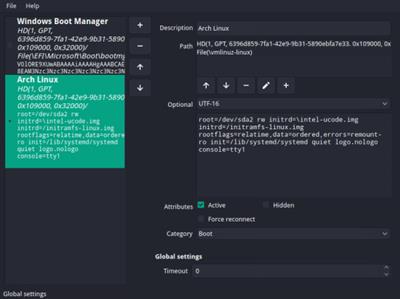
EFI Boot Editor provides you with a graphic interface for both checking your current boot settings and making modifications.

Provides a preview of the path and current attributes
The application is portable, so simply decompress the archive in the desired location and launch the executable to get started. The app comes with a clean and user-friendly interface designed as a dashboard with the main functions located in the left side. Therefore, you can preview the Windows Boot Manager along with EFI USB devices, Network and DVD / CDROM.
For the Windows Boot Manager you can check out the Description, path, category, global setting like the timeout and whether the attributes are active or hidden. Optionally, the application can provide the same information in other formats, namel HEX, BASE64, UTF-8 or UTF-16.
A tool for managing the EFI Boot Manager configuration
Considering the role of the tool, it is advisable that you create a restore point for Windows before proceeding. In addition, it may be ideal to use an Administrator account to make certain modifications, as certain files cannot be modified otherwise. It goes without saying that you must know what you are doing, as otherwise, your machine may not boot anymore.
In the eventuality that you want to make some modifications to the Boot Manager of your EFI system architecture and don't want to reboot or perhaps, don't have an administrator account, then perhaps you can consider giving EFI Boot Editor a try.
Код:
https://github.com/Neverous/efibooteditor/releases

Homepage:
Код:
https://github.com/Neverous/efibooteditor

Download link

rapidgator.net:
Код:
https://rapidgator.net/file/702447dae028494a78bf3eef71563f66/khwpg.EFI.Boot.Editor.1.2.0.msi.html

uploadgig.com:
Код:
https://uploadgig.com/file/download/d3990e759f5C64b0/khwpg.EFI.Boot.Editor.1.2.0.msi

nitroflare.com:
Код:
https://nitroflare.com/view/F863B70726937D3/khwpg.EFI.Boot.Editor.1.2.0.msi

1dl.net:
Код:
https://1dl.net/g0crja2bu320/khwpg.EFI.Boot.Editor.1.2.0.msi
 
Evernote 10.55.1.4005 Multilingual


39990696b4cd522c36519b5385537413.jpeg


Evernote 10.55.1.4005 Multilingual
File Size : 263 Mb​

Evernote allows you to easily capture information in any environment using whatever device or platform you find most convenient, and makes this information accessible and searchable at any time, from anywhere.

EverNote is an application/service which lets you capture, store and sync anything on multiple devices. EverNote works on any OS, whether PC, Mac or phone and can capture anything you throw at it, from notes, to images, media or passwords. All your information is stored in the program and you can use tags and notes to categorize it.
Now that we can access the internet from almost anywhere and any device the difficulty is getting access to your information all at once. It can be store all online or you can keep everything synced up on all your devices.
If you have EverNote installed on your devices, all it takes is having an internet connection and pressing the 'Synchronize' button from the menu, to ensure that you have the same information stored on all devices.
EverNote is a very promising application that captures, stores and syncs any sort of information on all your devices.
Stop forgetting things. Capture everything now so you will be able to find it all later.
* Tasks and to-dos
* Notes and research
* Web pages
* Whiteboards
* Business cards
* Scribbles
* Snapshots
* Wine labels
Whats New
Updates: official site does not provide any info about changes in this version

Homepage:
Код:
https://evernote.com/

Download link

rapidgator.net:
Код:
https://rapidgator.net/file/3a8d85ad2fff54f31aa92ea35b961364/wagnp.Evernote.10.55.1.4005.Multilingual.rar.html

uploadgig.com:
Код:
https://uploadgig.com/file/download/0514820D27018D35/wagnp.Evernote.10.55.1.4005.Multilingual.rar

nitroflare.com:
Код:
https://nitroflare.com/view/A93D4A9A71D4934/wagnp.Evernote.10.55.1.4005.Multilingual.rar

1dl.net:
Код:
https://1dl.net/1hhiocljrma3/wagnp.Evernote.10.55.1.4005.Multilingual.rar
 
File List Export 2.8.0 macOS


762b11872df26f81bbaa5ce7e82ea1b9.jpeg


File List Export 2.8.0 macOS
File size: 25 MB​

File List Export (was File list to Excel) is an easy to use application that will help you create list of files for any need. List all your photos, all your videos or all your files. If you need to create list of files this app is for you. Just select a folder and get a list with all files and folders to Excel or to a CVS file.

You can choose if you want to include the files from all subfolders. Preview and edit the list before export to file. Easily search and filter the file list records.
Release Notes
Код:
https://geo.itunes.apple.com/app/id852692251

Supported Operation Systems
macOS 10.9 or later

Homepage:
Код:
https://geo.itunes.apple.com/app/id852692251

Download link

rapidgator.net:
Код:
https://rapidgator.net/file/be0700bdc43ebc76d0610c626ddd5655/ewkao.File.List.Export.2.8.0.macOS.dmg.html

uploadgig.com:
Код:
https://uploadgig.com/file/download/e1a39e6b46f59b5c/ewkao.File.List.Export.2.8.0.macOS.dmg

nitroflare.com:
Код:
https://nitroflare.com/view/B359A02D8EBC99E/ewkao.File.List.Export.2.8.0.macOS.dmg

1dl.net:
Код:
https://1dl.net/o917nnkvio13/ewkao.File.List.Export.2.8.0.macOS.dmg
 
HitPaw Video Converter 2.8.0 macOS


2b16c1655592c5a82fcea02a36e61809.jpeg


HitPaw Video Converter 2.8.0 macOS
Language: Multilingual | File size: 257 MB​

HitPaw Video Converter is also a video downloader tool that empowers you to download videos/audio/subtitles from 10000+ popular websites and converts to MP4/WebM/MP3/WAV in high quality.

Efficiently Download YouTube Playlist and Channels
Now, you can easily download entire playlists from YouTube to your computer with HitPaw Video Converter's Downloader feature. Smartly parse all videos from the playlist and save videos all in one go with video quality can be achieved to 1080p, 2k, 4k, or even 8k.
Patented Technology to Convert Apple Music, iTunes Music & Audible Books
Apple Music is gaining popularity these days. However, it can only be played and downloaded on Apple devices. Want to play Apple Music that you subscribed to on other devices or platforms? HitPaw Video Converter is what you need. It now supports converting Apple Music, iTunes M4P music, M4B audiobooks, and Audible AA/AAX books to MP3, M4A, FLAC, WAV, etc., with original quality kept intact.
Cut Video
Trimming is an essential element of editing. Cutting a video could be cutting unwanted parts of a long video, or cutting a long video into different clips. HitPaw Video Converter provides an easy video trimming function, so you can cut a video into different segments, rearrange clips in the new sequences, or remove any unnecessary parts.
- Convert video to 1000+ formats and devices
- Save videos from 10000+ popular websites with a single click
- Download playlist and channels in bulk with ultrafast speed (Windows version only)
- Convert Apple Music, iTunes Music, audiobooks, and podcasts (Windows version only)
- Add-on video editing features enhance your video experience
- 90X faster video conversion speed without losing quality
Batch Conversion with Ease
This 5-star batch video converter allows you to convert 5000 videos or audios simultaneously at once.
Release Notes
Updates: official site does not provide any info about changes in this version

Supported Operation Systems
macOS 10.13 or later

Homepage:
Код:
https://www.hitpaw.com

Download link

rapidgator.net:
Код:
https://rapidgator.net/file/57d87c04a4951a2808aff1910e0781c3/usnoz.HitPaw.Video.Converter.2.8.0.macOS.dmg.html

uploadgig.com:
Код:
https://uploadgig.com/file/download/Ba8Fd0a8B741b7cC/usnoz.HitPaw.Video.Converter.2.8.0.macOS.dmg

nitroflare.com:
Код:
https://nitroflare.com/view/7CA1F3210217618/usnoz.HitPaw.Video.Converter.2.8.0.macOS.dmg

1dl.net:
Код:
https://1dl.net/zidti95dgsqf/usnoz.HitPaw.Video.Converter.2.8.0.macOS.dmg
 
iCollections 8.0.6 macOS


f45619ef30ba996fe769e3e374be39a5.jpeg


iCollections 8.0.6 macOS
File size: 20.66 MB​

iCollections is an expertly designed application which helps you keep your Mac desktop organized. The app's unique features are what make it the most popular method of desktop organization for Mac users.

iCollections lets you create areas on your desktop so you can sort and arrange your icons. This helps you keep related items together so your files (pictures, documents, screenshot, applications, etc.) are organized and easy to find.

Key Features
• Easily create Collections to organize items on your desktop
• Create Disk Panel to show your disk drives
• Create Folder View to access selected folders right on the desktop
• Create Photo Frame to have your favorite images on your desktop
• Add tabs to group files in one Collection
• Watch a slide show of your pictures on the desktop
• Change a collection's style, fonts and colors
• Sort items within collections
• Change the size and style of items within a Collection
• iCollections integrates with your desktop
• Retina display support

Creating Collections
Easily create Collections with just a few clicks. These shaded windows on your desktop are used to organize your icons, files and folders depending on your preferences. You can label, re-size, highlight or move them however you would like. iCollections integrates with macOS, launching when the system starts.

Web Views
Display your favourite website right on the Desktop - Facebook, YouTube, Twitter, Messenger, news or any other of your choice.
Open a chat or a forum conversation and be online during your work on Mac. Websites can be displayed in mobile verison in exactly the same way as on your mobile phone.

Photo Frames
Select Photo Frame from the main menu to create a picture frame on the desktop. The Photo Frame will display a collection of your pictures as a slide show, eg. new picture every day. Just select your pictures folder or Photos© app album and revisit your most wonderful moments.
Use Settings to define a slide show: choose the frame design and details to display.
You can also create a static picture - just select a picture instead of a folder. Quick and easy!

Design Your Collection
Each Collection can be customized with an easily identifiable style from within the Appearance Settings.
Quickly change the look of the Collection to suit your needs.
Release Notes
• Release notes were unavailable when this listing was updated.

Supported Operation System
• macOS 10.13 or later
• Apple Silicon or Intel Core processor

rapidgator.net:
Код:
https://rapidgator.net/file/fd154d2676b2bca8c2f31013bf6ef672/zguws.iCollections.8.0.6.macOS.dmg.html

uploadgig.com:
Код:
https://uploadgig.com/file/download/2Bc16eF6e30768c6/zguws.iCollections.8.0.6.macOS.dmg

nitroflare.com:
Код:
https://nitroflare.com/view/714AE6A99C31F4E/zguws.iCollections.8.0.6.macOS.dmg

1dl.net:
Код:
https://1dl.net/a4wdxu9e5vf5/zguws.iCollections.8.0.6.macOS.dmg
 
Live Wallpaper & Themes 4K PRO 16.0 macOS


997d9cc5289865bb8750649af0355764.jpeg


Live Wallpaper & Themes 4K PRO 16.0 macOS
File size: 189.95 MB​

Live Wallpaper & Themes 4K PRO allows you to use live wallpapers on your desktop/screensaver. It provides thousands of live wallpapers in the Workshop while taking as little system resources as possible. It's the Wallpaper Engine for Mac.

Features
• 2000+ hand-picked videos which are updated every day.
• Multiple types of 4K Ultra HD videos, anime, scenery, cute, game, creative, Beauty, Ancient, Movie, etc.
• Supports "keyword searching" in videos.
• Supports "Dynamic-ScreenSaver", personalize your lock screen.
• Easy to import local video.
• Supports The playlist, list loop, shuffle loop.
• Supports multiple screen aspect ratios and video native resolutions.
• Set different wallpapers on different displays.
• Manual control, video pause, resume and mute.
• Break reminders, with flexible customization if you want it.
• Supports global hotkeys to control wallpaper, hide desktop icons and show screensaver.
• Auto mode, pause the video when other apps are active, not disturbed at work.
• Auto mode, pause the video when Power Disconnected.
• Support for hiding desktop icons.
• Live Wallpaper Engine is designed to provide an interesting experience while consuming as little system resources as possible.
→ In-App Pro upgrade included.
Release Notes
Код:
http://geo.itunes.apple.com/app/id1456235760

Supported Operation System
• OS X 10.11 or later
• Apple Silicon or Intel Core processor

Homepage:
Код:
http://apps.apple.com/app/live-wallpaper-themes-4k/id1456235760

Download link

rapidgator.net:
Код:
https://rapidgator.net/file/07879db073c29c9186b9de5a6d097f60/zrbyp.Live.Wallpaper..Themes.4K.PRO.16.0.macOS.dmg.html

uploadgig.com:
Код:
https://uploadgig.com/file/download/5c8e6e1567eD84a2/zrbyp.Live.Wallpaper..Themes.4K.PRO.16.0.macOS.dmg

nitroflare.com:
Код:
https://nitroflare.com/view/EF0BE557E914A58/zrbyp.Live.Wallpaper..Themes.4K.PRO.16.0.macOS.dmg

1dl.net:
Код:
https://1dl.net/ri5i56es75iz/zrbyp.Live.Wallpaper..Themes.4K.PRO.16.0.macOS.dmg
 
Luminar Neo 1.7.1 (14365) macOS


72799d45e4df2e34176a1a7c425ca703.jpeg


Luminar Neo 1.7.1 (14365) macOS
Language: Multilingual | File size: 5.1 GB​

Luminar Neo is an AI-driven creative image editor. A creative image editor to bring your ideas to life. Have you ever wanted to achieve more with your images? Luminar Neo is an innovative image editor powered by AI technologies of the future that simplifies complex editing routines and enables creators to bring their boldest ideas to life. And enjoy it.

Control the light in 3D space with RelightAI
Relight backlit photos or darkened images in a click with the RelightAI feature. Luminar Neo calculates the depth of a photo and creates a 3D map, making it possible to spread light naturally in 3D space across a 2D image. You can also relight the background and foreground separately - meaning you can darken parts of the image as well. This opens up an opportunity for creative relighting in order to bring your artistic vision to life.
Remove messy powerlines with AI
Automatically remove distracting elements in your cityscapes, urban landscapes or travel photos. Get a clear sky with no cluttered phone or power lines.
Unleash your creativity with Layers and AI Masking
Use both MaskAI and Layers for limitless creativity. MaskAI automates the masking process by identifying objects in the image and creating precise masks.
You can always manually refine those masks with a brush if you choose to. Layers open up a whole new level of creative expression, with endless possibilities for adding objects, textures, watermarks, and any other graphics to your images.
Replace the sky in one click
Cutting-edge sky replacement technology with water reflections, sky positioning, and human-aware relighting to match the new sky.
Lightning-fast creative editing with an all-new image engine.
Designed as a module system its parts now can be optimized separately, for the best performance.
Release Notes
Updates: official site does not provide any info about changes in this version

Supported Operation Systems
macOS 10.14.6 or later

Homepage:
Код:
https://skylum.com/luminar

Download link

rapidgator.net:
Код:
https://rapidgator.net/file/1e4aea68abbeab6ca794a723772a6615/nnlub.LuminarNeo1.7.1.14365TNT.dmg.zip.001.html
https://rapidgator.net/file/30d93282e9080aaf74325f391ea64e46/nnlub.LuminarNeo1.7.1.14365TNT.dmg.zip.002.html
https://rapidgator.net/file/55fdb4e4fdbe804ea9c8933591c2f81f/nnlub.LuminarNeo1.7.1.14365TNT.dmg.zip.003.html
https://rapidgator.net/file/2c2205485fbadbd12a59b8f241eaca88/nnlub.LuminarNeo1.7.1.14365TNT.dmg.zip.004.html
https://rapidgator.net/file/aaabc08bb0c5106c2b1f0da1851f2e34/nnlub.LuminarNeo1.7.1.14365TNT.dmg.zip.005.html
https://rapidgator.net/file/61f65c0631dd1afacdbf6386e9d5d47e/nnlub.LuminarNeo1.7.1.14365TNT.dmg.zip.006.html

uploadgig.com:
Код:
https://uploadgig.com/file/download/9749d4cA212bDF25/nnlub.LuminarNeo1.7.1.14365TNT.dmg.zip.001
https://uploadgig.com/file/download/43aE2dcE38eaCbba/nnlub.LuminarNeo1.7.1.14365TNT.dmg.zip.002
https://uploadgig.com/file/download/f6ba189e24824484/nnlub.LuminarNeo1.7.1.14365TNT.dmg.zip.003
https://uploadgig.com/file/download/2f6eb84959403fF8/nnlub.LuminarNeo1.7.1.14365TNT.dmg.zip.004
https://uploadgig.com/file/download/C17e87b246FDd4db/nnlub.LuminarNeo1.7.1.14365TNT.dmg.zip.005
https://uploadgig.com/file/download/310A745190c71998/nnlub.LuminarNeo1.7.1.14365TNT.dmg.zip.006

nitroflare.com:
Код:
https://nitroflare.com/view/3ED8D0581AF9C7E/nnlub.LuminarNeo1.7.1.14365TNT.dmg.zip.001
https://nitroflare.com/view/C221DE16B1ACE17/nnlub.LuminarNeo1.7.1.14365TNT.dmg.zip.002
https://nitroflare.com/view/D7E46B8C55BE6F1/nnlub.LuminarNeo1.7.1.14365TNT.dmg.zip.003
https://nitroflare.com/view/3CDB1D111EAC01E/nnlub.LuminarNeo1.7.1.14365TNT.dmg.zip.004
https://nitroflare.com/view/B89E565DD1F9080/nnlub.LuminarNeo1.7.1.14365TNT.dmg.zip.005
https://nitroflare.com/view/E9854E526A8FDD7/nnlub.LuminarNeo1.7.1.14365TNT.dmg.zip.006

1dl.net:
Код:
https://1dl.net/7ei925b715cb/nnlub.LuminarNeo1.7.1.14365TNT.dmg.zip.001
https://1dl.net/pychtulgvr9x/nnlub.LuminarNeo1.7.1.14365TNT.dmg.zip.002
https://1dl.net/70nfblu7gc67/nnlub.LuminarNeo1.7.1.14365TNT.dmg.zip.003
https://1dl.net/0d0hop1v1ga8/nnlub.LuminarNeo1.7.1.14365TNT.dmg.zip.004
https://1dl.net/t3j1pcvzp8ut/nnlub.LuminarNeo1.7.1.14365TNT.dmg.zip.005
https://1dl.net/4fqs09war6jr/nnlub.LuminarNeo1.7.1.14365TNT.dmg.zip.006
 
MediaInfo 23.03 U2B macOS


c247b66c5a8803fe02811c564fa71d04.jpeg


MediaInfo 23.03 U2B macOS
File size: 14.34 MB​

MediaInfo is a convenient unified display of the most relevant technical and tag data for video and audio files.

The MediaInfo data display includes
• Container: format, profile, commercial name of the format, duration, overall bit rate, writing application and library, title, author, director, album, track number, date...
• Video: format, codec id, aspect, frame rate, bit rate, color space, chroma subsampling, bit depth, scan type, scan order...
• Audio: format, codec id, sample rate, channels, bit depth, bit rate, language...
• Subtitles: format, codec id, language of subtitle...
• Chapters: count of chapters, list of chapters...
The MediaInfo analyticals includes
• Container: MPEG-4, QuickTime, Matroska, AVI, MPEG-PS (including unprotected DVD), MPEG-TS (including unprotected Blu-ray), MXF, GXF, LXF, WMV, FLV, Real...
• Tags: Id3v1, Id3v2, Vorbis comments, APE tags...
• Video: MPEG-1/2 Video, H.263, MPEG-4 Visual (including DivX, XviD), H.264/AVC, Dirac...
• Audio: MPEG Audio (including MP3), AC3, DTS, AAC, Dolby E, AES3, FLAC, Vorbis, PCM...
• Subtitles: CEA-608, CEA-708, DTVCC, SCTE-20, SCTE-128, ATSC/53, CDP, DVB Subtitle, Teletext, SRT, SSA, ASS, SAMI...
MediaInfo features include
• Read many video and audio file formats
• View information in different formats (text, tree)
• Export information as text
• Graphical user interface, command line interface, or library (.dylib) versions available (command line interface and library versions are available separately, free of charge, on the editor website)
• Integrate with the shell (drag 'n' drop, and Context menu)
Release Notes
Код:
https://mediaarea.net/MediaInfo/ChangeLog

Supported Operation System
• OS X 10.10 or later
• Apple Silicon or Intel Core processor

Homepage:
Код:
http://apps.apple.com/app/mediainfo/id510620098

Download link

rapidgator.net:
Код:
https://rapidgator.net/file/b438ca5e05a7cae5dd505b5e0fb3775e/fqolt.MediaInfo.23.03.U2B.macOS.dmg.html

uploadgig.com:
Код:
https://uploadgig.com/file/download/4788266e4F70c33C/fqolt.MediaInfo.23.03.U2B.macOS.dmg

nitroflare.com:
Код:
https://nitroflare.com/view/024E43AAFC42826/fqolt.MediaInfo.23.03.U2B.macOS.dmg

1dl.net:
Код:
https://1dl.net/rpuhajqb0q3k/fqolt.MediaInfo.23.03.U2B.macOS.dmg
 
Memory Pictures 4.3.2 macOS


e97f84e0993baedb826f0068e41e3baf.jpeg


Memory Pictures 4.3.2 macOS
File size: 46.83 MB​

Memory Pictures is an OS X app which lets you do just that. Photos taken from digital cameras come supported with a wide varied amount of information about all the settings used to take the picture with the EXIF header. Nested within the EXIF header is the GPS Coordinates and User's Comment settings.

Memory Pictures supports JPEG, HEIC photos, PNG, TIFF and RAW photos formats which includes Adobe RAW (DNG), Canon RAW (CR2 & CR3), Fujifilm RAW (RAF), Hasselblad RAW (3FR), Mamiya RAW (MEF), Minolta RAW (MRW), Nikon RAW (NEF & NRW), Olympus RAW (ORF), Panasonic RAW (RW2), Pentax RAW (PEF) and Sony RAW (SR2 & ARW).
The core goal of Memory Pictures is to allow to keep your memories alive by assisting you in embedding the location and journal entries within the photo header. We all take photos with our digital cameras and smartphones and it certainly is a great way to look back at where we came from and where we have been to. However, a picture alone may not paint the whole story.
A Photo may paint a thousand words but a few words added to the photo would certainly bring back memories of the Special Occasion. Memory Pictures was developed to let you do just that.
Photo + Location + Story = Memory Forever
The iPhone comes with a wonderful camera and like many smartphones, it is certain widely used as one. One beautiful thing is that the iPhone comes with GPS and does embed the location as to where the photo was taken into the photo so you can view back and know where those magnificent memories were captured in. It is great if the subject is right in front of you but at times we do take pictures from a distance but the phone only records the GPS of where you are standing at.
That's where Memory Pictures come in. It helps you :-
* Add/Modify GPS Coordinates embedded in the Photos
* Add/Modify the Place, Address and Country in the Photos to personalize it
* Add/Modify Your Personal Notes or Stories, right into the Photos so you do not need to keep separate notes to the photos
* Add/Modify Photo Keywords
* Support Export the List of All the Photos' Coordinates and Notes into a CSV file. The CSV Format is as follows Filename, Date, Latitude, Longitude, GPS Coordinates, Place, Address, Country, Notes
Finding Your Photo Location is easy with Memory Pictures and you do not need to know the Latitude and Longitude of the place.
For Photos without any GPS coordinates inside it, like those taken from a Point-and-Shoot or DSLR camera, you can :-
a) Use the Search Feature by typing in the popular place name, address and/or country and it will pin the place for you.
b) To fine-tune the location, just drag the Pin to the actual location and the GPS coordinates is automatically computed. Great for those photos which captures GPS Coordinates.
or
c) Scroll around the map and bring up the contextual menu and pin that location.
• It's never easier. You can change the GPS Coordinates and Notes to one or more photos on your list.
• To launch the larger map view, click on the blue magnifying glass on the top right of the built-in Map View.
• We do not use any proprietary settings so your user comments and GPS coordinates can be read by any apps or websites that support them.
• Have your friends download our Free Memory Pictures Viewer to photos with the embedded information.
Memory Pictures is a must-have to preserve the memories you have for the future. We make sure that the app does not make changes to the EXIF Date (if any), File Creation and Modification Date. So they will be exactly as prior to processing. Only the Notes and GPS Coordinates are being added or modified.
Release Notes
Код:
http://geo.itunes.apple.com/app/id1149209988

Supported Operation System
• OS X 10.11 or later
• Apple Silicon or Intel Core processor

Homepage:
Код:
http://apps.apple.com/app/memory-pictures/id1149209988

Download link

rapidgator.net:
Код:
https://rapidgator.net/file/f81265387384c848333e6afb0efc1c35/tzlqf.Memory.Pictures.4.3.2.macOS.dmg.html

uploadgig.com:
Код:
https://uploadgig.com/file/download/642742871bdD0Bb9/tzlqf.Memory.Pictures.4.3.2.macOS.dmg

nitroflare.com:
Код:
https://nitroflare.com/view/5830D9B297E958C/tzlqf.Memory.Pictures.4.3.2.macOS.dmg

1dl.net:
Код:
https://1dl.net/ydcywukx4zl6/tzlqf.Memory.Pictures.4.3.2.macOS.dmg
 
Native Instruments Kontakt 7 v7.2.0 macOS


d4ad457232ec8ff2de9f89cad7903106.jpeg


Native Instruments Kontakt 7 v7.2.0 macOS
MORiA | March, 30 2023 | STANDALONE | AUi | VST3i | 324.2 MB​

KONTAKT 7 is everything from instant inspiration for music makers to the industry's leading instrument-building tool. For the seventh generation of KONTAKT, we're bringing its 20-year legacy into the future. Find sounds easily with a new resizable browser. Explore new musical ideas and find fresh inspiration with an overhauled Factory Library, newly added effects, and under-the-hood audio improvements.

Whats new in this version
Version 7.2.0
• New features for instrument builders, performance optimizations and bug fixes.
• ADDED Bus amplifier section now includes phase invert and L/R swap controls
• ADDED Naming voice groups is now possible in Group Editor
• ADDED Stereo Modeller Pan parameter can now be modulated
• ADDED Lo-Fi Color parameter can now be modulated
• ADDED Lowpass and Highpass filters in Solid EQ
• ADDED Repack NKR button in Instrument Options dialog (only shows if the instrument has a resource container assigned)
• ADDED Collection of new wavetables and single cycle waveforms
• IMPROVED Previous and next instrument buttons in Single View are now disabled if only one instrument is loaded
• IMPROVED Output section now correctly recalls effect slot settings saved in output section presets
• IMPROVED Show additional useful info about the instrument in Monitor > Groups and Monitor > Zones panes
• IMPROVED All remaining dropdown menus are replaced with HiDPI menus
• FIXED TMPro Legato behavior was incorrect since Kontakt 7.1.3
• FIXED Kontakt would crash attempting to reveal a sample in the Mapping Editor with no sample selected
• FIXED Bass Pro would always process the signal in stereo even if Mono button was enabled
• FIXED Mismatch in sample rate during sample analysis for AET filter which caused incorrect frequency response for non-44.1k samples
• FIXED In certain cases the performance view would be incorrectly shifted in the rack
• FIXED In certain cases the performance view size would not be updated correctly
• FIXED Slice Trigger group start condition listed available slices in the Trigger Zone menu, instead of Slice Index menu
• FIXED Pitch Bend Down/Up Only mod shaper presets were affecting the tuning even when pitch bend controller was zeroed out
• FIXED Harmonize and Harmonize - Tonal multi scripts produced an extraneous note off event for the original note
• ADDED KSP New source module engine parameters for Keyboard tracking, HQI mode, TMPro Keep Formants and S1200 filter mode
• ADDED KSP Filename of the last loaded MIDI file can be retrieved with mf_get_last_filename()
• ADDED KSP It is now possible to determine if Kontakt is running as a plugin or in standalone with $NI_KONTAKT_IS_STANDALONE
• IMPROVED KSP In certain cases using many ui_panel widgets would lag the whole performance view
• IMPROVED KSP Major performance improvement when setting zone, loop and sample parameters in batch
• IMPROVED KSP Added optional arguments to search() command which allows searching only a specific range of the array instead of the whole array
• FIXED KSP Incorrect script error was raised when load_array, save_array(), load_array_str(), save_array_str() commands were used in the init callback
• REMOVED Pop-out buttons for Mapping/Wave Editors in plugin versions
System Requirements
macOS 10.15 Catalina

Homepage:
Код:
https://www.native-instruments.com/en/products/komplete/samplers/kontakt-7/

Download link

rapidgator.net:
Код:
https://rapidgator.net/file/aef0e609af4c0023994614a5cfb3bc12/jloig.Native.Instruments.Kontakt.7.v7.2.0.macOS.rar.html

uploadgig.com:
Код:
https://uploadgig.com/file/download/a068c041b7F56eb3/jloig.Native.Instruments.Kontakt.7.v7.2.0.macOS.rar

nitroflare.com:
Код:
https://nitroflare.com/view/AAC603FA3B96693/jloig.Native.Instruments.Kontakt.7.v7.2.0.macOS.rar

1dl.net:
Код:
https://1dl.net/xly9r0eizire/jloig.Native.Instruments.Kontakt.7.v7.2.0.macOS.rar
 
NTFS Disk by Omi NTFS 1.1.4 macOS


a02f850c27cae3018115270266e57829.jpeg


NTFS Disk by Omi NTFS 1.1.4 macOS
File size: 13 MB​

NTFS disk read & write file. NTFS Disk by Omi, Best NTFS Disk Manager on Mac App Store. You can easily read and write files to Windows NTFS Disk on Mac using NTFS Disk by Omi. Support fix and format NTFS Disk on Mac.

[Main Features]
Manage all external disks on Mac
Mount all external disks (including NTFS Disk) on Mac automatically with read-write mode, Open and copy files to NTFS disks easily. Support fixing and formatting NTFS Disks on Mac.

Top In-App Purchases: Full Version - included
Release Notes

Optimised alerts for detected problems

Supported Operation Systems
macOS 10.13 or later

rapidgator.net:
Код:
https://rapidgator.net/file/feeebead8ece1a8fefecff87d6d0d6d7/issbu.NTFS.Disk.by.Omi.NTFS.1.1.4.macOS.dmg.html

uploadgig.com:
Код:
https://uploadgig.com/file/download/926c58bCF9a8fC2E/issbu.NTFS.Disk.by.Omi.NTFS.1.1.4.macOS.dmg

nitroflare.com:
Код:
https://nitroflare.com/view/1819D14175F4C84/issbu.NTFS.Disk.by.Omi.NTFS.1.1.4.macOS.dmg

1dl.net:
Код:
https://1dl.net/0zlkncf1z3ds/issbu.NTFS.Disk.by.Omi.NTFS.1.1.4.macOS.dmg
 
Perfectly Clear Video 4.4.0.2467 macOS


8c5a2bf630cca0f370abf1be5ef2ac77.jpeg


Perfectly Clear Video 4.4.0.2467 macOS
Language: Multilingual | File size: 80 MB

Power Your Video with Perfectly Clear's AI Automatic Video Enhancement.​

Say goodbye to camera limitations and bad lighting.
Open the possibilities of using AI enhanced video in your business. This automatic AI video enhancement technology is revolutionizing the industry by using artificial intelligence to increase the quality of your video frame by frame.
Simple, real-time automatic video enhancement
If you're going to enhance video with AI, it needs to be done right. We took care of the complicated part so your business can benefit from a simple, easy solution.
Perfectly Clear Video will automatically
• Bring your video to life with light and color correction
• Remove tint
• Powerfully recover highlights
• Create better contour, depth, and color tone on faces
• Vividly enhance skies and foliage
• Provide an exceptional exposure correction on any backlit videos
Release Notes
Updates: official site does not provide any info about changes in this version

Supported Operation Systems
macOS 10.10 or later

Homepage:
Код:
https://eyeq.photos/automatic-ai-video-enhancement/

Download link

rapidgator.net:
Код:
https://rapidgator.net/file/a3e255ffa370e99ddb95218ab18e693d/vzrlh.Perfectly.Clear.Video.4.4.0.2467.macOS.dmg.html

uploadgig.com:
Код:
https://uploadgig.com/file/download/9cC25070E57533dc/vzrlh.Perfectly.Clear.Video.4.4.0.2467.macOS.dmg

nitroflare.com:
Код:
https://nitroflare.com/view/0C6737EB4D98103/vzrlh.Perfectly.Clear.Video.4.4.0.2467.macOS.dmg

1dl.net:
Код:
https://1dl.net/btpf7pmwt8es/vzrlh.Perfectly.Clear.Video.4.4.0.2467.macOS.dmg
 
Назад
Сверху