• Форум работает в архивном режиме www.old.nado.in

All mitsumi'1s Applications !! (updated daily)

  • Автор темы Автор темы mitsumi1
  • Дата начала Дата начала
Blue-Cloner / Blue-Cloner Diamond 11.70.850


b7e0aaa5db4bc8839065ced0aaa45030.jpeg


Blue-Cloner / Blue-Cloner Diamond 11.70.850
Windows x86/x64 | File size: 93.02 MB / 203.15 MB​

This DVD/Blu-ray/UHD copy software enables you to make perfect 1:1 copy of your favorite videos. Blue-Cloner 2022 is all new Blu-ray copy/backup/burn/decryption software which can copy Blu-ray movies, including 3D, to blank Blu-ray/DVD/AVCHD discs or hard disk as Blu-ray folders and ISO image files with just one or a few clicks. In addition, Blue-Cloner 2022 has been enhanced to copy 4K UHD Blu-ray to a blank Blu-ray disc with an UHD friendly drive, with Dolby Vision and the HDR10 video quality preserved. The third party plug-in OpenCloner Decode widget allows VLC to play encrypted Blu-ray and UHD movies.

The Express and Expert interfaces can meet users' different needs for Blu-ray copy, whether a new user or a professional user. Blue-Cloner 2022 enables you to make perfect 1:1 Blu-ray copy, movie complete copy, movie-only copy, split copy and customized copy. If the Blu-ray movies are Cinavia protected, this best Blu-ray copying software can permanently remove Cinavia watermarks in the audio tracks, so that you can enjoy the backup discs on various playback devices such as PS3, PS4, Xbox One, DVD/Blu-ray player, PowerDVD software player, etc.
Features
Express mode (one-click copy)
• Copy Blu-ray to BD-25
• Copy Blu-ray to BD-50
• Copy 4K UHD Blu-ray to BD-50
Expert mode (professional copy)
• Decrypt and Access Any Blu-ray Disc (Internet connection required)
• As a Blu-ray decrypter, Blue-Cloner can remove various Blu-ray copy protections including AACS, BD+, UOPs, etc.
• Remove Cinavia watermarks planted in audio tracks of a Blu-ray movie, so that you can enjoy the copied discs on various playback devices such as PS3, PS4, Xbox One, DVD/Blu-ray player, PowerDVD software player, etc.
Perfect 1:1 Blu-ray Copy
• Copy a Blu-ray movie to a blank BD-R/RE (DL) in 1:1 ratio.
• Back up a Blu-ray movie disc to a Blu-ray folder for playback on the player software or TV and a Blu-ray player is not needed anymore.
• Back up a Blu-ray movie disc to an ISO image file on the hard disk for later burning, which can also be uploaded to the Internet easily.
Movie Complete Copy
• Compress one Blu-ray movie to a blank BD-R/RE, keeping menus and special features.
• Select to keep all audio tracks and subtitles or remove unwanted ones.
• Manually define the compression rate to define the picture quality of your Blu-ray copies.
Movie-Only Copy
• Copy the main movie from a Blu-ray disc, omitting menus and unwanted special features such as audio tracks and subtitles.
• Intelligently recognize the main movie from the source Blu-ray to avoid copying a fake main movie.
• Audio tracks and subtitles are selective to make a special copy of Blu-ray movie.
Split Blu-ray Copy
• Split one Blu-ray movie (50G) to two blank BD-R/REs (25G), including menus and special features.
• Optionally keep menus when splitting a Blu-ray movie.
Movie Customized Copy
• Episodic Blu-ray copier software - Copy only a certain range of chapters, audio tracks and subtitles.
• Preview every chapter before copying with the built-in player.
Burn a Blu-ray movie from the hard disk to a BD-R (DL)
• Burn Blu-ray folders or ISO image files on the hard disk to BD-R/RE (DL) with diverse copy modes.
Copy/Back up your 4K UHD Blu-ray movies without any additional charge
• Integrated the 4K UHD Blu-ray copy function, which enables you to copy 4K UHD Blu-ray movies with only one click. Learn more about how to copy UHD Blu-ray.
• 5 diverse copy modes for 4K UHD Blu-ray: perfect 1:1 copy, movie complete copy, movie-only copy, split copy and episodic Blu-ray copy.
• Back up 4K UHD Blu-ray to the hard disk as a movie folder or an ISO file, extending the service life of your original disc and optical drive.
• Improved HST feature for saving lots of time of UHD encoding.
• Select whether to cache files to the hard disk when compressing UHD.
Copy Blu-ray to DVD
• Copy a Blu-ray movie to a blank DVD-5 or DVD-9 to save money or if no Blu-ray disc is available at hand or you prefer a high cost-performance DVD backup.
• Copy a Blu-ray movie to a blank AVCHD DVD-5 or AVCHD DVD-9 disc (BD-5 or BD-9 output)*.
• Added the function of customizing audio tracks and subtitles, removing unwanted sections.
*The output DVD discs are of BD format, and can only be played with a Blu-ray player in this case.
Other Features
• Create multiple Blu-ray copies without having to repeat the entire process again.
• Select whether to skip bad sectors when reading disc data.
• Directly send us feedback within the software and get a solution within 24 hours.
• Convert HD audio tracks like TrueHD, DTS-HD Master and LPCM to a normal format to save your valuable Blu-ray disc.
• Compatible with more models and brands of Blu-ray drives and burners.
• Play back the copied Blu-ray movies on various Blu-ray players or on the PC with Blu-ray player software.
• No system delay or resource hogging.
• Use the full version of Blue-Cloner 7 days for free before purchasing.
• "NVIDIA" and "INTEL QSV" GPUs are supported.
• Select whether to delete temporary files when copy is finished.
Код:
http://www.blue-cloner.com/release.html

Homepage:
Код:
http://www.opencloner.com/

Download link

rapidgator.net:
Код:
https://rapidgator.net/file/37b176874506568694380c1b9960b46c/qaxmx.BlueCloner.11.70.850.rar.html
https://rapidgator.net/file/5a48aa7d403ede813cd89a6a574089bc/qaxmx.BlueCloner.Diamond.11.70.850.rar.html

uploadgig.com:
Код:
https://uploadgig.com/file/download/4970cedeC74dc3fF/qaxmx.BlueCloner.11.70.850.rar
https://uploadgig.com/file/download/8d67Ed89f423f356/qaxmx.BlueCloner.Diamond.11.70.850.rar

nitroflare.com:
Код:
https://nitroflare.com/view/3F8F28FB3A91528/qaxmx.BlueCloner.11.70.850.rar
https://nitroflare.com/view/EB4C71E38023ABC/qaxmx.BlueCloner.Diamond.11.70.850.rar

1dl.net:
Код:
https://1dl.net/whlj19d7hzfg/qaxmx.BlueCloner.11.70.850.rar.html
https://1dl.net/pqd6iqqq9z9q/qaxmx.BlueCloner.Diamond.11.70.850.rar.html
 
EaseUS Partition Master 17.6.0 Build 20221130 Multilingual


f3c18ad5dd185e0e25b7abe37fc2c676.jpeg


All Editions | File size: 125.59 MB​

EaseUS Partition Master is a all-in-one partition solution and disk management software. It allows you to extend partition (especially for system drive), manage disk space easily, settle low disk space problem on MBR and GPT disk.

EASEUS is one of the leading brands of disk management utilities. It got there by constantly raising the stakes and keeping the users more than pleased. The demands being met, all they had to do is take it up a notch. Partition Master Free Edition addresses the home users and brings three powerful and precise tools to the table: Partition Manager, Partition Recovery Wizard and Disk & Partition Copy.
EaseUS Partition Master Server Edition is an ALL-IN-ONE Windows Server partition manager and reliable disk management toolkit. It performs needed hard disk partition maintenance and provides powerful data protection and disaster recovery. Moreover, it minimizes server downtime to increase the efficiency of Windows-based system administration.
EASEUS Partition Master Unlimited Edition is an ALL-IN-ONE partition solution and reliable PC and Server disk management toolkit. Especially for large enterprise users. It allows unlimited usage within your company.
EASEUS Partition Master Technician Edition is an ALL-IN-ONE partition solution and reliable PC and Server disk management toolkit. It offers technical services with unlimited usage for IT professionals, system administrators, technicians and consultants.
Features
• Extend NTFS system partition without rebooting to maximize PC performance.
• Convert dynamic disk to basic disk and convert FAT to NTFS file system.
• Convert primary partition to logical partition and vice versa.
• Safely merge two adjacent partitions into a bigger one without data loss.
• Convert a primary volume to logical to create a fifth volume on a disk with 4 existed primary volumes.
• Linux partition management. Easily delete, create, format, recover EXT2, EXT3 partition, etc.
• Create WinPE rescue disk for booting sickly computer.
• Speed up your computer by defragmentation.
• Support all hardware. RAID, removable storage device, hard disk, GPT disk and FAT, NTFS, EXT2, EXT3 file system.
• Work on both BIOS-based and UEFI-based hardware.
• Convert MBR to GPT disk, and convert GPT to MBR disk without data loss.
Disk and Partition Copy Wizard
• Migrate OS to SSD without reinstalling Windows
• Copy partition with fast file-by-file copy to protect your data
• Clone entire hard disk to another without Windows reinstallation
• Upgrade system disk to a bigger one with one-click.
• Safely copy dynamic volume to basic disk and resize the basic disk, etc.
Partition Recovery Wizard
• Recover deleted or lost partitions from unallocated space due to any PC failure or virus attack.
• Recover deleted or lost partitions after repartitioned hard drive.
• Two recovery modes in Partition Recovery Wizard. Automatic recovery mode and Manual recovery mode.
• Supports FAT, NTFS, EXT2 and EXT3 partition recovery.
Editions:Professional / Server / Technician / Unlimited
Код:
https://www.easeus.com/partition-manager/history.html

Homepage:
Код:
https://www.easeus.com/

Download link

rapidgator.net:
Код:
https://rapidgator.net/file/1d5cd39d46e5b9743198470323288183/sajso.EaseUS.Partition.Master.17.6.0.Build.20221130.Multilingual.rar.html

uploadgig.com:
Код:
https://uploadgig.com/file/download/D94277f54Dd5224c/sajso.EaseUS.Partition.Master.17.6.0.Build.20221130.Multilingual.rar

nitroflare.com:
Код:
https://nitroflare.com/view/809087925F8D8FE/sajso.EaseUS.Partition.Master.17.6.0.Build.20221130.Multilingual.rar

1dl.net:
Код:
https://1dl.net/9yk4jht4mvhj/sajso.EaseUS.Partition.Master.17.6.0.Build.20221130.Multilingual.rar.html
 
FoneLab Screen Recorder 1.3.86 (x64) Multilingual


a16104131fa81bd9c8750daaed7d3ffc.jpeg


File size: 89 MB​

FoneLab allows you to capture video, audio, online tutorial and you can easily customize size, edit the video or audio, and more.

If you want to record movies, calls, tutorials, TV shows, songs, take snapshot or others, FoneLab can help you do it.
There are different things on your computer you want to record and then share with friends or just save them on computer or hard drive. Such as your favorite film, tutorial, ball game, online game or others. It is no doubt that this program is easy to use so the professional knowledge is not required for it.
Record system or microphone voice.
Take snapshots easier.
You can edit the video or snapshot like arrow, line, text and more.
Use hotkey to start or stop the record.
Features
Area Selection
Choose recording or capture area and lock the recording area.
Choose Format
Select video or audio format.
Record Offline
No internet connection required during the recording process.
Edition Available
Add text, arrow, line and other drawing panels on the videos or snapshots.
Screen recorder featureScreen recorder feature
Record History
Access record history easily.
Around Mouse
You can choose full screen or customized size.
Record Quality
High-quality video, audio and image.
Shortcut
Set hotkeys to start/stop/open or close webcam etc.
Whats New
Updates: official site does not provide any info about changes in this version

Homepage:
Код:
https://www.fonelab.com

Download link

rapidgator.net:
Код:
https://rapidgator.net/file/f427d6da30707077bf8cfa87b5463f99/sbsgh.FoneLab.Screen.Recorder.1.3.86.x64.Multilingual.rar.html

uploadgig.com:
Код:
https://uploadgig.com/file/download/b4a81816B3Ff0f31/sbsgh.FoneLab.Screen.Recorder.1.3.86.x64.Multilingual.rar

nitroflare.com:
Код:
https://nitroflare.com/view/C4D9E6CF5D766FF/sbsgh.FoneLab.Screen.Recorder.1.3.86.x64.Multilingual.rar

1dl.net:
Код:
https://1dl.net/inm616tf1yqe/sbsgh.FoneLab.Screen.Recorder.1.3.86.x64.Multilingual.rar.html
 
FonePaw WhatsApp Transfer for iOS 1.7 (x64) Multilingual


4ab052a5e94a3b9acee683483f99d9f4.jpeg


File size: 43 MB​

Easy to switch WhatsApp messages, pictures, videos,contacts, accessories and more from old iPhone/iPad to the other iPhone/iPad (iOS 14 supported). Decide the source phone and target phone. Then transfer WhatsApp chats in one click. After transferring, the original WhatsApp data on target phone would be overwritten. If the data is vital, please back it up at first.

Backup & Restore WhatsApp
Plug iPhone or iPad into PC and FonePaw iOS WhatsApp Transfer will detect WhatsApp app and info on device. It is simple to make a backup for your WhatsApp chat history. In addition, you are able to back up in a encryption method.
As for restoring, you can restore to device or computer selectively or in batch mode.
Note: Please make sure the WhatsApp has been launched after being installed. Besides, Find My iPhone setting should be turned off during the restoring peroid.
Export WhatsApp History to PC
The top WhatsApp exporter for your iPhone allows you to preview the conversations and select all or some of them to export to computer. The WhatsApp messages can be saved in CSV or HTML format on Windows and Mac computer.
Код:
https://www.fonepaw.com/whatsapp-transfer/reference.html

Homepage:
Код:
https://www.fonepaw.com/

Download link

rapidgator.net:
Код:
https://rapidgator.net/file/7902d14b2059b8d39be7d5dac6ccfe92/dnfdn.FonePaw.WhatsApp.Transfer.for.iOS.1.7.x64.Multilingual.rar.html

uploadgig.com:
Код:
https://uploadgig.com/file/download/d0E9270465bD187a/dnfdn.FonePaw.WhatsApp.Transfer.for.iOS.1.7.x64.Multilingual.rar

nitroflare.com:
Код:
https://nitroflare.com/view/51E1CE09363DB39/dnfdn.FonePaw.WhatsApp.Transfer.for.iOS.1.7.x64.Multilingual.rar

1dl.net:
Код:
https://1dl.net/4dzwgixf9goo/dnfdn.FonePaw.WhatsApp.Transfer.for.iOS.1.7.x64.Multilingual.rar.html
 
HitPaw Watermark Remover 2.1.0.15 Multilingual


533cce45a77e4366ff5b15b1b27bb7c4.jpeg


Windows x64 | File size: 275.13 MB​

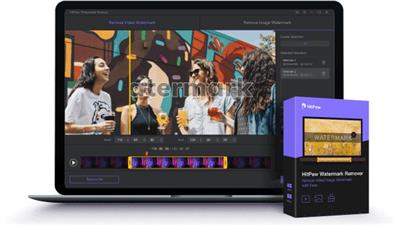
When you need to quickly erase a watermark from one of your images or videos, it is best to resort to specialized software solutions to ensure you obtain high-quality results. HitPaw Watermark Remover AI Powered Image and Video Watermark Remover.

• Al-inbuilt tech to detect & remove watermark automatically
• Remove watermark from video and photo without blur
• Delete watermarks, logos, texts, stamps and any objects
• Remove moving watermark from video with no effort
• Preview in real-time and output in high quality
Remove Watermark from Video with 5 AI-powered Modes
With 5 AI-powered removing mode, HitPaw Video Watermark remover can easily erase static or floating watermarks from a video in seconds.
-Al Model
Automatically detect and remove various types of watermarks from videos with its Al-based technology.
hitpaw Al video watermark remover
-Matte Filling
Copy any part in the video and cover to remove watermark from video without blur.
-Color Filling
Detect the color around the watermark to hide logo in video without blur.
-Smooth Filling
Make a smooth transition in the x and y directions to remove watermark from video by using the edge pixels.
-Gaussian Blur
Smoothly brush or blur to achieve the purpose of deleting video watermark.
Free Select and Remove Watermark from Photo Quickly
Three powerful watermark selection tools to remove any unwanted object from your photo. All types of image files (JPG/JPEG/PNG/BMP/TIFF) are supported.
-Texture Repair
Analyze the color around and utilize the most suitable color to get rid of watermarks on pictures.
-Edge Filling
Take the edge color of the watermark selection box to fill in, then, logo on images is removed.
-Smooth Filling
Remove watermark from photo via moving the color horizontally and vertically at the same time.
Easily Erase Watermark from Video/Image in 3 Easy Steps
01.Import Video / Image
Run this watermark remover and import the video or image you would like to remove the watermark.
02.Select the Watermark
Adjust the selection box to select the watermark you want to delete and choose the remove modes based on your needs.
03.Remove Watermark
Preview the removing effect in real-time and click "Remove and Export" button to get rid of the video/image watermark.
What's new
• official site does not provide any info about changes in this version
System requirements:Support Windows 11 / Windows 10 / Windows 8 / Windows 7 (x64 bit only)

Homepage:
Код:
https://www.hitpaw.com/

Download link

rapidgator.net:
Код:
https://rapidgator.net/file/12c24d9f65618d6a97846140b951d724/kertq.HitPaw.Watermark.Remover.2.1.0.15.Multilingual.rar.html

uploadgig.com:
Код:
https://uploadgig.com/file/download/a6662931D5f6d098/kertq.HitPaw.Watermark.Remover.2.1.0.15.Multilingual.rar

nitroflare.com:
Код:
https://nitroflare.com/view/C68E6D0F434F1E6/kertq.HitPaw.Watermark.Remover.2.1.0.15.Multilingual.rar

1dl.net:
Код:
https://1dl.net/7xq8fe48bc0x/kertq.HitPaw.Watermark.Remover.2.1.0.15.Multilingual.rar.html
 
iDealshare VideoGo 6.6.4.8366 Multilingual


60b9eb70c213590db1e96d5adef48548.jpeg


File size: 18 MB​

Best Video Converter to Fast Convert Video, Audio, Online Media Files! Professional video converter yet easy-to-use! iDealshare VideoGo helps to convert all kinds of video and audio formats with almost no loss of quality. Also features video downloading or editing functions.

- Convert all video or movie files to popular video formats in SD or HD
- Convert video, music video to audio or convert audio to other audio format
- Download and convert online movies, music video, music, audio files
- Convert video to streaming MP4, MOV for upload to video sharing websites
- Convert videos for successfully playing on iPad, iPhone, Android devices, Samsung Galaxy, PSP, BlackBerry, Google Nexus, Microsoft Surface, Xbox and etc
- Edit movie files like trim, crop, merge, split by chapter, rotate, compress video, increase video/audio volume, add subtitle/effect/audio track/watermark and etc
Convert media files to successfully playback anywhere
The powerful movie converter can convert all video or audio formats for successful playback on all kinds of media players or portable devices like Windows Media Player, iTunes, QuickTime, iPad, iPhone, iPod, Apple TV, Android, Samsung Galaxy, HTC, Motorola Droid, LG, Google Nexus, Microsoft Surface, Windows Phone, Archos, Creative Zen, iRiver, Amazon Kindle Fire, BlackBerry, Nokia, Xbox, PlayStation, Xbox, PSP, PS3, Zune, Wii, SanDisk Sansa, Sony Ericsson, Walkman, and etc.
Download and convert online videos
This ideal video converter is an all-in-one video downloader and converter app. iDealshare VideoGo enables you to download videos instantly in HD 720p, HD 1080p, HD 2k, ultra high definition (4K), 3D video and stand definition with a single click from popular video sharing websites, like YouTube, Facebook, Google Videos, Metacafe, eHow, Vimeo, MTV, BBC, Dailymotion, etc. and convert the downloaded videos to almost all popular video or audio formats.
Convert video much faster and preserve 100% original quality
The CUDA based Video Converter will automatically detect your CUDA/ATI-enabled graphics card if your computer is with NVIDIA® CUDA™ and auto enables the NVIDIA GPU Acceleration. By enabling NVIDIA GPU Acceleration, the video conversion speed will be faster than other converters with Zero Quality LOSS! Batch conversion and auto shutdown is available.
Convert Video to Audio or convert Audio to other Audio formats
Besides acting as a powerful video file converter, iDealshare VideoGo is also a video to audio converter which can extract audio from movie files and then convert to audio format in just one click. And it also supports convert between various audio formats.
Whats New
Updates: official site does not provide any info about changes in this version.

Homepage:
Код:
https://www.idealshare.net/

Download link

rapidgator.net:
Код:
https://rapidgator.net/file/002b9f8e3d5508ad99cb8a74587336da/bymrn.iDealshare.VideoGo.6.6.4.8366.Multilingual.rar.html

uploadgig.com:
Код:
https://uploadgig.com/file/download/15770aB767256fe3/bymrn.iDealshare.VideoGo.6.6.4.8366.Multilingual.rar

nitroflare.com:
Код:
https://nitroflare.com/view/2C6264A2220E28C/bymrn.iDealshare.VideoGo.6.6.4.8366.Multilingual.rar

1dl.net:
Код:
https://1dl.net/0tl7fgrifo87/bymrn.iDealshare.VideoGo.6.6.4.8366.Multilingual.rar.html
 
IM-Magic Partition Resizer 6.0.5 Multilingual


6d65bdee5316d04fa23358f1418fa437.jpeg


All Editions | File size: 12 MB​

Extend any partition without data loss? Download IM-Magic Partition Resizer, the free partition magic software to help expand, move, shrink, and merge partitions without destroying the data. It only requires a few clicks from you to command the program move the fences to rearrange the disk partition territory and keep your files untouched.

Extend C System Drive
C drive running out of space? Resizer Free helps to increase the boot volume to save your system from reformatting disk, reinstalling operating system, moving data to other places. Resizing the system partition would be an easy job to perform even for tech naives.
100% Safe - Rollback Tech
With unique roll-back power, this program will never hurt your data nor partition and provides a 100% of safety for the whole repartitioning even when your computer was shut down accidentally during the resizing.
Shrink/Extend Partition
Shrinking/Extending disk volume size without losing data is possible with IM-Magic Partition Resizer Free. You may decrease a large volume which holds too much free space without formatting it. Extend partitions with data untouched.
100% Data&OS Untouched
When your disk partitions are either running out of space or with a lot free space, you may use this freeware to re-arrange the fences for better computer performance. Resizing is 100% safe with Resizer Free on the same disk.
Whats New
Updates: official site does not provide any info about changes in this version.

Homepage:
Код:
http://www.resize-c.com/

Download link

rapidgator.net:
Код:
https://rapidgator.net/file/0f09542f9b89913090e7e63de836f667/pqgyb.IMMagic.Partition.Resizer.6.0.5.Multilingual.rar.html

uploadgig.com:
Код:
https://uploadgig.com/file/download/d327434425631b5c/pqgyb.IMMagic.Partition.Resizer.6.0.5.Multilingual.rar

nitroflare.com:
Код:
https://nitroflare.com/view/340F0676E24BC1E/pqgyb.IMMagic.Partition.Resizer.6.0.5.Multilingual.rar

1dl.net:
Код:
https://1dl.net/gi26yxw3skh2/pqgyb.IMMagic.Partition.Resizer.6.0.5.Multilingual.rar.html
 
Iperius Backup Full 7.7.6 Multilingual


809e388aefe3660fbf5ff0281ef68a34.jpeg


File size: 64 MB​

Iperius Backup is the perfect software to get the advantages of the many cloud storage services offered by well-known providers like Google or Microsoft. With a single application you will be able to easily save your files offsite to Google Drive, Dropbox or Microsoft SkyDrive. This backup task can be configured with a few clicks, and the result of this is the full security of automatic online backups, compressed and protected by an AES 256-bit encryption.

Iperius Backup uses the most advanced Windows drive imaging technology, that allows to copy the whole operating system with a fast and incremental backup (block-level backup). Iperius Backup can create full disk images, allowing to recover a server system in minutes (bare-metal restore). You can also restore individual files, mount the VHD image file, and restore the system to a dissimilar hardware (hardware independent restore).
Iperius Backup is an advanced and affordable tape backup software for Windows Server. Iperius is one of the best tape backup software: extremely easy and quick to setup, reliable, fast, and with flexible recovery features. Iperius Backup supports any tape drive, starting from the common HP DAT 72 USB or SCSI, to AIT, DLT and SDLT, and up to the powerful and high-capacity LTO 5 and LTO 6 devices, that allows to back up several terabytes.
Iperius Backup is an advanced software for FTP backup on any type of server or NAS. Iperius can send backups to a remote server with a few simple configurations, with the secure FTPS protocol and also with zip compression and AES 256 bit encryption. Iperius can perform automated upload of entire websites, limit the transfer bandwidth, make parallel transfers to multiple servers and help system administrators to build a centralized backup strategy for clients.
Iperius Backup can synchronize an unlimited number of files and folders from your computer to external hard drives or to network devices (like NAS servers). You can copy files and folders to an unlimited number of destinations and keep mirror copies deleting those files no more existing in the source folders. This allows to save space on your backup device and to always have a perfectly synchronized backup.
Код:
https://www.iperiusbackup.com/news.aspx

Homepage:
Код:
http://www.iperiusbackup.com

Download link

rapidgator.net:
Код:
https://rapidgator.net/file/e9f964c94cc2d81fb9f073b9650522c1/wrsyu.Iperius.Backup.Full.7.7.6.Multilingual.rar.html

uploadgig.com:
Код:
https://uploadgig.com/file/download/4ee91d78Ba1e611b/wrsyu.Iperius.Backup.Full.7.7.6.Multilingual.rar

nitroflare.com:
Код:
https://nitroflare.com/view/BA4F21476F1A289/wrsyu.Iperius.Backup.Full.7.7.6.Multilingual.rar

1dl.net:
Код:
https://1dl.net/xnmmbfl6xjpn/wrsyu.Iperius.Backup.Full.7.7.6.Multilingual.rar.html
 
iTop Data Recovery Pro 3.4.0.672


a9fd4918a82797e8aea928b1652c39d2.jpeg


File Size: 14.6 MB​

This powerful data recovery tool speeds up the scanning and data recovery process due to iTop unique recovery algorithm. You don't need to wait for a long time to get data back. In Just Minutes, you can retrieve deleted files perfectly as you expected. Besides, Scan options are diverse for different needs. You can quickly find your lost data by Location and File Type.

Recover Any Data from Any Data Loss Situations
Data loss can be caused by many reasons, and damages may differ greatly. You may have encountered a hard drive crash, a hard drive formatting, a computer virus, and malware, or you just accidentally delete your project documents and photos or videos, iTop Data Recovery is powerful enough to handle emergent data loss issues instantly and securely.
iTop Data Recovery enables you to easily perform file recovery without limitations. More than 1000 file formats are supported. Meanwhile, this Windows data recovery software supports recovery on all types of storage media including hard drive, memory card, USB drive, and SSD, etc.
Up to 95% Success Rate
The Windows data recovery tool also provides a totally free visualization preview of the deleted, corrupted, inaccessible and formatted data, including Microsoft Office documents, photos, videos, and audios. Moreover, you get to know the status of each of your files, for example, Excellent, Good or Poor, making sure it is exactly what you are looking for and if the data is recoverable. The feature is remarkably helpful in ensuring a precise and smooth data recovery experience. With years of recovery experience, till now iTop Data Recovery maintains a high level of 95% recovery rate.
Hint
Data recovery success rate depends on several factors. For example, how much new data have you been written? If you didn't perform much operation after the file is deleted, it will be simple to undelete files. Earlier recovery ensures more chances of data recovery.
Whats New
official site does not provide any info about changes in this version.

Homepage:
Код:
https://www.itopvpn.com/data-recovery-software

Download link

rapidgator.net:
Код:
https://rapidgator.net/file/827f26de4caae3e4015f4fcbee8c008d/qbhjn.iTop.Data.Recovery.Pro.3.4.0.672.rar.html

uploadgig.com:
Код:
https://uploadgig.com/file/download/ee1405ed40fd1279/qbhjn.iTop.Data.Recovery.Pro.3.4.0.672.rar

nitroflare.com:
Код:
https://nitroflare.com/view/B228918BDBF0052/qbhjn.iTop.Data.Recovery.Pro.3.4.0.672.rar

1dl.net:
Код:
https://1dl.net/xluhg2n8blb7/qbhjn.iTop.Data.Recovery.Pro.3.4.0.672.rar.html
 
Muziza YouTube Downloader Converter 7.29.0


1496d8d4295a56eac0ffe284557b992d.jpeg


File size: 39.55 MB​

YouTube Downloader Converter is a tool that facilitates an attractive interface and plenty of features to help you download video clips from YouTube, Facebook, Dailymotion, Instagram and other websites.

Features
•Online video downloader
The app can download videos from YouTube, Facebook, Instagram, Dailymotion, and thousands of other video sites.
•HD video downloader
The app can download UHD 8K, 5K, 4K, QHD 2K, HD 1080p and 720p videos from YouTube.
•YouTube to MP3 converter
The app allows you to download only audio stream from YouTube, and save it as MP3. You don't need to download the entire video file.
•Playlist downloader
The app enables you to download entire or part of a playlist with just a few clicks.
•Download accelerator
The app features a multi-thread download acceleration engine that increases your download speeds by up to 500% or even more.
•Download multiple videos at a time
The app supports simultaneous downloads. It allows you to download more than one video at the same time.
•Pause and resume downloads
You can pause and resume your downloads at any time.
•Support drag-and-drop
You may directly drag and drop video link from your browser to the drop box or the app window to start a download. You don't even need to copy and paste video URL.
•Preview video/audio while downloading
While downloading, you can click the 'Preview' button to view incomplete file and make sure the content is you want.
•Video and audio converter
The app can convert your disk video/audio files between MP4, FLV, AVI, WMV, MOV, MP3, AAC, and any other formats for any device.
•Video optimizer
The app automatically optimizes downloaded videos for popular mobile devices, so you can watch downloaded videos smoothly on your iPhone, iPad, Android phone, and other devices.
•Video to MP3 converter
The app allows you to extract audio stream from video and save it as MP3, WAV, AC3, or other audio format.
•Ready-made presets
The app provides ready-made presets for all video and audio formats. You can also customize your own video/audio formats.
•iTunes compatible
Optionally, the app can add downloaded video/music to your iTunes library automatically, so you can easily synchronize your videos and music to your iPhone, iPad, iPod.
•Media Player
The app contains an easy-to-use media player for playing files that Windows Media Player cannot play.
What's new
• official site does not provide any info about changes in this version

Homepage:
Код:
http://www.muziza.com

Download link

rapidgator.net:
Код:
https://rapidgator.net/file/9275230cf72c49e87904bc0397742112/zkfyg.Muziza.YouTube.Downloader.Converter.7.29.0.rar.html

uploadgig.com:
Код:
https://uploadgig.com/file/download/b4b8731df78361a6/zkfyg.Muziza.YouTube.Downloader.Converter.7.29.0.rar

nitroflare.com:
Код:
https://nitroflare.com/view/9E0C0337E85415E/zkfyg.Muziza.YouTube.Downloader.Converter.7.29.0.rar

1dl.net:
Код:
https://1dl.net/h3olabjfhe1g/zkfyg.Muziza.YouTube.Downloader.Converter.7.29.0.rar.html
 
MyLanViewer 6.0.2 Enterprise Portable


f5c13e79e44fdc358ed7659659d75d1d.jpeg


File size: 10 MB​

MyLanViewer is a simple LAN scanner for your home network. It displays your network computers an easy to read, buddy-list style window that provides the machine names, IP addresses, MAC addresses, shared resources and other technical details for each computer. You can also view and access shared folders, terminate user sessions and disable shared resources. Easy to install and use, has friendly and beautiful interface.

MyLanViewer Network/IP Scanner is a powerful Netbios and LAN/Network IP address scanner for Windows, whois and traceroute tool, remote shutdown and Wake On LAN (WOL) manager, wireless network scanner and monitor. This application will help you find all IP addresses, MAC addresses and shared folders of computers on your wired or wireless (Wi-Fi) network. The program scans network and displays your network computers in an easy to read, buddy-list style window that provides the computer name, IP address, MAC address, NIC vendor, OS version, logged users, shared folders and other technical details for each computer. MyLanViewer Network/IP Scanner supports remote shutdown, wake-on-lan, lock workstation, log off, sleep, hibernate, reboot and power off. It is able to monitor IP address and show notifications when the states of some computers change. MyLanViewer Network/IP Scanner can also view and access shared folders, terminate user sessions, disable shared folders, show netstat information and detect rogue DHCP servers. The software can monitor all devices (even hidden) on your subnet, and show notifications when the new devices will be found (for example, to know who is connected to your WiFi router or wireless network). The program easy to install and use, and has a user-friendly and beautiful interface.
Release Notes
official site does not provide any info about changes in this version.

Homepage:
Код:
http://www.mylanviewer.com

Download link

rapidgator.net:
Код:
https://rapidgator.net/file/d1927fc4729dbc354c5f8bb8eae8220c/pdsqp.MyLanViewer.6.0.2.Enterprise.Portable.rar.html

uploadgig.com:
Код:
https://uploadgig.com/file/download/061e7baE19039878/pdsqp.MyLanViewer.6.0.2.Enterprise.Portable.rar

nitroflare.com:
Код:
https://nitroflare.com/view/11F0B1549F2D2DA/pdsqp.MyLanViewer.6.0.2.Enterprise.Portable.rar

1dl.net:
Код:
https://1dl.net/cnc8m0d794kk/pdsqp.MyLanViewer.6.0.2.Enterprise.Portable.rar.html
 
Password Depot 17.0.0 + Corporate Edition Multilingual


cb0175ea2505c11dbc8037be68b3ec65.jpeg


Windows x86/x64 | File size: 77.73 MB / 77.72 MB​

Password Depot is a powerful and very user-friendly password manager which helps to organize all of your passwords - but also, for instance, information from your credit cards or software licenses. The software provides security for your passwords - in three respects: It safely stores your passwords, guarantees you a secure data use and helps you to have secure passwords. However, Password Depot does not only guarantee security: It also stand for convenient use, high customizability, marked flexibility in interaction with other devices and, last but not last, extreme functional versatility. From now on you will need to remember only one single password - the password which you use to open Password Depot. Your passwords are protected from external access to the best possible extent due to double encryption with AES (Rijndael 256).

You can not only save your passwords locally, but also on a USB device, mobile phone, in the network or on an FTP server. With Password Depot Server you can manage password files in the network to use them together in a team.
Password Depot is very easy to use and spares you a lot of work. You can configure Password Depot individually and in this way adapt it precisely to your needs. Password Depot is able to work together with a range of other applications, flexibly and without problems.
Safe Password Storage
* Best possible enryption . In Password Depot, your information is encrypted not merely once but in fact twice, thanks to the algorithm AES or Rijndael 256. In the US, this algorithm is approved for state documents of utmost secrecy!
* Double protection. You can secure your passwords files doubly. To start with, you select a master password that has to be entered in order to be able to open the file. Additionally, you can choose to protect your data by means of a key file that must be uploaded to open the file.
* Protection against brute-force attacks. After every time the master password is entered incorrectly, the program is locked for three seconds. This renders attacks that rely on the sheer testing of possible passwords - so called "brute-force attacks" - virtually impossible..
* Lock function. This function locks your program and thereby denies unauthorized access to your passwords. The locking conditions are determined by you yourself, for instance every time the program has not been used for a certain time.
* Backup copies. Password Depot generates backup copies of your passwords files. The backups may be stored optionally on FTP servers on the Internet (also via SFTP) or on external hard drives. You can individually define the time interval between the backup copies' creation.
Secure Data Use
* Protection from keylogging. All password fields within the program are internally protected against different types of the interception of keystrokes (Key Logging). This disables that your sensible data entries can be spied out.
* Traceless Memory. Dealing with your passwords, Password Depot does not leave any traces in your PC's working memory. Therefore, even a hacker sitting directly at your computer and searching through its memory dumps cannot find any passwords.
* Clipboard protection: Password Depot automatically detects any active clipboard viewers and masks its changes to the keyboard; after performing auto-complete, all sensitive data is automatically cleared from the clipboard.
* Virtual keyboard. The ultimate protection against keylogging. With this tool you can enter your master password or other confidential information without even touching the keyboard. Password Depot does not simulate keystrokes, but uses an internal cache, so that they can neither be intercepted software- nor hardware-based.
* Fake mouse cursors. Typing on the program's virtual keyboard, you can also set the program to show multiple fake mouse cursors instead of your usual single cursor. This additionally renders impossible to discern your keyboard activities.
Verified Passwords
* Uncrackalble passwords. The integrated Password Generator creates virtually uncrackable passwords for you. Thus in future, you will not have to use passwords such as "sweetheart" anymore, a password that may be cracked within minutes.
* Verified password quality. Let Password Depot check your passwords' quality and security! Intelligent algorithms will peruse your passwords and warn you against 'weak' passwords which you can subsequently replace with the help of the Passwords Generator.
* Password policies. You can define basic security requirements that must be met by all passwords which are added or modified. For instance, you can specify the passwords' minimum length and the characters contained therein.
* Security warnings. Password Depot contains a list of warnings which always keep an eye on your passwords' security. For instance, the program warns you in case you use the unsafe FTP protocol and in this case advices you to use SFTP instead.
* Protection against dictionary attacks. An important warning featured in Password Depot is the notification in case you are using unsafe passwords. These are passwords which are frequently used, therefore appear in hacker dictionaries and are easily crackable.
* Warning against password expiry. You can set Password Depot to warn you before your passwords expire, for instance before the expiry date of your credit card. This ensures that your password data always remains up-to-date and valid.
Convenient Access
* User-friendly interface. Password Depot's user interface is similar to that of Windows Explorer. This allows you to effectively navigate through your password lists and to quickly find any password you happen to be searching for.
* Auto-completion. If you wish, Password Depot automatically fills in your password data into websites opened within the common browsers. This function runs via an internal setting on the one hand, and via so called browser add-ons on the other hand.
* Automatic recognition. You can set the program to automatically recognize which password information corresponds to the website you have called up and to then pre-select this password entry for you - as well as, if desired, to finally automatically fill this information into the website.
* Top bar. The program's form can be reduced to a narrow bar whose position may be individually determined: whether freely movable or stuck to the screen edge (Application Desktop Toolbar). In this way, the software is always at your hand without disturbing you.
* Direct opening of websites. URLs belonging to password entries saved in Password Depot may be opened directly from within the program. This spares you the hassle of having to manually copy website addresses and then paste them into your browser.
* Usage via mouse click. Using your password information may be done super easily via simple clicks with your mouse cursor. By means of a single mouse click, you can copy data to the clipboard and can even drag it directly into the target field on the website.
* Hotkeys. Pasword Depot features keyboard shortcuts for often-used commands in Windows ("Hotkeys"). By means of these hotkeys, you can easily turn Password Depot's format into a top bar or call it into the foreground when minimized to the system tray.
* Recycle bin. Password Depot features a recycle bin that stores deleted password data and enables their restoration. In this way, data you may have accidentally deleted, for instance, is yet not lost irrevocably.
Flexible Interplay
* Server module. Password Depot features a separate server model enabling several users to access the same passwords simultaneously. The access to the password files may run either via a local network or via the Internet.
* USB stick. You can copy both your password files and the program Password Depot itself onto a USB stick. In this way, you can carry the files and the software along wherever you go, always having them ready to use.
* Cloud devices. Password Depot supports web services, among them GoogleDrive, Microsoft SkyDrive and Dropbox. In this way, Password Depot enables you to quickly and easily enter the Cloud!
* Password files on the Web. You can optionally deposit your encrypted password files on the Internet. By this means, you can always access your passwords, no matter where you are! To access, you can use the protocols HTTP, HTTPS, FTP or SFTP as required
* TAN support. Password Depot supports the input and management of TAN numbers. In this way, it facilitates the life of all of those users that refer to online banking, securely storing their sensible banking data.
* URL placeholders. Entering URLs into Password Depot, you can replace any number of characters by placeholders, namely an asterisk (*). Using this symbol, you can thus match several URLs to a single password entry instead of having to enter one entry for each URL.
Код:
https://www.password-depot.de/en/news/index.htm
Supported Operating Systems:Windows Vista, 7, 8, 8.1, 10, 11

Homepage:
Код:
https://www.password-depot.de/en/

Download link

rapidgator.net:
Код:
https://rapidgator.net/file/e2e9a31cadc6ada6d7c5601e7f644f70/wgzmi.Password.Depot.17.0.0.Corporate.rar.html
https://rapidgator.net/file/93e2d9e5f74bf54ff02d337135fcf216/wgzmi.Password.Depot.17.0.0.rar.html

uploadgig.com:
Код:
https://uploadgig.com/file/download/0d1fD1f90f4d5B81/wgzmi.Password.Depot.17.0.0.Corporate.rar
https://uploadgig.com/file/download/40b3D689d1f44c86/wgzmi.Password.Depot.17.0.0.rar

nitroflare.com:
Код:
https://nitroflare.com/view/646E681E9DBE771/wgzmi.Password.Depot.17.0.0.Corporate.rar
https://nitroflare.com/view/B242EFCF83BDA53/wgzmi.Password.Depot.17.0.0.rar

1dl.net:
Код:
https://1dl.net/25glatxevz5k/wgzmi.Password.Depot.17.0.0.Corporate.rar.html
https://1dl.net/p0bluobkq004/wgzmi.Password.Depot.17.0.0.rar.html
 
Pattaizer 4.1.0.3 Multilingual


a1d66ded4450b3e4b7085d8797eacbbe.jpeg


File size: 70.9 MB​

Pattaizer creates patterns. It features 22 different pattern approaches which can be tuned and varied by the user. It includes brick and Ministeck® patterns can be made (mosaics) and lissajous patterns can be created with Harmonograph and Pantograph geometries. Each pattern has several control parameters to create that unique effect that you are looking for. You could try to learn how to use Photoshop (days?), but Pattaizer does it for you. In seconds.

Pattaizer is a stand-alone application that works under windows or under a windows environment in OS-X (mac). After installation you can immediately create a pattern. In the first period of use the application is unrestricted and fully functional. When these grace days have expired a few professional features will be limited or locked.
AMAZING PATTERNS
Pattaizer is a software painting tool. It does not replace the skill of many people to draw, paintbrush, sketch and paint. It is a tool for people who like to do it different, and create their own colourful painting. When your personal piece of art has amazed your family and friends when they ask 'is it real?' then you are satisfied. That's all it takes: amaze and be inspired by the possibilities of this simple application.
AUTOMATED AND MANUAL
Pattaizer offers both fully automated pattern creation and manual creation. Try automation first, and then switch to manual pattern creation, like to spirograph or free drawing. You don't need to be educated in art. You need a good tool that does it for you. Is it real? We believe it does: you made your own piece of art with love and intensity. That's all it takes to be a proud owner of a true painting.
PATTERN ART
When the right combination of source picture colours, pattern type, settings and a bit of luck your piece of art would match those in museums. Why not. You can either spend hours of creativity with a brush and paint, or use the perfect tool to amaze people. A lot of professional artists would turn away from such a fake approach. But you know better. It looks great and you made it yourself.
MECHANICAL ART
There are two tools available to simulate mechanical pattern generators: the harmonograph and the pantograph. Both are cabable to create stunning effects. You can make your own harmonograph from wood and steel (great fun) but you can also use Pattaizer to test the possibilities. And then build one yourself after all. The pantograph is also based on a mechanical contraption, translated into mathematical formulae. Seems dull, but it amazes every time you create a new pattern.
Код:
https://www.apphelmond.com/Pattaizer/index.htm

Homepage:
Код:
https://www.apphelmond.com/

Download link

rapidgator.net:
Код:
https://rapidgator.net/file/92ebc518c9e267d0ff8502c4d3ea063a/hrofv.Pattaizer.4.1.0.3.Multilingual.rar.html

uploadgig.com:
Код:
https://uploadgig.com/file/download/8814cc1Be34e37B3/hrofv.Pattaizer.4.1.0.3.Multilingual.rar

nitroflare.com:
Код:
https://nitroflare.com/view/8DA9F2E52A26297/hrofv.Pattaizer.4.1.0.3.Multilingual.rar

1dl.net:
Код:
https://1dl.net/zcg7sm4nevsv/hrofv.Pattaizer.4.1.0.3.Multilingual.rar.html
 
PDFify 3.7.1 macOS


bce623fecb42c2fb12b486e46ca5a35f.jpeg


File size: 25 MB​

PDFify creates searchable PDF for more than 100 languages! Reduce file size at the same time! Not only existing PDF can be processed, but also images, scans, screenshots, emails, web pages and more. Just drag your files to PDFify and the rest happens automatically.

In addition to Apple's integrated text recognition, the proven alternative "Tesseract" is also supported. Find your personal favorite. Finder Quick Actions allow you to quickly edit multiple files in one go.
Powerful functions make it easy to add new pages to the PDF
• Take screenshots directly from the app.
• Use your iPhone camera as a scanner.
• The app offers its own great scanner dialog.
• Choose PDFify as the destination for your ScanSnap scans.
• Paste pages directly from the clipboard.
Other useful features make PDF handling better
• Have the computer read content aloud.
• Reduce the size of the PDF file.
• Copy all text content with one click.
• Share, save or print the finished PDF.
And if you make a mistake, UNDO has you covered.
Release Notes
Updates: official site does not provide any info about changes in this version

Supported Operation Systems
macOS 10.13.2 or later

Homepage:
Код:
https://pdfify.app/en/

Download link

rapidgator.net:
Код:
https://rapidgator.net/file/99ce7be51a2ff78844d1c924a35da64e/ziavx.PDFify.3.7.1.macOS.dmg.html

uploadgig.com:
Код:
https://uploadgig.com/file/download/62cb5dFfca3D492e/ziavx.PDFify.3.7.1.macOS.dmg

nitroflare.com:
Код:
https://nitroflare.com/view/4B831493FDB52E9/ziavx.PDFify.3.7.1.macOS.dmg

1dl.net:
Код:
https://1dl.net/fqdqczit2845/ziavx.PDFify.3.7.1.macOS.dmg.html
 
Privacy Eraser Pro 5.30.0.4377 Multilingual


80c51156018624bc880b4d9c7bd71851.jpeg


File size: 10 MB​

Privacy Eraser is an easy to use solution for protecting your privacy by deleting your browsing history and other computer activities. All main popular web browsers are supported, including Internet Explorer, Microsoft Edge, Firefox, Google Chrome, Safari and Opera.

With literally one click, Privacy Eraser will erase all digital footprints - web browser cache, cookies, browsing history, address bar history, typed urls, autocomplete form history, saved passwords, index.dat files, Windows' run history, search history, open/save history, recent documents, temporary files, recycle bin, clipboard, dns cache, log files, error reporting and more.
Privacy Eraser also supports plugins to further extend the software's cleaning features. Meaning you can also delete whatever tracks are left behind by other applications with your own plugins. Privacy Eraser embedded more than 250 free plugins, supporting many popular programs such as ACDSee, Adobe Reader, Microsoft Office, WinZip, WinRAR, Windows Media Player, VLC Player, BitTorrent, Google Toolbar and many others.
Privacy Eraser works with Windows 10/8.x/7/Vista/2012/2008 (32/64-bit), and also supports Windows FAT16/FAT32/exFAT/NTFS file systems. The software implements and exceeds the US Department of Defense and NSA clearing and sanitizing standards, giving you the confidence that once erased, your file data is gone forever and can never be recovered.
Major Features
Internet Explorer (IE), Microsoft Edge, Firefox, Google Chrome, Safari and Opera
Cleans internet cache, browsing history, cookies, typed urls, download history, autocomplete & autofill form history, saved password and much more.
Windows
Better computer security: cleans run history, search history, open & save history, recent documents, temporary files, recycle bin, clipboard, taskbar jump lists, dns cache, log files, memory dumps, error reporting and more.
Third party applications
More than 250 free, pre-configured plugins to clean the traces of many popular applications. You can also extend cleaning features by making your own app plugins - allowing any application's traces to be deleted.
Security level
Supports Simple zero-fill (1 pass), US DoD 5220.22-M (3 passes), US DoD 5220.22-M (ECE) (7 passes), Peter Gutmann (35 passes) and custom wipe methods.
File shredder
Permanently erases specific files and folders from your PC - beyond any hope of recovery.
Drive wiper
Securely wipes spare and hidden areas on your drives. All free clusters on the drives, including the contents of deleted files and folders, will be wiped like a new drive.
Registry cleaner
Removes obsolete and invalid registry entries for non-existing applications, fixes corrupted registry entries, optimizes your PC's performance and speeds up Windows startup.
Real-time monitoring
You can set Privacy Eraser to run automatically every time you close your browser, or you can set it to monitor your Windows system in the background and detect when to clean.
And much more...
Код:
https://www.cybertronsoft.com/products/privacy-eraser/whats-new.php

Homepage:
Код:
https://www.cybertronsoft.com/

Download link

rapidgator.net:
Код:
https://rapidgator.net/file/d2c197edcdacdc515b6b552734696709/ddgbu.Privacy.Eraser.Pro.5.30.0.4377.Multilingual.rar.html

uploadgig.com:
Код:
https://uploadgig.com/file/download/6fc559440905cadB/ddgbu.Privacy.Eraser.Pro.5.30.0.4377.Multilingual.rar

nitroflare.com:
Код:
https://nitroflare.com/view/D24E28B5E5232D8/ddgbu.Privacy.Eraser.Pro.5.30.0.4377.Multilingual.rar

1dl.net:
Код:
https://1dl.net/ebazq4dkn61w/ddgbu.Privacy.Eraser.Pro.5.30.0.4377.Multilingual.rar.html
 
Robin YouTube Video Downloader Pro 5.39.0


00f56c87db6f9a57118134f98278c807.jpeg


File size: 47.52 MB​

YouTube Video Downloader is a small Windows app for downloading and converting videos from YouTube, Facebook, Dailymotion, and thousands of other video sharing sites. It accelerates your download by up to 5 times.


Features

Download video from YouTube and thousands of other video sites
YouTube Video Downloader can download videos from YouTube, Facebook, Dailymotion, Vimeo, Vine, Metacafe, and thousands of other video sites.
Accelerate download by up to 5 times
YouTube Video Downloader features an advanced download acceleration engine that lets you download video up to 500% faster than normal speed.
Download UHD 4K, QHD 2K, FHD 1080p, HD 720p, and 3D video from YouTube
YouTube Video Downloader can download 4K Ultra HD, 2K Quad HD, 1080p Full HD, 720p HD, and 3D video from YouTube if it is available.
Download only audio stream from YouTube
YouTube Video Downloader allows you to download only audio stream from YouTube, without downloading the entire video file.
Convert downloaded video to any format
YouTube Video Downloader can automatically convert downloaded video to the format that you specify. It supports MP4, FLV, WMV, MOV, ASF, AVI, DV, M4V, MKV, MPG, OGV, SWF, TS, VOB, WEBM, DVD, VCD, SVCD, and many other formats.
Optimize downloaded video for any device
YouTube Video Downloader automatically converts and optimizes downloaded video for your mobile/desktop device, so you can watch it smoothly on your iPhone, iPad, iPod, Android phone, Android tablet, Xbox, PSP, PS4, PS3, Samsung Galaxy, or other device.
Extract audio stream from video
YouTube Video Downloader allows you to extract audio stream from video, and save it as MP3, WAV, WMA, AC3, AAC, OGG, M4A, FLAC, MP2, or any other audio format.
Ready-made presets
YouTube Video Downloader provides ready-made presets for all popular video and audio formats. You can also custom output video/audio format settings.
iTunes compatible
Optionally, YouTube Video Downloader can automatically add downloaded video/music to your iTunes library, so you can easily synchronize your videos and music to your iPhone, iPad, iPod, etc.
Integrate with Internet Explorer and Firefox
YouTube Video Downloader adds download button and menu commands to the toolbar and the context menu of your browser, so you can download and convert any video with just one click.
Support drag-and-drop
You may directly drag and drop video link/URL from your browser to the main window of YouTube Video Downloader to start download, you don't even need to copy and paste video URL manually.
What's new
• official site does not provide any info about changes in this version

Homepage:
Код:
http://www.robinsoftware.com

Download link

rapidgator.net:
Код:
https://rapidgator.net/file/3c7669033deb6fdca1cce3682b41de36/yhhoe.Robin.YouTube.Video.Downloader.Pro.5.39.0.rar.html

uploadgig.com:
Код:
https://uploadgig.com/file/download/f298c7a21b1c0860/yhhoe.Robin.YouTube.Video.Downloader.Pro.5.39.0.rar

nitroflare.com:
Код:
https://nitroflare.com/view/6B38F5193C81162/yhhoe.Robin.YouTube.Video.Downloader.Pro.5.39.0.rar

1dl.net:
Код:
https://1dl.net/3tdkq4tsbbc7/yhhoe.Robin.YouTube.Video.Downloader.Pro.5.39.0.rar.html
 
Sante DICOM Editor 8.1.10


15cab4ab4e8b2a18aa17d309134a7c22.jpeg


File size: 76 MB​

Sante DICOM Editor is a professional DICOM editor, viewer, anonymizer, converter, dicomizer, PACS client, mini PACS server, patient CD/DVD burner (with viewer) and much more.

The unique viewer
Sante DICOM Editor is not a "yet another DICOM viewer" constructed with freely available libraries such as dcmtk, itk and vtk, like hundreds of other DICOM viewers which differ from each other only in the appearance, menus, panels and dialog boxes. It is a unique program with unique capabilities, designed and developed in-house by us, from the ground up, with the most advanced programming tools and it is the result of research and development on DICOM imaging of the last two decades.
The powerful editor
Sante DICOM Editor is the industry-leading post processing application for DICOM file editing, conversion and handling, it is used by almost all the large corporations and medical equipment manufacturers, and it is the DICOM editor of choice of the greatest universities and hospitals of the world. Among others, it lets the user to edit and modify DICOM files, to add and remove attributes, and even edit and modify sequence attributes.
Features and benefits
Powerful DICOM workstation, viewer and editor
Perpetual license that never expires.
Free updates and free technical support for product's lifetime
PACS client that supports all the DICOM network services (C-FIND SCU/SCP, C-MOVE SCU/SCP, C-STORE SCU/SCP, C-GET SCU/SCP, C-ECHO SCU/SCP)
It can be used as a mini PACS server as well
(the number of stored patients/studies depends on disk size only)
Command line switches for integration with PACS servers (learn more.)
Support of all charsets (latin, chinese, japanese, korean, cyrillic, arabic, greek, turkish, etc.)
Compatible with all modalities (CT, MR, NM, US, XA, MG, CR etc.), all manufacturers and all DICOM 3.0 and NEMA 2 file types.
Editing and modification of DICOM files (even of sequence attributes)
Simultaneous editing of all DICOM files of a series/study
DICOMDIR editor
Dual monitor support (new in version 6, learn more.)
Structured Report support (new in version 6.3)
Presentation State file editor
Structured Report file editor
Printing to DICOM printers and Windows printers
DICOM to DICOM conversion, DICOM file modification (transfer syntax, image width and height, color depth, frame insertion, removal, sorting, etc.)
Built-in Anonymizer, burned-in annotations removal (Patient data de-identification, suitable as well for avoiding issues with the GDPR regulation 2016/679 of EU)
Built-in Dicomizer: DICOM file creation from video files (avi, wmv) and plain image formats (jpeg, jpeg2000, tiff, bmp, and png)
Ultrasound region calibration module support (calibrated Ultrasound measurements)
Merging of DICOM files
Creation of DICOM CD/DVD disks with viewer
Support of Epson and Primera CD/DVD Disk Publishers (robots)
Contrast Agent Probe
Код:
https://www.santesoft.com/win/sante-dicom-editor/whats_new.html

Homepage:
Код:
https://www.santesoft.com/

Download link

rapidgator.net:
Код:
https://rapidgator.net/file/a3f0491a3ac92cd5635da86eb3796e23/zxvue.Sante.DICOM.Editor.8.1.10.rar.html

uploadgig.com:
Код:
https://uploadgig.com/file/download/a6074dc56712Fd0b/zxvue.Sante.DICOM.Editor.8.1.10.rar

nitroflare.com:
Код:
https://nitroflare.com/view/F68695BA0BD7791/zxvue.Sante.DICOM.Editor.8.1.10.rar

1dl.net:
Код:
https://1dl.net/fa9ruyton5q8/zxvue.Sante.DICOM.Editor.8.1.10.rar.html
 
Sante DICOM Viewer Pro 12.1.10


c9a949a0d523bf1ce47d386e62c2ac85.jpeg


File size: 75 MB​

Sante DICOM Viewer Pro is a professional DICOM viewer, anonymizer, converter, PACS client, mini PACS server, patient CD/DVD burner (with viewer) and much more.

The unique viewer
Sante DICOM Viewer Pro is not a "yet another DICOM viewer" constructed with freely available libraries such as dcmtk, itk and vtk, like hundreds of other DICOM viewers which differ from each other only in the appearance, menus, panels and dialog boxes. It is a unique program with unique capabilities, designed and developed in-house by us, from the ground up, with the most advanced programming tools and it is the result of research and development on DICOM imaging of the last two decades. Sante DICOM Viewer Pro has been developed since 1999 and it is one of the most popular professional DICOM viewers worldwide.
Features and benefits
Powerful DICOM workstation and viewer
Perpetual license that never expires.
Free updates and free technical support for product's lifetime
PACS client that supports all the DICOM network services (C-FIND SCU/SCP, C-MOVE SCU/SCP, C-STORE SCU/SCP, C-GET SCU/SCP, C-ECHO SCU/SCP)
It can be used as a mini PACS server as well
(the number of stored patients/studies depends on disk size only)
Command line switches for integration with PACS servers (learn more...)
Easy to use with native Windows "look and feel"
Support of all charsets (latin, chinese, japanese, korean, cyrillic, arabic, greek, turkish, etc.)
On-line, case sensitive help
Compatible with all modalities (CT, MR, NM, US, XA, MG, CR etc.), all manufacturers and all DICOM 3.0 and NEMA 2 file types.
Supports also jpeg, jpeg2000, tiff, png, and bitmap image formats
Dual monitor support (new in version 10, learn more...)
Structured Report support (new in version 10.3)
Built-in DICOM File Editor
Built-in DICOM Multi-File Editor
Full support of DICOMDIRs (view, open, create, edit, image/series selection for viewing or/and for transferring in another folder)
Built-in Anonymizer (Patient data de-identification, suitable as well for avoiding issues with the GDPR regulation 2016/679 of EU)
Scout image/localizer support
Support for Overlays
Study comparison side-by-side
Printing to DICOM printers and Windows printers
Creation of DICOM CD/DVD disks with viewer
Support of Epson and Primera CD/DVD Disk Publishers (robots)
Advanced ROI selection tools (free hand, magic wand, eye-dropper, rectangle, circle, ellipse, polygon)
Statistical analysis of ROIs (pixel count, min value, max value, mean value, standard deviation, area, volume)
Synchronized frame view between the series
Synchronized level-window between the series
Synchronized field of view between the series
Measurement tools (distance, angle, cobb angle, polyline, area, volume)
Ultrasound region calibration module support (calibrated Ultrasound measurements)
Annotation texts and arrows
Interpolated (smooth) zoom and advanced zoom tools (e.g. zoom dynamic, zoom window)
Comparison of DICOM files tag by tag
Built-in Hexadecimal File Editor
Built-in Hexadecimal DICOM Viewer
File searching with criteria (patient name, study ID etc.), within hard disk's or CD's folders
File searching by tag's existence and/or tag's value, within hard disk's or CD's folders
External DICOM dictionary support
Image orientation (flip, rotate)
Image and canvas resizing
Image processing filters (blur, sharpening, convolution masks, min mask, max mask, median mask etc.)
Subtraction filter for DSA
Video (wmv) creation with or without annotations
Batch convert to image formats (JPEG, TIFF, BMP, PNG, etc.)
Batch anonymizing, with ability of burned-in annotations removal
Export DICOM Headers to text files
Orthogonal Multi-planar Reconstruction (MPR)
Easy to use with native Windows "look and feel"
Windows 11/10/8.1/8/7/ and Vista compatible
Код:
https://www.santesoft.com/win/sante-dicom-viewer-pro/whats_new.html

Homepage:
Код:
https://www.santesoft.com/

Download link

rapidgator.net:
Код:
https://rapidgator.net/file/c26e060d54baa8f5310cb054a1a8b4d1/qlhsk.Sante.DICOM.Viewer.Pro.12.1.10.rar.html

uploadgig.com:
Код:
https://uploadgig.com/file/download/f24fb13b3a9F296F/qlhsk.Sante.DICOM.Viewer.Pro.12.1.10.rar

nitroflare.com:
Код:
https://nitroflare.com/view/0E0AC4B014ABFA9/qlhsk.Sante.DICOM.Viewer.Pro.12.1.10.rar

1dl.net:
Код:
https://1dl.net/w10kqmjxonpc/qlhsk.Sante.DICOM.Viewer.Pro.12.1.10.rar.html
 
Softwarenetz Rechnung 10.15 Multilingual


df3481cda17a8e53a04ff9a480175b3b.jpeg


File size: 19 MB​

For those self-employed persons, freelancers and small companies, who are in need of a simple and userfriendly program to create invoices.

PDF-invoices and PDF-reminders per e-mail.
PayPal-button on your PDF-invoice for payments.
Integrated designer for writing paper
Create invoice with or without VAT (also suitable for small companies).
Graphical statistics will inform you at any time about your turnover and details.
Photo-invoices: print invoices with the photos of your articles.
Create invoices fast and simple
Do you still create your invoices with Excel or Winword? Or don't you use any kind of program to create your invoices?
With the program Invoice 5 for Windows you can save yourself a lot of work. The program is easy to use and therefore suitable for beginners.
Adjust the invoice to your company
Create your own writing paper with your log and adjust the invoice layout with just a few clicks to your company wishes.
Select your colors, fonts and the layout of your invoice.
Customermanagement included
The invoice program contains a complete address / customer database. You can see at a glance all invoices, payments and reminders of a specific customer. A memofield gives you the opportunity to enter specific customer information. The import of existing customers from a csv-file is also included.
Article- and warehouse management
Your articles are saved into an articlemanager including warehouse and minimum stock. In case you have your articles available as a csv-file, you can import your articles easy and fast into the program. You can assign a photo to every article which you can print onto your invoice if you wish.
Writing paper
You can print your invoices onto your own writing paper. Create your writing paper with the integrated designer easy and fast. You have 8 different writing papers at your disposal. Select your fonts and colors and add as many graphical files (e.g. your logo) as you like.
Automatic assignment of payments
With our additional program Softwarenetz MyMoney you can assign the payements to the invoices automatically and book the invoices as 'paid'. The payments are being recognised by amount and/or invoice number.
Journal
The clear journal displays all invoices, credit notes, offers and order in the specified period. Optional you can display all net amounts per VAT-%. The journal can be printed as CSV-file which you can send to your accountant.
Whats New
Updates: official site does not provide any info about changes in this version.

Homepage:
Код:
http://softwarenetz.de/
Download link

rapidgator.net:
Код:
https://rapidgator.net/file/94ded9608caa34e9da3a733f0567d559/hqhmx.Softwarenetz.Rechnung.10.15.Multilingual.rar.html

uploadgig.com:
Код:
https://uploadgig.com/file/download/12d235597E953256/hqhmx.Softwarenetz.Rechnung.10.15.Multilingual.rar

nitroflare.com:
Код:
https://nitroflare.com/view/ED52C3D00F0FFEC/hqhmx.Softwarenetz.Rechnung.10.15.Multilingual.rar

1dl.net:
Код:
https://1dl.net/uyzyvhe00i5a/hqhmx.Softwarenetz.Rechnung.10.15.Multilingual.rar.html
 
Text Workflow 1.4.1 macOS


dc9560be0ad74d15c8a5e5abf6f2ae22.jpeg


File size: 8 MB​

A powerful and easy to use tool that will help you transform your text. Text Workflow removes the need to perform repetitive tasks manually on your text.

Combine transformation actions to create powerful automations for your text. Save your transformation workflows to use them any time you want.
Available text transformation actions
• Add prefix
• Add suffix
• Replace text
• Sort lines
- alphabetically
- reverse
- shuffle
- by length
• Trim Lines
• Add line number
• Break lines
- after every word
- after every sentence
- after text
- before text
• Convert Case
- uppercase
- lowercase
- title case
- camel case
- pascal case
• Delete Characters
- selected characters
- non-alphanumeric
- numeric characters
- non numeric
- tabs
- spaces
- characters after position
- characters before position
- last characters
- emojis
- characters after text
- characters before text
• Insert Text
- at first line
- at last line
- every line (position)
- before every word
- after every word
- before text
- after text
- after every character
• Delete Lines
- containing text
- starting with text
- not containing text
- not starting with text
• Remove line breaks
• Remove multiple spaces
• Remove duplicates lines
• Remove duplicates words
• Remove empty lines
• Delete/Filter words
- containing text
- starting with text
- not containing text
- not starting with text
• Spell out lines
• Get Statistics
- count characters
- count words
- count lines
• Encode/Decode
- Base64
- URL
• Encrypt/Decrypt Text with password
• Beautify JSON
• Beautify XML
You can combine all these actions to create your custom transformation workflows!
Export your workflows to file and share them easily with other users!
Release Notes
Код:
https://geo.itunes.apple.com/app/id1600520682

Supported Operation Systems
macOS 12.0 or later

Homepage:
Код:
https://geo.itunes.apple.com/app/id1600520682

Download link

rapidgator.net:
Код:
https://rapidgator.net/file/9282afd6c4543cc2d4c9b23cc9c3330f/elfxt.Text.Workflow.1.4.1.macOS.dmg.html

uploadgig.com:
Код:
https://uploadgig.com/file/download/8923Ac04894009E2/elfxt.Text.Workflow.1.4.1.macOS.dmg

nitroflare.com:
Код:
https://nitroflare.com/view/32FF36A1EEABCC1/elfxt.Text.Workflow.1.4.1.macOS.dmg

1dl.net:
Код:
https://1dl.net/at9irlbxfqso/elfxt.Text.Workflow.1.4.1.macOS.dmg.html
 
Назад
Сверху