• Форум работает в архивном режиме www.old.nado.in

All mitsumi'1s Applications !! (updated daily)

  • Автор темы Автор темы mitsumi1
  • Дата начала Дата начала
PilotEdit 17.0.0 Multilingual

d61eececb3b49cc1716c3d0bd7cfb36f.jpeg


Windows x86/x64 | File size: 69.89 MB​

PilotEdit is a handy and reliable file editor designed to help users to execute scripts, extract strings and edit large files. PilotEdit is a file editor that will help you search and replace multi line text, edit FTP files or even download and upload FTP files and directories. With PilotEdit file editing just became easier. PilotEdit is an advanced text and hex editor that supports opening of files larger than 4GB. It offers customizable syntax and keyword highlighting, advanced search and replace operations, automatic text encoding, 256-bit AES encryption/decryption, and a built-in FTP client lets you open, edit and upload files directly to/from an FTP server.

Simple user interface
All the program's functions are displayed using a single window. The app's workspace is divided in three smaller windows. The first provides access to the files and folders stored in your computer. The second lets you view and edit the text, while the third is an output window where you can see the program's messages for different actions.
Edit your text
The inserted text can be viewed in a column mode, word wrapped or have the HEX values displayed for the it. The utility can remove tabs and spaces automatically. You can switch the text to upper or lower case letters and increase or decrease text indentation. The app can insert the system date and time into the document. Moreover, words can be browsed, selected or removed using the "Edit" tab.
Different encoding modes
You can change the encoding to ANSI or UTF and set the output to work on different systems like DOS, UNIX or MAC. The tool can apply different predefined scripts which can change the date format and remove empty lines or HTML tags. PilotEdit can sort, find and remove duplicate lines or be used to extract strings from the text and copy it to the Clipboard.
FTP capability
The utility can search and replace in multiple directories and files the custom item, useful in case you have a big text file with a lot of lines. It can open an encrypted FTP file or be used in the decryption process for your files. The program can store your FTP login details and connect to your FTP server.
Conclusion
Overall, PilotEdit is a handy utility for users who want to edit their documents and then upload them to their FTP server. The program does not burden system resources and did not display any errors during tests.
Here are some key features of "PilotEdit"
-The file size supported by PilotEdit is unlimited.
-PilotEdit only uses a little memory even you open a big file.
-ANSI, UTF-8, UTF-16 and UTF-16 big endian files are fully supported by PilotEdit. You may also change a file's encoding with PilotEdit easily.
-DOS, UNIX file support. When you copy/paste text, PilotEdit will adjust text encoding automatically.
-Self-defined file types and key words high-lightening.
-The user interface of HEX mode is as friendly as text mode.
-Column mode.
-Endless undo/redo. You may undo/redo your operations even after you switch between text mode and HEX mode.
-Word wrap enable you to view long lines within one page.
-PilotEdit provides a friendly interface for editing FTP files. You can also download/upload FTP files and directories with PilotEdit.
-Searching and replacing multi-line text has become so easy with PilotEdit.
-You may compare two files or two directories with PilotEdit.
-Self-defined string table enable you to add a pre-defined text by just one click.
-Regular expression has made search and replacement much more powerful.
-You may define some operations in a script file and execute this script file so that you don't need to repeat your work day after day.
-Find/remove duplicated lines
-String collection
-Find/replace in multiple directories
-Sort
Код:
https://www.pilotedit.com/

Homepage:
Код:
http://www.pilotedit.com/

Download link

rapidgator.net:
Код:
https://rapidgator.net/file/c3424ffc9afbc4827dd83090de984c07/qobit.PilotEdit.17.0.0.Multilingual.rar.html
uploadgig.com:
Код:
https://uploadgig.com/file/download/Deb68a90729c201F/qobit.PilotEdit.17.0.0.Multilingual.rar

1dl.net:
Код:
https://1dl.net/54q7c1nf9p7f/qobit.PilotEdit.17.0.0.Multilingual.rar.html
 
QuickImageComment 4.51


fec827c35a275c6a2f2ae0ceb9f2b802.jpeg


File Size : 33.4 Mb​

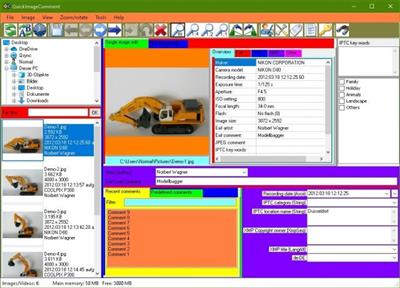
QuickImageComment displays EXIF, IPTC, and XMP properties of digital images (e.g. JPEG and TIFF) and allows to edit them. Especially editing of user comment and artist (author) is supported by using the last entered or predefined values. These attributes are read from the EXIF, IPTC, and XMP properties of the image and are stored there. Metadata (XMP) in video files are displayed.

Overview of features
Display of all EXIF, IPTC and XMP properties of images, as well as some other file properties such as modification date.
Display of metadata (XMP) of video files as well as (depending on the Windows version and, if necessary, installed components) display a frame of the video.
Images or videos can be searched via their properties or recording location on map.
In addition to the full lists of EXIF, IPTC and XMP properties a list of properties is displayed, which is configurable.
In addition to user comment and artist further EXIF, IPTC and XMP properties can be changed. The list of modifiable properties can be configured.
Data templates can be defined to set several properties in one step.
Via placeholder it is possible to copy values of properties in others.
Changes can be carried out simultaneously for two or more files.
EXIF, IPTC and XMP properties can be deleted, thereby exceptions can be defined. Single properties can be deleted selectively.
Files can be renamed using Exif, IPTC and XMP properties.
The EXIF, IPTC and XMP properties contained in the files can be compared.
A special mask is used to synchronize the recording time of a set of images taken with different cameras. Images are grouped by properties (mostly camera model). For each group, a shift of the recording time can be entered. Then the images are immediately sorted in order to check whether the images are then in the correct timely order.
Selected image properties of all images/videos in a folder (including any subfolders) can be exported to a text file.
All image properties of selected images/videos can be exported to text files (one file per image).
Display of image details with graphical and numerical representation of brightness and RGB values.
Display recording location in a map using the GPS coordinates; change of coordinates by selecting a position on the map.
Код:
http://www.quickimagecomment.de/index.php/en/change-history

Homepage:
Код:
http://www.quickimagecomment.de/index.php/en/

Download link

rapidgator.net:
Код:
https://rapidgator.net/file/33139e270078bb5ed82fdecde1911daa/izfur.QuickImageComment.4.51.rar.html

uploadgig.com:
Код:
https://uploadgig.com/file/download/E8Cec6db0C72e5e3/izfur.QuickImageComment.4.51.rar

1dl.net:
Код:
https://1dl.net/qv1fedk3q7d6/izfur.QuickImageComment.4.51.rar.html
 
RawTherapee 5.9 (x64) Multilingual


403849b8f56b76d7dfb0e22758d40f3e.jpeg


File Size : 33 Mb​

RawTherapee is a powerful graphics editor with many features and options for photo processing, which supports, among other things, the RAW-format digital cameras. The program has a fairly rich image editing tool that makes it one of the best for professional photo processing, adequately competing with Lightroom application. Is there color correction, noise reduction, rotation, exposure control, the change of light and shadow, tone setting, vignetting, processing EXIF-data capture, crop, white balance, and much more. If you want to edit a large number of photos of a batch mode is provided.

Features
- High Image Quality
* 96 bits (floating point) processing engine
* Non destructive editing
* Get the most details and least artifacts from your raw photos thanks to modern and traditional demosaicing algorithms: AMaZE, DCB, fast, AHD, EAHD, HPHD, IGV, LMMSE & VNG4.
* Advanced color handling from white balance to HSV (Hue-Saturation-Value) curves and color management.
* Powerful CIE Color Appearance Model 2002 (CIECAM02) module
* Enhanced exposure and tonality tools: tone and Lab curves, highlights and shadows tools, tone mapping (HDR-like effect), etc.
* Multiple denoising methods: luminance, chrominance (both rewritten in 2012), impulse (for salt and pepper noise) noise reduction.
* Several tools to enhance details: unsharp mask, RL deconvolution, contrast by detail levels.
- Efficiency
* Multi-threaded algorithms for high performance (RawTherapee can utilize modern processor features, like SSE).
* Quick thumbnails load lightning fast and are replaced later with live thumbnails.
* Batch processing: convert all the developed images at once without loading the processor while you work.
* Copy/paste editing parameters from one file to many other. Partially copying and/or pasting is also possible.
* Basic tools immediately at your hands.
* Parallel editing of multiple images in separate editor tabs, and/or all at once from the file browser.
* An optional secondary display can be used.
- Versatility
* Wide variety of supported cameras: almost all DSLRs and even some medium format bodies are supported.
* Can load DSLR's raw file, as well as standard Jpeg, Png (8/16 bits), and Tiff files, (8/16 bits + 32 bits 'logluv' format) ; can write Jpeg, Png (8/16 bits) or Tiff files (8/16 bits)
* Advanced control over the algorithms with many fine-tuning parameters and curves.
* Can send to Gimp or the editing tool of your choice in one click (16 bits Tiff file).
* Command line usage besides the normal graphical interface.
* Various layouts: multiple tabs, single tab with filmstrip, vertical tab with filmstrip, dual monitor.
- Freedom for Free
* RawTherapee is free and open source software, meaning you can use it free of charge, wherever you like on whatever hardware you like, as long as you abide by the copyleft GPLv3 license. Download the source code, modify it, feel free to do what comes to mind. We believe in open software.
* It is cross-platform: Linux, Mac, or Windows, be it 3
Код:
http://rawtherapee.com/downloads/5.9/

Homepage:
Код:
http://rawtherapee.com/

Download link

rapidgator.net:
Код:
https://rapidgator.net/file/269cf3c2c034033cc01d2628567ba86c/nnylo.RawTherapee.5.9.x64.Multilingual.zip.html

uploadgig.com:
Код:
https://uploadgig.com/file/download/d7854cc0727391Aa/nnylo.RawTherapee.5.9.x64.Multilingual.zip

1dl.net:
Код:
https://1dl.net/u45e4r2kvk4f/nnylo.RawTherapee.5.9.x64.Multilingual.zip.html
 
Roxio Easy CD & DVD Burning 2 v20.0.55.0


c013b81fe2f38da370d7d7019719be38.jpeg


Languages: Multilingual
File Size: 3.33 GB
​

For all your CD and DVD burning needs. Peace of mind comes from knowing where your irreplaceable data resides. Why not use the industry's leading toolkit to burn and copy CDs and DVDs in a few easy clicks? Just drag and drop invaluable music, photos, and video files from your desktop to disc. If your computer can read it, this software can can burn it!

Easy CD & DVD Burning 2 - CD and DVD Burner
- Copy and burn CDs and DVDs
- Burn CDs and edit and convert audio
- Author DVDs with chapters and menus
- Create or burn a DVD from an ISO image file
- Back up and archive data to disc
The industry standard for burning
- Drag and drop directly from your desktop and easily copy* or burn CDs and DVDs
- Create data, audio, photo, or video discs with ease
- Back up or archive your files across multiple discs
- Burn your photos to disc
- Create and burn ISO image files
- Easily erase discs or finalize discs
Create Audio CDs
- Copy* and convert audio to your preferred format and play back on your PC, smartphone, or favorite device
- Digitize LPs and cassettes
- Rip CDs and capture audio
- Edit audio, song information, and create custom music CDs
- Automatically add artist metadata and album artwork with built-in Gracenote® technology
- Record voiceover and capture video
Author DVDs
- Turn your videos into professional-looking discs with Roxio MyDVD
- Add customizable DVD menus and chapters to your videos
- Quickly trim videos
- Choose from 20 themed menu templates and personalize with a custom background image and music
- Combine multiple videos on one disc and play back on your home DVD player
Touch-up your media
- Rotate and crop photos
- Create stunning video slideshows
- Enhance sound and add effects
- Create personalized disc labels
Copy & convert media
- Digitize audio from LPs and cassettes
- Edit and convert audio and photos
- Convert video to popular formats
- Batch convert files
Release Notes
- Release notes were unavailable when this listing was updated.

System Requirements
- Microsoft Windows 11, 10, Windows 8.x, Windows 7 SP1
- Multi-core processor highly recommended
- For data burning and copy, audio capture, and editing: Intel® 1.6GHz Pentium 4 Processor or AMD equivalent, 1GB RAM
- For video or photo editing, conversion, and playback: Intel Pentium 4 2GHz processor or AMD equivalent and 2GB RAM
- 1024x768 DirectX 9.0c compatible graphics card with at least 16-bit color setting, sound card, DVD-ROM drive
- Internet Explorer 7 and above
- Windows Media Player version 10 and above
For burning and disc copy
- MyDVD video disc authoring requires 64-bit OS
- DVD and BD copy, as well as video editing and authoring, may require a large amount of free disk space, up to 10's of GB
- Multimedia compliant CD, DVD recordable drive
For video capture
OHCI compliant IEEE 1394 FireWire card for use with DV cameras or Roxio Video Capture USB for analog sources
Supported Languages
English, French, Italian, German, Spanish, Dutch, Japanese
Incl. Roxio Easy CD & DVD Burning 2 Content

Homepage:
Код:
https://www.roxio.com

Download link

rapidgator.net:
Код:
https://rapidgator.net/file/b60c3d1f5191fc6e2df5090837573283/hteln.Roxio.Easy.CD..DVD.Burning.2.v20.0.55.0.part1.rar.html
https://rapidgator.net/file/68dafed179b23527190f31964c81de9c/hteln.Roxio.Easy.CD..DVD.Burning.2.v20.0.55.0.part2.rar.html
https://rapidgator.net/file/fdaa7a0e2b4cc07b848b072336514759/hteln.Roxio.Easy.CD..DVD.Burning.2.v20.0.55.0.part3.rar.html
https://rapidgator.net/file/b2dd27a440b18039814879455862aa22/hteln.Roxio.Easy.CD..DVD.Burning.2.v20.0.55.0.part4.rar.html

uploadgig.com:
Код:
https://uploadgig.com/file/download/66C56d8c50F77b11/hteln.Roxio.Easy.CD..DVD.Burning.2.v20.0.55.0.part1.rar
https://uploadgig.com/file/download/e93Ea744f53Fe01f/hteln.Roxio.Easy.CD..DVD.Burning.2.v20.0.55.0.part2.rar
https://uploadgig.com/file/download/25B1c32f526c41Ea/hteln.Roxio.Easy.CD..DVD.Burning.2.v20.0.55.0.part3.rar
https://uploadgig.com/file/download/f8467619c0886888/hteln.Roxio.Easy.CD..DVD.Burning.2.v20.0.55.0.part4.rar

1dl.net:
Код:
https://1dl.net/ogxx21t4sv3m/hteln.Roxio.Easy.CD..DVD.Burning.2.v20.0.55.0.part1.rar.html
https://1dl.net/1nm55zxci5z5/hteln.Roxio.Easy.CD..DVD.Burning.2.v20.0.55.0.part2.rar.html
https://1dl.net/eo9ugwbxzwok/hteln.Roxio.Easy.CD..DVD.Burning.2.v20.0.55.0.part3.rar.html
https://1dl.net/5w09uztwdfzk/hteln.Roxio.Easy.CD..DVD.Burning.2.v20.0.55.0.part4.rar.html
 
ScanSpeeder Pro 3.24 Multilingual


8ab92649942603c7e14527c874b4f4e8.jpeg


File Size: 13.8 MB​

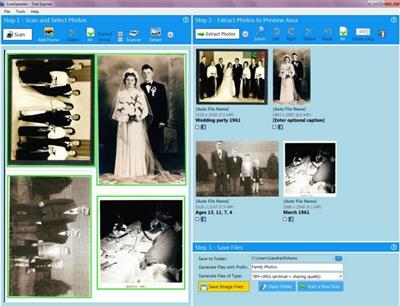
This photo scanning software allows anyone to scan multiple photos at once using your flatbed scanner, making scanning of old photos much faster, easier and cost effective.

Features
Use your flatbed scanner to scan multiple photos at once - in as few as 3 mouse clicks
Make photo scanning easy
Automatically split scanned photos into separate image files, or select photos manually
Automatically straighten photos, or manually adjust them
Scan directly from photo album page
Preserve written comments by tagging photos as you go - comments are permanently embedded inside the image files
Simultaneously save an archival quality and a web/e-mail quality image file for each photo
Batch correct skewing and orientation for multiple photos at once
Optionally import pre-scanned images containing multiple photos
Optionally send selected photos directly to your Facebook account
30-day money back guarantee
Код:
http://scanspeeder.com/updates

Homepage:
Код:
http://scanspeeder.com/

Download link

rapidgator.net:
Код:
https://rapidgator.net/file/a623c89c58b2d82a0a42ad0b706cfd97/ktiwr.ScanSpeeder.Pro.3.24.Multilingual.rar.html

uploadgig.com:
Код:
https://uploadgig.com/file/download/2be1Cea167053Eba/ktiwr.ScanSpeeder.Pro.3.24.Multilingual.rar

1dl.net:
Код:
https://1dl.net/wpmuwo96r16h/ktiwr.ScanSpeeder.Pro.3.24.Multilingual.rar.html
 
Source Insight 4.00.0126


a489402ba9e6c95a1789e66b908f6fb1.jpeg


File size: 20.4 MB​

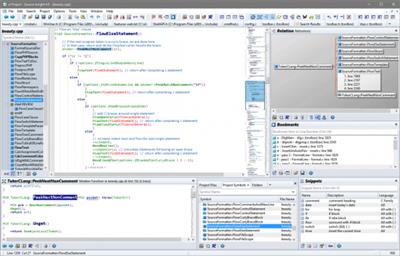
Need to Understand Code? Source Insight is a powerful project-oriented programming editor, code browser, and analyzer that helps you understand code, while you work and plan. Source Insight has built-in dynamic analysis for C/C++, C#, Java, Objective-C, and more.

Understand Code
Learn an existing code base quickly, and get up to speed on new projects. Evaluate the costs of potential changes by seeing where functions and objects are used. See class inheritance and function call trees.
Quickly Navigate
Source Insight parses your whole project and let's you navigate and edit code like a breeze, while showing you information automatically. Jump easily to callers of functions or references to variables.
Discover
See where functions and variables are used. Source Insight automatically shows references to functions, variables, classes, and more - almost instantly. Search across your project using advanced search features.
Read More
Code Analysis
Source Insight has built-in dynamic analysis for C/C++, C#, Java, Objective-C, and more.
Read More
Powerful Editing
Use powerful editing features, including code snippets, symbolic auto-completion, and smart-rename.
Syntax Formatting
See live references to variables and other declarations with Syntax Formatting. Identifiers are formatted based on their declaration, scope, and usage.
Код:
https://www.sourceinsight.com/updates/

Homepage:
Код:
https://www.sourceinsight.com/

Download link

rapidgator.net:
Код:
https://rapidgator.net/file/c11a0355f409aa74de235fa052b03c1e/vizpw.Source.Insight.4.00.0126.rar.html

uploadgig.com:
Код:
https://uploadgig.com/file/download/7e1Ed19c0B004632/vizpw.Source.Insight.4.00.0126.rar

1dl.net:
Код:
https://1dl.net/307awleh8eo5/vizpw.Source.Insight.4.00.0126.rar.html
 
Starry Night Pro Plus 8.1.1.2079


0f40397e7fa97dce9458d9b1787659e7.jpeg


Starry Night Pro Plus 8.1.1.2079
Languages: English
File Size: 2.36 GB​

Starry Night 8 - Professional Astronomy Telescope Control Software for PC. Starry Night Pro Plus 8 is our fully featured flagship program, tailored for the astronomer who wants the very best in-class astronomy software and telescope control experience.

Key features include
- Apollo 11 Mission Data
- Data Backup and Cloud Sync
- Improved DeepSky Database
- Improved Telescope Control
- New Dark Theme
- New Audio Descriptions
- Stars and Exoplanets in 3D
- Simple, fast, user-optimized interface
- All-Sky CCD Mosaic
- 5 multi-wavelength full sky surveys
- Fully featured with a complete object database
- Redesigned Live SkyGuide
- Maxim DL Plugin
What's New in Starry Night 8
Improved DeepSky Database
Explore a new, up-to-date, 36,000 object, cross-referenced database, built from various source catalogs.
Improved Telescope Control
Telescope control has been redesigned to offer a modern, sleek looking, user experience,
Open Astronomy Log
With the international standard for astronomical logging now export your data to Open Astronomy Log (OAL) format.
Sky Calendar
Explore a hand picked list of the most interesting celestial objects to observe each evening.
Audio Descriptions
Hours of descriptive audio for over 400 of the most interesting night sky objects. Click and listen!
Maps & Location Services
Auto-detect your home location and choose additional observing sites quickly and accurately.
Interactive Live SkyGuide
Web-delivered multimedia reveals the science of the solar system, stars, galaxies, and the known universe.
Binary Star Systems
3D models of eight beautiful and accurately rendered binary stars!
Features
We put the rocket in space science software
Universal Search
New dynamic user-optimized interface, with "Universal Search" for objects, Starry Night files, SkyGuide references, options, events, and more.
High Performance Graphics
The incredibly rich and detailed Starry Night software OpenGL graphics that have set the industry standard for excellence in astronomy software.
Extragalactic 3D Database
New & Exclusive - The Starry Night Extragalactic 3D Database includes over 200,000 galaxies encompassing over 1 billion lights years of space.
Space Missions
New and updating space missions with 30 detailed and accurate 3D models of spacecraft & trajectories for a real flight time experiences.
3D Suns
Every star is now accurately rendered as a 3D body with classification-appropriate color, texture and relative radii.
Updated Messier Catalog
An updated Messier catalog with new breathtaking high resolution images of your favourite star clusters, nebulae, and galaxies.
Analemma Simulations
The Sun's analemma can now be drawn accurately on any planet's surface.
3D Exoplanets
Exoplanets as 3D bodies with proper location, size, orbit and planetary texture. Land on the surface, see a sunset from the surface of Kepler-62e!
Scientific Precision
The most precise planetary positions available (using JPL ephemerides) plus an expanded asteroid catalog with highlighted families and groups.
H-R Diagrams
Hertzsprung-Russell diagrams tell about star age and mass, plotting star luminosity on a vertical axis vs. star temperature on a horizontal axis.
Horizon Panoramas
54 streamable photorealistic horizon panoramas, from Antarctica, to Stonehenge to the Egyptian Pyramids, and much more!
Ephemeris Generator
Ephemeris values are handy for knowing where an object will be in the sky at a particular time. You can export and print it out.
Graph Tool
The Graph offers a way of examining changes in an object's qualities over time. It is possible to plot more than one object on the Graph at one time.
Updated Surface Maps
We've got new maps of many planets and moons including Vesta, Ceres, and, of course, our favorite dwarf planet Pluto!
Release Notes
New Features
- FOV Indicators. Can now combine a guide camera with a main camera in an FOV Indicator.
Fixed Bugs / Improvements
- Export SkyView > As Image broken on retina displays.
- Export SkyView > As Movie broken on retina displays.
- FOV Indicators. FOV displayed in list of indicators incorrect.
- FOV Indicators. Camera sensor offset not working.
- Spaceship mode. Directional arrows also increasing speed.
- Observing Logs. Notes field using only single line.
- Observing Logs. Deleting OTAs results in a crash
- Observing Logs. Durations less than 6 result in one less.

System Requirements
- 32-bit or 64-bit operating system
- Windows 10
- 1 GHz or higher processor
- 1 GB RAM
- 12 GB of hard disk space
- Minimum recommended monitor resolution of 1024 x 768 pixels.
* 128 MB OpenGL 1.4 capable graphics card required.

Homepage:
Код:
https://starrynight.com

Download link

rapidgator.net:
Код:
https://rapidgator.net/file/6fb8e2e8e6cf4594942ab7f5391a114e/jndvj.Starry.Night.Pro.Plus.8.1.1.2079.part1.rar.html
https://rapidgator.net/file/5f697ec885b2dac3635fbbfa05937601/jndvj.Starry.Night.Pro.Plus.8.1.1.2079.part2.rar.html
https://rapidgator.net/file/3f2174f7ac2dab3d01533a09ff04b251/jndvj.Starry.Night.Pro.Plus.8.1.1.2079.part3.rar.html

uploadgig.com:
Код:
https://uploadgig.com/file/download/baA1C1ba75a6991f/jndvj.Starry.Night.Pro.Plus.8.1.1.2079.part1.rar
https://uploadgig.com/file/download/E64cfb4bc4dcA9BC/jndvj.Starry.Night.Pro.Plus.8.1.1.2079.part2.rar
https://uploadgig.com/file/download/7D24Df70be4DbB12/jndvj.Starry.Night.Pro.Plus.8.1.1.2079.part3.rar

1dl.net:
Код:
https://1dl.net/d4c347wymexm/jndvj.Starry.Night.Pro.Plus.8.1.1.2079.part1.rar.html
https://1dl.net/0pfjt2iz80r5/jndvj.Starry.Night.Pro.Plus.8.1.1.2079.part2.rar.html
https://1dl.net/stx9a74shi4l/jndvj.Starry.Night.Pro.Plus.8.1.1.2079.part3.rar.html
 
StartAllBack 3.5.4.4560 Multilingual


8eef5f442b46a770a194de7b1b099327.jpeg


File size: 2.0 MB​

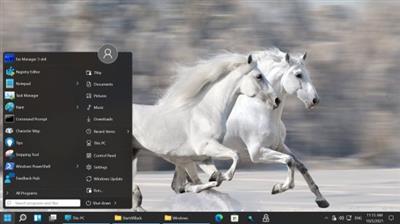
With Windows 11 officially released, users who want to enjoy the power of the new operating system must get accustomed to the new desktop layout and the enhanced looks. Created by the developers of the popular StartIsBack application, StartAllBack is an enhancement tool specifically designed to bring back the classic layout and looks to a Windows 11 computer.

Restore and improve taskbar
Show labels on task icons
Adjust icon size and margins
Move taskbar to top, left or right edges
Drag and drop stuff onto taskbar
Center task icons but keep Start button on the left
Split into segments, use dynamic translucency
Separate corner icons with Windows 7/10 UI
Restore and improve File Explorer UI
Ribbon and Command Bar revamped with translucent effects
Details pane on bottom
Old search box (the one which works)
Dark mode support for more dialogs
Restore and improve context menus
All new look with rounded acrylic menus
Fast and responsive taskbar menus
New fonts, better touch support
Restore and improve start menu
Launch apps and go to system places in one click
Navigate dropdown menus like a boss
Enjoy fast and reliable search
Finally, lightweight styling and UI consistency
Enjoy Windows 7, Windows 10 and third-party taskbar and start menu styles
Fix UI inconsistencies in Win32 apps
Don't be blue: recolor UI in all windows apps
Negative resource usage: fewer RAM used, fewer processes started
Код:
https://www.startallback.com/

Homepage:
Код:
https://www.startallback.com/

Download link

rapidgator.net:
Код:
https://rapidgator.net/file/6f754322ea65c4b3879af85bb1ff5554/xuaav.StartAllBack.3.5.4.4560.Multilingual.rar.html

uploadgig.com:
Код:
https://uploadgig.com/file/download/E25E28aa06d25ee7/xuaav.StartAllBack.3.5.4.4560.Multilingual.rar

1dl.net:
Код:
https://1dl.net/ixbgk09alf00/xuaav.StartAllBack.3.5.4.4560.Multilingual.rar.html
 
StartAllBack 3.5.4.4562 Multilingual


339004a20b71b5964e2cc88e18bd6aab.jpeg


File Size: 1.7 MB

Introducing StartAllBack: Windows 11 from better timeline, Embrace, enhance, unsweep classic UI from under the rug.​

Restore and improve taskbar
Show labels on task icons
Adjust icon size and margins
Move taskbar to top, left or right edges
Drag and drop stuff onto taskbar
Center task icons but keep Start button on the left
Split into segments, use dynamic translucency
Separate corner icons with Windows 7/10 UI
Restore and improve File Explorer UI
Ribbon and Command Bar revamped with translucent effects
Details pane on bottom
Old search box (the one which works)
Dark mode support for more dialogs
Restore and improve context menus
All new look with rounded acrylic menus
Fast and responsive taskbar menus
New fonts, better touch support
Restore and improve start menu
Launch apps and go to system places in one click
Navigate dropdown menus like a boss
Enjoy fast and reliable search
Finally, lightweight styling and UI consistency
Enjoy Windows 7, Windows 10 and third-party taskbar and start menu styles
Fix UI inconsistencies in Win32 apps
Don't be blue: recolor UI in all windows apps
Negative resource usage: fewer RAM used, fewer processes started
Код:
https://www.startallback.com/
OS:Windows 11

Homepage:
Код:
https://www.startallback.com/

Download link

rapidgator.net:
Код:
https://rapidgator.net/file/2257a3573e49f1815e96e49d9b521eaf/hewad.StartAllBack.3.5.4.4562.Multilingual.rar.html

uploadgig.com:
Код:
https://uploadgig.com/file/download/1f83a271708b1824/hewad.StartAllBack.3.5.4.4562.Multilingual.rar

1dl.net:
Код:
https://1dl.net/tp225e5o9frm/hewad.StartAllBack.3.5.4.4562.Multilingual.rar.html
 
StopUpdates10 3.8.2022 Multilingual


cf544c0b2fa253efabef3d05481bb3d0.jpeg


File Size : 2 Mb​

StopUpdates10 makes it easy for you to allow or block Windows 10 updates anytime. This app is perfectly timed for us. Our VMware started installing updates causing slowdowns and lag and aggravating us even though we had used similar apps to block Windows Updates previously. Microsoft has again changed how Windows Updates works, and most apps that prevent updates are now broken. Enter StopUpdates10. Now you can once again block or allow Windows Updates.

Typically, it would be difficult to test how effective this app is, but we're in the unique position of knowing Windows Updates keeps running within five minutes of booting VMware. We're happy to report that it did stop updates. We waited 30 minutes to be sure.
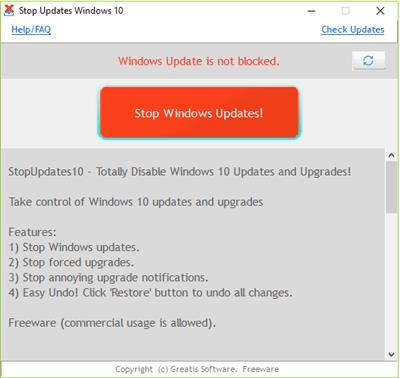
StopUpdates10 does require installation but is simple to use. By default, you should see "Windows Updates is not blocked" in red letters and a red button that says "Stop Windows Updates!" Once blocked, everything is reversed and in green letters with text that says "Windows Updated is blocked!" and a button that reads "Restore Windows Updates." Additionally, Greatis offers links to their other freeware programs including UnHackMe, BootReacer, Anti-WebMiner, and Edge Reset Button.
Код:
http://greatis.com/blog/stopupdates10

Homepage:
Код:
www.greatis.com

Download link

rapidgator.net:
Код:
https://rapidgator.net/file/48f19019f57dc8c2287a19413865e932/iwofg.StopUpdates10.3.8.2022.Multilingual.zip.html

uploadgig.com:
Код:
https://uploadgig.com/file/download/7694704e57867c14/iwofg.StopUpdates10.3.8.2022.Multilingual.zip

1dl.net:
Код:
https://1dl.net/sc3k9m0w2qwl/iwofg.StopUpdates10.3.8.2022.Multilingual.zip.html
 
Tarma InstallMate 9.111.7104.8369


92a15aabdba0dde8eba45d1a1b4c1d4d.jpeg


File size: 6.7 MB​

InstallMate 9 creates software installers for Windows 32-bit and 64-bit desktop and server platforms, with complete customization of all installer actions and dialogs. InstallMate 9 contains many features that you otherwise only find in products 10-20 times its price, plus some features that you will not find anywhere else.

Straightforward, functional, and fairly outdated user-interface
The program has a user friendly interface in which you can create a new project (mobile or standard installer) by selecting the language and giving it a name. In the "Product Information" area you can rename your product, write the publisher name and copyright notice, as well as generate a GUID. Plus, you can attach a "version info" file and add-on/update, as well as input the main product name.
Furthermore, you can write your website URL, email address, telephone, update URL, support URL and comments. You can also include a product registration page, specify the target system requirements and prerequisites.
Provides you with a plethora of options for creating comprehensive installers for your software projects
When it comes to the installation contents, you can define the product features, components and assemblies, specify the files, folders, shortcuts, registry keys and values, INI files and values, environment variables which require installation, as well as point out the file and MIME types, COM classes and type libraries that must be registered.
In the next steps, you can set the installation options (level, process check, uninstaller, reboot policy, log file mode), languages, action sequences, dialogs and behavior, localized strings, rich text resources, bitmaps, icon, font styles and symbolic variables. Last but not least, you can define and build the installer configurations (optionally assign a password).
Effortlessly create fast installers or packages for your projects, documents, or databases with the help of InstallMate
The program uses a low amount of system resources, includes a comprehensive help file and didn't freeze, crash or pop up errors during our tests. We strongly recommend InstallMate to all software developers and interested users.
Features
Windows Logo compliance
InstallMate complies with the latest Microsoft Windows Logo requirements for software installation so your installers operate smoothly in the Windows environment.
Installation on all Windows 32-bit and 64-bit Desktop and Server systems
In contrast to most other installers and MSI, InstallMate is compatible with all 32-bit and 64-bit Microsoft Windows desktop and server systems from Windows 95 through to Windows 7, including all Server editions (plus Core) and the Windows Preinstallation Environment (WinPE). You therefore only need one installer package, no matter which platforms you target.
Fully self-contained, compact installers
All InstallMate installers are fully self-contained and require no additional support files or runtime installation, thus greatly simplifying your product deployment. Compression is excellent and overhead very low, which makes your installation packages smaller than a .zip file.
Supports full GUI, progress-only, and hidden installation
All InstallMate installers can be run with a full graphical user interface (the familiar Setup wizard steps), or with only a progress box visible, or even completely hidden. This allows you to deploy your product both in interactive and in automated environments.
Flexible packaging for easy deployment
Each installer can be built as a single .exe package, as a small .exe loader with separate installation archives, with automatic download of installation components, or any combination thereof. Disk spanning is also supported. This lets you deploy your product in any manner that suits you and your customers.
Fully localized
InstallMate installers come pretranslated in 19 languages, use Unicode through-and-through, and allow localization of all installer aspects for any language, including right-to-left languages such as Arabic and Hebrew. Your installers are ready for world-wide deployment from the start.
Total control over all installation actions and dialogs
InstallMate allows you full access to all aspects of the installer with its build-in dialog editor and action sequence editor. This enables you to customize your installers exactly as you need them, with no scripting required.
Extensive preflight checks
More than 500 different preflight checks are performed each time you build an installer package to alert you to potential installation problems before they happen. This helps you build better installers and reduces your support costs.
Код:
https://installmate.com/support/im9/whatsnew.htm

Homepage:
Код:
http://www.installmate.com/

Download link

rapidgator.net:
Код:
https://rapidgator.net/file/5d669a3560c987f3b7b5cef267f0a53d/hxklk.Tarma.InstallMate.9.111.7104.8369.rar.html

uploadgig.com:
Код:
https://uploadgig.com/file/download/424E7e951BC52b02/hxklk.Tarma.InstallMate.9.111.7104.8369.rar

1dl.net:
Код:
https://1dl.net/4scb4mm4io60/hxklk.Tarma.InstallMate.9.111.7104.8369.rar.html
 
Tenorshare iCareFone 8.6.0.23 Multilingual


b72125b44fbb10cdfcc001aed2da3fb5.jpeg


File size: 107 MB​

iCareFone - A Real Manager of iOS Data. Transfer music, photos, videos, contacts, SMS without limitation. Backup & Restore your data selectively and instantly. Save iPhone/iPad/iPod from common iOS problems. Bring your device better performance.

Transfer Your Files Flexibly
Enjoy music, videos and photos anytime and anywhere
iPhone/iPad/iPod
Transfer & Playback your music collection seamlessly
Keep your photos and videos and accessible on all devices
Export & Import your valuable contacts and SMS securely
Copy other files between your computer and iOS devices
Backup & Restore Your Device at Ease
Meet faster backup speed and more backup file choices. From now on, get rid of iTunes or iCloud backup.
Rescue Your Smartphone from Common iOS Troubles
Handle annoying iOS problems and device failure at home. No professional knowledge required.
Whats New
Updates: official site does not provide any info about changes in this version

Homepage:
Код:
https://www.tenorshare.net

Download link

rapidgator.net:
Код:
https://rapidgator.net/file/0e8b63a2a3f796262209463f19774836/ydzlj.Tenorshare.iCareFone.8.6.0.23.Multilingual.rar.html

uploadgig.com:
Код:
https://uploadgig.com/file/download/1533A90390fe6E0b/ydzlj.Tenorshare.iCareFone.8.6.0.23.Multilingual.rar

1dl.net:
Код:
https://1dl.net/dvpq0656pnki/ydzlj.Tenorshare.iCareFone.8.6.0.23.Multilingual.rar.html
 
Tenorshare UltData for Android 6.8.1.12 Multilingual


8b96c0c3f24e0d0dd92cb42630dc5646.jpeg


File size: 155 MB​

Android Data Recovery - your Best Choice to Recover Android Data. Recover photos, contacts, messages, videos and everything you lost. Highest data recovery success rate in the industry. Support with most Android phones and tablets.

Main Features
- Recover up to 8 file types like contacts, photos, SMS, call history, WhatsApp messages
- Recover deleted data on Android SD card and internal memory
- 2 Ways to connect your Android device: via Wi-Fi or via a USB cable
- Support all Android phones and tablets, like Samsung, HTC, Motorola, LG etc.
- Preview and selective recover lost files before recovery
When Need Android Data Recovery?
- You delete some important data mistakenly.
- You lost data after rooting your device.
- Corrupted your OS through a software update.
- Wiped all files after restoring to factory settings.
- Lost files after a ROM flash.
- Lost files after Unlocking Bootloader.
- Can't access data on your device when it is broken.
Recover up to 8 Types of Android Files
- Contacts: Recover all your important contacts including the name, number and type. They will be export as TXT, XML, or XLS.
- Messages: Retrieve lost sent & received messages including content, phone numbers and sending date.
- Photos: Recover photos captured with built-in camera, as well as your downloaded ones.
- Call history: Retrieve your incoming and outgoing calls and save them on your computer.
- Videos and audios: Lost videos and audios on Android device can also be retrieved in their original formats.
- WhatsApp: WhatsApp chats history and contacts can be restored as well.
- Other Files: Recover archives, emails, database, apps, documents in DOC/XLS/PPT/PDF/HTML/PST/DBX/EMLX/EPS formats, and more.
Recover Android Data in 2 Modes
- Quick Recovery: Quickly scan lost contacts, call history, messages, photos and videos on your Android phone, and preset them in original name and folder structure. The whole process only takes several minutes.
- Deep Recovery: Deeply scan both lost and existing contacts, call history, messages, photos, videos and other documents on your Android phone. It can find more data but will take relatively longer time for scanning.
Support all Android Devices
- Work well with all Android devices
- Support various kinds of tablets
- Be compatible with all Android versions
Preview and Selectively Recover
- Display all your recoverable contacts, texts, pictures and more for you to preview before recovery.
- Selectively recover the files you need, instead of all of them.
- Mark the lost files in red, which make sure you find them more easily.
Whats New
Updates: official site does not provide any info about changes in this version.

Homepage:
Код:
http://www.tenorshare.com/

Download link

rapidgator.net:
Код:
https://rapidgator.net/file/4c0f5c4f763ecad43365ea8b01fce44a/vxpwb.Tenorshare.UltData.for.Android.6.8.1.12.Multilingual.rar.html

uploadgig.com:
Код:
https://uploadgig.com/file/download/E1a302af9Ca87139/vxpwb.Tenorshare.UltData.for.Android.6.8.1.12.Multilingual.rar

1dl.net:
Код:
https://1dl.net/yf2blpl1iux3/vxpwb.Tenorshare.UltData.for.Android.6.8.1.12.Multilingual.rar.html
 
TickTick Premium 4.3.4 Multilingual


56eb733fb5137b7e472ec49213fdbb29.jpeg


File size: 20.5 MB​

TickTick turns your Windows PC device into an office platform that is flexible, easy to use, and highly efficient. Join millions of people to capture ideas, organize life, and do something creative every day. Practice the Pomodoro Technique in TickTick 64 bit for PC. Stay focused, stay productive. Enjoy!

Organize everything
Stay organized and productive with work-related tasks, personal goals, and more.
Add tasks faster and easier
Use shortcut Ctrl+Shift+A to capture ideas in a second.
Powerful calendar views
View your tasks in a calendar, and manage them simply with draft & drop.
Collaborate with anyone
Share your lists and tasks with anyone - colleagues, friends, or family. Stay productive in any kind of group.
Stay focused
Stay concentrated with the built-in Pomo Timer, which helps you power through distractions to accomplish more.
Manage tasks from the desktop widget
With the desktop widget on Windows, view and complete tasks have never been this easy.
Whats New
Updates: official site does not provide any info about changes in this version.

Homepage:
Код:
https://ticktick.com/about/windows?language=en_us

Download link

rapidgator.net:
Код:
https://rapidgator.net/file/7a34223e732471820526fe35776fd336/yrxjg.TickTick.Premium.4.3.4.Multilingual.rar.html

uploadgig.com:
Код:
https://uploadgig.com/file/download/55c1C81923Aca18f/yrxjg.TickTick.Premium.4.3.4.Multilingual.rar

1dl.net:
Код:
https://1dl.net/yqrdjunshwbc/yrxjg.TickTick.Premium.4.3.4.Multilingual.rar.html
 
ToDoList 8.1.16.0


72555c8e656a54e8ffd6c00e7ebcfd25.jpeg


File Size : 6 Mb​

ToDoList is an easy to use, yet complex to-do list manager that enables you to organize and track general or project related tasks. It supports multiple levels of sub-tasks along with notes (plain or rich text), task icons, file links, time tracking, task reminders and more. The program is highly customizable and offers advanced configuration options that make it suitable for multi-user team projects with support for source control as well as general GTD usage. Other features include import/export, integrated backup, due task alerts, customizable interface and much more.

Features:
Task icons (Edit > Other Task Attributes > Set Task Icon)
Time component added to Start dates
Restored preference to control refiltering when editing (mainly to fix a specific bug)
Numbered bullets added to Rich Edit comments
Simple theming (4 sample themes included in the Resources folder)
Separate preference for hiding Start time
Added preference to control maximum width of column
Whats New
Updates: official site does not provide any info about changes in this version

Homepage:
Код:
http://www.abstractspoon.com/

Download link

rapidgator.net:
Код:
https://rapidgator.net/file/3c94b92c4b6063868c7267074d91f340/atdtj.ToDoList.8.1.16.0.zip.html

uploadgig.com:
Код:
https://uploadgig.com/file/download/5a79b6553647A072/atdtj.ToDoList.8.1.16.0.zip

1dl.net:
Код:
https://1dl.net/9fh8cy3be1st/atdtj.ToDoList.8.1.16.0.zip.html
 
Toontrack EZmix v2.2.3


6a1ac10ff6a76072e6d87cdab096d7a0.jpeg


File size: 57.7 MB​

EZmix is a simple, yet powerful mixing tool that gives you access to a huge array of mix presets for the whole gamut of mixing needs. Whether you need to mix drums, vocals, guitars, bass or keyboards this is your tool. Simply insert EZmix on a channel strip in your sequencer, and pick a preset to apply to your audio source. Done. In addition, EZmix comes with a standalone host that you can use to practice your guitar with using the included amplifiers and cabinets simulations. Of course, those are available when using your recording application too.

EZmix 2
Following the success of Toontrack's EZmix, the new and completely overhauled EZmix 2 continues to build on the same fundamental idea: having pro-designed effect chains for instruments and channels found in every recording session combined in one powerful mixing tool. With the vast collection of ready-made presets, mixing music is not only easy and incredibly fast you end up with results second to none.
All the previous functionality and content from EZmix is still intact and working in EZmix 2. The major difference however, is that the new and revamped version comes with settings based on high-tech mastering effects, new reverb algorithms, guitar/bass amp and cab simulation, a completely revised interface and a large core content boost. Essentially, EZmix 2 is a mixing engineer, mastering suite and guitar/bass amp all rolled up into one package. Start mixing - it's EZ
Effects
EZmix 2 is a powerful package that combines a multitude of quality studio effects with the know-how of professional engineers. As soon as you select one of EZmix's pre-designed settings, a complex chain of effect units instantly loads seamlessly in the background. See Details for in-depth information.
The professional touch
Making professional mixes has never been easier Having a vast array of available effects to choose from, the signal-chain settings in EZmix 2 and all EZmix Packs were carefully crafted by seasoned mixing engineers. Lend some pro secrets and platinum record magic to your music by letting seasoned veterans do the tweaking for you
Guitar/bass amp and speaker simulation
EZmix 2 has a large amount of ready-made settings based on some of the most classic vintage and contemporary guitar and bass amps, speakers and stomp boxes. Whether you are working stand-alone or in a host plug your instrument straight into your sound card and select a preset
Low CPU usage
Combing several plugins on multiple channels can slow down even the fastest computer. With EZmix 2 you only use ONE instance on each channel instead of MANY and end up reducing your CPU usage to a minimum. With EZmix 2 you can make flawless mixes on low resource systems or in mobile situations.
Код:
https://www.toontrack.com/release-notes/release-notes-ezmix-2/

Homepage:
Код:
https://www.toontrack.com/

Download link

rapidgator.net:
Код:
https://rapidgator.net/file/06c37dafec38c61f4251b9427891ba8c/thklz.Toontrack.EZmix.v2.2.3.rar.html

uploadgig.com:
Код:
https://uploadgig.com/file/download/8a6a2AD44bfd9492/thklz.Toontrack.EZmix.v2.2.3.rar

1dl.net:
Код:
https://1dl.net/yrikrudr8t0f/thklz.Toontrack.EZmix.v2.2.3.rar.html
 
TurboVNC 3.0.2


93851e6ef10c59ab32ce493413ae3672.jpeg


File Size : 76.3 Mb​

TurboVNC is a high-performance, enterprise-quality version of VNC based on TightVNC, TigerVNC, and X.org that allows efficient VNC server connections.

It contains a variant of Tight encoding tuned for maximum performance and compression with 3D applications (VirtualGL), video, and other image-intensive workloads. TurboVNC, in combination with VirtualGL, provides a complete solution for remotely displaying 3D applications with interactive performance. TurboVNC's high-speed encoding methods have been adopted by TigerVNC and libvncserver, and TurboVNC is also compatible with any other TightVNC derivative.
TurboVNC forked from TightVNC in 2004 and still covers all of the TightVNC 1.3.x features, but TurboVNC contains numerous feature enhancements and bug fixes relative to TightVNC, and it compresses 3D and video workloads much better than TightVNC while using generally only 5-20% of the CPU time of the latter. Using non-default settings, TurboVNC can also be made to compress 2D workloads as "tightly" as TightVNC.
On "modern" hardware, TurboVNC is capable of streaming 50+ Megapixels/second over a 100 Megabit/second local area network with perceptually lossless image quality. TurboVNC can stream between 10 and 12 Megapixels/second over a 5 Megabit/second broadband connection at reduced (but usable) image quality.
TurboVNC Features
Fine-grained control over the JPEG image quality and level of chrominance subsampling
Double buffering on the client side to reduce tearing artifacts in 3D and video applications
Flexible and configurable full-screen/multi-screen support
Full support for IPv6
Advanced flow control and continuous updates (greatly improves performance on high-latency connections)
Authentication with one-time passwords or Unix login credentials (in addition to standard VNC passwords)
Access control lists (for sharing VNC sessions with only certain users)
Allows security/authentication policies to be set globally for a particular server machine
Multithreaded encoding
"Lossless refresh" allows a viewer to request a lossless copy of the current screen image, either manually or automatically (after a specified number of seconds of inactivity)
High-performance zero-install Java viewer, deployable using Java Web Start, that calls libjpeg-turbo through JNI to achieve native levels of performance
Код:
https://sourceforge.net/projects/turbovnc/files/3.0.2/

Homepage:
Код:
https://turbovnc.org/

Download link

rapidgator.net:
Код:
https://rapidgator.net/file/8cbd1dfd92cfc85b2951d311603991a5/bleag.TurboVNC.3.0.2.rar.html

uploadgig.com:
Код:
https://uploadgig.com/file/download/3a65541787AC963b/bleag.TurboVNC.3.0.2.rar

1dl.net:
Код:
https://1dl.net/0ndt8h0sssad/bleag.TurboVNC.3.0.2.rar.html
 
Uninstall Tool 3.7.1.5699 Multilingual


665a00620965206cded2f10c129bf06e.jpeg


File size: 5.6 MB​

Uninstall Tool - Unique And Powerful Uninstaller. Make your Computer Work Faster Now by using Uninstall Tool! It's a fast, secure and convenient way to remove unneeded applications and system components. Great, powerful and reliable alternative to standard Windows Add/Remove program. The program has lots of features and options mising in Microsoft's applet. Uninstall Tool works with LIGHTNING SPEED and COMPLETELY removes any program from your computer.

Key Features
Completely remove any software installed! (using Uninstall Wizard technology)
3 Times Faster than Add/Remove program!
3 Applications Categories: Software, System, Hidden
Remove Programs that automatically run at system startup
Many ways of Sorting Applications: by Name, by Occupied Size, by Installation Date.
Uninstall Programs that could not be removed by Add/Remove program.
Force removal of uninstall related entries in the registry.
Highlighting of recently installed applications in the list
Smart Search allows quick finding of any application you need.
Navigate to a selected program's Registry Entry, Installation Folder and its Web Site.
View Detailed Information of a certain application installed on your computer.
Easy to use and modern User Interface allows to work comfortably with Uninstall Tool.
Multilingual interface!
Option to replace Add/Remove program.
Saving (exporting to HTML) detailed reports about currently installed applications
Running "Windows Components" and "Add/Remove Programs" tools
Complete compatibility with x64 Windows
Much More...
Код:
http://www.crystalidea.com/uninstall-tool-version-history

Homepage:
Код:
http://www.crystalidea.com

Download link

rapidgator.net:
Код:
https://rapidgator.net/file/178fd07be13678e6e2db45ac7fc0fb49/cqqtz.Uninstall.Tool.3.7.1.5699.Multilingual.rar.html

uploadgig.com:
Код:
https://uploadgig.com/file/download/2b726aefdEd6A816/cqqtz.Uninstall.Tool.3.7.1.5699.Multilingual.rar

1dl.net:
Код:
https://1dl.net/mfcwznotos0o/cqqtz.Uninstall.Tool.3.7.1.5699.Multilingual.rar.html
 
Windows 10 Pro 22H2 build 19045.2311 Preactivated Multilingual November 2022

8c6b1e8f35bbc7d98982f04c8019affb.jpeg


Windows 10 Pro 22H2 build 19045.2311 Preactivated Multilingual November 2022
Windows x64 | Languages:Arabic,English,German,Greek,French,Spanish,Italian,Portuguese-Portuguese,Portuguese-Brazil,Turkish | File Size: 4.52 GB​

Windows 10 is a series of personal computer operating systems produced by Microsoft as part of its Windows NT family of operating systems. It is the successor to Windows 8.1, and was released to manufacturing on July 15, 2015, and to retail on July 29, 2015. Windows 10 receives new releases on an ongoing basis, which are available at no additional cost to users. Devices in enterprise environments can receive these updates at a slower pace, or use long-term support milestones that only receive critical updates, such as security patches, over their ten-year lifespan of extended support.

One of Windows 10's most notable features is support for universal apps, an expansion of the Metro-style apps first introduced in Windows 8. Universal apps can be designed to run across multiple Microsoft product families with nearly identical code*-*including PCs, tablets,smartphones, embedded systems, Xbox One, Surface Hub and Mixed Reality. The Windows user interface was revised to handle transitions between a mouse-oriented interface and a touchscreen-optimized interface based on available input devices*-*particularly on 2-in-1 PCs, both interfaces include an updated Start menu which incorporates elements of Windows 7's traditional Start menu with the tiles of Windows 8. Windows 10 also introduced the Microsoft Edge web browser, a virtual desktop system,a window and desktop management feature called Task View, support for fingerprint and face recognition login, new security features for enterprise environments, and DirectX 12.
Код:
https://support.microsoft.com/en-us/topic/october-28-2022-kb5020953-os-builds-19042-2194-19043-2194-19044-2194-and-19045-2194-out-of-band-5b0e9c22-6d38-4ffc-9fe1-7cd83b63f7a7

d06ff6b8171e20174e832ec133196195.jpeg

System Requirements
- Processor: 1 gigahertz (GHz) or faster.
- RAM: 1 gigabyte (GB).
- Free space on hard disk: 16 gigabytes (GB).
- Graphics card: DirectX 9 graphics device or a newer version.
- Additional requirements to use certain features.
- To use touch you need a tablet or monitor that supports multitouch.
- To access the Windows store to download and run apps, you need an active Internet connection and a screen resolution of at least 1024 x 768 pixels

Homepage:
Код:
http://www.microsoft.com

Download link

rapidgator.net:
Код:
https://rapidgator.net/file/d42d944f9894b5740ba4ff56b8871d96/groib.Windows.10.Pro.22H2.build.19045.2311.Preactivated.Multilingual.November.2022.part1.rar.html
https://rapidgator.net/file/f15133bb56b96b6c0432b41606aa4893/groib.Windows.10.Pro.22H2.build.19045.2311.Preactivated.Multilingual.November.2022.part2.rar.html
https://rapidgator.net/file/3977570a148e05340710754b2c35b550/groib.Windows.10.Pro.22H2.build.19045.2311.Preactivated.Multilingual.November.2022.part3.rar.html
https://rapidgator.net/file/7be7f155b43f58f3cd3fc21b8cf1bc4f/groib.Windows.10.Pro.22H2.build.19045.2311.Preactivated.Multilingual.November.2022.part4.rar.html
https://rapidgator.net/file/a4f3be073c949ba20162af2168f8f41c/groib.Windows.10.Pro.22H2.build.19045.2311.Preactivated.Multilingual.November.2022.part5.rar.html

uploadgig.com:
Код:
https://uploadgig.com/file/download/ec985d06f0bCadD0/groib.Windows.10.Pro.22H2.build.19045.2311.Preactivated.Multilingual.November.2022.part1.rar
https://uploadgig.com/file/download/4DA82780AF9163f8/groib.Windows.10.Pro.22H2.build.19045.2311.Preactivated.Multilingual.November.2022.part2.rar
https://uploadgig.com/file/download/492784d6Fd98a4c9/groib.Windows.10.Pro.22H2.build.19045.2311.Preactivated.Multilingual.November.2022.part3.rar
https://uploadgig.com/file/download/c37017928a1f3f32/groib.Windows.10.Pro.22H2.build.19045.2311.Preactivated.Multilingual.November.2022.part4.rar
https://uploadgig.com/file/download/6839B78cc8971F07/groib.Windows.10.Pro.22H2.build.19045.2311.Preactivated.Multilingual.November.2022.part5.rar

1dl.net:
Код:
https://1dl.net/lky0lsfpnvl3/groib.Windows.10.Pro.22H2.build.19045.2311.Preactivated.Multilingual.November.2022.part1.rar.html
https://1dl.net/qjlzs9ic8jif/groib.Windows.10.Pro.22H2.build.19045.2311.Preactivated.Multilingual.November.2022.part2.rar.html
https://1dl.net/8claqogkeqlr/groib.Windows.10.Pro.22H2.build.19045.2311.Preactivated.Multilingual.November.2022.part3.rar.html
https://1dl.net/7bbgrlzhb4kz/groib.Windows.10.Pro.22H2.build.19045.2311.Preactivated.Multilingual.November.2022.part4.rar.html
https://1dl.net/bvsc8mdkeu36/groib.Windows.10.Pro.22H2.build.19045.2311.Preactivated.Multilingual.November.2022.part5.rar.html
 
Yamicsoft Windows 11 Manager 1.1.8 (x64) Multilingual


7d9b5569e9bb539be7a39ea936b13fe8.jpeg


File Size: 29.8 MB​

Windows 11 Manager is an all-in-one utility for Microsoft Windows 11 specially, it includes over forty different utilities to optimize, tweak, clean up, speed up and repair your Windows 11, helps make your system perform faster, eliminate system fault, increase stability and security, personalize your copy of Windows 11, and meet all of your expectations.

Features
Information
Creates the system restore point manually; Gets detailed information about your system and hardware, helps you find out the Micrsoft product key such as Microsoft Windows and Microsoft Office; Shows and manages all running processes and threads; Repair Center helps to diagnose and fix the various system problems; Cleans up your system just one clicking; Optimization Wizard is useful to the user who is unfamiliar with computers.
Optimizer
Tweaks your system to improve performance and increase speed; Manages and configures the Windows boot menu to your preference; Startup Manager controls all the started programs with Windows start, checks and repairs the advanced starup items to restore the malicious change by viruses; Manages and optimizes system services and drivers to improve performance; Manages and optimizes the scheduled tasks to speed up your system.
Cleaner
Disk Analyzer can analyze and view the disk space usage of all programs, files and folders find out which engross your disk space and shown with a chart; Cleans up WinSxS folder securely to reduce the component store size; Smart Uninstaller can fully delete programs from your system without residual files and Registry entries; Desktop Cleaner can analyze and move unused shortcuts, files and folders on desktop to specified folders; Searches and deletes junk files to save disk space and improve performance; Searches and deletes the duplicated files to save your disk space; Registry Cleaner searches Registry to find out and delete the invalid items; Registry Defrag rebuilds and re-indexes your Registry to reduce registry access time and therefore improve application responsiveness and eliminate mistakes and corruption in Registry.
Customization
Customizes system parameters according to your preferences by tweaking File Explorer, Desktop, Start, Taskbar and Notification area; Adds files, folders and system items to This PC, and Desktop; Pins the files or folders to your Desktop, Taskbar or Start; Creates the quick startup items for jumplist on Taskbar; Manages the context menu when right click the file, folder, etc; Edits the shortcut menu that right-click Start button (Win + X shortcut); Customizes the look of your system; Edits and adds the shortcuts that executed on Run dialog box; Tweaks the Windows Apps and Microsoft Modern UI settings.
Security
Tweaks system, components, UAC, Sign in settings, adjusts various settings and restricts access to drives and programs to improve system security; Safeguard your sensitive files and folders security, encrypt files, move system folders to safe locations; Privacy Protector ensures privacy and keeps sensitive information secure by eliminating tracks; File Undelete recovers and restores deleted or formatted files on logical disks; Locks some system features to improve security.
Network
Optimizes and tweaks your internet connection and network settings; Tweaks Microsoft Internet Explorer browser settings; IP Switcher can switch between different network settings easily; Edits the Hosts file to speed up system surfing internet; Wi-Fi Manager can view and manage all your wireless network.
Misc. Utilities
Creates scheduled tasks or the monitorings that trigger tasks; Shows and run the useful collection of utility that built-in your Windows; Splits a file into several smaller files or merges back to the original file; Super Copy is the powerful tool to copy files or backup automatically; Operates your Registry easily using the Registry Tools.
Код:
https://www.yamicsoft.com/windows11manager/product.html

Homepage:
Код:
https://www.yamicsoft.com/

Download link

rapidgator.net:
Код:
https://rapidgator.net/file/498b6c74adbf247e589f385bcfb7e139/pkhkc.Yamicsoft.Windows.11.Manager.1.1.8.x64.Multilingual.rar.html

uploadgig.com:
Код:
https://uploadgig.com/file/download/97b1fF28D6f3B807/pkhkc.Yamicsoft.Windows.11.Manager.1.1.8.x64.Multilingual.rar

1dl.net:
Код:
https://1dl.net/kgk2ljudlx14/pkhkc.Yamicsoft.Windows.11.Manager.1.1.8.x64.Multilingual.rar.html
 
Назад
Сверху