






• Форум работает в архивном режиме www.old.nado.in

All mitsumi'1s Applications !! (updated daily)

  • Автор темы Автор темы mitsumi1
  • Дата начала Дата начала
iToolab UnlockGo 5.2.0 macOS


1ebe434ff8786878cd4cd4ff1f642a38.jpeg


File size: 71.97 MB

All-in-One iPhone Lock Removal Tool. Remove Various Locks on iPhone/iPad in Minutes.​

Instantly unlock your iPhone/iPad's passcode
iToolab UnlockGo allows you to easily bypass iPhone passcode and gain full access to the device. It works on the following scenarios, and all kinds of passcodes are fully supported.
All types of passcodes are fully supported
UnlockGo supports to remove all types of passcodes easily including the 4-digit code, the 6-digit code, custom numeric code, alphanumeric code, Touch ID or Face ID.
Note: The removal of passwords for business purposes is illegal and prohibited.
• Forgot iPhone password
• iPhone is disabled
• Face/Touch ID is not available
• Passcode expired
• Second-hand iPhone
• Broken screen
Bypass iCloud activation lock without password
UnlockGo enables you to turn off the iCloud Activation Lock without password easily, if your device is stuck in the "Activation Lock" screen.
• Remove activation lock after restore
• Remove activation lock of lost iPhone
• Could not activate iPhone
• Unable to activate
Get access to the device after iCloud Activation Lock removal
Once Activation Lock is disabled, you can enjoy the following
• Gain access to your device.
• Use a new Apple ID for iTunes Store & App Store.
• The device won't be tracked by the previous Apple ID.
• The device won't be remotely erased by the previous Apple ID.
• The Activation Lock won't appear again even if you restart the device.
Remove Apple ID without password
Forgot Apple ID password or it has been disabled? iToolab UnlockGo helps you delete Apple ID account with no restrictions. By creating a new account, you can then obtain access to all iCloud services and Apple ID features once more.
Get complete control over your iPhone after Apple ID removal
No specialist knowledge is required to remove Apple ID from locked iOS devices, so you'll be able to take advantage of all of the following features on iPhone/iPad in no time.
• Switch to another Apple ID or set up a new one.
• Take advantage of all iCloud and Apple ID functionality.
• Easily switch off Find My iPhone/iPad.
• Remove the previous Apple ID's tracking.
No password required to disable Find My iPhone. UnlockGo is the best choice on how to turn off Find My iPhone.
You can access to your iPhone/iPad/iPod touch, but you don't know your Apple ID account password? Simply switch off FMI with UnlockGo.
• Find My iPhone can be disabled with no Apple ID or password necessary.
• Delete the previous Apple ID completely and avoid being tracked by the device's previous owner.
• Your iOS device can be used as a brand new one!
• Take advantage of all the iOS features and iCloud services with no limitations.
• Even if you restart or factory reset your iOS device, the activation lock will no longer be displayed after you disable Find My iPhone.
Supported devices & iOS versions
Remove Screen Passcode
• All iPhone, iPad, iPod touch
• iOS 7.0 and later
Bypass iCloud Activation Lock
• iPhone 5s - iPhone X
• iOS 12.0 and later
Remove Apple ID
• All iPhone, iPad, iPod touch
• iOS 11.4 and later
Turn Off FMI
• iPhone 6s - iPhone 12 Pro Max
• iOS 13.0 - 14
Release Notes
• Release notes were unavailable when this listing was updated.

Supported Operation System
• OS X 10.10 or later
• Intel Core processor

Homepage:
Код:
http://itoolab.com/unlock-iphone

Download link

rapidgator.net:
У Вас недостаточно прав для просмотра ссылок. Войдите или зарегистрируйтесь.


uploadgig.com:
У Вас недостаточно прав для просмотра ссылок. Войдите или зарегистрируйтесь.


nitroflare.com:
У Вас недостаточно прав для просмотра ссылок. Войдите или зарегистрируйтесь.


1dl.net:
У Вас недостаточно прав для просмотра ссылок. Войдите или зарегистрируйтесь.
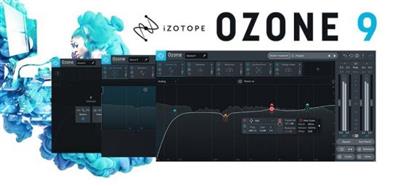
 
iZotope Ozone Advanced 9.12.2 (x64)


91ffb8859fb063698a7f53ea8510e9a6.jpeg


File Size: 229.3 MB​

Ozone 9 delivers the latest in audio technology with new tools for instrument balance and low end, smarter audio assistance, and improved performance.

Why Ozone 9?
AI powered mastering
Master Assistant can add modern or vintage vibes and help you get the right loudness for streaming
Match to your reference
The new Match EQ module can give you a custom EQ curve taken from your favorite reference tracks.
Find your (tonal) balance
Tonal Balance Control helps keep frequencies in line, letting you talk to iZotope plug-ins to fix issues accross your session.
Ozone 9 Features
Master with machine learning
Ozone 9 helps make mastering easier with AI powered assistive tools that give you an instant starting point. New source separation technology in Master Rebalance lets you correct instrument levels before starting your master, or add excitement to key sections. Have the final say in any mix, with complete control of your sound.
Control lows, mids, and highs
Tame harshness harshness in high end and bring out your low end instruments with industry first tools like the Spectral Shaper and Low End Focus modules. Use intuitive, fluid controls to target specific regions to easily smooth out issues or create unique effects.
Match your reference track
Load your favorite reference tracks into Ozone 9, loop any section, and compare your master with a single button press. Take a snapshot of your reference with the new Match EQ module, and save your favorite profiles as presets for other songs. Or, use Master Assistant to set up a custom chain based on your reference.
Tonal Balance Control
Finalize and fine tune your master in any listening environment using target curves for different genres. Quickly fix issues where you see them by calling up Ozone's EQ against your target. Use Tonal Balance Control in your mix session and adjust gain and EQ for Nectar, Neutron, and Relay plug-ins to keep frequencies in line.
NKS Support
NKS support puts the power of Ozone into your creative process, letting you master while making music with Maschine or Komplete Kontrol. Open Ozone on the fly and easily add professional polish while making music on your hardware, using hundreds of different presets and accessible parameters mapped to your hardware controls. Add loudness, width, and EQ without touching your DAW and keep the creative juices flowing.
Ozone for Streaming
Get your music ready for primetime in today's world of streaming audio. Set intelligent loudness targets to prevent your music from being turned down by a streaming platform with Master Assistant and Maximizer. Use CODEC Preview mode in Ozone 9 Advanced to hear your music translated to MP3 or AAC. Upload a reference track to Tonal Balance Control, Master Assistant, or EQ Match, and ensure your music stacks up against the competition. Create with confidence knowing your music will sound great in any format!
Master Rebalance
Adjust volume on drums, bass, or vocals in ANY audio track, even a bounced mix.
Master Rebalance works in real time...no need to render or bounce your tracks
Use DAW automation to add excitement in song sections with small gain changes
Twin spectrum meters let you see rebalanced source against the rest of your track
Master Rebalance is is available in Ozone 9 Advanced only.
Low End Focus
Get clear and punchy low frequencies and avoid artifacts from EQ and compression. "Punchy" and "Smooth" modes let you find the right setting for percussive or sustained low end issues
Set a Boundary region to add or remove contrast anywhere in your low end
Use the Listen button to hear what's being removed and avoid over-processing
Low End Focus is available in Ozone 9 Advanced only.
Imager
Add natural stereo width to narrow mixes with an upgraded "Stereoize" mode
NEW! Two modes for stereoize give you new flavors for widening your track
Sculpt your image in stereo with per-band widening and narrowing
Monitor stereo width and phase new fluid metering
Imager is available in all editions of Ozone 9
Equalizer
Control the finest details of your sound with fluid metering and new HUD controls
Emulate classic analog EQs or modern digital models depending on your style
Use Mid/Side mode to correct frequencies in the sides of your audio
NEW! Enjoy smooth, fluid metering and a resizable window that lets you see more of your sound
Equalizer is available in all editions of Ozone 9
and more...

Homepage:
Код:
https://www.izotope.com/en/products/master-and-deliver/ozone.html

Download link

rapidgator.net:
У Вас недостаточно прав для просмотра ссылок. Войдите или зарегистрируйтесь.


uploadgig.com:
У Вас недостаточно прав для просмотра ссылок. Войдите или зарегистрируйтесь.


nitroflare.com:
У Вас недостаточно прав для просмотра ссылок. Войдите или зарегистрируйтесь.


1dl.net:
У Вас недостаточно прав для просмотра ссылок. Войдите или зарегистрируйтесь.
 
Kaleidoscope 3.7 macOS


9112d63e28e8f26ef95b390af6661858.jpeg


File size: 33 MB​

Spot the differences. Merge in seconds. With text merge, three-way merge, folder comparison, and the ability to ignore whitespace-only differences, Kaleidoscope integrates perfectly with the version-control systems you already use.

FEATURES
Easy Workflow Integration
- Subversion, Git, Mercurial, Bazaar, and Perforce support
- Works as a fully functional diff or merge tool
- Supported by a growing list of GUI source control management apps
Two-Way Text Comparison & Merging
- Three powerful display modes
- Super-fast diffing of lines and character-level changes
- Color coding to spot added, deleted, and changed text
Three-Way Merge
- Review code changes and resolve conflicts
- Intelligently auto-merge the right content
File & Folder Comparison
- Ultra-fast algorithm for finding differences in large folders
- Sort and filter down to what matters most
- Drill deeper into folders for more detailed comparisons
- Copy your preferred files across sources
Release Notes
Updates: official site does not provide any info about changes in this version

Supported Operation Systems
macOS 11.1 or later

Homepage:
Код:
https://kaleidoscope.app/

Download link

rapidgator.net:
У Вас недостаточно прав для просмотра ссылок. Войдите или зарегистрируйтесь.


uploadgig.com:
У Вас недостаточно прав для просмотра ссылок. Войдите или зарегистрируйтесь.


nitroflare.com:
У Вас недостаточно прав для просмотра ссылок. Войдите или зарегистрируйтесь.


1dl.net:
У Вас недостаточно прав для просмотра ссылок. Войдите или зарегистрируйтесь.
 
LanSweeper 10.2.5


a45030374923ce8309a10b090204206a.jpeg


File Size: 214.9 MB​

Lansweeper is an automated network discovery and asset management tool which scans all your computers and devices and displays them in an easy accessible web interface. There is no need to install any agents on the computers, all scanning is done by standard build-in functionality.

Software inventory
With Lansweeper it's easy to track and audit all your installed software, you can create powerful software inventory reports to find out which application is installed on which computer. Google unknown software and publishers right from the web interface and find out who is running software that's not up to date.
Hardware inventory
Lansweeper cannot only detect all hardware devices in your computers but with it's change tracking it can find out when a device was changed or removed. Not only does Lansweeper scans windows devices, it also gathers details about all other IP enabled devices on your network from the network discovery scan. (Linux, Printers, Routers, ...)
License compliance
If you want to keep all software and operating systems licenses up to date it can be a time consuming work. With Lansweeper computer inventory it doesn't need to be...
The webinterface will tell you how many software versions are installed and how much licenses you are missing.
Compliance reporting
Every company needs policies to get a smooth running network. Compliance reporting and the dashboard can help you to make all kinds of asset management reports. Who doesn't have the latest version of our virus scanner, Who is missing the latest patch for our ERP solution. The only limit is your imagination...
Active directory integration
Lansweeper gathers all active directory user and computer details for your scanned machines. Create reports based on OU, integrate user pictures, Clean up your Active directory...
Eventlog integration
Every windows computer logs errors into the Eventlog. Thanks to Lansweeper you can now consolidate all these errors and get an alert e-mail as soon as an important error occurs.

Homepage:
Код:
http://www.lansweeper.com

Download link

rapidgator.net:
У Вас недостаточно прав для просмотра ссылок. Войдите или зарегистрируйтесь.


uploadgig.com:
У Вас недостаточно прав для просмотра ссылок. Войдите или зарегистрируйтесь.


nitroflare.com:
У Вас недостаточно прав для просмотра ссылок. Войдите или зарегистрируйтесь.


1dl.net:
У Вас недостаточно прав для просмотра ссылок. Войдите или зарегистрируйтесь.

 
Master of Typing 3 - Practice 3.3.15 macOS


e684cca38af4d7a21da38de5e6097c18.jpeg


Language: Multilingual | File size: 129 MB​

Master of Typing was created for those who want to learn touch typing. A lot of modern people almost live sitting at the computer. That's why fast typing is very important now. Touch typing is a method of typing using all your ten fingers without watching the keyboard. Fast typing not only allows you to save time but also reduces switching of attention.

Features
two modes: learning and test
study touch typing
increase your efficiency
colorful graphics
easy to use
Master of Typing - learn to type fast and effective and save your time. This app will help you to concentrate better and not to digress while working at the computer.
Top In-App Purchases: Full Version - included.

Supported Operation Systems
macOS 10.13 or later

Download link

rapidgator.net:
У Вас недостаточно прав для просмотра ссылок. Войдите или зарегистрируйтесь.


uploadgig.com:
У Вас недостаточно прав для просмотра ссылок. Войдите или зарегистрируйтесь.


nitroflare.com:
У Вас недостаточно прав для просмотра ссылок. Войдите или зарегистрируйтесь.


1dl.net:
У Вас недостаточно прав для просмотра ссылок. Войдите или зарегистрируйтесь.

 
Memory Pictures 2.2.5 macOS


1e87cee3415b8732d18fb6960e5fff94.jpeg


File size: 46.26 MB​

Memory Pictures is an OS X app which lets you do just that. Photos taken from digital cameras come supported with a wide varied amount of information about all the settings used to take the picture with the EXIF header. Nested within the EXIF header is the GPS Coordinates and User's Comment settings.

Memory Pictures supports JPEG, HEIC photos, PNG, TIFF and RAW photos formats which includes Adobe RAW (DNG), Canon RAW (CR2 & CR3), Fujifilm RAW (RAF), Hasselblad RAW (3FR), Mamiya RAW (MEF), Minolta RAW (MRW), Nikon RAW (NEF & NRW), Olympus RAW (ORF), Panasonic RAW (RW2), Pentax RAW (PEF) and Sony RAW (SR2 & ARW).
The core goal of Memory Pictures is to allow to keep your memories alive by assisting you in embedding the location and journal entries within the photo header. We all take photos with our digital cameras and smartphones and it certainly is a great way to look back at where we came from and where we have been to. However, a picture alone may not paint the whole story.
A Photo may paint a thousand words but a few words added to the photo would certainly bring back memories of the Special Occasion. Memory Pictures was developed to let you do just that.
Photo + Location + Story = Memory Forever
The iPhone comes with a wonderful camera and like many smartphones, it is certain widely used as one. One beautiful thing is that the iPhone comes with GPS and does embed the location as to where the photo was taken into the photo so you can view back and know where those magnificent memories were captured in. It is great if the subject is right in front of you but at times we do take pictures from a distance but the phone only records the GPS of where you are standing at.
That's where Memory Pictures come in. It helps you :-
* Add/Modify GPS Coordinates embedded in the Photos
* Add/Modify the Place, Address and Country in the Photos to personalize it
* Add/Modify Your Personal Notes or Stories, right into the Photos so you do not need to keep separate notes to the photos
* Add/Modify Photo Keywords
* Support Export the List of All the Photos' Coordinates and Notes into a CSV file. The CSV Format is as follows Filename, Date, Latitude, Longitude, GPS Coordinates, Place, Address, Country, Notes
Finding Your Photo Location is easy with Memory Pictures and you do not need to know the Latitude and Longitude of the place.
For Photos without any GPS coordinates inside it, like those taken from a Point-and-Shoot or DSLR camera, you can :-
a) Use the Search Feature by typing in the popular place name, address and/or country and it will pin the place for you.
b) To fine-tune the location, just drag the Pin to the actual location and the GPS coordinates is automatically computed. Great for those photos which captures GPS Coordinates.
or
c) Scroll around the map and bring up the contextual menu and pin that location.
• It's never easier. You can change the GPS Coordinates and Notes to one or more photos on your list.
• To launch the larger map view, click on the blue magnifying glass on the top right of the built-in Map View.
• We do not use any proprietary settings so your user comments and GPS coordinates can be read by any apps or websites that support them.
• Have your friends download our Free Memory Pictures Viewer to photos with the embedded information.
Memory Pictures is a must-have to preserve the memories you have for the future. We make sure that the app does not make changes to the EXIF Date (if any), File Creation and Modification Date. So they will be exactly as prior to processing. Only the Notes and GPS Coordinates are being added or modified.

Supported Operation System
• OS X 10.11 or later
• Apple Silicon or Intel Core processor

Download link

rapidgator.net:
У Вас недостаточно прав для просмотра ссылок. Войдите или зарегистрируйтесь.


uploadgig.com:
У Вас недостаточно прав для просмотра ссылок. Войдите или зарегистрируйтесь.


nitroflare.com:
У Вас недостаточно прав для просмотра ссылок. Войдите или зарегистрируйтесь.


1dl.net:
У Вас недостаточно прав для просмотра ссылок. Войдите или зарегистрируйтесь.
 
My Metronome 1.3.6 macOS


51c19056f31f2272b28fd817e018bf87.jpeg


Languages: Multilingual | File size: 108 MB​

My Metronome is the perfect practice tool for every person who is fond of music. It was created by professional musicians and it lets you feel a real metronome as close as it could ever be..

PRECISE INSTRUMENT FOR MUSICIANS
- Very steady tempo: ranges from 10 to 500 BPM (beats per minute)
- Flexible time signatures settings
- BPM detector: analyze a melody you want to sing, and it will show you the tempo you need to set
PLEASANT BONUSES
- Classic and advanced modes
- Guitar tuner: tune your guitar right then and there
- Truly intuitive interface
Use My Metronome app during your music sessions and you will never miss a single note!
Top In-App Purchases: Full Version - included

Supported Operation Systems
macOS 10.10 or later

Download link

rapidgator.net:
У Вас недостаточно прав для просмотра ссылок. Войдите или зарегистрируйтесь.


uploadgig.com:
У Вас недостаточно прав для просмотра ссылок. Войдите или зарегистрируйтесь.


nitroflare.com:
У Вас недостаточно прав для просмотра ссылок. Войдите или зарегистрируйтесь.


1dl.net:
У Вас недостаточно прав для просмотра ссылок. Войдите или зарегистрируйтесь.

 
Native Instruments Kontakt 7 v7.0.11 macOS


2760d2ff34b40cec9f07b75971405788.jpeg


MORiA | September, 28 2022 | STANDALONE | AUi | VST3i | 626 MB​

COMING IN OCTOBER 2022
For 20 years, KONTAKT has been the backbone of countless film scores and pop hits, as well as thousands of incredible instruments from NI and your favorite NKS developers alike. Now, with a new HiDPI browsing experience, an overhauled Factory Library, new creative effects, and under-the-hood audio improvements, the next evolution is nearly here.

Whats new in this version
Version 7.0.11 2022-09-27
• New HiDPI Browser, Factory Library 2 with HiDPI interfaces, New FX, UX improvements.
• ADDED A new fullscreen HiDPI Browser featuring global text search, filter by tag, brand & properties, favorite presets, import of non-Player libraries
• REMOVED Database tab has now been removed and superseded by the new Browser
• FIXED Kontakt plugin window would appear tiny in some hosts when HiDPI was enabled
• ADDED There is now a new Psyche Delay effect
• ADDED There is now a new Ring Modulator effect
• CHANGED Minimum supported macOS version is now 10.15
• CHANGED "Locate Libraries" has been changed to "Manage Libraries" and redirects to Native Access
• ADDED A new MIDI learn mechanism is introduced in the Automation tab
• IMPROVED The Minimized View user experience has been enhanced
• IMPROVED The Minimized View can now be toggled with F10
• IMPROVED The Options dialog can now be called with F12
• IMPROVED Octave numbers are now shown on the virtual keyboard
• IMPROVED Help text now extends to the full width of the rack
• ADDED The Output section now contains factory presets
• FIXED In some cases Reaper would create a mono channel instead of stereo channels for Kontakt multi outputs
• FIXED In some cases Cubase would crash when using certain 3rd party libraries
• FIXED Group output was not saved in snapshots
• FIXED Help tags of overlapping controls would be stuck
• FIXED Banks did not have a default file name
• FIXED Kontakt would crash when attempting to display special characters
• FIXED Edit all buses did not apply to all send effects parameters
• FIXED Load file dialog would display incorrect file extension
• FIXED Collection of minor GUI fixes
• IMPROVED In the "Saving Instrument" dialog, the "Absolute sample paths" option is now disabled by default and not persistent
• FIXED When using Auto Map in the Mapping Editor, Kontakt would not interpret numerical tokens starting with zero
• FIXED Zone auto mapping numeric value to single key would not set the root note
• IMPROVED Maximum number of declared user zones in now increased to 1024
• IMPROVED New empty groups can now also be created from the Expert tab context menu
• IMPROVED Empty user zones can now be hidden in the Mapping Editor
• FIXED Tape Saturator would cut out the signal with sample rates above 192khz
• FIXED Output section batch creation would create surround channels instead of stereo
• FIXED Kontakt would crash when forcing Wavetable parameters out of range via KSP
• ADDED KSP Engine parameter for setting the LFO phase $ENGINE_PAR_LFO_PHASE
• ADDED KSP Bindings for the 32 Step Modulator
• IMPROVED KSP Script errors and warnings are now more informative and consistent
• IMPROVED KSP A getter function for $EVENT_PAR_MOD_VALUE_ID is added
• IMPROVED KSP ui_mouse_area now responds to control parameters for Control, Alt and Shift keyboard modifiers
System Requirements
macOS 10.15 Catalina

Homepage:
Код:
https://www.native-instruments.com/en/products/komplete/samplers/kontakt-7/

Download link

rapidgator.net:
У Вас недостаточно прав для просмотра ссылок. Войдите или зарегистрируйтесь.


uploadgig.com:
У Вас недостаточно прав для просмотра ссылок. Войдите или зарегистрируйтесь.


nitroflare.com:
У Вас недостаточно прав для просмотра ссылок. Войдите или зарегистрируйтесь.


1dl.net:
У Вас недостаточно прав для просмотра ссылок. Войдите или зарегистрируйтесь.

 
Navicat Premium 16.1.3 macOS


fad495755cf5a487a1f3abe652b045a2.jpeg


File size: 235 MB​

Navicat Premium is a database development tool that allows you to simultaneously connect to MySQL, MariaDB, SQL Server, Oracle, PostgreSQL, and SQLite databases from a single application. Compatible with cloud databases like Amazon RDS, Amazon Aurora, Amazon Redshift, SQL Azure, Oracle Cloud and Google Cloud. You can quickly and easily build, manage and maintain your databases.

*** You need to disable the System Integrity Protection (SIP) to perform the selected Application and Gatekeeper off!
Release Notes
Updates: official site does not provide any info about changes in this version

Supported Operation Systems
macOS 10.14 or later

Download link

rapidgator.net:
У Вас недостаточно прав для просмотра ссылок. Войдите или зарегистрируйтесь.


uploadgig.com:
У Вас недостаточно прав для просмотра ссылок. Войдите или зарегистрируйтесь.


nitroflare.com:
У Вас недостаточно прав для просмотра ссылок. Войдите или зарегистрируйтесь.


1dl.net:
У Вас недостаточно прав для просмотра ссылок. Войдите или зарегистрируйтесь.
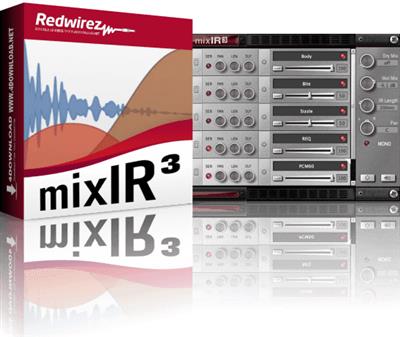
 
Redwirez mixIR3 IR Loader v1.9.0 macOS


65cd72443c906782e7558f7f43aeba54.jpeg


AwZ | 29 September 2022 | macOS | 472MB​

Sculpt your sound like never before with the new mixIR³ impulse response (IR) loader. The mixIR³ is a convolution reverb plug-in and a stand-alone Mac or Windows app.

Easily mix mics, cabinets, reverb and more with unrivaled performance. The mixIR³ allows you to stack and blend a practically unlimited number of IRs. And with our N-series and A-series mixIR³ modules you can now add classic Neve and API EQ to your IR stack.
You can even export your IR mix as a WAV or AIFF file for use in another plug-in, ampsim or hardware IR loader.
All current BIGbox libraries include both mixIR³ modules and IR WAV files. Loading up an IR module gives you an easy point-and-click way to choose a speaker, mic, position and distance.
Features
Efficient, drag-and-drop IR loader for Redwirez and 3rd-party IRs
Load Redwirez IR Modules to visually navigate and select IRs
Run one IR or up to 64 with the same unmatched performance
Zero latency for delay-free live performance
Export your IR mix to WAV or AIFF for use in an external device
No dongles! No authorization or activation scheme
Note: mixIR³ will load 3rd-party or previous generation Redwirez IRs. But, it will not display a 3D cabinet interface for 3rd-party or previous generation IRs. MixIR³ modules, included with all current BIGbox libraries, are required for a 3D cabinet interface.
Standalone App Features
Standalone app for mixing IRs without a DAW
Play guitar tracks in a loop and audition IRs
Play live through the app (low-latency on MacOS only)
Export your IR mix to WAV or AIFF for use in an external device
Modules Included
Marshall 1960A 4x12
To get you started, mixIR³ ships with our free Marshall 1960 IR module. It's loaded with Celestion G12M25 "Greenbacks" and sampled with 4 classic mics: Shure SM57, Royer R121, Sennheiser 421 and the Neumann KM84.
Redwirez REQ
Our 5-band EQ with high pass and low pass filters. Great analog-style curves. No nonsense. Use it alone or with a stack of IRs.
PCM60 Reverb
Classic PCM60 digital reverb. 12 buttons. 128 ways to make a splash with 80s-style plates and rooms.
Redwirez Giganator
Mix IRs with the Giganator to simulate the sound of high "gig" levels at bedroom listening volume. Tweak your existing IR mixes so they sound better live.
Whats new in this version
Official site does not provide any info about changes in this version.
System Requirements
Operating System
MacOS: 10.11.6 or later (64 bit); Apple Silicon is supported
Windows 7-SP1, 8.1, 10 (64 bit)
Plugin Formats
VST, AU (Audio Unit), AAX (Pro Tools)

Homepage:
Код:
https://redwirez.com/products/mixir3-ir-loader

Download link

rapidgator.net:
У Вас недостаточно прав для просмотра ссылок. Войдите или зарегистрируйтесь.


uploadgig.com:
У Вас недостаточно прав для просмотра ссылок. Войдите или зарегистрируйтесь.


nitroflare.com:
У Вас недостаточно прав для просмотра ссылок. Войдите или зарегистрируйтесь.


1dl.net:
У Вас недостаточно прав для просмотра ссылок. Войдите или зарегистрируйтесь.

 
RSS Menu 3.3.1 macOS


b70ba8b9839b772214fc2dcc9748dc6a.jpeg


File size: 11.36 MB​

RSS Menu is a systemwide menu that allows you to read and organize your favourite RSS, Atom and/or JSON feeds.

The articles are automatically updated and you will get a notification when new articles are available or when some other event occurs. In addition to visual notification, you can also enable speech notification and choose one of the many built in voices.
Key features include
• Easy to use RSS browsing with systemwide menu
• Very fast parsing engine
• Auto detects if a url has one or more feeds
• Importing and exporting of OPML files
• Many options to customize the menu
• Support for saving articles for offline reading
• Support for grouping feeds in submenus and adding separators
• Support for favourite icons (aka page icons)
• Supports RSS, Atom and JSON feeds

Supported Operation System
• macOS 10.14 or later
• Apple Silicon or Intel Core processor

Download link

rapidgator.net:
У Вас недостаточно прав для просмотра ссылок. Войдите или зарегистрируйтесь.


uploadgig.com:
У Вас недостаточно прав для просмотра ссылок. Войдите или зарегистрируйтесь.


nitroflare.com:
У Вас недостаточно прав для просмотра ссылок. Войдите или зарегистрируйтесь.


1dl.net:
У Вас недостаточно прав для просмотра ссылок. Войдите или зарегистрируйтесь.

 
start 6.0.1 macOS


7f35169dfdabd7ee3603da120fbcba5e.jpeg


File size: 14.91 MB​

innovative::bytes start is an unique launcher for macOS that allows you to open applications, documents, URLs or folders quickly and easily. Create tidiness in your Dock and start items with the smart launcher app start instead.

start supports you and your workflow with a well planned organizational system for your items and a quick access to what you need.
It's incredibly easy to use: start automatically collects all applications available with Spotlight. Further You also can add files and folders manually according to your wishes.
Start your Applications with a simple mouse click or even faster and more convenient: with a hotkey! Also use tags, colors and notes to keep track of your Applications. Enjoy the simple operation and the comfortable features of start!
## Features ##
TAGS
Tag it and love it! Use tags to create collections for your applications, frequently used folders, scripts or any other file. It has never been so easy to organize and sort items on macOS. Save a lot of time - searching was yesterday!
COMMENTS
Comments and notes! Add comments and small notes to your items to describe them in more detail. The comments will remind you what the items can do for you. Small notes with big effect - so you always keep track!
COLORS
Highlight your items as you like! With just a few clicks you can highlight your items with colors and find them even faster. Choose colors for more clarity and organization - effective and visually appealing!
HOTKEYS
Start with a simple keystroke! Assign a key combination to your individual items and open them immediately from anywhere with a customizable keyboard shortcut. Your workflow is no longer disturbed - you'll love the hotkeys!
## Requirements ##
start was developed for macOS 10.15 (and newer) and uses Spotlight internally to search for applications. For start to work, Spotlight must be enabled and also capture applications (this is the normal setting of macOS)

Supported Operation System
• macOS 10.15 or later
• Apple Silicon or Intel Core processor

Download link

rapidgator.net:
У Вас недостаточно прав для просмотра ссылок. Войдите или зарегистрируйтесь.


uploadgig.com:
У Вас недостаточно прав для просмотра ссылок. Войдите или зарегистрируйтесь.


nitroflare.com:
У Вас недостаточно прав для просмотра ссылок. Войдите или зарегистрируйтесь.


1dl.net:
У Вас недостаточно прав для просмотра ссылок. Войдите или зарегистрируйтесь.
 
Valentina Studio Pro 12.5.6 macOS


0fcf3fd58e71be2cd55baa2f63528531.jpeg


Language: Multilingual | File size: 150 MB​

Valentina Studio is the ultimate data management tool for database administrators. Valentina Studio includes a wealth of database administration tools. Valentina Studio PRO to unlock advanced data modeling tools, report design and editing and more.

The Best Database Management GUI for SQLite, MS SQL Server, MariaDB, mySQL, PostgreSQL and Valentina databases.
* Report Editor - visual editor of Valentina Reports that can be saved into Valentina Project file (.vsp). Reports can use as datasource MS SQL, MySQL, PostgreSQL, SQLite, Valentina DB, ODBC.
* Form Editor - visual editor of Valentina Forms that can be saved into Valentina Project file (.vsp). Forms can use all supported databases as the datasource.
* Data Editor - enables go to parent record function.
* Data Editor Layouts - save columns and their order as a named layout
* Data Editor Multiple Update - update few records at once.
* Data Transfer - copy data between different databases
* Diagram Editor - enables forward engineering - i.e. generation of SQL scripts for new/changed database objects.
* Dump Wizard - enables filter for tables to select them for a dump.
* Error Lookup - search for error description by its code.
* Keyboard Shortcuts - enables the ability to redefine the shortcuts and create own shortcut sets.
* Object Colors - enables marking objects with specific colors.
* Query Editor - enables the ability to copy the generated query.
* Schema Cache - save and reuse the schema cache.
* Schema Editor - copy one or few schema objects using drag&drop mechanism.
* Schema Editor - expanding and collapsing the tree items with subitems using OPTION + click
* Schema Snapshot - save and load schema in structured format.
* Source Control - develop database using any VCS.
* SQLDiff - find differences between two states of a databases and generate SQL script to move between these states.
* SQL Search - search of schema objects.
* SQL Editor - enables autocompletion for table aliases.
* SQL Editor - format SQL queries.
* SQL Editor - edit the result of SQL queries.

Supported Operation Systems
macOS 10.13 or later

Download link

rapidgator.net:
У Вас недостаточно прав для просмотра ссылок. Войдите или зарегистрируйтесь.


uploadgig.com:
У Вас недостаточно прав для просмотра ссылок. Войдите или зарегистрируйтесь.


nitroflare.com:
У Вас недостаточно прав для просмотра ссылок. Войдите или зарегистрируйтесь.


1dl.net:
У Вас недостаточно прав для просмотра ссылок. Войдите или зарегистрируйтесь.

 
Vellum 3.3.5 U2B macOS


c9ebb2ba233f4ae82bf243f5b01221ee.jpeg


File size: 89.61 MB​

Vellum - Create ebooks for every platform: Kindle, Kobo, Apple Books, and more. Each specialized file can guide readers to buy your next book in their favorite store.

Classic touches like custom drop caps and ornamental flourishes are included in both print and ebook editions.
So whether your readers prefer a paperback or a Paperwhite, they will see a beautiful, professionally-formatted book.
Use Vellum to get the most out of ebooks
⚬ Assemble box sets of a series
⚬ Produce advance copies for early feedback
⚬ Connect with links to Facebook and Twitter
⚬ Add store links and help readers buy your next book
⚬ Generate ebooks for Kindle, Apple Books, Kobo, and more
And with Vellum's instant turnaround, you can do it all on your schedule.
EVERYTHING FOR PRINT - NO SETUP REQUIRED
Created your ebook in Vellum? It's ready for print.
Page numbers. Margins. Headers. Font. Line spacing. All of the setup that can take hours elsewhere happens automatically with every book you create.
And Vellum goes beyond the basics to prevent widows, balance page spreads, and avoid short pages - all automatically. You'll have a book that looks like it took days to create .in minutes.
DESIGNED FOR BOOKS
Build
Import your manuscript and Vellum builds everything for your book, including a Title Page and Table of Contents. Need to add a Copyright page or backmatter? You can do that right in Vellum. Browse through Vellum's Book Styles to find the best match for your book. As you do so, Vellum applies your selection to every chapter (even if you add new ones). Use Vellum's Preview to see how your ebook will appear on a range of devices, and to see how your book will look in print. The Preview updates instantly and with every edit. When you're happy with your book, generate ebooks and your print edition, all at once. Every edition stays in sync, even when you need to make changes.
Style
Import your manuscript and Vellum builds everything for your book, including a Title Page and Table of Contents. Need to add a Copyright page or backmatter? You can do that right in Vellum. Browse through Vellum's Book Styles to find the best match for your book. As you do so, Vellum applies your selection to every chapter (even if you add new ones). Use Vellum's Preview to see how your ebook will appear on a range of devices, and to see how your book will look in print. The Preview updates instantly and with every edit. When you're happy with your book, generate ebooks and your print edition, all at once. Every edition stays in sync, even when you need to make changes.
Preview
Import your manuscript and Vellum builds everything for your book, including a Title Page and Table of Contents. Need to add a Copyright page or backmatter? You can do that right in Vellum. Browse through Vellum's Book Styles to find the best match for your book. As you do so, Vellum applies your selection to every chapter (even if you add new ones). Use Vellum's Preview to see how your ebook will appear on a range of devices, and to see how your book will look in print. The Preview updates instantly and with every edit. When you're happy with your book, generate ebooks and your print edition, all at once. Every edition stays in sync, even when you need to make changes.
Generate
Import your manuscript and Vellum builds everything for your book, including a Title Page and Table of Contents. Need to add a Copyright page or backmatter? You can do that right in Vellum. Browse through Vellum's Book Styles to find the best match for your book. As you do so, Vellum applies your selection to every chapter (even if you add new ones). Use Vellum's Preview to see how your ebook will appear on a range of devices, and to see how your book will look in print. The Preview updates instantly and with every edit. When you're happy with your book, generate ebooks and your print edition, all at once. Every edition stays in sync, even when you need to make changes.
Release Notes

Supported Operation System
• macOS 10.15 or later
• Apple Silicon or Intel Core processor

Download link

rapidgator.net:
У Вас недостаточно прав для просмотра ссылок. Войдите или зарегистрируйтесь.


uploadgig.com:
У Вас недостаточно прав для просмотра ссылок. Войдите или зарегистрируйтесь.


nitroflare.com:
У Вас недостаточно прав для просмотра ссылок. Войдите или зарегистрируйтесь.


1dl.net:
У Вас недостаточно прав для просмотра ссылок. Войдите или зарегистрируйтесь.
 
MyLanViewer 5.6.7 Enterprise


552fe3ec082b84848a1a978f55d1b6eb.jpeg


File size: 5.0 MB​

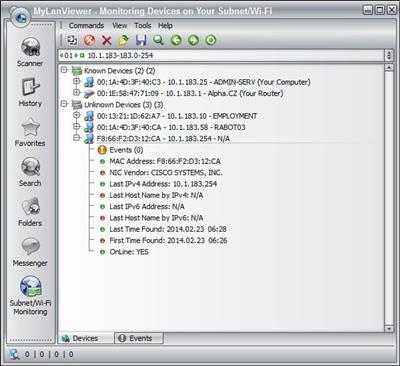
MyLanViewer is a simple LAN scanner for your home network. It displays your network computers an easy to read, buddy-list style window that provides the machine names, IP addresses, MAC addresses, shared resources and other technical details for each computer. You can also view and access shared folders, terminate user sessions and disable shared resources. Easy to install and use, has friendly and beautiful interface.

MyLanViewer Network/IP Scanner is a powerful Netbios and LAN/Network IP address scanner for Windows, whois and traceroute tool, remote shutdown and Wake On LAN (WOL) manager, wireless network scanner and monitor. This application will help you find all IP addresses, MAC addresses and shared folders of computers on your wired or wireless (Wi-Fi) network. The program scans network and displays your network computers in an easy to read, buddy-list style window that provides the computer name, IP address, MAC address, NIC vendor, OS version, logged users, shared folders and other technical details for each computer. MyLanViewer Network/IP Scanner supports remote shutdown, wake-on-lan, lock workstation, log off, sleep, hibernate, reboot and power off. It is able to monitor IP address and show notifications when the states of some computers change. MyLanViewer Network/IP Scanner can also view and access shared folders, terminate user sessions, disable shared folders, show netstat information and detect rogue DHCP servers. The software can monitor all devices (even hidden) on your subnet, and show notifications when the new devices will be found (for example, to know who is connected to your WiFi router or wireless network). The program easy to install and use, and has a user-friendly and beautiful interface.
Whats New
Updates: official site does not provide any info about changes in this version.

Homepage:
Код:
http://www.mylanviewer.com

Download link

rapidgator.net:
У Вас недостаточно прав для просмотра ссылок. Войдите или зарегистрируйтесь.


uploadgig.com:
У Вас недостаточно прав для просмотра ссылок. Войдите или зарегистрируйтесь.


nitroflare.com:
У Вас недостаточно прав для просмотра ссылок. Войдите или зарегистрируйтесь.


1dl.net:
У Вас недостаточно прав для просмотра ссылок. Войдите или зарегистрируйтесь.
 
MyLanViewer 5.6.7 Enterprise Portable


963e5f5658a1cce3b400ea9ddaeb4409.jpeg


File size: 37 MB​

MyLanViewer is a simple LAN scanner for your home network. It displays your network computers an easy to read, buddy-list style window that provides the machine names, IP addresses, MAC addresses, shared resources and other technical details for each computer. You can also view and access shared folders, terminate user sessions and disable shared resources. Easy to install and use, has friendly and beautiful interface.

MyLanViewer Network/IP Scanner is a powerful Netbios and LAN/Network IP address scanner for Windows, whois and traceroute tool, remote shutdown and Wake On LAN (WOL) manager, wireless network scanner and monitor. This application will help you find all IP addresses, MAC addresses and shared folders of computers on your wired or wireless (Wi-Fi) network. The program scans network and displays your network computers in an easy to read, buddy-list style window that provides the computer name, IP address, MAC address, NIC vendor, OS version, logged users, shared folders and other technical details for each computer. MyLanViewer Network/IP Scanner supports remote shutdown, wake-on-lan, lock workstation, log off, sleep, hibernate, reboot and power off. It is able to monitor IP address and show notifications when the states of some computers change. MyLanViewer Network/IP Scanner can also view and access shared folders, terminate user sessions, disable shared folders, show netstat information and detect rogue DHCP servers. The software can monitor all devices (even hidden) on your subnet, and show notifications when the new devices will be found (for example, to know who is connected to your WiFi router or wireless network). The program easy to install and use, and has a user-friendly and beautiful interface.
Release Notes
official site does not provide any info about changes in this version.

Homepage:
Код:
http://www.mylanviewer.com

Download link

rapidgator.net:
У Вас недостаточно прав для просмотра ссылок. Войдите или зарегистрируйтесь.


uploadgig.com:
У Вас недостаточно прав для просмотра ссылок. Войдите или зарегистрируйтесь.


nitroflare.com:
У Вас недостаточно прав для просмотра ссылок. Войдите или зарегистрируйтесь.


1dl.net:
У Вас недостаточно прав для просмотра ссылок. Войдите или зарегистрируйтесь.

 
Notepad++ 8.4.6 Multilingual


5719e133e1a8f6d6cd0e9f20cb5768d1.jpeg


File Size : 8.5 Mb​

Notepad++ has all the same great features of Notepad++ including support for multiple languages and an extensive plugin system, but there's nothing to install.

Syntax Highlighting and Syntax Folding
Supported languages
C C++ Java C# XML HTML
PHP CSS makefile ASCII art (.nfo) doxygen ini file
batch file Javascript ASP VB/VBS SQL Objective-C
RC resource file Pascal Perl Python Lua TeX
TCL Assembler Ruby Lisp Scheme Properties
Diff Smalltalk Postscript VHDL Ada Caml
AutoIt KiXtart Matlab Verilog Haskell InnoSetup
CMake YAML WYSIWYG
If you have a colour printer, print your source code (or whatever you want) in colour.
User Defined Syntax Highlighting
It allows user to define his own language : not only the syntax highlighting keywords, but also the syntax folding keywords, comment keywords and the operators. ( screenshot1, screenshot2, screenshot3, screenshot4 ).
Auto-completion
For most supported languages, user can make his/her own API list (or download the api files from dowload section). Once the api file is ready, type Ctrl+Space to launch this action (see screenshot). For more information about Auto-completion, please see Auto-completion HOWTO.
Multi-Document
You can edit several documents at the same time.
Multi-View
You have two views at same time. That means you can visualize (edit) 2 different documents at the same time (screenshot). You can visualize (edit) in the 2 views one document at 2 different positions as well. The modification of document in one view will carry out in another view (i.e. you modify the SAME document when you are in clone mode).
Regular Expression Search/Replace supported
You can search and replace one string in the document by using the regular expression.
Full Drag 'N' Drop supported
You can open a document by drag & drop. You can also move your document from a position (or even a view) to another by drag & drop.
Dynamic position of Views
The user can set the position of the views dynamically (only in 2 views mode : the splitter can be set in horizontal or in vertical), see screenshot.
File Status Auto-detection
If you modify or delete a file which opened in Notepad++, you will be notified to update your document (reload the file or remove the file).
Zoom in and zoom out
That's another fantastic function of Scintilla component. Just see screenshot.
Multi-Language environment supported
The Chinese, Japanese, Korean, Arabic and Hebrew Windows environments are supported. See Notepad++ under the Chinese Windows , under the Arabic Windows and under the Hebrew Windows in action screenshot.
Bookmark
User can just click on the bookmark margin (located right side of line number margin) or type Ctrl+F2 to toggle a book mark. To reach the bookmark, type just F2 (Next bookmark) or Shift+F2 (Previous bookmark). To clear all bookmarks, click the Menu Search->Clear All bookmarks. See screenshot.
Brace and Indent guideline Highlighting
When the caret stay beside of one of those symbol { }[ ] ( ) , the symbol beside of caret and its symmetric opposite symbol will be highlighted, as well as the indent guideline (if any) in order to locate the block more easily. See screenshot1, screenshot2 .
Macro recording and playback
You can save several macros and edit their keyboard shorcuts for the next use.

Homepage:
Код:
https://notepad-plus-plus.org

Download link

rapidgator.net:
У Вас недостаточно прав для просмотра ссылок. Войдите или зарегистрируйтесь.


uploadgig.com:
У Вас недостаточно прав для просмотра ссылок. Войдите или зарегистрируйтесь.


nitroflare.com:
У Вас недостаточно прав для просмотра ссылок. Войдите или зарегистрируйтесь.


1dl.net:
У Вас недостаточно прав для просмотра ссылок. Войдите или зарегистрируйтесь.
 
NoxPlayer 7.0.3.7 Multilingual


9f8c9d0ac050921d051ec2c1857cdc95.jpeg


File size: 569 MB​

NoxPlayer is the best free Android emulator leading in technology and performance. It brings the best experience for users to play Android games and apps on Windows. NoxPlayer is stable, efficient and powerful. It ensures the fast response - bigger screen, easier operation. This app has some useful settings, including options to change your screen resolutions and other. You can root and access blocked features on your android using iRoot for PC.

This app player gives the access to many games that you can control easily using different assistive utilities. You can use the mouse, keyboard or gamepad to play, giving us better control of plays. Full use of the keyboard proved especially handy when playing action role play games.
In addition, NoxPlayer also has support for several input/output devices - apart from the standard mouse and keyboard support, it also has compatibility for gamepads and controllers. The camera and microphone integration are basic functions. Also you can also map the WASD key to control your character in the game, and you can set other keys to release skills or take shots.
The multiplayer mode is an innovative feature which makes it possible for users to run several NoxPlayer window at the same time. Each window could run a different app/game. So instead of pushing other apps to the background, user can switch between them with ease on the same computer screen. This is like having several phones for real-time multi-tasking.
Features
Google Play store is already integrated, so no need to download or integrate it again
Just with a click, you can open unlimited multiplayer windows
No need to download APKs if you already have it in your PC. Just drag and drop them into Nox App Player and go for it
Customizing CPU, RAM and resolution are now possible with NoxPlayer. Bluestacks still doesn't give this option.
You can easily backup the Nox data in your computer itself
Has a button to On/Off the root mode
Capture a picture in Nox and it will be automatically saved in your PC
Now record videos of whatever you want in this emulator
Operation tips also added to navigate users in a right way
Nox App Player allows you to customize the sidebar options as well

Homepage:
Код:
http://en.bignox.com/

Download link

rapidgator.net:
У Вас недостаточно прав для просмотра ссылок. Войдите или зарегистрируйтесь.

uploadgig.com:
У Вас недостаточно прав для просмотра ссылок. Войдите или зарегистрируйтесь.


nitroflare.com:
У Вас недостаточно прав для просмотра ссылок. Войдите или зарегистрируйтесь.


1dl.net:
У Вас недостаточно прав для просмотра ссылок. Войдите или зарегистрируйтесь.

 
PDF Shaper Premium / Professional 12.6 Multilingual


39d01e80330a3d8fe2b457a050d6ba00.jpeg


Windows x86 | File size: 20.08 MB / 30.04 MB​

PDF Shaper - a program to convert PDF-files to different formats. Unlike similar programs, this product has a very simple and intuitive interface, not overloaded with unnecessary features and options - just choose the file to convert and save path. Functionality of the program also provides batch conversion, which will be useful when working with multi-page PDF documents.

PDF Shaper is a powerful and free PDF software, which offers a collection of PDF tools and utilities to modify and optimize your PDF documents and its content. With PDF Shaper you can easily split and merge any PDF documents, extract text and graphics from PDF files, encrypt / decrypt document with password and change users permissions, convert images to PDF or PDF to images, convert Word DOC / DOCX to PDF documents.
Key features
• Convert PDF to various formats and vice versa - DOC, TXT, images, scanned PDF
• Merge, split, rename documents and add watermarks using text or images
• Remove individual elements from PDF - images, bookmarks, annotations, text
• Protect PDF with password, add digital signatures and usage restrictions
• Work with pages or page ranges - rotate, crop, extract, move, insert or delete
• Common PDF utilities - rename files, extract text and images, edit metadata
Features
PDF Shaper makes it easy to tailor the content of PDF files. Users can split PDF files into smaller PDFs, extract or delete individual pages, and encrypt and decrypt files. It's just as simple to merge multiple PDF files into a larger file. The software rotates, crops, and normalizes pages, individually or in batch mode. It's simple to convert a PDF file's text to the popular Microsoft Word RTF format, or to convert DOC files to PDF files. Similarly, the software converts PDF pages to standalone images, and vice versa.
Key Benefits
PDF Shaper's clean, intuitive interface allows users to become productive in just a few minutes. PDF Shaper is optimized for high-DPI monitors and low CPU resource usage, even during the CPU-intensive conversion operations. The software runs under Windows XP, Vista, 7, 8, 8.1, 10 (32 and 64 bits).
Advanced Tools
With its emphasis on security and privacy, PDF Shaper lets users update or remove PDF metadata fields such as author, title, and dates. PDF files can be encrypted with owner and user passwords. In addition, the software can protect content, set user access permissions, sign PDF files, and decrypt previously encrypted files.

Homepage:
Код:
https://www.pdfshaper.com/

Download link

rapidgator.net:
У Вас недостаточно прав для просмотра ссылок. Войдите или зарегистрируйтесь.

У Вас недостаточно прав для просмотра ссылок. Войдите или зарегистрируйтесь.


uploadgig.com:
У Вас недостаточно прав для просмотра ссылок. Войдите или зарегистрируйтесь.

У Вас недостаточно прав для просмотра ссылок. Войдите или зарегистрируйтесь.


nitroflare.com:
У Вас недостаточно прав для просмотра ссылок. Войдите или зарегистрируйтесь.

У Вас недостаточно прав для просмотра ссылок. Войдите или зарегистрируйтесь.


1dl.net:
У Вас недостаточно прав для просмотра ссылок. Войдите или зарегистрируйтесь.

У Вас недостаточно прав для просмотра ссылок. Войдите или зарегистрируйтесь.
 
Plex Media Server 1.29.0.6244


d000902a54540deb61380f433fa4acd3.jpeg


File Size : 97.1 Mb​

Plex Media Server is an application that allows you to make your PC media server. After installing the program and make the necessary settings, you'll be able to access multimedia files with other computer devices. It is very convenient, for example, if you have several computers at home and want to listen to music or watch a movie, being on another PC. There is no need to transfer files with an external drive. When using Plex Media Server, access to all available information is provided directly.

The program has a nice user interface, which also affects the convenience of its use. a separate folder can be selected for each type of media content to which will have access to other members of your small network. Configure all necessary configuration is performed via a web interface. In addition, special plug-ins can be supplied if you wish, you can connect to a computer anywhere in the world using the internet. The application is cross-platform - runs on the operating systems Windows, Linux, Mac OS and Android.
Key Features
available for different platforms;
It allows access to the contents of the computer, not only over a local network, but also via the Internet;
It makes it easy to view videos stored on your computer hard drive with SMART TV;
It has an attractive user interface.
Whats New
NEW
(HTTP) Added additional startup state notifications
(macOS) Plex Media Server now requires macOS 10.11 or newer to run.
FIXES
(Auto Update) Old update files are now cleaned up upon server start.
(DVR) EPG data might be lost for new recordings
(DVR) Plex Tuner Service might become unresponsive in certain complex scenarios
(DVR) Sport events recording by team might not be shown in DVR schedule
(Downloads) Corrected a case where played downloaded media was not marked as played on server
(Photos) Photos could get reprocessed for geolocation unnecessarily
(Playback) Corrected playback decisions where metadata contained multiple medias and only some could be direct played or downloaded
(Scanner) Improvements to episode matching logic

Homepage:
Код:
https://www.plex.tv

Download link

rapidgator.net:
У Вас недостаточно прав для просмотра ссылок. Войдите или зарегистрируйтесь.


uploadgig.com:
У Вас недостаточно прав для просмотра ссылок. Войдите или зарегистрируйтесь.


nitroflare.com:
У Вас недостаточно прав для просмотра ссылок. Войдите или зарегистрируйтесь.


1dl.net:
У Вас недостаточно прав для просмотра ссылок. Войдите или зарегистрируйтесь.
 
Назад
Сверху