






• Форум работает в архивном режиме www.old.nado.in

All mitsumi'1s Applications !! (updated daily)

  • Автор темы Автор темы mitsumi1
  • Дата начала Дата начала
Any Video Downloader Pro 7.32.0

39d65652dfad56e8f213817e17193840.jpeg


File size: 37.4 MB​

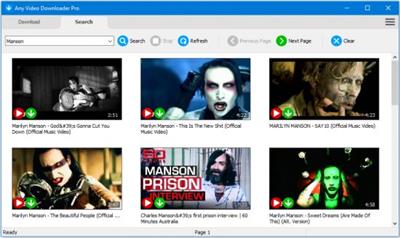
Any Video Downloader Pro, formerly known as HD Video Downloader Pro, is a Windows app to help you download videos from YouTube, Facebook, Dailymotion, and thousands of other video sharing sites. It accelerates your downloads by up to 5 times.

Features
• Download videos from YouTube and thousands of other video sharing sites
Any Video Downloader Pro can download videos from YouTube, Facebook, Dailymotion, Vimeo, and thousands of other video sharing sites.
• Download HD videos from video sharing sites
You can download 720p, 1080p, 2K, 4K, 5K, 8K, and 3D videos from YouTube if they are available.
• Speed up your downloads
Any Video Downloader Pro features a multi-threaded acceleration engine that can boost your download speeds by up to 500% faster.
• Download multiple videos at a time
Any Video Downloader Pro supports simultaneous downloads. It allows you to download more than one video at a time.
• Pause and resume downloads
Any Video Downloader Pro allows you to pause and resume your downloads if you need more connection to perform other important tasks.
• Preview videos while downloading
While downloading, you can click the Preview button to play the incomplete file and make sure the content you are downloading is really the content of your choice.
• Download whole playlist from YouTube
Just enter a YouTube playlist link or ID, Any Video Downloader Pro will download all or part of videos in the playlist from YouTube for you.
• Download only audio stream from YouTube
Any Video Downloader Pro can download only audio stream from YouTube, without downloading the entire video file. The audio stream is small, so you can download it in just a few seconds.
• Convert and optimize downloaded videos
Any Video Downloader Pro can convert and optimize downloaded videos to any format for any device, so you can watch them on your PC, iPhone, iPad, Android phone, and other portable devices. It supports MP4, FLV, WMV, MOV, AVI, MPG, VOB, M4V, ASF, MKV, WEBM, 3GP, etc.
• Video to MP3
Any Video Downloader Pro allows you to extract audio stream from video file and save it as MP3, WAV, WMA, AC3, AAC, OGG, M4A, ringtone, or other audio format.
• Any Video Converter
Any Video Downloader Pro includes a powerful video and audio converter for converting your disk video/audio files to any format you wish so that they are playable on your mobile device.
• Ready-made presets
Any Video Downloader Pro provides ready-made presets for all popular video and audio formats. You can also custom output video/audio format settings.
• iTunes compatible
Optionally, Any Video Downloader Pro adds downloaded video/music to your iTunes library automatically, so you can easily synchronize your videos and music to your iPhone, iPad, iPod.
• Support drag-and-drop
You can directly drag and drop a video link from your web browser to the drop box or the main window of the program. You don't even need to copy and paste video link manually.
• Search for videos on the web
Any Video Downloader Pro has a built-in video search engine. You can easily search for videos on the web within the program and download any video with just one click.
What's new
• official site does not provide any info about changes in this version

Download link

rapidgator.net:
У Вас недостаточно прав для просмотра ссылок. Войдите или зарегистрируйтесь.


uploadgig.com:
У Вас недостаточно прав для просмотра ссылок. Войдите или зарегистрируйтесь.


1dl.net:
У Вас недостаточно прав для просмотра ссылок. Войдите или зарегистрируйтесь.


nitroflare.com:
У Вас недостаточно прав для просмотра ссылок. Войдите или зарегистрируйтесь.
 
AviDemux 2.8.1 (x64) Multilingual


66926be7b674a485c570a7177ee0f20b.jpeg


File Size : 38 Mb​

Avidemux is a free, open source cross-platform video editor for Microsoft Windows, Linux, Mac OS X, and BSD. It is written in C++, and you can use it for various tasks such as encoding (convert videos from one format to another), cutting (cut individual portions from a recording) or filtering (resize, deinterlacing, add subtitles, color correction, etc.). Avidemux offers built-in support for many popular codecs and files: AVI, MP4, ASF, DVD, MPEG, MKV. It is one of the best free video editors whenever you need to automate video processing or editing process. The software is released under the GNU GPL license and has been released (binaries) in both 32-bit and 64-bit versions.

Features
- support for non-linear video editing, visual effects, and transcoding
- support for muxing (multiplexing) and demuxing
- support for popular subtitle formats: SUB, SSA, ASS, SRT
- has powerful scripting capabilities (tutorial available here)
- multiple filtering options: auto-resize, gauss smoothing, deinterlacing, chroma shifts, add black borders, etc.
- comes with a GUI (graphical user interface) and command line interface
- various output formats supported: MKV, Flash, AVI, MPEG-1/2, OGM, MP4, etc.
- built-in video encoders for: MPEG-1, MPEG-2, FFHuffYUV, FFV1, H.263, H.263+, HuffYUV, MJPEG, MPEG-4, Snow, x264, x264, Xvid, Y800
- built-in audio encoders for MPEG-1 Layer 3 (MP3), Vorbis, AAC, MPEG-1 layer 2 (MP2), AC-3, MPEG-1 layer 2 (MP2), Microsoft RIFF WAV PCM, LPCM

Download link

rapidgator.net:
У Вас недостаточно прав для просмотра ссылок. Войдите или зарегистрируйтесь.


uploadgig.com:
У Вас недостаточно прав для просмотра ссылок. Войдите или зарегистрируйтесь.


1dl.net:
У Вас недостаточно прав для просмотра ссылок. Войдите или зарегистрируйтесь.


nitroflare.com:
У Вас недостаточно прав для просмотра ссылок. Войдите или зарегистрируйтесь.

 
CyberLink YouCam 10.1.2105.0


1282316b297e3b579bb9fad1c9289184.jpeg


Languages: Multilingual
File Size: 379.61 MB
​

Video Calls, Upscaled. The Most Advanced Webcam Software for Streamers, Businesses, or Anyone in Between. Enjoy complete privacy in your video calls, no matter where you are. Apply customizable natural-looking makeup in real time. Add customizable titles and images to Twitch, Facebook Live, or YouTube Live. Showcase channel logos, advertisements, promotional messages, or sponsorships.

Replace or Blur Backgrounds
Enjoy complete privacy in your video calls, no matter where you are.
Look Sharp With Live Makeup
Apply customizable natural-looking makeup in real time.
Live-Stream, Record & Enhance Content
Add customizable titles and images to Twitch, Facebook Live, or YouTube Live. Showcase channel logos, advertisements, promotional messages, or sponsorships.
Real-Time Video Effects
Add studio-quality effects and overlays like filters, stickers, and emojis with ease.
Take Center Stage With Auto Zoom Face Tracking
Stay perfectly positioned, no matter where your webcam is placed.
Get the Most Out of Your Battery Charge
With significantly less power consumption and GPU/CPU usage than competitors.
Release Notes
- Enhances the program's compatibility when it launches with high DPI display configuration on Windows desktops.
- Adds support for multiple file selection when importing custom background images.
- Minor bug fixes and UX improvements.

System Requirements
- Microsoft Windows 11, 10, 8/8.1, 7 (64 bit OS only).
- Intel Core™ i5 or AMD Ryzen™ Series
- For Background Blur, Intel 6th Gen Core i5 and above is recommended
- Intel® HD Graphics
- For 720p video or above, H.264/AVC Hardware Acceleration support is required
- For Background Blur, Direct3D 9.3 support is required
- 8GB Memory
- 1GB space for product installation
- 1024 X 768 pixels, 16-bit color
- Web camera (built-in or external USB)
Supported Languages
- English
- French
- German
- Italian
- Spanish (European)
- Chinese Simplified
- Chinese Traditional
- Japanese
- Korean

Homepage:

Код:
https://www.cyberlink.com

Download link

rapidgator.net:
У Вас недостаточно прав для просмотра ссылок. Войдите или зарегистрируйтесь.


uploadgig.com:
У Вас недостаточно прав для просмотра ссылок. Войдите или зарегистрируйтесь.


1dl.net:
У Вас недостаточно прав для просмотра ссылок. Войдите или зарегистрируйтесь.


nitroflare.com:
У Вас недостаточно прав для просмотра ссылок. Войдите или зарегистрируйтесь.

 
Dropbox 157.4.4808


523d91cd80a0374fcf49153a60f9b236.jpeg


File Size : 166 Mb​

Dropbox is a free service that lets you bring all your videos, photos and docs anywhere and share them easily. This means that any file you save to your Dropbox will automatically save to all your computers, phones and even the Dropbox website. The program also makes it super easy to share with others, whether you're a student or professional, parent or grandparent. Even if you accidentally spill a latte on your laptop, have no fear! You can relax knowing that Dropbox always has you covered, and none of your stuff will ever be lost. The application works just like any other folder on your computer, but with a few differences. Any files or folders inside Dropbox will get synchronized to Dropbox's servers and any other computer linked to your account.

Features
Synchronization
Once installed, any file you drop into your Dropbox folder will synchronize and be available on any other computer you've installed Dropbox on, as well as from the web. Also, any changes you make to files in your Dropbox will sync to your other computers, instantly.
Backup
Let's say you accidentally delete that 8 page report that you were supposed to have for a meeting tomorrow. A handy Dropbox feature is the ability to undelete files or pull up any previous versions of it.
Sharing
You can also share files and folders with whomever you choose, whether it be music with buddies, docs with colleagues or photos with grandma, even if they're not Dropbox users.
Speed
We obsess over speed, and it shows. Dropbox is very smart about the way it handles files. For example, if you make a change to a huge file, dropbox will only update the piece of the file that changed.
Security
All files are transported over SSL and encrypted using AES-256 (banks use this too)

Download link

rapidgator.net:
У Вас недостаточно прав для просмотра ссылок. Войдите или зарегистрируйтесь.


uploadgig.com:
У Вас недостаточно прав для просмотра ссылок. Войдите или зарегистрируйтесь.


1dl.net:
У Вас недостаточно прав для просмотра ссылок. Войдите или зарегистрируйтесь.


nitroflare.com:
У Вас недостаточно прав для просмотра ссылок. Войдите или зарегистрируйтесь.
 
e-World Tech PHPMaker 2023.0


21dc084f05f5d22fb2681228e7709037.jpeg


File size: 57.3 MB​

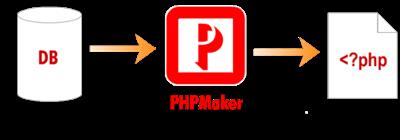
PHPMaker is a powerful automation tool that can generate a full set of PHP scripts quickly from MySQL, PostgreSQL, Microsoft SQL Server, Oracle and SQLite databases. Using PHPMaker you can instantly create web sites that allow users to view, edit, search, add and delete records on the web. PHPMaker can also create summary reports, crosstabs reports, calendar reports and dashboards with JavaScript (HTML5) charts (column, bar, line, pie, area, doughnut, multi-series and stacked chart) to summarize and visualize your data.

PHPMaker is designed for high flexibility and has numerous options for generating PHP applications that best suits your needs. The generated code is clean, straightforward and easy-to-customize. The PHP scripts can be run on Windows servers or Linux servers. PHPMaker can save you tons of time and is suitable for both beginners and experienced developers alike.
Supports 5 database types
MySQL, PostgreSQL, Microsoft SQL Server, Oracle, SQLite, on Linux or Windows web server
Support encryption connection with MySQL/PostgreSQL
URL connection script to simulate direct connection with MySQL/PostgreSQL
Multi-Column List Page - Table/Cards Views
Multi-column cards by Bootstrap Cards
Responsive multi-column layout
Improved list options button and 4 positions (top/bottom-left/right)
Switchable between regular table view and cards view by Ajax
Support Custom Template in both views
Support Bootstrap card-* classes

Download link

rapidgator.net:
У Вас недостаточно прав для просмотра ссылок. Войдите или зарегистрируйтесь.


uploadgig.com:
У Вас недостаточно прав для просмотра ссылок. Войдите или зарегистрируйтесь.


1dl.net:
У Вас недостаточно прав для просмотра ссылок. Войдите или зарегистрируйтесь.


nitroflare.com:
У Вас недостаточно прав для просмотра ссылок. Войдите или зарегистрируйтесь.
 
IDimager Photo Supreme 7.3.1.4525 (x64) Multilingual


a709f4208fd57d22eaa3c8f5fda6a851.jpeg


File size: 58.3 MB​

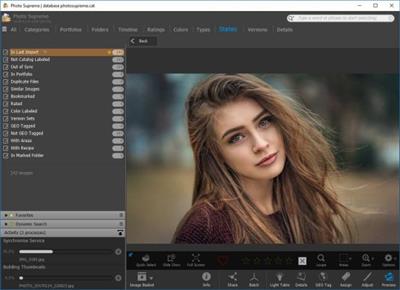
Do you own a digital camera? Then in no time you will have thousands of images on your computer, and finding that one image you are looking for will become a chore. But Photo Supreme can change all that. Whether you have 1,000 or 500,000 images in your archive, Photo Supreme's integrated photo cataloging and photo management features will help you quickly find and work with your desired image.

Extremely powerful yet easy-to-use
From the ground up, Photo Supreme was developed with easy-of-use as the primary focus. We were able to pack most of the features requested by our user base into a user interface that is clean and efficient, yet extremely powerful.
Photo Supreme comes with every essential image management feature you'll need to bring structure in your image archive. Assigning catalog labels, importing images to your computer, search features, etc. And once you have your images cataloged then you'll be able to find that one image you need within seconds to then view, duplicate, email, share on your favorite photo site, upload it to your FTP server, or edit it in your favorite photo editor.
Integrates with your favorite tools
Photo Supreme makes integration with your favorite photo editing tools seaminglessly. At installation it will automatically find and add the most common used image editing tools to the user interface.
Simply select an image and click on the application icon to start editing your image.
Unparalleled Speed
Digital Asset Management software uses a catalog database and should be optimized to work with thousands of images in the database. We took this seriously and were able to get the speed up, there where it belongs. Searches will return results in just milliseconds.
Always take your images with you
With Photo Supreme you can store previews of your images inside the database. Then, even if your images are physically located on your network, they travel with you. The previews can be stored in the size that you prefer, from small to large ones, up to 1680 pixels
Open architecture
Right from the start, Photo Supreme was designed with an open cataloging architecture in mind. Because existing industry standards are used to store its data, you can extract your information at any time, even without our software. Should you ever decide to switch applications (although once you've tried Photo Supreme, you'll never go back!), you won't have to repeat the time consuming operation of re-cataloging your data. After all, it is YOUR data, not the application's data!
Share with friends and family
Photo Supreme easily interfaces to public photo sharing sites like Facebook, Flickr, PicasaWeb, Zenfolio, or SmugMug. Resize or rename your images as you upload them to your on-line account without having to prepare them first. Also, add or remove your metadata, convert color space, or add your personal signature to your uploaded images.
Get started right away
If you already use some sort of image collection tool then Photo Supreme can help you get your existing data into Photo Supreme, saving you lots of time. There are import feature available for iPhoto™, Aperture™, Lightroom™ 3 and 4, iMatch™, and FotoTime™. At the same time, PSU is able to read and import meta-data that was written with XMP supporting tools, including Adobe products, Nikon software, iView™, MediaPro™.
Vocabularies
In addition there are import features to support market standard vocabularies, including David Rieck's ControlledVocabulary™, UltraTAG™, Lightroom™-Keyword Files, or any other tool that supports exporting to Formatted Vocabulary Files.
Main Features & Highlights
Advanced search capabilities
Multi Tab Browsing
Import/Ingest images
Side-by-Side comparison (up to 6 images)
Keyword tagging
Advanced GEO Tagging
Image organization in portfolios
Duplicate Detection
Share images with Flickr, Smugmug, Zenfolio, Picasaweb, FTP, EMail
Dual Monitor Support
Creative Commons support
Face Detection
Area Tagging
Extensible metadata with Custom Fields
Take your previews with you while travelling
Color Managed
Lossless Image Editing
Fully Scriptable
Available for Windows and MacOSX platform
Multi-User network/server version available for PostgreSQL and SQLServer (Server Edition)
English, German, French, Italian, Dutch, Portuguese, and Russian locale

Download link

rapidgator.net:
У Вас недостаточно прав для просмотра ссылок. Войдите или зарегистрируйтесь.


uploadgig.com:
У Вас недостаточно прав для просмотра ссылок. Войдите или зарегистрируйтесь.


1dl.net:
У Вас недостаточно прав для просмотра ссылок. Войдите или зарегистрируйтесь.


nitroflare.com:
У Вас недостаточно прав для просмотра ссылок. Войдите или зарегистрируйтесь.
 
Intertia Sound Systems Granulizer 2 v2.3.0


c5cbcf86e5b450a1b648f5d728145537.jpeg


Team NeBULA | 18 September 2022 | 181MB

Granular synthesis from the future.
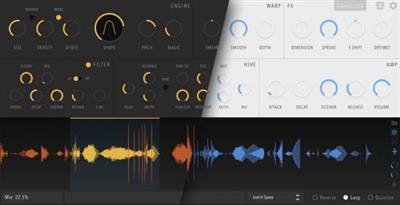
GRANULIZER 2 is a granular synthesis software synthesizer intended for creative sound design.​

It features a very versatile DSP engine that is able to deliver a wide sound palette, with sounds varying from metallic crunch and grainy fuzziness to smooth reverb-like tones, spectral widening or chaotic soundscapes.
Features
High quality audio engine that performs time-stretching, pitch-shifting, granular resynthesis and spectrum manipulation
Diffusion effect for wide droney sounds (think spectral reverb)
Spectral Shaping
Frequency shifter for atonal variations
Grain warping
Control over subtle randomization of certain internal parameters ("Magic" knob)
High quality diffusion delay effect for droney soundscapes
Waveform view with loop selection, zoom in / out
A portable and intuitive preset system
Explanatory on-screen tooltips on mouse hover over the parameters.
Minimal, clean UI
Whats new in this version
Official site does not provide any info about changes in this version.
System Requirements
Windows 10 x64: VST / VST3

Download link

rapidgator.net:
У Вас недостаточно прав для просмотра ссылок. Войдите или зарегистрируйтесь.


uploadgig.com:
У Вас недостаточно прав для просмотра ссылок. Войдите или зарегистрируйтесь.


1dl.net:
У Вас недостаточно прав для просмотра ссылок. Войдите или зарегистрируйтесь.


nitroflare.com:
У Вас недостаточно прав для просмотра ссылок. Войдите или зарегистрируйтесь.

 
iZotope Nectar Plus 3.8.0 (x64)


1ac75534762175591a1dade80b956040.jpeg


File Size: 91.6 MB​

Introducing Nectar 3, the most sophisticated set of tools designed for mixing vocals. Address every part of your vocal chain and get professional-sounding vocals in seconds.

First introduced in 2010, Nectar has found a space in studios all over the globe, offering world-class processing designed to get to a professional result in seconds. With version 3, Nectar helps your vocal tracks sing by addressing each part of the vocal production chain, offering invaluable machine-learning features, innovative new signal processing, and communication across your session.
The pinnacle of audio plug-in design
Every module in Nectar 3 has been redesigned with your time and experience in mind. With new ways to interact with key module settings, a resizable interface, exciting metering animations, and new contextual selection settings, it's a visual experience so smooth, you won't want to go back to knobs and faders.
Vocal Assistant
Like an extra pair of trusted ears, Vocal Assistant listens to your audio and gets you started by detecting and auto-adjusting level inconsistencies, identifying resonant peaks, timbre variations, and harsh frequencies. Vocal Assistant will intelligently set EQ nodes, analyze dynamics and set suggested compression settings, remove pesky sibilants, create space, ambience, and more. Once you've arrived at an optimal starting point, add your personal touch and tweak settings to taste.
Unmask
Unmask directly communicates with the rest of your mix to place your vocal at the forefront by moving other mix elements out of the way. Through inter-plugin communication, Unmask will communicate with any instance of Nectar 3, Neutron 2 Advanced (available separately), or iZotope Relay (included with Nectar 3) to create the perfect nest for your vocal.
iZotope has partnered with Celemony to include Melodyne 4 essential, giving you surgical, intuitive, and truly transparent pitch adjustment capabilities that are an industry standard in professional studios around the world. Nectar 3 is also bundled with iZotope RX Breath Control, which can intelligently detect breaths in dialogue or vocal recordings and automatically suppress them.
What's New
official site does not provide any info about changes in this version.

Download link

rapidgator.net:
У Вас недостаточно прав для просмотра ссылок. Войдите или зарегистрируйтесь.


uploadgig.com:
У Вас недостаточно прав для просмотра ссылок. Войдите или зарегистрируйтесь.


1dl.net:
У Вас недостаточно прав для просмотра ссылок. Войдите или зарегистрируйтесь.


nitroflare.com:
У Вас недостаточно прав для просмотра ссылок. Войдите или зарегистрируйтесь.
 
LRTimelapse Pro 6.1.2 (x64) Multilingual


b2e9e90852de411e6b2d05fd0ed57b60.jpeg


File size: 128.1 MB​

LRTimelapse provides the most comprehensive solution for time lapse editing, keyframing, grading and rendering. No matter if on Windows or Mac, or which camera you use: LRTimelapse will take your time lapse results to the next level.

Keyframe and grade timelapse sequences in an all-raw-file-based workflow, together with Lightroom Classic.
Animate and keyframe more than 400 Lightroom tools.
Create perfect Day-to-Night and Night-to-Day timelapse transitions with the Holy-Grail-Wizard.
Smoothen your timelapses with the lossless Multi-Pass-Visual Deflicker and the special LRT Motion Blur blending technology.
Supports any camera that is supported by Lightroom.
Render the final clips in different formats like MP4/H.264 and H.265/HEVC and also professional formats like Prores and DNxHR.
Render in resolutions up to 8K and beyond.
Best possible color rendition due to lossless Raw to Rec.2020 color transfer in a fully color managed workflow.
Special workflow for Long Term / Construction Timelapses.
Powerful batch capabilities to edit and render multiple timelapses as fast as possible.
LRTimelapse is being used by the majority of timelapse photographers all over the world (see some outstanding work by LRTimelapse users on the demo page), because it enables them to use their favorite photographic tools (Lightroom Classic or Adobe Camera RAW) to produce time lapses with all the advantages and power that those tools offer for image editing.

Download link

rapidgator.net:
У Вас недостаточно прав для просмотра ссылок. Войдите или зарегистрируйтесь.


uploadgig.com:
У Вас недостаточно прав для просмотра ссылок. Войдите или зарегистрируйтесь.


1dl.net:
У Вас недостаточно прав для просмотра ссылок. Войдите или зарегистрируйтесь.


nitroflare.com:
У Вас недостаточно прав для просмотра ссылок. Войдите или зарегистрируйтесь.
 
Lucion FileCenter Suite 11.0.49.3


34c501eb88527ba836d419b1d90decf8.jpeg


File size: 287 MB​

FileCenter is a complex software application, designed specifically in order to help individuals organize documents and directories from their hard drive, as well as manage their cloud from the desktop.

A filing system that makes sense. Organize your files in electronic filing cabinets that are intuitive and easy to understand.
Scan & organize in one step. Automatically scan and name documents based on their contents, and save them in the right cabinet with one click.
Keep using your favorite programs. FileCenter works with the programs you already use and integrates with all Windows desktop applications.
Do just about anything with PDFs. OCR scans into searchable PDFs, create PDFs from any other file, cut them apart or splice them together later.
Keep files in Windows, not a database. FileCenter saves to any drive you want, without the complication of a database that can hold your files hostage.
Everything in one intuitive program. Do all these things and more from a single interface, designed to be so simple our fathers could use it.
Products
FileCenter DMS
Easy Document Management. Looking for an easy way to scan paper documents and organize your computer files? It's time to try the solution that's got everyone talking: FileCenter, the low-cost leader in document management. Simple yet powerful, FileCenter helps businesses, professionals, and home users scan, organize, edit, convert, and find files ... effortlessly.
FileCenter Automate
Batch OCR & PDF Conversion. For those needing to convert and OCR thousands of documents to fully searchable PDF, FileCenter Automate is the easy answer. Designed to be simple enough for average users and priced within reach of small businesses, FileCenter Automate will work behind the scenes to make sure that your document archives are kept fully searchable ... effortlessly.
FileCenter Receipts
Receipt Scanning & Organization. Say goodbye to shoeboxes. There's a better way to organize and track your receipts digitally: FileCenter Receipts. Easily scan and file those tiny bits of paper then pull the data into useful reports. Whether you're a single home user or a power business user, FileCenter Receipts has you covered.
FileCenter Portal
Simple & Secure File Sharing. Documents are the vehicle of business. For your business to thrive in the Internet age, you need an effortless way to share key documents without putting privacy and confidentiality at risk. Enter the solution: FileCenter Portal, a secure online portal where you can share and exchange files confidently and ... effortlessly.

Download link

rapidgator.net:
У Вас недостаточно прав для просмотра ссылок. Войдите или зарегистрируйтесь.


uploadgig.com:
У Вас недостаточно прав для просмотра ссылок. Войдите или зарегистрируйтесь.


1dl.net:
У Вас недостаточно прав для просмотра ссылок. Войдите или зарегистрируйтесь.


nitroflare.com:
У Вас недостаточно прав для просмотра ссылок. Войдите или зарегистрируйтесь.
 
Muziza YouTube Downloader Converter 7.27.0


1c8e47202dd373489c36f36b1d431a4b.jpeg


File size: 24.52 MB​

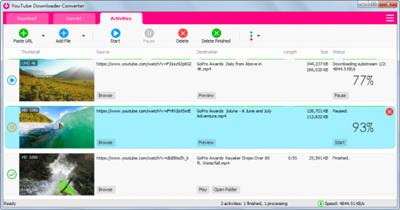
YouTube Downloader Converter is a tool that facilitates an attractive interface and plenty of features to help you download video clips from YouTube, Facebook, Dailymotion, Instagram and other websites.

Features
•Online video downloader
The app can download videos from YouTube, Facebook, Instagram, Dailymotion, and thousands of other video sites.
•HD video downloader
The app can download UHD 8K, 5K, 4K, QHD 2K, HD 1080p and 720p videos from YouTube.
•YouTube to MP3 converter
The app allows you to download only audio stream from YouTube, and save it as MP3. You don't need to download the entire video file.
•Playlist downloader
The app enables you to download entire or part of a playlist with just a few clicks.
•Download accelerator
The app features a multi-thread download acceleration engine that increases your download speeds by up to 500% or even more.
•Download multiple videos at a time
The app supports simultaneous downloads. It allows you to download more than one video at the same time.
•Pause and resume downloads
You can pause and resume your downloads at any time.
•Support drag-and-drop
You may directly drag and drop video link from your browser to the drop box or the app window to start a download. You don't even need to copy and paste video URL.
•Preview video/audio while downloading
While downloading, you can click the 'Preview' button to view incomplete file and make sure the content is you want.
•Video and audio converter
The app can convert your disk video/audio files between MP4, FLV, AVI, WMV, MOV, MP3, AAC, and any other formats for any device.
•Video optimizer
The app automatically optimizes downloaded videos for popular mobile devices, so you can watch downloaded videos smoothly on your iPhone, iPad, Android phone, and other devices.
•Video to MP3 converter
The app allows you to extract audio stream from video and save it as MP3, WAV, AC3, or other audio format.
•Ready-made presets
The app provides ready-made presets for all video and audio formats. You can also customize your own video/audio formats.
•iTunes compatible
Optionally, the app can add downloaded video/music to your iTunes library automatically, so you can easily synchronize your videos and music to your iPhone, iPad, iPod.
•Media Player
The app contains an easy-to-use media player for playing files that Windows Media Player cannot play.
What's new
• official site does not provide any info about changes in this version

Download link

rapidgator.net:
У Вас недостаточно прав для просмотра ссылок. Войдите или зарегистрируйтесь.


uploadgig.com:
У Вас недостаточно прав для просмотра ссылок. Войдите или зарегистрируйтесь.


1dl.net:
У Вас недостаточно прав для просмотра ссылок. Войдите или зарегистрируйтесь.


nitroflare.com:
У Вас недостаточно прав для просмотра ссылок. Войдите или зарегистрируйтесь.
 
Pixarra TwistedBrush Paint Studio 4.16 Portable


52cce6bf0e47dd82d4d2457b6a5022df.jpeg


File size: 27.4 MB​

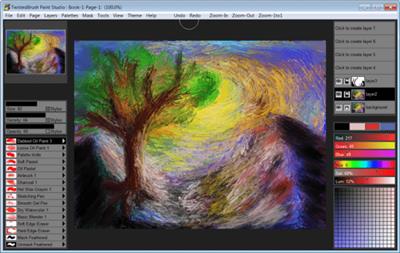
Paint Studio is a product born from TwistedBrush Pro Studio but with a focus on natural media painting and drawing with a simpler, streamlined interface. Internally the same great TwistedBrush brush engine is used. TwistedBrush Pro Studio is feature packed but if you want a stripped down version for painting and drawing with a new slick interface then Paint Studio is for you. Paint Studio strips away complexity and what remains is the very best natural media brushes available as well as the key features that have always made TwistedBrush great.

NEW PAINT STUDIO 4
Natural Media Painting
160+ of the Best Natural Media Brushes from Pixarra
Powerful Brush Editing & Brush Modifiers
Layers, Transparency and Mask Support
Different Paper Types & Colors
Clips, Tracing Paper & Reference Image Support
Automated Solutions
Extensive Tool Set
Convenient Sketchbook System
New User Interface & Different Color Themes
Intelligent Color Palette & Improved Layer Management
New ArtSet - Nu Media
Tablet Compatibility

Download link

rapidgator.net:
У Вас недостаточно прав для просмотра ссылок. Войдите или зарегистрируйтесь.


uploadgig.com:
У Вас недостаточно прав для просмотра ссылок. Войдите или зарегистрируйтесь.


1dl.net:
У Вас недостаточно прав для просмотра ссылок. Войдите или зарегистрируйтесь.


nitroflare.com:
У Вас недостаточно прав для просмотра ссылок. Войдите или зарегистрируйтесь.
 
Pixologic ZBrush 2022.0.6 (x64) Multilingual


693f0c7d333ee28384c574fc5261d20d.jpeg


File Size: 1.55 GB​

ZBrush sets the industry standard for digital sculpting and painting. Its features enable you to use customizable brushes to shape, texture and paint virtual clay in a real-time environment that provides instant feedback. When you use ZBrush you'll be empowered by the same tools employed by film studios, game developers, toy/collectible makers, jewelry designers, automotive/aviation designers, illustrators, advertisers, scientists and other artists the world over. In fact, we have even received an Academy Award for the technology that powers ZBrush. In short, ZBrush is an art tool created by artists, for artists. It allows you to create models and illustrations limited only by your imagination, at a speed that allows you to stand out in today's fast paced industry.

Base Mesh Generation
As with anything else in life, where you can go is usually determined by where you begin. Having a great finished model requires a quality base mesh. ZBrush provides an arsenal of tools to assist with this task, ensuring that no matter what you have in mind, there is a way to get the perfect base to then take to the next level. The best known of these systems are explained here.
Sculptris Pro
Ignore the constraints of polygon distribution and simply - sculpt! Sculptris Pro will dynamically add (tesselate) and remove (decimate) polygons wherever and whenever needed. It does this during your brush stroke in a real-time process called Tessimation. This frees you to focus entirely on the look you're trying to achieve.
Dynamesh
DynaMesh is a perfect solution for free-form sculpting because it removes all need for focusing on topological constraints. Change the overall shape of the model by pushing or pulling, adding various pieces of geometry to combine into one, or even remove geometry in a manner similar to what can be done with Boolean operations. Where Sculptris Pro dynamically adjusts the triangles in your mesh as you sculpt, DynaMesh redistributes the model's polygons as quads on command.
Mesh Detailing
Whether created in ZBrush or imported from elsewhere, once you have your base mesh it is time to start detailing. ZBrush features a robust suite of tools to accomplish this. Those listed below are just the tip of the iceberg.
Sculpting Brushes
The main workflow for creating with ZBrush is based on a system of brushes which can also be modulated using pen pressure from a graphics tablet. ZBrush will reproduce the natural feeling of a real paint brush or sculpting tool, using the pressure applied to the pen tip to transform your digital stroke in a variety of ways. There are brushes to pinch, move, build up the surface, chisel into it, slice through the model and much more. You can even use other 3D models as brushes, inserting their geometry into your surface.
Noisemaker
In addition to being able to add detail by hand, ZBrush provides a system for procedurally generating surface detail through noise patterns. Choose a detail type, adjust a few simple parameters, then apply that pattern to your model in its entirety or by restricting it to a certain region. You can even combine different noise types to create highly complex effects. The Noise system is ideal for both hard surface work and organic details.
PolyPaint
Because ZBrush works with tens of millions of polygons in real-time, you can paint directly on the surface of the model without first assigning a texture map or UV's. This offers significant advantages compared to a standard workflow. The resolution of the texture map does not need to be decided in advance. This is particularly valuable if you find you need more detailing on an area than you thought you would. Instead of repainting a new, larger texture map you can simply transfer the existing surface detail to that larger map without any reworking. You don't even need to do UV unwrapping before you begin this painting. In fact, thanks to the way that ZBrush can project details (both sculpted and painted) from one model to another you can have a fully painted model before you even have a finalized animation mesh. Instead, you can copy everything to the final base mesh once it has been signed off on.
UV Master
In order create or use a texture map, a model first needs UV's. These are 2D coordinates that tell all 3D applications how to apply a texture to your model. With most programs, creating those UV's has been a time consuming challenge that requires a high level of technical expertise and has little room for creativity. With UV Master you are able to create very efficient UV's for your model - in most cases with a single click. If you need more control over this automatic process there are features that refine where seams will be placed or increase the amount of pixel space given to certain regions of your model. It's both intuitive and fast, letting you get back to being creative with minimal fuss.
Rendering
Whether you are using ZBrush by itself as an illustration tool or as part of a production pipeline for animation, you will at some point want to show your work to others. ZBrush makes this possible through a powerful rendering system called BPR (Best Preview Render).
What's New
Fixed
A problem preventing the W key from toggling between an active Deformer and Gizmo3D mode.
Mesh from Mask brushes now respect Transparency/Ghost mode when evaluating the surface
Crash with the Curve Alpha brushes when deleting a stroke
Issue preventing IMM brush set to vary between meshes from changing to the next mesh if Ctrl is held
Issue causing a mesh to split into separate pieces when a Sculptris Pro brush is used on a mesh partially hidden by the Selection Lasso
Alpha> Make3D now correctly sees the entire range of values in the alpha
Apply Displacement Map failures on meshes above a certain point count
IMM Multi-Curve ignoring the curve modifier profile when updating the stroke
Brushes could not overwrite polypaint with 100% white at 255, 255, 255 RGB values
Masking marquee preview not updating correctly in some situations when cycling modes with the Ctrl key.
ZBrush now respects RMB/LMB switching settings in warning pop-ups
Issue with Stager not keeping accurate form in certain situations
Issue with Stager not keeping accurate scale in certain situations
macOS: in file saving dialogs the format selection would not override a visible extension in the name field
Modified
Sculptris Pro mode is not intended to be used with the Contrast Target and Contrast Delta brushes. It has been disabled for those brushes.
USD export has been updated to improve Omniverse support: specifying Subdivision surface when Dynamic Subdivision is used in ZBrush and Mesh visibility when all subtools are exported.
Added
GoZ support for Maya 2023 and 3DS Max 2023

Download link

rapidgator.net:
У Вас недостаточно прав для просмотра ссылок. Войдите или зарегистрируйтесь.


uploadgig.com:
У Вас недостаточно прав для просмотра ссылок. Войдите или зарегистрируйтесь.


1dl.net:
У Вас недостаточно прав для просмотра ссылок. Войдите или зарегистрируйтесь.


nitroflare.com:
У Вас недостаточно прав для просмотра ссылок. Войдите или зарегистрируйтесь.
 
Prima Cartoonizer One 2.8.6


afeb75526cc84ae65c62980befdacc19.jpeg


Languages: English
File Size: 43.02 MB
​

Prima Cartoonizer One has the same effects as Prima Cartoonizer but with Batch Processing! Convert photos into cartoons with just few clicks of a mouse with our Prima Cartoonizer for PC. Now, you can convert all of your pictures and images into cartoon effect more quickly and precisely.

You can convert large or high-quality photos into cartoons with best results. Besides, you can also edit your photos and make multiple adjustments even before or after converting them. Add many items, crop your photos, resize and adjust the brightness and contrast.
Enjoy cartooning several pictures at the same time in One Click!
- Batch Processing!
- Automatic Cartoon effect conversion !
- Turn Yourself Into Caricature In One Click!
- Amazing Cartoon Effects!
- Exclusive Cartoonizer Software With More Than 30 Cartoon Effects!
- Full HD Conversion!
- It works offline without internet connection!
- Output image size up to 4096px!
It's the time to replace the cookie cut forum avatar by a real cartoon of you
- The good thing is that you can let the people know how you look like without sharing your actual photo but a cartoon of yourself.
- You can make cartoons of your friends, pets, house, neighborhood and especially the celebrities and the politicians.
- Cartoons will be the best gift for your family and friends. You can also use them on mugs and T-shirts.
- Undoubtedly, this software is a great fun and addictive, too. It is very easy to use and also intuitive.
- No need of great artistic skills because no manual drawing is involved.
- The software uses very novel technology to execute the whole process.
- First of all, it splits the image into solid color patterns just similar to a mosaic. After that, it converts the minute details of the image into cartoon format.
- Since it applies effects throughout the photo, the end result is always of high-quality.
- Cartoon yourelf without any Watermark or Logo!
- Standalone software!
Comes with several neat customization features
Following a quick installation, you are prompted to add a picture to get started, an event that also brings forth the effects, features and options of the application. Therefore, on the ride side, you can use the small menu to customize the brightness, contrast and RGB. The app also comes with a zoom feature that can come in handy when adjusting these parameters.
An app for anyone who enjoys cartoons or this particular effect
Depending on the number of effects you want to add to your pictures the conversion process can take some time. But then again, nobody is really in a hurry when processing images and overall, it's not a big setback. All in all, Prima Cartoonizer is an easy to use application that provides an effective way to add a toon effect to your images.
More Features
- Prima Cartoonizer One has the same effects as Prima Cartoonizer but with Batch Processing!
- You can even make all types of adjustments with the cartoonized photo.
- Avail multiple effects to make your pictures desirable and mesmerizing.
- You can conveniently convert your photos into cartoons just within seconds.
- It is extremely simple software with the main theme of turning images into cartoons.
- It allows the users to covert photos into cartoons really fast than normal process.
- With the help of crop function, you can remove any unwanted part/parts of your image.
- You can edit your images and adjust the brightness and the contrast...etc
- No other standalone program or software is needed; it does all the functions itself.
- The converted cartoon does not contain any watermark or logo.(Paid version only)
- You need not to save the photo to print it. You can do it right from within your software.
- Resize function available, you can resize your photo before or after the conversion.
- Different goodies enhance the overall fun and joy, thus bringing extra colors to your cartoons.
Release Notes
- Release notes were unavailable when this listing was updated.

System Requirements
Windows 11, 10, 8.1, 7 (64-bit)

Download link

rapidgator.net:
У Вас недостаточно прав для просмотра ссылок. Войдите или зарегистрируйтесь.


uploadgig.com:
У Вас недостаточно прав для просмотра ссылок. Войдите или зарегистрируйтесь.


1dl.net:
У Вас недостаточно прав для просмотра ссылок. Войдите или зарегистрируйтесь.


nitroflare.com:
У Вас недостаточно прав для просмотра ссылок. Войдите или зарегистрируйтесь.
 
Quick CPU 4.4.2


99699ed01960c491bb9c727ef5c92faf.jpeg


File size: 64.3 MB​

Quick CPU is a program that was designed to fine-tune and monitor important CPU and System parameters such as CPU Temperature (Package and Core Temp), CPU Performance, Power, Voltage, Current, Core Parking, Frequency Scaling, System Memory, Turbo Boost, C-States, Speed Shift FIVR Control as well as making other adjustments. Below you can find information about the way this application works and how to interpret application data and settings as well as modify and monitor other critical system parameters.

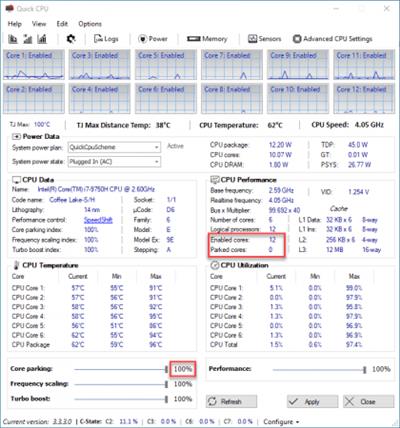
CPU frequency scaling is a feature that enables the operating system to scale CPU frequency up or down to try and match supply to demand, delivering CPU performance when necessary or saving energy when possible. Similar to Core Parking OS is trying to scale CPU frequency dynamically based on the system load. The index for this control works similar to Core parking. On specific detail about the frequency scaling is that even if you set an index to 100% it'll increase (and keep) the frequency up to the CPU base frequency level, and still use dynamic scaling for any extra performance
You can see an example in the image below where frequency scaling is set to 100% and the OS is keeping CPU frequency as close to its base (2.6 GHz in this specific example) as possible at all times. However, you can see that during heavy system loads CPU can spike higher than its base frequency thanks to 'Turbo Boost' technology. The good news is that you can go above the base frequency levels and keep your CPU close to it's Maximum possible frequency thanks to Intel Turbo Boost and AMD Turbo CORE technologies. And that's what the next section is about.

Download link

rapidgator.net:
У Вас недостаточно прав для просмотра ссылок. Войдите или зарегистрируйтесь.


uploadgig.com:
У Вас недостаточно прав для просмотра ссылок. Войдите или зарегистрируйтесь.


1dl.net:
У Вас недостаточно прав для просмотра ссылок. Войдите или зарегистрируйтесь.


nitroflare.com:
У Вас недостаточно прав для просмотра ссылок. Войдите или зарегистрируйтесь.
 
RadioMaximus Pro 2.30.7 (x64) Multilingual


eed3db3b98d34b032cc1feca1b18755d.jpeg


File size: 25.7 MB​

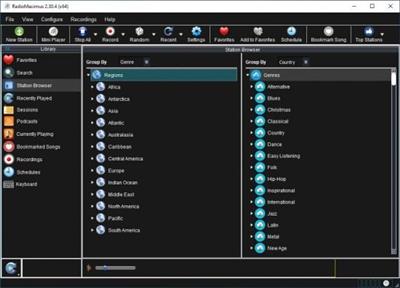
RadioMaximus - Maximum radio and a whole lot more. With RadioMaximus you can receive and record thousands of radio stations available on the Internet.

Features
Listen to and record multiple stations simultaneously
Create a schedule for automatic recording
Save songs as bookmarks
Shows station logos
Portable installation available

Download link

rapidgator.net:
У Вас недостаточно прав для просмотра ссылок. Войдите или зарегистрируйтесь.


uploadgig.com:
У Вас недостаточно прав для просмотра ссылок. Войдите или зарегистрируйтесь.


1dl.net:
У Вас недостаточно прав для просмотра ссылок. Войдите или зарегистрируйтесь.


nitroflare.com:
У Вас недостаточно прав для просмотра ссылок. Войдите или зарегистрируйтесь.
 
Robin YouTube Video Downloader Pro 5.37.0


fcb70d1b28479ba9ef4a7859b933f40c.jpeg


File size: 36.69 MB​

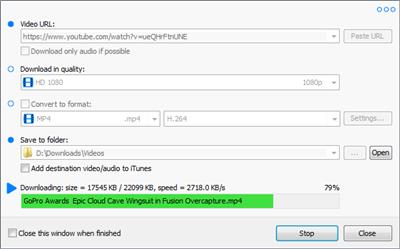
YouTube Video Downloader is a small Windows app for downloading and converting videos from YouTube, Facebook, Dailymotion, and thousands of other video sharing sites. It accelerates your download by up to 5 times.


Features

Download video from YouTube and thousands of other video sites
YouTube Video Downloader can download videos from YouTube, Facebook, Dailymotion, Vimeo, Vine, Metacafe, and thousands of other video sites.
Accelerate download by up to 5 times
YouTube Video Downloader features an advanced download acceleration engine that lets you download video up to 500% faster than normal speed.
Download UHD 4K, QHD 2K, FHD 1080p, HD 720p, and 3D video from YouTube
YouTube Video Downloader can download 4K Ultra HD, 2K Quad HD, 1080p Full HD, 720p HD, and 3D video from YouTube if it is available.
Download only audio stream from YouTube
YouTube Video Downloader allows you to download only audio stream from YouTube, without downloading the entire video file.
Convert downloaded video to any format
YouTube Video Downloader can automatically convert downloaded video to the format that you specify. It supports MP4, FLV, WMV, MOV, ASF, AVI, DV, M4V, MKV, MPG, OGV, SWF, TS, VOB, WEBM, DVD, VCD, SVCD, and many other formats.
Optimize downloaded video for any device
YouTube Video Downloader automatically converts and optimizes downloaded video for your mobile/desktop device, so you can watch it smoothly on your iPhone, iPad, iPod, Android phone, Android tablet, Xbox, PSP, PS4, PS3, Samsung Galaxy, or other device.
Extract audio stream from video
YouTube Video Downloader allows you to extract audio stream from video, and save it as MP3, WAV, WMA, AC3, AAC, OGG, M4A, FLAC, MP2, or any other audio format.
Ready-made presets
YouTube Video Downloader provides ready-made presets for all popular video and audio formats. You can also custom output video/audio format settings.
iTunes compatible
Optionally, YouTube Video Downloader can automatically add downloaded video/music to your iTunes library, so you can easily synchronize your videos and music to your iPhone, iPad, iPod, etc.
Integrate with Internet Explorer and Firefox
YouTube Video Downloader adds download button and menu commands to the toolbar and the context menu of your browser, so you can download and convert any video with just one click.
Support drag-and-drop
You may directly drag and drop video link/URL from your browser to the main window of YouTube Video Downloader to start download, you don't even need to copy and paste video URL manually.
Release Notes
• official site does not provide any info about changes in this version

Download link

rapidgator.net:
У Вас недостаточно прав для просмотра ссылок. Войдите или зарегистрируйтесь.


uploadgig.com:
У Вас недостаточно прав для просмотра ссылок. Войдите или зарегистрируйтесь.


1dl.net:
У Вас недостаточно прав для просмотра ссылок. Войдите или зарегистрируйтесь.


nitroflare.com:
У Вас недостаточно прав для просмотра ссылок. Войдите или зарегистрируйтесь.
 
Tubemate Downloader 3.30.0


361f3f41073733916c8a6e4fc5b54a8f.jpeg


File size: 36.69 MB​

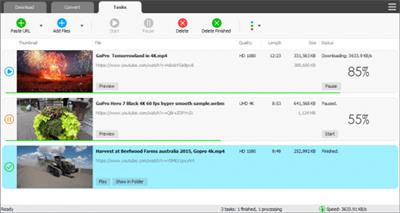
Windows TubeMate is a smart application that lets you snag any clip you want from the main video hosting sites and convert them while downloading or after that. If you need a simple and efficient video downloading tool, you can give it a try.

Features
Online video downloader
TubeMate can download videos from YouTube, Facebook, Instagram, Dailymotion, and thousands of other video sites.
HD video downloader
TubeMate can download UHD 8K, 5K, 4K, QHD 2K, HD 1080p and 720p videos from YouTube.
YouTube to MP3 converter
TubeMate allows you to download only audio stream from YouTube, and save it as MP3. You don't need to download the entire video file.
Playlist downloader
TubeMate enables you to download entire or part of a playlist with just a few clicks.
Download accelerator
TubeMate features a multi-thread download acceleration engine that increases your download speeds by up to 500% or even more.
Download multiple videos at a time
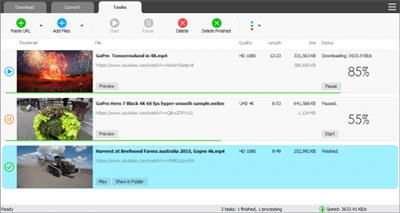
TubeMate supports simultaneous downloads. It allows you to download more than one video at the same time.
Pause and resume downloads
You can pause and resume your downloads at any time.
Support drag-and-drop
You may directly drag and drop video link from your browser to the drop box or app window to start a download. You don't even need to copy and paste video URL.
Preview video/audio while downloading
While downloading, you can click the 'Preview' button to view incomplete file and make sure the content is you want.
Video and audio converter
TubeMate can convert your disk video/audio files between MP4, FLV, AVI, WMV, MOV, MP3, AAC, and any other formats for any device.
Video optimizer
TubeMate automatically optimizes downloaded videos for popular mobile devices, so you can watch downloaded videos smoothly on your iPhone, iPad, Android phone, and other devices.
Video to MP3 converter
TubeMate allows you to extract audio stream from video and save it as MP3, WAV, AC3, or other audio format.
Ready-made presets
TubeMate provides ready-made presets for all video and audio formats. You can also customize your own video/audio formats.
iTunes compatible
Optionally, TubeMate can add downloaded video/music to your iTunes library automatically, so you can easily synchronize your videos and music to your iPhone, iPad, iPod.
Media player
TubeMate contains an easy-to-use media player for playing files that Windows Media Player cannot play.
What's new
• official site does not provide any info about changes in this version

Download link

rapidgator.net:
У Вас недостаточно прав для просмотра ссылок. Войдите или зарегистрируйтесь.


uploadgig.com:
У Вас недостаточно прав для просмотра ссылок. Войдите или зарегистрируйтесь.

1dl.net:
У Вас недостаточно прав для просмотра ссылок. Войдите или зарегистрируйтесь.


nitroflare.com:
У Вас недостаточно прав для просмотра ссылок. Войдите или зарегистрируйтесь.
 
Tubemate Downloader 3.30.1


8e3cadee5d157707cb9888a2ead92f2a.jpeg


File size: 36.69 MB​

Windows TubeMate is a smart application that lets you snag any clip you want from the main video hosting sites and convert them while downloading or after that. If you need a simple and efficient video downloading tool, you can give it a try.

Features
Online video downloader
TubeMate can download videos from YouTube, Facebook, Instagram, Dailymotion, and thousands of other video sites.
HD video downloader
TubeMate can download UHD 8K, 5K, 4K, QHD 2K, HD 1080p and 720p videos from YouTube.
YouTube to MP3 converter
TubeMate allows you to download only audio stream from YouTube, and save it as MP3. You don't need to download the entire video file.
Playlist downloader
TubeMate enables you to download entire or part of a playlist with just a few clicks.
Download accelerator
TubeMate features a multi-thread download acceleration engine that increases your download speeds by up to 500% or even more.
Download multiple videos at a time
TubeMate supports simultaneous downloads. It allows you to download more than one video at the same time.
Pause and resume downloads
You can pause and resume your downloads at any time.
Support drag-and-drop
You may directly drag and drop video link from your browser to the drop box or app window to start a download. You don't even need to copy and paste video URL.
Preview video/audio while downloading
While downloading, you can click the 'Preview' button to view incomplete file and make sure the content is you want.
Video and audio converter
TubeMate can convert your disk video/audio files between MP4, FLV, AVI, WMV, MOV, MP3, AAC, and any other formats for any device.
Video optimizer
TubeMate automatically optimizes downloaded videos for popular mobile devices, so you can watch downloaded videos smoothly on your iPhone, iPad, Android phone, and other devices.
Video to MP3 converter
TubeMate allows you to extract audio stream from video and save it as MP3, WAV, AC3, or other audio format.
Ready-made presets
TubeMate provides ready-made presets for all video and audio formats. You can also customize your own video/audio formats.
iTunes compatible
Optionally, TubeMate can add downloaded video/music to your iTunes library automatically, so you can easily synchronize your videos and music to your iPhone, iPad, iPod.
Media player
TubeMate contains an easy-to-use media player for playing files that Windows Media Player cannot play.
What's new
• official site does not provide any info about changes in this version

Download link

rapidgator.net:
У Вас недостаточно прав для просмотра ссылок. Войдите или зарегистрируйтесь.


uploadgig.com:
У Вас недостаточно прав для просмотра ссылок. Войдите или зарегистрируйтесь.


1dl.net:
У Вас недостаточно прав для просмотра ссылок. Войдите или зарегистрируйтесь.


nitroflare.com:
У Вас недостаточно прав для просмотра ссылок. Войдите или зарегистрируйтесь.
 
R-Studio Emergency Network 9.1 Build 0775 Multilingual WinPE


8be0e1315cc2260b25ecc22c4851eccd.jpeg


File size: 115 MB​

R-Studio Emergency runs from a set of floppy disks, CD / DVDs or removable disks, when you need to restore data from a computer that does not boot Windows due to the corruption of the boot partition or system files. There are two versions of R-Studio Emergency: R-Studio Emergency TUI (Text User Interface) and R-Studio Emergency GUI (Graphical User Interface).

R-Studio Emergency Startup Media Creator is installed on Windows and creates such bootable R-Studio Emergency devices (TUI or GUI), as a set of floppy disks and removable drives. An ISO image can also be created for the R-Studio Emergency bootable CD / DVD program (you can download the already created R-Studio Emergency ISO image directly from our website, see below).
Features
Standard user interface "Windows Explorer"
Recovering data over a network
Supported file systems: FAT12, FAT16, FAT32, NTFS, NTFS5, HFS / HFS +, Little and Big Endian variants of UFS1 / UFS2 and Ext2FS / Ext3FS
Recognition and analysis of Dynamic, Basic and BSD (UNIX) partitions, as well as Apple partition diagrams
Support for dynamic partitions on GPT, as well as for MBR
Reconstruction of damaged disk arrays (RAID)
Creating an IMAGE FILE for a whole Physical Disk (HD), Partition or part of it
Data recovery from damaged or deleted partitions, encrypted files (NTFS5), alternative data streams (NTFS, NTFS5)
Data recovery after the launch of FDISK or similar utilities
Data recovery after a virus attack; FAT damage; destruction of MBR
Localized name recognition
The recovered files can be saved to any, including network, disk accessible by the local operating system
The files or contents of the disc can be viewed and edited with the built-in hexadecimal editor
R-Studio recovers files
- Deleted outside the Recycle Bin or when the Trash was cleaned
- Removed by a virus attack or computer power failure
- After the partition with the files was reformatted, even in a partition with a different file system
- When the partition structure on the hard disk was changed or damaged
- From hard disks, which have a large number of bad sectors
Whats New
Updates: official site does not provide any info about changes in this version.

Download link

rapidgator.net:
У Вас недостаточно прав для просмотра ссылок. Войдите или зарегистрируйтесь.


uploadgig.com:
У Вас недостаточно прав для просмотра ссылок. Войдите или зарегистрируйтесь.


1dl.net:
У Вас недостаточно прав для просмотра ссылок. Войдите или зарегистрируйтесь.


nitroflare.com:
У Вас недостаточно прав для просмотра ссылок. Войдите или зарегистрируйтесь.
 
Назад
Сверху