• Форум работает в архивном режиме www.old.nado.in

All mitsumi'1s Applications !! (updated daily)

  • Автор темы Автор темы mitsumi1
  • Дата начала Дата начала
HitPaw Watermark Remover 1.2.1 macOS

7939d511c0d8f77655c0f68f737e0a8b.jpeg

File size: 107 MB​
When you need to quickly erase a watermark from one of your images, it is best to resort to specialized software solutions to ensure you obtain high-quality results. HitPaw Watermark Remover is one such utility.

All in all, HitPaw Watermark Remover can come in handy when you need to erase a watermark from your images or clips, and you do not have the expert skills to do it manually.
Release Notes
Release notes were unavailable when this listing was updated

Supported Operation Systems:
macOS 10.13 or later

Download link:​
Код:
[center][b]rapidgator_net[/b]:
https://rapidgator.net/file/e91e21dd778e6fff05c627d3655171e2/9l0oe.HitPaw.Watermark.Remover.1.2.1.macOS.dmg.html

[b]uploadgig_com[/b]:
https://uploadgig.com/file/download/cFb480caf44675d7/9l0oe.HitPaw.Watermark.Remover.1.2.1.macOS.dmg

[b]nitroflare_com[/b]:
https://nitroflare.com/view/258F5D6F9F34C7B/9l0oe.HitPaw.Watermark.Remover.1.2.1.macOS.dmg[/center]

Links are Interchangeable - No Password - Single Extraction​
 
IDimager Photo Supreme 6.3.0.3808 Multilingual

028c803dec7f04f1f7de109e8eb8ff2e.jpeg

File size: 112.65 MB​
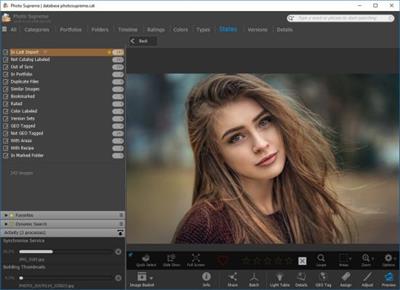
Do you own a digital camera? Then in no time you will have thousands of images on your computer, and finding that one image you are looking for will become a chore. But Photo Supreme can change all that. Whether you have 1,000 or 500,000 images in your archive, Photo Supreme's integrated photo cataloging and photo management features will help you quickly find and work with your desired image.

Extremely powerful yet easy-to-use
From the ground up, Photo Supreme was developed with easy-of-use as the primary focus. We were able to pack most of the features requested by our user base into a user interface that is clean and efficient, yet extremely powerful.

Photo Supreme comes with every essential image management feature you'll need to bring structure in your image archive. Assigning catalog labels, importing images to your computer, search features, etc. And once you have your images cataloged then you'll be able to find that one image you need within seconds to then view, duplicate, email, share on your favorite photo site, upload it to your FTP server, or edit it in your favorite photo editor.

Integrates with your favorite tools
Photo Supreme makes integration with your favorite photo editing tools seaminglessly. At installation it will automatically find and add the most common used image editing tools to the user interface.

Simply select an image and click on the application icon to start editing your image.

Unparalleled Speed
Digital Asset Management software uses a catalog database and should be optimized to work with thousands of images in the database. We took this seriously and were able to get the speed up, there where it belongs. Searches will return results in just milliseconds.

Always take your images with you
With Photo Supreme you can store previews of your images inside the database. Then, even if your images are physically located on your network, they travel with you. The previews can be stored in the size that you prefer, from small to large ones, up to 1680 pixels

Open architecture
Right from the start, Photo Supreme was designed with an open cataloging architecture in mind. Because existing industry standards are used to store its data, you can extract your information at any time, even without our software. Should you ever decide to switch applications (although once you've tried Photo Supreme, you'll never go back!), you won't have to repeat the time consuming operation of re-cataloging your data. After all, it is YOUR data, not the application's data!

Share with friends and family
Photo Supreme easily interfaces to public photo sharing sites like Facebook, Flickr, PicasaWeb, Zenfolio, or SmugMug. Resize or rename your images as you upload them to your on-line account without having to prepare them first. Also, add or remove your metadata, convert color space, or add your personal signature to your uploaded images.

Get started right away
If you already use some sort of image collection tool then Photo Supreme can help you get your existing data into Photo Supreme, saving you lots of time. There are import feature available for iPhoto™, Aperture™, Lightroom™ 3 and 4, iMatch™, and FotoTime™. At the same time, PSU is able to read and import meta-data that was written with XMP supporting tools, including Adobe products, Nikon software, iView™, MediaPro™.

Vocabularies
In addition there are import features to support market standard vocabularies, including David Rieck's ControlledVocabulary™, UltraTAG™, Lightroom™-Keyword Files, or any other tool that supports exporting to Formatted Vocabulary Files.

Main Features & Highlights:
Advanced search capabilities
Multi Tab Browsing
Import/Ingest images
Side-by-Side comparison (up to 6 images)
Keyword tagging
Advanced GEO Tagging
Image organization in portfolios
Duplicate Detection
Share images with Flickr, Smugmug, Zenfolio, Picasaweb, FTP, EMail
Dual Monitor Support
Creative Commons support
Face Detection
Area Tagging
Extensible metadata with Custom Fields
Take your previews with you while travelling
Color Managed
Lossless Image Editing
Fully Scriptable
Available for Windows and MacOSX platform
Multi-User network/server version available for PostgreSQL and SQLServer (Server Edition)
English, German, French, Italian, Dutch, Portuguese, and Russian locale

Download link:​
Код:
[center][b]rapidgator_net[/b]:
https://rapidgator.net/file/9a43b9fa1b09304d778679dd0ad8da89/as26j.IDimager.Photo.Supreme.6.3.0.3808.Multilingual.rar.html

[b]uploadgig_com[/b]:
https://uploadgig.com/file/download/d22Aa00d10e00056/as26j.IDimager.Photo.Supreme.6.3.0.3808.Multilingual.rar

[b]nitroflare_com[/b]:
https://nitroflare.com/view/9A5291E12530355/as26j.IDimager.Photo.Supreme.6.3.0.3808.Multilingual.rar[/center]

Links are Interchangeable - No Password - Single Extraction​
 
JP Software CMDebug 28.00.11 (x64) Multilingual

0bc455a5bc45f08bd89963a4e3e791aa.jpeg

File Size: 38.9 MB​
CMDebug is a stand-alone version of the Take Command IDE and batch debugger component. CMDebug is intended for developers who need to develop batch files to run in CMD.EXE or TCC-RT (runtime).

CMDebug allows you to create and debug your batch scripts with the integrated graphical IDE. CMDebug includes tabbed edit windows and a sophisticated debugger with single stepping, breakpoints, syntax coloring, tooltips, bookmarks, and tabbed variable and watch windows. Windows batch file programming has never been easier or more powerful!

You can use CMDebug to develop either CMD-compatible batch files (.BAT or .CMD), or TCC-RT-compatible scripts (.BTM). If you select the "TCC Syntax" option, CMDebug provides the full TCC-RT command set. If you select the "CMD Syntax" option, CMDebug will maximize CMD compatibility and disable TCC-only internal commands, variables, and functions. Some internal CMD / TCC commands will also behave slightly differently or modify their display output in order to match CMD's behavior more closely.
Using CMDebug with TCC-RT allows you to write (and encrypt) scripts using the TCC command language, and then distribute them with the free TCC-RT runtime on an unlimited number of target machines.

Features:
Create and debug your batch scripts with the integrated graphical IDE. The IDE includes tabbed edit windows and a sophisticated debugger with single stepping, breakpoints, syntax coloring, tooltips, bookmarks, tabbed variable and watch windows. Windows batch file programming has never been easier or more powerful!
The TCC-RT scripting language is a massive superset of the Windows CMD shell, with 220+ internal commands, 367+ internal functions, and 289+ system variables. Almost all of the CMD command line commands (e.g. DIR, COPY, DEL, START, etc.) are enhanced with hundreds of additional options. And TCC adds more than 180 new commands. TCC-RT can usually do in one or two lines what requires dozens CMD commands (when CMD can do it at all).
The scripting language includes a complete set of extended flow control structures including IF-Then-Else, DO and FOR loops, SWITCH, subroutines, batch libraries, and more.
When using TCC-RT syntax, most interactive commands (such as COPY, DEL, DIR, MOVE, REN, START, etc.) have command dialogs that allow you to select filenames and options and see your command line before executing it. The most powerful Windows command processor is also the easiest to use!
Monitor your system's hardware and software events, and execute commands when an event is triggered. You can monitor directory changes, the clipboard, event logs, Ethernet and WiFi connections, services, processes, and USB and Firewire connections.
Environment variable substitution is greatly enhanced, including nested variables, delayed expansion, indirect variables, multidimensional array variables, and direct access to the system, user, and volatile variables in the registry.
Select or exclude files by date, time, size, owner, and extended wildcards or regular expressions for extraordinary flexibility in file management.
Specify multiple filenames for most file processing commands (i.e., COPY, DEL, DIR, MOVE, etc.), or optionally the name of a file that contains the filename arguments. (COPY even supports multiple targets as well as multiple sources.)
Multiple types of I/O redirection are available, including redirecting and piping to STDERR, "in-process" pipes, "here-document" and "here-string" redirection, and Tee and Y pipe fittings.
Send keystrokes to any application (console or GUI).
TCC-RT includes internal compression and extraction commands for ZIP, 7ZIP, TAR, JAR, GZIP, and BZIP files.
You can access FTP, TFTP and HTTP (including SSL and SSH) directories and files in all command processor file-handling commands (COPY, DEL, MOVE, etc.).
Internal support is included for Perl, Lua, REXX, Python, Tcl/tk, and any Windows Active Scripting language. You can even combine multiple languages in your batch scripts.
And many thousands more -- see our online help for details.

CMDebug is compatible with any version of Microsoft Windows 7, Server 2008R2, Windows 8, Server 2012, Windows 10, and Server 2016, including 64-bit Windows. CMDebugis available in both 32-bit and 64-bit versions.

Download link:​
Код:
[center][b]rapidgator_net[/b]:
https://rapidgator.net/file/bbb32fa5474df133ce5efbac0366cac0/4cfil.JP.Software.CMDebug.28.00.11.x64.Multilingual.rar.html

[b]uploadgig_com[/b]:
https://uploadgig.com/file/download/db39Bc5B3f1614ed/4cfil.JP.Software.CMDebug.28.00.11.x64.Multilingual.rar

[b]nitroflare_com[/b]:
https://nitroflare.com/view/D1540E0015F5AA8/4cfil.JP.Software.CMDebug.28.00.11.x64.Multilingual.rar[/center]

Links are Interchangeable - No Password - Single Extraction​
 
JP Software Take Command 28.00.11 (x64) Multilingual

543be1ef8a689b08d61c46a51a0759d3.jpeg

File Size: 61.5 MB​
Take Command is a comprehensive interactive GUI and command line environment that makes using the Windows command prompt and creating batch files easy and far more powerful. Take Command displays your command line applications in tabbed windows, with optional Explorer-style integration for a visual look at your folders. Take Command includes hundreds of major enhancements to the command line and CMD commands such as COPY, DEL, and DIR, and adds more than 140 new commands, 460 internal variables and functions, a batch file IDE / debugger, and thousands of other features.

Command Line Features:
· Modify and re-execute previous commands with a powerful command line editor
· Copy, delete, move, and rename groups of files and directories, not just individual ones
· Extended directory searches allow you to change to a directory anywhere on your system by entering only part of its name
· Quickly locate files or text within files anywhere on your system
· Built-in file viewer includes scrolling, search, and print capabilities
· Select or exclude files by date, time, size, and/or extended wildcards for extraordinary flexibility in file management
· Redefine commands, create new commands and functions for your regular tasks, even assign frequently used commands to a single keystroke
· Direct access to FTP, TFTP and HTTP (including SSL) directories and files in all file-handling commands
· Complete configuration adjustment, either through interactive dialogs or on the command line
· File descriptions up to 511 characters long provide information that can't fit in a filename

Batch File Features:
· Batch debugger with singlestepping, breakpoints, syntax coloring, bookmarks, popup variable windows, variable watch windows, and editing
· An improved batch language adds subroutines, IF/THEN/ELSE logic, DO loops, SWITCH statements, error and exception handling, and more than 130 internal commands, while retaining compatibility with batch files written for CMD
· More than 130 built-in variables include system configuration, device status, network drive detection, and free memory and disk space
· More than 200 variable functions assist with manipulation and display of strings, characters, numbers, date and time, file names, etc

Windows Features:
· Start graphical and character-mode applications with ease - even run most console programs in the Take Command window
· Built-in screen scrollback buffer lets you review or print output from past commands at any time
· Customizable toolbar gives you quick access to frequently used commands and applications
· Find File dialog lets you search quickly for files or text, anywhere on your system - or search from the command line with the new FFIND command
· Dialogs, accessible from the Options and Utilities menus, for editing environment variables, aliases, file descriptions, and startup parameters
· New commands such as ACTIVATE, MSGBOX, and QUERYBOX that allow you to use GUI features and control GUI applications from your batch files

Download link:​
Код:
[center][b]rapidgator_net[/b]:
https://rapidgator.net/file/49379f10f136a80a1f8cb92044156496/kkwy1.JP.Software.Take.Command.28.00.11.x64.Multilingual.rar.html

[b]uploadgig_com[/b]:
https://uploadgig.com/file/download/1bfA515cd13dB949/kkwy1.JP.Software.Take.Command.28.00.11.x64.Multilingual.rar

[b]nitroflare_com[/b]:
https://nitroflare.com/view/DB0768597BD213D/kkwy1.JP.Software.Take.Command.28.00.11.x64.Multilingual.rar[/center]

Links are Interchangeable - No Password - Single Extraction​
 
JP Software TCC 28.00.11 (x64)

6ff9cc8eb041ebf83a94925f85c333a6.jpeg

File Size: 50.6 MB​
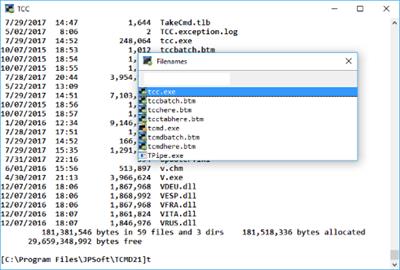
TCC is our console mode Windows command shell (formerly known as 4NT). TCC is a replacement for the CMD command line (the default Windows command prompt). TCC is a superset of CMD, with 246 internal commands (CMD has fewer than 40), 695+ internal variables and functions, and hundreds of enhancements to existing CMD commands.

TCC works with your existing command line applications and batch files, but offers major improvements in command line and batch file capabilities, and adds thousands of new features to your command prompt windows.

Benefits:
TCC is a CMD replacement command processor that is compatible with your existing CMD commands and batch files, while adding thousands of new features. You're immediately more productive, and you can learn and add TCC's new features at your own pace.
Create and debug your batch scripts in a fraction of the time with the integrated editor and batch file debugger.
The integrated and familiar environment means you are immediately more productive with your interactive command prompt and batch file development tasks.
The consistent syntax reduces your learning and development time.
The comprehensive help (including context-sensitive popup help for command line syntax), speeds your development time and reduces syntax errors.

Download link:​
Код:
[center][b]rapidgator_net[/b]:
https://rapidgator.net/file/d67dba3e4350360a710369df2869d799/mf4fy.JP.Software.TCC.28.00.11.x64.rar.html

[b]uploadgig_com[/b]:
https://uploadgig.com/file/download/D4749e9e9e7ceE37/mf4fy.JP.Software.TCC.28.00.11.x64.rar

[b]nitroflare_com[/b]:
https://nitroflare.com/view/1F389EC39CB47DE/mf4fy.JP.Software.TCC.28.00.11.x64.rar[/center]

Links are Interchangeable - No Password - Single Extraction​
 
Macrium Reflect 8.0.6036 Server Plus WINPE (x64)

d9fe991ea6e488d34cdeb4ce8b8ef803.jpeg

x64 | File Size: 464 MB​
Description:
Macrium Reflect Our image based backup and disaster recovery solutions have taken another big step forward in speed, simplicity and power. Our entire focus is helping organisations protect business critical data and systems, without fuss and budget breaking costs.

Solution highlights:
-New Backup Engine: Incremental and differential images up to 60 times faster
-Instant virtual booting of backup images: instantly create, start and manage Microsoft Hyper-V virtual machines
-Ultra-fast Live imaging of windows systems, physical and virtual
-Restore images to dissimilar hardware using Macrium ReDeploy
-Greatly simplified administration including pre-defined Backup Plans for popular backup strategies
-Fully featured file and folder level backup and recovery
-Updated support for all the latest Windows Operating Systems and disk formats

Macrium Reflect 8 Workstation Features:
-Backup your entire PC to a single compressed image file.
-Backup files and folders to a single compressed archive file.
-Recover partitions and entire disk images with just a few clicks of your mouse
-Dynamic disk support
-MBR and GPT disk support
-Restore images to dissimilar hardware using Macrium ReDeploy

Download link:​
Код:
[center][b]rapidgator_net[/b]:
https://rapidgator.net/file/11d69e81a38baae259166126f2ed4639/7hp4o.Macrium.Reflect.8.0.6036.Server.Plus.WINPE.x64.rar.html

[b]uploadgig_com[/b]:
https://uploadgig.com/file/download/11066f7526cd9e58/7hp4o.Macrium.Reflect.8.0.6036.Server.Plus.WINPE.x64.rar

[b]nitroflare_com[/b]:
https://nitroflare.com/view/A5F10EAE3A79621/7hp4o.Macrium.Reflect.8.0.6036.Server.Plus.WINPE.x64.rar[/center]

Links are Interchangeable - No Password - Single Extraction​
 
MAGIX Video Pro X13 v19.0.1.106 Multilingual

105b6667a4a1ab9a6346dbfd65de3b05.jpeg

Windows x64 | File size: 853.78 MB​
Video Pro X makes professional video production accessible for everyone. With its clearly structured interface and intuitive functions, getting started with Video Pro X is much easier than with other professional editing software. Video Pro X also delivers cutting-edge technology for video editing with a new INFUSION Engine 3 that ensures smooth playback and cutting in real time, even for high-resolution 8K UltraHD recordings.

3 reasons to choose Video pro X

Video editing made simple
Video Pro X lets you get started right away. The sleek interface is uncomplicated in terms of use and lets you achieve great results in no time at all.

Films that create an impression
With a range of professional tools, you can make each and every one of your ideas a reality - while benefiting from the latest technology.

More flexibility on each track
The one-of-a-kind multimedia timeline processes video, audio and graphics on the same track, meaning that you can enjoy maximum creative freedom .

Learn about new features in Video Pro X from our expert

The right tool for better films: 2 preview monitors
Discover the advantages of working with two monitors - for instance, for a more streamlined workflow for placing in and out points. You can also match or adjust the colors of different videos to get perfect results. Our resident expert explains how in this video tutorial.

Play around with color: Curves
Does using curves sound complicated? Curves are one of the most practical tools for color correction and are a standard tool used in the industry. Our video shows you how to easily and quickly perfect your footage for stunning results, for example by defining contrasts in detail.

New in Video Pro X13

INFUSION Engine 3: Give your videos the ultimate boost The brand-new INFUSION Engine 3 enables you to edit even complex projects in up to 8K with super smooth playback, and it harnesses the full speed of your GPU to export your videos.

Easily design your own animations Adjusting both the position and scale of video objects directly in the program monitor is now flexible and simple. Just use the mouse and the rotation point to easily control the center of each rotation.

Large preview pictures for an enhanced overview Discover a timeline that's clearer than ever before thanks to the new panorama storyboard. Large thumbnails make the subject of your video appear in the center of the screen and help you keep a clear overview even of more complex projects.

Sophisticated effects for impressive results FXhome Ignite Keying & Flares includes all the essential effects for compositing work. With integrated lens reflection effects and tools for green screen recording, you can truly unleash your creativity.

Minimum system requirements
- Recommended configuration for 8K editing
- Processor: Quad-core processor with 2.8 GHz or better
- RAM: 8 GB
- Graphics card: NVIDIA Geforce GTX 1060 4GB VRAM

Program languages:English, Deutsch, Français, Nederlands

Download link:​
Код:
[center][b]rapidgator_net[/b]:
https://rapidgator.net/file/126e5834c54f2db80732361266ecbf8b/9ntig.MAGIX.Video.Pro.X13.v19.0.1.106.Multilingual.rar.html

[b]uploadgig_com[/b]:
https://uploadgig.com/file/download/f4293bA28dB8a24f/9ntig.MAGIX.Video.Pro.X13.v19.0.1.106.Multilingual.rar

[b]nitroflare_com[/b]:
https://nitroflare.com/view/2C0C51258BA52E7/9ntig.MAGIX.Video.Pro.X13.v19.0.1.106.Multilingual.rar[/center]

Links are Interchangeable - No Password - Single Extraction​
 
Music Tag Editor Pro 5.7.4 macOS

d83d090e49af39d2cf8fb8bb1b29c5ad.jpeg

Language: Multilingual | File size: 20 MB​
Music Tag Editor Pro can help you to edit your Music Tag info easily and effectively,Batch edit all tags and batch rename with metadata, you can also use it to convert the text encoding of Music Tag, In situations,it can repair the messy code in Music Tags. You also can download the album image for MP3 from internet.

Also, you can search tags of music file from Amazon or MusicBrainz cloud services.
In Pro version More additional tags are supported, you can even custom any tags you want!

Support Music formats: MP3, M4A (Apple lossless), MP4, FLAC, APE, AIFF, WAV , Ogg files, asf, mkv, dsf, dsd...
Support ID3V1, ID3V2.3,ID3V2.4, xiphComments, APE Tag, Ogg Vorbis, Ogg Speex, Ogg Flac.

Main features:
1. support id3v1,id3v2,xiphComments, RIFF Info, APE Tag, Ogg Tags,iTunes tags. Tags:Title,Artist,Album,Genre,Copyright,Comments,Artworks,Lyrics and so on...
lyrics you saved to file can be show correctly in you iPhone or iPod music player.
2. support batch processing of lots of music files,support iTunes importing.
3. Online album image download,multi album image supported.
4. batch rename audio file with metadata
5. batch convert file name to tags
6. user can change,convert the tag text encoding easily, it also can repair messy code in situations.
7. Fully iTunes Tag supported.
8. Support strip APE or ID3V1 tags in mp3 files
9. support to save id3v2.3 or id3v2.4 tags!
10. Batch clean tags
11. Built-IN Music player for all audio formats

Advance features in pro version:
1.Edit Additional and Advanced Tags.
2.Custom and edit any tags you want.
3.Batch Find & Replace all tag fields in one click.
4.MusicBrainZ Cloud services supported.
Release Notes
1. support custom tags for csv file export.
2. optimizing the user experience.
3. fix Compatibility problem of localization.
3. bug fixes.

Supported Operation Systems:
macOS 10.9 or later

Download link:​
Код:
[center][b]rapidgator_net[/b]:
https://rapidgator.net/file/1f6fb05f1db86b821ff7a5cdcab5ad26/9pquz.Music.Tag.Editor.Pro.5.7.4.macOS.dmg.html

[b]uploadgig_com[/b]:
https://uploadgig.com/file/download/7688fBAb9817f516/9pquz.Music.Tag.Editor.Pro.5.7.4.macOS.dmg

[b]nitroflare_com[/b]:
https://nitroflare.com/view/2E27AF154238C01/9pquz.Music.Tag.Editor.Pro.5.7.4.macOS.dmg[/center]

Links are Interchangeable - No Password - Single Extraction​
 
Nitro Pro 13.45.0.917 Enterprise / Retail

2dc9248b9915086aeca81028a7499dcb.jpeg

File size: 427/430 MB​
Create, edit and convert PDF files effortlessly with the help of this intuitive program that also allows users to accurately extracting text from PDFs thanks to its OCR function. Nitro Pro is one of the most advanced PDF creating and editing software solutions, providing basically all the tools you would ever need to help you in this regard. Although it's called 'Professional,' the application has been developed to be aimed at beginners and advanced users alike, so you won't find it too difficult to use.

Directly edit your PDF files more easily. Just click, and edit. Nitro Pro 11 enables you to edit entire paragraphs with ease, automatically reflowing text as you type - like you would in a word processor.
Nitro Pro is the complete Adobe Acrobat alternative. It enables you to do more with PDF through powerful tools. Create, convert, edit, combine, secure, annotate, form-fill, and save 100% industry-standard PDF files. Recipient of multiple best product awards, Nitro Pro is specifically designed for the business user. That makes working with PDF faster and easier than ever before!

Features:
Create + Combine
This program lets you quickly and easily create professional-quality PDF documents from any format or content type. From paper scans, spreadsheets, presentations, reports, and more.
Open, read and edit PDF files from other PDF applications, like Adobe Acrobat and Adobe Reader and other popular solutions.
Create from 300+ Formats
Combine Files to PDF
Print to PDF
Microsoft Office Add-ins
Preset and Custom Profiles
Create from Clipboard
PDF/A and Archival
Scan to PDF

Edit Text + Images.
Add, manipulate, replace, and correct text and images in PDF files with intuitive editing tools. Extract and delete individual pages from documents.
Edit Text
Edit Images
Edit Pages
Optimize Files
Bookmarks and Links
Watermarks, Headers and Footers
Apply Bates numbering when unique page labeling and identification is required across pages.

Convert + Export.
Nitro Pro 11 lets you easily reuse and repurpose text, images, or entire documents, with tools to accurately convert and extract PDF files and their content.
PDF to Word
PDF to Excel
PDF to Image
Export Text
Export Images
Batch Export
Extract Pages
Snapshot + Copy

Scan + OCR.
Apply Optical Character Recognition (OCR) to image and paper based documents and create searchable and/or editable layers of text for digital archival.
Searchable Text Layers
Editable Text Layers
Scan to PDF
Multi-language Support
Repurpose for Conversion

Collaborate + Review.
Review and markup PDF files faster with a range of text- and shape-based annotations. Easily involve multiple contributors with tools to track, sort, and manage individual comments.
Compatible With Adobe
Markup and Review
Sort and Manage Comments
Stamps
Shape and Pencil Markups
Attach Files

Nitro Cloud.
Send secure, legally binding eSignatures in seconds
Securely share documents via link or email
Review and markup documents online

Download link:​
Код:
[center][b]rapidgator_net[/b]:
https://rapidgator.net/file/179119d2eeac7bdb3674e3d8dae4cea4/wx155.Nitro.Pro.13.45.0.917Ent..rar.html
https://rapidgator.net/file/9af6d07bbadecabb9cb6b8c293e9158a/wx155.Nitro.Pro.13.45.0.917Retail..rar.html

[b]uploadgig_com[/b]:
https://uploadgig.com/file/download/fa03AecAb9879dD0/wx155.Nitro.Pro.13.45.0.917Ent..rar
https://uploadgig.com/file/download/b5b79817bD556339/wx155.Nitro.Pro.13.45.0.917Retail..rar

[b]nitroflare_com[/b]:
https://nitroflare.com/view/803F20E539F24C6/wx155.Nitro.Pro.13.45.0.917Ent..rar
https://nitroflare.com/view/CA1A8337FAC7309/wx155.Nitro.Pro.13.45.0.917Retail..rar[/center]

Links are Interchangeable - No Password - Single Extraction​
 
O&O DiskImage Professional / Server 16.5 Build 234

7185b5f4f373facde2ed632d2abcd762.jpeg

File size: 230.7 MB​
O&O DiskImage lets you back up an entire computer or single files whenever you want - even while the computer is being used. In the event you should lose your personal data it can be quickly restored with just a few mouse clicks - even when Windows is no longer able to start. It also supports SSD drives and the latest UEFI System. O&O DiskImage lets you carry out a system restore and to duplicate or clone an entire PC or hard drive. You can even restore this backup onto a computer whose hardware is different from the original machine, for instance, where you have changed a motherboard on the target machine or have bought a brand new PC and want to restore an old backup onto it.

Features:
Backup an entire computer with the push of a button
Backup system and hard drives, clone drives and entire disks
Brand new file-based backup: now twice as fast as ever before - backup and restore individual files and/or folders
Direct creation of VHDs
Monitoring and warning of security risks
Incremental/differential backup: back up only the changes
Easily restore files, folders, drives and disks
System restore onto different hardware (M.I.R.)
Create a Windows Boot system directly from within the program with driver integration
Plug-and-play: Selected files and folders are automatically backed up and synchronized
Variable pixel density settings: adjusts to the selected DPI setting of the connected monitor
New and enhanced functions Control via Command Lines
Supports Windows 10, Windows 8.1 and Windows 8

A regular backup is still something that many users prefer to avoid. At least that is until they suffer their first loss of important files as a result of software, hardware or user error: that's when it becomes crystal clear just how valuable a reliable and up-to-date backup really is!

New in v16:
NEW: O&O DiskImage 16 with its own recovery partition
Normally with a backup or imaging program you need to create a boot medium (CD, USB) to boot up your system if something goes awry. This you have to either carry around or store somewhere safe in case disaster strikes.

Thanks to the integration into the system, the O&O DiskImage RecoveryPartition can be accessed immediately so that the last system image can be restored directly. If the Windows operating system does not start or if faulty drivers have to be uninstalled - with the integrated recovery environment, all O&O tools are available to make the system operational again as easily as possible. Not only is this much more comfortable and quicker for the user, it also provides them with an extra level of security as this medium cannot get lost or damaged as easily as a "portable", external one.

Whats New:
Updates: official site does not provide any info about changes in this version.

Download link:​
Код:
[center][b]rapidgator_net[/b]:
https://rapidgator.net/file/e06c6d5c359e5fb16de5329cc328389e/sx99f.OO.DiskImage.Professional..Server.16.5.Build.234.rar.html

[b]uploadgig_com[/b]:
https://uploadgig.com/file/download/1a2711fF193dF815/sx99f.OO.DiskImage.Professional..Server.16.5.Build.234.rar

[b]nitroflare_com[/b]:
https://nitroflare.com/view/BE04452F4A65FFB/sx99f.OO.DiskImage.Professional..Server.16.5.Build.234.rar[/center]

Links are Interchangeable - No Password - Single Extraction​
 
OCCT 9.0.0 (x64) Multilingual

251c24c5f58498a86928e3882461fc8d.jpeg

File Size : 18.1 Mb​

Computer performance is very important for every user, especially those who are working with applications that require important system resources to work properly. In order to enhance it, you can use an overclocking utility, such as OCCT.

This software is designed to help you monitor system hardware components and allow you to overclock them. It provides testing tools for the CPU (benchmark OCCT and LINPACK tests), the graphics card and the power supply.

The interface is intuitive and comprises two panels, one that includes the 'Monitoring' section and the other that displays the available tests.

In its main window, OCCT displays detailed information regarding your hardware devices, such as the CPU and the motherboard. Also, there is a table where you can view the current and the overclocked CPU and bus frequencies.

The CPU and the memory usage are constantly monitored and the values are displayed in a dynamic graph. By default, the program uses HWMonitor to generate them, but it also offers support from third party monitoring software, such as AIDA64, provided that you have them installed in your PC.

Whichever test you decide to choose, overclocking can easily be turned on or stopped anytime you want. Before starting, the user has the possibility to select the test type (infinite or automatic), configure its duration and idle periods, as well as other parameters, depending on the selected hardware device.

For instance, the LINPACK test allows you to choose the memory percentage, while choosing the GPU test lets you customize the resolution and the FPS limit.

Once the selected test is started, you can immediately view the effects on your CPU and memory usage graph, as well as the new values for the CPU frequency.

Although it does not offer a wide range of options, OCCT proves to be a handy tool for enhancing the overall system performance.

Download link:​
Код:
[center][b]rapidgator_net[/b]:
https://rapidgator.net/file/db9ebb96edb3574e936da8178f7b1865/xy6mq.OCCT.9.0.0.x64.Multilingual.rar.html

[b]uploadgig_com[/b]:
https://uploadgig.com/file/download/1b996a4665C66b2F/xy6mq.OCCT.9.0.0.x64.Multilingual.rar

[b]nitroflare_com[/b]:
https://nitroflare.com/view/31489A06393BA1C/xy6mq.OCCT.9.0.0.x64.Multilingual.rar[/center]

Links are Interchangeable - No Password - Single Extraction​
 
ON1 Photo RAW 2021.5 v15.5.1.10782 macOS

3fc38bec90438158bc76ed4ef77e57b5.jpeg

File size: 2.29 GB​
ON1 Photo RAW version 2021 is THE professional-grade photo organizer, raw processor, layered editor, and effects app. It works where you do; at the center of your workflow or as a plug-in to Adobe Photoshop, Lightroom, Elements, Affinity Photo, Corel Paintshop Pro, and Capture One.

ON1 Photo RAW 2021 provides the primary photo editing needs for every photographer regardless of what they shoot - without having to bounce between multiple pieces of software. Get the professional photo editing tools you need for the professional results you need while keeping your workflow efficient, powerful, and simple.

Power & Speed
At its core, ON1 Photo RAW includes a state-of-the-art image processing engine. Optimized for today's super-megapixel cameras and high-performance computer graphics systems, Photo RAW is the world's fastest, most flexible, and easiest-to-use photo editor on the market.

Unlimited Creativity
Creators want to create and not spend all of their time learning how to use editing tools. Photo RAW is like having Lightroom & Photoshop under one roof. It comes with the tools you need for compositing, hundreds of the hottest presets and filters built-in, and world-class masking tools to make your life easy.

Control of Your Photography
ON1 Photo RAW gives you an open system for complete control over your storage, organization, editing, and method of purchase. No long importing, easy organization, unlimited ways to dial in your style, and ON1 will also never be a subscription-only model.

Plug-in to Your Workflow
ON1 Portrait AI is the perfect fit for almost any workflow. Get amazing retouching results in seconds when using ON1 Portrait AI as a plug-in for:

- Adobe Photoshop
- Adobe Lightroom Classic
- Adobe Photoshop Elements
- Affinity Photo
- Capture One (coming soon)
- Apple Photos
- Corel Paintshop Pro

New Features in ON1 Photo RAW 2021:
- Quickly Add Clouds to Your Dull Skies
- Retouch an Entire Portrait Shoot Automatically
- Create Stunning Sunsets in Seconds
- View Your Photos in All of Their Beauty
- Refresh Smiles in a Few Simple Clicks
- Selectively Edit Like Never Before Using Color Selection
- A Better Way to Erase Away Unwanted Distractions
- Find Your Duplicate Photos in Seconds
- Easily Change Colors of Objects in Your Photos
- Quickly Find All Photos from Your Favorite Location
- Make the Eyes Pop in Seconds
- The Best Photoshop Plugin for Editing Portraits
- Presenting Photos for Your Clients

Feature List in New Version 2021:

New ON1 Portrait AI
Flawless retouching is just a click away with the new Portrait AI tab inside of Edit. It uses machine learning to find every face in your photo and make them look great, automatically. It analyzes each face and adds just the right amount of retouching to the skin, eyes, and mouth, giving you professional results in no time at all.

New Smart Organize
The New Smart Organize mode in Browse lets you take control over your cluttered photo archive. Not only can it find duplicates, but it can find and group photos that have similar appearance, location or time. It can help you cull your library to find just the best photos in a series.

New Spot Healing Brush
A new modern approach to removing distractions like dust spots, power-lines and unwanted people from your photos. The Spot Healing Brush is not only faster than current tools, it maintains full non-destructive adjustments for each spot you remove.

New Custom Brush Shapes
Brushing has taken a quantum-leap in control and creativity. Now you can choose from a variety of custom brush shapes or even import your own.

New Plug-in Support for Affinity Photo and Corel PaintShop Pro
Now you can extend your workflow in Affinity Photo and Corel PaintShop Pro by access Develop, Effects, and Portrait right inside the apps you use. Capture One support coming soon!

New Quick Slideshow
Need to quickly show a client their photos? With the Quick Slideshow you are only a click away from a full-screen slideshow complete with user adjustable delay and an elegant dissolve transition.

New Camera Based Presets
Now you can automatically apply a preset to any new photos from a specific camera. If you always find yourself making the same adjustments, just make a preset and apply it automatically to photos from that camera. This is super handy if you have created a custom camera profile or if you have converted a camera to infrared.

New Color-Sensitive Gradient Masks
Everyone knows how powerful the gradient mask tool is. You can quickly create straight, reflected or round radiant masks that are re-editable and blendable with brush masks. Now you can combine the color-sensitive power we created for the Perfect Brush with the gradient masks. When enabled, it detects the color under the gradient and applies the mask to only that adjustable color range. It makes it a breeze to mask areas like skies while maintaining things like buildings or trees that go into the sky.

New Batch HDR and Pano
Save time by batch processing your HDR brackets or panoramas. Simply organize your brackets into sub-folders, then let Browse build your new HDR and panos for you. This is a life-saver for real estate shooters.

New User Interface Improvements
We have taken a measured approach to updating the user interface. Based on user feedback we have improved common controls like sliders to have more precision and a longer area for labels so we can be more descriptive. We have also made sure that Layers and the Edit module tabs don't scroll out of view on a small display or when you have a large stack of filters.

New Color Fill Layers
We have brought back color fill layers to the Layers pane. They are a great way to set a background color for a composite layout. They are also handy when used with the new custom brush shapes for painting in objects like grass, trees, and clouds.

New Replace Color Filter
Easily change the color of an object to any new color. It's perfect for tweaking or totally changing the color of eyes, flowers, buildings, and apparel.

Supported Operation System:
* macOS 10.13 or later
* Apple Silicon or Intel Core processor

Download link:​
Код:
[center][b]rapidgator_net[/b]:
https://rapidgator.net/file/c3b85cc143386509d838ebd34dca73ab/mtaxi.ON1PhotoRAW2021.5v15.5.1.10782HCiSO.zip.001.html
https://rapidgator.net/file/df5848e8f3603073531eba6ab9567ff9/mtaxi.ON1PhotoRAW2021.5v15.5.1.10782HCiSO.zip.002.html
https://rapidgator.net/file/eb95824deb7485567f1f951bc55b63d5/mtaxi.ON1PhotoRAW2021.5v15.5.1.10782HCiSO.zip.003.html

[b]uploadgig_com[/b]:
https://uploadgig.com/file/download/1F7cDcF8f908DD59/mtaxi.ON1PhotoRAW2021.5v15.5.1.10782HCiSO.zip.001
https://uploadgig.com/file/download/e1A44638666a23f0/mtaxi.ON1PhotoRAW2021.5v15.5.1.10782HCiSO.zip.002
https://uploadgig.com/file/download/176Da15829db9d62/mtaxi.ON1PhotoRAW2021.5v15.5.1.10782HCiSO.zip.003

[b]nitroflare_com[/b]:
https://nitroflare.com/view/C39F1A5CCB6CD79/mtaxi.ON1PhotoRAW2021.5v15.5.1.10782HCiSO.zip.001
https://nitroflare.com/view/72AE55796A9D65A/mtaxi.ON1PhotoRAW2021.5v15.5.1.10782HCiSO.zip.002
https://nitroflare.com/view/CB7D83C0C1BC226/mtaxi.ON1PhotoRAW2021.5v15.5.1.10782HCiSO.zip.003[/center]

Links are Interchangeable - No Password - Single Extraction​
 
ON1 Photo RAW 2021.5 v15.5.1.10782 Multilingual

0e1ee6538ecaa346f41866721ed69eb0.jpeg

Windows x64 | File size: 1.55 GB​
ON1 Photo RAW version 2021 is THE professional-grade photo organizer, raw processor, layered editor, and effects app. It works where you do; at the center of your workflow or as a plug-in to Adobe Photoshop, Lightroom, Elements, Affinity Photo, Corel Paintshop Pro, and Capture One (coming soon).

What do you photograph?
ON1 Photo RAW 2021 provides the primary photo editing needs for every photographer regardless of what they shoot - without having to bounce between multiple pieces of software. Get the professional photo editing tools you need for the professional results you need while keeping your workflow efficient, powerful, and simple.

Power & Speed
At its core, ON1 Photo RAW includes a state-of-the-art image processing engine. Optimized for today's super-megapixel cameras and high-performance computer graphics systems, Photo RAW is the world's fastest, most flexible, and easiest-to-use photo editor on the market.

Unlimited Creativity
Creators want to create and not spend all of their time learning how to use editing tools. Photo RAW is like having Lightroom & Photoshop under one roof. It comes with the tools you need for compositing, hundreds of the hottest presets and filters built-in, and world-class masking tools to make your life easy.

Control of Your Photography
ON1 Photo RAW gives you an open system for complete control over your storage, organization, editing, and method of purchase. No long importing, easy organization, unlimited ways to dial in your style, and ON1 will also never be a subscription-only model.

Plug-in to Your Workflow
ON1 Portrait AI is the perfect fit for almost any workflow. Get amazing retouching results in seconds when using ON1 Portrait AI as a plug-in for:

- Adobe Photoshop
- Adobe Lightroom Classic
- Adobe Photoshop Elements
- Affinity Photo
- Capture One (coming soon)
- Apple Photos
- Corel Paintshop Pro

New Features in ON1 Photo RAW 2021:
- Quickly Add Clouds to Your Dull Skies
- Retouch an Entire Portrait Shoot Automatically
- Create Stunning Sunsets in Seconds
- View Your Photos in All of Their Beauty
- Refresh Smiles in a Few Simple Clicks
- Selectively Edit Like Never Before Using Color Selection
- A Better Way to Erase Away Unwanted Distractions
- Find Your Duplicate Photos in Seconds
- Easily Change Colors of Objects in Your Photos
- Quickly Find All Photos from Your Favorite Location
- Make the Eyes Pop in Seconds
- The Best Photoshop Plugin for Editing Portraits
- Presenting Photos for Your Clients

Feature List:

New ON1 Portrait AI
Flawless retouching is just a click away with the new Portrait AI tab inside of Edit. It uses machine learning to find every face in your photo and make them look great, automatically. It analyzes each face and adds just the right amount of retouching to the skin, eyes, and mouth, giving you professional results in no time at all.

New Smart Organize
The New Smart Organize mode in Browse lets you take control over your cluttered photo archive. Not only can it find duplicates, but it can find and group photos that have similar appearance, location or time. It can help you cull your library to find just the best photos in a series.

New Spot Healing Brush
A new modern approach to removing distractions like dust spots, power-lines and unwanted people from your photos. The Spot Healing Brush is not only faster than current tools, it maintains full non-destructive adjustments for each spot you remove.

New Custom Brush Shapes
Brushing has taken a quantum-leap in control and creativity. Now you can choose from a variety of custom brush shapes or even import your own.

New Plug-in Support for Affinity Photo and Corel PaintShop Pro
Now you can extend your workflow in Affinity Photo and Corel PaintShop Pro by access Develop, Effects, and Portrait right inside the apps you use. Capture One support coming soon!

New Quick Slideshow
Need to quickly show a client their photos? With the Quick Slideshow you are only a click away from a full-screen slideshow complete with user adjustable delay and an elegant dissolve transition.

New Camera Based Presets
Now you can automatically apply a preset to any new photos from a specific camera. If you always find yourself making the same adjustments, just make a preset and apply it automatically to photos from that camera. This is super handy if you have created a custom camera profile or if you have converted a camera to infrared.

New Color-Sensitive Gradient Masks
Everyone knows how powerful the gradient mask tool is. You can quickly create straight, reflected or round radiant masks that are re-editable and blendable with brush masks. Now you can combine the color-sensitive power we created for the Perfect Brush with the gradient masks. When enabled, it detects the color under the gradient and applies the mask to only that adjustable color range. It makes it a breeze to mask areas like skies while maintaining things like buildings or trees that go into the sky.

New Batch HDR and Pano
Save time by batch processing your HDR brackets or panoramas. Simply organize your brackets into sub-folders, then let Browse build your new HDR and panos for you. This is a life-saver for real estate shooters.

New User Interface Improvements
We have taken a measured approach to updating the user interface. Based on user feedback we have improved common controls like sliders to have more precision and a longer area for labels so we can be more descriptive. We have also made sure that Layers and the Edit module tabs don't scroll out of view on a small display or when you have a large stack of filters.

New Color Fill Layers
We have brought back color fill layers to the Layers pane. They are a great way to set a background color for a composite layout. They are also handy when used with the new custom brush shapes for painting in objects like grass, trees, and clouds.

New Replace Color Filter
Easily change the color of an object to any new color. It's perfect for tweaking or totally changing the color of eyes, flowers, buildings, and apparel.
Release Notes

What's New in 2021.5:
- Re-editable Smart Photos for Adobe® Lightroom® Classic - Now, you can re-edit your adjustments made in ON1 Photo RAW, maintaining your non-destructive workflow with Adobe Lightroom Classic. From Lightroom, you can send photos to ON1 Photo RAW, where you can retouch, crop, create layers, and add effects. The results round trip back to Lightroom as a normal Photoshop PSD where you can view and export them. If you want to adjust your settings made in ON1 Photo RAW, simply send it back to Photo RAW, and all your settings are still there. You can re-crop, change the retouching, adjust the layers, or add or change filters.
- Batch Processing for Adobe® Lightroom® Classic - Now, you can batch-process photos from Lightroom Classic with ON1 Photo RAW. You control the file types created and the settings to apply. It could be a preset or your own manual adjustments. You can adjust the first photo, and have the same settings applied to all the other photos, or pause on each photo to tweak the settings to your needs. For portrait photos, let the AI-based auto mode take over. It finds every face, analyses it, and adds the perfect amount of skin smoothing, and eye and mouth enhancements.
- Customize Keyboard Shortcuts - The new Shortcuts dialog allows you to view and change what keyboard shortcut, or hotkey, is used for most functions. You can change the key used to access any tool, tool option, module, or menu item. You can even assign shortcuts to menu items that don't have a shortcut yet. It's perfect if you live in a locale that doesn't use the QWERTY keyboard layout.
- Keyboard Control of Tone & Color - The powerful new shortcuts can also be used with the most-used image adjustments located in Develop's Tone and Color pane. You can now adjust the exposure, contrast, shadows, highlights, and white balance options using keyboard shortcuts or the mouse scroll wheel. You can even adjust these controls with an external control surface like a Stream Deck, Loupedeck, Monogram, or similar devices.
- Cloud Sync for Presets and Extras - Cloud Sync now keeps your presets and extras like backgrounds, borders, textures, LUTs, etc. all in sync across all your computers. When you create a new preset or install a preset pack it automatically syncs to your other computers. This even works for saved filter styles, import presets, color profiles. You name it, it all stays in sync now.
- Learning Hub - The Learning Hub puts the information you need to be successful right at your fingertips. This floating window lets you access the video library, user guides, support pages, and loyalty rewards from right inside the app.
- New Cameras for RAW Support - Fujifilm GFX-100S, Sony Alpha 1. Updated tethered shooting for Canon and Nikon cameras.

System Requirements:
- Windows 10 (current maintenance releases, 64-bit only)
- Processor: Intel Core i5, Xeon, or better
- RAM: 16+ GB
- Disk: 1.5 GB for installation, SSD
- Display: OpenGL 4.2-compatible video card with 2GB dedicated video RAM, 1920x1080 resolution (at 100% scale factor)

Optional Application Integration:
- Photoshop CC 2020
- Photoshop Elements 2020
- Photoshop Lightroom Classic CC 2020
- Affinity Photo
- Corel PaintShop Pro

Supported Languages:
- English, German, Spanish, French, Japanese, Korean, Simplified Chinese, Russian, Portuguese, Italian, Dutch

Download link:​
Код:
[center][b]rapidgator_net[/b]:
https://rapidgator.net/file/5448ef0ae749d8b16f3a9a149f23f7ba/fdiwo.ON1.Photo.RAW.2021.5.v15.5.1.10782.Multilingual.part1.rar.html
https://rapidgator.net/file/ab864b47b20381b3784065589c6d7edc/fdiwo.ON1.Photo.RAW.2021.5.v15.5.1.10782.Multilingual.part2.rar.html

[b]uploadgig_com[/b]:
https://uploadgig.com/file/download/8307483ff233eb47/fdiwo.ON1.Photo.RAW.2021.5.v15.5.1.10782.Multilingual.part1.rar
https://uploadgig.com/file/download/13612d789b8Bc2c3/fdiwo.ON1.Photo.RAW.2021.5.v15.5.1.10782.Multilingual.part2.rar

[b]nitroflare_com[/b]:
https://nitroflare.com/view/1090F2F2097EE59/fdiwo.ON1.Photo.RAW.2021.5.v15.5.1.10782.Multilingual.part1.rar
https://nitroflare.com/view/69136D8E5EB6B52/fdiwo.ON1.Photo.RAW.2021.5.v15.5.1.10782.Multilingual.part2.rar[/center]

Links are Interchangeable - No Password - Single Extraction​
 
Peusens GodMode 1.0.2.0

fed98c6f11e741aacd3f4d2e611089d2.jpeg

File Size : 0.2 Mb​

Peusens GodMode provides a simple slider to turn on/off God Mode features in Windows 10.No hoops to jump through, just a to the point app to access God Mode features. When you slide the interface over to on (green), an icon is created on your desktop, allowing you to open a window that contains a list of Windows 10 settings. From there, you can scroll through to view the various God Mode features normally hidden. Then, when you use the slider again, it will change the content of this window back to 'normal' operation.

Peusens GodMode is just an easy option to obtain quick access to settings without using having to navigate through start.

Whats New:
Updates: official site does not provide any info about changes in this version

Download link:​
Код:
[center][b]rapidgator_net[/b]:
https://rapidgator.net/file/09ae5f56888e626bb454774ad6cb0e36/4ncuq.Peusens.GodMode.1.0.2.0.rar.html

[b]uploadgig_com[/b]:
https://uploadgig.com/file/download/0f3421fe5CEBea20/4ncuq.Peusens.GodMode.1.0.2.0.rar

[b]nitroflare_com[/b]:
https://nitroflare.com/view/D339E4ED4C3B295/4ncuq.Peusens.GodMode.1.0.2.0.rar[/center]

Links are Interchangeable - No Password - Single Extraction​
 
Privacy Eraser Free 5.13.2 Build 3956 Multilingual

7be13b0434f08d3a227a4bd8f05c521d.jpeg

File size: 8.63 MB​
The tool for cleaning system from junk files and registry of unnecessary entries. It allows you to remove all traces of working with web-sites, local documents, programs, etc. It accelerates web surfing, improves performance and stability of your PC and allows you to configure the system clean "by itself".

Features:
* Cleaning system with additional features: cleaning and reloading, cleaning and off by simply cleaning.
* Automatic cleaning according to schedule.
* Automatically determines the range of available online channel and conducts a full sweep of the confidential information.
* Allows you to not only remove the information about the visit of certain pages, but also to protect the user from unauthorized access to the personal account.
* Support for all popular browsers: Internet Explorer, Microsoft Edge, Mozilla Firefox, Google Chrome, Safari and Opera.
* Removes the history of sites you've visited, cleans the browser cache, files, the cookies have, cleans garbage in different directories, which are allocated to the temporary Internet files, empties the Recycle Bin, etc.
* Supports all modern formats and network protocols.
* Support for plug-ins to extend cleaning features.
* Provides tools to remove the programs, secure file deletion, startup manager, supports the cleansing function (erase) discs.
* Displays detailed information about each workflow.

Download link:​
Код:
[center][b]rapidgator_net[/b]:
https://rapidgator.net/file/e4e7667551dbfe33f52e22e9208638a4/s7h56.Privacy.Eraser.Free.5.13.2.Build.3956.Multilingual.zip.html

[b]uploadgig_com[/b]:
https://uploadgig.com/file/download/c15606eB1345bdE5/s7h56.Privacy.Eraser.Free.5.13.2.Build.3956.Multilingual.zip

[b]nitroflare_com[/b]:
https://nitroflare.com/view/9970A0D788B2B77/s7h56.Privacy.Eraser.Free.5.13.2.Build.3956.Multilingual.zip[/center]

Links are Interchangeable - No Password - Single Extraction​
 
RapidWeaver 8.9.1 (20881) macOS

e95e1d1dffd8b1b671f26b49bf61a368.jpeg

File size: 94.57 MB​
RapidWeaver is a next-generation Web design application to help you easily create professional-looking Web sites in minutes. No knowledge of complex code is required, RapidWeaver will take care of all that for you. RapidWeaver produces valid XHTML- and CSS-based websites.

One of the perks about using RapidWeaver is that it has a strong custom theme community. You can download themes and edit them from within RapidWeaver and the result is a pretty slick-looking website that takes very little effort.

RapidWeaver also has a lot of custom plug-ins. Some of them make it easier to edit images directly in RapidWeaver. Others make creating a site map a matter of a few clicks. The supportive community that surrounds RapidWeaver is really what makes this great app superior to other WYSIWYG website creation tools. Be sure to check out for some little tools to help spice up your website in RapidWeaver.

Supported Operation System:
* macOS 10.12 or later
* Apple Silicon or Intel Core processor

Download link:​
Код:
[center][b]rapidgator_net[/b]:
https://rapidgator.net/file/90871325cbafdc28a64bf033bcf84690/lb6ri.RapidWeaver.8.9.1.20881.macOS.dmg.html

[b]uploadgig_com[/b]:
https://uploadgig.com/file/download/c0DBc909b6c750C5/lb6ri.RapidWeaver.8.9.1.20881.macOS.dmg

[b]nitroflare_com[/b]:
https://nitroflare.com/view/277F6DE6A0DADDF/lb6ri.RapidWeaver.8.9.1.20881.macOS.dmg[/center]

Links are Interchangeable - No Password - Single Extraction​
 
Remote Desktop Manager Enterprise 2021.1.41.0 Multilingual

9bc04303c9f31d24de8ebf4a962830d5.jpeg

File size: 181.6 MB​
Remote Desktop Manager is a small apgfplication used to manage all your remote connections and virtual machines. Add, edit, delete, shared, organize and find your remote connection quickly. Compatible with Microsoft Remote Desktop, Termfinal Services, VNC, LogMeIn, Team Viewer, Ftp, SSH, Telnet, Dameware, X Window, VMware, Virtual PC, PC Anywhere, Hyper-V, Citrix, Radmin, Microsoft Remote Assistance, Sun Virtual Box and more.

Enterprise Edition
* Share your remote connection settings inside a company database.
* Save your credentials and passwords in a database.
* Monitor user activities with the database logs.
* Faster and more secure solution.
* Available in single license, multiple licenses pack, global license or site license.

FEATURES:
Microsoft Remote Desktop (RDP)
Microsoft Remote Assistance
VNC (UltraVNC, TightVNC, RealVNC and embedded)
LogMeIn
Team Viewer
FTP (Explorer, Filezilla and WinSCP)
X Window
Putty (SSH, Telnet, RAW and rLogin)
Dameware Mini Remote Control
Radmin Viewer
Citrix XenApp (ICA)
Symantec PC Anywhere
Microsoft Hyper-V
Microsoft Virtual PC
Microsoft Virtual Server
Microsoft Windows Virtual PC
Sun VirtualBox
VMware Player, VMware Workstation, VMware ESXi and VMware vSphere
Cisco VPN client
SonicWall Global VPN client

Download link:​
Код:
[center][b]rapidgator_net[/b]:
https://rapidgator.net/file/b9db7a6e7e823b1adcccc043ae70b18a/nyw1f.Remote.Desktop.Manager.Enterprise.2021.1.41.0.Multilingual.rar.html

[b]uploadgig_com[/b]:
https://uploadgig.com/file/download/4249911533665c6f/nyw1f.Remote.Desktop.Manager.Enterprise.2021.1.41.0.Multilingual.rar

[b]nitroflare_com[/b]:
https://nitroflare.com/view/E7B05B2755FFEBA/nyw1f.Remote.Desktop.Manager.Enterprise.2021.1.41.0.Multilingual.rar[/center]

Links are Interchangeable - No Password - Single Extraction​
 
Siemens Simcenter FloEFD 2021.2.0 v5312 (x64) for NX

eb20152038ccba9d0f1037c566fd6fe3.jpeg

File Size: 1 GB​
FloEFD for Siemens NX is a powerful computational fluid dynamics (CFD) analysis tool that is embedded into Siemens NX. It enables design engineers to frontload CFD by moving simulation early into the design process where it is more cost effective to identify and fix problems and enhance productivity by x2 to x40.

FloEFD is:
Embedded in Siemens NX - one interface, one model
Intuitive and easy-to-use
Fast and has robust convergence criteria even for highly complex geometry
Accurate due to use of intelligent technology
It is also the only CFD software delivering local user interfaces in Japanese, Chinese, Korean, French, German and Russian.
Experience streamlined workflows, faster results, and increased productivity with FloEFD.

NX-embedded CFD Simulation
CAD-embedded simulation enables engineers to conduct analysis in the same user environment as design. Therefore, engineers can use the latest CAD geometry for analysis to conduct multiple design studies and evaluate how the modifications influence the performance of the design without the hassle of data translation.

Parametric Study and Design Comparison Functionality
The compare configuration and parametric study capability inside FloEFD enables engineers to understand the influence of changes in the geometry or boundary conditions on the results. Users can evaluate the design envelope by assessing results by numerical values, by graphs and by visual images and animations and thereby compare a wide range of project permutations.

Fast and Automated Meshing Technology with SmartCells™
FloEFD uses meshing technology which is recognized as the most efficient framework for simulating fluid flows, heat and mass transfer. In addition, the meshing process can be automated easily for even the most complex CAD geometries with the aid of SmartCells technology.

SmartCells are unique technology that combine robust Cartesian meshing with highly efficient analytical or semi-empirical solver models; thus providing high levels of simulation accuracy with fewer number of mesh cells than in traditional CFD. SmartCells typically reduce the manual time spent by traditional CFD tool users in meshing even complex geometries by an order of magnitude on average thus dramatically reducing a historical bottleneck to CFD user productivity.

LED and Lighting Thermal Simulation Capabilities
FloEFD's LED Module offers a unique range of capabilities required for various lighting applications:
Its Monte Carlo radiation model is best suited for thermal radiation predictions in lighting applications where lenses or reflectors can cause hot spots in focal points from the light source (solar or man-made).
A new band-less Monte Carlo model for lighting and radiation allows users to dramatically decrease time required for defining wave-length dependent properties while increasing simulation accuracy of spectral characteristics.
Its new water film model enables simulation of surface condensation, evaporation, icing and de-icing exploration such as condensation on the inner surfaces of automobile headlights.
Combined thermal and photometric model for LEDs based on T3Ster measurements of actual off-the-shelf LEDs can yield correct power and temperature predictions and "hot lumen" output.
Definition of radiation spectrum and setting intensity of radiation can now be dependent on the angle. With that data defined, FloEFD now automatically applies the calculated radiant flux on top of the LED.
Easy ray visualization helps finding sources for radiation hot spots on other parts of the luminaire.
A water absorption model enables the simulation of absorption of water into the plastic housing of the luminaire and later release of it under the right environmental conditions.

Instinctive User Experience
FloEFD for NX features an easy-to-use GUI with considerable intelligent automation built-in as standard:
Operate within NX graphical user environment
Powerful analysis wizard guides users through the problem set-up
Interface uses engineering terms instead of technical jargon therefore users can focus on solving flow problems as opposed to figuring out how to use the software
Real-time feedback about the solution progress such as convergence and monitor point values
Engineering outputs appear in both a timely and intuitive manner including reports in Microsoft® Excel and Word

System requirements :
Microsoft Windows 7 Professional, Ultimate or Enterprise 64-bit edition,
Microsoft Windows 10 Pro or Enterprise 64- bit (tested with v1909)

For solver:: Microsoft Windows 2019 Server x64, Microsoft Windows 2012 Server x64,
Windows 2012 Server R2 x64, Windows Server 2016, Windows Server 2016 with HPC Pack 2016

Microsoft Office 365, Microsoft Office 2019, Microsoft Office 2016, Microsoft Office 2013

Siemens NX 10.0.0.24, 10.0.2.6, 10.0.3.5
Siemens NX 11.0.0.33, 11.0.1.11, 11.0.2.7
Siemens NX 12.0.0.27, 12.0.2.9
Siemens NX 1847 series (tested versions 1855, 1867)
Siemens NX 1872 series (tested versions 1872, 1876, 1880, 1884, 1888, 1892)
Siemens NX 1899 series (tested versions 1899, 1903, 1907, 1911, 1915). The update
option must not be used to install NX1899. Use of update option leads to missing files required for FLOEFD. An installation from scratch is required.
Siemens NX 1926 series (tested version 1934)
Siemens NX 1953 series (tested versions 1953, 1957, 1961, 1965, 1969, 1973)
Siemens NX 1980 series (tested versions 1980)

Simcenter 3D 2019.2 series (tested versions 1880, 1892)
Simcenter 3D 2020.1 series (tested version 1919)
Simcenter 3D 2020.2 series (tested version 1946)
Simcenter 3D 2021.1 series (tested version 1961)

Ethernet network adapter
Mouse or other pointing device
8 GB RAM minimum, more recommended
2 GB of free hard disk space, more required for simulation models

What's New:
Read: FLOEFD_for_NX_rh.pdf

Download link:​
Код:
[center][b]rapidgator_net[/b]:
https://rapidgator.net/file/3fa6755fce9c41f4399610f1da739b4e/5zdpn.Siemens.Simcenter.FloEFD.2021.2.0.v5312.x64.for.NX.rar.html

[b]uploadgig_com[/b]:
https://uploadgig.com/file/download/7c4784B88e8d5f17/5zdpn.Siemens.Simcenter.FloEFD.2021.2.0.v5312.x64.for.NX.rar

[b]nitroflare_com[/b]:
https://nitroflare.com/view/B38705B1534BCE0/5zdpn.Siemens.Simcenter.FloEFD.2021.2.0.v5312.x64.for.NX.rar[/center]

Links are Interchangeable - No Password - Single Extraction​
 
Siemens Simcenter FloEFD 2021.2.0 v5312 for PTC Creo (x64)

d4f5816c425fd708fddfbcc1386a5fee.jpeg

File Size: 948.1 MB​
FloEFD for CREO applications for modeling the flow and heat transfer in liquids and gases in a CREO environment.FloEFD is fully integrated into the DS CREO environment and uses solvers based on computational fluid dynamics (CFD) technology.

Main advantages. Working directly with the model in the CREO environment. There is no need to convert the geometry to another format, often leading to loss of quality. The task of calculating hydrodynamics and heat transfer at any time time is fully synchronized with the model minimization efforts, and as a consequence, the error in the process of synchronization tasks and set hydro-model Automatic dete tirovanie changes in the model.There is no need for "manual" construction of the geometry describing the area occupied by the liquid / gas.
Automatic determination of the area occupied by the liquid / gas. The same graphic controls are used as in other CREO modules. Very easy to learn. Easy to use. Uses the CREO model tree. Intuitive and fully interactive Use when creating a project / processing the results of model elements selected in the graphics window / model tree Visualization of calculation results in the form of static and animated images directly in the graphics window Support for exporting results to MS Excel, Word. Ability to play and record animations

Support for multi-configuration of the model For effective multi-parameter research implemented - the ability to clone projects, automatically start a series of calculations. It is automated to reduce the number of cases when it is necessary to involve specialists in the field of gas-gas dynamics and heat transfer to analyze the formulation and calculation results Reliable and fully automatic computational grid generator A unique model of turbulence and boundary layer is used Automatic control of solution convergence. Reliable and accurate numerical methods and physical models A wide range of physical models Exact solution The ability to calculate very complex structures and physical phenomena.

Computational Fluid Dynamics (CFD) also allows you to analyze a wide range of complex problems, including:
-Analysis of hydro-aerodynamics and heat transfer of two- and three-dimensional models
-Analysis of external and internal flow patterns
-Analysis of steady and unsteady flow
-Flow of incompressible fluid and compressible gas including including combustible mixture at subsonic,

transonic, supersonic and hypersonic modes itecheniya
-Condensation of steam
-calculation of the relative humidity in the gas streams
-Non-Newtonian flow and Fluid (only laminar flow regime)
-The flow in the compressible fluid (the fluid density is dependent on the pressure)
-Currents in real gases
-Analysis of Laminar, turbulent and unsteady flows
-Analysis of vortex flows and fans
-Analysis of flows with solid inclusions
-Analysis of heat transfer inside and between liquids and solids
-Analysis of heat transfer inside solids in the absence of washer flow
-Calculation of thermal contact resistance
-Calculation of electrical contact resistance
-Thermoelectric coolers
-Radiant heat transfer
-Joule heating
-Streams with gravitational effects (also known as buoyancy effect i)
-Porous media
-Heat pipes
-Heat transfer in printed circuit boards
-Heat transfer in perforated plates
-Flow of aerosol flows
-Accounting for body roughness during flow
-Accounting for tangential wall motion (mixing and rotation)
-Flow in rotating devices
-Cavitation in fluid flows
-Combustion in gas mixtures

Software:
Creo Parametric v3 (recommended datecode M190)
Creo Parametric v4 (recommended datecode M120)
Creo Parametric v5 (recommended datecode v5.0.6.0)
Creo Parametric v6 (recommended datecode v6.0.6.0)
Creo Parametric v7 (recommended datecode v7.0.3. 0)

What's New:
Read: FLOEFD_for_Creo_rh.pdf

Download link:​
Код:
[center][b]rapidgator_net[/b]:
https://rapidgator.net/file/669e0e14661db0d7fc563d02057f5a4d/d3tel.Siemens.Simcenter.FloEFD.2021.2.0.v5312.for.PTC.Creo.x64.rar.html

[b]uploadgig_com[/b]:
https://uploadgig.com/file/download/23b86352b9af115b/d3tel.Siemens.Simcenter.FloEFD.2021.2.0.v5312.for.PTC.Creo.x64.rar

[b]nitroflare_com[/b]:
https://nitroflare.com/view/092E8AB2119644E/d3tel.Siemens.Simcenter.FloEFD.2021.2.0.v5312.for.PTC.Creo.x64.rar[/center]

Links are Interchangeable - No Password - Single Extraction​
 
Siemens Simcenter FloEFD 2021.2.0 v5391 for Siemens Simcenter3D (x64)

cf192989320c453656bd9c54d3198436.jpeg

File Size: 1 GB​
FloEFD for Siemens Simcenter3D Applications for fluid and gas flow and heat transfer simulation in the Siemens Simcenter3D environment. FloEFD is fully integrated into the iemens Simcenter3D environment and uses computational fluid dynamics (CFD) based solvers.

Main advantages

Working directly with the model in the Siemens Simcenter3D environment

There is no need to convert geometry to another format, which often leads to a loss of quality.The task of calculating fluid dynamics and heat transfer at any time is fully synchronized with the model
Minimization of efforts, and as a consequence, errors in the synchronization process of the set fluid dynamics problem and the model
Automatic detection of changes in the model.

There is no need for "manual" construction of the geometry describing the area occupied by the liquid / gas

Automatic detection of the area occupied by liquid / gas.

Uses the same graphical controls as other PTC Creo Parametric modules

Very easy to learn
Easy to use
Uses the PTC Creo Parametric model tree.

Intuitive and fully interactive
Use when creating a project / processing results of model elements selected in the graphics window / model tree
Visualization of calculation results in the form of static and animated images directly in the graphics window
Support for exporting results to MS Excel, Word. The ability to play and record animations.
Support for multi-configuration of the model.
For an efficient multi-parameter study, there are implemented - the ability to clone projects, automatic start of a series of calculations.

Automated to reduce the number of cases when it is necessary to involve specialists in the field of fluid dynamics and heat transfer to analyze the formulation and calculation results

Reliable and fully automatic generator of computational grids
A unique model of turbulence and boundary layer is used.
Automatic control of the convergence of the solution.

Reliable and accurate numerical methods and physical models

Large set of physical models
Exact solution
Ability to calculate very complex structures and physical phenomena.

Computational Fluid Dynamics (CFD) and allows you to analyze a wide range of complex problems, including:
* Analysis of hydro-aerodynamics and heat transfer of two - and three-dimensional models
* Analysis of external and internal flow flows
* Analysis of steady and unsteady flow
* Incompressible liquid and compressible gas flow , including including combustible mixture, at subsonic,

transonic, supersonic and hypersonic flow regimes
* Condensation of water vapor
* Calculation of the relative humidity of air in gas flows
* Flow in non-Newtonian fluids (only laminar flow regime)
* Flow in a compressible fluid (fluid density depends on pressure)
* Flows in real gases
* Laminar analysis , turbulent and unsteady flows
* Analysis of vortex flows and fans
* Analysis of flows with solid inclusions
* Analysis of heat transfer inside and between liquids and solids
* Analysis of heat transfer inside solids in the absence of a washing flow
* Calculation of thermal contact resistance
* Calculation of electrical contact resistance
* Thermoelectric coolers
* Heat transfer by radiation
* Joule heating
* Flows with gravitational effects (also known as the buoyancy effect)
* Porous media
* Heat pipes
* Heat transfer in printed circuit boards
* Heat transfer in perforated plates
* Aerosol flow
* Taking into account the roughness of bodies during
tangential flow wall movements (stirring and rotating)
* Flow in rotating devices
* Cavitation in liquid flows
* Combustion in gas mixtures

System requirements :
Microsoft Windows 7 Professional, Ultimate or Enterprise 64-bit edition,
Microsoft Windows 10 Pro or Enterprise 64- bit (tested with v1909)

For solver:: Microsoft Windows 2019 Server x64, Microsoft Windows 2012 Server x64,
Windows 2012 Server R2 x64, Windows Server 2016, Windows Server 2016 with HPC Pack 2016

Microsoft Office 365, Microsoft Office 2019, Microsoft Office 2016, Microsoft Office 2013

Simcenter 3D 2019.2 series (tested versions 1880, 1892)
Simcenter 3D 2020.1 series (tested version 1919)
Simcenter 3D 2020.2 series (tested version 1946)
Simcenter 3D 2021.1 series (tested version 1961)

Ethernet network adapter
Mouse or other pointing device
8 GB RAM minimum, more recommended
2 GB of free hard disk space, more required for simulation models
Localized languages: French, German, Japanese, Korean, Simplified Chinese, Russian

What's New:
Read: FLOEFD_SC_rh.pdf

Download link:​
Код:
[center][b]rapidgator_net[/b]:
https://rapidgator.net/file/98e86cff8296f02934a91427c9ff734b/bwjog.Siemens.Simcenter.FloEFD.2021.2.0.v5391.for.Siemens.Simcenter3D.x64.rar.html

[b]uploadgig_com[/b]:
https://uploadgig.com/file/download/Bee5657514fCdb26/bwjog.Siemens.Simcenter.FloEFD.2021.2.0.v5391.for.Siemens.Simcenter3D.x64.rar

[b]nitroflare_com[/b]:
https://nitroflare.com/view/29148C229C0FC8B/bwjog.Siemens.Simcenter.FloEFD.2021.2.0.v5391.for.Siemens.Simcenter3D.x64.rar[/center]

Links are Interchangeable - No Password - Single Extraction​
 
Назад
Сверху