• Форум работает в архивном режиме www.old.nado.in

All mitsumi'1s Applications !! (updated daily)

  • Автор темы Автор темы mitsumi1
  • Дата начала Дата начала
JP Software CMDebug 28.00.10 (x64) Multilingual
40d68c7b5c7e9f071fe86a6fba173d26.jpeg

File Size: 44.5 MB​
CMDebug is a stand-alone version of the Take Command IDE and batch debugger component. CMDebug is intended for developers who need to develop batch files to run in CMD.EXE or TCC-RT (runtime).

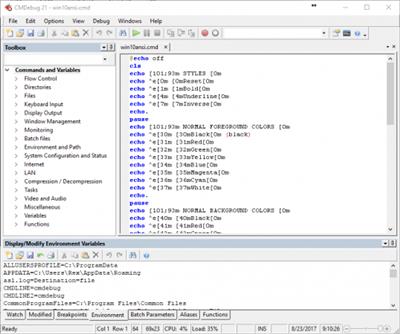
CMDebug allows you to create and debug your batch scripts with the integrated graphical IDE. CMDebug includes tabbed edit windows and a sophisticated debugger with single stepping, breakpoints, syntax coloring, tooltips, bookmarks, and tabbed variable and watch windows. Windows batch file programming has never been easier or more powerful!

You can use CMDebug to develop either CMD-compatible batch files (.BAT or .CMD), or TCC-RT-compatible scripts (.BTM). If you select the "TCC Syntax" option, CMDebug provides the full TCC-RT command set. If you select the "CMD Syntax" option, CMDebug will maximize CMD compatibility and disable TCC-only internal commands, variables, and functions. Some internal CMD / TCC commands will also behave slightly differently or modify their display output in order to match CMD's behavior more closely.
Using CMDebug with TCC-RT allows you to write (and encrypt) scripts using the TCC command language, and then distribute them with the free TCC-RT runtime on an unlimited number of target machines.

Features:
Create and debug your batch scripts with the integrated graphical IDE. The IDE includes tabbed edit windows and a sophisticated debugger with single stepping, breakpoints, syntax coloring, tooltips, bookmarks, tabbed variable and watch windows. Windows batch file programming has never been easier or more powerful!
The TCC-RT scripting language is a massive superset of the Windows CMD shell, with 220+ internal commands, 367+ internal functions, and 289+ system variables. Almost all of the CMD command line commands (e.g. DIR, COPY, DEL, START, etc.) are enhanced with hundreds of additional options. And TCC adds more than 180 new commands. TCC-RT can usually do in one or two lines what requires dozens CMD commands (when CMD can do it at all).
The scripting language includes a complete set of extended flow control structures including IF-Then-Else, DO and FOR loops, SWITCH, subroutines, batch libraries, and more.
When using TCC-RT syntax, most interactive commands (such as COPY, DEL, DIR, MOVE, REN, START, etc.) have command dialogs that allow you to select filenames and options and see your command line before executing it. The most powerful Windows command processor is also the easiest to use!
Monitor your system's hardware and software events, and execute commands when an event is triggered. You can monitor directory changes, the clipboard, event logs, Ethernet and WiFi connections, services, processes, and USB and Firewire connections.
Environment variable substitution is greatly enhanced, including nested variables, delayed expansion, indirect variables, multidimensional array variables, and direct access to the system, user, and volatile variables in the registry.
Select or exclude files by date, time, size, owner, and extended wildcards or regular expressions for extraordinary flexibility in file management.
Specify multiple filenames for most file processing commands (i.e., COPY, DEL, DIR, MOVE, etc.), or optionally the name of a file that contains the filename arguments. (COPY even supports multiple targets as well as multiple sources.)
Multiple types of I/O redirection are available, including redirecting and piping to STDERR, "in-process" pipes, "here-document" and "here-string" redirection, and Tee and Y pipe fittings.
Send keystrokes to any application (console or GUI).
TCC-RT includes internal compression and extraction commands for ZIP, 7ZIP, TAR, JAR, GZIP, and BZIP files.
You can access FTP, TFTP and HTTP (including SSL and SSH) directories and files in all command processor file-handling commands (COPY, DEL, MOVE, etc.).
Internal support is included for Perl, Lua, REXX, Python, Tcl/tk, and any Windows Active Scripting language. You can even combine multiple languages in your batch scripts.
And many thousands more -- see our online help for details.

CMDebug is compatible with any version of Microsoft Windows 7, Server 2008R2, Windows 8, Server 2012, Windows 10, and Server 2016, including 64-bit Windows. CMDebugis available in both 32-bit and 64-bit versions.

Download link:​
Код:
[center][b]rapidgator_net[/b]:
https://rapidgator.net/file/1c855d132deb37c95022a2b6bb3efbe1/1wx1a.JP.Software.CMDebug.28.00.10.x64.Multilingual.rar.html

[b]uploadgig_com[/b]:
https://uploadgig.com/file/download/5f34bedd0a8d0B39/1wx1a.JP.Software.CMDebug.28.00.10.x64.Multilingual.rar

[b]nitroflare_com[/b]:
https://nitroflare.com/view/CA7812E2A1CEF4A/1wx1a.JP.Software.CMDebug.28.00.10.x64.Multilingual.rar[/center]

Links are Interchangeable - No Password - Single Extraction​
 
JP Software Take Command 28.00.10 (x64) Multilingual

5ad94fa377c4bb55fc8ef6dc4be3da54.jpeg

File Size: 63.2 MB​
Take Command is a comprehensive interactive GUI and command line environment that makes using the Windows command prompt and creating batch files easy and far more powerful. Take Command displays your command line applications in tabbed windows, with optional Explorer-style integration for a visual look at your folders. Take Command includes hundreds of major enhancements to the command line and CMD commands such as COPY, DEL, and DIR, and adds more than 140 new commands, 460 internal variables and functions, a batch file IDE / debugger, and thousands of other features.

Command Line Features:
· Modify and re-execute previous commands with a powerful command line editor
· Copy, delete, move, and rename groups of files and directories, not just individual ones
· Extended directory searches allow you to change to a directory anywhere on your system by entering only part of its name
· Quickly locate files or text within files anywhere on your system
· Built-in file viewer includes scrolling, search, and print capabilities
· Select or exclude files by date, time, size, and/or extended wildcards for extraordinary flexibility in file management
· Redefine commands, create new commands and functions for your regular tasks, even assign frequently used commands to a single keystroke
· Direct access to FTP, TFTP and HTTP (including SSL) directories and files in all file-handling commands
· Complete configuration adjustment, either through interactive dialogs or on the command line
· File descriptions up to 511 characters long provide information that can't fit in a filename

Batch File Features:
· Batch debugger with singlestepping, breakpoints, syntax coloring, bookmarks, popup variable windows, variable watch windows, and editing
· An improved batch language adds subroutines, IF/THEN/ELSE logic, DO loops, SWITCH statements, error and exception handling, and more than 130 internal commands, while retaining compatibility with batch files written for CMD
· More than 130 built-in variables include system configuration, device status, network drive detection, and free memory and disk space
· More than 200 variable functions assist with manipulation and display of strings, characters, numbers, date and time, file names, etc

Windows Features:
· Start graphical and character-mode applications with ease - even run most console programs in the Take Command window
· Built-in screen scrollback buffer lets you review or print output from past commands at any time
· Customizable toolbar gives you quick access to frequently used commands and applications
· Find File dialog lets you search quickly for files or text, anywhere on your system - or search from the command line with the new FFIND command
· Dialogs, accessible from the Options and Utilities menus, for editing environment variables, aliases, file descriptions, and startup parameters
· New commands such as ACTIVATE, MSGBOX, and QUERYBOX that allow you to use GUI features and control GUI applications from your batch files

Download link:​
Код:
[center][b]rapidgator_net[/b]:
https://rapidgator.net/file/57f34302a4cb789be115d05db1b0f1a9/wymkc.JP.Software.Take.Command.28.00.10.x64.Multilingual.rar.html

[b]uploadgig_com[/b]:
https://uploadgig.com/file/download/eC41c9370e861832/wymkc.JP.Software.Take.Command.28.00.10.x64.Multilingual.rar

[b]nitroflare_com[/b]:
https://nitroflare.com/view/115B3AE052633C7/wymkc.JP.Software.Take.Command.28.00.10.x64.Multilingual.rar[/center]

Links are Interchangeable - No Password - Single Extraction​
 
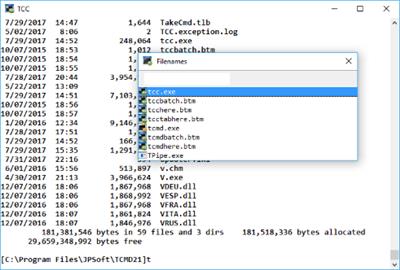
JP Software TCC 28.00.10 (x64)

14cd714c5627704143e53e910ea5b00f.jpeg

File Size: 52.2 MB​
TCC is our console mode Windows command shell (formerly known as 4NT). TCC is a replacement for the CMD command line (the default Windows command prompt). TCC is a superset of CMD, with 246 internal commands (CMD has fewer than 40), 695+ internal variables and functions, and hundreds of enhancements to existing CMD commands.

TCC works with your existing command line applications and batch files, but offers major improvements in command line and batch file capabilities, and adds thousands of new features to your command prompt windows.

Benefits:
TCC is a CMD replacement command processor that is compatible with your existing CMD commands and batch files, while adding thousands of new features. You're immediately more productive, and you can learn and add TCC's new features at your own pace.
Create and debug your batch scripts in a fraction of the time with the integrated editor and batch file debugger.
The integrated and familiar environment means you are immediately more productive with your interactive command prompt and batch file development tasks.
The consistent syntax reduces your learning and development time.
The comprehensive help (including context-sensitive popup help for command line syntax), speeds your development time and reduces syntax errors.

Download link:​
Код:
[center][b]rapidgator_net[/b]:
https://rapidgator.net/file/8ae4fcd22e2f43d60213a96523618e0b/clmum.JP.Software.TCC.28.00.10.x64.rar.html

[b]uploadgig_com[/b]:
https://uploadgig.com/file/download/98e2Fa813061878b/clmum.JP.Software.TCC.28.00.10.x64.rar

[b]nitroflare_com[/b]:
https://nitroflare.com/view/3E85E2721A61BA8/clmum.JP.Software.TCC.28.00.10.x64.rar[/center]

Links are Interchangeable - No Password - Single Extraction​
 
K-Lite Codec Pack Update 16.3.3

2f2f833a171e37bdc052d826c64e40bf.jpeg

File Size : 6.8 Mb​

The K-Lite Codec Pack is a collection of DirectShow filters, VFW/ACM codecs, and tools. Codecs and DirectShow filters are needed for encoding and decoding audio and video formats. The K-Lite Codec Pack is designed as a user-friendly solution for playing all your audio and movie files. With the K-Lite Codec Pack you should be able to play all the popular audio and video formats and even several less common formats.

Some codec packs are far from being friendly with computers, as they tend to slow down Windows, break down multimedia files and make the whole movie watching experience a nuisance. This is why an efficient software has to be chosen, one that does exactly what it is supposed to without additional and unnecessary features.

Easily deployed on the system
Simply put, this is exactly what K-Lite Codec Pack Full is meant to do. This is one of the most efficient codec packs out there that is not only delivered as a very light package but is also impressively friendly with computer resources.

Installing it is quite easy, unless one is an expert who really enjoys toying around with the advanced settings. K-Lite has numerous advanced customization options but novices are advised not to spend too much time on this section, as they might erroneously modify some options and break the entire process.

View detailed info on what is installed
Furthermore, before going through the step-by-step thorough setup process, one gains access to a list that displays content, along with several details regarding each of the codecs, to give users a glimpse of what they are about to deploy.

If everything goes well and K-Lite Codec Pack Full is successfully installed, users will be able to open any multimedia files stored on their computers, without any quality loss. Furthermore, it works like a breeze from the first run, without major changes to its default settings, which is a clear indication that beginners and those who want a codec that just works have chosen the right package.

Adjust settings with a dedicated tool
Experts have the possibility to configure the audio and video decoders, as well as the DirectVobSub, in an attempt to obtain a top-notch experience when it comes to playing multimedia files. This is easily done with the help of an integrated tweaking tool that, if managed properly it can enhance the overall multimedia experience.

To sum it up
All these considered, K-Lite Codec Pack should be the first on everyone's list when it comes to codec packages. It is light, freeware, easy to use and gets along perfectly even with slower computers. It represents the first brick that needs to be placed in the multimedia entertainment wall.

Download link:​
Код:
[center][b]rapidgator_net[/b]:
https://rapidgator.net/file/ed6d0476e7af769bc1cb74351f6e58b6/sz2uh.KLite.Codec.Pack.Update.16.3.3.rar.html

[b]uploadgig_com[/b]:
https://uploadgig.com/file/download/728de07fb13FCd8C/sz2uh.KLite.Codec.Pack.Update.16.3.3.rar

[b]nitroflare_com[/b]:
https://nitroflare.com/view/F7B17F9A796F6D8/sz2uh.KLite.Codec.Pack.Update.16.3.3.rar[/center]

Links are Interchangeable - No Password - Single Extraction​
 
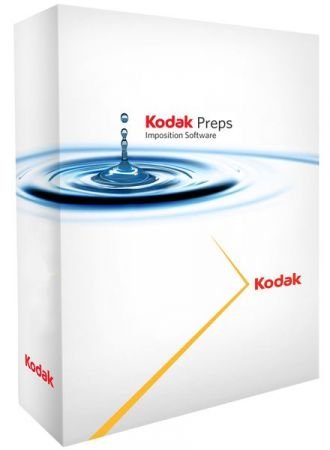
Kodak Preps 9.0.2 Build 128 Multilingual

81e8c2e785fcf3e9de45ee93ea193252.jpeg

Windows x64 | Languages: Multilingual | File Size: 255.27 MB​
KODAK PREPS Imposition Software - the leading solution for error-free impositions and one of the most widely used tools in the printing industry. PREPS Imposition Software produces faster, more accurate impositions that maximize press sheet usage. Its automated imposition process cuts turnaround time and reduces costs.

Primary Benefits
- Makes it fast and easy to create, save and manage step-and-repeat reducing turnaround time and costs so you can get to more jobs, faster
- Handles complex jobs for digital and conventional print with ease
- Produce similar or repetitive jobs easily, saving time and reducing cost with templates and libraries
- Efficiently and effectively manage any print project using specific interfaces for commercial and packaging
- Industry standard software well known by print operators minimizes training and maximizes productivity

Software Capabilities
- Flexible, easy-to-use templates make it easy to produce similar or repetitive jobs efficiently
- Template Search tool enables you find an existing Preps template quickly for re-use
- Define how a mark should be placed based on job or production needs with SmartMarks
- Define rules that utilize the SmartMarks automatically in a JDF or auto generated workflow with SmartMarks Editor
- Improved production reporting on colors, dimensions and equipment specified for the job
- Enhanced step-and-repeat for packaging applications and packaging specific interface
- AutoGang feature optimizes the placement of several jobs on a single press sheet
- Supports industry-standard PDF input and JDF output files

Save a layout with Independent Page as a Custom Fold Pattern
You can now save a Custom Fold Pattern with a section that includes independent pages. When adding these fold patterns to a Press Run, you will be prompted to set the independent page properties.

Preps can now define subsections (or ribbons) in Custom Fold Patterns. This means that you can use Preps to create a multi-web layout, save it as a custom fold pattern, and then generate a web press run with the custom fold pattern.

New Print menu and Preferences for Job Layout Report
You can now set output defaults for layout reports.

Remove marks through JDF import process
If you are working with Preps templates that have marks already defined on templates/signatures, you now have the ability to remove all existing marks through the JDF import process. You can then use SmartMarks based on marks rules to replace them.

New shortcut keys for inserting a new web and duplicating an existing web
You can now use shortcut keys to insert new webs and duplicate webs. See Menu shortcuts - Windows OS-based computers and Menu shortcuts

Disconnect Shingling/Bottling rules from Stock (Substrate) resource property
The Auto Shingling and Bottling rules are now defined in Resources > Shingling and Bottling Rules Editor, rather than being defined as a Stock (Substrate) resource property. This means that you no longer need to define multiple Stock (Substrate) resource properties for this purpose. In the new Shingling and Bottling Rules Editor, you will have all the same abilities defined in the Stock (Substrate) resource, plus additional fields to define a range of the Stock (Substrate) paper weight and caliper. An Auto Shingling and Bottling rule will be triggered when a Stock (Substrate) resource that fits the range is specified.

New Profile switch to allow users to enable AutoShingling
You have two ways to apply the Auto Shingling and Bottling rules: manually (in a Job Layout Details dialog box) or automatically.

To apply the rule automatically, in your Preps profile, set -AUTOSHINGLING and -AUTOBOTTLING to YES. When new jobs are created, the Auto Shingling and Auto Bottling will be automatically set in the Job Layout Details dialog box. The default is NO, so that you can control the use of Auto Shingling at a job level, as needed.

New mark capability to allow for marks only on the Preps Job Layout Report
You can now edit a SmartMark setting for placing marks on press runs that allows you to restrict the mark to printing only on the Job layout report. The mark will not print on the production layout.

New collation marks for Mixed Binding styles
When your production includes signatures made up from different binding styles-for example, you have two perfect bound signatures that are made up from three saddle stitched signatures each-you can now use Mixed Binding collation marks. In the example, the perfect bound signatures are the top level and each will get a signature number for the collation mark. The saddle stitched signatures get the same signature number as the parent and a tic line below indicating its number within the parent signature.
Release Notes
- Release notes were unavailable when this listing was updated.

System Requirements:

Supported operating systems:
- Microsoft Windows 10 Pro
- Windows 2016
- Windows 2019

Memory:
4 GB of RAM (available minimum)

Hard disk space:
4 GB of available space

Screen resolution:
1280 x 960 (minimum)

Download link:​
Код:
[center][b]rapidgator_net[/b]:
https://rapidgator.net/file/5dfb2b1d16ba801ce228a6b691ba541d/1xvqx.Kodak.Preps.9.0.2.Build.128.Multilingual.rar.html

[b]uploadgig_com[/b]:
https://uploadgig.com/file/download/Bfcd606fe8153602/1xvqx.Kodak.Preps.9.0.2.Build.128.Multilingual.rar

[b]nitroflare_com[/b]:
https://nitroflare.com/view/92CE3DC578D9299/1xvqx.Kodak.Preps.9.0.2.Build.128.Multilingual.rar[/center]

Links are Interchangeable - No Password - Single Extraction​
 
Lyn 2.0.11 macOS

3bc5caba8d1db9d3b9b7289a7de06f61.jpeg

Language: Multilingual | File size: 34 MB​
Lyn is a fast, lightweight image browser and viewer designed for photographers, graphic artists, and Web designers. Featuring an extremely versatile and aesthetically pleasing interface, it delivers an easy-to-use geotagging technology and a complete solution for sharing your photographs.

The new editing inspector gives you everything to turn your shots into great photos. Adjust exposure, color temperature, brightness, and contrast, or reveal image details with highlight and shadow adjustments. You can experiment and convert your color photos to black and white, try a classic sepia tone, or add a vignette.
Lyn natively supports all popular image formats like JPEG, TIFF, JPEG 2000, PNG, PPM, TGA, RAW, HDR, OpenEXR, animated GIF, and any other image format supported by OS X. It also integrates a movie player to watch camera recordings.
Release Notes
Minor fixes

Supported Operation Systems:
macOS 10.11 or later

Download link:​
Код:
[center][b]rapidgator_net[/b]:
https://rapidgator.net/file/3fc8d46e8ffbbe0edc0c1acd0fac578a/gplzr.Lyn.2.0.11.macOS.dmg.html

[b]uploadgig_com[/b]:
https://uploadgig.com/file/download/ff6bc1ff7816630b/gplzr.Lyn.2.0.11.macOS.dmg

[b]nitroflare_com[/b]:
https://nitroflare.com/view/06854A4700A2183/gplzr.Lyn.2.0.11.macOS.dmg[/center]

Links are Interchangeable - No Password - Single Extraction​
 
Metadatics 1.6.6 macOS

3b1c5b2add37c1043c6e61b643fb53b6.jpeg

File size: 17 MB​
Metadatics is a powerful and advanced audio metadata editor. It supports batch editing of most common audio file types including MP3, M4A, AIFF, WAV, FLAC, APE, OGG, WMA, and more. Lookup metadata from online sources, rename files based on metadata, or manipulate metadata using one of the many built in functions. Metadatics provides all you need to edit metadata with ease and flexibility.

Release Notes
Release notes were unavailable when this listing was updated.

Supported Operation Systems:
macOS 10.10 or later

Download link:​
Код:
[center][b]rapidgator_net[/b]:
https://rapidgator.net/file/585cbb417a9200ecea4393b6a6dbf91c/vseuw.Metadatics.1.6.6.macOS.dmg.html

[b]uploadgig_com[/b]:
https://uploadgig.com/file/download/e44b0BcD066d3022/vseuw.Metadatics.1.6.6.macOS.dmg

[b]nitroflare_com[/b]:
https://nitroflare.com/view/B22050E0C9D7EFD/vseuw.Metadatics.1.6.6.macOS.dmg[/center]

Links are Interchangeable - No Password - Single Extraction​
 
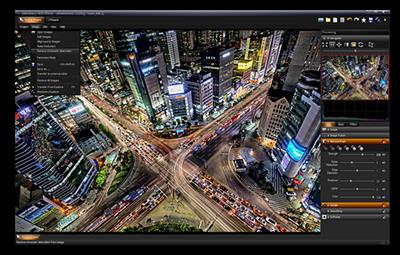
Machinery HDR Effects 3.0.92

43cd5578e93e526a7e3b07515295d92f.jpeg

Windows (x64) | Languages: English | File size: 23.2 MB​
MACHINERY HDR is a photo editor that utilizes this technology. You do not need to be an expert to achieve dazzling effects - even from a single image saved in JPG format! MACHINERY is easy to use thanks to an intuitive interface and the available set of options. Predefined settings allow the user to achieve professional HDR effects with just a single click of the mouse!

Features:

Advanced HDR effects
Machinery HDR Effects has a number of tools for an advanced edition of the photo as well as for an end "polishing" effect.

Enhancing details in images
Move the "Microcontrast", "Details" and "Dynamic Contrast" track bar to draw out more details and accentuate the texture of objects.You do not need multiple images - the function also works with only one photograph!
You can compare the processed image with the original in every moment with use of a right mouse button in the screen.

Quick start
Drag series of exposed images (various exposures) from Windows files. Wait until the program processes the image and save it. There is really nothing more you need to do in order to obtain a naturally looking HDR image!

Get great effects with just one click of your mouse!
Load images and go to the "Presets" tab to use a ready setting. Great effects on-the-spot - it could not be any simpler!.

Samples
After you install the program, load sample projects from the "Samples" folder, to see that they were really created with Machinery Effects. Test the samples to see how changing parameters effects image processing.

Batch processing
The program includes an additional app - Machinery Explorer - which makes finding and viewing images much easier. It also makes it possible to create a list of images for batch processing.
Use the Machinery Explorer app to create a list of images that you want processed. Select the "Batch Processing" option to transfer files to the main program.

Download link:​
Код:
[center][b]rapidgator_net[/b]:
https://rapidgator.net/file/de573b9494b35f54b830474c46453cb6/61ide.Machinery.HDR.Effects.3.0.92.rar.html

[b]uploadgig_com[/b]:
https://uploadgig.com/file/download/9554772300e26fF5/61ide.Machinery.HDR.Effects.3.0.92.rar

[b]nitroflare_com[/b]:
https://nitroflare.com/view/A009A2F34CA1F3B/61ide.Machinery.HDR.Effects.3.0.92.rar[/center]

Links are Interchangeable - No Password - Single Extraction​
 
Microsoft .NET Desktop Runtime 5.0.8 Build 30215

31ef5bf58fa6ba7f445debe0d2c80dc3.jpeg

File Size : 99 Mb​

Microsoft .NET Desktop Runtime enables you to run existing Windows desktop applications. This release includes the .NET Runtime, you do not need to install it separately.

Microsoft .NET Desktop Runtime redistributable package installs the .NET Desktop Runtime and associated files required to run many applications that use this programming language.

This is Microsoft's comprehensive and consistent programming model for building applications that have visually stunning user experiences, seamless and secure communication, and the ability to model various business processes.

The .NET Desktop Runtime also includes the .NET Runtime.

Download link:​
Код:
[center][b]rapidgator_net[/b]:
https://rapidgator.net/file/c5220705a84066b6349f4afa74e46786/fgjdx.Microsoft..NET.Desktop.Runtime.5.0.8.Build.30215.rar.html

[b]uploadgig_com[/b]:
https://uploadgig.com/file/download/ff2c6160358bB2ba/fgjdx.Microsoft..NET.Desktop.Runtime.5.0.8.Build.30215.rar

[b]nitroflare_com[/b]:
https://nitroflare.com/view/95156174037EF6C/fgjdx.Microsoft..NET.Desktop.Runtime.5.0.8.Build.30215.rar[/center]

Links are Interchangeable - No Password - Single Extraction​
 
Microsoft Malicious Software Removal Tool 5.91

ae6bfde286812be27e6a6649f731cda3.jpeg

File Size : 65 Mb​

The Microsoft Windows Malicious Software Removal Tool helps remove malicious software from your computers that are running Windows 10, Windows 8.1, Windows Server 2012 R2, Windows 8, Windows Server 2012, Windows 7, Windows Vista, Windows Server 2008.. Microsoft releases a new version of the Microsoft Malicious Software Removal Tool every month. After you download the tool, the tool runs one time to check your computer for infection by specific prevalent malicious software (including Blaster, Sasser, and Mydoom) and helps remove any infection it finds.

This article contains information about how the tool differs from an antivirus product, how you can download and run the tool, and what happens when the tool finds malicious software on your computer. The advanced user section includes information for the IT administrator and additional information about how to manage and run the Malicious Software Removal Tool.
Note In compliance with the Microsoft Support Lifecycle policy, the Windows Malicious Software Removal Tool (MSRT) will no longer be offered to or supported on Windows 2000-based systems after July 13, 2010. This date coincides with the end of the Extended Support phase for Windows 2000. For more information about the Support Lifecycle policy, go to the Microsoft Support Lifecycle website.

How the Microsoft Malicious Software Removal Tool differs from an antivirus product

The Microsoft Malicious Software Removal Tool does not replace an antivirus product. It is strictly a post-infection removal tool. Therefore, we strongly recommend that you install and use an up-to-date antivirus product.

The Microsoft Malicious Software Removal Tool differs from an antivirus product in three key ways:
The tool removes malicious software from an already-infected computer. Antivirus products block malicious software from running on a computer. It is significantly more desirable to block malicious software from running on a computer than to remove it after infection.
The tool removes only specific prevalent malicious software. Specific prevalent malicious software is a small subset of all the malicious software that exists today.
The tool focuses on the detection and removal of active malicious software. Active malicious software is malicious software that is currently running on the computer. The tool cannot remove malicious software that is not running. However, an antivirus product can perform this task.
For more information about how to protect your computer, go to the Microsoft Safety & Security Center website.

Note The Microsoft Malicious Software Removal Tool focuses on the detection and removal of malicious software such as viruses, worms, and Trojan horses only. It does not remove spyware. However, you can use Microsoft Security Essentials to detect and remove spyware.
Click here to download Microsoft Security Essentials
You do not have to disable or remove your antivirus program when you install the Microsoft Malicious Software Removal Tool. However, if prevalent, malicious software has infected your computer, the antivirus program may detect this malicious software and may prevent the removal tool from removing it when the removal tool runs. In this case, you can use your antivirus program to remove the malicious software.

Because the Microsoft Malicious Software Removal Tool does not contain a virus or a worm, the removal tool alone should not trigger your antivirus program. However, if malicious software infected the computer before you installed an up-to-date antivirus program, your antivirus program may not detect this malicious software until the tool tries to remove it.

Download link:​
Код:
[center][b]rapidgator_net[/b]:
https://rapidgator.net/file/95b65f9da1940bfb3bc1fdbd1594e372/5erxu.Microsoft.Malicious.Software.Removal.Tool.5.91.rar.html

[b]uploadgig_com[/b]:
https://uploadgig.com/file/download/6f4Ddf6132f5aD18/5erxu.Microsoft.Malicious.Software.Removal.Tool.5.91.rar

[b]nitroflare_com[/b]:
https://nitroflare.com/view/9497829F1481F17/5erxu.Microsoft.Malicious.Software.Removal.Tool.5.91.rar[/center]

Links are Interchangeable - No Password - Single Extraction​
 
Microsoft Office 2019 for Mac 16.51 VL Multilingual

0fa93eadc4e6d635b51ceb3e6743c757.jpeg

File Size: 1.8 GB​
Office 2019 for Mac is designed from the ground up to take advantage of the latest Mac features, including Retina display, full screen view support, and even scroll bounce. It's the perfect combination of the Office you know and trust, and the Mac you love.

Word
Create and share professional-looking documents with state-of-the-art editing, reviewing, and sharing tools. The new Design tab provides quick access to features, and Smart Lookup shows relevant contextual information from the web directly inside Word.

Excel
Analyze and visualize your data in new and intuitive ways with a fresh user interface plus your favorite keyboard shortcuts. Leverage features like Analysis Toolpak, Slicers, and Formula Builder to save time, so you can focus on insights.

PowerPoint
Create, collaborate, and effectively present your ideas with new slide transitions and an improved Animations task pane. Threaded comments alongside your slides help you incorporate feedback into your presentations. And Presenter View displays the current slide, next slide, speaker notes, and a timer on your Mac, while projecting only the presentation to your audience on the big screen.

OneNote
It's your very own digital notebook, so you can keep notes, ideas, web pages, photos, even audio and video all in one place. Whether you're at home, in the office, or on the move, you can take it all with you wherever you go while sharing and collaborating with others. It's great for school assignments, work projects, travel plans, party planning, and more.

Outlook
Easily manage your email, calendar, contacts, and tasks. Push email support keeps your inbox up to date, conversation view groups related messages, and calendars can be viewed side-by-side for planning.

Download link:​
Код:
[center][b]rapidgator_net[/b]:
https://rapidgator.net/file/edcd372e92f7621e818b0bb0f5956f78/dwyw2.Microsoft.Office.2019.for.Mac.16.51.VL.Multilingual.part1.rar.html
https://rapidgator.net/file/b2fd80e5375c08e3784a69f98a38462c/dwyw2.Microsoft.Office.2019.for.Mac.16.51.VL.Multilingual.part2.rar.html

[b]uploadgig_com[/b]:
https://uploadgig.com/file/download/c9D0E941d04E3D17/dwyw2.Microsoft.Office.2019.for.Mac.16.51.VL.Multilingual.part1.rar
https://uploadgig.com/file/download/ec475b41Ba730eEA/dwyw2.Microsoft.Office.2019.for.Mac.16.51.VL.Multilingual.part2.rar

[b]nitroflare_com[/b]:
https://nitroflare.com/view/2B2A50CC02B7F04/dwyw2.Microsoft.Office.2019.for.Mac.16.51.VL.Multilingual.part1.rar
https://nitroflare.com/view/31E413230E21D99/dwyw2.Microsoft.Office.2019.for.Mac.16.51.VL.Multilingual.part2.rar[/center]

Links are Interchangeable - No Password - Single Extraction​
 
Movavi Screen Recorder 21.4.0 macOS

13b951f9ecf44a8b16bdc94eb2f23ab8.jpeg

Language: Multilingual | File size: 97 MB​
Capture video from your Mac display with Movavi Screen Recorder! This neat video recorder for Mac will help you save live streams and video and audio clips from web pages, record your interactions in apps, capture gameplay, and do lots more screen capturing tasks!

- Save streaming movies
- Capture video at good quality: record program how-tos and Skype calls
- Record gameplay
Release Notes

Release notes were unavailable when this listing was updated

Supported Operation Systems:
macOS 10.10 or later

Download link:​
Код:
[center][b]rapidgator_net[/b]:
https://rapidgator.net/file/69bc6e6d37836a26b6add449fe2f5a7e/mmzbo.Movavi.Screen.Recorder.21.4.0.macOS.dmg.html

[b]uploadgig_com[/b]:
https://uploadgig.com/file/download/23fe2602cfae3D23/mmzbo.Movavi.Screen.Recorder.21.4.0.macOS.dmg

[b]nitroflare_com[/b]:
https://nitroflare.com/view/515C788E2961F81/mmzbo.Movavi.Screen.Recorder.21.4.0.macOS.dmg[/center]

Links are Interchangeable - No Password - Single Extraction​
 
Movavi Screen Recorder 21.4 Multilingual

3e24bd2155f1ae39bf8e09a015ee7888.jpeg

File size: 54.9 MB​
Movavi Screen Recorder: the Ultimate Screen Recorder for Windows. Movavi Screen Recorder is lightweight yet powerful video recording software that helps you capture streaming video and music from websites, save Skype calls and program activity, and much more.

Learning
- Record webinars, online tutorials, and other educational videos
- Cut out unwanted parts from any video
- Save recordings to watch on a computer or mobile device
- Replay captured videos at any time

Fun
- Capture short clips from websites
- Save movies and TV series
- Record video chats with your friends and family
- Extract music from video, record online radio
- Cut out ads and other unwanted content

Work
- Show screen activities to colleagues: take screenshots in a single click and illustrate them with arrows, frames, and captions
- Use screenshots and screen videos to demonstrate bugs and errors
- Save Skype conversations with colleagues and business partners
- Record online job interviews

Download link:​
Код:
[center][b]rapidgator_net[/b]:
https://rapidgator.net/file/f5b80d33b125df783881fcdb80868eeb/nxepq.Movavi.Screen.Recorder.21.4.Multilingual.rar.html

[b]uploadgig_com[/b]:
https://uploadgig.com/file/download/563a415e10722D97/nxepq.Movavi.Screen.Recorder.21.4.Multilingual.rar

[b]nitroflare_com[/b]:
https://nitroflare.com/view/157E6680FC98847/nxepq.Movavi.Screen.Recorder.21.4.Multilingual.rar[/center]

Links are Interchangeable - No Password - Single Extraction​
 
Mozilla Thunderbird 78.12.0

8f7a4851a78bf76c1b857e91fb5412ab.jpeg

File size: 48/49 MB​
Mozilla Thunderbird is a fully featured, very functional, secure email client and RSS feed reader, created by Mozilla. It offers a pretty and streamlined interface to a very powerful email package and lets you handle mail efficiently and with style, and Thunderbird filters away junk mail too. Thunderbird is a sophisticated and very well integrated Bayesian spam filter knocks out most junk mail (after some training). Combine these two aspects of Thunderbird, and you get a sensible feature that automatically sanitizes (potentially dangerous) HTML code and turns off remote images for spam or anything else - worms, viruses - you classify as bad mail. Though not perfect, a scam sensor detects tactics commonly used to fool users.

Flexible views, free-form tags and powerful filters, search and virtual folders (which also work fine with IMAP accounts and across email accounts) make it a snap to handle large amounts of mail. The integrated RSS feed reader extends these abilities to news.

Thunderbird , as a messaging system, is uniquely positioned as the tool that users can use to integrate as many of their communications as they want. By combining an open architecture, a powerful extensibility and customization framework, and a person-centric perspective on communications, Thunderbird is a powerful yet enjoyable tool to help individuals manage their online interactions - whether that's email, instant messaging, social networking messages, or other types of message.

Thunderbird will evolve to embrace the Web, by continuing to blur the distinction between what's on the web and what's on the desktop, while keeping in mind the importance of keeping the individual in charge of their online experience.

* Mozilla Thunderbird manages multiple POP and IMAP email accounts and reads RSS feeds.
* A junk mail filter using Bayesian statistics cans spam automatically in Mozilla Thunderbird.
* Mail views, free-form message tags and flexible filters let you organize and prioritize good mail easily.
* Searches can be saved to virtual folders that automatically aggregate relevant mail in Thunderbird.
* Mozilla Thunderbird offers rich, but security and privacy conscious HTML formatting support.
* Mail classified as junk can automatically be sanitized, Thunderbird detects common scam tactics.
* S/MIME support lets you encrypt and sign mail in Mozilla Thunderbird (OpenPGP plug-in available).
* You can run Mozilla Thunderbird from a removable medium such as USB stick.
* Many extensions more allow Mozilla Thunderbird to expand its feature set or improve usability.
* Mozilla Thunderbird supports Windows, Mac OS and Linux.

Download link:​
Код:
[center][b]rapidgator_net[/b]:
https://rapidgator.net/file/b8afa272f0362e8703753924bed97458/mr2st.ThunderbirdSetup78.12.0.rar.html
https://rapidgator.net/file/8d00d88a3a20dc20ef66827f781c3de5/mr2st.ThunderbirdSetup78.12.0x86.rar.html

[b]uploadgig_com[/b]:
https://uploadgig.com/file/download/5983cd40fe337ccf/mr2st.ThunderbirdSetup78.12.0.rar
https://uploadgig.com/file/download/6Eeccf84159b0720/mr2st.ThunderbirdSetup78.12.0x86.rar

[b]nitroflare_com[/b]:
https://nitroflare.com/view/88DA34BABF6BB26/mr2st.ThunderbirdSetup78.12.0.rar
https://nitroflare.com/view/D18382B52909DBD/mr2st.ThunderbirdSetup78.12.0x86.rar[/center]

Links are Interchangeable - No Password - Single Extraction​
 
n-Track Studio Suite 9.1.4.4071 (x64) Multilingual

12807d8e4a30cb3327e7d76c3fbd9ad0.jpeg

File size: 138 MB​
n-Track Studio 9 turns your PC into an easy to use multitrack audio recording studio. It is the perfect tool for professional quality audio recording, encoding, mixing and editing. Record, edit, overdub your audio tracks, apply effects, process audio live input, mix and then burn audio CDs or create mp3 files. n-Track Studio is an Audio and MIDI Digital Multitrack Recorder that transforms your computer into a powerful audio recording studio. You can record, playback, overdub your audio tracks exploiting the flexibility and power of today's PCs for applying effects, realtime input processing, automated aux channels sends and returns, destructive and non-destructive wave editing. The program supports 24bit-192 khz recording, 64 bit mixing, multiple channels soundcards, live input processing, CD burning, mp3 encoding and more.

Main n-Track Studio features:
* Records and plays back a virtually unlimited number of audio and MIDI tracks
* DirectX, VST and ReWire effects can be added to each channel/track
* Built-in effects include Reverb, Compression, Parametric and Graphic EQ, Echo, Auto-volume, Pitch Shift, Chorus, Multiband Compression, Spectrum analyzer
* Supports 16 and 24 bit single and multichannel soundcards at sampling frequencies up to 192 Khz using Asio, WaveRT, WDM, MME and DirectSound
* Is compatible with multichannel Asio, WaveRT, WDM and MME audio drivers, which means that n-Track can work with almost any soundcard available today with the lowest possible latency
* Supports VST Instruments and DirectX Instruments synth plug-ins. Sample-accurate MIDI tracks can be sent to VSTi/DXi software MIDI synths, without the need of expensive hardware MIDI synths.
* Adjust the effect settings and listen to the result in real time.
* Built-in effects include Reverb, Compression, Parametric and Graphic EQ, Echo, Auto-volume, Pitch Shift, Chorus, Multiband Compression, Spectrum analyzer.
* Supports third party DirectX, VST 2.0 and ReWire plug-ins.
* Realtime Audio effects can be added to each channel.
* Supports 16 and 24 bit single and multichannel soundcards at sampling frequencies up to 192 Khz using Asio, WaveRT, WDM, MME and DirectSound.
* Input processing allows to process with plug-ins live signals. Record the 'dry' (unprocessed) signal while processing and reprocess the recording later - i.e. Play a guitar through a distortion plug-in then change the distortion after the recording!

More Features:
* Supports surround mixing for creating DVD audio projects using 5.1, 6.1 and 7.1 channels surround formats
* Each audio track includes a 20 bands parametric EQ with graphical frequency response view, a full spectrum analyzer and an automatic instrument tuner. Up to 32 aux channels with fully automated sends and returns.
* Supports multiple input and output soundcards or more than one soundcard. You can record multiple tracks at a time and output to more than one stereo output. Each output channels has its own master channel effects and volume control.
* Supports technology by Propellerhead Software AB. Mix signals in realtime with n-Track's own channels from other programs (such as Reason, Ableton Live, Fruityloops and many others).
* Import and export .wav, .mp3, .wma, .mid, .ogg, .flac, .aiff, .cda, .sng, .sgw audio files
* Import and export EDL multitrack song files for exchanging songs with other multitrack programs
* Sync to other programs or external devices using SMPTE/MTC or MIDI Clock sync, acting either as master or slave
* Loads and saves MIDI tracks to standard MIDI files
* Play Videos (AVI, MPEG) in sync with the song in a dedicated video playback window
* Automated volume, pan, aux sends and returns and effects parameters. You can "program" fade-in/outs, cross fades, boost the volume of a track when there is a solo etc.

Download link:​
Код:
[center][b]rapidgator_net[/b]:
https://rapidgator.net/file/16aff3e88670da59b5a0a76871dc2024/0d4ps.nTrack.Studio.Suite.9.1.4.4071.x64.Multilingual.rar.html

[b]uploadgig_com[/b]:
https://uploadgig.com/file/download/32b7cbc6a67853e9/0d4ps.nTrack.Studio.Suite.9.1.4.4071.x64.Multilingual.rar

[b]nitroflare_com[/b]:
https://nitroflare.com/view/698A40F3FBB664E/0d4ps.nTrack.Studio.Suite.9.1.4.4071.x64.Multilingual.rar[/center]

Links are Interchangeable - No Password - Single Extraction​
 
Nukeygara Akeytsu 20.3.9 (x64)

29731b51a8f61288a14439b2ba2226a7.jpeg

File size: 84 MB​
3D animation. Reinvented. Disruptive & Intuitive. Akeytsu disrupts the status-quo with its simplicity, velocity and ergonomics. With its focus on the artist's needs, Akeytsu does away with the dated and complex technical constraints of the traditional 3D animation toolset. Designed by animators, it offers a brand new approach to skinning, rigging and animation. Built from meticulous feedback and testing, the UI design and intuitive and accessible features meet every artist's expectations.

Fast & Easy
Akeytsu simplifies the rigging workflow by doing away with traditional control rigs and manipulators and instead lets the artist handle directly the mesh and skeleton. The Akeytsu 3D animation toolset is designed for both the aspiring artist and the professional animator to produce large volumes of high quality animation quickly and easily. Dedicated solely to rigging and animation, Akeytsu has one of the fastest learning curves of any software in the 3D industry. It provides flexible and intuitive functionalities that are easy to use, without making compromises on the quality of the content that can be produced.

Innovative & Comfortable
Create a pose in a quick time with the Akeytsu Spinner, a smart 2D manipulator. Manage keyframing with the Akeytsu Stacker, the most efficient keyframe editor in its class. Edit the F-Curve in the 3D viewport and manipulate the IK solvers through the FK skeleton. Akeytsu optimizes your creative control and allows you to switch seamlessly between rigging and animation.

Efficient & Stable
Akeytsu has been perfected over an extensive twelve beta version history and is already widely used by indie game developers and animators before it's much anticipated release. During this long, deliberate period of unlimited free beta access, Akeytsu has amassed a ton of user feedback from a variety of sources. This information has been used to develop, not only a very stable software, but one with proven gains of productivity within different game workflows. Production ready, reliable and stable Akeytsu is perfect for any creator of animation.

Download link:​
Код:
[center][b]rapidgator_net[/b]:
https://rapidgator.net/file/e952b16ac6a1a1776c2b8224c4a1106b/hv0ig.Nukeygara.Akeytsu.20.3.9.x64.rar.html

[b]uploadgig_com[/b]:
https://uploadgig.com/file/download/B9202c15d90d6099/hv0ig.Nukeygara.Akeytsu.20.3.9.x64.rar

[b]nitroflare_com[/b]:
https://nitroflare.com/view/755971E7A2C76AB/hv0ig.Nukeygara.Akeytsu.20.3.9.x64.rar[/center]

Links are Interchangeable - No Password - Single Extraction​
 
Office Tool Plus 8.2.3.2 Multilingual

e2e78b0a730486c41692cb0882e706e3.jpeg

File Size : 11 Mb​

Office Tool Plus is a tool for managing, downloading and installing Office.Office Tool Plus is based on Microsoft's Office Deployment Tool. You can customize configure your Office installation and download installation files to install Office without Internet.

Opportunities:
1. Configure the Office installation, as well as customize the installed C2R products, such as adding and removing components, language packs, etc.
2. Download the Office installation package or the language pack, which can be downloaded using the official programs Thunder, Aria or Microsoft.
3. Configure your current Office, change the update channel, delete the product language, or delete the product, or use the built-in scripts or tools to clean the Office
4. Activate your office. Easily set the product key and configure your KMS server address or convert the Office version. (PS: the tool does not have a built-in KMS activation, it simply provides the ability to configure a KMS server.)

Supported products:
* MS Office 2016 -> Standard, Pro Plus, Mondo, Professional, Personal, Home Business, Home Student, O365 ProPlus, O365 Business, O365 Small Business, O365 Home Premium
* MS Office 2019 -> Standard, Pro Plus, Professional, Standard 2019 Volume, ProPlus 2019 Volume, Office 365, Home Business, Home Student

Download link:​
Код:
[center][b]rapidgator_net[/b]:
https://rapidgator.net/file/8b772bfe2ccabda3fb2ca0fd42812a73/indu1.Office.Tool.Plus.8.2.3.2.Multilingual.zip.html

[b]uploadgig_com[/b]:
https://uploadgig.com/file/download/1B8f9bc12dF0c528/indu1.Office.Tool.Plus.8.2.3.2.Multilingual.zip

[b]nitroflare_com[/b]:
https://nitroflare.com/view/45737980F50682D/indu1.Office.Tool.Plus.8.2.3.2.Multilingual.zip[/center]

Links are Interchangeable - No Password - Single Extraction​
 
PlanSwift Pro Metric 10.3.0.48 Multilingual

17ae3a5e3160f89a5108f8c6bfec396f.jpeg

File size: 55 MB​
PlanSwift Pro is a complex and efficient application created to provide architects and other specialists in the field with a method of creating virtual versions of construction plans, which they can edit in any way they please.

PlanSwift is easily customized for you and your specific trade. Simply create assemblies of commonly used materials, waste and even labor. Then drag those assemblies onto the takeoff items for instant and accurate estimates of all your costs!

1) Point & Click
Takeoff and Estimate in seconds, if it's colored it's counted.

2) Drag & Drop
Drag and Drop material and labor assemblies onto your takeoff.

3) Print or Export
Sharing your estimate is easy, and PlanSwift is fully Excel compatible.

General Contractors
Takeoff in a fraction of the time with PlanSwift software click, drop, and estimate functionality.
Manage projects large and small with accurate and timely calculations.
Easily adjust cost projections, simply change product cost and recalculate!
Bid more jobs, manage more efficiently and grow your business with PlanSwift takeoff and estimating software.

Concrete Takeoff and Estimating the Smart Way
Takeoff footings, walls and foundations measurements quickly and accurately.
Simple Single Click selection for for slab dimensions..
Custom pre built assemblies accurately project rebar, membranes and other materials and labor.
PlanSwift instantly and accurately calculates your costs and margins then print or export to excel

Fast and Accurate Drywall Takeoff
Simply point and click to measure walls, ceilings and partitions.
Calculate your square footage and surface areas quickly with our area and linear tools.
PlanSwift automatically calculates materials and labor for a perfect estimate, every time.
You'll make more accurate estimates much quicker, saving time and money!

Electrical Takeoff Made Easy With PlanSwift
Measures lengths for conduits, wiring and cables quickly and accurately
Adds total number of switches and receptacles with ease.
Automatically calculates materials and costs
Export into estimate in a snap, saves time, money and effort

Save Time on Flooring Takeoff and Estimating
One Click area select for tile,carpet , hardwood or laminate floor areas.
Speedy perimeter measurement for nail strip and baseboard needs.
Measure, count, calculate, print or export your estimate with our easy takeoff software.
Estimate more accurately in less time. Bid and win more jobs.

Fast and Accurate Framing Estimates
Measure joists, rafters, studs, headers, etc.
Count posts, connectors and more.
Calculate labor, waste and equipment hours.
Print or export your estimate with our easy takeoff software.
Estimate more accurately in less time. Bid and win more jobs.

Whats New:
Updates: official site does not provide any info about changes in this version.

Download link:​
Код:
[center][b]rapidgator_net[/b]:
https://rapidgator.net/file/bd7e74b3f0089066a827d7b79bc63209/d0nft.PlanSwift.Pro.Metric.10.3.0.48.Multilingual.rar.html

[b]uploadgig_com[/b]:
https://uploadgig.com/file/download/88BE5993f901d276/d0nft.PlanSwift.Pro.Metric.10.3.0.48.Multilingual.rar

[b]nitroflare_com[/b]:
https://nitroflare.com/view/B80803A6934AB15/d0nft.PlanSwift.Pro.Metric.10.3.0.48.Multilingual.rar[/center]

Links are Interchangeable - No Password - Single Extraction​
 
Power-user Premium 1.6.1164

2d98f7beec7721cfdbc4a699cbe30fb8.jpeg

Languages: English | File size: 9.10 MB​
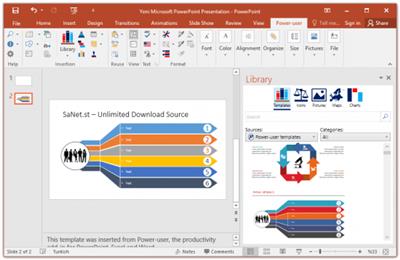
Power-user add-in: smart tools for PowerPoint, Excel and Word - Templates, Icons, Charts, Maps, Diagrams and more! Power-user provides you with a deep library of templates, icons, charts, maps, and diagrams for your spreadsheets and presentations. With Power-user for PowerPoint and Excel, you'll draw the attention of your audience with stunning graphics that are sure to impress. Create stunning documents
to impress clients and managers with your skills on PowerPoint, Excel & Word

Increase your productivity
by up to 50% to meet deadlines, save time and reduce labor costs

Focus on making an impact
instead of spending your time on low added-value tasks like formatting

LIBRARY OF TEMPLATES FOR POWERPOINT, EXCEL & WORD
Don't reinvent the wheel for every slide or document. Access hundreds of professionally designed templates from the Power-user add-in's library, and insert them in 1 click. Templates will automatically adjust to your own color scheme. You can also save your own slides or documents in the templates library to keep them accessible anytime. Or you can create shared libraries for all users in your organization.

ICONS & FLAGS
Power-user comes with a collection of 3,000 icons and all country flags to illustrate your slides. Icons are vector shapes so you can resize them without deformation and recolor them as you with. With Power-user you can search icons by categories and with different keywords associated to the same icon to let you find the right icon in just 2 seconds.

DATA MAPS
Our 200+ data maps are powerful tools to illustrate ideas with a geographical dimension. Those maps are fully editable, and can be colored automatically based on your Excel data. Within minutes, you can create beautiful maps that will immediately convince your audience.

WATERFALL CHARTS
Waterfall charts are very popular in finance and consulting. They are great to break down your data into multiple components, illustrating for instance what postively or negatively impacts a KPI.

MEKKO CHARTS
Create Mekko charts in PowerPoint, Excel or Word with Power-user. Mekko are one of the most powerful chart types. It can represents 3 dimensions of data, and is popular in consulting to show market positions of different companies for instance.

SANKEY CHARTS
Instantly insert breathtaking Sankey charts in PowerPoint, Excel or Word with the Power-user add-in. Sankey are very effective to illustrate flows such as transactions, exportations, migrations etc. Sankey Charts can be edited dynamically through a simple and intuitive interface.

PICTURES
Sometimes a good picture tells more than a thousand words. Power-user allows you to browse over 100,000+ pictures and insert them with 1 click. it's ideal to illustrate concepts or trigger a discussion, without worrying about intellectual property rights. Pictures are inserted in PowerPoint with a size already optimized for your slides.

DIAGRAMS
Embed customized diagrams in no time with Power-user. Diagrams are a powerful tool to illustrate complex ideas and build eloquent slides or dashboards in little time. Diagrams include value chains, gauges, traffic lights, relationships, pyramids, arrows and more.

GANTT CHARTS
Use Gantt charts to illustrate the different phases of a project and their progress. Creating this manually can take hours. With the add-in, you can create them in a few seconds only. It's a great tool to improve the design of a slide in very little time.

POWERPOINT TOOLS
- Sticky notes, a helpful solution to add comments to your slides and share them with your teamworkers
- Stamps, a solution to instantly mark or un-mark all your slides as "Draft" or "Confidential"
- Mini-slides, to refer to a slide from earlier in the presentation,
- Slide summaries, listing the titles of all selected slides,
- Progress tools, to show the audience how far in the presentation you are.

System Requirements:
Power-user is fully compatible with PowerPoint, Excel and Word 2007, 2010, 2013, 2016, 2019 and 365 (32 or 64 bits)

Download link:​
Код:
[center][b]rapidgator_net[/b]:
https://rapidgator.net/file/978bdc4c16505178f46befb79a57a54b/8ncac.Poweruser.Premium.1.6.1164.rar.html

[b]uploadgig_com[/b]:
https://uploadgig.com/file/download/492a3b71fA30b4f3/8ncac.Poweruser.Premium.1.6.1164.rar

[b]nitroflare_com[/b]:
https://nitroflare.com/view/D7B8F890B8499FC/8ncac.Poweruser.Premium.1.6.1164.rar[/center]

Links are Interchangeable - No Password - Single Extraction​
 
Quite Imposing Plus 5.2

dbd52104b1619cb047cefba38bd45021.jpeg

File size: 14 MB​
Quite Imposing Plus is a plug-in for Adobe's Acrobat 9, "X" (10), "XI" (11) and DC. It does...Imposing. This is all about combining pages onto larger sheets to make books, booklets, or special arrangements. Creating booklets or arranging complex imposition layouts has never been easier and all without leaving Acrobat! (High end users who don't want to use Acrobat can use our hot folder product Quite HOT Imposing)

The man in our logo on the right is doing imposing as it used to be done - manually. This was a craftsmans task which required much expertise and skill behind it. Our modern imposition tools perform at the same level of skill and are quick to learn and easy to use. They give immediate results without need for expensive training or complicated job set ups. But if you do need a little help getting started just visit our support pages to see the variety of ways to get technical help.

A particularly important feature of the plug-ins is that the combined pages are a new PDF document, giving a way to check each sheet instantly, saving time and money.
Quite Imposing Plus has many more options from duplicating pages to adding dates or page numbers and a powerful feature for setting up impositions for playing with one click.

Both plug-ins can also re-order pages, split or merge even and odd pages, and more. The most popular feature may be an easy to use booklet maker, which can make a foldable booklet from just about any PDF file. They both work completely visually in Acrobat, and you choose which files to print, save for later, or throw away.

Download link:​
Код:
[center][b]rapidgator_net[/b]:
https://rapidgator.net/file/b58d7dd688e77cbdcd65ec6574ffc7fd/eizgl.Quite.Imposing.Plus.5.2.rar.html

[b]uploadgig_com[/b]:
https://uploadgig.com/file/download/754975b1a59d954a/eizgl.Quite.Imposing.Plus.5.2.rar

[b]nitroflare_com[/b]:
https://nitroflare.com/view/62F6B6BF8BEDEBD/eizgl.Quite.Imposing.Plus.5.2.rar[/center]

Links are Interchangeable - No Password - Single Extraction​
 
Назад
Сверху