• Форум работает в архивном режиме www.old.nado.in

All mitsumi'1s Applications !! (updated daily)

  • Автор темы Автор темы mitsumi1
  • Дата начала Дата начала
Native Instruments Expansion Sacred Futures WiN OSX

a5b77bc4f20eec4f006b8d63dde595f0.jpeg


Native Instruments Expansion: Sacred Futures WiN OSX | 1.35 Gb​
A brand-new twist on golden-age sounds for hip hop and trap. Bold, forward-looking beats, clean textures, and uplifting hooks. 50 MASCHINE kits and 61 BATTERY kits, plus 5 MASSIVE presets, 9 MONARK presets, and hundreds of loops and drum sounds.

CARRY THE TORCH
SACRED FUTURES unites the boom bap era with the next-gen sound of hip hop, bringing crisp, ultra-modern vibes that build on the classics. Hard-hitting drums and dirty bass level up with keys, synths, and hazy atmospheres for a fresh, futuristic blend. Drawing on the riches of history and blazing a new path ahead, SACRED FUTURES celebrates hip hop's rise from underground to icon status.

SACRED FUTURES was created with Snipe Young, a Grammy-winning producer and sound designer credited on hits by Nicki Minaj, The Game, Dr. Dre, Beyonce, and many more.

SAMPLES AND LOOPS
427 loops
415 drum samples
212 one-shots

DRUM KITS
61 BATTERY Kits
50 MASCHINE kits

SYNTH PRESETS
5 MASSIVE presets
9 MONARK presets
10 REAKTOR Presets

MASCHINE EXCLUSIVE
199 Patterns
10 Drumsynth presets

Download link:​
Код:
[center][b]rapidgator_net[/b]:
https://rapidgator.net/file/f12f0fdf4a9629e585412e99a6b32ff8/vxxl2.Native.Instruments.Expansion.Sacred.Futures.WiN.OSX.rar.html

[b]uploadgig_com[/b]:
https://uploadgig.com/file/download/32F9927E46dc48c0/vxxl2.Native.Instruments.Expansion.Sacred.Futures.WiN.OSX.rar

[b]nitroflare_com[/b]:
https://nitroflare.com/view/F32899069B57D72/vxxl2.Native.Instruments.Expansion.Sacred.Futures.WiN.OSX.rar[/center]

Links are Interchangeable - No Password - Single Extraction​
 
Native Instruments Maschine 2 v2.14.1 macOS

25d8eb7eca4936cf021fe4f254615f80.jpeg

macOS | SAL | AU | VST | 858 MB
BUILT FOR SPEED​
MASCHINE lets you effortlessly produce beats, melodies, and harmonies with powerful drum synths, premium sounds, an integrated sampler, and more - cutting-edge software meets intuitive hardware for ultra-smooth workflow.

Classic Groove Production Studio
Industry-standard, groovebox workflow
Sampler, arranger, mixer, effects, and more
Includes MASCHINE 2 software, instruments, and new drum synths

CONTROL YOUR GROOVE
MASCHINE's multi-color pads provide ultimate feel in the thick of the beat. Dedicated group buttons and a master push encoder deliver hands-on control of sounds and key parameters. And eight display knobs automatically map to key instrument parameters for on-the-fly, two-handed tweaking and sound shaping.

POWER OF SOFTWARE
The included MASCHINE 2 software is exploding with cutting-edge technology. Improved browsing, arranging, and sampling, plus a new mixer, plug-in strip, and exclusive drum synths. Get ready for the most responsive, fluid, and musical beatmaking experience ever.

SUPREME SOUNDS INSIDE
Get inspired by over 22 GB of sound. Create your own drums with sonically-outstanding drum synths, and dial-in 25 pro-grade effects directly from the hardware. Plus, you get KOMPLETE SELECT - a premium selection of 10 KOMPLETE Instruments and Effects. Get a full suite of professional sound right out of the box and control it all from your MASCHINE hardware.

THE WORLD OF MASCHINE
Explore the entire the MASCHINE family - integrated software/hardware systems for advanced, intuitive groove production. Cutting-edge MASCHINE 2 software features a powerful audio engine, unlimited groups and effects sends, multicore support, MASCHINE 2 Drum Synths, scale, arp, and chord functions, and much more. And three flavors of hardware deliver the perfect beat making tool for every studio.

Whats new in this version:
2.14.1 - 2021-07-02
FIXED an issue where browser items marked as favourite disappeared after the latest update

2.14 - 2021-07-01
After installing from Native Access, please ensure that any external storage devices containing content are connected when launching MASCHINE for the first time
ADDED Poly Synth - based on Pro 53
Factory Library also updated to add presets
ADDED Multi-selection of Clips in software
ADDED Change scenes via MIDI from MASCHINE MK3 (configure via SETTINGS > MIDI Tab)
ADDED Host Kontakt VST3 (please note: it is not currently possible to host VST3 versions of the recently released FX plug-ins)
ADDED Apple Silicon support:
- MASCHINE (standalone application) can be used on Apple Silicon machines when Rosetta 2 is installed (available from App Store)
- MASCHINE plug-in can be used in DAWs that have been launched using Rosetta (right-click on DAW application in Finder > Get Info > Open using Rosetta)
ADDED Additional Arpeggiator parameters: Retrigger, Repeat, Offset, Inversion and Range (available from MASCHINE MK3, MK2, Studio and KOMPLETE KONTROL S-Series MK2 controllers)
ADDED Save presets from MASCHINE MK3
CHANGED File paths in preferences are now shown in the standard POSIX format instead of the old Mac HFS format (i.e. slashes instead of colons) on macOS
CHANGED Browser tag 'Urban' has been changed to 'Hip Hop' for MASCHINE Projects and Groups
CHANGED 'Enabled' / 'Disabled' have been changed to 'On' / 'Off'
FIXED Audio crackles when sampling (introduced in MASCHINE 2.13)
FIXED Clunky scrolling when using a MacBook trackpad
FIXED Super 8 missing background image on controllers

System Requirements
macOS 10.13 or later

Download link:​
Код:
[center][b]rapidgator_net[/b]:
https://rapidgator.net/file/285ec701d9e9d4cdfe83f48ead4055c6/1btjp.Native.Instruments.Maschine.2.v2.14.1.macOS.rar.html

[b]uploadgig_com[/b]:
https://uploadgig.com/file/download/581A175a817c6687/1btjp.Native.Instruments.Maschine.2.v2.14.1.macOS.rar

[b]nitroflare_com[/b]:
https://nitroflare.com/view/6FE68F61084A732/1btjp.Native.Instruments.Maschine.2.v2.14.1.macOS.rar[/center]

Links are Interchangeable - No Password - Single Extraction​
 
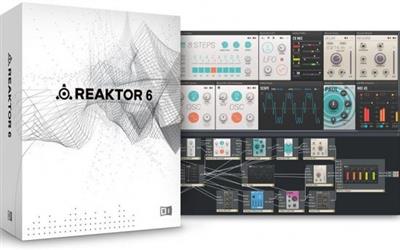
Native Instruments Reaktor 6 v6.4.2 macOS

b0c1b0976bab836c098cb4a7502aed02.jpeg

macOS | July 6 2021 | 205 MB
TRUE SONIC PLAYGROUND
REAKTOR 6 is the ultimate creative toolkit for deep sound exploration, featuring cutting-edge DSP and high-fidelity sound.​

MODULAR DSP LAB
Build custom synths, samplers, effects, and sound design tools.
Experiment with rack-style modular patching using Blocks.
Discover 70+ included instruments plus thousands of sounds in the User Library.

FOR SOUND MAKERS
Looking to take full control of your sounds, or create something never heard before?
REAKTOR is the beating heart that gives life to synths like Native's RAZOR and MONARK, as well as third-party releases from Twisted Tools, Tim Exile, Blinksonic and many more. It's a sandbox for sound creation - a limitless platform for experimenting and diving into new sound directions. Simply put, REAKTOR lets you build instruments to replicate the sounds in your head - in a way that existing instruments can't.

UNRIVALLED SOUND QUALITY
REAKTOR's trademark sound quality is unmistakable. From anti-aliased oscillators and ZDF (zero delay feedback) filters to granular synthesis engines, a team of leading developers build every component in REAKTOR from the core level up using the most elegant algorithms. Their relentless pursuit of DSP excellence keeps this sonic toolkit at the head of its class. And everything inside is organized for immediate use in REAKTOR's macro libraries for fast, creative building sessions.

REAKTOR BLOCKS
REAKTOR also provides a platform for modular synthesis in the form of Blocks - a range of sound generating and sound shaping modules. You can patch them together to create new and unique modular synthesizers, effects chains, complex sequencers, and more. REAKTOR includes BLOCKS BASE and BLOCKS PRIMES to kick start your modular journey, and the Blocks ecosystem is expandable with releases from builders like Unfiltered Audio, Toy Box, Genki instruments, ACL, and Holonic Systems.

GET CONNECTED
REAKTOR offers extensive options for connecting to other devices. MIDI, OSC, and CV/Gate connectivity lets you connect hardware modular systems, standalone hardware, other software instruments, and mobile devices. Ableton Link support lets you sync timing easily across instruments and devices, and makes collaborating with others a breeze.

HARDWARE CONTROL
Control REAKTOR directly from a KOMPLETE KONTROL keyboard or MASCHINE. With the REAKTOR API, you can design fully-integrated performance setups. Create your own touch strip integration, custom displays, parameter mappings, light guide configurations, and more. REAKTOR enables hybrid software/hardware instruments that are a true evolution in instrument design.

Whats new in this version:
6.4.2 - 2021-06-30
Big Sur Compatibility Update.

ADDED Big Sur compatibility on Intel-based Macs. Please note the following:
REAKTOR is not yet supported on Apple Silicon based Macs. Even though it can be installed from Native Access on these Computers, there is a small possibility on data loss, when loading Ensembles one after another in Logic and when relocating missing samples. We are working with Apple to resolve these issues. Please see this article for updates

REMOVED 32 bit VST plug-in targets on Windows
- Please note that the update installer will remove the 32 bit VST plug-in targets
- if you want to roll back and install the last version including the 32 bit VST plug-in targets Please visit this page

KNOWN ISSUE Only happens on Apple Silicon based Macs with Big Sur in Logic - There might be cutoff UI or UI glitches, when the Reaktor AU plugin window resizes on content load
can be worked around by closing and reopening the plugin window

System Requirements
macOS 10.14, 10.15, or 11 (latest update)

Download link:​
Код:
[center][b]rapidgator_net[/b]:
https://rapidgator.net/file/6b6de90119933d877880c206500a16d1/f2607.Native.Instruments.Reaktor.6.v6.4.2.macOS.rar.html

[b]uploadgig_com[/b]:
https://uploadgig.com/file/download/6d6896f9ffa3b293/f2607.Native.Instruments.Reaktor.6.v6.4.2.macOS.rar

[b]nitroflare_com[/b]:
https://nitroflare.com/view/2FF1CF903881218/f2607.Native.Instruments.Reaktor.6.v6.4.2.macOS.rar[/center]

Links are Interchangeable - No Password - Single Extraction​
 
Native Instruments Transient Master FX v1.4.0 macOS

1ac8d1696a250f87271ebadb288490fa.jpeg

macOS | July 6 2021 | 60.2 MB
MEET YOUR MASTER
Must-have dynamics effect. Enhance attack, control mix presence, fix problem recordings - the secret spice in your mix.​

INSTANT DYNAMIC CONTROL
Bring sounds from the back of the mix to the front.
Enhance attack on drums and percussion.
Fix muddy recordings, or reduce reverb.

THE MAGIC WAND OF DYNAMICS PROCESSORS
Based on a studio favorite, TRANSIENT MASTER is a must-have dynamics effect - uniquely powerful, deceptively simple and extremely useful. It's the go-to tool for positioning drums and percussion, letting you mix from front to back and dial-in just the right amount of space.

TRANSIENT MASTER is also a mix-fix for problematic recordings and with only three knobs - Attack, Sustain and Gain - it's quick and easy to use. Shape your sound, and make TRANSIENT MASTER the secret spice in your mix.

TRANSIENT MASTER runs as a stand-alone plug-in within your host software.

FOR DRUMS AND PERCUSSION
TRANSIENT MASTER can make radical changes to a sound, or just add subtleties. Fine-tune both Attack and Sustain to get exactly the right sound for your beats.

Raise the Attack for assertive kicks and crisp snares, or apply TRANSIENT MASTER to the whole drum group for added punch and definition. Reduce Attack to calm things down - on a hissing hi-hat, for example. The sound becomes less aggressive, and blends further back into the overall mix.

'Sustain' controls room sound and space. Make snares ring out or add depth to the whole drum group by raising Sustain. Reduce Sustain to tighten things up or kill long reverb tails.

FOR GUITARS AND OTHER INSTRUMENTS
TRANSIENT MASTER is great on any instrument with intrinsic attack. If a guitar track has too much pick sound, apply TRANSIENT MASTER and reduce the Attack. To liven things up, raise the Attack - the additional bite at the onset of each note adds presence.

Use 'Sustain' to correct room sound on recordings. For a guitar track with muddy reverb, apply TRANSIENT MASTER and lower the Sustain to choke the reverb. Add subtle Attack, and your guitar is now crisp, lively, and sitting at the front of your mix.

TRANSIENT MASTER can even put life back into pre-processed, over-compressed tracks. When nothing else works, TRANSIENT MASTER can provide an instant mix-fix at the turn of a dial.

FOR MIXING
TRANSIENT MASTER is indispensible for mixing drums, guitars, pianos, plucked strings - anything with intrinsic attack. It gives you another axis to work on. As well as panning left and right, you can position things quite precisely at the front or back of a mix without juggling volume levels.

Generally, more Attack and less Sustain brings a sound to the front; less Attack and more Sustain blends a sound into the background. Even before EQ, you can effectively 'stack' sounds according to the priorities of a particular mix.

HOW IT WORKS
Transients are non-tonal material at the onset of a sound. The Attack control emphasizes or de-emphasizes transients, making a sound more or less lively without affecting the overall level. The Sustain control cuts or lengthens the sustain part of a sound.

TRANSIENT MASTER effectively re-shapes the envelope, affecting the sound at its source. Engineers agree that this 're-shaping' delivers particularly natural and musical results - and it's quick and easy to get there, thanks to the simple, three-knob design. Try TRANSIENT MASTER, and you'll wonder how you ever managed without it.

Whats new in this version:
Official site does not provide any info about changes in this version.

System Requirements
macOS 10.14, 10.15 or 11 (latest update)

Download link:​
Код:
[center][b]rapidgator_net[/b]:
https://rapidgator.net/file/c721c7b4ff5d9725d29ad30a5f3adb5e/qwjgd.Native.Instruments.Transient.Master.FX.v1.4.0.macOS.zip.html

[b]uploadgig_com[/b]:
https://uploadgig.com/file/download/2bf8bd16330ca5d7/qwjgd.Native.Instruments.Transient.Master.FX.v1.4.0.macOS.zip

[b]nitroflare_com[/b]:
https://nitroflare.com/view/A8DAA485502CE5F/qwjgd.Native.Instruments.Transient.Master.FX.v1.4.0.macOS.zip[/center]

Links are Interchangeable - No Password - Single Extraction​
 
NCH Express Animate 6.21 macOS

72e091b447483b94248fbfe4b2d0f670.jpeg


NCH Express Animate 6.21 macOS | 7.9 Mb​
Express Animate is animation software that gives you the ability to animate shapes, text and imported images. You are also able to enhance your movie projects in post-production using key-frame motion animation, masking, dummy objects and more.

Features:
Add video and image files to your movie canvas
Objects can be moved, resized, rotated and more
Apply digital effects, such as brightness, contrast, negative and more
Key frames can be applied to each object and parameter
Add text to your video project
Create animated text and text bubbles
Add audio tracks or record audio
Apply effects to audio tracks
Group objects for easy editing
Add masks to an object
Export as video, flash, html5 or an animated GIF
Free to download and easy to use
Works seamlessly with VideoPad Video Editor

System Requirements
Mac OS X 10.5 or above

Home Page-
У Вас недостаточно прав для просмотра ссылок. Войдите или зарегистрируйтесь.


Download link:​
Код:
[center][b]rapidgator_net[/b]:
https://rapidgator.net/file/06e7bad8a0c8cd7466dd752d9199897f/zw646.NCH.Express.Animate.6.21.macOS.zip.html

[b]uploadgig_com[/b]:
https://uploadgig.com/file/download/0f1B93D6C3213b63/zw646.NCH.Express.Animate.6.21.macOS.zip

[b]nitroflare_com[/b]:
https://nitroflare.com/view/05B32C594D5BBB7/zw646.NCH.Express.Animate.6.21.macOS.zip[/center]

Links are Interchangeable - No Password - Single Extraction​
 
ON1 NoNoise AI 2021 v16.0.0.10747 macOS

0d04ecff97ac4e06681ab57735488eee.jpeg

File size: 1.6 GB​
The New Standard in Quality and Speed for Removing Image Noise. It's the best noise reduction software for photography. Quickly remove noise and get the sharpest details in your photos with AI-powered NoNoise AI. ON1 NoNoise AI intelligently removes all the image noise while intelligently recovering and enhancing the details. It integrates into your workflow by supporting common photo editors and file formats, including saving DNG raw files that maintain the full tonal and color range.

Get the Absolute Best Results Way Faster!
ON1 NoNoise is up to ten times faster than the other leading image noise removal products and the results will amaze you!

AI-Based Noise Reduction
Leverages state-of-art machine learning to build an AI network to remove luminance and color noise while maintaining the details like no other application producing excellent results.

AI-Based Demosaicing
For raw photos, most image noise comes in the demosaicing process. Combining this step with the noise reduction during the AI training in ON1 NoNoise AI will achieve both better noise reduction and help increase detail and sharpness.

AI-Based Demosaicing
Includes the ON1 exclusive Progressive Sharpening algorithm to enhance the sharpness and details based on the size of the details in the photo, without the halos and artifacts that other sharpening techniques can create.

Super-Fast Live Preview of the Adjustments
Results can be viewed in only a fraction of the time it takes other apps to produce viewable results. There are also far fewer controls to adjust without the limitation of sacrificing sharpness to reduce image noise.

Plugin to Your Workflow
ON1 NoNoise AI is the perfect fit for almost any workflow.

Get amazing retouching results in seconds when using ON1 NoNoise AI as a plugin for:
Adobe Photoshop * Adobe Lightroom Classic * Adobe Photoshop Elements * Affinity Photo * Capture One * Corel Paintshop Pro

Supported Operation System:
* macOS 10.13 or later
* Apple Silicon or Intel Core processor

Download link:​
Код:
[center][b]rapidgator_net[/b]:
https://rapidgator.net/file/e959dbd3d69f996893ca97393371d1fc/hbz35.ON1NoNoiseAI2021v16.0.0.10747HCiSO.zip.001.html
https://rapidgator.net/file/fea1fc75666cd2241bcbcd9f81d8f919/hbz35.ON1NoNoiseAI2021v16.0.0.10747HCiSO.zip.002.html

[b]uploadgig_com[/b]:
https://uploadgig.com/file/download/fB42Ca9826Cb320b/hbz35.ON1NoNoiseAI2021v16.0.0.10747HCiSO.zip.001
https://uploadgig.com/file/download/11ca9Ae2c18EbB1d/hbz35.ON1NoNoiseAI2021v16.0.0.10747HCiSO.zip.002

[b]nitroflare_com[/b]:
https://nitroflare.com/view/72C1459064E6F22/hbz35.ON1NoNoiseAI2021v16.0.0.10747HCiSO.zip.001
https://nitroflare.com/view/1A24F67EA137727/hbz35.ON1NoNoiseAI2021v16.0.0.10747HCiSO.zip.002[/center]

Links are Interchangeable - No Password - Single Extraction​
 
Parallels Desktop Business Edition v16.5.0-49183 macOS

6a6906d66969808409ffd9cbe6a48370.jpeg

Language: Multilingual | File size: 197 MB​
Parallels allows you to run Windows and Mac applications side by side. Choose your view to make Windows invisible while still using its applications, or keep the familiar Windows background and controls on your Mac.

Run Windows on Mac
- Develop & test across multiple OSes in a virtual machine for Mac
- Access Microsoft Office for Windows and Internet Explorer
- Fast-run Windows apps without slowing down your Mac
- Quickly move files, apps and more from a PC to a Mac
Release Notes

Release notes were unavailable when this listing was updated

Supported Operation Systems:
macOS 10.13.6 or later 64-bit

Download link:​
Код:
[center][b]rapidgator_net[/b]:
https://rapidgator.net/file/3062dd2a1127711dc5eed598f43f8980/t66o9.Parallels.Desktop.Business.Edition.v16.5.049183.macOS.dmg.html

[b]uploadgig_com[/b]:
https://uploadgig.com/file/download/203d512592c8fdbA/t66o9.Parallels.Desktop.Business.Edition.v16.5.049183.macOS.dmg

[b]nitroflare_com[/b]:
https://nitroflare.com/view/530AB00853BE0ED/t66o9.Parallels.Desktop.Business.Edition.v16.5.049183.macOS.dmg[/center]

Links are Interchangeable - No Password - Single Extraction​
 
Posterino 3.10.7 macOS

1ee7e2ffd6ee5810cd068bb093552a03.jpeg

Language: Multilingual | File size: 95 MB​
Posterino lets causal users and professional photographers create beautiful photo collages from postcard to poster size. The only limit of this ideal photo app is your imagination.

COLLAGE YOUR MEMORIES WITH POSTERINO

Design collages in minutes. Our innovative interface enables a large degree of customization through a variety of templates featuring grid, tiled, circular and random layouts. Adjust frames, filters and backgrounds to your liking. The result is a beautiful collage ready to be printed and displayed.

* Create posters, calendars, postcards, photo frames or contact sheets
* Enjoy a variety of gorgeous templates, frames, backgrounds, and caption styles
* Get creative with easy custom calendars
* Sleek user interface with large workspace is especially suited for MacBook
* Edit your document in full-screen mode
Release Notes
Release notes were unavailable when this listing was updated

Supported Operation Systems:
macOS 10.9 or later

Download link:​
Код:
[center][b]rapidgator_net[/b]:
https://rapidgator.net/file/c262f40029d01842a8202dc51d6f5b77/hk4u2.Posterino.3.10.7.macOS.dmg.html

[b]uploadgig_com[/b]:
https://uploadgig.com/file/download/4a042a46b1baa833/hk4u2.Posterino.3.10.7.macOS.dmg

[b]nitroflare_com[/b]:
https://nitroflare.com/view/055FEB42B83AF3A/hk4u2.Posterino.3.10.7.macOS.dmg[/center]

Links are Interchangeable - No Password - Single Extraction​
 
NetLimiter Pro 4.1.11 Multilingual

12fad774f2487236dfd1f7ecc2e1cdc5.jpeg

File Size: 7 MB​
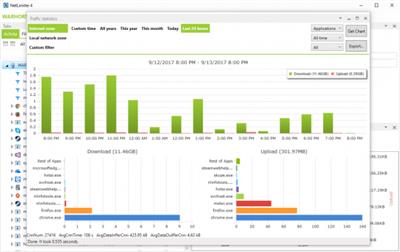
NetLimiter is an ultimate internet traffic control and monitoring tool designed for Windows. You can use NetLimiter to set download/upload transfer rate limits for applications or even single connection and monitor their internet traffic. Along with this unique feature, Netlimiter offers comprehensive set of internet statistical tools. It includes real-time traffic measurement and long-term per-application internet traffic statistics.

NetLimiter gives you full network control over your computer. You will decide where your application can connect and how fast these connections will be.

- Full internet bandwidth control over applications and computers
- Powerful connection blocker
- Long-term internet traffic statistics
- Fully customizable behaviour using user-defined Rules and Filters
- And much more...

NetLimiter 4 Current Features:
- OS restart not needed. Installs .NET 4.5 framework if missing.
- Ability to limit bandwidth of applications, connections and filters.
- Firewall rule to allow or block in/out connections. Option to ask the user what to do.
- Monitoring of applications, network connections and filters.
- Firewall and limit rule editor.
- Filtering of network traffic.
- NetLimiter client can connect to other machine running NetLimiter.
- Long-term traffic statistics.
- Priority rule to prioritize selected traffic using simple interface.
- Allow or deny the user to control or monitor NetLimiter.
- Real-time traffic chart for selected application, connection or filter.
- Option to start / stop rule at given time.
- Programatic access to NetLimiter functions.
- Support for IP version 6 protocol.

Download link:​
Код:
[center][b]rapidgator_net[/b]:
https://rapidgator.net/file/1652cec9e5dbb440d88622068002fae9/h2p32.NetLimiter.Pro.4.1.11.Multilingual.rar.html

[b]uploadgig_com[/b]:
https://uploadgig.com/file/download/015448CcB205da76/h2p32.NetLimiter.Pro.4.1.11.Multilingual.rar

[b]nitroflare_com[/b]:
https://nitroflare.com/view/4870A31BD931613/h2p32.NetLimiter.Pro.4.1.11.Multilingual.rar[/center]

Links are Interchangeable - No Password - Single Extraction​
 
Nik Collection by DxO 4.1.0.0 Multilingual

b4cb135cafedd43c4a405ea2495f9841.jpeg

Windows x64 | File size: 742.8 MB​
Even More Possibilities for Even Greater Creativity. New interface, even more precise Control Points, and optimized tools for Adobe Photoshop and Lightroom: Nik Collection 4 helps your creativity reach even greater heights.

New Interface, New Experience
The new interface of Nik Viveza and Nik Silver Efex is more modern, more appealing, and more functional. It also provides quicker access to all available tools and presets so you can concentrate on what's most important-finding your very own style.

Add Control Points to your custom presets
Save your favorite presets that you've created with Control Points, and then apply a similar style to a series of images-all while preserving a specific area in your photo. This is the perfect way to apply a color effect to several portraits as well as a blurred background!

Create an optimized and easier-to-use workflow
Because the Control Points now feature fewer sliders, you can now see the applied effects more easily. To really optimize your workflow, you can even rename them.

Adjust the saturation of a specific tone range
Thanks to the new Color Tolerance setting, users can not only select the color they want to edit, but also adjust the tolerance of similar color hues.

Combine the settings from several plugins with a single click
Meta Presets, which can be accessed directly from the Nik Selective Tool in Adobe Photoshop, combine all the presets and settings from the various Nik Collection plugins so you can apply several effects with a single click.

Incredible photos
Discover 10 Meta Presets created by professional photographers and instantly infuse your landscape and wildlife photography with a unique style-all without leaving Adobe Photoshop.

Lightning-fast retouching
With the Last Edit feature, you can recreate the last preset you used with one of the Nik Collection plugins.

Smart Copy & Paste
Selectively reapply a plugin's finish to one or several images directly in Adobe Lightroom-all without having to launch the Nik Collection interface. The definition of efficient.

Even more striking black-and-white photos
Nik Silver Efex now features revolutionary ClearView technology, which was first released as part of DxO PhotoLab. Remove haze, boost local contrast, and give your photos an entirely new dimension.

Add color
Nik Viveza features ten native presets designed by professional photographers. Pick the style you like the most and make your own local adjustments. The possibilities are endless!

Reconnect with the emotional impact of analog
Accurately recreate the finish of films that left their mark on the history of photography: Nik Silver Efex features 39 ultra-realistic grains to help you produce authentic black-and-white photos.

Create and share
Create and save your personalized presets in Nik Viveza. Easily share them or import them to another computer so you can continue editing, no matter where you are.

Control your tones
With Nik Viveza's new Selective Tone Tool, you can edit your images with even more control over bright lights, midtones, and shadows.

Adjust color temperatures
Nik Viveza's new Color Temperature Selector lets you select the true white value in your image for flawless white balance.

System Requirements:
* Microsoft Windows 8.1 (64-bit only)
* Microsoft Windows 10 (64-bit and versions still supported by Microsoft)

Compatible host software
* Adobe Photoshop 2020 and 2021
* Adobe Photoshop Elements 2020 and 2021 (except for HDR Efex Pro 2, not compatible with Photoshop Elements)
* Adobe Lightroom Classic 2020 and 2021
* From DxO PhotoLab 4
* From Serif Affinity Photo 1.8.3 (except Perspective Efex, not compatible with Affinity Photo)

Download link:​
Код:
[center][b]rapidgator_net[/b]:
https://rapidgator.net/file/18e2c27e291b747ca9caad6db124c1e4/pdf3p.Nik.Collection.by.DxO.4.1.0.0.Multilingual.rar.html

[b]uploadgig_com[/b]:
https://uploadgig.com/file/download/782F70d2feF19d2a/pdf3p.Nik.Collection.by.DxO.4.1.0.0.Multilingual.rar

[b]nitroflare_com[/b]:
https://nitroflare.com/view/3BE0719E3CCEFF8/pdf3p.Nik.Collection.by.DxO.4.1.0.0.Multilingual.rar[/center]

Links are Interchangeable - No Password - Single Extraction​
 
ON1 NoNoise AI 2021 v16.0.0.10747 Multilingual Portable

8456ad6b7276b0e4c3f926860f743a40.jpeg


ON1 NoNoise AI 2021 v16.0.0.10747 (x64) Multilingual Portable | 631 Mb​
The New Standard in Quality and Speed for Removing Image Noise. It's the best noise reduction software for photography. Quickly remove noise and get the sharpest details in your photos with AI-powered NoNoise AI. ON1 NoNoise AI intelligently removes all the image noise while intelligently recovering and enhancing the details. It integrates into your workflow by supporting common photo editors and file formats, including saving DNG raw files that maintain the full tonal and color range.

Get the Absolute Best Results Way Faster!
ON1 NoNoise is up to ten times faster than the other leading image noise removal products and the results will amaze you!

AI-Based Noise Reduction
Leverages state-of-art machine learning to build an AI network to remove luminance and color noise while maintaining the details like no other application producing excellent results.

AI-Based Demosaicing
For raw photos, most image noise comes in the demosaicing process. Combining this step with the noise reduction during the AI training in ON1 NoNoise AI will achieve both better noise reduction and help increase detail and sharpness.

AI-Based Demosaicing
Includes the ON1 exclusive Progressive Sharpening algorithm to enhance the sharpness and details based on the size of the details in the photo, without the halos and artifacts that other sharpening techniques can create.

Super-Fast Live Preview of the Adjustments
Results can be viewed in only a fraction of the time it takes other apps to produce viewable results. There are also far fewer controls to adjust without the limitation of sacrificing sharpness to reduce image noise.

Plugin to Your Workflow
ON1 NoNoise AI is the perfect fit for almost any workflow.

Get amazing retouching results in seconds when using ON1 NoNoise AI as a plugin for:
Adobe Photoshop * Adobe Lightroom Classic * Adobe Photoshop Elements * Affinity Photo * Capture One * Corel Paintshop Pro

Recommended System Requirements:
- Windows 10 (current maintenance releases, 64 bit only)
- Intel Core i5, Xeon or better
- 16+ GB RAM
- 1.5 GB for installation, SSD
- OpenGL 4.2 compatible video card with 2+ GB dedicated VRAM, 1920x1080 resolution (at 100% scale factor)

Optional Application Integration:

Minimum:
- Photoshop CS6 and above
- Photoshop Elements 14 and above
- Photoshop Lightroom Classic 6 and above
- Affinity Photo
- Corel Paint Shop Pro
- Capture One

Recommended:
- Photoshop CC 2021
- Photoshop Elements 2020
- Photoshop Lightroom Classic CC 2021
- Affinity Photo
- Corel Paint Shop Pro
- Capture One

Supported Languages:
English, German, Spanish, French, Japanese, Korean, Simplified Chinese, Russian, Portuguese, Italian, Dutch

Homepage-
У Вас недостаточно прав для просмотра ссылок. Войдите или зарегистрируйтесь.


Download link:​
Код:
[center][b]rapidgator_net[/b]:
https://rapidgator.net/file/e6749bbd1eec54f47f40b7b0b7909692/73juf.ON1.NoNoise.AI.2021.v16.0.0.10747.Multilingual.Portable.rar.html

[b]uploadgig_com[/b]:
https://uploadgig.com/file/download/A014C54125caf90e/73juf.ON1.NoNoise.AI.2021.v16.0.0.10747.Multilingual.Portable.rar

[b]nitroflare_com[/b]:
https://nitroflare.com/view/B92963AEA39C05D/73juf.ON1.NoNoise.AI.2021.v16.0.0.10747.Multilingual.Portable.rar[/center]

Links are Interchangeable - No Password - Single Extraction​
 
PreSonus Studio One 5 Professional v5.3.0.65413 WiN

573e7e815ebe93a544ab4ef1d5c26f8b.jpeg

WiN | July 6 2021 | 196 MB​
Record, produce, mix, master, and perform all from a single, intuitive application. Designed with ease of use at its core, Studio One® 5 is your creative partner from studio to stage. Studio One is driven by tools that enhance your creativity without getting in the way; we pioneered its drag-and-drop workflow that continues to be imitated elsewhere. Laborious tasks that take five steps in other DAWs usually only take... One. A popular example: you can convert MIDI to audio and back with a simple drag-and-drop.

Open the Song Page and you'll find everything you need to record, compose, edit, and mix with a complete set of virtual instruments, effects, groundbreaking live and static arrangement tools, and an advanced Score View based on our award-winning Notion notation application. Next, assemble and master your masterpiece in the Project Page. Projects and Songs are linked, so you know the mix you're mastering is always up to date.

And when you're ready to hit the stage, Studio One is right there with you. The all new Show Page lets you add virtual instruments, backing tracks, and plug-in effects to your live instruments with an easy-to-use Setlist that lets you sculpt your performance and change your show each night or alter your performance in real-time. New in version 5.2, live arranging lets you loop or jump to sections on the fly and in sync-whether you're testing a new arrangement or performing your tracks live. The standard for end-to-end production, only Studio One 5 seamlessly moves with you from initial inspiration to full production, final mix to mastered album, digital release to stage production... and lets you truly create without boundaries.

Whats new in this version:
У Вас недостаточно прав для просмотра ссылок. Войдите или зарегистрируйтесь.


System Requirements
Windows 10 (64-bit only)

Download link:​
Код:
[center][b]rapidgator_net[/b]:
https://rapidgator.net/file/1dd8befcb744a7f611344c60b0369a7c/uy144.PreSonus.Studio.One.5.Professional.v5.3.0.65413.WiN.rar.html

[b]uploadgig_com[/b]:
https://uploadgig.com/file/download/8eF49ac7922ccbc1/uy144.PreSonus.Studio.One.5.Professional.v5.3.0.65413.WiN.rar

[b]nitroflare_com[/b]:
https://nitroflare.com/view/94C85403F977AB7/uy144.PreSonus.Studio.One.5.Professional.v5.3.0.65413.WiN.rar[/center]

Links are Interchangeable - No Password - Single Extraction​
 
Reg Organizer 8.75

879de051d122f91fdef857ae7102d81c.jpeg

File size: 47.06 MB​
Reg Organizer® is a feature-rich application designed to edit, clean and maintain registry, fix errors in the system, and improve computer performance. The deep registry search feature lets you find all registry keys related to a specific application. The program helps you to edit registry files (.reg) and view their content directly from Windows Explorer. There is also a built-in application uninstaller, allowing you to uninstall redundant applications from the system completely. Another set of features will be useful to administrators, as well as ordinary users.

Main Features:
Registry editor for viewing and editing the system registry, manipulating the registry keys and values, exporting, importing, copying them, etc.
The registry cleaner of Reg Organizer can detect many types of registry errors. These include searching the registry for invalid references to files, folders and DLLs; invalid uninstallation data; finding obsolete and invalid file extensions and other issues. Reg Organizer can repair many of these registry problems.
Registry search feature can find all keys related to a certain application and delete them, if necessary. This feature can be useful if you manually delete some application that has no uninstall feature. In this case its keys can be left in the registry interfering with the normal operation of other programs. Reg Organizer provides the deepest search and can often find even those keys, that wouldn't be identified by other similar programs.
Defragmenting and compressing the registry: Increase the performance of the registry and consequently the overall performance of your system.
Ablilty to change many undocumented Windows settings (tweaks). In particular, it can accelerate the work of your system by sending the system a command to increase cache memory size or by unloading unused libraries, etc.
Ability to get information about any selected registry key and monitor changes of the specific keys.
Preview of the registry files (*.reg) before adding their contents to the system registry. The files can be viewed directly from Windows Explorer. Reg Organizer presents the file contents in the tree-like form, helping to visualize all keys that will be imported into the registry.
Functional registry file editor, allowing you to edit keys and values, add and delete data containing in the .reg files.
Provide quick access to all of the programs that are automatically started when you turn on or logon to your computer. Using Reg Organizer, you can inspect, edit, or disable such programs.
Registry search and replace mode offers you a variety of options for searching the registry and replacing the records matching the specified criteria.
Built-in software uninstaller. It can take snapshots before and after application installs and eradicate ALL system changes made by an app like it was never installed. Besides, this feature can be used for displaying changes made by the application to each of the system components.
Disk Cleanup tool lets you automatically remove unnecessary files from the hard drive of your computer, and to search for and fix invalid shortcuts.
Release Notes

* Tested for the Windows 11 preview version compatibility.
* The Applications tool:
1) It is now possible to launch applications from the list as well as open their installation folders. The corresponding commands have been added to the context menu.
2) A command to open the uninstall registry key has been added to the application's context menu.
3) More accurate application sizes are now displayed. When calculating the application's size, the data files it has created are also considered.
4) Improved the multiple applications handling support. If you mark an application in the list, a floating panel appears that displays how many applications are marked and helps you to start removing or updating them with one click.
5) A new "Refresh Window Data" command has been added to the Settings and Commands menu.
6) The applications' traces lookup algorithm has been improved.
7) It is shown on the final application's uninstall step how much space has been freed.
8) Usability improvements.
9) Bug fixed: When viewing some backups in the Undo Changes Center window, the list of files included in the backup was not complete.
* Registry Editor:
1) The ability to remove the blocked registry keys.
2) User interface improvements, the window's available space for the data output has been increased.
* An ability to choose any of the program's unofficial translations variety has been added to Settings.
* Bug fixed: The option Obsolete Tools -> Enable the Classic Registry Cleanup tool has disappeared from the settings.

Download link:​
Код:
[center][b]rapidgator_net[/b]:
https://rapidgator.net/file/6e99daafb4bbefbd514e6ec925aeaf15/4wlbi.Reg.Organizer.8.75.rar.html

[b]uploadgig_com[/b]:
https://uploadgig.com/file/download/fCa5E29e5C63Eb67/4wlbi.Reg.Organizer.8.75.rar

[b]nitroflare_com[/b]:
https://nitroflare.com/view/E244576832DC965/4wlbi.Reg.Organizer.8.75.rar[/center]

Links are Interchangeable - No Password - Single Extraction​
 
Reg Organizer 8.75 + Portable

6028dfcbffa33ba9f3d2e39e09ef7473.jpeg


Reg Organizer 8.75 + Portable | 47/15.5 Mb​
Reg Organizer is a feature-rich application designed to edit, clean and maintain registry, fix errors in the system, and improve computer performance. The deep registry search feature lets you find all registry keys related to a specific application. The program helps you to edit registry files (.reg) and view their content directly from Windows Explorer. There is also a built-in application uninstaller, allowing you to uninstall redundant applications from the system completely. Another set of features will be useful to administrators, as well as ordinary users.

Main Features:
Registry editor for viewing and editing the system registry, manipulating the registry keys and values, exporting, importing, copying them, etc.
The registry cleaner of Reg Organizer can detect many types of registry errors. These include searching the registry for invalid references to files, folders and DLLs; invalid uninstallation data; finding obsolete and invalid file extensions and other issues. Reg Organizer can repair many of these registry problems.
Registry search feature can find all keys related to a certain application and delete them, if necessary. This feature can be useful if you manually delete some application that has no uninstall feature. In this case its keys can be left in the registry interfering with the normal operation of other programs. Reg Organizer provides the deepest search and can often find even those keys, that wouldn't be identified by other similar programs.
Defragmenting and compressing the registry: Increase the performance of the registry and consequently the overall performance of your system.
Ablilty to change many undocumented Windows settings (tweaks). In particular, it can accelerate the work of your system by sending the system a command to increase cache memory size or by unloading unused libraries, etc.
Ability to get information about any selected registry key and monitor changes of the specific keys.
Preview of the registry files (*.reg) before adding their contents to the system registry. The files can be viewed directly from Windows Explorer. Reg Organizer presents the file contents in the tree-like form, helping to visualize all keys that will be imported into the registry.
Functional registry file editor, allowing you to edit keys and values, add and delete data containing in the .reg files.
Provide quick access to all of the programs that are automatically started when you turn on or logon to your computer. Using Reg Organizer, you can inspect, edit, or disable such programs.
Registry search and replace mode offers you a variety of options for searching the registry and replacing the records matching the specified criteria.
Built-in software uninstaller. It can take snapshots before and after application installs and eradicate ALL system changes made by an app like it was never installed. Besides, this feature can be used for displaying changes made by the application to each of the system components.
Disk Cleanup tool lets you automatically remove unnecessary files from the hard drive of your computer, and to search for and fix invalid shortcuts.

Operating System:Windows XP/Vista and Windows 7/8.1/10 (32-bit and 64-bit)

Home Page -
У Вас недостаточно прав для просмотра ссылок. Войдите или зарегистрируйтесь.


Download link:​
Код:
[center][b]rapidgator_net[/b]:
https://rapidgator.net/file/4f1d67e12fdf899d552b68c4ec408a63/1quop.Reg.Organizer.8.75.Portable.rar.html
https://rapidgator.net/file/99eba08d50dd7206142d38568c584b74/1quop.Reg.Organizer.8.75.rar.html

[b]uploadgig_com[/b]:
https://uploadgig.com/file/download/Bf8B234d3dfb2E5f/1quop.Reg.Organizer.8.75.Portable.rar
https://uploadgig.com/file/download/Bf5161335aA8d076/1quop.Reg.Organizer.8.75.rar

[b]nitroflare_com[/b]:
https://nitroflare.com/view/EFFA6521B99A11C/1quop.Reg.Organizer.8.75.Portable.rar
https://nitroflare.com/view/DE3B6FEA019A7C7/1quop.Reg.Organizer.8.75.rar[/center]

Links are Interchangeable - No Password - Single Extraction​
 
TeraByte Drive Image Backup & Restore Suite 3.46 Portable

c7e01ddd47190579cc80ac202acab1cb.jpeg


TeraByte Drive Image Backup & Restore Suite 3.46 (x64) Portable | 154.5 MB​
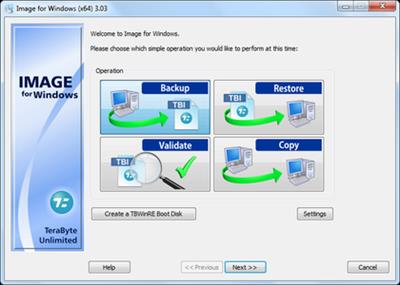
Image for Windows provides an easy and convenient way to completely backup all your hard drive's data, programs and operating systems. Your backups can be saved directly to external USB and FireWire™ drives, to internal or network drives, and even directly to CD, DVD, or BD. The suite includes an easy-to-use MakeDisk wizard for creating a recovery boot disk. To restore your data, programs and operating systems back to the way they were when the backup was created, simply boot the recovery disk and restore the partition(s) or drive(s) you need to recover. It's that easy.

As a key component of the TeraByte Drive Image Backup and Restore Suite, Image for Windows utilizes the technology provided by Volume Shadow Copy Service (VSS) or PHYLock™, an add-on component included in the suite. VSS and PHYLock™ allows you to continue using your computer while the backup is locked to a point-in-time. This eliminates the inconsistencies typically experienced while backing up a partition that is in use.

Image for Windows runs under the Windows operating system, yet it can backup or restore any partition, including those of DOS or Linux, and even partitions encrypted by third-party software.

The TeraByte drive image files produced by Image for Windows are compatible across all TeraByte Unlimited disk imaging products of the same major version number (i.e. all 3.x products are compatible with other 3.x products). This gives you the flexibility to restore disk images using your component of choice.

The TeraByte Drive Image Backup and Restore Suite includes Image for Windows, Image for Linux, Image for DOS, and the OSD Tool Suite. Image for DOS and Image for Linux support the same powerful drive image functionality without requiring a working Windows installation.

Bonus:
The TeraByte OS Deployment Tool Suite (TBOSDTS) Pro version contains a set of powerful scripts that, among other things, will help you deploy Windows to completely different hardware.

System Requirements:
- Compatible with Windows x86 and Windows x64 versions.
- Compatible with Windows NT4, 2000, XP, Vista, 7, 8, 10.
- Compatible with Windows Server and SBS versions (NT4, 2000, 2003, 2008, 2008R2, 2011, etc..).

TeraByte Drive Image Backup & Restore Suite Components:
- Image for Windows
- Image for DOS
- Image for Linux
- OSD Tool Suite

Home Page :
У Вас недостаточно прав для просмотра ссылок. Войдите или зарегистрируйтесь.


Download link:​
Код:
[center][b]rapidgator_net[/b]:
https://rapidgator.net/file/cabca705736476b9c16c8bf9fdd454d0/afx9a.TeraByte.Drive.Image.Backup..Restore.Suite.3.46.Portable.rar.html

[b]uploadgig_com[/b]:
https://uploadgig.com/file/download/FfDf833e5a0bb190/afx9a.TeraByte.Drive.Image.Backup..Restore.Suite.3.46.Portable.rar

[b]nitroflare_com[/b]:
https://nitroflare.com/view/019F14DF62C349B/afx9a.TeraByte.Drive.Image.Backup..Restore.Suite.3.46.Portable.rar[/center]

Links are Interchangeable - No Password - Single Extraction​
 
SDL Trados Studio 2021 SR1 Professional 16.1.8.4404

a7a3c8c07f1183afecf485c883ce8240.jpeg

Languages: English | File Size: 343.7 MB​
Translate faster and smarter while presenting a unified brand to the world. SDL Trados Studio is the complete translation environment for language professionals who want to edit, review and manage translation projects whilst in the office or on the move. Deliver world-class localized content to support your global sales and marketing efforts with software trusted by over 270,000 translation professionals worldwide.

Key Benefits
Discover a wealth of innovative features and create high-quality translations, faster.

- Translate more content.
- Maintain brand consistency.
- Increase team productivity.
- Reduce translation cost.
- Easily manage translation projects.

Powerful translation memory technology
Easily reuse previously translated and approved content across all of your projects with intelligent translation memory (TM) technology. The more you add to your TM, the faster your team can automatically match and translate subsequent translations, increasing translator productivity by as much as 80% and improving consistency across your content.

Sophisticated terminology management
Protect your brand values and ensure a consistent tone of voice across all languages by managing terminology. Your translation teams can create and share approved terminology across the organization to do more in less time, maintain consistency across every translation, all while reducing costs.

Efficient translation project management
Create and deliver translation projects quickly and easily in multiple languages with the project management capabilities found in SDL Trados Studio and SDL Trados GroupShare. Combine Studio with GroupShare for volume projects and complete control over security.

Innovative Neural Machine Translation
Our neural machine translation keeps improving from input by receiving and learning corrections dynamically. Incorporate our unique self-learning machine translation technology into existing translation workflows to complete projects faster and double your productivity levels.

Collaborate for even greater efficiency
Reduce the time required to complete translation projects. Enable your team to work together seamlessly with secure, shared access to centralized translation files, translation memories, and terminology.

Discover What's New in SDL Trados Studio 2021:
SDL Trados Studio 2021 is the ground-breaking, dynamic translation solution offering true flexibility for busy translators and project managers. Work on the Studio desktop app on your PC or laptop for maximum productivity, plus keep projects moving when you're away from your desk through SDL Trados Live - Studio's new cloud companion that works seamlessly across PC, mobile, and tablet.

Studio 2021's new, powerful features and enhancements will ensure everyone in your team achieves their full potential. The future way of working is here. The future of translation software is Studio 2021.

Flexibility to work wherever you are
The dynamic combination and flexibility offered by Studio 2021 and SDL Trados Live will benefit everyone - from individual translators through to project managers running large teams.

Higher quality translations can be delivered faster as you can:
- Manage your translations on the Studio 2021 desktop app when you're in the office
- Control your projects on any device, such as a tablet, through SDL Trados Live or the new SDL Trados Live mobile app, when you're away from your desk.

Designed to raise your productivity
When under pressure to deliver increasing volumes of translations within short timeframes, it's essential to find ways to be more productive.

Studio 2021 offers many enhancements:
- Improved automation and quality assurance (QA) with the ability to customize your recognition settings for Placeables such as dates, times, currencies, and measurements
- More powerful search with an upgrade to the Advanced Display Filter
- Enhanced Translation Quality Assessment (TQA) interface.

Personalize your Studio for increased functionality
It's now easier than ever to personalize your Studio. You can access the SDL AppStore directly from Studio 2021 making it faster and easier to find, manage, update, and remove apps with fewer clicks and effort.

Apps are used by thousands of our customers to customize and extend the functionality of Studio to:
- Improve and automate your translation, review or terminology processes
- Connect to third-party machine translation providers
- Fine-tune your verification checks to enhance the quality of your translations.

System Requirements:
- SDL Trados Studio 2021 will work on Windows 7*, Windows 8.1 and Windows 10. We recommend Windows 10.
- As a minimum requirement, we recommend an Intel or compatible CPU-based computer with 8 GB RAM and a screen resolution of 1024x768.
Screenshots

da7a19ced5445eaa0fa842224a7f4cf3.jpeg

Homepage
У Вас недостаточно прав для просмотра ссылок. Войдите или зарегистрируйтесь.


Download link:​
Код:
[center][b]rapidgator_net[/b]:
https://rapidgator.net/file/34648cfd8428fb2dcd14b750a4471656/tgx72.SDL.Trados.Studio.2021.SR1.Professional.16.1.8.4404.rar.html

[b]uploadgig_com[/b]:
https://uploadgig.com/file/download/064c03a291314921/tgx72.SDL.Trados.Studio.2021.SR1.Professional.16.1.8.4404.rar

[b]nitroflare_com[/b]:
https://nitroflare.com/view/5A0F29F0250639B/tgx72.SDL.Trados.Studio.2021.SR1.Professional.16.1.8.4404.rar[/center]

Links are Interchangeable - No Password - Single Extraction​
 
Siemens Simcenter FEMAP 2021.2.0 with NX Nastran (x64) Update 06/07/2021

22c11e4db95afabd6cc01ea1c9be697f.jpeg

x64 | Language: Multilingual | File Size: 2.53 GB​
FEMAP is an independent CAD and postprocessor from Siemens PLM Software to conduct engineering analysis by finite elements (FINITE Element Analysis - FeA). This means that FEMAP is a link between the user and the core - the kernel that calculates in the tasks of engineering analysis. The FEMAP system integrated with the NX Nastran solver operates based on Microsoft Windows, is included in the Velocity Series product line and is an independent full-featured medium for modeling, simulating and evaluating the results of the product characteristics analysis results.

The FEMAP system on the basis of the NX NASTRAN solver allows you to analyze the dynamics and strength of structures, machinery and structures, to obtain the solution of non-stationary nonlinear spatial problems, the tasks of the mechanics of composites and composite structures, construction and technological mechanics, carry out the analysis of heat transfer, to obtain solving problems of fluid and gas mechanics related multidisciplinary tasks.

The FEMAP base modules with NX NASTRAN allow main types of engineering analysis, such as linear static analysis, frequency analysis and forms of free oscillations, analysis of the loss of stability of structures, analysis of the tasks of stationary and non-stationary heat exchange, the basic possibilities of nonlinear analysis. The basic nonlinear analysis includes the accounting of such nonlinearities as geometric (large deformations, movements, tracking loads) and physical (taking into account nonlinear materials - plasticity, creep, viscoelasticity), the accounting of contact interaction with small movements - "linear" contact, contacting the contact with the condition of continuity . Advanced nonlinear module (Advanced nonlinear) is used in the analysis of large nonlinearities (including deformation [elastomer | elastomers], accounting for spatial contact interaction), combining various types of non-linearities, as well as in modeling and calculating fast nonlinear dynamic processes based on an explicit integration scheme. FEMAP includes three additional modules: FEMAP Flow Solver - allows you to analyze hydro and gas dynamics; FEMAP ADVANCED THERMAL SOLVER - provides a set of opportunities for analyzing heat and mass transfer, including modeling of liquid channels, related convection and analysis of hydro, gas-dynamic streams; Femap Thermal Solver is a solution for thermal analysis and heat transfer analysis. FEMAP is used by specialists of design organizations to model complex structures, systems and processes, such as satellites, aircraft, electronic equipment of military purposes, heavy construction equipment, cranes, sea transport and technological equipment. FEMAP provides solving complex engineering analysis tasks in various industries, for example, such as aerospace, helicopter construction, defense industry and shipbuilding.

Year / Release Date: 2021
Version: 2021.2.0.
Bigness: Windows 7 / 8.1 / 10 64-bit
Interface Language: Chinase Simplified, Chinese Traditional, English, German, Japanese
Tabletka: Present (Team Solidsquad-SSQ)
System Requirements: Processor: Pentium 4 / Atlon XP 2500+ and above
RAM: 1 GB and higher
Disk Space: 2.5GB
Video card: 128MB minimum

What news Release 06/07/2021

Update FEMAP20212_SATOOLKIT_SETUP

Download link:​
Код:
[center][b]rapidgator_net[/b]:
https://rapidgator.net/file/642e0515d0b27d929e77ff6b22c7c35f/z9y4i.Siemens.Simcenter.FEMAP.2021.2.0.with.NX.Nastran.x64.Update.06072021.part1.rar.html
https://rapidgator.net/file/44f5090bd68021b7aef99b0d0a8692c2/z9y4i.Siemens.Simcenter.FEMAP.2021.2.0.with.NX.Nastran.x64.Update.06072021.part2.rar.html
https://rapidgator.net/file/3e2c1e6274689a51c442d166bc9f3da2/z9y4i.Siemens.Simcenter.FEMAP.2021.2.0.with.NX.Nastran.x64.Update.06072021.part3.rar.html

[b]uploadgig_com[/b]:
https://uploadgig.com/file/download/Df0cad79b3f9D0e1/z9y4i.Siemens.Simcenter.FEMAP.2021.2.0.with.NX.Nastran.x64.Update.06072021.part1.rar
https://uploadgig.com/file/download/21683619dA8c189b/z9y4i.Siemens.Simcenter.FEMAP.2021.2.0.with.NX.Nastran.x64.Update.06072021.part2.rar
https://uploadgig.com/file/download/a462156c3Ec95a9d/z9y4i.Siemens.Simcenter.FEMAP.2021.2.0.with.NX.Nastran.x64.Update.06072021.part3.rar

[b]nitroflare_com[/b]:
https://nitroflare.com/view/AD4B16753110503/z9y4i.Siemens.Simcenter.FEMAP.2021.2.0.with.NX.Nastran.x64.Update.06072021.part1.rar
https://nitroflare.com/view/FC0D8970CBA7A13/z9y4i.Siemens.Simcenter.FEMAP.2021.2.0.with.NX.Nastran.x64.Update.06072021.part2.rar
https://nitroflare.com/view/896640A417C4BF6/z9y4i.Siemens.Simcenter.FEMAP.2021.2.0.with.NX.Nastran.x64.Update.06072021.part3.rar[/center]

Links are Interchangeable - No Password - Single Extraction​
 
StopUpdates10 3.6.2021 Multilingual

7a27c8e704f9925aa0e5cd9272c7165b.jpeg

File Size : 2 Mb​

StopUpdates10 makes it easy for you to allow or block Windows 10 updates anytime. This app is perfectly timed for us. Our VMware started installing updates causing slowdowns and lag and aggravating us even though we had used similar apps to block Windows Updates previously. Microsoft has again changed how Windows Updates works, and most apps that prevent updates are now broken. Enter StopUpdates10. Now you can once again block or allow Windows Updates.

Typically, it would be difficult to test how effective this app is, but we're in the unique position of knowing Windows Updates keeps running within five minutes of booting VMware. We're happy to report that it did stop updates. We waited 30 minutes to be sure.

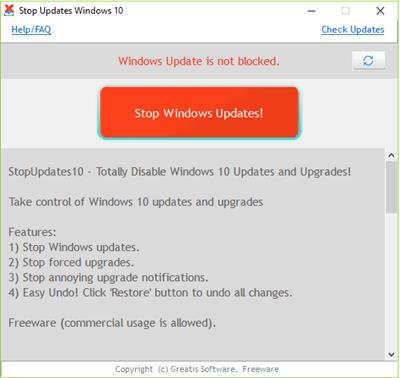
StopUpdates10 does require installation but is simple to use. By default, you should see "Windows Updates is not blocked" in red letters and a red button that says "Stop Windows Updates!" Once blocked, everything is reversed and in green letters with text that says "Windows Updated is blocked!" and a button that reads "Restore Windows Updates." Additionally, Greatis offers links to their other freeware programs including UnHackMe, BootReacer, Anti-WebMiner, and Edge Reset Button.

Download link:​
Код:
[center][b]rapidgator_net[/b]:
https://rapidgator.net/file/efc1042e6a3975c256b3e6bd9acfe1e3/vu0cu.StopUpdates10.3.6.2021.Multilingual.zip.html

[b]uploadgig_com[/b]:
https://uploadgig.com/file/download/d0b35a904c53B882/vu0cu.StopUpdates10.3.6.2021.Multilingual.zip

[b]nitroflare_com[/b]:
https://nitroflare.com/view/3967DBF4A9C2FA5/vu0cu.StopUpdates10.3.6.2021.Multilingual.zip[/center]

Links are Interchangeable - No Password - Single Extraction​
 
SysTools CorelDraw GMS Password Remover 4.0

138df1f50229947ea59a0166c7a51830.jpeg

File size: 2.7 MB​
SysTools CorelDraw GMS Password Remover helps to Remove passwords from Corel GMS VBA Macro and Reset forgotten Corel VBA Passwords for any length

Software remove all password from Corel GMS VBA Macro.
Eliminate new as well as older password from Corel GMS VBA MacroProvide multiple options for maintaining the folder hierarchy while saving.
Software is too easy to use that doesnot need any tehcnical knowledge to run the software.
Supports all CorelDraw X4/X5/X6/X7 Macro versions.

Key Features of CorelDraw GMS Password Remover

Removes & Reset Lost Password
Using the CorelDraw GMS password remover, user can easily reset the forgotten Corel GMS project password. Processing the file with the software makes a password protected Corel Macro GMS file become accessible.

Auto Generate New Password
After the resetting of old password of the GMS file, the software automatically generates a new password. Thus, the new software-generated replaces the old password to access VBA Macro for CorelDraw GMS.

Reset Any Length Password
When performing the Corel GMS password resetting, no limitations are imposed on the character length of the password. The software is open to recovering GMS password of any length, whatsoever.

Supports All CorelDraw GMS Files
GMS password remover tool successfully supports all CorelDraw Graphics Suite versions. You can reset the Macro password from a GMS file of CorelDraw Graphics Suite X7, X5, X6, and all below versions.

Reset Multilingual GMS Passwords
Multilingual gms (global macro storage) password resetting is fully supported by the tool. Thus, allowing you to reset passwords composed with symbols, digits, alphabets or even a combination of all three character types.

Complete Reset Details Displayed
Complete details of the password reset process, is provided by the software at the end. The gms password resetting details displayed include: initial processing details, locating and removal of gms password, new gms vba project password, and the final status.
Whats New
Updates: official site does not provide any info about changes in this version.

Download link:​
Код:
[center][b]rapidgator_net[/b]:
https://rapidgator.net/file/b38d1f17848226474768eae135f2a352/yprkh.SysTools.CorelDraw.GMS.Password.Remover.4.0.rar.html

[b]uploadgig_com[/b]:
https://uploadgig.com/file/download/cdc28f63b4e143a0/yprkh.SysTools.CorelDraw.GMS.Password.Remover.4.0.rar

[b]nitroflare_com[/b]:
https://nitroflare.com/view/33B68B0A3835FE0/yprkh.SysTools.CorelDraw.GMS.Password.Remover.4.0.rar[/center]

Links are Interchangeable - No Password - Single Extraction​
 
Tor Browser 10.5 (x64)

f830ecd62558dc16a599bde319fdce14.jpeg

File Size: 70.6 MB​
Tor is a toolset for a wide range of organizations and people that want to improve their safety and security on the Internet. Using Tor can help you anonymize web browsing and publishing, instant messaging, IRC, SSH, and other applications that use the TCP protocol. Tor also provides a platform on which software developers can build new applications with built-in anonymity, safety, and privacy features. The Tor Browser Bundle lets you use Tor on Windows, Mac OS X, or Linux without needing to install any software. It can run off a USB flash drive, comes with a pre-configured web browser to protect your anonymity, and is self-contained.

Surfing anonymously provides a powerful shield against network surveillance and traffic analysis. Protecting your online privacy can only be achieved by additional software tools that can hide your location and can prevent your online information and browsing habits from being revealed to anyone.

If you're ever in need of such a tool, Tor Browser Bundle is one suggestion you can add to the list. The application relies on a network of virtual servers in order to make your browsing sessions anonymous. Tor makes available a set of rules and algorithms that routes the communications through various servers all over the world. Thus, all the traffic is randomized so tracking the source becomes an almost impossible task.

The download package is a self-extracting archive that includes the Tor application itself, which can be run from command line, a cross platform controller GUI named Vidalia and a custom-made version of Firefox equipped with a set of addons that ensure online anonymity.

We advise the average user to consider using the Vidalia application, because the graphical interface puts you through a lesser ordeal than the command prompt version of Tor. When you first run Vidalia, it automatically connects to the Tor network and if the process is successful, a status will be displayed in the main window.

Vidalia's interface encases a collection of shortcuts that allow you to stop the service, to start setting up the relays, to trigger a global view of the network and most important of all, it sports a button for using a new identity any time you wish. If you're interested in bandwidth usage, Vidalia features a separate utility just for showing a bandwidth graph that measures the receive/send rate of the packets.

The portable Firefox version included in the download package is customized with a few extensions that make the anonymous surfing experience easier. These include: Torbutton - allows you to create a new identity each time you start a browsing session, NoScript - blocks scripts from untrusted domains and HTTPS Everywhere - enables you to encrypt the communication with a lot of popular sites.

With all the components it encases, Tor Browser Bundle is one of the most trustworthy anonymous surfing tools out there. It can be configured from command prompt, run from its dedicated GUI controller - Vidalia and comes with a pre-configured web browser. Whichever of these methods you choose the result is a safe and controlled Internet browsing experience.

Download link:​
Код:
[center][b]rapidgator_net[/b]:
https://rapidgator.net/file/0291c55bb2e7df3edbf7d2d9be9506a8/f2mfu.Tor.Browser.10.5.x64.rar.html

[b]uploadgig_com[/b]:
https://uploadgig.com/file/download/1484c18Ccb310b47/f2mfu.Tor.Browser.10.5.x64.rar

[b]nitroflare_com[/b]:
https://nitroflare.com/view/A73A7414DA0825D/f2mfu.Tor.Browser.10.5.x64.rar[/center]

Links are Interchangeable - No Password - Single Extraction​
 
Назад
Сверху