• Форум работает в архивном режиме www.old.nado.in

All mitsumi'1s Applications !! (updated daily)

  • Автор темы Автор темы mitsumi1
  • Дата начала Дата начала
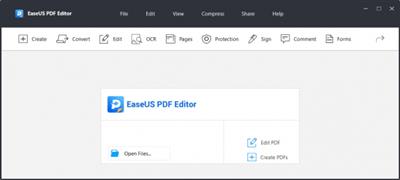
EaseUS PDF Editor Pro 5.4.1.0408 Multilingual

dbbdf6820e736ee881d9c66957868d4b.jpeg

Languages: Multilingual | File size: 42.7 MB​
EaseUS PDF Editor is an all-in-one PDF reader and creator, which enables you to modify the PDF files effortlessly. With the help of this program, you can create and edit a PDF from many common files including images and Microsoft Office documents. Speaking of the editing, it lets you insert, delete, reorder, extract, or crop a PDF as you want. In addition, you can insert footer and header, or add page numbers to PDF in no time.

Key features:
Allow you to OCR the scanned files and make it editable
Convert PDF to 10+ file formats
Combine, split, flip, and rotate PDF in seconds
Enable to add bates numbers to multiple PDFs

Whats New:
Updates: official site does not provide any info about changes in this version.

Download link:​
Код:
[center][b]rapidgator_net[/b]:
https://rapidgator.net/file/1ca9d683df6be641d77ef9916d570165/16q15.EaseUS.PDF.Editor.Pro.5.4.1.0408.Multilingual.rar.html

[b]uploadgig_com[/b]:
https://uploadgig.com/file/download/f8f23fDec7Ec3c9E/16q15.EaseUS.PDF.Editor.Pro.5.4.1.0408.Multilingual.rar

[b]nitroflare_com[/b]:
https://nitroflare.com/view/6F66B60BF81DFAB/16q15.EaseUS.PDF.Editor.Pro.5.4.1.0408.Multilingual.rar[/center]

Links are Interchangeable - No Password - Single Extraction​
 
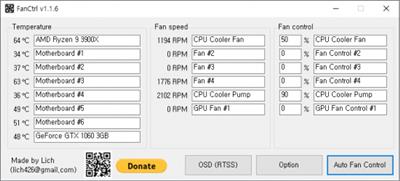
FanCtrl 1.4.1

b540c4b7838257ab967d8b0a02153a91.jpeg

File Size : 4.6 Mb

FanCtrl is a software that allows you to automatically control the fan speed on your PC.​

FanCtrl is easy to use, although the app is best for advanced users. You can cause damage to your computer by overheating or conflicting with other processors or other monitoring software. As an indie-developed app, not all motherboards are or can be, supported.

The app is laid out well and resides in the system tray with names for the motherboard and each fan speed and control that you can name. You can right-click on the icon to:

Enable automatic fan control
Enable OSD (RTSS)
Normal
Silence
Performance
Game

Download link:​
Код:
[center][b]rapidgator_net[/b]:
https://rapidgator.net/file/663a6f1908aa954b8f10948558b82611/qir3s.FanCtrl.1.4.1.zip.html

[b]uploadgig_com[/b]:
https://uploadgig.com/file/download/4a4be78a08e62248/qir3s.FanCtrl.1.4.1.zip

[b]nitroflare_com[/b]:
https://nitroflare.com/view/482AE102E08D1C2/qir3s.FanCtrl.1.4.1.zip[/center]

Links are Interchangeable - No Password - Single Extraction​
 
GameMaker Studio Ultimate 2.3.2.560 Multilingual

857c1ebde3c108b7087f9a9d8c05675c.jpeg

Windows x64 | Languages: Multilingual | File Size: 116.27 MB​
GameMaker Studio 2 is the latest and greatest incarnation of GameMaker! It has everything you need to take your idea from concept to finished game. With no barriers to entry and powerful functionality, GameMaker Studio 2 is the ultimate 2D development environment!

Easy to get started
Making games development accessible to everyone means taking away the barriers to getting started. Using our intuitive 'Drag and Drop' development environment you can have your game up and running in a matter of minutes without ever having to write any code! GameMaker's built-in language (GML) helps you learn to program as you go and not jump in at the deep end of coding.

Multiplatform Workflow
Using a single development workflow GameMaker Studio 2 allows you export your game directly to Windows desktop, Mac OS X, Ubuntu, Android, iOS, fireTV, Android TV, Microsoft UWP, HTML5, PlayStation 4, and Xbox One.

Backwards Compatible
Import your GameMaker: Studio projects directly into Studio 2 and have them ready to run in a matter of minutes.

YoYo Account
GameMaker Studio 2 uses your YoYo Account to provide a single login for all your game making needs.

Tutorials
With our integrated tutorials you can have your learning materials docked directly in your workspace.

Laptop Mode
For all of our users who develop on laptop pcs we have developed an efficient workflow that does not get in the way of development.

Skinning
Customise your development environment by choosing from our predefined skins or creating your own.

Docking
Organise your workspace by docking your tool windows where you want them.

Object Editor
With our unique stucture and workflow it has never been easier to manage the objects within your game.

Script Editor
With tabs and the ability to split the editor you can work with multiple files without having a window for each.

Superior Workflow
Drag and Drop like never before, create the game you want without ever writing any code.

Library
Choose what you need from our extensive library of events and actions to sculpt the game you desire.

Code Preview
Learn how to program by viewing the code behind our DnD™ actions and take your games to the next level.

GameMaker Language
Based on C programming language, GML gives you all the power of other programming languages while being easy to learn.

Layers
Take control of how objects are ordered within your rooms and draw sprites directly without the need for an object.

Tile Brushes
Make repetition a breeze by creating a group of tiles and drawing them directly to the room.

Inheritance
Add variety quickly to your projects by sharing common code and resources.

Brush Based Editing
Create a brush from any section of your image simply and efficiently with our amazing new editor.

Animation Support
Bring your sprites to life with a touch of motion and take your games to the next level.

Tileset Animations
Liven up your levels with a hint of animation without compromising on performance.

Brushes
Improve your workflow by creating a palette of commonly used tiles.

Auto Tiling
Automatically choose the correct tile for the job and never have to worry what goes where again.

GoTo Finder
The GoTo Finder lets you search for, locate, and open any resource within your project instantly.

Chain View
Easily navigate between resources without losing track of where you are.

Git Integration
Save and back-up your project history from anywhere in the world with our Git integration.

Debugger
Save time and effort with our powerful debugger.

System Requirements:
- GameMaker: Studio requires a reasonably modern PC running Windows XP, Vista, 7, or later. A DirectX 9 (or later) compatible graphics card with at least 32MB of memory is required for most created games. It requires a screen resolution of at least 1024x768 and 65536 (16-bit) colours (but preferably 32-bit true colour). Also a DirectX 9 compatible sound card, or integrated sound chip, is required. It is always recommended that you make sure you have the most recent drivers installed for your system.

- GameMaker: Studio requires DirectX version 9.0 or later to be installed on your computer. (You can download this version of DirectX from the Microsoft website) When designing and testing games, the memory requirements can be pretty high (at least 128 MB and preferably more, but this depends on the operating system). When just running games, the memory requirements are less severe and depend a lot on the type of game as well as the resources being used.

Download link:​
Код:
[center][b]rapidgator_net[/b]:
https://rapidgator.net/file/d49bb116cc8d3ec845c7cf895e454002/gxolc.GameMaker.Studio.Ultimate.2.3.2.560.Multilingual.rar.html

[b]uploadgig_com[/b]:
https://uploadgig.com/file/download/f7832d0a210995a7/gxolc.GameMaker.Studio.Ultimate.2.3.2.560.Multilingual.rar

[b]nitroflare_com[/b]:
https://nitroflare.com/view/3C66A5DAA2421E6/gxolc.GameMaker.Studio.Ultimate.2.3.2.560.Multilingual.rar[/center]

Links are Interchangeable - No Password - Single Extraction​
 
Google Backup and Sync 3.56.3802.7766 Multilingual

46b0d3754aee331178b95a833afe3c1b.jpeg

File Size : 113 Mb​

Google Drive (Backup and Sync) lets you access your stuff on every computer and mobile device. Using Google Drive is a great way to store your files safely in secure data centers, where your files won't go missing. Even if your computer, phone or tablet break, the files you store in Google Drive are safe.Upload photos, videos, documents, and other files that are important to you to Google Drive. Get going with up to 15GB of storage. Free. Google Drive helps you get to your files faster by recognizing objects in your images and text in scanned documents.

View over 30 file types right in your browser - including HD video, Adobe Illustrator and Photoshop - even if you don't have the program installed on your computer. If you use Chrome, you can turn on Drive offline to create, edit, and comment on Docs, Slides, and Drawings and view Sheets when there's no network connection.
Connect with others by chatting right inside Docs, Sheets, and Slides, or leave comments on files and images. Add a + in front of an email address in a comment and Drive will send them an email so they know to follow up.

Easily get your stuff in Drive. Drag one or hundreds of files into the Drive folder on your computer and they'll always be available at drive.google.com, on the mobile app, and wherever you install Drive.
Access what you need, wherever you go. Get apps for Android and iOS on your mobile phone and tablet, then get to everything you keep in Drive from wherever you are.
Create something. Google Docs, Sheets, and Slides are built in to Drive. Whip up a grocery list, plan an event in a spreadsheet, or put together a presentation for your history class on your own or with others.
Safe, secure, shareable. No matter what happens to your devices, your files are safely stored in Google Drive. And everything you upload to or create in Drive belongs to you and is automatically set to private, unless you decide to share.
Google Docs, Sheets, and Slides automatically save and track every change you make, forever. You can also look back as far as 30 days on other file types, making it easy to see who has made changes and restore previous versions.

Create, analyze & build stuff with more Google apps
Open and edit Microsoft Office documents, spreadsheets, and presentations on your phone or tablet.
Quickly create, access and organize notes, lists and photos with Google Keep.
Run a survey, or quickly create a team roster with a simple online form. Then check out the results, neatly organized in a spreadsheet.
Add some color to your documents, presentations and websites with easy to create charts and diagrams.
Develop scripts to enhance your favorite apps like Docs, Sheets, Forms, Drive, Calendar and Gmail.
Bust your data out of its silo! Combine it with other data on the web. Collaborate, visualize and share. (Experimental).
With 15 GB of free storage, you can safely keep thousands of photos, hours of audio and video, and big presentations safely in Drive. Never worry about broken or lost hardware.

Visit your Drive storage page to find out how much space you're using and how you're using it. If you need more than 15GB, you can buy more storage, starting at just $4.99/month for 100GB.

Your free storage is shared across Drive, Gmail, and Google+ Photos, and you can use it however you'd like.

Store files up to 10 GB in Drive. Stuff you create with Drive apps don't use storage.
Emails and attachments in Gmail use your storage.
Pictures you keep in Google+ photos smaller than 2048 pixels are free.
Add files by downloading Google Drive for your PC or via Google Drive webpage.

Whats New:
Updates: official site does not provide any info about changes in this version

Download link:​
Код:
[center][b]rapidgator_net[/b]:
https://rapidgator.net/file/1c80e1d173342baf33a331271cc646e2/wr0uc.Google.Backup.and.Sync.3.56.3802.7766.Multilingual.rar.html

[b]uploadgig_com[/b]:
https://uploadgig.com/file/download/C491E1f870b5fE28/wr0uc.Google.Backup.and.Sync.3.56.3802.7766.Multilingual.rar

[b]nitroflare_com[/b]:
https://nitroflare.com/view/2BF7763298F64E7/wr0uc.Google.Backup.and.Sync.3.56.3802.7766.Multilingual.rar[/center]

Links are Interchangeable - No Password - Single Extraction​
 
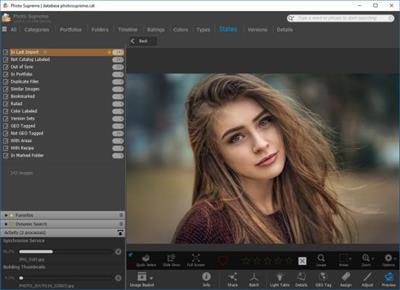
IDimager Photo Supreme 6.3.0.3765 Multilingual

79d2677263b9473059a5f245cd6644f7.jpeg

File Size: 110 MB​
Do you own a digital camera? Then in no time you will have thousands of images on your computer, and finding that one image you are looking for will become a chore. But Photo Supreme can change all that. Whether you have 1,000 or 500,000 images in your archive, Photo Supreme's integrated photo cataloging and photo management features will help you quickly find and work with your desired image.

Extremely powerful yet easy-to-use
From the ground up, Photo Supreme was developed with easy-of-use as the primary focus. We were able to pack most of the features requested by our user base into a user interface that is clean and efficient, yet extremely powerful.

Photo Supreme comes with every essential image management feature you'll need to bring structure in your image archive. Assigning catalog labels, importing images to your computer, search features, etc. And once you have your images cataloged then you'll be able to find that one image you need within seconds to then view, duplicate, email, share on your favorite photo site, upload it to your FTP server, or edit it in your favorite photo editor.

Integrates with your favorite tools
Photo Supreme makes integration with your favorite photo editing tools seaminglessly. At installation it will automatically find and add the most common used image editing tools to the user interface.

Simply select an image and click on the application icon to start editing your image.

Unparalleled Speed
Digital Asset Management software uses a catalog database and should be optimized to work with thousands of images in the database. We took this seriously and were able to get the speed up, there where it belongs. Searches will return results in just milliseconds.

Always take your images with you
With Photo Supreme you can store previews of your images inside the database. Then, even if your images are physically located on your network, they travel with you. The previews can be stored in the size that you prefer, from small to large ones, up to 1680 pixels

Open architecture
Right from the start, Photo Supreme was designed with an open cataloging architecture in mind. Because existing industry standards are used to store its data, you can extract your information at any time, even without our software. Should you ever decide to switch applications (although once you've tried Photo Supreme, you'll never go back!), you won't have to repeat the time consuming operation of re-cataloging your data. After all, it is YOUR data, not the application's data!

Share with friends and family
Photo Supreme easily interfaces to public photo sharing sites like Facebook, Flickr, PicasaWeb, Zenfolio, or SmugMug. Resize or rename your images as you upload them to your on-line account without having to prepare them first. Also, add or remove your metadata, convert color space, or add your personal signature to your uploaded images.

Get started right away
If you already use some sort of image collection tool then Photo Supreme can help you get your existing data into Photo Supreme, saving you lots of time. There are import feature available for iPhoto™, Aperture™, Lightroom™ 3 and 4, iMatch™, and FotoTime™. At the same time, PSU is able to read and import meta-data that was written with XMP supporting tools, including Adobe products, Nikon software, iView™, MediaPro™.

Vocabularies
In addition there are import features to support market standard vocabularies, including David Rieck's ControlledVocabulary™, UltraTAG™, Lightroom™-Keyword Files, or any other tool that supports exporting to Formatted Vocabulary Files.

Main Features & Highlights:
Advanced search capabilities
Multi Tab Browsing
Import/Ingest images
Side-by-Side comparison (up to 6 images)
Keyword tagging
Advanced GEO Tagging
Image organization in portfolios
Duplicate Detection
Share images with Flickr, Smugmug, Zenfolio, Picasaweb, FTP, EMail
Dual Monitor Support
Creative Commons support
Face Detection
Area Tagging
Extensible metadata with Custom Fields
Take your previews with you while travelling
Color Managed
Lossless Image Editing
Fully Scriptable
Available for Windows and MacOSX platform
Multi-User network/server version available for PostgreSQL and SQLServer (Server Edition)
English, German, French, Italian, Dutch, Portuguese, and Russian locale

Download link:​
Код:
[center][b]rapidgator_net[/b]:
https://rapidgator.net/file/8ed71cb7c07d6d633aaf24ce8adef616/hydni.IDimager.Photo.Supreme.6.3.0.3765.Multilingual.rar.html

[b]uploadgig_com[/b]:
https://uploadgig.com/file/download/7eec5D2ec7091d4A/hydni.IDimager.Photo.Supreme.6.3.0.3765.Multilingual.rar

[b]nitroflare_com[/b]:
https://nitroflare.com/view/11A8A4FE4D41C99/hydni.IDimager.Photo.Supreme.6.3.0.3765.Multilingual.rar[/center]

Links are Interchangeable - No Password - Single Extraction​
 
IrayPlugins IFMAX v2.5.0-150830 for 3ds Max

006a4273_medium.jpg

Windows x64 | File size: 1.9 GB​
Bring your 3D designs to life with Iray for 3ds Max. With access to a comprehensive materials library, intuitive physically-based NVIDIA MDL material creation and real-world environments and lighting you can quickly achieve stunning images and animations of your designs. A range of integrated post-production features and fine tuning controls allow finishing touches and refinement for your final shots.

Features:
- Physical Sky
- Physically Based Materials
- Cameras and Camera Effects
- Light Path Expressions
- Simultaneous Render Element Generation
- Render Modes
- VR Snapshots
- Workflow
- Denoising

What's New :
- Added support for 3ds Max 2022.
- Updated to Iray RTX 2020.1.5.
- Fixed intermittent "Access of invalid tag" bug.

Compatibility:3ds Max 2019/2020/2021/2022

Download link:​
Код:
[center][b]rapidgator_net[/b]:
https://rapidgator.net/file/81666c29f8c2801b577b8b90bd4fb4f8/fffz5.IrayPlugins.IFMAX.v2.5.0150830.for.3ds.Max.part1.rar.html
https://rapidgator.net/file/c7fa8ba491fe760d00572fee562f70e3/fffz5.IrayPlugins.IFMAX.v2.5.0150830.for.3ds.Max.part2.rar.html

[b]uploadgig_com[/b]:
https://uploadgig.com/file/download/93b0061eb119E397/fffz5.IrayPlugins.IFMAX.v2.5.0150830.for.3ds.Max.part1.rar
https://uploadgig.com/file/download/12d1fE342847a9dB/fffz5.IrayPlugins.IFMAX.v2.5.0150830.for.3ds.Max.part2.rar

[b]nitroflare_com[/b]:
https://nitroflare.com/view/963FD4D86D84A38/fffz5.IrayPlugins.IFMAX.v2.5.0150830.for.3ds.Max.part1.rar
https://nitroflare.com/view/48DBCC9150C7FF5/fffz5.IrayPlugins.IFMAX.v2.5.0150830.for.3ds.Max.part2.rar[/center]

Links are Interchangeable - No Password - Single Extraction​
 
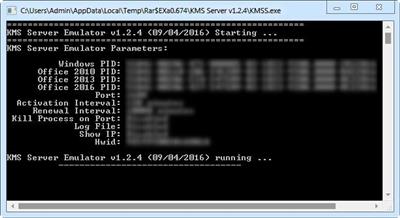
KMS Server Service 2.0.9

56787e49f430114f1e5f099ea0a8abca.jpeg

File size: 0.1 MB
KMS helpers and emulators. Part of the KMS Tools by Ratiborus.​

Command Line Parameters:
-Port- KMS Port. Range from 1 to 65535
-PWin- Windows PID
-PO14- Office 2010 PID
-PO15- Office 2013 PID
-PO16- Office 2016 PID
-AI- Activation Interval. Range from 15 to 43200 minutes
-RI- Renewall Interval. Range from 15 to 43200 minutes
-Debug - Detailed info.
-Log - Log file Enabled.
-Hwid- Machine Hardware Hash.

What's new
* official site does not provide any info about changes in this version

Download link:​
Код:
[center][b]rapidgator_net[/b]:
https://rapidgator.net/file/82593a287b15e14e39545f13f6a8a55a/rw2j2.KMS.Server.Service.2.0.9.rar.html

[b]uploadgig_com[/b]:
https://uploadgig.com/file/download/442dfB9aC2a0d66a/rw2j2.KMS.Server.Service.2.0.9.rar

[b]nitroflare_com[/b]:
https://nitroflare.com/view/756DC761FDFEFC2/rw2j2.KMS.Server.Service.2.0.9.rar[/center]

Links are Interchangeable - No Password - Single Extraction​
 
Mailbird 2.9.34.0 Multilingual

43cab126244f96ca864d5ac33a8e6a92.jpeg

File Size: 149.1 MB​
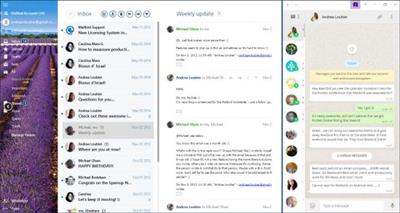
Mailbird is an intuitive email client that promises to deliver an uncluttered experience and several handy features for managing your email messages. The tool offers support for up to three email accounts and gives you the possibility to work with Gmail, Yahoo!, Outlook.com, iCloud or other IMAP email provider.

Your Inbox. Your Tasks. United.
- With Mailbird and Moo.do, you can now link up your tasks directly.
- Simply drag your emails into your daily task list, and get to inbox zero in no time, while you organize your tasks easily and conveniently.
- Want to quickly see the emails from your task list again?
- Simply click the email task, and Mailbird opens it for you.

Productivity. Scheduling. Anything.
Access the many powerful apps that helps you stay more productive, and integrate your daily communcation with your favorite apps.

- Try the Google or Sunrise calendar apps to easily schedule your meetings and combine multiple calendars.
- The WhatsApp instant messaging app, allows you to stay connected with your business partners, friends and family easily via Mailbird.
- Veeting Rooms app is for business meetings, when you want Swiss hosted secure and encrypted peer-to-peer connection. Includes secure p2p video, chat, whiteboard, and document sharing.

Whatsapp & Email. Side by side.
- With your WhatsApp stream running in Mailbird, you can easily communicate with people via email and instant messaging at the same time.
- Drag and drop attachments from your emails into Whatsapp, to easily share photos, videos and documents.

Create your own layout.
- You can customize the layout to match your preferred way of working. Try it now. Move your mouse over the different layouts below.

Pick your favorite color.
- Feel at home with your favorite color themes. The whole Mailbird experience adapts to your choice, and you can change as often as you'd like.

Full touchscreen support.
- Switch seemlessly between trackpad, mouse and touchscreen, as you swipe your way thorugh your inbox.
- Works with any laptop and touchscreen or touchpad.

Download link:​
Код:
[center][b]rapidgator_net[/b]:
https://rapidgator.net/file/2023d48eb1ae100b16005e7bbab54e65/nm5t5.Mailbird.2.9.34.0.Multilingual.rar.html

[b]uploadgig_com[/b]:
https://uploadgig.com/file/download/8706306434C4d5aD/nm5t5.Mailbird.2.9.34.0.Multilingual.rar

[b]nitroflare_com[/b]:
https://nitroflare.com/view/AC11B5D56E5FE2A/nm5t5.Mailbird.2.9.34.0.Multilingual.rar[/center]

Links are Interchangeable - No Password - Single Extraction​
 
Marmoset Toolbag v4.0.3 (x64)

192984ddf5d2b802c175e38ee988aa7c.jpeg

Windows X64 | File size: 161 MB​
A full-featured 3D real-time rendering, animation, and baking suite, providing artists a powerful and efficient workflow for all stages of production.

INTRODUCING TOOLBAG 4
The highly anticipated third version of Marmoset Toolbag is now available for Mac and Windows! We.ve been working diligently to make sure that Toolbag 3 exceeds expectations. Check out some of the key features in the video below.

LONG LIVE THE KING
The third release of Toolbag, our real-time rendering suite, ushers forth a new standard in image quality. A slew of exciting new features ensure that you.re able to tackle any challenge, while our modular shaders and responsive scene editor empower you to work at the speed of light.

IN MOTION
From previewing run and jump cycles to staging an epic short film, our new animation tools will bring your cinematic vision to life. Enjoy entirely new systems for importing and keyframing meshes, lights, cameras, post effects, and more.

LIGHT IT UP
Global illumination teams up with exceptional image-based lighting to provide awesome occlusion, beautifully bounced light, and spectacular reflections. Toolbag.s lighting tools are now better than ever.

BAKED GOODS
Our artist-friendly baking tools provide the instant feedback needed to revolutionize your texturing workflow. Real-time updates, bake groups and interactive 3D painting makes baking a piece of cake. Check out the Toolbag Baking Tutorial to learn more.

PRINCE OF PORTFOLIOS
Create impressive images with our refreshed renderer, vibrant videos with our new animation tools, and tantalizing WebGL presentations with Marmoset Viewer.

TAKE A SHOT
From look-dev to final presentation, our physically accurate renderer makes it easy to create gob-smacking promotional material for your game, film, or product launch.

PRODUCTION WIZARD
Toolbag makes getting to work easier than ever with Unity and Unreal Engine export. Share your art with the world by blasting off renders and Marmoset Viewer scenes directly to ArtStation.

CUSTOM FIT
Tailor Toolbag to your pipeline with Python plugin and custom shader support. Extend Toolbag.s functionality with scripts that automate common tasks and add new features. Bespoke shaders enable you to match the look of your project or create new effects. Not the technical type? Download shaders and plugins from our Add-on Library.

UNIVERSAL APPEAL
No matter the industry, Toolbag is an essential part of the modern 3D artist.s workflow. Whether you.re defining the look of your project, reviewing assets, or looking to stand out from the crowd, we.ve got you covered.

Screenshots

3054efcf6e26426d286af198858abbb3.jpeg


Download link:​
Код:
[center][b]rapidgator_net[/b]:
https://rapidgator.net/file/6f0530de18fd70101a83fd39fc37f8f7/qb8ml.Marmoset.Toolbag.v4.0.3.x64.rar.html

[b]uploadgig_com[/b]:
https://uploadgig.com/file/download/4694F0eef580FFFe/qb8ml.Marmoset.Toolbag.v4.0.3.x64.rar

[b]nitroflare_com[/b]:
https://nitroflare.com/view/EC5AC76333011A7/qb8ml.Marmoset.Toolbag.v4.0.3.x64.rar[/center]

Links are Interchangeable - No Password - Single Extraction​
 
Microsoft Exchange Server 2019 CU10 Build 15.02.0922.007 (x64) Multilanguage

6401542c7a22e619468a904870200198.jpeg

x64 | Languages:Multilanguage | File Size: 5.83 GB​
Description:
Exchange Server 2019 is designed to deliver security, performance and improved administration and management capabilities; attributes our largest on-premises customers expect from Exchange.

Here is a selection of other key features in Exchange Server 2019:

Security:
Exchange Server 2019 requires Windows Server 2019. In fact, we recommend installing Exchange Server 2019 onto Windows Server 2019 Server Core. Exchange Server 2019 installed on Windows Server 2019 Core provides the most secure platform for Exchange. You also have the option of installing Exchange 2019 onto Windows Server 2019 with Desktop Experience, but we have worked hard to make sure running Exchange on Server Core is the best choice for our code.

We're aware all media for Windows Server 2019 and Windows Server, version 1809 has been temporarily removed and Microsoft will provide an update when refreshed media is available. Exchange Server 2019 will be fully compatible with version 1809, and the refreshed version.

We also built Exchange Server 2019 to only use TLS 1.2 out of the box, and to remove legacy ciphers and hashing algorithms. To understand how this affects coexistence with earlier versions, please reference our previous series of posts on TLS.

Performance:
We've done significant work to allow Exchange Server to take advantage of larger core and memory packed systems available in market today. With our improvements, Exchange Server can use up to 48 processor cores and 256GB of RAM.

We've re-engineered search using Bing technology to make it even faster and provide better results, and in doing so have made database failovers much faster, and administration easier.

We're adding dual storage read/write capabilities to Exchange Server 2019 using Solid State Drive (SSD) technology to provide a super-fast cache of key data for improving end user experience. We also talked about this in our Email Search in a Flash! Accelerating Exchange 2019 with SSDs session at Ignite.

We also changed the way database caching works to allocate more memory to active database copies, again improving the end user experience. You can learn more about Dynamic Database Cache from Welcome to Exchange Server 2019! video and slides.

The improvements we have made to Exchange Server 2019 will enable you to scale to a larger number of users per server than ever before, use much larger disks, and see the latency of many client operations being cut in half.

End user experience:
We all rely on Exchange for calendaring, and we know large enterprises are heavy calendar users. We are bringing a few key features such as restricting the forwarding of meeting requests and better control over OOF settings to Exchange Server 2019. Administrators get some new calendaring features too, as we're adding the ability to manage events on user's calendars and assign delegate permissions more easily.

We are also adding support for routing mail to and from EAI/IDN recipients and hope to add additional capabilities in this area in the future.

Prerequisites:
OS:Windows Server 2012 R2/2016/2019
This cumulative update requires Microsoft .NET Framework 4.7.2.

Note:
The Cumulative Update 9 package can be used to run a new installation of Exchange Server 2019 or to upgrade an existing Exchange Server 2019 installation to Cumulative Update 10.

Original ISO Size:5.83 GB
Winrar Compressed Size:1.30GB

Download link:​
Код:
[center][b]rapidgator_net[/b]:
https://rapidgator.net/file/0418e3e8144320dce8c1a715c4c2da74/pyq6q.Microsoft.Exchange.Server.2019.CU10.Build.15.02.0922.007.x64.Multilanguage.part1.rar.html
https://rapidgator.net/file/78b68fca278b0a97dd39f069ffae5b0e/pyq6q.Microsoft.Exchange.Server.2019.CU10.Build.15.02.0922.007.x64.Multilanguage.part2.rar.html

[b]uploadgig_com[/b]:
https://uploadgig.com/file/download/280c6177b1b0c082/pyq6q.Microsoft.Exchange.Server.2019.CU10.Build.15.02.0922.007.x64.Multilanguage.part1.rar
https://uploadgig.com/file/download/F601Ef31c65e8eeD/pyq6q.Microsoft.Exchange.Server.2019.CU10.Build.15.02.0922.007.x64.Multilanguage.part2.rar

[b]nitroflare_com[/b]:
https://nitroflare.com/view/76DF82320B9D553/pyq6q.Microsoft.Exchange.Server.2019.CU10.Build.15.02.0922.007.x64.Multilanguage.part1.rar
https://nitroflare.com/view/028BF9A5A41934C/pyq6q.Microsoft.Exchange.Server.2019.CU10.Build.15.02.0922.007.x64.Multilanguage.part2.rar[/center]

Links are Interchangeable - No Password - Single Extraction​
 
Middle 1.5.29 macOS

3ff120314affce8e2b02c43743b92bcc.jpeg

File size: 15 MB
Middle simply adds the middle click to your Mac for your trackpad or Magic Mouse​

Select from the following gestures
- Click with three fingers (trackpad or Magic Mouse)
- Tap with three fingers (trackpad or Magic Mouse)
- Force touch with one finger on a force touch compatible trackpad
- Click with one finger in the center of the Magic Mouse
Release Notes

Release notes were unavailable when this listing was updated

Supported Operation Systems:
macOS 10.12 or later

Download link:​
Код:
[center][b]rapidgator_net[/b]:
https://rapidgator.net/file/1d87d997871ffdfd9e9397f0fe3e67f1/2ljjd.Middle.1.5.29.macOS.dmg.html

[b]uploadgig_com[/b]:
https://uploadgig.com/file/download/20dE15506eB5bee1/2ljjd.Middle.1.5.29.macOS.dmg

[b]nitroflare_com[/b]:
https://nitroflare.com/view/BF7175A0C8A6739/2ljjd.Middle.1.5.29.macOS.dmg[/center]

Links are Interchangeable - No Password - Single Extraction​
 
Multi Commander 11.2.0 Build 2795 Multilingual

7f948a646fee5a118a302865334a5a61.jpeg

File Size : 15.5 Mb​

Multi Commander is a multi-tabbed file manager that is an alternative to the standard Windows Explorer. It uses the very popular and efficient dual-panel layout. Multi Commander has a everything you need in your daily works with files to make your work fast and efficient. It has all the standard features like a file manager has like copy, move, rename, view. But Multi Commanders big strength is the special features that allow you to do advanced task with ease. Like Auto-unpacking , Auto-sorting , Browse inside archives, registry and FTP, Search for file, View files and pictures and the Scripting support let you automate many task. And it allows you to do everything from the keyboard using shortcut so you can work fast and efficient.

Features:
- Tabs allowing you to have multiple folders open.
- Caching that enable fast file browsing.
- Show files in Detailed, List, or Thumbnail list modes.
- Background work for all tasks that takes time to finish, allowing you to continue working without interruptions.
- Customize the layout and colors to fit your styling needs.
- Extensions and plugins that will increase the functionality of Multi Commander.
- FTP, Registry , Zip, 7-Zip, Rar , Tar , GZ , Bz2 , Jar Support
- View and Change file permissions, Take ownership of files.
- Picture tools like Convert / Rotate Pictures, View/Remove EXIF tags, Adjust EXIF Date of pictures.
- Internal picture viewer for Jpg, Png, Gif, Png, Bmp, Tiff and many RAW formats.
- Show Movie information from IMDB/Rotten tomato as extra columns on you movie files.
- Audio tools like View Audio file properties, View/Edit MP3 Tags.
- Open API for developers to create extensions and plugins.
- Remember selections when you get back from another location when browsing the filesystem.
- Use mouse and drag and drop or use quick keyboard command for all the task.
- FileOperations plugins that can automatically sort / unpack files when they are moved or copied.
- MultiRename tool for fast and safe rename of multiple files/folder, Rule based and supports Undo.
- File viewer that lets you view files of any size, as ASCII/Unicode/UTF8/Binary and Hex.
- Take over the file type association from windows. Configure view, edit and open action based on file type and path.
- Both 32bit and 64bit versions available.
- Handle folders with many thousands of files with easy, And use power full filters to limit what you want to view.
- Compare folders and select the files and folders that are different, that are the same and many other options.
- Powerfull script engine allowing you to create script that automate tasks.
- Portable. Can be installed and run from portable (USB) device. Will not write any settings/session info on host computer.
- Multi Language support. English, German, French, Czech, Dutch, Russian, Spanish, Swedish, Chinese (Simplified & Traditional), Polish and Japanese is supported.

Download link:​
Код:
[center][b]rapidgator_net[/b]:
https://rapidgator.net/file/88b9926fa9840d3c120b381ff6b4a242/t6bqx.Multi.Commander.11.2.0.Build.2795.Multilingual.rar.html

[b]uploadgig_com[/b]:
https://uploadgig.com/file/download/45a3DCf49D088884/t6bqx.Multi.Commander.11.2.0.Build.2795.Multilingual.rar

[b]nitroflare_com[/b]:
https://nitroflare.com/view/FB23715ADE68E7D/t6bqx.Multi.Commander.11.2.0.Build.2795.Multilingual.rar[/center]

Links are Interchangeable - No Password - Single Extraction​
 
Navicat Premium 15.0.29 macOS

603bc7f5b62d941bef6aeaa28992835c.jpeg

File size: 156 MB​
Navicat Premium is a database development tool that allows you to simultaneously connect to MySQL, MariaDB, MongoDB, SQL Server, Oracle, PostgreSQL, and SQLite databases from a single application. Compatible with cloud databases like Amazon RDS, Amazon Aurora, Amazon Redshift, Microsoft Azure, Oracle Cloud, Google Cloud and MongoDB Atlas.

New features and improvements:

· Chart
Turn your database data into visuals to have clear insights through charts and graphs.

· Data Transfer
A new approach for transferring data is released in version 15. Our new design comes with an intuitive interface for customizing the fields and specifying the number of rows you wish to transfer.

· SQL Builder
We engineered an entirely new mechanism to improve our SQL Builder in term of user experience, and the overall efficiency of your query writing.

· Modeling
Deliver a full picture of differences between model and database, and generate scripts to update the destination database.

· Dark Mode
Dark mode support has arrived in our 15 update. Set dark theme to protect your eyes from the traditionally blinding whiteness of computer.

· Native Linux
Native Linux support is now added into our Navicat family. You can enjoy a UI that better matches with user experiences of the Linux system.

*** You need to disable the System Integrity Protection (SIP) to perform the selected Application.
Release Notes
Release notes were unavailable when this listing was updated

Supported Operation Systems:
macOS 10.11 or later

Download link:​
Код:
[center][b]rapidgator_net[/b]:
https://rapidgator.net/file/16db4367295eb164b9c7a189314ef79d/wy2s5.Navicat.Premium.15.0.29.macOS.dmg.html

[b]uploadgig_com[/b]:
https://uploadgig.com/file/download/3Ac0c4807aec7De5/wy2s5.Navicat.Premium.15.0.29.macOS.dmg

[b]nitroflare_com[/b]:
https://nitroflare.com/view/7767361587FDD25/wy2s5.Navicat.Premium.15.0.29.macOS.dmg[/center]

Links are Interchangeable - No Password - Single Extraction​
 
ON1 Photo RAW 2021.5 v15.5.1.10737 macOS

c7d2b33cb018f0a13911fd76c5bbe225.jpeg

Languages: Multilingual | File size: 2 GB​
This professional-grade photo organizer, raw processor, layered editor, and effects app, includes everything you need in one photography application. The newest features include AI-powered features AI Match and AI Auto, four filters in Effects (Weather, Sun Flare, Color Balance, Channel Mixer), improved decoding of raw files (especially for Fujifilm), custom camera profiles with X-Rite, SmugMug integration, improved noise reduction, a map view, a Print Module, speed/performance enhancements, and much more!

ON1 Photo RAW puts the primary photo editing needs for every photographer regardless of what they shoot - without having to bounce between multiple pieces of software. Get the professional photo editing tools you need for the professional results you need while keeping your workflow efficient, powerful, and simple.

ON1 Photo RAW puts the primary photo editing needs for every photographer regardless of what they shoot - without having to bounce between multiple pieces of software. Get the professional photo editing tools you need for the professional results you need while keeping your workflow efficient, powerful, and simple.

We've curated hundreds of the most popular looks and styles seen throughout the industry. Our team of experts overhauled the preset library to give you the trendiest looks with these amazing new one-click presets.

Support for Over 800+ Cameras
Also supports JPEG, TIF, PSD, PSB, PNG, and DNG

Optional App Integration:
- Photoshop CS6 and above
- Photoshop Elements 14 and above
- Photoshop Lightroom Classic 6 and above
Release Notes
Release notes were unavailable when this listing was updated

Supported Operation Systems:
macOS 10.13 or later

Download link:​
Код:
[center][b]rapidgator_net[/b]:
https://rapidgator.net/file/a28b2150d232e82a85e077ebc4bffe05/4yzv3.ON1PhotoRAW2021.5v15.5.1.10737TNT.zip.001.html
https://rapidgator.net/file/b6d9d230d3bb0176a5d6b607da5bd9e5/4yzv3.ON1PhotoRAW2021.5v15.5.1.10737TNT.zip.002.html

[b]uploadgig_com[/b]:
https://uploadgig.com/file/download/7d642eab97fE11fd/4yzv3.ON1PhotoRAW2021.5v15.5.1.10737TNT.zip.001
https://uploadgig.com/file/download/0308DDc9be6B0068/4yzv3.ON1PhotoRAW2021.5v15.5.1.10737TNT.zip.002

[b]nitroflare_com[/b]:
https://nitroflare.com/view/514CD9D185266D0/4yzv3.ON1PhotoRAW2021.5v15.5.1.10737TNT.zip.001
https://nitroflare.com/view/B19DB37BE74B92A/4yzv3.ON1PhotoRAW2021.5v15.5.1.10737TNT.zip.002[/center]

Links are Interchangeable - No Password - Single Extraction​
 
PreSonus Studio One 5 Professional v5.3.0 macOS

15111abd3e4203ca97adb15401de019d.jpeg

macOS | July, 3 2021 | 195 MB​
Record, produce, mix, master, and perform all from a single, intuitive application. Designed with ease of use at its core, Studio One 5 is your creative partner from studio to stage. Studio One is driven by tools that enhance your creativity without getting in the way; we pioneered its drag-and-drop workflow that continues to be imitated elsewhere. Laborious tasks that take five steps in other DAWs usually only take... One. A popular example: you can convert MIDI to audio and back with a simple drag-and-drop.

Most of your work will take place in the Song Page, where you get unlimited tracks and buses, alongside everything else you need to record, compose, edit, and mix: a complete set of virtual instruments for synthesis (mono and poly) sample-instrument playback, and rhythm; a complete suite of Native Effects plug-ins with a fresh new look and some amazing features new in Version 5, including State Space Modeled analog drive on select plug-ins; and groundbreaking tools for song arranging and prototyping. Studio One's exclusive Project page lets you master your compositions and comp your record, simply by dragging and dropping your Song file. Studio One handles the versioning and rendering for you, so you always know you're working on the latest mix.

New in version 5: we've leveraged some of our award-winning Notion notation technology to add our new Score View. View multiple tracks on the same Score. View the same track in Score and Piano View at the same time. A streamlined pallet of playback symbols lets you add crescendos, trills and more without rerecording your track. We've also added MIDI Polyphonic Expression support for advanced, modern MIDI controllers.

Whats new in this version:
У Вас недостаточно прав для просмотра ссылок. Войдите или зарегистрируйтесь.


System Requirements
macOS® 10.13 or higher (64-bit only)
Intel® CoreTM i3 processor or better, or M1 processor running Rosetta 2
4 GB RAM minimum (8 GB or more recommended)
Internet connection (needed for installation and activation)
Monitor with 1366 x 768 resolution (Retina display recommended)
A multi-touch enabled monitor with TUIO support is required for touch operation
40 GB hard-drive space​

Download link:​
Код:
[center][b]rapidgator_net[/b]:
https://rapidgator.net/file/3ff8d5c35975ca6607c6de8755db37a0/rglas.PreSonus.Studio.One.5.Professional.v5.3.0.macOS.rar.html

[b]uploadgig_com[/b]:
https://uploadgig.com/file/download/74490199CC323c68/rglas.PreSonus.Studio.One.5.Professional.v5.3.0.macOS.rar

[b]nitroflare_com[/b]:
https://nitroflare.com/view/DA9AB36FE41D700/rglas.PreSonus.Studio.One.5.Professional.v5.3.0.macOS.rar[/center]

Links are Interchangeable - No Password - Single Extraction​
 
QuarkXPress 2021 17.0.0 macOS

8b8f2236b77f96186eebc466a81e1021.jpeg

File size: 1.04 GB​
QuarkXPress is the smart solution for every creative professional who wants to leverage the most modern and efficient design software in the market.

Features
Page Layout

Match the brilliance of your layout, with powerful Typography that lets you achieve your design flair effortlessly. Import and export to all major raster and vector files.

Graphics & Illustrations
Create gorgeous Illustrations, design color blends with Multi-Color Gradients, control color channels and apply non-destructive image editing that allows you to Bring your Creativity ALIVE!

Photo Editing
Create Artifacts which can be Aesthetic and/or Dramatic to Propel your Business Branding, with Superior Image Editing Capabilities.

Web Publication
Groundbreaking, modern responsive web design where you can effortlessly generate rich interactive digital publications for truly, responsive experience.

Mobile App Publication
Switch seamlessly and transition your design from Print to Digital, create Mobile Apps for iOS and Android which carry the flair of Print Design.

Unsurpassed typography:
* Color fonts support
* First-class opentype controls
* Upgraded font listing
* Hyphenation strictness levels
* Span footnotes over columns

Professional print publishing:
* Direct indesign® idml import
* Pdf print engine based on callas® pdftoolbox
* Tagged/accessible pdf
* Built-in modern javascript v8 support inspired by html dom
* Digital-to-print conversion

Unlimited digital publishing:
* Export unlimited android single apps
* Digital preview improvements
* Html5 export optimisations
* Grouped interactivity
* Collect for output digital
* Streamlined user interface:
* Vertical measurement palette
* Powerfull user interface

What's New :
Release notes were unavailable when this listing was updated

Supported Operation Systems:
macOS 10.13 or later

Download link:​
Код:
[center][b]rapidgator_net[/b]:
https://rapidgator.net/file/2a5541c0c36e262892802ff19830dd5c/s5kxg.QuarkXPress.2021.17.0.0.macOS.rar.html

[b]uploadgig_com[/b]:
https://uploadgig.com/file/download/5a5567dE0660fcA2/s5kxg.QuarkXPress.2021.17.0.0.macOS.rar

[b]nitroflare_com[/b]:
https://nitroflare.com/view/F5FA016FE58166D/s5kxg.QuarkXPress.2021.17.0.0.macOS.rar[/center]

Links are Interchangeable - No Password - Single Extraction​
 
Tap Forms 5.3.19 (1859) macOS

f70cb4703e89472eb08d75d160c8c518.jpeg

Language: Multilingual | File size: 31 MB​
Your digital filing cabinet for life's scattered details. Now with iCloud Sync! Accounts, recipes, expenses, inventory - life is full of things that we don't want to forget or misplace. Tap Forms 5 helps you organize all kinds of things in one place - secure, searchable, and accessible on your Mac (iOS + Apple Watch app sold separately).

Advanced Features

- Layout designer for creating custom form layouts
- Sync with Tap Forms for iOS and Mac with or without the cloud
- Advanced search rules with multi-field record filtering
- Lightning-fast search
- Share form templates with friends, family, and co-workers
- Import and export standard text, CSV and XLSX files from Excel, Numbers, or other systems
- Print 24 different types of barcodes including ISBN, UPC, Code 39, QR code, EAN, and more!
- Label printing engine includes over 1,000 Avery label templates
- Print record details

*** You need to disable the System Integrity Protection (SIP) to perform the selected Application.
Release Notes
Release notes were unavailable when this listing was updated.

Supported Operation Systems:
macOS 10.12 or later

Download link:​
Код:
[center][b]rapidgator_net[/b]:
https://rapidgator.net/file/4c6f3ad8c905e853c28ad1430c451b10/2n5zx.Tap.Forms.5.3.19.1859.macOS.dmg.html

[b]uploadgig_com[/b]:
https://uploadgig.com/file/download/27ccc8984656dE9A/2n5zx.Tap.Forms.5.3.19.1859.macOS.dmg

[b]nitroflare_com[/b]:
https://nitroflare.com/view/395CF9571FDF21A/2n5zx.Tap.Forms.5.3.19.1859.macOS.dmg[/center]

Links are Interchangeable - No Password - Single Extraction​
 
ON1 Photo RAW 2021.5 v15.5.1.10737 Multilingual

cdf9c67925ab46f2e82a79c0f324af6d.jpeg

Windows x64 | File size: 1.54 GB​
ON1 Photo RAW version 2021 is THE professional-grade photo organizer, raw processor, layered editor, and effects app. It works where you do; at the center of your workflow or as a plug-in to Adobe Photoshop, Lightroom, Elements, Affinity Photo, Corel Paintshop Pro, and Capture One (coming soon).

What do you photograph?
ON1 Photo RAW 2021 provides the primary photo editing needs for every photographer regardless of what they shoot - without having to bounce between multiple pieces of software. Get the professional photo editing tools you need for the professional results you need while keeping your workflow efficient, powerful, and simple.

Power & Speed
At its core, ON1 Photo RAW includes a state-of-the-art image processing engine. Optimized for today's super-megapixel cameras and high-performance computer graphics systems, Photo RAW is the world's fastest, most flexible, and easiest-to-use photo editor on the market.

Unlimited Creativity
Creators want to create and not spend all of their time learning how to use editing tools. Photo RAW is like having Lightroom & Photoshop under one roof. It comes with the tools you need for compositing, hundreds of the hottest presets and filters built-in, and world-class masking tools to make your life easy.

Control of Your Photography
ON1 Photo RAW gives you an open system for complete control over your storage, organization, editing, and method of purchase. No long importing, easy organization, unlimited ways to dial in your style, and ON1 will also never be a subscription-only model.

Plug-in to Your Workflow
ON1 Portrait AI is the perfect fit for almost any workflow. Get amazing retouching results in seconds when using ON1 Portrait AI as a plug-in for:

- Adobe Photoshop
- Adobe Lightroom Classic
- Adobe Photoshop Elements
- Affinity Photo
- Capture One (coming soon)
- Apple Photos
- Corel Paintshop Pro

New Features in ON1 Photo RAW 2021:
- Quickly Add Clouds to Your Dull Skies
- Retouch an Entire Portrait Shoot Automatically
- Create Stunning Sunsets in Seconds
- View Your Photos in All of Their Beauty
- Refresh Smiles in a Few Simple Clicks
- Selectively Edit Like Never Before Using Color Selection
- A Better Way to Erase Away Unwanted Distractions
- Find Your Duplicate Photos in Seconds
- Easily Change Colors of Objects in Your Photos
- Quickly Find All Photos from Your Favorite Location
- Make the Eyes Pop in Seconds
- The Best Photoshop Plugin for Editing Portraits
- Presenting Photos for Your Clients

Feature List:

New ON1 Portrait AI
Flawless retouching is just a click away with the new Portrait AI tab inside of Edit. It uses machine learning to find every face in your photo and make them look great, automatically. It analyzes each face and adds just the right amount of retouching to the skin, eyes, and mouth, giving you professional results in no time at all.

New Smart Organize
The New Smart Organize mode in Browse lets you take control over your cluttered photo archive. Not only can it find duplicates, but it can find and group photos that have similar appearance, location or time. It can help you cull your library to find just the best photos in a series.

New Spot Healing Brush
A new modern approach to removing distractions like dust spots, power-lines and unwanted people from your photos. The Spot Healing Brush is not only faster than current tools, it maintains full non-destructive adjustments for each spot you remove.

New Custom Brush Shapes
Brushing has taken a quantum-leap in control and creativity. Now you can choose from a variety of custom brush shapes or even import your own.

New Plug-in Support for Affinity Photo and Corel PaintShop Pro
Now you can extend your workflow in Affinity Photo and Corel PaintShop Pro by access Develop, Effects, and Portrait right inside the apps you use. Capture One support coming soon!

New Quick Slideshow
Need to quickly show a client their photos? With the Quick Slideshow you are only a click away from a full-screen slideshow complete with user adjustable delay and an elegant dissolve transition.

New Camera Based Presets
Now you can automatically apply a preset to any new photos from a specific camera. If you always find yourself making the same adjustments, just make a preset and apply it automatically to photos from that camera. This is super handy if you have created a custom camera profile or if you have converted a camera to infrared.

New Color-Sensitive Gradient Masks
Everyone knows how powerful the gradient mask tool is. You can quickly create straight, reflected or round radiant masks that are re-editable and blendable with brush masks. Now you can combine the color-sensitive power we created for the Perfect Brush with the gradient masks. When enabled, it detects the color under the gradient and applies the mask to only that adjustable color range. It makes it a breeze to mask areas like skies while maintaining things like buildings or trees that go into the sky.

New Batch HDR and Pano
Save time by batch processing your HDR brackets or panoramas. Simply organize your brackets into sub-folders, then let Browse build your new HDR and panos for you. This is a life-saver for real estate shooters.

New User Interface Improvements
We have taken a measured approach to updating the user interface. Based on user feedback we have improved common controls like sliders to have more precision and a longer area for labels so we can be more descriptive. We have also made sure that Layers and the Edit module tabs don't scroll out of view on a small display or when you have a large stack of filters.

New Color Fill Layers
We have brought back color fill layers to the Layers pane. They are a great way to set a background color for a composite layout. They are also handy when used with the new custom brush shapes for painting in objects like grass, trees, and clouds.

New Replace Color Filter
Easily change the color of an object to any new color. It's perfect for tweaking or totally changing the color of eyes, flowers, buildings, and apparel.
Release Notes

What's New in 2021.5:
- Re-editable Smart Photos for Adobe® Lightroom® Classic - Now, you can re-edit your adjustments made in ON1 Photo RAW, maintaining your non-destructive workflow with Adobe Lightroom Classic. From Lightroom, you can send photos to ON1 Photo RAW, where you can retouch, crop, create layers, and add effects. The results round trip back to Lightroom as a normal Photoshop PSD where you can view and export them. If you want to adjust your settings made in ON1 Photo RAW, simply send it back to Photo RAW, and all your settings are still there. You can re-crop, change the retouching, adjust the layers, or add or change filters.
- Batch Processing for Adobe® Lightroom® Classic - Now, you can batch-process photos from Lightroom Classic with ON1 Photo RAW. You control the file types created and the settings to apply. It could be a preset or your own manual adjustments. You can adjust the first photo, and have the same settings applied to all the other photos, or pause on each photo to tweak the settings to your needs. For portrait photos, let the AI-based auto mode take over. It finds every face, analyses it, and adds the perfect amount of skin smoothing, and eye and mouth enhancements.
- Customize Keyboard Shortcuts - The new Shortcuts dialog allows you to view and change what keyboard shortcut, or hotkey, is used for most functions. You can change the key used to access any tool, tool option, module, or menu item. You can even assign shortcuts to menu items that don't have a shortcut yet. It's perfect if you live in a locale that doesn't use the QWERTY keyboard layout.
- Keyboard Control of Tone & Color - The powerful new shortcuts can also be used with the most-used image adjustments located in Develop's Tone and Color pane. You can now adjust the exposure, contrast, shadows, highlights, and white balance options using keyboard shortcuts or the mouse scroll wheel. You can even adjust these controls with an external control surface like a Stream Deck, Loupedeck, Monogram, or similar devices.
- Cloud Sync for Presets and Extras - Cloud Sync now keeps your presets and extras like backgrounds, borders, textures, LUTs, etc. all in sync across all your computers. When you create a new preset or install a preset pack it automatically syncs to your other computers. This even works for saved filter styles, import presets, color profiles. You name it, it all stays in sync now.
- Learning Hub - The Learning Hub puts the information you need to be successful right at your fingertips. This floating window lets you access the video library, user guides, support pages, and loyalty rewards from right inside the app.
- New Cameras for RAW Support - Fujifilm GFX-100S, Sony Alpha 1. Updated tethered shooting for Canon and Nikon cameras.

System Requirements:
- Windows 10 (current maintenance releases, 64-bit only)
- Processor: Intel Core i5, Xeon, or better
- RAM: 16+ GB
- Disk: 1.5 GB for installation, SSD
- Display: OpenGL 4.2-compatible video card with 2GB dedicated video RAM, 1920x1080 resolution (at 100% scale factor)

Optional Application Integration:
- Photoshop CC 2020
- Photoshop Elements 2020
- Photoshop Lightroom Classic CC 2020
- Affinity Photo
- Corel PaintShop Pro

Supported Languages:
- English, German, Spanish, French, Japanese, Korean, Simplified Chinese, Russian, Portuguese, Italian, Dutch

Download link:​
Код:
[center][b]rapidgator_net[/b]:
https://rapidgator.net/file/810d2d822fcb898478e804e097ace542/m10j0.ON1.Photo.RAW.2021.5.v15.5.1.10737.Multilingual.part1.rar.html
https://rapidgator.net/file/74d0fcabdd684217ec5c15a1f715d735/m10j0.ON1.Photo.RAW.2021.5.v15.5.1.10737.Multilingual.part2.rar.html

[b]uploadgig_com[/b]:
https://uploadgig.com/file/download/b8ebB22C35d3d792/m10j0.ON1.Photo.RAW.2021.5.v15.5.1.10737.Multilingual.part1.rar
https://uploadgig.com/file/download/6d778e3c08Bf530C/m10j0.ON1.Photo.RAW.2021.5.v15.5.1.10737.Multilingual.part2.rar

[b]nitroflare_com[/b]:
https://nitroflare.com/view/77FA99578508C19/m10j0.ON1.Photo.RAW.2021.5.v15.5.1.10737.Multilingual.part1.rar
https://nitroflare.com/view/BA2EC4C201F9E60/m10j0.ON1.Photo.RAW.2021.5.v15.5.1.10737.Multilingual.part2.rar[/center]

Links are Interchangeable - No Password - Single Extraction​
 
ON1 Photo RAW 2021.5 v15.5.1.10747 Multilingual

d65552120a01c7f978e08a534df9a7c2.jpeg

Windows x64 | File size: 1.54 GB​
ON1 Photo RAW version 2021 is THE professional-grade photo organizer, raw processor, layered editor, and effects app. It works where you do; at the center of your workflow or as a plug-in to Adobe Photoshop, Lightroom, Elements, Affinity Photo, Corel Paintshop Pro, and Capture One (coming soon).

What do you photograph?
ON1 Photo RAW 2021 provides the primary photo editing needs for every photographer regardless of what they shoot - without having to bounce between multiple pieces of software. Get the professional photo editing tools you need for the professional results you need while keeping your workflow efficient, powerful, and simple.

Power & Speed
At its core, ON1 Photo RAW includes a state-of-the-art image processing engine. Optimized for today's super-megapixel cameras and high-performance computer graphics systems, Photo RAW is the world's fastest, most flexible, and easiest-to-use photo editor on the market.

Unlimited Creativity
Creators want to create and not spend all of their time learning how to use editing tools. Photo RAW is like having Lightroom & Photoshop under one roof. It comes with the tools you need for compositing, hundreds of the hottest presets and filters built-in, and world-class masking tools to make your life easy.

Control of Your Photography
ON1 Photo RAW gives you an open system for complete control over your storage, organization, editing, and method of purchase. No long importing, easy organization, unlimited ways to dial in your style, and ON1 will also never be a subscription-only model.

Plug-in to Your Workflow
ON1 Portrait AI is the perfect fit for almost any workflow. Get amazing retouching results in seconds when using ON1 Portrait AI as a plug-in for:

- Adobe Photoshop
- Adobe Lightroom Classic
- Adobe Photoshop Elements
- Affinity Photo
- Capture One (coming soon)
- Apple Photos
- Corel Paintshop Pro

New Features in ON1 Photo RAW 2021:
- Quickly Add Clouds to Your Dull Skies
- Retouch an Entire Portrait Shoot Automatically
- Create Stunning Sunsets in Seconds
- View Your Photos in All of Their Beauty
- Refresh Smiles in a Few Simple Clicks
- Selectively Edit Like Never Before Using Color Selection
- A Better Way to Erase Away Unwanted Distractions
- Find Your Duplicate Photos in Seconds
- Easily Change Colors of Objects in Your Photos
- Quickly Find All Photos from Your Favorite Location
- Make the Eyes Pop in Seconds
- The Best Photoshop Plugin for Editing Portraits
- Presenting Photos for Your Clients

Feature List:

New ON1 Portrait AI
Flawless retouching is just a click away with the new Portrait AI tab inside of Edit. It uses machine learning to find every face in your photo and make them look great, automatically. It analyzes each face and adds just the right amount of retouching to the skin, eyes, and mouth, giving you professional results in no time at all.

New Smart Organize
The New Smart Organize mode in Browse lets you take control over your cluttered photo archive. Not only can it find duplicates, but it can find and group photos that have similar appearance, location or time. It can help you cull your library to find just the best photos in a series.

New Spot Healing Brush
A new modern approach to removing distractions like dust spots, power-lines and unwanted people from your photos. The Spot Healing Brush is not only faster than current tools, it maintains full non-destructive adjustments for each spot you remove.

New Custom Brush Shapes
Brushing has taken a quantum-leap in control and creativity. Now you can choose from a variety of custom brush shapes or even import your own.

New Plug-in Support for Affinity Photo and Corel PaintShop Pro
Now you can extend your workflow in Affinity Photo and Corel PaintShop Pro by access Develop, Effects, and Portrait right inside the apps you use. Capture One support coming soon!

New Quick Slideshow
Need to quickly show a client their photos? With the Quick Slideshow you are only a click away from a full-screen slideshow complete with user adjustable delay and an elegant dissolve transition.

New Camera Based Presets
Now you can automatically apply a preset to any new photos from a specific camera. If you always find yourself making the same adjustments, just make a preset and apply it automatically to photos from that camera. This is super handy if you have created a custom camera profile or if you have converted a camera to infrared.

New Color-Sensitive Gradient Masks
Everyone knows how powerful the gradient mask tool is. You can quickly create straight, reflected or round radiant masks that are re-editable and blendable with brush masks. Now you can combine the color-sensitive power we created for the Perfect Brush with the gradient masks. When enabled, it detects the color under the gradient and applies the mask to only that adjustable color range. It makes it a breeze to mask areas like skies while maintaining things like buildings or trees that go into the sky.

New Batch HDR and Pano
Save time by batch processing your HDR brackets or panoramas. Simply organize your brackets into sub-folders, then let Browse build your new HDR and panos for you. This is a life-saver for real estate shooters.

New User Interface Improvements
We have taken a measured approach to updating the user interface. Based on user feedback we have improved common controls like sliders to have more precision and a longer area for labels so we can be more descriptive. We have also made sure that Layers and the Edit module tabs don't scroll out of view on a small display or when you have a large stack of filters.

New Color Fill Layers
We have brought back color fill layers to the Layers pane. They are a great way to set a background color for a composite layout. They are also handy when used with the new custom brush shapes for painting in objects like grass, trees, and clouds.

New Replace Color Filter
Easily change the color of an object to any new color. It's perfect for tweaking or totally changing the color of eyes, flowers, buildings, and apparel.
Release Notes

What's New in 2021.5:
- Re-editable Smart Photos for Adobe® Lightroom® Classic - Now, you can re-edit your adjustments made in ON1 Photo RAW, maintaining your non-destructive workflow with Adobe Lightroom Classic. From Lightroom, you can send photos to ON1 Photo RAW, where you can retouch, crop, create layers, and add effects. The results round trip back to Lightroom as a normal Photoshop PSD where you can view and export them. If you want to adjust your settings made in ON1 Photo RAW, simply send it back to Photo RAW, and all your settings are still there. You can re-crop, change the retouching, adjust the layers, or add or change filters.
- Batch Processing for Adobe® Lightroom® Classic - Now, you can batch-process photos from Lightroom Classic with ON1 Photo RAW. You control the file types created and the settings to apply. It could be a preset or your own manual adjustments. You can adjust the first photo, and have the same settings applied to all the other photos, or pause on each photo to tweak the settings to your needs. For portrait photos, let the AI-based auto mode take over. It finds every face, analyses it, and adds the perfect amount of skin smoothing, and eye and mouth enhancements.
- Customize Keyboard Shortcuts - The new Shortcuts dialog allows you to view and change what keyboard shortcut, or hotkey, is used for most functions. You can change the key used to access any tool, tool option, module, or menu item. You can even assign shortcuts to menu items that don't have a shortcut yet. It's perfect if you live in a locale that doesn't use the QWERTY keyboard layout.
- Keyboard Control of Tone & Color - The powerful new shortcuts can also be used with the most-used image adjustments located in Develop's Tone and Color pane. You can now adjust the exposure, contrast, shadows, highlights, and white balance options using keyboard shortcuts or the mouse scroll wheel. You can even adjust these controls with an external control surface like a Stream Deck, Loupedeck, Monogram, or similar devices.
- Cloud Sync for Presets and Extras - Cloud Sync now keeps your presets and extras like backgrounds, borders, textures, LUTs, etc. all in sync across all your computers. When you create a new preset or install a preset pack it automatically syncs to your other computers. This even works for saved filter styles, import presets, color profiles. You name it, it all stays in sync now.
- Learning Hub - The Learning Hub puts the information you need to be successful right at your fingertips. This floating window lets you access the video library, user guides, support pages, and loyalty rewards from right inside the app.
- New Cameras for RAW Support - Fujifilm GFX-100S, Sony Alpha 1. Updated tethered shooting for Canon and Nikon cameras.

System Requirements:
- Windows 10 (current maintenance releases, 64-bit only)
- Processor: Intel Core i5, Xeon, or better
- RAM: 16+ GB
- Disk: 1.5 GB for installation, SSD
- Display: OpenGL 4.2-compatible video card with 2GB dedicated video RAM, 1920x1080 resolution (at 100% scale factor)

Optional Application Integration:
- Photoshop CC 2020
- Photoshop Elements 2020
- Photoshop Lightroom Classic CC 2020
- Affinity Photo
- Corel PaintShop Pro

Supported Languages:
- English, German, Spanish, French, Japanese, Korean, Simplified Chinese, Russian, Portuguese, Italian, Dutch

Download link:​
Код:
[center][b]rapidgator_net[/b]:
https://rapidgator.net/file/be4d3e2b7fb738f2f79960fc2a49044d/oxg9a.ON1.Photo.RAW.2021.5.v15.5.1.10747.Multilingual.part1.rar.html
https://rapidgator.net/file/2c2da0783e31eff629ac14e732fd268b/oxg9a.ON1.Photo.RAW.2021.5.v15.5.1.10747.Multilingual.part2.rar.html

[b]uploadgig_com[/b]:
https://uploadgig.com/file/download/9aE4dd9d66d957a2/oxg9a.ON1.Photo.RAW.2021.5.v15.5.1.10747.Multilingual.part1.rar
https://uploadgig.com/file/download/e9292873E03877dd/oxg9a.ON1.Photo.RAW.2021.5.v15.5.1.10747.Multilingual.part2.rar

[b]nitroflare_com[/b]:
https://nitroflare.com/view/63263868C69B6A8/oxg9a.ON1.Photo.RAW.2021.5.v15.5.1.10747.Multilingual.part1.rar
https://nitroflare.com/view/37260BAFE25AA67/oxg9a.ON1.Photo.RAW.2021.5.v15.5.1.10747.Multilingual.part2.rar[/center]

Links are Interchangeable - No Password - Single Extraction​
 
ReadySunValley v0.11.11

bec8f2ad84f706ec6969182789349404.jpeg

File size: 635 KiB (0.620 MiB) |Language: English
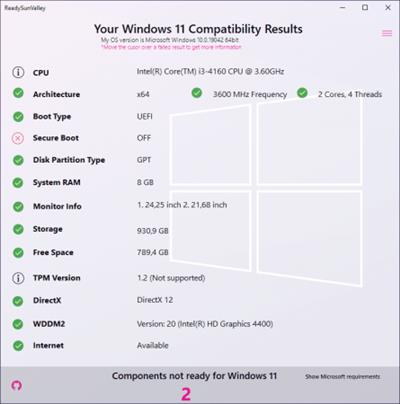
Checks if your computer is ready for the new Windows 11 (Sun Valley) update.

"Sun Valley" is Microsoft's internal code name for Windows 11.​

Runs compatibility tests and displays the results.
ReadySunValley is portable (it does not require installation). Once you download the package for your PC, just unzip the archive and start the application to begin the compatibility test.

ReadySunValley takes its time to run all the tests it needs, comparing the minimum requirements of Windows 11 to the specifications of your computer. Once all the tests are complete, the results are displayed in a one-window GUI, where you can see all the valid and the failed results. Moving the mouse cursor over a criterion that is not met displays popup messages with extra explanations.

Compares hardware and software requirements.
But what does ReadySunValley check for? You should know that it targets both hardware and software requirements of Windows 11, providing you with a full report on the system compatibility.

For instance, you get to see if your CPU is on the list of supported processors and check requirements related to the boot type, disk partition type, the system RAM memory, the monitor, the storage capacity on your drives. The TPM requirements, DirectX and WDDM2 are also verified.

Windows 11 compatibility checker.
With ReadySunValley, checking to see if your device is ready for the new Windows 11 is as simple as it gets. There is no need to search for a list of requirements and compare each item with your PC's specifications, as there is this lightweight application that can do it for you.
Release Notes

Changes inv0.11.11: some improvements.

Download link:​
Код:
[center][b]rapidgator_net[/b]:
https://rapidgator.net/file/2ba5388f991d4962b18f10843b4e170c/6nztd.ReadySunValley.v0.11.11.rar.html

[b]uploadgig_com[/b]:
https://uploadgig.com/file/download/F72dfCe5a45AE648/6nztd.ReadySunValley.v0.11.11.rar

[b]nitroflare_com[/b]:
https://nitroflare.com/view/6E4A33DEFA11155/6nztd.ReadySunValley.v0.11.11.rar[/center]

Links are Interchangeable - No Password - Single Extraction​
 
Назад
Сверху